steering MERCEDES-BENZ E-CLASS SALOON 2020 Owner's Guide
[x] Cancel search | Manufacturer: MERCEDES-BENZ, Model Year: 2020, Model line: E-CLASS SALOON, Model: MERCEDES-BENZ E-CLASS SALOON 2020Pages: 477, PDF Size: 8.67 MB
Page 210 of 477
Ste
ering and touch de tection
The driver is requiredtokeep their hands on the
st eering wheel at all times and be able tointer‐
ve ne at any time tocor rect the course of the
ve hicle and keep it in lane. The driver must
ex pect a change from active topassive mode or
vice versa at any time. If
th e sy stem de tects that the driver has not
st eered theve hicle for a considerable period of
time or has remo vedth eir hands from thesteer‐
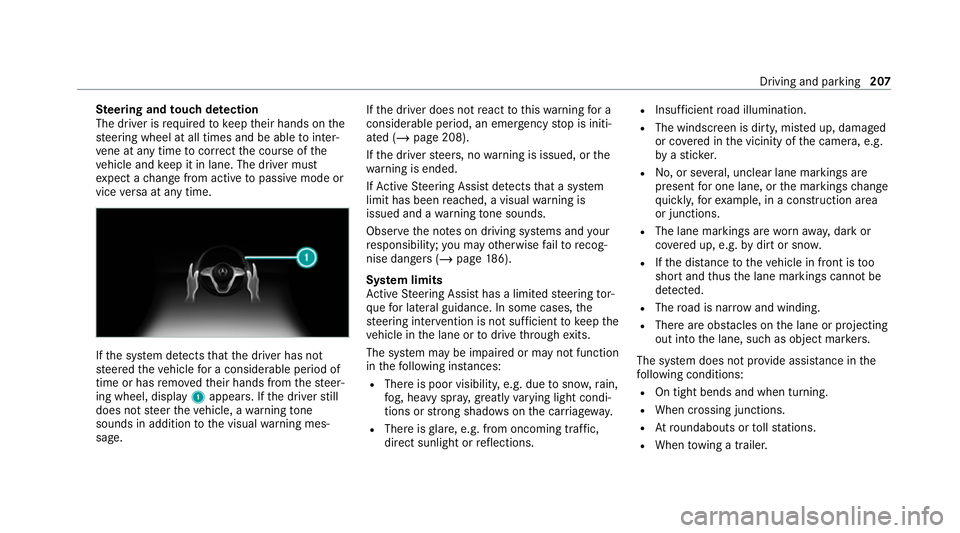
ing wheel, display 1appears. If the driver still
does not steer theve hicle, a warning tone
sounds in addition tothe visual warning mes‐
sage. If
th e driver does not react tothis wa rning for a
considerable period, an emergency stop is initi‐
ated (/ page 208).
If th e driver steers, no warning is issued, or the
wa rning is ended.
If Ac tive Steering Assist de tects that a sy stem
limit has been reached, a visual warning is
issued and a warning tone sounds.
Obser vethe no tes on driving sy stems and your
re sponsibility; you may otherwise failto recog‐
nise dangers (/ page 186).
Sy stem limits
Ac tive Steering Assist has a limited steering tor‐
qu efo r lateral guidance. In some cases, the
st eering inter vention is not su fficient tokeep the
ve hicle in the lane or todrive thro ugh exits.
The sy stem may be impaired or may not function
in thefo llowing ins tances:
R The reis poor visibilit y,e.g. due tosno w,rain,
fo g, heavy spr ay,greatly varying light condi‐
tions or strong shado wsonthe car riag ew ay.
R There is glare, e.g. from oncoming traf fic,
di re ct sunlight or reflections. R
Insuf ficient road illumination.
R The windsc reen is dirty, mis ted up, damaged
or co vered in the vicinity of the camera, e.g.
by ast icke r.
R No, or se veral, unclear lane markings are
present for one lane, or the markings change
qu ickl y,forex ample, in a con stru ction area
or junctions.
R The lane markings are wornaw ay, dark or
co vered up, e.g. bydirt or sno w.
R Ifth e dis tance totheve hicle in front is too
short and thus the lane markings cann otbe
de tected.
R The road is nar row and winding.
R There are obs tacles on the lane or projecting
out into the lane, such as object mar kers.
The sy stem does not pr ovide assis tance in the
fo llowing conditions:
R On tight bends and when turning.
R When crossing junctions.
R Atroundabouts or tollst ations.
R When towing a trailer. Driving and parking
207
Page 211 of 477
R
When the tyre pressure is too lo w. &
WARNING Risk of accident if Active
St eering Assist unexpectedly stops func‐
tioning
If th e sy stem limits of Active Steering Assist
are reached there is no guarantee that the
sy stem will remain active or will keep the
ve hicle in lane. #
Alw ayske ep your hands on thesteering
wheel and obser vethe tra ffic carefull y. #
Alw aysst eer theve hicle paying atten‐
tion totraf fic conditions. &
WARNING Risk of accident if Active
St eering Assist unexpectedly inter venes
The de tection of lane markings and objects
may malfunction and cause unexpected
st eering inter ventions. #
Steer according totraf fic conditions. Ac
tivating/deactivating Active Steering
Assist
Re quirements:
R ESP ®
is activated, but is not inter vening.
R Active Dis tance Assi stDISTRONIC is acti va‐
te d.
Multimedia sy stem:
4 © 5
Settings 5
Quick access #
Select aAct. Steer. Asst . Fu
nction of Active Eme rgency Stop Assist If
th e sy stem de tects that the driver has not
st eered theve hicle for a considerable period of
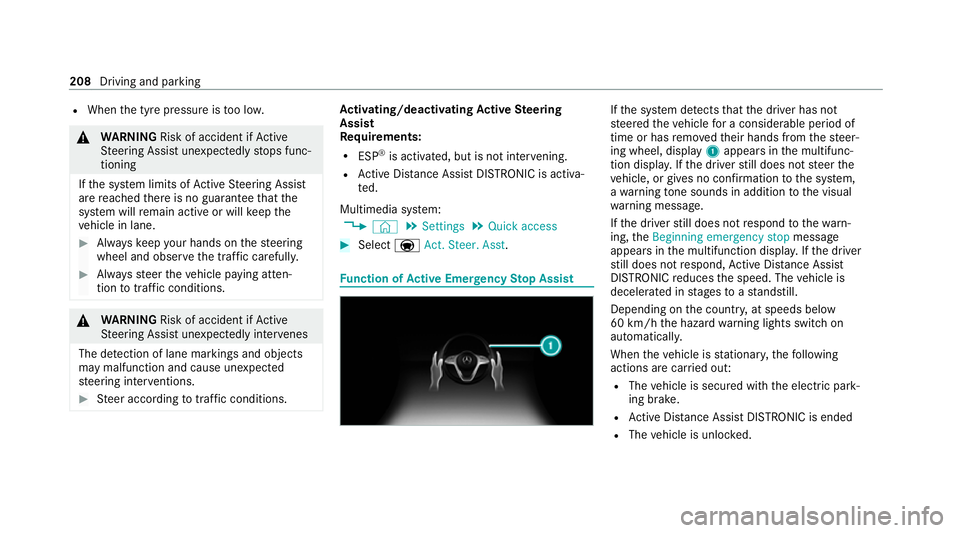
time or has remo vedth eir hands from thesteer‐
ing wheel, display 1appears in the multifunc‐
tion displa y.Ifth e driver still does not steer the
ve hicle, or gives no confirmation tothe sy stem,
a wa rning tone sounds in addition tothe visual
wa rning message.
If th e driver still does not respond tothewa rn‐
ing, theBeginning emergency stop message
appears in the multifunction displa y.Ifth e driver
st ill does not respond, Active Dis tance Assi st
DISTRONIC reduces the speed. The vehicle is
decelerated in stages toast andstill.
Depending on the count ry, at speeds below
60 km/h the hazard warning lights switch on
automaticall y.
When theve hicle is stationar y,thefo llowing
actions are car ried out:
R The vehicle is secured with the electric park‐
ing brake.
R Active Dis tance Assi stDISTRONIC is ended
R The vehicle is unloc ked. 208
Driving and parking
Page 212 of 477
R
If possible, an emer gency call is placed to
th e Mercedes-Benz emer gency call centre
The driver can cancel the deceleration at any
time byper form ing one of thefo llowing actions:
R Steering
R Braking or accelerating
R Deactivating Active Dis tance Assi st
DISTRONIC Fu
nction of Active Traf fic Jam Assist Ac
tive Traf fic Jam Assi sthelps you when in traf‐
fi c jams on multi-lane roads with separate car ria‐
ge wa ys by automatically pulling away within up
to 60 seconds and with mode rate steering
manoeuvres. It orients itself using theve hicle in
front and lane markings. Active Traf fic Jam
Assi stautomatically main tains a safe dis tance
from theve hicle in front and vehicles cutting in.
Ac tive Traf fic Jam Assi strequ ires you, as the
driver, tokeep your hands on thesteering wheel
at all times so that you are able tointer vene at
any time tocor rect the course of theve hicle and
ke ep it in lane. Obser
vethe no tes on driving sy stems and your
re sponsibility; you may otherwise failto recog‐
nise dangers (/ page 186).
Ac tive Traf fic Jam Assi stactivates automatically
when all of thefo llowing conditions are me t:
R You are in a traf fic jam on a mo torw ay or
high-speed major road.
R Active Dis tance Assi stDISTRONIC is acti va‐
te d and active (/ page 202).
R Active Brake Assi stisavailable
(/ page 191).
R Active Steering Assist is activated and active
(/ page 208).
R Active Traf fic Jam Assi stis activated
(/ page 209).
R You are tr avelling no fasterthan 60 km/h.
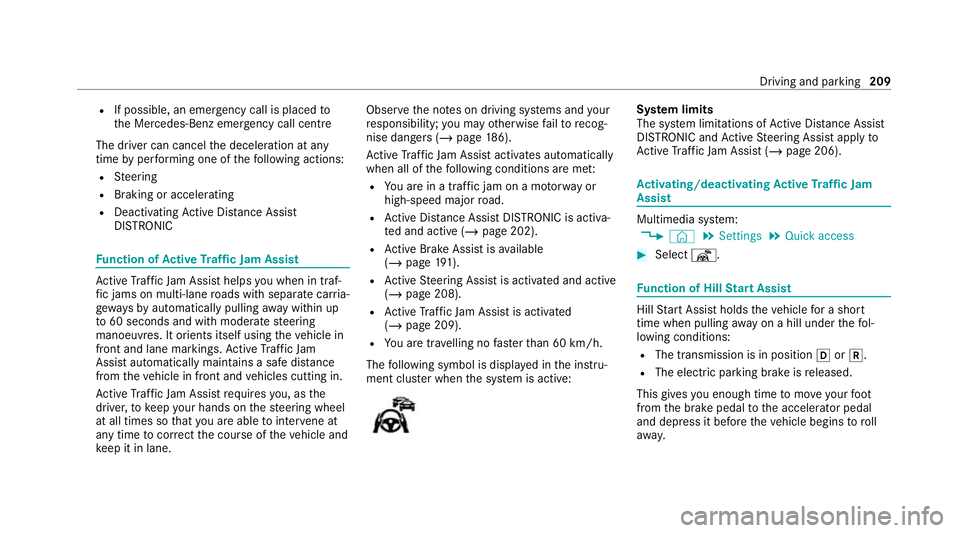
The following symbol is displa yed in the instru‐
ment clus ter when the sy stem is active: Sy
stem limits
The sy stem limitations of Active Dis tance Assi st
DISTRONIC and Active Steering Assist apply to
Ac tive Traf fic Jam Assi st (/ page 206). Ac
tivating/deactivating Active Traf fic Jam
Assist Multimedia sy
stem:
4 © 5
Settings 5
Quick access #
Select ¬. Fu
nction of Hill Start Assist Hill
Start Assist holds theve hicle for a short
time when pulling away on a hill under thefo l‐
lowing conditions:
R The transmission is in position hork.
R The elect ric pa rking brake is released.
This gives you enough time tomo veyour foot
from the brake pedal tothe accelera tor pedal
and depress it before theve hicle begins toroll
aw ay. Driving and pa
rking 209
Page 215 of 477
Drive program
;:
R The suspension setting is comfor table.
R The vehicle is set tolow le vel -1.
R The vehicle is not lo wered any fur ther if you
are tra velling at higher speeds.
Drive program C:
R The suspension setting is firm er.
R The vehicle is set tolow le vel -1.
R The vehicle is not lo wered any fur ther if you
are tr avelling at higher speeds.
Drive prog ram B:
R The suspension setting is evenfirm er.
R The vehicle is set tolow le vel -1.
R The vehicle is not lo wered any fur ther if you
are tr avelling at higher speeds.
Individual suspension settings can be called up
in drive prog ram = (/page 167). Setting
theve hicle le vel &
WARNING Risk of accident because
ve hicle le vel is too high
Driving characteristics may be impaired.
The vehicle can drift outwards, forex ample,
when steering or cornering. #
Choose a vehicle le vel which is suited
to the driving style and thero ad sur face
conditions. &
WARNING Risk of entrapment from vehi‐
cle lo wering
When lo wering theve hicle, other people
could become trapped if their limbs are
between theve hicle body and the tyres or
underneath theve hicle. #
Make sure no one is underneath the
ve hicle or in the immediate vicinity of
th e wheel ar ches when theve hicle is
being lo wered. &
WARNING Risk of becoming trapped
due totheve hicle lo wering
Ve hicles with AIR BODY CONT ROL or
le ve l control sy stem: when you unload lug‐
ga ge or lea vetheve hicle, theve hicle first
ri ses slightly and then returns tothe set le vel
shortly af terw ards.
Yo u or an yone else in the vicinity of the
wheel ar ches or the underbody could thus
become trapped.
The vehicle can also be lo wered af ter being
loc ked. #
When leaving theve hicle, make sure
th at nobody is in the vicinity of the
wheel ar ches or the underbody. *
NO
TEDama gedue tovehicle lo wering Pa
rts of the body could be damaged when
th eve hicle is lo wered. #
Make sure that there are no obs tacles
such as kerbs underneath or in the212
Driving and pa rking
Page 221 of 477
Ac
tivating/deactivating audio fadeout
Yo u can specify whe ther thevo lume of a media
source in the multimedia sy stem is tobe
re duced when Parking Assist PARKTRONIC
sounds a warning tone. #
Select Audio fadeout during warning tones. #
Activate or deacti vate the function. Re
versing camera Fu
nction of there ve rsing camera
If yo u ha veactivated the function in the multime‐
dia sy stem (/ page 224), the image from the
re ve rsing camera is shown in the media display
when there ve rsege ar is engaged. Dynamic
guide lines show the path theve hicle will take
with the cur rent steering angle. This helps youto
orient yourself and toavoid obs tacles when
re ve rsing.
The reve rsing camera is only an aid. It is not a
substitute foryo ur attention tothe sur roundings.
The responsibility for safe manoeuvring and
parking remains with you. Make sure that there
are no persons, animals or objects etc., in the manoeuvring area while manoeuvring and park‐
ing.
The guide lines in the media display show the
dis tances to yourvehicle. The dis tances dis‐
pl ay ed only apply toroad le vel.
Depending on theve hicle equipment, you can
select from thefo llowing vie ws:
R Normal view
R Wide-angle view
R Trailer view
The area behind theve hicle is displa yed as a
mir ror image, as in the inside rearview mir ror.
Ve hicles without Parking Assist PARKTRONIC
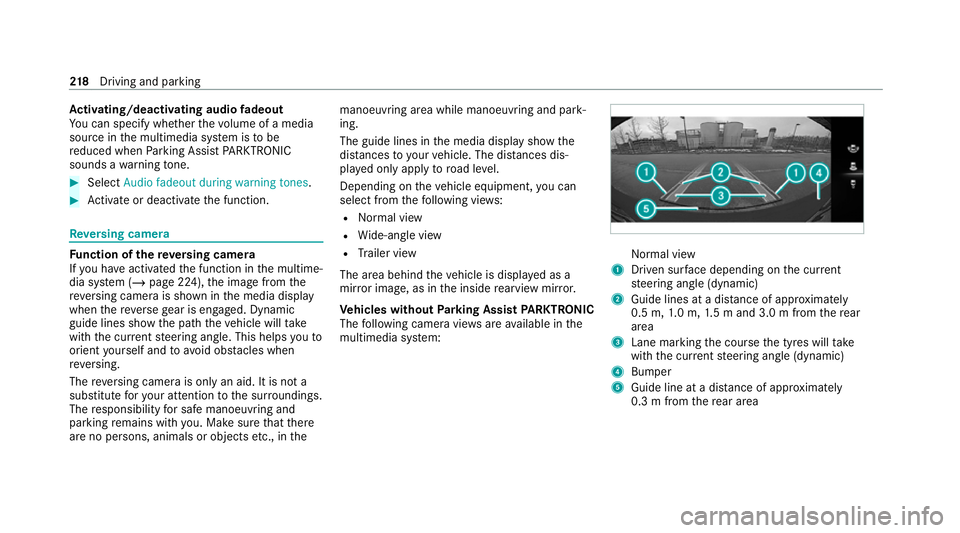
The following camera vie wsare available in the
multimedia sy stem: Normal view
1 Driven sur face depending on the cur rent
st eering angle (dynamic)
2 Guide lines at a dis tance of appr oximately
0.5 m, 1.0 m, 1.5 m and 3.0 m from there ar
area
3 Lane marking the course the tyres will take
with the cur rent steering angle (dynamic)
4 Bumper
5 Guide line at a dis tance of appr oximately
0.3 m from there ar area 218
Driving and pa rking
Page 222 of 477
Wi
de-angle view Tr
ailer view (vehicles with a trailer hit ch)
1 Locating aid 2
Guide line at a dis tance of appr oximately
0.3 m from the ball head of the trailer hitch
3 Ball head of the trailer hitch
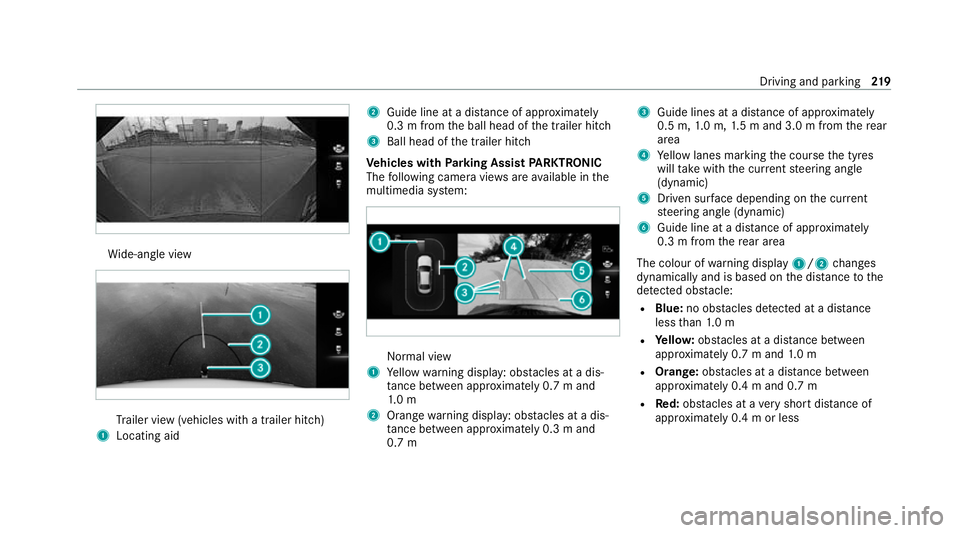
Ve hicles with Parking Assist PARKTRONIC
The following camera vie wsare available in the
multimedia sy stem: Normal view
1 Yellow warning display: obs tacles at a dis‐
ta nce between appr oximately 0.7 m and
1. 0 m
2 Orange warning display: obs tacles at a dis‐
ta nce between appr oximately 0.3 m and
0.7 m 3
Guide lines at a dis tance of appr oximately
0.5 m, 1.0 m, 1.5 m and 3.0 m from there ar
area
4 Yellow lanes marking the course the tyres
will take with the cur rent steering angle
(dynamic)
5 Driven sur face depending on the cur rent
st eering angle (dynamic)
6 Guide line at a dis tance of appr oximately
0.3 m from there ar area
The colour of warning display 1/2changes
dynamically and is based on the dis tance tothe
de tected obs tacle:
R Blue: no obs tacles de tected at a di stance
less than 1.0 m
R Yello w: obs tacles at a di stance between
appr oximately 0.7 m and 1.0 m
R Orange: obstacles at a di stance between
appr oximately 0.4 m and 0.7 m
R Red:obs tacles at a very short dis tance of
appr oximately 0.4 m or less Driving and parking
219
Page 224 of 477
ro
undings of theve hicle. The sy stem assists you
when you are parking or at exits with reduced
visibility, forex ample.
The vie wsofthe 360° Camera are alw aysav aila‐
ble when driving forw ards up toa speed of
appr ox.16 km/h and when reve rsing.
The 360° Camera is only an aid and may show a
dis torted view of obs tacles, show them incor‐
re ctly or not show them at all. It is not a substi‐
tute foryo ur attention tothe sur roundings. The
re sponsibility for safe manoeuvring and parking
re mains with you. Make sure that there are no
persons, animals or objects etc., in the manoeu‐
vring area while manoeuvring and parking.
The sy stem evaluates images from thefo llowing
cameras:
R Reversing camera
R Front camera
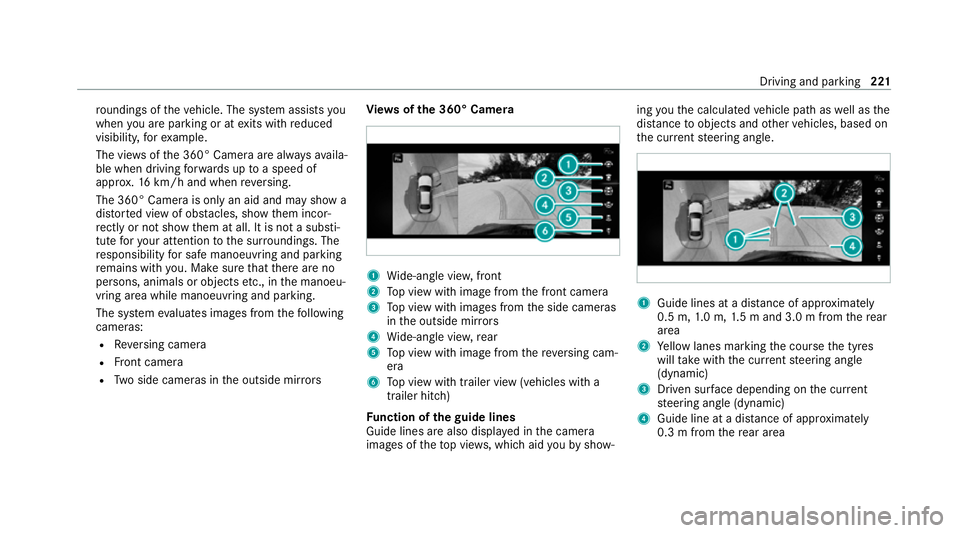
R Two side cameras in the outside mir rors Vi
ew s of the 360° Camera 1
Wide-angle vie w,front
2 Top view with image from the front camera
3 Top view with images from the side cameras
in the outside mir rors
4 Wide-angle vie w,rear
5 Top view with image from there ve rsing cam‐
era
6 Top view with trailer view (vehicles with a
trailer hitch)
Fu nction of the guide lines
Guide lines are also displa yed in the camera
images of theto p vie ws, which aid youby show‐ ing
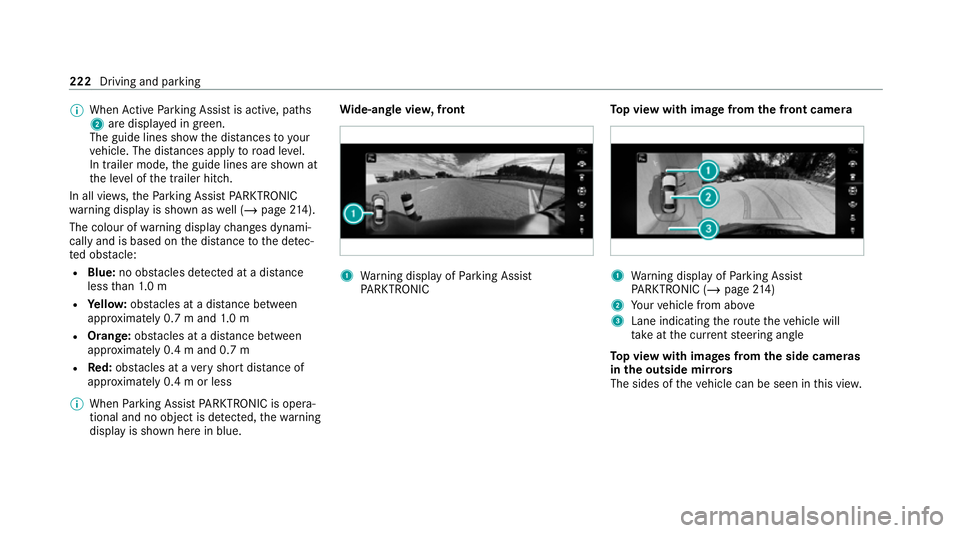
youth e calculated vehicle path as well as the
dis tance toobjects and other vehicles, based on
th e cur rent steering angle. 1
Guide lines at a dis tance of appr oximately
0.5 m, 1.0 m, 1.5 m and 3.0 m from there ar
area
2 Yellow lanes marking the course the tyres
will take with the cur rent steering angle
(dynamic)
3 Driven sur face depending on the cur rent
st eering angle (dynamic)
4 Guide line at a dis tance of appr oximately
0.3 m from there ar area Driving and parking
221
Page 225 of 477
%
When Active Parking Assist is active, paths
2 are displa yed in green.
The guide lines show the dis tances to your
ve hicle. The dis tances apply toroad le vel.
In trailer mode, the guide lines are shown at
th e le vel of the trailer hitch.
In all vie ws,th ePa rking Assist PARKTRONIC
wa rning display is shown as well (/ page214).
The colour of warning display changes dynami‐
cally and is based on the dis tance tothe de tec‐
te d obs tacle:
R Blue: no obs tacles de tected at a di stance
less than 1.0 m
R Yello w: obs tacles at a di stance between
appr oximately 0.7 m and 1.0 m
R Orange: obstacles at a di stance between
appr oximately 0.4 m and 0.7 m
R Red:obs tacles at a very short dis tance of
appr oximately 0.4 m or less
% When Parking Assist PARKTRONIC is opera‐
tional and no object is de tected, thewa rning
display is shown here in blue. Wi
de-an gle vie w,front 1
Warning display of Parking Assist
PA RKTRONIC To
p view with image from the front came ra 1
Warning display of Parking Assist
PA RKTRONIC (/ page214)
2 Your vehicle from abo ve
3 Lane indicating thero ute theve hicle will
ta ke atthe cur rent steering angle
To p view with images from the side came ras
in the outside mir rors
The sides of theve hicle can be seen in this vie w. 222
Driving and parking
Page 228 of 477
Ac
tive Parking Assist of fers thefo llowing func‐
tions:
Ve hicles with reve rsing camera
R Parking in parking spaces parallel tothero ad
Ve hicles with 360° Camera
R Parking in parking spaces parallel tothero ad
R Parking in parking spaces perpendicular to
th ero ad (optionally either forw ards or
re ve rse)
R Parking in parking spaces that are delineated
on lyby markings (for example at thero ad‐
side)
R Exiting a parking space parallel tothero ad
As soon as all requirements are met for search‐
ing for parking spaces, theÇ display appears
in the multifunction displa y.
When Active Parking Assist has de tected pa rking
spaces, theÈ display appears in the multi‐
function displa y.The ar rows show on which side
of thero ad de tected pa rking spaces are located.
They are then shown in the media displa y.Ve
hicles with reve rsing camera: the parking
space can be selected as desired. The vehicle is
par ked in reve rse.
Ve hicles with 360° Camera: the parking space
can be selected as desired. Depending on the
location of the parking space, the parking direc‐
tion (backwards or forw ards) can also be selec‐
te d as desired.
When Active Parking Assist is activated, the turn
signal indicators are activated based on the cal‐
culated path of your vehicle.
The parking procedure is assis tedby accelerat‐
ing, braking, steering and gear changes.
Ac tive Parking Assist is only an aid. It is not a
substitute foryo ur attention tothe sur roundings.
The responsibility for safe manoeuvring and
parking remains with you. Make sure that no
persons, animals or objects etc. are in the
manoeuvring range.
Ac tive Parking Assist will be cancelled in thefo l‐
lowing situations:
R Parking Assist PARKTRONIC is deacti vated.
R You begin steering. R
You en gage transmission position j.
R ESP ®
inter venes.
R You open the driver's door.
R After activating Active Parking Assist, you
press thec button again (/ page 226).
Sy stem limits
If th eex terior lighting is malfunctioning, Active
Pa rking Assist is not available.
Objects located abo veor below the de tection
ra nge of the sensors, e.g. overhanging loads,
ove rhangs or loading ramp s of goods vehicles, or
th e borders of parking spaces, are not de tected
du ring measu rement of the parking space. These
are also then not take n into account when calcu‐
lating the parking procedure. In some circum‐
st ances, Active Parking Assist may therefore
guide you into the parking space incor rectly. Driving and pa
rking 225
Page 240 of 477
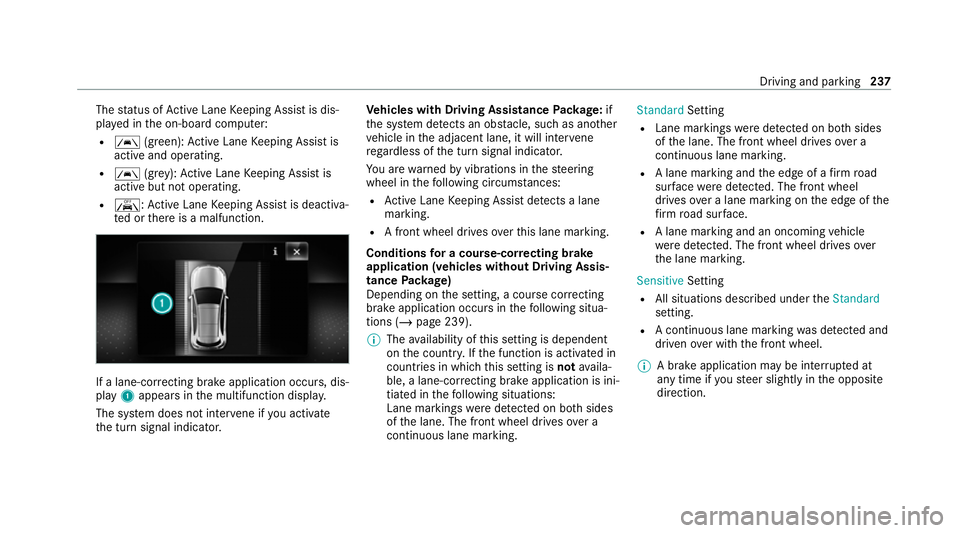
The
status of Active Lane Keeping Assist is dis‐
pla yed in the on-board computer:
R Ã (green): Active Lane Keeping Assist is
active and operating.
R Ã (grey):Ac tive Lane Keeping Assist is
active but not operating.
R ·: Active Lane Keeping Assist is deactiva‐
te d or there is a malfunction. If a lane-cor
recting brake application occu rs, dis‐
play 1appears in the multifunction displa y.
The sy stem does not inter vene if you activate
th e turn signal indicator. Ve
hicles with Driving Assistance Package: if
th e sy stem de tects an obs tacle, such as ano ther
ve hicle in the adjacent lane, it will inter vene
re ga rdless of the turn signal indicator.
Yo u are warned byvibrations in thesteering
wheel in thefo llowing circums tances:
R Active Lane Keeping Assist de tects a lane
marking.
R A front wheel drives over this lane marking.
Conditions for a course-cor recting brake
application (vehicles without Driving Assis‐
tance Package)
Depending on the setting, a course cor recting
brake application occu rsinthefo llowing situa‐
tions (/ page 239).
% The availability of this setting is dependent
on the count ry. If the function is activated in
count ries in which this setting is notavaila‐
ble, a lane-cor recting brake application is ini‐
tia ted in thefo llowing situations:
Lane markings weredetected on bo thsides
of the lane. The front wheel drives over a
continuous lane marking. Standard
Setting
R Lane markings weredetected on bo thsides
of the lane. The front wheel drives over a
continuous lane marking.
R A lane marking and the edge of a firm road
sur face weredetected. The front wheel
drives over a lane marking on the edge of the
fi rm road sur face.
R A lane marking and an oncoming vehicle
we redetected. The front wheel drives over
th e lane marking.
Sensitive Setting
R All situations described under theStandard
setting.
R A continuous lane marking was de tected and
driven over with the front wheel.
% A brake application may be inter rupte d at
any time if yousteer slightly in the opposite
direction. Driving and parking
237