warning MERCEDES-BENZ E-Class SEDAN 2010 W212 Comand Manual
[x] Cancel search | Manufacturer: MERCEDES-BENZ, Model Year: 2010, Model line: E-Class SEDAN, Model: MERCEDES-BENZ E-Class SEDAN 2010 W212Pages: 224, PDF Size: 7.4 MB
Page 139 of 224
iIf you eject a disc while another is being
played, the DVD changer interrupts
playback. Playback will continue once the
disc has been ejected completely.
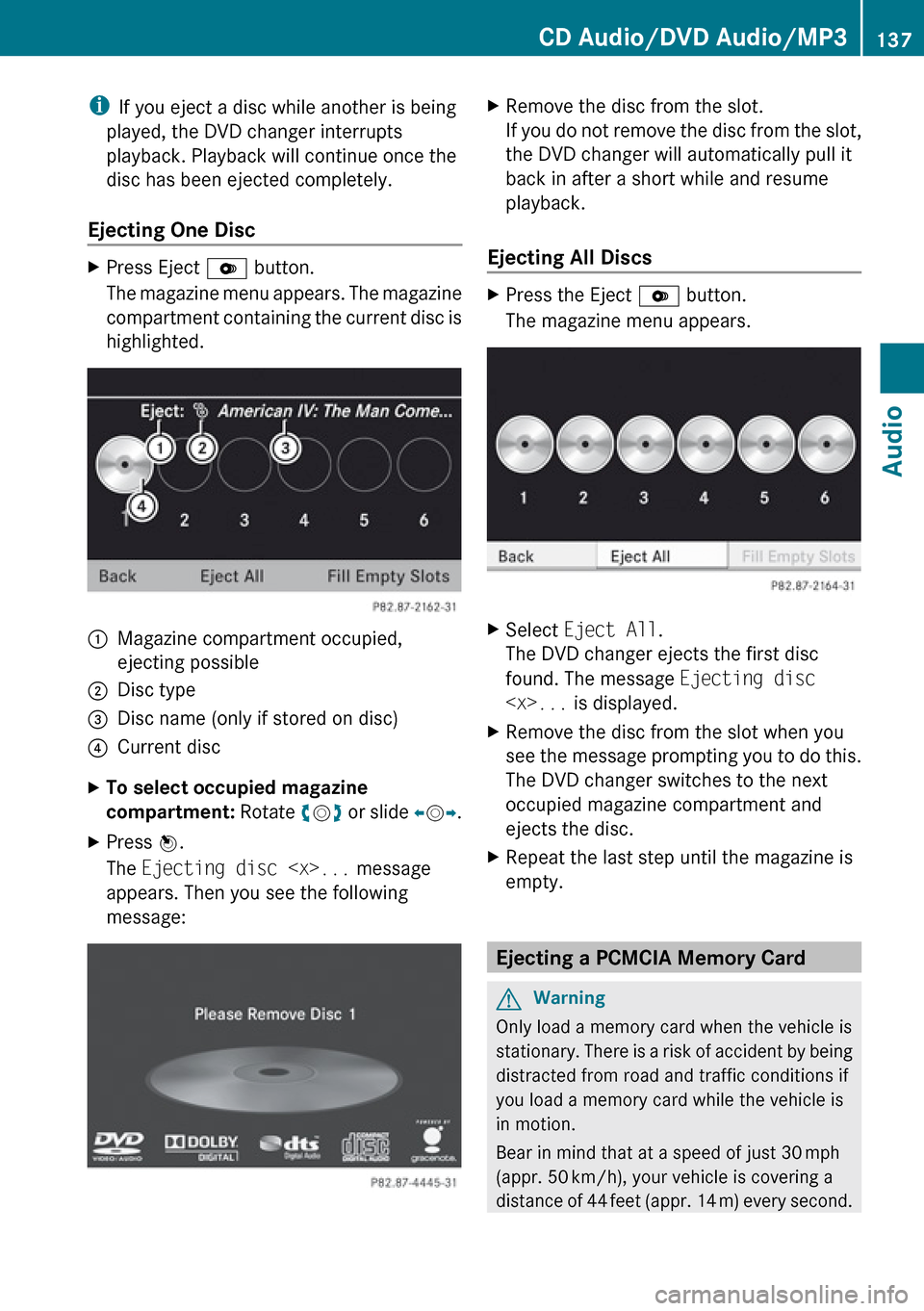
Ejecting One DiscXPress Eject V button.
The magazine menu appears. The magazine
compartment containing the current disc is
highlighted.1Magazine compartment occupied,
ejecting possible2Disc type3Disc name (only if stored on disc)4Current discXTo select occupied magazine
compartment: Rotate ym z or slide om p.XPress n.
The Ejecting disc
appears. Then you see the following
message:XRemove the disc from the slot.
If you do not remove the disc from the slot,
the DVD changer will automatically pull it
back in after a short while and resume
playback.
Ejecting All Discs
XPress the Eject V button.
The magazine menu appears.XSelect Eject All .
The DVD changer ejects the first disc
found. The message Ejecting disc
see the message prompting you to do this.
The DVD changer switches to the next
occupied magazine compartment and
ejects the disc.XRepeat the last step until the magazine is
empty.
Ejecting a PCMCIA Memory Card
GWarning
Only load a memory card when the vehicle is
stationary. There is a risk of accident by being
distracted from road and traffic conditions if
you load a memory card while the vehicle is
in motion.
Bear in mind that at a speed of just 30 mph
(appr. 50 km/h), your vehicle is covering a
distance of 44 feet (appr. 14 m) every second.
CD Audio/DVD Audio/MP3137AudioZ
Page 155 of 224
Audio Aux
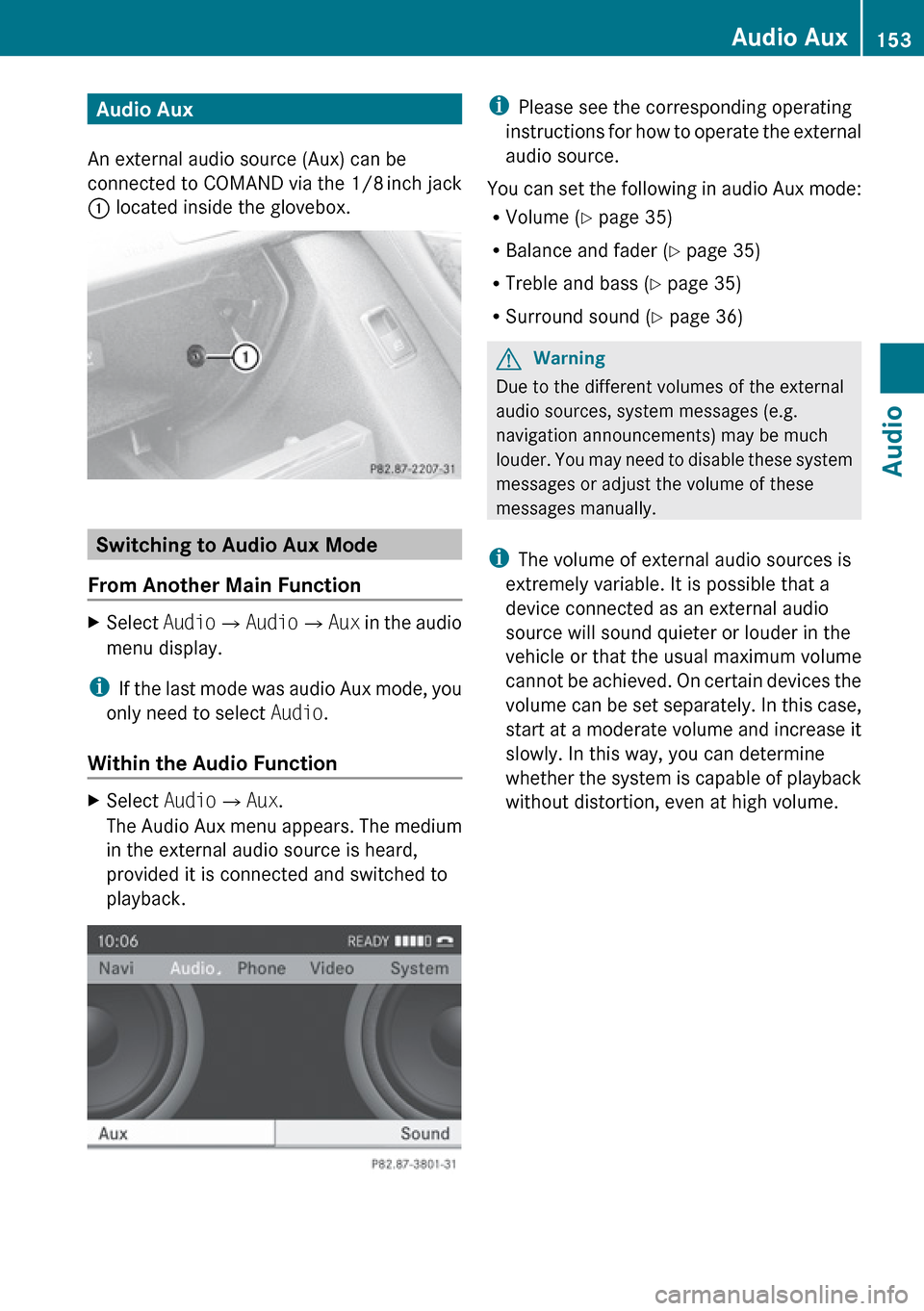
An external audio source (Aux) can be
connected to COMAND via the 1/8 inch jack
1 located inside the glovebox.
Switching to Audio Aux Mode
From Another Main Function
XSelect Audio£Audio £Aux in the audio
menu display.
i If the last mode was audio Aux mode, you
only need to select Audio.
Within the Audio Function
XSelect Audio£Aux .
The Audio Aux menu appears. The medium
in the external audio source is heard,
provided it is connected and switched to
playback.i Please see the corresponding operating
instructions for how to operate the external
audio source.
You can set the following in audio Aux mode:
R Volume ( Y page 35)
R Balance and fader ( Y page 35)
R Treble and bass ( Y page 35)
R Surround sound ( Y page 36)GWarning
Due to the different volumes of the external
audio sources, system messages (e.g.
navigation announcements) may be much
louder. You may need to disable these system
messages or adjust the volume of these
messages manually.
i The volume of external audio sources is
extremely variable. It is possible that a
device connected as an external audio
source will sound quieter or louder in the
vehicle or that the usual maximum volume
cannot be achieved. On certain devices the
volume can be set separately. In this case,
start at a moderate volume and increase it
slowly. In this way, you can determine
whether the system is capable of playback
without distortion, even at high volume.
Audio Aux153AudioZ
Page 158 of 224
General Information
Safety Notes
GWarning
COMAND is classified as a Class 1 laser
product. You must not open the casing. There
is a risk of exposure to invisible laser radiation
if you open the casing, or if the casing is faulty
or damaged.
COMAND does not contain any parts that you
are able to maintain yourself. For safety
reasons, all maintenance work must be
exclusively carried out by qualified
technicians.
GWarning
Only carry out the following when the vehicle
is stationary:
R Inserting a disc
R Ejecting a disc
There is a risk of accident by being distracted
from road and traffic conditions if you load a
CD/DVD while the vehicle is in motion.
Vehicle Equipment
i This Operator’s Manual describes all
features, standard or optional, potentially
available for your vehicle at the time of
purchase. Please be aware that your
vehicle might not be equipped with all
features described in this manual.
Automatic Picture Switch-off
The video picture is only displayed if the
gearshift lever is in “P” position.
When the gearshift lever is moved out of the
“P” position, the following message is
displayed: In order not to distract
you from the traffic situation, the
picture is faded out while the
vehicle is in motion.
When the gearshift lever is moved back into
the “P” position, the picture switches back
on.
Notes on Storage Media
i When playing copied discs, problems may
occur with the playback. A wide variety of
disc-writing software and writers are
available. Due to this variety we cannot
guarantee that the system will be able to
play discs that you have written/copied
yourself.
! Do not affix stickers or labels to the discs,
as they could peel off and damage
COMAND. Stickers can cause the disc to
bend, which can result in read errors and
disc recognition problems.
! COMAND is designed to hold discs which
comply with the EN 60908 standard. You
can therefore only use discs with a
maximum thickness of 1.3 mm.
If you insert thicker discs, e.g. those that
contain data on both sides (DVD on one
side and audio data on the other), they
cannot be ejected and can damage
COMAND.
Do not use discs with a diameter of 8 cm,
even with an adapter. Only use round discs
with a diameter of 12 cm.
Notes on the Care of Discs
R Only hold discs by the edge.
R Handle discs with care in order to prevent
malfunctions during playback.
R Avoid scratching, leaving fingerprints and
dust on the discs.
R Clean the discs occasionally with a
commercially available cleaning cloth.
Always wipe in a straight line from the
inside outwards, never in a circular motion.
156General InformationVideo
Page 165 of 224
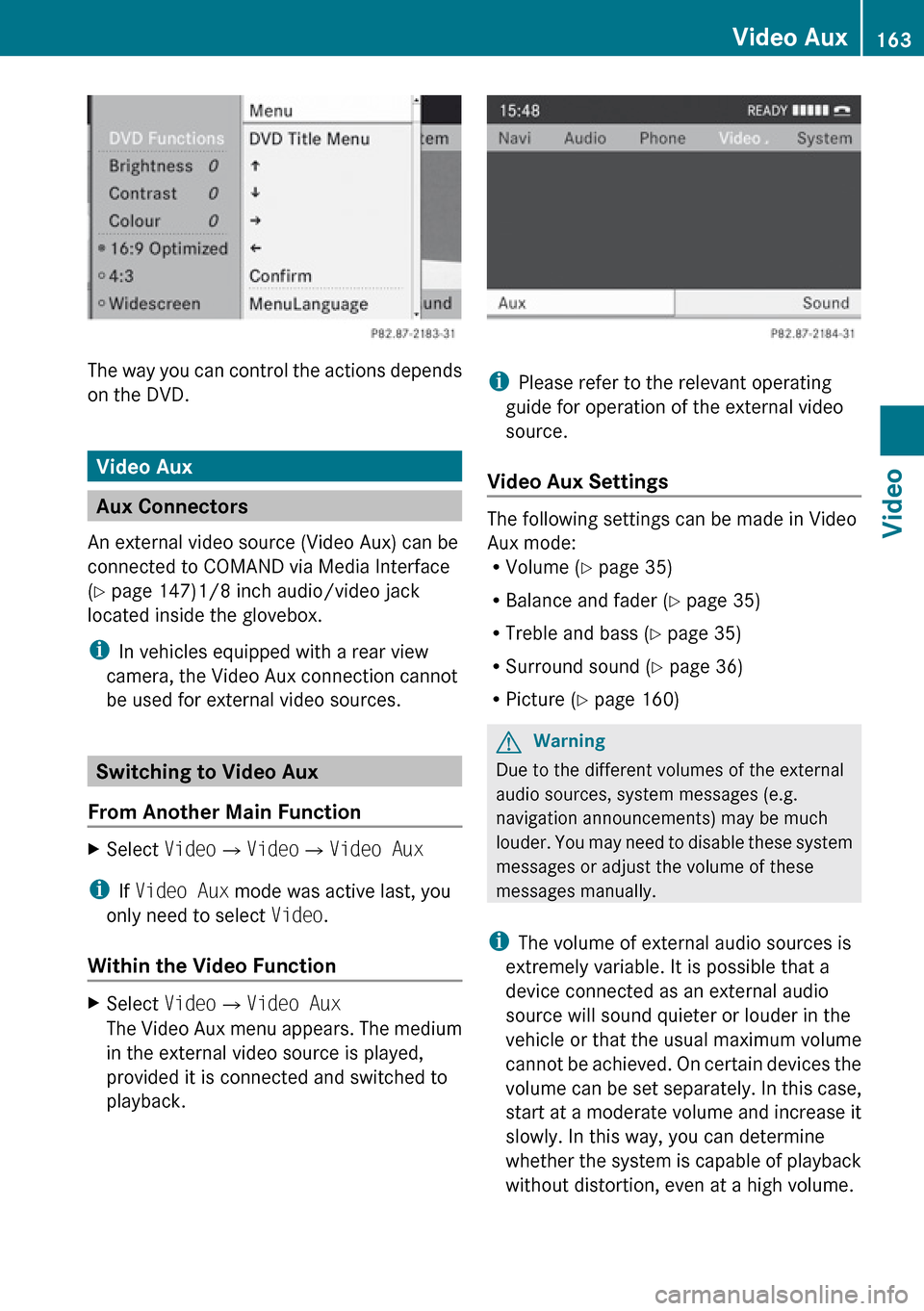
The way you can control the actions depends
on the DVD.
Video Aux
Aux Connectors
An external video source (Video Aux) can be
connected to COMAND via Media Interface
( Y page 147)1/8 inch audio/video jack
located inside the glovebox.
i In vehicles equipped with a rear view
camera, the Video Aux connection cannot
be used for external video sources.
Switching to Video Aux
From Another Main Function
XSelect Video£Video £Video Aux
i
If Video Aux mode was active last, you
only need to select Video.
Within the Video Function
XSelect Video£Video Aux
The Video Aux menu appears. The medium
in the external video source is played,
provided it is connected and switched to
playback.
i Please refer to the relevant operating
guide for operation of the external video
source.
Video Aux Settings
The following settings can be made in Video
Aux mode:
R Volume ( Y page 35)
R Balance and fader ( Y page 35)
R Treble and bass ( Y page 35)
R Surround sound ( Y page 36)
R Picture ( Y page 160)
GWarning
Due to the different volumes of the external
audio sources, system messages (e.g.
navigation announcements) may be much
louder. You may need to disable these system
messages or adjust the volume of these
messages manually.
i The volume of external audio sources is
extremely variable. It is possible that a
device connected as an external audio
source will sound quieter or louder in the
vehicle or that the usual maximum volume
cannot be achieved. On certain devices the
volume can be set separately. In this case,
start at a moderate volume and increase it
slowly. In this way, you can determine
whether the system is capable of playback
without distortion, even at a high volume.
Video Aux163VideoZ
Page 168 of 224
General Information
Vehicle Equipment
i This Operator’s Manual describes all
features, standard or optional, potentially
available for your vehicle at the time of
purchase. Please be aware that your
vehicle might not be equipped with all
features described in this manual.
Overview
This chapter describes the RSE (Rear Seat
Entertainment) system:
R Basic functions ( Y page 170)
R System settings ( Y page 172)
R CD/DVD audio and MP3 operation
( Y page 173)
R DVD Video operation ( Y page 177)
R Aux operation ( Y page 181)
Safety Instructions
GWarning
The RSE CD/DVD player is a Class 1 laser
product. There is a danger of invisible laser
radiation when you open or damage the cover.
Do not remove the cover. The RSE CD/DVD
player does not contain any parts which can
be serviced by the user. For safety reasons,
have any necessary service work performed
by qualified personnel.
GWarning
The driver should not wear a Rear Seat
Entertainment headset while operating the
vehicle under any circumstances. The use of
a headset while driving the vehicle could
drastically impair the ability to react to audible
traffic conditions (e.g. emergency sirens from
police/fire/ambulance, another car’s horn,
etc.).GWarning
When not in use, headsets or external video
sources should be stored in a safe location
(e.g. one of the vehicle’s storage
compartments) so that they are not loose
within the passenger compartment during
braking, vehicle maneuvers or a traffic
accident. Objects moving within the
passenger compartment could cause serious
personal injury to vehicle occupants.
GWarning
Due to a potential choking hazard, wired
headset usage by children should only occur
with adult supervision.
Rear Seat Entertainment
Components
The rear-seat entertainment system consists
of:
R two display screens behind the head rests
of front-seats
R remote control(s)
R a CD/DVD drive
R Aux connectors on the drive and display
screens for connecting external devices
R two headsets (wireless headsets only
available in the US)
166General InformationRear Seat Entertainment
Page 171 of 224
Switching ON/Off the Wireless headsetXPress button ?.
Depending on the previous state the
headset is switched on or off. In order to
preserve battery charge, the headset is
switched off if there is no IR signal
reception for appr. 3 minutes.
Setting the Wireless Headset Volume
XTurn the Thumb wheel : to set the desired
volume.
i If you have connected a wired headset to
a display screen, you can set the volume
with the Volume +/- button C of the
remote control ( Y page 167).
Selecting the Display Screen for the
Headset
XSelect the display screen with the
switch ;.
The selected screen L or R is indicated.
State Indicator LED
The color of the LED indicates:
R if the headset is switched on or off
R the battery condition
ColorStateGreenHeadset is switched on and
the batteries are full.DarkHeadset is switched off or
the batteries are empty or
not inserted.RedHeadset is switched on and
the batteries are almost
empty.
Connecting Additional Headsets
You can connect wired headsets to both of
the display screens. The socket is suitable for
headsets with 1/8“ stereo jacks and 32 Ohm
impedance ( Y page 167).
Rear Compartment Socket
In vehicles with the rear-seat entertainment
system, there is a 12 V socket in the rear
compartment. Please refer to the vehicle
Operator's Manual for the exact location of
the socket.
The socket can be used for accessories with
a maximum power consumption of 180 W.
Replacing the Batteries
You need batteries for the remote control and
the wireless headset.
GWarning
Keep batteries out of the reach of children.
Immediately seek medical help if a child
swallows a battery. Batteries are not to be
short-circuited, dismantled or thrown into
fire.
HEnvironmental Note
Batteries contain materials that can harm the
environment if disposed of improperly.
Recycling of batteries is the preferred method
of disposal. Many states require sellers of
batteries to accept old batteries for recycling.
General Information169Rear Seat EntertainmentZ
Page 175 of 224
Adjusting the Brightness XSelect System settings £
Brightness .
A scale appears.XTo set the brightness: Press the n or
ý button.
The brightness bar moves up or down. The
image dims or brightens according to the
bar position on the scale.XTo confirm the setting: Press the 9
button on the remote control.
Switching the Display Screen On/ Off
Switching Off the Display
XSelect Display off from the system
menu.
Switching On the Display
XPress the 9 button on the remote control.
CD/DVD Audio and MP3 Operation
Safety Instructions
GWarning
The RSE CD/DVD player is a Class 1 laser
product. There is a danger of invisible laser
radiation when you open or damage the cover.
Do not remove the cover. The RSE CD/DVD
player does not contain any parts which can
be serviced by the user. For safety reasons,
have any necessary service work performed
by qualified personnel.
Notes on CDs/DVDs
Please refer to the chapter ”Audio” for
general information about CD/DVD discs and
on the MP3 format ( Y page 133) and
( Y page 132).
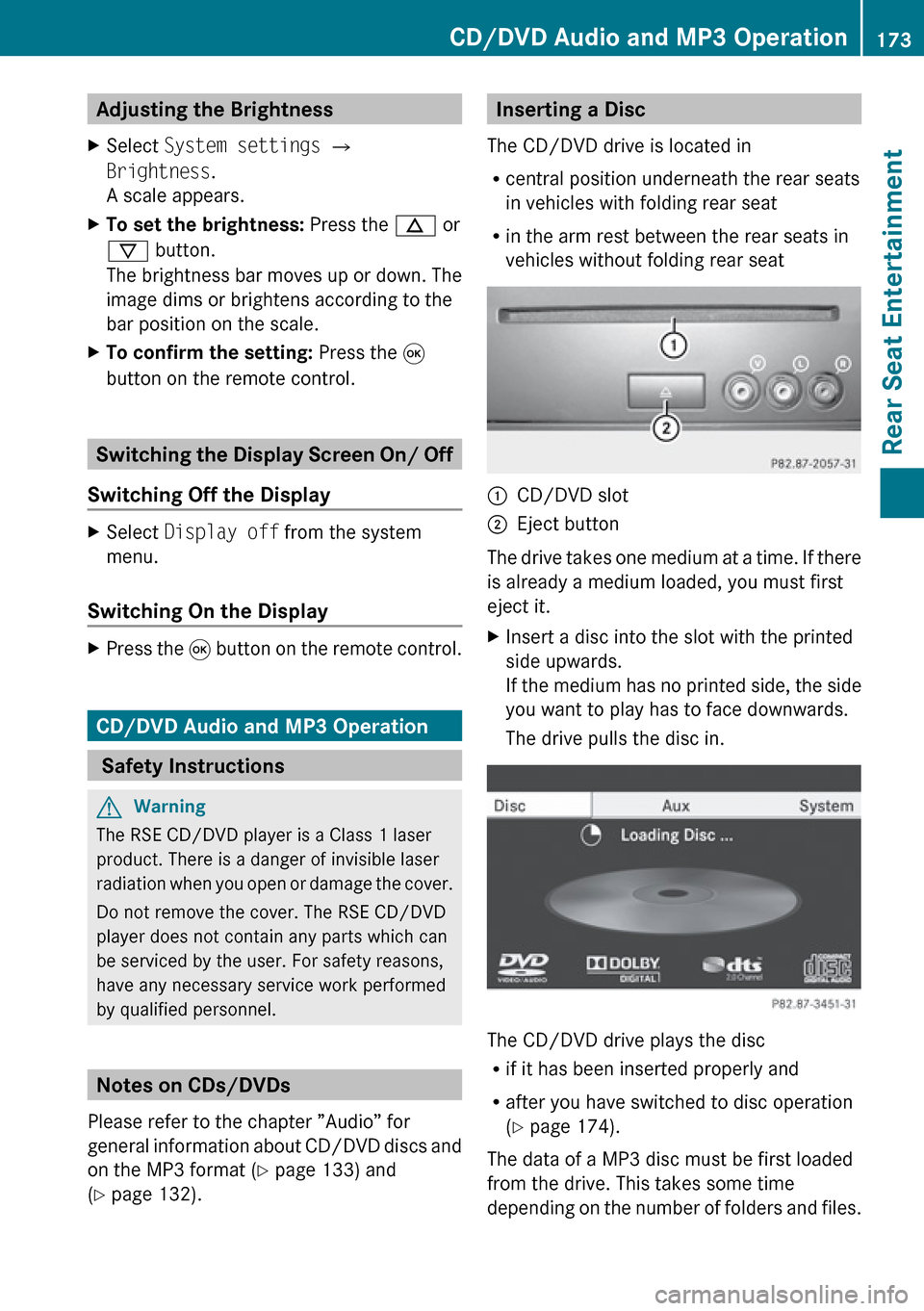
Inserting a Disc
The CD/DVD drive is located in
R central position underneath the rear seats
in vehicles with folding rear seat
R in the arm rest between the rear seats in
vehicles without folding rear seat1CD/DVD slot2Eject button
The drive takes one medium at a time. If there
is already a medium loaded, you must first
eject it.
XInsert a disc into the slot with the printed
side upwards.
If the medium has no printed side, the side
you want to play has to face downwards.
The drive pulls the disc in.
The CD/DVD drive plays the disc
R if it has been inserted properly and
R after you have switched to disc operation
( Y page 174).
The data of a MP3 disc must be first loaded
from the drive. This takes some time
depending on the number of folders and files.
CD/DVD Audio and MP3 Operation173Rear Seat EntertainmentZ
Page 188 of 224
Overview
Operating Safety
GWarning!
Please devote your attention first and
foremost to the traffic situation you are in.
While the system permits hands-free phone
operation, attention to traffic may be diverted
not only by physical operation of a phone, but
also by the distraction of a phone
conversation while driving. As such, for safety
reasons, we encourage the driver to stop the
vehicle in a safe place before answering or
placing a phone call.
For safety reasons, you should only select a
destination when the vehicle is stationary.
While the navigation system provides
directional assistance, the driver must remain
focused on safe driving behavior, especially
pay attention to traffic and street signs, and
should utilize the system’s audio cues while
driving.
The navigation system does not supply any
information on stop signs, yield signs, traffic
regulations or traffic safety rules. Their
observance always remains in the driver’s
personal responsibility. DVD maps do not
cover all areas nor all routes within an area.
Traffic regulations always have priority over
any route recommendations given.
Bear in mind that at a speed of just 30 mph
(approximately 50 km/h), your vehicle is
covering a distance of 44 feet (approximately
14 m) every second.
GWarning
Navigation announcements are intended to
direct you while driving without diverting your
attention from the road and driving.
Please always use this feature instead of
consulting the map display for directions.
Consulting the symbols or map display for
directions may cause you to divert your
attention from driving and increase your risk
of an accident.
GWarning!
Please do not use the Voice Control System
in an emergency, as the tone of your voice
may change in a stressful situation. This could
cause a delay in completing your phone call
in a timely manner. This could distract you in
an emergency situation and cause you to be
involved in an accident.
Vehicle Equipment
i This Operator’s Manual describes all
features, standard or optional, potentially
available for your vehicle at the time of
purchase. Please be aware that your
vehicle might not be equipped with all
features described in this manual.
Symbols Only Used in this Chapter
The following symbols indicate:
sthat you have to say somethingtthat there is a voice output from the
voice controluthat the system shows information on
the display.
Usage
You can use the voice control system to
operate the following systems depending on
the equipment in your vehicle:
R Phone
R Navigation
R Address book
R Audio (radio, satellite radio, DVD changer,
memory card, music register, media
interface)
Say the commands without pausing between
individual words. If you enter a command that
does not exist or is incorrect, the voice
control system asks you for a new command
with Please repeat or Please repeat
186OverviewVoice Control
Page 190 of 224
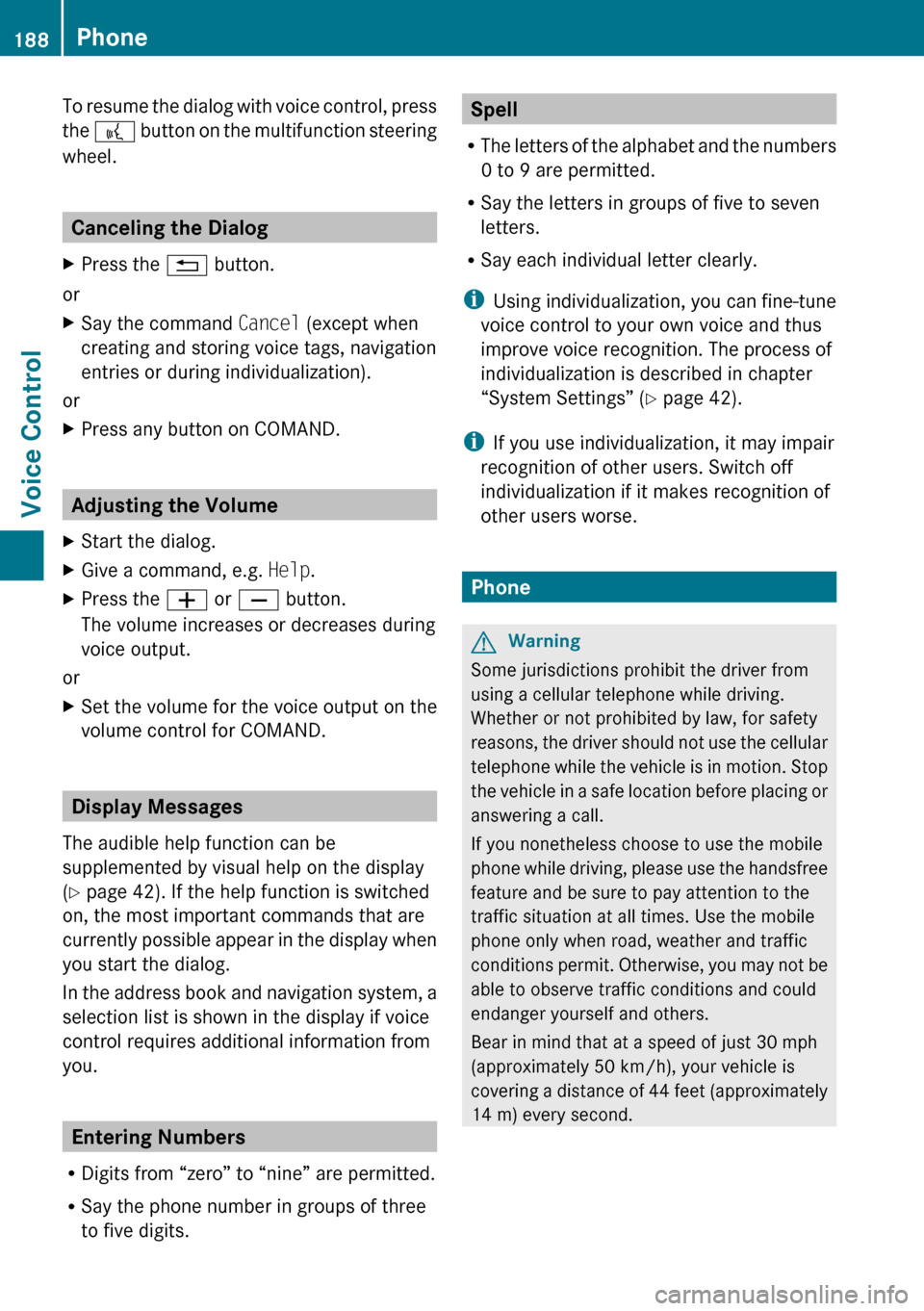
To resume the dialog with voice control, press
the ? button on the multifunction steering
wheel.
Canceling the Dialog
XPress the % button.
or
XSay the command Cancel (except when
creating and storing voice tags, navigation
entries or during individualization).
or
XPress any button on COMAND.
Adjusting the Volume
XStart the dialog.XGive a command, e.g. Help.XPress the W or X button.
The volume increases or decreases during
voice output.
or
XSet the volume for the voice output on the
volume control for COMAND.
Display Messages
The audible help function can be
supplemented by visual help on the display
( Y page 42). If the help function is switched
on, the most important commands that are
currently possible appear in the display when
you start the dialog.
In the address book and navigation system, a
selection list is shown in the display if voice
control requires additional information from
you.
Entering Numbers
R Digits from “zero” to “nine” are permitted.
R Say the phone number in groups of three
to five digits.
Spell
R The letters of the alphabet and the numbers
0 to 9 are permitted.
R Say the letters in groups of five to seven
letters.
R Say each individual letter clearly.
i Using individualization, you can fine-tune
voice control to your own voice and thus
improve voice recognition. The process of
individualization is described in chapter
“System Settings” ( Y page 42).
i If you use individualization, it may impair
recognition of other users. Switch off
individualization if it makes recognition of
other users worse.
Phone
GWarning
Some jurisdictions prohibit the driver from
using a cellular telephone while driving.
Whether or not prohibited by law, for safety
reasons, the driver should not use the cellular
telephone while the vehicle is in motion. Stop
the vehicle in a safe location before placing or
answering a call.
If you nonetheless choose to use the mobile
phone while driving, please use the handsfree
feature and be sure to pay attention to the
traffic situation at all times. Use the mobile
phone only when road, weather and traffic
conditions permit. Otherwise, you may not be
able to observe traffic conditions and could
endanger yourself and others.
Bear in mind that at a speed of just 30 mph
(approximately 50 km/h), your vehicle is
covering a distance of 44 feet (approximately
14 m) every second.
188PhoneVoice Control
Page 193 of 224
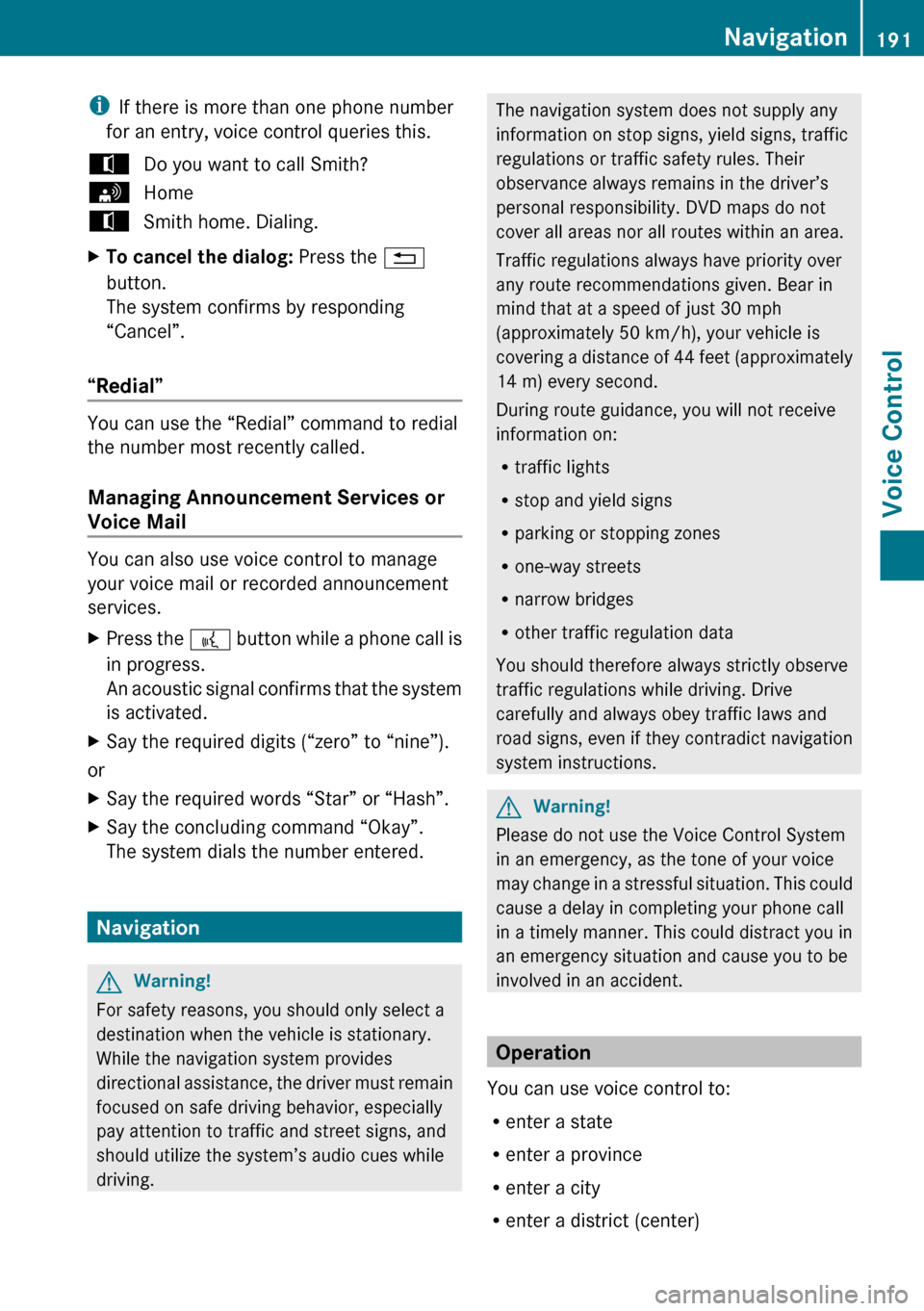
iIf there is more than one phone number
for an entry, voice control queries this.tDo you want to call Smith?sHometSmith home. Dialing.XTo cancel the dialog: Press the %
button.
The system confirms by responding
“Cancel”.
“Redial”
You can use the “Redial” command to redial
the number most recently called.
Managing Announcement Services or
Voice Mail
You can also use voice control to manage
your voice mail or recorded announcement
services.
XPress the ? button while a phone call is
in progress.
An acoustic signal confirms that the system
is activated.XSay the required digits (“zero” to “nine”).
or
XSay the required words “Star” or “Hash”.XSay the concluding command “Okay”.
The system dials the number entered.
Navigation
GWarning!
For safety reasons, you should only select a
destination when the vehicle is stationary.
While the navigation system provides
directional assistance, the driver must remain
focused on safe driving behavior, especially
pay attention to traffic and street signs, and
should utilize the system’s audio cues while
driving.
The navigation system does not supply any
information on stop signs, yield signs, traffic
regulations or traffic safety rules. Their
observance always remains in the driver’s
personal responsibility. DVD maps do not
cover all areas nor all routes within an area.
Traffic regulations always have priority over
any route recommendations given. Bear in
mind that at a speed of just 30 mph
(approximately 50 km/h), your vehicle is
covering a distance of 44 feet (approximately
14 m) every second.
During route guidance, you will not receive
information on:
R traffic lights
R stop and yield signs
R parking or stopping zones
R one-way streets
R narrow bridges
R other traffic regulation data
You should therefore always strictly observe
traffic regulations while driving. Drive
carefully and always obey traffic laws and
road signs, even if they contradict navigation
system instructions.GWarning!
Please do not use the Voice Control System
in an emergency, as the tone of your voice
may change in a stressful situation. This could
cause a delay in completing your phone call
in a timely manner. This could distract you in
an emergency situation and cause you to be
involved in an accident.
Operation
You can use voice control to:
R enter a state
R enter a province
R enter a city
R enter a district (center)
Navigation191Voice ControlZ