video MERCEDES-BENZ E-Class SEDAN 2011 W212 Comand Manual
[x] Cancel search | Manufacturer: MERCEDES-BENZ, Model Year: 2011, Model line: E-Class SEDAN, Model: MERCEDES-BENZ E-Class SEDAN 2011 W212Pages: 234, PDF Size: 8.64 MB
Page 37 of 234
X
Sel ect abalan ce setti ngbysliding XVY the
CO MAND controllera nd pre ssW to
confi rm.
X Sel ect afader setting byslidin gZVÆ the
COM AND controllera nd press Wto
con firm.
The settingisstor edand youexit themenu. Sur
round sound
General information If
your vehicle isequipped withtheharman/
kardon ®
Logic7 ®
surround soundsystem,
you can setthe optimum surround soundin
the vehicle interior.
The harman/ kardon®
Logic7 ®
surround
sound system isavailable forthe following
operatin gmodes:
R radio (FMonly)
R satellite radio
R audio CD
R audio DVD(MLP, dts,PCM andDolby
Digit alaudio format s)
R MP3 (including SDmemory cardandUSB
stor age device)
R Media Interface
R Bluetoot h®
audio mode
R video DVD(PCM, dtsand Dolby Digital
audio format s)
R AUX
Because someDVDscontain both stereoand
multichan nelaudio format s,itmay be
nec essary toset the audio format
(Y page 163).
i The Logic7 ®
On func
tion creat esa
surround soundexperien cefor every
passenger whenplaying, forexample,
ster eorecor dings. Itenables optimum
playback ofmusic andfilms onCD, audio
DVD orvideo DVDwithmultichan nelaudio
format s,such asMLP, dtsorDolby Digital.
This results insound charact eristicslike those
intended bythe sound engineer
when theoriginal wasrecor ded.
i Ifyou select Logic7 ®
Off ,a
llpermissible
format sareplayed asstor edon the
medium. Duetothe design ofthe
passenger compartment,ano ptimum
audio experien cecann otbe guaranteed for
all passengers .
i Disc swhich support theaudio format s
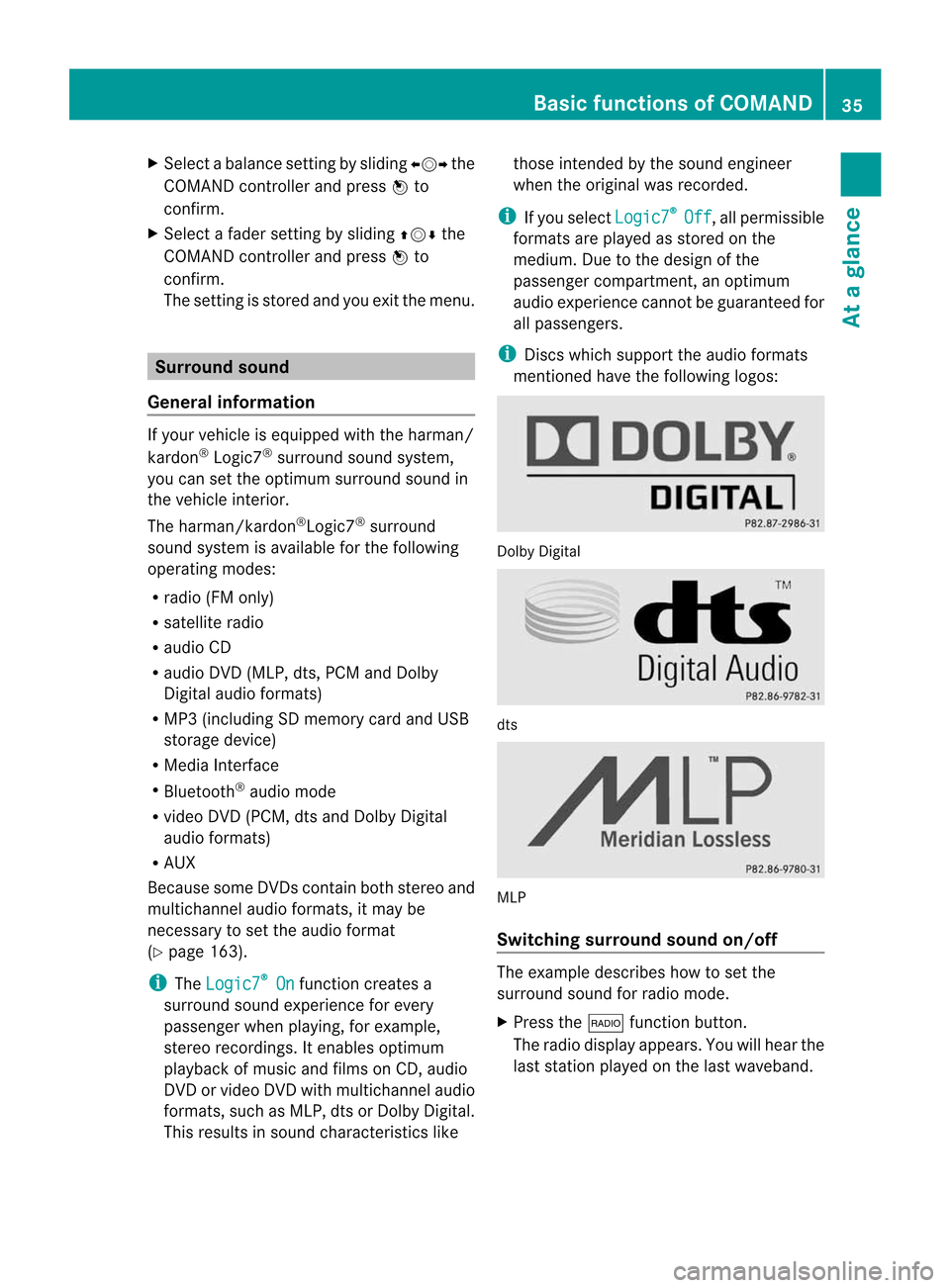
ment ioned havethefollowing logos: Dolby
Digital dts
MLP
Switching surround sound on/off The
example describes howtoset the
surround soundforradio mode.
X Press the$ function button .
The radio display appears. Youwillhear the
last stationplayed onthe last waveband. Ba
sic functions ofCOMAND
35Atag lance Z
Page 38 of 234
X
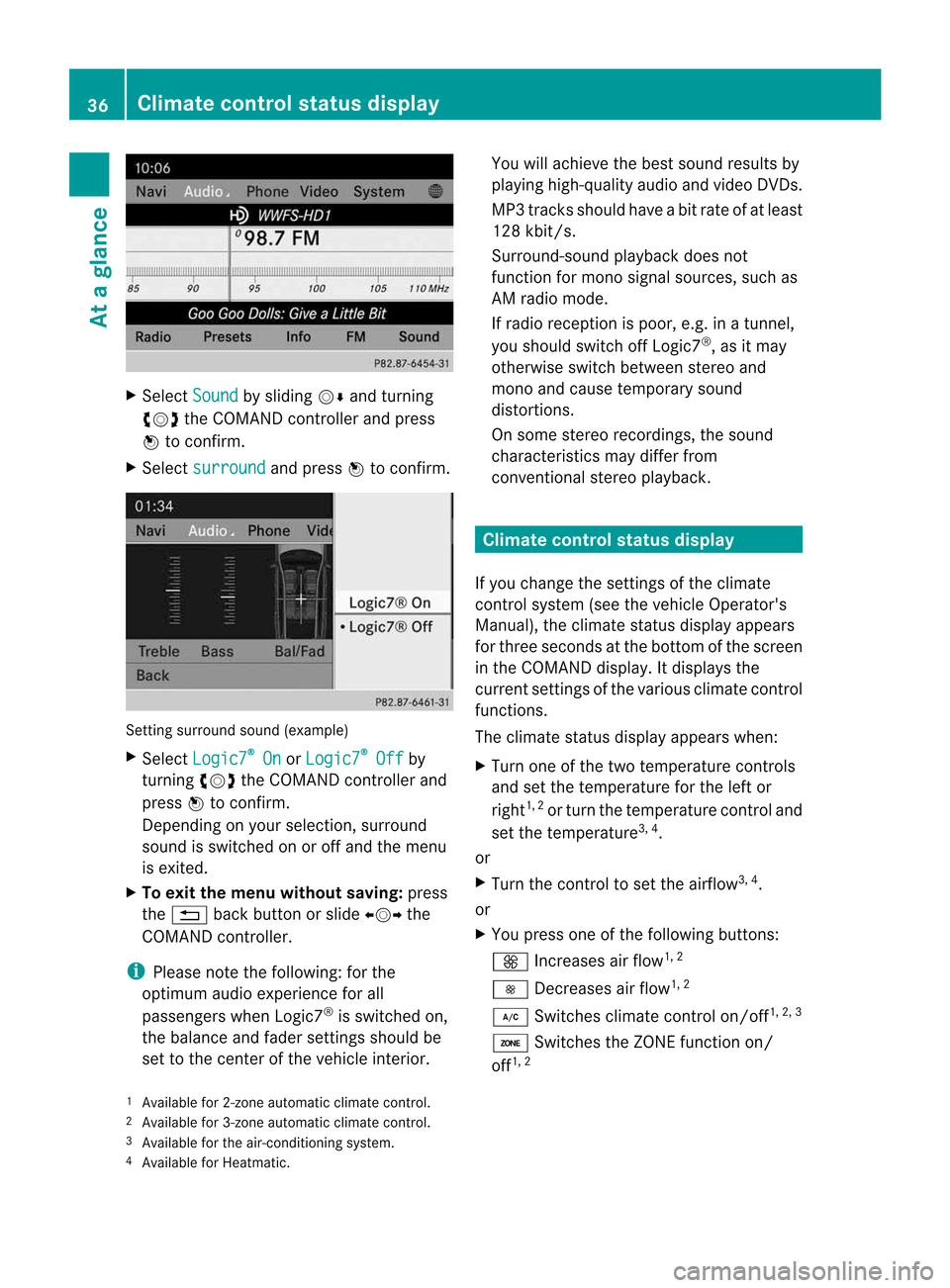
Sel ect Sound by
sliding VÆ andturni ng
cVd theCOMAND controllera nd pre ss
W toconfi rm.
X Sel ect surround and
pressW toconfi rm. Setting
surrou ndsou nd(examp le)
X Sel ect Logic7 ®
On or
Log ic7 ®
Off by
turni ngcVd theCOMAND controllera nd
pre ssW toconfi rm.
Depe nding on your sel ecti on, surrou nd
sou ndissw itche donoroffand themenu
is exi ted.
X To exitthe men uwithout saving:pre ss
the % back button orslide XVY the
CO MAND controller.
i Plea se note thefollowi ng: forthe
opti mum audioe xpe rience forall
pa sse nger swhenL ogic7 ®
is sw itche don,
the balance and fadersetti ngsshouldb e
set tothe center ofthe vehiclei nter ior. Yo
uw illa ch ieve the best sou ndresults by
pl ay ing high-q uality audioa nd video DVDs.
MP3 tracks shouldh aveab itrat eo fatleast
128 kbit/s.
Surr ound- soundplayback doesnot
func tion formon osign alsourc es,such as
AM radio mode.
If radio receptio nisp oor, e.g.inat unnel,
you should switchoffLogic7 ®
,a sitm ay
otherwise switchbetween stereoand
mono andcause temporary sound
distortions.
On some stereo recordings, thesound
characteristics maydiffer from
conven tionalstereo playback. Climate
controlstatusdisplay
If you change thesettings ofthe climate
cont rolsystem (seethevehicle Operator's
Manual ),the climate statusdisplayappea rs
for three seconds atthe bottom ofthe screen
in the COMAND display.Itdispla ysthe
current settings ofthe various climate control
function s.
The climate statusdisplayappea rswhen:
X Turn oneofthe two temperature controls
and setthe temperature forthe left or
right 1,
2
or turn thetemperature controland
set the temperature 3,
4
.
or
X Turn thecont roltoset the airflow 3,
4
.
or
X You press oneofthe followi ngbuttons:
K Increases airflow 1,
2
I Decreases airflow 1,
2
¿ Switches climatecontrolon/off 1,
2, 3
á Switches theZONE function on/
off 1,
2
1 Available for2-zon eautomatic climatecontrol.
2 Available for3-zon eautomatic climatecontrol.
3 Available forthe air-conditioning system.
4 Available forHeatmatic. 36
Cli
mat econtrol stat usdisplayAt ag
lance
Page 161 of 234
In
audio DVD modeonly X
To pause playba ck:swit chon audio DVD
mod e(Ypage 157).
X Se lec tË byslidi ngVÆ andturnin g
cVd theC OMA NDcontrol ler and press
W toconfirm .
The Ë displaychang estoÌ.
X To cont inueplayba ck:sele ctÌ and
pre ssW toconfirm .
Playbac kcont inues fromthepoint where it
was inter rupted. TheÌ display changes
to Ë. Stop
function
This funct ionisonly availa bleinaudio DVD
mode.
X Switch onaudio DVDmode (Ypage 157).
X To interr uptplayback: selectÉby
sliding VÆandturnin gcVd theCOMAND
cont roller andpress Wtoconf irm.
The Ë display changes toÌ. É
remains highlighted.
X To continue playback: selectÌand
press Wtoconf irm.
Playba ckcont inues fromthepoint where it
was inter rupted.
X To stop playback: whileplaybackis
inter rupted, selectÉagain andpress
W toconf irm.
or
X Select Éandconf irmbypressing W
twice inrapid succession.
Ì ishighlighted.
X To resta rtplayback: selectÌand
press Wtoconf irm.
Playba ckstart satthe beginning ofthe
DVD . Selecting
audioCD/DVD/MP3 discs
Selecting viathe media list X
In audio CD/DVDand MP3 mode: select
Media by
sliding VÆorturnin gcVd the
COMAND controller andpress Wto
conf irm.
The media listappears. The#dot
indicates thecurrent medium beingplayed. Media
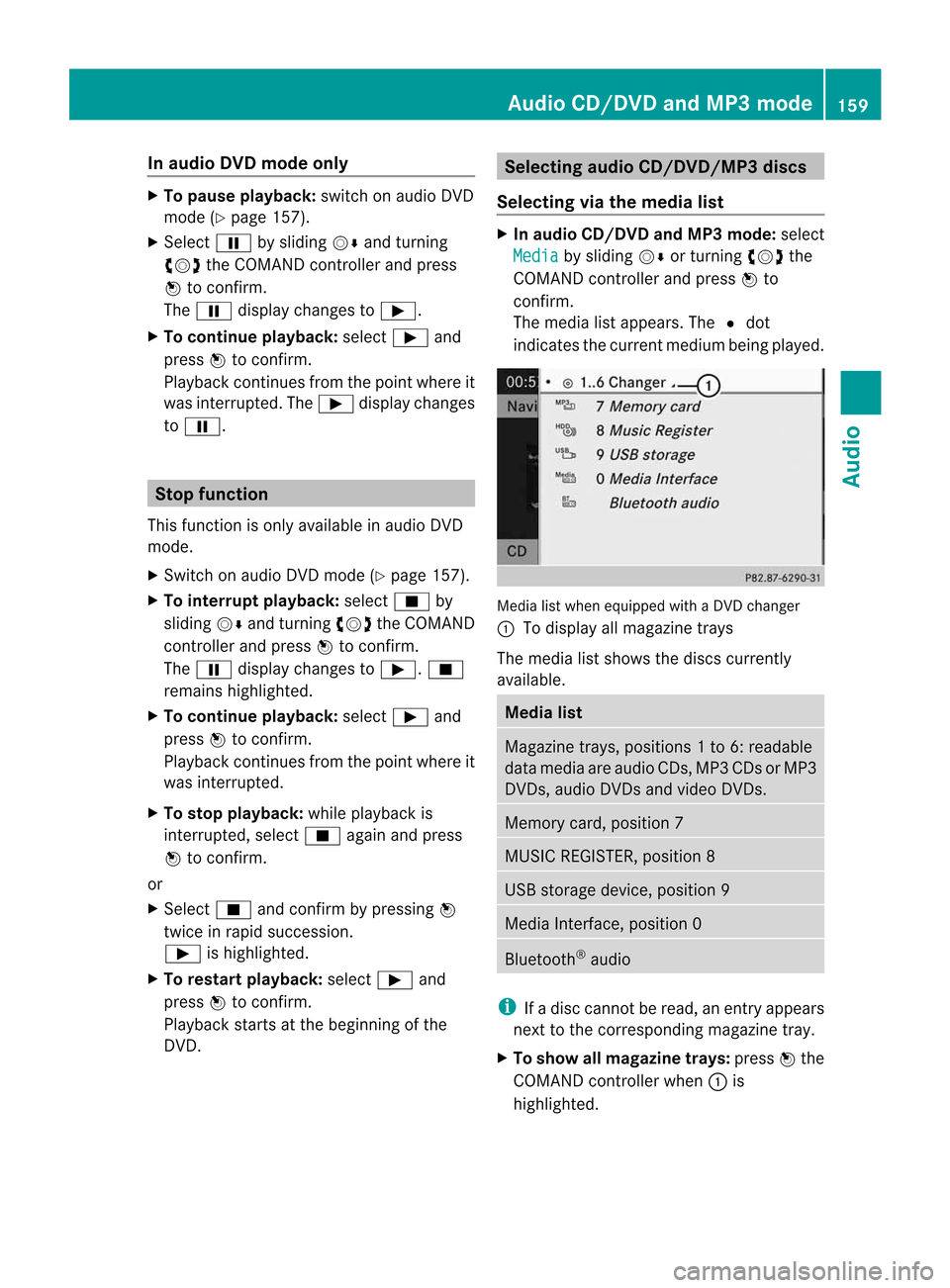
listwhen equipped withaDVD changer
: Todisplay allmagazine trays
The media listshows thediscs current ly
availa ble. Media
list Magazine
trays,positions 1to6 :readable
data media areaudio CDs,MP3CDsorMP3
DVD s,audio DVDsand video DVDs. Memory
card,position 7 MUSIC
REGISTER, position8 USB
storage device,position 9 Media
Interface, position 0 Bluetooth
®
audio i
Ifad isc cann otbe read, anentr yappears
next tothe correspon dingmagazine tray.
X To show allmagaz inetrays: press Wthe
COMAND controller when :is
highlighted. Audio
CD/DVD andMP3 mode
159Audio Z
Page 162 of 234

Media
listshowing allmagazine trays
X Select thedata medium byturning cVd
the COMAND controller andpress Wto
confirm .
i Ifyou select avideo DVD,the system
switches tovideo DVDmode
(Y page 186).
Selec tingatrac kusing thenumber
keypa d X
Press anumber key,e.g.n,w henthe
<0025002C00200022002900330034004A002000240029002400280021002C0030
0031V windowisactive.
The medium atthe corr espondin gposition
in the media listisloaded andthen played. Selecting
atrac k
Se lecti ng byskippin gtoat rack X
To ski pforwa rds orbac ktoat rack:tur n
cVd theCOMAND controllerw hent he
di sp lay/ selectio nwindow isact ive.
or
X Press theE orF button.
The skip forward function skipstot he nex t
tr ack .
The skip back function skipstot he
begin ningo fthe curr enttrack ifthe track
has been playing formor ethan
eight seconds.Ift he track hasbeen playing
for less than eight seconds, itskips tothe
start ofthe previous track. If
you have selected theplay back options
Random Tracks or
Random Folder ,t
he
track order israndom.
Selec tingatrac kusing thenumber
keypa d X
Press the¯ button onthe number
keypad.
An umer icalentryf ielda ppear s.The
num berofposi tion so ffere dcorresponds to
the number oftrack sonthe CD/DV D.Onl y
num bers tha tcorr esp ond toatrac k
num bero nthe CD/DV Dcanbe ente red.
X Enter thedesired trac knum beru sing the
num berk eys.
The trackplays afterthe last possible
numb erisent ered.
i Press ingand holdin ganumberkey for
mor ethan twoseco ndscom plete sthe
ent ry,and thecorrespo ndingtrack is
played.
Selecting atrac kusing music search Select
musicviacategor ies(e.g. album,
artist )with the music search function.
If you select acategor y,COMAND startsa
search fortrac kinfor mation ifthe following
con ditions arefulfilled:
R the data carriers areinsert edorcon nect ed
R the trac kinfor mation fromthese data
carriers isnot yetcontained inthe
COMAND musicdatabase
COMAND importstrackinfor mation fromthe
following datacarriers:
R disc (audio CD/DVD/MP3)
R memory card
R MUSIC REGISTE R
R USB storage device
The Track informat ioniscomplete message
appearsoncethe search is
complet ed.COMAND storesthe music data
in its own database. Youcannow select the
available musicdatawithin thedesired
categor y. 160
Audio
CD/DVD andMP3 modeAudio
Page 166 of 234

see
acorresponding displayint he displa y/
selection window.Seetheexample ofthe
displa yina udioC Dm ode (Ypage 158).
i The "Normal tracksequence" optionis
automaticall yselected whenyouchange
the medium youarecurrently listeningto
or when youselect adifferent medium. If
an option isselected, itremains selected
after COMAND isswitched onoroff. Notes
onMP3 mode
General informat ion Depending
onthe volume andformat ofthe
MP3 data, thelength oftime required for
reading thedata mayincrease.
Permissible datacarriers R
CD-R andCD-RW
R DVD-R andDVD-RW
R DVD+R andDVD+RW
R SD memory card
R USB storag edevice
Permis siblefiles yste ms R
ISO 9660/Jol ietstanda rdfor CDs
R UDF foraudio and videoDVDs
R FAT16 orFAT32 forSD memory cardsand
USB storag emedia
Multis essionC Ds For
multises sionC Ds, theconte ntofthe first
se ssi on determ ineshow COMAND will
pro ces sthe CD. COMAND play so nlyo ne
se ssi on and gives priorityto the audioC D
se ssi on.
If po ssi ble, useC OM AND toplay onl yC Ds
wh ich have been writte nino neses sion.
Fi le struc tureofad ata carrie r Whe
nyou create adisc with compressed
music files,thetrack scan be organized infolders.
Afolder mayalsocontainsubfolders.
Ad isc can cont ainam axim umof25 5fold ers .
Eac hfold ercan contain am aximum of
25 5t rack sa nd 255s ubf older s.
The disc may contain nomor ethane ight
dire ctory leve ls.File sbeyon dthe eight hleve l
will notb erecogn izedbythe system.
Tr ack and filenames When
youcreat eadiscwith compr essed
music files,youcan assign names tothe
trac ksand folders.
COMAND usesthese names accordingly for
the display. Folderswhichcontain data other
than MP3 orWMA tracksare not displayed by
COMAND .
If MP3 orWMA filesarestor edinthe root
direct oryitself, theroot direct orywill also be
treat edasafolder. COMAND willthen show
the name ofthe root direct oryasthe folder
name.
You must observe thefollowing when
assigning tracknames :
R track nam esmust haveatleast one
ch arac ter.
R track nam esmust havethee xtensi on
"mp3 "or"wma".
R there must beafull stop bet ween thet rack
nam eand thee xtensi on.
Ex ample ofac orrec ttrack nam e:
"Trac k1.m p3".
Per missibl eforma ts COMA
NDsuppo rtst he followin gformat s:
R MPE G1Audi oLayer 3(MP3)
R Microsoft WindowsMediaAudioV2,V7,V8
and V9(WMA)
R additional musicfilesinAAC format with
the fileexten sions .aac,.mp4, .m4a
and .m4b, butnot copy-protect ediTunes
music fileswith theexten sion.m4p.
i If,inaddition toMP3 files, there areother
music filesinthese audioformats storedon 164
Audio
CD/DVD andMP3 modeAudio
Page 174 of 234
X
To select opti ons:sw itch tothe MUSI C
REG ISTER (Ypage 168) .
X Sel ect Mus ic Reg
ist er by
slid ing VÆ and
tur ning cVd theCOMAND controller and
pre ssW toconfi rm.
The optio ns list appe ars. The #dot
ind icates the optio ns elected.
X Select anoption andpress Wtocon firm.
The option isswitche don.For alloption s
exc ept Normal TrackSequenc e ,y
ou will
see acorr espondin gdisplay inthe display/
select ionwindow.
i The Normal TrackSequenc e option
is
automatic allyselect edwhen youchange
the disc youarecurren tlylisten ingtoor
when youselect adifferen tmedium. Ifan
option isselect ed,itremains selectedafter
COMAND isswitched onoroff. Bluet
ooth®
aud iomode Connecting
Bluetooth®
aud iodevices
Conditions Bluet
ooth®
aud iodevice
Bluetoot h®
audio mode requires a
Bluetoot h®
-c apable audiodevice.
i Not allBluetoot h®
audio devices available
on the market areequally suitable. For
more detailed information onsuitable
Bluetoot h®
audio devices andon
con nectingB luetoot h®
audio devices to
COMAND ,visit
htt p://ww w.mbu sa-mobile.com (for
USA ).Alt ernat ively, calltheMercedes- Benz
Customer AssistanceCenter at
1-8 00- FOR-ME RCedes (1-800-367 -6372)
(for USA )orC ustomer Relations at
1-8 00- 387 -0100(for Canada). Befor
eusing Bluetoot h®
audio mode, you
should checkyour Bluetooth ®
audio device
for the following (seetheBluetooth ®
audio
device's operating instructions):
R Bluetooth ®
audio profile
The Bluetooth ®
audio device mustsupport
the A2D Pand AVRCP Bluetooth ®
audio
profiles.
R Bluetooth ®
visibility
On cert ainBluetooth ®
audio devices, as
well asactivatin gthe Bluetooth ®
funct ion,
the device itselfmust alsobemade
"visible" toother devices (seethe
Bluetooth ®
audio device's operating
instr uctions).
R Bluetooth ®
device name
This device nameispredetermin edbut can
usual lybe changed. Tomake aclear
selection ofthe Bluetooth ®
device
possible, Mercedes-B enzrecomm ends
that youcustomiz ethe device name(see
the Bluetooth ®
audio device's operating
instr uctions).
i A2D P(Advanced AudioDistribution
Profile): Bluetooth ®
audio profile foraudio
data trans mission
AVRCP (AudioVideoRemote Control
Profile): Bluetooth ®
audio profile foraudio
data playb ack
X Act ivate Bluetooth ®
and Bluetooth ®
visibility onthe Bluetooth ®
audio device.
On COMAND
X Act ivate theBluetooth ®
funct ionin
COMAND (Ypage 45).
General information Before
usingyourBluetooth ®
audio device
with COMAND forthe first time, youwillneed
to authorize it.
When youauthorize anew Bluetooth ®
audio
device, itis conn ected automatically.
Connect ioninvolves firstsearching fora 172
Bluetooth ®
aud iomodeAudio
Page 181 of 234

i
The separate USBconn ection ensures
quick access andexpanded mediacontent
options.
i Consult anauthorized Mercedes-Benz
Center ifyou have further questions. Switching
toMedia Interfa cemode
General information In
extr eme cases, startingupindividual
funct ionscantake uptoseveral minutes –
this depends onthe exter naldevice andits
cont ent(e.g. video podcasts).
Only usetheoriginal software tosave fileson
iPods orMP3 players. Otherwise, someorall
funct ionsmay notbeavailab le.
Option 1 X
Connec tane xter naldevice (Ypage 178).
COMAND activatesthe device. Thebasic
display thenappears.
Option 2 The
exter naldevice isconn ected tothe Media
Int erface.
X Press theh functionbutton oneormore
times.
By pressing thefunct ionbutton repeatedly,
you can change theoperating modeinthe
following order:
R audio CD/DVD/MP3 (disc)
R memory cardmode
R MUSIC REGISTE R
R USB storage device
R Media Interface oraudio AUXmode
R Bluetoot h®
audio mode
Option 3 X
Press thei number button.
This selects theconn ected externalaudio
device directly. Option
4 X
In the media list(Ypage 159), select the
ent ryat position 0byturnin gcVd the
COMAND controller andpress Wto
conf irm.
COMAND activatesthe conn ected device.
You willsee amessage tothis effect .The
basic displa ythen appea rs.
If no device isconn ected, youwillsee the
Media Int. entr
yinstead ofad evice
name. Media
Interface mode (iPod®
mode) when
equippe dwithaD VD changer
: Type ofdata medium
; Track number
= Elapsed tracktime(also informat
00:0 0:00 foraudi obooks)
? Track name
A Graphic timedispla y
B Graphic trackdispla y
C Sound settings
D Media list
E Album name(ifavaila ble)
F Music search
G Position inthe media list
H Artist (ifavaila ble)
I Play back options
Type ofdevice :conn ected isindicated by
the corresponding symbolforiPod ®
or MP3
play er. Media
Interface mode
179Audio Z
Page 187 of 234

COMAN
Dfeatures .... .... .... ...... ........ ... 186
Gener alinfor mation <003B003B003B003B003B003B003B003B003B003B003B003B003B003B003B003B
003B003B003B003B003B003B003B003B003BV 186
Basic settings ........ .......... ...... ........ .. .. 186
Video DVDmode <003B003B003B003B003B003B003B003B003B003B003B003B003B003B003B003B
003B003B003B003B003B003B003B003B003B003B003B003B003B003B003BV 186
AUX video mode ........ .......... ...... ........ 192
Pictur eviewer <003B003B003B003B003B003B003B003B003B003B003B003B003B003B003B003B
003B003B003B003B003B003B003B003B003B003B003B003B003B003B003B003B
003B003B003B> 193 185Video
Page 188 of 234

COMAN
Dfeatures
Thes eOperatin gInstruc tio ns desc ribeall
st andar dand opt ionalequipm enta vail able
for you rCOMAND systematthe time of
purcha se.Cou ntry-specifi cdeviation sare
possible. Pleasenotethat your COMAND
system maynotbeequipped withallthe
features described. General
information Autom
aticpictu reshut off
The video image isonly displayed ifthe
select orlever ofthe tran smission isin
position P.
If the select orlever ofthe tran smission is
changed fromposition P,theIn order not
to
distrac tyoufrom thetraffic situati
on, the picture is faded out
while
thevehicle isinmotion. message
appears
As soon asthe select orlever ofthe
tran smission isreturn edtoposition P,the
video image isshown. Basic
settings Pictur
esettings
Adju sting thebright ness,contra stor
color X
Press Wthe COMAND controller toshow
the menu.
X Select DVD-Vid eo by
sliding VÆand
turn ingcVd theCOMAND controller and
press Wtocon firm.
Am enu appears.
X Select Brightn ess ,
Contras t or
Color by
turn ingcVd theCOMAND controller and
press Wtocon firm. Changing
thepictu reform at X
Press Wthe COMAND controller toshow
the menu.
X Select DVD-Vid eo by
sliding VÆand
turn ingcVd theCOMAND controller and
press Wtocon firm.
Am enu appears.
X Select 16:9Optimiz ed ,
4:3 or
Widescr een and
press Wtocon firm.
The dotinfron tofthe ent ryindicat esthe
curren tlyselect edformat .
X Select asetting byturn ingcVd the
COMAND controller andpress Wto
con firm. Video
DVDmode Safet
ynotes G
WARN
ING
COMAND isclassified asaC lass 1laser
prod uct.You must notopen thecasing. Ifyou
open thecasing, orifthe casing isfaulty or
damaged, thereisar isk ofexposure to
invisible laserradiation. Thismay damage
your eyes, orthose ofothers.
COMAND doesnotcont ainany parts thatcan
be serviced bythe user. Forsafety reasons,
all mainten ancework must becarried outby
quali fiedaftersales technicians. G
WARNING
Only when thevehicle isstation aryshould
you:
R load adisc
R eject adisc
There isar isk ofbeing distract edfrom the
road andtraffic conditionsifthis isdone while
the vehicle isin motion. 186
Video
DVDmodeVideo
Page 189 of 234
Note
sabout dis cs
Pl ay ba ck pro blems mayoccu rwhen playing
copied discs.Therearealarge variety of
discs, DVDauthoring software,writing
software andwriters available.This variety
means thatthere isno guarantee thatthe
system willbeable toplay discs thatyouhave
copied yourself.
! Donot affix stick ersorlabel stot he discs,
as they could peeloffand damage
COMAND. Stickers cancause thedisc to
bend, which canresult inread errors and
disc recognit ionproblems.
! COMAND isdesigned toaccommodate
discs which comply withtheEN60908
standard. Youcantherefore onlyusediscs
with amaximum thickness of1.3 mm.
If you insert thickerdiscs, e.g.those that
cont aindata onboth sides (DVD onone
side andaudiodata onthe other), they
cannot beeject edand candamage
COMAND.
Use round discswithadiameter of12 cm.
Do not use discs withadiameter of8c m,
even withanadapter. DVD
playback conditions
If video DVDsdon otconf orm tothe NTSC or
PAL TVstandards, theymaycreate picture,
sound orother problems duringplayback.
COMAND canplay back video DVDs
produced according tothe following
standards:
R region code1orregion code0(no reg ion
cod e)
R PAL orNTSC standa rd
Yo uw illg en era llyf ind the releva ntdetai ls
ei ther onthe DVD itselfo ro nthe DVD case.
i Ifyo ui nsert avideo DVD with ad ifferent
reg ionc ode, youwillsee amessage tothis
effect . i
COMAND isset toregion code1atthe
factor y.This settingcan bechanged atan
authorized Mercedes-B enzCenter. Thiswill
allow youtoplay video DVDswitha
different regioncode,provided thatthey
are produced inaccordanc ewiththe PAL
or NTSC standard. Theregion codecanbe
changed uptofive times. Function
restrictions
Dependin gonthe DVD ,iti sp ossible that
cert ainfunct ionsoractions willbe
temporarily blockedormay notfunct ionatall.
As soon asyou trytoactivate thesefunctions
or actions ,you will see theKsymbol inthe
display . Inserting
andremoving DVDs
X Proceed asdescribed inthe "Insert ingand
eject ingCDs andDVD s"section
(Y page 154). Switching
tovideo DVDmode
Option 1 X
DVD changer: insertavideo DVD.
X Press theh functionbutton orthe
% backbutton .
COMAND loadsthemedium insertedand
start stop lay it.
Option 2 X
Press theh functionbutton oneormore
times.
COMAND switchestothe previous disc
operating mode. Video
DVDmode
187Video Z