reverse MERCEDES-BENZ E-Class SEDAN 2012 W212 User Guide
[x] Cancel search | Manufacturer: MERCEDES-BENZ, Model Year: 2012, Model line: E-Class SEDAN, Model: MERCEDES-BENZ E-Class SEDAN 2012 W212Pages: 396, PDF Size: 17.07 MB
Page 157 of 396
Rdepress the brake pedal and keep it
depressed.
R shift to neutral N.
R release the brake pedal.
R if applied, release the parking brake.
R switch off the ignition and leave the
SmartKey in the ignition lock.
Shifting to transmission position DXWhen the vehicle is stationary, depress the
brake pedal.XPush the DIRECT SELECT lever down past
the first point of resistance.
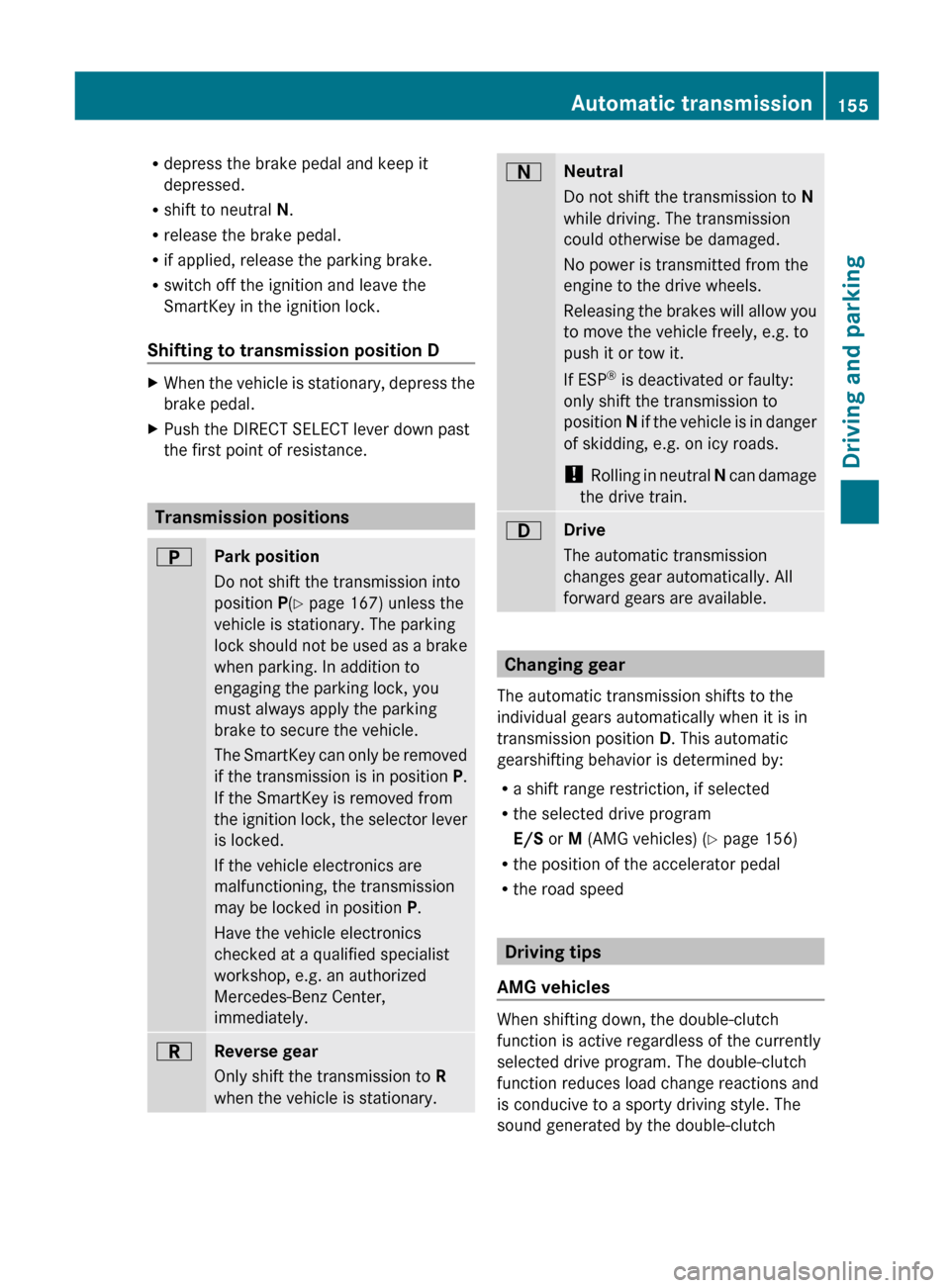
Transmission positions
BPark position
Do not shift the transmission into
position P(Y page 167) unless the
vehicle is stationary. The parking
lock should not be used as a brake
when parking. In addition to
engaging the parking lock, you
must always apply the parking
brake to secure the vehicle.
The SmartKey can only be removed
if the transmission is in position P.
If the SmartKey is removed from
the ignition lock, the selector lever
is locked.
If the vehicle electronics are
malfunctioning, the transmission
may be locked in position P.
Have the vehicle electronics
checked at a qualified specialist
workshop, e.g. an authorized
Mercedes-Benz Center,
immediately.CReverse gear
Only shift the transmission to R
when the vehicle is stationary.ANeutral
Do not shift the transmission to N
while driving. The transmission
could otherwise be damaged.
No power is transmitted from the
engine to the drive wheels.
Releasing the brakes will allow you
to move the vehicle freely, e.g. to
push it or tow it.
If ESP ®
is deactivated or faulty:
only shift the transmission to
position N if the vehicle is in danger
of skidding, e.g. on icy roads.
! Rolling in neutral N can damage
the drive train.7Drive
The automatic transmission
changes gear automatically. All
forward gears are available.
Changing gear
The automatic transmission shifts to the
individual gears automatically when it is in
transmission position D. This automatic
gearshifting behavior is determined by:
R a shift range restriction, if selected
R the selected drive program
E/S or M (AMG vehicles) ( Y page 156)
R the position of the accelerator pedal
R the road speed
Driving tips
AMG vehicles
When shifting down, the double-clutch
function is active regardless of the currently
selected drive program. The double-clutch
function reduces load change reactions and
is conducive to a sporty driving style. The
sound generated by the double-clutch
Automatic transmission155Driving and parkingZ
Page 159 of 396

S+ SportPlusExtremely sporty driving
styleM ManualManual gearshiftingRS RACE
STARTOptimal vehicle
acceleration from a
standstill
i For further information on the automatic
drive program, see ( Y page 157).
Only change from automatic drive program C,
S or S+ to manual drive program M when the
vehicle is stationary.
XTurn drive program selector : until the
desired drive program appears in the
multifunction display in the speedometer.
The drive program indicator on drive
program selector : lights up in red.
i
The automatic transmission shifts to
automatic drive program C each time the
engine is started.
i RS cannot be selected during normal
driving. For further information on RACE
START, see ( Y page 188).
Steering wheel paddle shifters
:Left-hand steering wheel paddle shifter;Right-hand steering wheel paddle shifter
You can restrict or derestrict the shift range
by using the steering wheel paddle shifters.
You can change gear yourself by using the
steering wheel paddle shifters in the manual
drive program.
In the automatic drive program, you can
restrict or derestrict the shift range by using
the steering wheel paddle shifters
( Y page 157).
i You can only change gear with the
steering wheel paddle shifters when the
transmission is in position D.
Automatic drive program
Drive program E (drive program C on AMG
vehicles) is characterized by the following:
R the vehicle pulling away more gently in
forward and reverse gears, unless the
accelerator pedal is depressed fully
R increased sensitivity. This improves driving
stability on slippery road surfaces, for
example
R the automatic transmission shifting up
sooner. This results in the vehicle being
driven at lower engine speeds and the
wheels being less likely to spin
Drive program S (drive programs S and S+ on
AMG vehicles) is characterized by the
following:
R sporty engine and automatic transmission
settings
R the vehicle pulling away in first gear
R the automatic transmission shifting up
later
R the fuel consumption possibly being higher
as a result of the later automatic
transmission shift points
Shift ranges
Introduction
When the automatic transmission is in
position D, it is possible to restrict or
derestrict the shift range ( Y page 157).
The shift range selected is shown in the
multifunction display. The automatic
Automatic transmission157Driving and parkingZ
Page 162 of 396
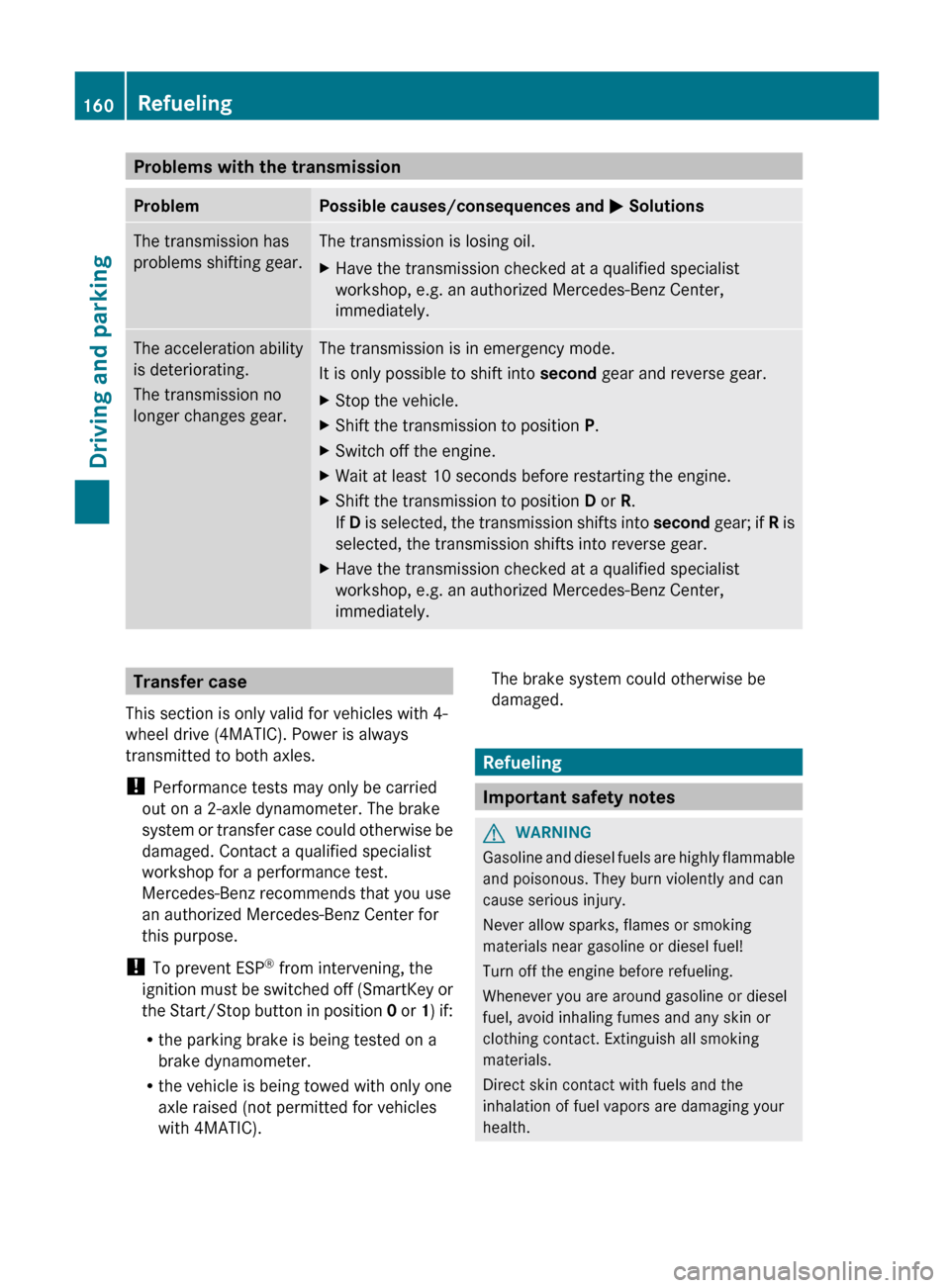
Problems with the transmissionProblemPossible causes/consequences and M SolutionsThe transmission has
problems shifting gear.The transmission is losing oil.XHave the transmission checked at a qualified specialist
workshop, e.g. an authorized Mercedes-Benz Center,
immediately.The acceleration ability
is deteriorating.
The transmission no
longer changes gear.The transmission is in emergency mode.
It is only possible to shift into second gear and reverse gear.XStop the vehicle.XShift the transmission to position P.XSwitch off the engine.XWait at least 10 seconds before restarting the engine.XShift the transmission to position D or R.
If D is selected, the transmission shifts into second gear; if R is
selected, the transmission shifts into reverse gear.XHave the transmission checked at a qualified specialist
workshop, e.g. an authorized Mercedes-Benz Center,
immediately.Transfer case
This section is only valid for vehicles with 4-
wheel drive (4MATIC). Power is always
transmitted to both axles.
! Performance tests may only be carried
out on a 2-axle dynamometer. The brake
system or transfer case could otherwise be
damaged. Contact a qualified specialist
workshop for a performance test.
Mercedes-Benz recommends that you use
an authorized Mercedes-Benz Center for
this purpose.
! To prevent ESP ®
from intervening, the
ignition must be switched off (SmartKey or
the Start/Stop button in position 0 or 1) if:
R the parking brake is being tested on a
brake dynamometer.
R the vehicle is being towed with only one
axle raised (not permitted for vehicles
with 4MATIC).The brake system could otherwise be
damaged.
Refueling
Important safety notes
GWARNING
Gasoline and diesel fuels are highly flammable
and poisonous. They burn violently and can
cause serious injury.
Never allow sparks, flames or smoking
materials near gasoline or diesel fuel!
Turn off the engine before refueling.
Whenever you are around gasoline or diesel
fuel, avoid inhaling fumes and any skin or
clothing contact. Extinguish all smoking
materials.
Direct skin contact with fuels and the
inhalation of fuel vapors are damaging your
health.
160RefuelingDriving and parking
Page 170 of 396
Unintended vehicle movement can cause
serious personal injury or damage to the
vehicle or the vehicle drivetrain. To reduce
such risks, always do the following before
turning off the engine and leaving the vehicle:
R keep your right foot on the brake pedal.
R engage the parking brake.
R shift the automatic transmission to park
position P.
R slowly release the brake pedal.
R when parked on an incline, always turn the
front wheels towards the road curb.
R turn the SmartKey in the ignition lock to
position 0 and remove the SmartKey from
the ignition lock, or press the KEYLESS-GO
Start/Stop button.
R take the SmartKey with you and lock the
vehicle when leaving.
Switching off the engine
Important safety notes
GWARNING
Do not turn off the engine before the vehicle
has come to a complete stop. With the engine
not running, there is no power assistance for
the brake and steering systems. In this case,
it is important to keep in mind that a
considerably higher degree of effort is
necessary to brake and steer the vehicle.
GWARNING
Keep in mind that turning off the engine alone
only will shift the automatic transmission into
neutral position N automatically.
Always shift the automatic transmission into
park position P before turning off the engine.
Otherwise the vehicle could roll away which
could result in an accident and/or serious
personal injury.
Vehicles with manual transmissionXShift to either first gear or reverse gear R.XTurn the SmartKey to position 0 in the
ignition lock and remove it.
The immobilizer is activated.XApply the parking brake firmly.
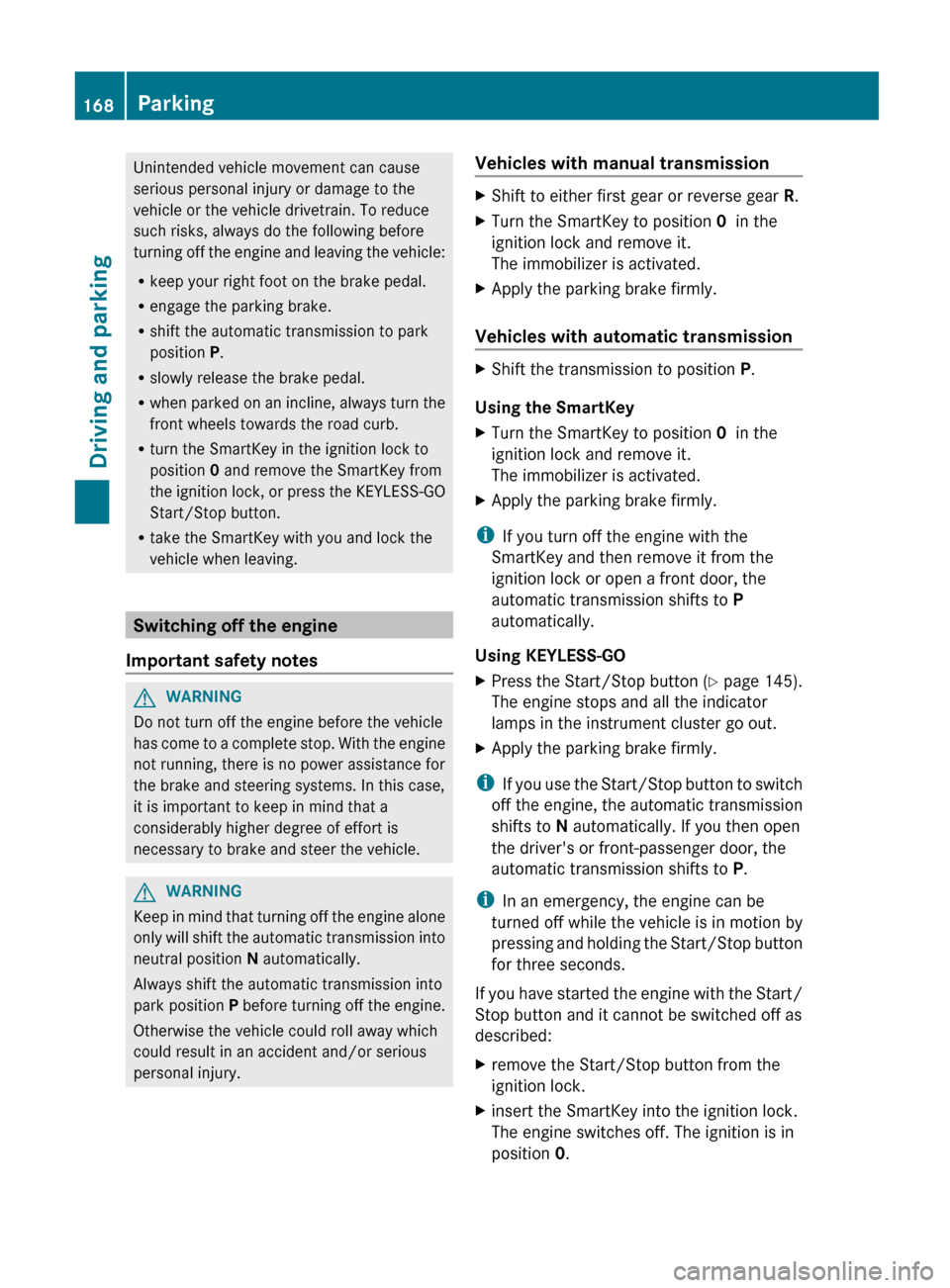
Vehicles with automatic transmission
XShift the transmission to position P.
Using the SmartKey
XTurn the SmartKey to position 0 in the
ignition lock and remove it.
The immobilizer is activated.XApply the parking brake firmly.
i If you turn off the engine with the
SmartKey and then remove it from the
ignition lock or open a front door, the
automatic transmission shifts to P
automatically.
Using KEYLESS-GO
XPress the Start/Stop button (Y page 145).
The engine stops and all the indicator
lamps in the instrument cluster go out.XApply the parking brake firmly.
i If you use the Start/Stop button to switch
off the engine, the automatic transmission
shifts to N automatically. If you then open
the driver's or front-passenger door, the
automatic transmission shifts to P.
i In an emergency, the engine can be
turned off while the vehicle is in motion by
pressing and holding the Start/Stop button
for three seconds.
If you have started the engine with the Start/
Stop button and it cannot be switched off as
described:
Xremove the Start/Stop button from the
ignition lock.Xinsert the SmartKey into the ignition lock.
The engine switches off. The ignition is in
position 0.168ParkingDriving and parking
Page 199 of 396
(30 km/h), you will see parking symbol ; as
a status indicator in the instrument cluster.
When a parking space has been detected, an
arrow towards the right = or the left : also
appears. Parking Guidance only displays
parking spaces on the front-passenger side
as standard. Parking spaces on the driver's
side are displayed as soon as the turn signal
on the driver's side is activated. To park on
the driver's side, you must leave the driver's
side turn signal switched on until you have
engaged reverse gear.
Parking Guidance will only detect parking
spaces:
R that are parallel to the direction of travel
R that are at least 5 ft (1.5 m) wide
R that are at least 4.3 ft (1.3 m) longer than
your vehicle
A parking space is displayed while you are
driving past it, and until you are
approximately 50 ft (15 m) away from it.
ParkingGWARNING
The Parking Guidance is only an aid and may
not detect all obstacles. The Parking
Guidance does not relieve you of the
responsibility to pay attention. You are always
responsible for safety and must continue to
pay attention to your immediate surroundings
when parking and maneuvering. Otherwise,
you could endanger yourself and others.
XStop the vehicle when the parking space
symbol shows the desired parking space in
the instrument cluster.XShift the transmission to position R.
The following message appears in the
multifunction display: Check vehicle
surroundings Confirm with OK .XPress the a button on the multifunction
steering wheel to confirm.
The multifunction display switches to
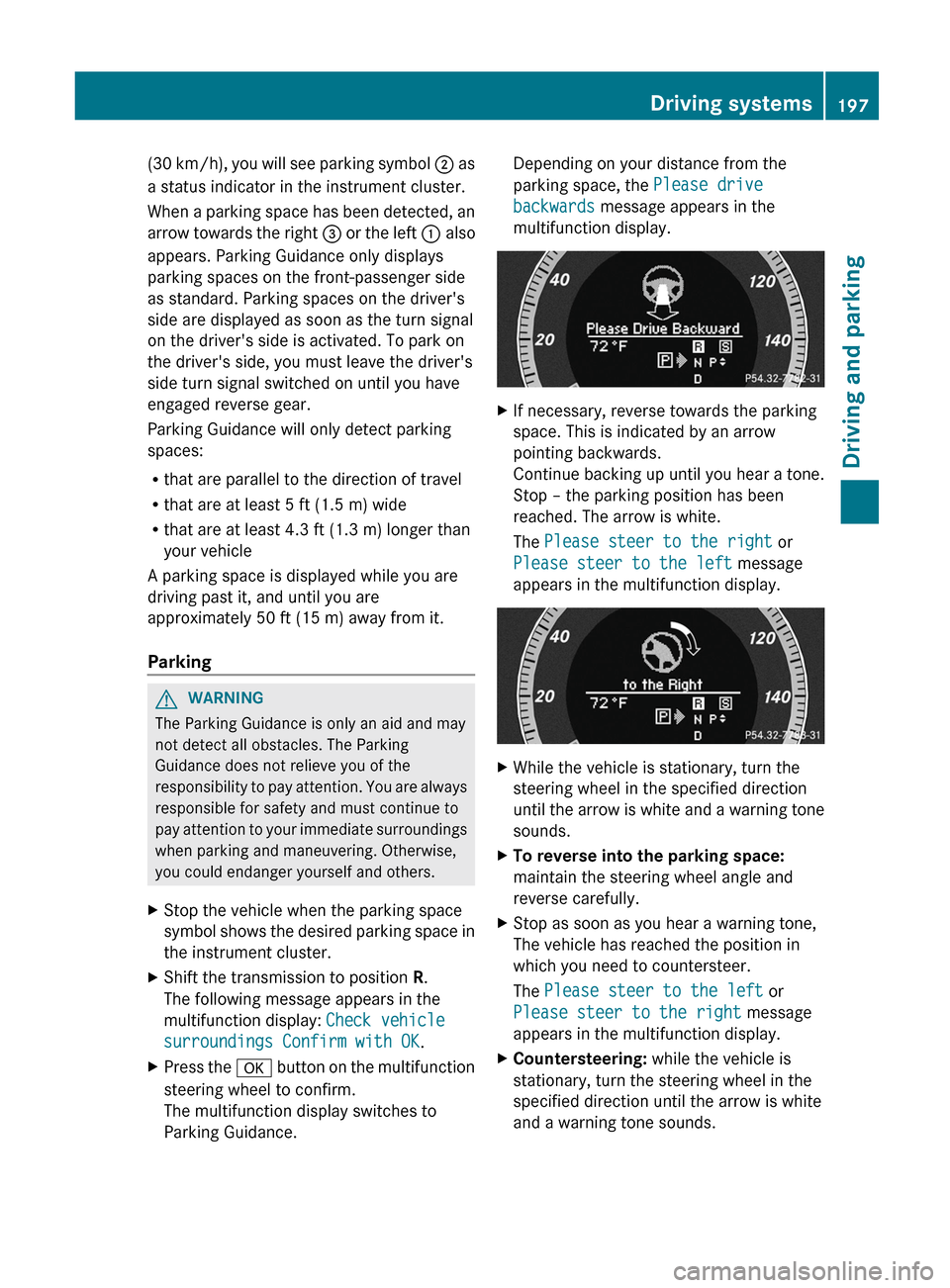
Parking Guidance.Depending on your distance from the
parking space, the Please drive
backwards message appears in the
multifunction display.XIf necessary, reverse towards the parking
space. This is indicated by an arrow
pointing backwards.
Continue backing up until you hear a tone.
Stop – the parking position has been
reached. The arrow is white.
The Please steer to the right or
Please steer to the left message
appears in the multifunction display.XWhile the vehicle is stationary, turn the
steering wheel in the specified direction
until the arrow is white and a warning tone
sounds.XTo reverse into the parking space:
maintain the steering wheel angle and
reverse carefully.XStop as soon as you hear a warning tone,
The vehicle has reached the position in
which you need to countersteer.
The Please steer to the left or
Please steer to the right message
appears in the multifunction display.XCountersteering: while the vehicle is
stationary, turn the steering wheel in the
specified direction until the arrow is white
and a warning tone sounds.Driving systems197Driving and parkingZ
Page 200 of 396

XTo reverse into the parking space:
maintain the steering wheel angle and
reverse carefully.XStop as soon as you hear a warning tone,
at the latest when PARKTRONIC sounds the
continuous warning tone.
The Parking Guidance finished
message appears in the multifunction
display and a warning tone sounds. You
may be asked to steer in a different
direction and then change gear. In this
case, further displays in the multifunction
display will direct you to the final position.XManeuver if necessary.XAlways observe the warning messages
displayed by PARKTRONIC ( Y page 193).
Canceling Parking Guidance
XPress the PARKTRONIC button on the
center console ( Y page 194).
Parking Guidance is canceled immediately
and PARKTRONIC is deactivated.
Parking Guidance is canceled automatically if
it is no longer possible to guide you into the
parking space, or if a malfunction occurs.
The parking space symbol goes out and a
warning tone sounds. The Parking
Guidance Canceled message appears in the
multifunction display.
Rear view camera
Important safety notes
The rear view camera is an optical parking aid.
It shows the area behind your vehicle in the
COMAND display.
GWARNING
Make sure that no persons or animals are in
the maneuvering range. Otherwise, they
could be injured.
The rear view camera is located in the handle
strip of the trunk lid/tailgate.
Example: Sedan
:Rear view camera
View through the camera
The area behind the vehicle is displayed in a
mirror-inverted manner, as in the rear-view
mirror.
GWARNING
The rear view camera is only an aid and the
obstacle display may:
R show a distorted perspective
R be inaccurate
R not show obstacles at all
The rear view camera does not mean that you
are no longer responsible for driving carefully.
Be careful and be particularly alert. The rear
view camera may not show objects that are:
R very close to the rear bumper
R underneath the rear bumper
R above the trunk handle/tailgate handle
Safety always remains your responsibility,
and you must continue paying careful
attention to your immediate surroundings
when parking and maneuvering. This includes
the area behind, in front of and beside the
vehicle. You could otherwise endanger
yourself or others.
GWARNING
The rear view camera will not function or will
not fully function if:
198Driving systemsDriving and parking
Page 201 of 396
Rthe trunk lid/the tailgate is open
R it is raining or snowing strongly or if it is
foggy
R it is night or if you are parking/
maneuvering your vehicle in a very dark
area
R a very bright white light is affecting the
camera
R the immediate vicinity is illuminated with
fluorescent light (the display of the
COMAND system can flicker)
R temperature changes abruptly, for example
if you drive out of the cold into a heated
garage (condensation on the lens)
R the camera lens is dirty or covered
R the rear of your vehicle is damaged
In this case, have the position and the
setting of the camera checked at a
specialist workshop. Mercedes-Benz
recommends that you consult a Mercedes-
Benz Center for this purpose.
Do not use the rear view camera in these
situations. You could otherwise injure
yourself and other people and/or cause
damage - including damage to your vehicle -
while parking/maneuvering.
Activating the rear view cameraXMake sure that the SmartKey is in position
2 in the ignition lock.XMake sure that the "rear view camera"
function is selected in COMAND (see the
separate operating instructions for
COMAND).XEngage reverse gear.
The area behind the vehicle is shown in the
COMAND display.
ATTENTION ASSIST
Important safety notes
ATTENTION ASSIST helps you during long,
monotonous journeys such as on freeways
and interstate highways. It is active in the
range between 50 mph (80 km/h) and
112 mph (180 km/h).
If ATTENTION ASSIST detects typical
indicators of fatigue or increasing lapses in
concentration on the part of the driver, it
suggests you take a break.GWARNING
ATTENTION ASSIST is only an aid and may
detect your tiredness or lapses in
concentration too late or not at all. It is not a
substitute for a well-rested and attentive
driver.
Fatigue may cause you to recognize
hazardous situations too late, misjudge a
situation or react more slowly. For this
reason, make sure you feel rested before you
begin driving and during your journey. Make
sure that you take regular breaks in time,
particularly on long journeys. Otherwise, you
may fail to recognize dangers in time, cause
an accident and injure yourself and others.
ATTENTION ASSIST assesses your level of
fatigue or lapses in concentration by taking
the following criteria into account:
R your personal driving style, e.g. steering
characteristics
R driving conditions, e.g. time, driving time
The functionality of ATTENTION ASSIST is
restricted and warnings may be delayed or
not occur at all:
R if the road condition is poor, e.g. if the
surface is uneven or if there are potholes
R if there is a strong side wind
R if you have adopted a sporty driving style
with high cornering speeds or high rates of
acceleration
R if you predominantly drive at speeds under
50 mph (80 km/h) or over 112 mph
(180 km/h)
R if you are currently using COMAND or
making a telephone call with it
Driving systems199Driving and parkingZ
Page 203 of 396
persons or animals are in the area in which
you are maneuvering. You could otherwise
injure them.
i Infrared light is not visible to the human
eye and therefore does not glare. Night
View Assist Plus can therefore remain
switched on even if there is oncoming
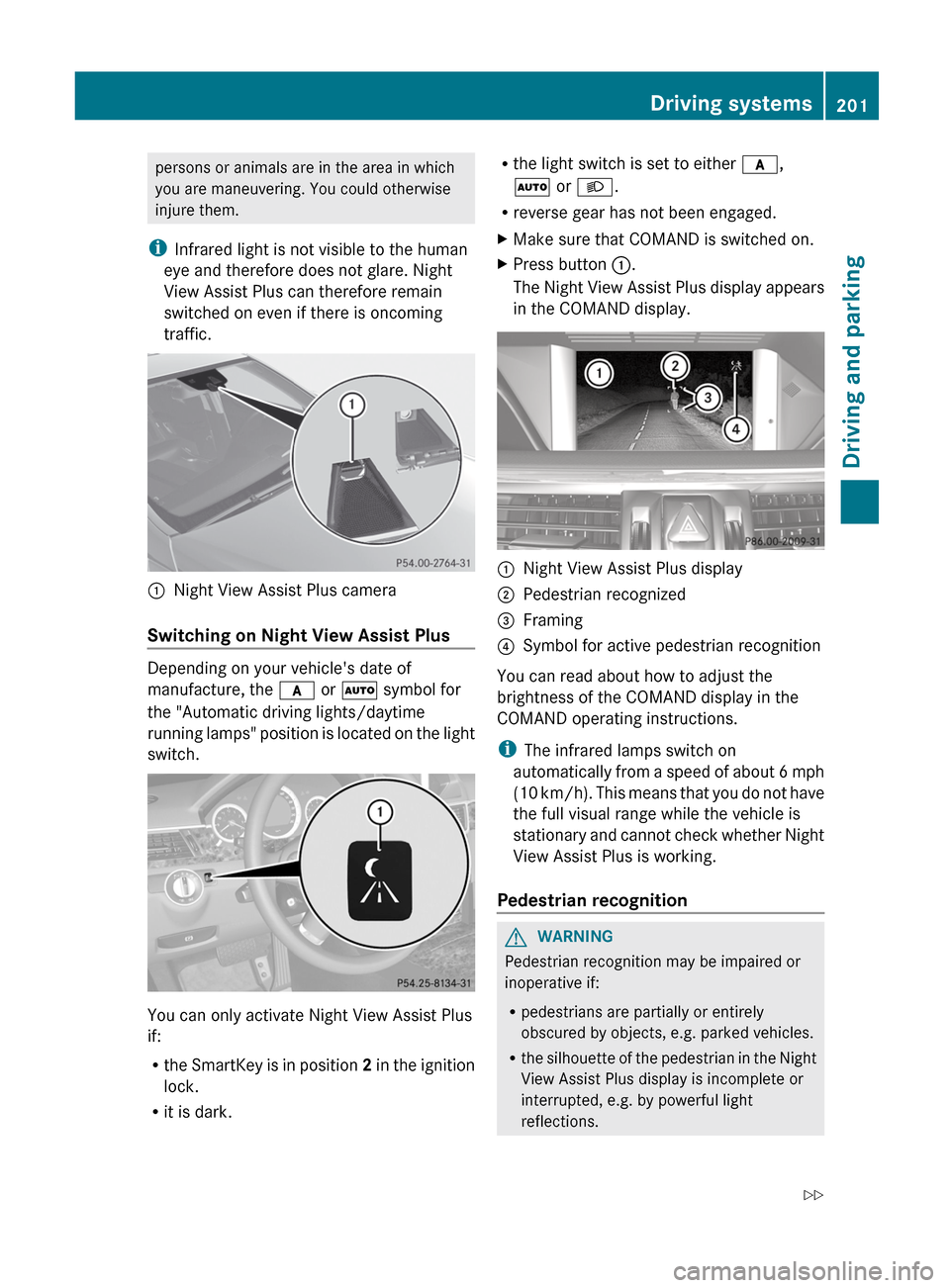
traffic.:Night View Assist Plus camera
Switching on Night View Assist Plus
Depending on your vehicle's date of
manufacture, the c or à symbol for
the "Automatic driving lights/daytime
running lamps" position is located on the light
switch.
You can only activate Night View Assist Plus
if:
R the SmartKey is in position 2 in the ignition
lock.
R it is dark.
Rthe light switch is set to either c,
à or L .
R reverse gear has not been engaged.XMake sure that COMAND is switched on.XPress button :.
The Night View Assist Plus display appears
in the COMAND display.:Night View Assist Plus display;Pedestrian recognized=Framing?Symbol for active pedestrian recognition
You can read about how to adjust the
brightness of the COMAND display in the
COMAND operating instructions.
i The infrared lamps switch on
automatically from a speed of about 6 mph
( 10 km/h). This means that you do not have
the full visual range while the vehicle is
stationary and cannot check whether Night
View Assist Plus is working.
Pedestrian recognition
GWARNING
Pedestrian recognition may be impaired or
inoperative if:
R pedestrians are partially or entirely
obscured by objects, e.g. parked vehicles.
R the silhouette of the pedestrian in the Night
View Assist Plus display is incomplete or
interrupted, e.g. by powerful light
reflections.
Driving systems201Driving and parkingZ
Page 207 of 396
(30 km/h). When the vehicle speed exceeds
20 mph (30 km/h), the indicator lamp goes
out and Blind Spot Assist is ready for use.
When your speed exceeds approximately
20 mph (30 km/h), warning lamp : lights up
red on the corresponding side whenever a
vehicle is detected in the blind spot
monitoring range. This warning is always
given when a vehicle enters the blind spot
monitoring range from behind or from the
side. When you are passing another vehicle,
the warning is emitted only if the difference
in speed is less than 7 mph (12 km/h).
The yellow indicator lamp goes out if reverse
gear is engaged. In this event, Blind Spot
Assist is no longer active.
The brightness of the indicator/warning
lamps is adjusted automatically according to
the ambient light.GWARNING
Blind Spot Assist is not active at speeds under
approximately 20 mph (30 km/h). The
indicator lamps in the exterior mirrors are
yellow. Vehicles in the monitoring range are
then not indicated.
Always pay attention to traffic conditions and
your surroundings. Otherwise, you may fail to
recognize dangers in time, cause an accident
and injure yourself and others.
Collision warning
If a vehicle is detected in the monitoring range
of Blind Spot Assist and you switch on the turn
signal, a double warning tone sounds. Red
warning lamp : flashes. If the turn signal
remains on, detected vehicles are indicated
by the flashing of red warning lamp :. There
are no further warning tones.
Switching on Blind Spot Assist
XMake sure that the radar sensor system
( Y page 229) and Blind Spot Assist(Y page 225) are activated in the on-board
computer.XTurn the SmartKey to position 2 in the
ignition lock.
Warning lamps : light up red in the
exterior mirrors for approximately 1.5
seconds and then turn yellow.
Lane Keeping Assist
Important safety notes
Lane Keeping Assist monitors the area in
front of your vehicle by means of a camera at
the top of the windshield. Lane Keeping Assist
detects lane markings on the road and warns
you before you leave your lane
unintentionally.
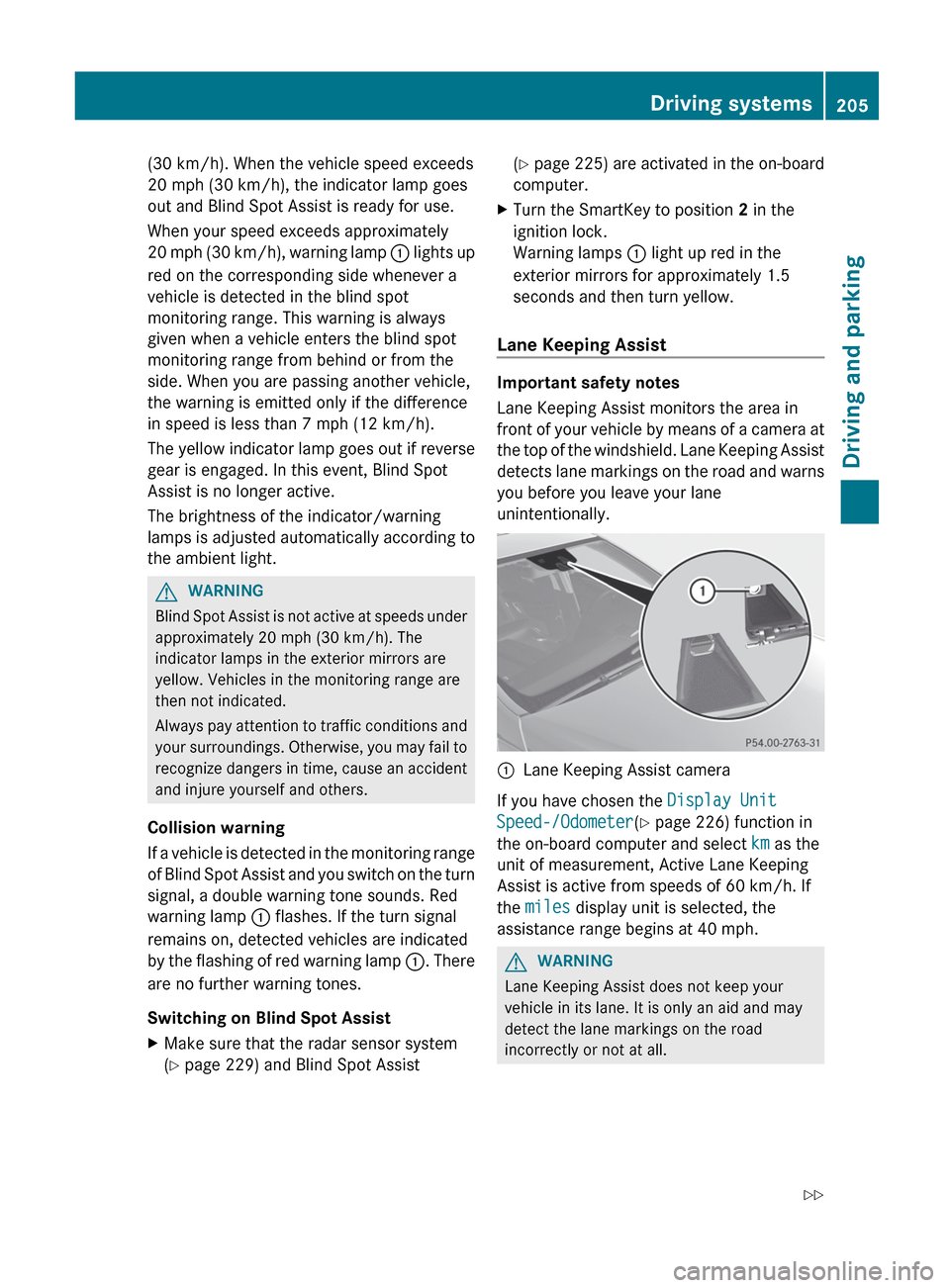
:Lane Keeping Assist camera
If you have chosen the Display Unit
Speed-/Odometer (Y page 226) function in
the on-board computer and select km as the
unit of measurement, Active Lane Keeping
Assist is active from speeds of 60 km/h. If
the miles display unit is selected, the
assistance range begins at 40 mph.
GWARNING
Lane Keeping Assist does not keep your
vehicle in its lane. It is only an aid and may
detect the lane markings on the road
incorrectly or not at all.
Driving systems205Driving and parkingZ
Page 210 of 396
does not brake the vehicle to correct your
course.
If the lanes are very wide, it may not be
possible to monitor the complete width of the
neighboring lane. For this reason, vehicles in
the next lane may not be detected, especially
if they are driving in a staggered formation.
This may be the case if vehicles are driving at
that edge of their lane which is furthest away
from your vehicle.
Always pay attention to traffic conditions and
your surroundings. Otherwise, you may fail to
recognize dangers in time, cause an accident
and injure yourself and others.
If the lanes are narrow, vehicles driving in the
lane beyond the lane next to your vehicle may
be indicated, especially if the vehicles are not
driving in the middle of their lane. This may
be the case if there are vehicles driving at the
inner edge of their lanes.
Due to the nature of the system:
R warnings may be issued in error when
driving close to crash barriers or similar
solid lane borders.
R warnings may be interrupted when driving
alongside long vehicles, such as trucks, for
a prolonged time.
Two Active Blind Spot Assist radar sensors
are integrated into the front and rear bumpers
respectively. An additional radar sensor is
located behind the cover in the radiator grill.
Make sure that the sensor areas on the
bumpers and the sensor cover in the radiator
grill are free of dirt, ice and slush. The rear
sensors must not be covered, for example by
cycle racks or overhanging cargo. Following
a severe impact or in the event of damage to
the bumpers, have the function of the radar
sensors checked at a qualified specialist
workshop. Blind Spot Assist may otherwise
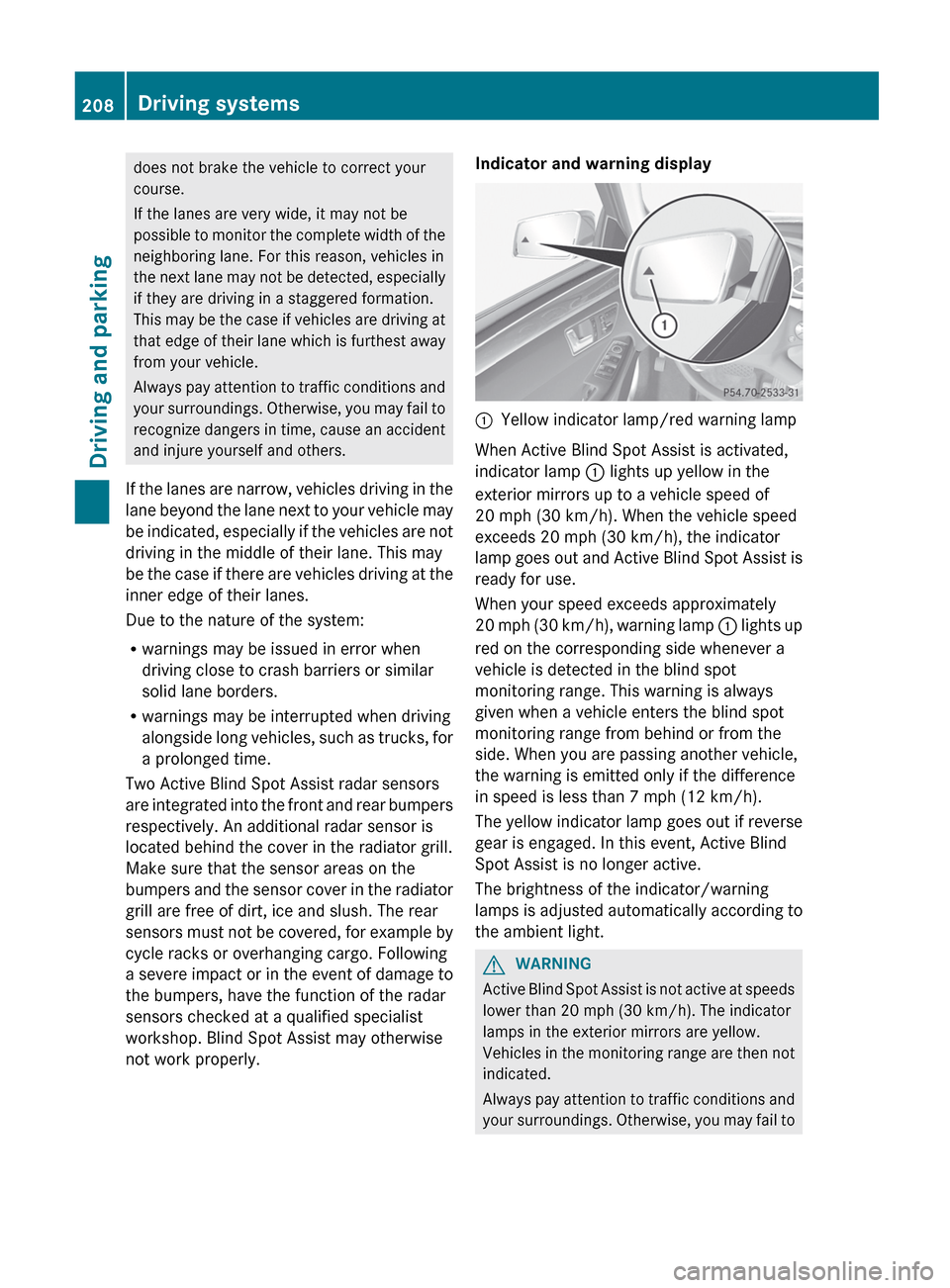
not work properly.Indicator and warning display:Yellow indicator lamp/red warning lamp
When Active Blind Spot Assist is activated,
indicator lamp : lights up yellow in the
exterior mirrors up to a vehicle speed of
20 mph (30 km/h). When the vehicle speed
exceeds 20 mph (30 km/h), the indicator
lamp goes out and Active Blind Spot Assist is
ready for use.
When your speed exceeds approximately
20 mph (30 km/h), warning lamp : lights up
red on the corresponding side whenever a
vehicle is detected in the blind spot
monitoring range. This warning is always
given when a vehicle enters the blind spot
monitoring range from behind or from the
side. When you are passing another vehicle,
the warning is emitted only if the difference
in speed is less than 7 mph (12 km/h).
The yellow indicator lamp goes out if reverse
gear is engaged. In this event, Active Blind
Spot Assist is no longer active.
The brightness of the indicator/warning
lamps is adjusted automatically according to
the ambient light.
GWARNING
Active Blind Spot Assist is not active at speeds
lower than 20 mph (30 km/h). The indicator
lamps in the exterior mirrors are yellow.
Vehicles in the monitoring range are then not
indicated.
Always pay attention to traffic conditions and
your surroundings. Otherwise, you may fail to
208Driving systemsDriving and parking