high beam MERCEDES-BENZ E-Class SEDAN 2015 W212 User Guide
[x] Cancel search | Manufacturer: MERCEDES-BENZ, Model Year: 2015, Model line: E-Class SEDAN, Model: MERCEDES-BENZ E-Class SEDAN 2015 W212Pages: 426, PDF Size: 8.27 MB
Page 137 of 426
Only operate bulbs in enclosed lamps
designed for that purpose. Only install spare
bulbs of the same type and the specified volt-
age.
Marks on the glass tube reduce the service
life of the bulbs. Do not touch the glass tube
with your bare hands. If necessary, clean the glass tube when cold with alcohol or spirit and
rub it off with a lint-free cloth.
Protect bulbs from moisture during opera-
tion. Do not allow bulbs to come into contact
with liquids.
Replace only the bulbs listed (Y page 135).
Have the bulbs that you cannot replace your-
self changed at a qualified specialist work-
shop.
If you require assistance changing bulbs, con- sult a qualified specialist workshop.
If the new bulb still does not light up, consult
a qualified specialist workshop.
Bulbs and lamps are an important aspect of
vehicle safety. You must therefore make sure that these function correctly at all times.
Have the headlamp setting checked regularly.
Vehicles with static LED headlamps
The front and rear light clusters of your vehi-
cle are equipped with LED light bulbs. Do not replace the bulbs yourself. Contact a qualified
specialist workshop which has the necessary specialist knowledge and tools to carry out
the work required.
Lamps are an important aspect of vehicle
safety. You must therefore make sure that
these function correctly at all times. Have the headlamp setting checked regularly. Overview: changing bulbs/bulb types
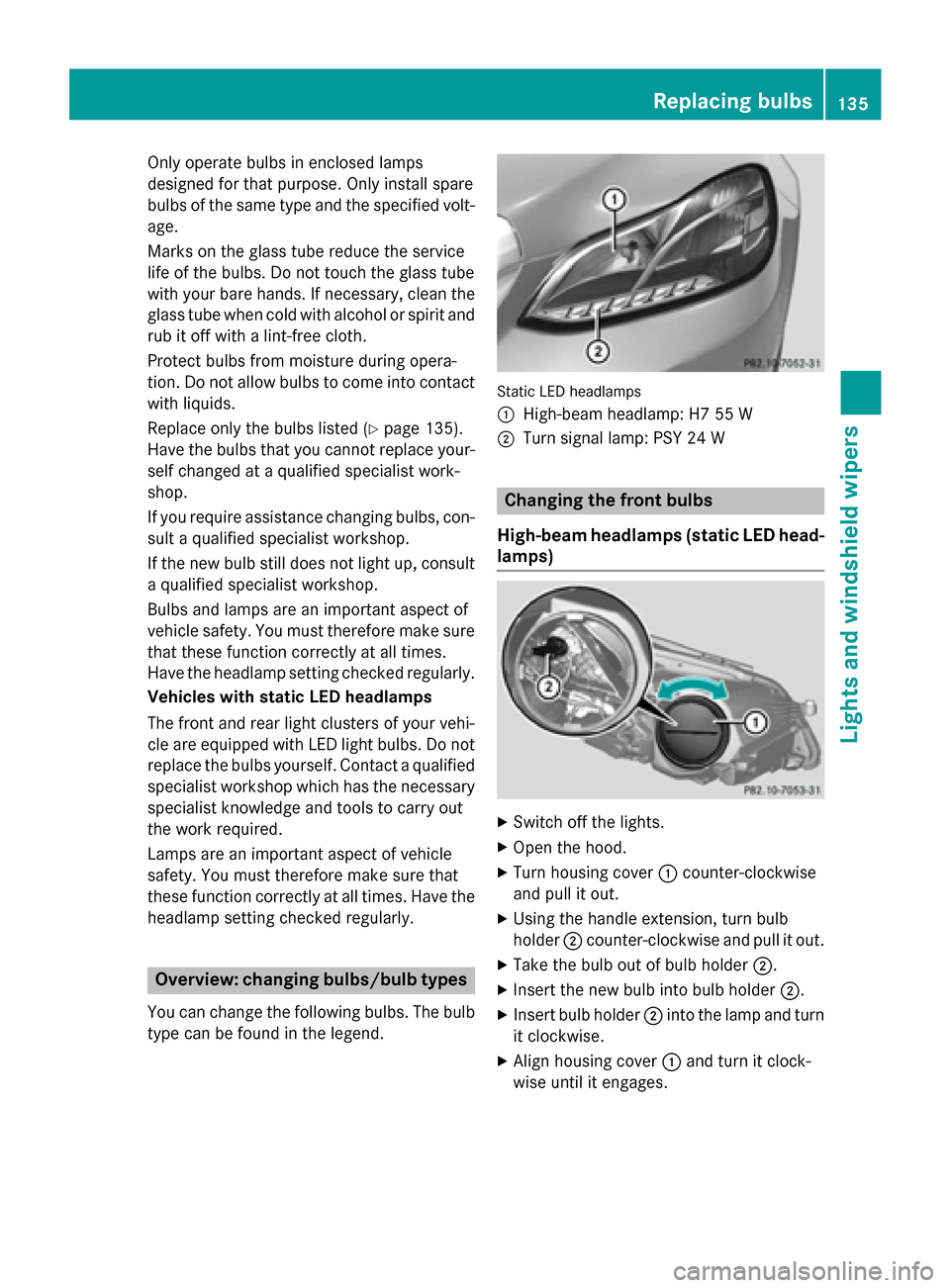
You can change the following bulbs. The bulb type can be found in the legend. Static LED headlamps
0043
High-beam headlamp: H7 55 W
0044 Turn signal lamp: PSY 24 W Changing the front bulbs
High-beam headlamps (static LED head- lamps) X
Switch off the lights.
X Open the hood.
X Turn housing cover 0043counter-clockwise
and pull it out.
X Using the handle extension, turn bulb
holder 0044counter-clockwise and pull it out.
X Take the bulb out of bulb holder 0044.
X Insert the new bulb into bulb holder 0044.
X Insert bulb holder 0044into the lamp and turn
it clockwise.
X Align housing cover 0043and turn it clock-
wise until it engages. Replacing bulbs
135Lights and windshield wipers Z
Page 237 of 426
Text field
0043shows the selected menu or
submenu as well as display messages.
The following messages may appear in the
multifunction display:
0097 Gearshift recommendation when
shifting manually (Y page 171)
0095005D0096 Active Parking Assist (Y page 209)
CRUISE
CRUISE Cruise control (Y
page 187)
00CE Adaptive Highbeam Assist
(Ypage 133)
00A7 ECO start/stop function
(Ypage 161)
00D9 HOLD function (Y page 200) Menus and submenus
Menu overview
Press the 0059or0065 button on the steer-
ing wheel to call up the menu bar and select a
menu.
Operating the on-board computer
(Y page 233).
Depending on the equipment installed in the
vehicle, you can call up the following menus:
R Trip Trip menu (Y page 235)
R Navi
Navi menu (navigation instructions)
(Y page 237)
R Audio
Audio menu (Y page 238)
R Tel
Tel menu (telephone) (Y page 239)
R DriveAssist
DriveAssist menu (assistance)
(Y page 240)
R Serv
Serv menu (Y page 243)
R Sett
Sett menu (settings) (Y page 243)
R AMG
AMG menu in AMG vehicles (Y page 247) Trip menu
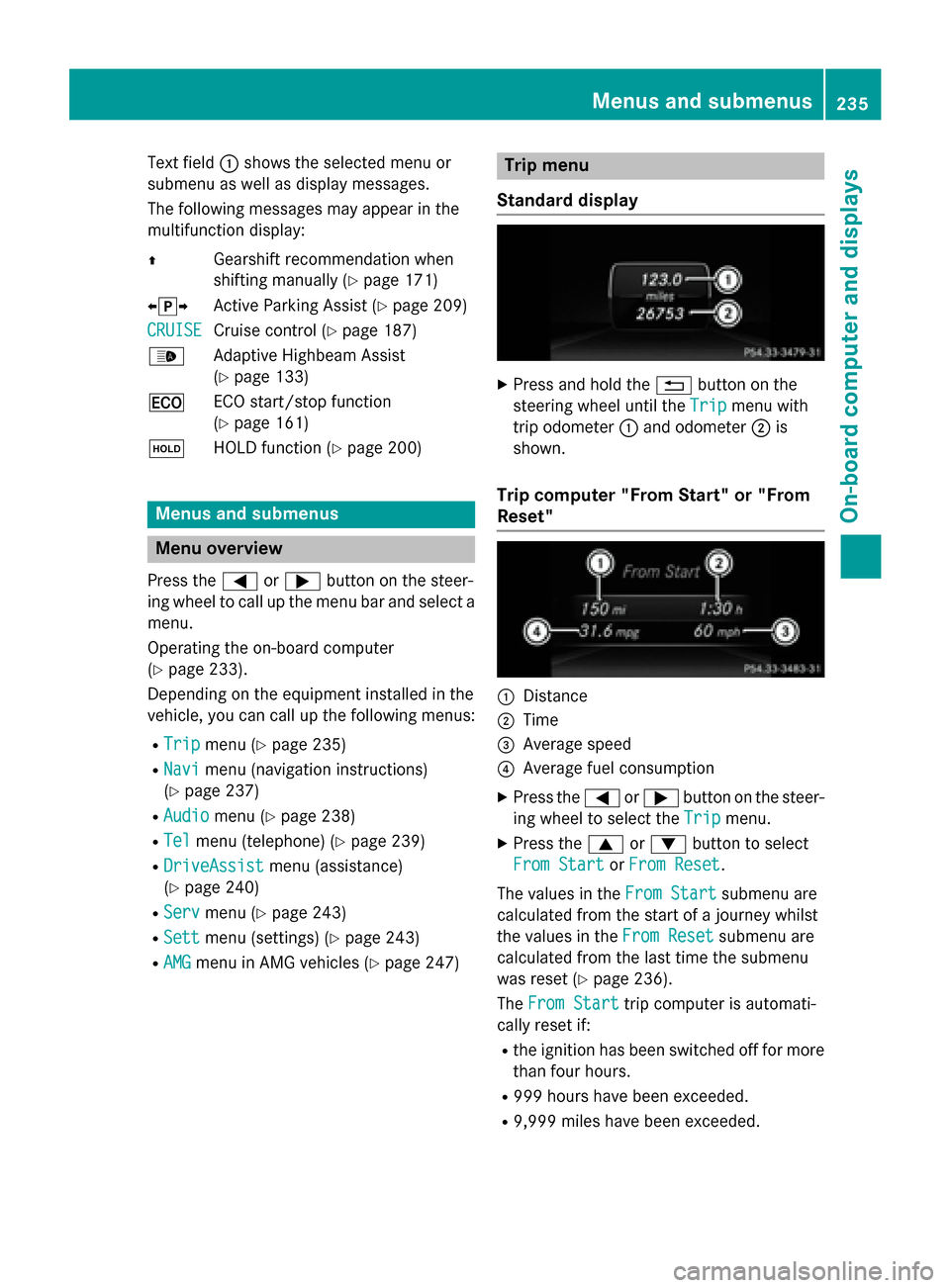
Standard display X
Press and hold the 0038button on the
steering wheel until the Trip
Tripmenu with
trip odometer 0043and odometer 0044is
shown.
Trip computer "From Start" or "From
Reset" 0043
Distance
0044 Time
0087 Average speed
0085 Average fuel consumption
X Press the 0059or0065 button on the steer-
ing wheel to select the Trip Tripmenu.
X Press the 0063or0064 button to select
From Start
From Start orFrom Reset
From Reset.
The values in the From Start
From Startsubmenu are
calculated from the start of a journey whilst
the values in the From Reset From Resetsubmenu are
calculated from the last time the submenu
was reset (Y page 236).
The From Start From Start trip computer is automati-
cally reset if:
R the ignition has been switched off for more
than four hours.
R 999 hours have been exceeded.
R 9,999 miles have been exceeded. Menus and submenus
235On-board computer and displays Z
Page 264 of 426
Display messages
Possible causes/consequences and
0050
0050Solutions 0049
Check Left Mirror Check Left Mirror
Turn Signal Turn Signal
or
Check
Check Right
RightMirror
Mirror
Turn Signal
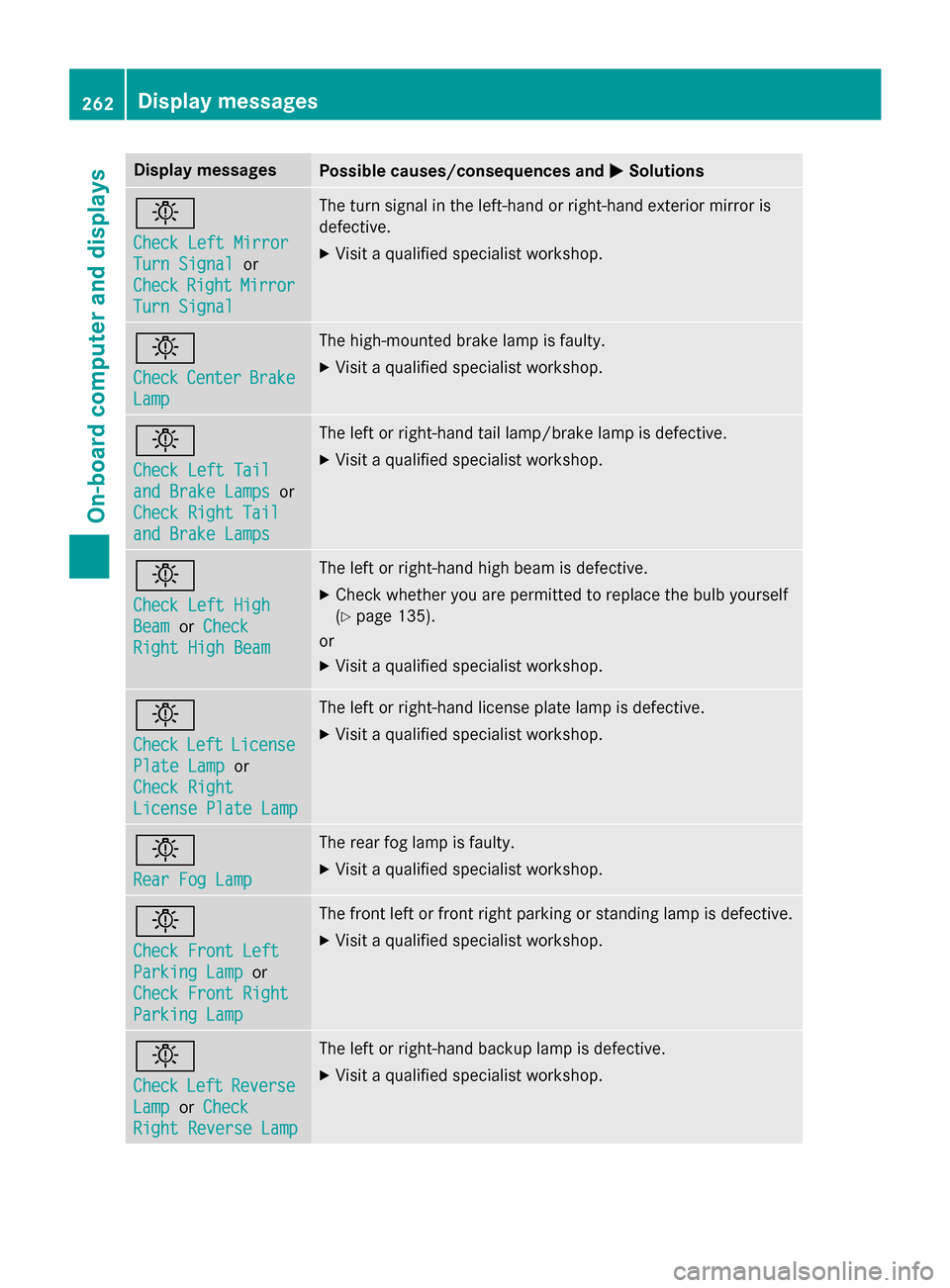
Turn Signal The turn signal in the left-hand or right-hand exterior mirror is
defective.
X Visit a qualified specialist workshop. 0049
Check Check
Center
Center Brake
Brake
Lamp
Lamp The high-mounted brake lamp is faulty.
X
Visit a qualified specialist workshop. 0049
Check Left Tail Check Left Tail
and Brake Lamps and Brake Lamps
or
Check Right Tail
Check Right Tail
and Brake Lamps and Brake Lamps The left or right-hand tail lamp/brake lamp is defective.
X Visit a qualified specialist workshop. 0049
Check Left High Check Left High
Beam Beam
orCheck
Check
Right High Beam
Right High Beam The left or right-hand high beam is defective.
X Check whether you are permitted to replace the bulb yourself
(Y page 135).
or
X Visit a qualified specialist workshop. 0049
Check Check
Left
LeftLicense
License
Plate Lamp
Plate Lamp or
Check Right
Check Right
License Plate Lamp License Plate Lamp The left or right-hand license plate lamp is defective.
X Visit a qualified specialist workshop. 0049
Rear Fog Lamp Rear Fog Lamp The rear fog lamp is faulty.
X Visit a qualified specialist workshop. 0049
Check Front Left Check Front Left
Parking Lamp Parking Lamp
or
Check Front Right
Check Front Right
Parking Lamp Parking Lamp The front left or front right parking or standing lamp is defective.
X Visit a qualified specialist workshop. 0049
Check Check
Left
LeftReverse
Reverse
Lamp
Lamp orCheck
Check
Right Reverse Lamp
Right Reverse Lamp The left or right-hand backup lamp is defective.
X Visit a qualified specialist workshop. 262
Display
messagesOn-board computer and displays
Page 266 of 426
Display messages
Possible causes/consequences and
0050
0050Solutions Adaptive Highbeam
Adaptive Highbeam
Assist Currently Assist Currently
Unavailable See Unavailable See
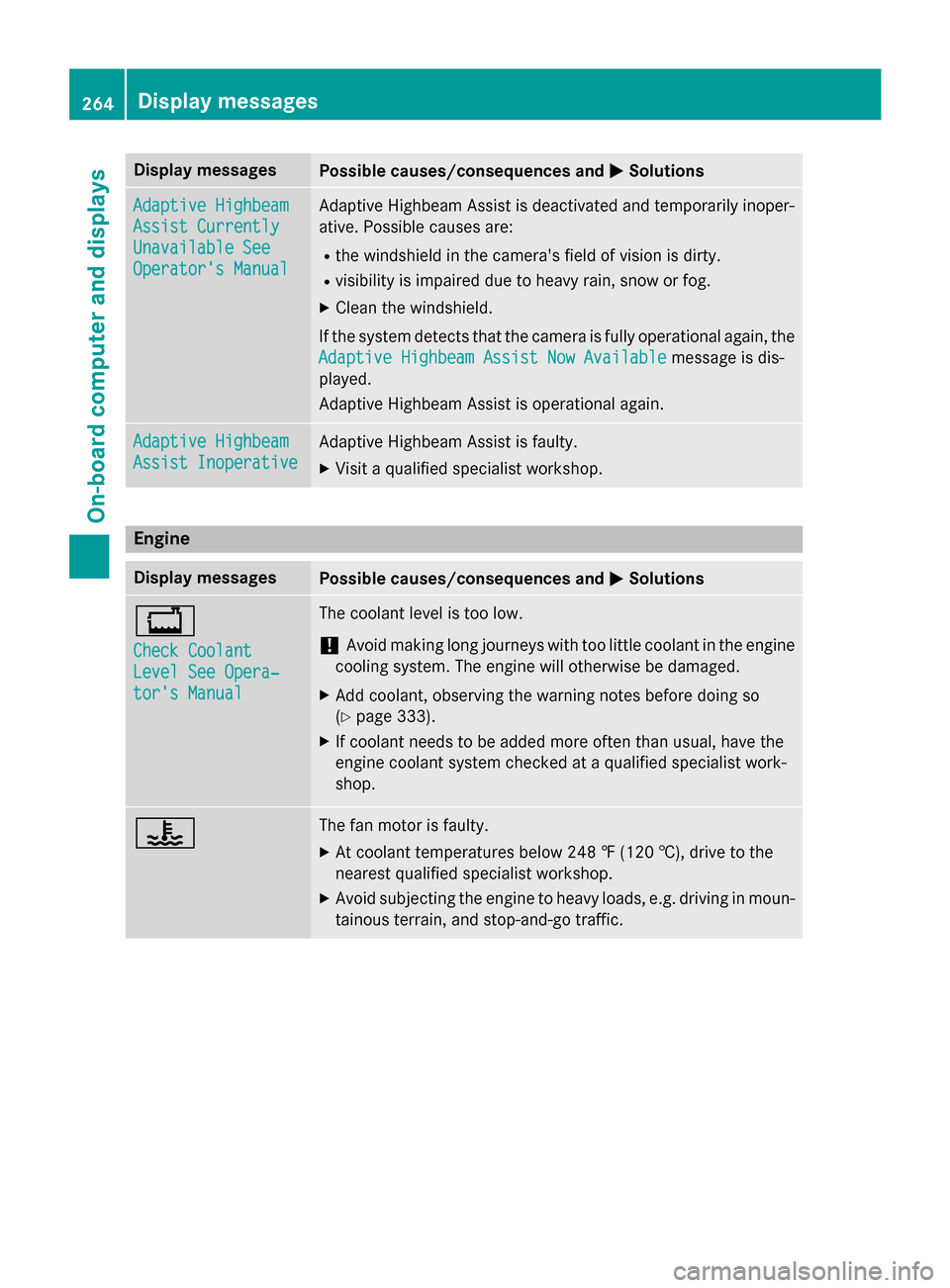
Operator's Manual Operator's Manual Adaptive Highbeam Assist is deactivated and temporarily inoper-
ative. Possible causes are:
R the windshield in the camera's field of vision is dirty.
R visibility is impaired due to heavy rain, snow or fog.
X Clean the windshield.
If the system detects that the camera is fully operational again, the
Adaptive Highbeam Assist Now Available
Adaptive Highbeam Assist Now Available message is dis-
played.
Adaptive Highbeam Assist is operational again. Adaptive Highbeam Adaptive Highbeam
Assist Inoperative Assist Inoperative Adaptive Highbeam Assist is faulty.
X
Visit a qualified specialist workshop. Engine
Display messages
Possible causes/consequences and
0050 0050Solutions 00BD
Check Coolant Check Coolant
Level See Opera‐ Level See Opera‐
tor's Manual tor's Manual The coolant level is too low.
! Avoid making long journeys with too little coolant in the engine
cooling system. The engine will otherwise be damaged.
X Add coolant, observing the warning notes before doing so
(Y page 333).
X If coolant needs to be added more often than usual, have the
engine coolant system checked at a qualified specialist work-
shop. 00AC The fan motor is faulty.
X At coolant temperatures below 248 ‡ (120 †), drive to the
nearest qualified specialist workshop.
X Avoid subjecting the engine to heavy loads, e.g. driving in moun-
tainous terrain, and stop-and-go traffic. 264
Display
messagesOn-board computer and displays