RON MERCEDES-BENZ E-Class SEDAN 2015 W212 Repair Manual
[x] Cancel search | Manufacturer: MERCEDES-BENZ, Model Year: 2015, Model line: E-Class SEDAN, Model: MERCEDES-BENZ E-Class SEDAN 2015 W212Pages: 426, PDF Size: 8.27 MB
Page 114 of 426
!
Make sure that there are no objects in the
footwell under or behind the seats when
moving the seats back. There is a risk that
the seats and/or the objects could be dam- aged.
i The head restraints in the front seats are
installed with the NECK-PRO system
(Y page 59). For this reason, it is not pos-
sible to remove the head restraints from
the front seats.
Vehicles without the through-loading fea-
ture: the head restraints cannot be
removed from the rear compartment seats.
For more information, contact a qualified
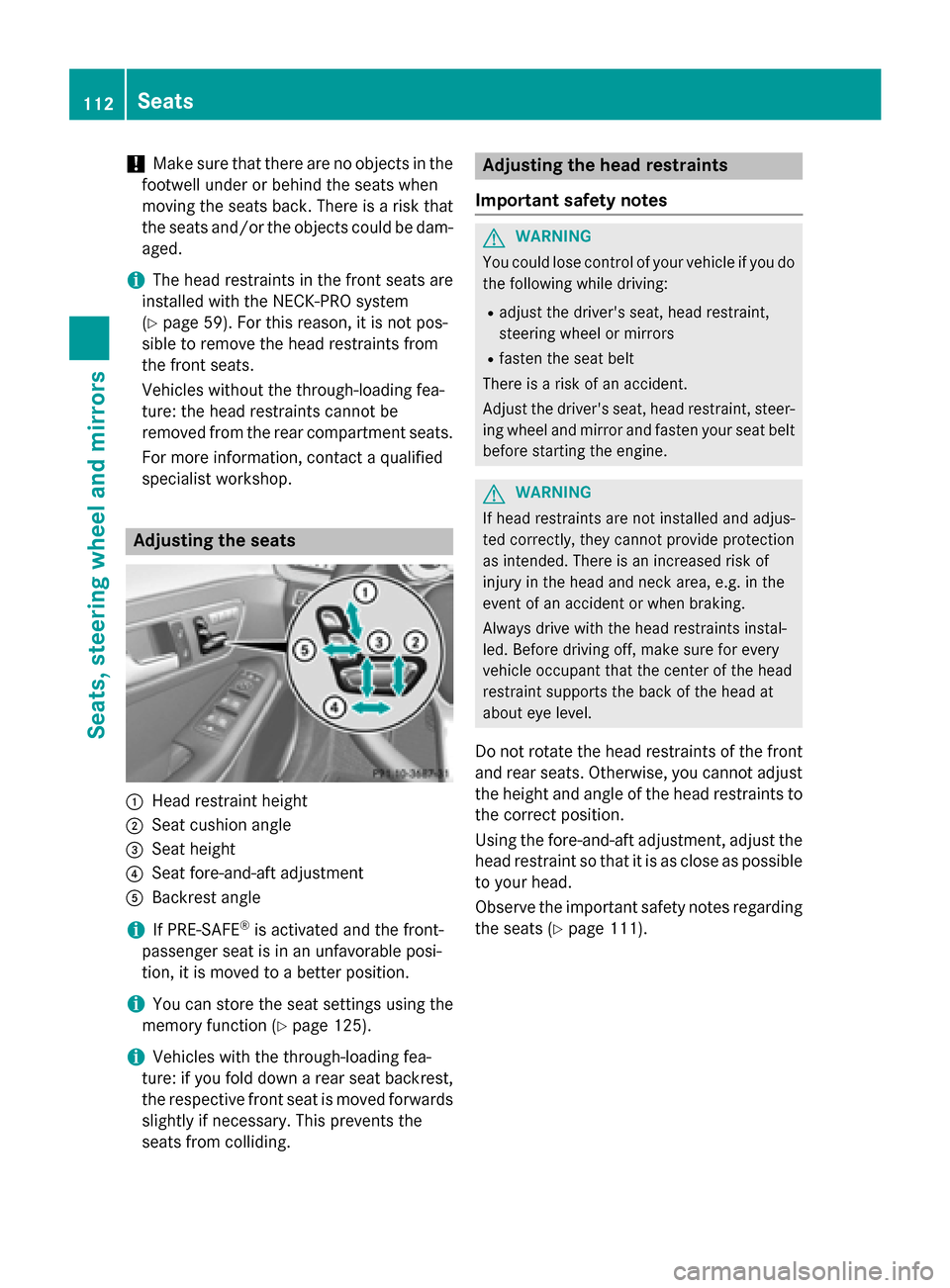
specialist workshop. Adjusting the seats
0043
Head restraint height
0044 Seat cushion angle
0087 Seat height
0085 Seat fore-and-aft adjustment
0083 Backrest angle
i If PRE-SAFE ®
is activated and the front-
passenger seat is in an unfavorable posi-
tion, it is moved to a better position.
i You can store the seat settings using the
memory function (Y page 125).
i Vehicles with the through-loading fea-
ture: if you fold down a rear seat backrest,
the respective front seat is moved forwards slightly if necessary. This prevents the
seats from colliding. Adjusting the head restraints
Important safety notes G
WARNING
You could lose control of your vehicle if you do the following while driving:
R adjust the driver's seat, head restraint,
steering wheel or mirrors
R fasten the seat belt
There is a risk of an accident.
Adjust the driver's seat, head restraint, steer-
ing wheel and mirror and fasten your seat belt before starting the engine. G
WARNING
If head restraints are not installed and adjus-
ted correctly, they cannot provide protection
as intended. There is an increased risk of
injury in the head and neck area, e.g. in the
event of an accident or when braking.
Always drive with the head restraints instal-
led. Before driving off, make sure for every
vehicle occupant that the center of the head
restraint supports the back of the head at
about eye level.
Do not rotate the head restraints of the front and rear seats. Otherwise, you cannot adjust
the height and angle of the head restraints to
the correct position.
Using the fore-and-aft adjustment, adjust the head restraint so that it is as close as possibleto your head.
Observe the important safety notes regarding
the seats (Y page 111).112
SeatsSeats, steering wheel and mirrors
Page 115 of 426
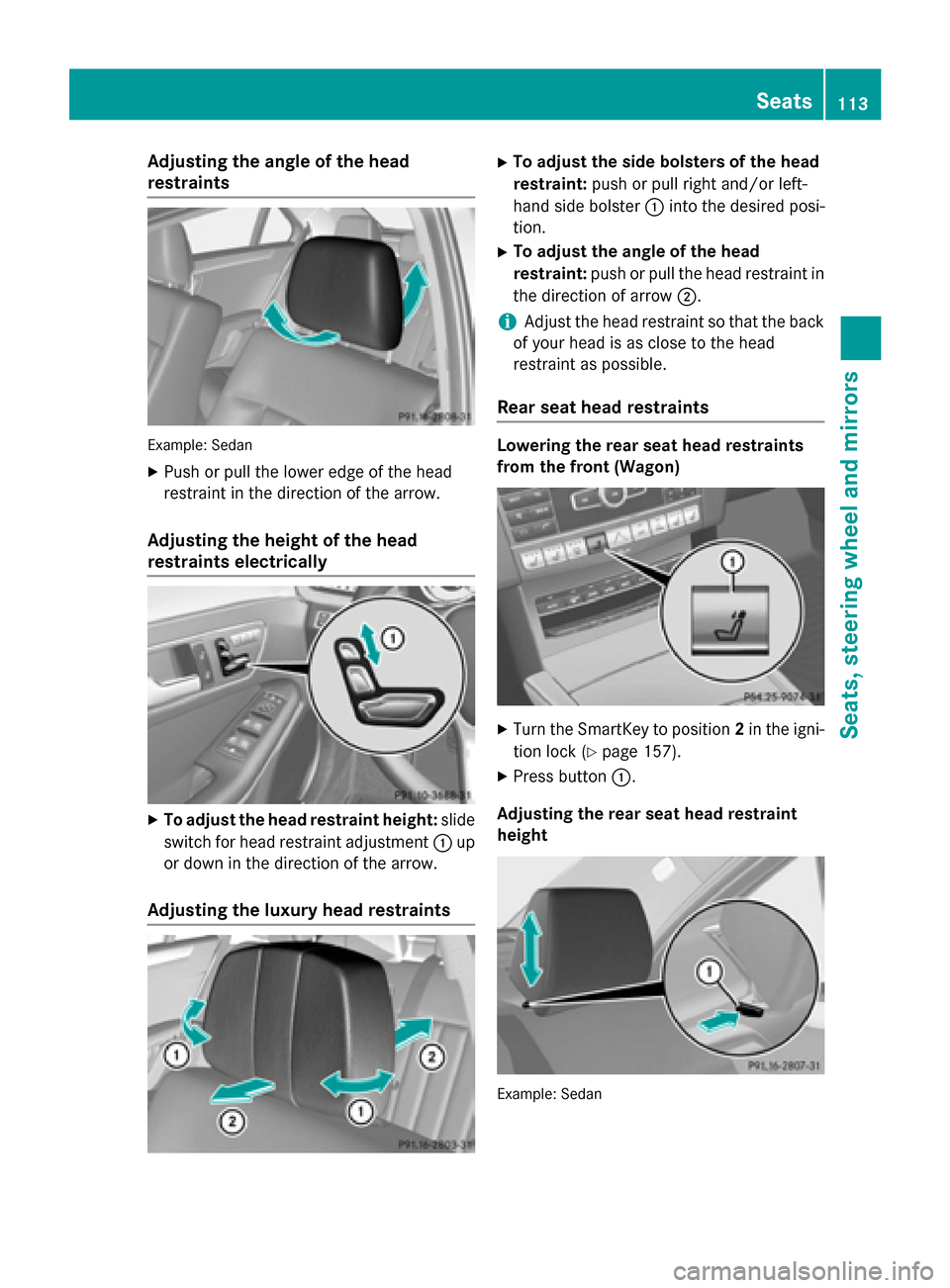
Adjusting the angle of the head
restraints Example: Sedan
X Push or pull the lower edge of the head
restraint in the direction of the arrow.
Adjusting the height of the head
restraints electrically X
To adjust the head restraint height: slide
switch for head restraint adjustment 0043up
or down in the direction of the arrow.
Adjusting the luxury head restraints X
To adjust the side bolsters of the head
restraint: push or pull right and/or left-
hand side bolster 0043into the desired posi-
tion.
X To adjust the angle of the head
restraint: push or pull the head restraint in
the direction of arrow 0044.
i Adjust the head restraint so that the back
of your head is as close to the head
restraint as possible.
Rear seat head restraints Lowering the rear seat head restraints
from the front (Wagon)
X
Turn the SmartKey to position 2in the igni-
tion lock (Y page 157).
X Press button 0043.
Adjusting the rear seat head restraint
height Example: Sedan Seats
113Seats, steering wheel and mirrors Z
Page 117 of 426
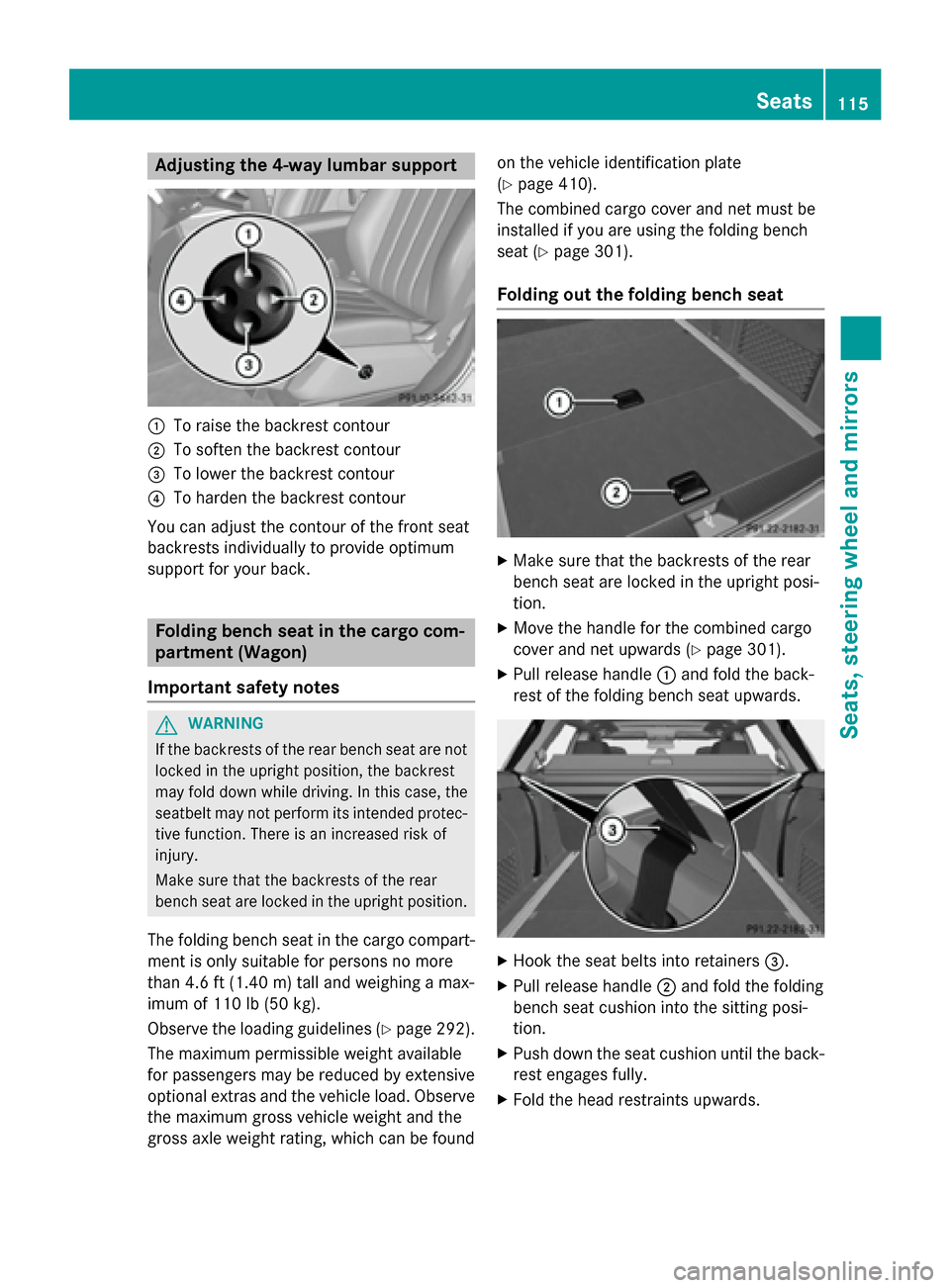
Adjusting the 4-way lumbar support
0043
To raise the backrest contour
0044 To soften the backrest contour
0087 To lower the backrest contour
0085 To harden the backrest contour
You can adjust the contour of the front seat
backrests individually to provide optimum
support for your back. Folding bench seat in the cargo com-
partment (Wagon)
Important safety notes G
WARNING
If the backrests of the rear bench seat are not locked in the upright position, the backrest
may fold down while driving. In this case, the
seatbelt may not perform its intended protec-
tive function. There is an increased risk of
injury.
Make sure that the backrests of the rear
bench seat are locked in the upright position.
The folding bench seat in the cargo compart- ment is only suitable for persons no more
than 4.6 ft (1.40 m) tall and weighing a max-
imum of 110 lb (50 kg).
Observe the loading guidelines (Y page 292).
The maximum permissible weight available
for passengers may be reduced by extensive
optional extras and the vehicle load. Observe the maximum gross vehicle weight and the
gross axle weight rating, which can be found on the vehicle identification plate
(Y
page 410).
The combined cargo cover and net must be
installed if you are using the folding bench
seat (Y page 301).
Folding out the folding bench seat X
Make sure that the backrests of the rear
bench seat are locked in the upright posi-
tion.
X Move the handle for the combined cargo
cover and net upwards (Y page 301).
X Pull release handle 0043and fold the back-
rest of the folding bench seat upwards. X
Hook the seat belts into retainers 0087.
X Pull release handle 0044and fold the folding
bench seat cushion into the sitting posi-
tion.
X Push down the seat cushion until the back-
rest engages fully.
X Fold the head restraints upwards. Seats
115Seats, steering wheel and mirrors Z
Page 119 of 426
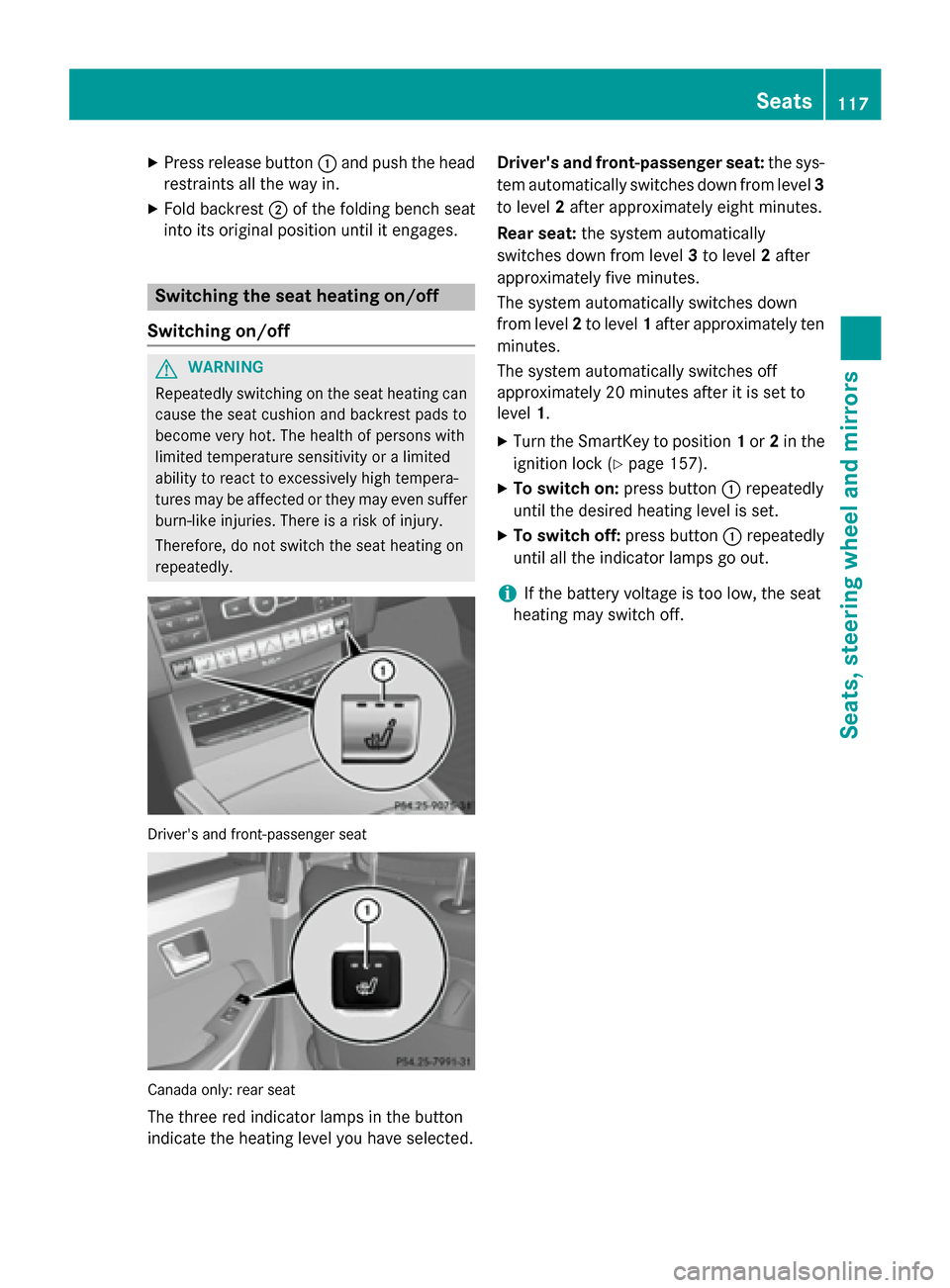
X
Press release button 0043and push the head
restraints all the way in.
X Fold backrest 0044of the folding bench seat
into its original position until it engages. Switching the seat heating on/off
Switching on/off G
WARNING
Repeatedly switching on the seat heating can
cause the seat cushion and backrest pads to
become very hot. The health of persons with
limited temperature sensitivity or a limited
ability to react to excessively high tempera-
tures may be affected or they may even suffer burn-like injuries. There is a risk of injury.
Therefore, do not switch the seat heating on
repeatedly. Driver's and front-passenger seat
Canada only: rear seat
The three red indicator lamps in the button
indicate the heating level you have selected. Driver's and front-passenger seat:
the sys-
tem automatically switches down from level 3
to level 2after approximately eight minutes.
Rear seat: the system automatically
switches down from level 3to level 2after
approximately five minutes.
The system automatically switches down
from level 2to level 1after approximately ten
minutes.
The system automatically switches off
approximately 20 minutes after it is set to
level 1.
X Turn the SmartKey to position 1or 2in the
ignition lock (Y page 157).
X To switch on: press button0043repeatedly
until the desired heating level is set.
X To switch off: press button0043repeatedly
until all the indicator lamps go out.
i If the battery voltage is too low, the seat
heating may switch off. Seats
117Seats, steering wheel and mirrors Z
Page 120 of 426
Problems with the seat heating
Problem
Possible causes/consequences and
0050
0050Solutions The seat heating has
switched off prema-
turely or cannot be
switched on. The on-board voltage is too low because too many electrical con-
sumers are switched on.
X Switch off electrical consumers that you do not need, such as
the rear window defroster or interior lighting.
Once the battery is sufficiently charged, the seat heating will
switch back on automatically. Switching the seat ventilation on/off
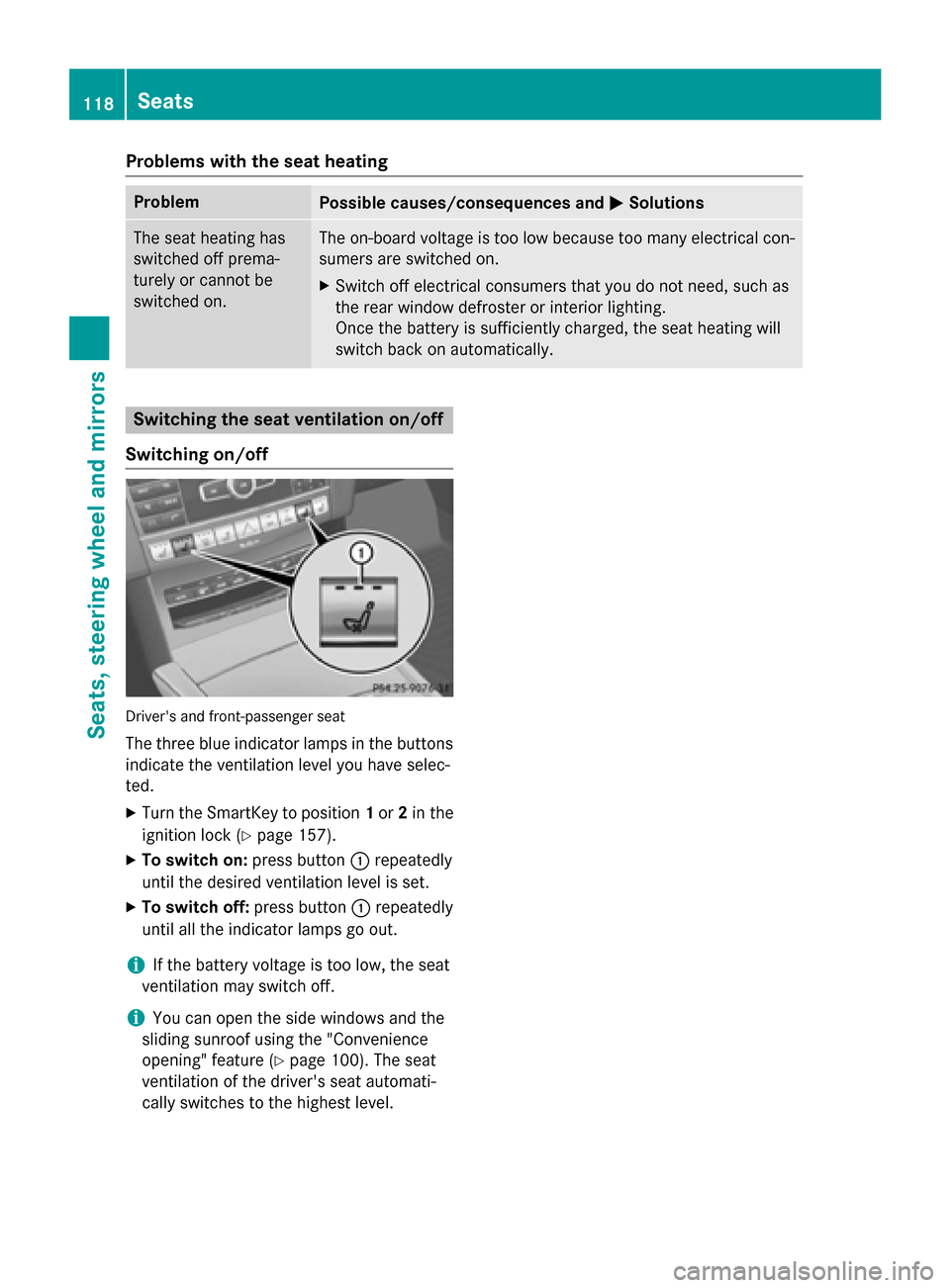
Switching on/off Driver's and front-passenger seat
The three blue indicator lamps in the buttons
indicate the ventilation level you have selec-
ted.
X Turn the SmartKey to position 1or 2in the
ignition lock (Y page 157).
X To switch on: press button0043repeatedly
until the desired ventilation level is set.
X To switch off: press button0043repeatedly
until all the indicator lamps go out.
i If the battery voltage is too low, the seat
ventilation may switch off.
i You can open the side windows and the
sliding sunroof using the "Convenience
opening" feature (Y page 100). The seat
ventilation of the driver's seat automati-
cally switches to the highest level. 118
SeatsSeats, steering wheel and mirrors
Page 124 of 426
When you close the driver's door with the
ignition switched on, the steering wheel is
also automatically moved to the previously
set position.
The last position of the steering wheel is
stored when you switch off the ignition or
when you store the setting with the memory
function (Y page 125).
Crash-responsive EASY-EXIT feature If the crash-responsive EASY-EXIT feature is
triggered in an accident, the steering column
will move upwards when the driver's door is
opened. This occurs irrespective of the posi-
tion of the SmartKey in the ignition lock. This makes it easier to exit the vehicle and rescue the occupants.
The crash-responsive EASY-EXIT feature is
only operational if the EASY-EXIT/ENTRY fea-
ture is activated in the on-board computer
(Y page 246). Mirrors
Rear-view mirror
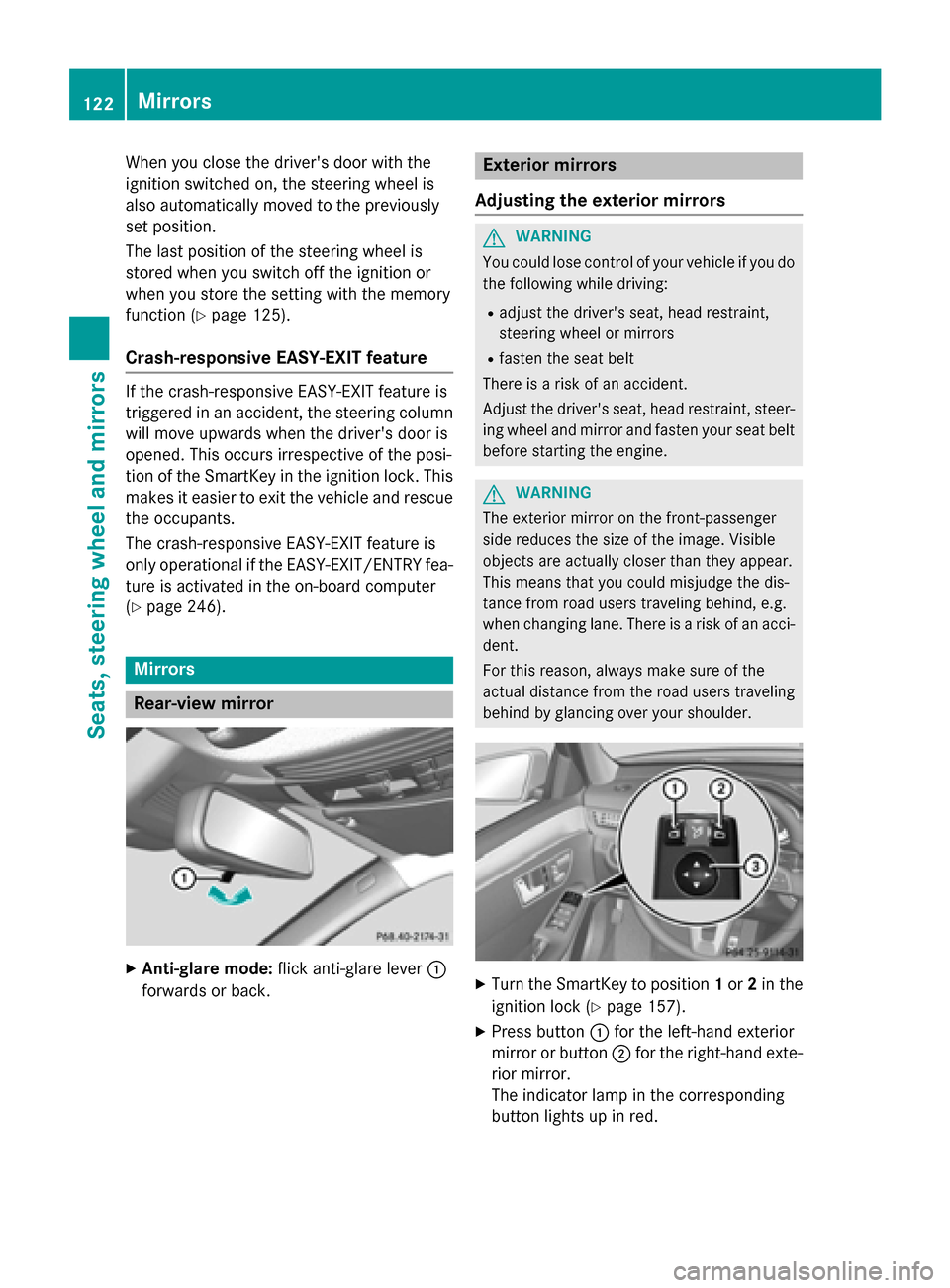
X
Anti-glare mode: flick anti-glare lever 0043
forwards or back. Exterior mirrors
Adjusting the exterior mirrors G
WARNING
You could lose control of your vehicle if you do the following while driving:
R adjust the driver's seat, head restraint,
steering wheel or mirrors
R fasten the seat belt
There is a risk of an accident.
Adjust the driver's seat, head restraint, steer-
ing wheel and mirror and fasten your seat belt before starting the engine. G
WARNING
The exterior mirror on the front-passenger
side reduces the size of the image. Visible
objects are actually closer than they appear.
This means that you could misjudge the dis-
tance from road users traveling behind, e.g.
when changing lane. There is a risk of an acci-
dent.
For this reason, always make sure of the
actual distance from the road users traveling
behind by glancing over your shoulder. X
Turn the SmartKey to position 1or 2in the
ignition lock (Y page 157).
X Press button 0043for the left-hand exterior
mirror or button 0044for the right-hand exte-
rior mirror.
The indicator lamp in the corresponding
button lights up in red. 122
MirrorsSeats, steering wheel and mirrors
Page 125 of 426
The indicator lamp goes out again after
some time. You can adjust the selected
mirror using adjustment button
0087as long
as the indicator lamp is lit.
X Press adjustment button 0087up, down, or to
the left or right until you have adjusted the
exterior mirror to the correct position. You
should have a good overview of traffic con- ditions.
The convex exterior mirrors provide a larger
field of vision.
After the engine has been started, the exte-
rior mirrors are automatically heated if the
rear window defroster is switched on and the
outside temperature is low. Heating takes a
maximum of ten minutes.
i You can also heat up the exterior mirrors
manually by switching on the rear window
defroster.
Folding the exterior mirrors in or out
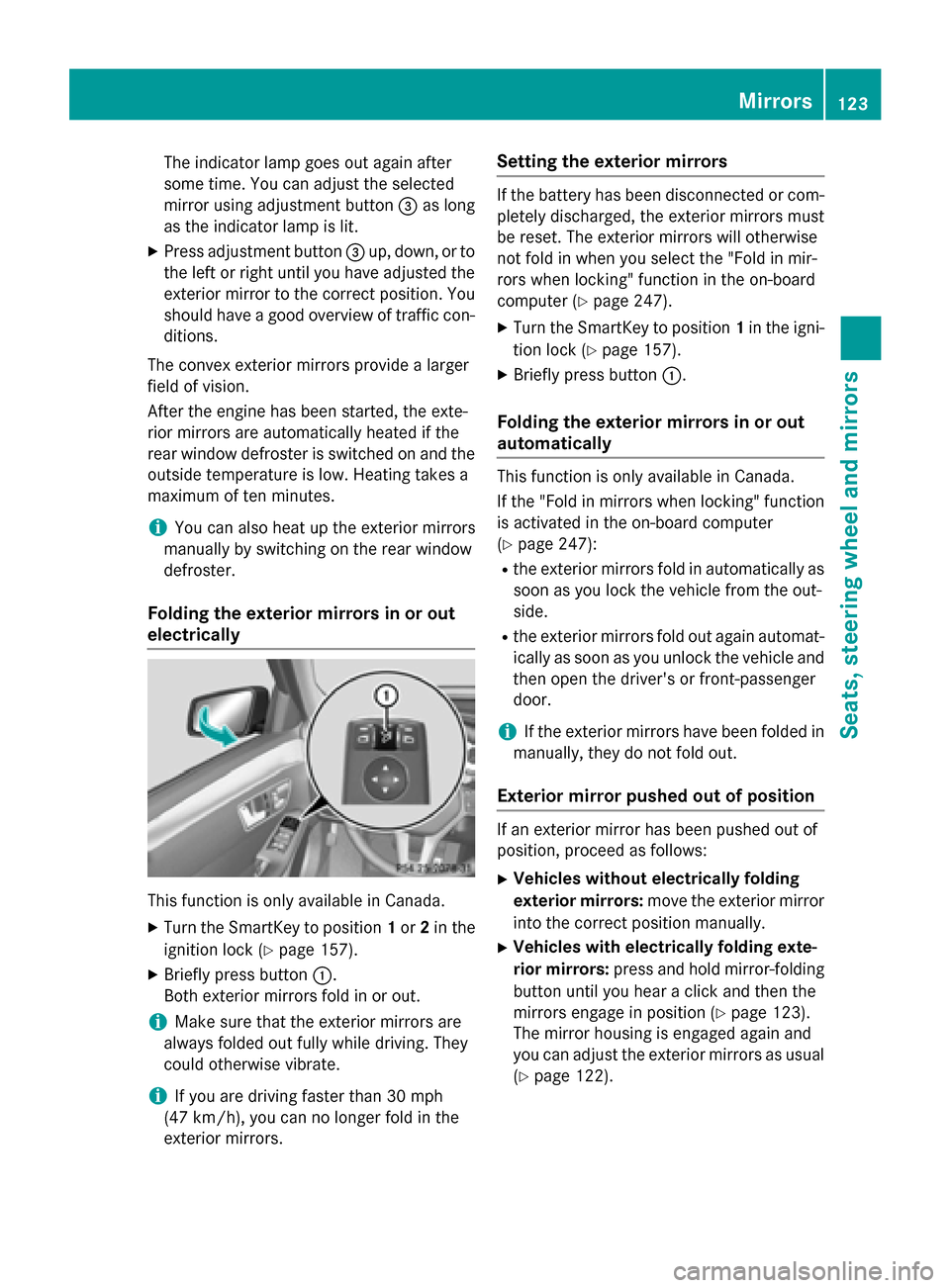
electrically This function is only available in Canada.
X Turn the SmartKey to position 1or 2in the
ignition lock (Y page 157).
X Briefly press button 0043.
Both exterior mirrors fold in or out.
i Make sure that the exterior mirrors are
always folded out fully while driving. They
could otherwise vibrate.
i If you are driving faster than 30 mph
(47 km/h) , you can no longer fold in the
exterior mirrors. Setting the exterior mirrors If the battery has been disconnected or com-
pletely discharged, the exterior mirrors must
be reset. The exterior mirrors will otherwise
not fold in when you select the "Fold in mir-
rors when locking" function in the on-board
computer (Y page 247).
X Turn the SmartKey to position 1in the igni-
tion lock (Y page 157).
X Briefly press button 0043.
Folding the exterior mirrors in or out
automatically This function is only available in Canada.
If the "Fold in mirrors when locking" function
is activated in the on-board computer
(Y page 247):
R the exterior mirrors fold in automatically as
soon as you lock the vehicle from the out-
side.
R the exterior mirrors fold out again automat-
ically as soon as you unlock the vehicle and
then open the driver's or front-passenger
door.
i If the exterior mirrors have been folded in
manually, they do not fold out.
Exterior mirror pushed out of position If an exterior mirror has been pushed out of
position, proceed as follows:
X Vehicles without electrically folding
exterior mirrors: move the exterior mirror
into the correct position manually.
X Vehicles with electrically folding exte-
rior mirrors: press and hold mirror-folding
button until you hear a click and then the
mirrors engage in position (Y page 123).
The mirror housing is engaged again and
you can adjust the exterior mirrors as usual
(Y page 122). Mirrors
123Seats, steering wheel and mirrors Z
Page 126 of 426
Automatic anti-glare mirrors
G
WARNING
Electrolyte may escape if the glass in an auto- matic anti-glare mirror breaks. The electrolyte
is harmful and causes irritation. It must not
come into contact with your skin, eyes, res-
piratory organs or clothing or be swallowed.
There is a risk of injury.
If you come into contact with the electrolyte,
observe the following:
R Rinse off the electrolyte from your skin
immediately with water.
R Immediately rinse the electrolyte out of
your eyes thoroughly with clean water.
R If the electrolyte is swallowed, immediately
rinse your mouth out thoroughly. Do not
induce vomiting.
R If electrolyte comes into contact with your
skin or hair or is swallowed, seek medical
attention immediately.
R Immediately change out of clothing which
has come into contact with electrolyte.
R If an allergic reaction occurs, seek medical
attention immediately.
The rear-view mirror and the exterior mirror
on the driver's side automatically go into anti-
glare mode if the following conditions are met simultaneously:
R the ignition is switched on and
R incident light from headlamps strikes the
sensor in the rear-view mirror
The mirrors do not go into anti-glare mode if
reverse gear is engaged or if the interior light-
ing is switched on. Parking position for the exterior mir-
ror on the front-passenger side
Setting and storing the parking position Using reverse gear
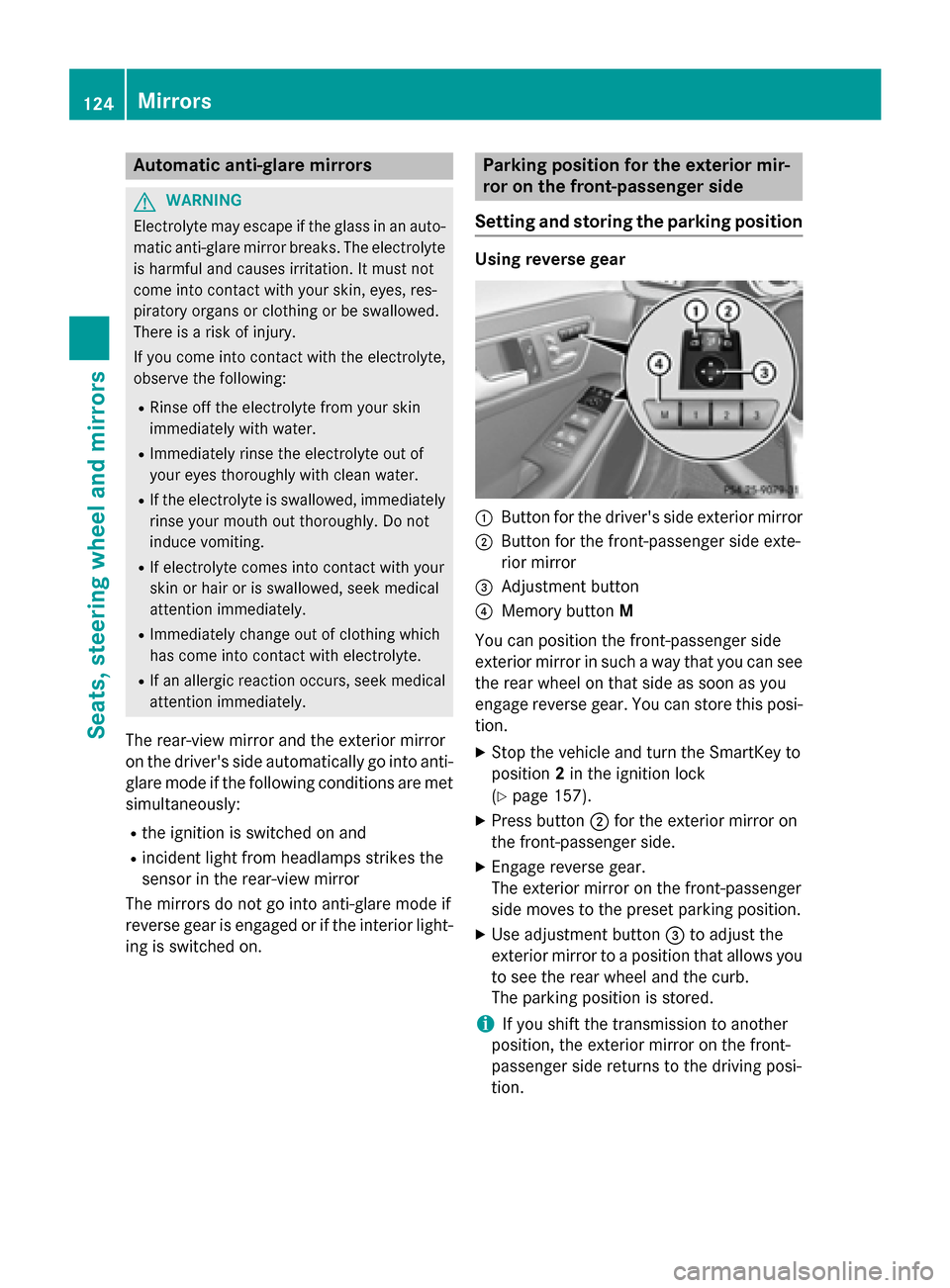
0043
Button for the driver's side exterior mirror
0044 Button for the front-passenger side exte-
rior mirror
0087 Adjustment button
0085 Memory button M
You can position the front-passenger side
exterior mirror in such a way that you can see
the rear wheel on that side as soon as you
engage reverse gear. You can store this posi-
tion.
X Stop the vehicle and turn the SmartKey to
position 2in the ignition lock
(Y page 157).
X Press button 0044for the exterior mirror on
the front-passenger side.
X Engage reverse gear.
The exterior mirror on the front-passenger
side moves to the preset parking position.
X Use adjustment button 0087to adjust the
exterior mirror to a position that allows you to see the rear wheel and the curb.
The parking position is stored.
i If you shift the transmission to another
position, the exterior mirror on the front-
passenger side returns to the driving posi-
tion. 124
MirrorsSeats
, steering wheel and mirrors
Page 127 of 426
Using the memory button
You can position the front-passenger side
exterior mirror in such a way that you can see
the rear wheel on that side as soon as you
engage reverse gear. This setting can be
stored using memory button M0085.
X Turn the SmartKey to position 2in the igni-
tion lock (Y page 157).
X With the exterior mirror on the front-
passenger side activated, use adjustment
button 0087to adjust the exterior mirror. In
the exterior mirror, the rear wheel and the
curb should be visible.
X Press memory button M0085 and one of the
arrows on adjustment button 0087within
three seconds.
The parking position is stored if the exterior
mirror does not move.
X If the mirror moves out of position, repeat
these steps.
Calling up a stored parking position set- ting X
Turn the SmartKey to position 2in the igni-
tion lock (Y page 157).
X Adjust the exterior mirror on the front-
passenger side using button 0044.
X Engage reverse gear.
The exterior mirror on the front-passenger
side moves to the stored parking position.
The exterior mirror on the front-passenger
side moves back to its original position:
R as soon as you exceed a speed of 9 mph
(15 km/ h)
R if you press button 0043for the exterior mir-
ror on the driver's side Memory function
Storing settings
G
WARNING
If you use the memory function on the driver's side while driving, you could lose control of the vehicle as a result of the adjustments
being made. There is a risk of an accident.
Only use the memory function on the driver's
side when the vehicle is stationary. G
WARNING
Children could become trapped if they acti-
vate the memory function, particularly when
unattended. There is a risk of injury.
When leaving the vehicle, always take the
SmartKey with you and lock the vehicle. Never leave children unsupervised in the vehicle. G
WARNING
When the memory function adjusts the seat or steering wheel, you and other vehicle occu-
pants – particularly children – could become
trapped. There is a risk of injury.
While the memory function is making adjust-
ments, make sure that no one has any body
parts in the sweep of the seat or steering
wheel. If somebody becomes trapped, imme-
diately release the memory function position
button. The adjustment process is stopped.
The memory function can be used at any time,
e.g. even when the SmartKey isn't in the igni- tion lock.
With the memory function, you can store up
to three different settings, e.g. for three dif-
ferent people.
The following settings are stored as a single
memory preset:
R position of the seat, backrest and head
restraint
R active multicontour seat: seat contour,
dynamic function level
R driver's side: position of the exterior mir-
rors on the driver's and front-passenger
sides Memory function
125Seats, steering wheel and mirrors Z
Page 134 of 426
Adaptive Highbeam Assist
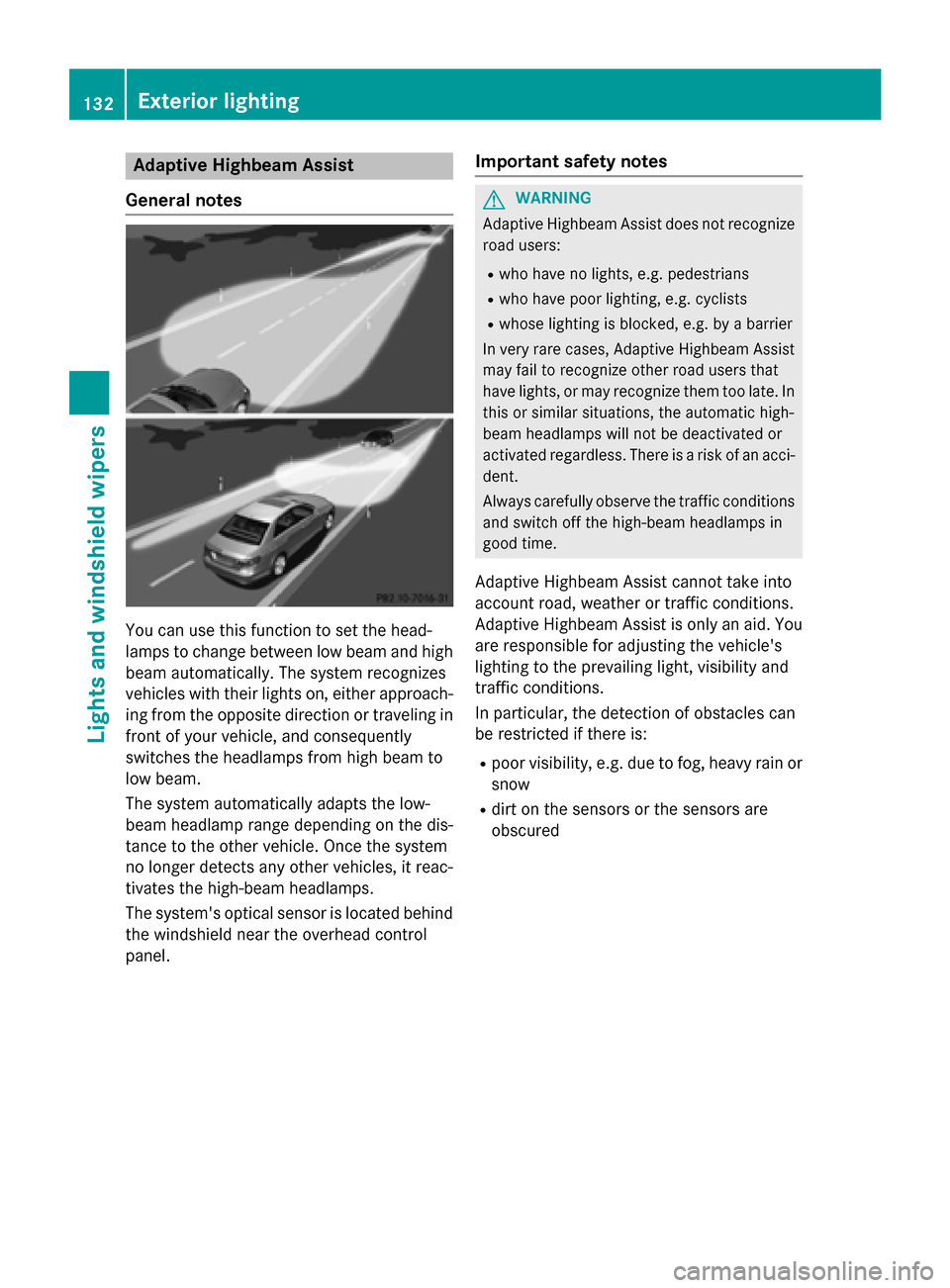
General notes You can use this function to set the head-
lamps to change between low beam and high
beam automatically. The system recognizes
vehicles with their lights on, either approach-
ing from the opposite direction or traveling in front of your vehicle, and consequently
switches the headlamps from high beam to
low beam.
The system automatically adapts the low-
beam headlamp range depending on the dis-
tance to the other vehicle. Once the system
no longer detects any other vehicles, it reac-
tivates the high-beam headlamps.
The system's optical sensor is located behind
the windshield near the overhead control
panel. Important safety notes G
WARNING
Adaptive Highbeam Assist does not recognize road users:
R who have no lights, e.g. pedestrians
R who have poor lighting, e.g. cyclists
R whose lighting is blocked, e.g. by a barrier
In very rare cases, Adaptive Highbeam Assist
may fail to recognize other road users that
have lights, or may recognize them too late. In this or similar situations, the automatic high-
beam headlamps will not be deactivated or
activated regardless. There is a risk of an acci-
dent.
Always carefully observe the traffic conditions and switch off the high-beam headlamps in
good time.
Adaptive Highbeam Assist cannot take into
account road, weather or traffic conditions.
Adaptive Highbeam Assist is only an aid. You are responsible for adjusting the vehicle's
lighting to the prevailing light, visibility and
traffic conditions.
In particular, the detection of obstacles can
be restricted if there is:
R poor visibility, e.g. due to fog, heavy rain or
snow
R dirt on the sensors or the sensors are
obscured 132
Exterior lightingLights and windshield wipers