Console MERCEDES-BENZ E-Class SEDAN 2015 W212 Owner's Manual
[x] Cancel search | Manufacturer: MERCEDES-BENZ, Model Year: 2015, Model line: E-Class SEDAN, Model: MERCEDES-BENZ E-Class SEDAN 2015 W212Pages: 426, PDF Size: 8.27 MB
Page 8 of 426
Display message ............................ 270
Notes/functio n.............................. 220
see Active Blind Spot Assist
BlueTEC (DEF) .................................... 415
BlueTEC ®
Adding DEF .................................... 177
Box (trunk) ......................................... 303
Brake Assist see BAS (Brake Assist System)
Brake fluid
Display message ............................ 254
Notes ............................................. 416
Brake lamps
Display message ............................ 262
Brakes
ABS .................................................. 69
Adaptive Brake Assist ...................... 73
BAS .................................................. 70
BAS PLUS with Cross-Traffic
Assist ............................................... 70
Brake fluid (notes) ......................... 416
Display message ............................ 252
High-performance brake system .... 185
HOLD function ............................... 200
Important safety notes .................. 183
Maintenance .................................. 184
Parking brake ................................ 180
Riding tips ...................................... 183
Warning lamp ................................. 281
Breakdown
see Flat tire
Brightness control (instrument
cluster lighting) ................................... 33
Bulbs see Replacing bulbs C
California Important notice for retail cus-
tomers and lessees .......................... 25
Calling up a malfunction
see Display messages
Car
see Vehicle Care
360° camera ................................. 340
Carpets .......................................... 342
Car wash ........................................ 336
Display ........................................... 341
Exhaust pipe .................................. 340
Exterior lights ................................ 339
Gear or selector lever .................... 341
Interior ........................................... 341
Matte finish ................................... 338
Note s............................................. 335
Paint .............................................. 338
Plastic trim .................................... 341
Power washer ................................ 337
Rear view camera .......................... 340
Roof lining ...................................... 342
Seat belt ........................................ 342
Seat cove r..................................... 341
Sensors ......................................... 340
Steering wheel ............................... 341
Trim pieces .................................... 341
Washing by hand ........................... 337
Wheels ........................................... 338
Windows ........................................ 339
Wiper blades .................................. 339
Wooden trim .................................. 341
Cargo compartment cover
Important safety notes .................. 300
Cargo compartment enlargement ... 298
Cargo compartment floor ................. 306
Cargo net Attaching ....................................... 302
Important safety information ......... 302
Cargo tie down rings ......................... 300
Car key see SmartKey
CD player/CD changer (on-board
computer) .......................................... 238
Center console Lower section .................................. 37
Lower section (AMG vehicles) .......... 38
Upper section .................................. 36
Central locking
Automatic locking (on-board com-puter) ............................................. 246
Locking/unlocking (SmartKey )........ 84 6
Index
Page 10 of 426
Temperature (on-board com-
puter) ............................................. 247
Temperature gauge ........................ 232
Warning lamp ................................. 287
Cooling
see Climate control
Copyright ............................................. 30
Cornering light function Display message ............................2 61
Function/notes ............................ .131
Crash-responsive emergency light-
ing ....................................................... 134
Cruise control Activation conditions ..................... 187
Cruise control lever ....................... 187
Deactivating ................................... 189
Display message ............................ 273
Driving system ............................... 187
Function/notes ............................ .187
Important safety notes .................. 187
Setting a speed .............................. 188
Storing and maintaining current
speed ............................................. 188
Cup holder
Center console .............................. 309
Folding bench seat ........................ 310
Important safety notes .................. 309
Rear compartment ......................... 310
Customer Assistance Center
(CAC) ..................................................... 28
Customer Relations Department ....... 28D
Dashboard see Instrument cluster
Data
see Technical data
Daytime running lamps
Display message ............................ 263
Function/notes ............................ .129
Switching on/off (on-board com-
puter) ............................................. 244
Declarations of conformity ................. 27
DEF Adding .......................................... .177
Display message ............................ 267 Filling capacity ............................... 415
Important safety notes .................. 415
Delayed switch-off
Exterior lighting (on-board com-
puter) ............................................. 245
Interior lighting .............................. 245
Diagnostics connection ......................27
Diesel .................................................. 413
Digital speedometer .........................236
DIRECT SELECT lever Automatic transmission ................. 166
Display messages
ASSYST PLUS ................................ 334
Calling up (on-board computer) ..... 251
Driving systems ............................ .268
Engine ............................................ 264
General notes ................................ 251
Hiding (on-board computer) ........... 251
KEYLESS-GO .................................. 278
Lights ............................................. 261
Safety systems .............................. 252
SmartKey ....................................... 278
Tires ............................................... 274
Vehicle .......................................... .276
Distance recorder .............................235
Distance warning (warning lamp) .... 289
Distance warning function Function/notes ................................ 72
DISTRONIC PLUS
Activating ....................................... 191
Activation conditions ..................... 191
Deactivating ................................... 196
Display message ............................ 271
Displays in the multifunction dis-
pla y................................................ 195
Function/note s............................. 189
Important safety notes .................. 190
Setting the specified minimum
distance ......................................... 194
Doors
Automatic locking (on-board com-
puter) ............................................. 246
Automatic locking (switch) ............... 90
Central locking/unlocking
(SmartKey) ....................................... 84
Control panel ................................... 40
Display message ............................ 277 8
Index
Page 20 of 426
Refrigerant (air-conditioning sys-
tem) .............................................. .418
Washer fluid ................................... 418
Settings
Factory (on-board computer) ......... 247
On-board computer ....................... 243
Setting the air distribution ...............149
Setting the airflow ............................ 150
SETUP (on-board computer) ............. 248
Side impact air bag .............................50
Side marker lamp (display mes-
sage) ................................................... 263
Side windows Cleaning ......................................... 339
Convenience closing feature ..........1 01
Convenience opening feature ....... .100
Important safety information ........... 99
Opening/closing ............................ 100
Problem (malfunction) ................... 103
Resetting ....................................... 102
Skibag ................................................ 295
Sliding sunroof Important safety notes .................. 103
Opening/closing ............................ 104
Problem (malfunction) ................... 108
Resetting ....................................... 105
see Panorama roof with power
tilt/sliding panel
SmartKey
Changing the battery ....................... 87
Changing the programming ............. 85
Checking the battery ....................... 87
Convenience closing feature .......... 101
Convenience opening feature ....... .100
Display message ............................ 278
Door central locking/unlocking ....... 84
Important safety notes .................... 84
Loss ................................................. 88
Mechanical key ................................ 86
Overview .......................................... 84
Positions (ignition lock) ................. 157
Problem (malfunction) ..................... 88
Starting the engine ........................ 160
Snow chains ...................................... 365
Sockets Center console .............................. 314
General notes ................................ 314 Luggage compartment ................... 314
Rear compartment ......................... 314
Spare wheel
Stowing .......................................... 405
Specialist workshop ............................ 27
Special seat belt retractor .................. 63
Speed, controlling see Cruise control
Speedometer
Digital ............................................ 236
In the Instrument cluster ................. 33
Segments ...................................... 233
Selecting the unit of measure-
ment .............................................. 243
see Instrument cluster
SPORT handling mode
Activating/deactivating (AMG
vehicles) .......................................... 76
Warning lamp ................................. 284
Standing lamps
Display message ............................ 262
Switching on/off ........................... 130
Start/stop function
see ECO start/stop function
Starting (engine) ................................ 159
STEER CONTROL .................................. 80
Steering (display message) .............. 277
Steering Assist and Stop&Go Pilot
(DISTRONIC PLUS)
Activating/deactivating ................. 242
Display message ............................ 272
Steering assistant STEER CON-
TROL see STEER CONTROL
Steering wheel
Adjusting (electrically) ................... 119
Button overview ............................... 35
Buttons (on-board computer) ......... 233
Cleaning ......................................... 341
Important safety notes .................. 119
Paddle shifters ............................... 170
Steering wheel heating .................. 120
Storing settings (memory func-
tion) ............................................... 125
Steering wheel heating
Problem (malfunction) ................... 121
Switching on/off ........................... 120 18
Index
Page 21 of 426
Steering wheel paddle shifters
........ 170
Stopwatch (RACETIMER) ...................248
Stowage areas ................................... 292
Stowage compartments Armrest (under) ............................ .294
Center console .............................. 294
Cup holders ................................... 309
Eyeglasses compartment .............. .293
Glove box ....................................... 293
Important safety information ......... 293
Rear ............................................... 295
Stowage net ................................... 295
Under driver's seat/front-
passenger sea t.............................. 294
Stowage net ....................................... 295
Stowage well beneath the trunk
floor .................................................... 306
Summer tires ..................................... 364
Sun visor ............................................ 311
Surround lighting (on-board com-
puter) .................................................. 245
Suspension tuning AIRMATIC ...................................... 203
AMG adaptive sport suspension
system ........................................... 204
SETUP (on-board computer) .......... 248
Switching air-recirculation mode
on/off ................................................. 152 T
Tachometer ........................................ 232
Tailgate Display message ............................ 277
Emergency unlocking ....................... 98
Important safety notes .................... 91
Limiting the opening angle ............... 97
Opening/closing (automatically
from inside) ...................................... 96
Opening/closing (automatically
from outside) ................................... 93
Opening/closing (from outside) ....... 93
Opening dimensions ...................... 419
Tail lamps
Display message ............................ 262
Tank
see Fuel tank Tank content
Fuel gauge ....................................... 33
Technical data
Capacities ...................................... 411
Emergency spare wheel ................. 407
Information .................................... 410
Tires/wheels ................................. 389
Vehicle data ................................... 419
TELEAID
Call priority .................................... 320
Downloading destinations
(COMAND) ..................................... 320
Downloading routes ....................... 323
Emergency call .............................. 317
General notes ................................ 316
Geo fencing ................................... 324
Locating a stolen vehicle ............... 322
MB info call button ........................ 319
Remote vehicle locking .................. 322
Roadside Assistance button .......... 318
Search & Send ............................... 321
Self-test ......................................... 317
Speed alert .................................... 324
System .......................................... 317
Triggering the vehicle alarm ........... 324
Vehicle remote malfunction diag-
nosis .............................................. 323
Vehicle remote unlocking .............. 321
Telephone
Accepting a cal l............................. 239
Display message ............................ 278
Menu (on-board computer) ............ 239
Number from the phone book ........ 240
Redialing ........................................ 240
Rejecting/ending a call ................. 239
Telescopic rod (EASY-PACK load-
securing kit) ....................................... 305
Temperature Coolant .......................................... 232
Coolant (on-board computer) ......... 247
Engine oil (on-board computer) ...... 247
Outside temperature ...................... 233
Setting (climate control )................ 149
Through-loading feature ................... 297
Timing (RACETIMER) ......................... 248
TIREFIT kit .......................................... 346 Index
19
Page 25 of 426
Protection of the environment
General notes
H
Environmental note
Daimler's declared policy is one of compre-
hensive environmental protection.
The objectives are for the natural resources
that form the basis of our existence on this
planet to be used sparingly and in a manner
that takes the requirements of both nature
and humanity into account.
You too can help to protect the environment
by operating your vehicle in an environmen-
tally responsible manner.
Fuel consumption and the rate of engine,
transmission, brake and tire wear are affected by these factors:
R operating conditions of your vehicle
R your personal driving style
You can influence both factors. You should
bear the following in mind:
Operating conditions:
R avoid short trips as these increase fuel con-
sumption.
R always make sure that the tire pressures
are correct.
R do not carry any unnecessary weight.
R remove roof racks once you no longer need
them.
R a regularly serviced vehicle will contribute
to environmental protection. You should
therefore adhere to the service intervals.
R always have service work carried out at a
qualified specialist workshop.
Personal driving style:
R do not depress the accelerator pedal when
starting the engine.
R do not warm up the engine when the vehicle
is stationary.
R drive carefully and maintain a safe distance
from the vehicle in front.
R avoid frequent, sudden acceleration and
braking. R
change gear in good time and use each gear
only up to 00C3of its maximum engine speed.
R switch off the engine in stationary traffic.
R keep an eye on the vehicle's fuel consump-
tion. Environmental concerns and recom-
mendations
Wherever the operating instructions require
you to dispose of materials, first try to regen-
erate or re-use them. Observe the relevant
environmental rules and regulations when
disposing of materials. In this way you will
help to protect the environment. Genuine Mercedes-Benz parts
H
Environmental note
Daimler AG also supplies reconditioned major
assemblies and parts which are of the same
quality as new parts. They are covered by the same Limited Warranty entitlements as new
parts.
! Air bags and Emergency Tensioning Devi-
ces, as well as control units and sensors for these restraint systems, may be installed inthe following areas of your vehicle:
R doors
R door pillars
R door sills
R seats
R cockpit
R instrument cluster
R center console
Do not install accessories such as audio
systems in these areas. Do not carry out
repairs or welding. You could impair the
operating efficiency of the restraint sys-
tems.
Have aftermarket accessories installed at a qualified specialist workshop. Introduction
23 Z
Page 33 of 426
Cockpit
................................................. 32
Instrument cluster ..............................33
Multifunction steering wheel .............35
Center console .................................... 36
Overhead control panel ......................39
Door control panel .............................. 40 31At a glance
Page 38 of 426
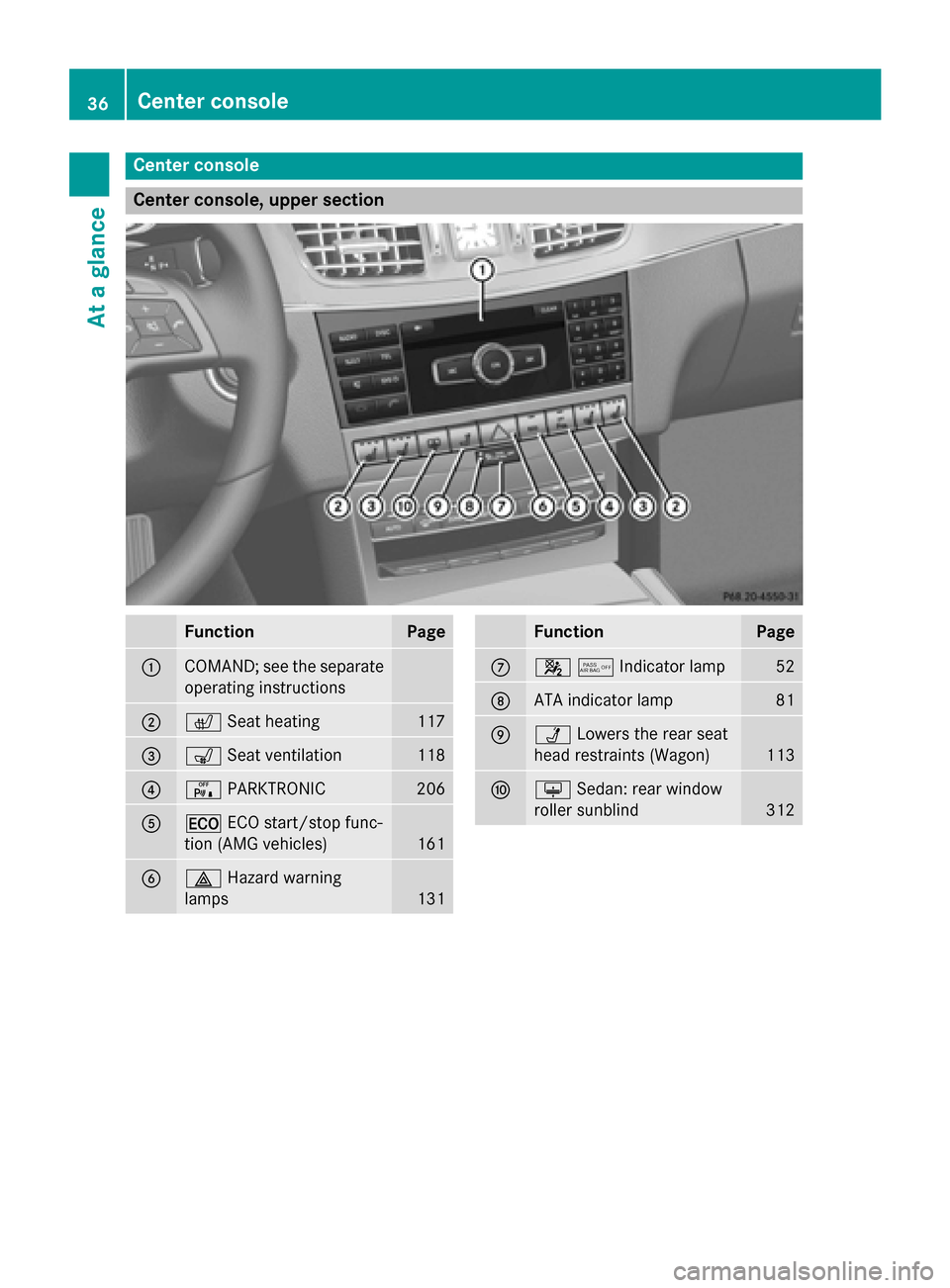
Center console
Center console, upper section
Function Page
0043
COMAND; see the separate
operating instructions 0044
0072
Seat heating 117
0087
008E
Seat ventilation 118
0085
008F
PARKTRONIC 206
0083
00A7
ECO start/stop func-
tion (AMG vehicles) 161
0084
002F
Hazard warning
lamps 131 Function Page
006B
00730074Indicator lamp
52
006C
ATA indicator lamp 81
006D
00CA
Lowers the rear seat
head restraints (Wagon) 113
006E
0094
Sedan: rear window
roller sunblind 31236
Center consoleAt a glance
Page 39 of 426
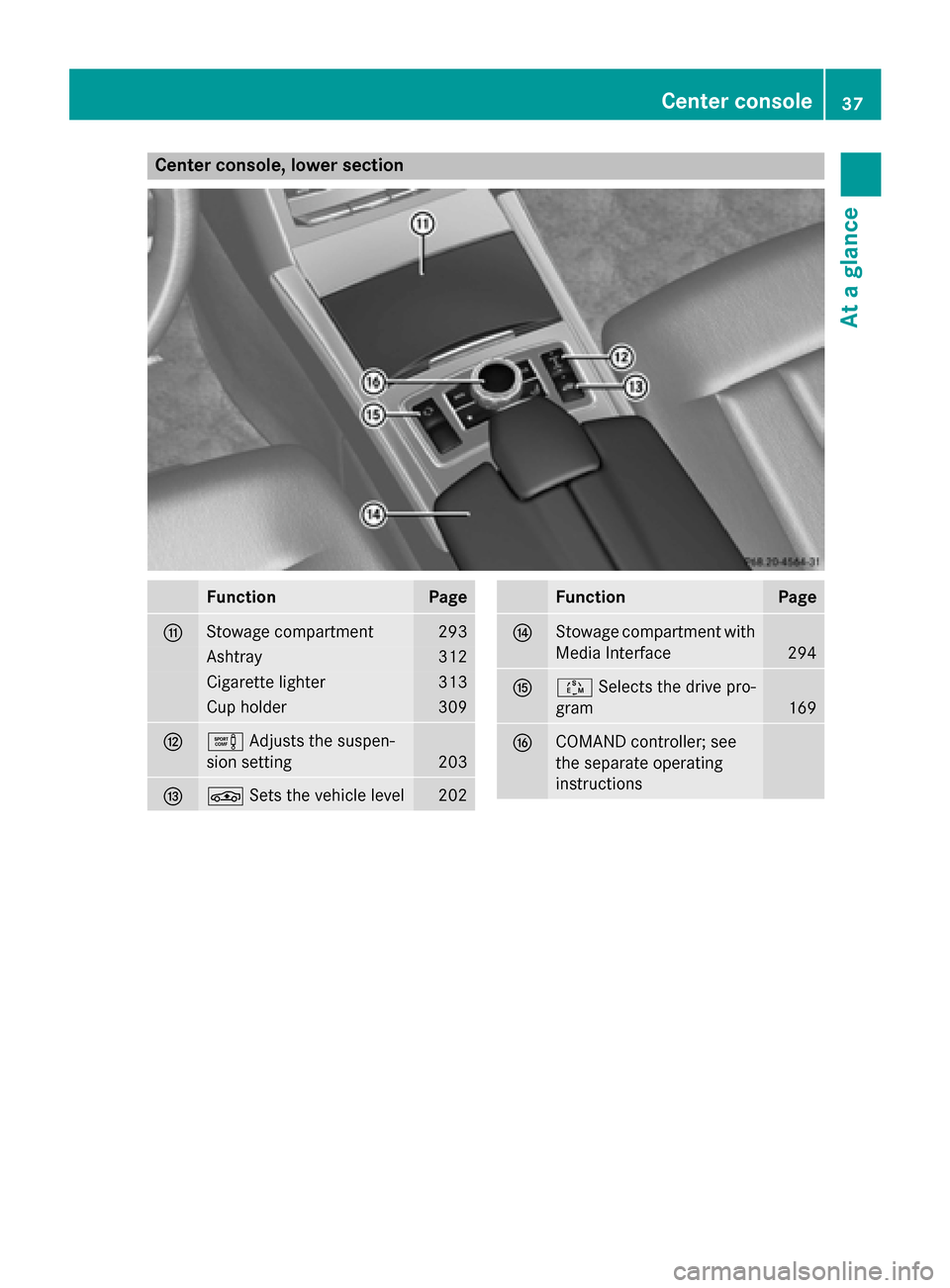
Center console, lower section
Function Page
006F
Stowage compartment 293
Ashtray 312
Cigarette lighter 313
Cup holder 309
0070
0091
Adjusts the suspen-
sion setting 203
0071
00CC
Sets the vehicle level 202 Function Page
0072
Stowage compartment with
Media Interface 294
0073
00C8
Selects the drive pro-
gram 169
0074
COMAND controller; see
the separate operating
instructions Center console
37At a glance
Page 40 of 426
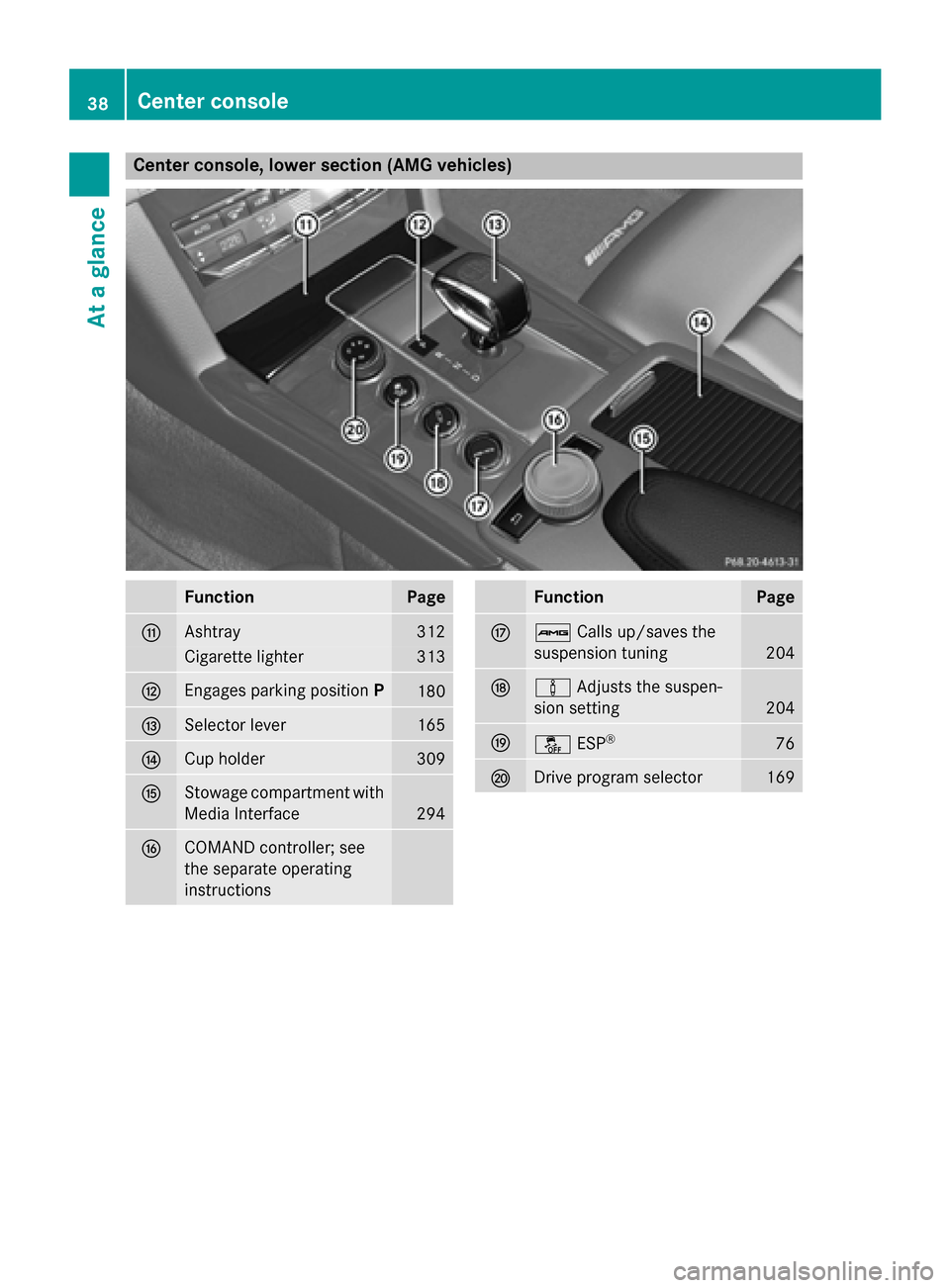
Center console, lower section (AMG vehicles)
Function Page
006F
Ashtray 312
Cigarette lighter 313
0070
Engages parking position
P 180
0071
Selector lever 165
0072
Cup holder 309
0073
Stowage compartment with
Media Interface 294
0074
COMAND controller; see
the separate operating
instructions Function Page
0075
00CB
Calls up/saves the
suspension tuning 204
0076
00CC
Adjusts the suspen-
sion setting 204
0077
00BB
ESP® 76
0078
Drive program selector 16938
Center consoleAt a glance
Page 215 of 426
not exceed an angle of 45° to the starting
position as it is maneuvering into the park- ing space.
R a maneuvering distance of at least 3.3 ft
(1.0 m) must be available.
i Vehi
cles with automatic transmission:
If PARKTRONIC detects obstacles, Active
Parking Assist brakes automatically whilst
the vehicle exits the parking space. You are responsible for braking in good time.
Active Parking Assist can only assist you with exiting a parking space if you have parked thevehicle parallel to the direction of travel using
Active Parking Assist.
X Start the engine.
X Release the parking brake.
X Switch on the turn signal in the direction
you are pulling away.
X Shift the transmission to position Dor R.
The Start Park Assist? Yes: OK No: Start Park Assist? Yes: OK No:
0038 message appears in the multifunction
display.
X To cancel the procedure: press the0038
button on the multifunction steering wheel
or pull away.
or X To exit a parking space using Active
Parking Assist: press the0076button on
the multifunction steering wheel.
The Park Assist Active Accelerate
Park Assist Active Accelerate
and
and Brake
Brake Observe
Observe Surroundings
Surroundings mes-
sage appears in the multifunction display.
X Let go of the multifunction steering wheel.
X Pull away, being ready to brake at all times.
Do not exceed a maximum speed of
approximately 6 mph (10 km/h) when exit-
ing a parking space. Otherwise Active Park- ing Assist will be canceled.
X Shift the transmission to position Dor Ras
required or according to the message while
the vehicle is stationary.
Active Parking Assist immediately steers in
the other direction. The Park Assist Park Assist
Active Accelerate and Brake
Active Accelerate and Brake Observe
Observe
Surroundings
Surroundings message appears
in the multifunction display.
i You will achieve the best results by wait-
ing for the steering procedure to complete before pulling away.
If you back up after activation, the steeringwheel is moved to the straight-ahead posi-
tion.
X Drive forwards and back up as instructed
by the PARKTRONIC warning displays.
Once you have exited the parking space com- pletely, the steering wheel is moved to the
straight-ahead position. You hear a tone and
the Park Assist Finished
Park Assist Finished message
appears in the multifunction display. You will
then have to steer and merge into traffic on
your own. PARKTRONIC is still available. You
can take over the steering, before the vehicle
has exited the parking space completely. This is useful, for example when you recognize
that it is already possible to pull out of the
parking space.
Canceling Active Parking Assist You can cancel Active Parking Assist at any
time.
X Stop the movement of the multifunction
steering wheel or steer yourself.
Active Parking Assist will be canceled at
once. The Park Assist Canceled
Park Assist Canceled mes-
sage appears in the multifunction display
and you hear a tone.
or X Press the PARKTRONIC button on the cen-
ter console (Y page 208).
PARKTRONIC is switched off and Active
Parking Assist is immediately canceled.
The Park Assist Canceled Park Assist Canceled message
appears in the multifunction display and
you hear a tone.
Active Parking Assist is canceled automati-
cally if:
R the transmission is shifted too early
R transmission position Pis selected Driving systems
213Driving and parking Z