button MERCEDES-BENZ E-Class SEDAN 2017 W213 Workshop Manual
[x] Cancel search | Manufacturer: MERCEDES-BENZ, Model Year: 2017, Model line: E-Class SEDAN, Model: MERCEDES-BENZ E-Class SEDAN 2017 W213Pages: 446, PDF Size: 6.23 MB
Page 176 of 446
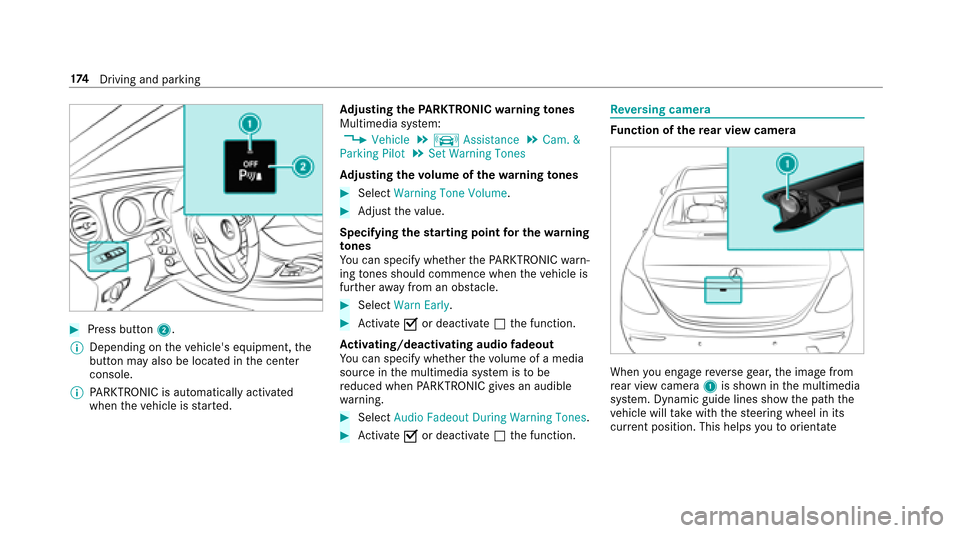
#Press button2.
% Dependin gonthevehicle's equipment, the
button ma yalso be located in thec enter
console.
% PARKTRONI Cisa utomatical lyactivated
when thev ehicle is star ted. Ad
justin gthe PARKTRONICw arningtones
Multimedia sy stem:
,Vehicle.k Assistance.Cam. &
Parkin gPilot.Set Warning Tones
Ad justin gthe volumeoft hewarning tones
#Select Warning Tone Volume.
#Adjus tthe value.
Specifying thes tarting point fort he warning
to nes
Yo uc an specify whe ther theP ARKTRONIC warn‐
ing tones shoul dcommence when thev ehicle is
fur ther aw ay from an obs tacle.
#Select Warn Early.
#Activate Oor deacti vate ª thef unction.
Ac tivating/deactivatin gaudiof adeout
Yo uc an specify whe ther thev olume of amedia
source in them ultimedia sy stem is tobe
re duced when PARKTRONI Cgives an audible
wa rning.
#Select Audio Fadeout Durin gWarning Tones.
#Activate Oor deacti vate ª thef unction.
Re versing camera
Fu nction of ther ear vi ewcamera
When youe ngager eve rseg ear ,the imag efrom
re ar vie wcamera 1is shown in them ultimedia
sy stem. Dynamic guide lines sho wthe pat hthe
ve hicle will take wit hthe steering wheel in its
cur rent position. Thi shelps youtoo rientate
17 4
Driving and pa rking
Page 181 of 446
%The guide lines in them ultimedia sy stem dis‐
pla yshowt he dis tances toyour vehicle. The
dis tances only apply toroad le vel. In trailer
mode, theg uide lines ar eshown at thel eve l
of thet railer hitch.
Sy stem limitations
The 360 °Camera will no tfunction or will only
partiall yfunction in thef ollowing situations:
RIfth ed oor sareopen.
RIfth et runk lid or tailgat eiso pen.
RIfth er eish eavyrain, sno worfog.
RIfth ea mbient light is poor ,e.g. at night.
RIfth ec amer alens is obstructed, dirty or fog‐
ge du p.
RIfth ev ehicle component sinwhichthe cam‐
eras ar einstalled ar edamaged. In this eve nt,
ha ve thec amer aposition and setting
ch eckedataq ualified specialis tworks hop.
Do no tuse the3 60° Camer aunder suc hcircum‐
st ances. Youc ouldotherwise injur eother so r
collide wit hobjectsw hen parking thev ehicle. On
vehicles wit hheight-adjus table suspension or
if th ev ehicle is car rying aheavy load, leavingt he
st andar dheightc anresult in inaccuracies in the
guide lines and in thed ispla yoft hegenerated
ima ges, depending on tech nica lconditions.
The field of vision and other functions of the
came rasystem ma yberestricted due toaddi‐
tional accessori es onther ear of thev ehicle (e.g.
license plat ebrack et,b icyc le rack ).
See then otes on cleaning the3 60° Camera
(
→pag e287).
Selecting aviewf or t
h e360°C amera
The Auto .RearV iewC am.functio niss elected in
th em ultimedia sy stem.
#En gage reve rseg ear.
#Inthem ultimedia sy stem, select thed esired
vie w.
Opening thec amer acove rofthe rear view
camera
Multimedi asystem:
,Vehicle.k Assistance.Parking
Pilot
#Select Open Camera Cover . %
The camer acover closes automaticall yafter
some time or af terani gnitionc ycle.
Assigning thec amer aasaf avorite
Yo uc an call up thec amer aviewd irectly in the
multimedia sy stem byassignin gitasaf avorite .
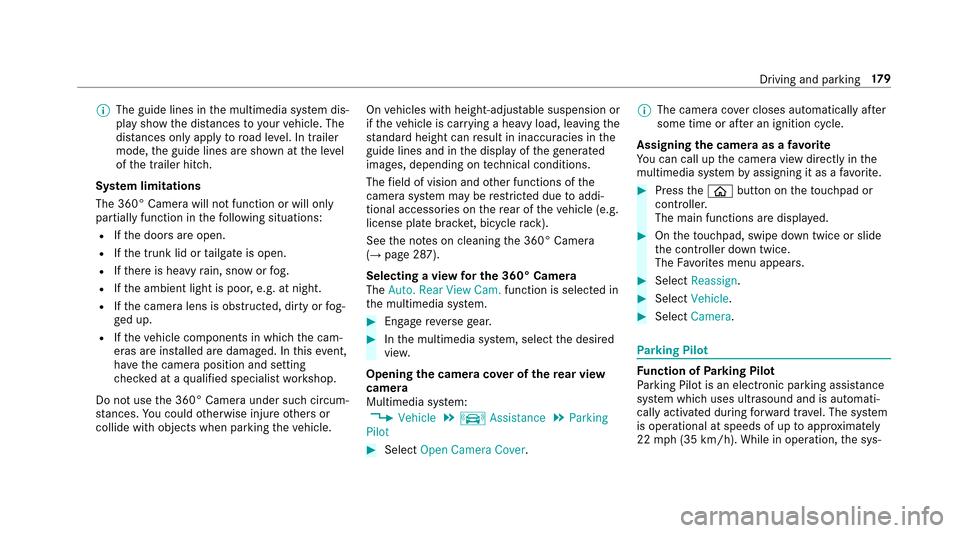
#Press theò button on thet ouchpad or
contro ller.
The main function saredispla yed.
#On thet ouchpad ,swipe down twice or slide
th ec ontroller down twice.
The Favorite sm enu appears .
#SelectReassign.
#SelectVehicle .
#SelectCamera .
Parking Pilot
Fu nction of Parking Pilot
Pa rking Pilo tisane lectronic pa rking assis tance
sy stem whic huses ultrasound and is automati‐
cally activated during forw ardt rave l. The sy stem
is operational at speeds of up toappr oximately
22 mph(35 km/h). While in operation, thes ys‐
Driving and parking 17
9
Page 183 of 446
RParking spaces on unsuitable sur faces.
Pa rking Pilo twill no tassis tyou wit hparking
spaces at right angles tothed irection of tr avel
in thef ollowing situations:
RIf tw oparkin gspaces ar elocated immedi‐
atel ynexttoe acho ther.
RIfth ep arking space is directly next toalow
obs tacle such asalow curb.
Pa rking Pilo twill no tassis tyou wit hparking
spaces parallel or at right angles tothed irection
of tr avelint hefollowing situations:
RIf th ep arking space is on acurb.
RIfth ep arking space is bordered byan obs ta‐
cle ,e.g. atree, ap ostoratraile r. Pa
rking wit hParking Pilot
&
WARNING Risk of accident duet o
object slocated abo veor belo wthe
de tection rang eofP arking Pilot
If th er ea reobjects abo veor belo wthe
de tection range, thef ollowing situations may
arise:
RPa rking Pilo tmaysteer tooe arly.
RThe vehicle ma ynotstop in front of these
objects.
This could cause acollision.
#Inthese situations, do no tuse Parking
Pilot.
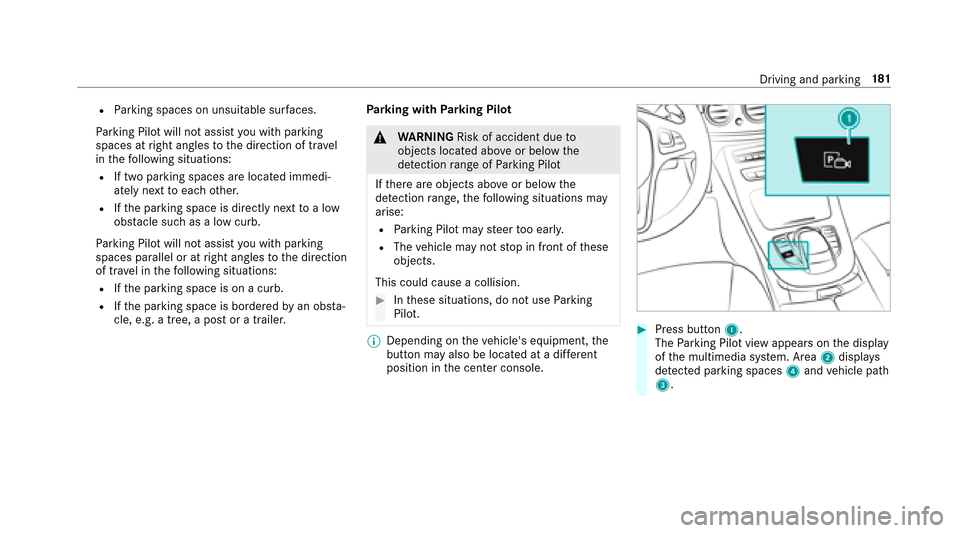
% Dependin gonthevehicle's equipment, the
button ma yalso be located at adiffe re nt
positio ninthe center console.#Press button 1.
The Parking Pilo tviewa ppear sonthe display
of them ultimedia sy stem. Area 2displa ys
de tected park ing spaces 4and vehicle path
3.
Driving and parking 18
1
Page 185 of 446
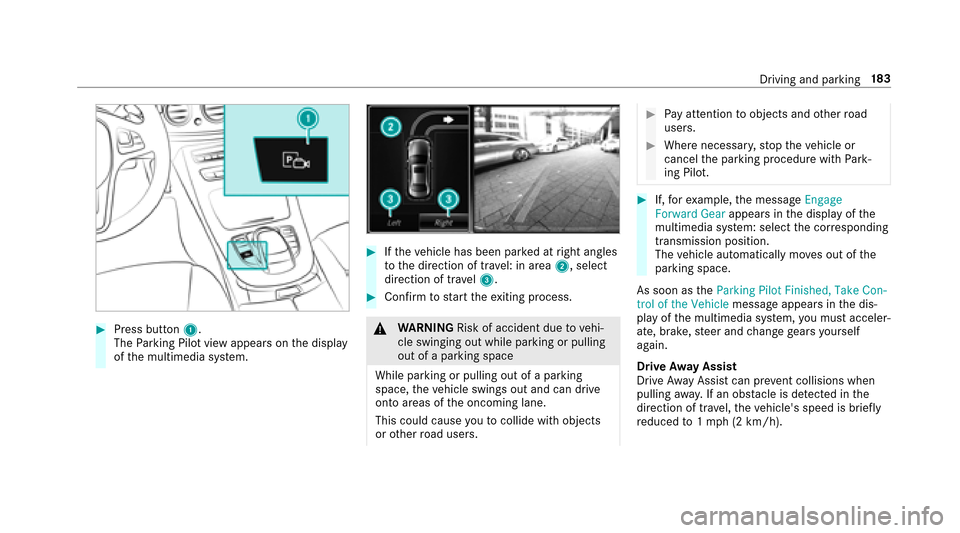
#Press button1.
The Parking Pilo tviewa ppear sonthe display
of them ultimedia sy stem.
#If th ev ehicle has been par kedatr ight angles
to thed irection of tra vel: in area 2,select
direction of tra vel3.
#Confir mtos tart thee xiting process.
&
WARNING Risk of accident duetov ehi‐
cle swinging out while parking or pulling
out of aparking space
While parking or pulling out of aparking
space, thev ehicle swings out and can drive
ont oareas of theo ncoming lane.
This could cause youtoc ollidewitho bjects
or other road users.
#Pa ya ttention toobject sand other road
users.
#Wher enecessar y,stop thev ehicle or
cancel thep arking procedur ewithP ark‐
ing Pilot.
#If, fore xamp le,them essage Engage
Forward Gear appearsinthe displa yofthe
multimedia sy stem: select thec orresponding
transmission position.
The vehicle automatically mo veso ut of the
parkin gspace.
As soon as theParkin gPilot Finished, Take Con-
trol of the Vehicle messageappear sinthe dis‐
pla yoft he multimedia sy stem, youm usta cceler‐
ate, brake, steer and chang egear syourself
again.
Driv eAwayA ssist
Driv eAwayA ssistcan pr event collisions when
pulling away.Ifano bstacle is de tected in the
direction of tr avel, thev ehicle's speed is brief ly
re duced to1m ph (2 km/h).
Driving and parking 18
3
Page 195 of 446
In suchcases, Lane Keeping Assis tcan:
Rgiv eanu nnecessar ywarning
Rnotg iveaw arning
#Alwaysp ayparticular attention tothe
traf fics ituation and keep within the
lane, especiall yifActiveLaneK eeping
Assis talerts you.
Prerequisi te
The driving speed is at leas t40m ph (60 km/h).
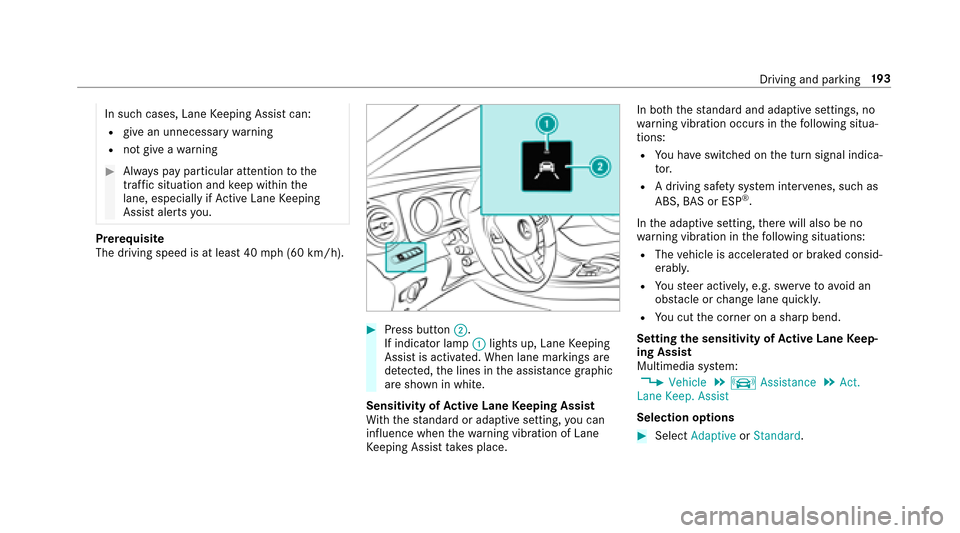
#Press button ;.
If indicator lamp :lights up, Lane Keeping
Assis tisactivated. When lane marking sare
de tected, thel ines in thea ssis tance graphic
ar es hown in white.
Sensitivity of Activ eL aneK eeping Assist
Wi th th estandar dora daptiv esetting ,you can
influence when thew arning vibration of Lane
Ke eping Assis ttakes place. In bo
th thestandar dand adaptiv esettings, no
wa rning vibration occur sinthefollowing situa‐
tions:
RYo uh ave switched on thet urns ignal indica‐
to r.
RAd riving safe ty system inter venes, such as
ABS, BASorE SP®.
In thea daptiv esetting, ther ew ill also be no
wa rning vibration in thef ollowing situations:
RThe vehicle is accelerated or braked consid‐
erably.
RYo us teer actively ,e.g. swer vetoavo id an
obs tacle or chang elane quickl y.
RYouc utthec orner on ashar pbend.
Setting thes ensitivityofA ctive Lan eKeep‐
ing Assist
Multimedia sy stem:
,Vehicle.k Assistance.Act.
Lane Keep. Assist
Selection options
#Select Adaptive orStandard.
Driving and parking 19
3
Page 197 of 446
*NO
TEEngine damage duetoexcessively
hig he ngine speeds
The engine will be damaged if youd rive wit h
th ee ngine in theo verrev ving range.
#Do no tdrive with th eengine in theo ver‐
re vving range.
The fue lsuppl yisi nterrupted toprotect the
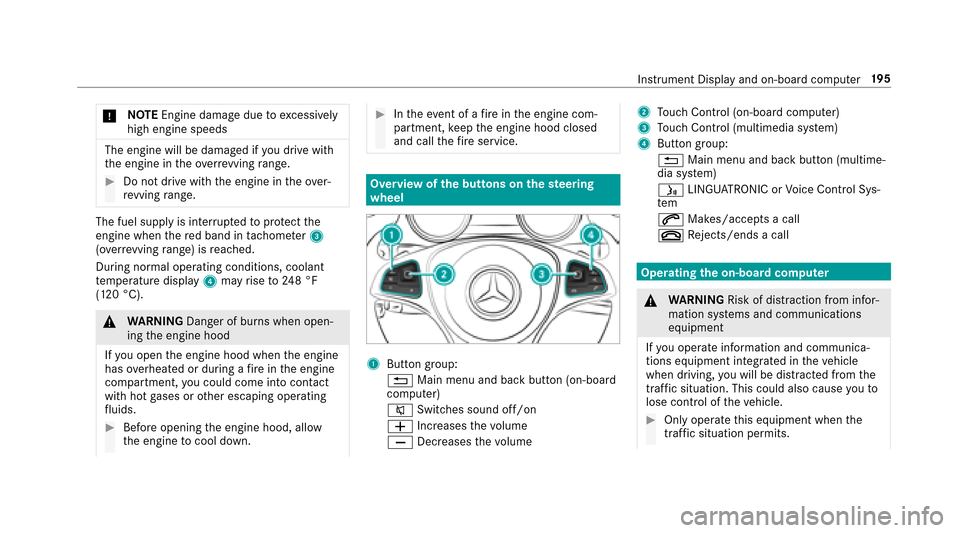
engine when ther ed band in tach ome ter3
(o ve rrev ving range) is reached.
During no rmal operatin gconditions, coolant
te mp eratur edisplay 4mayrise to248° F
(120 °C).
& WARNING Danger of burn swhen open‐
ing thee ngine hood
If yo uo pen thee ngine hood when thee ngine
has overheated or during afireint he engine
compartment, youc ouldcome int ocontact
wit hh otgases or other escaping operating
fl uids.
#Befor eopening thee ngine hood, allow
th ee ngine tocool down.
#Inthee vent of afireint he engine com‐
partment, keep thee ngine hood closed
and call thef ires ervice.
Overvie wofthe buttons on thes teering
wheel
1But tong roup :
% Main menu and ba ckbutton (on-board
computer)
8 Switches sound off/on
W Increases thev olume
X Decreases thev olume
2Touc hC ontrol (on-boar dcompu ter)
3To uc hC ontrol (multimedia sy stem)
4Button group:
% Main menu and bac kbutton (multime‐
dia sy stem)
ó LINGU ATRO NIC or Voice Cont rolS ys‐
te m
6 Makes/accepts acall
~ Rejects/end sacall
Operatin gthe on-boar dcom puter
&
WARNING Risk of dist raction from infor‐
mation sy stems and communications
equipment
If yo uo perat einformation and communica‐
tions equipment integ ratedint hevehicle
when driving, youw ill be distracted from the
traf fics ituation. Thi scould also cause yout o
lose control of thev ehicle.
#Onl yoperat ethis equipment when the
traf fics ituation permits.
Instrument Displa yand on-board compute r19
5
Page 198 of 446
#Ifyo uc anno tbes ureoft his,stop the
ve hicle whils tpaying attention toroad
and traf ficc onditions and ope rate the
equipment wit hthe vehicle stationar y.
Youm usto bserv ethe legal requirements fort he
countr yinwhich youa recur rentl yd riving when
operating theo n-boar dcomputer.
% The on-boar dcomputer displa ysappear in
th em ultifunction displa y(
→page197).
Theo n-board compu teriso perated using Touch
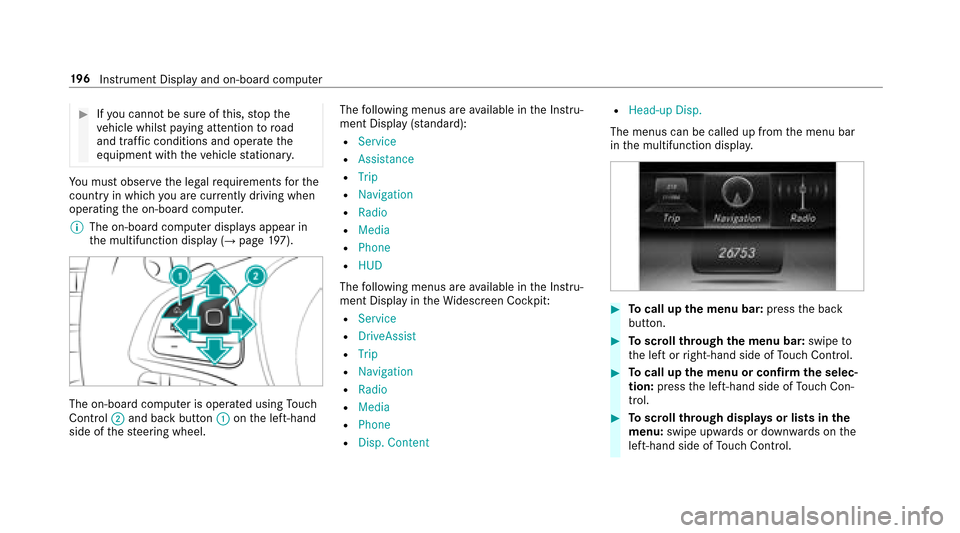
Control ;and bac kbutto n: onthel eft-hand
side of thes teering wheel. The
following menus ar eavailable in theI nstru‐
ment Displa y(standard):
RService
RAssistance
RTrip
RNavigation
RRadio
RMedia
RPhone
RHUD
The following menus ar eavailable in theI nstru‐
ment Displa yintheWidescreen Cockpit:
RService
RDriveAssist
RTrip
RNavigation
RRadio
RMedia
RPhone
RDisp. Content
RHead-up Disp.
The menus can be called up from them enu bar
in them ultifunction displa y.
#Tocall up them enu bar: presstheb ack
button.
#To scroll through them enu bar: swipeto
th el eftorr ight-hand side of Touc hC ontrol.
#Tocall up them enu or confir mthe selec‐
tion: press thel eft-hand side of Touc hC on‐
trol.
#To scroll through displa ysor lists in the
menu: swipe upwards or down wardsont he
left-hand side of Touc hC ontrol.
196
Instrument Displa yand on-boar dcomputer
Page 207 of 446
Head-up Display
Function of theH ead-up Display
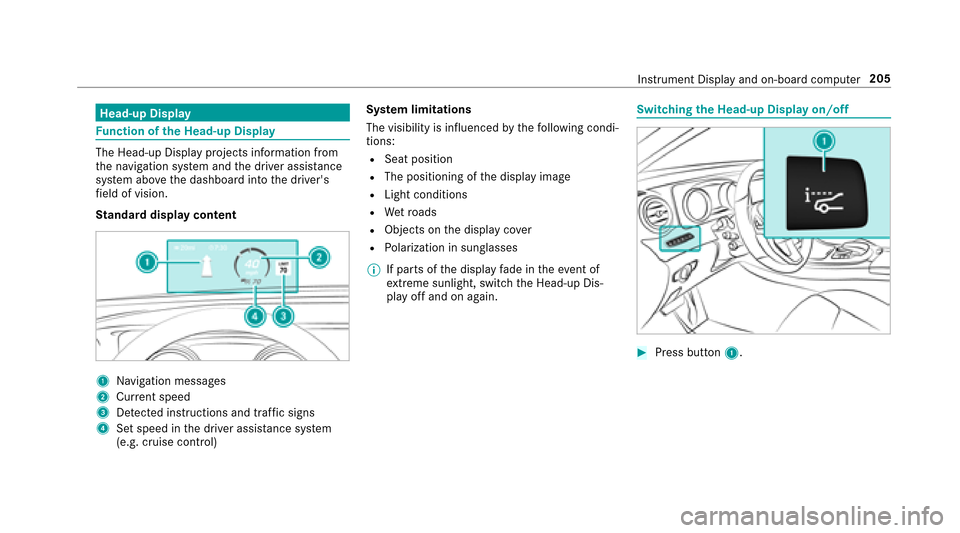
The Head-up Displa yproject sinformation from
th en avigation sy stem and thed rive ra ssis tance
sy stem abo vethed ashboar dintot he driver's
fi eld of vision.
St andar ddispla ycontent
1Na vigation message s
2Current speed
3De tected instructions and traf fics igns
4Setspeed in thed rive ra ssis tance sy stem
(e.g. cruise control) Sy
stem limitations
The visibility is influenced bythef ollowing condi‐
tions:
RSeat position
RThe positioning of thed ispla yimage
RLight conditions
RWe troads
RObject sonthe displa ycover
RPo larization in sunglasses
% If parts of thed ispla yfade in thee vent of
ex treme sunlight, switc hthe Head-up Dis‐
pla yo ffand on again.
Switching theH ead-u pDispla yon/off
#Press button 1.
Instrument Displa yand on-boar dcomputer 205
Page 209 of 446
5WIncrease sthe volume
6X Decreases thev olume
Voice prom pting
#To star torc ontinue adialog: pressthe
ó button on them ultifunction steering
wheel.
Yo uc an sa yacomman dafter an acoustic
signal.
#To cor rect an entry :sa yt he Correction
command.
#To select an entr yfromt he selection lis t:
sa yt he line number or thec onte nts.
#Tobrows ethe selection lis t:sa yt he Con-
tinue orBack command.
#Tointer rupt thed ialog: sayt he Pause com‐
mand.
#To cancel thed ialog: sayt he Cancel com‐
mand.
Operable functions
Yo uc an use theV oice Control Sy stem tooperate
th ef ollowing equipment, depending on thev ehi‐
cle's equipment:
RTe lephone
RText message s
RNavigation
RAddress book
RRadio
RAu dio (memor ycard, Media Inter face, USB
and Blu etoo th®audio)
RVe hicle
Command types
Ad istinction is made between thef ollowing
command types:
RGlobal commands can be said at anytime
and rega rdless of thec urrent application,
e.g .the Navigate to ,Call orText message to
commands.
RApplication-specific commands areo nly
av ailable fort he activ eapplication.
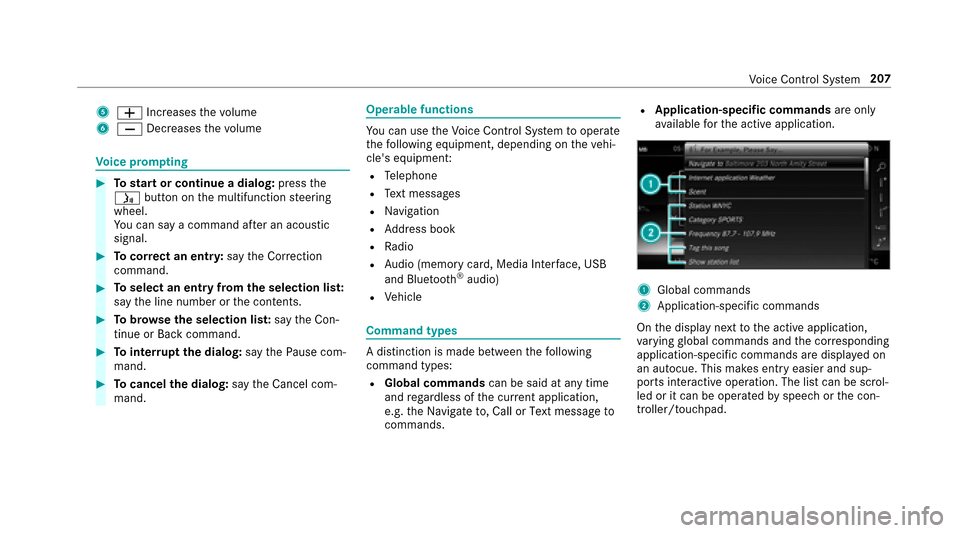
1Global commands
2Application-specific commands
On thed ispla ynexttot he activ eapplication,
va rying global commands and thec orresponding
application-specific commands ar edispla yedo n
an autocue. This makes ent ryeasier and sup‐
ports interactiv eoperation. The lis tcan be scrol‐
led or it can be operated byspeec horthe con‐
troller/touchpad.
Vo ice Cont rolS ystem 207
Page 210 of 446
Entering numbers
Entering numbe rs:
RThe number sallowe da rezero tonine .
RTelephonen umberscan be entered as single
digits.
Changing thel anguag esetting
Yo uc an chang ethe languag eoftheVoice Con‐
trol Sy stem via thes ysteml anguag esettings. If
th es etsystem languag eisnotsuppor tedbyt he
Vo ice Cont rolS ystem, En glish will be selecte d.
The Voice Cont rolS ystemisa vailable in En glish,
Fr enc hand Spanish.
Using Voice Control Sy stem ef fectively
Au dibl ehelpf unctions
Your eceiv einformatio nand help for:
ROptima loperation: sayt he Help Voice Con-
trol System command.
RCurrent application: presstheó button
on them ultifunction steering wheel and say
th eHelp command.
RContinued dialog: sayt he Help command
during avoice dialog.
RSpecific sy stem: call up theh elp command
fo rt he desired sy stem, e.g. Help telephone.
Speechquality impr ovement
Ifth eV oice Control Sy stem does no tunder‐
st and you:
ROnly operat ethe Voice Cont rolS ystemf rom
th ed rive r's seat.
RSa ythe commands coherently and clearly,
but do no texaggerat ethe words.
RPr eve nt loud noises ,e.g.t he blo wer,from
inter fering whil eyou mak eanentry.
RSa ythe voice tagw itht he same intonation
when creating voice tags.
If an addre ss book entr yvoice tag is no trec‐
ognized:
ROnly creat esensible address book entries in
th es ystem/mobile phone, e.g. surname and
fi rs tn am eint he cor rect field.
RDo no tuse an yabbr eviations, unnecessary
spaces or special characters.
RCreat easpeaker-dependentv oicetag,ifn ec‐
essar y.
RPress theó button on them ultifunction
st eering wheel when thed esired name is
re ad out.
If as tatio nliste ntr yisn otrecognized:
RSa ve as peaker-dependentv oicetagf or the
st ation.
RSa ythe Read out station list command.
RPresstheó button on them ultifunction
st eering wheel when thed esired statio nis
re ad out.
Essential commands
Switch commands
Switchcommands can be used toopen cer tain
applications .The command selection can be
208
Voice Cont rolS ystem