navi MERCEDES-BENZ E-Class WAGON 2011 S212 Comand Manual
[x] Cancel search | Manufacturer: MERCEDES-BENZ, Model Year: 2011, Model line: E-Class WAGON, Model: MERCEDES-BENZ E-Class WAGON 2011 S212Pages: 234, PDF Size: 8.64 MB
Page 30 of 234
Callin
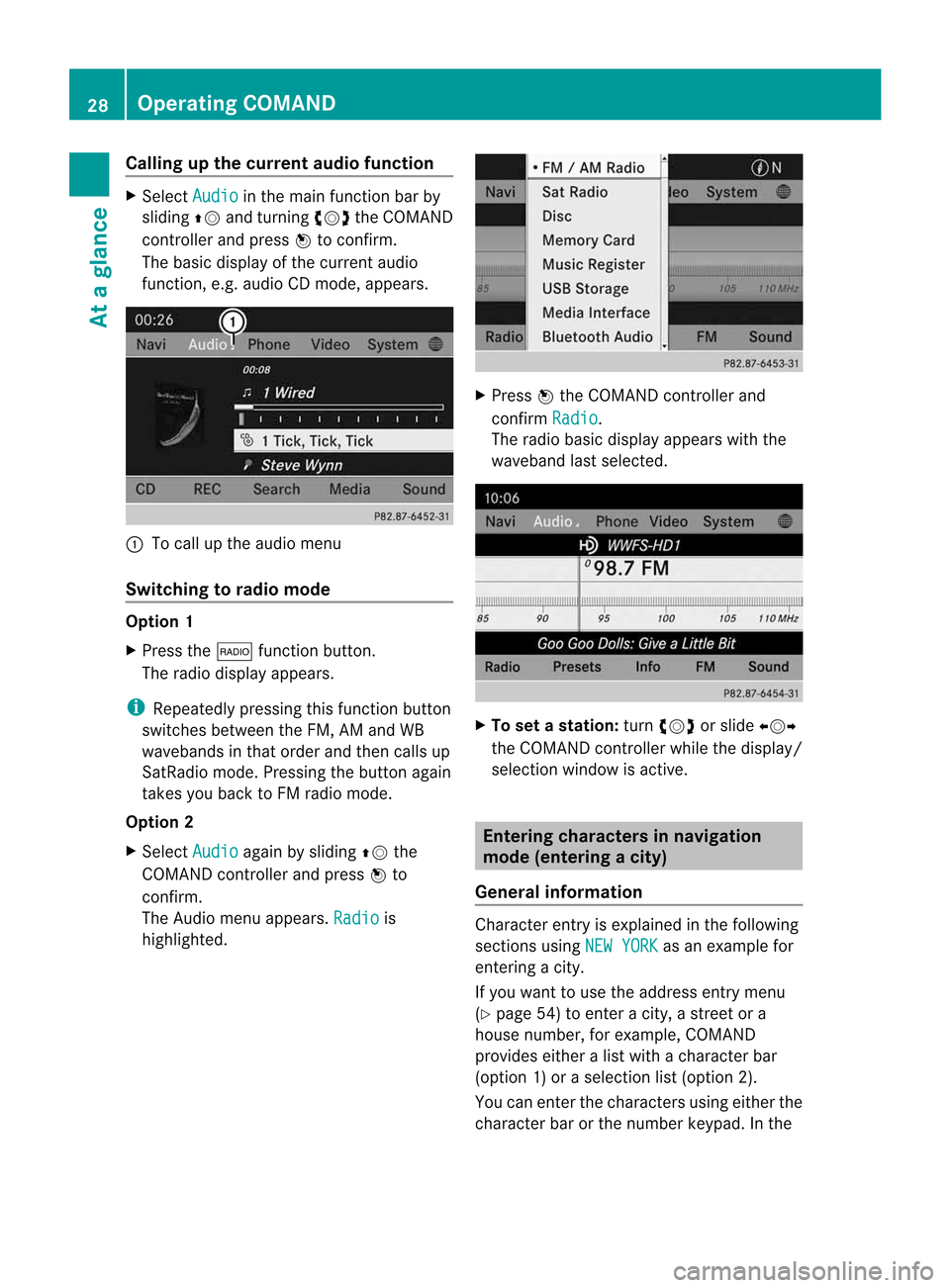
gupthe cur ren taudiofunct ion X
Sel ect Audio in
them ainfunction bar by
slidin gZV andturnin gcVd theC OMA ND
co ntroll erand pres sW toconfirm .
The basic displayofthec urren taudio
fun ction ,e.g.a udio CDmod e,appear s. :
Tocall upthea udio menu
Swit chingtor adiomod e Op
tion1
X Pre ssthe$ function button.
The radio displayappear s.
i Repeat edlypressin gthisf un ction button
swit ches bet ween theF M, AM and WB
waveb andsint hato rder and then call sup
Sat Radio mode.Pre ssin gthe but tona gain
takes youback toFM radio mode.
Option 2
X Select Audio again
bysliding ZVthe
COMAND controller andpress Wto
conf irm.
The Audio menuappears. Radio is
highlighted. X
Press Wthe COMAND controller and
conf irmRadio .
The radio basic display appears withthe
waveband lastselected. X
To set astation: turn cVd orslide XVY
the COMAND controller while thedisplay /
selection windowisactive. Entering
characters innavigation
mode (entering acity)
Gener alinfor mation Charact
erent ryisexplain edinthe followin g
sect ions using NEWYORK as
an exam plefor
ent erin gac ity.
If you want touse theaddress entrymen u
(Y page 54)toent erac ity, as treet ora
house numbe r,for exam ple,COMAN D
prov ides eitheralist with achar acterbar
(optio n1)oras elect ionlist(option 2).
You canenterthe charac tersu sing either the
charac terbar orthe number keypad. Inthe 28
Oper
ating COMANDAtag
lance
Page 35 of 234

Basi
cfunc tions ofCO MA ND Sw
itchin gC OM ANDo n/off
X Pre ssthe qcontro lknob.
Aw arning mes sage appear s.COMA ND
calls upthep reviously selectedm enu.
i Ifyou switchoff COMA ND,playbac kof
the curre ntaudioo rvideo source willal so
be switch ed off. Sw
itch ingt he COMAND displayon/
off
X Press theW functionbutton .
or
X Select System in
the main functionbar by
sliding ZVandturnin gcVd theCOMAND
cont roller andpress Wtoconf irm.
In both cases, thesystem menuappears.
X To switch off:select Display Off and
press Wtoconf irm.
X To switch on:press oneofthe funct ion
button s,e.g. W, Øorthe % back
button . Mut
e
Sound fromanaudio/video source X
Press the8 button onCOMAND oron
the multifunct ionsteerin gwheel.
The sound fromtherespect iveaudio or
video source isswitched onormuted.
i When thesound isoff, thesystem
display sthe , icon inthe status line.
When youchange theaudio orvideo
source, oradjust thevolume, sound
automatically switchesonagain.
i Even ifthe sound isswitched off,you will
still hear navigation system
announc ements. Switching
offallnavigation
announcements X
Navigat ionannouncements: pressthe
8 button duringtheannounc ement.
Switching navigation announcements
back on X
Press 8again.
i The navigation announcementsare
swi tched onaga inifyou start anew route
gui dance orifCOMAND isswi tched offand
on with theqcontrol knob. Adjusting
thevolume
Adjusting thevolume forthe audio or
video source X
Turn theqcontrol knob.
or
X Press theW orX button onthe
multi function steeringwheel.
The volumeofthe currently selected audio
or vide osource changes.
You canalsoa dju stthe volu meforthe
foll owi ng:
R naviga tionannouncements
R phone calls
R voice outputofthe Voice Control System
(see theseparate operating instructions)
Adjust ingthe volume fornavigation
announcements During
anavigation announcemen t:
X Turn qthe cont rolknob.
or
X Press theW orX button onthe
multifunction steeringwheel. Basic
functions ofCOMAND
33Atag lance Z
Page 42 of 234
COMAN
Dfeatures
Thes eOperatin gInstruc tio ns desc ribeall
st andar dand opt ionalequipm enta vail able
for you rCOMAND systematthe time of
purcha se.Cou ntry-specifi cdeviation sare
possible. Pleasenotethat your COMAND
system maynotbeequipped withallthe
features described. Display
settings Sett
ingthe bright ness
The brightn essdetec tedbythe display light
sensor affectsthe sett ingoption sfor this
func tion.
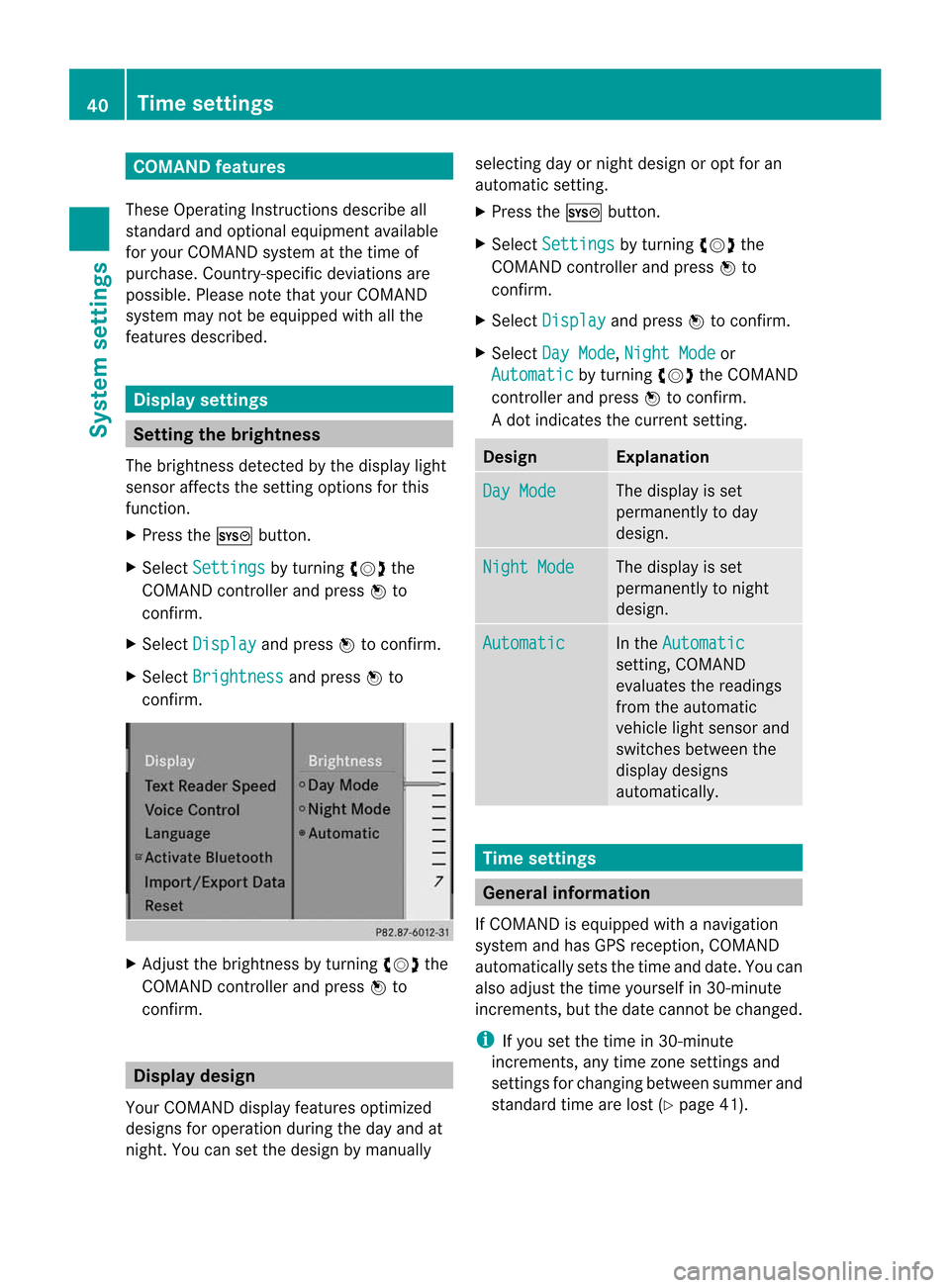
X Press theW button .
X Select Setting s by
turn ingcVd the
COMAND controller andpress Wto
con firm.
X Select Display and
press Wtocon firm.
X Select Brightn ess and
press Wto
con firm. X
Adj ust the brightn essbyturn ingcVd the
COMAND controller andpress Wto
con firm. Display
design
Your COMAND displayfeatures optimized
designs foroperation duringtheday and at
night .You can setthe design bymanually selecting
dayornight design oropt foran
automatic setting.
X Press theW button .
X Select Settings by
turnin gcVd the
COMAND controller andpress Wto
conf irm.
X Select Display and
press Wtoconf irm.
X Select DayMode ,
Night Mode or
Automatic by
turnin gcVd theCOMAND
cont roller andpress Wtoconf irm.
Ad otindicates thecurrent setting. Design Explanat
ion Day
Mode The
display isset
permanent lyto day
design. Night
Mode The
display isset
permanent lyto night
design. Automatic In
the Automatic sett
ing, COMAND
evaluates thereadings
from theautomatic
vehicle lightsensor and
switches betweenthe
display designs
automatically. Time
settings General
information
If COMAND isequipped withanavigation
system andhasGPS reception ,COMAND
automatically setsthetime anddate. Youcan
also adjust thetime yourself in30- minute
increm ents,but the date cannotbe changed.
i Ifyou setthe time in30- minute
increm ents,any time zonesettings and
sett ings forchanging betweensummerand
standard timearelost (Ypage 41). 40
Tim
esettingsSystem settings
Page 43 of 234
i
The following navigation systemfunctions
require thetime, timezoneand summer/
standard timetobe set correc tlyinorder
to work properly:
R route guidance onroutes withtime-
dependent trafficguidance
R calculation ofexpect edtime ofarrival Setting
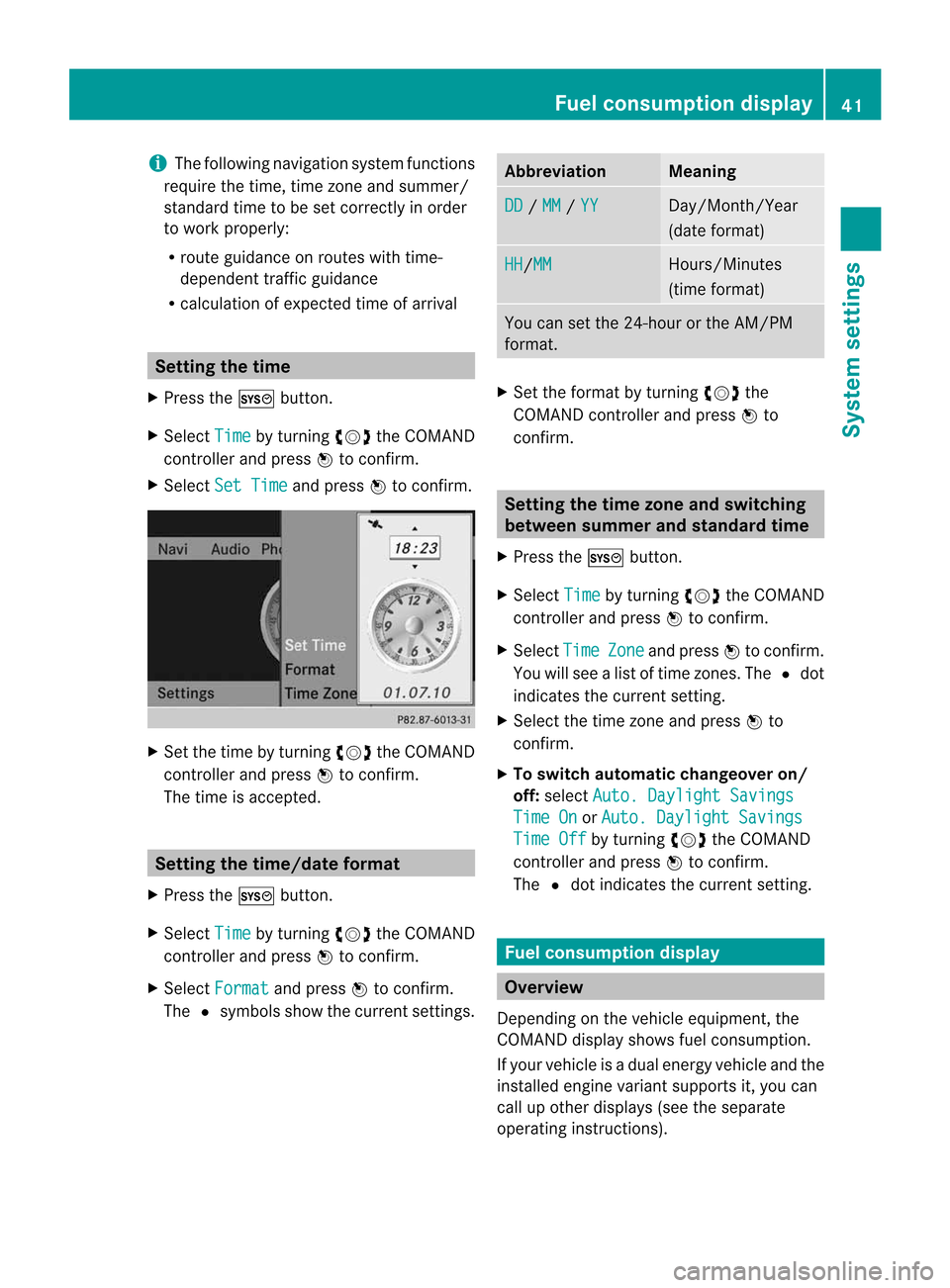
thetime
X Press theW button .
X Select Time by
turnin gcVd theCOMAND
cont roller andpress Wtoconf irm.
X Select SetTime and
press Wtoconf irm. X
Set thetime byturnin gcVd theCOMAND
cont roller andpress Wtoconf irm.
The time isaccepted. Setting
thetime/da teform at
X Press theW button .
X Select Time by
turnin gcVd theCOMAND
cont roller andpress Wtoconf irm.
X Select Format and
press Wtoconf irm.
The #symbols showthecurren tsett ings. Abbreviat
ion Meaning
DD /
MM /
YY Day/Mon
th/Year
(date format ) HH /MM Hours/
Minutes
(time format ) You
cansetthe 24-hour orthe AM/ PM
format . X
Set theformat byturn ingcVd the
COMAND controller andpress Wto
con firm. Sett
ingthe timezone and switching
between summerand stand ardtime
X Press theW button .
X Select Time by
turn ingcVd theCOMAND
con troller andpress Wtocon firm.
X Select Time Zone and
press Wtocon firm.
You willsee alist oftime zones.The #dot
indicat esthe curren tsett ing.
X Select thetime zoneand press Wto
con firm.
X To switch automat icchangeover on/
off: select Auto. Dayligh tSavings Time
On or
Auto. Dayligh tSavings Time
Off by
turn ingcVd theCOMAND
con troller andpress Wtocon firm.
The #dot indicat esthe curren tsett ing. Fuel
consumpt iondispla y Overview
Depen dingonthe vehicle equipment, the
COMAND displayshowsfuelconsumption .
If your vehicle isad ual energy vehicle andthe
inst alled engin evariant supports it,you can
call upother displays (seetheseparate
operatin ginst ruct ions). Fuel
consumpt iondispla y
41System sett
ings
Page 45 of 234
during
voicecontroloperation andthe
<002C00310025002C0035002C0025002E00330029002C002A00330021002C0030
0031V process.
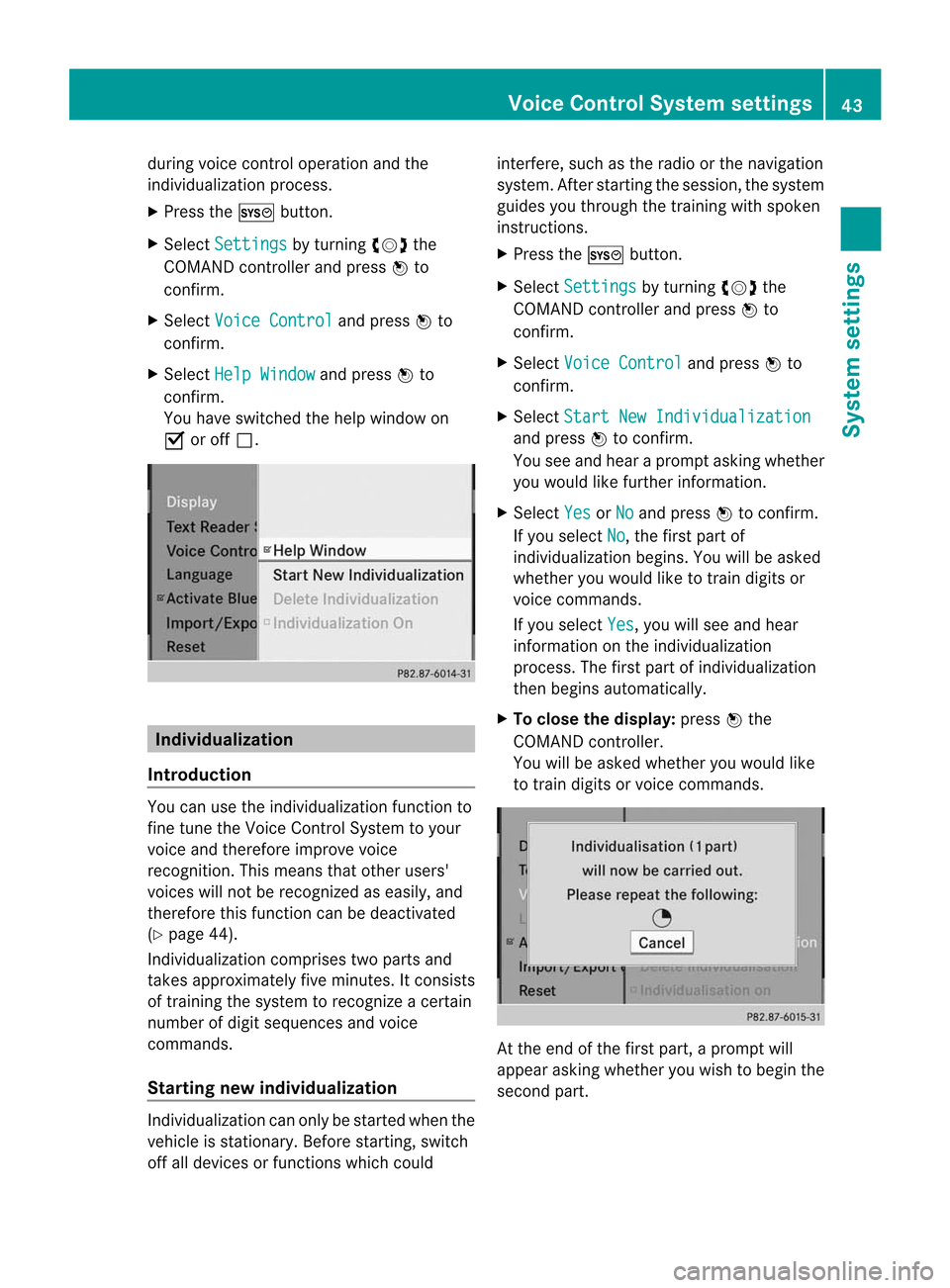
X Press theW button.
X Select Settin gs by
turn ingcVd the
COMAND controller and press Wto
con firm.
X Select Voice Control and
press Wto
con firm.
X Select HelpWindow and
press Wto
con firm.
You have switchedthehelp window on
O oroff ª. Individu
alization
Intr oduct ion You
canusethe<002C00310025002C0035002C0025002E00330029002C002A00330021002C0030
0031V function to
fine tune theVoice ControlSyst emtoyour
voice andtherefore improve voice
recog nition. This means thatother users'
voices willnotberecog nized aseasily, and
ther efore thisfunc tion canbedeactiv ated
(Y page 44).
Indiv idualization comprisestwoparts and
tak esapproximat elyfive minut es.Itcon sists
of train ingthe system torecog nizeac ertain
number ofdigit sequenc esand voice
comm ands.
Sta rting new individu alization Indiv
idualization canonly bestart edwhen the
vehicle isstat ionary. Beforestart ing, switc h
off alldevices orfunc tionswhich could int
erfer e,such asthe radio orthe navigat ion
system. Afterstart ingthe session ,the system
guides youthrough thetrain ingwith spoken
inst ruct ions.
X Press theW button.
X Select Settin gs by
turn ingcVd the
COMAND controller and press Wto
con firm.
X Select Voice Control and
press Wto
con firm.
X Select Start NewIndivi dualization and
press Wtocon firm.
You seeand hear aprompt askingwhether
you would likefurther infor mation .
X Select Yes or
No and
press Wtocon firm.
If you select No ,t
he first part of
<002C00310025002C0035002C0025002E00330029002C002A00330021002C0030
0031V begins.Youwillbeasked
whether youwould liketotrain digits or
voice comm ands.
If you select Yes ,y
ou will see and hear
infor mation onthe <002C00310025002C0035002C0025002E00330029002C002A00330021002C0030
0031V
proces s.The first part of<002C00310025002C0035002C0025002E00330029002C002A00330021002C0030
0031V
then begins automatic ally.
X To close thedispla y:press Wthe
COMAND controller.
You willbeasked whether youwould like
to train digits orvoice comm ands. At
the end ofthe first part, aprompt will
appear askingwhether youwish tobegin the
secon dpart. Voice
Control Systemsett ings
43System
sett ings
Page 47 of 234
Acti
vating/d eactivating Blu eto oth ®
X Pre sstheW button.
The systemmen uappear s.
X Se lec tSet tin gs by
turnin gcVd the
COMA NDcontrol ler and pressW to
co nfirm .
X Se lec tAct iva teBlu etooth and
press
W toconfirm .
This switches Blue tooth®
on O oroff ª. Set
ting thes ystem langua ge
This function allows youtodet erm inethe
lan guage forthem enud isplays andthe
nav igat ionann oun cemen ts.T he navigation
announcemen tsare not availa bleinall
language s.Ifal anguage isnot availa ble,the
navigation announcemen tswill beinEnglish.
The selected language affectsthecharacters
availa bleforentr y.
When yousetthe system language ,the
language ofthe Voice Control System will
change accordingly. Ifthe selected language
is not supported bythe Voice Control System,
English willbeselected.
X Press theW button.
X Select Settings by
turning cVdthe
COMAND controller andpress Wto
confirm .
X Select Language and
press Wtoconfirm .
The listoflanguage sappea rs.The #dot
indicates thecurrent setting. X
Select thelanguage byturning cVdthe
COMAND controller andpress Wto
confirm .
COMAND loadstheselected language and
sets it. Assign
ingthe favorites button
This funct ionisavaila ble,e.g. forthe M-Class.
Depending onthe vehicle equipment, youcan
assign oneortwo favorites buttons.Theyare
located onthe left (one favorites button
installed) oron the left and right (twofavorites
buttons installed) besidetheCOMAND
cont roller (Ypage 19).
You canselect thefollowing predefined
funct ionsinam enu:
R Display On/Off :y
ou can switch the
displa yoffor on.
R Full Screen: 'Clock' :y
ou can show the
clock infull screen .
R Full Screen: 'Map' :y
ou can show the
map infull screen .
R Spoken Driving Tip :y
ou can callupthe
current drivingrecomm endation.
R Display Traffic Messages :y
ou can call
up traffic reports.
R Navigate Home :y
ou can start route
guidance toyour home address ifyou have
already enteredand saved theaddress
(Y page 57).
R Detour Menu :y
ou can callupthe Detour
menu andthen avoid asection ofthe route
and recalculate theroute (Ypage 82).
R Compass Screen :y
ou can callupthe
compass.
X To assign afavorite sbutton: pressthe
W button.
X Sele ctSettin gs by
sliding VÆandturning
cVd theCOM AND controll erand press
W toconfirm. As
sig nin gthe favorite sbutton
45Systems
ettin
gs
Page 49 of 234
!
Never remove thestick orcard when
writing datatothe USB stick orthe memory
card Youmay otherwise losedata. Reset
function
You canreset COMAND tothe factory
settings. Amongotherthings, thiswilldelete
all personal COMAND data(e.g.station
presets, entriesinthe destination memory
and inthe listofprevious destinations inthe
navigation system,address bookentries).
Resetting isrecommended beforesellingor
transferrin gownership ofyour vehicle, for
example.
Data onthe internal harddrive, e.g.music
files inthe MUSIC REGISTER, willbedeleted.
You canalso delete musicfilesfrom the
MUSIC REGISTER usingthe"Delete allmusic
files" (Ypage 170)function.
X Press theW function button.
X Select Settings by
turning cVdthe
COMAND controller andpress Wto
confirm.
X Select Reset and
press Wtoconfirm.
Ap rompt appears asking whethe ryou wish
to reset.
X Select Yes or
No and
press Wtoconf irm.
If you select No ,t
he process willbeaborted.
If you select Yes ,ap
rompt willappear again
asking whether youreally wishtoreset.
X Select Yes or
No and
press Wtoconf irm.
If you select Yes ,am
essage willbeshown.
COMAND isreset andrestart ed.
If you select No ,t
he process willbeaborted. Reset
function
47Systemsettings
Page 51 of 234

COMAN
Dfeatures <003B003B003B003B003B003B003B003B003B003B003B003B003B003B003B003B
003B003B003B003B003B003B003B003B003B003B003B003B003B003B003BV 50
Introd uction ...... ...... ...... ...... ................. 50
Basic settings <003B003B003B003B003B003B003B003B003B003B003B003B003B003B003B003B
003B003B003B003B003B003B003B003B003B003B003B003B003B003B003B003B
003B003B003B003B003B003B> 52
Destinat ionentr y<003B003B003B003B003B003B003B003B003B003B003B003B003B003B003B003B
003B003B003B003B003B003B003B003B003B003B003B003B003B003B003B003BV 53
Entering apoint ofint erest ................ 66
Personal pointsofinterest ........ ......... 72
Search &Send <003B003B003B003B003B003B003B003B003B003B003B003B003B003B003B003B
003B003B003B003B003B003B003B003B003B003B003B003B003B003B003B003B
003B003B003B003B003B> 76
Rout eguida nce<003B003B003B003B003B003B003B003B003B003B003B003B003B003B003B003B
003B003B003B003B003B003B003B003B003B003B003B003B003B003B003B003B
003B003B003B> 77
Tr affic repor ts<003B003B003B003B003B003B003B003B003B003B003B003B003B003B003B003B
003B003B003B003B003B003B003B003B003B003B003B003B003B003B003B003B
003B003B003B003B003B> 88
Destinat ionmem ory<003B003B003B003B003B003B003B003B003B003B003B003B003B003B003B003B
003B003B003B003B003B003B003B003B003B003B003BV 94
Previous destinations<003B003B003B003B003B003B003B003B003B003B003B003B003B003B003B003B
003B003B003B003B003B003B003B003B003BV 97
Map opera tionandsettings ............... 98
Addit ional settings <003B003B003B003B003B003B003B003B003B003B003B003B003B003B003B003B
003B003B003B003B003B003B003B003B003B003B003BV 105
Problems withthenavigat ionsys-
tem <003B003B003B003B003B003B003B003B003B003B003B003B003B003B003B003B
003B003B003B003B003B003B003B003B003B003B003B003B003B003B003B003B
003B003B003B003B003B003B003B003B003B003B003B003B003B003B003B003B
003B003B003B003B003BV 111 49Navigat
ion
Page 52 of 234
COMAN
Dfeatures
Thes eOperatin gInstruc tio ns desc ribeall
st andar dand opt ionalequipm enta vail able
for you rCOMAND systematthe time of
purcha se.Cou ntry-specifi cdeviation sare
possible. Pleasenotethat your COMAND
system maynotbeequipped withallthe
features described. Introd
uction Safet
ynotes G
WARN
ING
For safety reasons, onlyenterad estin ation
when thevehicle isstat ionary. Whenthe
vehicle isin motion ,apassen gershoul denter
th ed estinat ion.Stud ym anualand select
rou tebefor ed rivin g.
Bea rinm indt hata ta spee do fjus t3 0m ph
(a pp roxi mately5 0k m/h) ,you rv ehiclei s
cove ringad ista nce of44 feet(appro ximately
14 m)ever ysecon d.
COMA NDcalc ulate sthe rout etot he
destination withouttakingaccount ofthe
following:
R Traffic lights
R Stop andright- of-way-signs
R Lane merging
R Parking orstopping prohibited areas
R Other roadandtraffic rulesandregulations
R Narrow bridges G
WARNING
COMAND maygiveincorr ectnavigation
commands ifthe data inthe digital mapdoes
not correspon dwiththe actual road/traff ic
situation. Digitalmapsdonot cover allareas
nor allroutes withinanarea. Forexample, if
the traffic routing hasbeen changed orthe
direction ofao ne-way roadhasbeen
reversed.
For this reason, youmust alway sobserve
applicable roadandtraffic rulesand regulations
duringyourjourney. Roadand
traffic rulesandregulations alwayshave
priority overthenavigation commands
generated bythe system. G
WARNING
Navigation announcementsareinten dedto
direct youwhile driving without diverting your
atten tionfrom theroad anddriving.
Please alwaysusethis feature instead of
consultin gthe map display fordirection s.
Consulting thesymbols ormap display for
direction smaycause youtodivert your
atten tionfrom driving andincrease yourrisk
of an accident . General
notes
Operat ionalreadiness ofthe navigation
system The
navigation systemmustdetermin ethe
position ofthe vehicle beforefirstuseor
whenever operational statusisrestored.
Therefore, youmay have todrive foraw hile
before precise routeguidance ispossible.
GPS reception Correct
functioning ofthe navigation system
depends, amongstotherthings, onGPS
reception .Inc ertain situation s,GPS
recept ionmay beimpaired, theremaybe
int erferen ceorther emaybe no recept ionat
all, e.g. intunn elsorparkin ggarages.
Entry restriction On
vehicles forcert aincount ries,thereisa
rest riction onent ering data.
The restriction isactiv eabove avehicle speed
of about 3mph.The restriction isdeactiv ated
as soon asthe vehicle speeddropsbelow
about 2mph.
When therest riction isactiv e,cert ainentries
cann otbe made. Thiswillbeindicat edbythe 50
Intr
oduct ionNavigat
ion
Page 53 of 234

fact
that certain menuitemsaregray edout
and cannot besele cted.
The followi ngentries arenot possi ble,for
examp le:
R entering thedesti nation cityand street
R entering adesti nation viathe map
R entering points ofinterest inthe vicini tyof
ac ity orvia aname search
R edi ting entries
R usi ng the numbe rkeyp adfor dire ctentry
Other entries arepossi ble,such asentering
poi nts ofinterest inthe vicini tyof the
desti nation orcurrent position.
Address escan beentered viathe Voice
Control System (seethesepa rateOpera ting
Instructions) whilethe vehi cleisin motion. Swi
tchin gton avig ation mode
Option 1
X Press theØ function button.
The map isdisp layed with themenu either
show norhidden .
Opt ion 2
X Selec tNavi in
the main function barby
slidin gZV andturnin gcVd theCOMA ND
con troller andpress Wtocon firm .
The map isdisplayed withthemen ushown . Map
showin gthe men u;rout eguidan ceinac tive
: Status bar
; Main function bar =
Curre ntveh icle posit ion
? Navi gation men ubar Map
withoutthem enu;rout eguidan ceinac tive
: Curre ntveh icle posit ion
; Map orientatio nselected
= Map scale select ed
"Route guidance active"meansthatyouhave
ent ered adestin ation andthat COMAND has
calculated theroute. Thedisplay showsthe
route, changes ofdirect ionand lane
recom mendat ions.Navigation
announ cementsguide youtoyour
destin ation.
"Route guidance inactive"means thatno
destin ationhasbeen entered andthat no
route hasbeen calculated. Showing/hiding
themenu
X To hide themenu: slideZVtheCOMAND
con troller and,when theFull Screen menu
itemisshown, pressWtocon firm.
or
X Press the% backbutton .
The map canbeseen inthe full-scr een
display.
X To show themenu: pressWthe COMAND
con troller whenthemap isshown infull-
screen display. Introd
uction
51Navigation Z