phone MERCEDES-BENZ E-Class WAGON 2011 S212 Comand Manual
[x] Cancel search | Manufacturer: MERCEDES-BENZ, Model Year: 2011, Model line: E-Class WAGON, Model: MERCEDES-BENZ E-Class WAGON 2011 S212Pages: 234, PDF Size: 8.64 MB
Page 169 of 234

X
Sel ect atrack andpressW toconfi rm.
Pl ay ba ck star ts.
Se lecti ng ayear ofpublicat ion X
Sele ctYea r in
thec ategor ylist
(Y page 165)by tur nin gcVd theC OMA ND
con troller andpres sW tocon firm. X
Sele ctan ent ryand pres sW tocon firm.
The genrelist isdisplayed .
X Sele ctag enre, e.g.pop, and press Wto
conf irm.
The track listisdisplay ed.
X Select atrack andpress Wtoconf irm.
Playba ckstart s.
Selecting acover X
Sele ctSel ect ByCover in
thec ategor y
list (Ypage 165)by turnin gcVd the
COMA NDcontroller andpres sW to
con firm.
The available covers are displayed in
alphabet icalorde rofthe artists. X
Select thedesired coverbyturning cVd
the COMAND controller andpress Wto
confirm .
The corresponding albumisplayed.
Selec tionviakeyword search X
Select Keyword Search in
the category list
(Y page 165)byturning cVdtheCOMAND
cont roller andpress Wtoconfirm.
An input menu appears. X
Ent ercharacters andconfirm theentry.
Instr uctions forentering characters canbe
found inthe "Enterin gcharacters inthe
phone bookandaddress book"section
(Y page 31).
Depending onthe entry, thehits areshown
in alist. Music
search
167Audio Z
Page 173 of 234

R
MUSIC REGISTER
R USB storage device
X Switch toMUSIC REGISTER (Ypage 168).
X Select Search by
sliding VÆandturning
cVd theCOMAND controller andpress
W toconfirm .
The category listappea rs.
X Select atrack inac ategory (Ypage 165).
Example: openingafolder X
Sele ctFol der in
thec ategor ylist by
tur nin gcVd theC OMA NDcontroller and
pres sW tocon firm.
You seethec ontent so fthe cur ren tfolder. The
name ofthe current folderisat the top
and thetrack current lyplayi ngisindicated by
a # dot.
X To switch tothe next folder up:press the
% backbutton orslide XVthe
COMAND controller.
Changing thefolder/tr ackname X
Switch toMUSIC REGISTER (Ypage 168).
X Select Music Register by
sliding VÆand
turnin gcVd theCOMAND controller and
press Wtoconf irm.
X Select Rename/Delet eFiles and
press
W toconf irm.
X Select afolder/t rackbyturnin gcVd.
X Select Options by
sliding VYandpress
W toconf irm. X
Select Change and
press Wtoconf irm.
X En ter aname forthe folder/t rack.
Inst ruction sfor enter ingcharact erscan be
found inthe "Ent ering charact ersinthe
phone bookandaddress book"section
(Y page 31).
X To save thechanges: select¬and
press Wtoconf irm.
Dele ting folders/tr acks X
Switch toMUSIC REGISTER (Ypage 168).
X Select Music Register by
sliding VÆand
turnin gcVd theCOMAND controller and
press Wtoconf irm.
X Select Rename/Delet eFiles and
press
W toconf irm.
X Select afolder/t rackbyturnin gcVd.
X Select Options by
sliding VYandpress
W toconf irm.
X Select Delete and
press Wtoconf irm.
Aq uery appear s.No is
high light ed.
If you selectYes ,t
he folder s/track sare
delet ed.You seethePle ase wait... mes
sage .Then, youseetheData Deleted message.
If you select No ,t
he process willbeaborted. Playback
options
The following optionsareavaila ble:
R Normal TrackSequence The
track sareplay edinthe normal order
(e.g. track 1,2,3, etc. ).
R Random Medium All
the track sonthe medium areplay edin
random order.
R Random TrackList (MP3
mode only)
The track sint he current lyactive folder/
track listare play edinar andom order. MUSIC
REGISTER
171Audio Z
Page 175 of 234

Blu
etoo th®
au diod evice and then authori zing
it.
You canauthori zeup tofifte enBlu etoo th®
dev ices.
i Ifyo ua uthori zeam obilep hone that
su ppo rtsBluetoo th®
au dio, the A2DP and
AVRC PBluetoo th®
au diop rofiles are
connected automa tically. The mob ile
pho neisthen entere dinb oth the
Blu etoo th®
tele pho nelist (Y page 116) and
in the Bluetoo th®
dev icelist (Y page 173).
Merce des-Benz recom mendsauthori zing a
mob ilep hone inBlu etoo th®
tele pho ny
(Y page 116).
Se archi ngfor and authori zinga
Blue tooth®
audio device X
Swi tch onBlu etoo th®
au diom ode
(Y page 175).
If yo us ee the NoBlue toothAudi o Devi
ceAuth orized mess
age, youw ill
need toconnect theBluetoo th®
au dio
dev icefirst.
X Sele ctBT Audi
o by
sliding VÆ andturni ng
cVd theCOMAND controllera nd pre ss
W toconfir m.
X Co nfirm BluetoothAudi oDevi ceList by
pre ssing W the COMAND controller.
X To search: confirmUpda te by
pre ssing
W the COMAND controller.
CO MAND searches forBluetoo th®
au dio
dev icesw ithin rang eand adds them tothe
Blu etoo th®
dev icelist. Blu etoo th®
au dio
dev icesaredete cted ifthey suppo rtthe
Blu etoo th®
au diop rofiles (A2DP, AVRCP).
The durati onofthe search depends onthe
numb erofBlu etoo th®
au diod evice sw ithin
rang eand thei rcharacteristics. Example:
Bluetooth®
device list
: Newly detectedmobile phonewith
Bluetooth ®
audi ofunct ioninrange
; Bluetooth ®
audi oplayernot within range
but previously authorized (iconappea rsin
gray)
The Bluetooth ®
device listdispla ysall
authorized devices,whether theyarewithin
range ornot. Afterad evice search, devices
which arewithin rangebutnot authorized are
also displa yed.
i With some Bluetooth ®
audi odevices,
play back must beinitially started onthe
device itself,sothat COMAND canplay the
audi odata.
X To auth orize: select anunauthorized
Bluetooth ®
audi odevice fromthelist
(example: :)byturning cVdthe
COMAND controller.
X Select thesymbol tothe right ofthe
Bluetooth ®
audi odevice bysliding VYthe
COMAND controller andpress Wto
confirm .
X Select Authorize and
press Wtoconfirm .
Depending onthe Bluetooth ®
audi odevice
used, younow have twooptions for
cont inuing withauthorization.
X Option 1:enter thepasskey. Todo so,
proceed asdescribed inthe "Authorizing
(registering) amobile phone" section
(Y page 117).
Aft ersuccessful authorization, the
Bluetooth ®
audi odevice isconn ected and
starts playing. Bluetooth
®
audi omode 173Audio Z
Page 176 of 234
X
Opt ion 2(Secure SimplePairing): ifthe
digit codes displayed inCOMAND andon
the Bluetoot h®
audio device arethe same,
con firm Yes by
pressing W.
If you select Yes ,a
uthorizat ioncontinues
and theBluetoot h®
audio device is
con nect ed.Playback starts.
If you select No ,a
uthorizat ionwill be
canc eled.
i The Bluetoot h®
audio device must
support theBluetoot h®
version 2.1for
con nect ionviaSecure SimplePairing.
COMAND createsasix-digit code, which is
displayed onthe two devices thataretobe
con nect ed.
X Externa lauthoriz ation: COMAND may
not beable tolocate yourBluetoot h®
audio
device duetothe specific securitysett ings
of the Bluetoot h®
audio device itself.Inthis
case, check whether yourBluetoot h®
audio
device canlocate theCOMAND system
(Y page 118). TheBluetoot h®
device name
of COMAND isMB Bluetoot h .
Aft ersuccess fulauthorizat ion,the
Bluetoot h®
audio device iscon nect edand
start splaying.
Reconnecting aBluet ooth ®
aud io
device The
Bluet ooth®
audio profilesareconnected
automat icallyunder thefollowin g
circ umst ances:
R one ofthe last two mobile phonestohave
been connected has also been usedasa
Bluet ooth®
audio player (ifthis func tion is
support edbythe mobile phone).
R the mobile phonetakes over theautomat ic
con nection itself.
AB luetoo th®
audio player withouttelep hone
func tionsisn otautom atically reconn ected,
even ifit was thelast devic econnec ted.
If the NoBlue toothAudioD evice Conn
ected mess
ageappears, youhave two opt
ions tocon nectaB luetooth®
audio
devic e:
Opt ion 1
X Conf irmConn ectLast Device in
the
basic display bypress ingWthe COMA ND
con troller.
If COMA NDcan locat ethe Bluet ooth®
audio device,itwill becon nected and will
st art playing.
i With some Bluetooth®
audio devices,
playback mustbeinit ially start ed on the
devic eitself, sothat COMA NDcan play the
audio data.
Opt ion 2
X Selec tBT Audi o by
turnin gcVd the
COMA NDcontroller andpress Wto
con firm .
X Conf irmBlue toothAudioD evice List by
press ingWthe COMA NDcontroller.
X Selec taBluet ooth ®
au diod evice byturni ng
cVd theCOMAND controllera nd pre ss
W toconfi rm.
If CO MAND canlocatethe Bluetoo th®
au diod evice ,itw illb ec onnected andwill
star tplaying.
i With some Bluetooth®
audio devices,
playback mustbeinit ially start ed on the
devic eitself, sothat COMA NDcan play the
audio data.
Blu etoot h®
aud iodevice and
simu ltaneous searchfor mobile phones During
thesearc hfor mobile phones
(Y page 116),the connection with the
Bluet ooth®
audio deviceist ermin ated. Inthe
Bluet ooth®
audio basicdisplay
(Y page 176),you willsee theRece ived Busi
ness Cards mess
ageand the
Rece ived Business Cards men
uitem
can not beselec ted. 174
Bluetoot h®
au dio mod eAudio
Page 177 of 234

Disp
laying details X
Se lec taB luet ooth ®
au diod evice inthe
Blu etoo th®
dev icelist.
X Sele ctthe symbo ltot he right ofthe
Blu etoo th®
au diod evice bysliding VY the
CO MAND controllera nd pre ssW to
confi rm.
X Sel ect Detail s and
pressW toconfi rm.
The followi ng info rma tionc oncer ningthe
selected mobilephoneisshown:
R Bluetooth ®
name
R Bluetooth ®
address
R availa bilitystatus (shown afteran
update)
R authorization status
X To close thedetailed view:turncVd or
slide XVY theCOMAND controller.
De-author izing(de-registering) a
Bluetooth ®
audio device X
Select aBluetooth ®
audio device inthe
Bluetooth ®
device list.
X Select thesymbol tothe right ofthe
Bluetooth ®
audio device bysliding VYthe
COMAND controller andpress Wto
conf irm.
X Select De-Authorize and
press Wto
conf irm.
Ap rompt appears asking whethe ryou
really wishtode-authorize thisdevice.
X Select Yes or
No .
If you select Yes ,t
he device willbedeleted
from theBluetooth ®
device list.
If you select No ,t
he process willbeaborted.
i Before re-authoriz ingthe Bluetooth ®
audio device, youshould alsodelete the
device nameMBBluetooth from
your
Bluetooth ®
audio device's Bluetooth ®
list
(see theBluetooth ®
audio device's
operating instructions). Switching
toBluetooth ®
audio mode
Option 1 X
Connect (Ypage 172)orrecon nect
(Y page 174)aBluetooth ®
audio device.
COMAND activatestheBluetooth ®
audio
device. Thebasic display appears andthe
device startsplayi ng.
Option 2 X
Press theh functionbutton oneormore
times.
i Bypressing thefunct ionbutton
repeatedly, youcan change theoperating
mode inthe following order:
R audio CD/DVD/MP3 (disc)
R memory cardmode
R MUSIC REGISTER
R USB storage device
R Media Interface oraudio AUXmode
R Bluetooth ®
audio mode
Option 3 X
Select Bluetooth Audio (Y
page 159)in
the media listbyturnin gcVd theCOMAND
cont roller andpress Wtoconf irm.
COMAND activatestheconn ected device.
You willsee amessage tothis effect .The
basic displa ythen appea rs. Bluetooth
®
audio mode 175Audio Z
Page 178 of 234
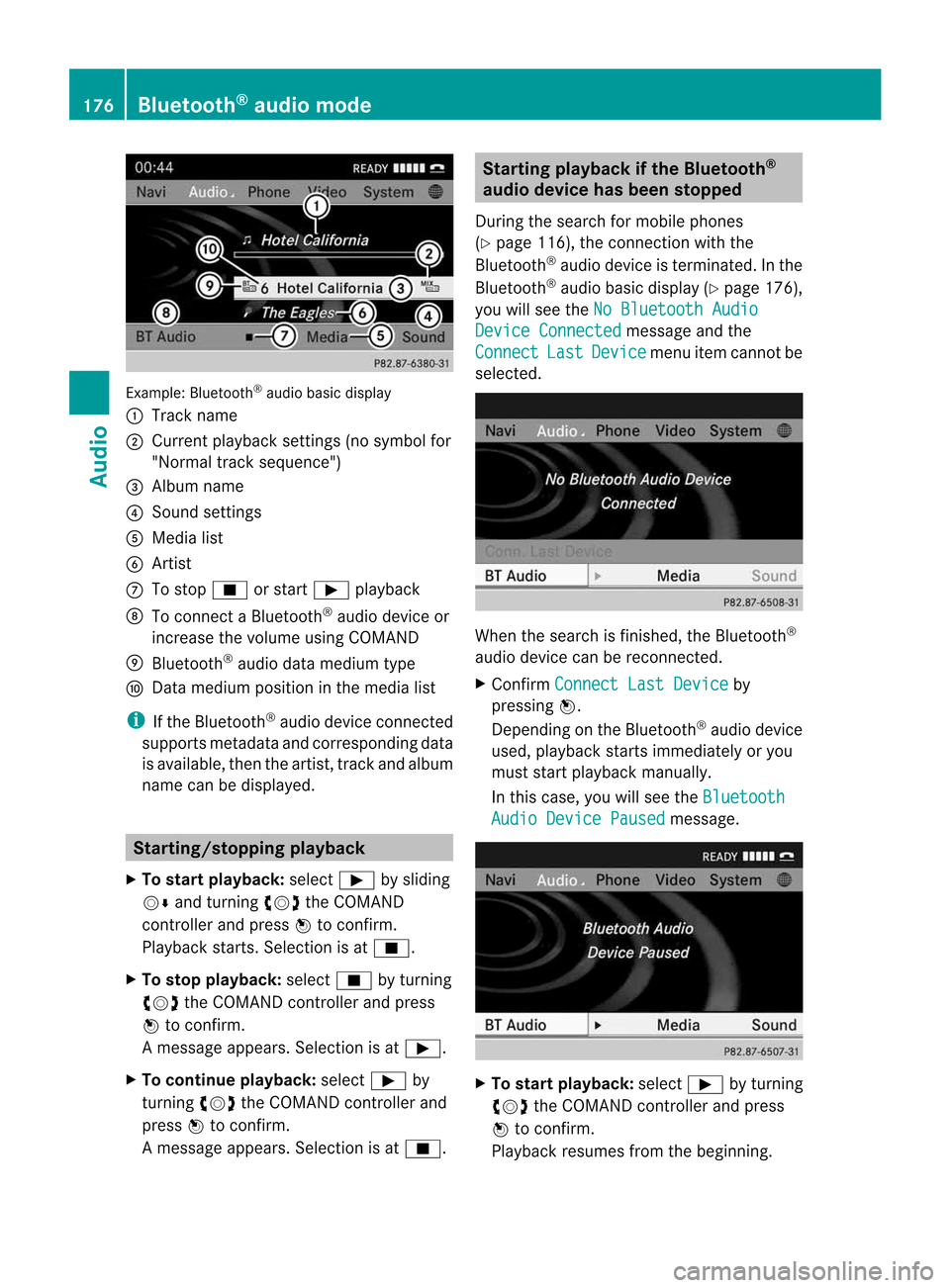
Exam
ple: Blu etoo th®
au diob asic disp lay
: Trac kn ame
; Curren tplayback settings (no symbol for
"Norm altrack sequen ce")
= Album name
? Soun dsettin gs
A Media list
B Artis t
C Tostop É orstart Ì playback
D Tocon nectaB luetooth®
audio deviceor
inc rease thevolume usingCOMA ND
E Bluet ooth®
audio datamedium type
F Datam edium positioninthe media list
i Ifthe Bluet ooth®
audio deviceconnec ted
support smetadata andcorrespo ndingdata
is available, thenthe artist, trackandalbu m
name canbedispla yed. Star
ting/stopping playback
X To star tplayback: selectÌbysliding
VÆ andturning cVdtheCOMAND
cont roller andpress Wtoconfirm .
Play back starts. Selection isat É.
X To stop playback: selectÉbyturning
cVd theCOMAND controller andpress
W toconfirm .
Am essage appears. Selectionisat Ì.
X To continue playback:select Ìby
turn ingcVd theCOMAND controller and
press Wtocon firm.
Am essage appears. Selectionisat É. Sta
rting playba ckifthe Bluet ooth®
aud iodevice hasbeen stopp ed
Durin gthe search formobile phones
(Y page 116),the connection with the
Bluetoot h®
audio device isterm inated. Inthe
Bluetoot h®
audio basicdisplay (Ypage 176),
you willsee theNoBluetoo thAudio Device
Connected message
andthe
Connect Last Device menu
itemcannotbe
select ed. When
thesearch isfinished, theBluetoot h®
audio device canberecon nected.
X Confirm Connect LastDevice by
pressing W.
Depen dingonthe Bluetoot h®
audio device
used, playback startsimmediately oryou
must startplayback manually.
In this case, youwillsee theBluetoo th Audio
Device Paused message.
X
To star tplayba ck:select Ìbyturn ing
cVd theCOMAND controller andpress
W tocon firm.
Playback resumesfromthebeginn ing. 176
Bluetooth®
aud iomod eAudio
Page 182 of 234
The
curren tplayback option (Ypage 163)is
shown withasymbol behindalbum name
E (no display forNorm al Trac
k Sequ
ence ).
i Ifthe devic econnec ted does notcontain
any playable track s,am essage appears to
this effect . Selecting
music files
Not e COMA
NDdisplays thedata stored onthe
iPod ®
or MP3 player accordin gtot he filing
struct ureused inthe respect ivemedium.
Selecting byskipping toatrac k X
To ski pforwa rds orbac ktoat rack:tur n
cVd theCOMAND controllerw hent he
di sp lay/ selectio nwindow isact ive.
or
X Press theE orF button.
The skip forward function skipstot he nex t
tr ack .The skip back function skipstot he
begin ningo fthe curr enttrack ifthe track
has been playing formor ethan eight
seco nds.Ift he track hasbeen playingfor
less than eight seconds, itskips tothe start
of the previous track.Ify ou have selected
ap layb ack option otherthanNormal Track
Sequence ,t
he track sequence is
random.
Selecting usingthenumber keypad X
To mak eane ntr y:press thel button .
An input menu appears. Thenumber of
charact ersavailable forinput depends on
the number ofstor edtrac ks.
X To enter atrack number :press anumber
key, e.g.q.
The digit isent ered inthe first position in
the input line.
i COMAND willignore andnotdisplay an
invalid digit. X
En ter more numbers ifdesired.
The trackplays afterthe last possible
numb erisent ered.
i Press ingand holdin ganumberkey for
mor ethan twoseco ndscom plete sthe
ent ry,and thecorrespo ndingtrack is
played.
Fast forwar ding/r ewinding X
While thedisplay/s electionwindow is
act ive, slide XVY andhold theCOMA ND
con troller untilthe desire dposition has
been reached.
or
X Press andhold theF orE button
until thedesired position isreached.
i OnaniPod ®
/iPhone ®
,f ast rewind only
funct ionswithin thecurrent track. Selecting
acatego ry/play list/fo lder
Ove rview iPo
d®
and certain MP3playe rs
For aniPo d®
or MP3 player,you can select
tracks using catego riesorfold ers.
Depend ingonthe devi ceconnected, the
foll owi ngcatego riesmay beava ilable ,for
examp le:
R Curre ntTrack list R
Playl ists (e.g.
All )
R Artis ts R
Album s R
Track s R
Podca sts R
Genre s R
Compo sers R
Audio books i
Some playback catego riescontain the
entry All .I
ft his entr yhasbeen selected,
the entire contentofthe category selected
will beplay ed. 180
Media
Interface modeAudio
Page 212 of 234
A
Con firms asele ction orset ting
B Swit ches soun don/off( forc orded
headphones)
C Adjust sthe volume (forcorded
headphones)
D Skips toatrack, fast-forwa rd/fast-rew ind
E Selects atrack; directentry
F Exits amenu (back)
Sel ecting thescre enfor the remote
co ntrol You
canusetheremote controltoopera te
one ofthe two rear screens atat ime. Todo
so, you must switch the remote controltothe
desi redscreen.
X To sele ctthe left-hand screen:turn
thumbw heel=until "LREAR" is
high lighted inthe windo w.
X To sele ctthe right-hand screen:turn
thumbw heel=until "REAR R"is
high lighted inthe windo w.
Swi tching thescre enon/ off If
the SmartKey isin posi tion 0or 1in the
ignitio nlock (see thevehicle Operator's
Manual), orthe Smart Keyisnot insert ed,the
screen sint he rear willswitch offafter 30
minutes. Beforethescreen sswitch off,they
show amessage tothis effect .
You canswitch thescreen sback on.
How ever,this will disc harg ethe start er
bat tery.
X Poin tthe rem otec ontro latthe rear -
co mpar tments cree nwhich hasbeen
selected forremote operation.
X Press button :onthe remote control.
The respective rearscreen switches onor
off.
i You canonly switch thescreens onusing
the remote controlifthe ignition is
switched on. Switching
thebutt onlighting on/off X
Press button ;onthe remote control.
Depending onthe previous status,the
button lighting isswitched onoroff.
i Ifyou donot use theremote controlfor
about 15seconds, thebutton lighting
switches offautomatically .
Switching thesound on/off(corded
headph onesonly) X
Press button Bonthe remote control.
The sound isswitched on/off.
Selec tingamenu/m enuitem and
confir mingyour select ion X
Sele ctam enu/m enuitemu singthe
=;9 :buttonso nthe
rem otec ontrol and pres sthe 9 butt onto
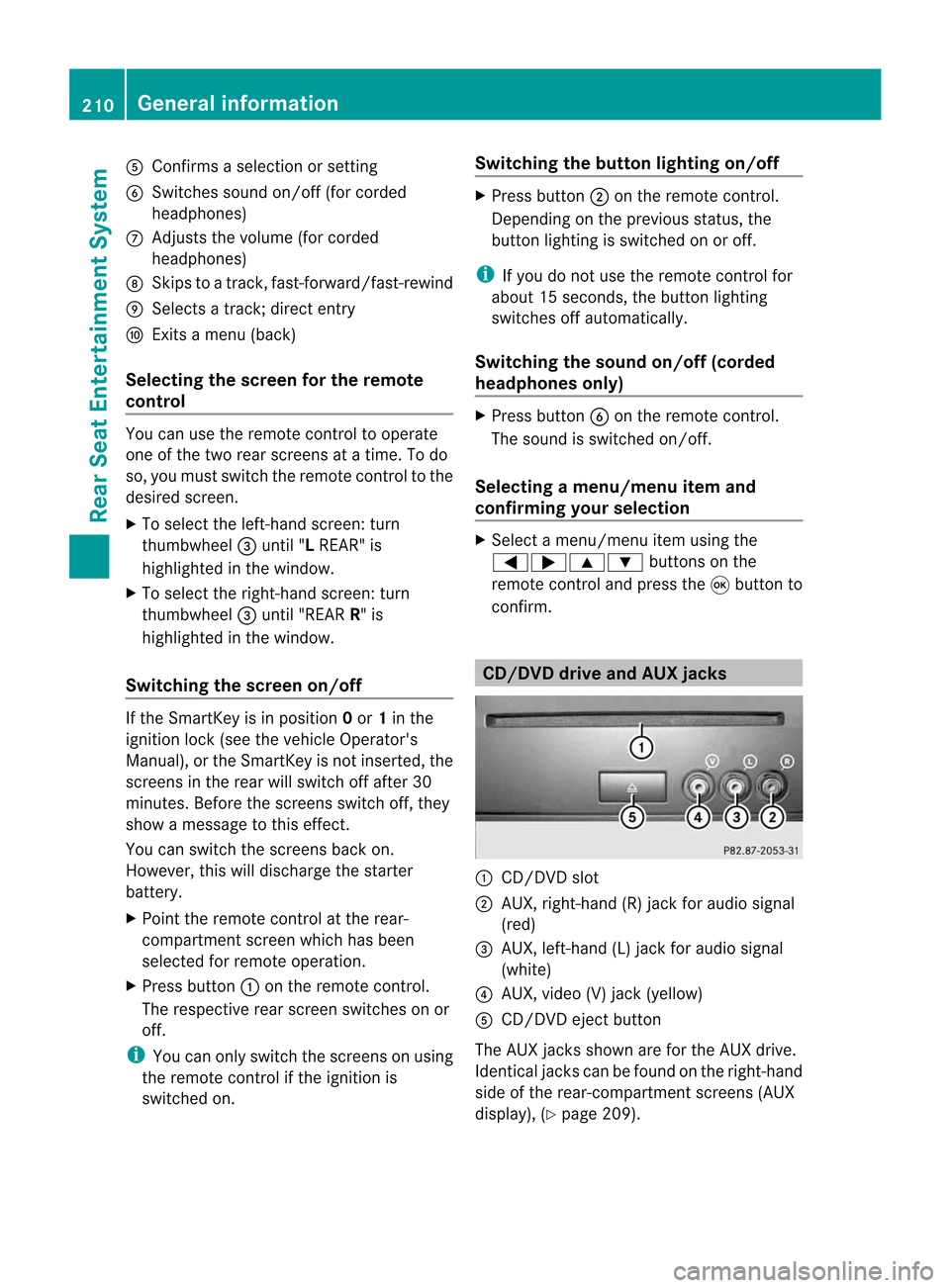
con firm. CD/DVD
drive and AUX jacks :
CD/ DVDs lot
; AUX,righ t-han d(R) jac kfor audio signal
(red)
= AUX, left-hand (L)jack foraudio signal
(white)
? AUX, video (V)jack (yellow )
A CD/D VDeject button
The AUX jacksshown areforthe AUX drive.
Ident icaljack scan be found onthe right- hand
side ofthe rear-com partmentscreen s(AUX
display ),(Y page 209). 210
General
informationRear
Seat
Entert ainment System
Page 213 of 234
Cord
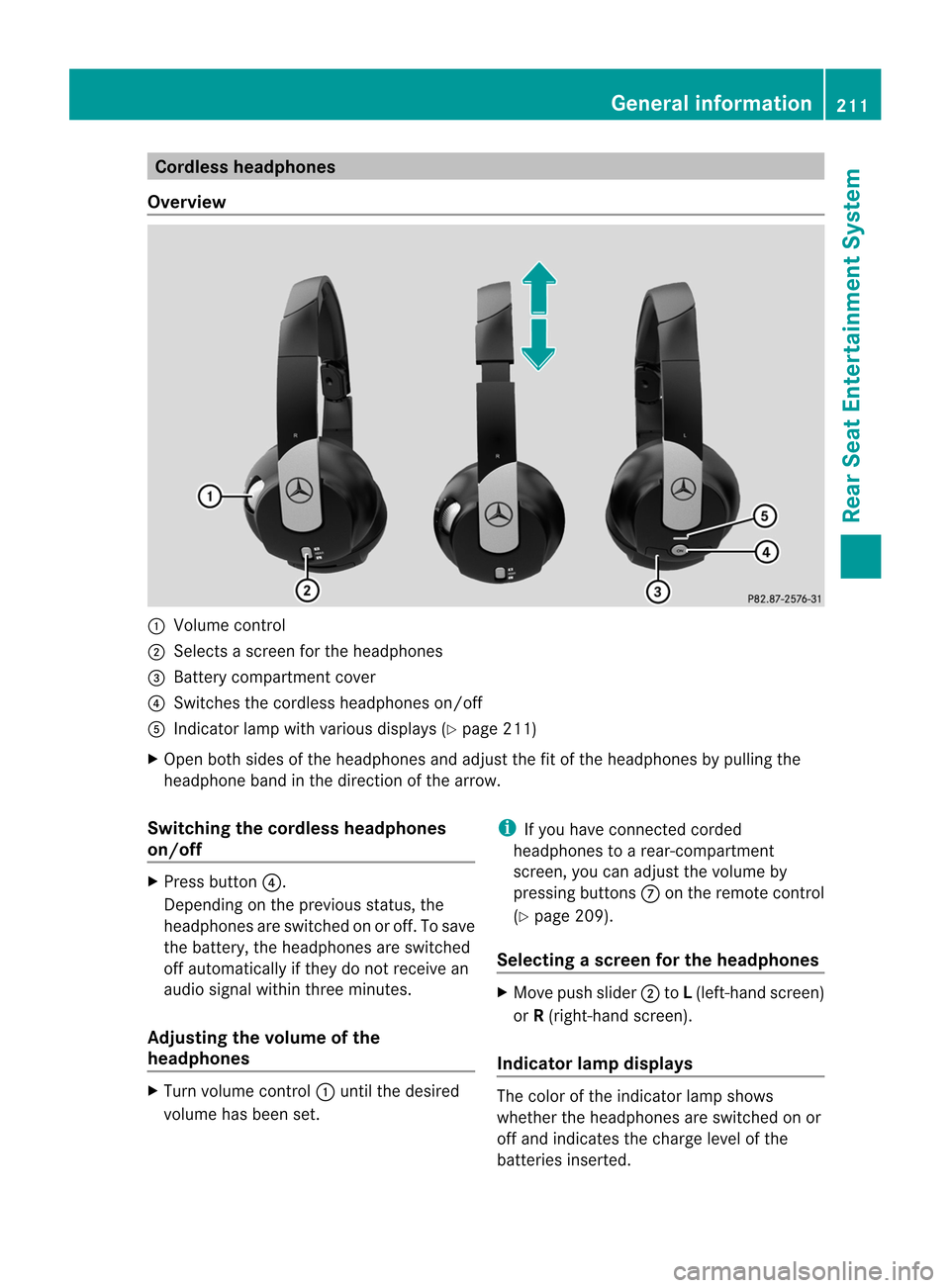
lessheadphones
Over view :
Volum econtro l
; Select sas cree nf or the headphones
= Batt erycompart mentcover
? Switches thecordless headphones on/off
A Indicat orlamp withvarious displays(Ypage 211)
X Open bothsides ofthe headphones andadjust thefitofthe headphones bypulling the
headphone bandinthe direction ofthe arrow.
Switching thecordless headphones
on/off X
Press button ?.
Dependin gonthe previous status,the
headphones areswitched onoroff. Tosave
the battery, theheadphones areswitched
off automatically ifthey donot receive an
audio signal within threeminutes.
Adjust ingthe volume ofthe
headp hones X
Turn volume control: until thedesired
volume hasbeen set. i
Ifyou have connected corded
headphones toarear-com partmen t
screen ,you can adjust thevolume by
pressing buttonsC onthe remote control
(Y page 209).
Selecting ascree nfor theh eadp hones X
Mov epush slide r; toL(lef t-han dscree n)
or R(rig ht-hand scree n).
Ind icat orlam pdispla ys The
color ofthei nd icat orlamp shows
whet hertheh eadp honesare swit ched on or
off and indicat esthec harge leve lofthe
bat teries inserted. Gener
alinfor mation
211RearS
eatE
nter
tai nme
nt
Syste m Z
Page 214 of 234
LED
disp lay St
atus Green The
batteries arefine. Red The
batteries arealmos t
disc harge d. Lit
con tinuous
ly The
headph onesareswit ched
on and connected toas cree n. Fla
shing The
headph ones are
sea rchi ngfor the connecti on
to as cree n. No
displ ay
(d ark) The
headph ones areswitched
off orthe batterie sare
di scha rged. Co
nne cting additi onalheadpho nes You
canconnect oneadditiona lset ofcord ed
hea dph ones toeach ofthe two rearscree ns
(Y page 209). Thesocke tisd esigned for
headphones witha3.5mm stereo jackplug
and animpedance of32 ohms. Changing
batteries
Notes Batteries
arerequired forthe remote control
and forthe two sets ofcordless headphones. G
WARNING
Keep thebatteries outofthe reach of
children. Consultadoctor immediately ifa
child should swallowabattery.
Do not dismantle, short-circuitorburn a
battery. H
Environmental
note
Dispose ofdischarged batteriesinan
environment allyresponsible manner. On
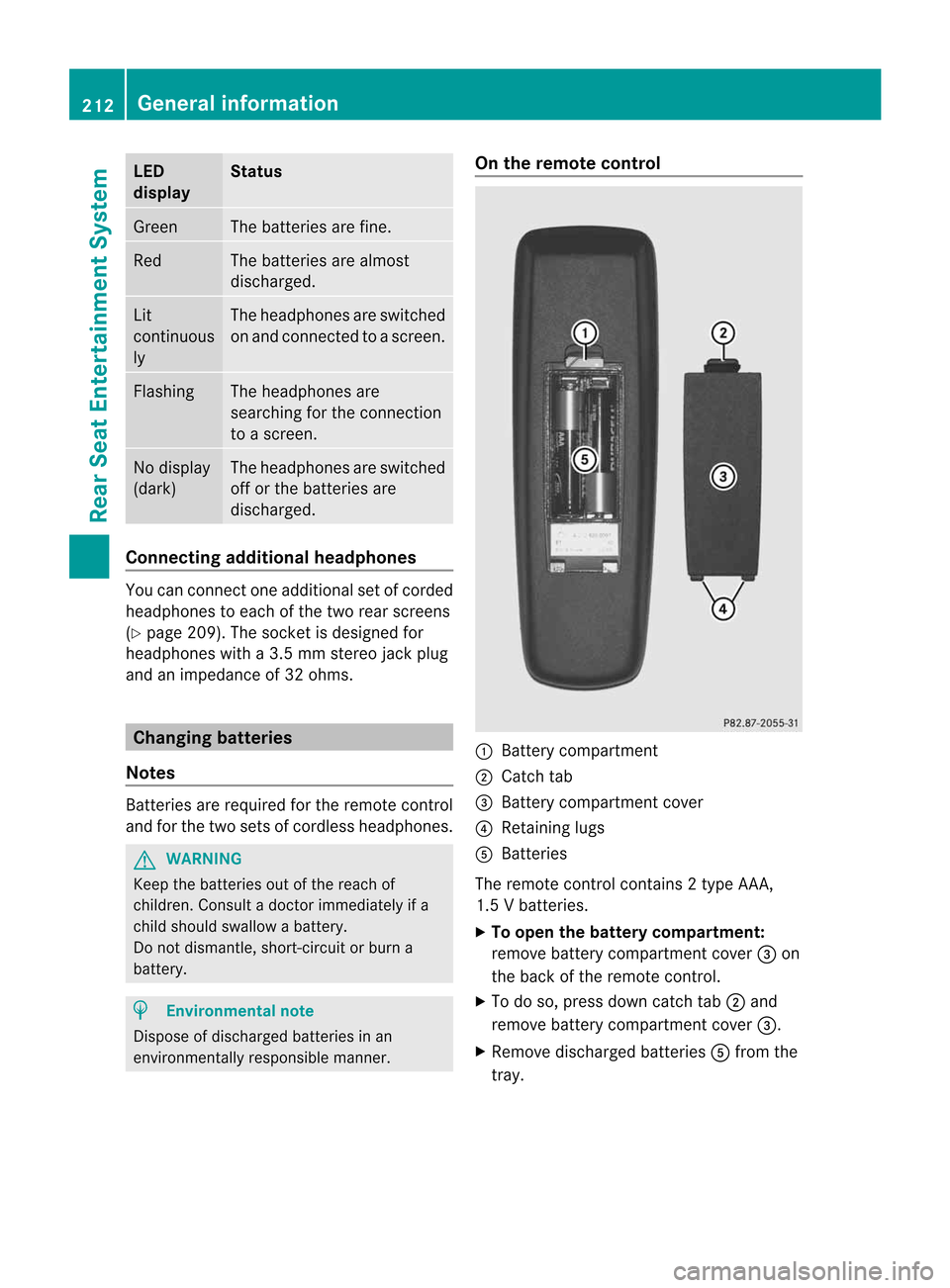
the remote control :
Battery compartment
; Catch tab
= Battery compartment cover
? Retaining lugs
A Batteries
The remote controlcont ains 2type AAA ,
1.5 Vbatteries.
X To open thebatter ycompart ment:
remove batterycompartment cover=on
the back ofthe remote control.
X To do so, press downcatch tab;and
remove batterycompartment cover=.
X Remove discharged batteriesAfrom the
tray. 212
General
informat ionRear
Seat
Entertainment System