display MERCEDES-BENZ E-Class WAGON 2013 W212 Owner's Guide
[x] Cancel search | Manufacturer: MERCEDES-BENZ, Model Year: 2013, Model line: E-Class WAGON, Model: MERCEDES-BENZ E-Class WAGON 2013 W212Pages: 420, PDF Size: 14.26 MB
Page 76 of 420
R
to crossing traffic
R when cornering
As a result, PRE-SAFE ®
Brake may neither
give warnings nor intervene in all critical
situations. There is a risk of an accident.
Always pay careful attention to the traffic
situation and be ready to brake.
In
order to maintain the appropriate distance
to the vehicle in front and thus prevent a
collision, you must apply the brakes yourself.
X To activate/deactivate: activate or
deactivate PRE-SAFE ®
Brake in the on-
board computer ( Y page 237).
When PRE-SAFE ®
Brake is activated, the
Ä symbol appears in the multifunction
display, as long as the HOLD function is
deactivated (Y
page 196). On vehicles with
the Active Parking Assist driving system,
the Ä symbol is displayed when position
P is engaged or you are driving faster than
22 mph (35 km/h).
For PRE-SAFE ®
Brake to assist you when
driving, the radar sensor system must be
switched on (Y page 241) and be
operational.
Following damage to the front end of the
vehicle,
have the configuration and operation
of the radar sensors checked at a qualified
specialist workshop. This also applies to
collisions at low speeds where there is no
visible damage to the front of the vehicle.
i USA only: This device has been approved
by the FCC as a "Vehicular Radar System".
The radar sensor is intended for use in an
automotive radar system only. Removing,
altering or tampering with the device will
void any warranties, and is not permitted
by the FCC. Do not tamper with, alter, or
use the device in any non-approved way.
Any unauthorized modification to this
device could void the user's authority to
operate the equipment. i
Canada only: This device complies with
RSS-210 of Industry Canada. Operation is
subject to the following two conditions:
1. This device may not cause interference,
and
2.
this device must accept any interference
received, including interference that may
cause undesired operation of the device.
Removal, tampering, or altering of the
device will void any warranties, and is not
permitted. Do not tamper with, alter, or use
the device in any non-approved way.
Any unauthorized modification to this
device could void the user's authority to
operate the equipment. Theft deterrent locking system
Immobilizer
X To activate with the SmartKey: remove
the SmartKey from the ignition lock.
X To activate with KEYLESS-GO:
switch the
ignition off and open the driver's door.
X To deactivate: switch on the ignition.
The immobilizer prevents your vehicle from
being started without the correct SmartKey.
When leaving the vehicle, always take the
SmartKey with you and lock the vehicle.
Anyone can start the engine if a valid
SmartKey has been left inside the vehicle.
i The immobilizer is always deactivated
when you start the engine.
In the event that the engine cannot be
started when the starter battery is fully
charged, the immobilizer may be faulty.
Contact an authorized Mercedes-Benz
Center
or call 1-800-FOR-MERCedes (in the
USA) or 1-800-387-0100 (in Canada). 74
Theft deterrent locking system
Safety
Page 104 of 420
Useful information
i This Operator's Manual describes all
models and all standard and optional
equipment of your vehicle available at the
time of publication of the Operator's
Manual. Country-specific differences are
possible.
Please note that your vehicle may
not be equipped with all features
described. This also applies to safety-
related systems and functions.
i Read the information on qualified
specialist workshops: ( Y page 25).Correcting the driver's seat position
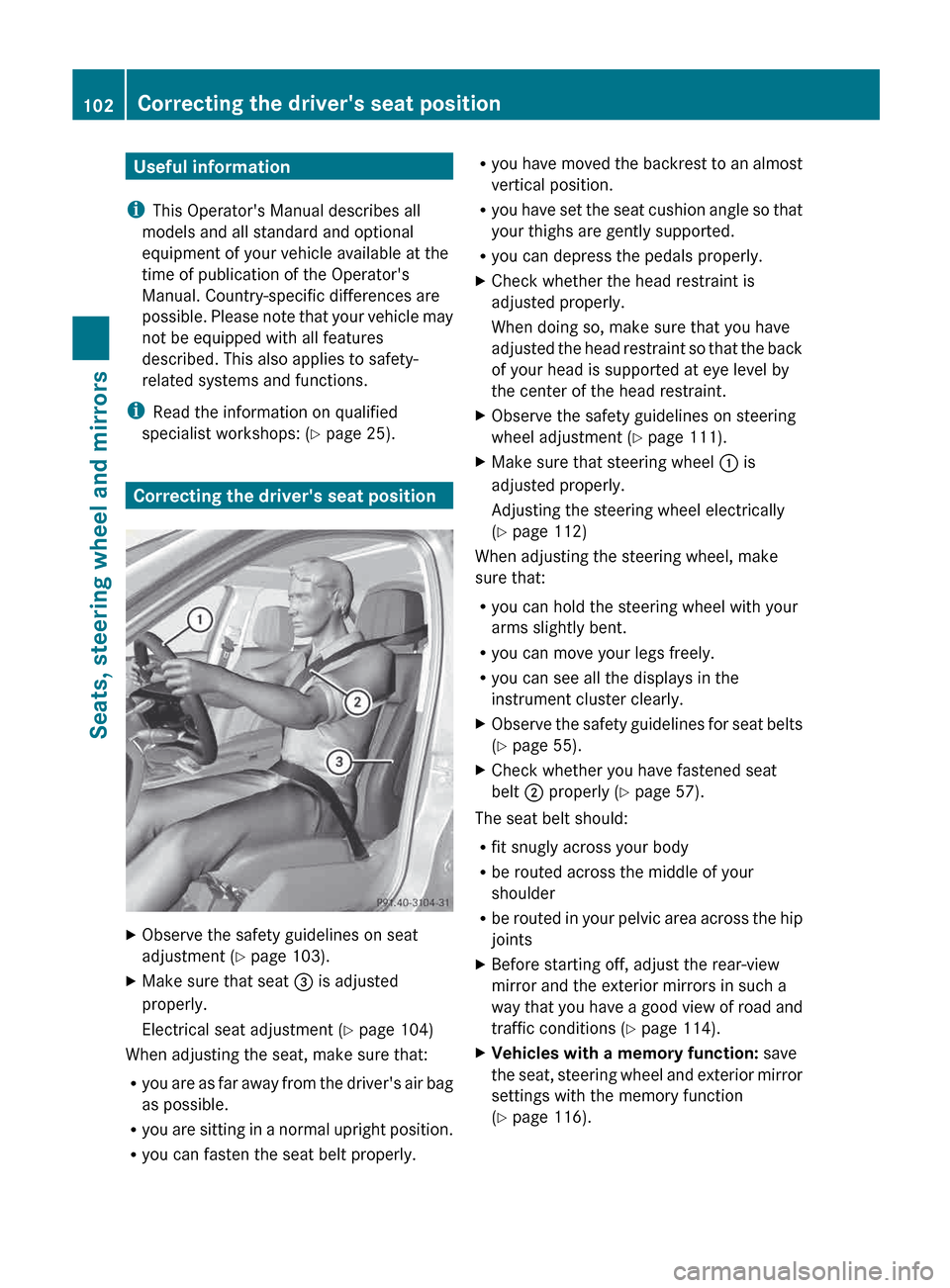
X
Observe the safety guidelines on seat
adjustment ( Y page 103).
X Make sure that seat = is adjusted
properly.
Electrical seat adjustment ( Y page 104)
When adjusting the seat, make sure that:
R you
are as far away from the driver's air bag
as possible.
R you are sitting in a normal upright position.
R you can fasten the seat belt properly. R
you
have moved the backrest to an almost
vertical position.
R you have set the seat cushion angle so that
your thighs are gently supported.
R you can depress the pedals properly.
X Check whether the head restraint is
adjusted properly.
When doing so, make sure that you have
adjusted
the head restraint so that the back
of your head is supported at eye level by
the center of the head restraint.
X Observe the safety guidelines on steering
wheel adjustment ( Y page 111).
X Make sure that steering wheel : is
adjusted properly.
Adjusting the steering wheel electrically
(Y page 112)
When adjusting the steering wheel, make
sure that:
R you can hold the steering wheel with your
arms slightly bent.
R you can move your legs freely.
R you can see all the displays in the
instrument cluster clearly.
X Observe the safety guidelines for seat belts
(Y page 55).
X Check whether you have fastened seat
belt ; properly
(Y page 57).
The seat belt should:
R fit snugly across your body
R be routed across the middle of your
shoulder
R be
routed in your pelvic area across the hip
joints
X Before starting off, adjust the rear-view
mirror and the exterior mirrors in such a
way
that you have a good view of road and
traffic conditions (Y page 114).
X Vehicles with a memory function: save
the
seat, steering wheel and exterior mirror
settings with the memory function
(Y page 116). 102
Correcting the driver's seat position
Seats, steering wheel and mirrors
Page 129 of 420
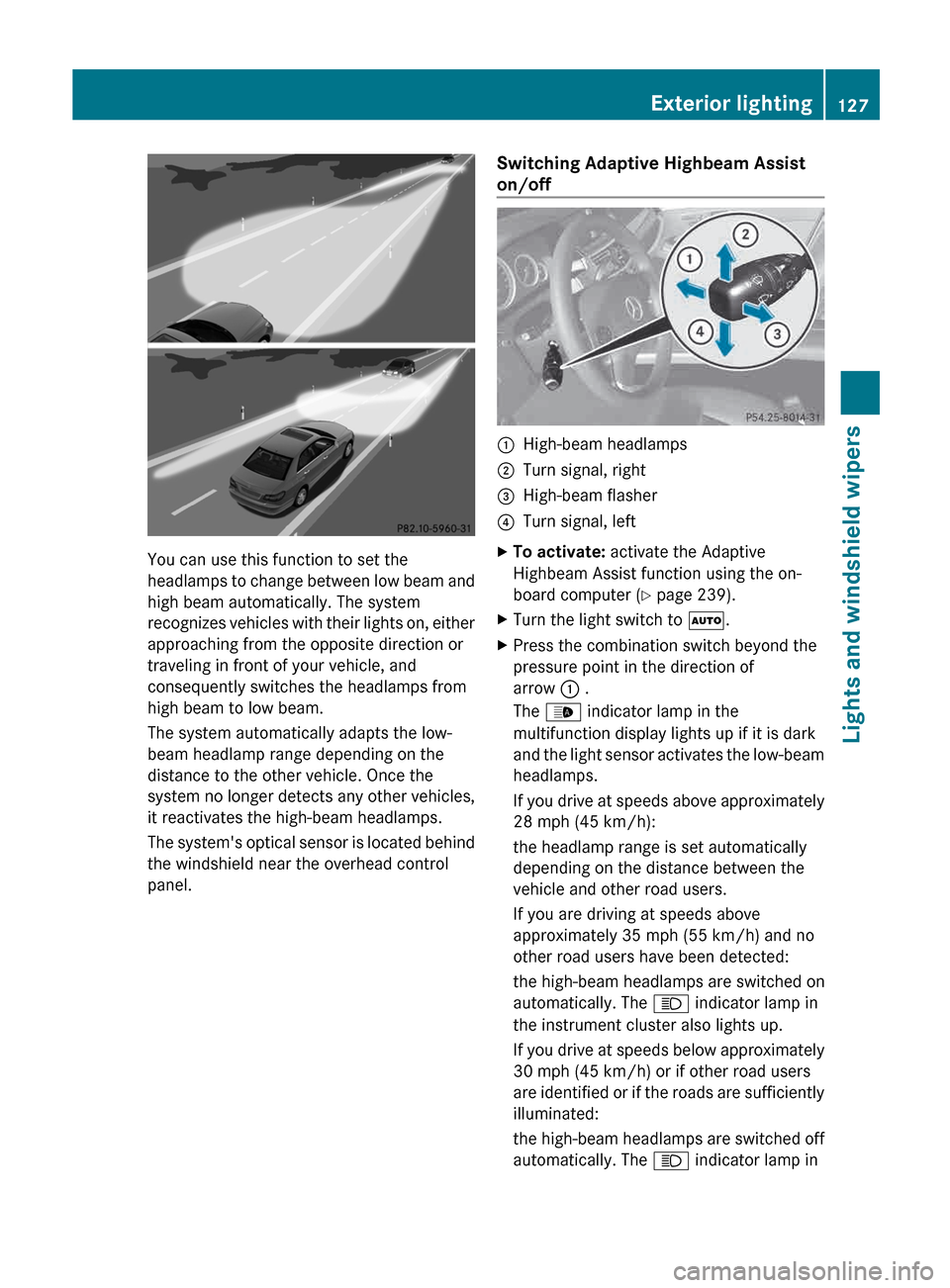
You can use this function to set the
headlamps
to change between low beam and
high beam automatically. The system
recognizes vehicles with their lights on, either
approaching from the opposite direction or
traveling in front of your vehicle, and
consequently switches the headlamps from
high beam to low beam.
The system automatically adapts the low-
beam headlamp range depending on the
distance to the other vehicle. Once the
system no longer detects any other vehicles,
it reactivates the high-beam headlamps.
The system's optical sensor is located behind
the windshield near the overhead control
panel. Switching Adaptive Highbeam Assist
on/off :
High-beam headlamps
; Turn signal, right
= High-beam flasher
? Turn signal, left
X To activate: activate the Adaptive
Highbeam Assist function using the on-
board computer ( Y page 239).
X Turn the light switch to Ã.
X Press the combination switch beyond the
pressure point in the direction of
arrow : .
The _ indicator lamp in the
multifunction display lights up if it is dark
and
the light sensor activates the low-beam
headlamps.
If you drive at speeds above approximately
28 mph (45 km/h):
the headlamp range is set automatically
depending on the distance between the
vehicle and other road users.
If you are driving at speeds above
approximately 35 mph (55 km/h) and no
other road users have been detected:
the high-beam headlamps are switched on
automatically. The K indicator lamp in
the instrument cluster also lights up.
If you drive at speeds below approximately
30 mph (45 km/h) or if other road users
are identified or if the roads are sufficiently
illuminated:
the high-beam headlamps are switched off
automatically. The K indicator lamp in Exterior lighting
127
Lights and windshield wipers Z
Page 130 of 420
the instrument cluster goes out. The
_
indicator lamp in the multifunction display
remains lit.
X To deactivate: move the combination
switch back to its normal position.
The _ indicator lamp in the instrument
cluster goes out. Headlamps fogged up on the inside
The headlamps may fog up on the inside if
there is high atmospheric humidity.
X Switch on the light and drive off.
The level of moisture diminishes,
depending
on the length of the journey and
the weather conditions (humidity and
temperature).
If the level of moisture does not diminish:
X Have the headlamps checked at a qualified
specialist workshop. Interior lighting
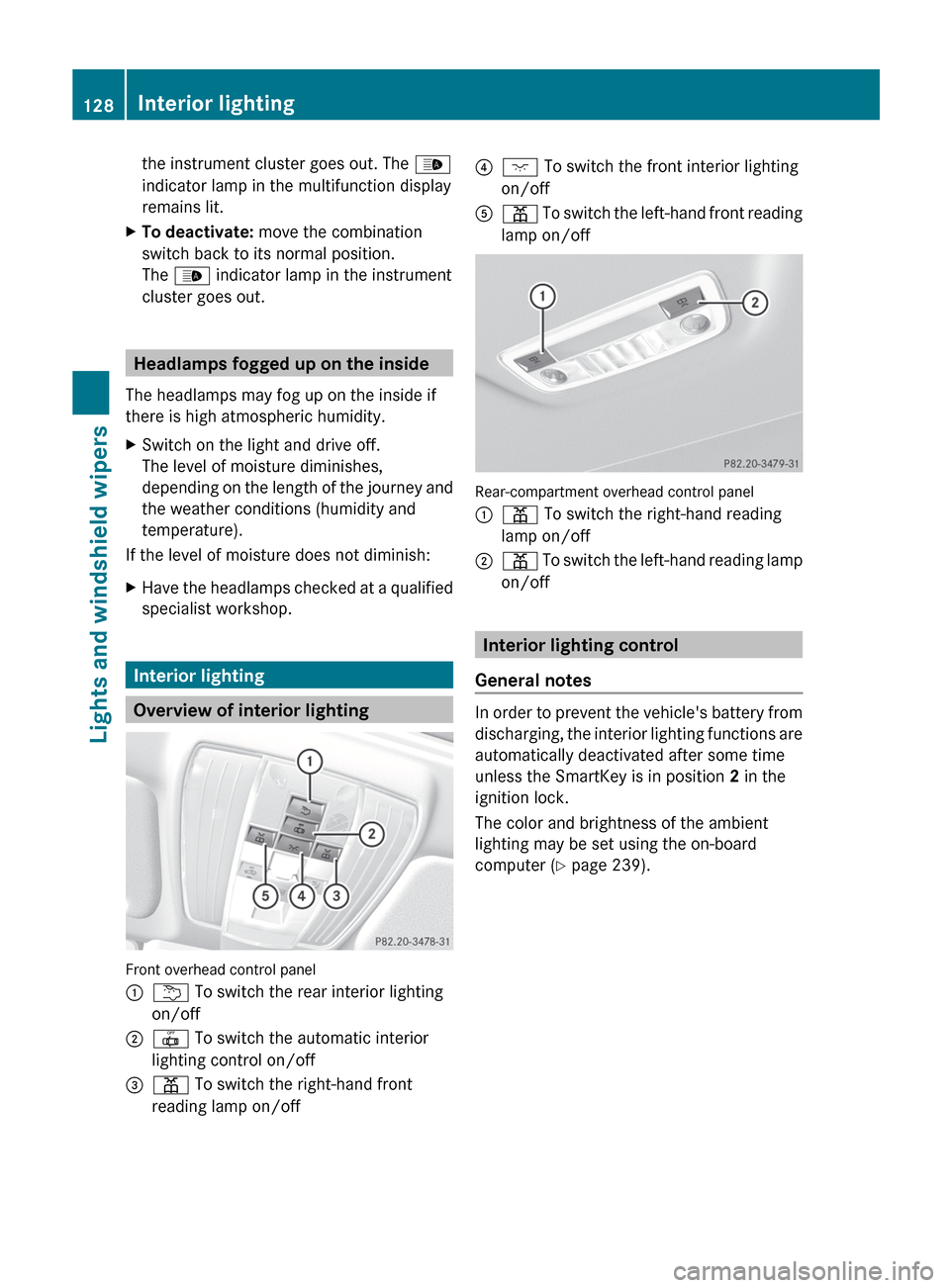
Overview of interior lighting
Front overhead control panel
:
u To switch the rear interior lighting
on/off
; | To switch the automatic interior
lighting control on/off
= p To switch the right-hand front
reading lamp on/off ?
c To switch the front interior lighting
on/off
A p
To switch the left-hand front reading
lamp on/off Rear-compartment overhead control panel
:
p To switch the right-hand reading
lamp on/off
; p
To switch the left-hand reading lamp
on/off Interior lighting control
General notes In order to prevent the vehicle's battery from
discharging,
the interior lighting functions are
automatically deactivated after some time
unless the SmartKey is in position 2 in the
ignition lock.
The color and brightness of the ambient
lighting may be set using the on-board
computer (Y page 239). 128
Interior lighting
Lights and windshield wipers
Page 141 of 420
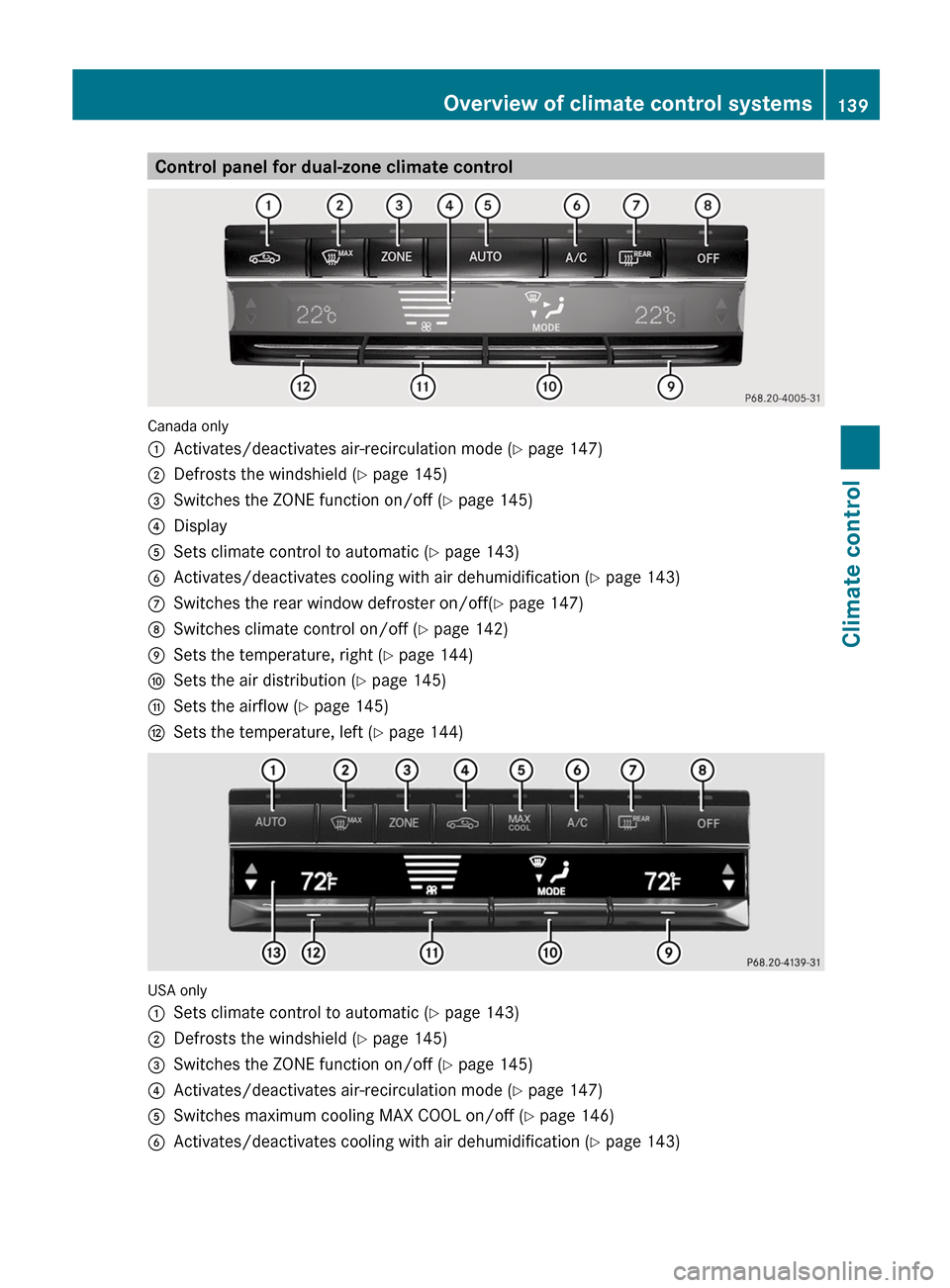
Control panel for dual-zone climate control
Canada only
:
Activates/deactivates air-recirculation mode (Y page 147)
; Defrosts the windshield ( Y page 145)
= Switches the ZONE function on/off ( Y page 145)
? Display
A Sets climate control to automatic (Y page 143)
B Activates/deactivates cooling with air dehumidification ( Y page 143)
C Switches the rear window defroster on/off( Y page 147)
D Switches climate control on/off ( Y page 142)
E Sets the temperature, right ( Y page 144)
F Sets the air distribution (Y page 145)
G Sets the airflow ( Y page 145)
H Sets the temperature, left ( Y page 144)USA only
:
Sets climate control to automatic (Y page 143)
; Defrosts the windshield ( Y page 145)
= Switches the ZONE function on/off ( Y page 145)
? Activates/deactivates air-recirculation mode (Y page 147)
A Switches maximum cooling MAX COOL on/off ( Y page 146)
B Activates/deactivates cooling with air dehumidification ( Y page 143)Overview of climate control systems
139Climate control Z
Page 142 of 420
C
Switches the rear window defroster on/off( Y page 147)
D Switches climate control on/off ( Y page 142)
E Sets the temperature, right ( Y page 144)
F Sets the air distribution (Y page 145)
G Sets the airflow ( Y page 145)
H Sets the temperature, left ( Y page 144)
I Display Information about using automatic
climate control
The following contains notes and
recommendations on optimum use of
automatic climate control.
R Activate
climate control using the à and
¿ buttons. The indicator lamps above
the à and ¿ buttons light up.
R Set the temperature to 72 ‡ (22 †).
R Only use the "defrosting" function briefly
until the windshield is clear again.
R Only use "air-recirculation" mode briefly,
e.g. if there are unpleasant outside odors
or when in a tunnel. The windows could
otherwise fog up, since no fresh air is drawn
into the vehicle in air-recirculation mode.
R Use the ZONE function to adopt the
temperature settings on the driver's side
for the front-passenger side as well. The
indicator lamp above the á button goes
out. 140
Overview of climate control systems
Climate control
Page 143 of 420
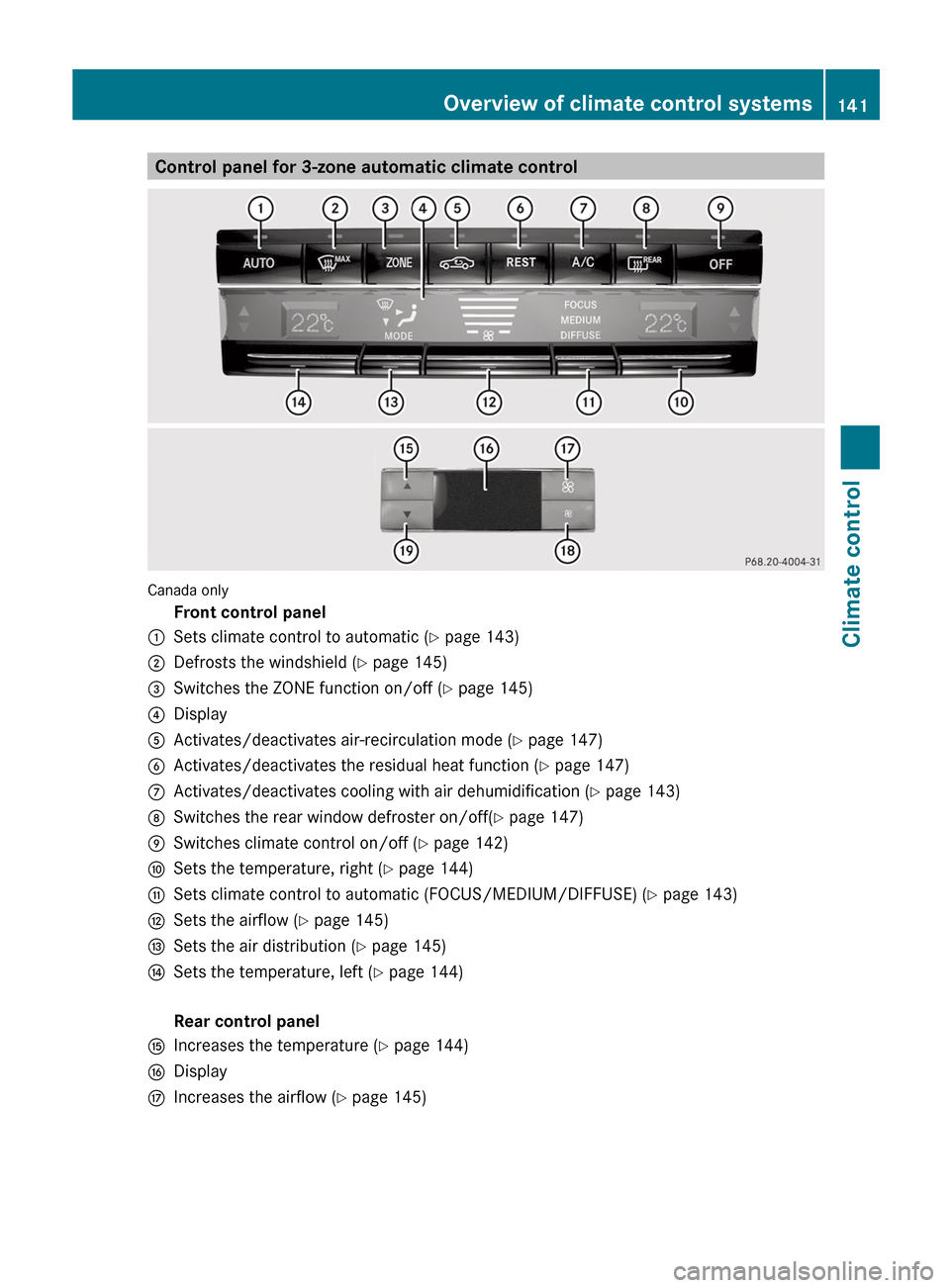
Control panel for 3-zone automatic climate control
Canada only
Front control panel
: Sets climate control to automatic (Y page 143)
; Defrosts the windshield ( Y page 145)
= Switches the ZONE function on/off ( Y page 145)
? Display
A Activates/deactivates air-recirculation mode (Y page 147)
B Activates/deactivates the residual heat function (Y page 147)
C Activates/deactivates cooling with air dehumidification ( Y page 143)
D Switches the rear window defroster on/off( Y page 147)
E Switches climate control on/off ( Y page 142)
F Sets the temperature, right ( Y page 144)
G Sets climate control to automatic (FOCUS/MEDIUM/DIFFUSE) ( Y page 143)
H Sets the airflow ( Y page 145)
I Sets the air distribution (Y page 145)
J Sets the temperature, left ( Y page 144)
Rear control panel
K Increases the temperature (Y page 144)
L Display
M Increases the airflow ( Y page 145) Overview of climate control systems
141Climate control Z
Page 147 of 420
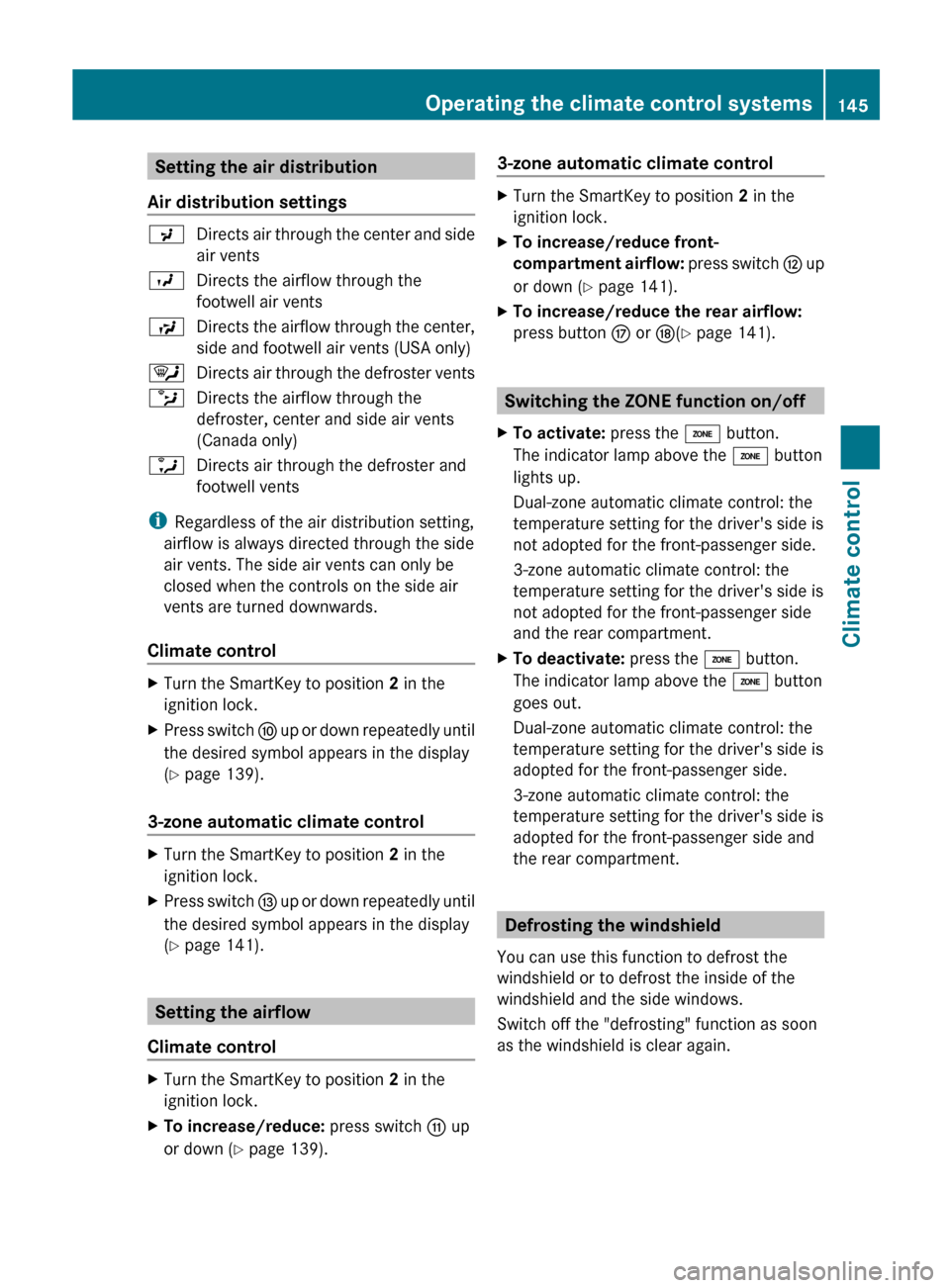
Setting the air distribution
Air distribution settings P
Directs air through the center and side
air vents
O Directs the airflow through the
footwell air vents
S Directs the airflow through the center,
side and footwell air vents (USA only)
¯ Directs air through the defroster vents
b Directs the airflow through the
defroster, center and side air vents
(Canada only)
a Directs air through the defroster and
footwell vents
i Regardless of the air distribution setting,
airflow is always directed through the side
air vents. The side air vents can only be
closed when the controls on the side air
vents are turned downwards.
Climate control X
Turn the SmartKey to position 2 in the
ignition lock.
X Press switch F up or down repeatedly until
the desired symbol appears in the display
(Y page 139).
3-zone automatic climate control X
Turn the SmartKey to position 2 in the
ignition lock.
X Press switch I
up or down repeatedly until
the desired symbol appears in the display
(Y page 141). Setting the airflow
Climate control X
Turn the SmartKey to position 2 in the
ignition lock.
X To increase/reduce: press switch G up
or down ( Y page 139). 3-zone automatic climate control X
Turn the SmartKey to position 2 in the
ignition lock.
X To increase/reduce front-
compartment
airflow: press switch H up
or down ( Y page 141).
X To increase/reduce the rear airflow:
press button M or N(Y page 141). Switching the ZONE function on/off
X To activate: press the á button.
The indicator lamp above the á button
lights up.
Dual-zone automatic climate control: the
temperature setting for the driver's side is
not adopted for the front-passenger side.
3-zone automatic climate control: the
temperature setting for the driver's side is
not adopted for the front-passenger side
and the rear compartment.
X To deactivate: press the á button.
The indicator lamp above the á button
goes out.
Dual-zone automatic climate control: the
temperature setting for the driver's side is
adopted for the front-passenger side.
3-zone automatic climate control: the
temperature setting for the driver's side is
adopted for the front-passenger side and
the rear compartment. Defrosting the windshield
You can use this function to defrost the
windshield or to defrost the inside of the
windshield and the side windows.
Switch off the "defrosting" function as soon
as the windshield is clear again. Operating the climate control systems
145
Climate control Z
Page 148 of 420
X
Turn the SmartKey to position 2 in the
ignition lock.
X To activate: press the ¬ button.
The indicator lamp above the ¬ button
lights up.
The
climate control system switches to the
following functions:
R heating with dehumidification on
R high airflow (depending on the outside
temperature)
R high temperature (depending on the
outside temperature)
R air distribution to the windshield and
front side windows
R air-recirculation mode off
X To deactivate: press the ¬ button.
The indicator lamp above the ¬ button
goes out. The previously selected settings
are restored. The heating with air
dehumidification function remains on. Air-
recirculation mode remains deactivated.
or
X Press the à button.
The indicator lamp above the ¬ button
goes
out. Airflow and air distribution are set
to automatic mode.
or
X Automatic climate control: press
temperature button E or H up or down
(Y page 139).
Automatic climate control: press
temperature button F or J up or down
(Y page 141).
or
X Automatic climate control: press switch
G up or down ( Y page 139).
Automatic climate control: press button
H up or down ( Y page 141).MAX COOL maximum cooling
The MAX COOL function is only available in
vehicles for the USA. MAX COOL is only operational when the
engine is running.
X
To activate: press the Ù button.
The indicator lamp in the button lights up.
X To activate: press off-road button Ù
again.
The
indicator lamp goes out. The previously
selected settings are restored.
When you activate MAX COOL, climate
control switches to the following functions:
R maximum cooling
R maximum airflow
R air-recirculation mode on Defrosting the windows
Windows fogged up on the inside X
Activate the ¿ cooling with air
dehumidification function.
X Activate automatic mode Ã.
X If the windows continue to fog up, activate
the defrosting function
(Y page 145).
i You should only select this setting until
the windshield is clear again.
Windows fogged up on the outside X
Automatic climate control: press switch
F up or down ( Y page 139) until the
P or O symbol appears in the
display.
X Automatic climate control: press button
I up or down ( Y page 141) until the
P or O symbol appears in the
display.
i You should only select this setting until
the windshield is clear again. 146
Operating the climate control systemsClimate control
Page 157 of 420
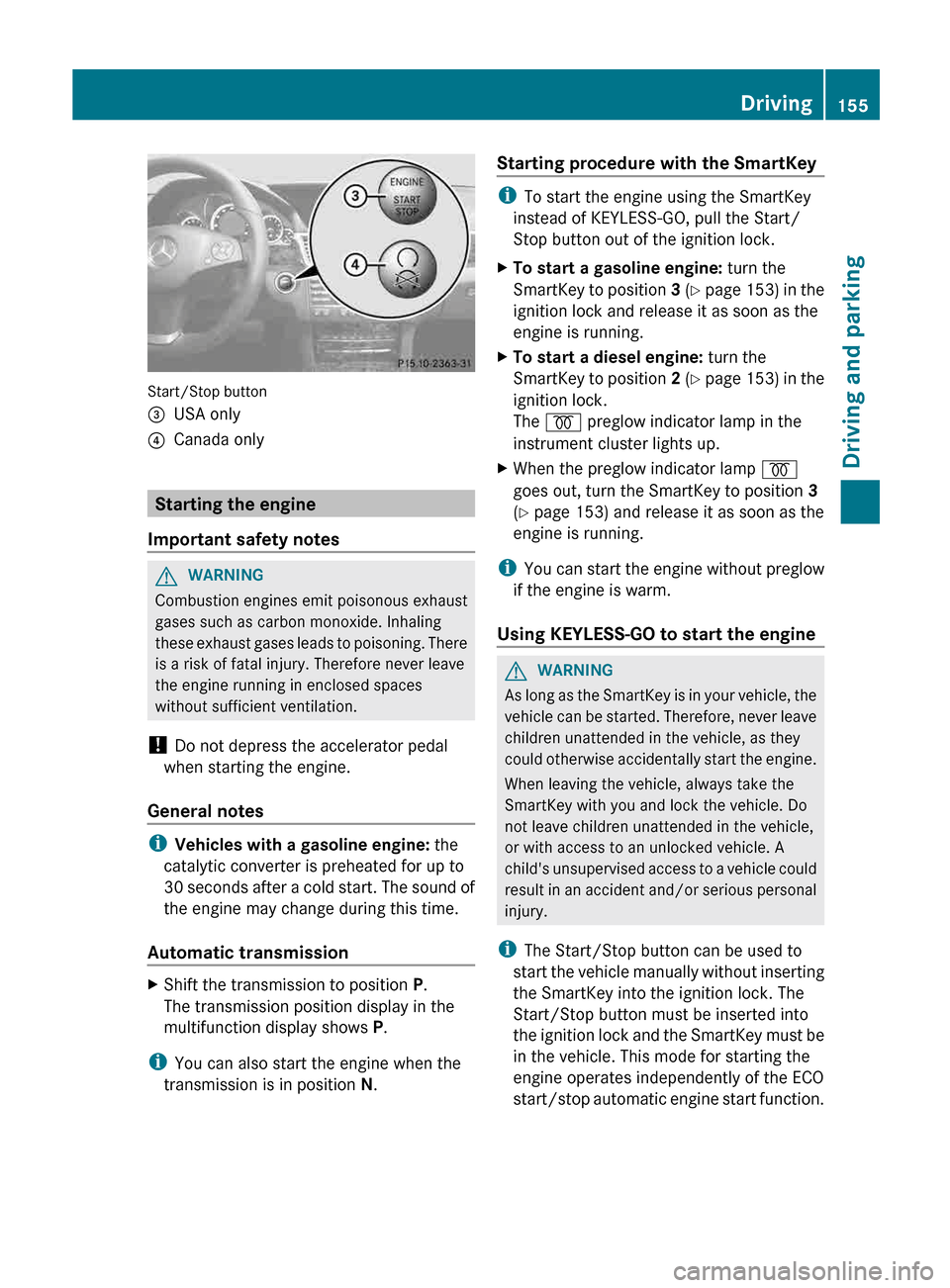
Start/Stop button
=
USA only
? Canada only Starting the engine
Important safety notes G
WARNING
Combustion engines emit poisonous exhaust
gases such as carbon monoxide. Inhaling
these
exhaust gases leads to poisoning. There
is a risk of fatal injury. Therefore never leave
the engine running in enclosed spaces
without sufficient ventilation.
! Do not depress the accelerator pedal
when starting the engine.
General notes i
Vehicles with a gasoline engine: the
catalytic converter is preheated for up to
30
seconds after a cold start. The sound of
the engine may change during this time.
Automatic transmission X
Shift the transmission to position P.
The transmission position display in the
multifunction display shows P.
i You can also start the engine when the
transmission is in position N. Starting procedure with the SmartKey i
To start the engine using the SmartKey
instead of KEYLESS-GO, pull the Start/
Stop button out of the ignition lock.
X To start a gasoline engine: turn the
SmartKey
to position 3 (Y page 153) in the
ignition lock and release it as soon as the
engine is running.
X To start a diesel engine: turn the
SmartKey
to position 2 (Y page 153) in the
ignition lock.
The % preglow indicator lamp in the
instrument cluster lights up.
X When the preglow indicator lamp %
goes out, turn the SmartKey to position 3
(Y page 153) and release it as soon as the
engine is running.
i You
can start the engine without preglow
if the engine is warm.
Using KEYLESS-GO to start the engine G
WARNING
As long as the SmartKey is in your vehicle, the
vehicle
can be started. Therefore, never leave
children unattended in the vehicle, as they
could otherwise accidentally start the engine.
When leaving the vehicle, always take the
SmartKey with you and lock the vehicle. Do
not leave children unattended in the vehicle,
or with access to an unlocked vehicle. A
child's unsupervised access to a vehicle could
result in an accident and/or serious personal
injury.
i The Start/Stop button can be used to
start the vehicle manually without inserting
the SmartKey into the ignition lock. The
Start/Stop button must be inserted into
the ignition lock and the SmartKey must be
in the vehicle. This mode for starting the
engine operates independently of the ECO
start/stop automatic engine start function. Driving
155
Driving and parking Z