display MERCEDES-BENZ E-Class WAGON 2013 W212 Repair Manual
[x] Cancel search | Manufacturer: MERCEDES-BENZ, Model Year: 2013, Model line: E-Class WAGON, Model: MERCEDES-BENZ E-Class WAGON 2013 W212Pages: 420, PDF Size: 14.26 MB
Page 191 of 420
R
the driver's door must be closed when you
shift from P to D or your seat belt must be
fastened.
R the front-passenger door and rear doors
must be closed.
R the vehicle must not skid.
Activating while driving X
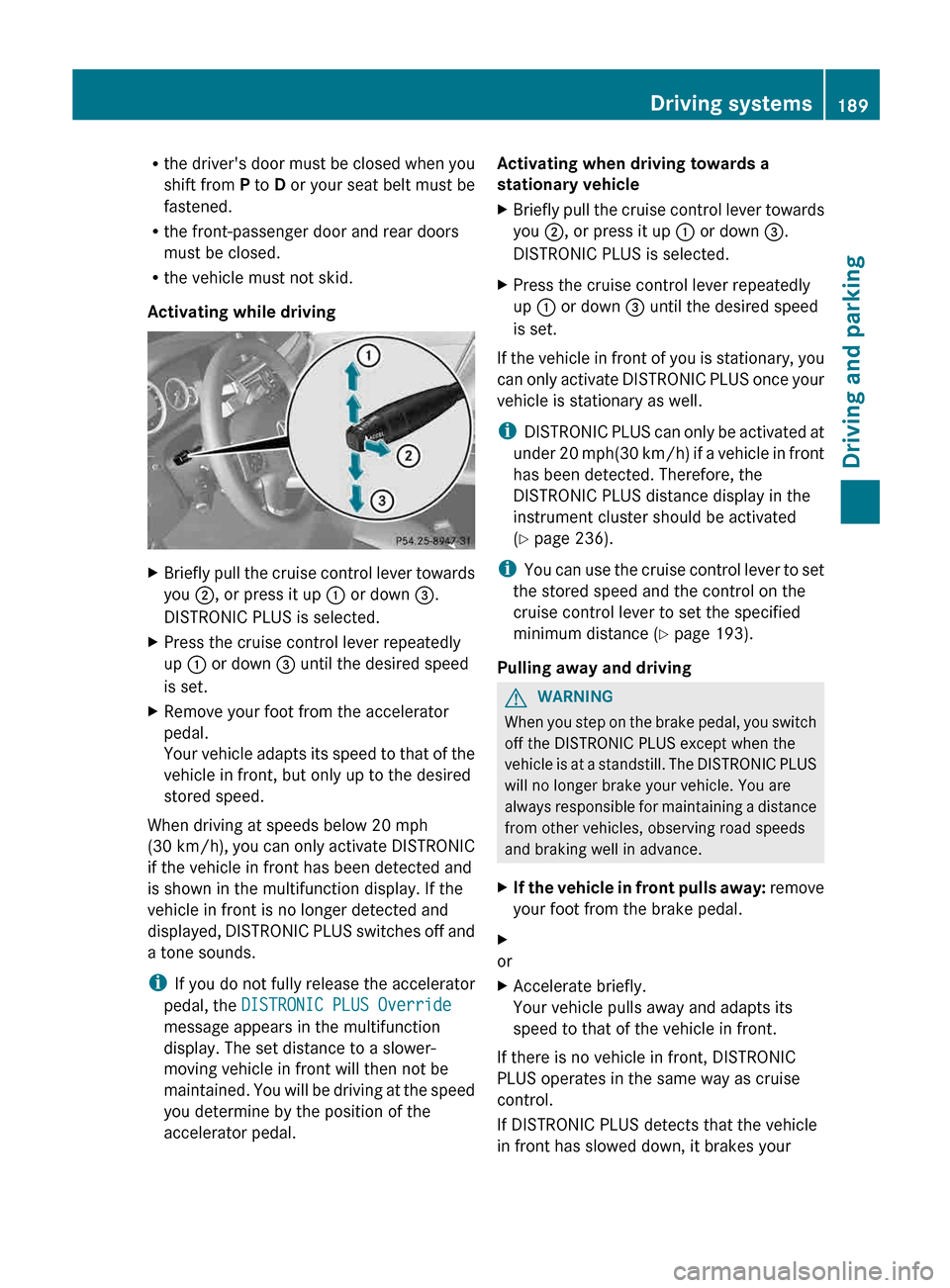
Briefly pull the cruise control lever towards
you ;, or press it up : or down =.
DISTRONIC PLUS is selected.
X Press the cruise control lever repeatedly
up : or down = until the desired speed
is set.
X Remove your foot from the accelerator
pedal.
Your
vehicle adapts its speed to that of the
vehicle in front, but only up to the desired
stored speed.
When driving at speeds below 20 mph
(30 km/h),
you can only activate DISTRONIC
if the vehicle in front has been detected and
is shown in the multifunction display. If the
vehicle in front is no longer detected and
displayed, DISTRONIC PLUS switches off and
a tone sounds.
i If you do not fully release the accelerator
pedal, the DISTRONIC PLUS Override
message appears in the multifunction
display. The set distance to a slower-
moving vehicle in front will then not be
maintained. You will be driving at the speed
you determine by the position of the
accelerator pedal. Activating when driving towards a
stationary vehicle
X
Briefly pull the cruise control lever towards
you ;, or press it up : or down =.
DISTRONIC PLUS is selected.
X Press the cruise control lever repeatedly
up : or down = until the desired speed
is set.
If the vehicle in front of you is stationary, you
can
only activate DISTRONIC PLUS once your
vehicle is stationary as well.
i DISTRONIC PLUS can only be activated at
under 20 mph(30 km/h) if a vehicle in front
has been detected. Therefore, the
DISTRONIC PLUS distance display in the
instrument cluster should be activated
(Y page 236).
i You can use the cruise control lever to set
the stored speed and the control on the
cruise control lever to set the specified
minimum distance (Y page 193).
Pulling away and driving G
WARNING
When you step on the brake pedal, you switch
off the DISTRONIC PLUS except when the
vehicle
is at a standstill. The DISTRONIC PLUS
will no longer brake your vehicle. You are
always responsible for maintaining a distance
from other vehicles, observing road speeds
and braking well in advance.
X If the vehicle in front pulls away:
remove
your foot from the brake pedal.
X
or
X Accelerate briefly.
Your vehicle pulls away and adapts its
speed to that of the vehicle in front.
If there is no vehicle in front, DISTRONIC
PLUS operates in the same way as cruise
control.
If DISTRONIC PLUS detects that the vehicle
in front has slowed down, it brakes your Driving systems
189
Driving and parking Z
Page 195 of 420
X
Briefly pull the cruise control lever towards
you :.
X Remove your foot from the accelerator
pedal.
DISTRONIC PLUS is activated. The first
time it is activated, the current speed is
stored.
Otherwise, it sets the vehicle cruise
speed to the previously stored value.
Setting the specified minimum distance G
WARNING
It is up to the driver to exercise discretion to
select the appropriate setting given road
conditions, traffic, driver's preferred driving
style and applicable laws and driving
recommendations
for safe following distance.You can set the specified minimum distance
for
DISTRONIC PLUS by varying the time span
between one and two seconds. With this
function, you can set the minimum distance
that DISTRONIC PLUS keeps to the vehicle in
front, dependent on vehicle speed. You can
see this distance in the multifunction display
(Y page 193).
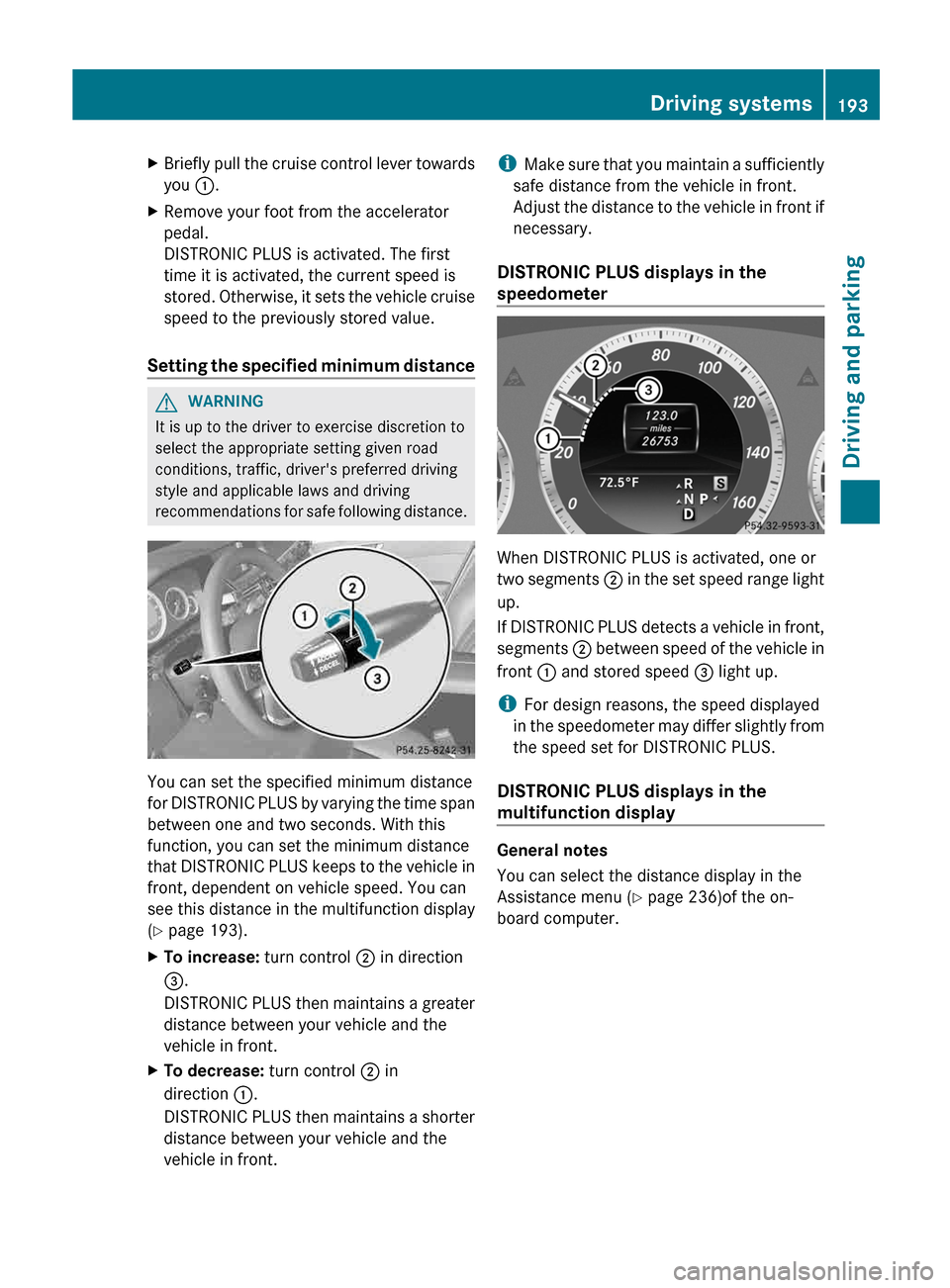
X To increase: turn control ; in direction
=.
DISTRONIC
PLUS then maintains a greater
distance between your vehicle and the
vehicle in front.
X To decrease: turn control ; in
direction :.
DISTRONIC
PLUS then maintains a shorter
distance between your vehicle and the
vehicle in front. i
Make
sure that you maintain a sufficiently
safe distance from the vehicle in front.
Adjust the distance to the vehicle in front if
necessary.
DISTRONIC PLUS displays in the
speedometer When DISTRONIC PLUS is activated, one or
two
segments ; in the set speed range light
up.
If DISTRONIC PLUS detects a vehicle in front,
segments ; between speed of the vehicle in
front : and stored speed = light up.
i For design reasons, the speed displayed
in the speedometer may differ slightly from
the speed set for DISTRONIC PLUS.
DISTRONIC PLUS displays in the
multifunction display General notes
You can select the distance display in the
Assistance menu (
Y page 236)of the on-
board computer. Driving systems
193
Driving and parking Z
Page 196 of 420
Display when DISTRONIC PLUS is
deactivated
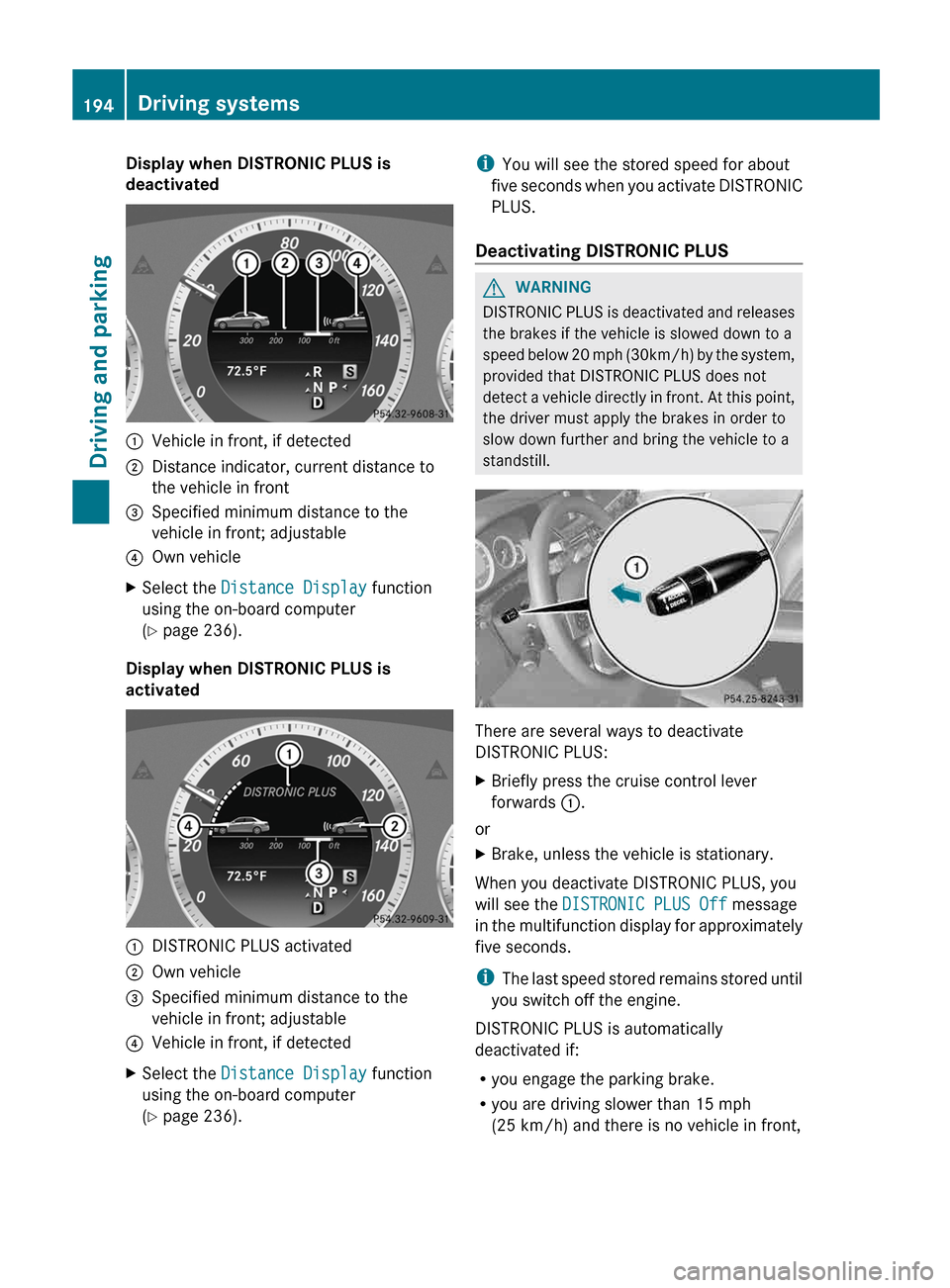
:
Vehicle in front, if detected
; Distance indicator, current distance to
the vehicle in front
= Specified minimum distance to the
vehicle in front; adjustable
? Own vehicle
X Select the Distance Display function
using the on-board computer
(Y page 236).
Display when DISTRONIC PLUS is
activated :
DISTRONIC PLUS activated
; Own vehicle
= Specified minimum distance to the
vehicle in front; adjustable
? Vehicle in front, if detected
X Select the Distance Display function
using the on-board computer
(Y page 236). i
You will see the stored speed for about
five
seconds when you activate DISTRONIC
PLUS.
Deactivating DISTRONIC PLUS G
WARNING
DISTRONIC PLUS is deactivated and releases
the brakes if the vehicle is slowed down to a
speed
below 20 mph (30km/h) by the system,
provided that DISTRONIC PLUS does not
detect a vehicle directly in front. At this point,
the driver must apply the brakes in order to
slow down further and bring the vehicle to a
standstill. There are several ways to deactivate
DISTRONIC PLUS:
X
Briefly press the cruise control lever
forwards :.
or
X Brake, unless the vehicle is stationary.
When you deactivate DISTRONIC PLUS, you
will see the DISTRONIC PLUS Off message
in
the multifunction display for approximately
five seconds.
i The last speed stored remains stored until
you switch off the engine.
DISTRONIC PLUS is automatically
deactivated if:
R you engage the parking brake.
R you are driving slower than 15 mph
(25 km/h) and there is no vehicle in front,194
Driving systems
Driving and parking
Page 197 of 420
or if the vehicle in front is no longer
detected.
R ESP ®
intervenes or you deactivate ESP ®
.
R the
transmission is in the P, R or N position.
R you switch off the radar sensor system
(Y page 241).
R you pull the cruise control lever towards
you in order to pull away and the front-
passenger door or one of the rear doors is
open.
R the vehicle has skidded.
If DISTRONIC PLUS is deactivated, you will
hear a warning tone. You will see the
DISTRONIC PLUS Off message in the
multifunction display for approximately five
seconds.
Tips for driving with DISTRONIC PLUS Important safety notes
G
WARNING
The DISTRONIC PLUS works to maintain the
speed
selected by the driver unless a moving
obstacle proceeding directly ahead of it in the
same travel direction is detected (e.g.
following another vehicle ahead of you at your
set distance).
This means that:
R Your vehicle can pass another vehicle after
you have changed lanes.
R While in a sharp turn or if the preceding
vehicle is in a sharp turn, the DISTRONIC
PLUS could lose sight of the preceding
vehicle. Your vehicle could then accelerate
to the previously selected speed.
The DISTRONIC PLUS regulates only the
distance between your vehicle and those
directly ahead of it. It may not register
stationary objects in the road, e.g.:
R a stopped vehicle in a traffic jam
R a disabled vehicle
R an oncoming vehicle The driver must always be alert, observe all
traffic
and intercede as required by means of
steering or braking the vehicle. G
WARNING
The DISTRONIC PLUS should not be used in
snowy or icy road conditions.
The
following contains descriptions of certain
road and traffic conditions in which you must
be particularly attentive. In such situations,
brake if necessary. DISTRONIC PLUS is then
deactivated.
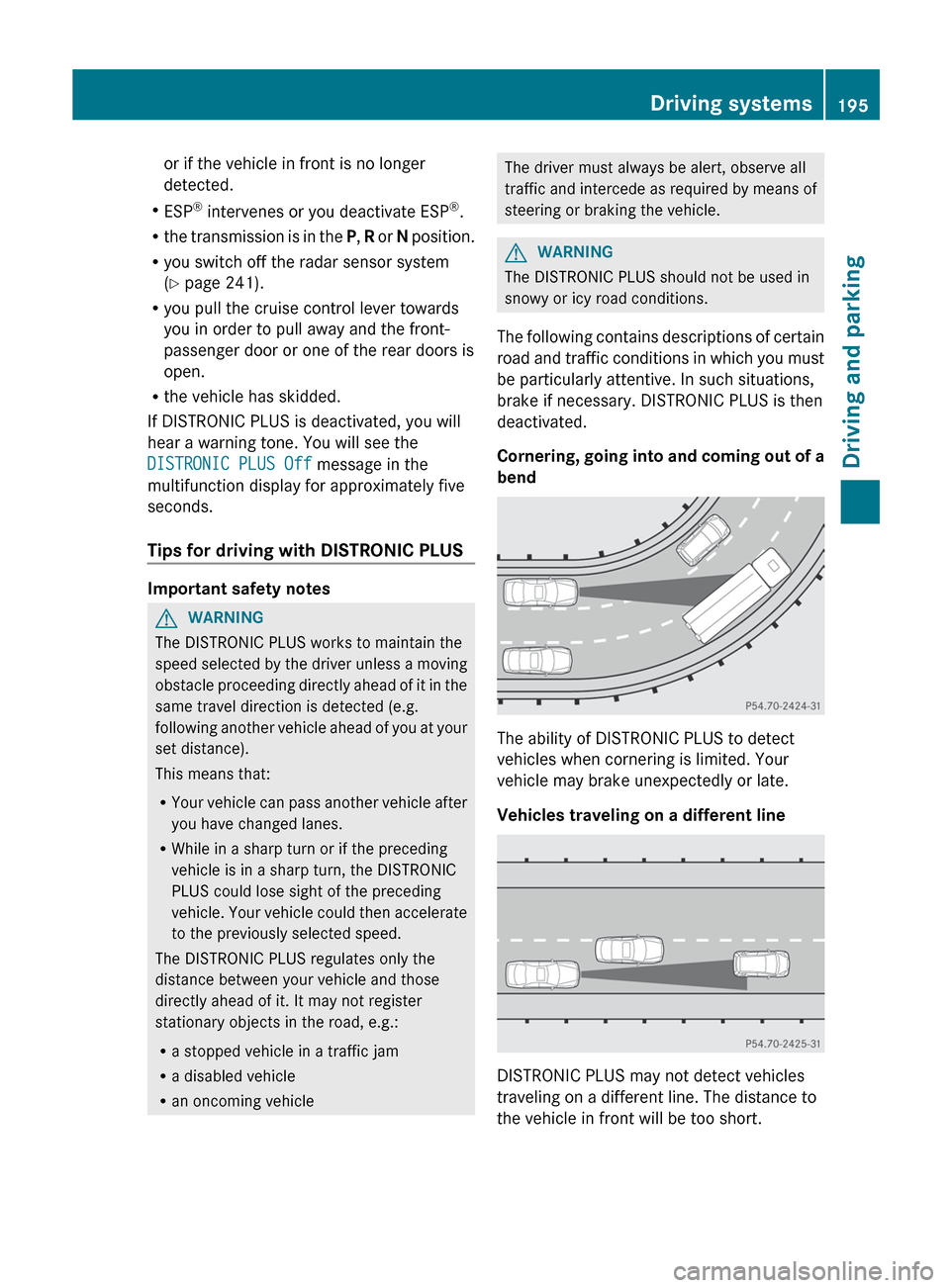
Cornering, going into and coming out of a
bend The ability of DISTRONIC PLUS to detect
vehicles when cornering is limited. Your
vehicle may brake unexpectedly or late.
Vehicles traveling on a different line
DISTRONIC PLUS may not detect vehicles
traveling on a different line. The distance to
the vehicle in front will be too short. Driving systems
195
Driving and parking Z
Page 199 of 420
R
the driver's door is closed or your seat belt
is fastened.
R the parking brake is released.
R the hood is closed.
R the transmission is in position D, R or N.
R DISTRONIC PLUS is deactivated.
Activating the HOLD function G
WARNING
The vehicle's brakes are applied when the
HOLD function is activated. For this reason,
deactivate
the HOLD function if the vehicle is
to be set in motion by other means (e.g. in a
car wash or by towing).
X Make sure that the activation conditions
are met.
X Depress the brake pedal.
X Quickly depress the brake pedal further
until ë appears in the multifunction
display.
The HOLD function is activated. You can
release the brake pedal.
i If depressing the brake pedal the first
time does not activate the HOLD function,
wait briefly and then try again.
Deactivating the HOLD function G
WARNING
Never get out of the vehicle when the HOLD
function is activated.
The HOLD function must never be operated
or
deactivated by a passenger or from outside
the vehicle.
The HOLD function does not replace the
parking brake and must not be used for
parking. The braking effect of the HOLD function is
canceled and the vehicle could roll away if:
R
the HOLD function is deactivated by
depressing the accelerator pedal or the
brake pedal.
R there is a malfunction in the system or an
interruption in the power supply, e.g.
battery failure.
R the electrical system in the engine
compartment, the battery or the fuses are
tampered with.
R the battery is disconnected.
If you leave the vehicle or park it, deactivate
the HOLD function and secure the vehicle
against rolling away.
The HOLD function is deactivated
automatically if:
R you accelerate and the transmission is in
position D or R.
R you shift the transmission to position P.
R you depress the brake pedal again with a
certain amount of pressure until ë
disappears from the multifunction display.
R you activate DISTRONIC PLUS.
When the HOLD function is activated, the
transmission is shifted automatically to
position P if:
R the driver's door is open and the driver's
seat belt is unfastened.
R the engine is switched off, unless it is
automatically switched off by the ECO
start/stop function.
R the hood is opened.
R a system malfunction occurs.
R the power supply is not sufficient.
i If the engine has been switched off, it
cannot be started again until the HOLD
function has been deactivated.
If there is a malfunction in the system or
power supply while the HOLD function is
activated, the Brake ImmediatelyBrake
Immediately message is shown in the Driving systems
197
Driving and parking Z
Page 200 of 420
multifunction display. Immediately depress
the
brake firmly until the warning message in
the multifunction display goes out. RACE START
Important safety notes G
WARNING
RACE START is only available when SPORT
handling mode is activated. SPORT handling
mode only stabilizes the vehicle to a limited
extent in the event of swerving or wheelspin.
RACE
START should only be used on specially
designated roads. Always adapt your speed
and driving style to the prevailing road and
weather conditions.
i RACE START is only available in AMG
vehicles.
RACE START enables optimal acceleration
from a standing start. The precondition for
this is a suitable high-grip road surface.
Conditions for activation You can activate RACE START if:
R
the doors are closed.
R the
engine is running and it has reached an
operating temperature of approximately
176 ‡ (80 †). This is the case when the
engine oil temperature in the multifunction
display stops flashing.
R SPORT handling mode is activated.
(Y page 70)
R the steering wheel is in the straight-ahead
position.
R the vehicle is stationary and the brake
pedal is depressed (left foot).
R the transmission is in position D. Activating RACE START X
Depress the brake pedal with your left foot
and keep it depressed.
X Turn the drive program selector clockwise
(Y page 165) until the RS lamp lights up.
The RACE START Confirm: Paddle UP
Cancel: Paddle DOWN message appears
in the multifunction display.
i If the activation conditions are no longer
fulfilled, RACE START is canceled. The
RACE START Canceled message appears
in the multifunction display.
X To cancel: pull the left steering wheel
paddle shifter
(Y page 166).
or
X To confirm: pull the right steering wheel
paddle shifter
(Y page 166).
The RACE START Available Depress
gas pedal message appears in the
multifunction display.
i If you do not depress the accelerator
pedal fully within two seconds, RACE
START
is canceled. The RACE START Not
Possible See Operator's Manual
message appears in the multifunction
display.
X Fully depress the accelerator pedal.
The engine speed rises to approximately
3500 rpm.
The RACE START Release brake to
start message appears in the
multifunction display.
i If you do not release the brake pedal
within five seconds, RACE START is
canceled. The RACE START Canceled
message appears in the multifunction
display.
X Take your foot off the brake, but keep the
accelerator pedal depressed.
The vehicle pulls away at maximum
acceleration.
The RACE
START Active message appears
in the multifunction display. 198
Driving systems
Driving and parking
Page 201 of 420
RACE START is deactivated when the vehicle
reaches a speed of approximately
30 mph
(Canada: 50 km/h). Drive program S+ is
activated. SPORT handling mode remains
activated.
RACE START is deactivated immediately if
you release the accelerator pedal during
RACE START or if any of the activation
conditions are no longer fulfilled. The RACE
START Not Possible See Operator's
Manual message appears in the multifunction
display.
i If RACE START is used repeatedly within
a short period of time, it is only available
again after the vehicle has been driven a
certain distance. AIRMATIC
Vehicle level Important safety notes
Your vehicle regulates its height
automatically.
All-round level control ensures
the best possible suspension and constant
ground clearance, even with a laden vehicle.
When you drive fast, the vehicle is lowered
automatically to improve driving safety and to
reduce fuel consumption.
The following vehicle levels are possible:
R normal
R raised: the vehicle is raised by about
0.80 in (20 mm) when compared with the
normal level
R lowered: the vehicle is lowered by about
0.40 in (10 mm) when compared with the
normal level
The "Normal" and "Raised" vehicle levels can
be set manually.
The "Lowered” vehicle level is set
automatically:
R at speeds above 70 mph (113 km/h)
R if you have selected "Sports tuning"
(Y page 200) Setting the vehicle level G
WARNING
To help avoid personal injury, keep hands and
feet away from wheel housing area, and stay
away from under the vehicle when lowering
the vehicle chassis.
Select the "Normal" setting for normal road
surfaces and "Raised" for driving with snow
chains or on particularly poor road surfaces.
Your selection remains stored even if you
remove the SmartKey from the ignition lock.
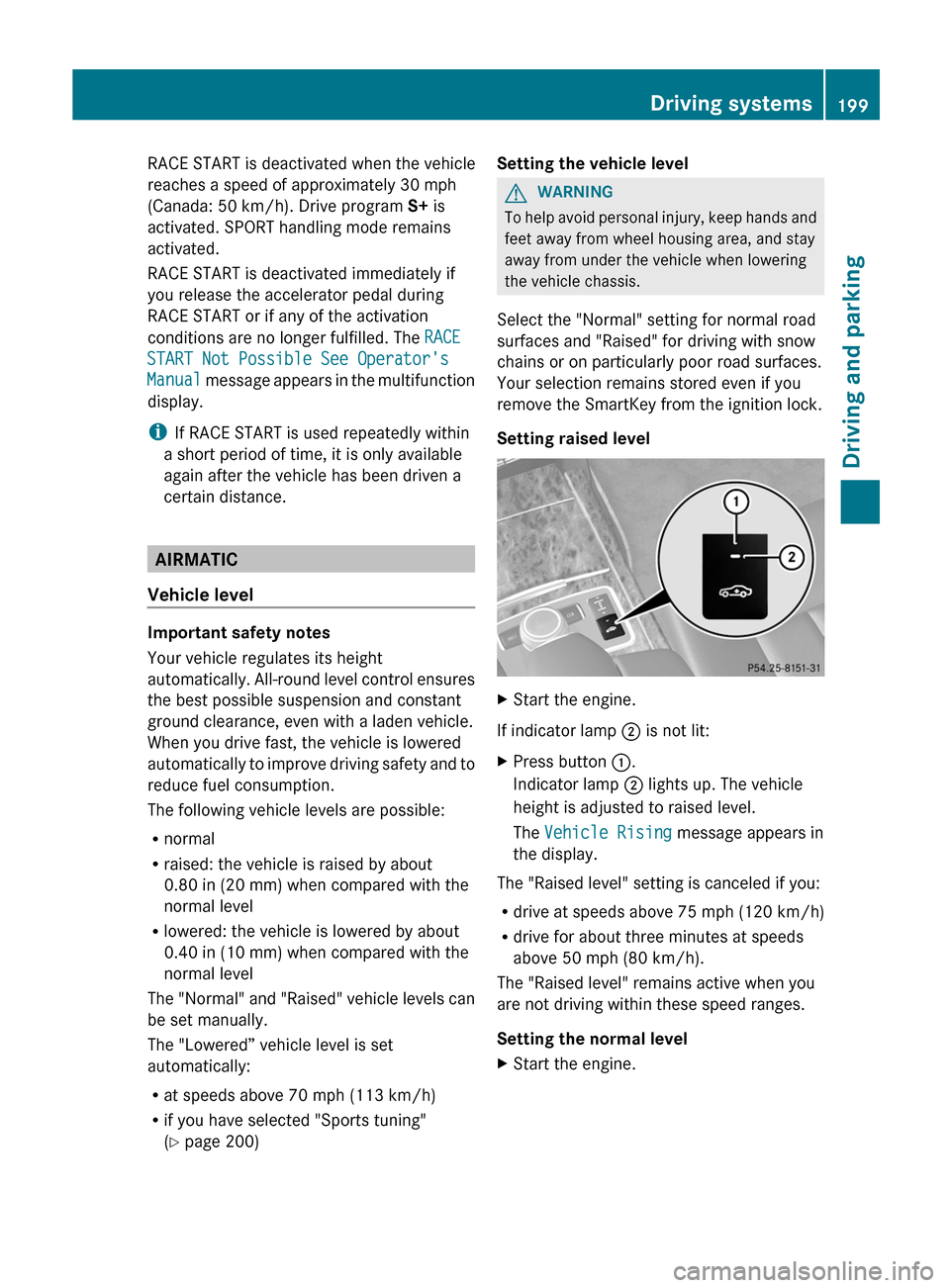
Setting raised level X
Start the engine.
If indicator lamp ; is not lit:
X Press button :.
Indicator lamp ; lights up. The vehicle
height is adjusted to raised level.
The Vehicle Rising message appears in
the display.
The "Raised level" setting is canceled if you:
R drive
at speeds above 75 mph (120 km/h)
R drive for about three minutes at speeds
above 50 mph (80 km/h).
The "Raised level" remains active when you
are not driving within these speed ranges.
Setting the normal level
X Start the engine. Driving systems
199
Driving and parking Z
Page 202 of 420
If indicator lamp ; is lit:
X
Press button :.
Indicator lamp ; goes out. The vehicle is
adjusted to normal level.
Suspension tuning General notes
The
electronically controlled damping system
works continuously. This improves driving
safety and ride comfort.
The damping is tuned individually to each
wheel and depends on:
R your driving style, e.g. sporty
R the road surface condition, e.g. bumps
R your individual selection, i.e. sports or
comfort
Your selection remains stored even if you
remove the SmartKey from the ignition lock.
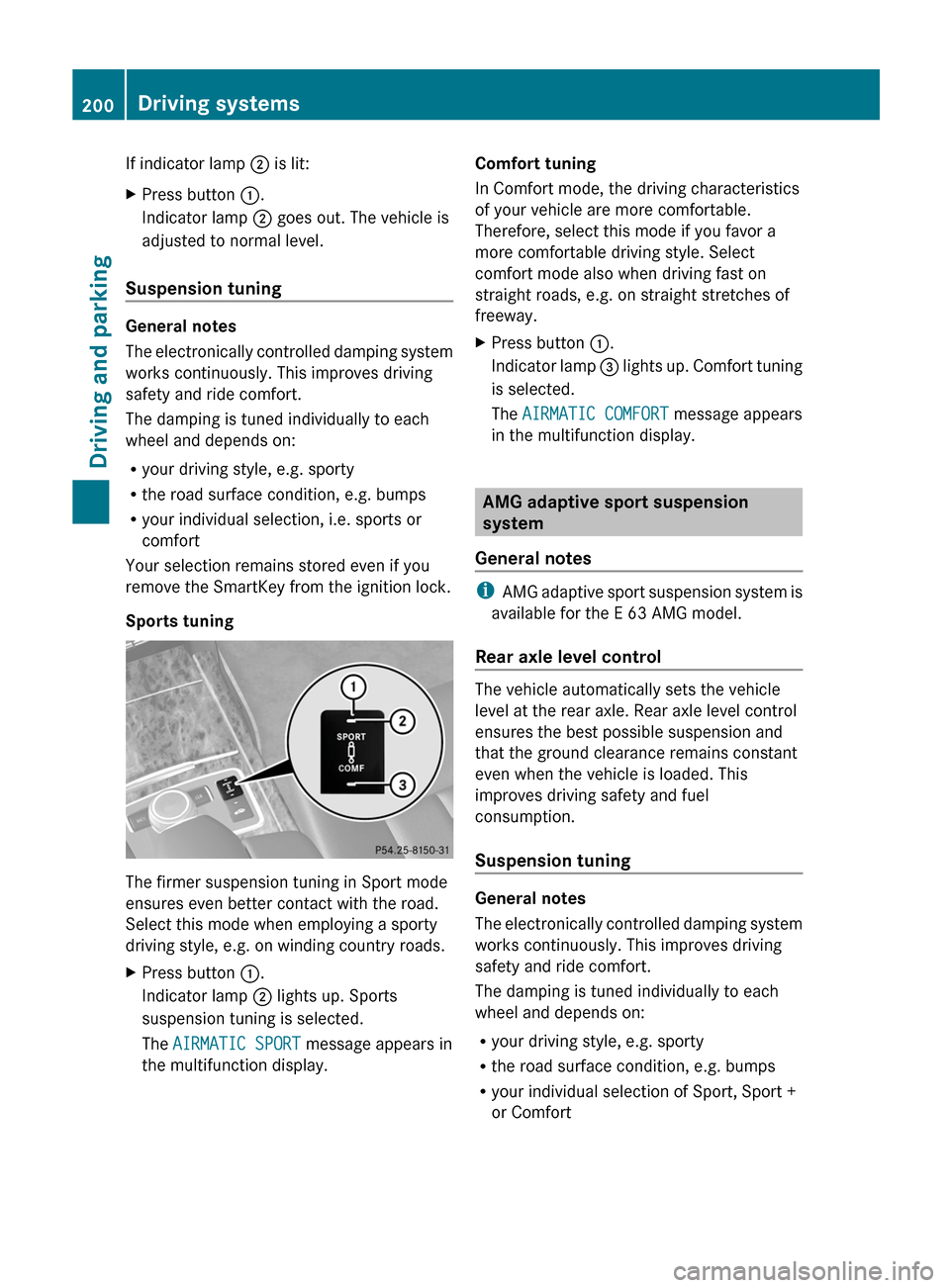
Sports tuning The firmer suspension tuning in Sport mode
ensures even better contact with the road.
Select this mode when employing a sporty
driving style, e.g. on winding country roads.
X
Press button :.
Indicator lamp ; lights up. Sports
suspension tuning is selected.
The AIRMATIC SPORT message appears in
the multifunction display. Comfort tuning
In Comfort mode, the driving characteristics
of your vehicle are more comfortable.
Therefore, select this mode if you favor a
more comfortable driving style. Select
comfort mode also when driving fast on
straight roads, e.g. on straight stretches of
freeway.
X
Press button :.
Indicator
lamp = lights up. Comfort tuning
is selected.
The AIRMATIC COMFORT message appears
in the multifunction display. AMG adaptive sport suspension
system
General notes i
AMG
adaptive sport suspension system is
available for the E 63 AMG model.
Rear axle level control The vehicle automatically sets the vehicle
level at the rear axle. Rear axle level control
ensures the best possible suspension and
that the ground clearance remains constant
even when the vehicle is loaded. This
improves driving safety and fuel
consumption.
Suspension tuning
General notes
The
electronically controlled damping system
works continuously. This improves driving
safety and ride comfort.
The damping is tuned individually to each
wheel and depends on:
R your driving style, e.g. sporty
R the road surface condition, e.g. bumps
R your individual selection of Sport, Sport +
or Comfort200
Driving systems
Driving and parking
Page 203 of 420
If you select Sport or Sport + mode and
restart the engine, the suspension setting
reverts to Comfort mode.
Sport mode
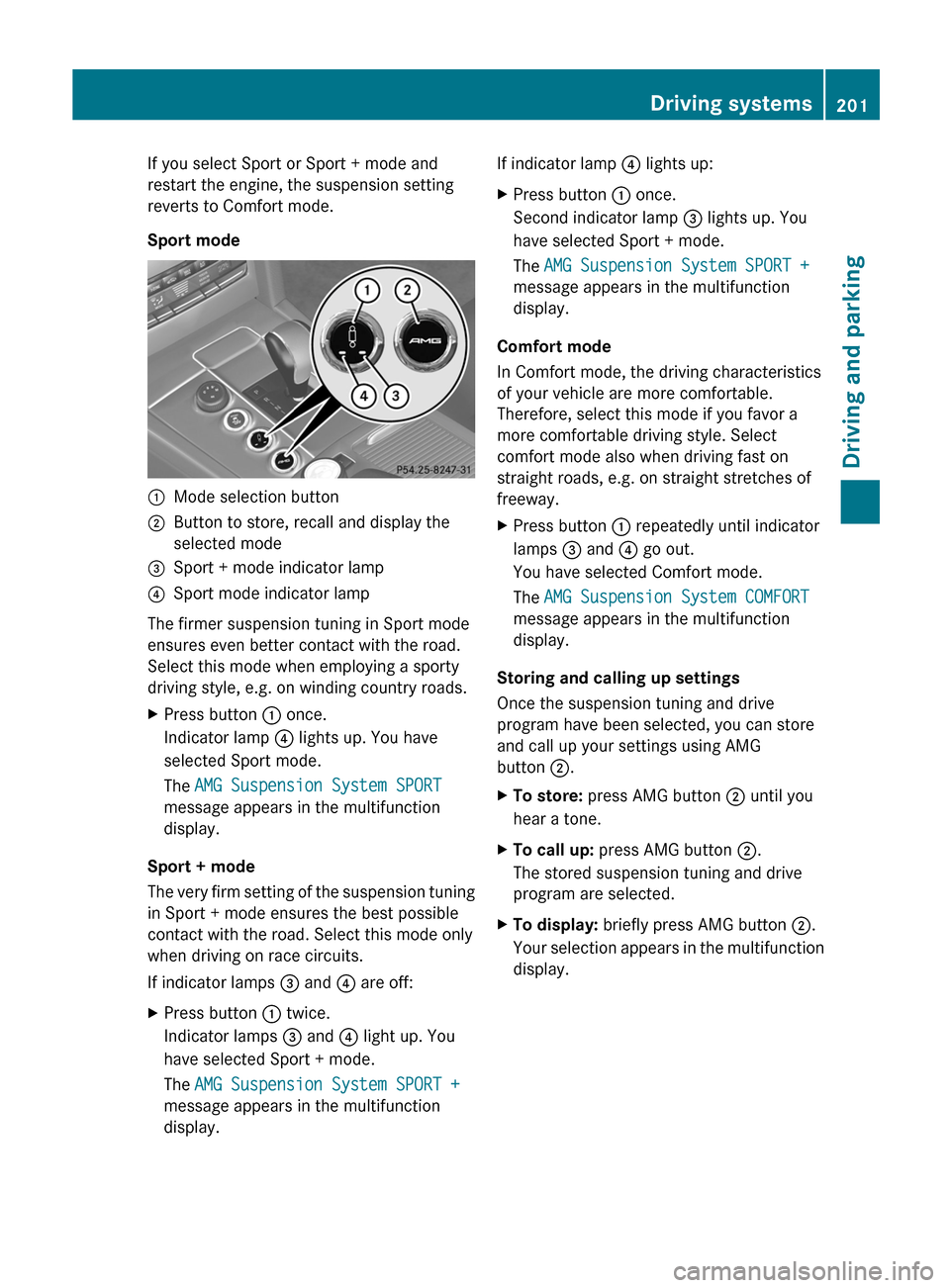
:
Mode selection button
; Button to store, recall and display the
selected mode
= Sport + mode indicator lamp
? Sport mode indicator lamp
The firmer suspension tuning in Sport mode
ensures even better contact with the road.
Select this mode when employing a sporty
driving style, e.g. on winding country roads.
X Press button : once.
Indicator lamp ? lights up. You have
selected Sport mode.
The AMG Suspension System SPORT
message appears in the multifunction
display.
Sport + mode
The very firm setting of the suspension tuning
in Sport + mode ensures the best possible
contact with the road. Select this mode only
when driving on race circuits.
If indicator lamps = and ? are off:
X Press button : twice.
Indicator lamps = and ? light up. You
have selected Sport + mode.
The AMG Suspension System SPORT +
message appears in the multifunction
display. If indicator lamp ? lights up:
X
Press button : once.
Second indicator lamp = lights up. You
have selected Sport + mode.
The AMG Suspension System SPORT +
message appears in the multifunction
display.
Comfort mode
In Comfort mode, the driving characteristics
of your vehicle are more comfortable.
Therefore, select this mode if you favor a
more comfortable driving style. Select
comfort mode also when driving fast on
straight roads, e.g. on straight stretches of
freeway.
X Press button : repeatedly until indicator
lamps = and ? go out.
You have selected Comfort mode.
The AMG Suspension System COMFORT
message appears in the multifunction
display.
Storing and calling up settings
Once the suspension tuning and drive
program have been selected, you can store
and call up your settings using AMG
button ;.
X To store: press AMG button ; until you
hear a tone.
X To call up: press AMG button ;.
The stored suspension tuning and drive
program are selected.
X To display: briefly press AMG button ;.
Your
selection appears in the multifunction
display. Driving systems
201
Driving and parking Z
Page 205 of 420
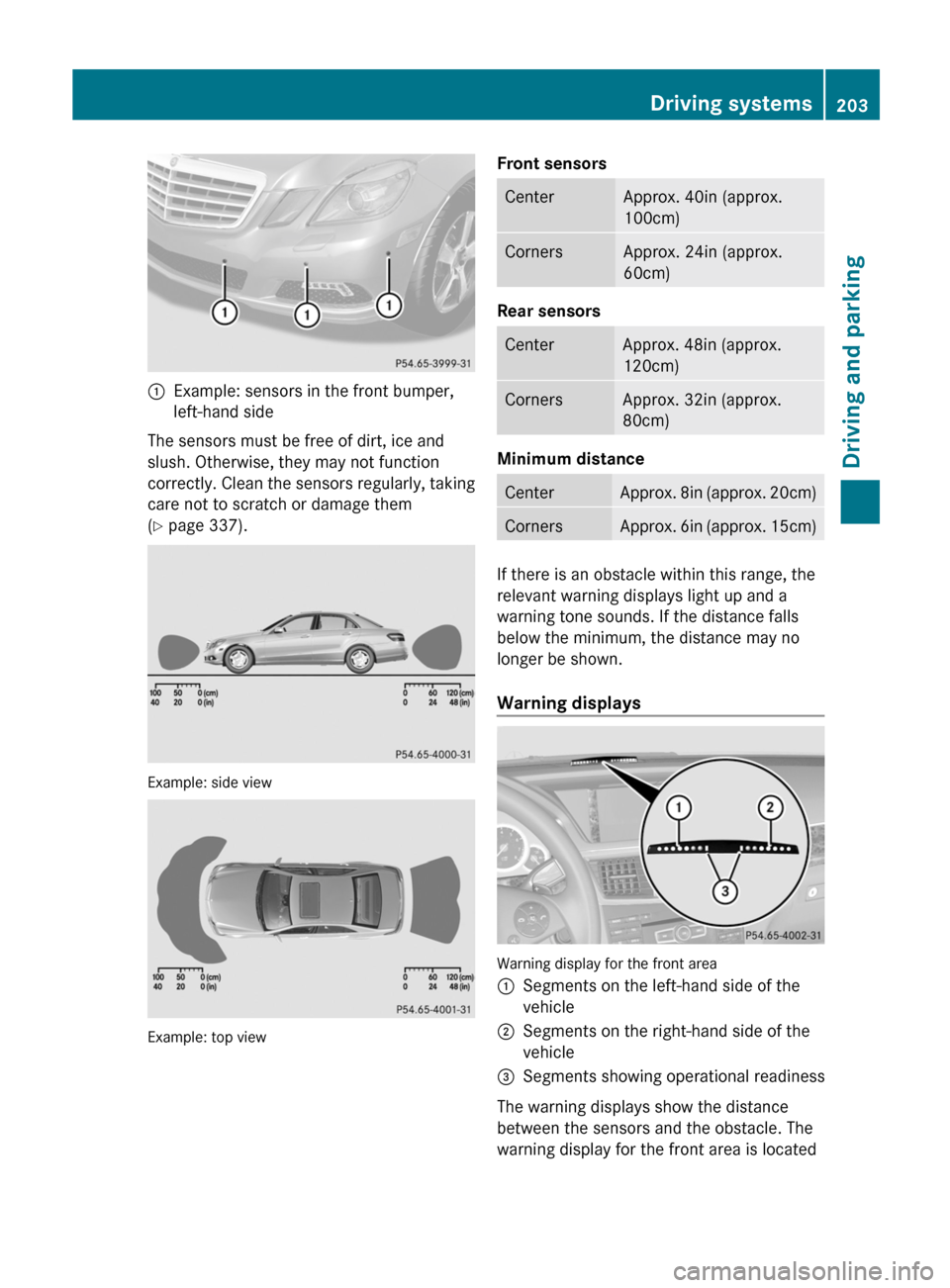
:
Example: sensors in the front bumper,
left-hand side
The sensors must be free of dirt, ice and
slush. Otherwise, they may not function
correctly.
Clean the sensors regularly, taking
care not to scratch or damage them
(Y page 337). Example: side view
Example: top view Front sensors Center Approx. 40in (approx.
100cm)
Corners Approx. 24in (approx.
60cm)
Rear sensors
Center Approx. 48in (approx.
120cm)
Corners Approx. 32in (approx.
80cm)
Minimum distance
Center Approx. 8in
(approx. 20cm)
Corners Approx. 6in
(approx. 15cm)
If there is an obstacle within this range, the
relevant warning displays light up and a
warning tone sounds. If the distance falls
below the minimum, the distance may no
longer be shown.
Warning displays
Warning display for the front area
:
Segments on the left-hand side of the
vehicle
; Segments on the right-hand side of the
vehicle
= Segments showing operational readiness
The warning displays show the distance
between the sensors and the obstacle. The
warning display for the front area is located Driving systems
203
Driving and parking Z