load MERCEDES-BENZ E-Class WAGON 2016 W213 Owner's Manual
[x] Cancel search | Manufacturer: MERCEDES-BENZ, Model Year: 2016, Model line: E-Class WAGON, Model: MERCEDES-BENZ E-Class WAGON 2016 W213Pages: 350, PDF Size: 6.71 MB
Page 12 of 350
see also Digital Operator's Man-
ual .................................................. 214
E
E10see Fuel
EASY-ENTRY feature
Activating/deactivating ................. 190
Function/notes ............................. 117
EASY-EXIT feature
Function/notes ............................. 117
Switching on/off ........................... 190
EASY-PACK cargo compartment
management system ........................ 246
EASY-PACK folding floor
Important safety notes .................. 248
EASY-PACK folding luggage-com-
partment floor
Opening and closing ......................2 49
EASY-PACK load-securing kit
Components and storage .............. 246
Inserting the brackets into the
loading rail ..................................... 247
EASY-PACK rear sill protector .......... 249
EASY-PACK trunk box ....................... 245
EBD (electronic brake force distri-
bution)
Display message ............................ 194
Function/notes ................................ 84
ECO display
Function/notes ............................. 154
ECO start/stop function
Automatic engine start .................. 141
Automatic engine switch-off .......... 141
Deactivating/activating ................. 141
General information ....................... 141
Important safety notes .................. 141
Introduction ................................... 141
Electronic Stability Program
see ESP
®(Electronic Stability Program)
Emergency
Automatic measures after an acci-
dent ................................................. 67
Emergency release
Driver's door .................................... 96
Fuel filler flap ................................. 147
Trunk ............................................. 103 Vehicle ............................................. 96
Emergency spare wheel
General notes ................................ 329
Important safety notes .................. 329
Removing ....................................... 329
Storage location ............................ 329
Stowing .......................................... 330
Technical data ............................... 332
Emergency Tensioning Devices
Activation ......................................... 63
Emergency unlocking
Tailgate .......................................... 103
Emissi ons c
ontrol
Service and warranty information .... 28
Engine
Check Engine warning lamp ........... 202
Display message ............................ 199
ECO start/stop function ................ 141
Engine number ............................... 337
Irregular running ............................ 142
Jump-starting ................................. 279
Starting problems .......................... 142
Starting the engine with the
SmartKey ....................................... 140
Starting with KEYLESS-GO ............. 140
Switching off .................................. 152
Tow-starting (vehicle) ..................... 284
Engine electronics
Problem (malfunction) ................... 142
Engine oil
Adding ........................................... 264
Checking the oil level ..................... 263
Checking the oil level using the
dipstick .......................................... 264
Display message ............................ 191
Filling capacity ............................... 342
Notes about oil grades ................... 341
Notes on oil level/consumption .... 263
Temperature (on-board com-
puter) ............................................. 190
Entering an address
see also Digital Operator's Man-
ual .................................................. 214
ESP
®(Electronic Stability Pro-
gram)
Activating/deactivating (except
AMG vehicles) .................................. 81
10Index
Page 15 of 350
iPod®
see also Digital Operator's Man-
ual .................................................. 214
J
JackStorage location ............................ 270
Using ............................................ .310
Jump starting (engine) ......................279
K
Key positions
KEYLESS-GO .................................. 138
SmartKey ....................................... 137
KEYLESS-GO
Deactivation ..................................... 91
Display message ............................ 191
Locking ............................................ 91
Removing the Start/Stop button ... 139
Start/Stop button .......................... 138
Starting the engine ........................ 140
Unlocking ......................................... 91
Kickdown
Driving tips ....................................1 44
Manual drive program .................... 145
Knee bag .............................................. 56
L
Lamps
see Warning and indicator lamps
Lane Keeping Assist
Activating/deactivating ................. 190
Function/information .................... 179
Lane Tracking package ..................... 177
Lap time (RACETIMER) ...................... 190
LATCH-type (ISOFIX) child seat
anchors ................................................ 70
License plate lamp (display mes-
sage) ................................................... 191
Light function, active
Display message ............................ 191
Light sensor (display message) ....... 191
Lights
Activating/deactivating the inte-
rior lighting delayed switch-off ....... 190
Adaptive Highbeam Assist ............. 122 Automatic headlamp mode ............ 121
Cornering light function ................. 121
Hazard warning lamps ................... 120
High beam flasher .......................... 121
High-beam headlamps ................... 121
Light switch ................................... 120
Low-beam headlamps .................... 121
Parking lamps ................................ 121
Rear fog lamp ................................ 121
Setting the brightness of the
ambient lighting (on-board com-
puter) ............................................. 190
Setting the brightness of the dis-
play/switch (on-board computer) .. 190
Setting the color of the ambient
lighting (on-board computer) ......... 190
Standing lamps .............................. 121
Switching the daytime running
lamps on/off (on-board com-
puter) ............................................. 190
Switching the daytime running
lamps on/off (switch) .................... 121
Switching the exterior lighting
delayed switch-off on/off (on-
board computer) ............................ 190
Switching the surround lighting
on/off (on-board com-
puter) ............................................. 190
Turn signals ................................... 121
see Replacing bulbs
List of access data
New provider ................................. 233
List of mobile phone network pro-
viders
With the se
lected provider ............. 233
Loading guidelines ............................ 238
Locking
see Central locking
Locking (doors)
Automatic ........................................ 95
Emergency locking ........................... 96
From inside (central locking but-
ton) .................................................. 95
Locking centrally
see Central locking
Locking verification signal (on-
board computer) ............................... 190
Index13
Page 16 of 350
Low-beam headlampsDisplay message ............................ 191
Switching on/off .......................... .121
Luggage holder (EASY-PACK load-
securing kit) ....................................... 247
Lumbar support
Adjusting the 4-way lumbar sup-
port ................................................ 116
M
M+S tires ............................................ 290
Malfunction message
see Display messages
Matte finish (cleaning instruc-
tions) ..................................................2 68
mbrace
Call priority ....................................2 56
Display message ............................ 191
Downloading destinations
(COMAND) ..................................... 252
Downloading routes ....................... 252
Emergency call .............................. 253
General notes ................................ 252
Geo fencing ................................... 252
Locating a stolen vehicle ...............2 52
MB info call button ........................ 255
Remote vehicle locking .................. 252
Roadside Assistance button .......... 254
Search & Send ............................... 252
Self-test ......................................... 252
Speed alert ....................................2 52
System .......................................... 252
Triggering the vehicle alarm ........... 252
Vehicle remote malfunction diag-
nosis .............................................. 252
Vehicle remote unlocking .............. 252
Mechanical key
Function/notes ................................ 92
Inserting .......................................... 92
Locking vehicle ................................ 96
Removing ......................................... 92
Unlocking the driver's door .............. 96
Media Interface
see Separate operating instructions
Memory card (audio) ......................... 190
Memory function ............................... 117 Mercedes-Benz Intelligent Drive
360°camera .................................. 173
ABS (Anti-lock Brake System) .......... 75
Active Blind Spot Assist ................. 180
Active Lane Keeping Assist ............ 183
Active Parking Assist ..................... 170
ATTENTION ASSIST ........................ 175
BAS (Brake Assist) ........................... 76
BAS PLUS (Brake Assist PLUS)
with Cross-Traffic Assist .................. 76
Blind Spot Assist ............................ 178
COLLISION PREVENTION ASSIST
PLUS ................................................ 78
Cruise control ................................ 155
DISTRONI C PLUS ........................... 156
DISTR
ONIC PLUS with Steering
Assist and Stop&Go Pilot ...............1 63
ESP
®(Electronic Stability Pro-
gram) ............................................... 80
General notes ................................ 155
Lane Keeping Assist ......................1 79
PARKTRONIC ................................. 168
PRE-SAFE
®(anticipatory occu-
pant protection) ............................... 66
PRE-SAFE
®Brake .............................8 4
PRE-SAFE®PLUS (anticipatory
occupant protection PLUS) .............. 67
Rear view camera .......................... 171
Traffic Sign Assist .......................... 176
Message memory (on-board com-
puter) .................................................. 191
Messages
see Display messages
Mirrors
see Exterior mirrors
see Rear-view mirror
see Vanity mirror (in the sun visor)
Mobile phone
Authorizing .................................... 229
Connecting (Bluetooth
®inter-
face) ..............................................2 27
Connecting another mobile
phone ............................................ 231
De-authorizing ............................... 231
Enabling for Internet access .......... 233
Frequencies ................................... 334
Installation ..................................... 334
14Index
Page 20 of 350
Reversing featurePanorama sliding sunroof .............. 107
Roller sunblinds ............................. 109
Side windows ................................. 104
Sliding sunroof ............................... 107
Trunk lid/tailgate ............................. 97
Reversing lamps (display mes-
sage) ................................................... 191
Roadside Assistance (breakdown) .... 29
Roller sunblind
Panorama roof with power tilt/
sliding panel .................................. 108
Rear side windows ......................... 251
Rear window .................................. 251
Roof lining and carpets (cleaning
guidelines) ......................................... 268
Roof load (maximum) ........................ 344
Route (navigation)
see Route guidance (navigation)
Route guidance
see also Digital Operator's Man-
ual .................................................. 214
Route guidance (navigation) ............ 190
S
Safety
Children in the vehicle ..................... 68
Safety system
see Driving safety systems
SD memory card
see also Digital Operator's Man-
ual .................................................. 214
Search & Send
see also Digital Operator's Man-
ual .................................................. 214
Seat belts
Adjusting the driver's and front-
passenger seat belt ......................... 53
Adjusting the height ......................... 52
center rear-compartment seat ......... 53
Cleaning ......................................... 268
Correct usage .................................. 51
Fastening ......................................... 52
Important safety guidelines ............. 50
Introduction ..................................... 50
Releasing ......................................... 53 Switching belt adjustment on/off
(on-board computer) ...................... 190
Warning lamp ................................. 202
Warning lamp (function) ................... 54
Seats
Active multicontour seat ................ 116
Adjusting (electrically) ................... 116
Adjusting the 4 ‑way lumbar sup-
port ................................................ 116
Adjusting the head restraint .......... 116
Cleaning the cover ......................... 268
Correct driver's seat position ........ 114
Folding the backrest (rear com-
partment) forwards/back .............. 241
Important safety notes .................. 115
Seat heating problem .................... 117
Storing settings (memory func-
tion) ............................................... 117
Switching seat heating on/off ....... 116
Switching seat ventilation on/off .. 116
Securing cargo .................................. 242
Selecting stations
Radio ............................................. 235
Sensors (cleaning instructions) ....... 268
Service menu (on-board com-
puter) .................................................. 190
Service products
Brake fluid ..................................... 342
Coolant (engine) ............................ 342
DEF special additives ..................... 341
Engine oil ....................................... 341
Fuel ................................................ 337
Important safety notes .................. 337
Refrigerant (air-conditioni ng sy
s-
tem) ............................................... 344
Washer fluid ................................... 343
Setting access data
Online and Internet ........................ 233
Setting the air distribution ............... 133
Setting the airflow ............................ 133
Setting the date/time format
see also Digital Operator's Man-
ual .................................................. 214
Setting the language
see also Digital Operator's Man-
ual .................................................. 214
18Index
Page 22 of 350
Stowage areas................................... 238
Stowage compartments
Armrest (under) ............................. 239
Center console .............................. 239
Cup holders ................................... 251
Display message) ........................... 191
Eyeglasses compartment ............... 239
Glove box ....................................... 239
Important safety information ......... 239
Rear ............................................... 239
Stowage net ................................... 239
Under driver's seat/front-
passenger seat .............................. 239
Stowage net ....................................... 239
Stowage well beneath the trunk
floor ....................................................2 48
Summer tires ..................................... 290
Sun visor ............................................ 251
Surround lighting (on-board com-
puter) ..................................................1 90
Suspension tuning
AIRMATIC ...................................... 167
SETUP (on-board computer) .......... 190
Switching air-recirculation mode
on/off ................................................. 133
T
Tachometer ........................................ 188
Tail lamps
Display message ............................ 191
Tailgate
Display message ............................ 201
Emergency unlocking ..................... 103
Important safety notes .................... 96
Limiting the opening angle ............. 102
Opening dimensions ......................3 44
Opening/closing (automatically
from inside) ................................... 101
Opening/closing (automatically
from outside) ................................... 98
Opening/closing (from outside) ....... 97
Tank
see Fuel tank
Tank content
Fuel gauge ....................................... 37
Technical data
Capacities ...................................... 337 Emergency spare wheel ................. 332
Information ....................................3
34
Tires/wheels ................................. 314
Vehicle data ................................... 344
Telephone
Accepting a call ..................... 190, 231
Authorizing a mobile phone (con-
necting) ......................................... 229
Connecting a mobile phone (gen-
eral information) ............................ 227
De-authorizing (disconnecting) a
mobile phone ................................. 231
Ending an active call ......................2 32
Entering phone numbers ................ 232
Establishing the connection from
the mobile phone ........................... 230
Making a call ................................. 232
Menu (on-board computer) ............ 190
Number from the phone book ........1 90
Reconnecting a mobile phone
automatically ................................. 231
Redialing ........................................ 190
Rejecting a call .............................. 232
Rejecting/ending a call ................. 190
see also Digital Operator's Man-
ual ..................................................2 14
Switching between mobile
phones ...........................................2 31
Using the telephone ....................... 231
Telephone number
Entering ......................................... 232
Telescopic rod (EASY-PACK load-
securing kit) ....................................... 248
Te
mperature
Coolant .......................................... 188
Coolant (on-board computer) ......... 190
Engine oil (on-board computer) ...... 190
Outside temperature ......................1 88
Setting (climate control) ................ 133
Through-loading feature ................... 239
Timing (RACETIMER) ......................... 190
Tire pressure
Calling up (on-board computer) ..... 294
Checking manually ........................ 294
Display message ............................ 200
Maximum ....................................... 294
Not reached (TIREFIT) .................... 274
Notes ............................................. 292
20Index
Page 23 of 350
Reached (TIREFIT) .......................... 274
Recommended .............................. .291
Tire pressure monitor
Checking the tire pressure elec-
tronically ........................................ 296
Function/notes .............................2 94
General notes ................................ 294
Important safety notes .................. 295
Radio type approval for the tire
pressure monitor ........................... 297
Restarting ...................................... 297
Warning lamp ................................. 211
Warning message .......................... 296
Tire-change tool kit ........................... 270
TIREFIT kit .......................................... 273
Tires
Aspect ratio (definition) ................. 308
Average weight of the vehicle
occupants (definition) .................... 307
Bar (definition) ............................... 306
Changing a wheel .......................... 309
Characteristics .............................. 306
Checking ........................................ 289
Curb weight (definition) ................. 308
Definition of terms ......................... 306
Direction of rotation ...................... 309
Display message ............................ 200
Distribution of the vehicle occu-
pants (definition) ............................ 309
DOT (Department of Transporta-
tion) (definition) ............................. 307
DOT, Tire Identification Number
(TIN) ............................................... 306
GAWR (Gross Axle Weight Rating)
(definition) ..................................... 307
General notes ................................ 314
GVW (Gross Vehicle Weight) (def-
inition) ........................................... 307
GVWR (Gross Vehicle Weight Rat-
ing) (definition) .............................. 307
Important safety notes .................. 288
Increased vehicle weight due to
optional equipment (definition) ...... 307
Information on driving .................... 288
Kilopascal (kPa ) (
definition) ........... 307
Labeling (overview) ........................ 303
Load bearing index (definition) ...... 308
Load index ..................................... 305 Load index (definition) ................... 307
Maximum load on a tire (defini-
tion) ............................................... 308
Maximum loaded vehicle weight
(definition) ..................................... 307
Maximum permissible tire pres-
sure (definition) ............................. 308
Maximum tire load ......................... 305
Maximum tire load (definition) ....... 308
MOExtended tires .......................... 290
Optional equipment weight (defi-
nition) ............................................ 308
PSI (pounds per square inch) (def-
inition) ........................................... 308
Replacing ....................................... 309
Service life ..................................... 290
Sidewall (definition) ....................... 308
Speed rating (definition) ................ 307
Storing ........................................... 309
Structure and characteristics
(definition) ..................................... 306
Temperature .................................. 302
TIN (Tire Identification Number)
(definition) ..................................... 308
Tire bead (definition) ...................... 308
Tire pressure (definition) ................ 308
Tire pressures (recommended) ...... 307
Tire size (data) ............................... 314
Tire size designation, load-bearing
capacity, speed rating .................... 303
Tire tread ....................................... 289
Tire tread (definition) ..................... 308
Total load limit (definition) ............. 309
Traction ......................................... 302
Traction (definition) ....................... 308
Tread wear ..................................... 302
Uniform Tire Quality Grading
Standards ...................................... 301
Uniform Tire Quality Grading
Standards (definition) .................... 307
Wear indicator (definition) ............. 308
Wheel and tire combination ........... 316
Wheel rim (definition) .................... 307
see Fl
at tire
Top Tether ............................................ 71
Tow-starting
Emergency engine starting ............ 284
Important safety notes .................. 281
Index21
Page 24 of 350
Towing a trailerCleaning the trailer tow hitch ......... 268
ESP
®(Electronic Stability Pro-
gram) ...............................................8 4
Towing away
Important safety guidelines ........... 281
Installing the towing eye ................ 282
Removing the towing eye ............... 283
With both axles on the ground ....... 283
With the rear axle raised ................ 283
Towing eye ......................................... 270
Traffic reports
see also Digital Operator's Man-
ual .................................................. 214
Traffic Sign Assist
Activating/deactivating the warn-
ing function .................................... 190
Function/notes ............................. 176
Important safety notes .................. 177
Instrument cluster display ............. 177
Transfer case ..................................... 145
Transmission
see Automatic transmission
Transmission position display ......... 143
Transmission position display
(DIRECT SELECT lever) ...................... 143
Transporting the vehicle .................. 283
Trim pieces (cleaning instruc-
tions) .................................................. 268
Trip computer (on-board com-
puter) .................................................. 190
Trip odometer
Calling up ....................................... 190
Resetting (on-board computer) ...... 190
Trunk
Emergency release ........................ 103
Important safety notes .................... 96
Locking separately ......................... 102
Opening/closing (automatically
from inside) ................................... 101
Opening/closing (automatically
from outside) ................................... 98
Opening/closing (from outside,
HANDS-FREE ACCESS) .................... 99
Opening/closing (manually from
outside) ............................................ 97 Trunk lid
Display message ............................ 191
Opening dimensions ...................... 344
Trunk load (maximum) ...................... 344
Turn signals
Changing bulbs (front) ................... 125
Display mes sage ............................ 191
Sw
itching on/off ........................... 121
Two-way radio
Frequencies ................................... 334
Installation ..................................... 334
Transmission output (maximum) .... 334
Type identification plate
see Vehicle identification plate
U
UnlockingEmergency unlocking ....................... 96
From inside the vehicle (central
unlocking button) ............................. 95
V
Vanity mirror (in the sun visor) ........ 252
Vehicle
Correct use ...................................... 32
Data acquisition ............................... 33
Display message ............................ 201
Equipment ....................................... 28
Individual settings .......................... 190
Limited Warranty ............................. 32
Loading .......................................... 298
Locking (in an emergency) ............... 96
Locking (SmartKey) .......................... 90
Lowering ........................................ 313
Maintenance .................................... 29
Parking for a long period ................ 153
Pulling away ................................... 140
Raising ........................................... 310
Reporting problems ......................... 32
Securing from rolling away ............ 310
Towing away .................................. 281
Transporting .................................. 283
Unlocking (in an emergency) ........... 96
Unlocking (SmartKey) ...................... 90
Vehicle data ................................... 344
Vehicle data ....................................... 344
22Index
Page 54 of 350
When fastening the seat belt, always make
sure that:
Rthe seat belt tongue is only inserted to thebelt buckle belonging to that seat.
Rthe seat belt is tight across your body.
Avoid wearing bulky clothing, e.g. a winter
coat.
Rthe seat belt is not twisted.
Only then can the forces which occur be
distributed over the area of the belt.
Rthe shoulder section of the belt is always
routed across the center of your shoulder.
The shoulder section of the belt must not
come into contact with your neck or be
routed under your arm. Where possible,
adjust the seat belt to the appropriate
height.
Rthe lap belt passes tightly and as low down
as possible across your lap.
The lap belt must always be routed across
your hip joints and not across your abdo-
men. This applies particularly to pregnant
women. If necessary, push the lap belt
down to your hip joint and pull it tight using
the shoulder section of the belt.
Rthe seat belt is not routed across sharp,
pointed or fragile objects.
If you have such items located on or in yourclothing, e.g. pens, keys or eyeglasses,
store these in a suitable place.
Ronly one person is using a seat belt at a
time.
Infants and children must never travel sit-
ting on the lap of a vehicle occupant. In the
event of an accident, they could be crushed
between the vehicle occupant and seat
belt.
Robjects are never secured with a seat belt if the seat belt is also being used by one of the
vehicle's occupants.
Seat belts are only intended to secure and
restrain vehicle occupants. Always observe
the "Loading guidelines" for securing objects,
luggage or loads (
Ypage 238).
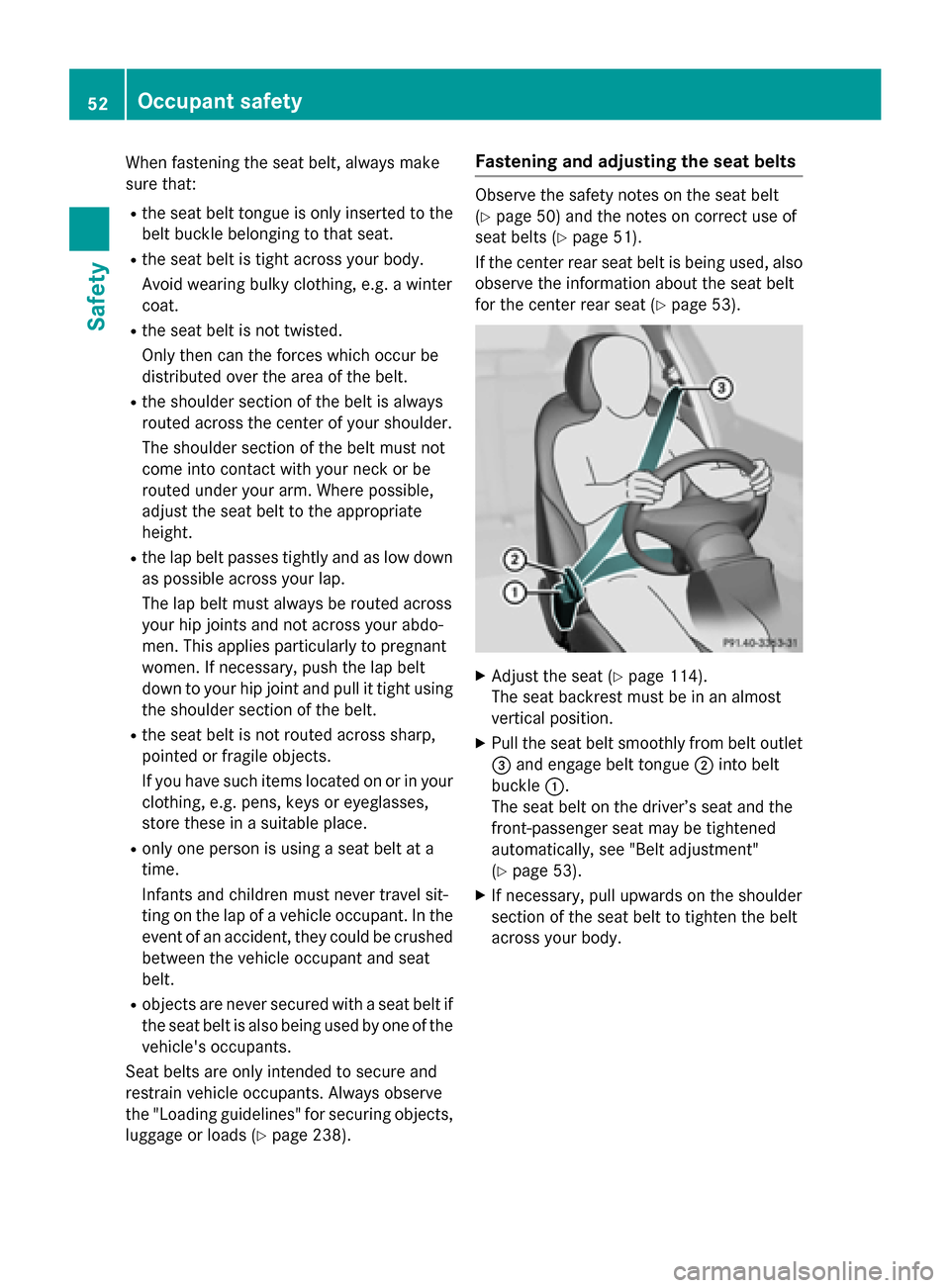
Fastening and adjusting the seat belts
Observe the safety notes on the seat belt
(
Ypage 50) and the notes on correct use of
seat belts (
Ypage 51).
If the center rear seat belt is being used, also
observe the information about the seat belt
for the center rear seat (
Ypage 53).
XAdjust the seat (Ypage 114).
The seat backrest must be in an almost
vertical position.
XPull the seat belt smoothly from belt outlet
= and engage belt tongue ;into belt
buckle :.
The seat belt on the driver’s seat and the
front-passenger seat may be tightened
automatically, see "Belt adjustment"
(
Ypage 53).
XIf necessary, pull upwards on the shoulder
section of the seat belt to tighten the belt
across your body.
52Occupant safety
Safety
Page 60 of 350
Occupant Classification System
(OCS)
Introduction
The Occupant Classification System (OCS)
categorizes the person in the front-passenger
seat. Depending on that result, the front-
passenger front air bag is either enabled or
deactivated.
The system does not deactivate:
Rthe side impact air bag
Rthe pelvis air bag
Rthe window curtain air bag
Rthe Emergency Tensioning Devices
Prerequisites
To be classified correctly, the front passenger
must sit:
Rwith the seat belt fastened correctly
Rin an almost upright position with their
back against the seat backrest
Rwith their feet resting on the floor, if possi-
ble
If the front passenger does not observe these
conditions, OCS may produce a false classi-
fication, e.g. because the front passenger:
Rtransfers their weight by supporting them-
selves on a vehicle armrest
Rsits in such a way that their weight is raised
from the seat cushion
If it is absolutely necessary to install a child
restraint system on the front-passenger seat,
be sure to observe the correct positioning of
the child restraint system. Never place
objects under or behind the child restraint
system, e.g. cushions. The entire base of the
child restraint system must always rest on the seat cushion of the front-passenger seat. The
backrest of the forward-facing child restraint
system must lie as flat as possible against the
backrest of the front-passenger seat.
The child restraint system must not touch theroof or be subjected to a load by the head
restraint. Adjust the angle of the seat back- rest and the head restraint position accord-
ingly.
Only then can OCS be guaranteed to function
correctly. Always observe the child restraint
system manufacturer's installation instruc-
tions.
Occupant Classification System opera-
tion (OCS)
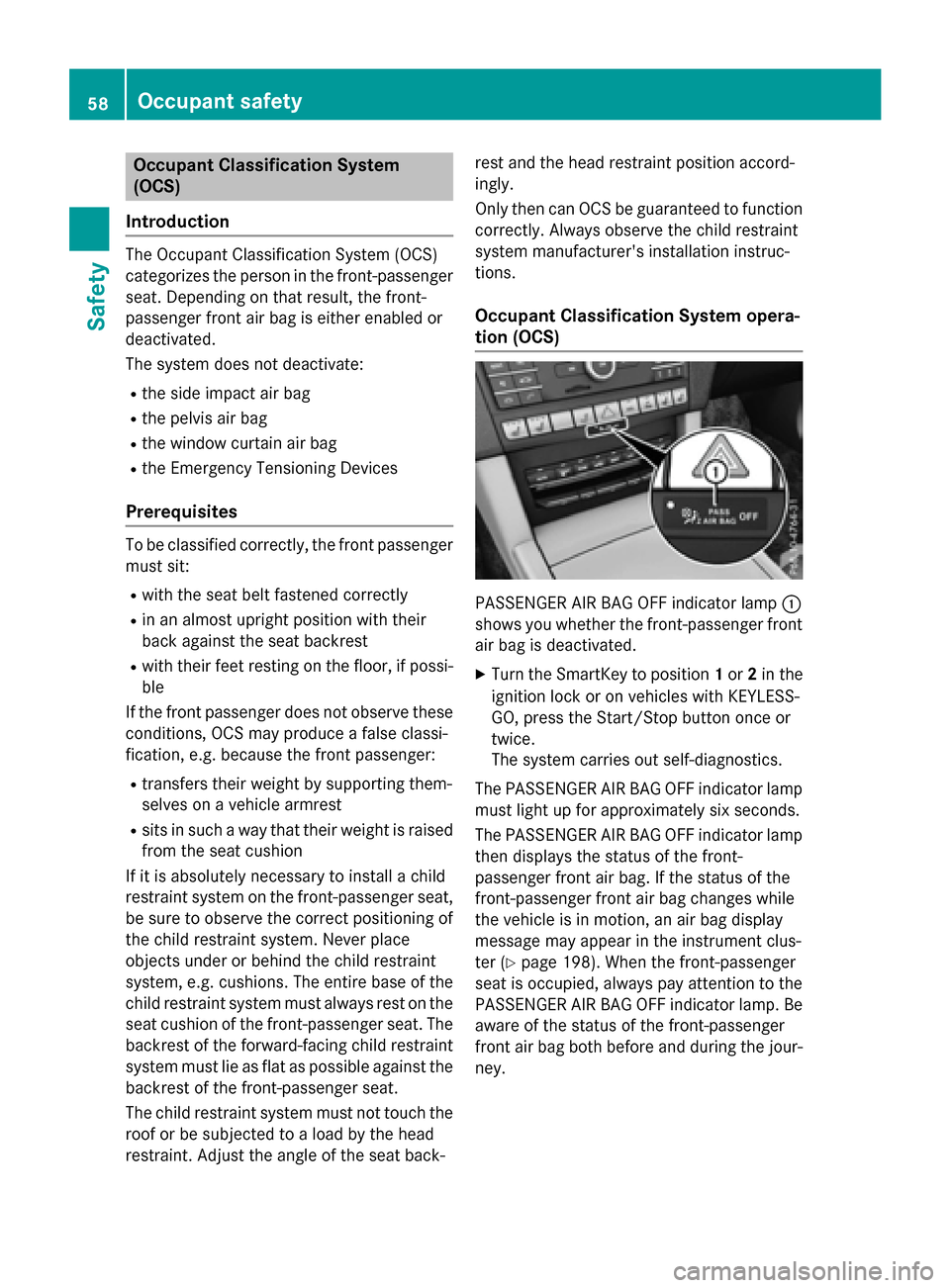
PASSENGER AIR BAG OFF indicator lamp :
shows you whether the front-passenger front
air bag is deactivated.
XTurn the SmartKey to position 1or 2in the
ignition lock or on vehicles with KEYLESS-
GO, press the Start/Stop button once or
twice.
The system carries out self-diagnostics.
The PASSENGER AIR BAG OFF indicator lamp
must light up for approximately six seconds.
The PASSENGER AIR BAG OFF indicator lamp
then displays the status of the front-
passenger front air bag. If the status of the
front-passenger front air bag changes while
the vehicle is in motion, an air bag display
message may appear in the instrument clus-
ter (
Ypage 198). When the front-passenger
seat is occupied, always pay attention to the
PASSENGER AIR BAG OFF indicator lamp. Be
aware of the status of the front-passenger
front air bag both before and during the jour-
ney.
58Occupant safety
Safety
Page 64 of 350
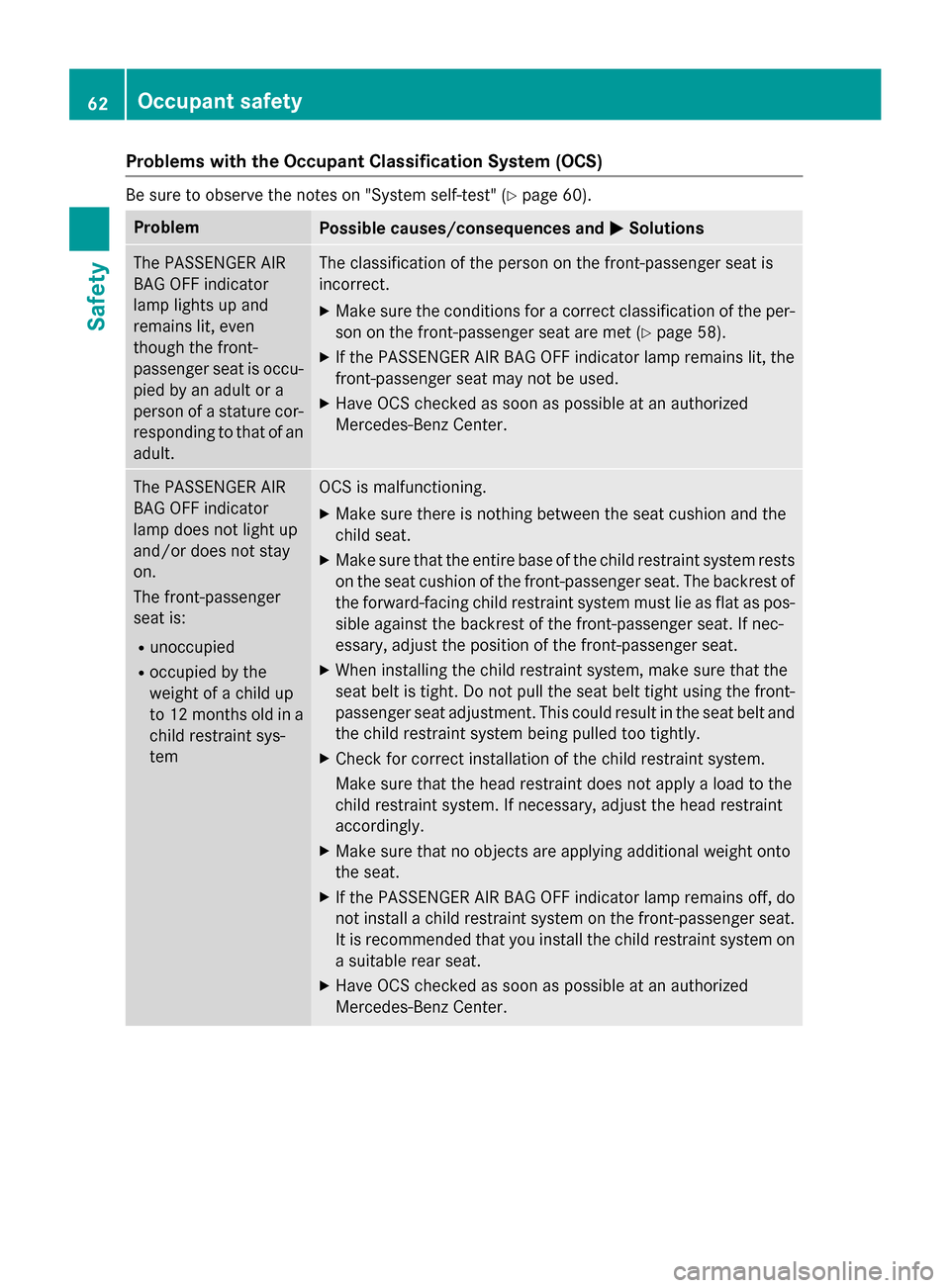
Problems with the Occupant Classification System (OCS)
Be sure to observe the notes on "System self-test" (Ypage 60).
ProblemPossible causes/consequences andMSolutions
The PASSENGER AIR
BAG OFF indicator
lamp lights up and
remains lit, even
though the front-
passenger seat is occu-
pied by an adult or a
person of a stature cor-
responding to that of an
adult.The classification of the person on the front-passenger seat is
incorrect.
XMake sure the conditions for a correct classification of the per-
son on the front-passenger seat are met (
Ypage 58).
XIf the PASSENGER AIR BAG OFF indicator lamp remains lit, the
front-passenger seat may not be used.
XHave OCS checked as soon as possible at an authorized
Mercedes-Benz Center.
The PASSENGER AIR
BAG OFF indicator
lamp does not light up
and/or does not stay
on.
The front-passenger
seat is:
Runoccupied
Roccupied by the
weight of a child up
to 12 months old in a
child restraint sys-
tem
OCS is malfunctioning.
XMake sure there is nothing between the seat cushion and the
child seat.
XMake sure that the entire base of the child restraint system rests on the seat cushion of the front-passenger seat. The backrest of
the forward-facing child restraint system must lie as flat as pos-
sible against the backrest of the front-passenger seat. If nec-
essary, adjust the position of the front-passenger seat.
XWhen installing the child restraint system, make sure that the
seat belt is tight. Do not pull the seat belt tight using the front-
passenger seat adjustment. This could result in the seat belt and
the child restraint system being pulled too tightly.
XCheck for correct installation of the child restraint system.
Make sure that the head restraint does not apply a load to the
child restraint system. If necessary, adjust the head restraint
accordingly.
XMake sure that no objects are applying additional weight onto
the seat.
XIf the PASSENGER AIR BAG OFF indicator lamp remains off, do
not install a child restraint system on the front-passenger seat.
It is recommended that you install the child restraint system on
a suitable rear seat.
XHave OCS checked as soon as possible at an authorized
Mercedes-Benz Center.
62Occupant safety
Safety