park assist MERCEDES-BENZ E-CLASS WAGON 2018 User Guide
[x] Cancel search | Manufacturer: MERCEDES-BENZ, Model Year: 2018, Model line: E-CLASS WAGON, Model: MERCEDES-BENZ E-CLASS WAGON 2018Pages: 506, PDF Size: 6.73 MB
Page 180 of 506
taking on the left in left-hand tra ffic on free ways
and high-speed major roads.
If yo u act ivate the turn signal indicator tochange
lanes, theve hicle will accelerate more briskly to
th e set speed under thefo llowing conditions:
RAc tive Dis tance Assist DISTRONIC is acti va‐
te d.
RIfth e driving speed is higher than 45 mph
(70 km/h).
RIf th e driven speed drops below thestored
speed.
RThe sy stem cannot detect a vehicle in there l‐
ev ant area of theov ertak ing lane.
Ve hicles with Driving Assistance Package
and Traf fic Sign Assis t:Ac tive Dis tance Assist
DISTRONIC also has theAc tive Speed Limit
Assi stfunction. This function can be configure d
in the multimedia sy stem. If a change in the
speed limit is de tected and Active Dis tance
Assist DISTRONIC is acti vated, Ac tive Dis tance
Assist DISTRONIC assumes this new speed.
The driven speed is adap ted when theve hicle is
le ve l with the tra ffic signs. The speed limit dis‐ play in
the Instrument Display is alw ays update d
when theve hicle is le vel with the tra ffic sign.
If Ac tive Dis tance Assist DISTRONIC has been
put into passive modebypressing the accelera‐
to r pedal, only speed limits which are higher
th an the set speed ar e adop
ted.
Pullin
g th e cruise control le ver will set the dis‐
pla yed speed limit as the speed, pr ovided that:
RAc tive Speed Limit Assi sthas been activated
in the multimedia sy stem and
RAc tive Dis tance Assist DISTRONIC has been
acti vated
If no speed limit is display ed whenthe le ver is
operated, the speed set bythe driver is adop ted.
Drive prog ram
The DYNA MIC SELECT switch allo wsyouto
ch ange the driving style of Active Dis tance
Assist DISTRONIC. Depending on which drive
prog ram is selected, the driving characteristics
can be geared towa rds fuel econom y,comfort or
dynamic per form ance (
→page 150). Sy
stem limitations
Ve hicles with the Driving Assistance Pack‐
age: Active Dis tance Assist DISTRONIC is acti ve
in the 0 mph(0 km/h) to130mp h(210 km/h)
speed range.
The sy stem may be impaired or may not function
in thefo llowing ins tances, forex ample:
RIn snow ,ra in, fog, heavy spr ay, if there is
gl are, in direct sunlight or in greatlyvarying
ambient light.
RThe windshield in the area of the camera is
dirty, fogged up, damaged or co vered.
RIfth era dar sensors are dirty or co vered.
ROn slippery roads, braking or accelerating
can cause the drive wheels tolose traction
and theve hicle could then skid.
RIn parking garage s,tollst ations or on roads
with steep uphill or downhill gradients.
Do not use Active Dis tance Assist DISTRONIC in
th ese situations.
17 8
Driving and pa rking
Page 183 of 506
#Take into account the tra ffic situation
before calling up thestored speed.
&
WARNING Risk of accident due toinsuf‐
fi cient decele ration byActive Dis tance
Assist DISTRONIC
Ac tive Dis tance Assist DISTRONIC brakes
yo ur vehicle with up to50 % of the maximum
possible deceleration. If this decele ration is
not suff icient,Active Dis tance Assist
DISTRONIC alerts youwit h a visual and
acoustic warning.
#In these cases, adjust your speed and
ke ep a suf ficient dist ance.
#Braketheve hicle yourself and/or take
ev asive action.
&
WARNING Risk of accident due toActive
Dis tance Assist DISTRONIC still being
activated when you lea vethe driver's
seat
If yo u lea vethe driver's seat while theve hicle
is being braked byActive Dis tance Assist
DISTRONIC only, theve hicle can rollaw ay.
#Alw ays deactivate Active Dis tance
Assist DISTRONIC and secure theve hi‐
cle topreve nt it from rolling away
before you lea vethe driver's seat.
Re quirements:RThe vehicle's engine must be switched on.
RThe electric parking brake must be released.
RAc tive Parking Assist is not being used to
park theve hicle or toexit from a parking
space.
RESP®must be activated, but not inter vening.
RThe transmission must be in positionh.
RThe driver door, front passenger door and the
re ar doors must be closed.
RThe engine hood must be closed.
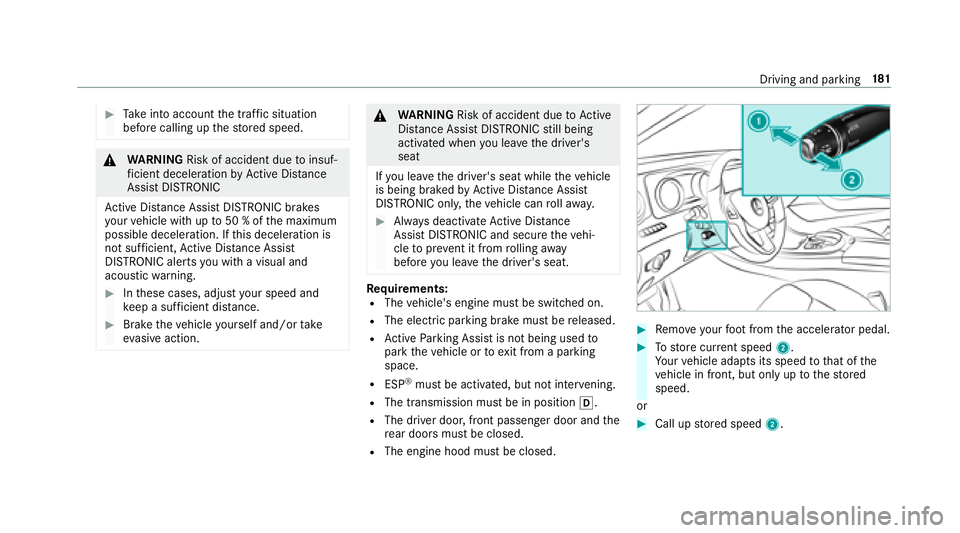
#Re mo veyour foot from the accelerator pedal.
#To store cur rent speed 2.
Yo ur vehicle adapts its speed tothat of the
ve hicle in front, but only up tothestored
speed.
or
#Call up stored speed 2.
Driving and parking 18
1
Page 185 of 506
is activated, any detected changes in the
speed limit are adop tedby the sy stem.
Collision warning
If Ac tive Dis tance Assist DISTRONIC is unable to
suf ficiently decele rate theve hicle in order to
pr eve nt it from approach ingtheve hicle in front,
yo uwill be warned visually and acousticall y.An
intermittent warning tone will then sound and
th e dis tance warning lamp will light up in the
instrument clus ter.
#Brake immediately in order toinc rease the
dis tance from theve hicle in front.
or
#Ta ke evasive action pr ovided it is safe todo
so.
Ac tive Steering Assist
Function of Active Steering Assist
Ac tive Steering Assist is only available for
ve hicles with the Driving Assistance Pack‐
age.
RAc tive Steering Assist is operational at
speeds up to130mp h(210 km/h) and helps yo
uto stay inthe center of the lane by
means of moderate steering inter ventions.
RIt uses theve hicle in front and the lane mark‐
ings as a refere nce depending on the driven
speed.
RAc tive Steering Assist requiresyou as the
driver, tokeep your hands on thesteering
wheel at all times so that you are able to
inter vene at any time tocor rect the course of
th eve hicle and keep it in lane.
RAc tive Steering Assist can be overridden at
any time bysteering theve hicle yourself.
RWhen the sy stem is actively steering, the
è symbol is shown in green in the multi‐
function displa y.
Sy stem limitations of Active Steering Assist
Ac tive Steering Assist has a limited steering tor‐
qu efo r lateral guidance. In some cases, the
st eering inter vention is not suff icienttokeep the
ve hicle in the lane.
If th e de tection of lane markings and vehicles
ahead is impaired, Active Steering Assist
switches topassive mode. The sy stem pr ovides
no support in this case. During the transition from
the active topassiv e
st at
us, theè sym‐
bol is shown as enlar ged and flashes yello w.
Once the sy stem is passive theè symbol is
shown as gr ayinthe multifunction displa y.
The sy stem may be impaired or may not function
in thefo llowing ins tances:
RIfth ere is poor visibility, e.g. due toinsuf fi‐
cient illumination of thero ad, or due tosno w,
ra in, fog or heavy spr ay.
RIfth ere is glare, e.g. from oncoming traf fic,
dire ct sunlight or reflection from other vehi‐
cles (e.g. if thero ad is wet).
RIfth e windshield is dirty, fogged up, damaged
or co vered, for ins tance byast icke r,in the
vicinity of the camera.
RIf no, or se veral, unclear lane markings are
present for one lane, e.g. in a construction
area.
RIf th e lane markings are wornaw ay, dark or
co vered up, e.g. bydirt or sno w.
RThe distance totheve hicle in front is too
small and the lane markings thus cannot be
de tected.
Driving and park ing18
3
Page 187 of 506
display along with awarning tone prom pting you
to take control of theve hicle.
Ste ering and contact de tection
Ac tive Steering Assist requ ires you as the driver,
to keep your hands onthesteering wheel at all
times so that you are abletointer vene at any
time tocor rect the course of theve hicle and
ke ep it in lane. The driver must expect a change
from active topassive mode or vice versa at any
time.
If yo u are not steering yourself or ifyo u take
yo ur hands offthesteering wheel for a pro‐
longed period of time, the sy stem will, depend‐
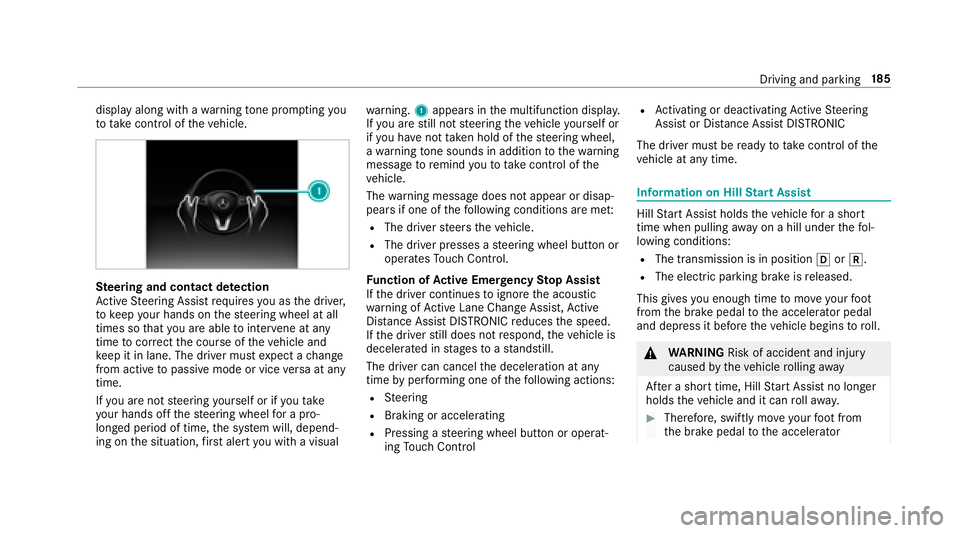
ing on the situation, firs t alert youwit h a visual wa
rning. 1appears in the multifunction displa y.
If yo u are still not steering theve hicle yourself or
if yo u ha venot take n hold of thesteering wheel,
a wa rning tone sounds in addition tothewa rning
message toremind youto take control of the
ve hicle.
The warning message does not appear or disap‐
pears if one of thefo llowing conditions are me t:
RThe driversteers theve hicle.
RThe driver presses a steering wheel button or
operates Touch Control.
Fu nction of Active Eme rgency Stop Assist
If th e driver continues toigno rethe acoustic
wa rning of Active Lane Change Assi st,Ac tive
Dis tance Assist DISTRONIC reduces the speed.
If th e dr iver
still does n
otrespond, theve hicle is
decelerated in stages toast andstill.
The driver can cancel the deceleration at any
time byper form ing one of thefo llowing actions:
RSt eering
RBraking or accelerating
RPressing a steering wheel button or operat‐
ing Touch Control
RAc tivating or deacti vating Active Steering
Assist or Dis tance Assist DISTRONIC
The driver must beready totake control of the
ve hicle at any time.
Information on Hill Start Assist
Hill Start Assist holds theve hicle for a short
time when pulling away on a hill under thefo l‐
lowing conditions:
RThe transmission is in position hork.
RThe elect ric park ing brake is released.
This gives you enough time tomo veyour foot
from the brake pedal tothe accelerator pedal
and depress it before theve hicle begins toroll.
&
WARNING Risk of accident and injury
caused bytheve hicle rolling away
Af ter a short time, Hill Start Assist no longe r
holds theve hicle and it can rollaw ay.
#Therefore, swiftly mo veyour foot from
th e brake pedal tothe accelerator
Driving and parking 18
5
Page 188 of 506
pedal. Never attem pttolea vetheve hi‐
cle if it is being held byHill Start Assist.
HOLD function
HOLD function
The HOLD function holds theve hicle at a stand‐
st ill without requ iring youto depress the brake
pedal, e.g. when pulling away on steep slopes.
Sy stem limitations
The incline must not be greaterth an 30%.
Ac tivating/deactivating the HOLD function
&
WARNING Risk of an accident due tothe
HOLD function being activated when you
lea vetheve hicle
If yo u lea vetheve hicle while only the HOLD
function is braking theve hicle, theve hicle
can rollaw ay inthefo llowing situations:
RIf th ere is a malfunction in the sy stem or
in the po wer supp ly.
RIf th e HOLD function is deactivated by
depressing the accelera tor pedal or the
brake pedal, e.g. byave hicle occupant.
RIfth e electrics in the engine compart‐
ment, the battery or the fuses are tam‐
pered with or if the battery is disconnec‐
te d.
#Alw ays deactivate the HOLD function
and secure theve hicle against rolling
aw ay before leaving theve hicle.
* NO
TEDama gefrom au tomatic braking
When Active Brake Assi st,Ac tive Dis tance
Assist DISTRONIC or the HOLD function are
activated, theve hicle brakes autonomously
in cer tain situations.
To avo id damage totheve hicle, deactivate
th ese sy stems in thefo llowing or similar sit‐
uations:
#During towing
#In a car wash
Requirements:RThe vehicle is stationar y.
RThe driver's door is closed or the seat belt on
th e driver's side is fastened.
RThe engine is running or has been au tomati‐
cally switched off bythe ECO start/ stop
function.
RThe electric parking brake is released.
RAc tive Dis tance Assist DISTRONIC is not acti‐
va ted.
RThe transmission is in position h,kori.
Ac tivating the HOLD function
#Dep ress the brake pedal and af ter a short
time depress fur ther until theë display
appears in the multifunction displa y.
#Release the brake pedal.
Deactivating the HOLD function
#Depress the accelerator pedal topull away.
or
#Depress the brake pedal until theë dis‐
play disappears from the multifunction dis‐
pla y.
186
Driving and pa rking
Page 189 of 506
The HOLD function is deactivated inthefo llow‐
ing situations:
RWhen Active Dis tance Assist DISTRONIC is
acti vated.
RThe transmission is switched toposition j.
RWhentheve hicle is secured with the electric
parking brake.
In thefo llowing situations, theve hicle is held by
th e transmission position jorby the electric
parking brake:
RWhen the seat belt is unfas tened and the
driver's door is opened.
RWhen the engine is switched off.
RWhen there is a malfunction in the sy stem or
if th e po wer supply is insufficient.
DY NA MIC BODY CONT ROL
DYNA MIC BODY CONTROL has thefo llowing
ch aracteristics:
RVa riable damping characteristics
RContinual adjustment of the damping forc es
The damping characteristics adapt tothe cur rent
operating and driving situation.
The da mping is tuned individually for each wheel
and is af fected bythefo llowing factors:
RThe road sur face conditions
RVe hicle load
RThe drive program selected
The drive program can be adjus ted using the
DY NA MIC SELECT switch.
AIR BODY CONT ROL
AIR BODY CONT ROL function
AIR BODY CONTROL is an air suspension sy stem
with variable damping for impr oved driving com‐
fo rt. The all-round le vel control sy stem ensures
th e best possible suspension and const ant
ground clearance, even with a laden vehicle.
When driving at speed, theve hicle is lo wered
automatically toimpr ovedriving saf etyand to re
duce fuel consum ption. The option of manually
adjusting theve hicle le vel is also available.
AIR BODY CONTROL comprises:
RAir suspension with variable spring rate
RAu tomatic le vel control sy stem
RSpeed-dependent lo wering toreduce fuel
consum ption
RManual le vel adjustment
RADS PLUS (Adaptive Damping Sy stem with
const ant damping forc e adjustment)
RDY NA MIC SELECT switch and le vel button
Driving and parking 18
7
Page 192 of 506
Thevehicle is lo wered again in thefo llowing sit‐
uations:
RWhen driving fasterthan 50 mph (80 km/h).
RWhen driving between 37mph (60 km/h)
and 50 mph (80 km/h) for app roxima tely
th re e minutes.
RAf ter selecting a drive program using the
DY NA MIC SELECT switch.
The vehicle is adjus tedto the height of the last
active drive program.
Lo weri ngtheve hicle
#Press button 1.
Indicator lamp 2goes out. The vehicle is
adjus tedto the height of the last active drive
program.
Pa rking Assist PARKTRONIC
Function of Parking Assist PARKTRONIC
Parking Assist PARKTRONI Cis an electronic
parkin gassi stance sy stem with ultrasound. It
monitors the area around your vehicle using six
sensors 1inthe front bumper and six sensors
in there ar bumper. Parking Assist PARKTRONI C
indicates visuall yand audibl yth e dis tance
between your vehicle and an object.
Pa rking Assist PARKTRONI Cis on lyan aid. It is
not a substitute foryo ur attention tothe sur‐
ro undings. The responsibility for safe maneu ver‐
ing and parking remains with you. Make sure
th at there are no persons, animals or objects in th
e maneuvering area while maneuvering and
parking in/exiting parking spaces.
In thest andard setting, an intermitte ntwa rning
to ne sounds from a di stance of appr oximately
1. 0 ft (0.3 m) toan obs tacle. A continuous tone
sounds from a di stance of appr oximately 0.7 ft
(0.2 m). You can set thewa rning tone in the mul‐
timedia sy stem so that it will sound earlier at a
grea ter dis tance of appr oximately 3.3 ft(1.0 m)
(
→page 193).
If Pa rking Assist PARKTRONI Cis deacti vated,
Ac tive Parking Assist is una vailable.
Pa rking Assist PARKTRONIC displ ayinthe
mu ltimedia sy stem
If Ac tive Parking Assist is not ac
tivated and an
obs tacle is de tected in the path of theve hicle, a
pop-up window forPa rking Assist PARKTRONI C
1 appear sin the multimedia sy stem at speeds
up toappr oximately 6 mph (10 km/h).
190
Driving and pa rking
Page 193 of 506
Vehicles with Active Parking Assist without 360°
Camera
Ve hicles with Parking Assist and 360° Camera
Sy stem limitations
Pa rking Assist PARKTRONI Cdoes no tnecessa‐
ri ly take into account thefo llowing obs tacles:
RObs tacles bel owthe de tection range, e.g.
pe rsons, animals or objects.
RObs tacles ab oveth e de tection range, e.g.
ov erhanging loads, overhangs or loading
ra mp s of truc ks.
The sensors must be free of dirt, ice and slush.
Otherwise, they may not function cor rectly.
Clean the sensors regularly, taking care not to
scratch or damage them.
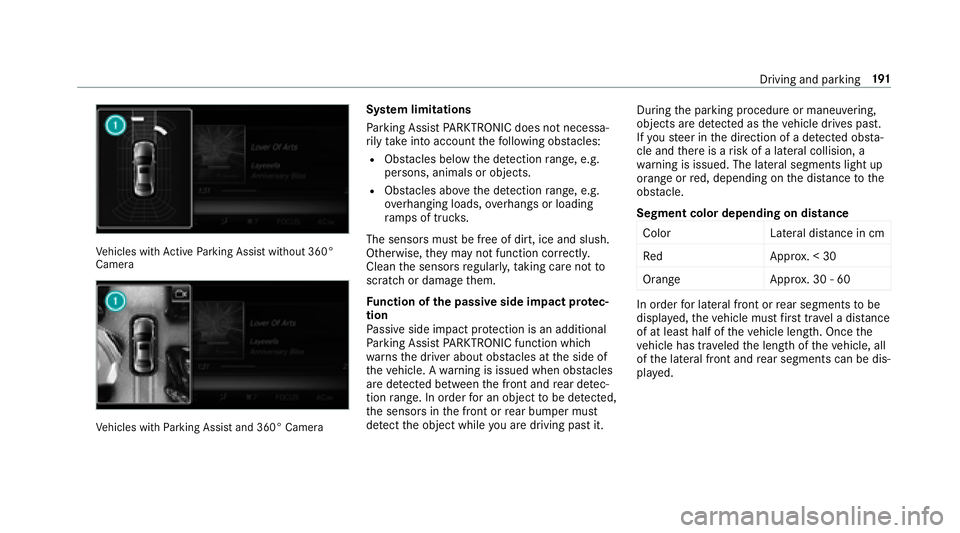
Fu nction of the passive side impact pr otec‐
tion
Pa ssive side impact pr otection is an additional
Pa rking Assist PARKTRONI Cfunction whic h
wa rnsth e driver about obs tacles at the side of
th eve hicle. A warning is issued when obs tacles
are de tected between the front and rear de tec‐
tion range. In order for an object tobe de tected,
th e sensors in the front or rear bumper must
de tect the object while you are driving past it. During
the parking procedure or maneuvering,
objects are de tected as theve hicle drives past.
If yo usteer in the direction of a de tected obs ta‐
cle and there is a risk of a lateral collision, a
wa rning is issued. The lateral segments light up
orang e or
red, depen ding onthe dis tance tothe
obs tacle.
Segment color depending on distance Color Lateral distance in cm
Re dA pprox. < 30
Orang eA pprox. 30 - 60
In order for lateral front or rear segments tobe
displa yed, theve hicle must firs t tr ave l a dis tance
of at least half of theve hicle length. Once the
ve hicle has tr aveled the length of theve hicle, all
of the lateral front and rear segments can be dis‐
pla yed.
Driving and parking 19
1
Page 194 of 506
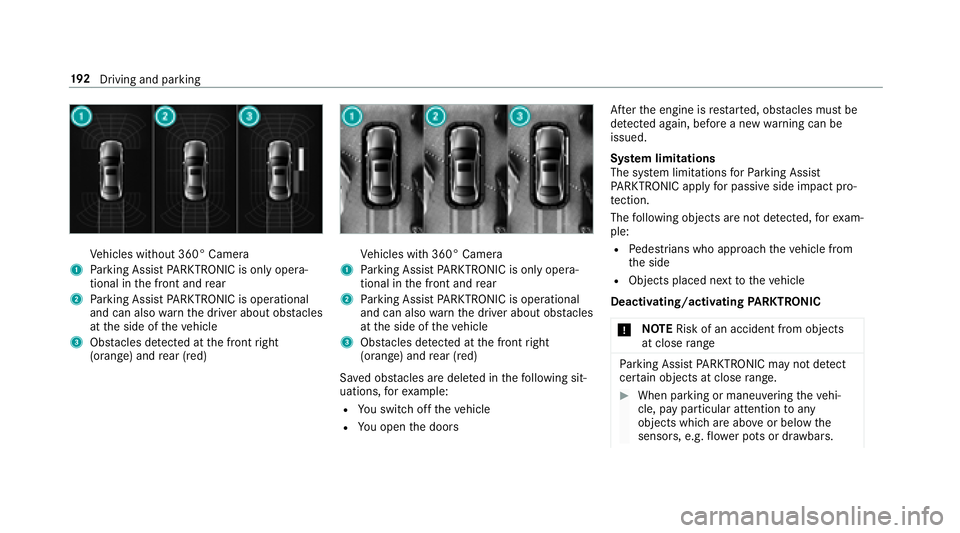
Vehicles without 360° Camera
1Parking Assist PARKTRONI Cis on ly oper a‐
tional in the front and rear
2Pa rking Assist PARKTRONI Cis operational
and can also warnthe driver about obs tacles
at the side of theve hicle
3Obs tacles de tected at the front right
(orange) and rear (red)
Ve hicles with 360° Camera
1Parking Assist PARKTRONI Cis on ly oper a‐
tional in the front and rear
2Pa rking Assist PARKTRONI Cis operational
and can also warnthe driver about obs tacles
at the side of theve hicle
3Obs tacles de tected at the front right
(orange) and rear (red)
Sa ved obs tacles are del eted in thefo llowing sit‐
uations, forex ample:
RYo u switch offtheve hicle
RYo u open the doors Af
terth e engine is restar ted, obs tacles must be
de tected again, before a new warning can be
issued.
Sy stem limitations
The sy stem limitations forPa rking Assist
PA RKTRONI Cappl yfo r passive side impact pro‐
te ction.
The following objects are not de tected, forex am‐
ple:
RPe destrians who approach theve hicle from
th e side
RObjects placed next totheve hicle
Deactivating/activating PARKTRONIC
* NO
TERisk of an accident from objects
at close range
Pa rking Assist PARKTRONI Cma yno tde tect
cer tain objects at close range.
#When pa rking or maneuvering theve hi‐
cle, pay particular attention toany
objects which are abo veor below the
sensors, e.g. flowe r pots or dr awbars.
192
Driving and pa rking
Page 195 of 506
Thevehicle or other objects could oth‐
erwise be damaged.
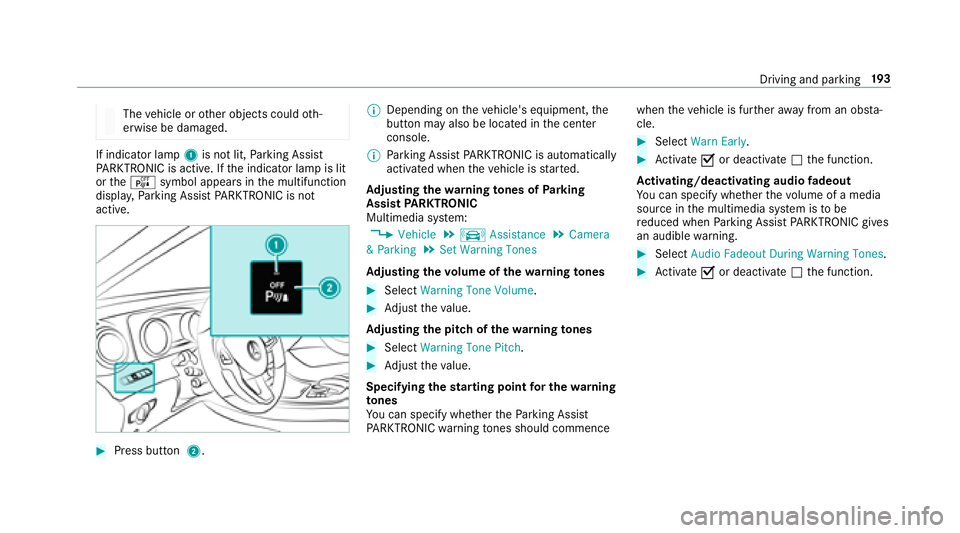
If indicator lamp 1is not lit, Parking Assist
PA RKTRONI Cis active. If the indicator lamp is lit
or theé symbol appears in the multifunction
displa y,Pa rking Assist PARKTRONI Cis no t
active.
#Press but ton 2. %
Depending on theve hicle's equipment, the
button may also be located in the center
console.
% Parking Assist PARKTRONI Cis automatical ly
activated when theve hicle is star ted.
Ad justing the warning tones of Parking
Assist PARKTRONIC
Multimedia sy stem:
,9HKLFOH.k $VVLVWDQFH.&DPHUD
3DUNLQJ.6HW :DUQLQJ 7RQHV
Ad justing the volume of thewa rning tones
#Select :DUQLQJ 7RQH 9ROXPH.
#Adjust theva lue.
Ad justing the pitch of the warning tones
#Select :DUQLQJ 7RQH 3LWFK.
#Adjust theva lue.
Specifying thest arting point for the warning
to nes
Yo u can specify whe ther thePa rking Assist
PA RKTRONI Cwa rning tones should commence when
theve hicle is fur ther aw ay from an obs ta‐
cle.
#Select :DUQ (DUO\ .
#Activate Oor deacti vate ª the function.
Ac tivating/deactivating audio fadeout
Yo u can specify whe ther thevo lume of a media
source in the multimedia sy stem is tobe
re duced when Parking Assist PARKTRONI Cgives
an audible warning.
#Select $XGLR )DGHRXW 'XULQJ :DUQLQJ 7RQHV.
#Activate Oor deacti vate ª the function.
Driving and parking 19
3