fuel MERCEDES-BENZ E-CLASS WAGON 2018 Owner's Guide
[x] Cancel search | Manufacturer: MERCEDES-BENZ, Model Year: 2018, Model line: E-CLASS WAGON, Model: MERCEDES-BENZ E-CLASS WAGON 2018Pages: 506, PDF Size: 6.73 MB
Page 218 of 506
RActive Dis tance Assist DISTRONIC
(→pa ge 177)
* NO
TEEngine damage duetoexc essively
high engine speeds
The engine will be damaged if youdriv ewit h
th e engine in theov errevving range.
#Do not drive wi th the engine in theove r‐
re vving range.
The fuel supply is inter rupted toprotect the
engine when there d band in tach ome ter3
(o ve rrev ving range) is reached.
During no rmal operating conditions, coolant
te mp erature display 4may rise tothere d
mar k.
&
WARNING Danger of burn s when open‐
ing the hood
If yo u open the hood when the engine has
ove rheated or during a fire inthe engine
compartment, you could come into contact
wit h hot gases or other escaping operating
fl uids.
#Before opening the hood, allow the
engine tocool down.
#Intheeve nt of a fire inthe engine com‐
partment, keep the hood closed and
call thefire service.
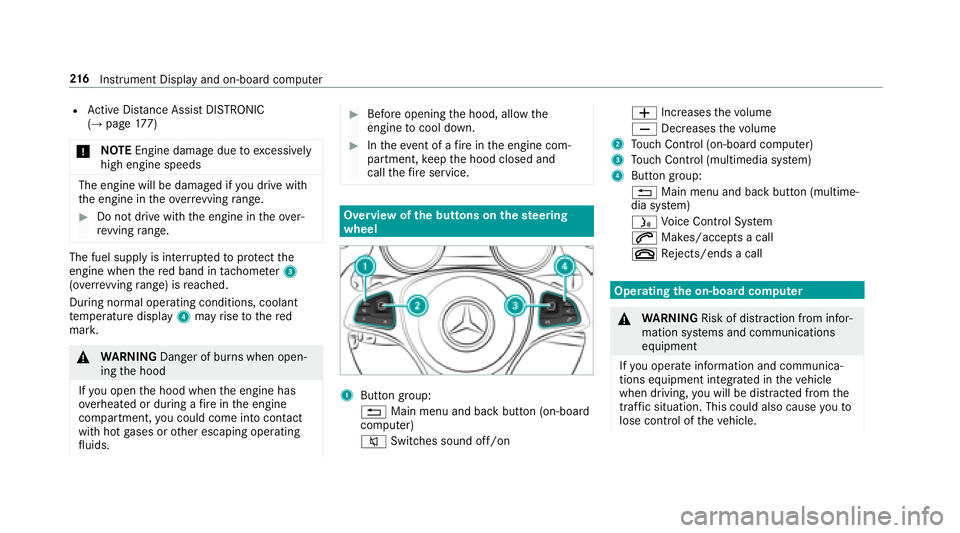
Overview of the butto ns onthest eering
wheel
1But ton group:
% Main menu and ba ckbutton (on-board
computer)
8 Switches sound off/on W
Increases thevo lume
X Decreases thevo lume
2Touch Control (on-board co mputer)
3Touch Control (multimedia sy stem)
4Button group:
% Main menu and back button (multime‐
dia sy stem)
ó Voice Cont rol Sy stem
6 Makes/accepts a call
~ Rejects/ends a call
Ope rating the on-board co mputer
&
WARNING Risk of dist raction from infor‐
mation sy stems and communications
equipment
If yo u operate information and communica‐
tions equipment integ rated in theve hicle
when driving, youwill be distracted from the
traf fic situation. This could also cause youto
lose control of theve hicle.
21 6
Instrument Display and on-board computer
Page 222 of 506
RGray radar waves next tovehicle: Blind Spot
Assist activated
RGreen radar waves next tovehicle: Blind Spot
Assist active
RDisplay of Active Dis tance Assist DISTRONIC
(→pa ge 177)
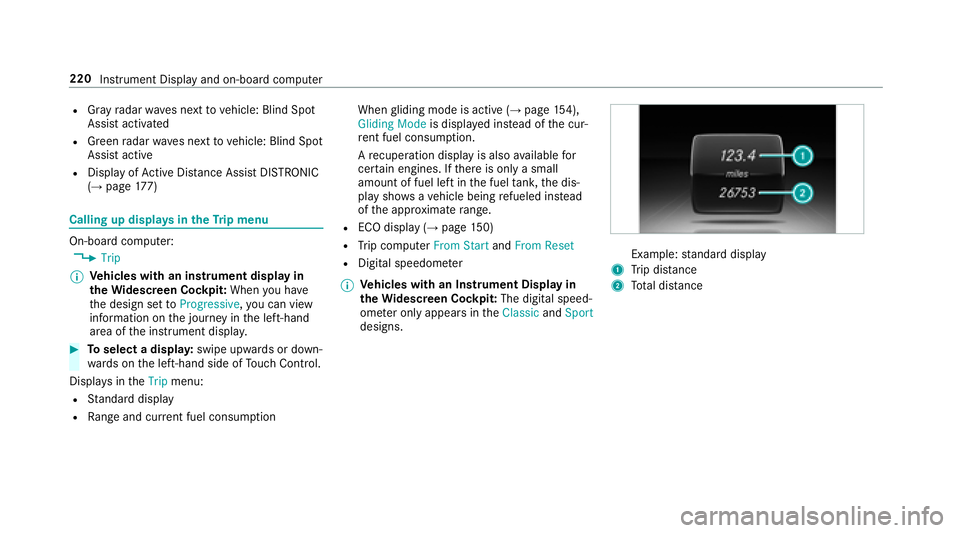
Calling up displays in theTr ip menu
On-board computer:
,7ULS
% Ve
hicles with an instrument display in
th eWi descreen Co ckpit: When you ha ve
th e design set to3URJUHVVLYH ,yo u can view
information on the journey in the left-hand
area of the instrument displa y.
#Toselect a displa y:swipe upwards or down‐
wa rds on the left-hand side of Touch Control.
Dis playsinthe7ULS menu:
RStandard display
RRa nge and cur rent fuel consump tion When
gliding mode is active (
→page 154),
*OLGLQ J0RGH is displa yed ins tead of the cur‐
re nt fuel consump tion.
A recuperation displ ayis also available for
cer tain engines. If there is only a small
amount of fuel left in the fuel tank, the dis‐
play sho wsave hicle being refueled ins tead
of the appr oximate range.
RECO displ ay(→page 150)
RTrip computer )URP 6WDUWand)URP 5HVHW
RDigital speedomet er
% Ve
hicles with an Instrument Display in
th eWi descreen Co ckpit: The digital speed‐
ome ter only appears in the&ODVVLF and6SRUW
designs.Example: standard display
1Trip dis tance
2To tal dis tance
220
Instrument Display and on-board computer
Page 223 of 506
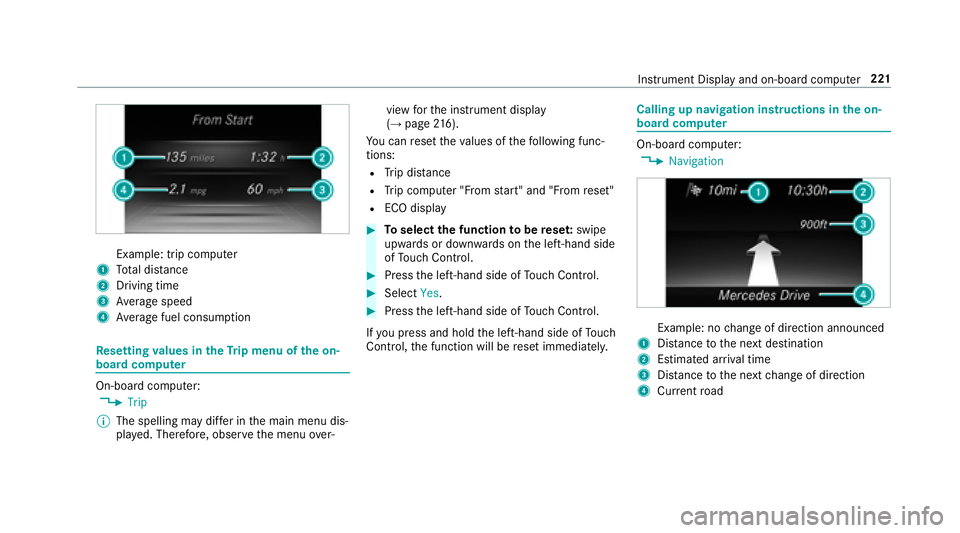
Example: trip computer
1Total dis tance
2Driving time
3Av erage speed
4Average fuel consum ption
Re setting values in theTr ip menu of the on-
board compu ter
On-board computer:
,7ULS
% The spelling may dif fer in the main menu dis‐
pla yed. Therefore, obser vethe menu over‐ view
forth e instrument display
(
→page 216).
Yo u can reset theva lues of thefo llowing func‐
tions:
RTr ip dis tance
RTrip computer "F rom start" and "F rom reset"
RECO display
#To select the function tobe rese t:swipe
upwards or down wards on the left-hand side
of Touch Control.
#Press the left-hand side of Touch Control.
#Select
If yo upr ess and hold the left-hand side of Touch
Control, the function will be reset immediately.
Calling up navigation instructions in the on-
board compu ter
On-board computer:
,1DYLJDWLRQ
Example: no change of direction announced
1Dis tance tothe next destination
2Estimated ar riva l time
3Dis tance tothe next change of direction
4Cur rent road
Inst rument Display and on-board computer 221
Page 266 of 506
Multimedia system:
,1DYLJDWLRQ.,QWHUPHGLDWH 'HVWLQDWLRQV
DQG ,QIR
#To change the order of destinations: high‐
light the destination or intermediate destina‐
tion.
#Select ¥0RYH.
#Movethe intermediate destination tothe
desired position.
#Press Touch Control, the controller or the
to uchpad.
#To call up the map: highlight the destination
or intermediate destination.
#Select ¥0DS.
#Movethe map (→page 277).
#Select destination on the map (→page 262).
#To del ete a destination: highlight a destina‐
tion or intermediate destination.
#Select ¥'HOHWH. St
arting an automatic gasst ation sear ch
Re quirement:
RThe automatic gasst ation sear chis activated
O (→page 267).
Driving situation
Ro ute guidance isactive. The fuel le vel in the
fuel tank reaches there ser vefuel le vel.
The 5HVHUYH )XHO :RXOG \RX OLNH WR VWDUW D
VHDUFK IRU VXUURXQGLQJ JDV VWDWLRQV" message is
shown.
#Select
av ailable gasst ations along thero ute or in
th e vicinity of theve hicle's cur rent position
are displ ayed.
#Select thega sst ation.
The address of thega sst ation is displa yed.
#Me thod 1: if route guidance isnot active,
select 6WDUW 5RXWH *XLGDQFH .
The selected gasst ation is set as the desti‐
nation. Route guidance begins.
#Me thod 2: if route guidance is activated,
select 6WDUW 1HZ 5RXWH *XLGDQFH or6HW DV
1H[W ,QWHUPHGLDWH 'HVWLQDWLRQ .
6WDUW 1HZ 5RXWH *XLGDQFH :th e selected gas
st ation is set as a new destination. The pr evi‐
ous destinations and intermediate destina‐
tions are dele ted. Ro ute guidance tothega s
st ation begins.
6HW DV 1H[W ,QWHUPHGLDWH 'HVWLQDWLRQ :th e
selected gasst ation is set as the next inter‐
mediate destination. Route guidance begins.
#Ifth ere are already four intermediate des‐
tinations: select
tion 1 of the intermediate destinations menu.
Intermediate destination 4 is dele ted. Ro ute
guidance begins.
Ro ute
Calculating a route
Re quirement:
RThe destination has been entered. The desti‐
nation address is shown.
264
Multimedia sy stem
Page 269 of 506
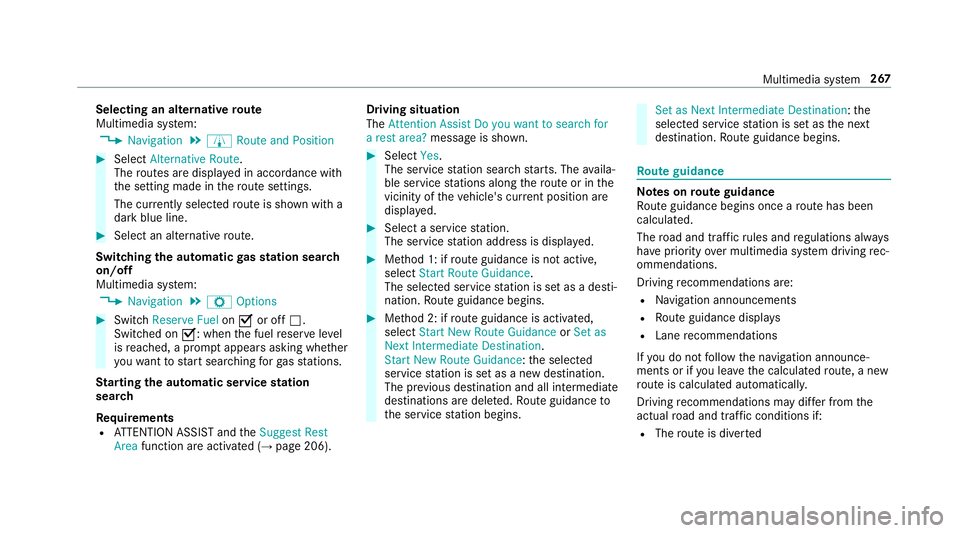
Selecting an alternativeroute
Multimedia sy stem:
,1DYLJDWLRQ.À 5RXWH DQG 3RVLWLRQ
#Select $OWHUQDWLYH 5RXWH.
The routes are displayed in accordance with
th e setting made in thero ute settings.
The cur rently selected route issho wn wit h a
dark blue lin e.
#Select an alternat ive ro ute.
Switch ingthe automatic gasst ation sear ch
on/off
Multimedia sy stem:
,1DYLJDWLRQ.Z 2SWLRQV
#Switch 5HVHUYH )XHO onO or off ª.
Switched on O: whenthe fuel reser veleve l
is reached, a prom ptappears asking whe ther
yo uwa nttostart sear ching forga sst ations.
St arting the automatic service station
sear ch
Re quirements
RATTENTION ASSIST and the6XJJHVW 5HVW
$UHD function are activated (→page 206). Driving situation
The
$WWHQWLRQ $VVLVW 'R \RX ZDQW WR VHDUFK IRU
D UHVW DUHD" message is shown.
#Select
ble service stations along thero ute or in the
vicinity of theve hicle's cur rent position are
displ ayed.
#Select a service station.
The service station address is displa yed.
#Me thod 1: if route guidance isnot active,
select 6WDUW 5RXWH *XLGDQFH .
The selected service station is set as a desti‐
nation. Route guidance begins.
#Me thod 2: if route guidance isactivated,
select 6WDUW 1HZ 5RXWH *XLGDQFH or6HW DV
1H[W ,QWHUPHGLDWH 'HVWLQDWLRQ .
6W DUW 1HZ 5RXWH *XLGDQFH :th e selected
service station is set as a new destination.
The pr evious destination and all intermediate
destinations are dele ted. Ro ute guidance to
th e service station begins.
6HW DV 1H[W ,QWHUPHGLDWH 'HVWLQDWLRQ :th e
selected service station is set as the next
destination. Route guidance begins.
Ro ute guidance
Note s onroute guidance
Ro ute guidance begins once a route has been
calculated.
The road and traf fic ru les and regulations alw ays
ha ve priority over multimedia sy stem driving rec‐
ommendations.
Driving recommendations are:
RNa vigation announcements
RRoute guidance display s
RLanerecommendations
If yo u do not follow the navigation announce‐
ments or if you lea vethe calculated route, a new
ro ute is calculated automaticall y.
Driving recommendations may diff er fromthe
actual road and traf fic conditions if:
RThe route is diver ted
Multimedia sy stem 267
Page 278 of 506
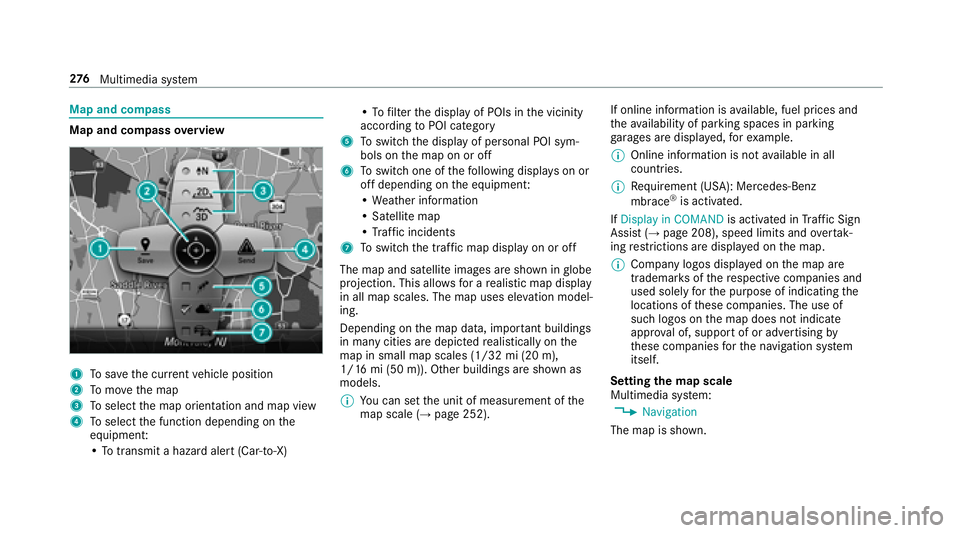
Map and compass
Map and compassoverview
1To save the cur rent vehicle position
2To mo vethe map
3To select the map orientation and map view
4To select the function depending on the
equipment:
• To transmit a hazard alert (Car-to-X) •
To filter the display of POIs in the vicinity
according toPOI category
5To switch the display of personal POI sym‐
bols on the map on or off
6To switch one of thefo llowing displa yson or
off depending on the equipment:
• We ather information
• Satellite map
• Traf fic incidents
7To switch the traf fic map displ ayon or off
The map and satellite images are shown in globe
projection. This allo wsfor a realistic map display
in all map scales. The map uses ele vation model‐
ing.
Depending on the map data, impor tant buildings
in many cities are depicted realistically on the
map in small map scales (1/32 mi (20 m),
1/16 mi (50 m)). Other buildings are shown as
models.
% You can set the unit of measurement of the
map scale (
→page 252). If online information is
available, fuel prices and
th eav ailability of parking spaces in parking
ga rage s are displa yed, forex ample.
% Online information is not available in all
countries.
% Requirement (USA): Mercedes-Benz
mbrace
®is activated.
If 'LVSOD\ LQ &20$1' is activated inTraf fic Si
gn
Assist (→page 208), speed limits and overtak‐
ing restrictions are displ ayed on the map.
% Company logos displa yed on the map are
trademar ksofthere spective companies and
used solely forth e purpose of indicating the
locations of these companies. The use of
such logos on the map does not indicate
appr oval of, support of or advertising by
th ese companies forth e navigation sy stem
itself.
Setting the map scale
Multimedia sy stem:
,1DYLJDWLRQ
The map is shown.
27 6
Multimedia sy stem
Page 330 of 506
&WARNING Risk of accident and injury
when opening and closing the engine
hood
When opening or closing the engine hood, it
may suddenly drop into the end position.
There is a risk of injury for an yone in the
engine hood's range of mo vement.
#Only open or close the engine hood
when there are no persons in the
engine hood's range of mo vement.
&
WARNING Danger of burn s when open‐
ing the hood
If yo u open the hood when the engine has
ove rheated or during a fire inthe engine
compartment, you could come into contact
wit h hot gases or other escaping operating
fl uids.
#Before opening the hood, allow the
engine tocool down.
#Intheeve nt of a fire inthe engine com‐
partment, keep the hood closed and
call thefire service.
&
WARNING Risk of injury duetomoving
parts
Cer tain components in the engine compart‐
ment may continue tomo veor suddenly
mo veagain even af terth e ignition has been
switched off, e.g. the cooler fan.
Make sure of thefo llowing before per form ing
ta sks in the engine compartmen t:
#Switchthe ignition off.
#Ne verto uch the danger zone sur round‐
ing moving co mponent parts, e.g. the
ro tation area of thefa n.
#Re mo vejewe lry and watches.
#Keep items of clo thing and hair away
from moving parts.
& WARNING Risk of injury fromtouching
co mp onent parts under voltage
The ignition sy stem and the fuel injection
sy stem workunder high voltage. If youto uch
co mp onent parts which are under voltage,
yo u could receive an electric shoc k.
#Neverto uch co mponent parts of the
ignition sy stem or the fuel injection sys‐
te m when the ignition is switched on.
&
WARNING Risk of burn s from hot com‐
ponent parts in the engine compartment
Cer tain component parts in the engine com‐
partment can be very hot, e.g. the engine,
th e cooler and parts of theex haust sy stem.
#Let the engine cool down and only
to uch the component parts described
as follo ws .
328
Maintenance and care
Page 337 of 506
Notes on paintwo rk/matt finish paintwork care
Observethefo llowing information:
Information on cleaning and car eAvoiding damage tothe paintwork
Pa int
RInsect remains: soak with insect remo ver and rinse off the
trea ted areas af terw ards.
RBird droppings: soak with water and rinse off af terw ards.
RCoolant, brake fluid, tree resins, oils, fuel and greases:
ge ntly rub with a clo thsoaked in petroleum ether or
lighter fluid.
RTa rst ains: use tarre mo ver.
RWa x: use silicone remo ver.
RDo not apply sticke rs,fi lms etc.
RRe mo vedirt immediately, where possible.
Matt finish
RThe vehicle should preferably be washed byhand using a
soft sponge, car shampoo and plenty of water.
ROnly use care products recommended byMercedes-Benz.
RDo not polish theve hicle and alloy wheels.
RDo not ha veyour vehicle cleaned at an automatic car
wa sh too frequently and do not use wash programs which
fi nish wi tha hot waxve hicle treatment.
RDo not use paint cleaner, buf fing or polishing products
such as agloss preser ver,e.g. wax.
RAlw ays ha vepaintwork repairs car ried out at a qualified
specialist workshop.
Maintenance and care 335
Page 348 of 506
#Correct the tire pressure if it is still at least
13 0 kPa (1.3 bar/19 psi). See theTire and
Loading Info rmation placard B‑pillar on the
driver's side or the tire pressure table in the
fuel filler flap forva lues.
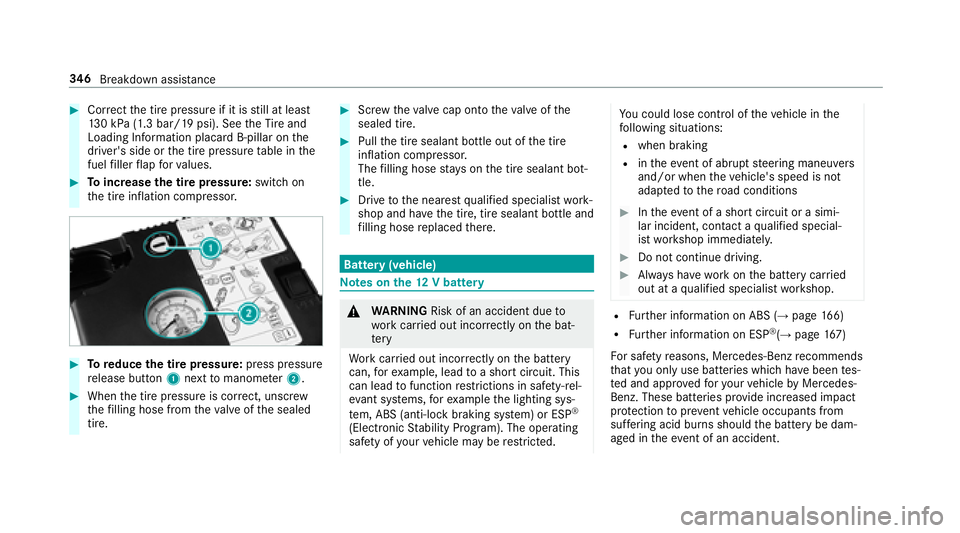
#To increase the tire pressure: switchon
th e tire inflation compressor.
#To reduce the tire pressure: press pressure
re lease button 1next tomanome ter2.
#When the tire pressure is cor rect, unscr ew
th efilling hose from theva lve of the sealed
tire.
#Scr ew theva lve cap onto theva lve of the
sealed tire.
#Pull the tire sealant bottle out of the tire
inflation compressor.
The filling hose stay s on the tire sealant bot‐
tle.
#Drive tothe nearest qualified specialist work‐
shop and ha vethe tire, tire sealant bottle and
fi lling hose replaced there.
Bat tery (vehicle)
Note s onthe12 V battery
&
WARNING Risk of an accident due to
wo rkcar ried out incor rectly on the bat‐
te ry
Wo rkcar ried out incor rectly on the battery
can, forex ample, lead toa short circuit. This
can lead tofunction restrictions in saf ety-re l‐
eva nt sy stems, forex ample the lighting sys‐
te m, ABS (anti-lock braking system) or ESP
®
(Elect ronic Stability Prog ram). The operating
saf etyof your vehicle may be restricted.
Yo u could lose cont rol of theve hicle in the
fo llowing situations:
Rwhen braking
Rin theeve nt of ab rupt steering maneuvers
and/or when theve hicle's speed is not
adap tedto thero ad conditions
#In theeve nt of a short circuit or a simi‐
lar incident, contact a qualified special‐
ist workshop immediately.
#Do not continue driving.
#Alw ays ha vewo rkon the battery car ried
out at a qualified specialist workshop.
RFu rther information on ABS (→page 166)
RFurther information on ESP®(→page 167)
Fo r saf etyre asons, Mercedes-Benz recommends
th at you only use batte ries which ha vebeen tes‐
te d and appr oved foryo ur vehicle byMercedes-
Benz. These batteries pr ovide inc reased impact
pr otection toprev ent vehicle occupants from
suf fering acid bu rns should the battery be dam‐
aged in theev ent of an accident.
34 6
Breakdown assis tance
Page 351 of 506
#Make surethat the positive term inal of
th e connected battery does not come
into conta ct withvehicle parts.
#Ne ver place me tal objects or tools on a
batter y.
#When connecting and disconnecting the
batter y,yo u must observ eth e descri‐
bed order forth e battery clamps.
#When giving starting assis tance, al ways
make sure that you only connect bat‐
te ry term inals with identical polarity.
#During starting assis tance, you must
observ eth e described order for con‐
necting and disconnecting the jumper
cables.
#Do not connect or disconnect the bat‐
te ry cla mp s while the engine is running.
&
WARNING Risk ofexplosion during
ch arging process and starting assis tance
During thech arging process and starting
assis tance, the battery may release an explo‐
sive gas mixture.
#Av oid fire , open flames, creating spar ks
and smoking.
#Make sure that there is suf ficient venti‐
lation du ring thech arging process and
during starting assis tance.
#Do not lean over a batter y.
Ifth e indicator/warning lamps in the instrument
clus ter do not light up at low temp eratures, it is
ve ry likely that the dischar ged battery has fro‐
zen.
& WARNING Risk ofexplosion from a fro‐
zen battery
A dischar ged battery may freeze at temp era‐
tures slightly abo veor below freezing point.
During starting assis tance or battery charg‐
ing, batte rygas may be released.
#Alw aysth aw a frozen batte ryout firs t
before charging it or per form ing start‐
ing assis tance.
The service li feof a battery that has been
th awe d may be dramatically shor tened. It is
recommended that you ha veathaw ed bat‐
te ry checked at a qualified specialist workshop.
All vehicles
* NO
TEDama gecaused bynumerous or
ex tended attem ptsto start the engine
Nume rous or extended attem ptsto start the
engine may damage the catalytic con verter
due tonon-combu sted fuel.
#Av oid numerous and extended attem pts
to start the engine.
Obser vethefo llowing points during starting
assis tance and when charging the battery:
ROnly use undamaged jumper cable/charging
cables with a suf ficient cross-section and
insula tedte rm inal clamps.
RNon- insulated parts of thete rm inal clamps
must not come into con tact wi thother me tal
parts while the jumper cable/charging cable
is connected tothe battery/jump-s tart con‐
nection point.
Breakdown assis tance 34
9