torque MERCEDES-BENZ E-CLASS WAGON 2018 Owner's Manual
[x] Cancel search | Manufacturer: MERCEDES-BENZ, Model Year: 2018, Model line: E-CLASS WAGON, Model: MERCEDES-BENZ E-CLASS WAGON 2018Pages: 506, PDF Size: 6.73 MB
Page 170 of 506
RWhen braking.
RInstro ng sidewinds when you are driving
fast erthan 50 mph(8 0 km/h).
ESP
®can stabilize theve hicle byinter vening in
th efo llowing ways:
ROne or more wheels are braked.
RThe engine output is adap ted according to
th e situation.
ESP
®is deactivated if the ESP®OFF å warn‐
ing lamp lights up continuously in the instrument
clus ter:
RDriving stability will no longe r be improved.
RCrosswind Assist is no longer active.
RThe drive wheels could spin.
RETS/4ETS traction control is still active.
% Even when ESP
®is deactivated, you are still
assis tedby ESP®when braking.
ESP
®is inter vening if the ESP®÷ warning
lamp flashes in the instrument clus ter:
RDo not deacti vate ESP®.
ROnly depress the accelera tor pedal as far as
is necessar y.
RAdapt your drivin gst yle to suit the cur rent
ro ad and weather conditions.
Deactivate ESP
®in thefo llowing situations to
impr ovetraction:
Rwhen using snow chains
Rin deep snow
Ron sand or gr avel
% Spinning the wheels results in a cutting
action which pr ovides better grip.
ESP
®is deactivated if theå ESP®OFFwarn‐
ing lamp lights up continuously in the instrument
clus ter.
If th e ESP
®÷ warning lamp lights up continu‐
ousl y,ESP®is not available due toa malfunction.
Observ e any information which may be displa yed
in the instrument clus ter:
RWa rning and indicator lamps (→page 449)
RDispl aymessage s (→page 402) ETS/4ETS (Electronic
Traction Sy stem)
ETS/4ETS traction control is pa rtof ESP
®.
ETS/4ETS can impr ovetheve hicle's traction by
inter vening in thefo llowing ways:
RThe drive wheels are braked individually if
they spin.
RMore drive torque is transferred tothe wheel
or wheels with traction.
Influence of drive prog rams on ESP
®
The drive programs enable ESP®to adapt todif‐
fe re nt we ather and road conditions as well as
th e driver's prefer red driving style. You can
select the drive programs using theDY NA MIC
SELECT switch.
16 8
Driving and pa rking
Page 186 of 506
RIfth e lane markings change quickl y,e.g.
lanes branch off, cross one ano ther or
mer ge.
RThe road is nar row and winding.
RIfth ere are highly variable shade conditions
on thero ad.
RIfth ere are obs tacles such as object mar kers
on the lane or projecting out into the lane.
The sy stem does not pr ovide assis tance in the
fo llowing conditions:
ROn very sharp bends.
RWhen towing a trailer.
RIfyo u act ively change lane without switch ing
on the turn signal indicator.
RIfyo uswit chon the turn signal indicator and
th e conditions for activating Active Lane
Change Assi stare not fulfilled.
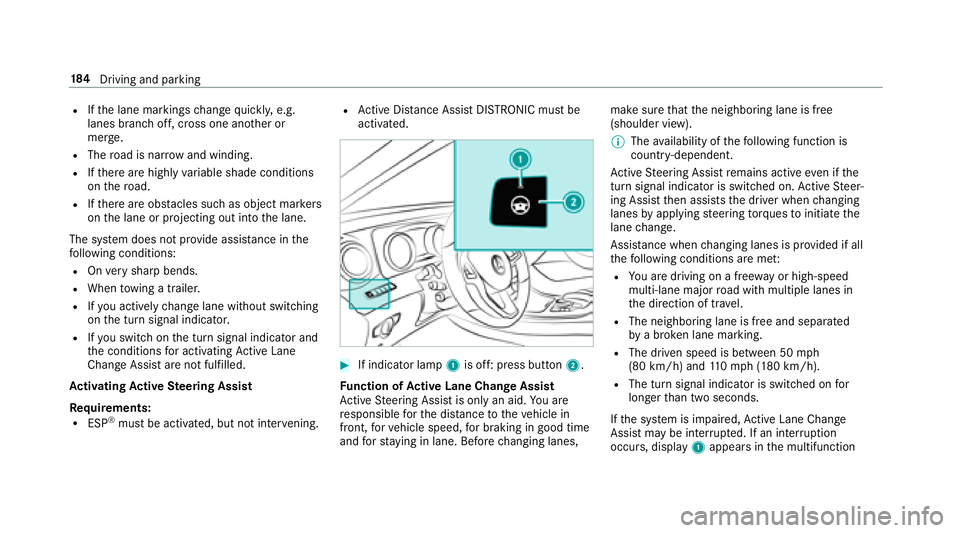
Ac tivating Active Steering Assist
Requ irements:
RESP®must be activated, but not inter vening.
RAc tive Dis tance Assist DISTRONIC must be
activated.
#If indicator lamp 1is off: press button 2.
Fu nction of Active Lane Change Assi st
Ac tive Steering Assist is only an aid. You are
re sponsible forth e dis tance totheve hicle in
front, forve hicle speed, for braking in good time
and forst ay ing in lane. Before changing lanes, make sure
that the neighboring lane is free
(shoulder view).
% The availability of thefo llowing function is
countr y-dependent.
Ac tive Steering Assist remains active even if the
turn signal indica tor is switched on. Active Steer‐
ing Assist then assists the driver when changing
lanes byapplying steering torques toinitiate the
lane change.
Assis tance when changing lanes is pr ovided if all
th efo llowing conditions are me t:
RYou are driving on a free wayor high-speed
multi-lan emajo rro ad with multiple lanes in
th e direction of tr avel.
RThe neighboring lane is free and separated
bya broken lane marking.
RThe driven speed is between 50 mph
(80 km/h) and 110mp h(1 80 km/h).
RThe turn signal indicator is switched on for
longer than two seconds.
If th e sy stem is impaired, Active Lane Change
Assi stmay be inter rupte d. If an inter ruption
occurs, display 1appears in the multifunction
18 4
Driving and pa rking
Page 391 of 506
#Tighten the wheel bolts evenly in a crosswise
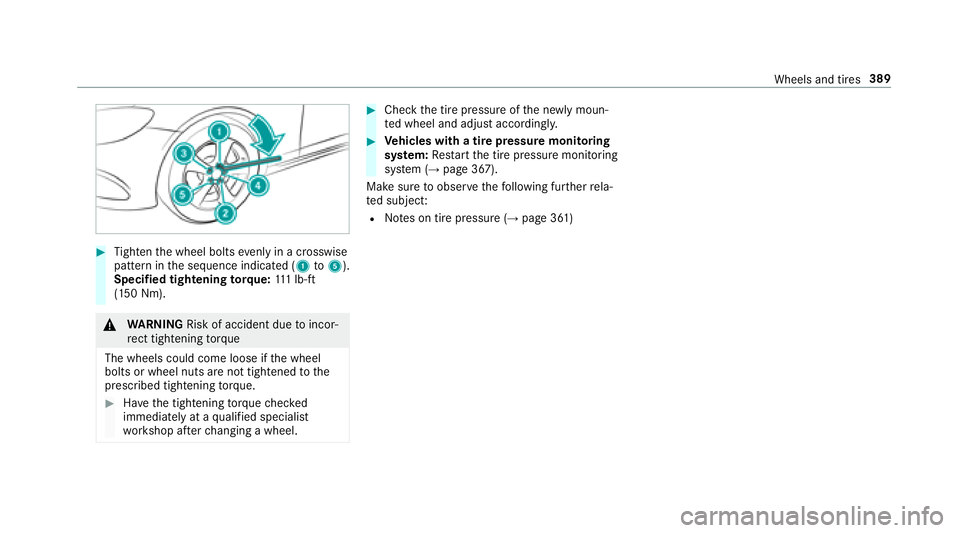
pattern in the sequence indicated (1 to5).
Specified tightening torq ue: 111 lb-ft
(150 Nm).
& WARNING Risk of accident due toincor‐
re ct tigh tening torque
Th ewheels could come loose if the wheel
bolts or wheel nuts are not tightened tothe
prescribed tightening torque.
#Ha ve the tightening torque checked
immediately at a qualified specialist
wo rkshop af terch anging a wheel.
#Check the tire pressure of the newly moun‐
te d wheel and adjust according ly.
#Ve hicles with a tire pressure monitoring
sy stem: Restart the tire pressure monitoring
sy stem (
→page 367).
Make sure toobser vethefo llowing fur ther rela‐
te d subjec t:
RNotes on tire pressure (→page 361)
Wheels and tires 389