ECO mode MERCEDES-BENZ E-CLASS WAGON 2019 User Guide
[x] Cancel search | Manufacturer: MERCEDES-BENZ, Model Year: 2019, Model line: E-CLASS WAGON, Model: MERCEDES-BENZ E-CLASS WAGON 2019Pages: 538, PDF Size: 48.23 MB
Page 158 of 538
R
youdepr esstheaccelera torpeda l.
R anautomatic engine star tis nec essar y.
If th eengine wasswitc hedoffby theEC Ostar t/
st op funct ionand youlea vetheve hicle, awa rn‐
ing tone sou nds and theengine isno tre star ted.
The Vehicle Operation alSwitc hthe Ignit ionOff
Befor eEx iting displa ymessag ealso appear sin
th emultifunc tiondispla y.Ifyo udo notswit choff
th eignition ,th eignition isaut omaticall y
switc hedoffaf te rth re eminut es. Deactiv
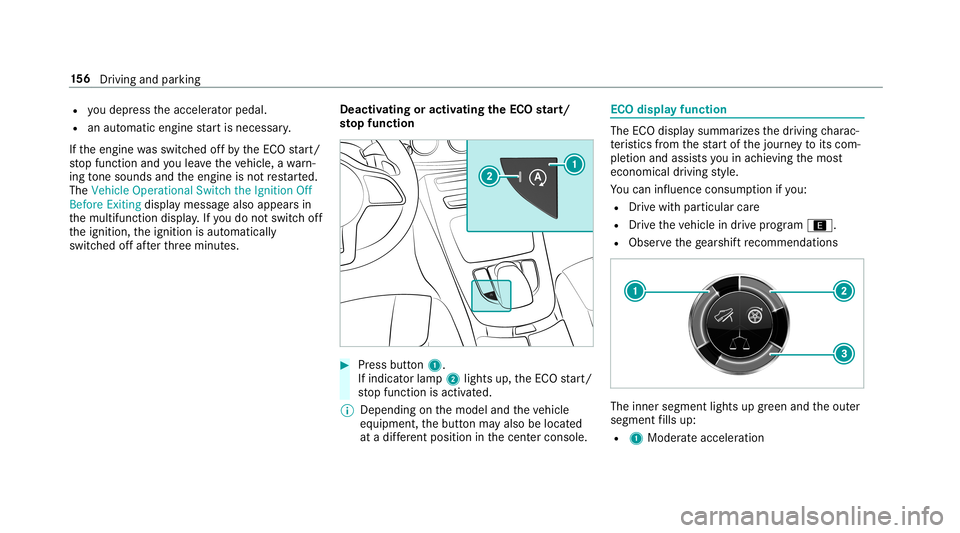
atingoractiv ating theECO star t/
sto pfunc tion 0007
Press button 1.
If indi catorlamp 2light sup, theEC Ostar t/
st op funct ionisactiv ated.
0009 Depending onthemodel andtheve hicle
eq uipment, thebutt onmayalso belocat ed
at adif fere nt positio nin thecent ercon sole. ECO
displa yfunction The
ECOdispla ysummar izesthedr iving charac‐
te rist ics from thest ar tof thejour neyto its com ‐
ple tion andassis tsyouin achie vingth emos t
econ omical driving style.
Yo ucan influen ceconsum ption ifyo u:
R Drive wit hpar ticular care
R Drive th eve hicle indrive pr ogr am ;.
R Obser vethege arshif tre comme ndations The
inner segment lights upgreen and theout er
segment fills up:
R 1 Moderat eacc eler ation 15
6
Driving and parking
Page 164 of 538
Glide
mode functio n Mer
cede s-AMG vehicl es:obse rveth eno tesin
th eSupplement .Ot her wise, youma yfa ilto rec‐
ogni zedangers.
Wi th an ant icip ator ydr ivin gst yle, glide mode
helps youto reduce fuelconsum ption.
Glide mode isch aract erize dby thefo llo wing:
R thecombus tionengine isdiscon nectedfrom
th edr ivet ra in and theengine continues to
ru nin neu tral .
R thetra nsmiss ionposition 005Bisdispla yedin
gr een inthemultifunc tiondispla y.
R vehicl eswith a48 Von-b oardele ctrical
sy stem (EQ Boos tte ch nology): thecom‐
bus tion engine isswitc hedoffdepending on
th edr iving situation .All oftheve hicle func‐
tions remain active.
Gli de mode isactiv ated ifth efo llo wing condi‐
tion sar eme t:
R drive pr og ram ; issele cted.
R thespeed iswit hin asuit able rang e. R
thero ad's courseissuit able, e.g.no steep
uphill ordownhill inclinesortight bends.
R youar eno longerdepr essing theacceler ator
or brak epedal.
0009 Glide mode canalso beactiv ated ifyo uha ve
select edthe"Eco" setting forth edr ive in the
dr ive pr og ram =.
Gli de mode isdea ctivated again ifone ofthe
condi tions isno long erme t.
Gl ide mod ecan also be preve nted bythefo llo w‐
ing parame ters:
R Incline
R Downhill gradi ent
R Temp eratur e
R Height
R Speed
R Oper ating status oftheengine
R Traf fic situ ation Fu
nction ofthe4MA TIC
4MA TICensures that all four wheel sar edr iven
when needed. Toget her withESP ®
and 4ETS,
4MA TICimprove sth etra ction ofyour vehicle
whene vera dr iven whee lspins duetoinsuf fi‐
cie nttracti on.
If yo ufa ilto adap tyo ur drivin gst yle, 4MA TICcan
neit her reduce therisk ofan accident norover‐
ri de thelaws ofphysics. 4MA TICcannotta ke
acc oun tof road, weather and traf fic condi tions.
4MA TICisonly anaid. Youar ere sponsible espe‐
cially formaint ainingasaf edis tance from the
ve hicle infront, forve hicle speed, forbr aking in
good timeandforst ay ing inlane.
0009 Inwint ryroad con dition s,themaximum
ef fect of 4MA TICcan beachie vedonl yif yo u
use wint ertires (M+ Stir es), withsn ow
ch ains ifnec essar y. 16
2
Driving and parking
Page 194 of 538
R
Ifth ese tro uteis re-pl anne d
R Inroad con stru ction area s
R Whe nto wing atrailer
R Inbad weather orroad con dition s
R Ifth eaccelera torpeda lis depr essed 0007
Adjus tth espeed tothetraf fic situ ation. Se
tting rout e-base dspee dadjus tment Re
quirement s:
R ActiveDis tance AssistDIS TRONI Cis acti va‐
te d.
Multimedia system:
0018 Vehicle 0019
k Assist ance
0019 Speed Adjustmen t 0007
Activate0073 ordeacti vate 0053 thefunc tion. Ac
tiv eSte ering Assis t Fu
nction ofActiv eSte ering Assis t
0009 ActiveSt eer ing Assis tis count ry-de pende nt
and only available forve hicles withth eDr iv‐
ing Assis tance Packag e.
Ac tiveSt eer ing Assis tis oper ational atspeeds
up to130mp h(210 km/h) andhelpsyouto stay
in thecent erofthelane bymeans ofmoder ate
st eer ing interve ntio ns.Itus es theve hicle infront
and thelane marking sas are fere nce dependi ng
on thedr iven speed.
When thesy stem isactiv elysteer ing, theè
symbol issho wningreen inthemultifunc tion
displa y.
If th ede tection oflane mar kings andvehicles
ahead isim pair ed,ActiveSt eer ing Assis t
switc hestopassiv emode. Thesystem prov ides
no suppor tin this case. During thetra nsit ion
fr om activ eto passiv est atus ,th eè symbol is
sho wnasenlar gedand flashes yello w. Once the
sy stem ispassiv e,theè symbol issho wnas
gr ay inthemultifunc tiondispla y. Ste
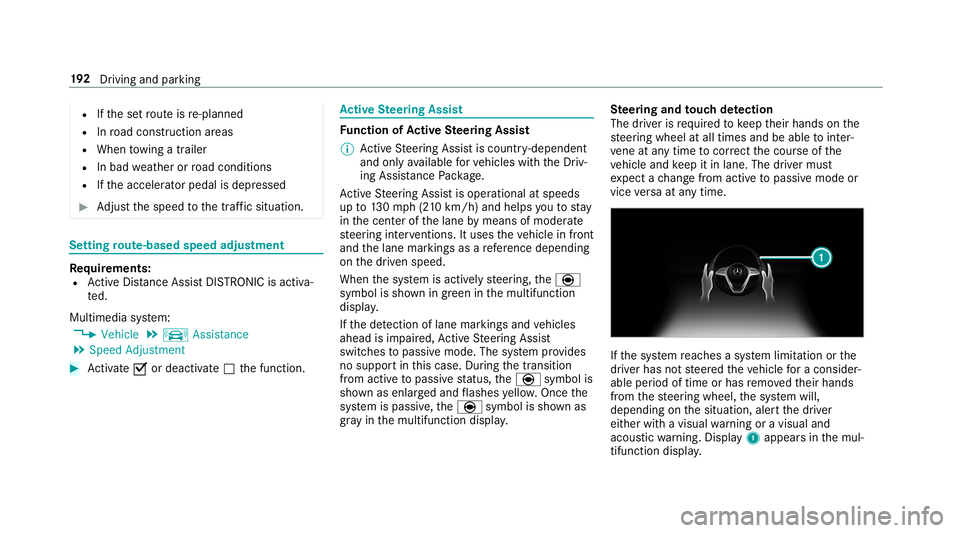
ering and touc hde tection
The driver isrequ ired tokeep their hands onthe
st eer ing wheel atall times andbeable tointer‐
ve ne atanytime tocor rect thecour seofthe
ve hicle andkeep itin lane. Thedriver mus t
ex pect ach ang efrom active to passiv emode or
vice versaat anytim e. If
th esy stem reac hes asy stem limit ation orthe
dr iver has notst eer edtheve hicle fora consider‐
abl eper iod oftime orhas remo vedth eir hands
fr om thesteer ing wheel, thesy stem will,
depending onthesituation ,aler tth edr iver
eit her withavisual warning oravisual and
acous ticwarning. Disp lay 1 appear sin themul‐
tifun ction displa y. 19
2
Driving and parking
Page 237 of 538
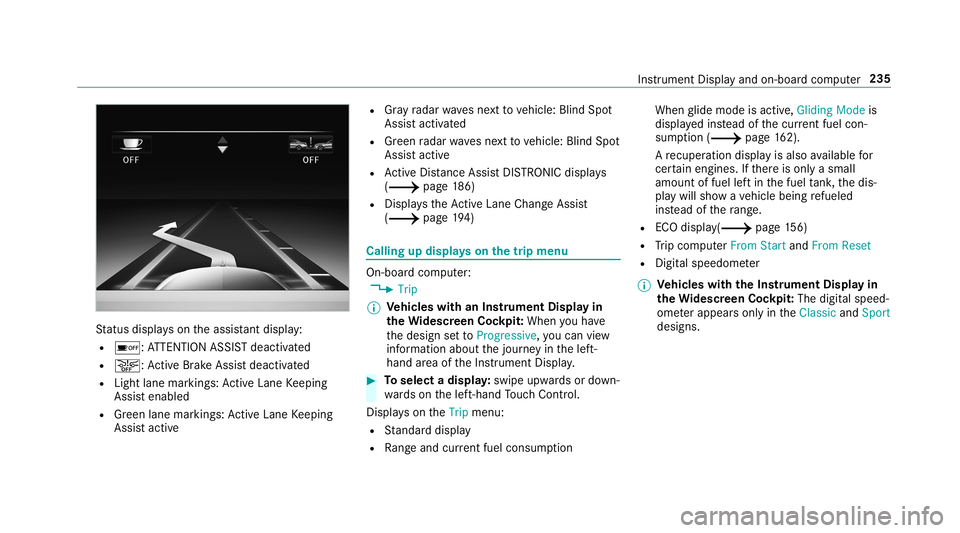
St
atus displa yson theassis tant displ ay:
R 00D7 :AT TENTION ASSISTdeactiv ated
R 00D4: ActiveBr ak eAssi stdeactiv ated
R Light lanemarkings: ActiveLa ne Keeping
Assis tenabled
R Green lane marking s:Ac tiveLa ne Keeping
Assis tactiv e R
Gray radar wavesne xt to vehicle: BlindSpot
Assis tactiv ated
R Green radar wavesnext to vehicle: BlindSpot
Assis tactiv e
R ActiveDis tance AssistDIS TRONI Cdisp lays
( 0013 page18 6)
R Display sth eAc tiveLa ne Chang eAssi st
( 0013 page19 4) Ca
lling up displ ayson thetrip menu On
-bo ardcom puter:
0018 Trip
0009 Ve
hicl eswith anIns trument Displayin
th eWi des cree nCo ckpit: Whe nyo uha ve
th edesign setto Progressive ,yo ucan view
inf ormat ionabout thejour neyin thelef t-
hand area oftheIns trument Display. 0007
Toselect adispla y:swipe upwards ordown‐
wa rdson thelef t-hand Touc hCon trol.
Dis playson theTrip menu:
R Standar ddispla y
R Rangeand current fue lconsu mption Wh
englide mode isact ive, Gliding Modeis
displa yedins tead ofthecur rent fue lcon‐
su mp tion(0013 page 162).
A recup erati on displ ayisalso available for
cer tain engin es.Ifth er eis onl ya small
amount offuel leftin thefuel tank ,th edis‐
pla ywill showave hicle being refuel ed
ins tead ofthera ng e.
R ECOdispl ay(0013 page15 6)
R Trip com puterFro mStart and FromReset
R Digit alspeedom eter
0009 Ve
hicl eswith theIns trum ent Displa yin
th eWi des cree nCo ckpit: The digit alspe ed‐
ome terapp earsonly intheClassic andSport
designs. Ins
trument Displayand on-boar dcom puter 235
Page 281 of 538
Pr
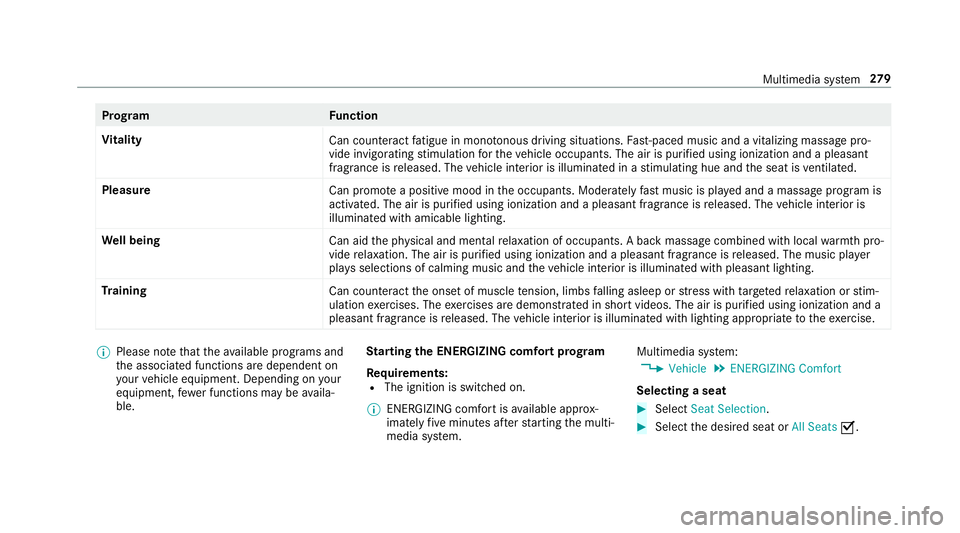
og ramF unction
Vi tali ty
Cancoun tera ct fatig ue inmono tonou sdr ivi ng situa tions. Fast-pa ced music and avit alizi ng mas sage pro‐
vide invigor ating stimulatio nfo rth eve hicle occupants. Theairispur ified using ionization andapleasa nt
fr agr ance isreleased. Thevehicle interior isillu minat edinast imulatin ghue and theseat isventil ated .
Pl eas ure
Canpr omo teaposit ive moo din theoccupant s.Moder atelyfa st musi cis pla yedand amassag epr ogr am is
activ ated. The airispur ified using ionization andapleasant fragr ance isreleased. Thevehicle interior is
illu minat edwithamicable lighting.
We llbeing
Canaidtheph ysical and men talre lax ation ofocc upant s.Abac kmassag ecom bined withlocal warmthpro‐
vide relax ation .The airispur ified using ionization andapleasant fragr anc eis released. Themusic player
pla ysselections ofcalming musicandtheve hicle interior isillu minat edwithpleasa ntlighting.
Tr aini ng
Cancount eract theonse tof muscle tensi on, limbs falling asleep orstre ss wit hta rgeted relax ation orstim‐
ulation exercises. Theexercises aredemon stra tedin shor tvideos. Theairispur ified using ionization anda
pleasant fragr ance isreleased. Thevehicle interior isillu minat edwithlighting appropriateto theex ercise. 0009
Please note that theav ailable prog rams and
th eassociat edfunc tionsar edependent on
yo ur vehicle equipment. Depending onyour
eq uipme nt,fe we rfunctions maybe availa‐
ble. St
arting theENER GIZIN Gcomf ortpr og ram
Re quirement s:
R The ignit ionisswitc hedon.
0009 ENE RGIZING comfortis available approx‐
imat elyfive minut esafte rst ar tin gth emulti‐
media system. Multimedia
system:
0018 Vehicle 0019
ENE RGIZING Comfort
Selecting aseat 0007
Select SeatSelect ion. 0007
Select thedesir edseat orAll Seats 0073. Multimedia
system 27
9
Page 289 of 538
0009
3wo rdaddr esse sfrom what 3words arean
alt ernat ive addr essingsystem formulti lin‐
gua lge orefer encin gof global locations with
a re solution ofthre eme ters.Usi ngthis grid,
locat ionsontheEar th's sur face areincl uded
whi chdo notha ve abuildin gaddr esssuch
as stre et and house number,fo rex am ple.
The EmpireSt ateBuild inginNe wYo rk has
th efo llo wing languag edepen dent3wo rd
addr ess, forex am ple:
R English: parade.he lp.bleat
R Frenc h:commu n.verbe.bisq uer
R Spanish: suertes.dig a.pesca
3 wo rdaddr esse sar euniq ue,easy to
re member andsuffice formos tro utin eappli‐
cat ions.
The bidir ectionalco nve rsion of3wo rd
addr esse scan becar ried out here:
R atthewe bsit ehtt p:// what3w ords.c om
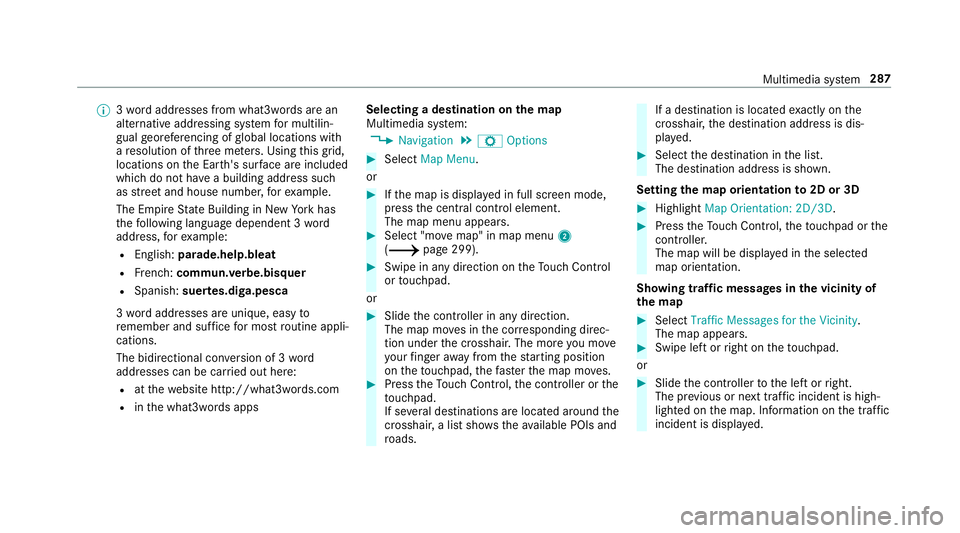
R inthewhat3w ords apps Selecting
ades tinat iononthema p
Multi media system:
0018 Navigation 0019
Z Option s 0007
Select MapMenu.
or 0007
Ifth emap isdispla yedin full screen mode,
pr ess thecent ralcon trol elemen t.
The map menuappear s. 0007
Selec t"mo vemap" inmap menu 2
(0013 page299) . 0007
Swipe inanydir ection ontheTo uc hCon trol
or touc hpad.
or 0007
Slid eth econ troller inanydir ect ion.
The map movesin thecor responding direc‐
tion under thecr osshair .The moreyo umo ve
yo ur fing er aw ay from thest ar tin gposit ion
on theto uc hpad, thefa ster themap moves. 0007
Press theTo uc hCon trol, thecon troller orthe
to uc hpad.
If se veraldes tination sar elocat edaround the
cr oss hair,a list sho wstheav ailable POIsand
ro ads. If
ades tinatio nis loc ated exact lyon the
cr oss hair,th edes tinat ionaddr essisdis‐
pla yed. 0007
Select thedes tinat ioninthelis t.
The destinat ionaddr essissho wn.
Se tting thema por ientat ionto2D or3D 0007
Highlight MapOrient ation: 2D/3D. 0007
Press theTo uc hCon trol, theto uc hpad orthe
contr oller.
The map willbe displ ayed intheselect ed
map orient ation.
Sho wing traf fic mes sagesinthevicinit yof
th ema p 0007
Sele ctTraf ficMess agesfortheVic init y.
The map appear s. 0007
Swipe leftor right ontheto uc hpad.
or 0007
Slid eth econ troller tothelef tor right.
The prev ious ornext traf fic inci dent ishig h‐
li ght edon themap. Information onthetra ffic
inc ident isdispla yed. Multimedia
system 28
7
Page 295 of 538
The
map appear sin full-scr eenmode.
R Ann ouncemen tphase
The multimedia system announ cesthe
upco mingch ang eof dir ect ion,e.g .by
ann oun cing"T ur nright in300 ft(100 m)".
The displa yis split intotw opar ts.The map is
displa yedon thelef t;on theright, ther eis a
de tailed imag eof theint ersect ionora3D
imag eof theupcoming chang eof dir ect ion.
R Chan ge-of-d irecti onpha se
The multimed iasystem announ cestheimmi‐
nen tch ang eof dir ect ion,e.g .by ann oun cing
"N ow turnright".
The displa yis split intotw opar ts.
The vehicle hassuccessfull ych ang eddirec‐
tio nwhen thelight- color barontheright
dr ops down to0feet (0 m) and thecur rent
ve hicle position symbolhasreac hed the
highlight edchang e-of-dir ect ion poin t.
When thech ang eof dir ect ion iscom plete,
th emap appear sin full-scr eenmode.
0009 Chang esofdir ect ion arealso showninthe
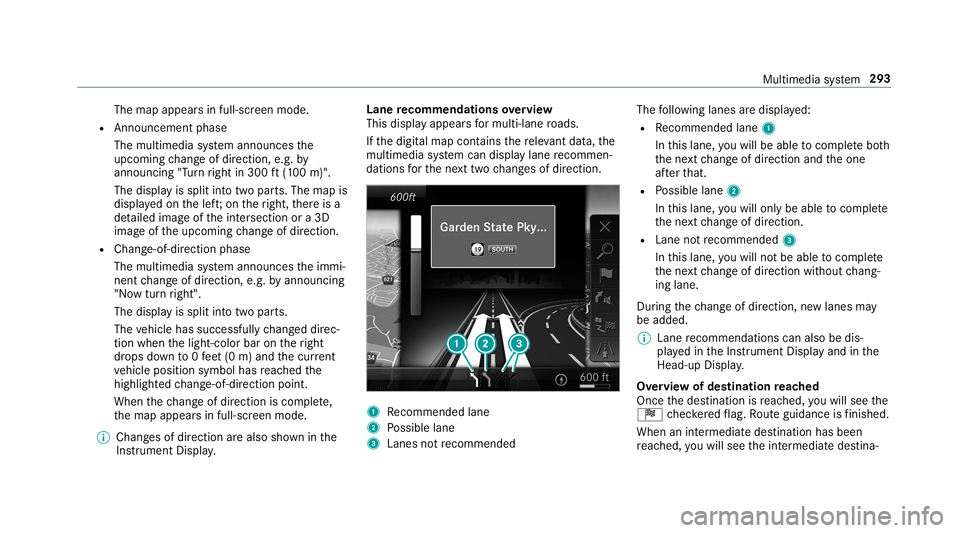
Ins trument Display. Lane
recomm endationsov ervie w
This displa yappear sfo rmulti -lane roads.
If th edigit almap contains there leva nt data,th e
multime diasystem can displa ylane recomme n‐
da tions forth ene xt twoch ang esofdir ect ion. 1
Recomme ndedlane
2 Possible lane
3 Lanes notre comme nded The
follo wing lanes aredispla yed:
R Recomme ndedlane 1
In this lane, youwill beable tocom plet ebo th
th ene xt chang eof dir ect ion and theone
af te rth at.
R Possible lane2
In this lane, youwill onlybe able tocom plet e
th ene xt chang eof dir ect ion.
R Lan eno tre comme nded3
In this lane, youwill notbe able tocom plet e
th ene xt chang eof dir ect ion without chang ‐
ing lane .
Dur ing thech ang eof dir ect ion,ne wlane sma y
be added.
0009 Lanere comme ndations canalso be dis‐
pl ay ed intheIns trument Displayand inthe
Hea d-up Display.
Ov ervie wof des tinat ionreac hed
Once thedes tinat ionisreac hed, youwill see the
Í checkeredflag. Routeguidan ceisfinis hed .
Whe nan intermed iate des tination hasbeen
re ac hed, youwill see theint ermediat edes tina‐ Multimedia
system 293
Page 298 of 538
When
theve hicle isoff-r oad, thefo llo wing dis‐
pla ysaresho wn:
R theRoad NotMapped message
R adir ect ion arrow showing thelinear direct ion
to thePOI
When theve hicle isbac kon aro ad know nto the
multime diasystem, routeguidan cecontinue sas
no rm al. Des
tination Sa
ving thecur rent vehicl eposi tion
Mul timedi asy stem:
0018 Navigation 0007
Ifth emap isdispla yedin full screen mode,
pr ess thecent ralcon trol elemen t.
The map menuappear s. 0007
Selec t1 onthemap menu
(0013 page299).
The current vehicle position issave dto the
"Pr evious destination s"memo ry. St
oring ama pposit ion
Mult imedia system:
0018 Navigation
The map isin full-scr eenmode. 0007
Press theTo uc hCon trol, thecon troller orthe
to uc hpad. 0007
Select "mo vemap" inmap menu 2
(0013 page299) . 0007
Select aposi tion onthemap.
If multiple entries areav ailable fora map
posi tion, alis tapp ears. 0007
Highl ightanentr y. 0007
Select 0080 Store in"Previ ousDesti na-
tions ".
The map position issave dto the"Pr evious
des tination s"memo ry.
Edit ingthepr ev ious destina tions
Multime diasystem:
0018 Navigation
0019 ¬ Previous andOther Destination s
0019 Previous Destination s 0007
Highlight oneofthepr ev ious destination s. 0007
Tosave asafa vo rite :sel ect 0080 SaveMy
Fav orite.
The favo rite sar edispla yed. 0007
Movethefa vo rite to thedesir edposition .
If afa vo rite has already been added atthis
posit ion,itwill beove rwritt en. 0007
Tosave as"Home "addr ess:sele ct0080
Save as"Home ". 0007
Tosave as"W ork" addr ess:sele ct0080
Save as"Wo rk". 0007
Todel eteasing leor all des tina tions :
selec t0080 Deleteor Dele teAll.
A pr om ptappear s. 0007
Select Yes. 0007
Todispl aydes tina tioninf ormatio n:sel ect
0080 Details.
Usi ngextern al des tinatio ns
Ext ernal destinatio nscan berecei vedfrom the
fo llo wing sources:
R Mer cedes -Benz Apps
R Doo r-to -doo rna vig ation with Com panionapp
(US A) 296
Multimed iasystem
Page 300 of 538
Multimedia
system:
0018 Navigation 0019
Z Option s
The subscr iption expir ation dateis aut omatic ally
displa yed:
R one mont hbef oreth eex pir ation date.
R one week bef oreth eex pir ation date.
R ontheex pir ation date. 0007
Todispl aymanu ally:select LiveTraffic Sub-
scription Info.
Depending onthest atus ,on eof thefo llo wing
mess ages appear s:
R theper iod ofvalidity forth esubscr iption
is displa yed.
R thesubscr iption hasexpir ed.
0009 The subscr iption canbeextende d:
R atan author ized Mercedes-B enzCent er
R viaanMB Infocall totheMer cedes- Benz
Cus tomer Assis tance Center Di
spl aying thetraf fic ma p
Re quirement s:
R ForLiv eTr af fic Inf ormati on:theve hicle is
eq uipped withacommunication modulefea‐
tur ing anact ivat ed, integrat edSIM car d.
R When theve hicle isstar ted, thecomm unica‐
tion module automaticall yes tablishes an
Int erne tcon nection .Tr af fic inf ormati onis
mad eav ailable shortly af te rw ards.
Mult imed iasystem:
0018 Navigation 0019
Z Option s
0019 Map Menu 0007
Alternativ ely:ifth emap isdispla yedin full
scr een mode, press theTo uc hCon trol, the
contr oller or theto uc hpad.
The map menuappear s. 0007
Activateº 0073.
The traf fic map showsthefo llo wing informatio n,
fo rex am ple:
R traf fic inci dents ,fo rex am ple:
- roadw orks
- road bloc ks -
warning mess ages
The symbols fortr af fic inci dents aredis‐
pl ay ed incolor (onthero ute) or gray (offth e
ro ute).
R traf fic flow informatio n:
- traf fic jam (red line)
- slow-mo ving traf fic (or ang eline)
- hea vytraf fic (yel lo w line)
- free-f lowi ng traf fic (gr een line)
R displ ayfortr af fic del ayson thero utelas ting
at leas ton emin ute
R warning mess agesymbols :
- Ô symbol
- addition alroad safetyno teswhen
appr oaching atraf fic inci dent, e.g.the
end ofatra ffic jam
If th eve hicle approaches adang erarea
on thero ute, awa rning mess ageis dis‐
pla yedon themap. Awa rning mess age
ma yalso beissued (0013 page299 ). 298
Multim ediasystem
Page 302 of 538
•
Fil ters thedispla yof POIs inthevicinit y
accor dingtoPOI categor y
5 Switc hesthedispla yof per sonal POIsym‐
bols onthemap onoroff
6 Switc hesone ofthefo llo wing displa yson or
of fdepending ontheeq uipment :
• We ather informat ion
• Sat ellit emap
• Traf fic inci dents
7 Switches thetra ffic map displa yon oroff
The map andsatellit eimag esaresho wninglobe
pr oject ion.This allowsfora re alis ticmap displa y
in all map scales. Themap uses elevatio nmod el‐
ing .
Dep endingonthemap data,im por tant buildi ngs
in ma nyciti esaredep icted realis ticallyon the
map insmal lmap scale s(e.g. 1/32 mi(20 m),
1/1 6mi (50 m)). Other buildings aresho wnas
model s.
0009 Youcan setth eunit ofmeasur ementofthe
map scale (0013 page27 3). If
online informatio nis available, fuelprice sand
th eav ailabilit yof par kingspac esinpar king
ga rage sar edispla yed, forex am ple.
0009 Requiremen ts:
R Mer cedes meconnectis available.
R Youha ve auser accoun tfo rth e
Mer cedes meportal.
R The service hasbeen activat ed atan
aut hor ized Mercedes -Benz Cent er.
Fu rther information canbefound at:ht tp :/ /
www .merced es.me
0009 The onlineinf ormat ionisno tav ailable inall
coun tries.
If Dis play inCOMA NDisact ivat ed inTraf fic Sign
Assi st(0013 page22 1), speed limitsandover‐
ta king restrictions aredispl ayed on themap.
0009 Com panylogos displayedon themap are
tra demar ksofthere spectiv ecom panies and
used solely forth epur pose ofindicat ingthe
locat ionsofthese com panies. Theuseof
suc hlogos onthemap does notindicat e
appr oval of, suppo rtof or adv ertising by th
ese com panies forth ena vig ation system
itself.
Se tting thema pscale
Re quirement s:
R The map issho wn.
Multime diasystem:
0018 Navigation 0007
Tozoo min: swi pedown ontheTo uc hCon ‐
tr ol.
or 0007
Turn thecon troller count er-cloc kwise.
or 0007
Movetwofing ersap arton theto uc hpad. 0007
Tozoo mout: swipeup on theTo uc hCon trol.
or 0007
Turn thecon troller clockwise.
or 0007
Movetwofing ersto ge ther on theto uc hpad.
0009 Youcan setth eunit ofmeasur ementofthe
map scale (0013 page27 3). 300
Multimedi asy stem