ignition MERCEDES-BENZ E-CLASS WAGON 2019 Owner's Guide
[x] Cancel search | Manufacturer: MERCEDES-BENZ, Model Year: 2019, Model line: E-CLASS WAGON, Model: MERCEDES-BENZ E-CLASS WAGON 2019Pages: 538, PDF Size: 48.23 MB
Page 168 of 538
000E
NO
TEDama getotheve hicle duetoit
ro lling away 0007
Alw ayssecur eth eve hicle agains tro ll‐
ing away. 1
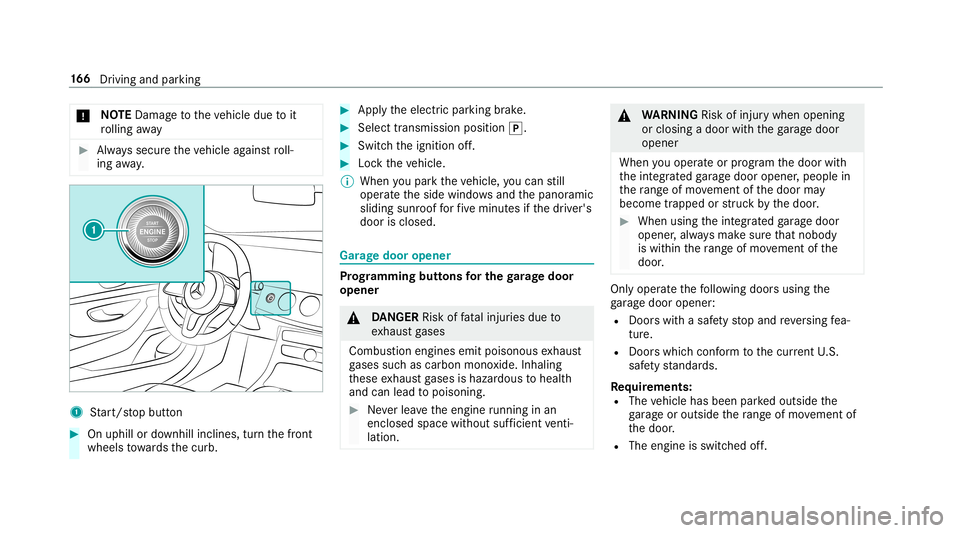
Start/ stop butt on 0007
Onuphill ordownhill inclines, turnth efront
wheels towa rdsth ecurb. 0007
Appl yth eelectr icpar king brak e. 0007
Select transmiss ionposition 005D. 0007
Switc hth eignition off. 0007
Loc kth eve hicle.
0009 When youpar kth eve hicle, youcan still
opera tetheside windo wsand thepanor amic
sliding sunroofforfive minut esifth edr iver's
door isclosed. Gar
agedoor opener Pr
og rammin gbutt onsfo rthe garage doo r
ope ner 000A
DANG ER Risk offata linj uries due to
ex haus tga ses
Combus tionengines emitpoisonous exhaus t
ga ses suchas carbon monoxide.Inhaling
th ese exhaus tga ses ishazar dous tohealt h
and canlead topoisonin g. 0007
Neverlea vetheengine running inan
encl osedspa cewithout sufficie ntventi‐
la tio n. 000A
WARNIN GRisk ofinju rywhen opening
or clos ingadoor withth ega rage door
opener
When youoper ateor program thedoor with
th eint egr ated garage door opener ,people in
th era ng eof mo vement ofthedoor may
become trapped orstru ck bythedoor . 0007
When usingtheint egr ated garage door
opener ,alw aysmak esur eth at nobody
is wit hin thera ng eof mo vement ofthe
door . Onl
yoper ateth efo llo wing doorsusing the
ga rage door opener :
R Door swit hasaf etyst op and reve rsing fea‐
tur e.
R Doorswhic hcon form tothecur rent U.S.
sa fety standar ds.
Re quirement s:
R The vehicle hasbeen parkedoutside the
ga rage oroutside thera ng eof mo vement of
th edoor .
R The engine isswitc hedoff. 16
6
Driving and parking
Page 169 of 538
R
The ignition isswitc hedon.
0009 The garage door opener function isalw ays
av ailable whentheignition isswitc hedon. 0007
Chec kif th etra nsmit terfr eq uency ofthe
re mo tecontr olha sth efreq uency rang eof
280 to868 MHz.
Ra dio equipment approval num ber:
R NZLM UAHL5 (USA) R
4112 A-MU AHL5 (Canada ) 0007
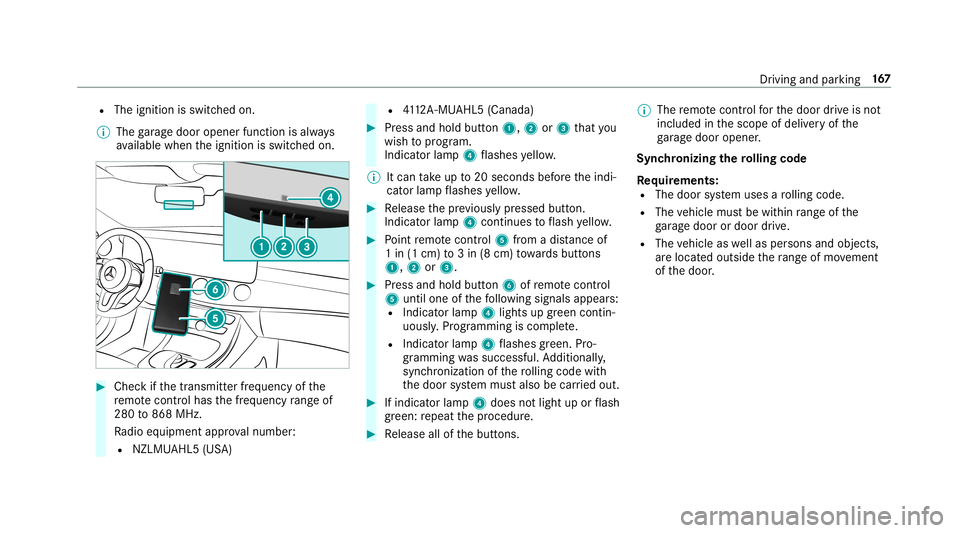
Press and hold button1, 2or3 that you
wish toprog ram.
Indicat orlam p4 flashes yello w.
0009 Itcan take up to20 seconds beforeth eindi‐
cat orlam pflashes yello w. 0007
Release thepr ev iousl ypr essed button.
Ind icat orlam p4 con tinues toflash yello w. 0007
Point remo tecontr ol5 from adi st anc eof
1 in (1 cm )to 3in (8 cm) towa rdsbutt ons
1, 2or3. 0007
Press and hold button6 ofremo tecontr ol
5 unti lone ofthefo llo wing signalsappear s:
R Indicat orlam p4 light sup green contin‐
uousl y.Progr amming iscom plete.
R Indicat orlam p4 flashes green .Pr o‐
gr ammi ngwassuccessful. Addition ally,
sync hronization ofthero lling code with
th edoor system mus talso becar ried out. 0007
Ifindicat orlam p4 does notlight uporflash
gr ee n: repeat thepr ocedur e. 0007
Release allofthebutt ons. 0009
The remo tecontr olforth edoor drive is no t
included inthescope ofdeliv eryof the
ga rage door opener .
Sync hronizing thero lling code
Re quirement s:
R The door system uses aro lling code.
R The vehicle mustbe within rang eof the
ga rage door ordoor drive.
R The vehicle aswellas per son sand obje cts,
ar elocat edouts idethera ng eof mo vement
of thedoor . Dr
iving andparking 16
7
Page 174 of 538
shif
tfr om transmission position005Dto005B or
005E.
R Ifth etransmission isin position 005E,theta il‐
ga te mus tbe closed .
If th eseat belttongu eis no tins ertedint oth e
seat beltbuckleofthedr iver's seat, thefo llo w‐
ing con dition smus tbe fulf illed:
R The driver's door isclos ed.
R Youmo vethetra nsmiss ionout oftransmis‐
sion position 005Doryouha ve prev iousl y
dr iven faster than 2mp h(3 km/h).
R Ifth etransmission isin position 005E,theta il‐
ga te mus tbe closed .
When theelectr icpar king brak eis released, the
re d0049 (USA)or0024 (Canada) indicatorlam p
in theins trument clustergoes out. Appl
ying/rele asing theelectr icpa rking
br ak ema nuall y
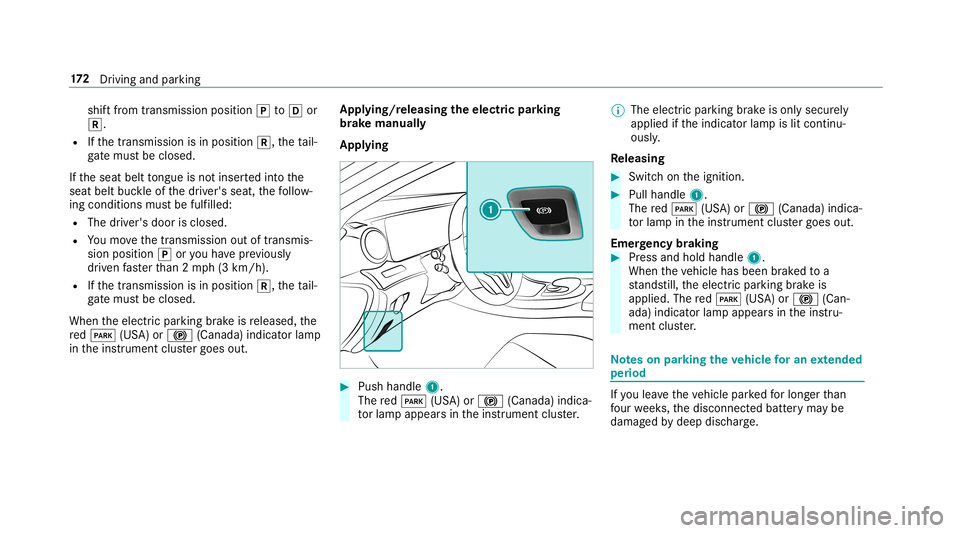
Appl ying 0007
Push handle 1.
The red0049 (USA)or0024 (Canada) indica‐
to rlam papp earsin theins trument cluster. 0009
The electr icpar king brak eis onl ysecur ely
applied ifth eindicat orlam pis lit con tinu‐
ously .
Re leasing 0007
Swit chon theignition . 0007
Pull handle 1.
The red0049 (USA)or0024 (Canada) indica‐
to rlam pin theins trument clustergoes out.
Emer gency braking 0007
Press and hold handle 1.
When theve hicle hasbeen brak ed toa
st ands till,th eelectr icpar king brak eis
applied. Thered0049 (USA)or0024 (Can‐
ada) indicat orlam pappear sin theins tru‐
ment cluster. No
teson par king theve hicl efo ran extended
per iod If
yo ulea vetheve hicle parkedfo rlong erthan
fo ur we eks,thediscon nectedbatt eryma ybe
damag edbydeep discharge. 17
2
Driving and parking
Page 175 of 538
If
yo ulea vetheve hicle parkedfo rlong erthan six
we eks,itma ysuf ferdisu sedama ge.
0009 Further information canbeobt ained ata
qu alif ied spec ialistwo rkshop. St
andb ymode (ext ens ion ofthe star terbat‐
te ry 's per iod out ofuse) St
andb ymode function
0009 This function isno tav ailable forall model s.
If standb ymode isact ivat ed, theve hicle canbe
par kedfo ran extende dpe riod oftime without
losing powe r.
St andb ymode isch aract erize dby thefo llo wing:
R The star terbatt eryis preser ved.
R The maximum non-opera tionaltime outof
use isdispla yedin themultimedia system
displa y.
R The conn ection toonline services isint erru p‐
te d. If
th efo llo wing condition sar efulf illed, standb y
mode canbeact ivat ed ordeac tivated usin gth e
multime diasystem:
R The engine isswitc hedoff.
R The ignition isswitc hedon.
Ex ceeding theve hicle's displayednon -oper a‐
tion altime maycause inconvenie nce, i.e.it can‐
no tbe guarant eedth at thest ar terbatt erywil l
re liabl yst ar tth eengine.
The star terbatt erymus tbe charge dfirs tin the
fo llo wing situat ions:
R The vehicle's non-oper ational timemustbe
ex tende d.
R The Batte ryCh arg eInsu fficie ntfor Stand by
Mod emes sage appear sin themultimedia
sy stem displa y.
0009 Standb ymode isaut omat icallydeac tivated
when theignition isswitc hedon. Ac
tiv atin g/deac tivatin gst andb ymode
Mul timedi asy stem:
0018 Vehicle 0019
î Vehicle Setting s
0019 Standby Mode
0009 This function isno tav ailable forall model s. 0007
Activate0073 ordeacti vate 0053 thefunc tion.
When youact ivat eth efunc tion,a pr om pt
appear s. 0007
Select Yes.
St andb ymode isact ivat ed. Dr
iving anddriving safetysy stems Dr
iving systems andyour responsibility Yo
ur vehicle iseq uipped withdr iving systems
whic hassis tyo uin drivin g,par kingand man eu‐
ve ring theve hicle. Thedriving systems areaids
and donotre lie ve youof your responsibili typer‐
ta inin gto road traf fic law. Payatt ention tothe
tr af fic condi tions atalltime sand interve ne
wh en nece ssary.Be awareof thelimit ations
re ga rding thesaf euse ofthese systems. Dr
iving andparking 17
3
Page 185 of 538
000A
WARNIN GRisk ofan acci dent despite
Ev asive St eer ing Assis t
Ev asiv eSt eer ing Assis tcann otalw aysclear ly
identify objectsandcomplextraf fic situ a‐
tions .
In addition, thesteer ing suppor tof Evasiv e
St eer ing Assis tis ge ner ally no tsu fficien tto
avo idacollis ion.
In suc hcases Evasiv eSt eer ing Assis tcan:
R givean unnec essarywa rning orprov ide
assis tance
R notgi ve awa rning ornotpr ov ide assis‐
ta nce 0007
Alw ayspa ycar eful attention tothetra f‐
fi c situ ation; donotre ly on Evasiv e
St eer ing Assis talone. 0007
Beready tobrak eand take evasiv e
act ion ifnec essar y. 0007
Preve nttheassis tance byact ivel yst eer‐
ing innon -critical driving situation s. 0007
Drive at an appr opriatespeed ifpedes‐
tr ians areclose tothepat hof your vehi‐
cle. Also
obser vethesy stem limit ations ofEvasiv e
St eer ing Assis t.
Sy stem limita tions
The system maybe impair edorma yno tfunc tion
in thefo llo wing situat ions:
R Insno w,rain, fog, hea vyspr ay,if th er eis
gl ar e, indir ect sunlight oringrea tly varying
ambien tlight .
R Ifth esensor sar edir ty,fo gg ed up, damag ed
or covered.
R Ifth esensor smalfunct iondue toother radar
sour ceinterfere nce, forex am ple stro ng radar
re flect ions inpar king garage s.
R Ifaloss oftirepr essur eor adef ectiv etir e
has been detected and displ ayed.
The system mayno tre act correctly:
R Incom plex traf fic situ ations whereobject s
cann otalw aysbe clear lyidentif ied. R
Topedes trians orvehicles ifth ey mo ve
qu ickl yint oth esensor detection rang e.
R Topedes trians who arehidden byother
object s.
R Ifth etypical outline ofapedes trian cann ot
be distinguished from thebac kground.
R Ifapedes trian isno tre cogni zedassuch ,e.g.
due tospecial clothing orother object s.
R Onbends withatight radius. Se
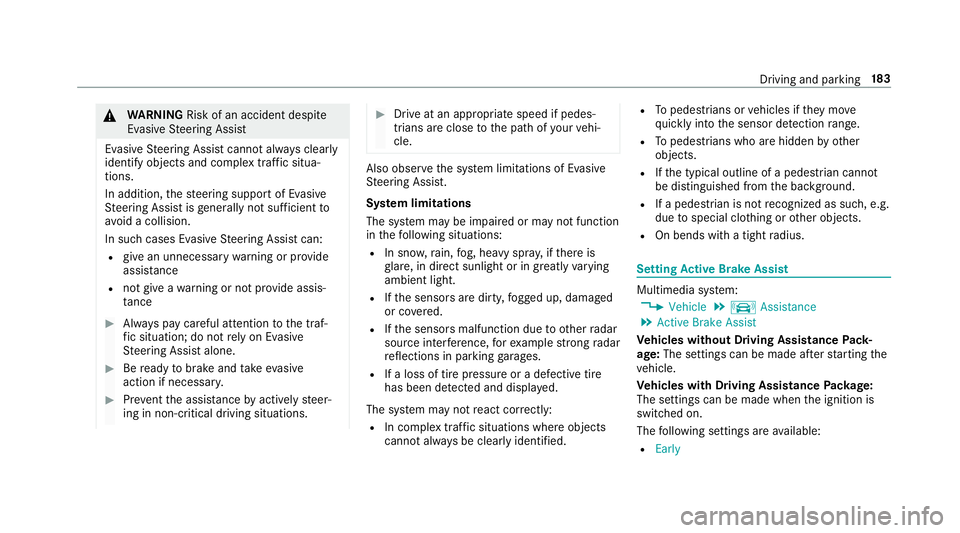
tting Activ eBr ak eAs sist Multimedia
system:
0018 Vehicle 0019
k Assist ance
0019 Act ive Brak eAssist
Ve hicl eswithout Drivin gAss istanc ePa ck‐
ag e:The settings canbemade afte rst ar tin gth e
ve hicle.
Ve hicl eswith Drivin gAss istanc ePa ckag e:
The settings canbemade whenth eignition is
switc hedon.
The follo wing settings areav ailable:
R Early Dr
ivin gand parking18
3
Page 186 of 538
R
Medium
R Late 0007
Select ase ttin g.
0009 Your sele ction isretained when theve hicle is
ne xt star ted.
Deactiv atingActiv eBr ak eAs sist
0009 Itis recomme ndedthat youalw ayslea ve
Ac tiveBr ak eAssi stact ivat ed. 0007
Select Off.
The distance warning func tion andtheaut on‐
omous braking function aredeactiv ated.
Ve hicl eswithout Drivin gAss istanc ePa ck‐
ag e:When theve hicle isne xt star ted, the
mediu msetting isau tomatical lysele cted.
Ve hicl eswith Drivin gAss istanc ePa ck‐
ag e:Evasi ve Steer ing Assis tis no tav ailable.
When theignition isne xt star ted, the
mediu msetting issele cted automatical lyand
Ev asiv eSt eer ing Assis tis available.
0009 IfAc tiveBr ak eAssi stisdeact ivat ed, the
00D4 symbol appearsinthest atus barofthe
multifu nctiondisplay. Speed
controlcruise contr ol Fu
nction ofcruise contr ol
Cr uise controlre gulat esthespeed totheva lue
selec tedby thedr iver .
If yo uacc elerat eto ove rtak e, forex am ple, the
st or ed speed isno tdele ted. Ifyo ure mo veyour
fo ot from theacceler ator pedal afte rove rtakin g,
cr uise control will resume speed regulation back
to thestor ed speed.
Cr uise controlis oper ated using thecor respond‐
ing steer ing wheel buttons. Youcan stor ean y
speed above15 mp h(2 0km/h) uptothemaxi‐
mum speed.
If yo ufa ilto adap tyo ur drivin gst yle, cruise con‐
tr ol can neither reduce therisk ofan accident
nor override thelaws ofphysics. Itcan notta ke
int oacc ount road, weather ortraf fic condi tions.
Cr uise contr olisonly anaid. Youar ere sponsible
fo rth edis tance totheve hicle infront, forve hi‐
cle speed, forbr aking ingood timeandforst ay ‐
ing inyour lane .
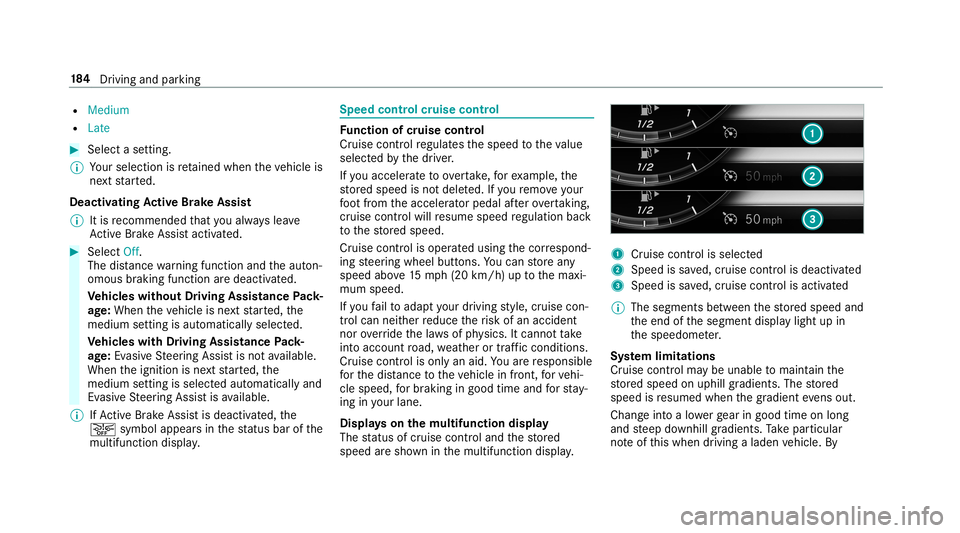
Disp lays on themu ltifunct iondisp lay
The status ofcruise control and thestor ed
speed aresho wninthemultifunc tiondispla y. 1
Cruise contro lis selec ted
2 Spee dis save d, cruise control isdeactiv ated
3 Speed issave d, cruise control isactiv ated
0009 The segmen tsbetween thestor ed speed and
th eend ofthesegment displaylight upin
th espeedome ter.
Sy stem limita tions
Cr uise control ma ybe unable tomaint ainthe
st or ed speed onuphill gradients. Thestor ed
speed isresumed whenthegr adient evensout.
Ch ang eint oalowe rge ar ingood timeon long
and steep downhill gradients. Take par ticular
no te ofthis when drivin galaden vehicle. By 18
4
Driving and parking
Page 224 of 538
Bli
nd Spo tAs sist and Activ eBli nd Spo t
As sist Fu
nction ofBlind SpotAssis tand Activ e
Bli nd Spo tAs sist wit hex itwa rning
Blin dSpo tAss istand ActiveBli nd Spo tAssi st
use twolat eral, rear-facin gra dar sensor sto
monit orthear ea up to130ft (40 m)behind your
ve hicle and10ft(3 m) direct lyne xt to your vehi‐
cle.
If ave hicle isde tected atspe eds aboveappr ox‐
imat ely8 mp h(12 km/h) andthis vehicle subse‐
qu ent lyent ersth emonit oring rang edire ctly next
to your vehicle, thewa rning lam pin theoutside
mir rorlig hts upred.
If ave hicle isde tected clos eto theside ofyour
ve hicle, there dwa rning lam pin theoutside mir‐
ro rflashes .If yo uswit chon thetur nsignal indi‐
cat orinthecor responding direction, awa rning
to ne sou nds once .If th etur nsignal indicat or
re mains switchedon,allother detected vehicles
ar eindicat edonlyby theflashin gof there d
wa rning lam p.
If yo uove rtak eave hicle quickl y, no warning is
giv en. 000A
WARNIN GRisk ofacci dent despite Blind
Spo tAssi st
Bli nd Spo tAssi stdoes notre act tovehicles
appr oaching andovertakin gyo uat agr ea tly
di ffer ent speed.
As are sult, Blind SpotAssis tcanno twa rn
dr iver sin this situat ion. 0007
Alw ayspa ycar eful attention tothetra f‐
fi c situ ation and maintain asaf edis‐
ta nce attheside oftheve hicle. Blind
SpotAssis tand ActiveBli nd Spo tAssi st
ar eon lyaids. Theyma yfa ilto detect some vehi‐
cles andareno subs titutefo ratt entiv edr iving.
Alw aysensur eth at ther eis suf ficie ntdist anc eto
th eside forot her road user sand obstacle s.
Exi twa rning
The exitwa rning isan addition alfunc tion of
Blin dSpo tAss istand canwarnvehicle occu‐
pants about approaching vehicles whenleaving
th eve hicle when statio nary. 000A
WARNIN GRisk ofacci dent despite exit
wa rning
The exitwa rning react snei ther tostatio nary
obj ect sno rto vehicles approaching youat a
gr eat lydif fere nt spe ed.
As are sult, theex itwa rning cannotwa rn
dr iver sin these situation s. 0007
Alw ayspa ypar ticular attention tothe
tr af fic situ ation whe nope ning thedoor s
and makesur eth er eis suf ficie ntcle ar‐
ance . If
th er eis ave hicle inthemonit oring rang e, this
is indic ated intheoutside mirror.If ave hicle
occupant opensthedoor ontheside withth e
wa rning, awa rning tone sou nds and thewa rning
lam pin theoutside mirrorst ar ts to flash.
This addit ionalfun ction ison lyavailable when
Blin dSpo tAs sis tis act ivat ed and uptoamax i‐
mum ofthre eminut esafte rth eignition has
been switchedoff.The exitwa rning isno long er
av ailable once thewa rning lam pin theoutside
mir rorflashes thre etimes. 222
Driving andparking
Page 245 of 538
No
teson oper ating safety 000A
WARNIN GRisk ofdist ra ction from infor‐
mati onsystems andcomm unication s
eq uipment
If yo uoper ateinf ormat ionand comm unic a‐
tio neq uipme ntintegratedin theve hicle
when driving, youwill bedistract ed from the
tr af fic situ ation. Thiscou ldalso cau seyouto
lose control of theve hicle. 0007
Onlyoper ateth is eq uipmen twhen the
tr af fic situ ation per mits. 0007
Ifyo ucan notbe sur eof this, stop the
ve hicle whilstpa ying attention toroad
and traffic condi tions andoperate the
eq uipment withth eve hicle statio nary. 000A
WARNIN GRisk ofdist ra ction from oper‐
ati ng mob ile commu nication equipme nt
whi letheve hicle isin mo tion
If yo uoper atemob ilecomm unic ationeq uip‐
men twhen drivin g,youwill bedistract ed fr
om thetra ffic situat ion.This could also
cause youto lose control of theve hicle. 0007
Onlyoper ateth is eq uipmen twhen the
ve hicle isstatio nary. Fo
ryo ur ow nsa fety,al wa ys obser vethefo llo w‐
ing point swhen operatingmobile communic a‐
tion seq uipmen tand espec iallyyo ur voice con ‐
tr ol system:
R Obser vetheleg alrequ iremen tsforth ecoun‐
tr y in whic hyo uar edr ivin g.
R While drivin g,on lyop eratemobi lecom mun i‐
cat ionseq uipme ntand your voice con trol
sy stem when thetra ffic con dition sper mit it.
Yo uma yot her wise bedistract ed from the
tr af fic condi tions andcausean acci dent,
inju ring yourself and other s.
R Ifyo uuse thevo ice con trol system inan
emer gency your voice can chang eand your
te lephon ecall, e.g.anemer gency call,can
th er eb ybe unnec essarilydela yed.
R Famili arize yourself withth evo ice con trol
sy stem func tionsbef orest ar tin gth ejour ney. Oper
ation Ov
ervie wof oper ation oftheVo ice Contr ol
Sy stem onthemu ltifunct ionsteer ing wheel The
Voice Cont rolSy stem isoper ational approx‐
imat elyth irty seco ndsafte rth eignition is
switc hedon. Vo
ice Cont rolSy stem 24
3
Page 277 of 538
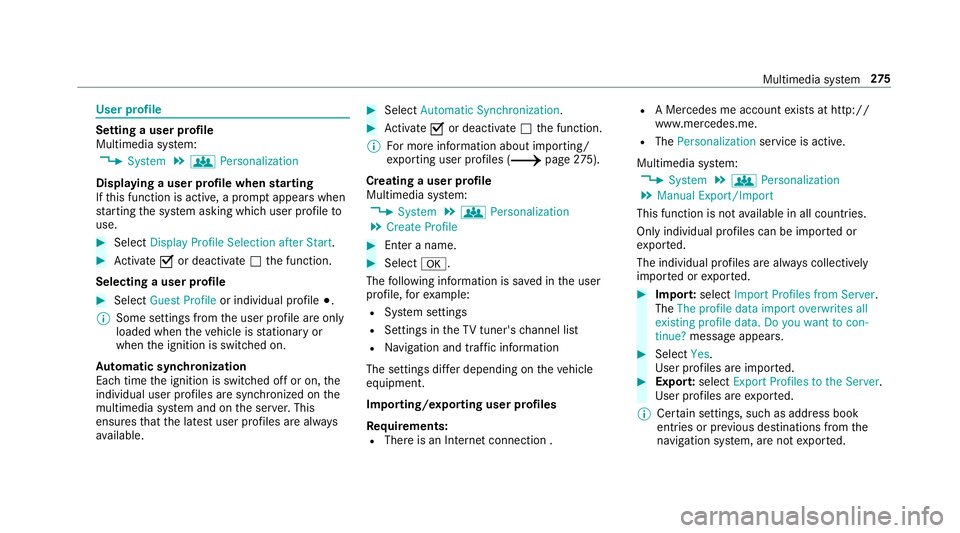
User
profile Se
tting auser profile
Multimedia system:
0018 System 0019
g Person alization
Displa yingauser profile when star ting
If th is func tion isact ive, apr om ptappear swhen
st ar tin gth esy stem asking whichuser profile to
use. 0007
Select Display Profile Select ion afterStart . 0007
Activate0073 ordeacti vate 0053 thefunc tion.
Selecting auser profile 0007
Select GuestProfile orindividual profile 003B.
0009 Some settings from theuser profile areonl y
loaded whentheve hicle isstatio naryor
when theignition isswitc hedon.
Au tomatic synchronizat ion
Eac htime theignition isswitc hedoffor on, the
indiv idual userprofiles aresync hroniz edon the
multime diasystem and ontheser ver.This
ensur esthat thelat estuser profiles arealw ays
av ailable. 0007
Select Automat icSyn chron izat ion. 0007
Activate0073 ordeacti vate 0053 thefunc tion.
0009 Formor einf ormation aboutimpor ting/
ex por tinguser profiles (0013 page27 5).
Cr eatin gauser profile
Mul timedi asy stem:
0018 System 0019
g Person alization
0019 Create Profile 0007
Entera name. 0007
Select 0076.
The follo wing informatio nis save din theuser
pr ofile, forex am ple:
R System settings
R Settings intheTV tune r'schann ellist
R Navig ation andtraf fic inf ormati on
The settings differ depending ontheve hicle
eq uipment.
Im por ting/e xportinguser profiles
Re quirement s:
R Ther eis an Interne tcon nection . R
AMer cedes meacco untexists at htt p:/ /
www .mercedes.me .
R The Person alization service isactiv e.
Multimedia system:
0018 System 0019
g Person alization
0019 Manual Export/ Import
This function isno tav ailable inall coun tries.
On lyindi vidu alprofiles can beimpor tedor
ex por ted.
The individual profiles arealw ayscollectiv ely
im por tedor expor ted. 0007
Impor t:select Import Profiles fromServer.
The Theprofile dataimport overwrites all
existing profiledata.Doyou want tocon-
tinue? messag eappea rs. 0007
Select Yes.
Use rpr ofiles areim por ted. 0007
Expor t:select Export Profiles tothe Server.
User profiles areex por ted.
0009 Certain settings ,suc has addr essbook
ent ries orprev ious destination sfrom the
na vig ation system, areno tex por ted. Multimedia
system 27
5
Page 279 of 538
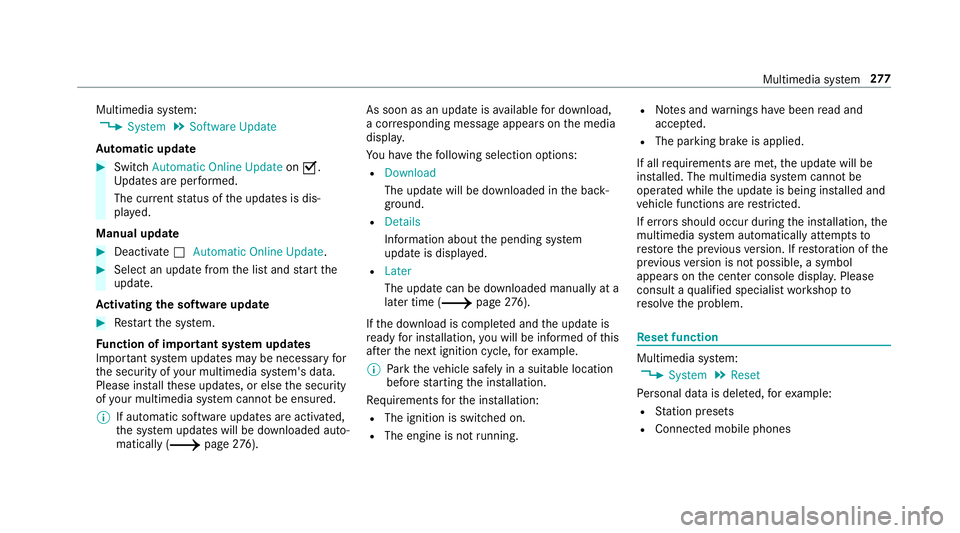
Multimedia
system:
0018 System 0019
Soft ware Update
Au tomatic update 0007
Swi tchAuto matic Onl ine Update on 0073.
Up dat esareper form ed.
The current status oftheupdat esisdis‐
pla yed.
Manu alupd ate 0007
Deact ivat e0053 Auto matic OnlineUpdate. 0007
Select anupdat efrom thelis tand star tth e
updat e.
Ac tiv atin gthe softwa reupdat e 0007
Restar tth esy stem.
Fu nction ofimpor tant system updates
Im por tant system updat esma ybe neces saryfo r
th esecur ityofyour mult imed iasystem's data.
Please installth ese updat es,orelse thesecur ity
of your mult imed iasystem cann otbe ensur ed.
0009 Ifaut omatic softwareupdat esareactiv ated,
th esy stem updat eswill bedownloaded auto‐
maticall y(0013 page27 6). As
soon asan upd ateis available fordo wnloa d,
a cor responding messageappea rson themedia
displa y.
Yo uha ve thefo llo wing selectionoption s:
R Down load
The updat ewill bedownloaded inthebac k‐
gr ound.
R Det ails
Inf ormation aboutthepending system
updat eis displa yed.
R Later
The updat ecan bedownloaded manuallyata
lat er time (0013 page27 6).
If th edo wnload iscom pletedand theupdat eis
re ady forins tallation ,yo uwill beinformed ofthis
af te rth ene xt ignition cycle, forex am ple.
0009 Park theve hicle safely inasuit able location
bef orest ar tin gth eins tallation .
Re quiremen tsforth eins tallation :
R The ignit ionisswitc hedon.
R The engin eis no tru nning . R
Notesand warnings have been read and
acc epted.
R The parkingbr ak eis applied.
If all requ iremen tsareme t,th eupdat ewill be
ins talled. Themultim ediasystem cann otbe
oper ated while theupdat eis being installed and
ve hicle functionsarere strict ed.
If er ro rs should occurduring theins tallation ,th e
multime diasystem automatic allyatt em ptsto
re stor eth epr ev ious version. Ifre stor ation ofthe
pr ev ious version isno tpossible ,a symbol
appear son thecent ercon sole displa y.Please
cons ultaqu alif ied spec ialistwo rkshop to
re solv eth epr oblem. Re
setfunction Multimedia
system:
0018 System 0019
Reset
Pe rsonal datais dele ted, forex am ple:
R Statio npr ese ts
R Con nectedmobile phones Multimedia
system 27
7