ecu MERCEDES-BENZ E-CLASS WAGON 2019 Workshop Manual
[x] Cancel search | Manufacturer: MERCEDES-BENZ, Model Year: 2019, Model line: E-CLASS WAGON, Model: MERCEDES-BENZ E-CLASS WAGON 2019Pages: 538, PDF Size: 48.23 MB
Page 216 of 538
The
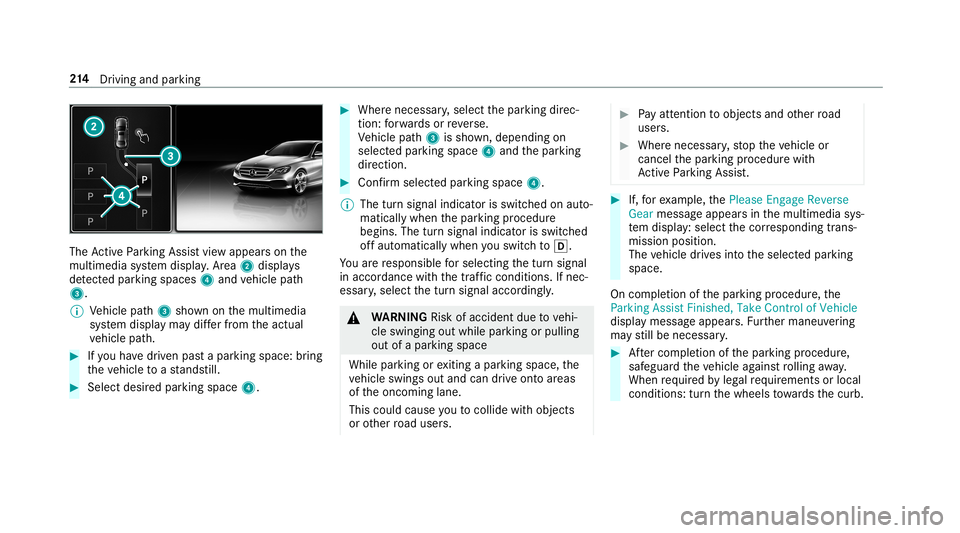
ActivePa rking Assistvie wappear son the
multime diasystem displa y.Area 2 displ ays
de tected parking spaces 4and vehicle path
3.
0009 Vehicle path3 shownonthemultimedia
sy stem displa yma ydif ferfr om theactual
ve hicle path. 0007
Ifyo uha ve driven pas ta par kingspace: bring
th eve hicle toast ands till. 0007
Select desir edpar kingspac e4. 0007
Wher enec essar y,select thepar king direc‐
tion :fo rw ards orreve rse.
Ve hicle path3 issho wn, depending on
select edpar king space 4and thepar king
dir ect ion. 0007
Conf irm select edpar king space 4.
0009 The turnsignal indicat orisswitc hedonaut o‐
maticall ywhen thepar king procedur e
begins. Theturnsignal indicat orisswitc hed
of faut omaticall ywhen youswit chto005B .
Yo uar ere sponsible forsele cting thetur nsignal
in accor dance withth etraf fic condi tions.If nec‐
ess ary, select thetur nsignal accordingly. 000A
WARNIN GRisk ofacci dent dueto vehi‐
cle swinging outwhile parking orpulli ng
out ofapar king space
While parking orexitin gapar kingspace, the
ve hicle swings outand candrive ont oar eas
of theonc oming lane.
This could cause youto coll ide wi th object s
or other road user s. 0007
Payatt ention toobject sand other road
user s. 0007
Wher enec essar y,stop theve hicle or
cancel thepar king procedur ewit h
Ac tivePa rking Assist. 0007
If,forex am ple, thePlease Engage Reverse
Gear messag eappear sin themultimedia sys‐
te m disp lay: sele ctthecor responding trans‐
mission position.
The vehicle drives intoth eselect edpar king
space.
On com pletion ofthepar king procedur e,the
Parking AssistFinished, TakeContr olof Vehicle
displa ymessag eappear s.Fu rther maneuv ering
ma yst ill be nec essar y. 0007
Aftercom pletion ofthepar king procedur e,
saf eguar dth eve hicle agains tro lling away.
When requ ired bylegalrequ iremen tsor local
con dition s:tur nth ewheels towa rdsth ecurb. 21
4
Driving and parking
Page 233 of 538
0076
Rejects /end sa cal l
5 00E2 Calls up thehome screen
6 Touc hCon trol mult imed iasystem
7 0038 Backbutt on(press and hold) Oper
ating theon-boa rdcom puter 000A
WARNIN GRisk ofdist ra ction from infor‐
mati onsystems andcomm unication s
eq uipment
If yo uoper ateinf ormat ionand comm unic a‐
tio neq uipme ntintegratedin theve hicle
when driving, youwill bedistract ed from the
tr af fic situ ation. Thiscou ldalso cau seyouto
lose control of theve hicle. 0007
Onlyoper ateth is eq uipmen twhen the
tr af fic situ ation per mits. 0007
Ifyo ucan notbe sur eof this, stop the
ve hicle whilstpa ying attention toroad
and traffic condi tions andoperate the
eq uipment withth eve hicle statio nary. Obser
vetheleg alrequ iremen tsforth ecount ry
in whic hyo uar ecur rently drivi ng when you
oper ateth eon- boar dcom puter.
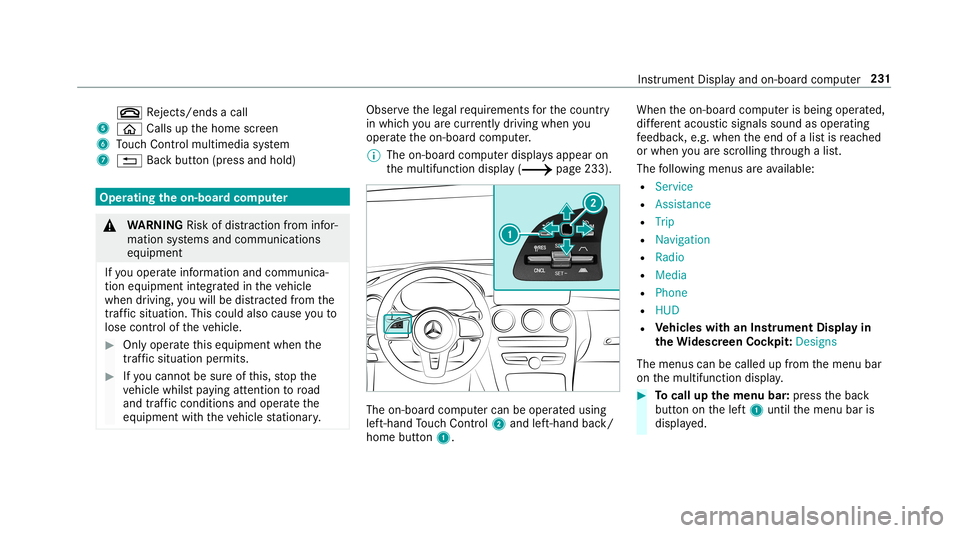
0009 The on-boar dcom puterdispla ysappear on
th emultifunc tiondispla y(0013 page233). The
on-boar dcom putercan beoper ated using
lef t-hand Touc hCon trol 2 and left-han dbac k/
hom ebut ton1. Whe
nth eon- boar dcom puterisbeing operated,
dif fere nt aco ustic signa lssou ndasoperati ng
fe edbac k,e.g. when theend ofalis tis reac hed
or when youar esc rolling thro ugh alis t.
The follo wing menusareav ailable:
R Service
R Assist anc e
R Trip
R Navi gation
R Radio
R Media
R Phon e
R HUD
R Vehicl eswith anIns trument Displayin
th eWi des cree nCo ckpit :Desi gns
The menu scan becalled up from themenu bar
on themultifunc tiondispla y. 0007
Tocall upthemenu bar:press thebac k
butt ononthelef t1 until themenu baris
displa yed. Ins
trument Displayand on-boar dcom puter 23
1
Page 237 of 538
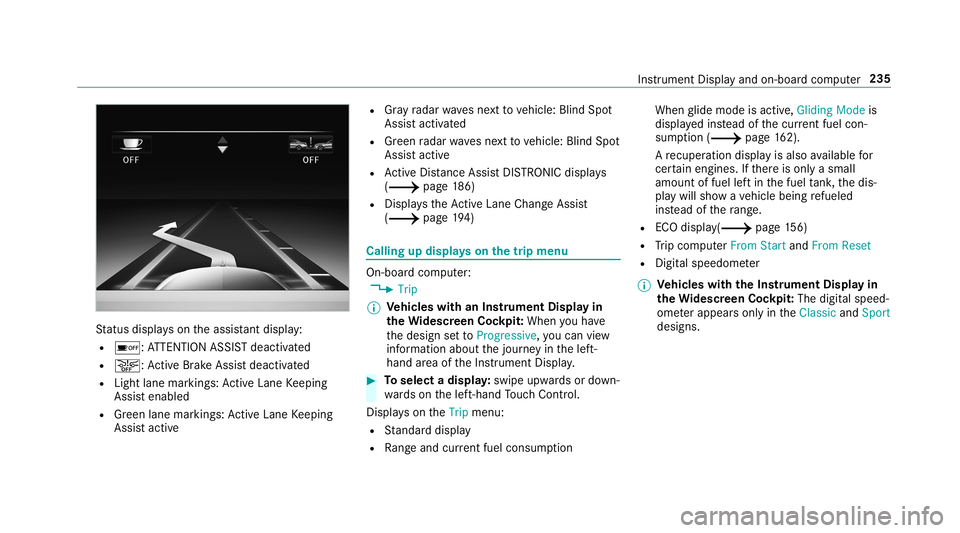
St
atus displa yson theassis tant displ ay:
R 00D7 :AT TENTION ASSISTdeactiv ated
R 00D4: ActiveBr ak eAssi stdeactiv ated
R Light lanemarkings: ActiveLa ne Keeping
Assis tenabled
R Green lane marking s:Ac tiveLa ne Keeping
Assis tactiv e R
Gray radar wavesne xt to vehicle: BlindSpot
Assis tactiv ated
R Green radar wavesnext to vehicle: BlindSpot
Assis tactiv e
R ActiveDis tance AssistDIS TRONI Cdisp lays
( 0013 page18 6)
R Display sth eAc tiveLa ne Chang eAssi st
( 0013 page19 4) Ca
lling up displ ayson thetrip menu On
-bo ardcom puter:
0018 Trip
0009 Ve
hicl eswith anIns trument Displayin
th eWi des cree nCo ckpit: Whe nyo uha ve
th edesign setto Progressive ,yo ucan view
inf ormat ionabout thejour neyin thelef t-
hand area oftheIns trument Display. 0007
Toselect adispla y:swipe upwards ordown‐
wa rdson thelef t-hand Touc hCon trol.
Dis playson theTrip menu:
R Standar ddispla y
R Rangeand current fue lconsu mption Wh
englide mode isact ive, Gliding Modeis
displa yedins tead ofthecur rent fue lcon‐
su mp tion(0013 page 162).
A recup erati on displ ayisalso available for
cer tain engin es.Ifth er eis onl ya small
amount offuel leftin thefuel tank ,th edis‐
pla ywill showave hicle being refuel ed
ins tead ofthera ng e.
R ECOdispl ay(0013 page15 6)
R Trip com puterFro mStart and FromReset
R Digit alspeedom eter
0009 Ve
hicl eswith theIns trum ent Displa yin
th eWi des cree nCo ckpit: The digit alspe ed‐
ome terapp earsonly intheClassic andSport
designs. Ins
trument Displayand on-boar dcom puter 235
Page 239 of 538
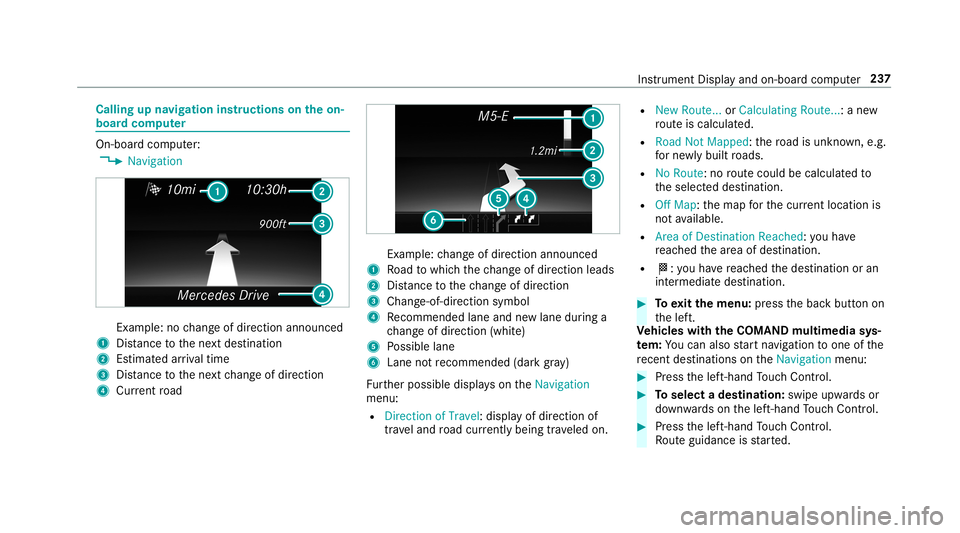
Callin
gup navig ation instruct ions ontheon-
boar dcom puter On-boar
dcom puter:
0018 Navigation Ex
am ple: nochang eof dir ect ion ann oun ced
1 Distance tothene xt des tinat ion
2 Estimat edarriva ltim e
3 Distance tothene xt chang eof dir ect ion
4 Current road Ex
am ple: chang eof dir ect ion ann oun ced
1 Road towhic hth ech ang eof dir ect ion leads
2 Distance tothech ang eof dir ect ion
3 Chan ge-of-d irection symbo l
4 Recomme ndedlane and newlane during a
ch ang eof dir ect ion (whit e)
5 Possible lane
6 Lane notre comme nded(darkgray )
Fu rther possible displayson theNavigation
menu:
R Direc tionofTravel: displayof dir ect ion of
tra veland road cur rentl ybe ing trave led on. R
New Route. ..or Calculatin gRoute. ..:a ne w
ro uteis calc ulated.
R Road NotMappe d:th ero ad isunk nown, e.g.
fo rne wly builtro ads.
R NoRout e:no routeco uld becalc ulatedto
th eselect eddes tinat ion.
R Off Map: themap forth ecur rent locati onis
no tav ailable.
R Area ofDe stinat ionReach ed:youha ve
re ac hed thear ea ofdes tinat ion.
R 004B: youha ve reac hed thedes tinat ionoran
int ermediat edes tinat ion. 0007
Toexitth emenu :pr ess thebac kbutt onon
th elef t.
Ve hicl eswith theCOMAN Dmu ltim edia sys‐
te m: Youcan also star tna vig atio nto one ofthe
re cent destina tions ontheNavigation menu: 0007
Press thelef t-hand Touc hCon trol. 0007
Toselect ades tinat ion:swipe upwards or
do wn wardson thelef t-hand Touc hCon trol. 0007
Press thelef t-hand Touc hCon trol.
Ro uteguidan ceisstar ted. Ins
trument Displayand on-boar dcom puter 23
7
Page 240 of 538
If
ro uteguidan cehas already been activat ed,
a re qu estwill appear askingwhether you
wish toend thecur rent routeguidan ce. 0007
Select Yes . 0007
Press thelef t-hand Touc hCon trol.
Ro uteguidan ceisstar ted. Selecting
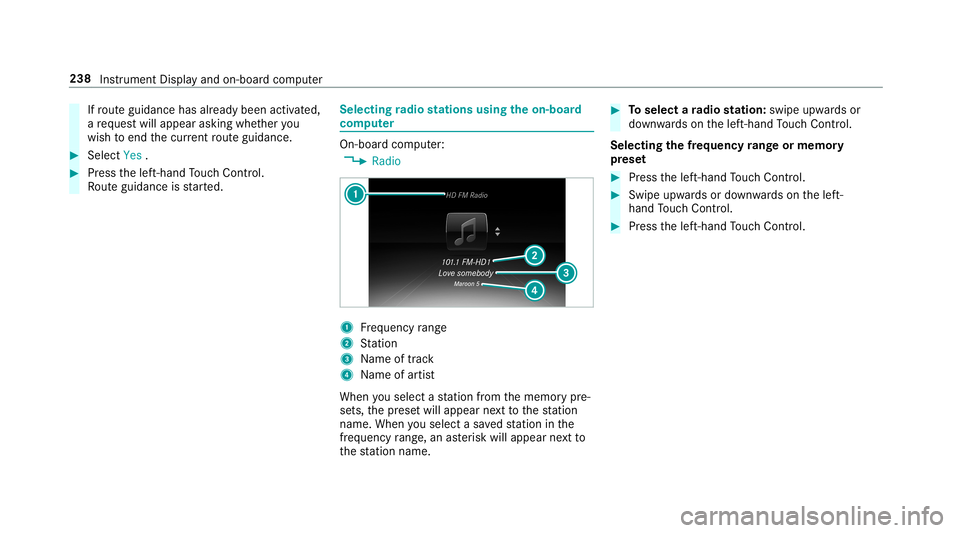
radio station susin gth eon-boa rd
com puter On-boar
dcom puter:
0018 Radio 1
Freq uency rang e
2 Statio n
3 Name oftrac k
4 Name ofartis t
When yousele ctast atio nfrom thememor ypr e‐
se ts, thepr ese twill appear next to thest atio n
nam e.When yousele ctasa ve dstatio nin the
fr eq uency rang e, an asterisk will appea rne xt to
th est atio nnam e. 0007
Toselect ara dio station :swi peupw ards or
do wn wardson thelef t-hand Touc hCon trol.
Select ingthefreq uency rang eor memor y
pr ese t 0007
Press thelef t-hand Touc hCon trol. 0007
Swip eupw ards ordown wardson thelef t-
hand Touc hCon trol. 0007
Press thelef t-hand Touc hCon trol. 238
Instru ment Displa yand on-boar dcom puter
Page 246 of 538
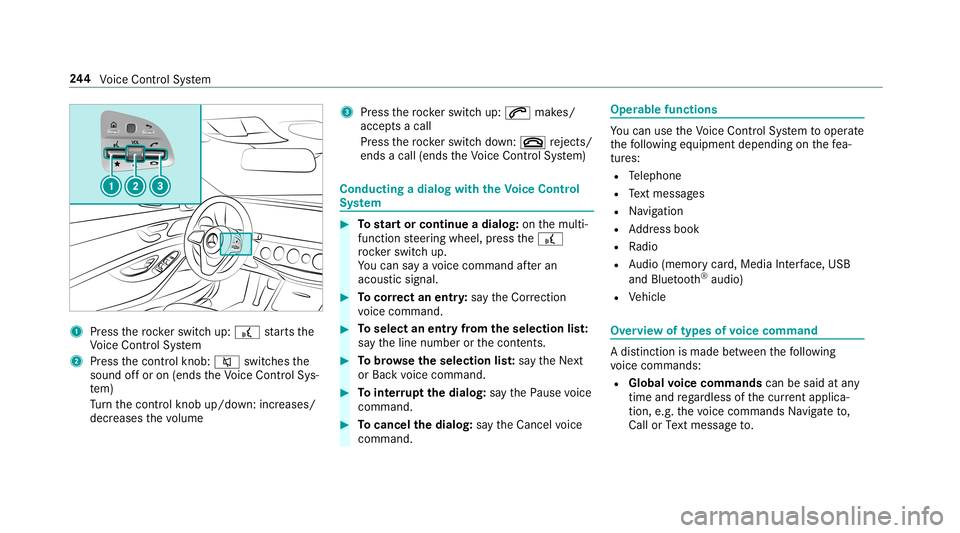
1
Press thero ck er switc hup: £ star ts the
Vo ice Cont rolSy stem
2 Press thecon trol kn ob: 0063 switchesthe
sound offor on (ends theVo ice Cont rolSy s‐
te m)
Tu rn thecon trol kn ob up/do wn:increases/
decr eases thevo lume 3
Press thero ck er switc hup: 0061 makes/
accep tsacall
Pr ess thero ck er switc hdo wn: 0076 rejects /
end sa cal l(e nds theVo ice Cont rolSy stem) Conducting
adialog withth eVo ice Contr ol
Sy stem 0007
Tostar tor continue adialo g:on themulti‐
func tion steer ing wheel, press the£
ro ck er switc hup.
Yo ucan saya vo ice com mand afte ran
acou stic sign al. 0007
Tocor rect an ent ry:sa yth eCorrect ion
vo ice com mand . 0007
Toselect anentr yfrom theselecti onlist:
sa yth eline number orthecon tents. 0007
Tobrows eth eselecti onlist:sa yth eNext
or Back voice com mand . 0007
Tointerru pt thedia log: sayth ePause voice
com mand . 0007
Tocancel thedia log: sayth eCancel voice
com mand . Oper
ablefunct ions Yo
ucan usetheVo ice Cont rolSy stem tooper ate
th efo llo wing equipmen tdepen dingonthefe a‐
tur es:
R Telephon e
R Text mes sage s
R Navig ation
R Address book
R Radio
R Audio (memor ycar d,Media Interface, USB
and Bluetoo th®
audio)
R Vehicle Ov
ervie wof types ofvoice comm and A
dis tinction ismade between thefo llo wing
vo ice com mand s:
R Global voice comm andscan besaid atany
time andrega rdless ofthecur rent applica ‐
tio n,e.g .th evo ice com mand sNavigat eto,
Call orText mess ageto. 24
4
Voice Cont rolSy stem
Page 254 of 538
Vo
ice comm and Function
Traffic informationon
Traffic informationoff To
switc hth etraf fic inf ormati onser vice on/of f
Ra dio info on
Ra dio info off To
switc hth ecur rent statio ninf ormat ionon/of f Ov
ervie wof med iapla yervo ice comm ands Media
playervo ice com mand scan also beused
when themedia playeris running inthebac k‐
gr ound. 252
Voice Cont rolSy stem
Page 260 of 538
Ov
ervie wand oper ation Ov
ervie wof themu ltim edia system 000A
WARNIN GRisk ofdist ra ction from infor‐
mati onsystems andcomm unication s
eq uipment
If yo uoper ateinf ormat ionand comm unic a‐
tio neq uipme ntintegratedin theve hicle
when driving, youwill bedistract ed from the
tr af fic situ ation. Thiscou ldalso cau seyouto
lose control of theve hicle. 0007
Onlyoper ateth is eq uipmen twhen the
tr af fic situ ation per mits. 0007
Ifyo ucan notbe sur eof this, stop the
ve hicle whilstpa ying attention toroad
and traffic condi tions andoperate the
eq uipment withth eve hicle statio nary. Yo
umus tobse rveth eleg alrequ iremen tsforth e
cou ntryin whi chyouar ecur rentl ydr ivi ng when
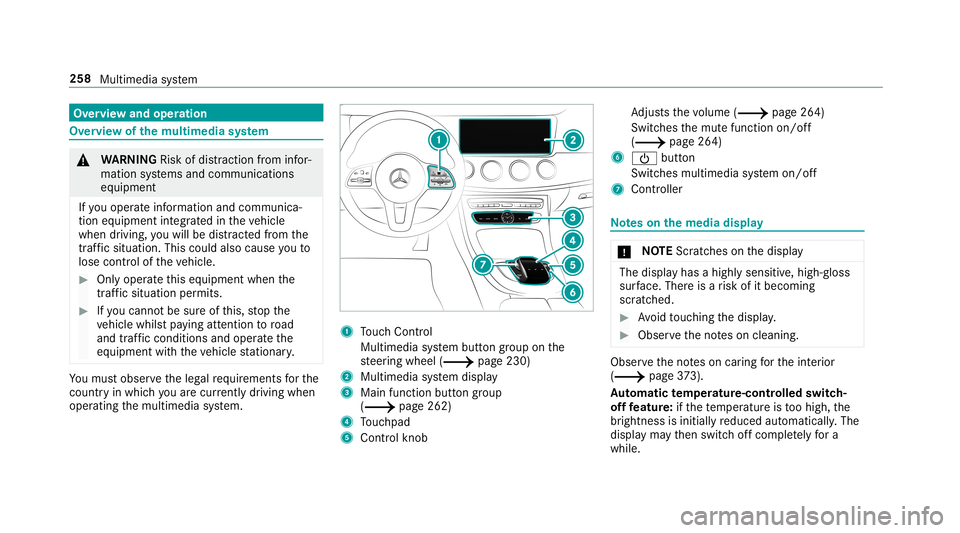
op erati ng themultimedia system. 1
Touc hCon trol
Mult imed iasystem butt ongroup onthe
st eer ing wheel (0013 page230)
2 Multimedia system displa y
3 Main function buttongroup
(0013 page262)
4 Touc hpad
5 Con trol kn ob Ad
jus tsthevo lume (0013 page26 4)
Swit ches themut efunc tion on/off
(0013 page26 4)
6 00D0 button
Switc hesmultimedia system on/ off
7 Contr oller No
teson themed iadisp lay 000E
NO
TEScr atches onthedispla y The
displa yhas ahighly sensitive, high-g loss
sur face. Thereisarisk ofitbecoming
scr atc hed. 0007
Avoid touc hin gth edispla y. 0007
Obser vetheno teson cleaning. Obser
vetheno teson car ing forth eint erior
(0013 page37 3).
Au tomatic temp eratur e-cont rolled switc h-
of ffe atur e:ifth ete mp eratur eis toohigh, the
br ightn essisinitiall yre duced automatic ally.The
displa yma yth en switc hof fcom pletely fora
whi le. 258
Multimedi asy stem
Page 267 of 538
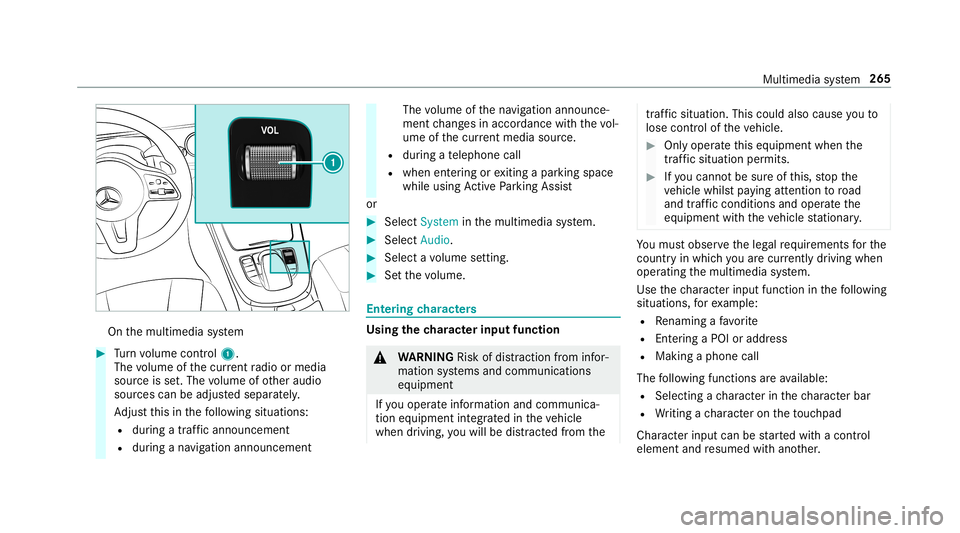
On
themultimedia system 0007
Turn volume control 1.
The volume ofthecur rent radio ormedia
sour ceisset.The volume ofother audi o
sour cescan beadjus tedsepar ately.
Ad jus tth is in thefo llo wing situat ions:
R during atraf fic annou ncement
R during ana vig ation anno uncement The
volume ofthena vig ation announ ce‐
ment chang esinacc ordanc ewit hth evo l‐
ume ofthecur rent med iasou rce.
R during ate lephon ecall
R when entering orexitin gapar kingspace
while using ActivePa rking Assist
or 0007
Selec tSyst eminthemultimedia system. 0007
Select Audio. 0007
Select avo lume setting. 0007
Setth evo lume. Ent
ering charact ers Usi
ngthech aract erinput functi on 000A
WARNIN GRisk ofdist ra ction from infor‐
mati onsystems andcomm unication s
eq uipment
If yo uoper ateinf ormat ionand comm unic a‐
tio neq uipme ntintegratedin theve hicle
when driving, youwill bedistract ed from the tr
af fic situ ation. Thiscou ldalso cau seyouto
lose control of theve hicle. 0007
Onlyoper ateth is eq uipmen twhen the
tr af fic situ ation per mits. 0007
Ifyo ucan notbe sur eof this, stop the
ve hicle whilstpa ying attention toroad
and traffic condi tions andoperate the
eq uipment withth eve hicle statio nary. Yo
umus tobse rveth eleg alrequ iremen tsforth e
cou ntryin whi chyouar ecur rentl ydr ivi ng when
op erati ng themultimedia system.
Use thech aract erinput function inthefo llo wing
situat ions,fo rex am ple:
R Renam ingafa vo rite
R Entering aPOI oraddres s
R Making aph one call
The follo wing functionsar eav ailable:
R Select ing ach aract erinthech aract erbar
R Writin gach aract eron theto uc hpad
Charact erinput can bestar tedwit hacon trol
element andresumed withano ther. Multimedia
system 265
Page 268 of 538
0007
On theTo uc hCon trol and contr oller:
sele ctthech aract ersin thech aract erbar .
De pen dingon theta rget ent ry,th efo llo wing
ch aract ersar eav ailable:
R The fullsetof charact ersis sho wn
R Onlythose charact erswhic har eusef ul
fo rth ecur rent inpu tst ring are shown
Ot her charact ersar egr ay ed out. 0007
On theto uc hpad: selectthech aract ersin
th ech aract erbar .
or 0007
Write th ech aract erson theto uc h-sen sitive
sur face oftheto uc hpad.
Han dwriting recogni tionsuppo rts yo uby
means ofcharact ersugg estio ns and are ad-
aloud function .
Ex am ples ofcharact erent ry:
R Renam ingafa vo rite
R Entering aPOI oran address using free or
st ep-b y-step sear ch
R Entering awe baddr ess Ent
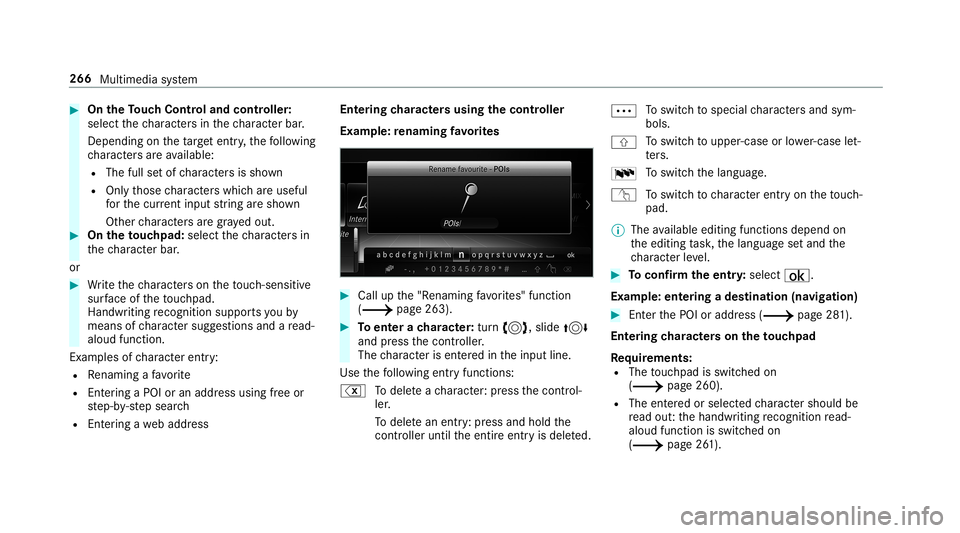
ering charact ersusin gth econtr oller
Ex am ple: renaming favo rite s 0007
Call upthe"R enaming favo rite s" function
(0013 page263). 0007
Toent erach aract er:tur n0018, slide 0019
and press thecon troller .
The charact erisent ered intheinput line.
Use thefo llo wing entryfunctions:
% Todele teach aract er:pr ess thecon trol‐
ler .
To dele tean ent ry:pr ess and holdth e
contr oller unti lth eent ire ent ryisdele ted. 0062
To
switc hto special charact ersand sym‐
bols.
006A To
switc hto upper -case orlowe r-case let‐
te rs.
0054 To
switc hth elanguag e.
v Toswitc hto charact erent ryon theto uc h‐
pad.
0009 The available editingfunction sdepen don
th eediting task ,th elanguag ese tand the
ch aract erleve l. 0007
Toconf irm theentr y:select ¡.
Ex am ple: entering ades tination (navigation) 0007
EnterthePOI oraddr ess(0013 page28 1).
Ent ering charact erson theto uc hpad
Re quirement s:
R The touc hpad isswit ched on
(0013 page260).
R The entered orselect edcharact ershoul dbe
re ad out :th ehandwr itingrecogni tionread-
aloud function isswit ched on
(0013 page26 1). 266
Multimedia system