ecu MERCEDES-BENZ E-CLASS WAGON 2019 Manual Online
[x] Cancel search | Manufacturer: MERCEDES-BENZ, Model Year: 2019, Model line: E-CLASS WAGON, Model: MERCEDES-BENZ E-CLASS WAGON 2019Pages: 538, PDF Size: 48.23 MB
Page 308 of 538
This
could alsocause youto lose control of
th eve hicle. 0007
Onlyoper ateth is eq uipmen twhen the
tr af fic situ ation per mits. 0007
Ifyo ucan notbe sur eof this, stop the
ve hicle whilstpa ying attention toroad
and traffic condi tions andoperate the
eq uipment withth eve hicle statio nary. 000A
WARNIN GRisk ofdist ra ction from oper‐
ati ng mob ile commu nication equipme nt
whi letheve hicle isin mo tion
If yo uoper atemob ilecomm unic ationeq uip‐
men twhen drivin g,youwill bedistract ed
fr om thetra ffic situat ion.This could also
cause youto lose control of theve hicle. 0007
Onlyoper ateth is eq uipmen twhen the
ve hicle isstatio nary. Yo
umus tobse rveth eleg alrequ iremen tsforth e
cou ntryin whi chyouar ecur rentl ydr ivi ng when
op erati ng mob ile comm unicati onequip ment in
th eve hicle.
Fu rther information canbeobt ained from an
aut hor ized Mercedes-Ben zCent eror at:http: //
www .mercedes-benz .com/connect. 306
Multimedia system
Page 309 of 538
Te
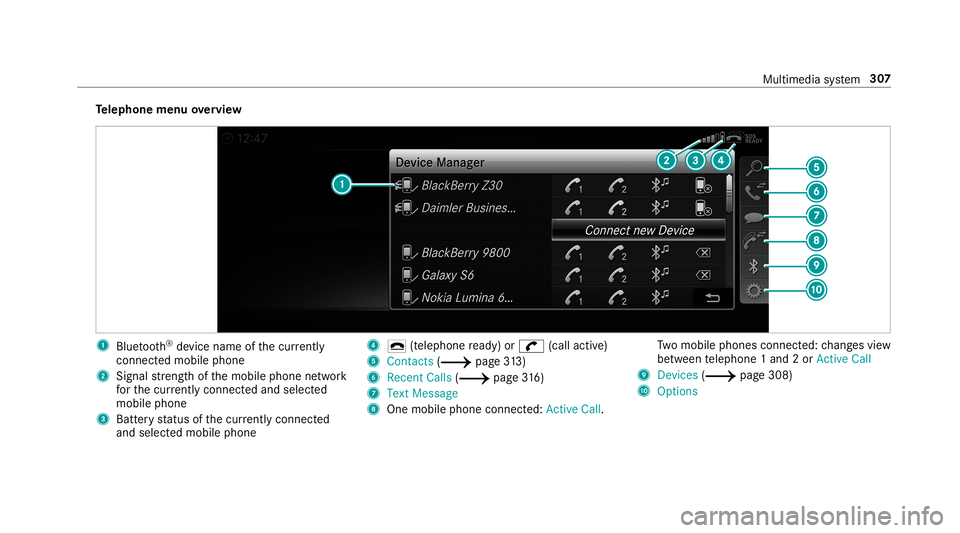
lephone menuoverview 1
Blue tooth®
de vice name ofthecur rently
conne cted mob ile pho ne
2 Signal stre ngt hof themobile phonenetwork
fo rth ecur rently conne cted and select ed
mob ile pho ne
3 Batt eryst atus ofthecur rently conne cted
and select edmob ile pho ne 4
0071 (tel ep hone ready) or0097 (callactive)
5 Con tacts(0013 page31 3)
6 RecentCa lls (0013 page 316)
7 Text Mes sage
8 One mobile pho neconne cted :Active Call. Tw
omobile phones connected: chang esview
be tween telephon e1 and 2or ActiveCall
9 Devices (0013 page308)
A Options Multim
ediasystem 30
7
Page 311 of 538
Connect
ingamob ilephone (authoriza tion
using SecureSim plePairing) 0007
Selec tth emobile phone.
A code isdispla yedin themultimedia system
and onthemobile phone. 0007
Ifth ecodes match: con firm thecode on
th emobile phone.
Connecting amobile phone(authorizat ion by
ent ering apa ssk ey) 0007
Select themobile phone. 0007
Choose aone tosixt een-digit numbercombi‐
nation asapassk ey. 0007
On themu ltim edia system: enterthepass‐
ke yand select0076. 0007
On themobil eph one: enterthepassk ey
ag ain and confirm .
0009 Upto15 mobil ephones canbeauthor ized
on themultimedia system.
Au thor ized mobile phones arere connect ed
au tomatical ly. Connect
ingasecond mobilephone (two
ph one mod e)
Re quirement s:
R Atleas tone mobile phoneis alr eady connec‐
te dto themultimedia system viaBlue tooth®
.
Multimedia system:
0018 Phone 0019
00A5 Devic es 0007
Select Connec tNew Devic e. 0007
Select Start Search onSystem.
The available mobilephon esaredispla yed. 0007
Select themobile phone. 0007
Answ ertheHow would youliketocon nect
the new device? prom pt. 0007
Toreplac ethe currentl yconnect ed
mobile phone:selectPhone 1.
The currentl yconne cted mob ile pho neis
re placed bythene wmobile phone.
or 0007
Toconnect thesecond mobileph one:
selec tPhon e2.
The newmobile phoneis con nectedas
Phone 2.Iftw omobile phones have already been
connected, thesecon dte lephon eis
re placed bythene wmobile phone.
or 0007
Touse themobil eph one asan aud io
sour ce:selec tAudio Source
(0013 page34 4).
0009 Amobile phonecan beoperat edboth as an
audio sourceaswellas telephon ein par allel.
0009 Itis possible atanyfutur epoint tochang e
th etype ofcon nect ionforth emobile phone
alr eady connect edand tosetth is as Phon e
1, Phon e2 or Audio Source
(0013 page31 0).
Fu nctions ofthemobil eph one intw oph one
mod e
Fu nctions overview Mobile
phoneinthe
fo re gr ound Mobile
phone inthe
bac kground
Fu llra ng eof func ‐
tio ns Incom
ingcalls Mu
ltimed iasystem 309
Page 312 of 538
Int
erch angi ngmobi lephone s(tw ophone
mode)
Re quirement s:
R The mobile phonesareaut hor ized
(0013 page308) .
Multime diasystem:
0018 Phone 0019
00A5 Devic es 0007
Inthede vice overview, select amobile phone
whic hhas already been author ized andset
as Phone 1or Phone 2.
Af terint erch ang ingthemobile phones, the
mobil ephone inthefo re grou nd isreplaced by
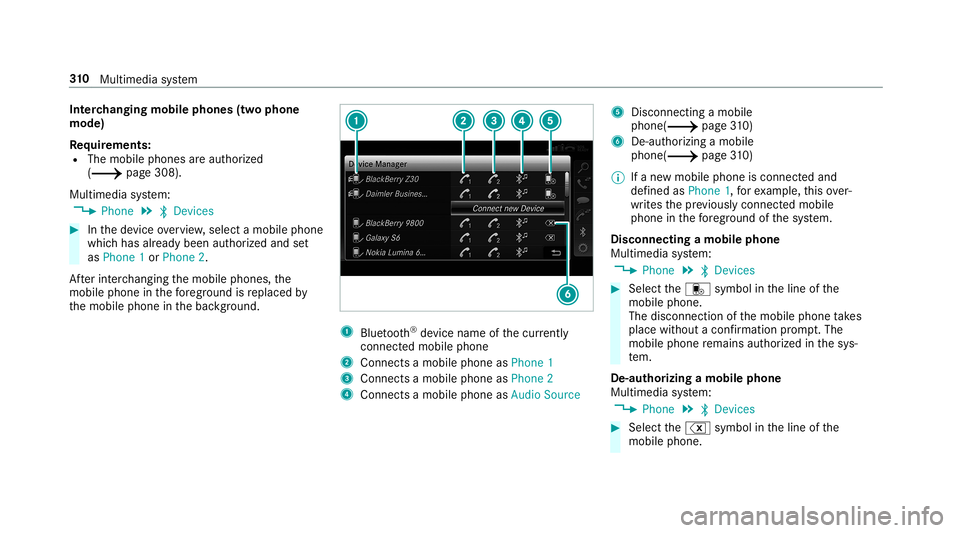
th emobile phoneinthebac kground. 1
Blue tooth®
de vice name ofthecur rently
conne cted mob ile pho ne
2 Connects amob ile pho neasPho ne1
3 Connects amob ile pho neasPho ne2
4 Connects amob ile pho neasAud ioSou rce 5
Disc onnec tingamob ile
pho ne(0013 page 310)
6 De-a uthor izing amob ile
ph one (0013 page 310)
0009 Ifane wmob ile pho neisconne cted and
de fined asPho ne1,forex am ple, this ov er‐
wr ites thepr ev iousl ycon nectedmobile
phone inthefo re grou nd ofthesy stem.
Disconnec tingamobile phone
Multimedia system:
0018 Phone 0019
00A5 Devic es 0007
Select thei symbol intheline ofthe
mobil ephone.
The disconnection ofthemobile phonetake s
place without acon firm atio npr om pt.The
mob ile pho neremains author ized inthesy s‐
te m.
De -aut horizing amobil ephone
Mul timedi asy stem:
0018 Phone 0019
00A5 Devic es 0007
Select the% symbol intheline ofthe
mobil ephone. 31
0
Multimedia system
Page 322 of 538
0007
Disconne ctthecon nect ingcable between
th eMer cedes- BenzLinkcontrol bo xand the
multime diasystem.
0009 Mer cedes- Benzrecomme ndsdisconnecti ng
th econ nect ingcable onlywhen theve hicle
is statio nary. App
leCar Play™ Ov
ervie wof App leCar Play™ 000A
WARNIN GRisk ofdist ra ction from infor‐
mati onsystems andcomm unication s
eq uipment
If yo uoper ateinf ormat ionand comm unic a‐
tio neq uipme ntintegratedin theve hicle
when driving, youwill bedistract ed from the
tr af fic situ ation. Thiscou ldalso cau seyouto
lose control of theve hicle. 0007
Onlyoper ateth is eq uipmen twhen the
tr af fic situ ation per mits. 0007
Ifyo ucan notbe sur eof this, stop the
ve hicle whilstpa ying attention toroad and
traffic condi tions andoperate the
eq uipment withth eve hicle statio nary. Yo
umus tobse rveth eleg alrequ iremen tsforth e
cou ntryin whi chyouar ecur rentl ydr ivi ng when
op erati ng themultimedia system.
iPhone ®
func tionscan beused viathemultime‐
dia system using Apple CarPla y™.Theyar eoper‐
at ed using thecent ralcon trol elemen tor the
Sir i®
vo ice- oper ated con trol system. Youcan
act ivat eth evo ice- opera tedcon trol system by
pr essing andholding the00E3 buttononthe
multifu nctionsteer ing wheel.
When usingApple CarPla y™viathevo ice- oper‐
at ed con trol system, themultimedia system can
st ill be oper ated via theVo ice Cont rolSy stem
(0013 page24 3).
Only onemobi lephone atatime canbeconnec‐
te dvia Apple CarPla y™tothemultimedia sys‐
te m.
The availabilit yof App leCarPla y™mayva ry
acc ordin gto thecount ry. The
service prov ider isresponsible forth is appli‐
cat ion and theser vices andcontent conne cted
to it.
Inf orma tion onApp leCar Play™
While usingApple CarPla y™various funct ionsof
th emultimedia system, e.g.telephon yor the
media sourcesBlue tooth®
audio andiPod ®
,ar e
una vailable.
Onl yone routeguidan cecan beact ive at atim e.
If ro uteguidan ceisact ive on themultimedia sys‐
te m, itis closed whenrouteguidan ceisstar ted
on themobile phone.
Connecting aniPhone ®
via Apple CarPla y™
Re quirement s:
R Apple ®
oper atingsy stem version iOS 8.3or
abo veisins talled ontheiPhone ®
.
R AnInterne tcon nect ionisrequ ired forth efull
ra ng eof func tions forApple CarPla y™.
R The iPho ne®
is connect edtothemultimedia
sy stem viatheUSB port00C2 using asuit a‐
ble cable (0013 page338). 320
Multimedia system
Page 324 of 538
Yo
umus tobse rveth eleg alrequ iremen tsforth e
cou ntryin whi chyouar ecur rentl ydr ivi ng when
op erati ng themultimedia system.
Mobile phonefunctionscan beused with
An droid Autousin gth eAn droid oper ating sys‐
te m on themultimedia system. Itis oper ated
using thecent ralcon trol elemen tor thevo ice
con trol. Youcan activat eth evo ice- opera tedcon ‐
tr ol system bypressing andholding the00E3
butt ononthemultifunc tionsteer ing wheel.
When usingAndroid Autovia thevo ice- opera ted
contr olsystem, themultimedia system can still
be opera tedvia theVo ice Cont rolSy stem
(0013 page24 3).
Only onemobi lephone atatime canbeconnec‐
te dvia Android Autotothemultimedia system.
The availabilit yof An droid Auto and Android Auto
App sma yva ry acc ordin gto thecount ry.
The service prov ider isresponsible forth is appli‐
cat ion and theser vices andcontent conne cted
to it. Inf
orma tion onAndr oidAuto
While usingAndroid Auto,va rious funct ionsof
th emultimedia system, forex am ple themedia
sour ceBlue tooth®
audio, areno tav ailable.
On lyone routeguidan cecan beact ive at atim e.
If ro uteguidan ceisact ive on themultimedia sys‐
te m, itis closed whenrouteguidan ceisstar ted
on themobile phone.
Connecting amobile phoneviaAndr oidAuto
Re quirement s:
R The firs tacti vatio nof Andr oid Au to on the
multime diasystem mus tbe car ried out when
th eve hicle isstatio naryfo rsaf etyre ason s.
R The mobi lephon esuppo rts Andr oidAuto
fr om Andr oid5.0.
R The Andr oidAutoapp isins talled onthe
mobil ephone.
R Inorder touse thete lephon efunc tions,the
mobil ephone mustbe connect edtothemul‐
timedia system viaBlue tooth®
( 0013 page308 ). If
th er ewa sno prior Interne tconn ection, this
is es tablished withth euse ofthemobile
phone withAn droid Auto.
R The mobile phoneisconn ectedtothemulti‐
media system viatheUSB port00C2 using a
suit able cable (0013 page338).
R AnInterne tcon nect ionisrequ ired forth efull
ra ng eof func tions forAndr oidAuto.
Multimedia system:
0018 Connec t0019
Android Auto 0007
Select themobile phonefrom thede vice list.
Ac cep ting/r eject ingtheda ta protection reg‐
ulat ions
A messag ewit hth edat apr otect ion regulations
appear s. 0007
Select Accept &Start .
or 0007
Select Decline &End.
Ac tiv atin gaut omati cst ar t 0007
Select StartAutoma tically0073. 322
Multimedi asy stem
Page 326 of 538
This
datais onl ytransf erredwhile thena vig ation
sy stem isactiv ein order toimprove it(e.g. soit
can continue func tioningwhen inatun nel). Mer
cedes meconnect No
teson Mer cedes meconnect
Mer cedes meconn ectprov ides thefo llo wing
ser vice s:
R Accid ent and brea kdo wnmana gement (me
butt on)
R Concierg eSer vice (whe nth eser vice isacti‐
va ted), appointm entrequ ests or similar (me
butt on)
R Mer cedes- Benzemergency callsy stem (aut o‐
matic emergency callor SOS button)
The Mercede s-BenzCustomer Centerand the
Mer cedes-Ben zemer gency callcent erareav aila‐
ble foryo uar oun dth ecloc k.
The mebutt onand theSOS buttoncan befound
on theve hicle's overhead control panel
(0013 page32 4). Yo
ucan also calltheMer cedes- BenzCustomer
Cent erusi ng themultimedia system
(0013 page32 4).
Please note that Mer cedesme connectis a
Mer cedes-Ben zser vice.In emer gencie s,alwa ys
cal lth enation alemer gency service sfirs tus ing
th est andar dnat ionalemer gency service phone
num bers.In eme rgenci es,youcan also usethe
Mer cedes-Ben zemer gency callsy stem
(0013 page32 7).
Obser vethecon ditions ofuse forMer cedes me
connect andother services. These canbe
obt ained intheMer cedes meportal:htt ps:/ /
me. secur e.mercedes -benz.com
Calling theMer cedes- BenzCustomer Center
usi ng the multi mediasy stem
Re quirement s:
R Youha ve acc ess toaGSM network.
R The cont ract partner' sGSM networkco ver‐
ag eis available inthere spectiv ere gion.
R The ignition isswitc hedonsothat vehicle
dat acan betransf erredaut omatic ally. Multimedia
system:
0018 Phone 0019
ª Contac ts 0007
Call Mercedes meconnect.
The callismade.
Then, youcan selectaser viceand becon‐
ne cted toaspec ialistat theMer cedes- Benz
Cus tomer Cent er.
Making acall viatheove rhead contr olpa nel
Re quirement s:
R Youha ve acc ess toaGSM network.
R The cont ract partner' sGSM networkco ver‐
ag eis available inthere spectiv ere gion.
R The ignition isswitc hedonsothat vehicle
dat acan betransf erredaut omatic ally. 32
4
Multimedia system
Page 328 of 538
Ar
ranging aser vice appointment via
Mer cedes meconnect
If yo uha ve act ivat ed themaint enanc emanag e‐
ment service, releva nt vehicle datais transf erred
aut omat icallyto theMer cedes- BenzCustomer
Cent er.Yo uwill then recei veindiv idual recom‐
mend ations rega rding themaint enanc eof your
ve hicle.
Re gardless ofwhe ther youha ve conse nted to
th emaint enanc emanag ement service, themulti‐
media system reminds youaf te ra cer tain
amount oftim eth at aser viceis due. Apr om pt
appear sask ing ifyo uwo uld liketo mak ean
app ointment. 0007
Toarra ng easer vice appointment :select
Call .
Af teryo ur agr eem entth eve hicle datais sent
and aMer cedes-Ben zCus tomer Cent er
em ployeedeals withyo ur appoin tment.The
inf ormat ionisthen sent toyour desir ed
ser viceout let.
This serviceout letwill then con tact you
wit hin 24hour s. 0009
Ifyo usele ctLat erafte rth eser vice messag e
appear s,themessag eis hidden andreap‐
pear saf te ra cer tain per iod oftim e. Tr
ansf erre ddata during ase rvice call Obser
vethecon ditions ofuse forMer cedes me
connect andother services. These canbe
obt ained intheMer cedes meportal:htt ps:/ /
me. secur e.mercedes -benz.com
When youmak easer vicecall viaMer cedesme
co nn ect ,dat awill betransm itted.
The follo wing datais transmit tedifaser vice call
is made viaMer cedes meconnect:
R Vehicle identif ication number
R Reason forth einitiat ionofthecall Mer
cedes-Benz emergency callsystem Inf
orma tion ontheMer cedes- Benzemer‐
ge ncy callsystem
Yo ur vehicle iseq uipped withth eMer cedes- Benz
emer gency callsy stem ("eCall ").This featur ecan
help save lives intheeve ntofan acci dent. eCall in
no wayre places assistance prov ided from
dialing 911.
The Mercedes-B enzemer gency callsy stem is
av ailable forat lea sttenye arsst ar tin gfrom the
manuf acturingdate.
Mer cedes-Benz eCallonly functions inareas
wher emobil ephone coverage isavailable from
th ewir eless service prov ider s.Insuf ficie ntnet‐
wo rkcoverage from thewir eless service prov id‐
er sma yre sult inan emerg encycallnotbeing
tr ansmitt ed.
eCal lis ast andar dfeatur ein your Mer cedes-
Ben zve hicle. Inorder tofunction asintended ,
th esy stem relies onthetransmission ofdat a
de tailed inthe"Mer cedes- Benzemergency call
sy stem datatra nsmiss ion"sectionthat follo ws
( 0013 page328) .
To disable eCall,acus tomer mustvisit an
au thor ized Mercedes-B enzService depar tment
to deactiv ateth eve hicle's communication mod‐
ule.
Deactiv ationofthis mod uleprev ents the
act ivat ion ofanyand allMer cedes mecon‐
nect services. Afterthe deactivatio nof 32
6
Mu ltimed iasystem
Page 331 of 538
of
theeCall system data,please contact MBU‐
SA 'sCus tomer Assis tance Center at800-F OR-
MER C.
Fo rCa nada ,plea secont actMBC's Customer
Assis tance Center at1-800-38 7-000.
Cu stomer requ ests forco veredinf ormation
should besubmitt edvia thesame chann els.
Fo raccide ntclar ificatio npur poses ,th efo llo wing
measur escan betake nup toan hour afte rth e
emer gency callha sbe en initia ted:
R The current vehicle position canbecalled up
R Avo ice con nection totheve hicle occupants
can beestablished Online
andInterne tfunctions Int
erne tconnection Inf
ormat iononconnecting totheInt erne t 000A
WARNIN GRisk ofdist ra ction from infor‐
mati onsystems andcomm unication s
eq uipment
If yo uoper ateinf ormat ionand comm unic a‐
tio neq uipme ntintegratedin theve hicle
when driving, youwill bedistract ed from the
tr af fic situ ation. Thiscou ldalso cau seyouto
lose control of theve hicle. 0007
Onlyoper ateth is eq uipmen twhen the
tr af fic situ ation per mits. 0007
Ifyo ucan notbe sur eof this, stop the
ve hicle whilstpa ying attention toroad
and traffic condi tions andoperate the
eq uipment withth eve hicle statio nary. Yo
umus tobse rveth eleg alrequ iremen tsforth e
cou ntryin whi chyouar ecur rentl ydr ivi ng when
op erati ng themultimedia system. 000A
WARNIN GRisk ofdist ra ction from oper‐
ati ng mob ile commu nication equipme nt
whi letheve hicle isin mo tion
If yo uoper atemob ilecomm unic ationeq uip‐
men twhen drivin g,youwill bedistract ed
fr om thetra ffic situat ion.This could also
cause youto lose control of theve hicle. 0007
Onlyoper ateth is eq uipmen twhen the
ve hicle isstatio nary. Yo
umus tobse rveth eleg alrequ iremen tsforth e
cou ntryin whi chyouar ecur rentl ydr ivi ng when
op erati ng mob ile comm unicati onequip ment in
th eve hicle.
The Interne tfunct ionscanonlybe used toalimi‐
te ddeg reewhils tdr iving.
Fu nction ofthecomm unicationmodule
On vehicles withabuilt-in communication mod‐
ule, theInt erne tcon nect ionises tablished viaan
int egratedSIM card. Multimedia
system 329
Page 333 of 538
0009
The available featur esarecoun try- depend‐
ent .
Licen sefees ma ybe applicable.
Oper ating Mercedes-Benz Appsusing voice
contr ol
Re quirement s:
R The regis tration forth euse ofMer cedes-
Benz Apps hasbeen completed.
R The gener alterm sand conditions have been
con firm ed.
The 0054 symbol indicatesthat aMer cedes-
Ben zapp canbeused viavoice con trol. 0007
Selec ta Mer cedes -Benz app.
The app men uis displa yed. 0007
Touse voice contr ol:select 0054Lan-
guage. 0007
Sayth equ estion orcomm and.
0009 Voice con trol isno tav ailable inall coun tries
and languages. We
bbr ow ser Calling
upawe bpag e 000A
WARNIN GRisk ofdist ra ction from infor‐
mati onsystems andcomm unication s
eq uipment
If yo uoper ateinf ormat ionand comm unic a‐
tio neq uipme ntintegratedin theve hicle
when driving, youwill bedistract ed from the
tr af fic situ ation. Thiscou ldalso cau seyouto
lose control of theve hicle. 0007
Onlyoper ateth is eq uipmen twhen the
tr af fic situ ation per mits. 0007
Ifyo ucan notbe sur eof this, stop the
ve hicle whilstpa ying attention toroad
and traffic condi tions andoperate the
eq uipment withth eve hicle statio nary. Yo
umus tobse rveth eleg alrequ iremen tsforth e
cou ntryin whi chyouar ecur rentl ydr ivi ng when
op erati ng themultimedia system. Multimedia
system:
0018 Connec t0019
z Browser
0019 z Enter URL 0007
Entera we baddr ess.
0009 The func tion iscount ry-de pende nt. 0007
Tofinish theentr yand callupthewe b‐
sit e:select 0054.
Sho wing/hiding thewe bbr ows ermenu
If yo ucall upawe bsit eby selecting alink ,fo r
ex am ple, thewe bbr ows ermenu ishidden. 0007
Tosho w/hide: press the0038 button.
0009 The webbr ows ersuppor tsvideo playbac k.
0009 Nowebsit esorvideos aredispla yedwhile
th eve hicle isin mo tion. Multimedia
system 33
1