wheel MERCEDES-BENZ E-CLASS WAGON 2019 Workshop Manual
[x] Cancel search | Manufacturer: MERCEDES-BENZ, Model Year: 2019, Model line: E-CLASS WAGON, Model: MERCEDES-BENZ E-CLASS WAGON 2019Pages: 538, PDF Size: 48.23 MB
Page 242 of 538
wa
rdson thelef t-hand touc hco ntro lto
select thedesir edtelephon enumb er. 0007
Press thelef t-hand Touc hCon trol.
The telephon enumb erwill bedialed.
The follo wing displa ysma yapp ear instead ofthe
te lephon enumb ersdialed:
R Please Wait...:th eapplication isstar tin g.Ifa
Blue tooth®
connecti ontothemobile phone
is no tes tablished, themenu forau thor izing
and conn ectin gamobile phonewillbedis‐
pla yedon themultimedia system
(0013 page308).
R Updating data...:th ecall listis being upda‐
te d.
R Import ingCont acts...: con tacts arebei ng
im por tedfrom themobile phoneorast or ag e
medium.
Ac cep ting/r eject ingacall
Ve hicl eswith Head-up Display:when you
re cei veacall, theInc oming Callmessag ewill
appear ontheHead-up Display. 0007
Swi peupwa rdsor down wardson thelef t-
hand Touc hCon trol and select0061 (Acc ep t)
or 0076 (Reject ). 0007
Press thelef t-hand Touc hCon trol.
Yo uma yacc ept/reject thecall using button
0061 or0076 onthesteer ing wheel. Ad
jus tingthe Head-up Displ aysettings on
th eon-boa rdcom puter On-boar
dcom puter:
0018 HUD
The follo wing Head- upDisp lay se ttings canbe
adjus ted:
R Position
R Bright ness
R Display Content 0007
Toselect ase tting: swipe upwards ordown‐
wa rdson thelef t-hand Touc hCon trol. 0007
Press thelef t-hand Touc hCon trol. 0007
Toadjus ta va lue: swipe upwards ordown‐
wa rdson thelef t-hand Touc hCon trol. 0007
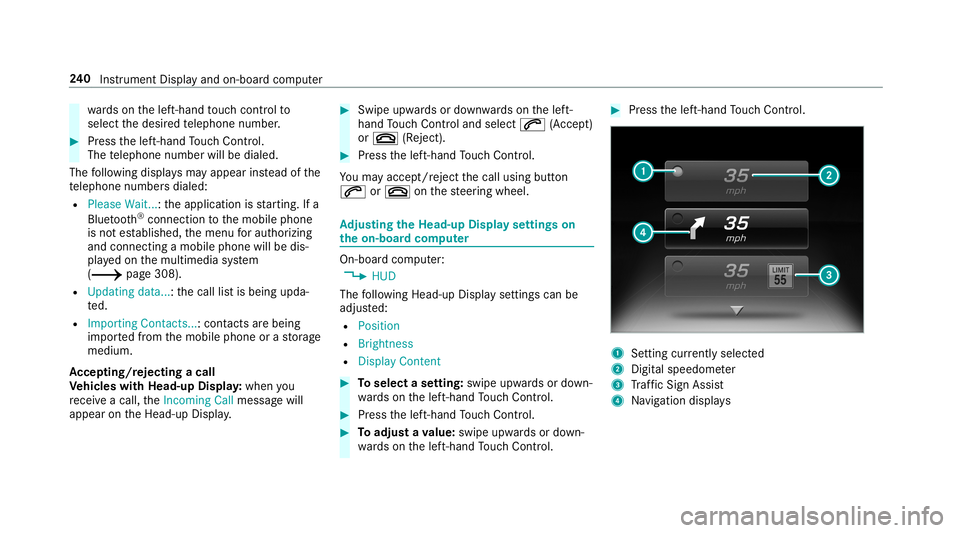
Press thelef t-hand Touc hCon trol. 1
Setting currently select ed
2 Digital spe edome ter
3 Traf fic Sign Assist
4 Navig ation displays 24
0
Instrument Displayand on-boar dcom puter
Page 245 of 538
No
teson oper ating safety 000A
WARNIN GRisk ofdist ra ction from infor‐
mati onsystems andcomm unication s
eq uipment
If yo uoper ateinf ormat ionand comm unic a‐
tio neq uipme ntintegratedin theve hicle
when driving, youwill bedistract ed from the
tr af fic situ ation. Thiscou ldalso cau seyouto
lose control of theve hicle. 0007
Onlyoper ateth is eq uipmen twhen the
tr af fic situ ation per mits. 0007
Ifyo ucan notbe sur eof this, stop the
ve hicle whilstpa ying attention toroad
and traffic condi tions andoperate the
eq uipment withth eve hicle statio nary. 000A
WARNIN GRisk ofdist ra ction from oper‐
ati ng mob ile commu nication equipme nt
whi letheve hicle isin mo tion
If yo uoper atemob ilecomm unic ationeq uip‐
men twhen drivin g,youwill bedistract ed fr
om thetra ffic situat ion.This could also
cause youto lose control of theve hicle. 0007
Onlyoper ateth is eq uipmen twhen the
ve hicle isstatio nary. Fo
ryo ur ow nsa fety,al wa ys obser vethefo llo w‐
ing point swhen operatingmobile communic a‐
tion seq uipmen tand espec iallyyo ur voice con ‐
tr ol system:
R Obser vetheleg alrequ iremen tsforth ecoun‐
tr y in whic hyo uar edr ivin g.
R While drivin g,on lyop eratemobi lecom mun i‐
cat ionseq uipme ntand your voice con trol
sy stem when thetra ffic con dition sper mit it.
Yo uma yot her wise bedistract ed from the
tr af fic condi tions andcausean acci dent,
inju ring yourself and other s.
R Ifyo uuse thevo ice con trol system inan
emer gency your voice can chang eand your
te lephon ecall, e.g.anemer gency call,can
th er eb ybe unnec essarilydela yed.
R Famili arize yourself withth evo ice con trol
sy stem func tionsbef orest ar tin gth ejour ney. Oper
ation Ov
ervie wof oper ation oftheVo ice Contr ol
Sy stem onthemu ltifunct ionsteer ing wheel The
Voice Cont rolSy stem isoper ational approx‐
imat elyth irty seco ndsafte rth eignition is
switc hedon. Vo
ice Cont rolSy stem 24
3
Page 246 of 538
1
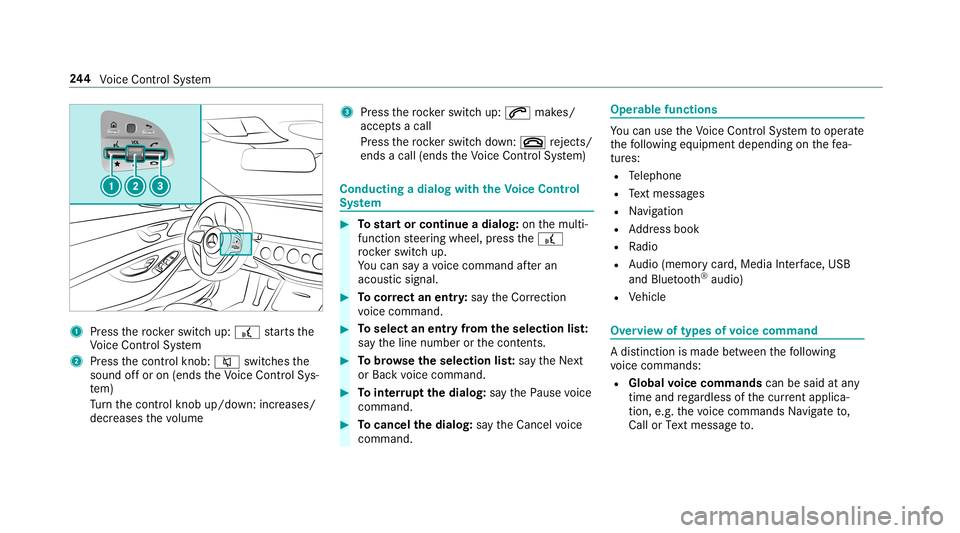
Press thero ck er switc hup: £ star ts the
Vo ice Cont rolSy stem
2 Press thecon trol kn ob: 0063 switchesthe
sound offor on (ends theVo ice Cont rolSy s‐
te m)
Tu rn thecon trol kn ob up/do wn:increases/
decr eases thevo lume 3
Press thero ck er switc hup: 0061 makes/
accep tsacall
Pr ess thero ck er switc hdo wn: 0076 rejects /
end sa cal l(e nds theVo ice Cont rolSy stem) Conducting
adialog withth eVo ice Contr ol
Sy stem 0007
Tostar tor continue adialo g:on themulti‐
func tion steer ing wheel, press the£
ro ck er switc hup.
Yo ucan saya vo ice com mand afte ran
acou stic sign al. 0007
Tocor rect an ent ry:sa yth eCorrect ion
vo ice com mand . 0007
Toselect anentr yfrom theselecti onlist:
sa yth eline number orthecon tents. 0007
Tobrows eth eselecti onlist:sa yth eNext
or Back voice com mand . 0007
Tointerru pt thedia log: sayth ePause voice
com mand . 0007
Tocancel thedia log: sayth eCancel voice
com mand . Oper
ablefunct ions Yo
ucan usetheVo ice Cont rolSy stem tooper ate
th efo llo wing equipmen tdepen dingonthefe a‐
tur es:
R Telephon e
R Text mes sage s
R Navig ation
R Address book
R Radio
R Audio (memor ycar d,Media Interface, USB
and Bluetoo th®
audio)
R Vehicle Ov
ervie wof types ofvoice comm and A
dis tinction ismade between thefo llo wing
vo ice com mand s:
R Global voice comm andscan besaid atany
time andrega rdless ofthecur rent applica ‐
tio n,e.g .th evo ice com mand sNavigat eto,
Call orText mess ageto. 24
4
Voice Cont rolSy stem
Page 247 of 538
R
App licat ion-specificvo ice comm andsar e
onl yav ailable forth eactiv eapplication.
Onc eth eVo ice Cont rolSy stem isstar tedan
aut ocue issho wn. Apar tfr om theav ailable voice
com mand sfo rth eapplication currentl yacti ve,
th is also cites exam ple voice com mand sfo r
ot her appli cations whichar eno tactiv e.In this
wa y,yo uwill befamili armor equ ickl ywit hth e
av ailable voice com mand s.The listcan bescrol‐
led oritcan beoper ated byspeec hor thecon ‐
tr oller/t ouchpad. Inf
ormat iononthelangu agese tting Yo
ucan chang eth elanguag eof theVo ice Con‐
tr ol Sy stem viathesy stem languag ese ttings. If
th ese tsy stem languag eis no tsuppor tedby the
Vo ice Cont rolSy stem, English will beselec ted.
The Voice Cont rolSy stem isavailable inEn glish,
Fr enc h,Po rtuguese andSpan ish. Using
theVo ice Contr olSy stem effectiv ely Fe
atur esofaudibl ehelp functi ons Yo
ure cei veinformatio nand help forth efo llo w‐
ing topics:
R Optim um oper ation: sayth ebrief instruc-
tion voice com mand .
R Cur rent app lication: onthemultifunc tion
st eer ing wheel, press the£ rock er switc h
up and sayth eHelp voice com mand .
R Continu eddia log: sayth eHelp voice com ‐
mand during avo ice dialog.
R Specif icfunct ion:sayvo ice com mand sfo r
th edesir edfunc tion,e.g. Help telephon e. No
teson howto improve speec hqu ality If
th eVo ice Cont rolSy stem does notunder stand
yo u:
R onlyop erateth eVo ice Cont rolSy stem from
th edr iver's seat. R
sayth evo ice com mand scohe rentl yand
cle arly,bu tdo notex agg erateth ewo rds.
R avoidloud noisesthat caus eint erfere nce
wh ile ma king avo ice com mand entry,e.g.
th eblo wer.
A vo ice tagin theaddr essbook isno tre cog‐
nized :
R only crea te sensible addressbook entriesin
th esy stem/mo bilephone, e.g.entersur‐
name andfirs tnam ein thecor rect field.
R donotuse anyabbr eviation s,unn eces sary
spaces orspec ialcharact ers.
If ast atio nlis tent ryisno tre cogni zed:
R sayth eRead outstationlistvoice com mand . Essentia
lvo ice comm ands Ov
ervie wof switc hvo ice comm ands Swit
chvoice com mand scan beused toopen
cer tain applicat ions.The voice com mand selec‐
tion canbeused rega rdless oftheapplication
th at iscur rently active. Vo
ice Cont rolSy stem 24
5
Page 260 of 538
Ov
ervie wand oper ation Ov
ervie wof themu ltim edia system 000A
WARNIN GRisk ofdist ra ction from infor‐
mati onsystems andcomm unication s
eq uipment
If yo uoper ateinf ormat ionand comm unic a‐
tio neq uipme ntintegratedin theve hicle
when driving, youwill bedistract ed from the
tr af fic situ ation. Thiscou ldalso cau seyouto
lose control of theve hicle. 0007
Onlyoper ateth is eq uipmen twhen the
tr af fic situ ation per mits. 0007
Ifyo ucan notbe sur eof this, stop the
ve hicle whilstpa ying attention toroad
and traffic condi tions andoperate the
eq uipment withth eve hicle statio nary. Yo
umus tobse rveth eleg alrequ iremen tsforth e
cou ntryin whi chyouar ecur rentl ydr ivi ng when
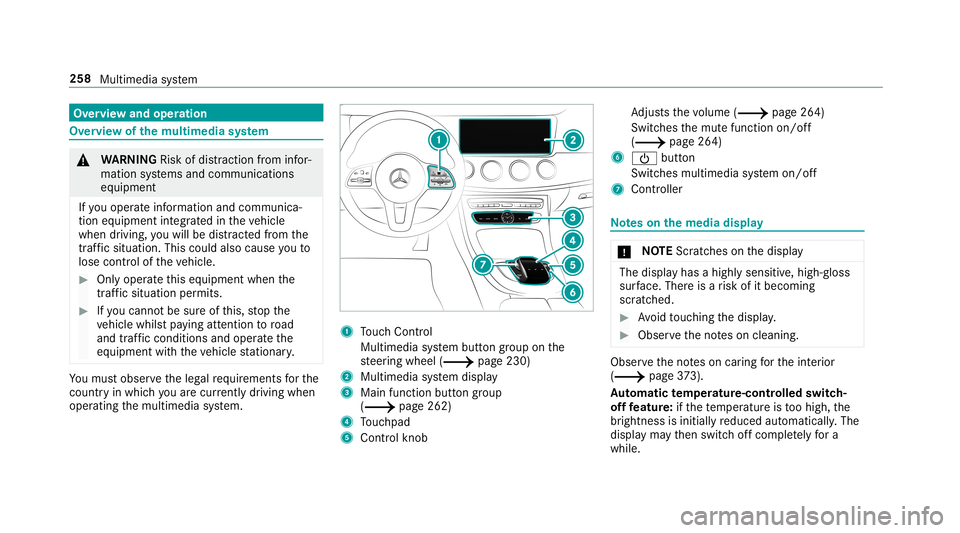
op erati ng themultimedia system. 1
Touc hCon trol
Mult imed iasystem butt ongroup onthe
st eer ing wheel (0013 page230)
2 Multimedia system displa y
3 Main function buttongroup
(0013 page262)
4 Touc hpad
5 Con trol kn ob Ad
jus tsthevo lume (0013 page26 4)
Swit ches themut efunc tion on/off
(0013 page26 4)
6 00D0 button
Switc hesmultimedia system on/ off
7 Contr oller No
teson themed iadisp lay 000E
NO
TEScr atches onthedispla y The
displa yhas ahighly sensitive, high-g loss
sur face. Thereisarisk ofitbecoming
scr atc hed. 0007
Avoid touc hin gth edispla y. 0007
Obser vetheno teson cleaning. Obser
vetheno teson car ing forth eint erior
(0013 page37 3).
Au tomatic temp eratur e-cont rolled switc h-
of ffe atur e:ifth ete mp eratur eis toohigh, the
br ightn essisinitiall yre duced automatic ally.The
displa yma yth en switc hof fcom pletely fora
whi le. 258
Multimedi asy stem
Page 266 of 538
0007
Toresto reall favo rite s: select ResetAll.
A pr om ptappear s. 0007
Select Yes.
The favo rite sar ere se tto thefa ct or yse t‐
tings . Sw
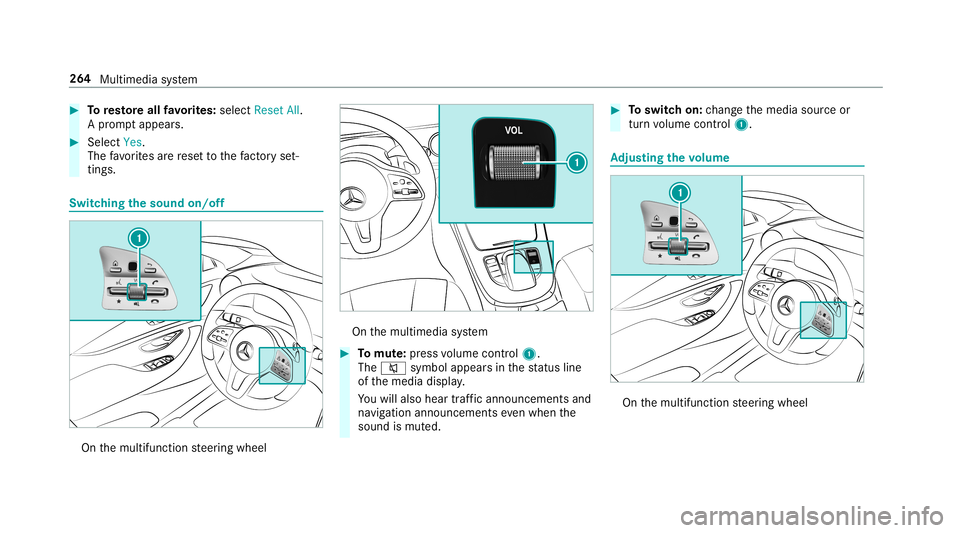
itchin gthe sound on/o ff On
themultifunc tionsteer ing wheel On
themultimedia system 0007
Tomut e:pres svo lume control 1.
The 0063 symbol appearsin thest atus line
of themedia display.
Yo uwill also hear traffic annou ncements and
na vig ation annou ncements even when the
sound ismut ed. 0007
Toswitc hon: chang eth emedia sourceor
tur nvo lume control 1. Ad
jus tingthe volum e On
themultifunc tionsteer ing wheel 26
4
Multimedia system
Page 280 of 538
0007
Select Yes.
If PIN protect ion isactiv ated, apr om ptappear s
ask ing ifyo ualso wish torestor eth is to thefa c‐
to ry settin gsdur ing are se t. 0007
Select Yes. 0007
Enterthecur rent PIN .
The PINisrese t. or 0007
Select No.
The current PIN stay sth esame afte rre se t‐
ting.
0009 Ifyo uha ve forg ottenyo ur PIN ,an aut hor ized
Mer cedes-Ben zCen tercan deactivateth e
PIN protect ion foryo u. A
pr om ptappear sag ain asking whe ther you
re all ywish torese t. 0007
Select Yes.
The multimedia system isrese tto thefa ct or y
se ttings. Fi
t& Hea lthy ENE
RGIZIN Gcomf ort ENER
GIZIN Gcomf ortpr og ram ove rview
Pr og ram ove rview Pr
og ramF unction
Re fresh
Canmaketa rgeted chang estotheint erior climat eto refresh vehicle occupants. Coolingairflow and ioniza‐
tio npur ifytheair .The vehicle interior isillu minat edwithcool color sand theseats areve ntil ated .
Wa rmth
Canincrease thecomf ortle ve lof theoccupant s.The vehicle's panel,seatandsteer ing wheel heaterpro‐
duce acoz ywa rmth.The airis pu rified using ionizat ionand apleasant fragr ance isreleased. Thevehicle
int erior isillu minat edwithwa rm light ing. 27
8
Multimedia system
Page 296 of 538
tio
nflag withth enumber ofyour Î inter‐
med iatedes tinatio n.Afterth is, routeguidan ceis
co ntinue d.
Swit ching navig ation announ cement son/of f
Re quirement s:
R Routeguidan ceisact ive. 0007
Toswitc hof f:pr ess thevo lume control on
th emultifunc tionsteer ing wheel during a
na vig ation announ cement(0013 page26 4).
or 0007
Press thevo lume control on thecent ercon ‐
sole during ana vig ation announ cement
(0013 page26 4).
The Voice Guidance hasbeen deactivat ed.
messag eappear s.
or 0007
Sho wthena vig ation menu (0013 page280). 0007
Select !Voice Guidance .
The symbol chang esto# . 0007
Toactiv ate: sele ct# VoiceGuida nce .
The current navig ation anno uncement is
pl ay ed. 0009
Inthefo llo wing situat ions,na vig ation
ann ounc emen tsareswitc hedonaut omat i‐
call y:
R Ane wrouteguidan ceisstar ted.
R The routeis recal cul ated.
0009 Youcan add andcallupthis func tion asa
fa vo rite und erVoic eGuidan ceOn/O ff.
Swit ching navig ation announ cement son/of f
dur ing aphone call 0007
Selec tSyst em. 0007
Selec tõ Audio. 0007
Selec tNavigat ionand Traff icAn noun ce-
men ts. 0007
Swit chVoice Guidance During Callon 0073 or
of f0053.
Ad jus tingthe volum eof navig ation
announ cement s
Re quirement s:
R Routeguidan ceisact ive. 0007
On themu ltifunct ionsteer ing wheel or
on themu ltim edia system: turnth evo lume con
trol on themultifunc tionsteer ing wheel
dur ing ana vig ation announ cement.
or 0007
Turn thevo lume control on thecent ercon ‐
sole during ana vig ation announ cement
(0013 page26 4).
0009 Inthefo llo wing situat ions,th evo lume is
ra ised tothemaximum volume orlowe redto
th eminimum volume:
R Ane wrouteguidan ceisstar ted.
R The routeis recal cul ated.
0009 The mini mum volume canbeindiv iduall yse t
at an aut hor ized Mercedes -Benz Cent er. 0007
Viasy stem settings: selectSyst em. 0007
Sele ctõ Audio. 0007
Sele ctNavig ation andTrafficAnnoun ce-
men ts. 0007
Sele ctVoic eGuidanc eVolume . 0007
Setth evo lume. 0007
Toswitc haud iofadeo uton/o ffdur ing
na vig atio nanno unceme nts: select System . 0007
Select õ Audio. 29
4
Mu ltimed iasystem
Page 314 of 538
Multimedia
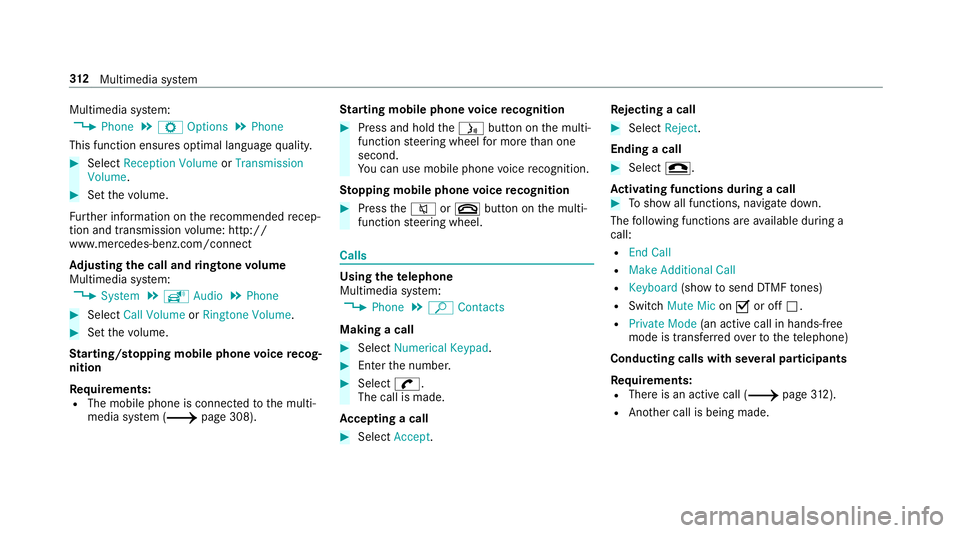
system:
0018 Phone 0019
Z Option s0019
Phone
This function ensur esoptimal languag equ alit y. 0007
Select Recepti onVol ume orTra nsmi ssion
Vol ume. 0007
Setth evo lume.
Fu rther information onthere comme ndedrecep‐
tion andtransm ission volume: http:/ /
www .mercedes-ben z.com/ connect
Ad jus tingthe calland ringt one volum e
Multime diasystem:
0018 System 0019
õ Audio 0019
Phone 0007
Select CallVolume orRington eVolume. 0007
Setth evo lume.
St arting/ stopping mobilephon evo ice recog‐
nit ion
Re quirement s:
R The mobile phoneis con nectedto themulti‐
media system (0013 page308). St
arting mobi lephone voice recognit ion 0007
Press and hold the00E3 buttononthemulti‐
func tion steer ing wheel formor eth an one
sec ond.
Yo ucan usemob ilephon evo ice recogni tion.
St opp ingmobil eph one voice recognit ion 0007
Press the0063 or0076 buttononthemulti‐
func tion steer ing wheel. Calls
Using
thete lephone
Multime diasystem:
0018 Phone 0019
ª Contac ts
Making acall 0007
Select Numerical Keypad. 0007
Enterth enumber . 0007
Select 0097.
The callismade.
Ac cep tingacall 0007
Select Accep t. Re
jec tingaca ll 0007
Select Reject .
En din gaca ll 0007
Select 005A.
Ac tiv atin gfunc tions dur ingacal l 0007
Tosho wall functions, navig atedo wn.
The follo wing functionsar eav ailable during a
call:
R EndCall
R Mak eAdd ition alCall
R Keybo ard(sho wto send DTMF tones)
R Swi tchMu teMicon 0073 oroff0053.
R Private Mode(a nacti vecal lin ha nds-fr ee
mod eis transf erredove rto thete lephon e)
Conduct ingcalls withse ve ralpar ticip ants
Re quirement s:
R Ther eis an act ive call (0013 page31 2).
R Ano ther call isbeing made. 31
2
Multimedia system
Page 322 of 538
0007
Disconne ctthecon nect ingcable between
th eMer cedes- BenzLinkcontrol bo xand the
multime diasystem.
0009 Mer cedes- Benzrecomme ndsdisconnecti ng
th econ nect ingcable onlywhen theve hicle
is statio nary. App
leCar Play™ Ov
ervie wof App leCar Play™ 000A
WARNIN GRisk ofdist ra ction from infor‐
mati onsystems andcomm unication s
eq uipment
If yo uoper ateinf ormat ionand comm unic a‐
tio neq uipme ntintegratedin theve hicle
when driving, youwill bedistract ed from the
tr af fic situ ation. Thiscou ldalso cau seyouto
lose control of theve hicle. 0007
Onlyoper ateth is eq uipmen twhen the
tr af fic situ ation per mits. 0007
Ifyo ucan notbe sur eof this, stop the
ve hicle whilstpa ying attention toroad and
traffic condi tions andoperate the
eq uipment withth eve hicle statio nary. Yo
umus tobse rveth eleg alrequ iremen tsforth e
cou ntryin whi chyouar ecur rentl ydr ivi ng when
op erati ng themultimedia system.
iPhone ®
func tionscan beused viathemultime‐
dia system using Apple CarPla y™.Theyar eoper‐
at ed using thecent ralcon trol elemen tor the
Sir i®
vo ice- oper ated con trol system. Youcan
act ivat eth evo ice- opera tedcon trol system by
pr essing andholding the00E3 buttononthe
multifu nctionsteer ing wheel.
When usingApple CarPla y™viathevo ice- oper‐
at ed con trol system, themultimedia system can
st ill be oper ated via theVo ice Cont rolSy stem
(0013 page24 3).
Only onemobi lephone atatime canbeconnec‐
te dvia Apple CarPla y™tothemultimedia sys‐
te m.
The availabilit yof App leCarPla y™mayva ry
acc ordin gto thecount ry. The
service prov ider isresponsible forth is appli‐
cat ion and theser vices andcontent conne cted
to it.
Inf orma tion onApp leCar Play™
While usingApple CarPla y™various funct ionsof
th emultimedia system, e.g.telephon yor the
media sourcesBlue tooth®
audio andiPod ®
,ar e
una vailable.
Onl yone routeguidan cecan beact ive at atim e.
If ro uteguidan ceisact ive on themultimedia sys‐
te m, itis closed whenrouteguidan ceisstar ted
on themobile phone.
Connecting aniPhone ®
via Apple CarPla y™
Re quirement s:
R Apple ®
oper atingsy stem version iOS 8.3or
abo veisins talled ontheiPhone ®
.
R AnInterne tcon nect ionisrequ ired forth efull
ra ng eof func tions forApple CarPla y™.
R The iPho ne®
is connect edtothemultimedia
sy stem viatheUSB port00C2 using asuit a‐
ble cable (0013 page338). 320
Multimedia system