remote control MERCEDES-BENZ E-SEDAN 2014 Owners Manual
[x] Cancel search | Manufacturer: MERCEDES-BENZ, Model Year: 2014, Model line: E-SEDAN, Model: MERCEDES-BENZ E-SEDAN 2014Pages: 430, PDF Size: 5.8 MB
Page 18 of 430
Remote control
Garage door opener .......................331
Programming (garage door opener) 331
Replacing bulbs
Important safety notes ..................137
Overview of bulb type s.................. 137
Reporting safety defects ....................27
Reserve (fuel tank) see Fuel
Reserve fuel
Display message ............................ 272
Warning lamp ................................. 292
see Fuel
Residual heat (climate control) ........154
Restraint system see SRS (Supplemental Restraint
System)
Reverse gear
Engaging (automatic transmission) 167
Reversing feature
Panorama sliding sunroo f.............. 103
Roller sunblinds ............................. 104
Side windows ................................... 98
Sliding sunroof .............................. .103
Trunk lid/tailgate ............................. 91
Reversing lamps (display message) 268
Roadside Assistance (breakdown) ....24
Roller sunblind Panorama roof with power tilt/
sliding pane l.................................. 104
Rear side windows .........................318
Rear window .................................. 318
Roof carrier ........................................ 314
Roof lining and carpets (cleaning
guidelines) ......................................... 349
Roof load (maximum) ........................426 S
Safety Children in the vehicle .....................60
Child restraint systems ....................60
Occupant Classification System
(OCS) ............................................... 48
Safety system
see Driving safety systems Seat belts
Adjusting the driver's and front-
passenger seat belt .........................57
Adjusting the height ......................... 58
Belt force limiters ............................ 59
center rear-compartment sea t......... 58
Cleaning ......................................... 348
Correct usage .................................. 56
Emergency Tensioning Devices ....... .59
Fastening ......................................... 56
Important safety guidelines .............55
Releasing ......................................... 58
Safety guidelines ............................. 41
Switching belt adjustment on/off
(on-board computer) ......................252
Warning lamp ................................. 285
Warning lamp (function) ................... 58
Seats
Adjusting (electrically) ...................110
Adjusting the 4-way lumbar
support .......................................... 114
Adjusting the active multicontour
seat ............................................... 113
Adjusting the head restraint ..........110
Cleaning the cover .........................348
Correct driver's seat position ........108
Folding the backrest (rear
compartment) forwards/back .......305
Important safety notes ..................109
Massage function .......................... 113
Overview ........................................ 109
Seat heating problem ....................118
Seat ventilation problem ................119
Storing settings (memory function) 125
Switching seat heating on/off .......116
Switching seat ventilation on/off ..118
Selector lever
Cleaning ......................................... 347
Sensors (cleaning instructions) .......346
Service menu (on-board computer) .249
Service products Brake fluid ..................................... 423
Coolant (engine) ............................ 423
DEF special additives .....................421
Engine oil ....................................... 422
Fuel ................................................ 418
Important safety notes ..................41816
IndexProCarManuals.com
Page 20 of 430
Paddle shifter
s............................... 172
Steering wheel heating ..................120
Storing settings (memory function) 125
Steering wheel heating
Problem (malfunction) ...................121
Switching on/off ........................... 120
Steering wheel paddle shifters ........172
Stopwatch (RACETIMER) ................... 254
Stowage areas ................................... 298
Stowage compartments Armrest (under) ............................. 300
Center console .............................. 299
Cup holders ................................... 316
Eyeglasses compartment ...............299
Glove box ...................................... .299
Important safety information .........298
Rear ............................................... 300
Stowage net ................................... 301
Under driver's seat/front-
passenger seat .............................. 300
Stowage net ....................................... 301
Stowage well beneath the trunk
floor .................................................... 312
Summer tires ..................................... 374
Sun visor ............................................ 317
Surround lighting (on-board
computer) .......................................... 251
Suspension tuning AIRMATIC ...................................... 205
AMG adaptive sport suspension
system ........................................... 206
SETUP (on-board computer) ..........254
Switching air-recirculation mode
on/off ................................................. 154
Switching off the alarm (ATA) ............78 T
Tachometer ........................................ 238
Tailgate Display message ............................ 282
Emergency unlocking .......................97
Important safety notes ....................90
Limiting the opening angle ...............96
Opening/closing (automatically
from inside) ...................................... 95
Opening/closing (automatically
from outside) ................................... 92Opening/closing (from outside)
.......92
Opening dimensions ......................426
Tail lamps
Display message ............................ 267
Tank content
Fuel gauge ....................................... 31
Technical data
Capacities ...................................... 418
Emergency spare wheel .................414
Information .................................... 416
Tires/wheels ................................. 400
Vehicle data ................................... 426
TELEAID
Call priority .................................... 326
Downloading destinations
(COMAND) ..................................... 326
Downloading routes .......................330
Emergency call .............................. 323
Geo fencing ................................... 330
Locating a stolen vehicle ...............328
MB info call button ........................325
Remote vehicle locking ..................328
Roadside Assistance button ..........325
Search & Send ............................... 327
Self-test ......................................... 323
Speed alert .................................... 330
System .......................................... 323
Triggering the vehicle alarm ........... 330
Vehicle remote malfunction
diagnosis ....................................... 329
Vehicle remote unlocking ..............328
Tele Aid
General notes ................................ 322
Telephone
Accepting a call ............................. 245
Display message ............................ 283
Menu (on-board computer) ............245
Number from the phone book ....... .245
Redialing ........................................ 246
Rejecting/ending a call .................245
Telescopic rod (EASY-PACK load-
securing kit) ....................................... 312
Temperature Coolant .......................................... 238
Coolant (on-board computer) ......... 253
Engine oil (on-board computer) ...... 253
Outside temperature ..................... .239
Setting (climate control) ................15118
IndexProCarManuals.com
Page 84 of 430
Useful information
i This Operator's Manual describes all
models and all standard and optional
equipment of your vehicle available at the
time of publication of the Operator's
Manual. Country-specific differences are
possible. Please note that your vehicle may
not be equipped with all features
described. This also applies to safety-
related systems and functions.
i Read the information on qualified
specialist workshops: (Y page 26).SmartKey
Important safety notes
G
WARNING
If children are left unsupervised in the vehicle,
they could:
R open the doors, thus endangering other
people or road users.
R get out and disrupt traffic.
R operate the vehicle's equipment.
Additionally, children could set the vehicle in
motion if, for example, they:
R release the parking brake.
R shifting the automatic transmission out of
park position P
R Start the engine.
There is a risk of an accident and injury.
When leaving the vehicle, always take the
SmartKey with you and lock the vehicle. Never
leave children or animals unattended in the
vehicle. Always keep the SmartKey out of
reach of children. G
WARNING
If persons, particularly children are subjected
to prolonged exposure to extreme heat or
cold, there is a risk of injury, possibly even
fatal. Never leave children unattended in the
vehicle. G
WARNING
If you attach heavy or large objects to the
SmartKey, the SmartKey could be
unintentionally turned in the ignition lock. This
could cause the engine to be switched off.
There is a risk of an accident.
Do not attach any heavy or large objects to
the SmartKey. Remove any bulky key rings
before inserting the SmartKey into the
ignition lock.
! Keep the SmartKey away from strong
magnetic fields. Otherwise, the remote
control function could be affected.
Strong magnetic fields can occur in the
vicinity of powerful electrical installations.
Do not keep the SmartKey:
R with electronic devices, e.g. a mobile
phone or another SmartKey
R with metallic objects, e.g. coins or metal
foil
R inside metallic objects, e.g. a metal case
This can affect the functionality of the
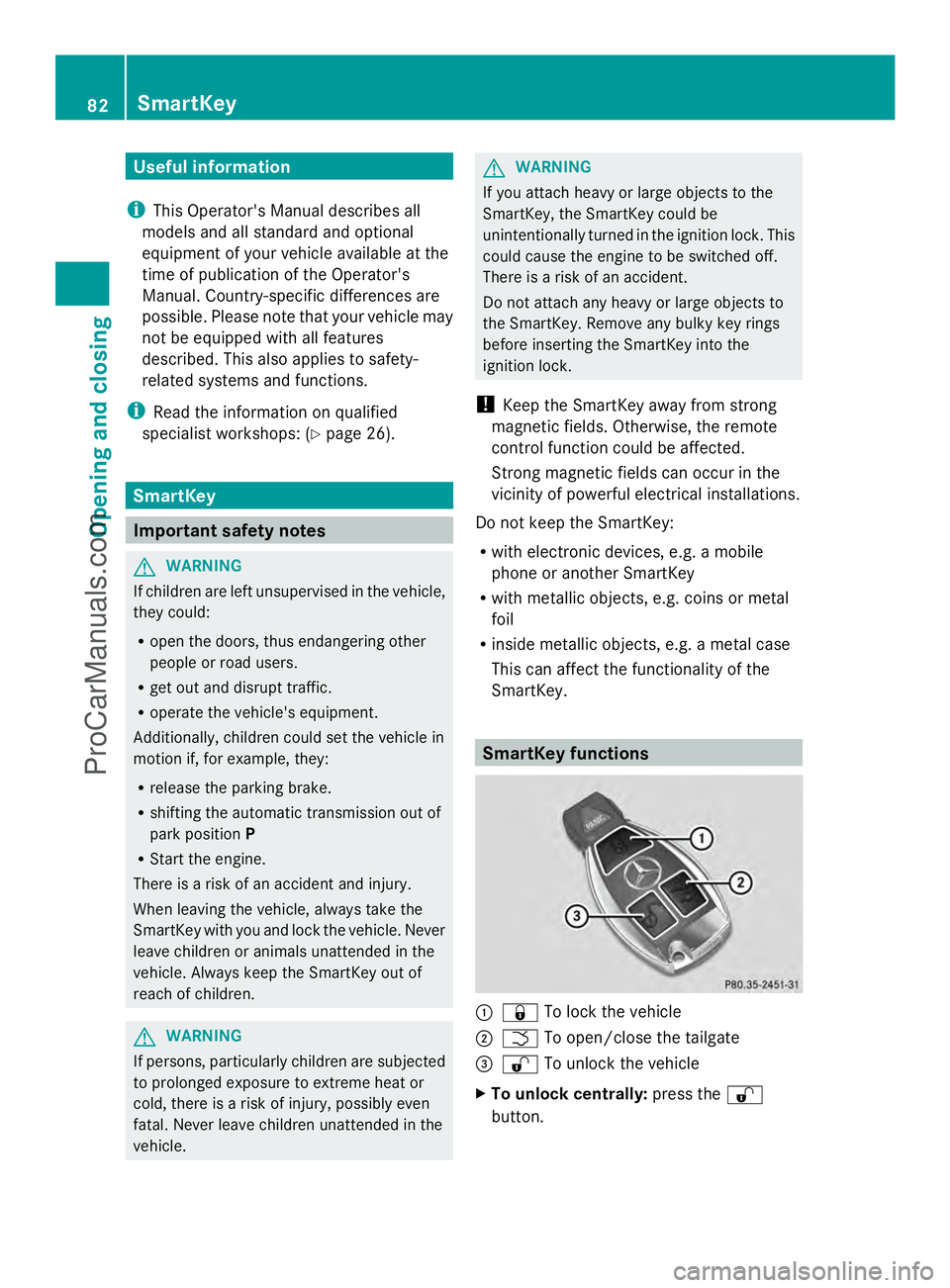
SmartKey. SmartKey functions
:
& To lock the vehicle
; F To open/close the tailgate
= % To unlock the vehicle
X To unlock centrally: press the%
button. 82
SmartKeyOpening and closing
ProCarManuals.com
Page 89 of 430
Problems with the SmartKey
Problem Possible causes/consequences and
M
MSolutions You can no longer lock
or unlock the vehicle
using the SmartKey. The SmartKey battery is discharged or nearly discharged.
X
Check the SmartKey battery (Y page 85) and replace it if
necessary (Y page 85).
If this does not work:
X Lock (Y page 90) or unlock (Y page 90) the vehicle using
the mechanical key. The SmartKey is faulty.
X
Lock (Y page 90) or unlock (Y page 90) the vehicle using
the mechanical key.
X Have the SmartKey checked at a qualified specialist workshop. You can no longer lock
or unlock the vehicle
using KEYLESS-GO. The SmartKey battery is discharged or nearly discharged.
X
Check the SmartKey battery (Y page 85) and replace it if
necessary (Y page 85).
If this does not work:
X Lock (Y page 90) or unlock (Y page 90) the vehicle using
the mechanical key. There is interference from a powerful source of radio waves.
X
Lock (Y page 90) or unlock (Y page 90) the vehicle using
the mechanical key. KEYLESS-GO is malfunctioning.
X
Lock/unlock the vehicle using the remote control function of
the SmartKey.
X Have the vehicle and SmartKey checked at a qualified specialist
workshop.
If the vehicle can also not be locked/unlocked using the remote
control function:
X Lock (Y page 90) or unlock (Y page 90) the vehicle using
the mechanical key.
X Have the vehicle and SmartKey checked at a qualified specialist
workshop. You have lost a
SmartKey. X
Have the SmartKey deactivated at a qualified specialist
workshop.
X Report the loss immediately to the vehicle insurers.
X If necessary, have the locks changed as well. SmartKey
87Opening and closing Z
ProCarManuals.com
Page 333 of 430
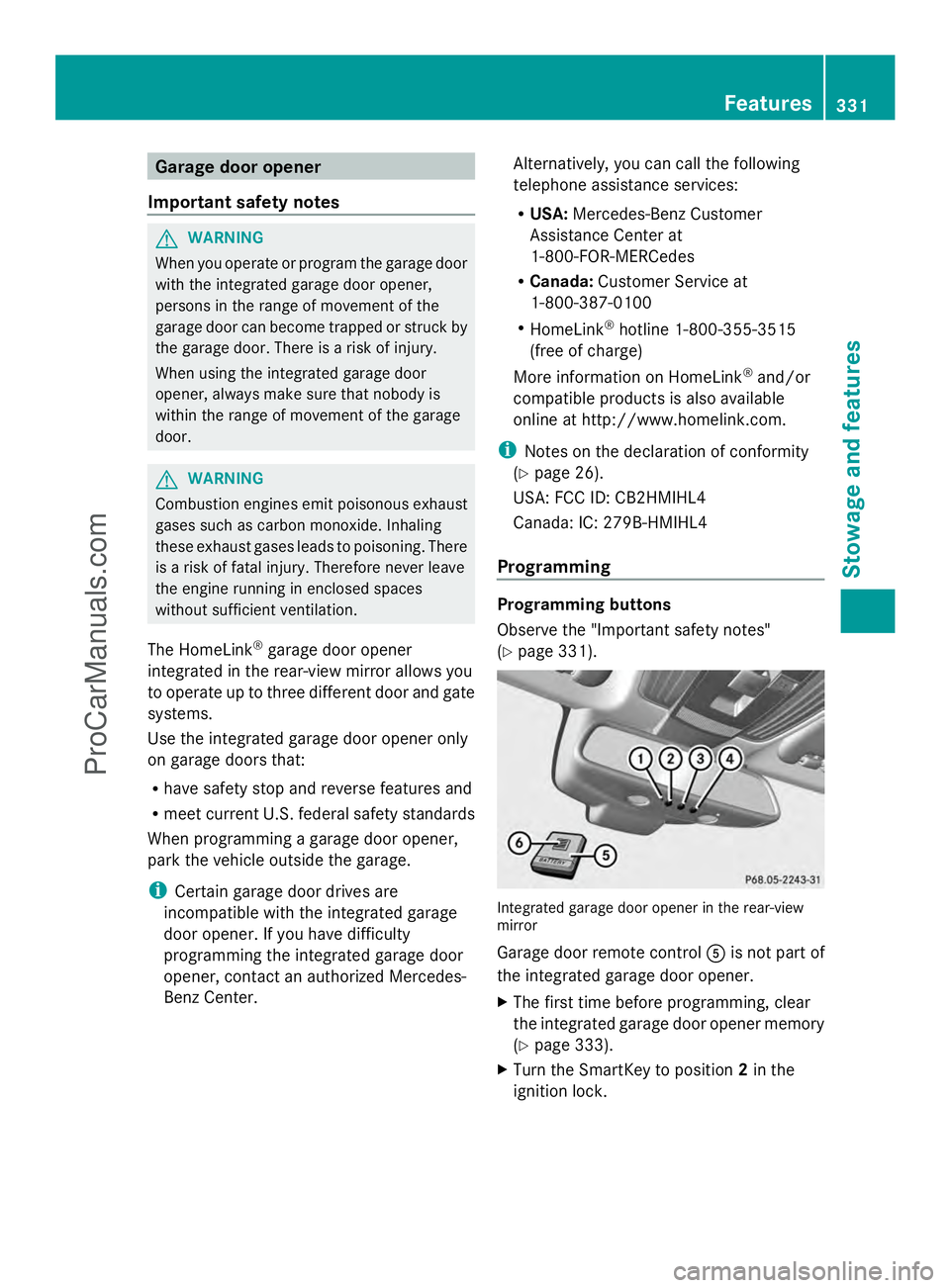
Garage door opener
Important safety notes G
WARNING
When you operate or program the garage door
with the integrated garage door opener,
persons in the range of movement of the
garage door can become trapped or struck by
the garage door. There is a risk of injury.
When using the integrated garage door
opener, always make sure that nobody is
within the range of movement of the garage
door. G
WARNING
Combustion engines emit poisonous exhaust
gases such as carbon monoxide. Inhaling
these exhaust gases leads to poisoning. There
is a risk of fatal injury. Therefore never leave
the engine running in enclosed spaces
without sufficient ventilation.
The HomeLink ®
garage door opener
integrated in the rear-view mirror allows you
to operate up to three different door and gate
systems.
Use the integrated garage door opener only
on garage doors that:
R have safety stop and reverse features and
R meet current U.S. federal safety standards
When programming a garage door opener,
park the vehicle outside the garage.
i Certain garage door drives are
incompatible with the integrated garage
door opener. If you have difficulty
programming the integrated garage door
opener, contact an authorized Mercedes-
Benz Center. Alternatively, you can call the following
telephone assistance services:
R
USA: Mercedes-Benz Customer
Assistance Center at
1-800-FOR-MERCedes
R Canada: Customer Service at
1-800-387-0100
R HomeLink ®
hotline 1-800-355-3515
(free of charge)
More information on HomeLink ®
and/or
compatible products is also available
online at http://www.homelink.com.
i Notes on the declaration of conformity
(Y page 26).
USA: FCC ID: CB2HMIHL4
Canada: IC: 279B-HMIHL4
Programming Programming buttons
Observe the "Important safety notes"
(Y
page 331). Integrated garage door opener in the rear-view
mirror
Garage door remote control
Ais not part of
the integrated garage door opener.
X The first time before programming, clear
the integrated garage door opener memory
(Y page 333).
X Turn the SmartKey to position 2in the
ignition lock. Features
331Stowage and features Z
ProCarManuals.com
Page 334 of 430
X
Press and hold one of buttons ;to? on
the integrated garage door opener.
After a short time, indicator lamp :lights
up yellow.
i Indicator lamp :lights up yellow as soon
as button ;,=or? is programmed for
the first time. If the selected button has
already been programmed, indicator
lamp :will only light up yellow after ten
seconds have elapsed.
X Release button ;,=or?. Indicator
lamp :flashes yellow.
X Point garage door remote control A
towards buttons ;to? on the rear-view
mirror at a distance of 2 to 8 inches (5 to
20 cm).
i The required distance between remote
control Aand the integrated garage door
opener depends on the garage door drive
system. Several attempts might be
necessary. You should test every position
for at least 25 seconds before trying
another position.
X Press and hold button Bon remote control
A until indicator lamp :lights up green.
If indicator lamp :lights up green or
flashes, then programming has been
successful.
X Release button Bon remote control Afor
the garage door drive system.
X If indicator lamp :lights up red: repeat
the programming procedure for the
corresponding button on the rear-view
mirror. When doing so, vary the distance
between remote control Aand the rear-
view mirror.
i If the indicator lamp flashes green after
successful programming, the garage door
system is using a rolling code. After
programming, you must synchronize the
garage door opener integrated in the rear-
view mirror with the receiver of the garage
door system. Synchronizing the rolling code
Observe the "Important safety notes"
(Y
page 331).
Your vehicle must be within reach of the
garage door or exterior gate drive. Make sure
that neither your vehicle nor any persons/
objects are present within the sweep of the
door or gate.
X Turn the SmartKey to position 2in the
ignition lock.
X Press the program button of the door or
gate drive (see the door or gate drive
operating instructions, e.g. under
"programming of additional remote
controls").
i Usually, you now have 30seconds to
initiate the next step.
X Press previously programmed button ;,
= or? of the integrated garage door
opener until the door closes.
The rolling code synchronization is then
complete.
Notes on programming the remote
control
Canadian radio frequency laws require a
"break" (or interruption) of the transmission
signals after broadcasting for a few seconds.
Therefore, these signals may not last long
enough for the integrated garage door
opener. The signal is not recognized during
programming. Comparable with Canadian
law, some U.S. garage door openers also
feature a "break".
Proceed as follows:
R if you live in Canada
R if you have difficulties programming the
garage door opener (regardless of where
you live) when using the programming
steps 332
FeaturesStowage and features
ProCarManuals.com
Page 335 of 430
X
Press and hold one of buttons ;to? on
the integrated garage door opener.
After a short time, indicator lamp :lights
up yellow.
X Release the button.
Indicator lamp :flashes yellow.
X Press button Bof garage door remote
control Afor two seconds, then release it
for two seconds.
X Press button Bagain for two seconds.
X Repeat this sequence on button Bof
remote control Auntil indicator lamp :
lights up green.
If indicator lamp :turns red, repeat the
process.
X Continue with the other programming
steps (see above).
Problems when programming
If you are experiencing problems
programming the integrated garage door
opener on the rear-view mirror, take note of
the following instructions:
R Check the transmitter frequency of garage
door drive remote control A. This can
usually be found on the back of the remote
control.
The integrated garage door opener is
compatible with devices that have units
which operate in the frequency range of
280to 433MHz.
R Replace the batteries in garage door
remote control A. This increases the
likelihood that garage door remote control
A will transmit a strong and precise signal
to the integrated garage door opener in the
rear-view mirror.
R When programming, hold remote control
A at varying distances and angles from the
button that you are programming. Try
various angles at a distance between 2and
12 inches (5to 30 cm) or at the same angle
but at varying distances.
R If another remote control for the same
garage door drive is available, repeat the same programming steps with this remote
control. Before performing these steps,
make sure that new batteries have been
installed in garage door drive remote
control
A.
R Note that some remote controls only
transmit for a limited amount of time (the
indicator lamp on the remote control goes
out). Press button Bon remote control
A again before transmission ends.
R Align the antenna cable of the garage door
opener unit. This can improve signal
reception/transmission.
Opening/closing the garage door After it has been programmed, the integrated
garage door opener performs the function of
the garage door system remote control.
Please also read the operating instructions
for the garage door system.
X
Turn the SmartKey to position 2in the
ignition lock.
X Press button ;,=or? which you have
programmed to operate the garage door.
Garage door system with a fixed code:
indicator lamp :lights up green.
Garage door system with a rolling code:
indicator lamp :flashes green.
i The transmitter will transmit a signal as
long as the button is pressed. The
transmission is halted after a maximum of
ten seconds and indicator lamp :lights
up yellow. Press button ;,=or? again
if necessary.
Clearing the memory X
Turn the SmartKey to position 2in the
ignition lock.
X Press buttons ;and ?.
The indicator lamp lights up yellow.
X Press and hold buttons ;and ?until the
indicator lamp turns green. Features
333Stowage and features Z
ProCarManuals.com