light MERCEDES-BENZ E WAGON 2021 Manual Online
[x] Cancel search | Manufacturer: MERCEDES-BENZ, Model Year: 2021, Model line: E WAGON, Model: MERCEDES-BENZ E WAGON 2021Pages: 466, PDF Size: 42.07 MB
Page 222 of 466
#
When leaving theve hicle, makesur e
th at nobody isin thevicinit yof the
wheel arch es ortheunderbody . *
NO
TEDama gedue tovehicle lowe ring Pa
rts of thebody could bedamag edwhen
th eve hicle islowe red. #
Mak esur eth at ther ear eno obs tacles
suc has curbs underneathor inthe
immed iatevicin ityofthebody when the
ve hicle isbeing lowe red. *
NO
TEMercede s-AMG vehicles #
Obser vetheno tesin theSupplement .
Yo uco uld other wise failto recogni ze
da ngers. Re
quirement s:
R The vehicle hasbeen star ted.
R Allvehicl esexc eptAll- Terrain vehicl es:
th eve hicle mustno tbe mo ving faster than
37 mph(60 km/h). R
All-Terrain vehicl es:theve hicle mustno tbe
mo ving faster than 22 mph(35 km/h).
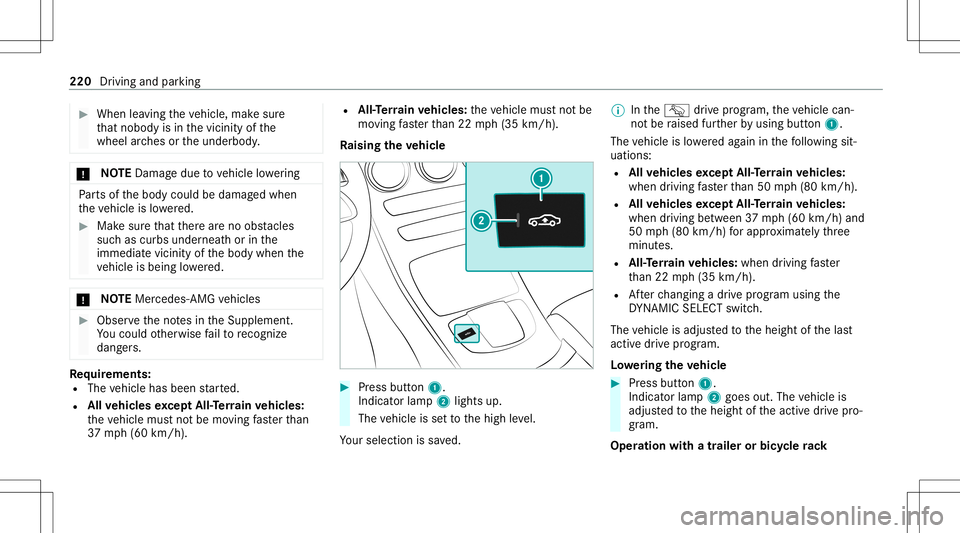
Ra ising theve hicl e #
Press butt on1.
Indica torlam p2 lights up.
The vehicle issetto thehigh leve l.
Yo ur sele ction issave d. %
IntheG drive pr og ram, theve hicle can‐
no tbe raised further by usin gbut ton1.
The vehicle islowe redag ain inthefo llo wing sit‐
uation s:
R Allvehicl esexc eptAll- Terrain vehicl es:
when driving faster than 50 mph(80 km/h).
R Allvehicl esexc eptAll- Terrain vehicl es:
when driving between 37mph(6 0km/h) and
50 mph(8 0km/h) forapp roxima tely thre e
minut es.
R All-Ter rain vehicl es:when driving faster
th an 22 mph(3 5km/h).
R Afterch ang ingadr ive pr og ram usi ng the
DY NA MIC SELE CTswitc h.
The vehicle isadjus tedto theheight ofthelas t
activ edr ive pr og ram.
Lo we ring theve hicl e #
Press butt on1.
Indica torlam p2 goes out.Thevehicle is
adjus tedto theheight oftheactiv edr ive pr o‐
gr am.
Oper ation withatrailer orbicy clerack 220
Driving andparking
Page 225 of 466
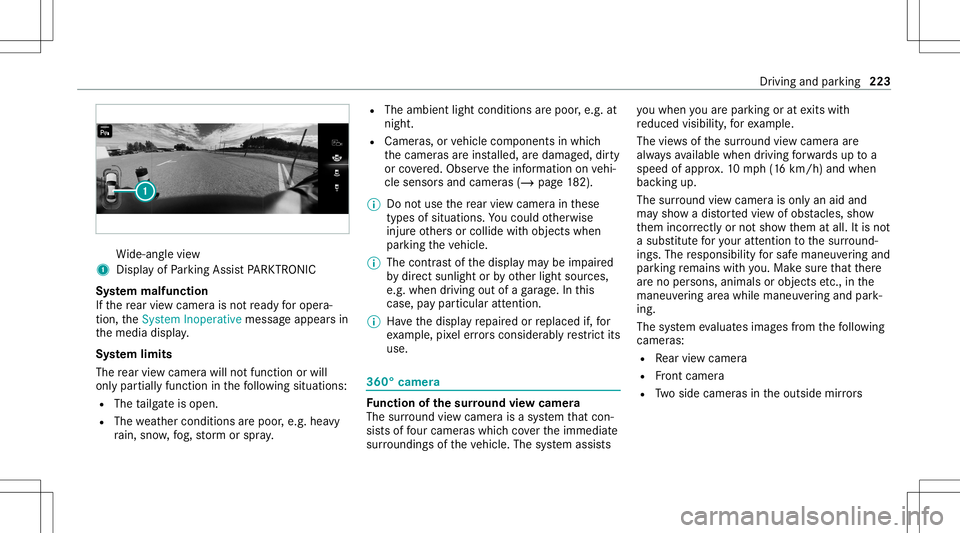
Wi
de-ang levie w
1 Displa yof Parking AssistPA RK TRONI C
Sy stem malfun ction
If th ere ar vie wcam erais no tre ady foroper a‐
tion, theSystem Inoperativemessag eappear sin
th emedia display.
Sy stem limit s
The rear vie wcam erawill notfun ction orwill
on lypa rtiall yfunc tion inthefo llo wing situat ions:
R The tailgat eis open .
R The weather condition sar epoor ,e.g .hea vy
ra in, sno w,fog, stor m or spr ay. R
The ambient lightcondit ionsarepoor ,e.g. at
night.
R Camer as,orvehicle component sin whic h
th ecamer asareins talled, aredamag ed,dirty
or covered. Obser vetheinf ormation onvehi‐
cle sensor sand camer as(/ page18 2).
% Donotuse there ar vie wcam erain these
types ofsituation s.Yo uco uld other wise
injur eot her sor collide withobject swhen
par king theve hicle.
% The cont rast of thedispla yma ybe impair ed
by direct sunlight orby other light sources,
e.g. when driving outofaga rage .In this
case, paypar ticular attent ion.
% Have thedispla yre pair edorreplaced if,for
ex am ple, pixelerro rs consi derablyrestrict its
us e. 360
°came ra Fu
nction ofthesur round viewcamer a
The surround viewcam erais asy stem that con ‐
sis tsof four cam eras whic hco verth eimmediat e
sur round ingsof theve hicle. Thesystem assis ts yo
uwhen youar epar kingor atexits with
re duced visibility ,fo rex am ple.
The views ofthesur round viewcam eraar e
alw aysav ailable whendrivin gfo rw ards up toa
speed ofappr ox.10 mph(1 6 km/h) andwhen
bac king up.
The surround viewcam erais on lyan aid and
ma ysho wadis torted viewof obs tacle s,sho w
th em incor rectly ornotsho wthem atall. Itis no t
a subs titutefo ryo ur att entio nto thesur round ‐
ing s.The responsibili tyforsaf emaneu vering and
pa rking remains withyo u. Mak esur eth at ther e
ar eno per sons, animals orobjec tsetc., inthe
maneu vering area while ma neu vering and park‐
ing.
The system evaluat esimag esfrom thefo llo wing
cameras:
R Rear vie wcam era
R Front camer a
R Twoside camer asintheoutside mirrors Dr
iving and parking 223
Page 228 of 466
R
Anoutside mir roris no tcom pletely folded
out.
R The trunk lidisopen .
R The weather condition sar epoor ,e.g .hea vy
ra in, sno w,fog, stor m or spr ay.
R The ambient lightcondit ionsarepoor ,e.g. at
night.
R The camer alens isobs truct ed, dirtyor fog‐
ge dup.
R Ifcamera sor vehicle component sin whic h
th ecamer asareins talled aredamag ed.In
th is eve nt,have thecamer as,their position s
and their setting checkedat aqu alif ied spe‐
cialis two rkshop.
% Donotuse thesur round viewcam eraunde r
suc hcir cum stanc es.Youco uld other wise
injur eot her sor collide withobject swhen
par king theve hicle.
Fo rte ch nica lre ason s,thest andar dheigh tof the
ve hicle maybe altered ifth eve hicle iscar rying a
hea vyload andcanresult ininaccur aciesinthe
guide linesandinthedispla yof thege ner ated
ima ges. The
field ofvision andother funct ionsofthe
came rasystem maybe restrict ed dueto addi‐
tio nal attachme ntson theve hicle (e.g.license
plat ebr ac ket,bicy cle rack ).
% The contras tof thedispla yma ybe impair ed
by abr upt,dir ect sunlight orby other light
sour ces, e.g.when driving outofaga rage .In
th is case, paypar ticular attent ion.
% Have thedispla yre pair edorreplaced if,for
ex am ple, pixelerro rs consi derablyrestrict its
us e.
See theno teson cleaning thesur round view
cam era(/ page29 6).
Calli ngup thevie wof thesur round view
camer ausing reve rsege ar #
Shif tto reve rsege ar. #
Select thedesir edviewin themultimedia
sy stem (/ page223). #
If,afte rshif ting toreve rsege ar,th eimag eof
th ere ar vie wcam erais no tsho wn: switchoff
th eignition ,pr ess and hold thec button,
switc hon theignition andengagere ve rse
ge ar again. Pa
rking Assis tPA RK TRONI C Fu
nction ofParking Assis tPA RK TRONI C
Pa rking AssistPA RK TRONI Cis an elec tron ic
par kingassi stanc esy stem whic hmonit orsth e
ar ea sur round ingyour vehicle andshowsyouth e
dis tance betwee nth eve hicle andade tected
obs tacle visually and audibly .
Pa rking AssistPA RK TRONI Cis on lyan aid. Itis
no ta subs titutefo ryo ur att entio nto thesur‐
ro und ings.The responsibili tyforsaf emaneu ver‐
ing and parking remains withyo u. Mak esur e
th at ther ear eno per sons, animals orobjec tsin
th emaneuv ering area while maneuv ering and
par king in/exitingpar king spaces.
The passiv eside impact protect ion also warns
yo uof obs tacle sto theside. During thepar king
pr ocedur eor maneuv ering, objec tsarede tected
as theve hicle drives pas t.Ifyo usteer inthe
dir ect ion ofade tected obs tacle and ther eis a
ri sk ofalat eral collision, awa rning isissued. In
or der foran object ontheside tobe detected,
th esensor sin thefront and rear bum permus t
fi rs tde tect theobjec twhile youar edr ivin gpas t
it. 226
Drivin gand parking
Page 233 of 466
Ve
hicles withsur round viewcam era
R Parking inpar kingspaces parallel tothero ad
R Parking inpar kingspaces perpendic ularto
th ero ad (op tionall yeit her forw ards or
re ve rse)
R Parking inpar kingspaces that can onlybe
de tected assuch due tomar kings (for exam‐
ple atthero adside )
R Exiting apar kingspac epar allel tothero ad
As soon asall requ iremen tsareme tfo rsear ch‐
ing forpar king space s,theÇ displa yappear s
in themultifunc tiondispla y.
When ActivePa rking Assisthas detected parking
spaces ,th eÈ displa yappear sin themulti‐
func tion displa y.The arrow ssho won whic hside
of thero ad detected parking spaces arelocat ed.
The yar eth en sho wninthemedia display.
Ve hicl eswith rear vie wcamer a:thepar king
space canbeselect edasdesir ed.The vehicle is
par kedin reve rse.
Ve hicl eswith surround viewcamer a:the
par kingspace canbeselect edasdesir ed.
Depen dingonthelocation ofthepar king space, th
epar king direct ion (rear wardsor forw ards)
can also beselec tedas desir ed.
When ActivePa rking Assistis act ivat ed, thetur n
signal indicat orsar eactiv ated based onthecal‐
culat edpat hof your vehicle.
The parking procedur eis assis tedby acc eler at‐
ing ,br akin g,steer ing and gear chang es.
Ac tivePa rking Assistis onl yan aid. Itis no ta
subs titutefo ryo ur att entio nto thesur round ings.
The responsibili tyforsaf emaneu vering and
pa rking remains withyo u. Mak esur eth at no
per son s,anim alsorobj ect set c. arein the
maneu vering rang e.
Ac tivePa rking Assistwill becan celed inthefo l‐
lo wing situat ions:
R Parking AssistPA RK TRONI Cis deac tiva ted.
R Youbegin steer ing.
R Youen gage trans missi on positio n005D.
R ESP ®
int erve nes.
R Youopen thedr iver's door .
R Afteractiv ating ActivePa rking Assist, yo u
pr ess thec buttonagain (/ page232). Sy
stem limit s
If th eex terior lighting ismalfunct ioning,Active
Pa rking Assistis no tav ailable.
Obj ectsloc ated abo veorbelo wthede tection
ra ng eof thesensor s,e.g. overhang ingloads,
ove rhang sor loadin gra mp sof truc ks,or thebor‐
der sof par king spaces, areno tde tected during
mea surement ofthepar king space. Theseare
also then notta ke nint oacco untwhen calcul at‐
ing thepar king procedur e.In some circums tan‐
ces, ActivePa rking Assistma yth er efor eguide
yo uint oth epar king space incorrectly . &
WARNIN GRisk ofacci dent dueto
object slocat edabo veorbelo wthe
de tection rang eof ActivePa rking Assist
If th er ear eobjec tsabo veorbelo wthe
de tection rang e, thefo llo wing situat ionsmay
ar ise:
R ActivePa rking Assistma yst eer tooear ly.
R The vehicle mayno tst op infront ofthese
objec ts.
This could cause acollision. Dr
iving andparking 23
1
Page 241 of 466
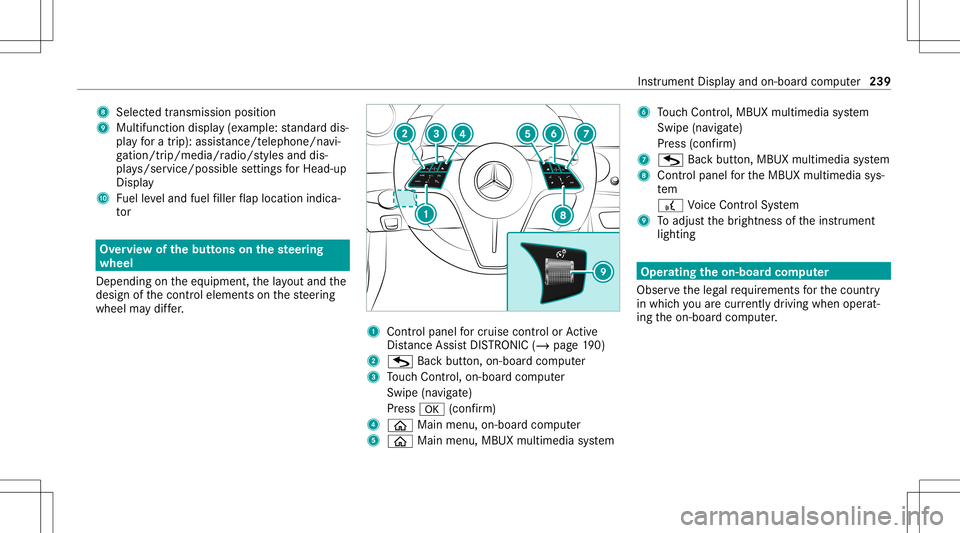
8
Select edtransm ission pos ition
9 Multifuncti ondispl ay(exa mp le:standar ddis‐
pla yfo ra trip) :assi stanc e/teleph one/n avi‐
ga tio n/tr ip/me dia/r adio/s tylesand dis‐
pl ay s/ser vice/possible settin gsforHead-u p
Displa y
A Fuelleve land fuel filler flap locatio nind ica‐
to r Ov
ervie wof thebut tons on thest eer ing
wheel
Dep endingontheeq uipment, thelayo ut and the
design ofthecon trol element son thesteer ing
wheel maydif fer. 1
Con trol pan elforcr uis econtr olor Active
Dis tance AssistDIS TRONI C(/ page 190)
2 G Backbu tton, on-bo ardcom puter
3 Touc hCon trol, on-bo ardco mp uter
Swip e(na vigate)
Pr ess 0076 (confirm)
4 00E2 Mainmenu,on -bo ardco mp uter
5 00E2 Mainmenu,MB UX mult imed iasystem 6
Touc hCon trol, MB UX mult imed iasystem
Swipe (navigate)
Pr ess (conf irm)
7 G Backbutt on,MBUX multimedia system
8 Contr olpanel forth eMBUX multimedia sys‐
te m
£ Voice Cont rolSy stem
9 Toadjus tth ebr ightn essoftheins trument
lighting Oper
ating theon-boa rdcom puter
Obser vetheleg alrequ iremen tsforth ecount ry
in whic hyo uar ecur rently drivi ng when operat‐
ing theon- boar dcom puter. Ins
trument Displayand on-boar dcom puter 239
Page 244 of 466
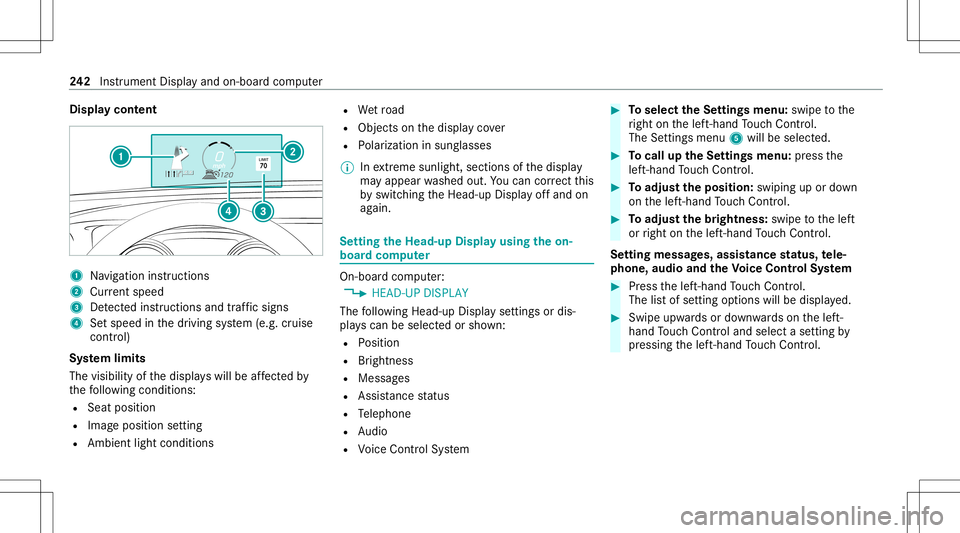
Disp
laycont ent 1
Navig ation instructions
2 Current speed
3 Detected instructi ons and traf fic sig ns
4 Setspe edinthedr iving system (e.g. cruise
con trol)
Sy stem limit s
The visib ilityofthedispla yswill beaffect ed by
th efo llo wing condition s:
R Seat position
R Imag eposit ionsetting
R Ambient lightcondition s R
Wetro ad
R Objectson thedispla yco ver
R Polar izat ion insung lasses
% Inextreme sunli ght, sectio nsofthedispla y
ma yappear washed out.Youcan correct this
by switc hingtheHead-up Displayof fand on
ag ain. Se
tting theHead -upDispla yusing theon-
boar dcom puter On-boar
dcom puter:
4 HEAD-UP DISPLA Y
The follo wing Head- upDisp lay se ttings ordis‐
pla yscan beselect edorsho wn:
R Position
R Brightness
R Messag es
R Assis tance status
R Telephon e
R Audio
R Voice Cont rolSy stem #
Toselect theSe ttings menu :swipe tothe
ri ght onthelef t-hand Touc hCon trol.
The Setting smen u5 will besele cted. #
Tocall uptheSe ttings menu :pr ess the
lef t-hand Touc hCon trol. #
Toadjus tth eposit ion:swipin gup ordown
on thelef t-hand Touc hCon trol. #
Toadjus tth ebr ight ness: swipe tothelef t
or right onthelef t-hand Touc hCon trol.
Se tting mes sages,assistance status, tele‐
phone, audioand theVo ice Contr olSy stem #
Press thelef t-hand Touc hCon trol.
The listof setting optio ns will bedispl ayed. #
Swipe upwards ordown wardson thelef t-
hand Touc hCon trol and selectase tting by
pr essing thelef t-hand Touc hCon trol. 24
2
Instrument Displayand on-boar dcom puter
Page 251 of 466
R
Clothing being worn(hat, shawl,scar f)ma y
be limitin gth ede tection area ofthecamer a. Ke
ep thecamer a'sfield ofvision clear.
R The camer ais no toper ational. Consult
anaut hor ized Mercedes- BenzCen‐
te r.
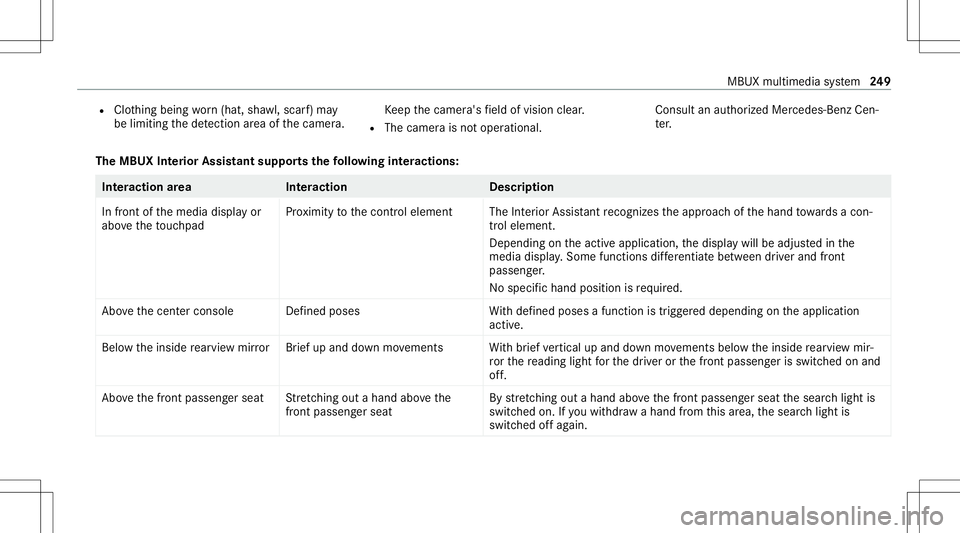
The MBUX Inte rior Assis tantsupportsthefo llo wing interactions : Int
eraction area Interaction Description
In front ofthemedia displayor
abo vetheto uc hpad Pr
ox imit yto thecon trol element TheInterior Assis tant recogni zestheappr oachof thehand towa rdsa con‐
tr ol element.
Depending ontheactiv eapplication, thedispla ywill beadjus tedin the
media display. Some functionsdiffer ent iatebe tween driver and front
passeng er.
No specif ichand position isrequ ired.
Abo vethecent ercon sole Defined poses With def ined poses afunc tion istrigg ered dependin gon theapplication
activ e.
Belo wtheinside rear vie wmir rorB rief up and down movements With brief vertical upand down movements belowtheinside rear vie wmir ‐
ro rth ere adin glight forth edr iver or thefront passeng erisswitc hedonand
of f.
Abo vethefront passeng erseat Stretching outa ha nd above the
fr ont passeng ersea t By
stre tching outa ha nd above thefront passeng erseat thesear chlight is
switc hedon.Ifyo uwit hdra wahan dfrom this area, thesear chlight is
switc hedoffag ain. MBU
Xmultim ediasystem 24
9
Page 252 of 466
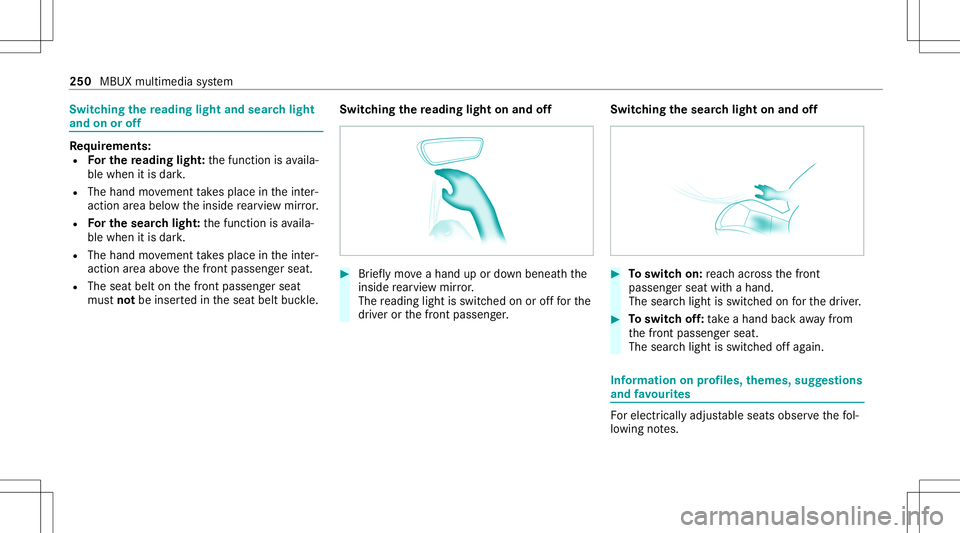
Switc
hingthere ading light and sear chlight
and onoroff Re
quirement s:
R Forthe reading light:th efunc tion isavaila‐
ble when itis dar k.
R The hand movement take splace intheint er‐
action area belo wtheinside rear vie wmir ror.
R Forthe search light :th efunc tion isavaila‐
ble when itis dar k.
R The hand movement take splace intheint er‐
action area abo vethefront passeng erseat.
R The seat beltonthefront passeng erseat
mus tno tbe inser tedin theseat beltbuckle. Switc
hingthere ading light on and off #
Brief lymo veahan dup ordown ben eathth e
insid ere ar vie wmir ror.
The readin glight isswit ched on orofffo rth e
dr iver or thefront passeng er. Switc
hingthesear chlight onand off #
Toswitc hon: reac hacr oss thefront
passeng erseat withahand.
The sear chlight isswitc hedonforth edr iver . #
Toswitc hof f:take ahan dbac kaw ay from
th efront passeng erseat.
The sear chlight isswitc hedoffag ain. Inf
orma tion onprofiles, themes, suggestions
and favo urites Fo
relectr icallyadjus table seats observethefo l‐
lo wing notes. 250
MBUX multimedia system
Page 253 of 466
&
WARNIN GRisk ofbeco ming trap ped
du ring adjus tment ofthedr iver's seat
af te rcall ing upadr iver profile
Selecting auser profile ma ytrigg eran
adju stment ofthedr iver's seat totheposi‐
tion save dunder theuser profile. Youor
ot her vehicle occupants couldbeinjur edin
th epr ocess. #
Mak esur eth at when theposition of
dr iver's seat isbeing adjustedusing the
multime diasystem, nopeople orbody
par tsarein theseat's rang eof mo ve‐
ment.
If th er eis arisk ofsomeone becoming trap‐
ped, stop theadjus tmentpr ocess immedi‐
at ely: #
a)Tapth ewa rning mess ageon the
media display.
or #
b)Press amemor yposition buttonora
seat adjus tmentswitc hon thedr iver's
door .
The adjus tmentpr ocess willbestop‐
ped. The
driver's seat iseq uipped withan access pre‐
ve nter.
If th edr iver's door isopen, thedr iver's seat will
no tbe setaf te rcall ing upthedr iver's profile.
Pr ofiles stor eyo ur vehicle settin gsand settin gs
fo rth emultimedia system. Ifth eve hicle isused
by severaldr iver s, thedr iver can select their
ow npr ofile wi thout chang ingthestor ed profile
se ttings ofother driver s.
% Information onprofiles from Mer cedes me
conn ectcan befound intheDigita lOper a‐
to r's Manua l.
Ve hicle settin gsare, forex am ple, driver' sseat ,
st eer ing wheel andmirrorse ttings, climatecon‐
tr ol and amb ient lighti ng.Forth ese ttings ofthe
multime diasystem, youcan select,fo rex am ple,
ra dio statio ns,pr ev ious destination sas wellas
th emes, suggestion sand favo urites. Fo
rre cur ring drivi ng situa tions, such aslon g
dr ives on thefree wa y,yo ucan save your prefer‐
re dse ttings inath eme intheve hicle. Inath eme
yo ucan save thedispla yof thedigit almap, your
pr efer redra dio statio nand prefer reddr ive pr o‐
gr am, forex am ple.
The vehicle canlearnth ehabits ofthedr iver .It
th en offers sugg estions forth emos tpr obable
na vig ation destinat ions, media sources, radio
st atio nsorcon tacts. Thepre-r equir ementsfor
th at areth eselect ionofapr ofile, your consen t
to there cor ding ofdata and sufficie ntcoll ected
da ta.
Fa vourites prov ide quick acc ess toapplic ations
th at areused often. Youcan selectfavo urites
fr om categor iesoradd them direct lyto an appli‐
cat ion. MBU
Xmult imed iasystem 25
1
Page 254 of 466
Conf
iguringprofiles, themes andsugg es‐
tions Multi
media system:
4 © 5
f Profiles
Cr eating ane wprofile #
Select 0081Create Profile. #
Select anavatar. #
Enterth ename andconfirm with0076. #
Sele ctCont inue 0048 . #
Sele ctCurren tSet tings. #
Sele ctSav e. #
ActivateBlu etoo th®
and selec tCon nect
Phon e,to connect amob ile pho newith the
user profile . #
Select Finish.
Select ingprofile optio ns #
Select 0062 fora pr ofile .
The follo wing functionsar eav ailable:
R Editing,rese ttin gor dele ting apr ofile
R Resettin gth emes orfavo rite s R
Con figur ing sugg estions
Conf iguringsugg estions #
Select 0062fora pr ofile . #
Select SuggestionSettings . #
Switc hAllow Destination Suggestions, Allow
Musi cSugge stions andAllow Contact Sug-
gestions onoroff. #
Todeac tivatethe lear nin gfunc tionfo r
on eda y:act ivat eDe act .Lear ningfor 24h.
Fo r24 hour sno newactions willbetrained
and nodat are cor ded forth eactiv epr ofile.
Sugg estion swill continue tobe sho wn.
Ex am ple: ifth eop tion isswitc hedonand a
ro uteto ane wdes tinatio nhas been calcula‐
te d, this des tination would notbe take nint o
acco untforth elear ning function.
Cr eating newthemes #
Sele ct©. #
Sele ctTHE MES. #
Sele ct0081 CreateThem e.
The settings whichar esa ve din theth eme
ar esho wn. #
Select Continue0048. #
Select AudioandNavigation (Navigation )and
st or eth eactiv ese ttings intheth eme. #
Select Continue0048. #
Select anent ryscr een. #
Select Continue 0048. #
Select animag e. #
Enterthenames intoth eent ryfield and con‐
fi rm with0076. #
Sele ctSav e. Sy
stem settings Ov
ervie wof thesy stem settings menu In
thesy stem settings menu, youcan makese t‐
tin gs inthefo llo wing menusand control ele‐
men ts:
R Disp lay
- Styles
- Instrument lighting
- Displa ybr ightn ess 252
MBUX multimedia system