reset MERCEDES-BENZ E320 WAGON 2003 S210 User Guide
[x] Cancel search | Manufacturer: MERCEDES-BENZ, Model Year: 2003, Model line: E320 WAGON, Model: MERCEDES-BENZ E320 WAGON 2003 S210Pages: 354, PDF Size: 13.99 MB
Page 96 of 354
93 Multifunction steering wheel, multifunction display
Te ch n i c a l
data Instruments
and controlsOperationDrivingInstrument
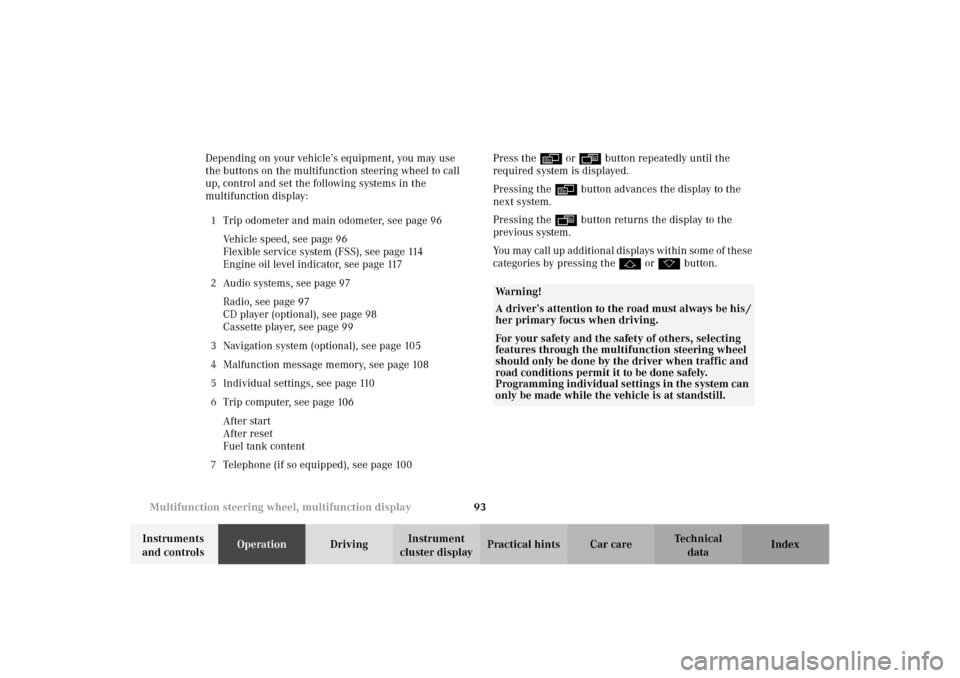
cluster displayPractical hints Car care Index Depending on your vehicle’s equipment, you may use
the buttons on the multifunction steering wheel to call
up, control and set the following systems in the
multifunction display:
1Trip odometer and main odometer, see page 96
Vehicle speed, see page 96
Flexible service system (FSS), see page 114
Engine oil level indicator, see page 117
2Audio systems, see page 97
Radio, see page 97
CD player (optional), see page 98
Cassette player, see page 99
3Navigation system (optional), see page 105
4Malfunction message memory, see page 108
5Individual settings, see page 110
6Trip computer, see page 106
After start
After reset
Fuel tank content
7Telephone (if so equipped), see page 100Press the è or ÿ button repeatedly until the
required system is displayed.
Pressing the è button advances the display to the
next system.
Pressing the ÿ button returns the display to the
previous system.
You may call up additional displays within some of these
categories by pressing the j or k button.
Wa r n i n g !
A driver’s attention to the road must always be his /
her primary focus when driving. For your safety and the safety of others, selecting
features through the multifunction steering wheel
should only be done by the driver when traffic and
road conditions permit it to be done safely.
Programming individual settings in the system can
only be made while the vehicle is at standstill.
Page 99 of 354
96 Multifunction steering wheel, multifunction display
Te ch n i c a l
data Instruments
and controlsOperationDrivingInstrument
cluster displayPractical hints Car care Index
Trip and main odometer, vehicle speed,
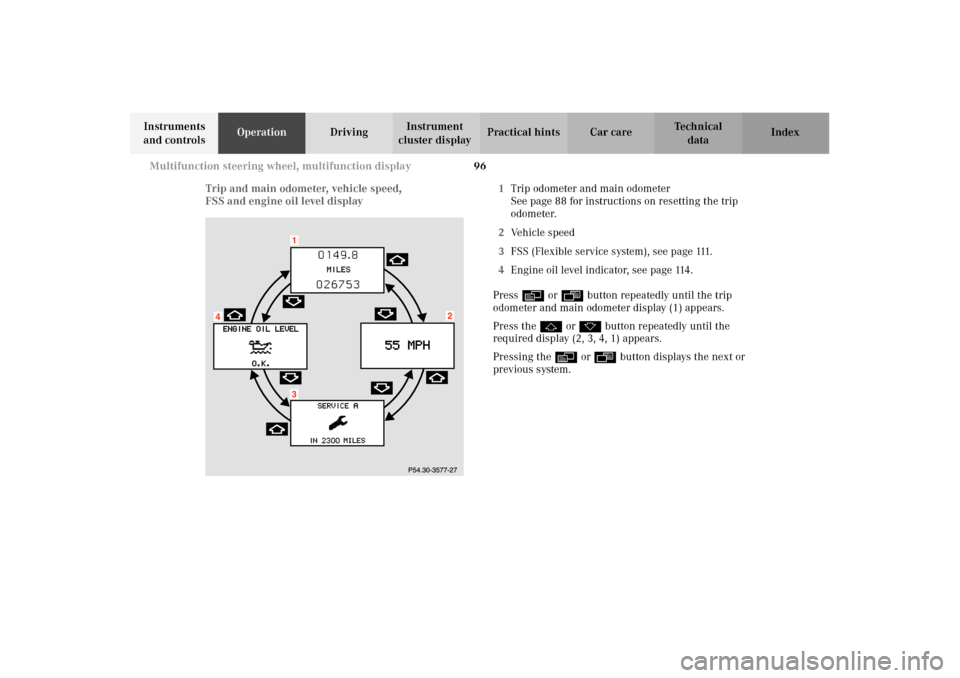
FSS and engine oil level display1Trip odometer and main odometer
See page 88 for instructions on resetting the trip
odometer.
2Vehicle speed
3FSS (Flexible service system), see page 111.
4Engine oil level indicator, see page 114.
Press è or ÿ button repeatedly until the trip
odometer and main odometer display (1) appears.
Press the j or k button repeatedly until the
required display (2, 3, 4, 1) appears.
Pressing the è or ÿ button displays the next or
previous system.
Page 109 of 354
106 Multifunction steering wheel, multifunction display
Te ch n i c a l
data Instruments
and controlsOperationDrivingInstrument
cluster displayPractical hints Car care Index
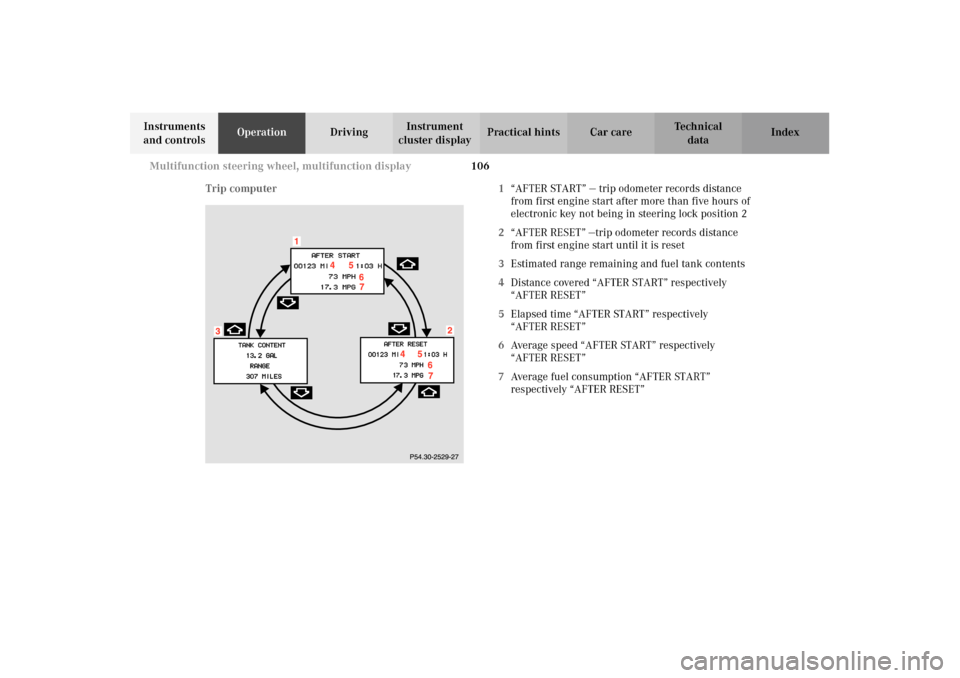
Trip computer 1“AFTER START” — trip odometer records distance
from first engine start after more than five hours of
electronic key not being in steering lock position 2
2“AFTER RESET” —trip odometer records distance
from first engine start until it is reset
3Estimated range remaining and fuel tank contents
4Distance covered “AFTER START” respectively
“AFTER RESET”
5Elapsed time “AFTER START” respectively
“AFTER RESET”
6Average speed “AFTER START” respectively
“AFTER RESET”
7Average fuel consumption “AFTER START”
respectively “AFTER RESET”
Page 110 of 354
107 Multifunction steering wheel, multifunction display
Te ch n i c a l
data Instruments
and controlsOperationDrivingInstrument
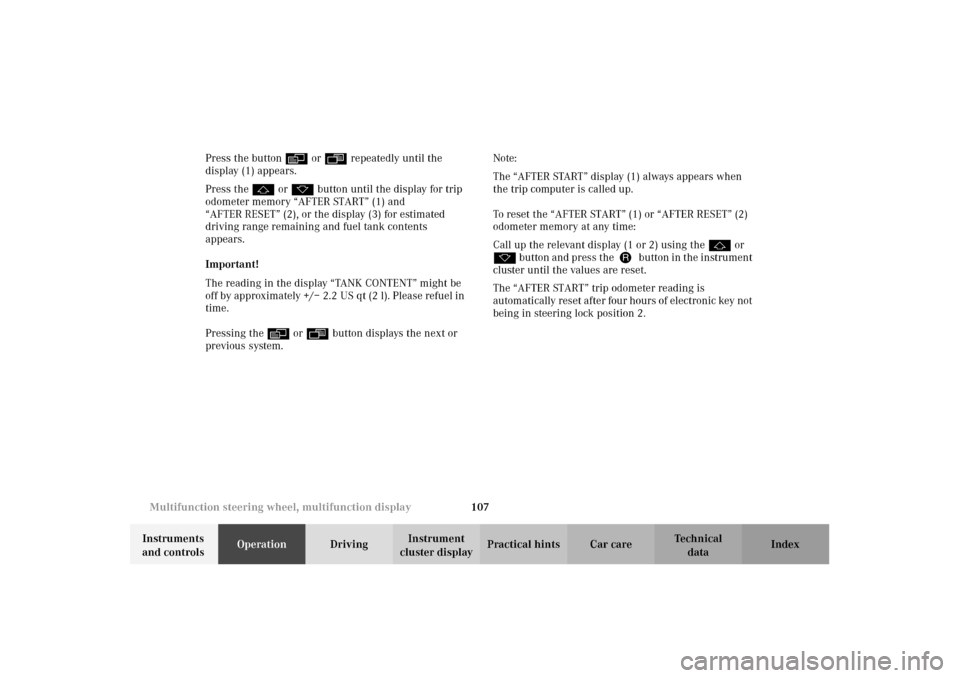
cluster displayPractical hints Car care Index Press the button è or ÿ repeatedly until the
display (1) appears.
Press the j or k button until the display for trip
odometer memory “AFTER START” (1) and
“AFTER RESET” (2), or the display (3) for estimated
driving range remaining and fuel tank contents
appears.
Important!
The reading in the display “TANK CONTENT” might be
off by approximately +/– 2.2 US qt (2 l). Please refuel in
time.
Pressing the è or ÿ button displays the next or
previous system.Note:
The “AFTER START” display (1) always appears when
the trip computer is called up.
To reset the “AFTER START” (1) or “AFTER RESET” (2)
odometer memory at any time:
Call up the relevant display (1 or 2) using the j or
k button and press theJbutton in the instrument
cluster until the values are reset.
The “AFTER START” trip odometer reading is
automatically reset after four hours of electronic key not
being in steering lock position 2.
Page 114 of 354
111 Multifunction steering wheel, multifunction display
Te ch n i c a l
data Instruments
and controlsOperationDrivingInstrument
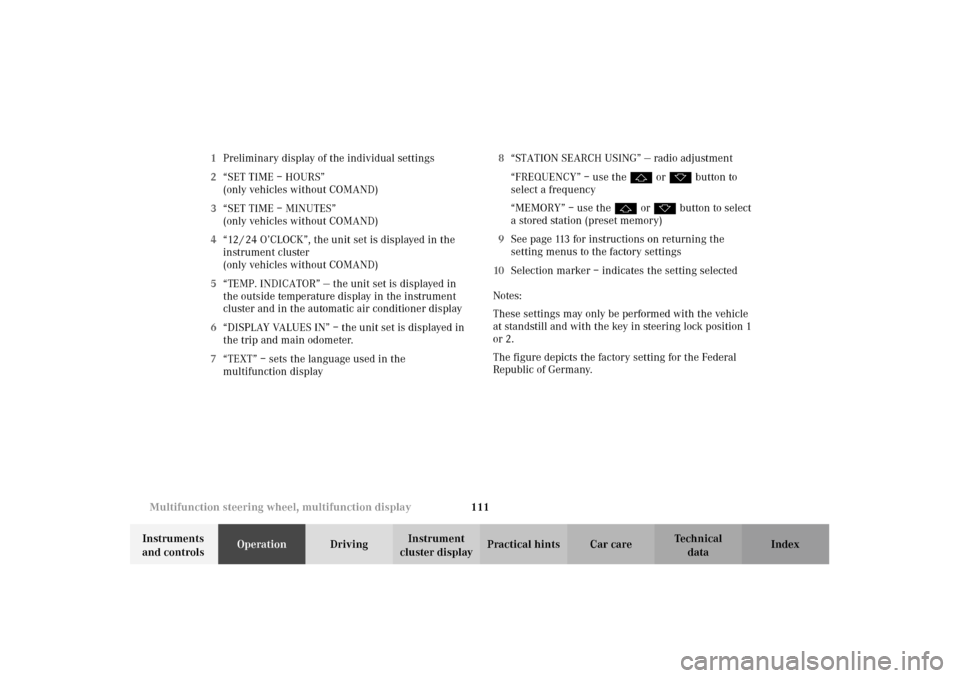
cluster displayPractical hints Car care Index 1Preliminary display of the individual settings
2“SET TIME – HOURS”
(only vehicles without COMAND)
3“SET TIME – MINUTES”
(only vehicles without COMAND)
4“12 / 24 O’CLOCK”, the unit set is displayed in the
instrument cluster
(only vehicles without COMAND)
5“TEMP. INDICATOR” — the unit set is displayed in
the outside temperature display in the instrument
cluster and in the automatic air conditioner display
6“DISPLAY VALUES IN” – the unit set is displayed in
the trip and main odometer.
7“TEXT” – sets the language used in the
multifunction display8“STATION SEARCH USING” — radio adjustment
“FREQUENCY” – use the j or k button to
select a frequency
“MEMORY” – use the j or k button to select
a stored station (preset memory)
9See page 113 for instructions on returning the
setting menus to the factory settings
10Selection marker – indicates the setting selected
Notes:
These settings may only be performed with the vehicle
at standstill and with the key in steering lock position 1
or 2.
The figure depicts the factory setting for the Federal
Republic of Germany.
Page 116 of 354
113 Multifunction steering wheel, multifunction display
Te ch n i c a l
data Instruments
and controlsOperationDrivingInstrument
cluster displayPractical hints Car care Index To return setting menus (4 to 8) to their factory settings:
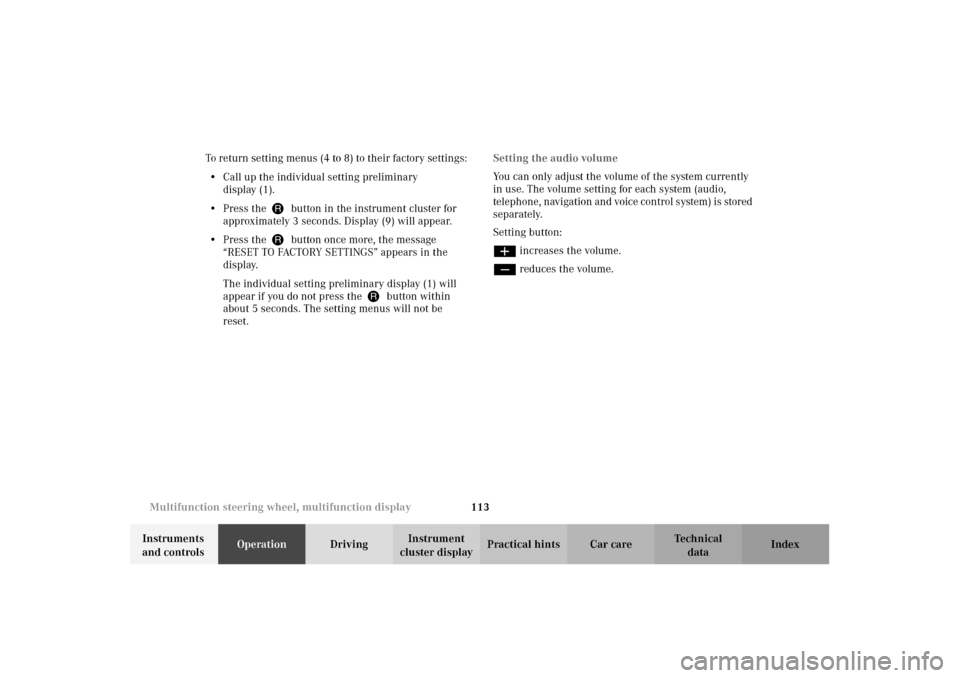
•Call up the individual setting preliminary
display (1).
•Press theJbutton in the instrument cluster for
approximately 3 seconds. Display (9) will appear.
•Press theJbutton once more, the message
“RESET TO FACTORY SETTINGS” appears in the
display.
The individual setting preliminary display (1) will
appear if you do not press theJbutton within
about 5 seconds. The setting menus will not be
reset.Setting the audio volume
You can only adjust the volume of the system currently
in use. The volume setting for each system (audio,
telephone, navigation and voice control system) is stored
separately.
Setting button:
æ increases the volume.
ç reduces the volume.
Page 119 of 354
116 Flexible service system
Te ch n i c a l
data Instruments
and controlsOperationDrivingInstrument
cluster displayPractical hints Car care Index
Following a completed A or B service the Mercedes-Benz
Center sets the counter mileage to 10 000 miles
(Canada: 15 000 km).
The counter can also be set by any individual. To do so:
Turn the electronic key in steering lock to position 2.
To call up the trip odometer and main odometer, press
button è or ÿ on the multifunction steering
wheel until the display appears. See page 96.
Press button j or k until the FSS indicator
appears.
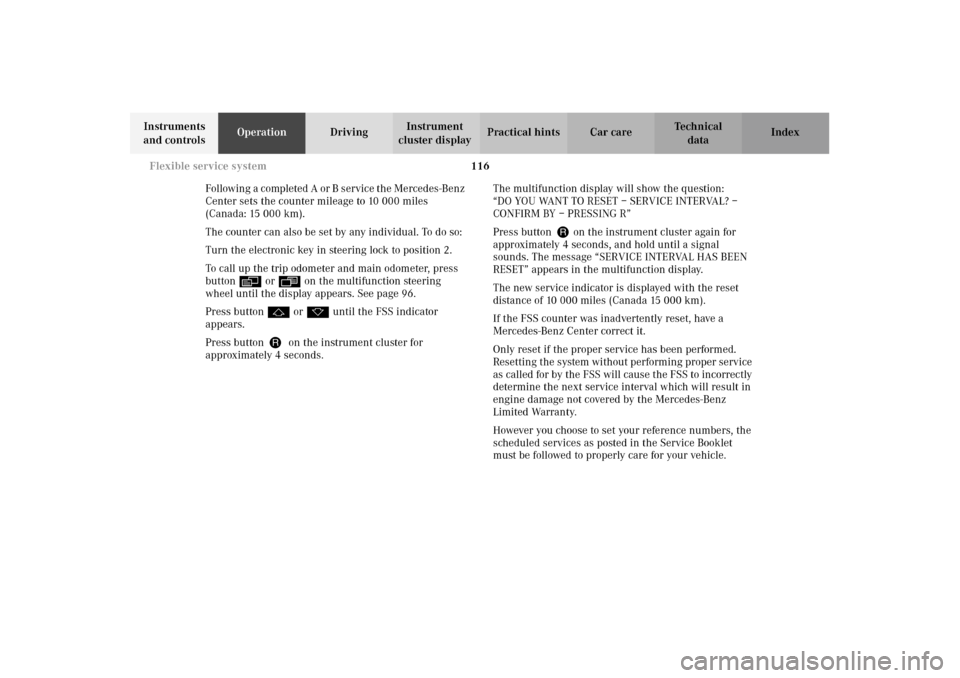
Press buttonJon the instrument cluster for
approximately 4 seconds.The multifunction display will show the question:
“DO YOU WANT TO RESET – SERVICE INTERVAL? –
CONFIRM BY – PRESSING R”
Press button J on the instrument cluster again for
approximately 4 seconds, and hold until a signal
sounds. The message “SERVICE INTERVAL HAS BEEN
RESET” appears in the multifunction display.
The new service indicator is displayed with the reset
distance of 10 000 miles (Canada 15 000 km).
If the FSS counter was inadvertently reset, have a
Mercedes-Benz Center correct it.
Only reset if the proper service has been performed.
Resetting the system without performing proper service
as called for by the FSS will cause the FSS to incorrectly
determine the next service interval which will result in
engine damage not covered by the Mercedes-Benz
Limited Warranty.
However you choose to set your reference numbers, the
scheduled services as posted in the Service Booklet
must be followed to properly care for your vehicle.
Page 145 of 354
142 Audio system
Te ch n i c a l
data Instruments
and controlsOperationDrivingInstrument
cluster displayPractical hints Car care Index
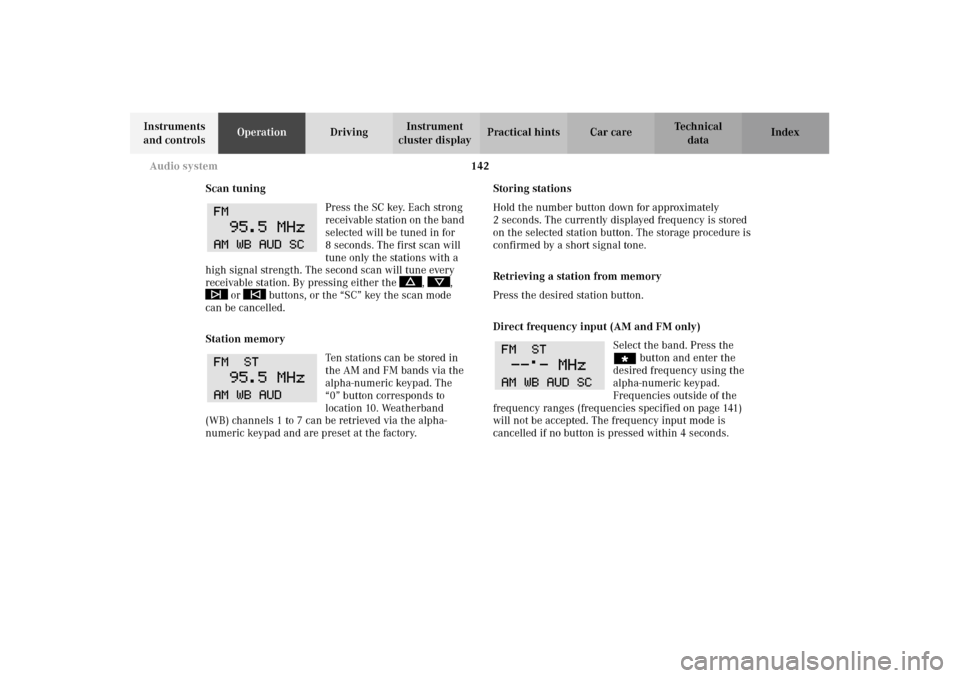
Scan tuning
Press the SC key. Each strong
receivable station on the band
selected will be tuned in for
8 seconds. The first scan will
tune only the stations with a
high signal strength. The second scan will tune every
receivable station. By pressing either the , ,
or buttons, or the “SC” key the scan mode
can be cancelled.
Station memory
Ten stations can be stored in
the AM and FM bands via the
alpha-numeric keypad. The
“0” button corresponds to
location 10. Weatherband
(WB) channels 1 to 7 can be retrieved via the alpha-
numeric keypad and are preset at the factory.Storing stations
Hold the number button down for approximately
2 seconds. The currently displayed frequency is stored
on the selected station button. The storage procedure is
confirmed by a short signal tone.
Retrieving a station from memory
Press the desired station button.
Direct frequency input (AM and FM only)
Select the band. Press the
“ button and enter the
desired frequency using the
alpha-numeric keypad.
Frequencies outside of the
frequency ranges (frequencies specified on page 141)
will not be accepted. The frequency input mode is
cancelled if no button is pressed within 4 seconds.
Page 198 of 354
195 Tele Aid
Te ch n i c a l
data Instruments
and controlsOperationDrivingInstrument
cluster displayPractical hints Car care Index Important!
If the indicator lamp continues to flash or the system
does not reset, contact the Response Center at
1-800-756-9018 (in the USA) or 1-888-923-8367 (in
Canada), or Mercedes-Benz Customer Assistance at
1-800-FOR-MERCedes (1-800-367-6372) in the USA or
Customer Service at 1-800-387-0100 in Canada.
Notes:
The indicator lamp in the respective button flashes until
the call is concluded. Calls can only be terminated by a
Response Center or Customer Assistance Center
representative except Roadside Assistance and
Information calls, which can also be terminated by
pressing ìbutton on the multifunction steering
wheel.When a Tele Aid call has been initiated, the audio
system or the COMAND system audio (only vehicles
with COMAND) is muted and the selected mode (radio,
tape or CD) pauses. The optional cellular phone (if
installed) switches off. If you must use this phone, the
vehicle must be parked. Disconnect the coiled cord and
place the call. The COMAND navigation system (if
engaged) will continue to run. The display in the
instrument cluster is available for use and spoken
commands are only available by pressing the RPT
button on the COMAND unit. A pop-up window will
appear in the COMAND display to indicate that a Tele
Aid call is in progress.
Page 226 of 354
223 Driving systems
Te ch n i c a l
data Instruments
and controlsOperationDrivingInstrument
cluster displayPractical hints Car care Index 3Canceling
To cancel the cruise control, briefly push lever to
position 3.
When you step on the brake pedal or the vehicle
speed drops below approximately 20 mph
(30 km / h), for example when driving upgrade, the
cruise control will be canceled.
If the cruise control cancels by itself and remains
inoperative until the engine is restarted, have the
system checked at your authorized Mercedes-Benz
Center as soon as possible.
4Resume
If the lever is briefly pushed to position 4 when
driving at a speed exceeding approximately 20 mph
(30 km / h), the vehicle resumes the speed which
was set prior to the cancellation of the cruise
control. The last memorized speed is canceled when
the electronic key in the steering lock is turned to
position 1 or O.Important!
Moving gear selector lever to position “N” switches the
cruise control off.
Wa r n i n g !
Only use the cruise control if the traffic and
weather conditions make it advisable to travel at a
steady speed.
• The use of cruise control can be dangerous on
winding roads or in heavy traffic because
conditions do not allow safe driving at a steady
speed.• The use of cruise control can be dangerous on
slippery roads. Rapid changes in tire adhesion
can result in wheel spin and loss of control.The “Resume” function should only be operated if
the driver is fully aware of the previously set speed
and wishes to resume this particular preset speed.