instrument cluster MERCEDES-BENZ E550 4MATIC 2011 W212 User Guide
[x] Cancel search | Manufacturer: MERCEDES-BENZ, Model Year: 2011, Model line: E550 4MATIC, Model: MERCEDES-BENZ E550 4MATIC 2011 W212Pages: 400, PDF Size: 16.3 MB
Page 68 of 400
The ! warning lamp in the instrument
cluster lights up when the ignition is switched
on. It goes out when the engine is running.
Braking
If ABS intervenes when braking, you will feel
a pulsing in the brake pedal.
XIf ABS intervenes: continue to depress the
brake pedal with force until the braking
situation is over.XTo make a full brake application:
depress the brake pedal with full force.GWarning
If the ABS malfunctions, other driving systems
such as the BAS or the ESP ®
are also switched
off. Observe indicator and warning lamps that
may come on as well as messages in the
multifunction display that may appear.
If the ABS malfunctions, the wheels may lock
during hard braking, reducing the steering
capability and extending the braking distance.
The pulsating brake pedal can be an
indication of hazardous road conditions and
functions as a reminder to take extra care
while driving.
BAS (Brake Assist)
GWarning
Observe "Important safety notes"
( Y page 65).
BAS operates in emergency braking
situations. If you depress the brake pedal
quickly, BAS automatically boosts the braking
force, thus shortening the stopping distance.
XKeep the brake pedal firmly depressed until
the emergency braking situation is over.
ABS prevents the wheels from locking.
The brakes will function as usual once you
release the brake pedal. BAS is deactivated.
GWarning
If the BAS malfunctions, the brake system still
functions, but without the additional brake
boost available that the BAS would normally
provide in an emergency braking maneuver.
Therefore, the braking distance may increase.
BAS PLUS (Brake Assist PLUS)
GWarning
Observe "Important safety notes"
( Y page 65).
At speeds above approximately
20 mph (30 km/h), BAS PLUS assists you
when braking in hazardous situations and
uses the radar sensor system to evaluate the
traffic conditions.
GWarning!
BAS PLUS is a convenience system designed
to assist the driver during vehicle operation.
The responsibility for the vehicle speed and
the distance to the vehicle ahead, including
most importantly brake operation to assure
safe stopping distance, always remains with
the driver.
Always pay attention to traffic conditions
even while BAS PLUS is switched on.
Otherwise, you may not be able to recognize
dangerous situations until it is too late and
could cause an accident. Personal or fatal
injury to you or others may be the result.
i This equipment has been approved by the
FCC as a "Vehicular Radar System". The
radar sensor system is intended for use in
an automotive radar system only. Removal,
tampering, or altering of the device will void
any warranties, and is not permitted by the
FCC. Do not tamper with the device in any
way.
Any unauthorized modification to this
device could void the user's authority to
operate the equipment.
66Driving safety systemsSafety
BA 212 USA, CA Edition B 2011; 1; 5, en-USdimargiVersion: 3.0.3.62010-05-20T13:33:46+02:00 - Seite 66
Page 69 of 400
BAS PLUS can detect obstacles that are in the
path of your vehicle for an extended period of
time. Should you approach a detected
obstacle quickly, BAS PLUS calculates the
braking force necessary to avoid a rear-end
collision. Should you additionally apply the
brakes, BAS PLUS will automatically increase
the braking force to a level suitable for the
traffic conditions.
If BAS PLUS demands particularly high
braking force, PRE-SAFE ®
is activated
simultaneously.XKeep the brake pedal depressed until the
emergency braking situation is over.
ABS prevents the wheels from locking.
The brakes will work normally again when:
R you release the brake pedal
R no obstacle is detected in front of your
vehicle
R there is no longer any danger of a rear-end
collision
BAS PLUS is then deactivated.
At speeds up to approximately
40 mph (70 km/h), BAS PLUS can also detect
stationary obstacles, for example, stopped or
parked vehicles.
For BAS PLUS to assist you when driving, the
radar sensor system must be switched on and
operational. You can check this by activating
DISTRONIC PLUS ( Y page 179) or via the
"radar sensor" function in the on-board
computer( Y page 232).
GWarning!
BAS PLUS will only respond with brake
assistance if it has clearly detected an object.
Detection can be impeded by
R dirty or covered sensors
R snowfall or heavy rain
R disturbance from other radar sources
R strong radar reflection such as in parking
garages
BAS PLUS uses radar signals that are not
reflected well by narrow objects and
absorptive materials. For this reason BAS
PLUS will not react to persons, animals, and
approaching traffic or cross-traffic.
BAS PLUS may not detect narrow vehicles
driving in front of you, such as motorcycles
and vehicles driving offset from your vehicle
center.
Following a collision or accident-related
damage to the front end of the vehicle, have
the configuration and operation of the radar
sensors checked at an authorized Mercedes-
Benz Center.
If BAS PLUS is not available due to a
malfunction in the radar sensor system, the
brake system remains available with full
brake boosting effect and BAS.
ESP ®
(Electronic Stability Program)
Important safety notes
GWarning
Observe "Important safety notes"
( Y page 65).
If ESP ®
detects that the vehicle is deviating
from the direction desired by the driver, one
or more wheels are braked to stabilize the
vehicle. If necessary, the engine output is also
modified to keep the vehicle on the desired
course within physical limits. ESP ®
assists
the driver when pulling away on wet or
slippery roads. ESP ®
can also stabilize the
vehicle during braking.
If ESP ®
intervenes, the ä warning lamp
flashes in the instrument cluster.
Driving safety systems67SafetyBA 212 USA, CA Edition B 2011; 1; 5, en-USdimargiVersion: 3.0.3.62010-05-20T13:33:46+02:00 - Seite 67Z
Page 70 of 400
GWarning!
Never switch off the ESP when you see the
ESP warning lamp ä flashing in the
instrument cluster. In this case proceed as
follows:
R When driving off, apply as little throttle as
possible.
R While driving, ease up on the accelerator
pedal.
R Adapt your speed and driving style to the
prevailing road conditions.
Failure to observe these guidelines could
cause the vehicle to skid. The ESP cannot
prevent accidents resulting from excessive
speed.
! Vehicles without 4MATIC: switch the
ignition off when:
R the parking brake is being tested using a
dynamometer
R the vehicle is being towed with the front/
rear axle raised
Application of the brakes by ESP ®
may
otherwise destroy the brake system.
! Vehicles with 4MATIC: switch off the
ignition when the parking brake is being
tested on a brake dynamometer.
Application of the brakes by ESP ®
may
otherwise destroy the brake system.
i Only use wheels with the recommended
tire sizes. Only then will ESP ®
function
properly.
ETS/4ETS (Electronic Traction System)
GWarning
Observe "Important safety notes"
( Y page 65).
Traction control is part of ESP ®
.
Traction control brakes the drive wheels
individually if they spin. This enables you to
pull away and accelerate on slippery surfaces,
for example if the road surface is slippery on
one side. On vehicles with 4MATIC, more
drive torque is also transferred to the wheel
or wheels with traction.
Traction control remains active if you
deactivate ESP ®
.
Deactivating/activating ESP ®
(except
AMG vehicles)GWarning!
The ESP should not be switched off during
normal driving other than in the
circumstances described below. Disabling
the system will reduce vehicle stability in
driving maneuvers.
Do not switch off the ESP when a spare wheel
is mounted.
ESP ®
is activated automatically when the
engine is running.
It may be best to deactivate ESP ®
in the
following situations:
R when using snow chains
R in deep snow
R on sand or gravel
GWarning!
Switch on the ESP immediately if the
aforementioned circumstances do not apply
anymore. Otherwise the ESP will not stabilize
the vehicle when it is starting to skid or a
wheel is spinning.
If you deactivate ESP ®
:
R ESP ®
no longer improves driving stability.
R the engine's torque is no longer limited and
the drive wheels can spin. The spinning of
the wheels results in a cutting action, which
provides better grip.
R traction control is still activated.
R ESP ®
still provides support when you
brake.
If ESP ®
is deactivated and one or more wheels
start to spin, the ä warning lamp in the
68Driving safety systemsSafety
BA 212 USA, CA Edition B 2011; 1; 5, en-USdimargiVersion: 3.0.3.62010-05-20T13:33:46+02:00 - Seite 68
Page 71 of 400
instrument cluster flashes. In such situations,
ESP ®
will not stabilize the vehicle.XTo deactivate: (Y page 228).
The å warning lamp in the instrument
cluster lights up.GWarning
When the å ESP OFF warning lamp lights
up, ESP is switched off.
When the ä ESP warning lamp and the
å ESP OFF warning lamp are on
continuously, ESP is not operational due to a
malfunction.
When ESP is switched off or not operational,
the vehicle's stability during standard driving
maneuvers is reduced.
Adapt your driving style to suit the prevailing
road conditions/weather conditions and to
the non-operating status of ESP.
! Avoid spinning a drive wheel for an
extended period with ESP switched off. This
could cause serious damage to the drive
train.
XTo activate: (Y page 228).
The å warning lamp in the instrument
cluster goes out.
Deactivating/activating ESP ®
(AMG
vehicles)
Activating/deactivating SPORT handling
mode
GWarning
The SPORT handling mode should not be
switched on during normal driving.
Switching on the SPORT handling mode will
result in the following:
R no restriction to the engine torque
R system supported traction control is
limited
The SPORT handling mode is designed for
driving on closed tracks when the vehicle's
own natural oversteer and understeer
characteristics are desired and requires a
highly skilled and experienced driver able to
handle these critical driving situations.
You could lose control of your vehicle and
cause an accident.
Please be aware of these limits when you
switch on the SPORT handling mode.
Do not switch on the SPORT handling when a
spare wheel is mounted.
SPORT handling mode is active automatically
as long as the engine is running.
It may be best to activate SPORT handling
mode in the following situations:
R when using snow chains
R in deep snow
R on sand or gravelGWarning
Switch off the SPORT handling mode and
switch on the ESP ®
immediately if the
aforementioned circumstances do not apply
anymore. Otherwise the SPORT handling
mode will only stabilize the vehicle to a limited
extent when it is starting to skid or a wheel is
spinning.
When SPORT handling mode is activated:
R ESP ®
only improves driving stability to a
limited degree.
R the engine's torque is restricted to a limited
degree and the drive wheels can spin. The
spinning of the wheels results in a cutting
action, which provides better grip.
R traction control is still activated.
R ESP ®
still provides support when you brake
firmly.
If SPORT handling mode is activated and one
or more wheels start to spin, the ä
warning lamp in the instrument cluster
flashes. ESP ®
only stabilizes the vehicle to a
limited degree.
Driving safety systems69SafetyBA 212 USA, CA Edition B 2011; 1; 5, en-USdimargiVersion: 3.0.3.62010-05-20T13:33:46+02:00 - Seite 69Z
Page 72 of 400
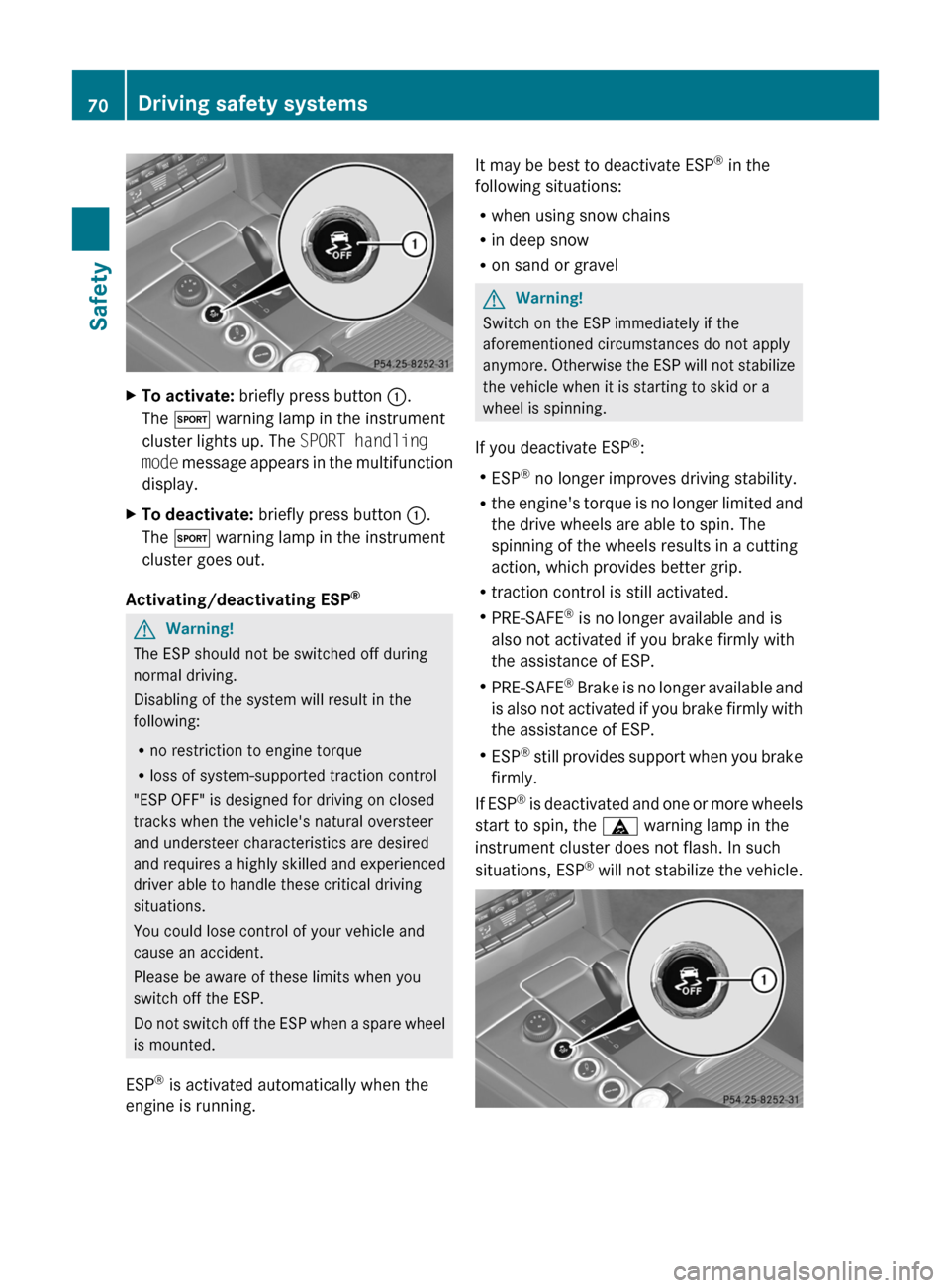
XTo activate: briefly press button :.
The M warning lamp in the instrument
cluster lights up. The SPORT handling
mode message appears in the multifunction
display.XTo deactivate: briefly press button :.
The M warning lamp in the instrument
cluster goes out.
Activating/deactivating ESP ®
GWarning!
The ESP should not be switched off during
normal driving.
Disabling of the system will result in the
following:
R no restriction to engine torque
R loss of system-supported traction control
"ESP OFF" is designed for driving on closed
tracks when the vehicle's natural oversteer
and understeer characteristics are desired
and requires a highly skilled and experienced
driver able to handle these critical driving
situations.
You could lose control of your vehicle and
cause an accident.
Please be aware of these limits when you
switch off the ESP.
Do not switch off the ESP when a spare wheel
is mounted.
ESP ®
is activated automatically when the
engine is running.
It may be best to deactivate ESP ®
in the
following situations:
R when using snow chains
R in deep snow
R on sand or gravelGWarning!
Switch on the ESP immediately if the
aforementioned circumstances do not apply
anymore. Otherwise the ESP will not stabilize
the vehicle when it is starting to skid or a
wheel is spinning.
If you deactivate ESP ®
:
R ESP ®
no longer improves driving stability.
R the engine's torque is no longer limited and
the drive wheels are able to spin. The
spinning of the wheels results in a cutting
action, which provides better grip.
R traction control is still activated.
R PRE-SAFE ®
is no longer available and is
also not activated if you brake firmly with
the assistance of ESP.
R PRE-SAFE ®
Brake is no longer available and
is also not activated if you brake firmly with
the assistance of ESP.
R ESP ®
still provides support when you brake
firmly.
If ESP ®
is deactivated and one or more wheels
start to spin, the ä warning lamp in the
instrument cluster does not flash. In such
situations, ESP ®
will not stabilize the vehicle.
70Driving safety systemsSafety
BA 212 USA, CA Edition B 2011; 1; 5, en-USdimargiVersion: 3.0.3.62010-05-20T13:33:46+02:00 - Seite 70
Page 73 of 400
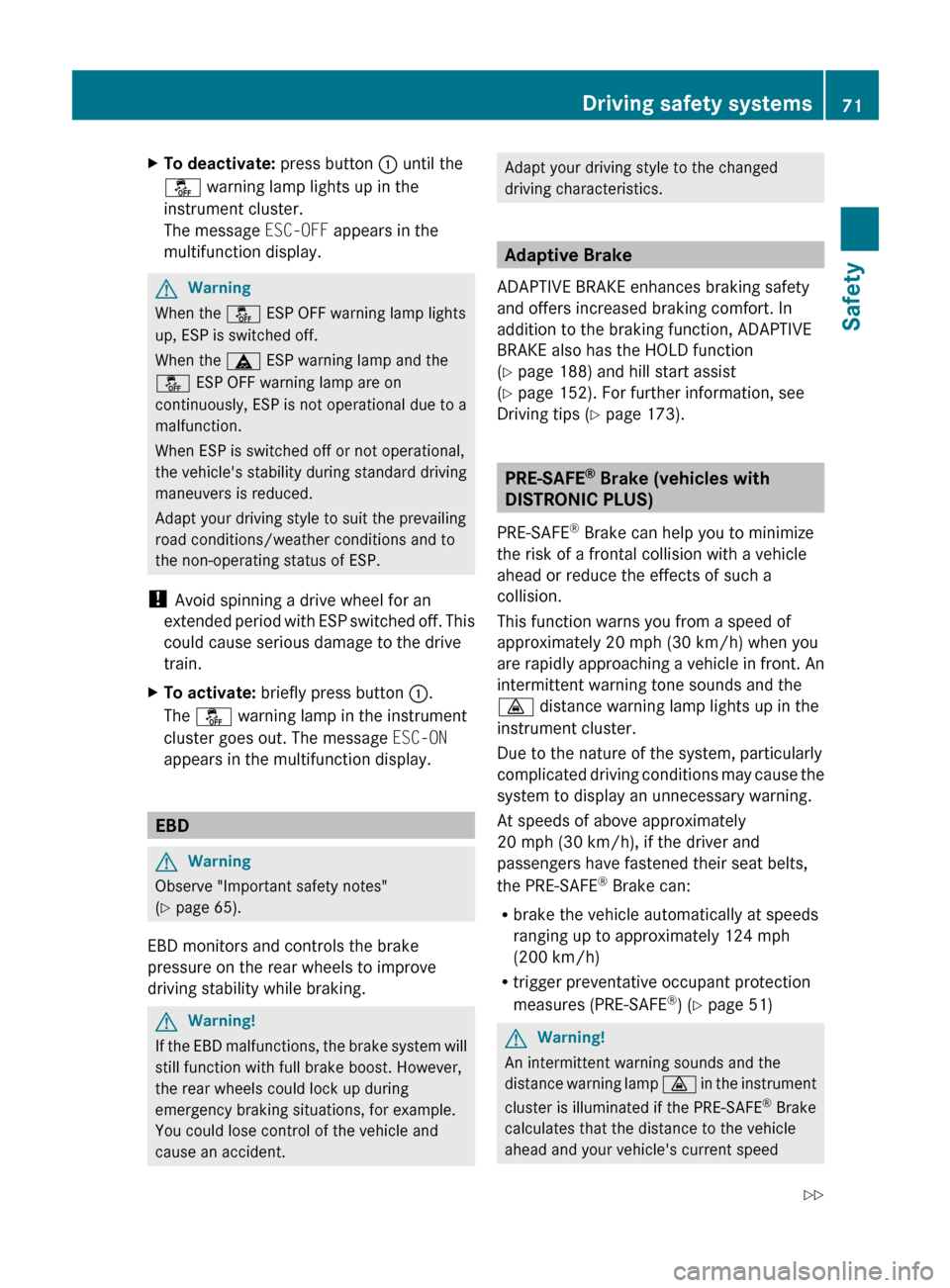
XTo deactivate: press button : until the
å warning lamp lights up in the
instrument cluster.
The message ESC-OFF appears in the
multifunction display.GWarning
When the å ESP OFF warning lamp lights
up, ESP is switched off.
When the ä ESP warning lamp and the
å ESP OFF warning lamp are on
continuously, ESP is not operational due to a
malfunction.
When ESP is switched off or not operational,
the vehicle's stability during standard driving
maneuvers is reduced.
Adapt your driving style to suit the prevailing
road conditions/weather conditions and to
the non-operating status of ESP.
! Avoid spinning a drive wheel for an
extended period with ESP switched off. This
could cause serious damage to the drive
train.
XTo activate: briefly press button :.
The å warning lamp in the instrument
cluster goes out. The message ESC-ON
appears in the multifunction display.
EBD
GWarning
Observe "Important safety notes"
( Y page 65).
EBD monitors and controls the brake
pressure on the rear wheels to improve
driving stability while braking.
GWarning!
If the EBD malfunctions, the brake system will
still function with full brake boost. However,
the rear wheels could lock up during
emergency braking situations, for example.
You could lose control of the vehicle and
cause an accident.
Adapt your driving style to the changed
driving characteristics.
Adaptive Brake
ADAPTIVE BRAKE enhances braking safety
and offers increased braking comfort. In
addition to the braking function, ADAPTIVE
BRAKE also has the HOLD function
( Y page 188) and hill start assist
( Y page 152). For further information, see
Driving tips ( Y page 173).
PRE-SAFE ®
Brake (vehicles with
DISTRONIC PLUS)
PRE-SAFE ®
Brake can help you to minimize
the risk of a frontal collision with a vehicle
ahead or reduce the effects of such a
collision.
This function warns you from a speed of
approximately 20 mph (30 km/h) when you
are rapidly approaching a vehicle in front. An
intermittent warning tone sounds and the
· distance warning lamp lights up in the
instrument cluster.
Due to the nature of the system, particularly
complicated driving conditions may cause the
system to display an unnecessary warning.
At speeds of above approximately
20 mph (30 km/h), if the driver and
passengers have fastened their seat belts,
the PRE-SAFE ®
Brake can:
R brake the vehicle automatically at speeds
ranging up to approximately 124 mph
(200 km/h)
R trigger preventative occupant protection
measures (PRE-SAFE ®
) ( Y page 51)
GWarning!
An intermittent warning sounds and the
distance warning lamp · in the instrument
cluster is illuminated if the PRE-SAFE ®
Brake
calculates that the distance to the vehicle
ahead and your vehicle's current speed
Driving safety systems71SafetyBA 212 USA, CA Edition B 2011; 1; 5, en-USdimargiVersion: 3.0.3.62010-05-20T13:33:46+02:00 - Seite 71Z
Page 104 of 400
Vehicle equipment
iThis manual describes all the standard
and optional equipment of your vehicle
which was available at the time of
purchase. Country-specific differences are
possible. Bear in mind that your vehicle
may not feature all functions described
here. This also refers to safety-related
systems and functions.
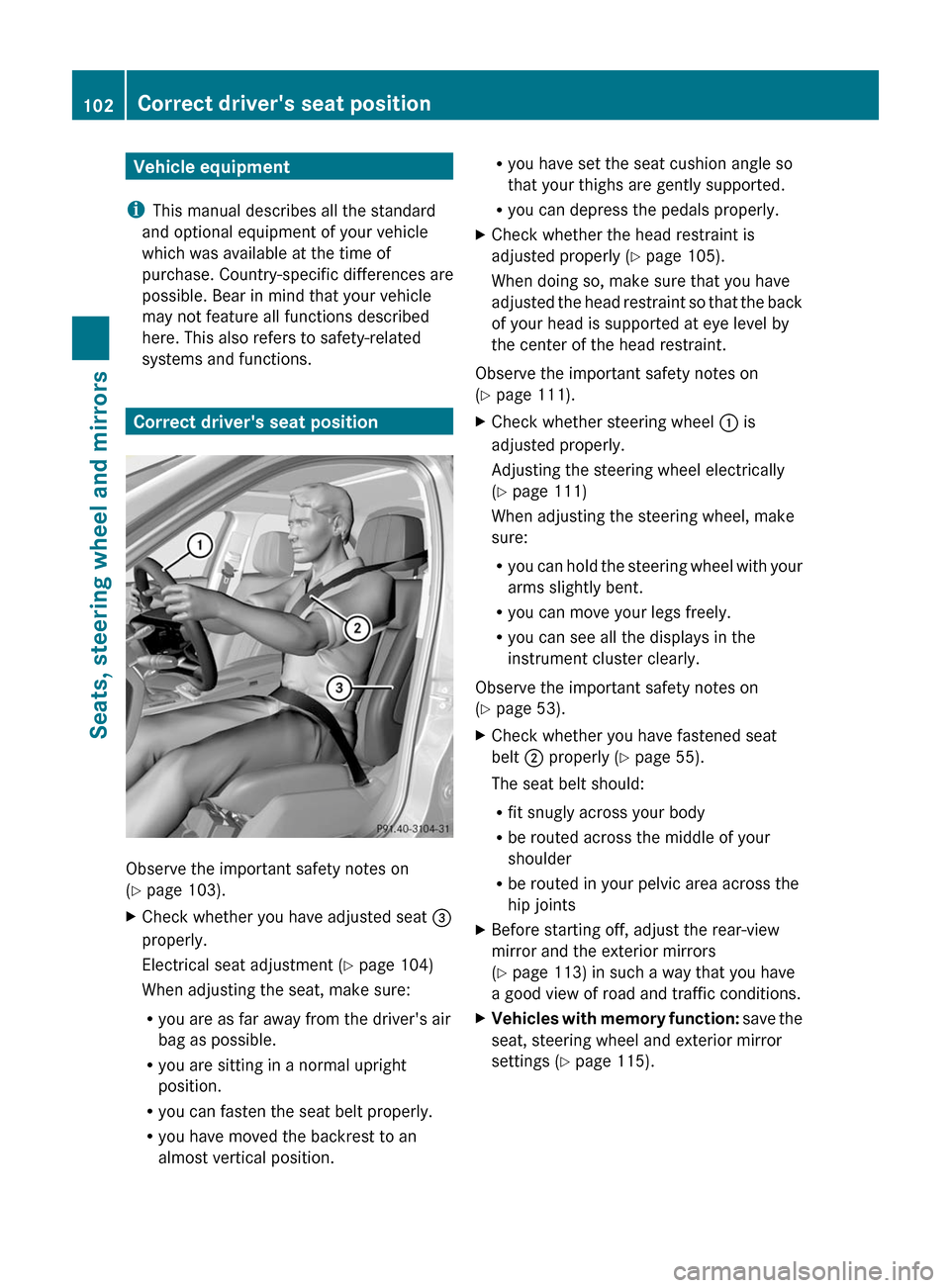
Correct driver's seat position
Observe the important safety notes on
(Y page 103).
XCheck whether you have adjusted seat =
properly.
Electrical seat adjustment (Y page 104)
When adjusting the seat, make sure:
Ryou are as far away from the driver's air
bag as possible.
Ryou are sitting in a normal upright
position.
Ryou can fasten the seat belt properly.
Ryou have moved the backrest to an
almost vertical position.
Ryou have set the seat cushion angle so
that your thighs are gently supported.
Ryou can depress the pedals properly.
XCheck whether the head restraint is
adjusted properly (Y page 105).
When doing so, make sure that you have
adjusted the head restraint so that the back
of your head is supported at eye level by
the center of the head restraint.
Observe the important safety notes on
(Y page 111).
XCheck whether steering wheel : is
adjusted properly.
Adjusting the steering wheel electrically
(Y page 111)
When adjusting the steering wheel, make
sure:
Ryou can hold the steering wheel with your
arms slightly bent.
Ryou can move your legs freely.
Ryou can see all the displays in the
instrument cluster clearly.
Observe the important safety notes on
(Y page 53).
XCheck whether you have fastened seat
belt ; properly (Y page 55).
The seat belt should:
Rfit snugly across your body
Rbe routed across the middle of your
shoulder
Rbe routed in your pelvic area across the
hip joints
XBefore starting off, adjust the rear-view
mirror and the exterior mirrors
(Y page 113) in such a way that you have
a good view of road and traffic conditions.
XVehicles with memory function: save the
seat, steering wheel and exterior mirror
settings (Y page 115).
102Correct driver's seat positionSeats, steering wheel and mirrors
BA 212 USA, CA Edition B 2011; 1; 5, en-USdimargiVersion: 3.0.3.62010-05-20T13:33:46+02:00 - Seite 102
Page 121 of 400
Low-beam headlampsXTo switch on the low-beam headlamps:
turn the key in the ignition lock to position
2 or start the engine.XTurn the light switch to L.
The L indicator lamp in the instrument
cluster lights up.
Daytime running lamps
Daytime running lamps in Canada
In Canada, the "daytime running lamps"
function is required by law. It can therefore
not be deactivated.
XTurn the light switch to c.
With the engine running: depending on the
ambient light, either the daytime running
lamps or the low-beam headlamps are
switched on.
If the low-beam headlamps are switched
on, the L indicator lamp in the
instrument cluster lights up.
With the engine running while the vehicle is
stationary: the daytime running lamps/low-
beam headlamps switch off after 3 minutes if
you shift the selector lever to P from a driving
position.
With the engine running, the vehicle
stationary and bright ambient light: if you set
the light switch to T, the daytime running
lamps and the parking lamps switch on.
If you set the light switch to L while the
engine is running, the manual setting
overrides the daytime running lamps.
Daytime running lamps in the USA
The daytime running lamps are deactivated
ex works on vehicles for the USA.
XTo switch on the daytime running
lamps: switch on the "daytime runninglamps" function via the on-board computer
( Y page 230).XTurn the light switch to c.
With the engine running: depending on the
ambient light, either the daytime running
lamps or the low-beam headlamps are
switched on.
If the low-beam headlamps are switched
on, the L indicator lamp in the
instrument cluster lights up.
If you set the light switch to T or L
while the engine is running, the manual
setting overrides the daytime running lamps.
Automatic headlamps
GRisk of accident
If the light switch is set to c, the low-beam
headlamps will not come on automatically if
it is foggy. This could endanger you and
others. Therefore, turn the light switch to
L in fog.
The automatic headlamp feature is only an
aid. The driver is responsible for the vehicle's
lighting at all times.
XTo switch on automatic headlamp
mode: turn the light switch to c.
SmartKey in position 1 in the ignition lock:
the parking lamps are switched on or off
automatically depending on the brightness
of the ambient light.
With the engine running: depending on the
brightness of the ambient light, the daytime
running lamps 10
or the low-beam
headlamps are switched on or off
automatically.
When the low-beam headlamps are
switched on, the L indicator lamp in the
instrument cluster lights up.10 Only if daytime running lamps have been activated via the on-board computer.Exterior lighting119Lights and windshield wipersBA 212 USA, CA Edition B 2011; 1; 5, en-USdimargiVersion: 3.0.3.62010-05-20T13:33:46+02:00 - Seite 119Z
Page 122 of 400
Fog lamps and rear fog lamps
Front fog lamps
Only vehicles with front fog lamps have the
"fog lamps" function.
GWarning!
If you suspect that driving conditions will be
foggy, turn the light switch to L before you
start your journey. Otherwise, your vehicle
may not be visible and you could endanger
yourself and others.
XTo switch on the front fog lamps: turn
the key in the ignition lock to position 2 or
start the engine.
XTurn the light switch to L or c.XPress the N button.
The green N indicator lamp in the
instrument cluster lights up.
XTo switch off the front fog lamps: press
the N button.
The green N indicator lamp in the
instrument cluster goes out.
iIf you switch the engine off (key in
position 1 in the ignition lock) and then
restart it, the previous fog lamp settings are
restored.
Rear fog lamp
XTo switch on the rear fog lamp: turn the
key in the ignition lock to position 2 or start
the engine.
XTurn the light switch to L or c.
When the light switch is set to c, the
rear fog lamp only lights up if the low-beam
headlamps are switched on.
XPress the R button.
The yellow R indicator lamp in the
instrument cluster lights up.
XTo switch off the rear fog lamp: press the
R button.
The yellow R indicator lamp in the
instrument cluster goes out.
iIf you switch the engine off (key in
position 1 in the ignition lock) and then
restart it, the previous rear fog lamp
settings are restored.
Combination switch
Turn signals
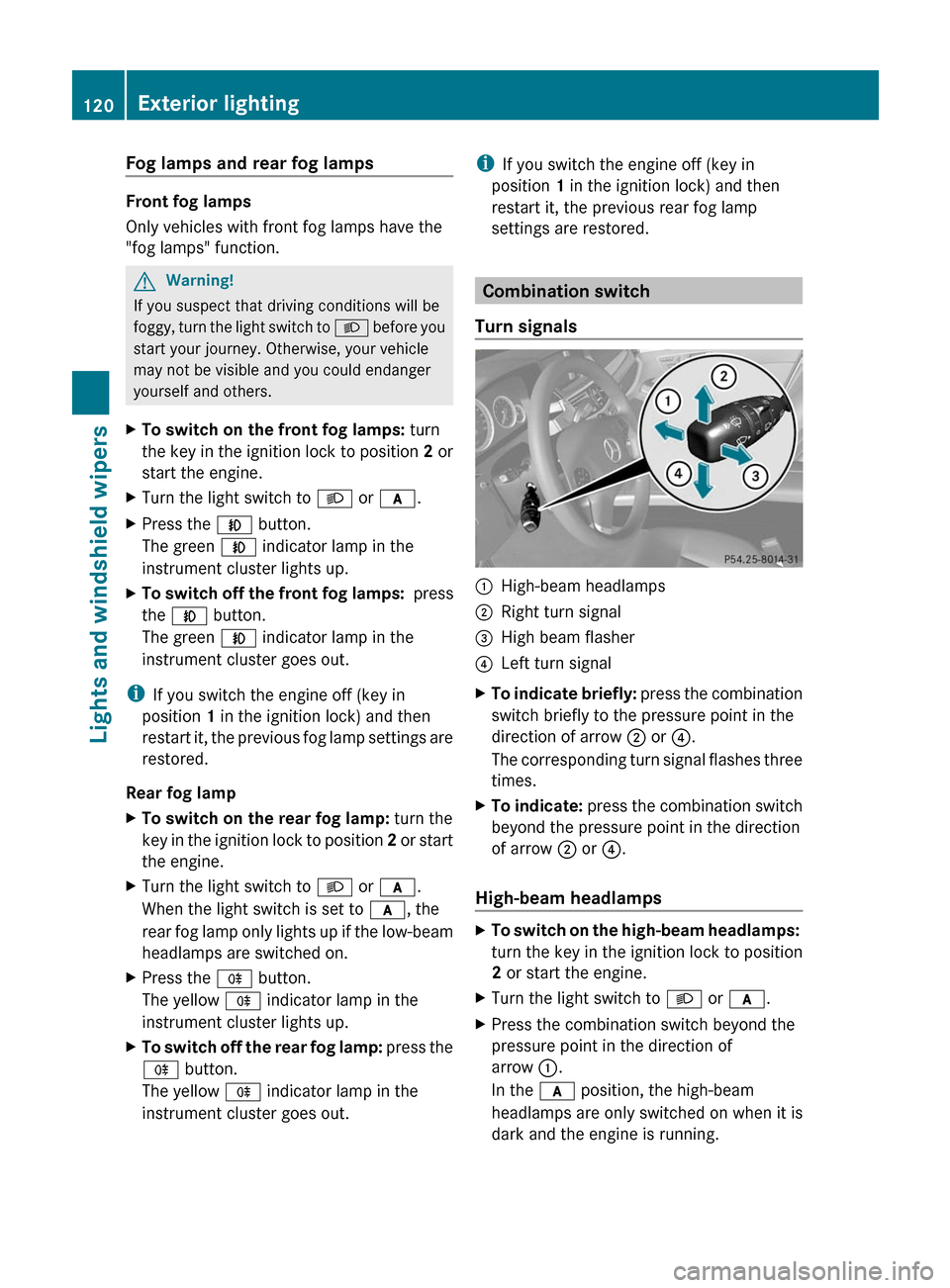
:High-beam headlamps;Right turn signal=High beam flasher?Left turn signalXTo indicate briefly: press the combination
switch briefly to the pressure point in the
direction of arrow ; or ?.
The corresponding turn signal flashes three
times.
XTo indicate: press the combination switch
beyond the pressure point in the direction
of arrow ; or ?.
High-beam headlamps
XTo switch on the high-beam headlamps:
turn the key in the ignition lock to position
2 or start the engine.
XTurn the light switch to L or c.XPress the combination switch beyond the
pressure point in the direction of
arrow :.
In the c position, the high-beam
headlamps are only switched on when it is
dark and the engine is running.
120Exterior lightingLights and windshield wipers
BA 212 USA, CA Edition B 2011; 1; 5, en-USdimargiVersion: 3.0.3.62010-05-20T13:33:46+02:00 - Seite 120
Page 123 of 400
The K indicator lamp in the instrument
cluster lights up when the high-beam
headlamps are switched on.XTo switch off the high-beam
headlamps: move the combination switch
back to its normal position.
The K indicator lamp in the instrument
cluster goes out.
Adaptive Highbeam Assist
GWarning!
The Adaptive Highbeam Assist is only an aid
intended to support you while driving. The
driver is and remains responsible for proper
vehicle lighting in accordance with the
prevailing light, sight and traffic conditions.
The system may be impaired or unavailable
when
R visibility is poor, e.g. due to snow, rain, fog,
or heavy spray
R the optical sensor area of the windshield is
dirty, fogged up, or covered by a sticker for
example
The system cannot recognize the following
road users:
R Road users without a lighting system of
their own, e.g. pedestrians
R Road users with dim lighting of their own,
e.g. cyclists
R Road users whose lighting is obstructed,
e.g. road users behind a guardrail
R In some seldom cases, even road users with
a lighting system of their own may be
recognized too late or not at all.
The automatic high-beam headlamps will then
not be deactivated or it will be activated in
spite of preceding or oncoming road users.
This could endanger you and/or others and
cause an accident. Always pay close attention
to the traffic situation and switch off the high
beam manually if necessary.
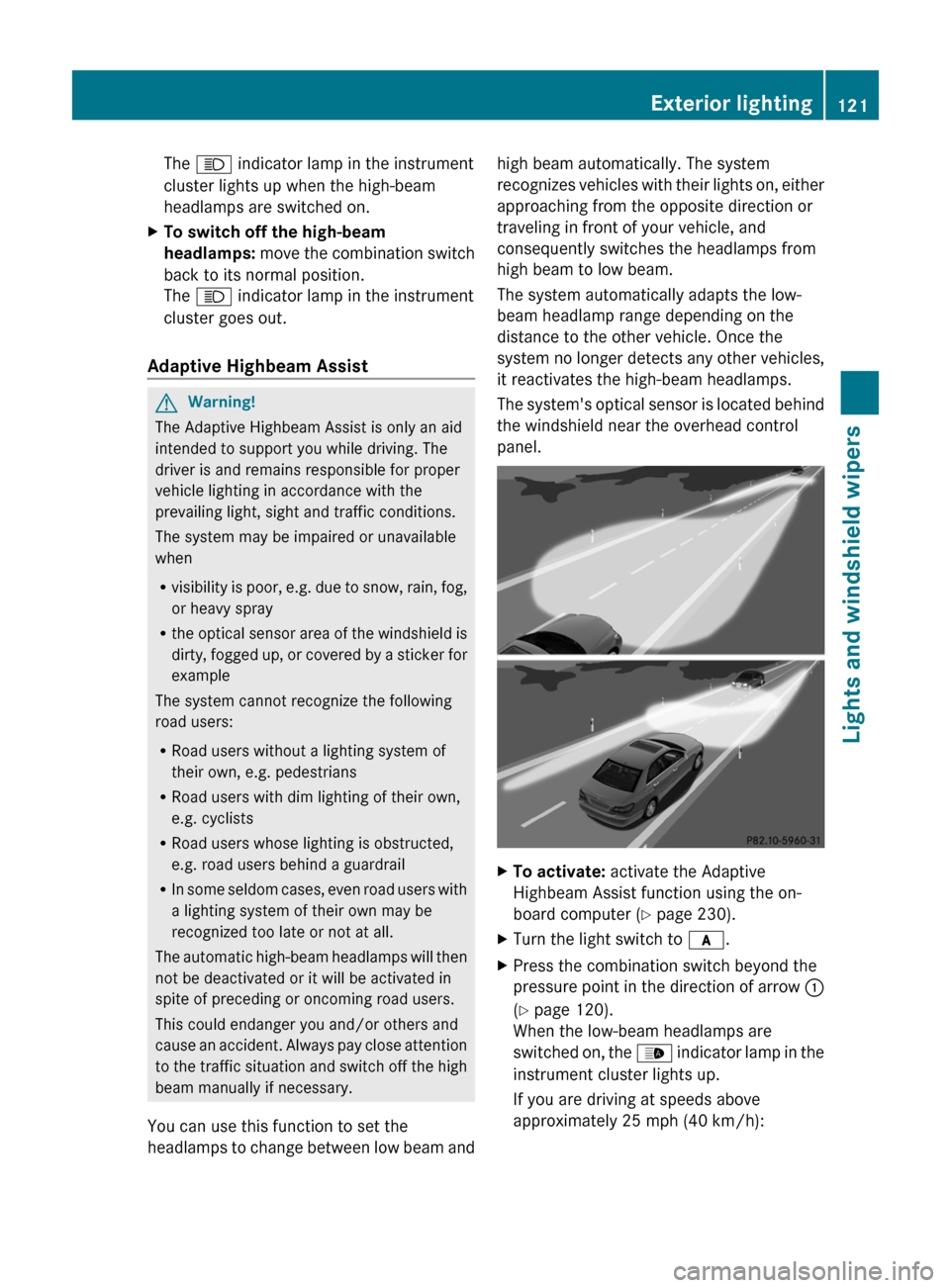
You can use this function to set the
headlamps to change between low beam and
high beam automatically. The system
recognizes vehicles with their lights on, either
approaching from the opposite direction or
traveling in front of your vehicle, and
consequently switches the headlamps from
high beam to low beam.
The system automatically adapts the low-
beam headlamp range depending on the
distance to the other vehicle. Once the
system no longer detects any other vehicles,
it reactivates the high-beam headlamps.
The system's optical sensor is located behind
the windshield near the overhead control
panel.XTo activate: activate the Adaptive
Highbeam Assist function using the on-
board computer ( Y page 230).XTurn the light switch to c.XPress the combination switch beyond the
pressure point in the direction of arrow :
( Y page 120).
When the low-beam headlamps are
switched on, the _ indicator lamp in the
instrument cluster lights up.
If you are driving at speeds above
approximately 25 mph (40 km/h):Exterior lighting121Lights and windshield wipersBA 212 USA, CA Edition B 2011; 1; 5, en-USdimargiVersion: 3.0.3.62010-05-20T13:33:46+02:00 - Seite 121Z