wheel MERCEDES-BENZ E55AMG 2002 W210 User Guide
[x] Cancel search | Manufacturer: MERCEDES-BENZ, Model Year: 2002, Model line: E55AMG, Model: MERCEDES-BENZ E55AMG 2002 W210Pages: 350, PDF Size: 21.88 MB
Page 76 of 350
73 Restraint systems
Technical
data Instruments
and controlsOperationDrivingInstrument
cluster displayPractical hints Car care IndexYour vehicle was originally equipped with airbags
which are designed to activate in certain impacts
exceeding a preset threshold to reduce the potential
and severity of injury. It is important to your safety
and that of your passenger that you replace
deployed airbags and repair any malfunctioning
airbags to ensure the vehicle will continue to
provide crash protection for occupants.
Wa r n i n g !
Airbags are designed to reduce the potential of
injury in certain frontal (front airbags) impacts, or
side (side impact and head protection window
curtain airbags) impacts which may cause
significant injuries, however, no system available
today can totally eliminate injuries and fatalities.The activation of the “SRS” temporarily releases a
small amount of dust from the airbags. This dust,
however, is neither injurious to your health, nor
does it indicate a fire in the vehicle. The dust might
cause some temporary breathing difficulty for
people with asthma or other breathing trouble. To
avoid this, you may wish to get out of the vehicle as
soon as it is safe to do so. If you have any breathing
difficulty but cannot get out of the vehicle after the
airbag inflates, then get fresh air by opening a
window or door.
Wa r n i n g !
To reduce the risk of injury when the front airbags
inflate, it is very important for the driver and front
passenger to always be in a properly seated
position and to wear their seat belts.For maximum protection in the event of a collision
always be in normal seated position with your back
against the backrest. Fasten your seat belt and
ensure that it is properly positioned on your body.Since the airbag inflates with considerable speed
and force, a proper seating and hands on steering
wheel position will help to keep you at a safe
distance from the airbag. Occupants who are
unbelted, out of position or too close to the airbag
can be seriously injured by an airbag as it inflates
with great force in the blink of an eye:
W210.book Seite 73 Mittwoch, 30. Mai 2001 11:45 11
Page 77 of 350
74 Restraint systems
Technical
data Instruments
and controlsOperationDrivingInstrument
cluster displayPractical hints Car care Index
• Sit properly belted in an upright position with
your back against the backrest.• Adjust the driver’s seat as far as possible
rearward, still permitting proper operation of
vehicle controls. The distance from the center
of the driver’s breastbone to the center of the
airbag cover on the steering wheel must be at
least ten inches (25 cm) or more. You should
be able to accomplish this by a combination of
adjustments to the seat and steering wheel. If
you have any problems, please see your
authorized Mercedes-Benz Center.• Do not lean with your head or chest close to the
steering wheel or dashboard.• Keep hands on the outside of steering wheel
rim. Placing hands and arms inside the rim
can increase the risk and potential severity of
hand / arm injury when driver front airbag
inflates.• Adjust the front passenger seat as far as
possible rearward from the dashboard when
the seat is occupied.
• Occupants, especially children, should never
lean their heads in the area of the door where
the side airbag inflates. This could result in
serious injuries or death should the airbag be
triggered. Always sit upright, properly use the
seatbelts and appropriate size infant or child
restraint system• Children 12 years old and under must never
ride in the front seat, except in a Mercedes-
Benz authorized Baby Smart
TM compatible
child seat, which operates with the
BabySmart
TM system installed in the vehicle to
deactivate the passenger front airbag when it
is properly installed. Otherwise they will be
struck by the airbag when it inflates in a
crash. If this happens, serious or fatal injury
can result.
Failure to follow these instructions can result in
severe injuries to you or other occupants.
W210.book Seite 74 Mittwoch, 30. Mai 2001 11:45 11
Page 79 of 350
76 Restraint systems
Technical
data Instruments
and controlsOperationDrivingInstrument
cluster displayPractical hints Car care Index
When you sell the vehicle we strongly urge you to give
notice to the subsequent owner that it is equipped with
an “SRS” by alerting him to the applicable section in the
Operator’s Manual.
• Airbags and “ETR’s” are designed to function
on a one-time-only basis. An airbag or
emergency tensioning retractor (ETR) that was
activated must be replaced.• No modifications of any kind may be made to
any components or wiring of the “SRS”. This
includes changing or removing any component
or part of the “SRS”, the installation of
additional trim material, badges etc. over the
steering wheel hub, front passenger airbag
cover, door trim panels, or door frame trims,
and installation of additional electrical /
electronic equipment on or near “SRS”
components and wiring. Keep area between
airbags and occupants free of objects (e.g.
packages, purses, umbrellas, etc.).• Do not use handles above doors for placing
such items as coat hangers etc.• An airbag system component within the
steering wheel gets hot after the airbag has
inflated. Do not touch.
• Improper work on the system, including
incorrect installation and removal, can lead to
possible injury through an unintended
activation of the “SRS”.• In addition, through improper work there is
the risk of rendering the “SRS” inoperative or
causing unintended deployment. Work on the
“SRS” must therefore only be performed by an
authorized Mercedes-Benz Center.• For your protection and the protection of
others, when scrapping the airbag unit or
emergency tensioning retractor, our safety
instructions must be followed. These
instructions are available at your authorized
Mercedes-Benz Center.• Given the considerable deployment speed and
the textile structure of the airbags, there is the
possibility of abrasions or other injuries
resulting from airbag deployment.
W210.book Seite 76 Mittwoch, 30. Mai 2001 11:45 11
Page 84 of 350
81 Steering wheel adjustment
Technical
data Instruments
and controlsOperationDrivingInstrument
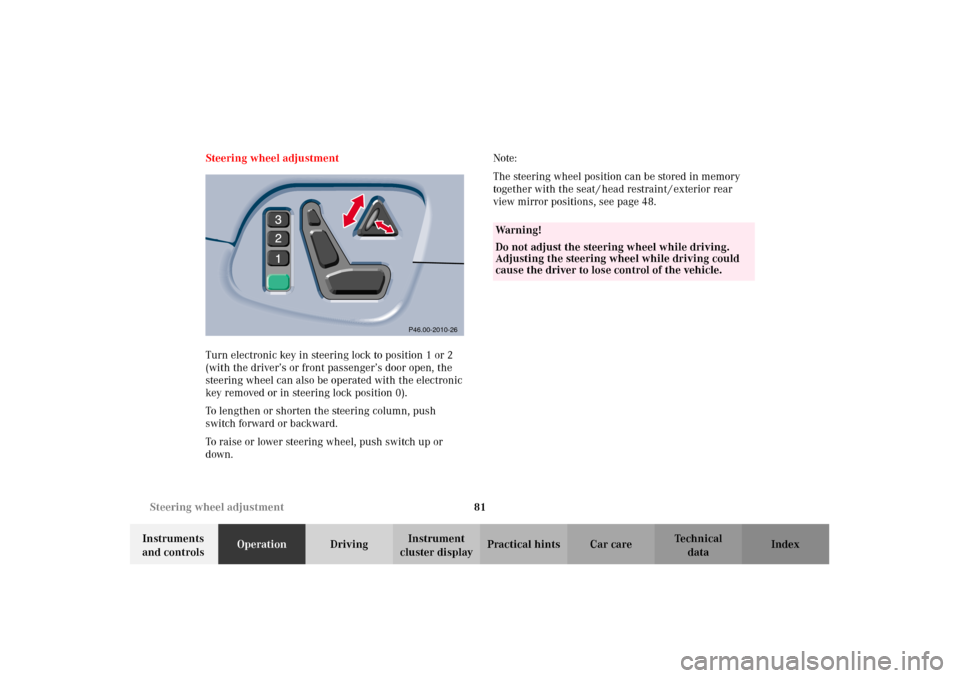
cluster displayPractical hints Car care Index Steering wheel adjustment
Turn electronic key in steering lock to position 1 or 2
(with the driver’s or front passenger’s door open, the
steering wheel can also be operated with the electronic
key removed or in steering lock position 0).
To lengthen or shorten the steering column, push
switch forward or backward.
To raise or lower steering wheel, push switch up or
down.Note:
The steering wheel position can be stored in memory
together with the seat / head restraint / exterior rear
view mirror positions, see page 48.
P46.00-2010-26
Wa r n i n g !
Do not adjust the steering wheel while driving.
Adjusting the steering wheel while driving could
cause the driver to lose control of the vehicle.
W210.book Seite 81 Mittwoch, 30. Mai 2001 11:45 11
Page 94 of 350
91 Instrument cluster
Technical
data Instruments
and controlsOperationDrivingInstrument
cluster displayPractical hints Car care Index Trip odometer (9)
To reset to “0” miles / km:
Activate the instrument cluster if it is not already
activated, see page 89.
Press button è or ÿ on the multifunction
steering wheel repeatedly until the trip odometer
appears if it is not displayed, see page 96.
Press buttonJ(2) on the instrument cluster.Tachometer (13)
The red marking on tachometer denotes excessive
engine speed.
Avoid this engine speed, as it may result in serious
engine damage that is not covered by the
Mercedes-Benz Limited Warranty.
To help protect the engine, the fuel supply is
interrupted if the engine is operated within the red
marking.
W210.book Seite 91 Mittwoch, 30. Mai 2001 11:45 11
Page 95 of 350
92 Multifunction steering wheel, multifunction display
Technical
data Instruments
and controlsOperationDrivingInstrument
cluster displayPractical hints Car care Index
Multifunction steering wheel, multifunction display
W210.book Seite 92 Mittwoch, 30. Mai 2001 11:45 11
Page 96 of 350
93 Multifunction steering wheel, multifunction display
Technical
data Instruments
and controlsOperationDrivingInstrument
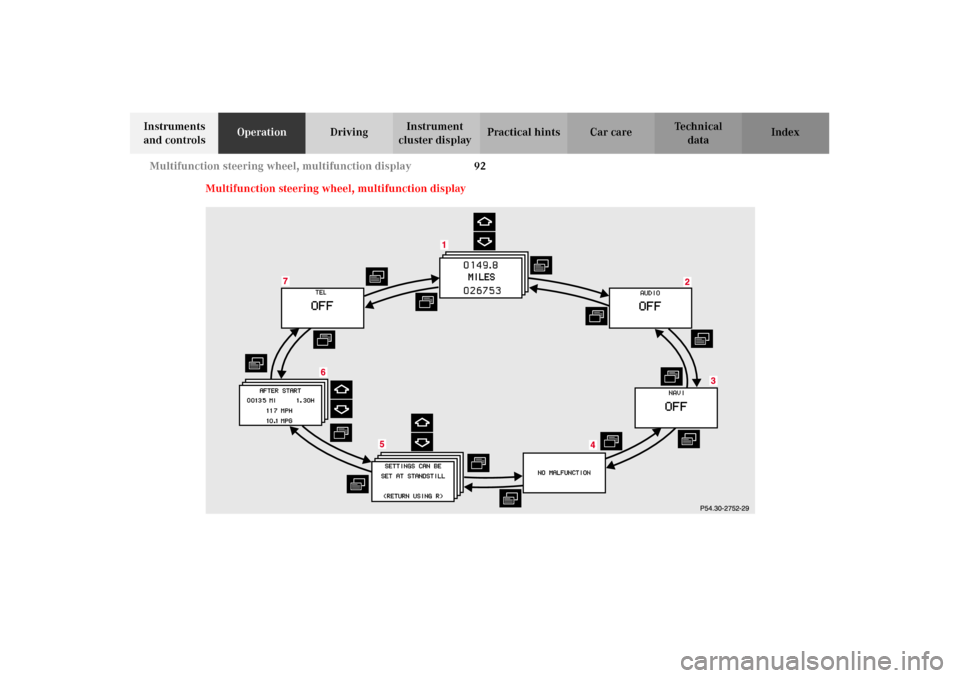
cluster displayPractical hints Car care Index Depending on your vehicle’s equipment, you may use
the buttons on the multifunction steering wheel to call
up, control and set the following systems in the
multifunction display:
1Trip odometer and main odometer, see page 96
Vehicle speed, see page 96
Flexible service system (FSS), see page 114
Engine oil level indicator, see page 117
2Audio systems, see page 97
Radio, see page 97
CD player (optional), see page 98
Cassette player, see page 99
3Navigation system (if so equipped), see page 105
4Malfunction message memory, see page 108
5Individual settings, see page 110
6Trip computer, see page 106
After start
After reset
Fuel tank content
7Telephone (if so equipped), see page 100Press the è or ÿ button repeatedly until the
required system is displayed.
Pressing the è button advances the display to the
next system.
Pressing the ÿ button returns the display to the
previous system.
You may call up additional displays within some of
these categories by pressing the j or k button.
Wa r n i n g !
A driver’s attention to the road must always be
his /her primary focus when driving. For your safety and the safety of others, selecting
features through the multifunction steering wheel
should only be done by the driver when traffic and
road conditions permit it to be done safely.
Programming individual settings in the system can
only be made while the vehicle is at standstill.
W210.book Seite 93 Mittwoch, 30. Mai 2001 11:45 11
Page 97 of 350
94 Multifunction steering wheel, multifunction display
Technical
data Instruments
and controlsOperationDrivingInstrument
cluster displayPractical hints Car care Index
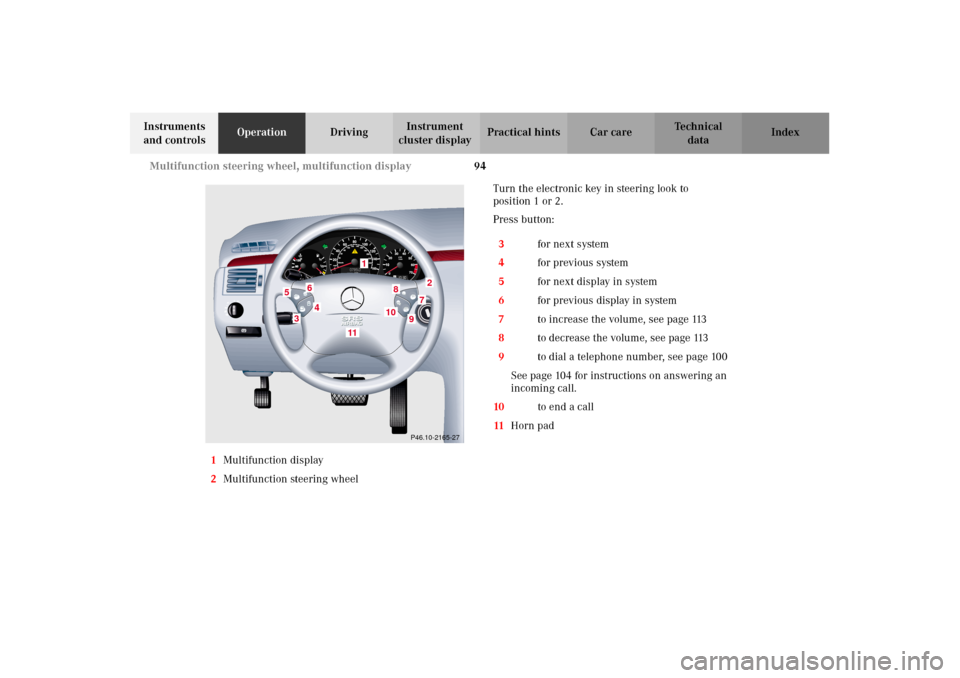
1Multifunction display
2Multifunction steering wheelTurn the electronic key in steering look to
position 1 or 2.
Press button:
3è for next system
4ÿ for previous system
5j for next display in system
6k for previous display in system
7æ to increase the volume, see page 113
8ç to decrease the volume, see page 113
9í to dial a telephone number, see page 100
See page 104 for instructions on answering an
incoming call.
10ì to end a call
11Horn pad
P46.10-2165-27
1
2
3
4
5
6
7
8
9
11
10
W210.book Seite 94 Mittwoch, 30. Mai 2001 11:45 11
Page 98 of 350
95 Multifunction steering wheel, multifunction display
Technical
data Instruments
and controlsOperationDrivingInstrument
cluster displayPractical hints Car care Index Press the è or ÿ button repeatedly until the
required system is displayed.
Pressing the è button advances the display to the
next system.
Pressing the ÿ button returns the display to the
previous system.
You may call up additional displays in some systems by
pressing the j or k button.Note:
The displays in the multifunction display can be set to
German, English, French, Italian or Spanish language.
See the “TEXT” individual setting on page 110 for
instructions on changing the language setting.
The displays for the audio systems (radio, CD player,
cassette player) will appear in English, regardless of the
language selected.
W210.book Seite 95 Mittwoch, 30. Mai 2001 11:45 11
Page 99 of 350
96 Multifunction steering wheel, multifunction display
Technical
data Instruments
and controlsOperationDrivingInstrument
cluster displayPractical hints Car care Index
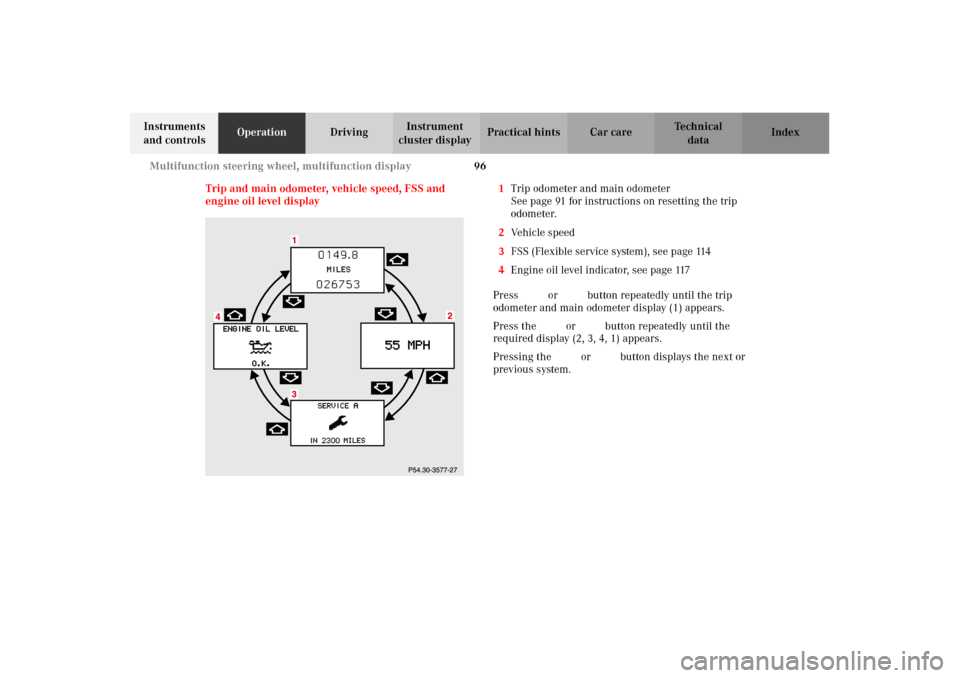
Trip and main odometer, vehicle speed, FSS and
engine oil level display1Trip odometer and main odometer
See page 91 for instructions on resetting the trip
odometer.
2Vehicle speed
3FSS (Flexible service system), see page 114
4Engine oil level indicator, see page 117
Press è or ÿ button repeatedly until the trip
odometer and main odometer display (1) appears.
Press the j or k button repeatedly until the
required display (2, 3, 4, 1) appears.
Pressing the è or ÿ button displays the next or
previous system.
W210.book Seite 96 Mittwoch, 30. Mai 2001 11:45 11