stop start MERCEDES-BENZ E63AMG 2011 W212 Owner's Guide
[x] Cancel search | Manufacturer: MERCEDES-BENZ, Model Year: 2011, Model line: E63AMG, Model: MERCEDES-BENZ E63AMG 2011 W212Pages: 400, PDF Size: 16.3 MB
Page 172 of 400
Vehicle movement may result in serious
personal injury or damage to the vehicle or
vehicle drivetrain. Therefore, always do the
following before turning off the engine and
leaving the vehicle:
R Keep right foot on the brake pedal.
R Engage the parking brake.
R Shift the automatic transmission into park
position P.
R Slowly release the brake pedal.
R When parked on an incline, always turn the
front wheels towards the road curb.
R Turn the SmartKey in the starter switch to
position 0 and remove the SmartKey from
the starter switch, or press the KEYLESS-
GO start/stop button.
R Take the SmartKey with you and lock the
vehicle when leaving.
Switching off the engine
Important safety notes
GWarning
Do not turn off the engine before the vehicle
has come to a complete stop. With the engine
not running, there is no power assistance for
the brake and steering systems. In this case,
it is important to keep in mind that a
considerably higher degree of effort is
necessary to brake and steer the vehicle.
GWarning!
Keep in mind that turning off the engine alone
only will shift the automatic transmission into
neutral position N automatically.
Always shift the automatic transmission into
park position P before turning off the engine.
Otherwise the vehicle could roll away which
could result in an accident and/or serious
personal injury.
Vehicles with automatic transmissionXShift the transmission to position P.
Using the SmartKey
XTurn the SmartKey to position 0 in the
ignition lock and remove it.
The parking lock is activated.XApply the parking brake firmly.
i If you turn off the engine with the
SmartKey and then remove it from the
ignition lock or open a front door, the
automatic transmission switches to P
automatically.
Using KEYLESS-GO
XPress the Start/Stop button (Y page 150).
The engine stops and all the indicator
lamps in the instrument cluster go out.XApply the parking brake firmly.
i If you turn off the engine with the Start/
Stop button, the automatic transmission
shifts to N. If you then open the driver's or
front-passenger door, the automatic
transmission shifts to P automatically.
i In an emergency, you can turn off the
engine while the vehicle is in motion by
pressing and holding the Start/Stop button
for three seconds.
If you have started the engine with the Start/
Stop button and it cannot be switched off as
described:
Xremove the Start/Stop button from the
ignition lock.Xinsert the SmartKey into the ignition lock.
The engine stops. The ignition lock is in
position 0.
Parking brake
GWarning
Engaging the parking brake while the vehicle
is in motion can cause the rear wheels to lock
up. You could lose control of the vehicle and
170ParkingDriving and parking
BA 212 USA, CA Edition B 2011; 1; 5, en-USdimargiVersion: 3.0.3.62010-05-20T13:33:46+02:00 - Seite 170
Page 173 of 400
cause an accident. In addition, the vehicle's
brake lights do not light up when the parking
brake is engaged.
GWarning!
When leaving the vehicle, always remove the
SmartKey from the starter switch, take it with
you, and lock the vehicle. Do not leave
children unattended in the vehicle, or with
access to an unlocked vehicle. Children could
release the parking brake and/or shift the
automatic transmission out of park position
P, either of which could result in an accident
and/or serious personal injury.
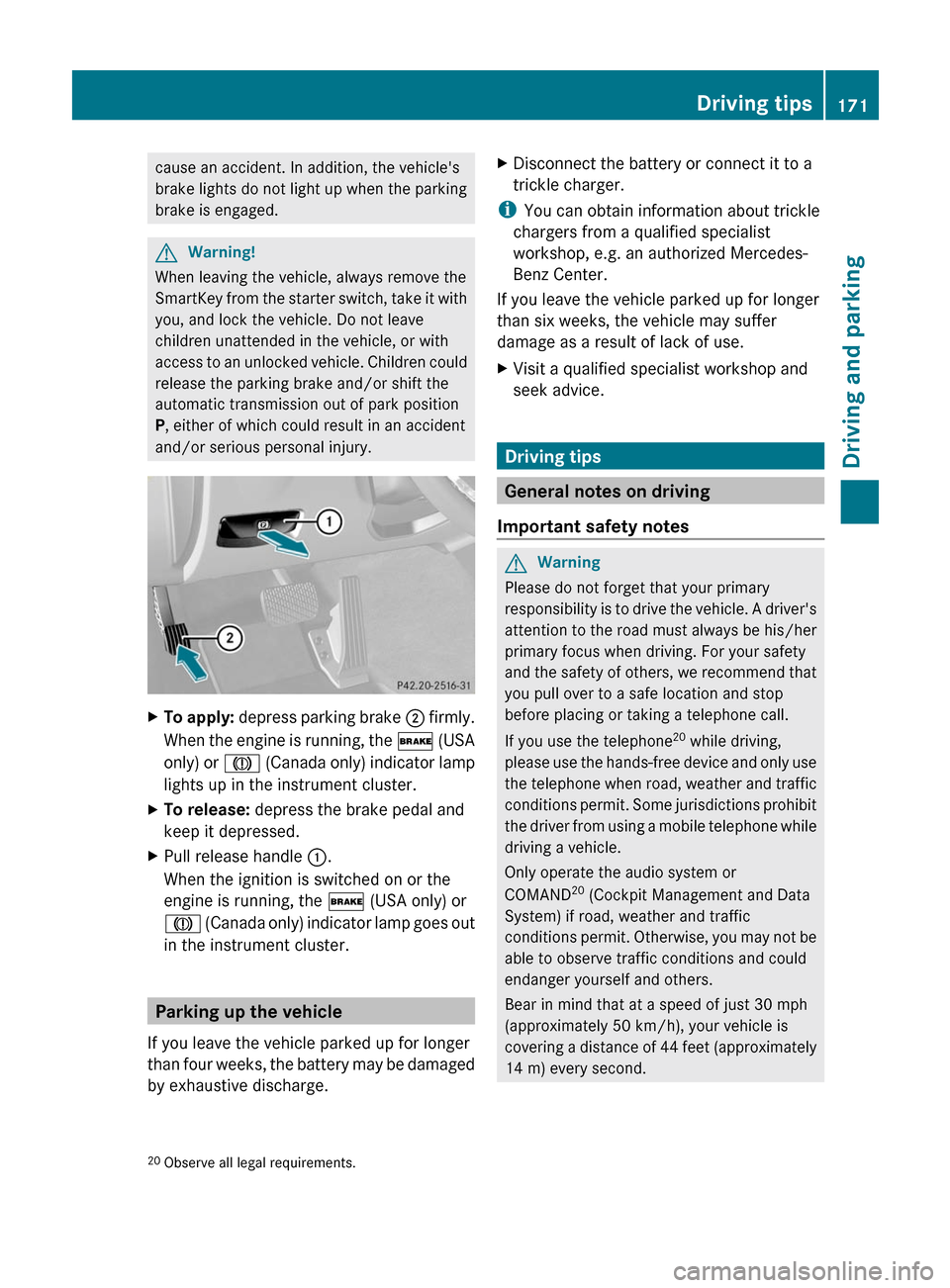
XTo apply: depress parking brake ; firmly.
When the engine is running, the $ (USA
only) or J (Canada only) indicator lamp
lights up in the instrument cluster.
XTo release: depress the brake pedal and
keep it depressed.
XPull release handle :.
When the ignition is switched on or the
engine is running, the $ (USA only) or
J (Canada only) indicator lamp goes out
in the instrument cluster.
Parking up the vehicle
If you leave the vehicle parked up for longer
than four weeks, the battery may be damaged
by exhaustive discharge.
XDisconnect the battery or connect it to a
trickle charger.
iYou can obtain information about trickle
chargers from a qualified specialist
workshop, e.g. an authorized Mercedes-
Benz Center.
If you leave the vehicle parked up for longer
than six weeks, the vehicle may suffer
damage as a result of lack of use.
XVisit a qualified specialist workshop and
seek advice.
Driving tips
General notes on driving
Important safety notes
GWarning
Please do not forget that your primary
responsibility is to drive the vehicle. A driver's
attention to the road must always be his/her
primary focus when driving. For your safety
and the safety of others, we recommend that
you pull over to a safe location and stop
before placing or taking a telephone call.
If you use the telephone20 while driving,
please use the hands-free device and only use
the telephone when road, weather and traffic
conditions permit. Some jurisdictions prohibit
the driver from using a mobile telephone while
driving a vehicle.
Only operate the audio system or
COMAND20 (Cockpit Management and Data
System) if road, weather and traffic
conditions permit. Otherwise, you may not be
able to observe traffic conditions and could
endanger yourself and others.
Bear in mind that at a speed of just 30 mph
(approximately 50 km/h), your vehicle is
covering a distance of 44 feet (approximately
14 m) every second.
20Observe all legal requirements.Driving tips171Driving and parkingBA 212 USA, CA Edition B 2011; 1; 5, en-USdimargiVersion: 3.0.3.62010-05-20T13:33:46+02:00 - Seite 171Z
Page 176 of 400
remove any salt that may have started to
build up on the brake discs and the brake
pads/linings.
R maintain a greater distance to the vehicle
ahead and drive with particular care.
R carefully apply the brakes at the end of a
trip and immediately after commencing a
new trip, so that salt residues are removed
from the brake discs.
Servicing the brakes
! If the red brake warning lamp lights up in
the instrument cluster and you hear a
warning tone while the engine is running,
the brake fluid level may be too low.
Observe additional warning messages in
the multifunction display.
The brake fluid level may be too low due to
brake pad wear or leaking brake lines.
Have the brake system checked
immediately. This work should be carried
out at an authorized Mercedes-Benz
Center.
All checks and maintenance work on the
brake system must be carried out at a
qualified specialist workshop. This work
should be carried out at an authorized
Mercedes-Benz Center.
Only install brake pads and use brake fluid
recommended by Mercedes-Benz.
GWarning
If other than recommended brake pads are
installed, or other than recommended brake
fluid is used, the braking properties of the
vehicle can be degraded to an extent that safe
braking is substantially impaired. This could
result in an accident.
! Vehicles with 4MATIC: a function or
performance test may only be carried out
on a two-axle dynamometer. If you are
planning to have the vehicle tested on such
a dynamometer, contact an authorized
Mercedes-Benz Center to obtain further
information first. Otherwise, the drive train
or the brake system may suffer damage.
! Vehicles with 4MATIC: as the ESP®
system operates automatically, the engine
and the ignition must be switched off
(SmartKey in position 0 or 1 in the ignition
lock or Start/Stop button in position 0 or
1 ) while the parking brake is being tested
on a brake dynamometer.
Braking maneuvers triggered automatically
by ESP ®
may seriously damage the brake
system.
! Vehicles with 4MATIC: as the ESP®
system operates automatically, the engine
and the ignition system must be switched
off (SmartKey in position 0 or 1 in the
ignition lock or Start/Stop button in
position 0 or 1) when:
R testing the parking brake on a brake
dynamometer.
R you intend to have the vehicle towed with
one of the axles raised.
Braking maneuvers triggered automatically
by ESP ®
may seriously damage the brake
system.
If your brake system is only subjected to
moderate loads, you should regularly test
your brake system's function by forcefully
depressing the brake pedal when driving at
high speed. This will give the brake pads
better grip.GWarning
Make sure that you do not endanger other
road users when you apply the brakes.
A description of Brake Assist (BAS) can be
found on ( Y page 66) or of BAS PLUS on
( Y page 66).
AMG high-performance brake system
and ceramic brake system
The high-performance and ceramic brake
system is only installed on the E 63 AMG.
174Driving tipsDriving and parking
BA 212 USA, CA Edition B 2011; 1; 5, en-USdimargiVersion: 3.0.3.62010-05-20T13:33:46+02:00 - Seite 174
Page 185 of 400
XKeep the cruise control lever pressed
up : or down ; until the desired speed
is set.
i You can use the cruise control lever to set
the stored speed and the control on the
cruise control lever to set the specified
minimum distance ( Y page 185).
Pulling away
XIf the vehicle in front pulls away: remove
your foot from the brake pedal.XBriefly pull the cruise control lever towards
you ?.
or
XAccelerate briefly.
Your vehicle pulls away and adapts its
speed to that of the vehicle in front.
Driving
If there is no vehicle in front, DISTRONIC
PLUS operates in the same way as cruise
control.
If a slower-moving vehicle is detected in front,
DISTRONIC PLUS causes your vehicle to
brake and maintain a preset distance to the
vehicle in front.
If DISTRONIC PLUS detects a faster-moving
vehicle in front, it increases the driving speed,
but only up to the desired speed you have
stored.
GWarning!
When you step on the brake pedal, you switch
off the DISTRONIC PLUS except when the
vehicle is at a standstill. The DISTRONIC PLUS
will no longer brake your vehicle. You are
always responsible for maintaining a distance
from other vehicles, observing road speeds
and braking well in advance.
Changing lanes
If you wish to change to the passing lane (in
left-hand-drive vehicles, the passing lane is
the left-hand lane), DISTRONIC PLUS
supports you if:
R you are driving above 40 mph (60 km/h)
R DISTRONIC PLUS is maintaining the
distance to a vehicle in front
R you switch on the appropriate turn signals
R DISTRONIC PLUS does not detect a danger
of collision
If these conditions are met, your vehicle is
accelerated. Acceleration will be interrupted
if changing lanes takes too long or if the
distance between your vehicle and the
vehicle in front becomes too small.GWarning
DISTRONIC PLUS and Active Blind Spot Assist
are only aids designed to assist driving.
They do not relieve you of the responsibility
of paying attention. The driver remains fully
responsible for the vehicle's distance from
other vehicles, the vehicle's speed and for
braking in good time. Always pay attention to
traffic conditions and your surroundings.
Otherwise, you may fail to recognize dangers
in time, cause an accident and injure yourself
and others.
Stopping
GWarning
Never get out of the vehicle when DISTRONIC
PLUS is activated.
DISTRONIC PLUS must also never be
operated, activated or deactivated by a
passenger or from outside the vehicle.
DISTRONIC PLUS does not replace the
parking brake and must not be used for
parking.
The DISTRONIC PLUS braking effect is
canceled and the vehicle can start moving if:
R DISTRONIC PLUS is deactivated using the
cruise control lever.
R you accelerate.
Driving systems183Driving and parkingBA 212 USA, CA Edition B 2011; 1; 5, en-USdimargiVersion: 3.0.3.62010-05-20T13:33:46+02:00 - Seite 183Z
Page 192 of 400
RACE START
Important safety guidelines
i RACE START is only available in AMG
vehicles.
RACE START enables optimal acceleration
from a standing start under suitable high-grip
road surface conditions.
GRisk of accident
RACE START is only available when SPORT
handling mode is activated. SPORT handling
mode only stabilizes the vehicle to a certain
extent if it is swerving or the wheels are
spinning.
RACE START may only be used on closed
roads. Always adapt your speed and driving
style to suit the current road and weather
conditions.
Conditions for activation
RACE START can be activated when:
R the doors are closed
R the engine is running and it has reached an
operating temperature of approximately
80 †. This is the case when the engine oil
temperature in the multifunction display
stops flashing.
R SPORT handling mode is activated
( Y page 69)
R the steering wheel is in the straight-ahead
position
R the vehicle is at rest and the brake pedal is
depressed (left foot)
R the transmission is in position D
Activating RACE STARTXDepress the brake pedal with your left foot,
and keep it depressed.XTurn the program selector switch
clockwise ( Y page 158) until the RS lamp
lights up.
The multifunction display shows the RACE
START Confirm: Paddle UP Cancel:
Paddle DOWN message.
i
If the conditions for activation are no
longer fulfilled, RACE START is canceled.
The multifunction display shows the RACE
START Canceled message.
XTo cancel: pull the left steering wheel shift
paddle ( Y page 159).
or
XTo confirm: pull the right steering wheel
shift paddle ( Y page 159).
The multifunction display shows the RACE
START Available Depress gas pedal
message.
i If you do not depress the accelerator
pedal fully within two seconds, RACE
START is canceled. The multifunction
display shows the RACE START Not
Possible See Operator's Manual
message.
XDepress the accelerator pedal fully.
The engine speed increases to
approximately 4000 rpm.
The multifunction display shows the RACE
START Release brake to start
message.
i If you do not release the brake pedal
within seven seconds, RACE START is
canceled. The multifunction display shows
the RACE START Canceled message.
XTake your foot off the brake, but keep the
accelerator pedal depressed.
The vehicle pulls away at maximum
acceleration.
The multifunction display shows the RACE
START Active message.190Driving systemsDriving and parking
BA 212 USA, CA Edition B 2011; 1; 5, en-USdimargiVersion: 3.0.3.62010-05-20T13:33:46+02:00 - Seite 190
Page 224 of 400
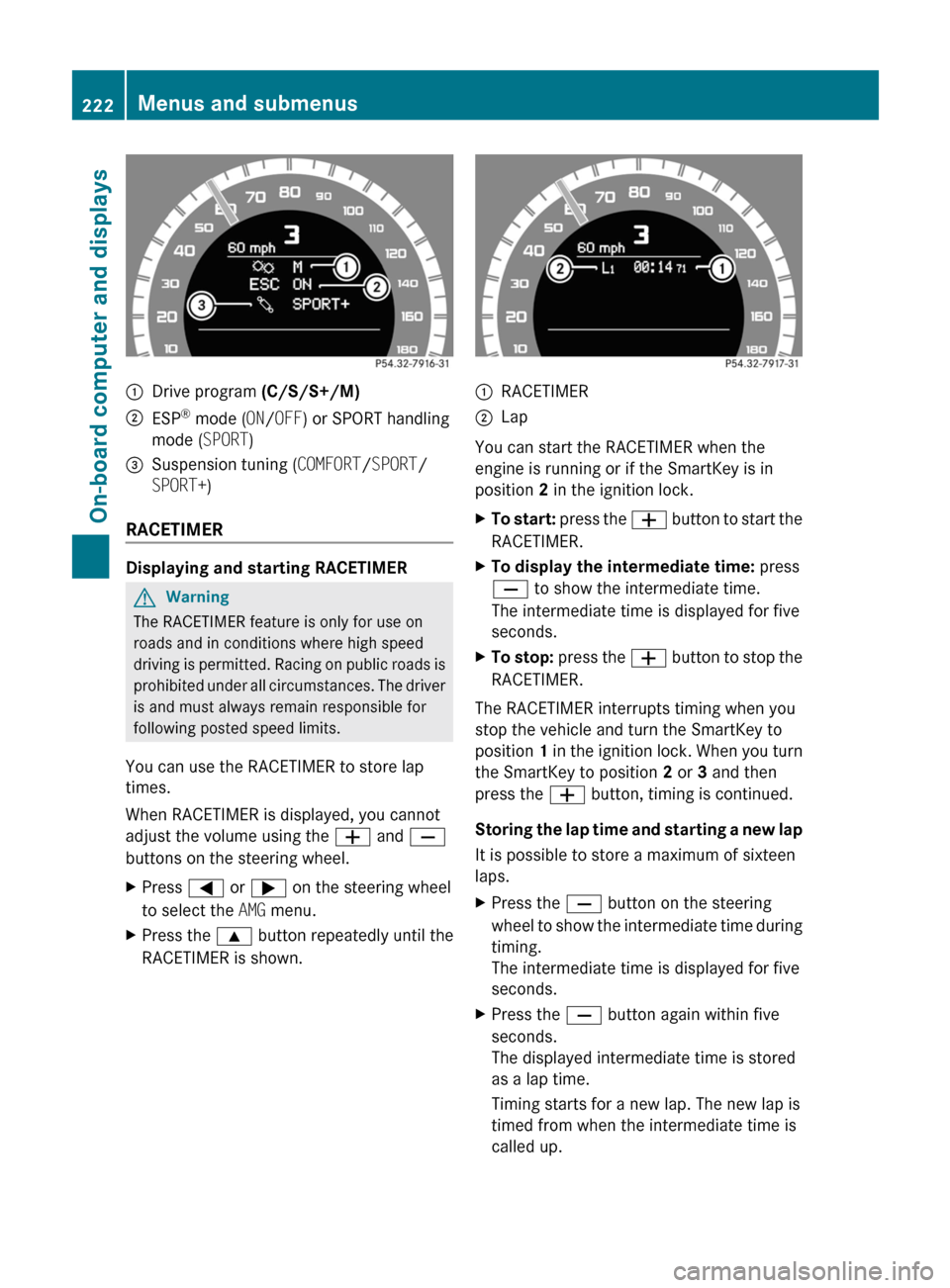
:Drive program (C/S/S+/M);ESP®
mode ( ON/OFF ) or SPORT handling
mode ( SPORT)3Suspension tuning ( COMFORT/SPORT /
SPORT+ )
RACETIMER
Displaying and starting RACETIMER
GWarning
The RACETIMER feature is only for use on
roads and in conditions where high speed
driving is permitted. Racing on public roads is
prohibited under all circumstances. The driver
is and must always remain responsible for
following posted speed limits.
You can use the RACETIMER to store lap
times.
When RACETIMER is displayed, you cannot
adjust the volume using the W and X
buttons on the steering wheel.
XPress = or ; on the steering wheel
to select the AMG menu.XPress the 9 button repeatedly until the
RACETIMER is shown.:RACETIMER;Lap
You can start the RACETIMER when the
engine is running or if the SmartKey is in
position 2 in the ignition lock.
XTo start: press the W button to start the
RACETIMER.XTo display the intermediate time: press
X to show the intermediate time.
The intermediate time is displayed for five
seconds.XTo stop: press the W button to stop the
RACETIMER.
The RACETIMER interrupts timing when you
stop the vehicle and turn the SmartKey to
position 1 in the ignition lock. When you turn
the SmartKey to position 2 or 3 and then
press the W button, timing is continued.
Storing the lap time and starting a new lap
It is possible to store a maximum of sixteen
laps.
XPress the X button on the steering
wheel to show the intermediate time during
timing.
The intermediate time is displayed for five
seconds.XPress the X button again within five
seconds.
The displayed intermediate time is stored
as a lap time.
Timing starts for a new lap. The new lap is
timed from when the intermediate time is
called up.222Menus and submenusOn-board computer and displays
BA 212 USA, CA Edition B 2011; 1; 5, en-USdimargiVersion: 3.0.3.62010-05-20T13:33:46+02:00 - Seite 222
Page 229 of 400
Accepting a call
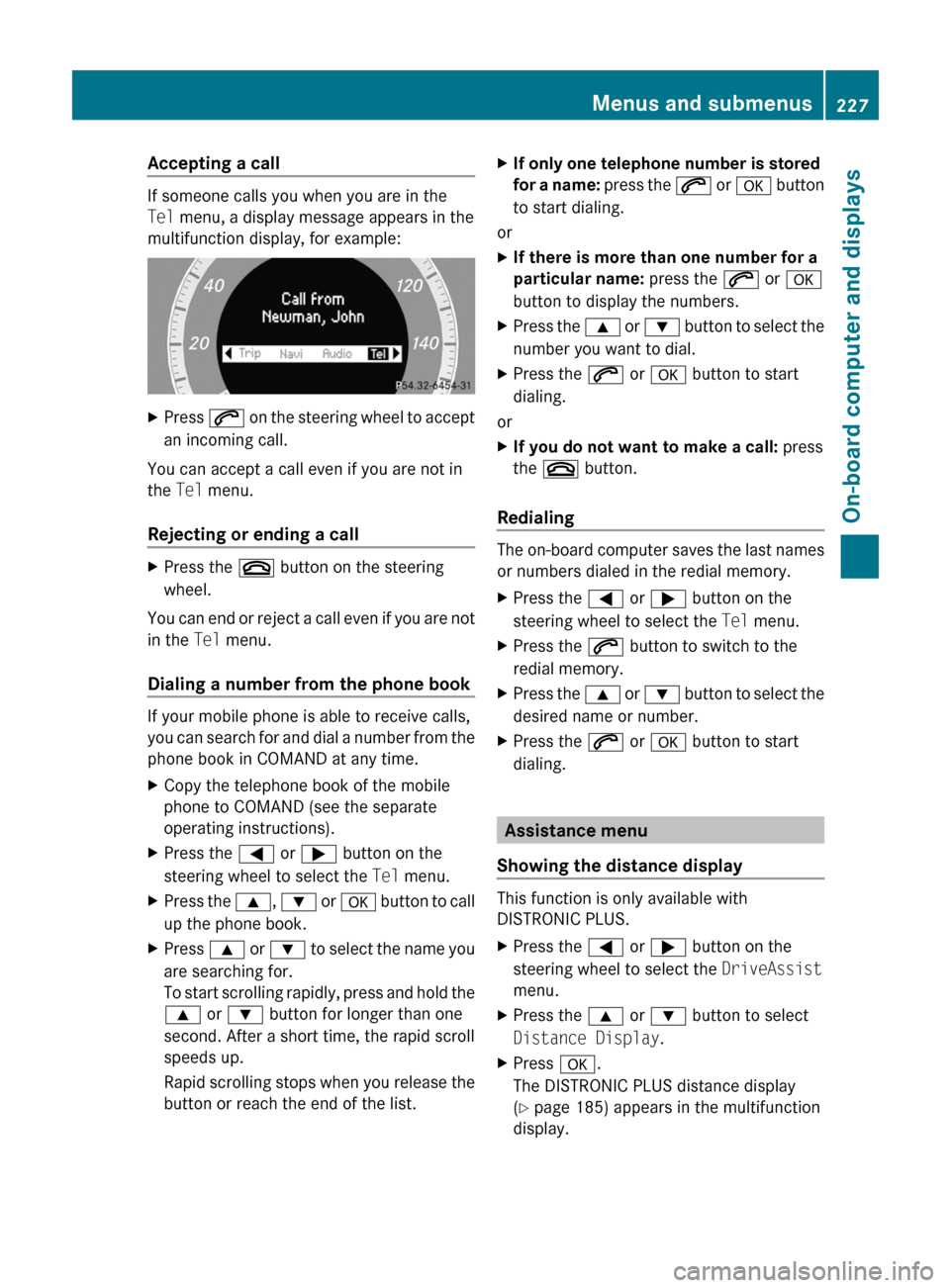
If someone calls you when you are in the
Tel menu, a display message appears in the
multifunction display, for example:
XPress 6 on the steering wheel to accept
an incoming call.
You can accept a call even if you are not in
the Tel menu.
Rejecting or ending a call
XPress the ~ button on the steering
wheel.
You can end or reject a call even if you are not
in the Tel menu.
Dialing a number from the phone book
If your mobile phone is able to receive calls,
you can search for and dial a number from the
phone book in COMAND at any time.
XCopy the telephone book of the mobile
phone to COMAND (see the separate
operating instructions).XPress the = or ; button on the
steering wheel to select the Tel menu.XPress the 9, : or a button to call
up the phone book.XPress 9 or : to select the name you
are searching for.
To start scrolling rapidly, press and hold the
9 or : button for longer than one
second. After a short time, the rapid scroll
speeds up.
Rapid scrolling stops when you release the
button or reach the end of the list.XIf only one telephone number is stored
for a name: press the 6 or a button
to start dialing.
or
XIf there is more than one number for a
particular name: press the 6 or a
button to display the numbers.XPress the 9 or : button to select the
number you want to dial.XPress the 6 or a button to start
dialing.
or
XIf you do not want to make a call: press
the ~ button.
Redialing
The on-board computer saves the last names
or numbers dialed in the redial memory.
XPress the = or ; button on the
steering wheel to select the Tel menu.XPress the 6 button to switch to the
redial memory.XPress the 9 or : button to select the
desired name or number.XPress the 6 or a button to start
dialing.
Assistance menu
Showing the distance display
This function is only available with
DISTRONIC PLUS.
XPress the = or ; button on the
steering wheel to select the DriveAssist
menu.XPress the 9 or : button to select
Distance Display .XPress a.
The DISTRONIC PLUS distance display
( Y page 185) appears in the multifunction
display.Menus and submenus227On-board computer and displaysBA 212 USA, CA Edition B 2011; 1; 5, en-USdimargiVersion: 3.0.3.62010-05-20T13:33:46+02:00 - Seite 227Z
Page 244 of 400
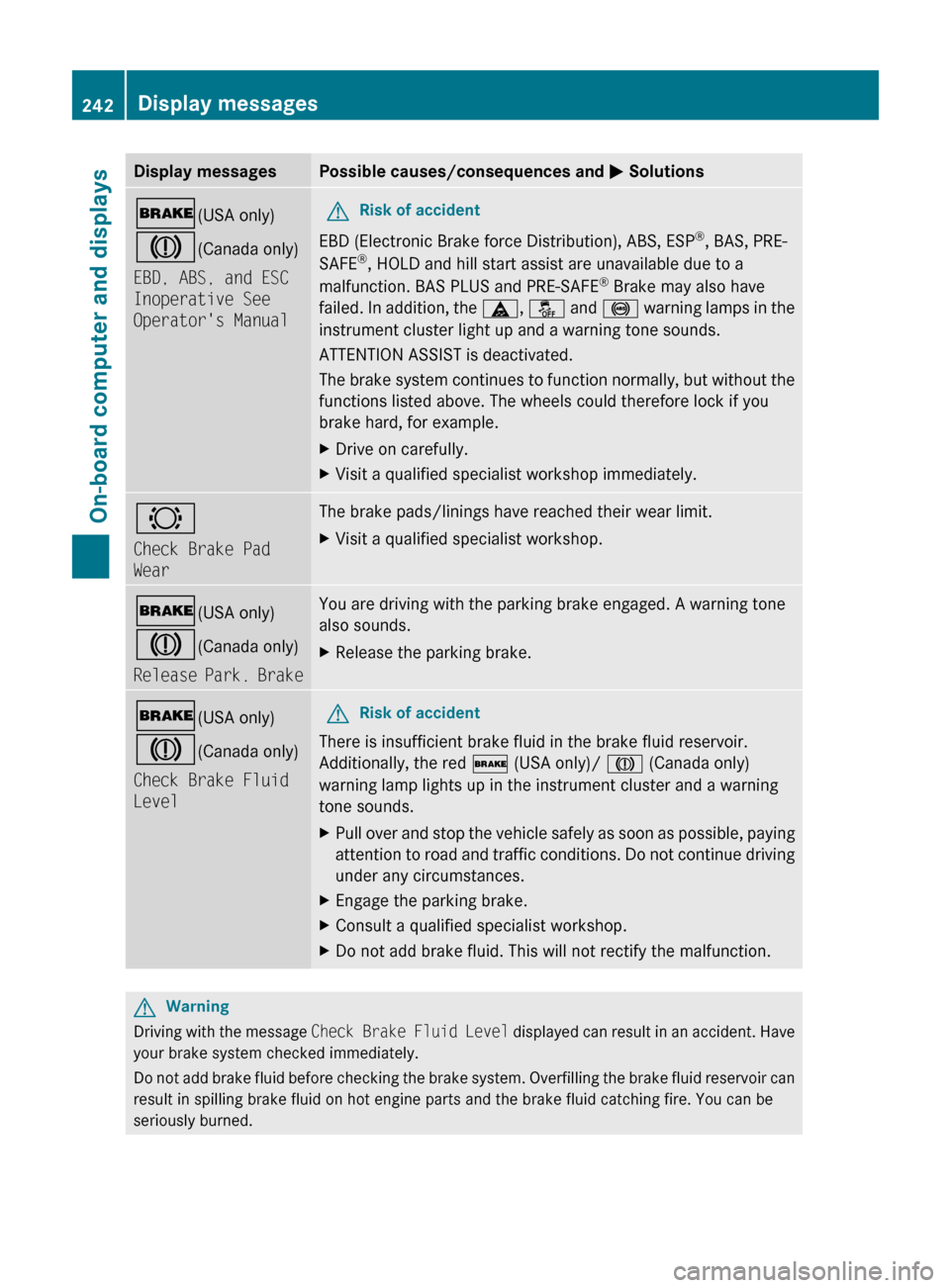
Display messagesPossible causes/consequences and M Solutions$ (USA only)
J (Canada only)
EBD, ABS, and ESC
Inoperative See
Operator's ManualGRisk of accident
EBD (Electronic Brake force Distribution), ABS, ESP ®
, BAS, PRE-
SAFE ®
, HOLD and hill start assist are unavailable due to a
malfunction. BAS PLUS and PRE-SAFE ®
Brake may also have
failed. In addition, the ä, å and ! warning lamps in the
instrument cluster light up and a warning tone sounds.
ATTENTION ASSIST is deactivated.
The brake system continues to function normally, but without the
functions listed above. The wheels could therefore lock if you
brake hard, for example.
XDrive on carefully.XVisit a qualified specialist workshop immediately.#
Check Brake Pad
WearThe brake pads/linings have reached their wear limit.XVisit a qualified specialist workshop.$ (USA only)
J (Canada only)
Release Park. BrakeYou are driving with the parking brake engaged. A warning tone
also sounds.XRelease the parking brake.$ (USA only)
J (Canada only)
Check Brake Fluid
LevelGRisk of accident
There is insufficient brake fluid in the brake fluid reservoir.
Additionally, the red $ (USA only)/ J (Canada only)
warning lamp lights up in the instrument cluster and a warning
tone sounds.
XPull over and stop the vehicle safely as soon as possible, paying
attention to road and traffic conditions. Do not continue driving
under any circumstances.XEngage the parking brake.XConsult a qualified specialist workshop.XDo not add brake fluid. This will not rectify the malfunction.GWarning
Driving with the message Check Brake Fluid Level displayed can result in an accident. Have
your brake system checked immediately.
Do not add brake fluid before checking the brake system. Overfilling the brake fluid reservoir can
result in spilling brake fluid on hot engine parts and the brake fluid catching fire. You can be
seriously burned.
242Display messagesOn-board computer and displays
BA 212 USA, CA Edition B 2011; 1; 5, en-USdimargiVersion: 3.0.3.62010-05-20T13:33:46+02:00 - Seite 242
Page 249 of 400
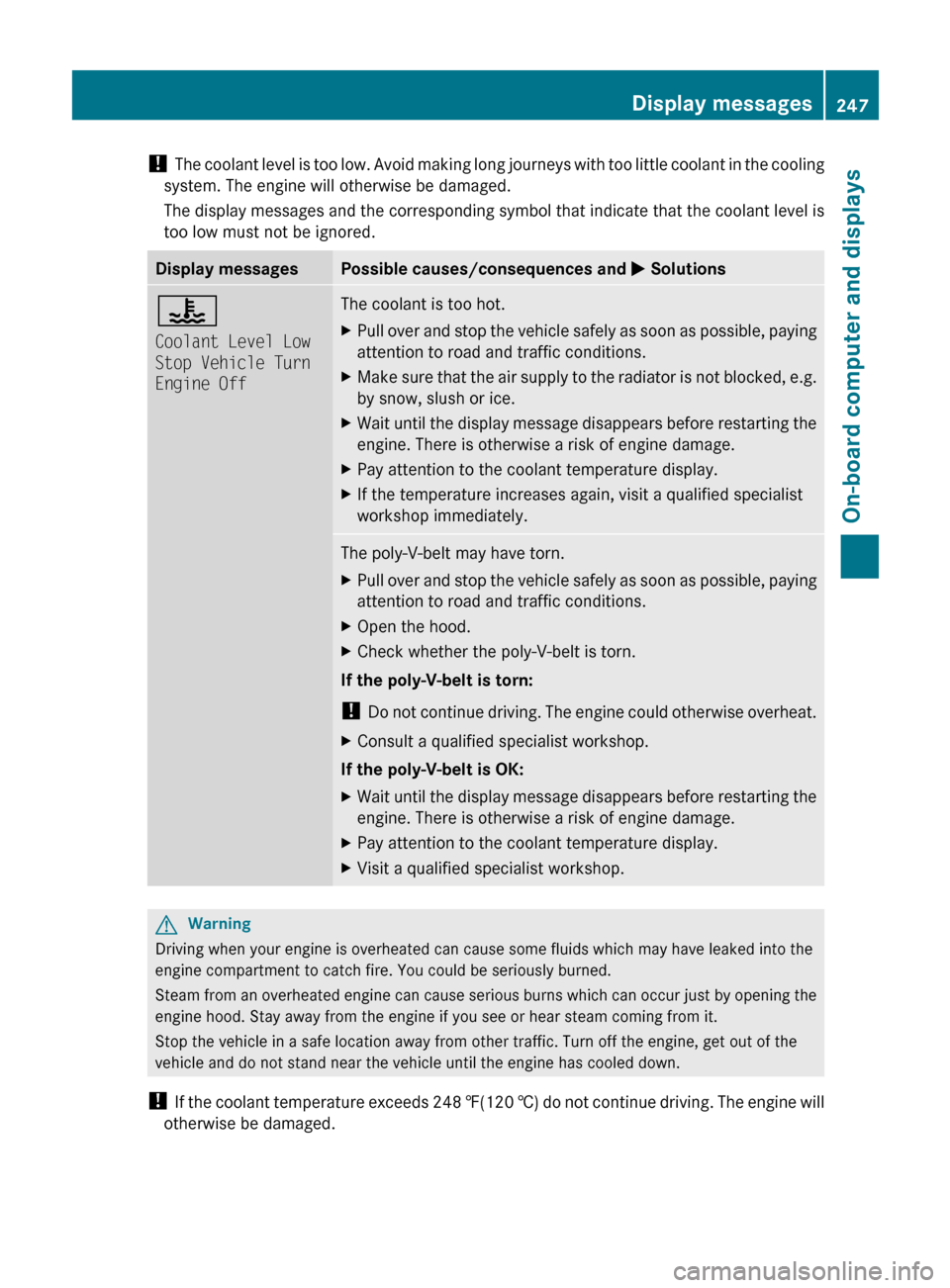
! The coolant level is too low. Avoid making long journeys with too little coolant in the cooling
system. The engine will otherwise be damaged.
The display messages and the corresponding symbol that indicate that the coolant level is
too low must not be ignored.Display messagesPossible causes/consequences and M Solutions?
Coolant Level Low
Stop Vehicle Turn
Engine OffThe coolant is too hot.XPull over and stop the vehicle safely as soon as possible, paying
attention to road and traffic conditions.XMake sure that the air supply to the radiator is not blocked, e.g.
by snow, slush or ice.XWait until the display message disappears before restarting the
engine. There is otherwise a risk of engine damage.XPay attention to the coolant temperature display.XIf the temperature increases again, visit a qualified specialist
workshop immediately.The poly-V-belt may have torn.XPull over and stop the vehicle safely as soon as possible, paying
attention to road and traffic conditions.XOpen the hood.XCheck whether the poly-V-belt is torn.
If the poly-V-belt is torn:
! Do not continue driving. The engine could otherwise overheat.
XConsult a qualified specialist workshop.
If the poly-V-belt is OK:
XWait until the display message disappears before restarting the
engine. There is otherwise a risk of engine damage.XPay attention to the coolant temperature display.XVisit a qualified specialist workshop.GWarning
Driving when your engine is overheated can cause some fluids which may have leaked into the
engine compartment to catch fire. You could be seriously burned.
Steam from an overheated engine can cause serious burns which can occur just by opening the
engine hood. Stay away from the engine if you see or hear steam coming from it.
Stop the vehicle in a safe location away from other traffic. Turn off the engine, get out of the
vehicle and do not stand near the vehicle until the engine has cooled down.
! If the coolant temperature exceeds 248 ‡(120 †) do not continue driving. The engine will
otherwise be damaged.
Display messages247On-board computer and displaysBA 212 USA, CA Edition B 2011; 1; 5, en-USdimargiVersion: 3.0.3.62010-05-20T13:33:46+02:00 - Seite 247Z
Page 250 of 400
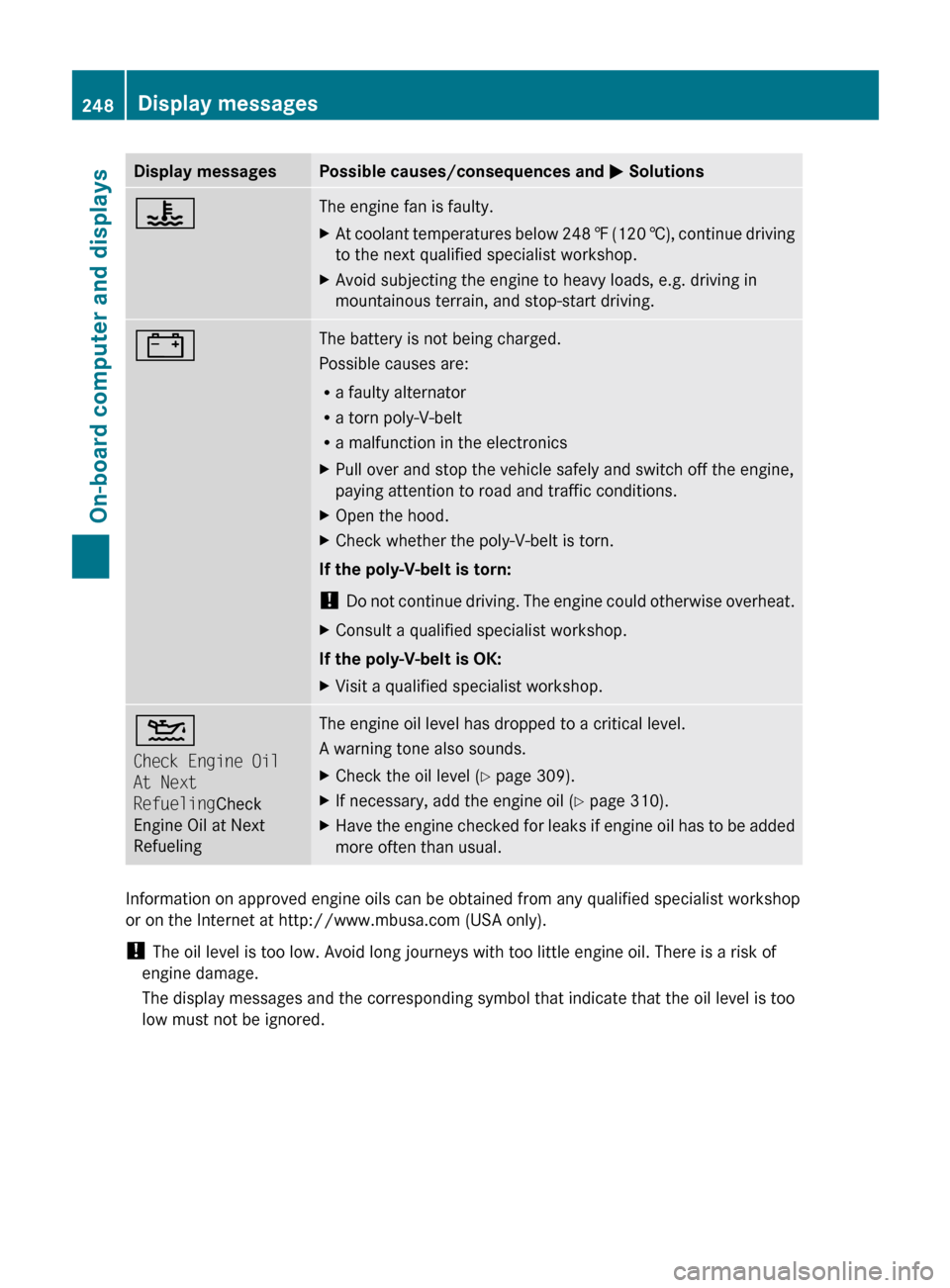
Display messagesPossible causes/consequences and M Solutions?The engine fan is faulty.XAt coolant temperatures below 248 ‡ (120 †), continue driving
to the next qualified specialist workshop.XAvoid subjecting the engine to heavy loads, e.g. driving in
mountainous terrain, and stop-start driving.#The battery is not being charged.
Possible causes are:
R a faulty alternator
R a torn poly-V-belt
R a malfunction in the electronicsXPull over and stop the vehicle safely and switch off the engine,
paying attention to road and traffic conditions.XOpen the hood.XCheck whether the poly-V-belt is torn.
If the poly-V-belt is torn:
! Do not continue driving. The engine could otherwise overheat.
XConsult a qualified specialist workshop.
If the poly-V-belt is OK:
XVisit a qualified specialist workshop.4
Check Engine Oil
At Next
Refueling Check
Engine Oil at Next
RefuelingThe engine oil level has dropped to a critical level.
A warning tone also sounds.XCheck the oil level ( Y page 309).XIf necessary, add the engine oil ( Y page 310).XHave the engine checked for leaks if engine oil has to be added
more often than usual.
Information on approved engine oils can be obtained from any qualified specialist workshop
or on the Internet at http://www.mbusa.com (USA only).
! The oil level is too low. Avoid long journeys with too little engine oil. There is a risk of
engine damage.
The display messages and the corresponding symbol that indicate that the oil level is too
low must not be ignored.
248Display messagesOn-board computer and displays
BA 212 USA, CA Edition B 2011; 1; 5, en-USdimargiVersion: 3.0.3.62010-05-20T13:33:46+02:00 - Seite 248