navigation MERCEDES-BENZ EQC SUV 2019 Manual PDF
[x] Cancel search | Manufacturer: MERCEDES-BENZ, Model Year: 2019, Model line: EQC SUV, Model: MERCEDES-BENZ EQC SUV 2019Pages: 629, PDF Size: 11.02 MB
Page 392 of 629
#
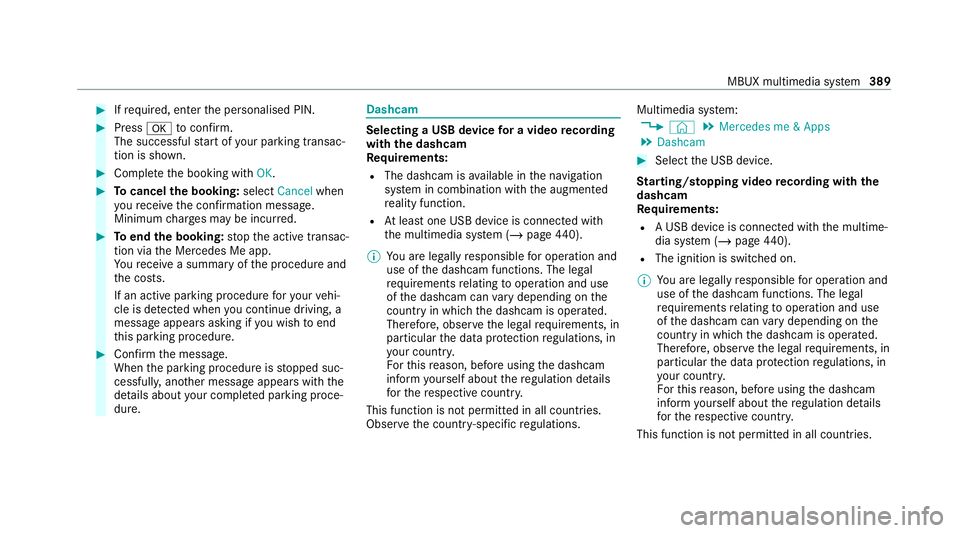
Ifre qu ired, enter the personalised PIN. #
Press atoconfirm.
The successful start of your parking transac‐
tion is shown. #
Comple tethe booking with OK. #
Tocancel the booking: selectCancel when
yo ure cei vethe confi rmation message.
Minimum charge s may be incur red. #
Toend the booking: stop the active transac‐
tion via the Mercedes Me app.
Yo ure cei vea summary of the procedure and
th e costs.
If an active parking procedure foryo ur vehi‐
cle is de tected when you continue driving, a
message appears asking if you wish toend
th is parking procedure. #
Confirm the message.
When the parking procedure is stopped suc‐
cessfull y,ano ther message appears with the
de tails about your co mplete d parking proce‐
dure. Dashcam
Selecting a USB device
for a video recording
with the dashcam
Re quirements:
R The dashcam is available in the navigation
sy stem in combination with the augmented
re ality function.
R Atleast one USB device is connec ted with
th e multimedia sy stem (/ page440).
% You are legally responsible for operation and
use of the dashcam functions. The legal
re qu irements relating tooperation and use
of the dashcam can vary depending on the
country in whi chthe dashcam is operated.
Therefore, obser vethe legal requirements, in
particular the data pr otection regulations, in
yo ur count ry.
Fo rth is reason, before using the dashcam
inform yourself about there gulation de tails
fo rth ere spective countr y.
This function is not permitted in all count ries.
Obser vethe count ry-specific regulations. Multimedia sy
stem:
4 © 5
Mercedes me & Apps
5 Dashcam #
Select the USB device.
St arting/ stopping video recording with the
da shcam
Re quirements:
R A USB device is connec ted with the multime‐
dia sy stem (/ page440).
R The ig nition is switched on.
% You are legally responsible for operation and
use of the dashcam functions. The legal
re qu irements relating tooperation and use
of the dashcam can vary depending on the
country in whi chthe dashcam is operated.
Therefore, obser vethe legal requirements, in
particular the data pr otection regulations, in
yo ur count ry.
Fo rth is reason, before using the dashcam
inform yourself about there gulation de tails
fo rth ere spective countr y.
This function is not permitted in all count ries. MBUX multimedia sy
stem 389
Page 402 of 629
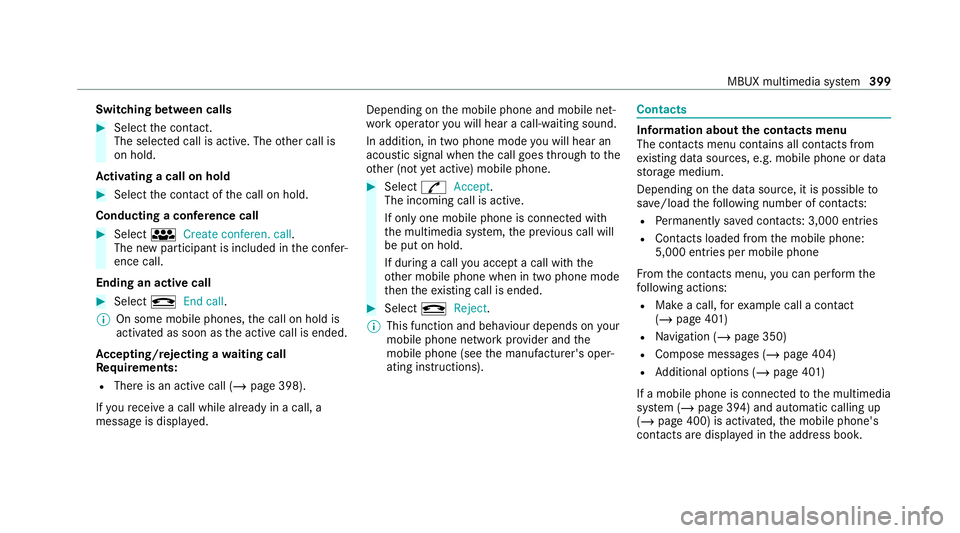
Switching between calls
#
Select the conta ct.
The selected call is acti ve. The other call is
on hold.
Ac tivating a call on hold #
Select the conta ct ofthe call on hold.
Conducting a conference call #
Select iCreate conferen. call.
The new participant is included in the confe r‐
ence call.
Ending an active call #
Select kEnd call .
% On some mobile phones, the call on hold is
activated as soon as the active call is ended.
Ac cepting/rejecting a waiting call
Re quirements:
R There is an active call (/ page 398).
If yo ure cei vea call while already in a call, a
message is displa yed. Depending on
the mobile phone and mobile net‐
wo rkoperator you will hear a call- waiting sound.
In addition, in two phone mode you will hear an
acoustic signal when the call goes thro ugh tothe
ot her (not yet acti ve) mobile phone. #
Select RAccept.
The incoming call is active.
If only one mobile phone is connec ted with
th e multimedia sy stem, the pr evious call will
be put on hold.
If during a call you accept a call with the
ot her mobile phone when in two phone mode
th en theex isting call is ended. #
Select kReject.
% This function and behaviour depends on your
mobile phone network pr ovider and the
mobile phone (see the manufacturer's oper‐
ating instructions). Contacts
Information about
the contacts menu
The con tacts menu contains all contacts from
ex isting data sources, e.g. mobile phone or data
st orage medium.
Depending on the data source, it is possible to
sa ve /load thefo llowing number of con tacts:
R Perm anently sa ved con tacts: 3,000 entries
R Contacts loaded from the mobile phone:
5,000 entri es per mobile phone
Fr om the conta cts menu, you can per form the
fo llowing actions:
R Make a call, forex ample call a con tact
(/ page 401)
R Navigation (/ page 350)
R Compose messa ges (/ page 404)
R Additional options (/ page 401)
If a mobile phone is connec tedto the multimedia
sy stem (/ page 394) and automatic calling up
(/ page 400) is activated, the mobile phone's
conta cts are displ ayed in the address book. MBUX multimedia sy
stem 399
Page 403 of 629
The multimedia sy
stem can show suggestions
based on frequently used conta cts aswell as
incoming and outgoing calls (/ page315).
These are sh own at theto p of the conta ct list.
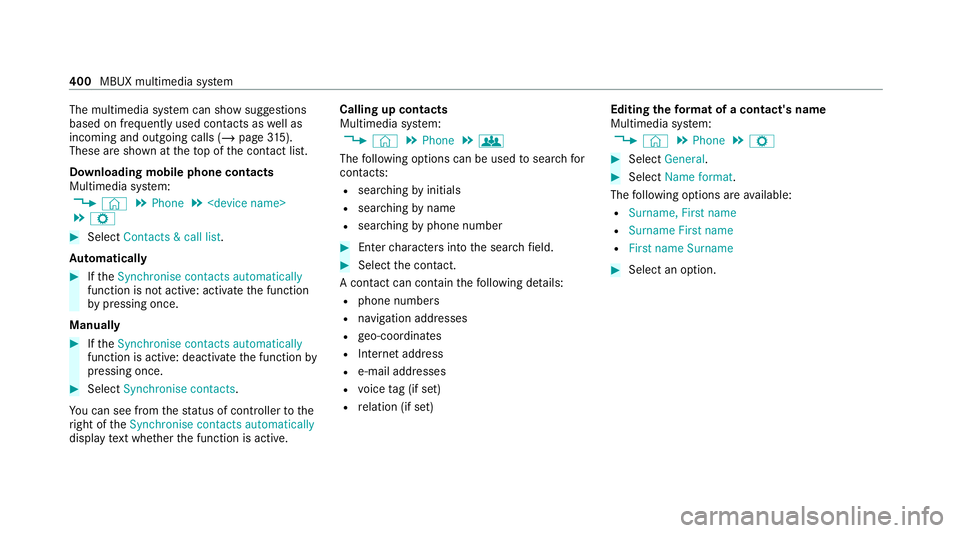
Downloading mobile phone contacts
Multimedia sy stem:
4 © 5
Phone 5
5 Z #
Select Contacts & call list.
Au tomatically #
Ifth eSynchronise contacts automatically
function is not active: activate the function
by pressing once.
Manually #
Ifth eSynchronise contacts automatically
function is active: deactivate the function by
pressing once. #
Select Synchronise contacts .
Yo u can see from thest atus of controller tothe
ri ght of theSynchronise contacts automatically
display text wh ether the function is active. Calling up contacts
Multimedia sy
stem:
4 © 5
Phone 5
g
The following options can be used tosear chfor
contacts:
R searching byinitials
R sear ching byname
R searching byphone number #
Ente rch aracters into the sear chfield. #
Select the conta ct.
A contact can contain thefo llowing de tails:
R phone numbers
R navigation addresses
R geo-coordinates
R Internet address
R e-mail addresses
R voice tag (if set)
R relation (if set) Editing
thefo rm at of a contact's name
Multimedia sy stem:
4 © 5
Phone 5
Z #
Select General. #
Select Name format.
The following options are available:
R Surname, First name
R Surname First name
R First name Surname #
Select an option. 400
MBUX multimedia sy stem
Page 409 of 629
Using
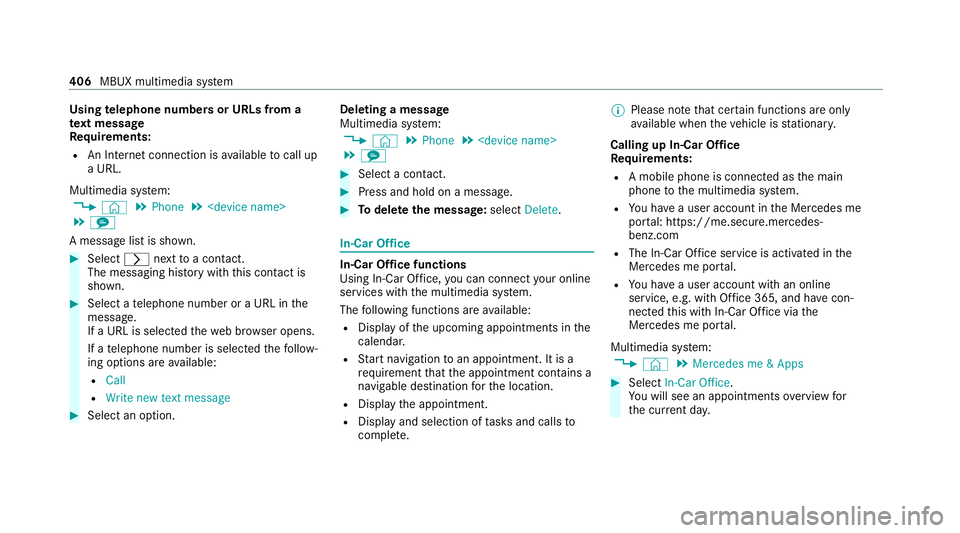
telephone numbers or URLs from a
te xt message
Re quirements:
R An Internet connection is available tocall up
a URL.
Multimedia sy stem:
4 © 5
Phone 5
5 l
A message list is shown. #
Select rnexttoa con tact.
The messaging his tory with this con tact is
shown. #
Select a telephone number or a URL in the
messa ge.
If a URL is selected thewe b br ows er opens.
If a telephone number is selec tedth efo llow‐
ing options are available:
R Call
R Write new text message #
Select an option. Deleting a message
Multimedia sy
stem:
4 © 5
Phone 5
5 l #
Select a conta ct. #
Press and hold on a message. #
Todel eteth e message: selectDelete. In-Car Of
fice In-Car Of
fice functions
Using In-Car Of fice, you can connect your online
services with the multimedia sy stem.
The following functions are available:
R Display of the upcoming appointments in the
calenda r.
R Start navigation toan appointment. It is a
re qu irement that the appointment conta ins a
navigable destination forth e location.
R Display the appointment.
R Display and selection of tasks and calls to
compl ete. %
Please no tethat cer tain functions are only
av ailable when theve hicle is stationar y.
Calling up In-Car Of fice
Re quirements:
R A mobile phone is connec ted as the main
phone tothe multimedia sy stem.
R You ha vea user account in the Mercedes me
por tal: https://me.secure.mercedes-
benz.com
R The In-Car Of fice service is acti vated in the
Mercedes me por tal.
R You ha vea user account with an online
service, e.g. with Of fice 365, and ha vecon‐
nected this with In-Car Of fice via the
Mercedes me por tal.
Multimedia sy stem:
4 © 5
Mercedes me & Apps #
Select In-Car Office.
Yo u will see an appointments overview for
th e cur rent da y. 406
MBUX multimedia sy stem
Page 418 of 629
Tr
ansfer redve hicle data with Android Auto
and Apple CarPlay ®Overview of transfer
redve hicle data
When using Android Autoor Apple CarPlay ®
, cer‐
ta in vehicle data is transfer redto the mobile
phone. This enables youto getth e best out of
selected mobile phone services. Vehicle data is
not directly accessible.
The following sy stem information is transmit ted:
R Software release of the multimedia sy stem
R System ID (anonymised)
The transfer of this data is used tooptimise
communication between theve hicle and the
mobile phone.
To do this, and toassign se veralve hicles tothe
mobile phone, a vehicle identifier is randomly
ge nerated.
This has no connection totheve hicle identifica‐
tion number (VIN) and is dele ted when the multi‐
media sy stem is reset (/ page 338).
The following driving status data is transmit ted:
R Transmission position engaged R
Distinction between par ked, standstill, rolling
and driving
R Day/night mode of the instrument clus ter
The transfer of this data is used toalter how
con tent is displ ayed tocor respond tothe driving
situation.
The following position data is transmitte d:
R Coordinates
R Speed
R Compass direction
R Acceleration di rection
This da tais only transfer red while the navigation
sy stem is active, in order toimpr oveit (e.g. so it
can continue functioning when in a tunnel). Mercedes me calls
Making a call via the
overhead control panel
% Mercedes me calls are not possible in every
count ry. Find out at a Mercedes-Benz
service centre if these functions are availa‐
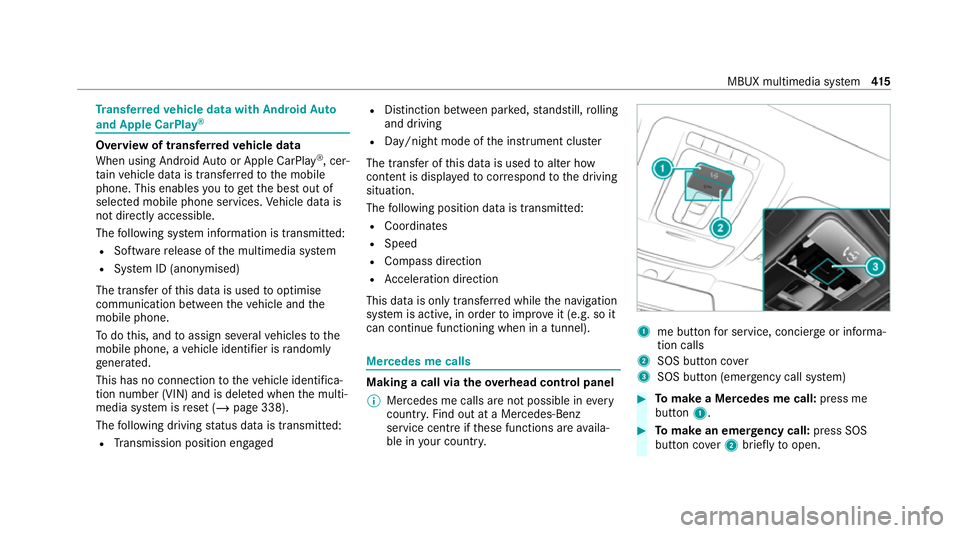
ble in your count ry. 1
me button for service, concier geor informa‐
tion calls
2 SOS button co ver
3 SOS button (emergency call sy stem) #
Tomake a Me rcedes me call: press me
button 1. #
Tomake an eme rgency call: press SOS
button co ver2 briefly toopen. MBUX multimedia sy
stem 415
Page 450 of 629
Ac
tivating/deactivating the frequency fix
function Multimedia sy
stem:
4 © 5
Radio 5
Z 5
General #
Switch Frequency fix on or off.
If th e function is activated, the set frequency
is ke pt eve n ifthere ception is poo r. Ac
tivating/deactivating traf fic announce‐
ments Multimedia sy
stem:
4 © 5
Radio 5
Z 5
General #
Switch Traffic announcements (TA) on or off.Setting
the traf fic information service vol‐
ume increase Multimedia sy
stem:
4 © 5
Settings 5
Audio #
Select Navigation and traffic announce-
ments. #
Select Traffic announc. vol. increase. #
Set a le vel between 0 and 10. #
Accept theva lue with q. Displaying
radio text Multimedia sy
stem:
4 © 5
Radio 5
Z 5
General #
Switch Radio text information on or off. TV
Information on
TVmode In
fo rm ation on copy right pr otection and
tradema rks
Ubiquitous DTCP-IP
Copyright ®
20 15 Ubiquitous Corp.
DV B and DVB logos are tradema rks of theDVB
Project.
The TVtuner enables reception of digital chan‐
nels according tothefo llowing standards:
R DVB-T
R DVB-T2 In some countries,
thest andards may not be
av ailable, or may not be available in all areas.
A CI+ module (Common In terface Module),
which is not included in the scope of deliver y,is
used todecrypt HD prog rammes according to
th e CI+ standard. In some countries, an addi‐
tional smart card is required, which is inse rted
into the CI+ module (see the manufacturer's
operating manual).
The CI+ module is connected in the CI+ box in
th eglov e compartment.
% The CI+ box is designed for operation at
te mp eratures between 0 °C and 65 °C. At
operating temp eratures that are higher or
to o low a message appears in the multime‐
dia sy stem and the CI+ module is switched
off automaticall y.Ifth e CI+ module is
switched off, no encryp tedch annels can be
re cei ved. MBUX multimedia sy
stem 447
Page 454 of 629
#
Select a TVchannel.
The TVtuner selects thech annel from the
ch annel list. #
Tap on the pr eview picture and show the full
screen. #
Tosear chfor a TVchannel: selectthe
sear chbar in the menu next toª . #
Enter thefirs tch aracters. #
Select theTV channel from thech annel list.
% Further information on the sear chbar
(/ page 452).
Selecting a TVchannel from thech annel pre‐
sets and from thefa vo urites
Re quirements:
R The TVchannel has been sa ved in thech an‐
nel presets and in thefa vo urites.
Multimedia sy stem:
4 © 5
Media 5
TV #
Select in the menu .
#
Select Presets. #
Select theTV channel.
Setting in thefa vo urites #
Brief lypress theß rocker switch on the
st eering wheel down. #
Select theTV channel.
Selecting TVchannels in the bac kground
Re quirements:
R The navigation sy stem is active, forex ample
R TVmode is switched on in the bac kground
and the sound from the selected TVchannel
can be heard #
Swipe tothe left or right over the~ but‐
to n on theto uchpad.
The pr evious or next TVchannel is set.
or #
Inthe control menu: pressthe~ button
on theto uchpad. #
Select qorr.
The pr evious or next TVchannel is set. Displ
aying cur rent prog ramme in form ation
fo r the selected station (EPG)
Multimedia sy stem:
4 © 5
Media 5
TV 5
Õ
EPG displa ys thefo llowing information (if availa‐
ble):
R Broadcast times
R Names of the cur rent and upcoming pro‐
grammes #
Select a programme name wi thr .
The programme information is displa yed. #
Toscroll: swipe up or down. #
Tolea vethe prog ramme in form ation dis‐
pla y:select q.
or #
Select GTo TV.
Fu nction of thech annel fix setting
Channel fix is switched on
The channel is not changed. This is useful if, for
ex ample, you drive theve hicle thro ugh reception
re gions that ove rlap. It pr events frequent switch‐
ing ba ckand forth between channels. MBUX multimedia sy
stem 451