language MERCEDES-BENZ EQC SUV 2019 Owners Manual
[x] Cancel search | Manufacturer: MERCEDES-BENZ, Model Year: 2019, Model line: EQC SUV, Model: MERCEDES-BENZ EQC SUV 2019Pages: 629, PDF Size: 11.02 MB
Page 1 of 629
Disclaimer
Das folgen de PDF -Doku ment für die ses Fahrze ugmodell be zieht sich in allen
Sprachver sionen nur auf die Fahrz euge, d ie fü r den deutsche n Markt best immt
sind und die den deutschen Vorschriften entsprechen. Bitte wenden Sie sich an
Ihr en autorisierten Mer cedes-Benz Services tützpunkt, um ein gedruckt es Exem plar
für andere Fahrzeugmodelle und Fahrzeugmodelljahre zu erhalten.
Dieses PDF -Dokume nt stellt die aktuelle Version dar . Mögliche Abweic hungen zu
Ihrem konkreten Fahrzeug könnten nicht berücksichtigt sein, da Mercedes-Benz
seine Fahrzeuge st ändig dem neuest en Stand d er Technik anp asst, so wie
Änderungen in Form und Ausstattung vornimmt. Bitte beachten Sie daher, dass
dieses PDF-Dokument in keinem Fall das gedruckte Exemplar ersetzt, das mit
dem Fahrzeug ausgeliefert wurde.
Internal use only
Disclaimer
All language versions of the following PD\f document for this vehicle model
relate solel\b to vehicles intended for sale on the German market and which
correspond to German regulations.
Please contact \bour authorised Mercedes-Benz Service Centre to obtain
a printed version for other vehicle models and vehicle model \bears. This PD\f
document is the latest version. Possible variations to \bour vehicle ma\b not
be taken into account as Mercedes-Benz constantl\b updates their vehicles to
the state of the art and introduces changes in design and e\Dquipment. Please
therefore note that this PD\f document in no wa\b replaces the printed version
which was delivered with \bour vehicle.
Internal use only
Disclaimer
The following version of the Owner‘s Manual describes all models, series and
special equipment of your vehicle. Country-specific language variations are
possible. Please note that your vehicle might not be equipped with all the
described functions. This also affects safety-relevant systems and functions.
Please contact your authorised Mercedes-Benz dealership if you would like
to receive a printed Owner‘s Manual for other vehicle models and vehicle
model years.
The online Owner‘s Manual is the current and valid version. It is possible that
deviations affecting your specific vehicle could not be taken into account
as Mercedes-Benz constantly adapts its vehicles according to the latest
technology and makes changes to the form and the equipment.
Please also read the printed Owner‘s Manual, supplementary documents and
the digital Owner‘s Manual in the vehicle.
Copyright
All rights reserved. All texts, images and graphics are subject to copyright
and other laws for the protection of intellectual property. They may not be
copied or changed for any commercial use or for the purpose of being passed
on nor used on other webistes.
Page 19 of 629
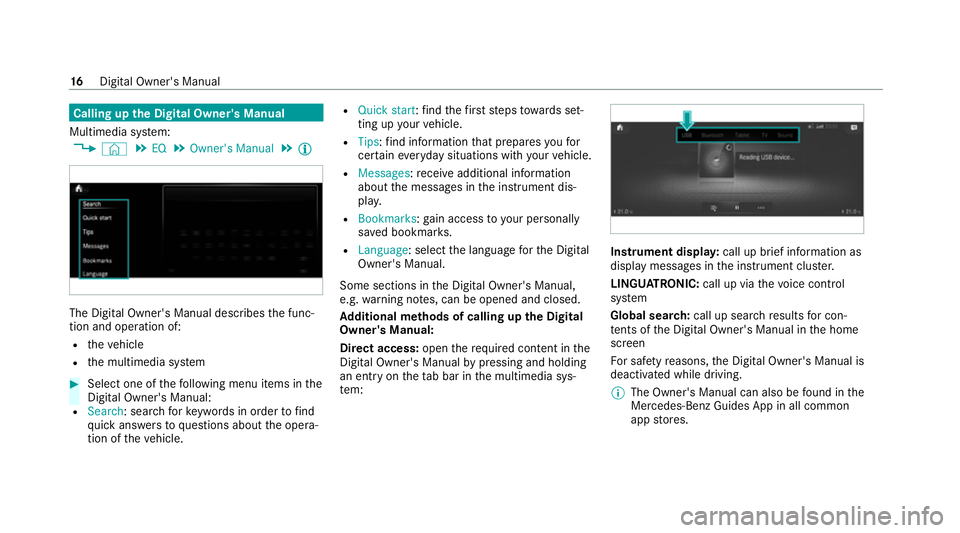
Calling up
the Digital Owner's Manual
Multimedia sy stem:
4 © 5
EQ 5
Owner's Manual 5
Õ The Digital Owner's Manual describes
the func‐
tion and operation of:
R theve hicle
R the multimedia sy stem #
Select one of thefo llowing menu items in the
Digital Owner's Manual:
R Search: sea rchfo rke ywords in order tofind
qu ick answers toquestions about the opera‐
tion of theve hicle. R
Quick start: find thefirs tst eps towa rds set‐
ting up your vehicle.
R Tips: find information that prepares youfor
cer tain eve ryday situations with your vehicle.
R Messages: recei veadditional information
about the messages in the instrument dis‐
pla y.
R Bookmarks :ga in access to your personally
sa ve d bookmar ks.
R Language: select the language forth e Digital
Owner's Manual.
Some sections in the Digital Owner's Manual,
e.g. warning no tes, can be opened and closed.
Ad ditional methods of calling up the Digital
Owner's Manual:
Di rect access: openthere qu ired con tent in the
Digital Owner's Manual bypressing and holding
an ent ryon theta b bar in the multimedia sys‐
te m: Instrument displa
y:call up brief information as
displ aymessa ges in the instrument clus ter.
LINGU ATRO NIC: call up via thevo ice control
sy stem
Global sear ch:call up sear chresults for con‐
te nts of the Digital Owner's Manual in the home
screen
Fo r saf etyre asons, the Digital Owner's Manual is
deactivated while driving.
% The Owner's Manual can also be found in the
Mercedes-Benz Guides App in all common
app stores. 16
Digital Owner's Manual
Page 279 of 629
R
Ifyo u use thevo ice control sy stem in an
emer gency your voice can change and your
te lephone call, e.g. an emer gency call, can
th ereby be unnecessarily dela yed.
R Familiarise yourself with thevo ice control
sy stem functions before starting the journe y.
R Comply with the loading guidelines
(/ page 113). Operation
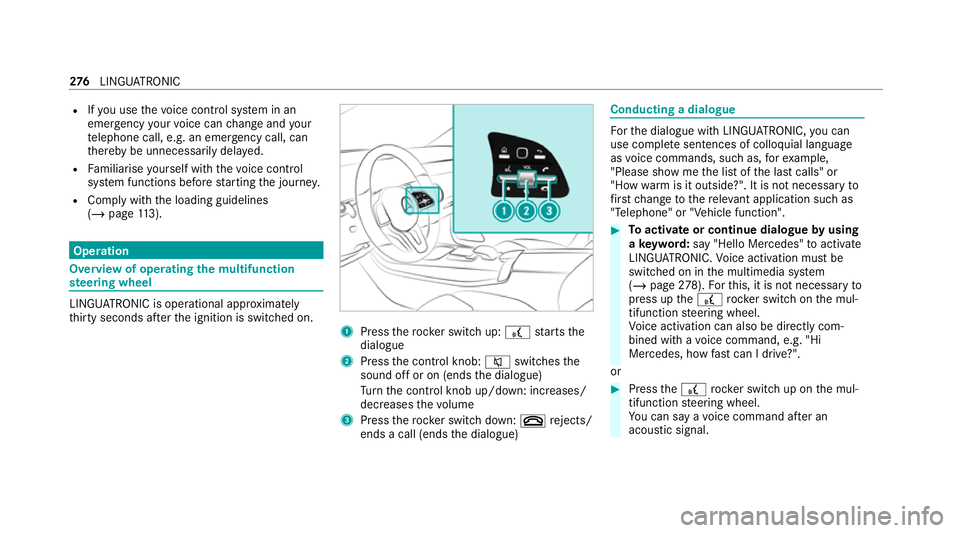
Overview of operating
the multifunction
st eering wheel LINGU
ATRO NIC is operational appr oximately
th irty seconds af terth e ignition is switched on. 1
Press therock er switch up: £starts the
dialogue
2 Press the control knob: 8switches the
sound off or on (ends the dialogue)
Tu rn the control knob up/down: increases/
decreases thevo lume
3 Press therock er switch down: ~rejects/
ends a call (ends the dialogue) Conducting a dialogue
Fo
rth e dialogue with LINGU ATRO NIC, you can
use co mplete sentences of colloquial language
as voice commands, such as, forex ample,
"Please show me the list of the last calls" or
"How warm is it outside?". It is not necessary to
fi rs tch ange tothere leva nt application su chas
"Telephone" or "Vehicle function". #
Toactivate or continue dialogue byusing
a ke yword: say "Hello Mercedes" toactivate
LINGU ATRO NIC. Voice activation must be
switched on in the multimedia sy stem
(/ page 278). Forth is, it is not necessary to
press up the£ rock er switch on the mul‐
tifunction steering wheel.
Vo ice activation can also be directly com‐
bined with a voice command, e.g. "Hi
Mercedes, how fastcan I drive?".
or #
Press the£ rocker switch up on the mul‐
tifunction steering wheel.
Yo u can say a voice command af ter an
acou stic signal. 276
LINGU ATRO NIC
Page 280 of 629
#
Tocor rect an ent ry:say theCorrection
vo ice command. #
Toselect an entry from the selection lis t:
say the line number or the conte nts. #
Tobrows eth e selection lis t:say theNext
or Back voice command. #
Tointer rupt the dialogue: saythePause
vo ice command.
The dialogue can be continued with the
"Hello Mercedes" voice command or by
pressing up the£ rock er switch on the
multifunction steering wheel. #
Tojump tothe preceding dialogue: saythe
Back voice command. #
Tojump back totheto p dialogue le vel:
say theHome voice command. #
Tocancel the dialogue: saytheClose voice
command or press the8 or~ button
on the multifunction steering wheel. #
Tointer rupt avo ice output: speak inthe
middle of a voice dialogue when the sy stem
is still answering.
The voice output is shor tened and the con‐
clusion is reached more quickl y.
% The Voice barge-in option must be switched
on in the multimedia sy stem forth is
(/ page 278). Overvi
ewof operable functions in LINGUA‐
TRONIC Yo
u can use the LINGU ATRO NIC voice control
sy stem tooperate thefo llowing functions
depending on theve hicle equipment:
R Telephone
R Text messa geand e-mail
R Navigation
R Address book
R Radio
R Media
R TV
R Vehicle functions R
Weather
Fu ll functionality is only available foryo u with
activation of online voice control (/ page278). Note
s onthe language setting Yo
u can change the language of LINGU ATRO NIC
via the sy stem language settings. If the set sys‐
te m language is not suppor tedby LINGUA‐
TRONIC, English will be selected.
LINGU ATRO NIC is available in thefo llowing lan‐
guages:
R German
R English
R French
R Italian
R Dutch
R Polish
R Portuguese
R Russian
R Swedish
R Spanish LINGU
ATRO NIC 277
Page 282 of 629
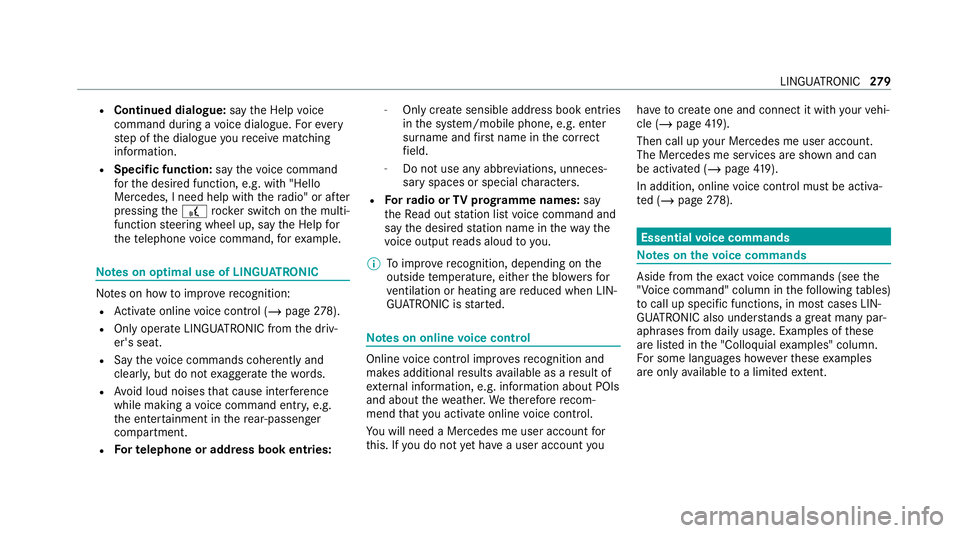
R
Continued dialogue: saytheHelp voice
command during a voice dialogue. Foreve ry
st ep of the dialogue youre cei vematching
information.
R Speci fic function: saythevo ice command
fo rth e desired function, e.g. with "Hello
Mercedes, I need help with thera dio" or af ter
pressing the£ rock er switch on the multi‐
function steering wheel up, say theHelp for
the telephone voice command, forex ample. Note
s on optimal use of LINGU ATRO NIC No
tes on how toimpr overecognition:
R Activate online voice control (/ page278).
R Onlyoperate LINGU ATRO NIC from the driv‐
er's seat.
R Say thevo ice commands cohe rently and
clear ly, but do not exaggerate thewo rds.
R Avoid loud noises that cause inter fere nce
while making a voice command ent ry, e.g.
th e enter tainment in there ar-passen ger
compa rtment.
R Forte lephone or add ress book entries: -
Only create sensible address book entri es
in the sy stem/mobile phone, e.g. enter
surname and firs t name in the cor rect
fi eld.
- Do not use any abbr eviations, unneces‐
sary spaces or special characters.
R Forra dio or TVprog ramme names: say
th eRead out station list voice command and
say the desired station name in thewa ythe
vo ice output reads aloud to you.
% Toimpr overecognition, depending on the
outside temp erature, either the blo wersfor
ve ntilation or heating are reduced when LIN‐
GU ATRO NIC is star ted. Note
s on online voice control Online
voice control impr oves recognition and
makes additional results available as a result of
ex tern al information, e.g. information about POIs
and about thewe ather. Wetherefore recom‐
mend that you activate online voice control.
Yo u will need a Mercedes me user account for
th is. If you do not yet ha vea user account youha
ve tocrea teone and connect it with your vehi‐
cle (/ page419).
Then call up your Mercedes me user account.
The Mercedes me services are shown and can
be activated (/ page419).
In additio n, onlinevoice control must be activa‐
te d (/ page278). Essential
voice commands Note
s onthevo ice commands Aside from
theex act voice commands (see the
"Voice command" column in thefo llowing tables)
to call up specific functions, in most cases LIN‐
GU ATRO NIC also under stands a great ma nypar‐
aphrases from daily usage. Examples of these
are lis ted in the "Colloquial examples" column.
Fo r some languages ho weverth ese examples
are on lyavailable toa limited extent. LING
UATRONIC 279
Page 285 of 629
Na
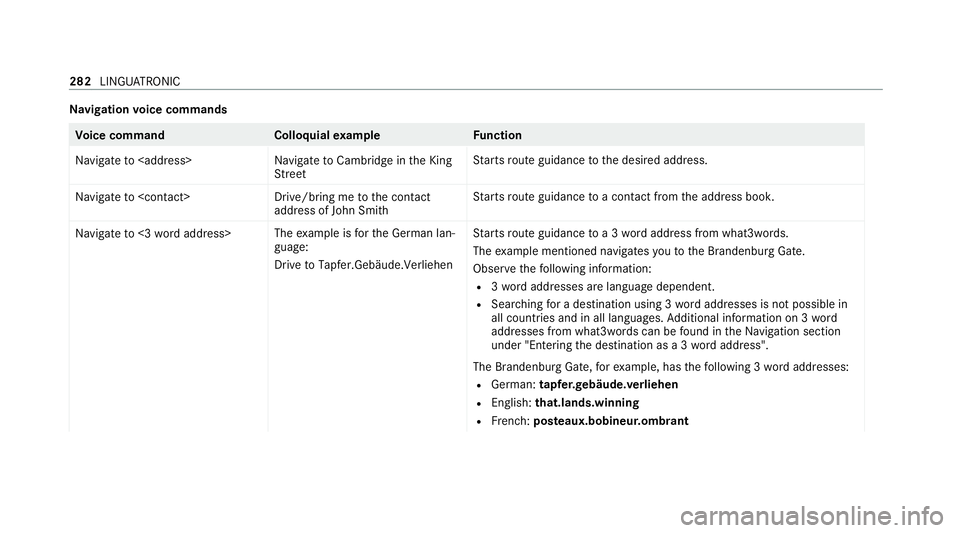
vigation voice commands Vo
ice command Colloquialexample Function
Navigate to
StreetSt
arts route guidance tothe desired address.
Navigate to
address of John Smith St
arts route guidance toa con tact from the address book.
Navigate to <3 word address> The
example is forth e German lan‐
guage:
Drive to Tapfer.Gebäude.Verliehen St
arts route guidance toa 3 wordaddress from what3words.
The example mentioned navigates youto the Brandenburg Gate.
Obser vethefo llowing information:
R 3wo rdaddresses are language dependent.
R Sear ching for a destination using 3 wordaddresses is not possible in
all countries and in all languages. Additional information on 3 word
addresses from what3words can be found in theNa vigation section
under "Entering the destination as a 3 wordaddress".
The Brandenburg Gate, forex ample, has thefo llowing 3 wordaddresses:
R German: tapfer.ge bäude.verliehen
R Engl ish:that.lands.winning
R French: posteaux.bobineur.ombrant 282
LINGU ATRO NIC
Page 304 of 629
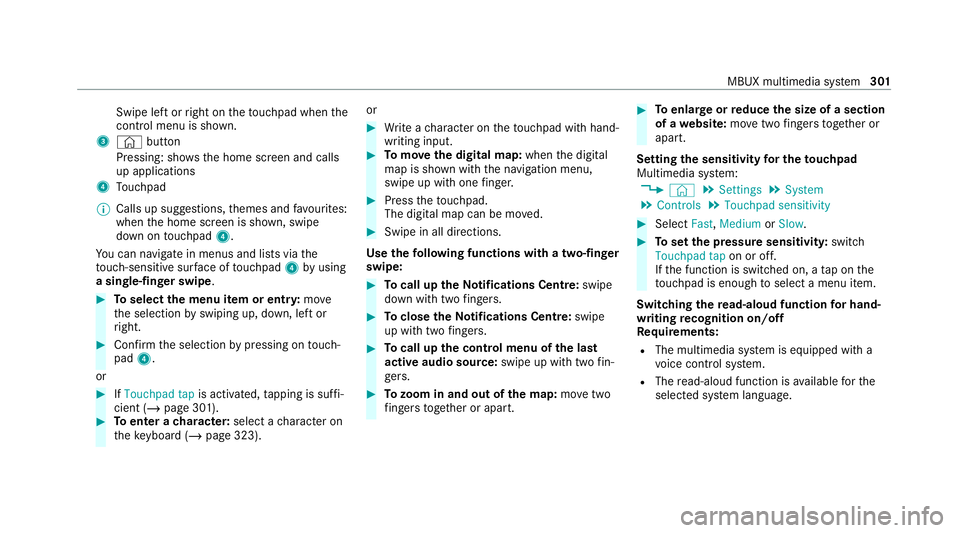
Swipe le
ftor right on theto uchpad when the
control menu is shown.
3 © button
Pressing: sho ws the home screen and calls
up applications
4 Touchpad
% Calls up suggestions, themes and favo urites:
when the home screen is shown, swipe
down on touchpad 4.
Yo u can navigate in menus and lists via the
to uch-sensitive sur face of touchpad 4byusing
a single-finger swipe .#
Toselect the menu item or entr y:mo ve
th e selection byswiping up, down, left or
ri ght. #
Confirm the selection bypressing on touch‐
pad 4.
or #
IfTouchpad tap is activated,tapping is suf fi‐
cient (/ page 301). #
Toenter a character: select acharacter on
th eke yboard ( /page 323). or #
Write a character on theto uchpad with hand‐
writing input. #
Tomo vethe digital map: whenthe digital
map is shown with the navigation menu,
swipe up with one finger. #
Press theto uchpad.
The digital map can be mo ved. #
Swipe in all directions.
Use thefo llowing functions with a two-finger
swipe: #
Tocall up theNo tifications Centre: swipe
down wi thtwo fingers. #
Toclose theNo tifications Centre: swipe
up wi thtwo fingers. #
Tocall up the control menu of the last
active audio source: swipe up with twofin‐
ge rs. #
Tozoom in and out of the map: movetwo
fi ngers toget her or apart. #
Toenlar georreduce the size of a section
of a website: movetwo fingers toget her or
apart.
Setting the sensitivity for the touchpad
Multimedia sy stem:
4 © 5
Settings 5
System
5 Controls 5
Touchpad sensitivity #
Select Fast,Medium orSlow . #
Toset the pressure sensitivit y:switch
Touchpad tap on or off.
If th e function is switched on, a tap on the
to uchpad is enough toselect a menu item.
Switching there ad-aloud function for hand‐
writing recognition on/off
Re quirements:
R The multimedia sy stem is equipped with a
vo ice control sy stem.
R The read-aloud function is available forthe
selected sy stem language. MBUX multimedia sy
stem 301
Page 326 of 629
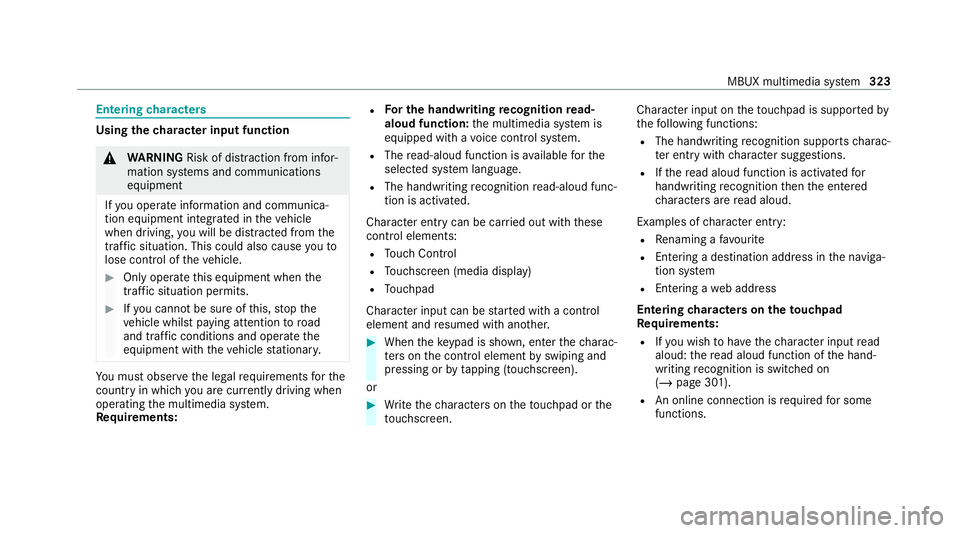
Entering
characters Using
thech aracter input function &
WARNING Risk of di stra ction from infor‐
mation sy stems and communications
equipment
If yo u operate information and communica‐
tion equipment integ rated in theve hicle
when driving, you will be distracted from the
traf fic situation. This could also cause youto
lose control of theve hicle. #
Only operate this equipment when the
traf fic situation permits. #
Ifyo u cannot be sure of this, stop the
ve hicle whilst paying attention toroad
and traf fic conditions and ope rate the
equipment with theve hicle stationar y. Yo
u must obse rveth e legal requirements forthe
country in whi chyou are cur rently driving when
operating the multimedia sy stem.
Re quirements: R
For the handwriting recognition read-
aloud function: the multimedia sy stem is
equipped with a voice control sy stem.
R The read-aloud function is available forthe
selected sy stem language.
R The handwriting recognition read-aloud func‐
tion is activated.
Character ent rycan be car ried out with these
control elements:
R Touch Control
R Touchsc reen (media display)
R Touchpad
Character input can be star ted with a control
element and resumed with ano ther. #
When theke ypad is shown, en terth ech arac‐
te rs on the control element byswiping and
pressing or bytapping (touchscreen).
or #
Write thech aracters on theto uchpad or the
to uchsc reen. Character input on
theto uchpad is suppo rted by
th efo llowing functions:
R The handwriting recognition suppo rts ch arac‐
te r entry with character suggestions.
R Ifth ere ad aloud function is activated for
handwriting recognition then the entered
ch aracters are read aloud.
Examples of character ent ry:
R Renaming a favo urite
R Entering a de stination address in the naviga‐
tion sy stem
R Ente ring a web address
Entering characters on theto uchpad
Re quirements:
R Ifyo u wish tohave thech aracter input read
aloud: there ad aloud function of the hand‐
writing recognition is switched on
(/ page 301).
R An online connection is requiredfor some
functions. MBUX multimedia sy
stem 323
Page 327 of 629
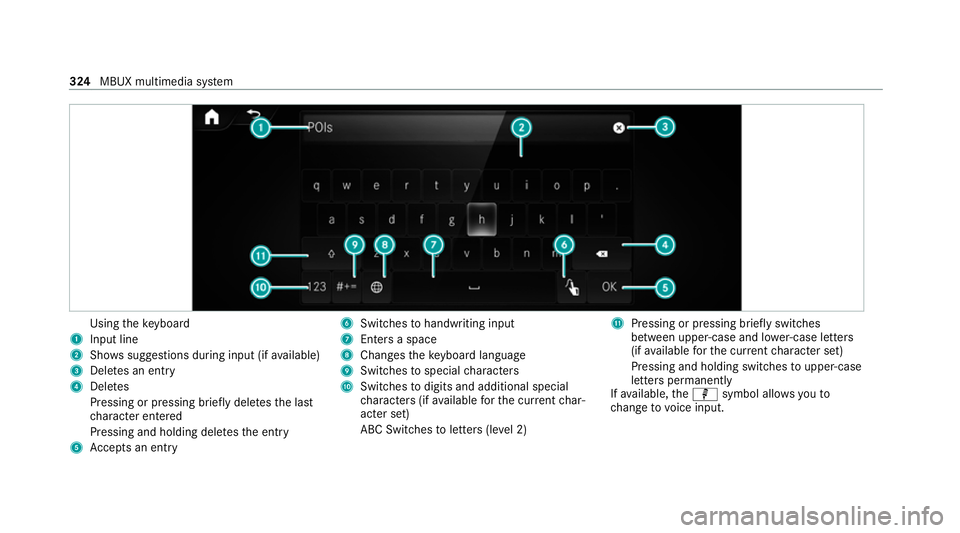
Using
theke yboard
1 Input line
2 Shows suggestions during input (if available)
3 Dele tes an entry
4 Dele tes
Pressing or pressing brief lydele testh e last
ch aracter entered
Pressing and holding dele testh e entry
5 Accepts an entry 6
Switches tohandwriting input
7 Enters a space
8 Changes theke yboard language
9 Switches tospecial characters
A Swit ches todigits and additional special
ch aracters (if available forth e cur rent char‐
acter set)
ABC Swit ches toletters (le vel 2) B
Pressing or pressing brief lyswitches
between upper-case and lo wer-case letters
(if available forth e cur rent character set)
Pressing and holding swit ches toupper-case
letters permanently
If av ailable, thep symbol allo wsyouto
ch ange tovoice input. 324
MBUX multimedia sy stem
Page 328 of 629
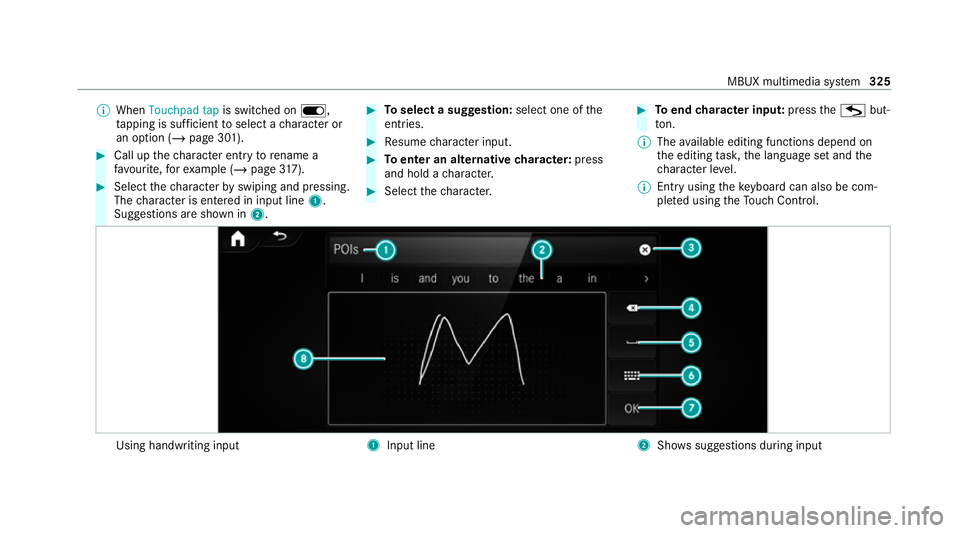
%
When Touchpad tap is switched on D,
ta pping is suf ficient toselect a character or
an option (/ page 301). #
Call up thech aracter ent ryto rename a
fa vo urite, forex ample (/ page317). #
Select thech aracter byswiping and pressing.
The character is entered in input line 1.
Suggestions are shown in 2. #
Toselect a suggestion: select one ofthe
entri es. #
Resume character input. #
Toenter an alternative character: press
and hold a character. #
Select thech aracter. #
Toend character input: presstheG but‐
to n.
% The available editing functions depend on
th e editing task, the language set and the
ch aracter le vel.
% Entry using theke yboard can also be com‐
ple ted using theTo uch Control. Using handwriting input
1
Input line 2
Shows suggestions during input MBUX multimedia sy
stem 325