fuse MERCEDES-BENZ EQC SUV 2019 Owners Manual
[x] Cancel search | Manufacturer: MERCEDES-BENZ, Model Year: 2019, Model line: EQC SUV, Model: MERCEDES-BENZ EQC SUV 2019Pages: 629, PDF Size: 11.02 MB
Page 6 of 629
Operating
the climate control sy stem ......... 15 0 Driving and pa
rking ................................. 15 8
Driving ........................................................ 15 8
DY NA MIC SELECT switch ............................1 69
Tr ansmission .............................................. .173
Fu nction of flex ible all-wheel distribution .... 175
Charging the high-voltage battery ............... 175
Pa rking ...................................................... .189
Driving and driving saf ety sy stems .............. 197
Tr ailer hit ch................................................ 256
Bicycle rack function .................................. 260
Ve hicle towing instructions ........................ .262 Instrument Display and on-board
comp uter.................................................. 263
Instrument display overview ...................... .263
Overview of the buttons on thesteering
wheel ..........................................................2 63
Operating the on-board computer .............. 264
Fu nction of the po wer display ..................... 265
Setting the additional value range .............. 266
Overview of displ ays on the multifunc‐
tion display .................................................2 67Ad
justing the instrument lighting ................2 67
Menus and submenus ................................ 268
Head-up Display .......................................... 274 LINGU
ATRO NIC ......................................... 275
No tes on operating saf ety .......................... .275
Operation ....................................................2 76
Using LINGU ATRO NIC ef fectively ................ 278
Essential voice commands ........................ .279 MBUX multimedia sy
stem ...................... 295
Overview and operation .............................. 295
Sy stem settings .......................................... 329
Fit & Healt hy............................................... 338
Na vigation .................................................. 343
Te lephone .................................................. .391
Online and Internet functions ..................... 427
Media ......................................................... 436
Ra dio .......................................................... 444
TV ............................................................... 447
Sound ......................................................... 455 Main
tenance and care ............................. 459
ASS YST PLUS service inter val display ........ 459
Engine compartment .................................. 460
Cleaning and care ...................................... .463 Breakdown assi
stance ............................ 473
Emergency ................................................. .473
Flat tyre ...................................................... 475
Battery (vehicle) ......................................... 480
To w- starting or towing away ....................... 482
Electrical fuses ........................................... 486 Wheels and tyres
..................................... 490
No tes on noise or unusual handling char‐
acteristics .................................................. .490
No tes on regular lyinspecting wheels and
tyres .......................................................... .490
No tes on snow chains ................................ 490
Ty re pressure .............................................. 491
Wheel change ............................................ .498
Emergency spa rewheel .............................. 508 Contents
3
Page 154 of 629
#
Toswitch off: setthe air flow toleve l 0 using
th eH button.
% If climate control is switched off, the win‐
do ws may mist up more quickl y.Switch off
climate control only brie fly. Calling up
the air conditioning menu Calling up
the air conditioning menu using
th e multimedia sy stem #
Select one of thete mp erature displa ysatthe
lo we r edge of the media displa y.
Calling up the air conditioning menu using
th e but ton on the control panel #
Press thet button on the control panel.
% The button on the control panel is not availa‐
ble on all equipment variants. In this case,
th e air conditioning menu can only be called
up using the multimedia sy stem. Ac
tivating/deactivating the A/C function via
the multimedia sy stem The A/C function heats, cools and dehumidifies
th
eve hicle's interior air. #
Call up the air conditioning menu
(/ page 151). #
Select First row of seats . #
Select A/C.
Depending on the pr evious status, the func‐
tion is activated or deactivated. Setting climate control
toautomatic mode In auto
matic mode, the set temp erature is con‐
trolled and maintained at a const ant levelby the
air suppl y. #
Press the à button. #
Toswitch tomanual mode: pressthe H
or _ button. Climate
style Climate
style function
In automatic mode, you can select thefo llowing
climate style settings forth e driver's and front
passenger areas:
R FOCUS: high air flow , slightly cooler setting
R MEDIUM: medium air flow ,st andard setting
R DIFFUSE: low airflow , slightly warmer and
draught-f ree setting Overview of
the air distribution settings The symbols on
the display indicate which vents
th e air flow is being directed thro ugh:
¯ def
rost ervents
P centre and side air
vents
O fo
ot we llve nts
S centre, side and
foot we llve nts
a defros
ter and foot we llve nts
_ all
vents
b defros
ter,middle and side air vents Clima
tecontrol 151
Page 186 of 629
Setting
the maximum permissible charging
cur rent forch arging at a mains outlet *
NO
TEDanger due toexcessive charging
cur rent If
th ech arging cur rent is too high, the fuse
could be tripped or theex tern al mains supply
could overheat. #
Make sure, that theex tern al mains sup‐
ply has been designed tohandle the set
ch arging cur rent. #
If necessa ry,re duce the set charging
cur rent or use a di fferent mains soc ket. #
Before charging at a mains outlet, ha vethe
maximum permissible charging cur rent for
th ere leva nt mains outlet or the building
inspected byaqu alified electrician. The
ch arging cable supplied is set toa countr y-
specific maximum charging cur rent value.
When charging abroad, the maximum value
may exceed the permitted value forth at countr
y.When abroad, obser vethe count ry-
specific la wswhen charging.
If yo u ha vequestions concerning setting the
ch arging cur rent or if there is a malfunction,
please conta ct aqualified specialist work‐
shop. #
Set the maximum permissible charging cur‐
re nt in the multimedia sy stem menu
(/ page 178).
If th eex act value of the maximum permissible
ch arging cur rent cannot be set, select the next
smaller adjus table value.
% Ifth eve hicle requ ires more time than usual
to charge the high-voltage batter y,ch eck the
maximum charging cur rent settings in the
multimedia sy stem menu. Note
s oncharging the high-voltage bat tery
at a wallbox (mode 3) &
DANG ER Risk of fata l injury from incor‐
re ctly ins talled component parts
Connecting thech arging cable tothewa llbox
via an incor rectly ins talled wallbox or by
means of adapt ers,extension cables or simi‐
lar could cause a fire or an electric shoc k. #
Only connect thech arging cable to a
wa llbox that:
R Has been proper ly installed and
R Has been inspec tedby aqu alified electri‐
cian #
For saf etyre asons, on lyuse charging
cables that ha vebeen tested and
appr ovedby the manufacturer for
ch arging the high-voltage battery in an
electric vehicle. #
Never use dama gedch arging cables. #
Do not connect thech arging cable toan
amplifier. Driving and parking
18 3
Page 489 of 629
To
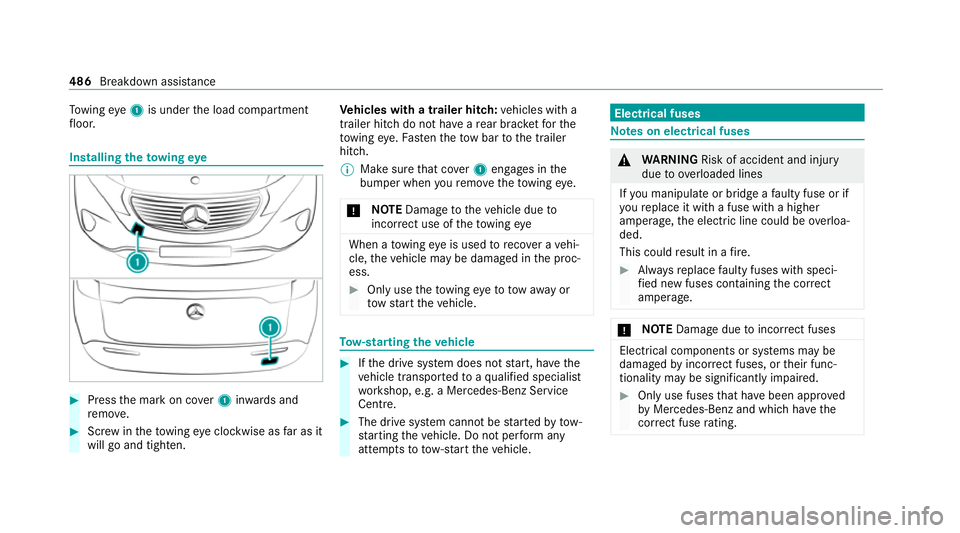
wing eye1 is under the load compartment
fl oor. Installing
theto wing eye #
Press the mark on co ver1 inwa rds and
re mo ve. #
Screw intheto wing eyeclockwise as far as it
will go and tighten. Ve
hicles with a trailer hitch: vehicles with a
trailer hitch do not ha veare ar brac ketfo rthe
to wing eye. Fasten theto w bar tothe trailer
hitch.
% Make sure that co ver1 engages in the
bumper when youre mo vetheto wing eye.
* NO
TEDama getotheve hicle due to
incor rect use of theto wing eye When a
towing eye is used toreco ver a vehi‐
cle, theve hicle may be damaged in the proc‐
ess. #
Only use theto wing eyeto to waw ay or
to w start theve hicle. To
w- starting theve hicle #
Ifth e drive sy stem does not start, ha vethe
ve hicle transpor tedto aqu alified specialist
wo rkshop, e.g. a Mercedes-Benz Service
Centre. #
The drive sy stem cann otbe star tedby tow-
st arting theve hicle. Do not per form any
attem ptsto to w-start theve hicle. Electrical fuses
Note
s on electrical fuses &
WARNING Risk of accident and inju ry
due to ov erloaded lines
If yo u manipulate or bridge a faulty fuse or if
yo ure place it with a fuse with a higher
amperage, the electric line could be overloa‐
ded.
This could result in a fire. #
Alw aysre place faulty fuses with speci‐
fi ed new fuses conta iningthe cor rect
amperage. *
NO
TEDama gedue toincor rect fuses Electrical components or sy
stems may be
damaged byincor rect fuses, or their func‐
tionality may be significant lyimpaired. #
Only use fuses that ha vebeen appr oved
by Mercedes-Benz and which ha vethe
cor rect fuse rating. 486
Breakdown assi stance
Page 490 of 629
Blown fuses must be
replaced with fuses of the
same rating, which you can recognise bythe col‐
our and fuse rating. The fuse ratings and fu rther
information tobe obser ved can be found in the
fuse assignment diagram.
Fu se assignment diag ram: onthe fuse box in
th e load compartment (/ page 489).
* NO
TEDama geor malfunctions caused
by moisture Moisture may cause dama
getothe electrical
sy stem or cause it tomalfunction. #
When the fuse box is open, make sure
th at no moisture can enter the fuse
box. #
When closing the fuse box, make sure
th at the seal of the lid is positioned cor‐
re ctly on the fuse box. If
th e newly inser ted fuse also blo ws, ha vethe
cause traced and rectified at a qualified special‐
ist workshop.
Ensure thefo llowing before replacing a fuse:
R The vehicle is secured against rolling away. R
All electrical consumers are switched off.
R The ignition is switched off.
The electrical fuses are located in various fuse
bo xes:
R Fuse box in the engine compartment on the
driver's side (/ page 487)
R Fuse box on the driver's side of the cockpit
(/ page 488)
R Fuse box in the front passenger foot we ll
(/ page 488)
R Fuse box in the load compartment on the
ri ght-hand side of theve hicle, when vie wed
in the direction of tra vel (/ page 489) Opening and closing
the fuse box in the
engine compa rtment Re
quirements:
R A dry clo thand a sc rewdriver are available.
Obse rveth e no tes on electrical fuses
(/ page 486). Opening &
WARNING Risk of inju ryfrom using the
windscreen wipers while the engine bon‐
net is open
When the engine bonn etis open, and the
windscreen wipers are set in motion, you can
be trapped bythe wiper linkage. #
Alw ays switch off the windscreen wip‐
ers and ignition before opening the
engine bonn et. Breakdown assis
tance 487
Page 491 of 629
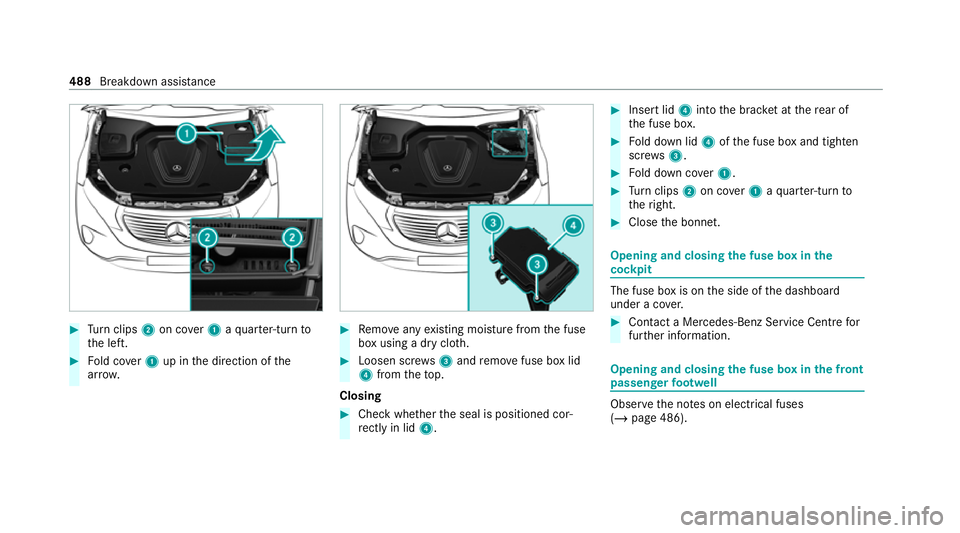
#
Turn clips 2on co ver1 aqu arter-turn to
th e left. #
Fold co ver1 up in the direction of the
ar row. #
Remo veany existing moisture from the fuse
box using a dry clo th. #
Loosen scr ews3 and remo vefuse box lid
4 from theto p.
Closing #
Check whe ther the seal is positioned cor‐
re ctly in lid 4. #
Insert lid 4into the brac ket at there ar of
th e fuse box. #
Fold down lid 4ofthe fuse box and tighten
scr ews3. #
Fold down co ver1. #
Turn clips 2on co ver1 aqu arter-turn to
th eright. #
Close the bonn et. Opening and closing
the fuse box in the
cockpit The fuse box is on
the side of the dashboard
under a co ver. #
Con tact a Mercedes-Benz Service Centre for
fur ther information. Opening and closing
the fuse box in the front
passenger foot we ll Obser
vethe no tes on electrical fuses
(/ page 486). 488
Breakdown assis tance
Page 492 of 629
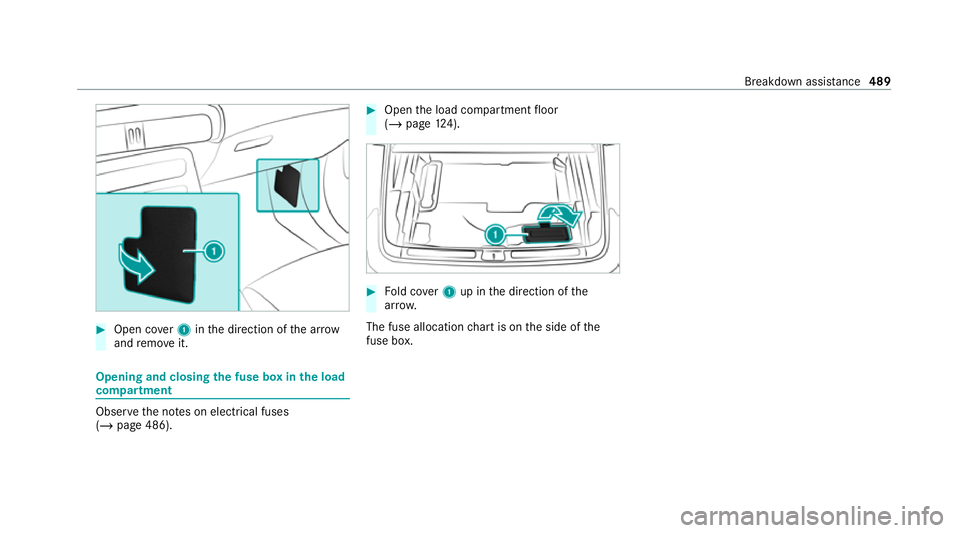
#
Open co ver1 inthe direction of the ar row
and remo veit. Opening and closing
the fuse box in the load
compa rtment Obse
rveth e no tes on electrical fuses
(/ page 486). #
Open the load compartment floor
(/ page 124). #
Fold co ver1 up in the direction of the
ar row.
The fuse allocation chart is on the side of the
fuse box. Breakdown assi
stance 489
Page 567 of 629
Lights
Display messages
Possible causes/consequences and M
MSolutions
b Left dipped beam (Example)*T
he cor responding light source is defective. #
Drive on carefully. #
Consult a qualified specialist workshop immediatel y.
% LED light bulbs: the display message forth e cor responding lamp appears only when allthe light-emitting diodes
in the lamp ha vefailed.
b Malfunction See Owner's
Manual *T
heexterior lighting is faulty. #
Consult a qualified specialist workshop.
* Ve hicles with a trailer hitch: a fuse may haveblown. #
Stop theve hicle in accordance with the tra ffic conditions. #
Check the fuses and replace them if necessary (/ page 486).
b
Automatic driving lights
inoperative *T
he light sensor is faulty. #
Consult a qualified specialist workshop. 564
Display messages and warning/indicator lamps
Page 598 of 629
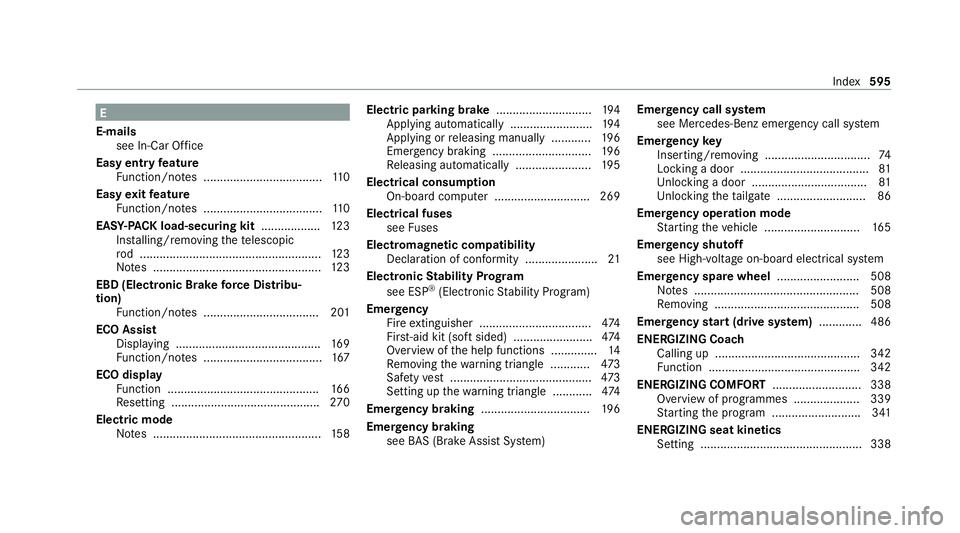
E
E-mails see In-Car Of fice
Easy entry feature
Fu nction/no tes .................................... 11 0
Easy exitfeature
Fu nction/no tes .................................... 11 0
EAS Y-PA CK load-securing kit ..................12 3
Ins talling/ removing thete lescopic
ro d .......................................................1 23
No tes ................................................... 12 3
EBD (Electronic Brake forc e Distribu‐
tion)
Function/no tes ................................... 201
ECO Assist Displaying ............................................ 16 9
Fu nction/no tes .................................... 167
ECO display Function .............................................. 16 6
Re setting ............................................. 270
Electric mode Notes ................................................... 15 8Electric pa
rking brake ............................ .194
App lying automatically ........................ .194
App lying or releasing manually ............ 19 6
Emergency braking .............................. 19 6
Re leasing automatically ...................... .195
Electrical consum ption
On-board computer ............................ .269
Electrical fuses see Fuses
Electromagnetic compatibility Declaration of conformity ......................21
Electronic Stability Prog ram
see ESP ®
(Electronic Stability Prog ram)
Emer gency
Fire extinguisher ................................. .474
Fir st-aid kit (so ftsided) ........................ 474
Overview of the help functions .............. 14
Re moving thewa rning triangle ............ 473
Saf etyve st ........................................... 473
Setting up thewa rning triangle ............ 474
Emer gency braking ................................. 19 6
Emer gency braking
see BAS (Brake Assi stSystem) Emer
gency call sy stem
see Mercedes-Benz emer gency call sy stem
Emer gency key
Inserting/removing ................................ 74
Locking a door ....................................... 81
Un locking a door .................................. .81
Un locking theta ilgate .......................... .86
Emer gency operation mode
St arting theve hicle ............................. 16 5
Emer gency shutoff
see High-voltage on-board electrical sy stem
Emer gency spare wheel .........................5 08
No tes .................................................. 508
Re moving ............................................ 508
Emer gency start (drive sy stem) ............ .486
ENERGIZI NGCoach
Calling up ............................................ 342
Fu nction .............................................. 342
ENE RGIZING COMFORT ...........................338
Overview of programmes .................... 339
St arting the program ........................... 341
ENERGIZING seat kinetics Setting .................................................3 38 Index
595
Page 600 of 629
Fo
r an EQ-optimised route
Overview ............................................. 354
Fr ag rance
see Fragrance sy stem
Fr ag rance sy stem .................................... 15 3
Inserting/removing theflacon ............ .153
Setting ................................................. 15 2
Fr ee software ............................................ 29
Fr equencies
Mobile phone ...................................... .510
Tw o-w ayradio ...................................... 51 0
Fr equency band
Dialling (on-board computer) .............. .271
Fr ont airbag (driver, front passenger) .....37
Fr ont passenger seat
see Seat
Fu el consum ption indicator
Calling up ............................................ .173
Fu nction seat
see Door cont rol panel
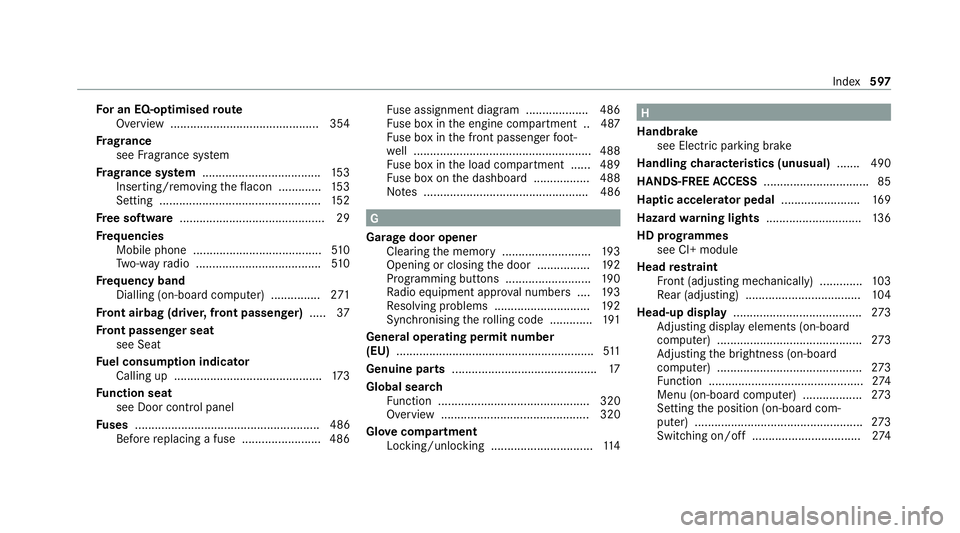
Fu ses ........................................................ 486
Before replacing a fuse ........................ 486 Fu
se assignment diagram ...................4 86
Fu se box in the engine compartment .. 487
Fu se box in the front passenger foot‐
we ll ...................................................... 488
Fu se box in the load compartment ...... 489
Fu se box on the dashboard ................. 488
No tes .................................................. 486 G
Garage door opener Cleari ngthe memory ........................... 19 3
Opening or closing the door ................1 92
Programming buttons .......................... 19 0
Ra dio equipment appr oval numbers .... 19 3
Re solving problems ............................. 19 2
Synchronising thero lling code ............ .191
Genera l operating permit number
(EU) ............................................................ 511
Genuine parts ............................................ 17
Global sear ch
Fu nction .............................................. 320
Overview ............................................. 320
Glo vecompa rtment
Locking/unlo cking .............................. .114 H
Handbrake see Electric parking brake
Handling characteristics (unusual) ....... 490
HANDS-FREE ACCESS ................................ 85
Ha ptic accelerator pedal ........................16 9
Hazard warning lights ............................ .136
HD prog rammes
see CI+ module
Head restra int
Fr ont (adjusting mechanically) .............1 03
Re ar (adjusting) .................................. .104
Head-up display ....................................... 273
Ad justing display elements (on-board
compu ter) ............................................ 273
Ad justing the brightness (on-board
computer) ............................................ 273
Fu nction ............................................... 274
Menu (on-board computer) .................. 273
Setting the position (on-board com‐
puter) ................................................... 273
Switching on/off ................................. 274 Index
597