lights MERCEDES-BENZ G-Class 2016 W463 Service Manual
[x] Cancel search | Manufacturer: MERCEDES-BENZ, Model Year: 2016, Model line: G-Class, Model: MERCEDES-BENZ G-Class 2016 W463Pages: 302, PDF Size: 7.04 MB
Page 109 of 302
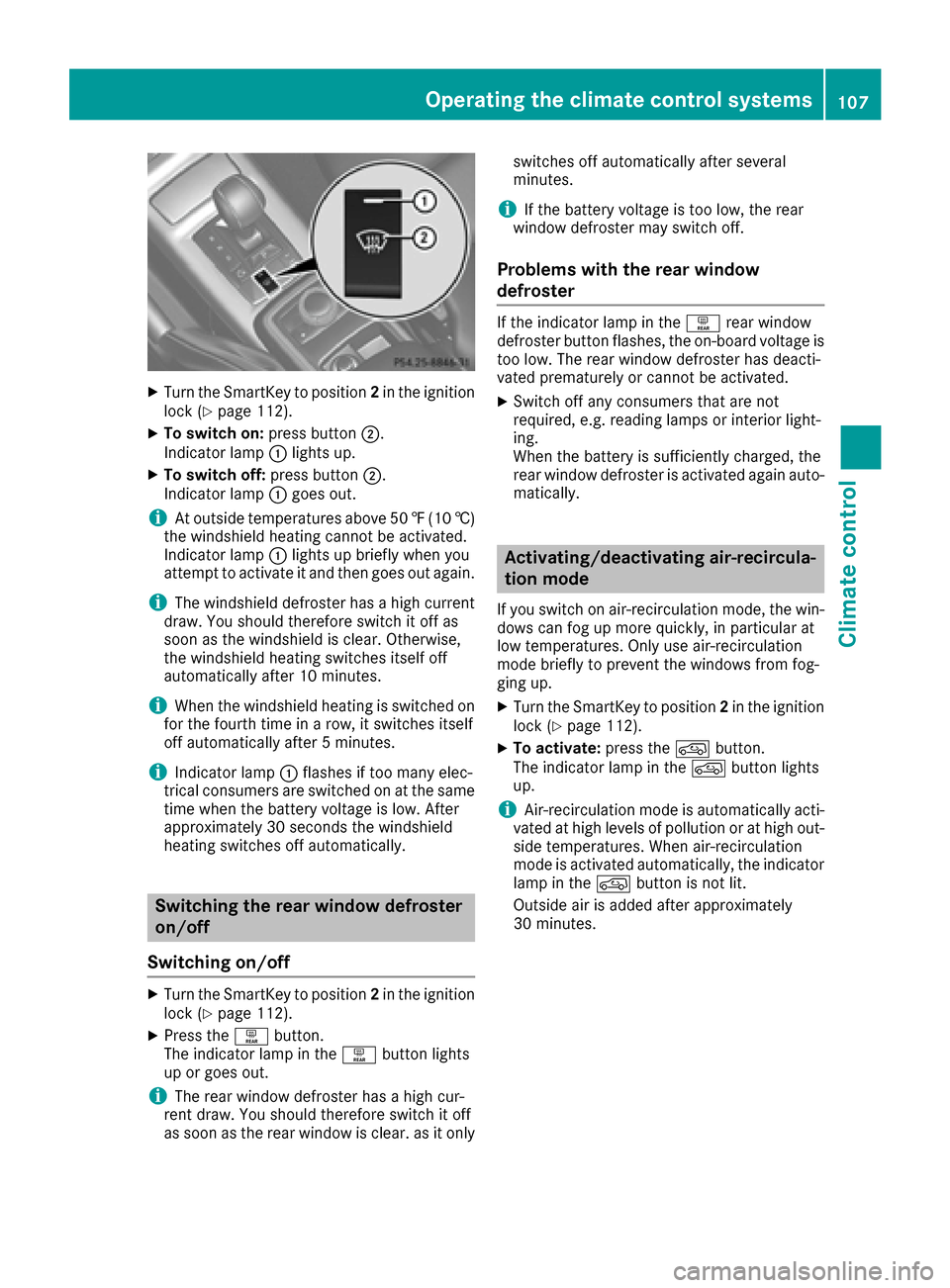
XTurn the SmartKey to position2in the ignition
lock (Ypage 112).
XTo switch on: press button;.
Indicator lamp :lights up.
XTo switch off: press button;.
Indicator lamp :goes out.
iAt outside temperatures above 50 ‡(10 †)
the windshield heating cannot be activated.
Indicator lamp :lights up briefly when you
attempt to activate it and then goes out again.
iThe windshield defroster has a high current
draw. You should therefore switch it off as
soon as the windshield is clear. Otherwise,
the windshield heating switches itself off
automatically after 10 minutes.
iWhen the windshield heating is switched on
for the fourth time in a row, it switches itself
off automatically after 5 minutes.
iIndicator lamp :flashes if too many elec-
trical consumers are switched on at the same
time when the battery voltage is low. After
approximately 30 seconds the windshield
heating switches off automatically.
Switching the rear window defroster
on/off
Switching on/off
XTurn the SmartKey to position 2in the ignition
lock (Ypage 112).
XPress the ªbutton.
The indicator lamp in the ªbutton lights
up or goes out.
iThe rear window defroster has a high cur-
rent draw. You should therefore switch it off
as soon as the rear window is clear. as it only switches off automatically after several
minutes.
iIf the battery voltage is too low, the rear
window defroster may switch off.
Problems with the rear window
defroster
If the indicator lamp in the ªrear window
defroster button flashes, the on-board voltage is
too low. The rear window defroster has deacti-
vated prematurely or cannot be activated.
XSwitch off any consumers that are not
required, e.g. reading lamps or interior light-
ing.
When the battery is sufficiently charged, the
rear window defroster is activated again auto- matically.
Activating/deactivating air-recircula-
tion mode
If you switch on air-recirculation mode, the win-
dows can fog up more quickly, in particular at
low temperatures. Only use air-recirculation
mode briefly to prevent the windows from fog-
ging up.
XTurn the SmartKey to position 2in the ignition
lock (Ypage 112).
XTo activate: press thedbutton.
The indicator lamp in the dbutton lights
up.
iAir-recirculation mode is automatically acti-
vated at high levels of pollution or at high out-
side temperatures. When air-recirculation
mode is activated automatically, the indicator
lamp in the dbutton is not lit.
Outside air is added after approximately
30 minutes.
Operating the climate control systems107
Climate control
Z
Page 110 of 302
XTo deactivate:press thedbutton.
The indicator lamp in the dbutton goes
out.
iAir-recirculation mode switches off auto-
matically:
Rafter approximately five minutes at outside
temperatures below approximately 41 ‡
Rafter approximately five minutes if cooling
with air dehumidification is deactivated
Rafter approximately 30 minutes at outside
temperatures above approximately 41 ‡
(5 †)
Convenience opening or closing using
the air-recirculation button
GWARNING
When the convenience closing feature is oper- ating, parts of the body could become trapped
in the closing area of the side window and the
sliding sunroof. There is a risk of injury.
Observe the complete closing procedure
when the convenience closing feature is oper-
ating. Make sure that no body parts are in
close proximity during the closing procedure.
GWARNING
During convenience opening parts of the body could be drawn in or become trapped
between the side window and window frame.
There is a risk of injury.
Make sure that nobody touches the side win-
dow during the opening procedure. If some-
one becomes trapped, immediately press
the W switch in the door to stop the move-
ment of the side windows. To continue closing
the side window, pull on the Wswitch.
XConvenience closing feature: press and
hold the grocker switch up or down until
the side windows and the sliding sunroof start
to close automatically.
The indicator lamp above the grocker
switch lights up. Air-recirculation mode is
activated.
If you manually open the side windows or the
sliding sunroof after closing with the conve- nience closing feature, they will remain in this
position when opened.
If parts of the body are in the closing area during
convenience closing, proceed as follows:
XPress the Wbutton to stop the side win-
dows.
The side window stops.
XTo then open the side windows, press the
W button again.
XPress the 3switch to stop the sliding sun-
roof.
The sliding sunroof stops.
XTo then open the sliding sunroof, pull back on
the 3 switch.
XConvenience opening feature: press and
hold the grocker switch up or down until
the side windows and the sliding sunroof start
to open automatically.
The indicator lamp above the grocker
switch goes out. Air-recirculation mode is
deactivated.
Activating/deactivating the residual
heat function
The "residual heat" function is only available in
Canada.
It is possible to make use of the residual heat of
the engine to continue heating the stationary
vehicle for up to 30 minutes after the engine has
been switched off. The heating time depends on the coolant temperature and on the interior tem-
perature that has been set.
iThe blower will run at a low speed regardless
of the airflow setting.
iIf you activate the residual heat function at
high temperatures, only the ventilation will be
activated.
XTurn the SmartKey to position 0(Ypage 112)
in the ignition lock or remove it.
XTo activate: press theÁbutton.
The indicator lamp in the Ábutton lights
up.
108Operating the climate control systems
Climate control
Page 114 of 302
Wear suitable footwear to ensure correct
usage of the pedals.
GWARNING
If you switch off the ignition while driving,
safety-relevant functions are only available
with limitations, or not at all. This could affect, for example, the power steering and the brake
boosting effect. You will require considerably
more effort to steer and brake. There is a risk
of an accident.
Do not switch off the ignition while driving.
GWARNING
If the parking brake has not been fully
released when driving, the parking brake can:
Roverheat and cause a fire
Rlose its hold function.
There is a risk of fire and an accident. Release
the parking brake fully before driving off.
!Warm up the engine quickly. Do not use the
engine's full performance until it has reached
operating temperature.
Only shift the automatic transmission to the
desired drive position when the vehicle is sta-
tionary.
Where possible, avoid spinning the drive
wheels when pulling away on slippery roads.
You could otherwise damage the drive train.
!Avoid high engine speeds when the engine
is cold. The engine's service life could other-
wise be significantly shortened. Do not use
the engine's full performance until it has
reached operating temperature.
!AMG vehicles: at low engine oil tempera-
tures below 68 ‡ (+20 †), the maximum
engine speed is restricted in order to protect the engine. To protect the engine and main-
tain smooth engine operation, avoid driving at
full throttle when the engine is cold.
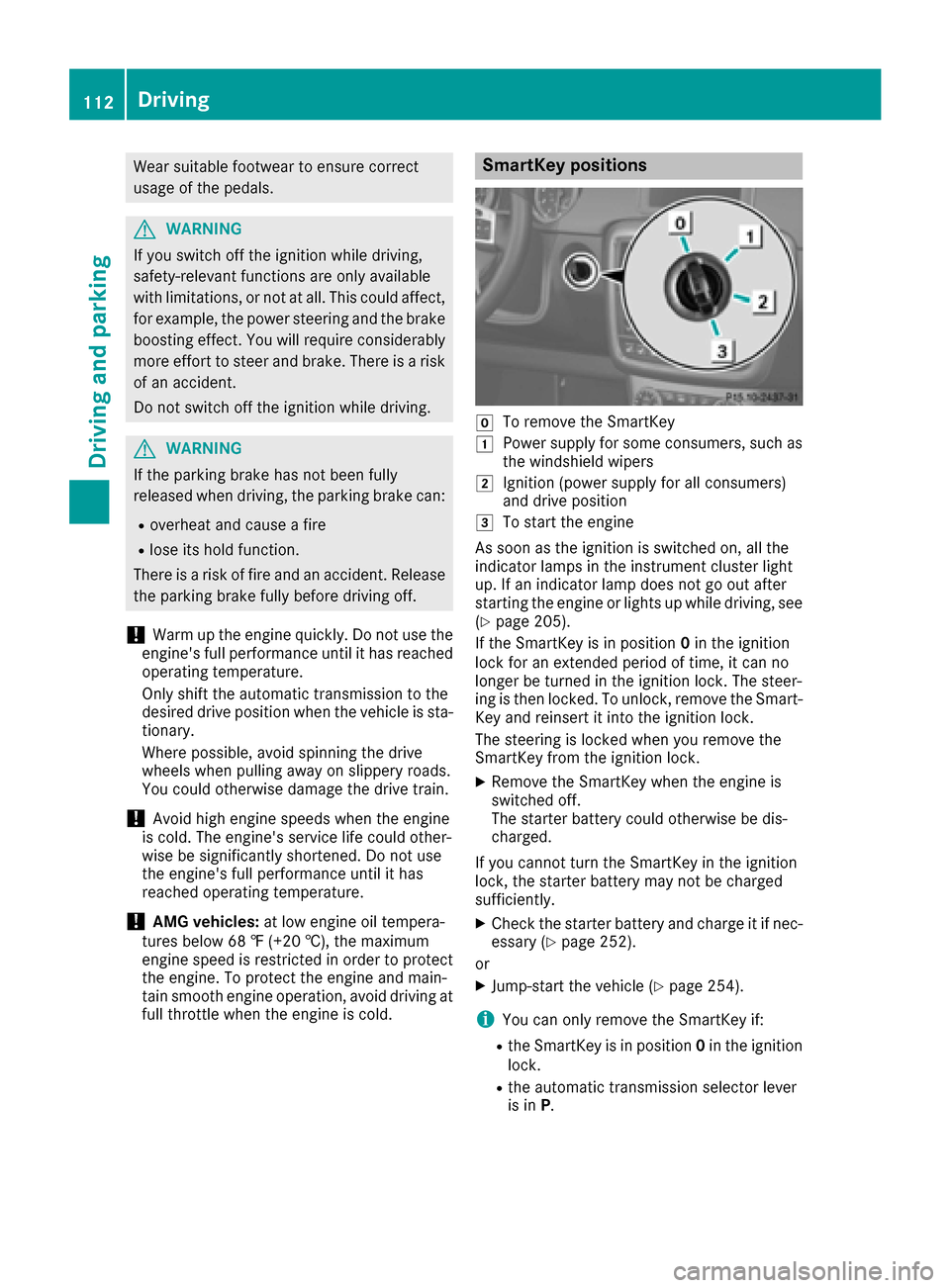
SmartKey positions
gTo remove the SmartKey
1Power supply for some consumers, such as
the windshield wipers
2Ignition (power supply for all consumers)
and drive position
3To start the engine
As soon as the ignition is switched on, all the
indicator lamps in the instrument cluster light
up. If an indicator lamp does not go out after
starting the engine or lights up while driving, see
(
Ypage 205).
If the SmartKey is in position 0in the ignition
lock for an extended period of time, it can no
longer be turned in the ignition lock. The steer-
ing is then locked. To unlock, remove the Smart-
Key and reinsert it into the ignition lock.
The steering is locked when you remove the
SmartKey from the ignition lock.
XRemove the SmartKey when the engine is
switched off.
The starter battery could otherwise be dis-
charged.
If you cannot turn the SmartKey in the ignition
lock, the starter battery may not be charged
sufficiently.
XCheck the starter battery and charge it if nec-
essary (Ypage 252).
or
XJump-start the vehicle (Ypage 254).
iYou can only remove the SmartKey if:
Rthe SmartKey is in position 0in the ignition
lock.
Rthe automatic transmission selector lever
is in P.
112Driving
Driving and parking
Page 117 of 302
XTo deactivate:in drive program C/E press
button :.
or
XSwitch to drive program Sor M(Ypage 122).
Indicator lamp ;on button :and the è
ECO symbol in the multifunction display go
out.
The Stop/Start active
orStop/Startinactivemessage in the AMG menu in the
multifunction display goes out.
XTo activate: press button :.
Indicator lamp ;lights up. If drive program S
or Mis active, the automatic transmission
switches to drive program C/E .
If all conditions for automatic engine switch-
off (
Ypage 115) are fulfilled, the èECO
symbol is shown in green in the multifunction
display. In addition, the Stop/Start active
message is shown in the AMG menu in the
multifunction display.
If not all conditions for automatic engine
switch-off (
Ypage 115)are fulfilled, the è
ECO symbol is not shown. If this is the case,
the ECO start/stop function is not available.
In addition, the Stop/Start inactive
dis-
play message is shown in the AMG menu in
the multifunction display.
iIf indicator lamp ;is off, the ECO start/
stop function has been deactivated manually
or as the result of a malfunction. The engine
will then not be switched off automatically
when the vehicle stops.
Automatic engine switch-off
If the vehicle is braked to a standstill in Dor N,
the ECO start/stop function switches off the
engine automatically.
The ECO start/stop function is operational and
the è ECO symbol is shown in green in the
multifunction display, if:
Rthe indicator lamp in the èECO button is
lit green.
Rno off-road program has been selected.
Rthe vehicle is stationary.
Rthe outside temperature is within the comfort
range.
Rthe engine is at normal operating tempera-
ture.
Rthe set temperature for the vehicle interior
has been reached.
Rthe battery is sufficiently charged.
Rthe system detects that the windshield is not
fogged up when the air-conditioning system is switched on.
Rthe hood is closed.
Rthe driver's door is closed and the driver's
seat belt is fastened.
If the conditions for automatic engine switch-off
are not all fulfilled, the èECO symbol is
shown in yellow.
In addition, the Stop/Start inactive
mes-
sage is shown in the AMG menu in the multi-
function display.
iIf you shift the transmission from Rto D, the
ECO start/stop function is available again
once the èECO symbol reappears in
green in the multifunction display.
iThe engine can be automatically switched
off an unlimited number of times.
iYou can still activate the HOLD function
when the vehicle is stationary, even if the
engine has been switched off automatically. It
is then not necessary to continue applying the
brakes during the automatic stop phase.
When you depress the accelerator pedal, the
engine starts automatically and the braking
effect of the HOLD function is deactivated.
Depress the accelerator pedal carefully, as
the engine must be started first.
iDuring automatic engine switch-off, the cli-
mate control system only operates at a
reduced capacity. If you require full climate
control capacity, the ECO start/stop function
can be deactivated by pressing the ECO but-
ton (
Ypage 114).
Driving115
Driving and parking
Z
Page 120 of 302
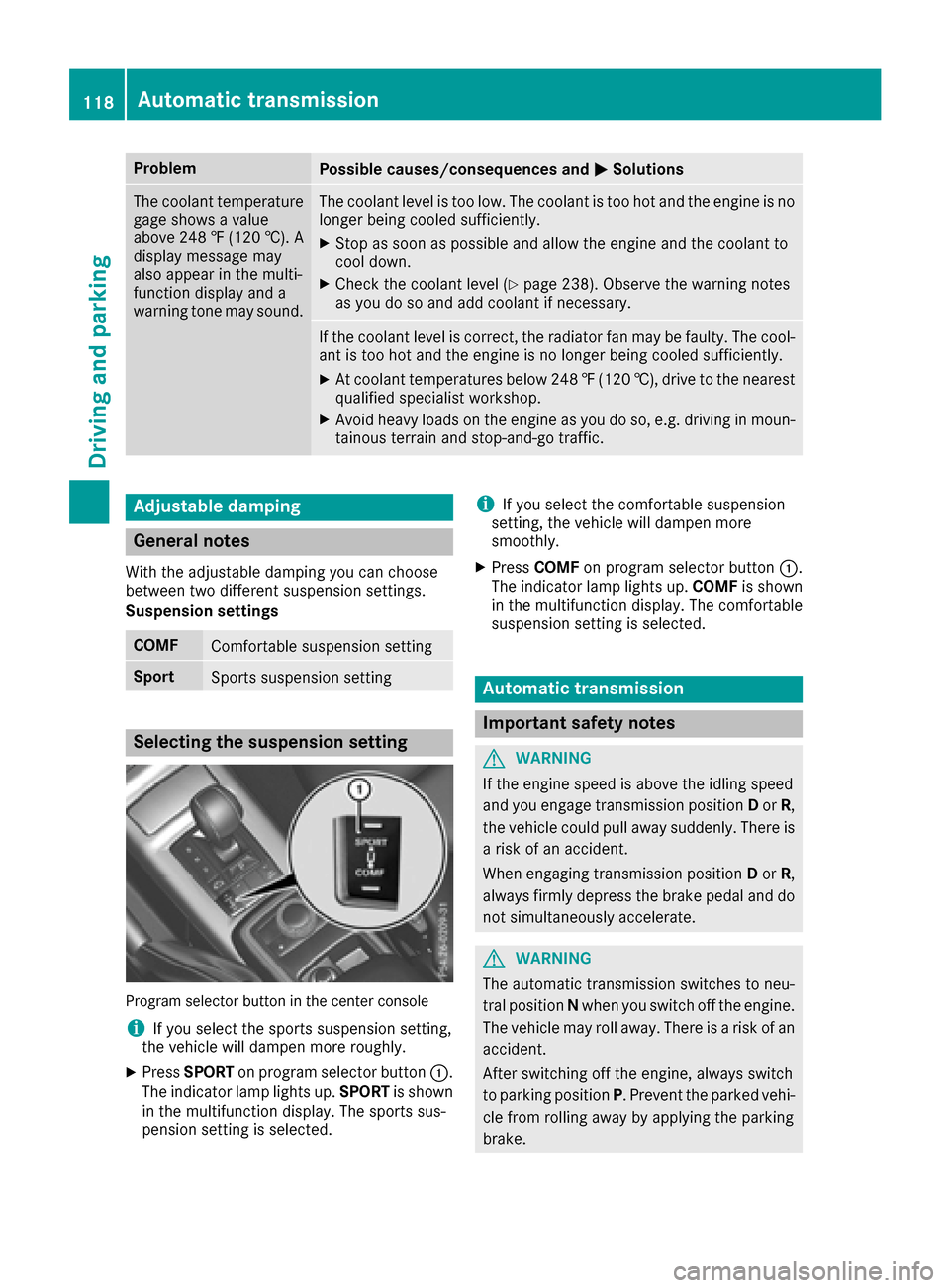
ProblemPossible causes/consequences andMSolutions
The coolant temperature
gage shows a value
above 248 ‡ (120 †). A
display message may
also appear in the multi-
function display and a
warning tone may sound.The coolant level is too low. The coolant is too hot and the engine is no
longer being cooled sufficiently.
XStop as soon as possible and allow the engine and the coolant to
cool down.
XCheck the coolant level (Ypage 238). Observe the warning notes
as you do so and add coolant if necessary.
If the coolant level is correct, the radiator fan may be faulty. The cool-
ant is too hot and the engine is no longer being cooled sufficiently.
XAt coolant temperatures below 248 ‡(120 †), drive to the nearest
qualified specialist workshop.
XAvoid heavy loads on the engine as you do so, e.g. driving in moun-
tainous terrain and stop-and-go traffic.
Adjustable damping
General notes
With the adjustable damping you can choose
between two different suspension settings.
Suspension settings
COMFComfortable suspension setting
SportSports suspension setting
Selecting the suspension setting
Program selector button in the center console
iIf you select the sports suspension setting,
the vehicle will dampen more roughly.
XPress SPORT on program selector button :.
The indicator lamp lights up. SPORTis shown
in the multifunction display. The sports sus-
pension setting is selected.
iIf you select the comfortable suspension
setting, the vehicle will dampen more
smoothly.
XPress COMF on program selector button :.
The indicator lamp lights up. COMFis shown
in the multifunction display. The comfortable
suspension setting is selected.
Automatic transmission
Important safety notes
GWARNING
If the engine speed is above the idling speed
and you engage transmission position Dor R,
the vehicle could pull away suddenly. There is
a risk of an accident.
When engaging transmission position Dor R,
always firmly depress the brake pedal and do not simultaneously accelerate.
GWARNING
The automatic transmission switches to neu-
tral position Nwhen you switch off the engine.
The vehicle may roll away. There is a risk of an
accident.
After switching off the engine, always switch
to parking position P. Prevent the parked vehi-
cle from rolling away by applying the parking
brake.
118Automatic transmission
Driving and parking
Page 136 of 302
Never use the brake pedal as a footrest. Never
depress the brake pedal and the accelerator
pedal at the same time.
!Depressing the brake pedal constantly
results in excessive and premature wear to
the brake pads.
If the brakes have been subjected to a heavy
load, do not stop the vehicle immediately, but
drive on for a short while. This allows the airflow
to cool the brakes more quickly.
Wet roads
If driving in heavy rain for a prolonged period of time without braking, there may be a delayed
reaction from the brakes when braking for the
first time. This may also occur after the vehicle
has been washed.
You have to depress the brake pedal more
firmly. Maintain a greater distance from the
vehicle in front.
After driving on a wet road or having the vehicle washed, brake firmly while paying attention to
the traffic conditions. This will warm up the
brake discs, thereby drying them more quickly
and protecting them against corrosion.
Limited braking performance on salt-
treated roads
If you drive on salted roads, a layer of salt resi-
due may form on the brake discs and brake
pads. This can result in a significantly longer
braking distance.
RBrake occasionally to remove any possible
salt residue. Make sure that you do not
endanger other road users when doing so.
RCarefully depress the brake pedal and the
beginning and end of a journey.
RMaintain a greater distance to the vehicle
ahead.
Servicing the brakes
!If the brake warning lamp lights up in the
instrument cluster and you hear a warning
tone even though the parking brake has been released, the brake fluid level may be too low.
Observe additional warning messages in the
multifunction display.
The brake fluid level may be too low due to
brake pad wear or leaking brake lines. Have the brake system checked immediately.
This work should be carried out at a qualified
specialist workshop.
!A function or performance test should only
be carried out on a 2-axle dynamometer. If
you are planning to have the vehicle tested on
such a dynamometer, contact an authorized
Mercedes-Benz Center to obtain further infor-
mation first. Otherwise, you could damage
the drive train or the brake system.
!As the ESP®system operates automatically,
the engine and the ignition must be switched
off (the SmartKey must be in position 0or 1in
the ignition lock) if the parking brake is tested
on a brake dynamometer (for a maximum of
ten seconds).
Braking applications triggered automatically
by ESP
®may otherwise seriously damage the
brake system.
Mercedes-Benz recommends that you only have
brake pads/linings installed on your vehicle
which have been approved for Mercedes-Benz
vehicles or which correspond to an equivalent
quality standard. Brake pads/linings which have
not been approved for Mercedes-Benz vehicles
or which are not of an equivalent quality could
affect your vehicle's operating safety.
Mercedes-Benz recommends that you only use
brake fluid that has been specially approved for
your vehicle by Mercedes-Benz, or which corre-
sponds to an equivalent quality standard. Brake
fluid which has not been approved for
Mercedes-Benz vehicles or which is not of an
equivalent quality could affect your vehicle's
operating safety.
All checks and maintenance work on the brake
system must be carried out at a qualified spe-
cialist workshop.
Have brake pads installed and brake fluid
replaced at a qualified specialist workshop.
If your brake system is subject only to moderate
loads, you should test the functionality of your
brakes at regul ar interva
ls by pressing firmly on
the brake pedal at high speeds. This improves
the grip of the brake pads.
You can find a description of Brake Assist (BAS)
on (
Ypage 56).
134Driving tips
Driving and parking
Page 140 of 302
The following driving systems are specially
adapted to off-road driving:
R4ETS (Ypage 57)
RTransfer case (Ypage 162)
RDifferential locks (Ypage 162)
Observe the following notes:
Rstop your vehicle and, if necessary, shift the
transfer case to LOW RANGE(Ypage 162)
before driving off-road.
Rin transfer case position LOW RANGEthe
ECO start/stop function is not available
(
Ypage 114).
Rengage the differential locks, if necessary
(Ypage 165).
iABS, 4ETS, ESP®and BAS are deactivated
while the differential locks are engaged. This
allows the front wheels to lock briefly, so that
these can dig into a loose surface. However,
please note that locked wheels skid and can
no longer steer.
RCheck that items of luggage and loads are
stowed safely and are well secured
(
Ypage 219).
RTo avoid damaging the vehicle, make sure
there is always sufficient ground clearance.
RAlways keep the engine running and in gear
when driving on a downhill gradient.
RAlways keep the engine running and in gear
when driving on a slope.
RDrive slowly and evenly, if necessary at a
walking pace.
REnsure that the wheels are in contact with the
ground at all times.
RDrive with extreme care on unfamiliar off-road routes where visibility is poor. For safety rea-
sons, get out of the vehicle first and survey
the off-road route.
RCheck the depth of water before fording rivers
and streams.
RWhen fording, do not stop and do not switch
off the engine.
RLook out for obstacles, such as rocks, holes,
tree stumps and furrows.
RAlways keep the doors, rear door, side win-
dows and the sliding sunroof closed while the
vehicle is in motion.
RSwitch off cruise control.
RDo not stray from marked routes or paths.
RAdapt your speed to the terrain. The rougher,
steeper or more ruts on the terrain, the slower
your speed should be.
RDrive slowly and at an even speed through the
water. Ensure that a bow wave does not form
as you drive.
ROn sand, drive quickly to overcome the rolling resistance. Otherwise the vehicle's wheels
could become st
uck in loose ground.
RDo not jump with the vehicle as this will inter-
rupt the vehicle's propulsion.
RAvoid high engine speeds. Drive at appropri-
ate engine speeds (maximum 3,000 rpm).
RDo not shift the automatic transmission to
transmission position N.
RAlways check the vehicle for damage after off-
road driving.
iInformation about retrofitting special all-ter-
rain tires is available from any qualified spe-
cialist workshop.
iDo not use the HOLD function when driving
off-road, on steep uphill or downhill gradients
or on slippery or loose surfaces. The HOLD
function cannot hold the vehicle on such sur-
faces.
Checklist before driving off-road
!If the engine oil warning lamp lights up while
the vehicle is in motion, stop the vehicle in a
safe place as soon as possible. Check the
engine oil level. The engine oil warning lamp
warning must not be ignored. Continuing the
journey while the symbol is displayed could
lead to engine damage.
XOil level: check the engine oil level and add oil
if necessary.
Only then does the engine receive enough oil when the vehicle is on a steep incline.
XTire-changing tool kit: check that the jack is
working and make sure you have the lug
wrench, a robust tow cable and a folding
spade in the vehicle.
XWheels and tires: check the tire tread depth
and tire pressure.
XCheck for damage and remove any foreign
objects, e.g. small stones, from the wheels/
tires.
XReplace any missing valve caps.
138Driving tips
Driving and parking
Page 141 of 302
XReplacedente dor damaged wheels.
XCarr y asoun dspar ewheel.
Checklist after driving off-road
Drivin gove rroug hterrain places greate r
demand son your vehicl ethan driving on normal
roads. Afte rdriving off-road, chec kth evehicle.
This allows you to detec tdamag epromptly and
reduce th eris kof an acciden tto yourself and
other road users.
XShift th etransfer cas eto HIG H
RANGE (Ypage 162).
XDisengage th edifferential locks
(Ypage 166).
XClean th eheadlamps and rear lights and
chec kfor damage.
XClean th efron tand rear license plates.
XClean th ewheels and tires wit h awater je t
and remove any foreign objects .
XClean thewheels, tires ,whee lhousing sand
th evehicl eunderside wit h awater jet; chec k
for any foreign objects and damage.
XChec kwhether twigs or other part sof plants
hav ebecome trapped .These increas eth eris k
of fir eand can damag efuel pipes ,brak e
hoses or th erubber bellows of th eaxl ejoint s
and propelle rshafts .
XAfterth etrip, examin ewithout fail th eentire
undercarriage, wheels, tires ,brakes, body-
wor kstructure, steering ,chassi sand exhaust
system for damage.
XAfte rdriving for extended periods across
sand, mud, gravel, water or in similarl ydirt y
conditions, hav eth ebrak ediscs, wheels,
brak epads/lining sand axl ejoint schecke d
and clea
ned.
XIf you notice stron
gvibration safter off-road
driving ,chec kfor foreign objects in th e
wheels and driv etrain and ,if necessary,
remove them.
Foreign objects can disturb th ebalance and
caus evibrations.
XTes tth ebrakes.
Driving on sand
Observ eth efollowin grule swhen driving on
sand:
RShift th etransfer cas eto LOW
RANGE (Ypage 162).
RAvoid high engin espeeds.
RLimit th eshif trange of th eautomatic trans -
mission according to th eoff-road conditions.
RDrive quickly to overcome th erollin gresist -
ance. Otherwise th evehicle's wheels could
become stuck in loos eground .
RDrive in th etrack sof other vehicles if possi-
ble. When doin gso, mak esur ethat:
-th etire rut sare no tto odeep .
-thesan dis sufficientl yfirm.
-your vehicl ehas sufficien tground clear-
anc e
Tire ruts and gravel roads
!Chec kthat th erut sare no tto odeep and
that your vehicl ehas sufficien tclearance .
Otherwise, your vehicl ecould be damaged or
botto mout and get stuck .
Observ eth efollowin grule swhen driving alon g
rut sin off-road terrain or on road swit hloos e
gravel:
RShift th etransfer cas eto LOW
RANGE (Ypage 162).
RAvoid high engin espeeds.
RObserv eth esafet ynote s (Ypage 137) and
th egeneral note s (Ypage 137) on off-road
driving .
RRestric tth eshif trange of th eautomatic
transmission to 1(Ypage 123).
RDrive slowly.
RWhererut sare to odeep ,driv ewit hth e
wheels of on eside on th ecenter grassy area,
if possible.
Driving over obstacles
!Obstacles could damag eth efloor of th e
vehicl eor component sof th echassis. As k
passenger sfor guidance when driving ove r
larg eobstacles. The passenger should always
keep asaf edistanc efrom th evehicl ewhen
doin gso in order to avoi dinjury as aresult of
unexpecte dvehicl emovements. Afte rdriving
off-road or ove robstacles, chec kth evehicl e
Driving tips139
Driving and parking
Z
Page 146 of 302
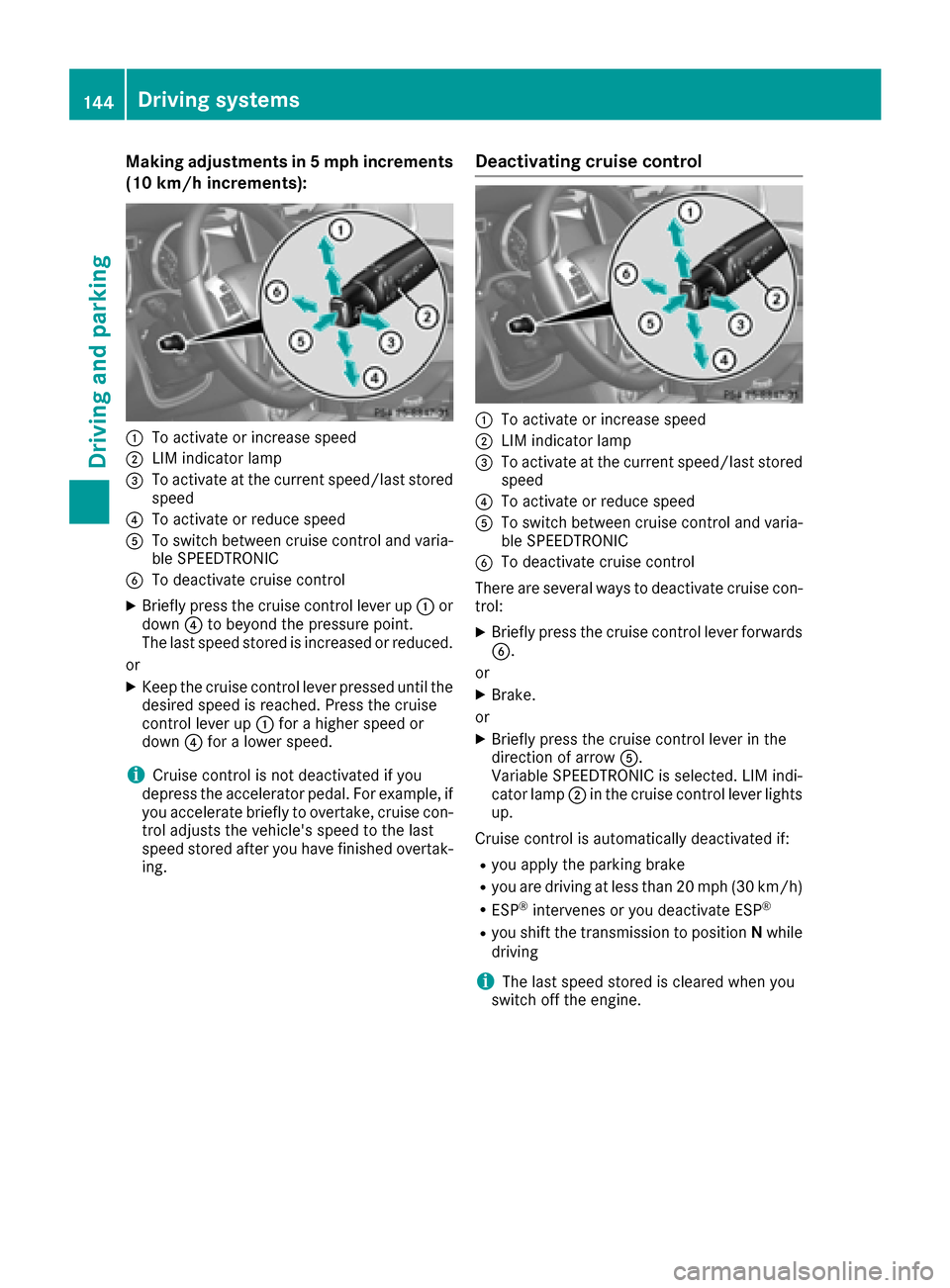
Making adjustments in 5 mph increments
(10 km/h increments):
:To activate or increase speed
;LIM indicator lamp
=To activate at the current speed/last storedspeed
?To activate or reduce speed
ATo switch between cruise control and varia-
ble SPEEDTRONIC
BTo deactivate cruise control
XBriefly press the cruise control lever up :or
down ?to beyond the pressure point.
The last speed stored is increased or reduced.
or
XKeep the cruise control lever pressed until the
desired speed is reached. Press the cruise
control lever up :for a higher speed or
down ?for a lower speed.
iCruise control is not deactivated if you
depress the accelerator pedal. For example, if
you accelerate briefly to overtake, cruise con-
trol adjusts the vehicle's speed to the last
speed stored after you have finished overtak-
ing.
Deactivating cruise control
:To activate or increase speed
;LIM indicator lamp
=To activate at the current speed/last stored speed
?To activate or reduce speed
ATo switch between cruise control and varia-
ble SPEEDTRONIC
BTo deactivate cruise control
There are several ways to deactivate cruise con- trol:
XBriefly press the cruise control lever forwardsB.
or
XBrake.
or
XBriefly press the cruise control lever in the
direction of arrow A.
Variable SPEEDTRONIC is selected. LIM indi-
cator lamp ;in the cruise control lever lights
up.
Cruise control is automatically deactivated if:
Ryou apply the parking brake
Ryou are driving at less than 20 mph (30 km/h)
RESP®intervenes or you deactivate ESP®
Ryou shift the transmission to position Nwhile
driving
iThe last speed stored is cleared when you
switch off the engine.
144Driving systems
Driving and parking
Page 148 of 302
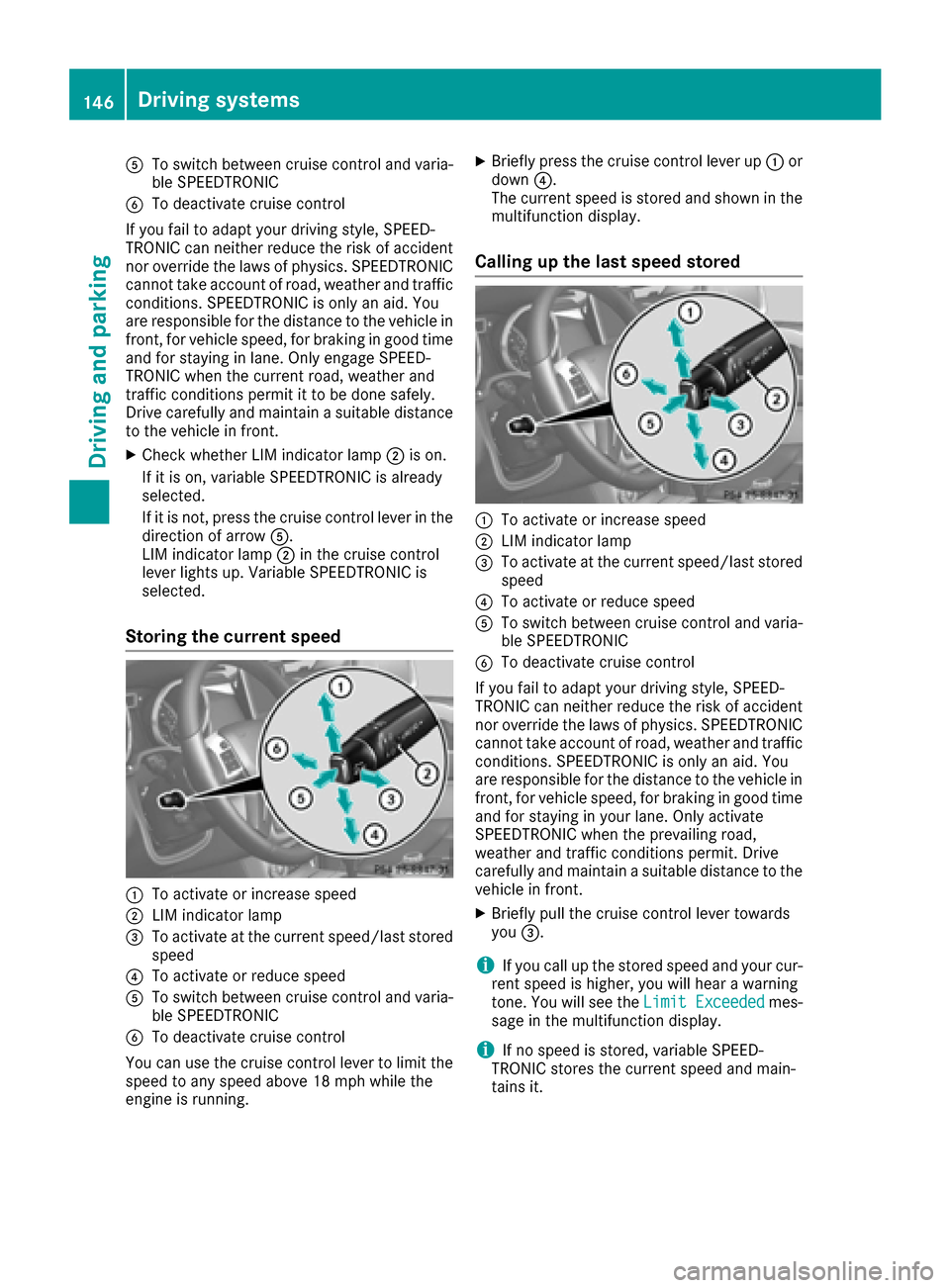
ATo switch between cruise control and varia-
ble SPEEDTRONIC
BTo deactivate cruise control
If you fail to adapt your driving style, SPEED-
TRONIC can neither reduce the risk of accident
nor override the laws of physics. SPEEDTRONIC
cannot take account of road, weather and traffic
conditions. SPEEDTRONIC is only an aid. You
are responsible for the distance to the vehicle in
front, for vehicle speed, for braking in good time
and for staying in lane. Only engage SPEED-
TRONIC when the current road, weather and
traffic conditions permit it to be done safely.
Drive carefully and maintain a suitable distance to the vehicle in front.
XCheck whether LIM indicator lamp ;is on.
If it is on, variable SPEEDTRONIC is already
selected.
If it is not, press the cruise control lever in the
direction of arrow A.
LIM indicator lamp ;in the cruise control
lever lights up. Variable SPEEDTRONIC is
selected.
Storing the current speed
:To activate or increase speed
;LIM indicator lamp
=To activate at the current speed/last stored speed
?To activate or reduce speed
ATo switch between cruise control and varia-
ble SPEEDTRONIC
BTo deactivate cruise control
You can use the cruise control lever to limit the speed to any speed above 18 mph while the
engine is running.
XBriefly press the cruise control lever up :or
down ?.
The current speed is stored and shown in the
multifunction display.
Calling up the last speed stored
:To activate or increase speed
;LIM indicator lamp
=To activate at the current speed/last stored speed
?To activate or reduce speed
ATo switch between cruise control and varia-
ble SPEEDTRONIC
BTo deactivate cruise control
If you fail to adapt your driving style, SPEED-
TRONIC can neither reduce the risk of accident
nor override the laws of physics. SPEEDTRONIC
cannot take account of road, weather and traffic
conditions. SPEEDTRONIC is only an aid. You
are responsible for the distance to the vehicle in
front, for vehicle speed, for braking in good time
and for staying in your lane. Only activate
SPEEDTRONIC when the prevailing road,
weather and traffic conditions permit. Drive
carefully and maintain a suitable distance to the
vehicle in front.
XBriefly pull the cruise control lever towards
you =.
iIf you call up the stored speed and your cur-
rent speed is higher, you will hear a warning
tone. You will see the Limit Exceeded
mes-
sage in the multifunction display.
iIf no speed is stored, variable SPEED-
TRONIC stores the current speed and main-
tains it.
146Driving systems
Driving and parking