phone MERCEDES-BENZ G-Class 2017 W463 Comand Manual
[x] Cancel search | Manufacturer: MERCEDES-BENZ, Model Year: 2017, Model line: G-Class, Model: MERCEDES-BENZ G-Class 2017 W463Pages: 198, PDF Size: 4.53 MB
Page 93 of 198
Your multimediasyste mequipment
These operatin ginstruction sdescribe all th e
standar dan doptional equipment of your multi-
media system, as available at th etime of going
to press. Country-specifi cdifference sare pos -
sible. Bear in min dthat your vehicle may no t
feature all function sdescribed here. Thi salso
applies to safety-relevan tsystems an dfunc-
tions.
Read th einformation on qualifie dspecialis t
workshop sin th evehicle Operator's Manual.
Important safet ynotes
GWARNING
If you operat emobile communication equip-
men twhil edriving, you will be distracted from
traffic conditions. You could also los econtro l
of th evehicle. There is aris kof an accident.
Only operat ethis equipment when th evehicle
is stationary.
If you mak e acallon your mobile phone whil e
driving, always use hands-free mode. Only use
th emobile phone when road, weather an dtraffic
condition spermit .Some jurisdiction sprohibit
th edriver from usin g amobile phone whil edriv-
in g a vehicle.
Bear in min dthat at aspeed of 30 mph (approx-
imately 50 km/h), th evehicle cover s adistanc e
of 44 ft (approximately 14 m) per second.
Excessive levels of electromagnetic radiation
may cause damage to your health an dth ehealth
of others.
There is scientific discussio nsurroundin gth e
possible health risks posed by electromagnetic
fields .You can reduce this ris kby usin gan exte -
rio rantenna.
Therefore, connec tyour mobile communica-
tion sequipment to th evehicle' sexterio r
antenn awhereve rpossible.
General notes
Telephon y
The Bluetoot h®interface on th emultimedia sys -
te m is available fo rtelephony. If your mobile phone supports th
eBluetoot h
®
profilePBAP (Phone Book Access Profile),th e
contact sare automatically displaye din th emul-
timedia system.
You can use th etext messag ean de-mail func-
tion sif your mobile phone supports th eMA P
Bluetoot h
®profile (Message Access Profile) .
Observ eth eother requirements fo rth ee-mail
an dtext messag efunction s (
Ypage 113).
Wit h a suitable mobile phone ,you can use th e
hands-free syste mandreceiv evCards via th e
Bluetoot h
®interface .
You can obtain more information about suitable
mobile phone son th eInternet at
http://www.mercedes-benz.com/connect .
You can also obtain more information by calling.
In th eUSA, you can get in touch wit hth e
Mercedes-Ben zCustomer Assistanc eCente ron
1-800-FOR-MERCede s(1-800-367-6372 ).
In Canada, you can get in touch with the Cus-
tomer Relations Center on 1-800-387-0100.
Call disconnection while the vehicle is in motion
A call may be disconnected if:
Rthere is insufficient network coverage in cer-
tain areas.
Ryou move from one transmitter/receiver area
(cell) into another and no channels are free.
Ryou use a SIM card which is not compatible
with the network available.
Operating options
You can operate the telephone by:
Rusing the controller:
turning
sliding 1 or4
pressing
Rusing the 6or~ button on the multi-
function steering wheel
Rusing the Voice Control System (see the sep-
arate operating instructions)
General notes91
Telephone
Z
Page 94 of 198
Function restrictions
You may have to wait to use telephonyvia th e
multimedia system in th efollowin gsituations:
Rth emobile phon eis switched off
RBluetoot h®is switched off on th emobile
phon e
Rthemobile phon ehas no tlogged on to a
mobile phon enetwork
Rif th eBluetoot h®function is switched off in
th emultimedia system
The telephon eautomatically tries to log on to a
network .If no network is available, you may no t
be able to mak e a "911"emergenc ycall .If you
attemp tto mak ean outgoin gcall ,th eNo Ser ‐
vicemessage will appear for ashort while .
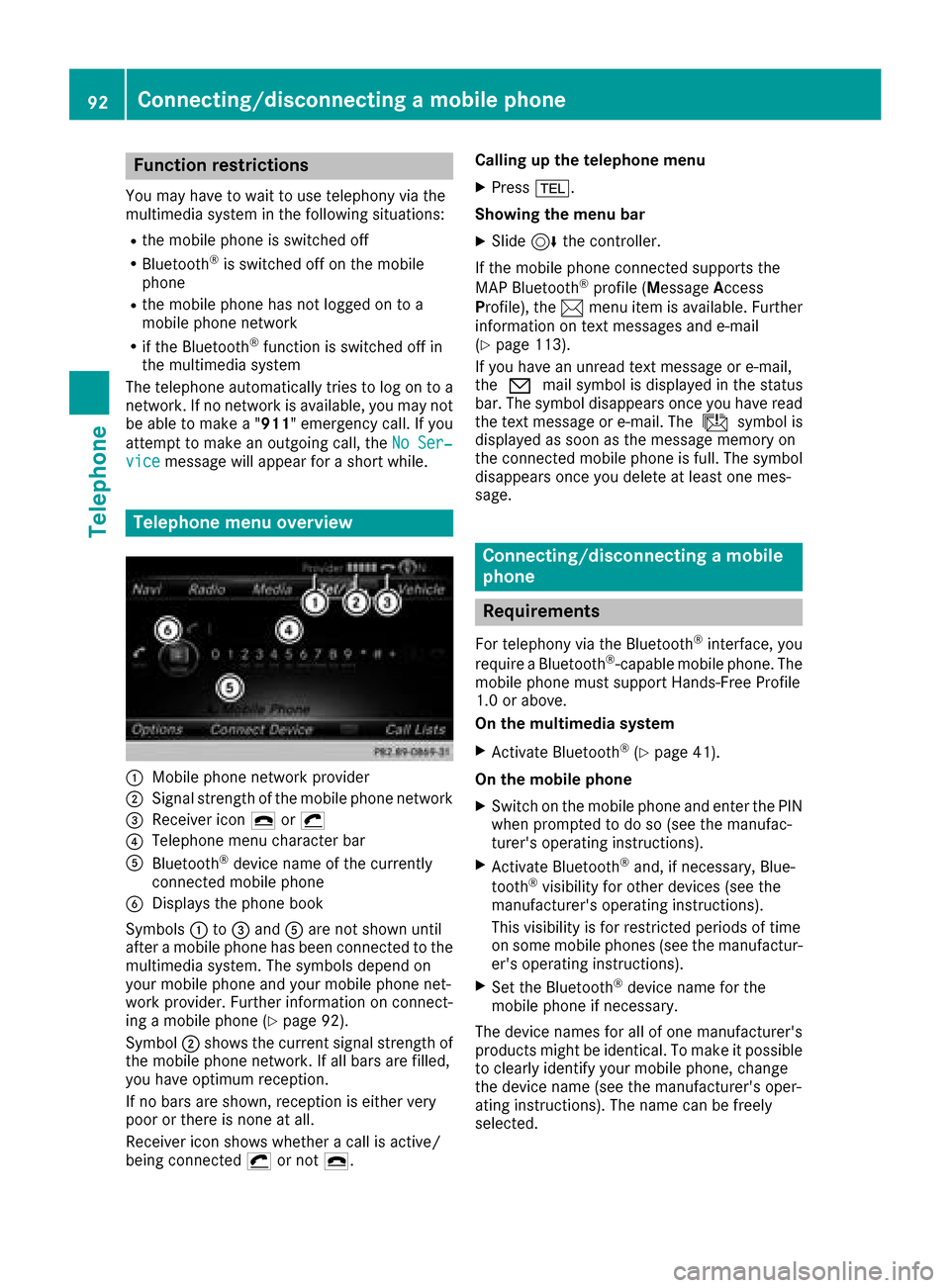
Telephone menu overview
:Mobile phon enetwork provide r
;Signal strengthof th emobile phon enetwork
=Receiver ico n¢ or¡
?Telephon emen ucharacte rbar
ABluetoot h®device nam eof th ecurrentl y
connected mobile phon e
BDisplays thephon ebook
Symbols :to= and Aare no tshown until
after amobile phon ehas been connected to th e
multimedia system. The symbols depend on
your mobile phon eand your mobile phon enet-
work provider. Further information on connect -
ing amobile phon e (
Ypage 92).
Symbol ;shows th ecurren tsignal strengt hof
th emobile phon enetwork .If all bars are filled,
you have optimum reception .
If no bars are shown, reception is either ver y
poor or there is none at all.
Receiver ico nshows whether acall is active/
bein gconnected ¡or no t¢. Calling up th
etelephone men u
XPress%.
Showing th emen ubar
XSlide 6thecontroller.
If th emobile phon econnected support sth e
MA PBluetoot h
®profile(M essage Access
Profile), th e1 men uitem is available. Further
information on text message sand e-mail
(
Ypage 113).
If you have an unread text message or e-mail,
th e0 mail symbol is displayed in th estatus
bar. The symbol disappear sonce you have read
th etext message or e-mail. The úsymbol i
s
displayed as soo nas th emessage memory on
th econnected mobile phon eis full. The symbol
disappear sonce you delet eat least on emes -
sage .
Connecting/disconnecting a mobile
phone
Requirements
Fortelephon yvia th eBluetoot h®interface ,you
require aBluetoot h®-capable mobile phone. The
mobile phon emust support Hands-Free Profile
1. 0or above.
On th emultimedia system
XActivat eBluetoot h®(Ypage 41).
On th emobile phone
XSwitc hon th emobile phon eand ente rth ePIN
when prompted to do so (see th emanufac -
turer' soperating instructions).
XActivat eBluetoot h®and,if necessary, Blue -
toot h®visibilit yfor other device s(see th e
manufacturer' soperating instructions).
This visibilit yis for restricted periods of time
on som emobile phones (see th emanufactur -
er' soperating instructions).
XSe tth eBluetoot h®device nam efor th e
mobile phon eif necessary.
The device names for all of on emanufacturer' s
product smight be identical. To mak eit possible
to clearly identify your mobile phone, chang e
th edevice nam e(see th emanufacturer' soper -
ating instructions). The nam ecan be freely
selected.
92Connecting/disconnecting a mobile phone
Telephone
Page 95 of 198
If the mobile phone supports the PBAP (Phone
BookAccess Profile) and MAP (Message
A ccess Profile) Bluetooth
®profiles, the follow-
ing information will be transmitted after you
connect:
RPhone book
RCall lists
RText messages and e-mail
Further information on allowing or suppressing
the automatic download of the phone book
(
Ypage 108).
The battery of the mobile phone should always
be kept sufficiently charged in order to prevent
malfunctions.
iNot all mobile phones available on the mar-
ket are equally suitable. You can obtain fur-
ther information about suitable mobile
phones and about the connection between
the mobile phone and the multimedia system
on the Internet at http://www.mercedes-
benz.com/connect .
You can also obtain more information by call-
ing.
In the USA, you can get in touch with the
Mercedes-Benz Customer Assistance Center
on 1-800-FOR-MERCedes (1-800-367-6372).
In Canada, you can get in touch with the Cus-
tomer Relations Center on 1-800-387-0100.
iSome displays (e.g. the signal strength)
depend on the supported version of the
Hands-Free Profile.
Procedure and general information
Authorizing a mobile phone (connect-
ing)
Before using your mobile phone with the multi-
media system for the first time, you will need to search for the phone (
Ypage 93) and then
authorize it (Ypage 94). Depending on the
mobile phone, authorization either takes place
by means of Secure Simple Pairing or by enter-
ing a passkey. The multimedia system automat-
ically makes the procedure that is relevant for
your mobile phone available. You can recognize
Secure Simple Pairing by the fact that a code is
displayed on the mobile phone and on the mul-
timedia system. You can recognize the passkey system by the fact that you have to enter a code
on the mobile phone and on the multimedia sys- tem. The mobile phone is connected automati-
cally after authorization. Further information
about automatically reconnecting authorized
mobile phones (
Ypage 95).
If the multimedia system does not detect your
mobile phone, this may be due to particular
security settings on your mobile phone. You can
also start the search procedure and authoriza-
tion on the mobile phone (
Ypage 95).
Device-specific information on authorizing and
connecting Bluetooth
®-capable mobile phones
can be obtained from an authorized Mercedes-
Benz Center or via the Internet at http://
www.mercedes-benz.com/connect .
You can authorize up to 15 mobile phones. After authorization, the connection of the last two tel-
ephones used always functions automatically.
For telephony, only one mobile phone can be
connected to the multimedia system at any one
time.
De-authorizing (disconnecting) a mobile
phone
The connection is terminated automatically if
you leave the receiver range of the multimedia
system or deactivate Bluetooth
®on your mobile
phone.
If you no longer want the Bluetooth
®connection
to be established automatically, the mobile
phone must be de-authorized (disconnected)
(
Ypage 96).
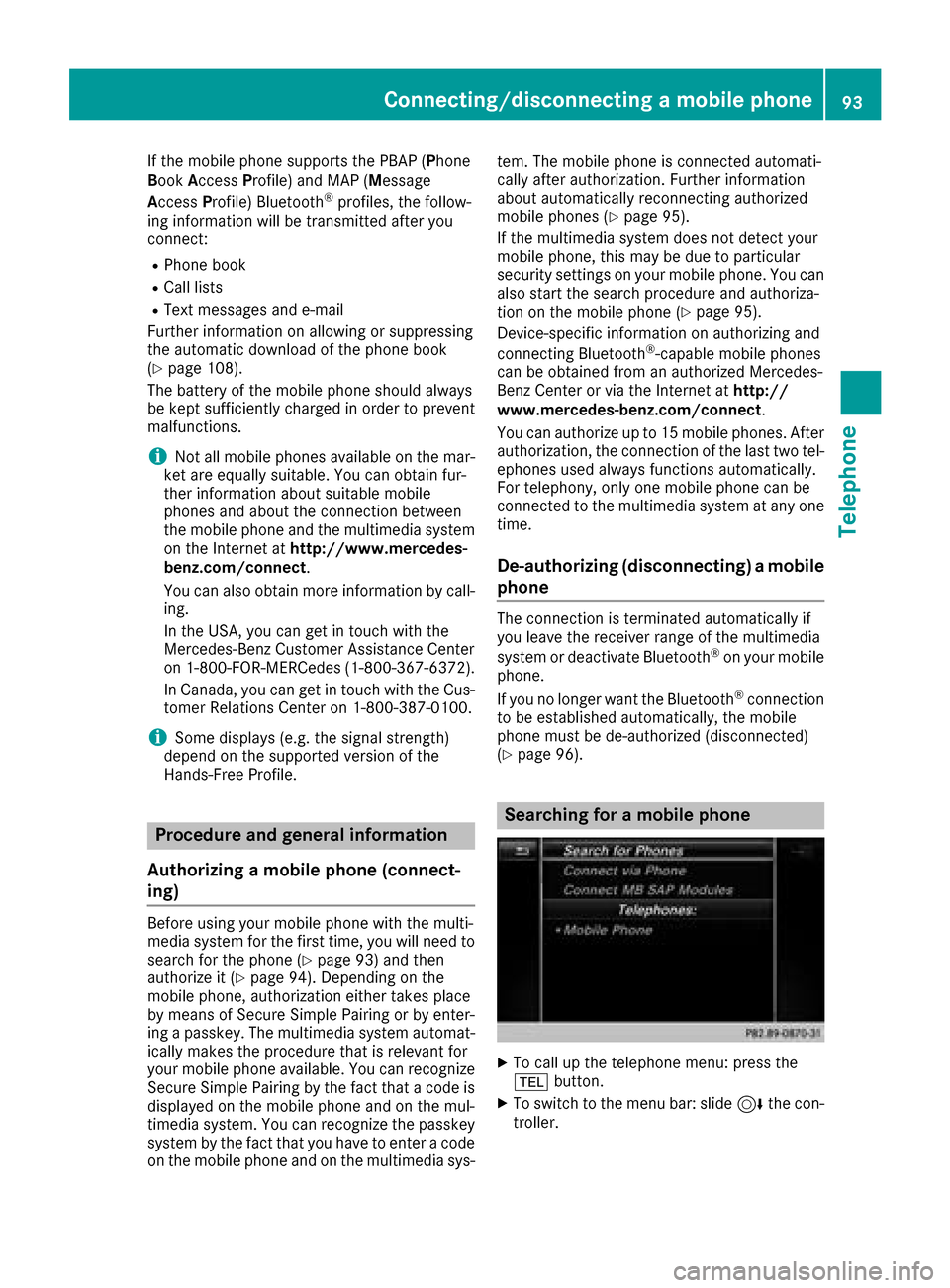
Searching for a mobile phone
XTo call up the telephone menu: press the
% button.
XTo switch to the menu bar: slide 6the con-
troller.
Connecting/disconnecting a mobile phone93
Telephone
Z
Page 96 of 198
XTo selectConn. Device: turn and press the
controller.
The device list is displayed.
XTo select Search for Phones: turn and
press the controller.
A message is displayed that Bluetooth
®must
be activated on the mobile phone and must be
made visible to other devices.
XTo select StartSearch: press the controller.
The available mobile phones are displayed in
the device list.
The duration of the search depends on the num- ber of Bluetooth
®telephones within range and
their characteristics.
If a new phone is found, it appears in the device list with the Ïsymbol. You can now author-
ize (connect) the mobile phone found
(
Ypage 94).
If the maximum number of authorized devices in
the device list is reached, you will be requested
to de-authorize a mobile phone (
Ypage 96).
When you call up the device list again, de-
authorized devices will be removed from the list.
To update the device list, start the search again.
Symbols in the device list
Sym-
bolExplanation
ÏNew mobile phone found, not yet
authorized.
ÑMobile phone is authorized, but is
not connected.
#Mobile phone is authorized and
connected.
Authorizing a mobile phone (connect-
ing)
Authorization via Secure Simple Pairing
If the multimedia system has found your mobile
phone, you can authorize (connect) it.
XTo select a mobile phone from the device list: turn the controller and press to confirm.
A code is displayed in the multimedia system
and on the mobile phone. The code is the same
XMultimedia system:
selectYes.
XMobile phone: confirm the code. Depending
on the mobile phone used, you may have to
confirm the connection to the multimedia sys-
tem and for the PBAP and MAP Bluetooth
®
profiles separately. You may also save the
confirmation on the mobile phone (see the
manufacturer's operating instructions).
The mobile phone is now authorized and con-
nected to the multimedia system. You can
now speak using the hands-free system.
To ensure an optimum language quality, you can
set the mobile phone's transmission and recep-
tion volume (
Ypage 96).
The code is different
XMultimedia system: selectNo.
The process is canceled. Repeat the authori-
zation.
Authorization via passkey entry (access
code)
If the multimedia system has found your mobile
phone, you can authorize (connect) it.
XTo select a mobile phone from the device list: turn the controller and press to confirm.
The input menu for the passkey is displayed.
The passkey is a one- to sixteen-digit number
combination which you can choose yourself.
Depending on the mobile phone used, you
may have to enter a number sequence of four
digits or more.
XMultimedia system: enter the passkey using
the character bar.
XSelect ¬once all the numbers have been
entered.
XMobile phone: enter the same passkey and
confirm your entry. Depending on the mobile
phone used, you may have to confirm the
connection to the multimedia system and for
the PBAP and MAP Bluetooth
®profiles sepa-
rately. You may also save the confirmation on
the mobile phone (see the manufacturer's
operating instructions).
The mobile phone is now authorized and con-
nected to the multimedia system. You can
now speak using the hands-free system.
To ensure an optimum language quality, you can
set the mobile phone's transmission and recep-
tion volume (
Ypage 96).
94Connecting/disconnecting a mobile phone
Telephone
Page 97 of 198
If theAuthorization Failedmessage
appears, you may have entered a different pass-
key or exceeded the prescribed time limit.
Repeat the procedure.
iIf you wish to re-authorize the mobile phone
after de-authorizing it, you can choose
another passkey for it.
iMercedes-Benz recommends de-authoriza-
tion in the multimedia system as well as on
the mobile phone (
Ypage 96). Subsequent
authorization may otherwise fail.
Establishing the connection from the
mobile phone
The Bluetooth®device name of the multimedia
system is MB Bluetooth.
XMultimedia system: call up the telephone
menu.
XTo switch to the menu bar: slide 6the con-
troller.
XTo select Conn. Device: turn and press the
controller.
The device list is displayed.
XTo select Connect via Phone: turn and
press the controller.
A message is displayed, stating that you can
start the search on your mobile phone.
XMobile phone: start the search for a Blue-
tooth®device (see manufacturer's operating
instructions).
The multimedia system is displayed with the
name MB Bluetooth
in the mobile phone's
device list.
XSelect MB Bluetooth.
A prompt appears in the multimedia system's
display asking if the mobile phone should be
authorized.
XMultimedia system:select Yes.
If No
is selected, the procedure is canceled.
If your mobile phone supports Secure Simple
Pairing, a code is now displayed on both devi-
ces.
The code is the same
XMultimedia system:select Yes.
XMobile phone:confirm the code. Depending
on the mobile phone used, you may have to
confirm the connection to the multimedia sys-
tem and for the PBAP and MAP Bluetooth
®
profiles separately. You may also save the
confirmation on the mobile phone (see the
manufacturer's operating instructions).
The mobile phone is now authorized and con-
nected to the multimedia system. You can
now speak using the hands-free system.
To ensure an optimum language quality, you
can set the mobile phone's transmission and
reception volume (
Ypage 96).
The code is different
XMultimedia system:select No.
The process is canceled. Repeat the proce-
dure.
If your mobile phone does not support Secure
Simple Pairing, an input menu is displayed for
the passkey. The passkey is a one- to sixteen-
digit number combination which you can choose
yourself. Enter the same passkey in both the
multimedia system and on the mobile phone and
confirm. Depending on the mobile phone used,
you may have to confirm the connection to the
multimedia system and for the PBAP and MAP
Bluetooth
®profiles.
Reconnecting automatically
The multimedia system always searches for the
last connected mobile phone.
If no connection can be made to the most
recently connected mobile phone, the system
searches for the mobile phone that was con-
nected before that one.
Switching between mobile phones
If you have authorized more than one mobile
phone, you can switch between the individual
phones.
XTo call up the telephone menu: press the
% button.
XTo switch to the menu bar: slide 6the con-
troller.
XTo select Conn. Device: turn and press the
controller.
The device list is displayed.
XTo select the desired mobile phone: turn and press the controller.
The selected mobile phone is connected if it is
within Bluetooth
®range and if Bluetooth®is
activated.
Connecting/disconnecting a mobile phone95
Telephone
Z
Page 98 of 198
Only one mobile phone can be connected at any
one time for telephony. The currently connected
mobile phone is indicated by the#dot in the
device list.
iYou can only switch to another authorized
mobile phone if you are not currently making
a call.
De-authorizing (disconnecting) a
mobile phone
Mercedes-Benz USA, LLC recommends de-
authorization in the multimedia system as well
as on the mobile phone. Subsequent authoriza-
tion may otherwise fail.
XTo call up the telephone menu: press the
% button.
XTo switch to the menu bar: slide 6the con-
troller.
XTo select Conn. Device: turn and press the
controller.
The device list is displayed.
XTo highlight the desired mobile phone in the
device list: turn the controller.
XTo select G: slide 9the controller.
XTo select Deauthorize: turn and press the
controller.
A prompt appears, asking whether you really
wish to de-authorize this device.
XTo select Yes: turn and press the controller.
The mobile phone is de-authorized.
Displaying connection details
XTo call up the telephone menu: press the
% button.
XTo switch to the menu bar: slide 6the con-
troller.
XTo select Conn. Device: turn and press the
controller.
The device list is displayed.
XTo highlight the desired mobile phone: turn
the controller.
XTo select G: slide 9the controller.
XTo select Details: turn and press the con-
troller.
The following information concerning the
selected mobile phone is shown:
RBluetooth®device name
RBluetooth®address
RAuthorization status
Setting the reception and transmis-
sion volume
Once the mobile phone has been authorized,
you can optimize the transmission and recep-
tion volume settings. To find out about the best
possible settings for your mobile phone, visit
http://www.mercedes-benz.com/connect .
You can also obtain more information by calling.
In the USA, you can get in touch with the
Mercedes-Benz Customer Assistance Center on
1-800-FOR-MERCedes (1-800-367-6372).
In Canada, you can get in touch with the Cus-
tomer Relations Center on 1-800-387-0100.
XTo call up the telephone menu: press the
% button.
XTo switch to the menu bar: slide 6the con-
troller.
XTo select Conn. Device: turn and press the
controller.
The device list appears.
XTo highlight the desired mobile phone in the
device list: turn the controller.
XTo select G: slide 9the controller.
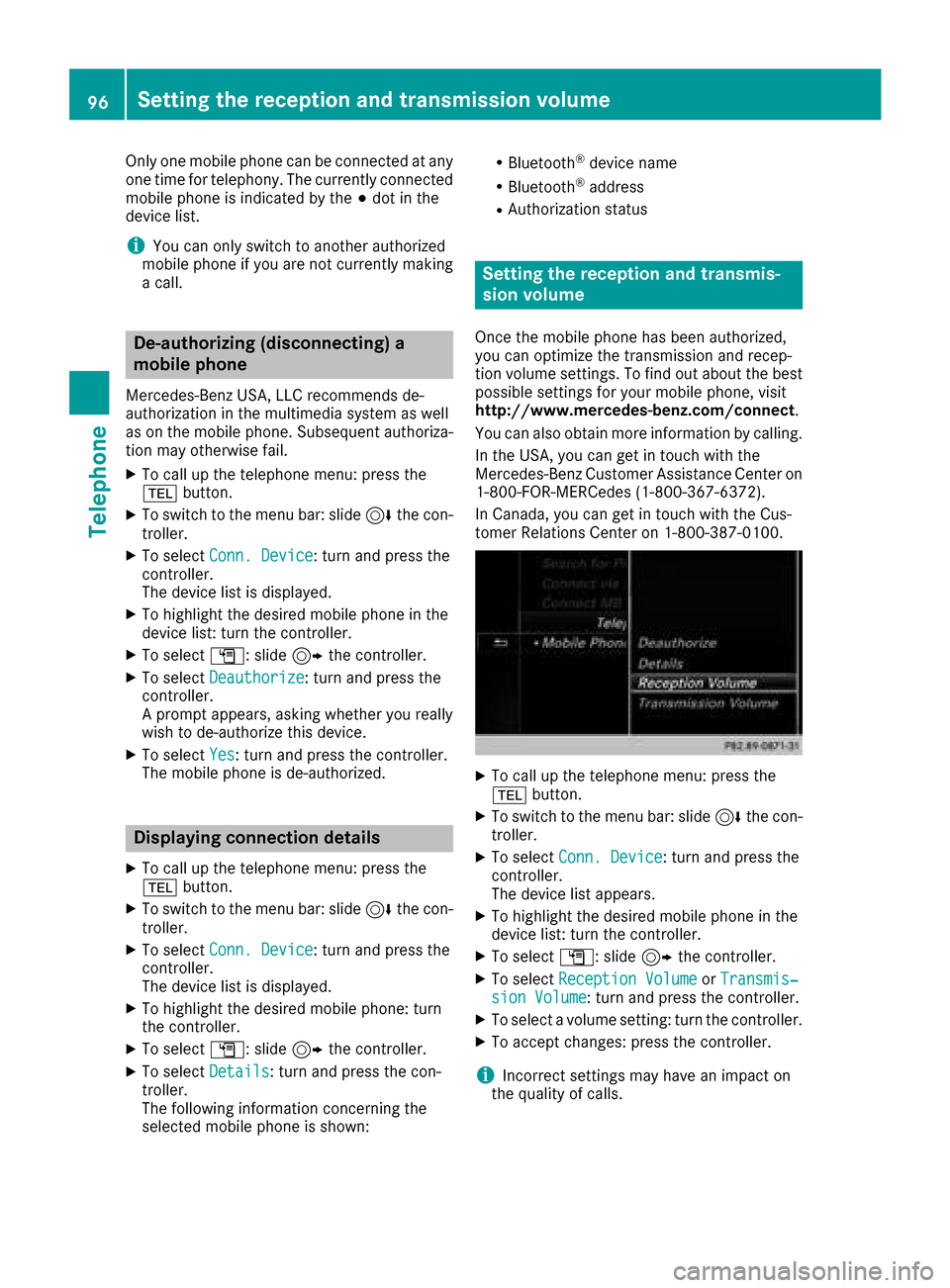
XTo select Reception VolumeorTransmis‐sion Volume: turn and press the controller.
XTo select a volume setting: turn the controller.
XTo accept changes: press the controller.
iIncorrect settings may have an impact on
the quality of calls.
96Setting the reception and transmission volume
Telephone
Page 99 of 198
Using the telephone
Accepting a call
XTo selectwAccept: press the controller.
or
XPress 6on the multifunction steering
wheel.
The call is accepted.
Additional functions available during a call
(
Ypage 98).
Adjusting the call volume (
Ypage 96).
Further information about ending a call
(
Ypage 100).
iIf the phone number of the caller is trans-
ferred, it appears in the display. If the phone
number is saved in the phone book, the con-
tact's name and picture are also displayed. If
the phone number is not transferred,
Unknown
is shown in the display.
Rejecting a call
XTo select =Reject: turn and press the
controller.
or
XPress ~on the multifunction steering
wheel.
Making a call
Using the telephone menu
XTo call up the telephone menu: press the
% button.
XTo select the sequence of numbers: turn and
press the controller for each number.
XTo select win the telephone menu: turn
and press the controller.
The call is made.
Further information about ending a call
(
Ypage 100).
Using the number keypad
XTo call up the telephone menu: press the
% button.
XEnter the number sequence using the number
keypad.
XTo select win the telephone menu: turn
and press the controller.
The call is made.
Redial
XTo call up the telephone menu: press the
% button.
XTo select win the telephone menu: turn
and press the controller.
The list of outgoing calls is displayed. The
most recently dialed number is at the top.
XTo select an entry and make a call: turn and
press the controller.
For redialing using the multifunction steering
wheel (see the vehicle Operator's Manual).
Further information about ending a call
(
Ypage 100).
Using call lists
XTo call up the telephone menu: press the
% button.
XTo switch to the menu bar: slide 6the con-
troller.
XTo select Call Lists: turn and press the
controller.
XTo select CallsReceivedorCallsDialed:
turn and press the controller.
The relevant list is displayed.
XTo select an entry and make a call: turn and
press the controller.
Selecting and placing a call using the multifunc- tion steering wheel (see vehicle Operator's Man-
ual)
Further information about ending a call
(
Ypage 100).
Using the phone book
XTo call up the telephone menu: press the
% button.
XTo select Namein the telephone menu: turn
and press the controller.
XSearch for and call a contact (Ypage 101).
Using the telephone97
Telephone
Z
Page 100 of 198
Selecting and placing a call using the multifunc-
tion steering wheel (see vehicle Operator's Man-ual)
Further information about ending a call
(
Ypage 100).
Using speed dial
Option 1
XTo call up the telephone menu: press the
% button.
XTo highlight a number from the character bar:
turn the controller.
XPress the controller for longer than two sec-
onds.
The telephone menu displays the selected
entry. The number is dialed.
Option 2
XTo call up the telephone menu: press the
% button.
XTo switch to the menu bar: slide 6the con-
troller.
XTo select Call Lists: turn and press the
controller.
XTo select Speed Dial Preset List: turn
and press the controller.
The speed dial list is displayed.
XTo select an entry and make a call: turn and
press the controller.
The telephone menu displays the selected
entry. The number is dialed.
Further information on setting up speed dial
(
Ypage 112).
Further information about ending a call
(
Ypage 100).
Functions available during a call
Overview
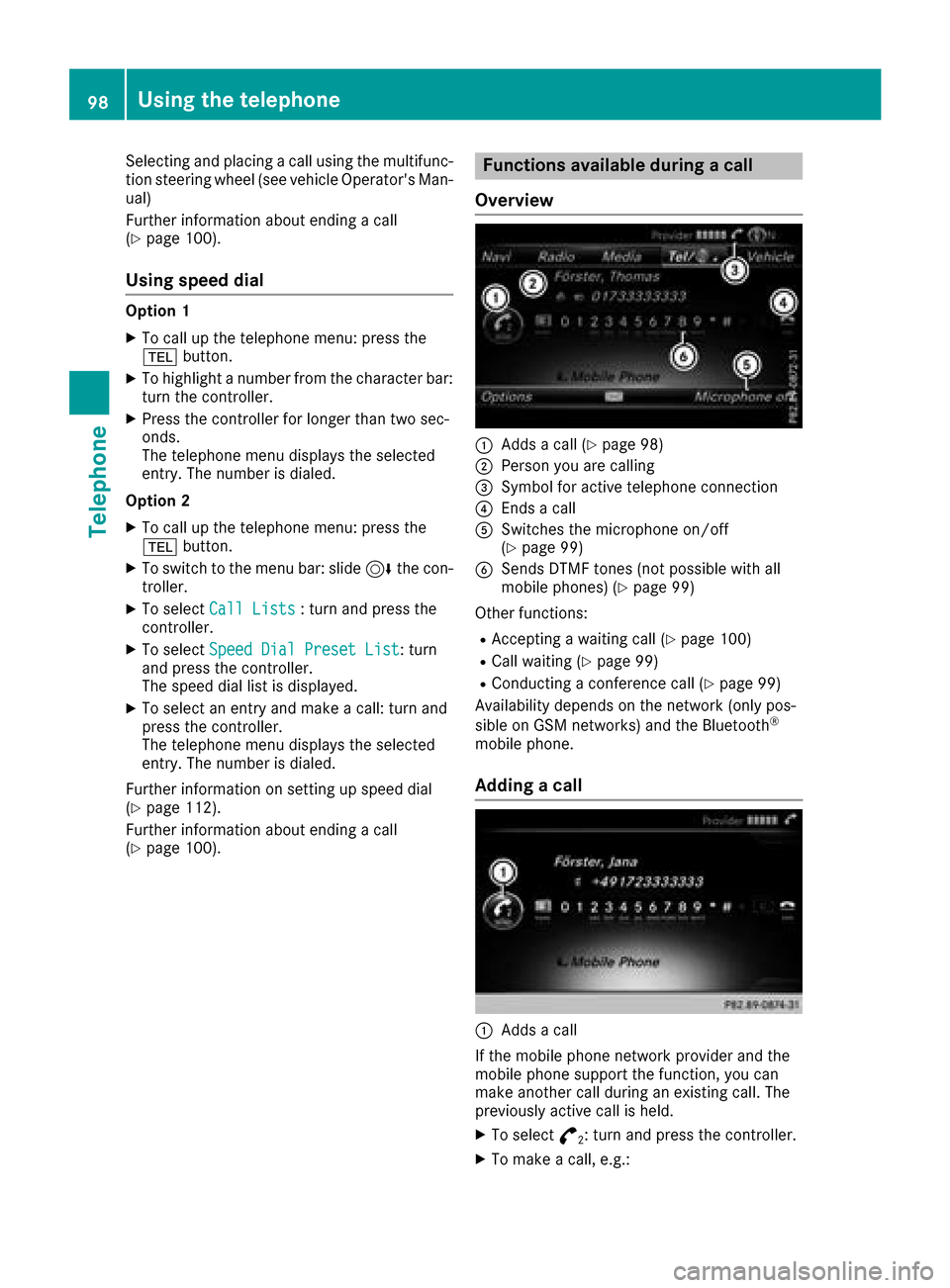
:Adds a call (Ypage 98)
;Person you are calling
=Symbol for active telephone connection
?Ends a call
ASwitches the microphone on/off
(Ypage 99)
BSends DTMF tones (not possible with all
mobile phones) (Ypage 99)
Other functions:
RAccepting a waiting call (Ypage 100)
RCall waiting (Ypage 99)
RConducting a conference call (Ypage 99)
Availability depends on the network (only pos-
sible on GSM networks) and the Bluetooth
®
mobile phone.
Adding a call
:Adds a call
If the mobile phone network provider and the
mobile phone support the function, you can
make another call during an existing call. The
previously active call is held.
XTo select °2: turn and press the controller.
XTo make a call, e.g.:
98Using the telephone
Telephone
Page 101 of 198
RUsing the telephone menu (Ypage 97)
RUsing redial (Ypage 97)
RUsing the call lists (Ypage 97)
RUsing the phone book (Ypage 97)
RUsing speed dial (Ypage 98)
Switching the microphone on or off
This function is available in the telephone menu
during an active phone call.
Switching off the microphone:
XTo switch to the menu bar: slide6the con-
troller.
XTo select Microphone Off: turn and press
the controller.
If the microphone is switched off, the Q
symbol and the The microphone is off.
message are displayed.
Switching on the microphone:
XSelect Microphone On.
The Qsymbol disappears. The The micro‐
phone is on.message is shown.
Sending DTMF tones
This function is not supported by all mobile
phones.
Answering machines or other devices can be
controlled by DTMF tones, e.g. for remote query
functions.
XIf you would like to listen to the messages on
your answering machine, for example, dial the
corresponding number.
Transmitting individual characters
XOnce a connection has been established to
the answer phone, select the desired charac-
ters in the telephone menu: turn and press the
controller each time.
or
XPress the corresponding key on the number
keypad.
Every character selected will be transmitted
immediately.
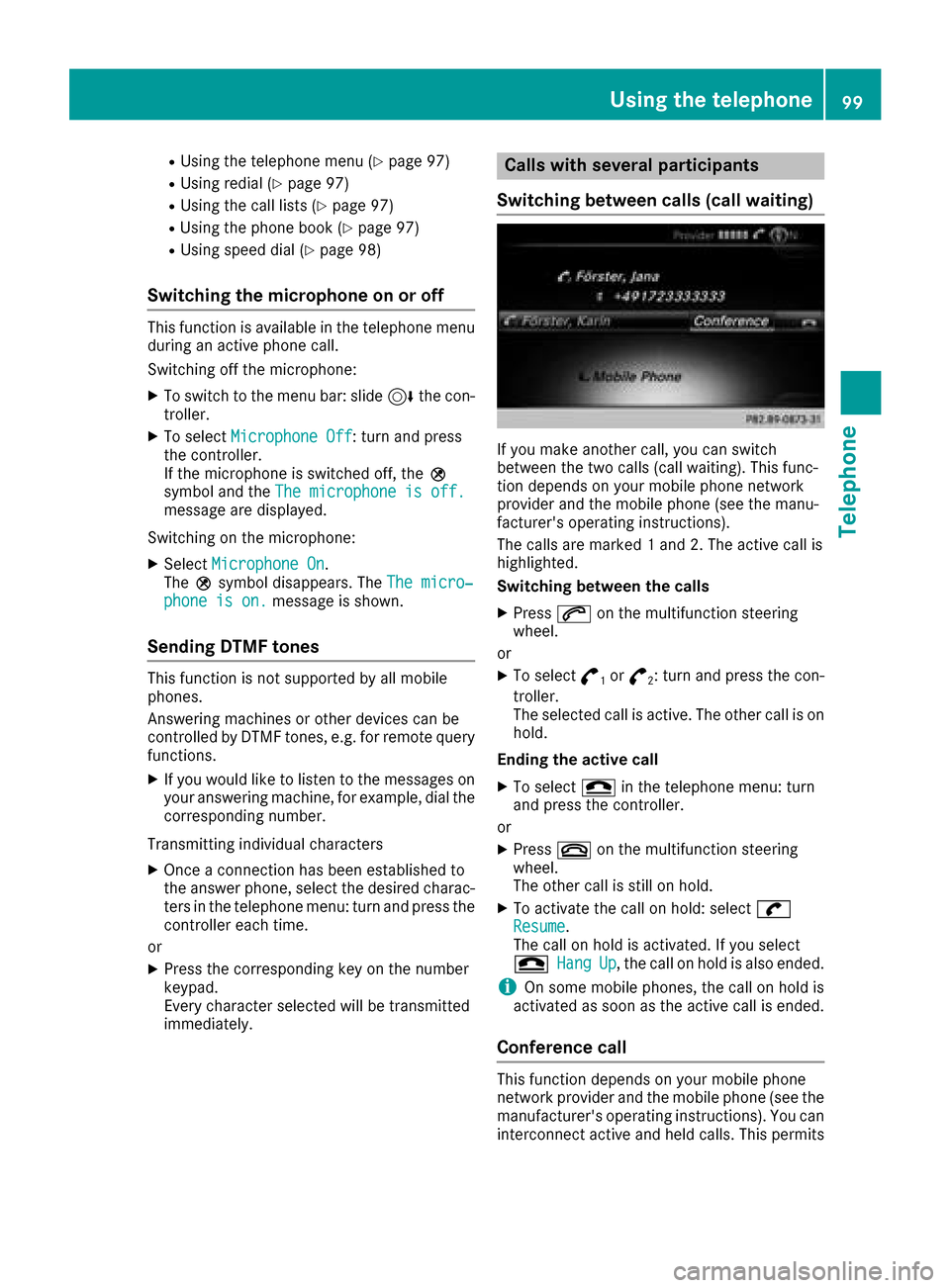
Calls with several participants
Switching between calls (call waiting)
If you make another call, you can switch
between the two calls (call waiting). This func-
tion depends on your mobile phone network
provider and the mobile phone (see the manu-
facturer's operating instructions).
The calls are marked 1 and 2. The active call is
highlighted.
Switching between the calls
XPress 6on the multifunction steering
wheel.
or
XTo select °1or°2: turn and press the con-
troller.
The selected call is active. The other call is on
hold.
Ending the active call
XTo select =in the telephone menu: turn
and press the controller.
or
XPress ~on the multifunction steering
wheel.
The other call is still on hold.
XTo activate the call on hold: select wResume.
The call on hold is activated. If you select
=
HangUp, the call on hold is also ended.
iOn some mobile phones, the call on hold is
activated as soon as the active call is ended.
Conference call
This function depends on your mobile phone
network provider and the mobile phone (see the
manufacturer's operating instructions). You can
interconnect active and held calls. This permits
Using the telephone99
Telephone
Z
Page 102 of 198
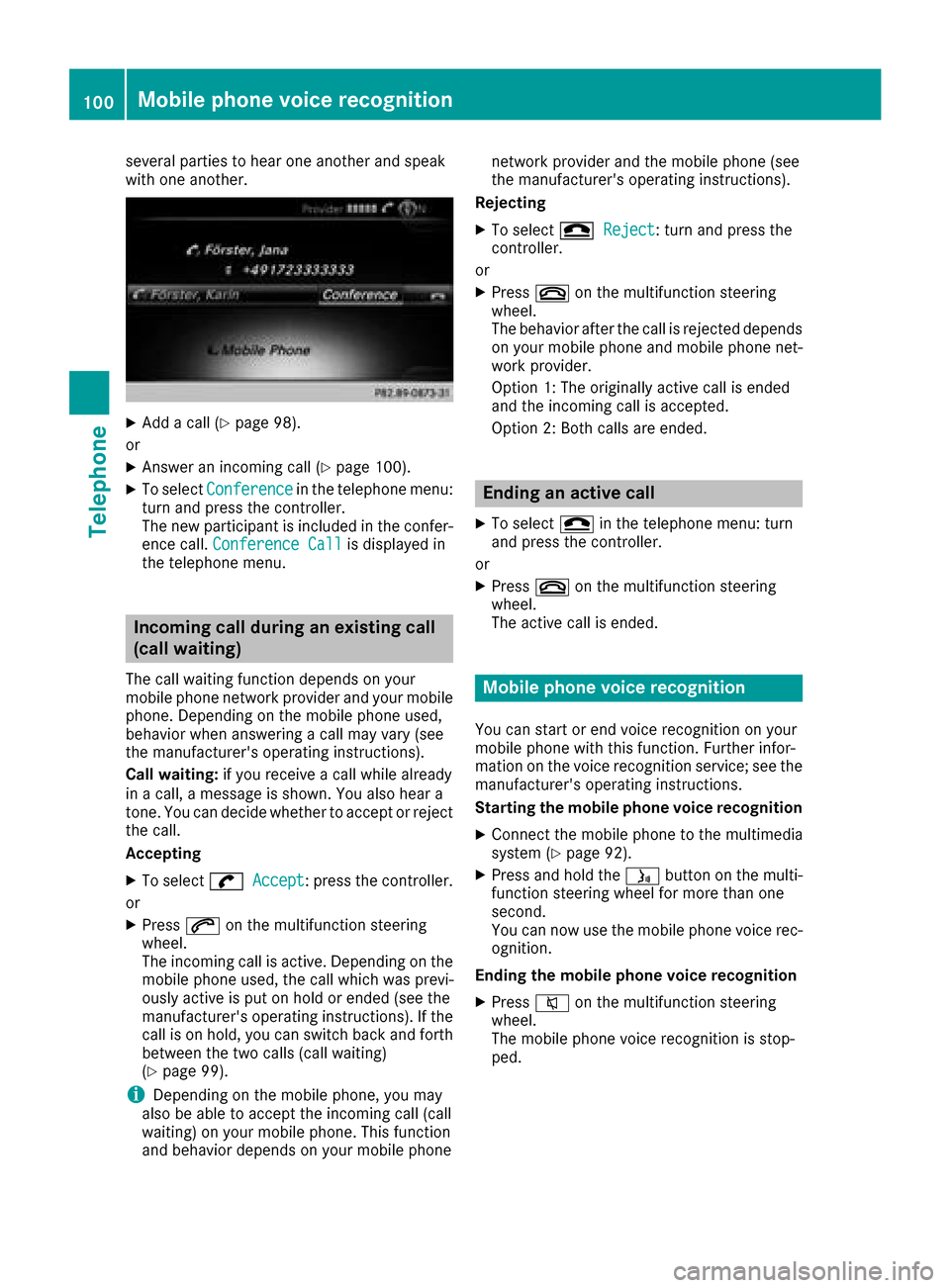
several parties to hear one another and speak
with one another.
XAdd a call (Ypage 98).
or
XAnswer an incoming call (Ypage 100).
XTo select Conferencein the telephone menu:
turn and press the controller.
The new participant is included in the confer-
ence call. Conference Call
is displayed in
the telephone menu.
Incoming call during an existing call
(call waiting)
The call waiting function depends on your
mobile phone network provider and your mobile
phone. Depending on the mobile phone used,
behavior when answering a call may vary (see
the manufacturer's operating instructions).
Call waiting: if you receive a call while already
in a call, a message is shown. You also hear a
tone. You can decide whether to accept or reject
the call.
Accepting
XTo select wAccept: press the controller.
or
XPress 6on the multifunction steering
wheel.
The incoming call is active. Depending on the
mobile phone used, the call which was previ-
ously active is put on hold or ended (see the
manufacturer's operating instructions). If the
call is on hold, you can switch back and forth
between the two calls (call waiting)
(
Ypage 99).
iDepending on the mobile phone, you may
also be able to accept the incoming call (call
waiting) on your mobile phone. This function
and behavior depends on your mobile phone network provider and the mobile phone (see
the manufacturer's operating instructions).
Rejecting
XTo select =Reject: turn and press the
controller.
or
XPress ~on the multifunction steering
wheel.
The behavior after the call is rejected depends
on your mobile phone and mobile phone net-
work provider.
Option 1: The originally active call is ended
and the incoming call is accepted.
Option 2: Both calls are ended.
Ending an active call
XTo select =in the telephone menu: turn
and press the controller.
or
XPress ~on the multifunction steering
wheel.
The active call is ended.
Mobile phone voice recognition
You can start or end voice recognition on your
mobile phone with this function. Further infor-
mation on the voice recognition service; see the
manufacturer's operating instructions.
Starting the mobile phone voice recognition
XConnect the mobile phone to the multimedia
system (Ypage 92).
XPress and hold the óbutton on the multi-
function steering wheel for more than one
second.
You can now use the mobile phone voice rec-
ognition.
Ending the mobile phone voice recognition
XPress 8on the multifunction steering
wheel.
The mobile phone voice recognition is stop-
ped.
100Mobile phone voice recognition
Telephone