engine MERCEDES-BENZ G-Class 2017 W463 Repair Manual
[x] Cancel search | Manufacturer: MERCEDES-BENZ, Model Year: 2017, Model line: G-Class, Model: MERCEDES-BENZ G-Class 2017 W463Pages: 286, PDF Size: 4.91 MB
Page 131 of 286
Checklist after driving off-road
!If you detect damagetothevehicle after
driving off-road, have th evehicle checked
immediately at aqualified specialist work-
shop.
Drivin goverroug hterra in places greater
demands on your vehicle than driving on normal
roads. Afte rdriving off-road, check th evehicle.
This allows you to detect damag epromptly and
reduc ethe riskofana ccidenttoy ourself and
other road users.
XShift th etransfer cas etotheon-road position
HIG HRANGE (Ypage 146).
XDisengage th edifferential locks
(Ypage 149).
XClean th eheadlamps and rear lightsa nd
check for damage.
XClean th efront and rear licens eplates.
XClean th ewheelsa nd tires withaw aterjet
and remove any foreign objects.
XClean th ewheels, wheel housing sand the
vehicle underside withaw aterjet;c he ck for
any foreign object sand damage.
XCheckw hether twigs or other part sofplants
have become trapped. Thesei ncreasethe risk
of fir eand can damag efuel pipes,b rake
hoses or th erubbe rbellows of th eaxle joints
and propeller shafts.
XAfte rthe trip, examin ewithout fail th eentire
undercarriage, wheels, tires, brakes, body-
work structure, steering ,cha ssis and exhaust
system for damage.
XAfte rdriving in sand, mud, gravel, wate ror
similar dirt yconditions, have th efollowing
checked and cleaned:
Rbrak ediscs
Rwheels
Rbrak epads
Raxle joints
XIf you notic estron gv ibrations after off-road
driving ,che ck for foreign object sinthe
wheelsa nd drivetrain and ,ifnecessary,
remove them. Foreign object scan disturb the
balance and caus evibrations.
XCarr youtab rak etest.
Driving on sand
Observ ethe followingr ules when driving on
sand:
RShift th etransfer cas etotheoff-road driving
position LOW RANGE (Ypage 146).
RAvoid high engines peeds.
RShift theautomatic transmission to alow
gear.
RDrive quickly to overcome th erolling resist-
ance. Otherwise th evehicle's wheelsc ould
become stuck in looseg round.
RDrive in thetrack sofo ther vehicle sifpossi-
ble. When doings o, makesure that:
-thet irer utsa re no ttoo deep
-thes andiss ufficiently firm
-your vehicle has sufficient ground clear-
ance
Tirer utsa nd grave lroads
!Checkt hatthe rutsa re no ttoo deep and
that your vehicle has sufficient clearance.
Otherwise, your vehicle coul dbedamaged or
botto mout and get stuck.
Observ ethe followingr ules when driving along
rut sino ff-road terrain or on road swithl oose
gravel:
RShift th etransfer cas etotheoff-road driving
position LOW RANGE (Ypage 146).
RAvoid high engines peeds.
RObservethe safety note s(Ypage 127) and
th eg eneral note s(Ypage 127) on off-road
driving.
RShift th eautomatic transmission to alow
gear.
RDrive slowly.
RWherer utsa re to odeep, driv ewitht he
wheelsofo neside on th ecente rgrassy area,
if possible.
Driving over obstacles
!Obstacle scoul dd amag ethe floo roft he
vehicle or components of th echassis.A sk
passengersf or guidance when driving over
large obstacles. The passenger should always
keep asafe distanc efromt hevehicle when
doingsoino rder to avoid injury as aresult of
unexpected vehicle movements. Afte rdriving
off-road or ove robstacles, check th evehicle
Driving tips129
Driving and parking
Z
Page 132 of 286
for possible damage, especially to the under-
body and the components of the chassis.
!Drive with particularcare when driving over
an obstacle while driving up or downas teep
slope.
The vehiclec ouldotherwise tilt and slide side-
ways or tip over.
Observe the following rules when driving over
tree stumps ,larg estones and other obstacles:
RObserve the safety notes (Ypag e127) and
the generaln otes (Ypage127) on off-road
driving.
RShift the transfer case to the off-road driving
position LOW RANGE (Ypage146).
RAvoid high engine speeds.
RShift the automatic transmission to alow
gear.
RMake sure that you have enoug hground
clearance before driving across an obstacle.
RDrive very slowly.
RTry to drive straight over the center of obsta-
cles: front wheelf irst, then rear wheel.
Travelinguphill
Approach/departure angle
GWARNING
If you drive on asteep incline at an angle or
turn when driving on an incline ,the vehicle
coul dslips ideways, tip and rollover. There is a
risk of an accident.
Always drive on asteep incline in the line of
fall (straight up or down) and do not turn the
vehicle.
Always observe the approach/departure angle
values (
Ypag e283).
RObserve the safety notes (Ypag e127) and
generaln otes (Ypage127) on driving off-
road.
RDo not drive at an angle on slopes, incline sor
gradients, but instead follow the direct line of
fall .Note that the climbing ability of you rvehi-
cle depends on the terrai nconditions.
RBefore driving on extreme uphill and extreme
downhill gradients, set the transfer case to
the off-road driving position LOW RANGE
(
Ypag e146).
REngage the differential locks if necessary
(Ypag e148).
RDrive slowly.
RAccelerate gently and make sure that the
wheels are gripping.
RAvoid high engine speeds, except when driv-
ing on sandy and mudd yroutes with high driv-
ing resistance.
RAvoid high engine speeds –drive at an appro-
priate engine speed( maximum 3,000 rpm).
RWhen driving downani ncline,make use of the
engine'sb raking effect. Observe the engine
speed; do not overrev the engine.
Further information on the maximu mengine
speed: (
Ypag e157).
RShift the automatic transmission to alow gear
appropriate for tackling an uphill gradient or a
long, steep downhill gradient.
Hill start assist wil laid you when pulling away on
ah ill. For further information about hills tart
assist, see (
Ypag e127).
Maximum gradient-climbing capability
Always observe the maximu mgradient climbing
ability values (Ypag e283).
Hilltops
When driving up an uphill gradient, slightly
reduce pressure on the accelerator immediately
before reaching the brow of the hill( do not shift
the transmission into N).Make use of the vehi-
cle's own impetus to travel over the brow.
This style of driving prevents:
Rthe vehiclef rom lifting off the ground on the
brow of ahill
Rloss of traction
Rthe vehiclef rom traveling too quickly down
the other side
Driving downhill
RDrive slowly.
RDo not drive at an angle downs teep inclines.
Steer into the line of fall and drive with the
front wheels aligned straight. Otherwise, the
vehiclec ouldslips ideways, tip and rollover.
RBefore tackling steep downhill gradients, shift
the automatic transmission to alow gear.
By doing so, you wil luse the braking effect of
the engine to reduce the speed. If this is not
130Driving tips
Driving and parking
Page 133 of 286
sufficient, brake gently. When doing so, make
sure that the vehicle is facing in the direction
of the line of fall.
RObserve the notes on driving in mountainous
terrain (Ypage 130).
RCheck that the service brake is working nor-
mally after along downhill stretch.
When driving at speeds below 37 mph
(60 km/h), off-road ABS is activated and the
front wheels lock cyclically during braking. The
digging-in effect achieved in the process
reduces the stopping distance on off-road ter-
rain. This limits steering capability.
Driving systems
Cruise control
General notes
Cruise control maintains aconstant road speed
for you. It brakes automatically in order to avoid
exceeding the set speed. Change into alower
gear in good time on long and steep downhill
gradients.
This is especiallyi mportant if the vehicle is
laden. By doing so, you will make use of the
braking effect of the engine. This relieves the
load on the brake system and prevents the
brakes from overheating and wearing too
quickly.
Use cruise control only if road and traffic con-
ditions make it appropriate to maintain asteady
speed for aprolonged period. You can store any
road speed above 20 mph (30 km/h).
Do not activate cruise control on off-road jour-
neys.
Important safety notes
Cruise control can neither reduce the risk of an
accident if you fail to adapty our driving style nor
override the laws of physics. Cruise control can-
not take into account the road, traffic and
weather conditions. Cruise control is only an
aid. You are responsible for maintaining asafe
distance to the vehicle in front,f or vehicle
speed, for braking in good time and for staying in
lane.
Do not use cruise control:
Rin road and traffic conditions that do not allow
you to maintain aconstant speed, e.g. in heavy traffic, on winding roads or on rough
terrain
Ron slippery road surfaces. Braking or accel-
erating could cause the drive wheels to lose
traction and the vehicle could then skid
Rin poor visibility, e.g. due to fog, heavy rain or
snow
If there is achange of drivers, advise the new
driver of the speed stored.
iThe speed indicated in the speedometer
may differ slightly from the speed stored.
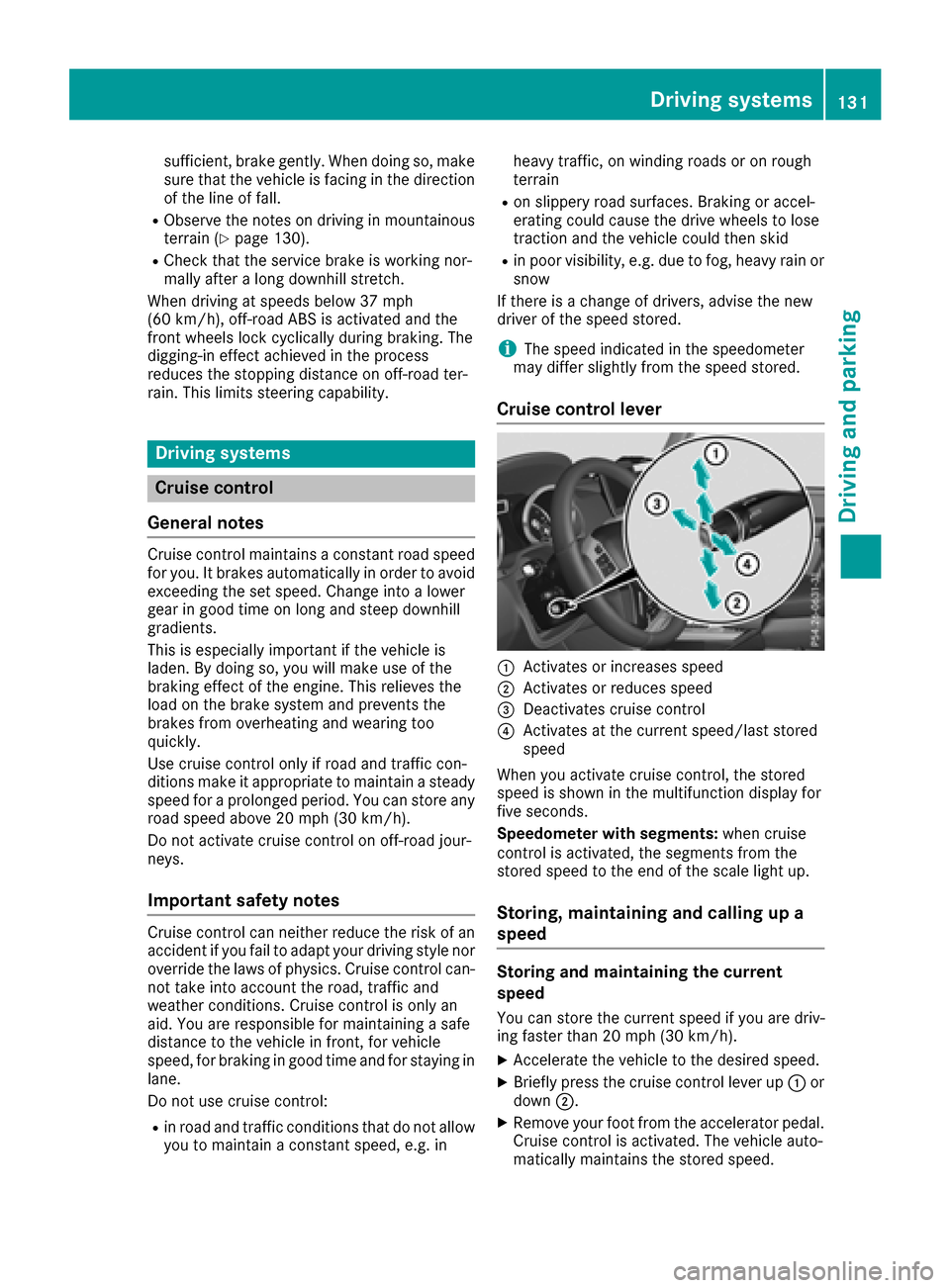
Cruise control lever
:Activates or increases speed
;Activates or reduces speed
=Deactivates cruise control
?Activates at the current speed/last stored
speed
When you activate cruise control, the stored
speed is shown in the multifunction displayf or
five seconds.
Speedometer with segments: when cruise
control is activated, the segments from the
stored speed to the end of the scale light up.
Storing, maintaining and callingupa
speed
Storing and maintaining the current
speed
You can store the current speed if you are driv-
ing faster than 20 mph (30 km/h).
XAccelerate the vehicle to the desired speed.
XBriefly press the cruise control lever up :or
down ;.
XRemove your foot from the accelerator pedal.
Cruise control is activated. The vehicle auto-
matically maintains the stored speed.
Driving systems131
Driving and parking
Z
Page 134 of 286
iCruisecontro lmaybe unab leto maintain
th es toreds peedonu phillanddownhill gra-
dien ts.T he storeds peedisresumed when the
gradientl evelsout.C ruisecontro lmaintains
th es toreds peedond ownhillgradients by
automaticall yapplyin gthe brakes.
Calling up th estored speed
GWAR NING
If you call up th estoreds peeda ndit is lower
than th ecurren tspeed, thev ehicle deceler-
ates. Ifyou donotkno wt he storeds peed,the
veh icle could decelerate unexpectedly. There
is ar iskofana cciden t.
Pay attentio ntotheroad and traff iccondi-
tions before calling up th estoreds peed. If you
do notk nowt he storeds peed,store the
desired speeda gain.
XBrieflypull th ecruise control leve rtow ards
you ?.
XRemove your foo tfro mt heaccelerato rpedal.
Cruis econtro lisactivated and adjustst he
veh icle's speedtot helast speeds tored.
If no speediss tored, cruise control storest he
curren tspeeda nd maintain sit.
Settin gaspeed
Keep inmin dthatitm ay tak eabriefm oment
unt ilth ev ehicle has accelerate dorbraked to
th es peeds et.
XPress th ecruise control leve rup: for a
higher speedord own;for alower speed.
XTo ad just th eset speed in1 mphincre-
ments (1 km/h increments): briefly press
th ec ruise control leve rup: ordown ;to
th ep ressurep oint.
Every tim ethe cruise control leve rispressed
up : ordown ;thel ast speeds toredi s
increased or reduced.
XTo ad just th eset speed in 5mphincre-
ments (10 km/h increments): briefly press
th ec ruise control leve rup: ordown ;
beyondt hepressurep oint.
Every tim ethe cruise control leve rispressed
up : ordown ;thel ast speeds toredi s
increased or reduced.
iCruis econtro lisnotdeactivate difyou
depr ess th eaccelerato rpedal. Ifyou acceler-
ate to overtake ,cruise control adjustst hevehicle's speedtot
helast speeds toreda fter
you have finishedo vertaking.
Deactivatingcruise control
Therea re several ways to deactivate cruise con-
trol:
XBriefl ypress th ecruise control leve rforwards
=.
or
XBrake.
Cruis econtro lisautomaticall ydeactivate dif:
Ryou apply th eparking brake
Ryou are driving at less than 20 mph (30 km/h)
RESP®intervenes or yo udeactivate ESP®
Ryous hift the automatic transmission to posi-
tion Nwhil edriving
Ryoue ngag ead ifferential lock
If cruis econtro lisdeactivated ,awarning tone
sounds .You will see the Cruise ControlO ff
message in the multifunctio ndisplay for approx-
imatel yfives econds. The message on the mul-
tifunctio ndisplay disappears and the segments
on the speedomete rgoout.
iWhen yo uswitch off the engine ,the last
spee dstored is cleared.
DISTRONIC PLUS
General notes
DISTRONICP LUSregulate sthe spee dand auto-
maticall yhelps youm aintain the distance from
the vehicl edetecte dinf ront. Vehicles ar edetec-
ted with the ai dofthe rada rsensor system.
DISTRONICP LUSb rakes automaticall ysothat
the set spee disnot exceeded.
Chang einto alower gear in good time on long
and stee pdownhil lgradients.
Thi sise specially important if the vehicl eis
laden. By doing so, yo uwillm akeu seof the
braking effect of the engine .Thisr elieves the
load on the brake system and prevents the
brakes fromo verheating and wearing too
quickly.
If DISTRONICP LUSd etects acritica lriskofc ol-
lision with the vehicl einfront, yo uwillbew arned
visuall yand acoustically. DISTRONICP LUSc an-
not prevent acollision withou tyou rintervention.
An intermittent warning tone sounds and the
132Driving system s
Driving an dparking
Page 136 of 286
DISTRONICPLUSm aynot detect narrow vehi-
cle sd rivin ginf ront, e.g .motorcycles, or vehi-
cle sd rivin gonad ifferent line.
In particular ,the detection of obstacle scan be
impaired if:
Rthere is dirt on the sensor soranything else
coverin gthe sensors
Rthere is snow or heav yrain
Rthere is interferenc ebyotherradar sources
Rthere ar estrong rada rreflections, for exam-
ple, in parkin ggarages
If DISTRONICP LUSnol ongerd etects avehicle
in front, DISTRONICP LUSm ayunexpectedly
accelerate the vehicl etothe stored speed.
Thi sspeed may:
Rbe too high if yo uaredrivin ginaf ilter lane or
an exi tlan e
Rbe so high in the right lane thaty oupass vehi-
cle sd rivin gont he left (left-hand drive coun-
tries)
Rbe so high in the left lane thaty oupass vehi-
cle sd rivin gont he right (right-hand drive
countries)
If there is achange of drivers, advis ethe new
driver of the spee dstored.
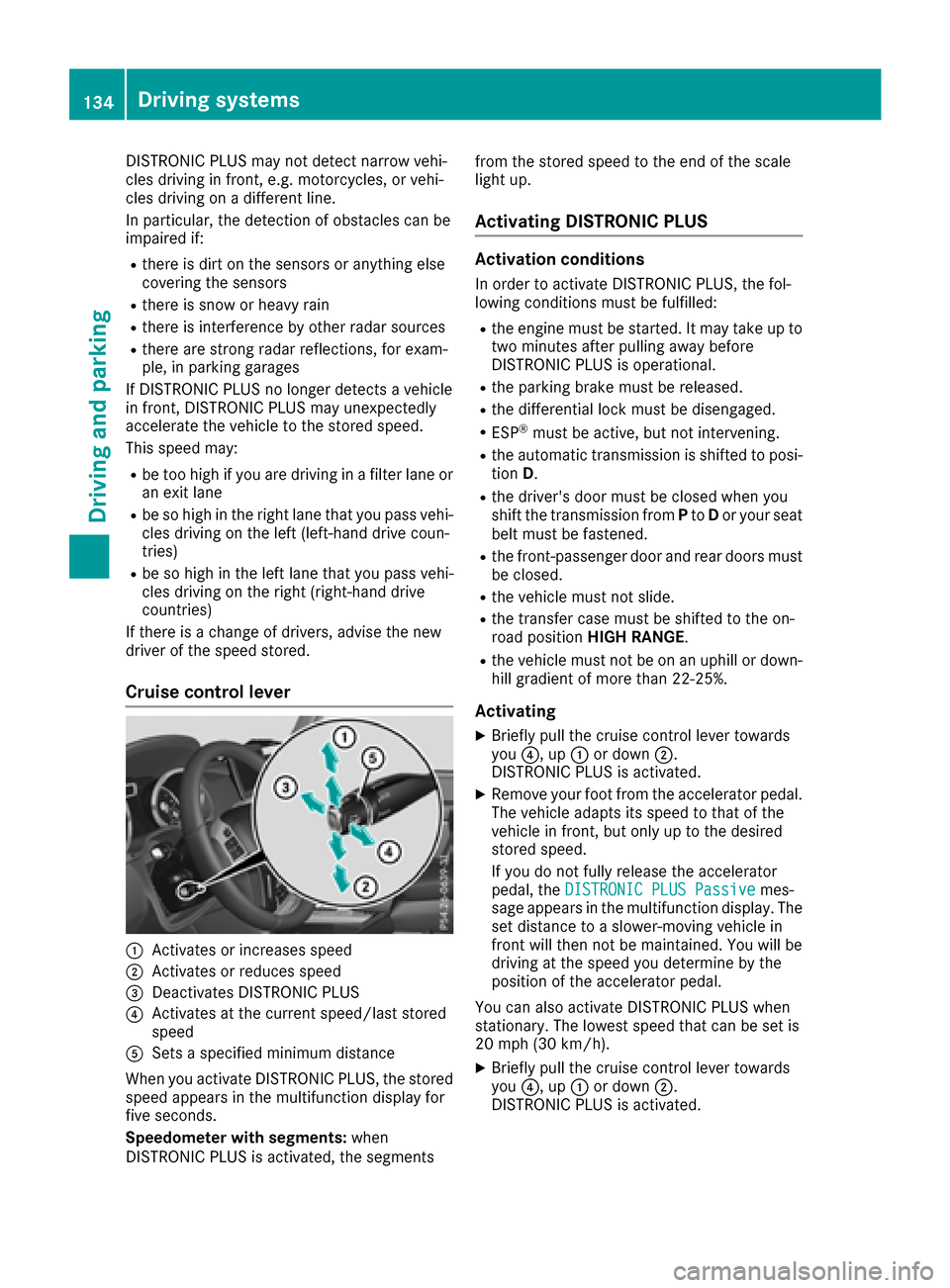
Cruis econtroll ever
:Activate sorincreases speed
;Activate sorreduce sspeed
=Deactivate sDISTRONICP LUS
?Activatesatthe current speed/las tstored
speed
ASets aspecifie dminimu mdistance
When yo uactivate DISTRONICP LUS, the stored
spee dappears in the multifunctio ndisplay for
fiv es econds.
Speedomete rwiths egments: when
DISTRONICP LUSisa ctivated ,the segments fromt
he stored spee dtothe end of the scale
light up.
Activatin gDISTRONIC PLUS
Activatio nconditions
In order to activate DISTRONICP LUS, the fol-
lowing conditions must be fulfilled:
Rthe engine must be started .Itmaytake up to
two minute safter pulling away before
DISTRONICP LUSiso perational.
Rthe parkin gbrake must be released.
Rthe differential lock must be disengaged.
RESP®must be active, bu tnot intervening.
Rthe automatic transmission is shifted to posi-
tion D.
Rthe driver's door must be closed when you
shift the transmission from Pto Dor your seat
belt must be fastened.
Rthe front-passenge rdoorand rea rdoors must
be closed.
Rthe vehicl emustn ot slide.
Rthe transferc asem ustbes hifted to the on-
roa dposit ion HIGH RANGE .
Rthe vehiclemustn ot be on an uphill or down-
hill gradient of mor ethan2 2‑25%.
Activating
XBrieflypullt he cruis econtro llev er towards
you ?,u p: or down ;.
DISTRONICP LUSisa ctivated.
XRemov eyourfoo tfromt he accelerator pedal.
The vehicl eadapt sits spee dtothatoft he
vehicl einfront, bu tonlyuptot he desired
stored speed.
If yo udon ot fullyrelease the accelerator
pedal, the DISTRONIC PLUSP assive
mes-
sage appear sinthe multifunctio ndisplay .The
set distance to aslower -moving vehicl ein
front will thenn ot be maintained. Yo uwillb e
drivin gatthe spee dyou determine by the
positio nofthe accelerator pedal.
Yo uc an also activate DISTRONICP LUSw hen
stationary. The lowest spee dthatc an be set is
20 mph (30 km/h).
XBriefl ypullt he cruis econtro llev er towards
you ?,u p: or down ;.
DISTRONICP LUSisa ctivated.
134Driving system s
Driving an dparking
Page 137 of 286
Activatingatthe curren tspeed/last
store dspeed
GWARNIN G
If you call up th estoreds pee dand it differs
from th ecurren tspeed, th evehicl eacceler -
ate sord ecelerates. If you do no tknowt he
store dspeed, th evehicl ecould accelerate or
brak eunexpectedly. Ther eisariskofana cci-
dent.
Pay attentio ntotheroad and traffic condi-
tions before calling up th estoreds peed. If you
do no tknowt he store dspeed, store th e
desired spee dagain .
XBriefl ypull th ecruise control leve rtow ards
you ?.
XRemove your foo tfro mt heaccelerato rpedal.
DISTRONI CPLUSisa ctivated. The first tim eit
is activated, th ecurren tspee diss tored. Oth-
erwise, it set sthe vehicl espee dtot heprevi-
ously store dvalue .
Driving with DISTRONIC PLUS
Pulling awa yand driving
XIf you want to pull awa ywith DISTRONIC
PLUS :remove your foo tfro mt hebrak epedal.
XBriefl ypull th ecruise control leve rtow ards
you ?.
or
XAccelerat ebriefly.
The vehicl epulls away and adapt sits spee dto
that of th evehicl einf ront.Ifnov ehicleis
detected in front, your vehicl eaccelerate sto
th es toreds peed.
The vehicl ecan also pull away when it is facing
an unidentified obstacle or is driving on adiffer-
en tlinef roma nother vehicle. The vehicl ethen
brakes automatically.
If DISTRONI CPLUSd oes no tdetect avehicl ein
front, th esystem operate slikeac ruise control .
If DISTRONI CPLUSd etect sthatthe vehicl ein
fron tisd riving slower, your vehicl ebrakes. In
this way, th especifie dminimum distanc eyou
have selected is maintained.
If DISTRONI CPLUSd etect safaster-moving
vehicl einfront,itincreases th edriving spee dto
th es et speed. If you depress th
ebrake, DISTRONI CPLUSis
deactivate dunless your vehicl eisstationary.
Selecting thed rive program
DISTRONI CPLUSs upport sasporty driving style
when you have selected th eS driving program
(
Ypage 114). Acceleration behind th evehicl ein
fron tortot heset spee disthenn oticeably mor e
dynamic .Ifyou h
ave selected driv
eprogram Eor
C (Mercedes-AM Gvehicles), th evehicl eaccel-
erates mor egently. This settin gisrecommen -
ded in stop-start traffic.
Changing lanes
If you chang etothepassing lane ,DISTR ONIC
PLU Ssupport syou when :
Ryou are driving faste rtha n40m ph(60 km/ h)
RDISTRONICP LUSism aintaining the distance
to av ehicl einf ront
Ryous witch on the appropriate tur nsignal
RDISTRONICP LUSd oesn ot detect adangero f
collision
If these conditions ar efulfilled ,you rv ehicl eis
accelerated .Acceleratio nwillbei nterrupte dif
changing lanes take stoo long or if the distance
between your vehicl eand the vehicl einfront
become stoo small.
When changing lanes ,DISTRONICP LUSm oni-
tors the left lane on left-hand drive vehicles and
the right lane on right-hand drive vehicles.
Stopping
GWARNING
When leaving the vehicle, eve nifitisbraked
onl ybyD ISTRONICP LUS, it could rol lawa yif:
Rthere is amalfunctio ninthe system or in
the voltag esupply.
RDISTRONICP LUSh asbeen deactivated
with the cruis econtro llev er,e .g.b yav ehi-
cle occupant or fromo utside the vehicle.
Rthe electrical system in the engine com-
partment, the battery or the fuses have
been tampered with.
Rthe battery is disconnected.
Rthe accelerator peda lhas been depressed,
e.g .byav ehicl eoccupant.
There is ariskofana ccident.
Driving system s135
Driving an dparking
Z
Page 138 of 286
If you wish to exit the vehicle,always turn off
DISTRONIC PLUS and secure the vehicle
against rolling away.
For further information on deactivating
DISTRONIC PLUS (
Ypage 136).
If DISTRONIC PLUS detects that the vehicle in
front is stopping, it brakes you rvehicle until it is
stationary.
Once you rvehicle is stationary,itr emains sta-
tionary and you do not need to depresst he
brake.
Depending on the specifiedm inimum distance,
you rvehicle willc ome toastandstill at asuffi-
cient distance behind the vehicle in front. The
specifiedm inimum distance is set using the
control on the cruise control lever.
The automatic transmission shifts automatically
to transmission position P,ifDISTRONIC PLUS
is activated and:
Rthe driver's seat belt is not fastened and the
driver's door is open.
Rthe engine is switched off, unless it is auto-
matically switched off by the ECO start/stop
function.
On steep uphill or downhill inclines or if there is
am alfunction, the automatic transmission may
also automatically be shifted to position P.
Deactivating DISTRONIC PLUS
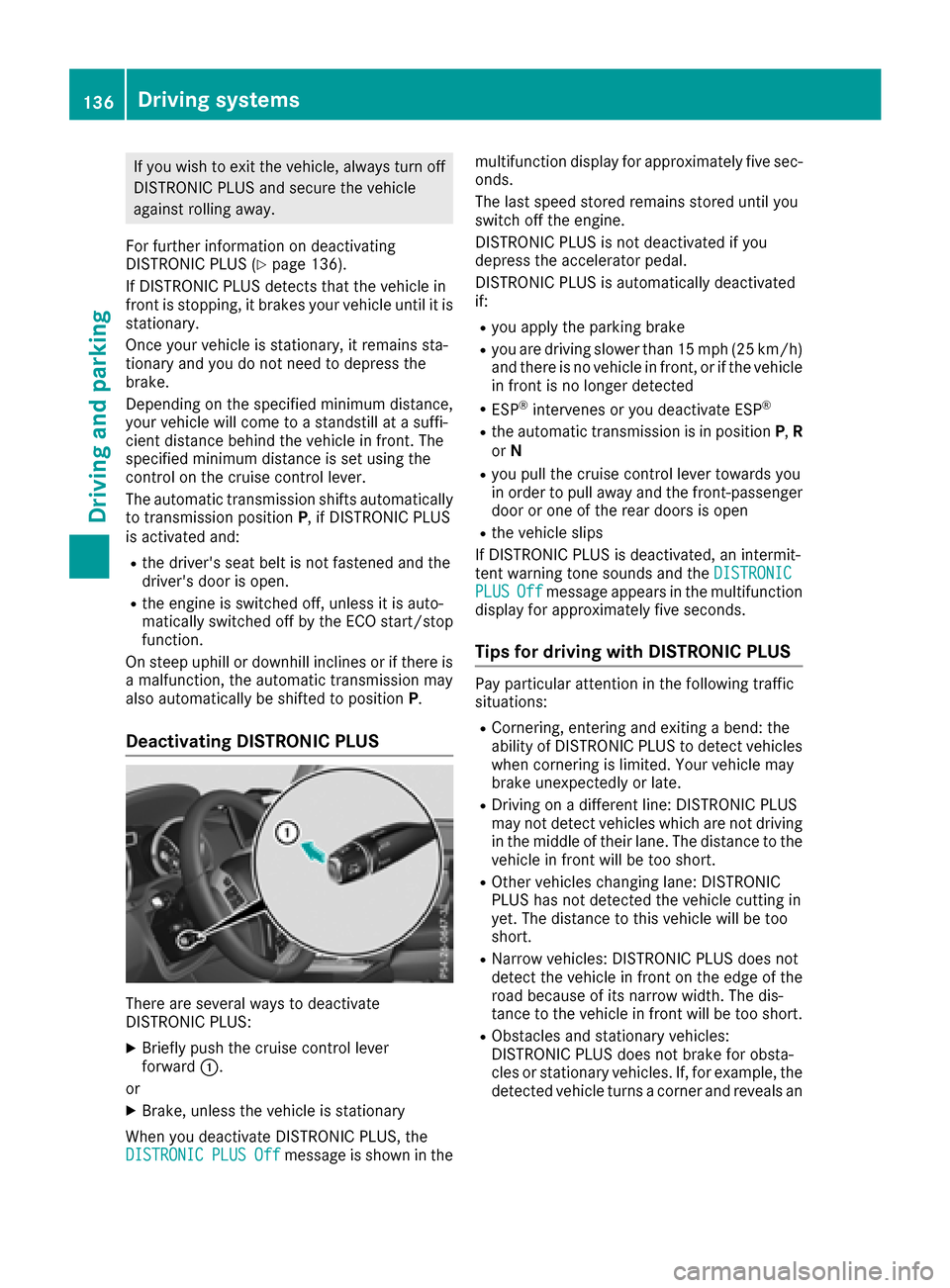
There are several waystodeactivate
DISTRONIC PLUS:
XBriefly push the cruise control lever
forward :.
or
XBrake, unless the vehicle is stationary
When you deactivate DISTRONIC PLUS, the
DISTRONIC
PLUSOffmessage is shown in the multifunction display for approximately five sec-
onds.
The last speed stored remains stored until you
switch off the engine.
DISTRONIC PLUS is not deactivated if you
depresst
he accelerator pedal.
DISTRONIC PLUS is automatically deactivated
if:
Ryou applyt he parking brake
Ryou are driving slower than 15 mph (25 km/h)
and there is no vehicle in front, or if the vehicle
in front is no longer detected
RESP®intervenes or you deactivate ESP®
Rthe automatic transmission is in position P,R
or N
Ryou pullt he cruise control lever towards you
in order to pulla waya nd the front-passenger
door or one of the rear doors is open
Rthe vehicle slips
If DISTRONIC PLUS is deactivated, an intermit-
tent warning tone sounds and the DISTRONIC
PLUSOffmessageappears in the multifunction
display for approximately five seconds.
Tips for driving with DISTRONIC PLUS
Pay particular attention in the following traffic
situations:
RCornering, entering and exiting abend: the
ability of DISTRONIC PLUS to detect vehicles
when cornering is limited. Your vehicle may
brake unexpectedly or late.
RDriving on adifferent line: DISTRONIC PLUS
may not detect vehiclesw hich are not driving
in the middleoft heir lane. The distance to the
vehicle in front willbet oo short.
ROther vehicleschanging lane: DISTRONIC
PLUS has not detected the vehicle cutting in
yet. The distance to this vehicle willbet oo
short.
RNarrow vehicles: DISTRONIC PLUS does not
detect the vehicle in front on the edge of the
road because of its narrow width. The dis-
tance to the vehicle in front willbet oo short.
RObstacles and stationary vehicles:
DISTRONIC PLUS does not brake for obsta-
cles or stationary vehicles. If, for example,t he
detected vehicle turns acorner and revealsa n
136Driving systems
Driving and parking
Page 141 of 286
HOLD function
General notes
The HOLD function can assist the driverint he
following situations:
Rwhen pulling away, especially on steep slopes
Rwhen maneuvering on steep slopes
Rwhen waiting in traffic
The vehicleisk ept stationary without the driver
having to depress the brake pedal.
The braking effect is cancele dand the HOLD
function deactivated when you depress the
accelerator pedaltop ulla way.
Do not use the HOLD function when driving off-
road ,ons teep uphill or downhill gradients or on
slippery or looses urfaces. The HOLD function
cannot hold the vehicleons uch surfaces.
Important safety notes
GWARNING
When leaving the vehicle, it can still roll away despite being braked by the HOLD function if:
Rthere is amalfunction in the system or in
the voltag esupply.
Rthe HOLD function has been deactivated by
pressing the accelerator pedalort he brake
pedal, e.g. by avehicleo ccupant.
Rthe electrical system in the engine com-
partment, the battery or the fuse shave
been tampere dwith.
Rthe battery is disconnected
There is arisk of an accident.
If you wis htoexit the vehicle, alway sturn off
the HOLD function and secure the vehicle
against rolling away.
!When DISTRONIC PLUS or the HOLD func-
tion is activated, the vehicleb rakes automat-
ically in certain situations.
To avoi ddamage to the vehicle, deactivate
DISTRONIC PLUS and the HOLD function in
the following or similar situations:
Rwhen towing the vehicle
Rin the car wash
Deactivating the HOLD function (
Ypage1 39).
Activation conditions
You can activate the HOLD function if:
Rthe vehicleiss tationary
Rthe engine is running or if it has been auto-
matically switched off by the ECO start/stop
function
Rthe driver's door is closed or you rseat belti s
fastened
Rthe parking brake is released
Rthe transmission is in position D,R or N
RDISTRONIC PLUS is deactivated
Activating the HOLD function
XMake sure that the activation conditions are
met.
XDepress the brake pedal.
XQuickly depress the brake pedalf urther until
ë appears in the multifunction display.
The HOLD function is activated. You can
release the brake pedal.
If depressing the brake pedalt he first time does
not activate the HOLD function, wai tbriefly and
then try again.
Deactivatin gthe HOLD function
The HOLD function is deactivated automatically
if:
Ryou accelerate and the transmission is in
position Dor R.
Rthe transmission is in position j.
Ryou depress the brake pedalagain withacer-
tain amount of pressure until ëdisap-
pears from the multifunction display.
Ryou activate DISTRONIC PLUS
On steep uphill or downhill gradients or if there
is am alfunction, the transmission may als obe
automatically shifted into position P.
Permanentall-wheel drive
!
Never tow the vehiclew ith one axle raised.
This may damage the transfer case. Damage
of this sort is not covered by the Mercedes-
Benz Limited Warranty. All wheels must
remai neither on the ground or be full yraised.
Observe the instructions for towing the vehi-
cle with all wheels in full contact with the
ground.
Driving systems139
Driving and parking
Z
Page 143 of 286
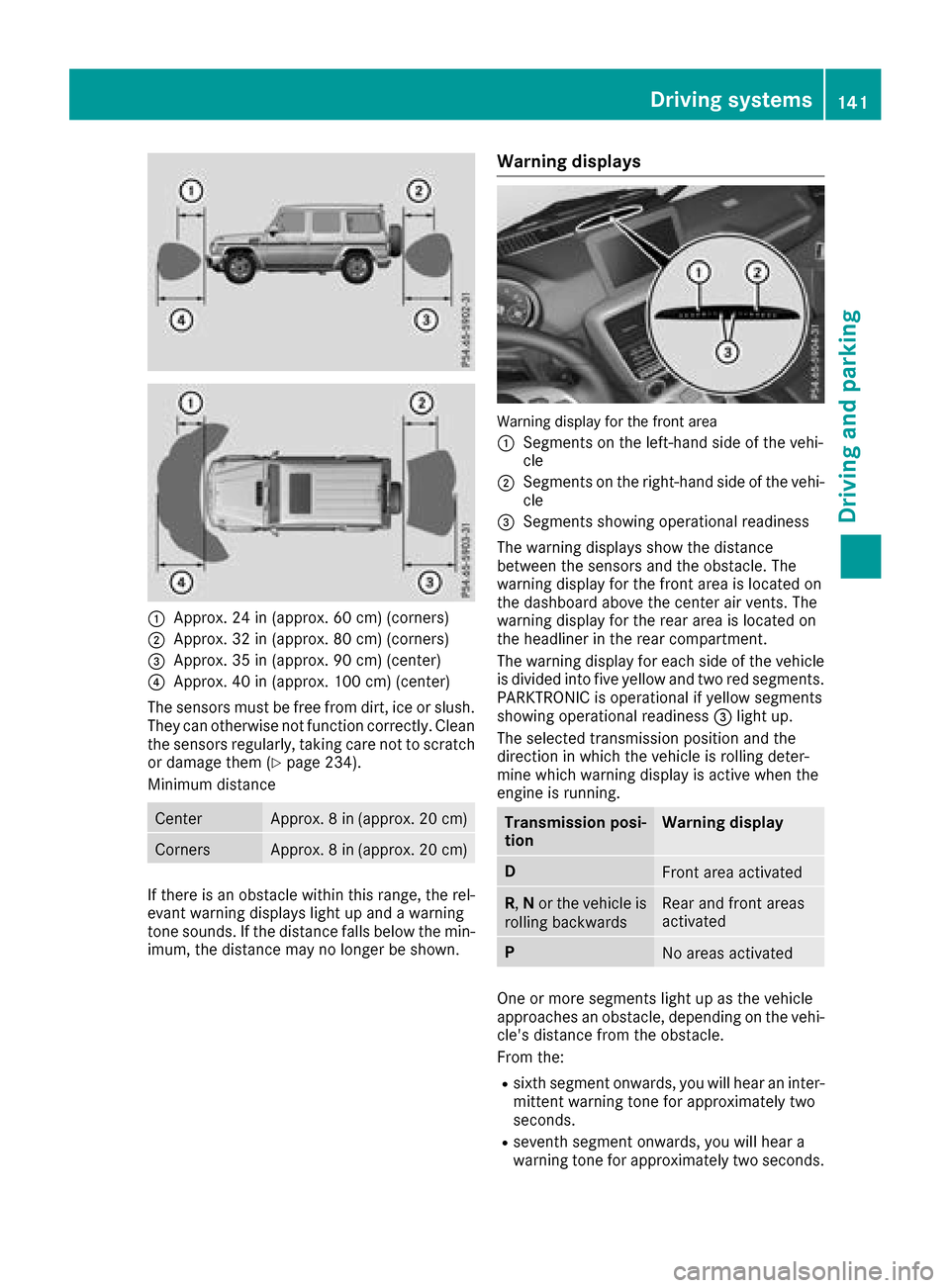
:Approx. 24 in (approx. 60 cm)(corners)
;Approx. 32 in (approx. 80 cm )(corners)
=Approx. 35 in (approx. 90 cm )(center)
?Approx. 40 in (approx. 100 cm )(center)
The sensors must be freef rom dirt, ice or slush.
The ycan otherwise not functio ncorrectly. Clean
the sensors regularly ,taking car enot to scratch
or damage them (
Ypage 234).
Minimu mdistance
CenterApprox. 8in(appr ox. 20 cm)
CornersApprox. 8in(appr ox. 20 cm)
If ther eisano bstacle withint hisrange,t he rel-
evant warning display slight up and awarning
tone sounds. If the distance falls belo wthe min-
imum, the distance maynol ongerbes hown.
Warning displays
Warning display for the front area
:
Segments on the left-hand side of the vehi-
cle
;Segments on the right-hand side of the vehi-
cle
=Segments showing operational readiness
The warning display sshowt he distance
between the sensors and the obstacle .The
warning display for the front area is locate don
the dashboard above the cente rairvents .The
warning display for the rea rareaisl ocate don
the headline rinthe rea rcompartment.
The warning display for each side of the vehicle
is divided into fiv eyello wand two red segments.
PARKTRONICi soperational if yellow segments
showing operational readiness =light up.
The selecte dtransmission positio nand the
direction in which the vehicl eisrolling deter-
mine which warning display is active when the
engine is running.
Transmission posi-
tionWarning display
DFront area activated
R, Nor the vehicl eis
rolling backwardsRear and front areas
activated
PNo area sactivated
One or more segments light up as the vehicle
approaches an obstacle ,depen ding on the vehi-
cle's distance from the obstacle.
From the:
Rsixth segment onwards, yo uwillh ea rani nter-
mittent warning tone for approximatelyt wo
seconds.
Rseventh segment onwards, yo uwillh eara
warning tone for approximatelyt wo seconds.
Driving systems141
Driving andparking
Z
Page 148 of 286
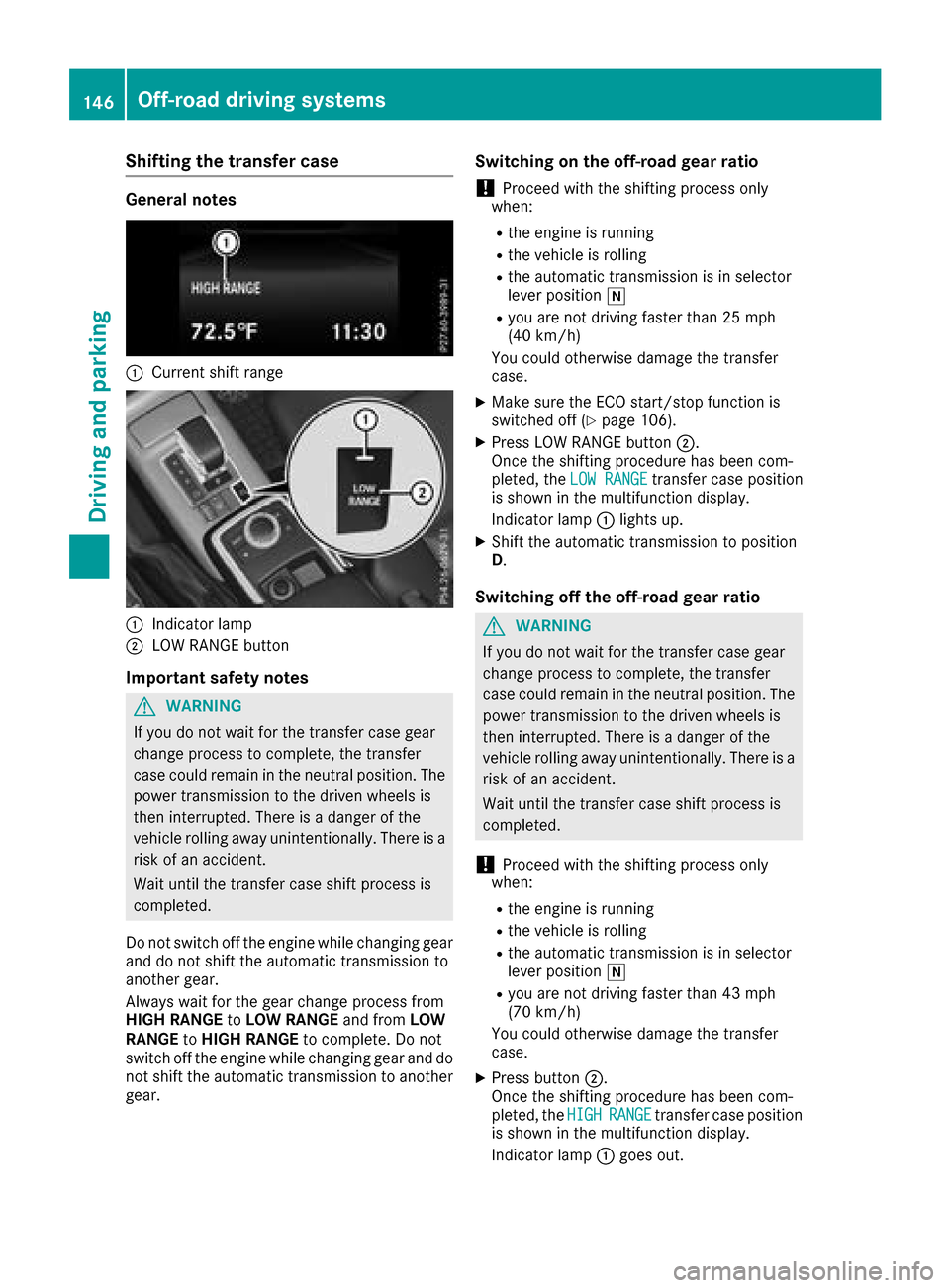
Shifting the transfer case
General notes
:Current shift range
:Indicator lamp
;LOW RANGE button
Important safety notes
GWARNING
If you do not wait for the transfer case gear
change process to complete, the transfer
case could remain in the neutral position. The power transmission to the driven wheels is
then interrupted. There is adanger of the
vehicle rolling away unintentionally. There is a
risk of an accident.
Wait until the transfer case shift process is
completed.
Do not switch off the engine while changing gear
and do not shift the automatic transmission to
another gear.
Always wait for the gear change process from
HIGH RANGE toLOW RANGE and fromLOW
RANGE toHIGH RANGE to complete. Do not
switch off the engine while changing gear and do
not shift the automatic transmission to another
gear.
Switching on the off-road gear ratio
!Proceed with the shifting process only
when:
Rthe engine is running
Rthe vehicle is rolling
Rthe automatic transmission is in selector
lever position i
Ryou are not driving faster than 25 mph
(40 km/h)
You could otherwise damage the transfer
case.
XMake sure the ECO start/stop function is
switched off (Ypage 106).
XPress LOW RANGE button ;.
Once the shifting procedure has been com-
pleted, the LOW RANGE
transfer case position
is shown in the multifunction display.
Indicator lamp :lights up.
XShift the automatic transmission to position
D.
Switching off the off-road gear ratio
GWARNING
If you do not wait for the transfer case gear
change process to complete, the transfer
case could remain in the neutral position. The power transmission to the driven wheels is
then interrupted. There is adanger of the
vehicle rolling away unintentionally. There is a
risk of an accident.
Wait until the transfer case shift process is
completed.
!Proceed with the shifting process only
when:
Rthe engine is running
Rthe vehicle is rolling
Rthe automatic transmission is in selector
lever position i
Ryou are not driving faster than 43 mph
(70 km/h)
You could otherwise damage the transfer
case.
XPress button ;.
Once the shifting procedure has been com-
pleted, the HIGH
RANGEtransfer case position
is shown in the multifunction display.
Indicator lamp :goes out.
146Off-road driving systems
Driving and parking