light MERCEDES-BENZ G-CLASS 2018 User Guide
[x] Cancel search | Manufacturer: MERCEDES-BENZ, Model Year: 2018, Model line: G-CLASS, Model: MERCEDES-BENZ G-CLASS 2018Pages: 294, PDF Size: 4.86 MB
Page 19 of 294
Overview .......................................... 69
Problem (malfunction) ..................... 70
SIRIUS services
see also Digital Operator's Man-
ual .................................................. 203
Sliding sunroof
Important safety notes .................... 71
Opening/closing .............................. 72
Operating manually .......................... 72
Problem (malfunction) ..................... 73
SmartKey
Changing the battery ....................... 65
Changing the programming ............. 64
Checking the battery ....................... 65
Convenience closing feature ............ 70
Convenience opening feature .......... 70
Display message ............................ 191
Door central locking/unlocking ....... 63
Important safety notes .................... 63
Loss ................................................. 66
Mechanical key ................................ 64
Overview .......................................... 63
Positions (ignition lock) ................. 105
Problem (malfunction) ..................... 66
Starting the engine ........................ 106
SMS
see also Digital Operator's Man-
ual .................................................. 203
Snow chains ...................................... 259
Socket (12 V)
Cargo compartment ....................... 218
Front-passenger footwell ............... 217
General notes ................................ 217
Rear compartment ......................... 218
Sound
Switching on/off ........................... 204
Spare fuses ........................................ 255
Spare wheel
Important safety notes .................. 279
Spare wheel bracket at the rear .... 245
Stainless-steel spare hub cap ........ 245
Special seat belt retractor .................. 50
Specialist workshop ............................ 27
Speedometer
Digital ............................................ 163
In the Instrument cluster ................. 32
Segments ...................................... 160
Selecting the display unit ............... 168 Standing lamps
Display message ............................ 180
Switching on/off .............................. 87
Starting the engine
Important safety notes .................. 106
Steering (display mes sage
)
.............. 191
Steering wheel
Adjusting (electrically) ..................... 80
Buttons (on-board computer) ......... 161
Cleaning ......................................... 241
Important safety notes .................... 79
Paddle shifters ............................... 116
Steering wheel heating .................... 80
Storing settings (memory func-
tion) ................................................. 84
Steering wheel heating
Indicator lamp (malfunction) ............ 81
Steering wheel paddle shifters ........ 116
Stopwatch (RACETIMER) ................... 172
Stowage areas ................................... 210
Stowage compartment
Door stowage compartment .......... 211
Stowage compartments
Armrest (under) ............................. 211
Cup holders ................................... 215
Glove box ....................................... 210
Important safety information ......... 210
Stowage net ................................... 211
Stowage pockets ........................... 211
Stowage net ....................................... 211
Summer opening
see Convenience opening feature
Summer tires
In winter ........................................ 259
Sun visor ............................................ 215
Surround lighting (on-board com-
puter) .................................................. 169
SUV
(Sport Utility Vehicle) ....................... 26
Switching air-recirculation mode
on/off ................................................. 102
Switching on media mode
Via the device list .......................... 208
T
Tachometer ........................................ 160
Index17
Page 21 of 294

Maximum tire load .........................272
Maximum tire load (definition) ....... 274
Optional equipment weight (defi-
nition) ............................................ 275
PSI (pounds per square inch) (def-
inition) ...........................................2 75
Replacing ....................................... 275
Service life ..................................... 258
Sidewall (definition) ....................... 275
Snow chains .................................. 259
Speed rating (definition) ................ 274
Storing ...........................................2 76
Structure and characteristics
(definition) ..................................... 273
Summer tires in winter .................. 259
Temperature .................................. 269
TIN (Tire Identification Number)
(definition) ..................................... 275
Tire bead (definition) ......................2 75
Tire pressure (definition) ................ 275
Tire pressures (recommended) ...... 274
Tire size (data) ............................... 279
Tire size designation, load-bearing
capacity, speed rating .................... 270
Tire tread ....................................... 258
Tire tread (definition) ..................... 275
Total load limit (definition) ............. 275
Traction ......................................... 269
Traction (definition) ....................... 275
Tread wear ..................................... 269
TWR (permissible trailer drawbar
noseweight) (definition) ................. 275
Uniform Tire Quality Grading
Standards ...................................... 269
Uniform Tire Quality Grading
Standards (definition) .................... 273
Wear indicator (definition) ............. 275
Wheel and tire combination ........... 279
Wheel rim (definition) .................... 274
see Flat tire
Top Tether ............................................ 52
Tow-starting
Emergency engine starting ............ 254
Important safety notes .................. 251
Towing a trailer
Axle load, permi
ssible .................... 291
Cleaning the trailer tow hitch ......... 240
Coupling up a trailer ...................... 157 Decoupling a trailer ....................... 158
Driving tips .................................... 154
ESP
®(Electronic Stability Pro-
gram) ............................................... 61
Important safety notes .................. 153
Installing the ball coupling ............. 156
Lights display message .................. 180
Pulling away with a trailer .............. 107
Shift range ..................................... 115
Trailer loads ................................... 291
Trailer tow hitch ............................. 291
Towing away
Important safety guidelines ........... 251
In the event of malfunctions .......... 253
With both axles on the ground ....... 252
Towing eye
Front .............................................. 252
Rear ............................................... 252
Traffic reports
see also Digital Operator's Man-
ual .................................................. 203
Trailer
7-pin connector ............................. 159
Power supply ................................. 159
Trailer coupling
see Towing a trailer
Trailer loads
Technical data ............................... 291
Trailer loads and drawbar nose-
weights ............................................... 159
Trailer tow hitch
Ball position ................................... 291
Trailer towing
PARKTRONIC ................................. 145
Permissible trailer loads and
drawbar noseweights ..................... 159
Transfer case
General notes ................................ 149
Shift range ..................................... 149
Shifting .......................................... 149
Shifting (general notes) .................. 149
Shifting (important safety notes) ... 149
Shifting to neutral .......................... 150
Switching off the off-road gear
ratio ............................................... 150
Switching on the off-road gear
ratio ............................................... 149
Index19
Page 30 of 294
National Highway Traffic Safety Administration
(NHTSA) in addition to notifying Mercedes-Benz
USA, LLC.
If NHTSA receives similar complaints, it may
open an investigation, and if it finds that a safety
defect exists in a group of vehicles, it may order
a recall and remedy campaign. However, NHTSA
cannot become involved in individual problems
between you, your dealer, or Mercedes-Benz
USA, LLC.
To contact NHTSA, you may call the Vehicle
Safety Hotline toll-free at 1-888-327-4236
(TTY: 1-800-424-9153); go tohttp://
www.safercar.gov; or write to: Administrator,
NHTSA, 400 Seventh Street, SW., Washington,
DC 20590.
You can also obtain other information about
motor vehicle safety from
http://www.safercar.gov
Limited Warranty
!
Follow the instructions in this manual about
the proper operation of your vehicle as well as
about possible vehicle damage. Damage to
your vehicle that arises from culpable contra-
ventions against these instructions is not cov-
ered either by the Mercedes-Benz Limited
Warranty or by the New or Used-Vehicle War-
ranty.
QR codes for rescue cards
The QR codes are secured in the fuel filler flap
and on the opposite side on the B-pillar. In the
event of an accident, rescue services can use
the QR code to quickly find the appropriate res- cue card for your vehicle. The current rescue
card contains the most important information
about your vehicle in a compact form, e.g. the
routing of the electric cables.
You can find more information under
www.mercedes-benz.de/qr-code.
Data stored in the vehicle
Data storage
A wide range of electronic components in your
vehicle contain data memories. These data memories temporarily or perma-
nently store technical information about:
Rthe vehicle's operating state
Rincidents
Rmalfunctions
In general, this technical information docu-
ments the state of a component, a module, a
system or the surroundings.
This includes, for example:
Roperating conditions of system components.
For example, fluid levels
Rthe vehicle's status messages and those of its
individual components, e.g. number of wheel
revolutions/speed, deceleration in move-
ment, lateral acceleration, accelerator pedal
position
Rmalfunctions and defects in important system
components, e.g. lights, brakes
Rvehicle reactions and operating conditions in
special driving situations, e.g. air bag deploy-
ment, intervention of stability control sys-
tems
Rambient conditions, e.g. outside temperature
This data is of an exclusively technical nature
and can be used to:
Rassist in recognizing and rectifying malfunc-
tions and defects
Ranalyze vehicle functions, e.g. after an acci-
dent
Roptimize vehicle functions
The data cannot be used to trace the vehicle's
movements.
When your vehicle is serviced, technical infor-
mation can be read from the event data memory
and malfunction data memory.
Services include, for example:
Rrepair services
Rservice processes
Rwarranties
Rquality assurance
The vehicle is read out by employees of the ser-
vice network (including the manufacturer) using special diagnostic testers. More detailed infor-
mation is obtained from it, if required.
After a malfunction has been rectified, the infor-
mation is deleted from the malfunction memory or is continually overwritten.
When operating the vehicle, situations are con-
ceivable in which this technical data, in connec-
28Data stored in the vehicle
Introduction
Page 33 of 294
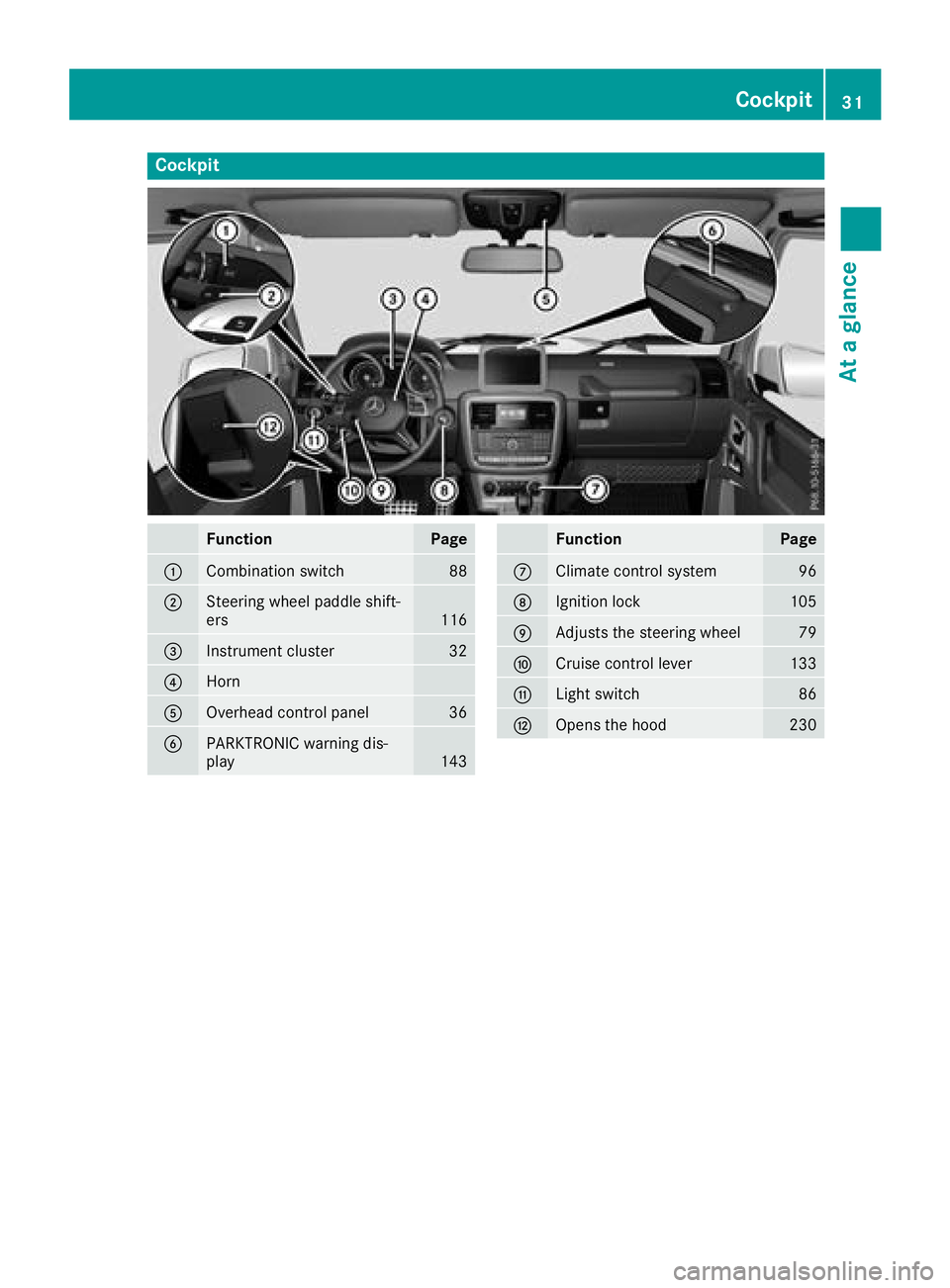
Cockpit
FunctionPage
:Combination switch88
;Steering wheel paddle shift-
ers116
=Instrument cluster32
?Horn
AOverhead control panel36
BPARKTRONIC warning dis-
play143
FunctionPage
CClimate control system96
DIgnition lock105
EAdjusts the steering wheel79
FCruise control lever133
GLight switch86
HOpens the hood230
Cockpit31
At a glance
Page 34 of 294
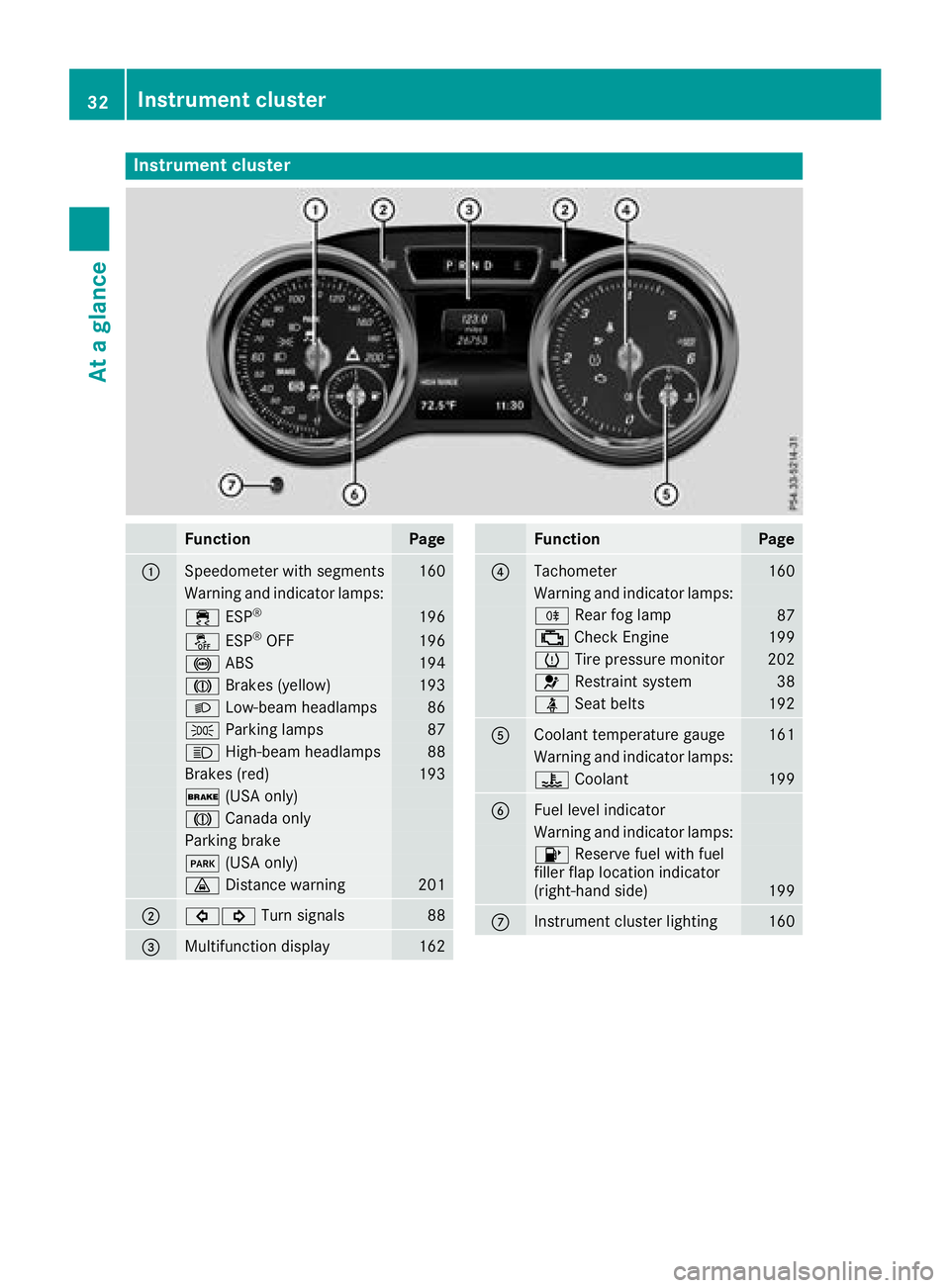
Instrument cluster
FunctionPage
:Speedometer wit hsegments16 0
Warning and indicator lamps:
÷ ESP®19 6
å ESP®OF F196
! ABS194
J Brakes(yellow)19 3
L Low-beam headlamps86
TParking lamp s87
KHigh-beam headlamps88
Brakes(red)19 3
$ (USAonly)
J Canad aonly
Parking brak e
F(USAonly)
· Distanc ewarning20 1
;#! Turn signals88
=Multifunction display162
FunctionPag e
?Tachometer160
Warning and indicator lamps:
R Rear fog lamp87
;CheckEngin e199
h Tirepressur emonitor20 2
6 Restrain tsystem38
ü Seat belt s192
ACoolan ttemperature gauge16 1
Warning and indicator lamps:
? Coolan t199
BFue llevel indicator
Warning and indicator lamps:
8 Reserve fuel wit hfuel
filler flap location indicator
(right-hand side )
199
CInstrumen tcluste rlighting16 0
32Instrument cluster
At a glance
Page 37 of 294
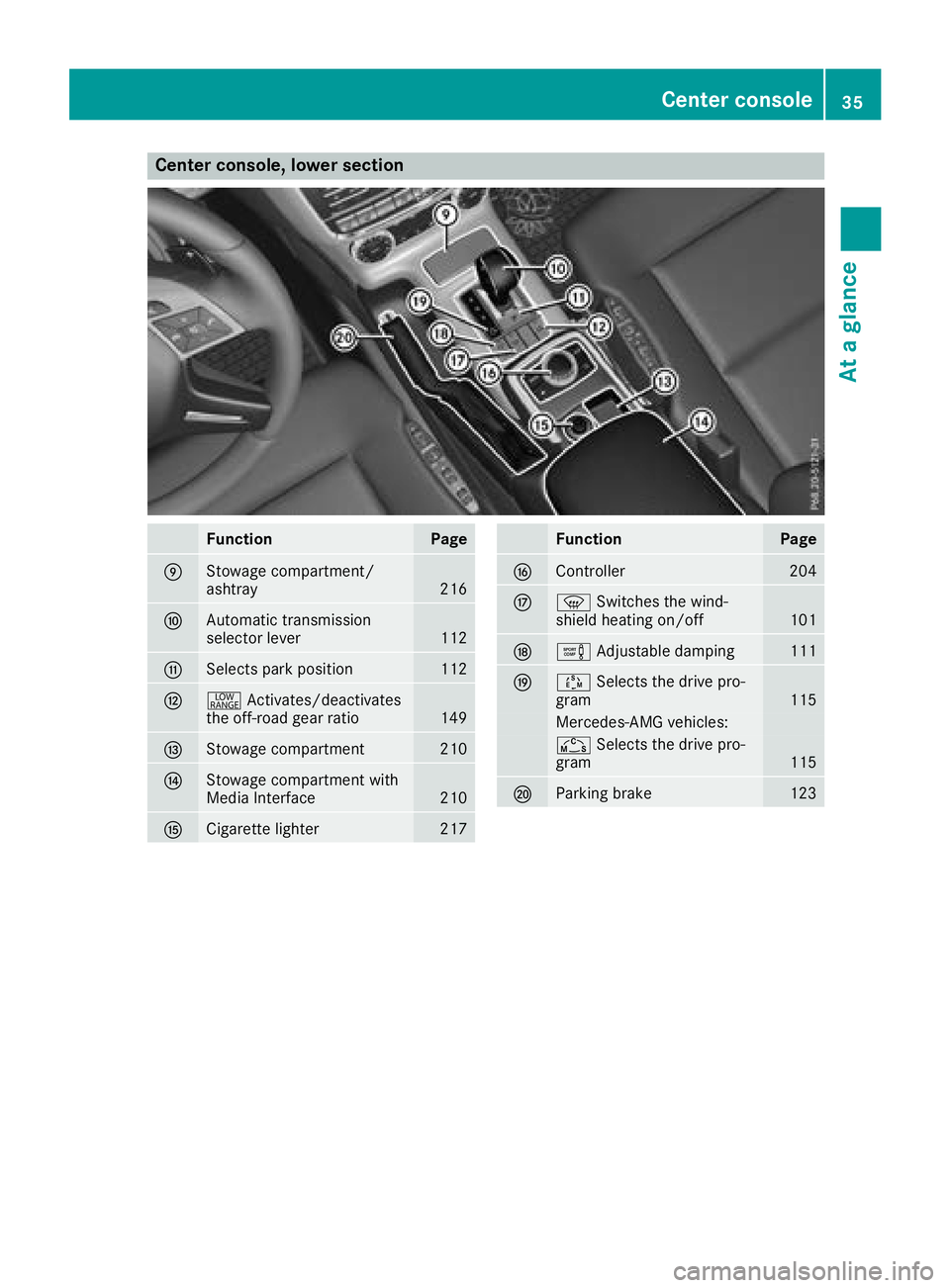
Center console, lower section
FunctionPage
EStowage compartment/
ashtray216
FAutomatic transmission
selector lever112
GSelects park position112
H+Activates/deactivates
the off-road gear ratio149
IStowage compartment210
JStowage compartment with
Media Interface210
KCigarette lighter217
FunctionPage
LController204
Mz Switches the wind-
shield heating on/off101
Ne Adjustable damping111
OÚSelects the drive pro-
gram115
Mercedes-AMG vehicles:
Ñ Selects the drive pro-
gram115
PParking brake123
Center console35
At a glance
Page 38 of 294
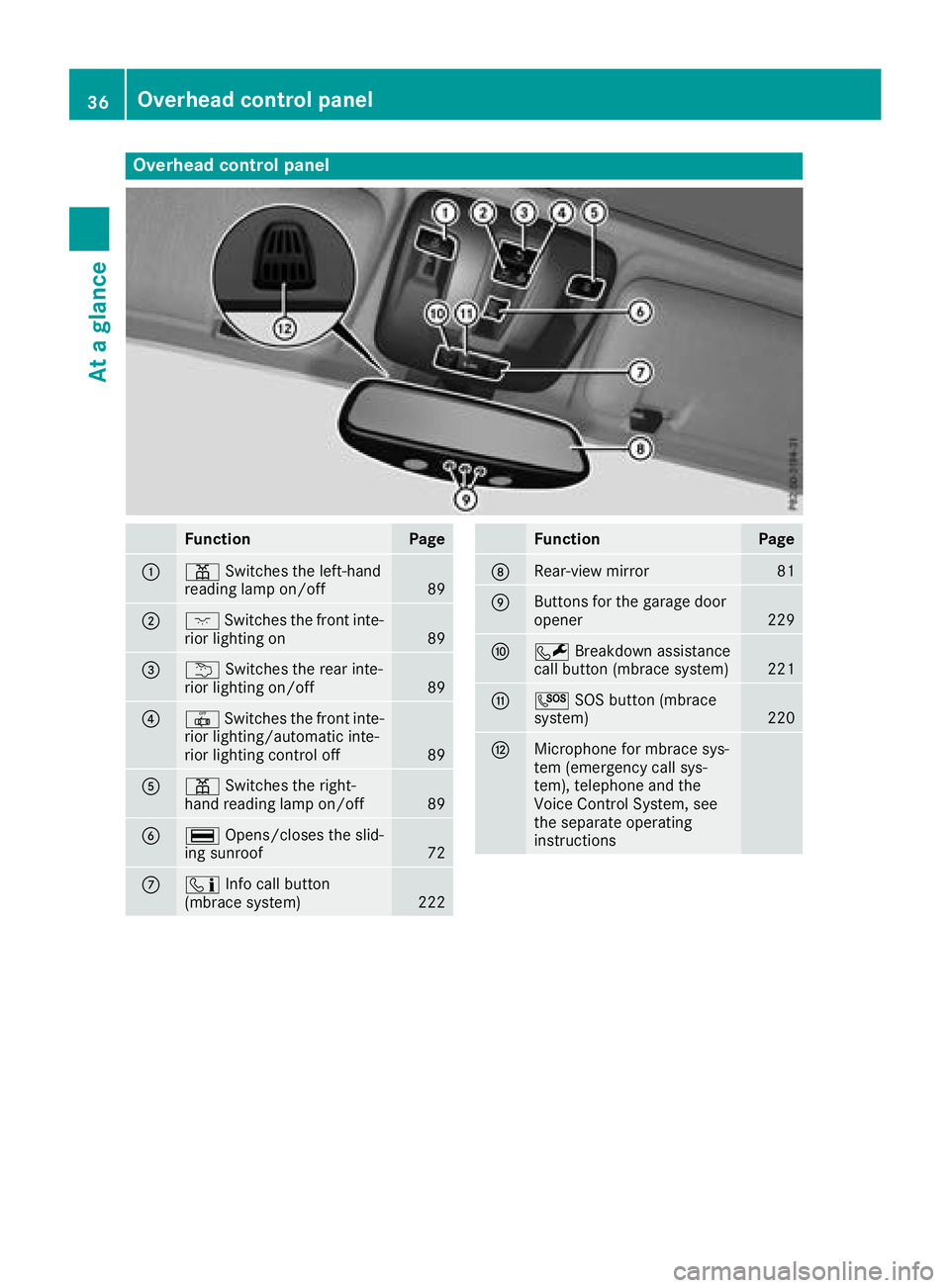
Overhead control panel
FunctionPage
:pSwitches the left-hand
reading lamp on/off89
;c Switches the front inte-
rior lighting on89
=u Switches the rear inte-
rior lighting on/off89
?| Switches the front inte-
rior lighting/automatic inte-
rior lighting control off
89
Ap Switches the right-
hand reading lamp on/off89
B¡ Opens/closes the slid-
ing sunroof72
Cï Info call button
(mbrace system)222
FunctionPage
DRear-view mirror81
EButtons for the garage door
opener229
FF Breakdown assistance
call button (mbrace system)221
GG SOS button (mbrace
system)220
HMicrophone for mbrace sys-
tem (emergency call sys-
tem), telephone and the
Voice Control System, see
the separate operating
instructions
36Overhead control panel
At a glance
Page 41 of 294
regular intervals while the engine is running.
Therefore, malfunctions can be detected in
good time.
The6 restraint system warning lamp on the
instrument cluster lights up when the ignition is
switched on. It goes out no later than a few sec-
onds after the vehicle is started. The compo-
nents of the restraint system are in operational
readiness.
A malfunction has occurred if the 6restraint
system warning lamp:
Rdoes not light up after the ignition is switched
on
Rdoes not go out after a few seconds with the
engine running
Rlights up again while the engine is running
GWARNING
If the restraint system is malfunctioning,
restraint system components may be trig-
gered unintentionally or may not deploy as
intended during an accident. This can affect
for example the Emergency Tensioning
Device or the air bag. This poses an increased
risk of injury or even fatal injury.
Have the restraint system checked and
repaired in a qualified specialist workshop as
soon as possible.
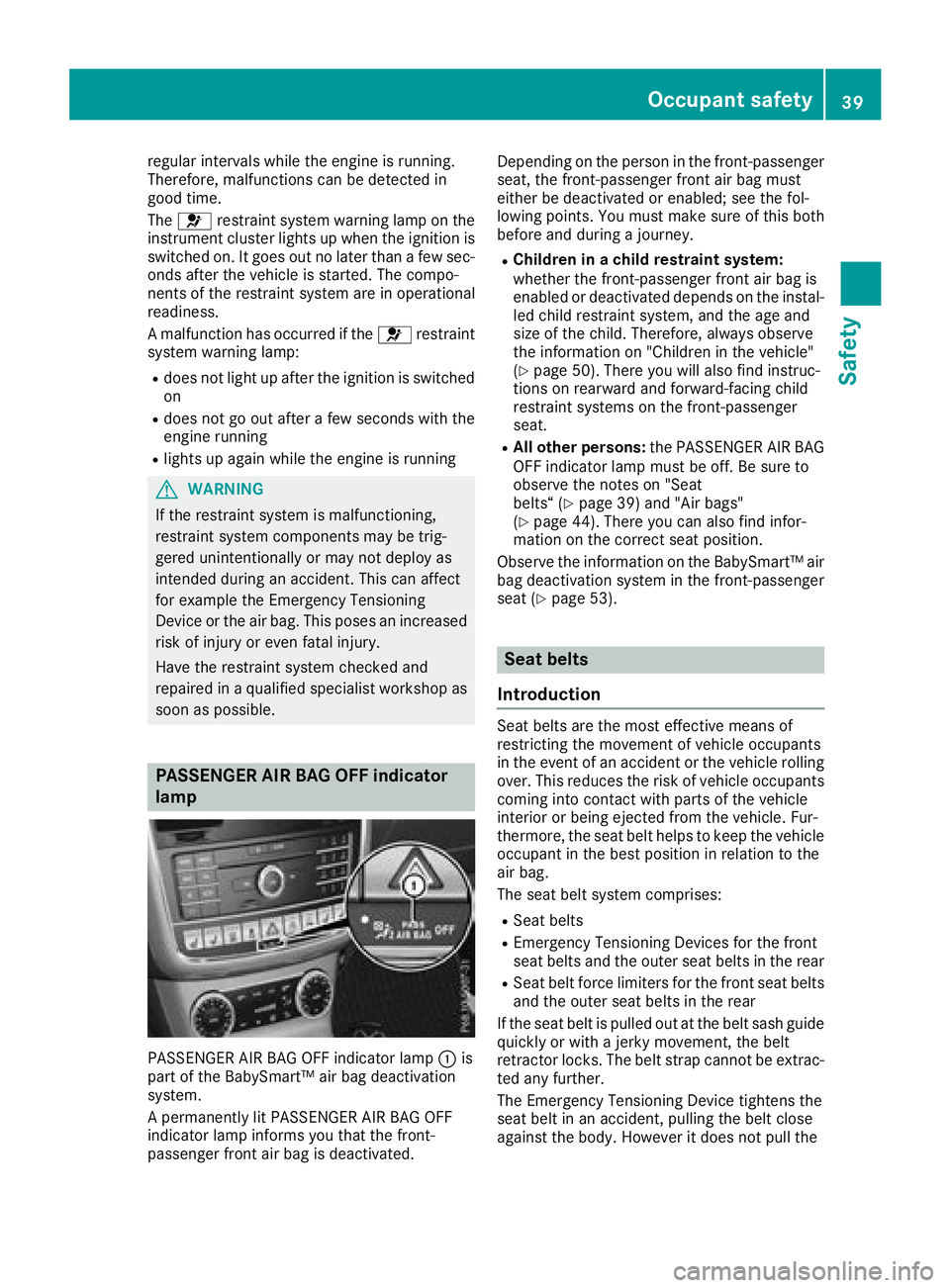
PASSENGER AIR BAG OFF indicator
lamp
PASSENGER AIR BAG OFF indicator lamp :is
part of the BabySmart™ air bag deactivation
system.
A permanently lit PASSENGER AIR BAG OFF
indicator lamp informs you that the front-
passenger front air bag is deactivated. Depending on the person in the front-passenger
seat, the front-passenger front air bag must
either be deactivated or enabled; see the fol-
lowing points. You must make sure of this both
before and during a journey.
RChildren in a child restraint system:
whether the front-passenger front air bag is
enabled or deactivated depends on the instal-
led child restraint system, and the age and
size of the child. Therefore, always observe
the information on "Children in the vehicle"
(
Ypage 50). There you will also find instruc-
tions on rearward and forward-facing child
restraint systems on the front-passenger
seat.
RAll other persons: the PASSENGER AIR BAG
OFF indicator lamp must be off. Be sure to
observe the notes on "Seat
belts“ (
Ypage 39) and "Air bags"
(Ypage 44). There you can also find infor-
mation on the correct seat position.
Observe the information on the BabySmart™ air
bag deactivation system in the front-passenger
seat (
Ypage 53).
Seat belts
Introduction
Seat belts are the most effective means of
restricting the movement of vehicle occupants
in the event of an accident or the vehicle rolling
over. This reduces the risk of vehicle occupants
coming into contact with parts of the vehicle
interior or being ejected from the vehicle. Fur-
thermore, the seat belt helps to keep the vehicle
occupant in the best position in relation to the
air bag.
The seat belt system comprises:
RSeat belts
REmergency Tensioning Devices for the front
seat belts and the outer seat belts in the rear
RSeat belt force limiters for the front seat belts
and the outer seat belts in the rear
If the seat belt is pulled out at the belt sash guide
quickly or with a jerky movement, the belt
retractor locks. The belt strap cannot be extrac-
ted any further.
The Emergency Tensioning Device tightens the
seat belt in an accident, pulling the belt close
against the body. However it does not pull the
Occupant safety39
Safety
Z
Page 45 of 294
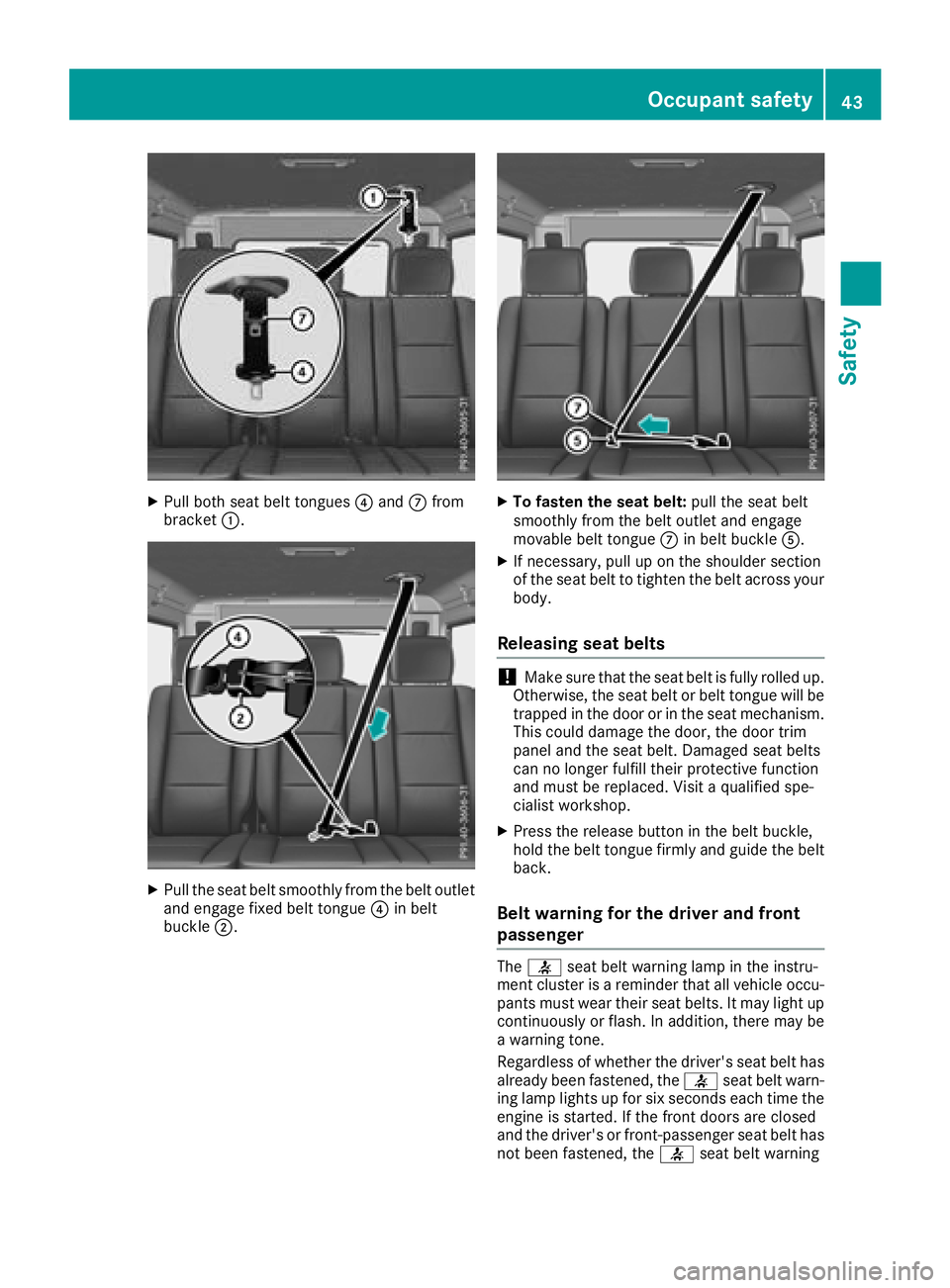
XPull both seat belt tongues?and Cfrom
bracket :.
XPull the seat belt smoothly from the belt outlet
and engage fixed belt tongue ?in belt
buckle ;.
XTo fasten the seat belt: pull the seat belt
smoothly from the belt outlet and engage
movable belt tongue Cin belt buckle A.
XIf necessary, pull up on the shoulder section
of the seat belt to tighten the belt across your
body.
Releasing seat belts
!Make sure that the seat belt is fully rolled up.
Otherwise, the seat belt or belt tongue will be
trapped in the door or in the seat mechanism.
This could damage the door, the door trim
panel and the seat belt. Damaged seat belts
can no longer fulfill their protective function
and must be replaced. Visit a qualified spe-
cialist workshop.
XPress the release button in the belt buckle,
hold the belt tongue firmly and guide the belt
back.
Belt warning for the driver and front
passenger
The 7 seat belt warning lamp in the instru-
ment cluster is a reminder that all vehicle occu- pants must wear their seat belts. It may light up
continuously or flash. In addition, there may be
a warning tone.
Regardless of whether the driver's seat belt has
already been fastened, the 7seat belt warn-
ing lamp lights up for six seconds each time the engine is started. If the front doors are closed
and the driver's or front-passenger seat belt has
not been fastened, the 7seat belt warning
Occupant safety43
Safety
Z
Page 46 of 294
lamp lights up again after the six seconds. As
soon as the driver's and front-passenger seat
belts are fastened or a front door is opened
again, the7seat belt warning lamp goes out.
If the driver's seat belt is not fastened after the
engine is started, an additional warning tone will
sound. The warning tone switches off after six
seconds or once the driver's seat belt is fas-
tened.
If the vehicle's speed exceeds 15 mph
(25 km/h) once and the driver's and front-
passenger seat belts are not fastened, a warning
tone sounds. A warning tone also sounds with
increasing intensity for 60 seconds or until the
driver or front passenger have fastened their
seat belts.
If the driver or front passenger unfasten their
seat belts during the journey, the seat belt warn-
ing is activated again.
Air bags
Introduction
The installation point of an air bag can be rec-
ognized by the AIRBAG marking.
An air bag complements the correctly fastened
seat belt. It is no substitute for the seat belt. The
air bag provides additional protection in appli-
cable accident situations.
Not all air bags are deployed in an accident. The
different air bag systems function independ-
ently from one another (
Ypage 47).
However, no system available today can com-
pletely eliminate injuries and fatalities.
It is also not possible to rule out a risk of injury
caused by an air bag due to the high speed at
which the air bag must be deployed.
Important safety notes
GWARNING
If you do not sit in the correct seat position,
the air bag cannot protect as intended and
could even cause additional injury when
deployed. This poses an increased risk of
injury or even fatal injury.
To avoid hazardous situations, always make
sure that all of the vehicle's occupants:
Rhave fastened their seat belts correctly,
including pregnant women
Rare sitting correctly and maintain the great-
est possible distance to the air bags
Rfollow the following instructions
Always make sure that there are no objects
between the air bag and the vehicle's occu-
pants.
RAdjust the seats properly before beginning
your journey. Always make sure that the seat
is in an almost upright position. The center of
the head restraint must support the head at
about eye level.
RMove the driver's and front-passenger seats
as far back as possible. The driver's seat posi-
tion must allow the vehicle to be driven safely.
ROnly hold the steering wheel on the outside.
This allows the air bag to be fully deployed.
RAlways lean against the backrest while driv-
ing. Do not lean forward or lean against the
door or side window. You may otherwise be in
the deployment area of the air bags.
RAlways keep your feet in the footwell in front
of the seat. Do not put your feet on the dash-
board, for example. Your feet may otherwise
be in the deployment area of the air bag.
RFor this reason, always secure persons less
than 5 ft (1.50 m) tall in suitable restraint sys-
tems. Up to this height, the seat belt cannot
be worn correctly.
If a child is traveling in your vehicle, also
observe the following notes:
RAlways secure children under twelve years of
age and less than 5 ft (1.50 m)tall in suitable
child restraint systems.
RChild restraint systems should be installed on
the rear seats.
ROnly secure a child in a rearward-facing child
restraint system on the front-passenger seat
when the front-passenger front air bag is
deactivated. If the PASSENGER AIR BAG OFF
indicator lamp is permanently lit, the front-
passenger front air bag is deactivated
(
Ypage 39).
RAlways observe the instructions and safety
notes on "Children in the vehicle"
(
Ypage 50) and on the "Child restraint sys-
44Occupant safety
Safety