ECU MERCEDES-BENZ G-CLASS 2018 Owner's Guide
[x] Cancel search | Manufacturer: MERCEDES-BENZ, Model Year: 2018, Model line: G-CLASS, Model: MERCEDES-BENZ G-CLASS 2018Pages: 294, PDF Size: 4.86 MB
Page 94 of 294
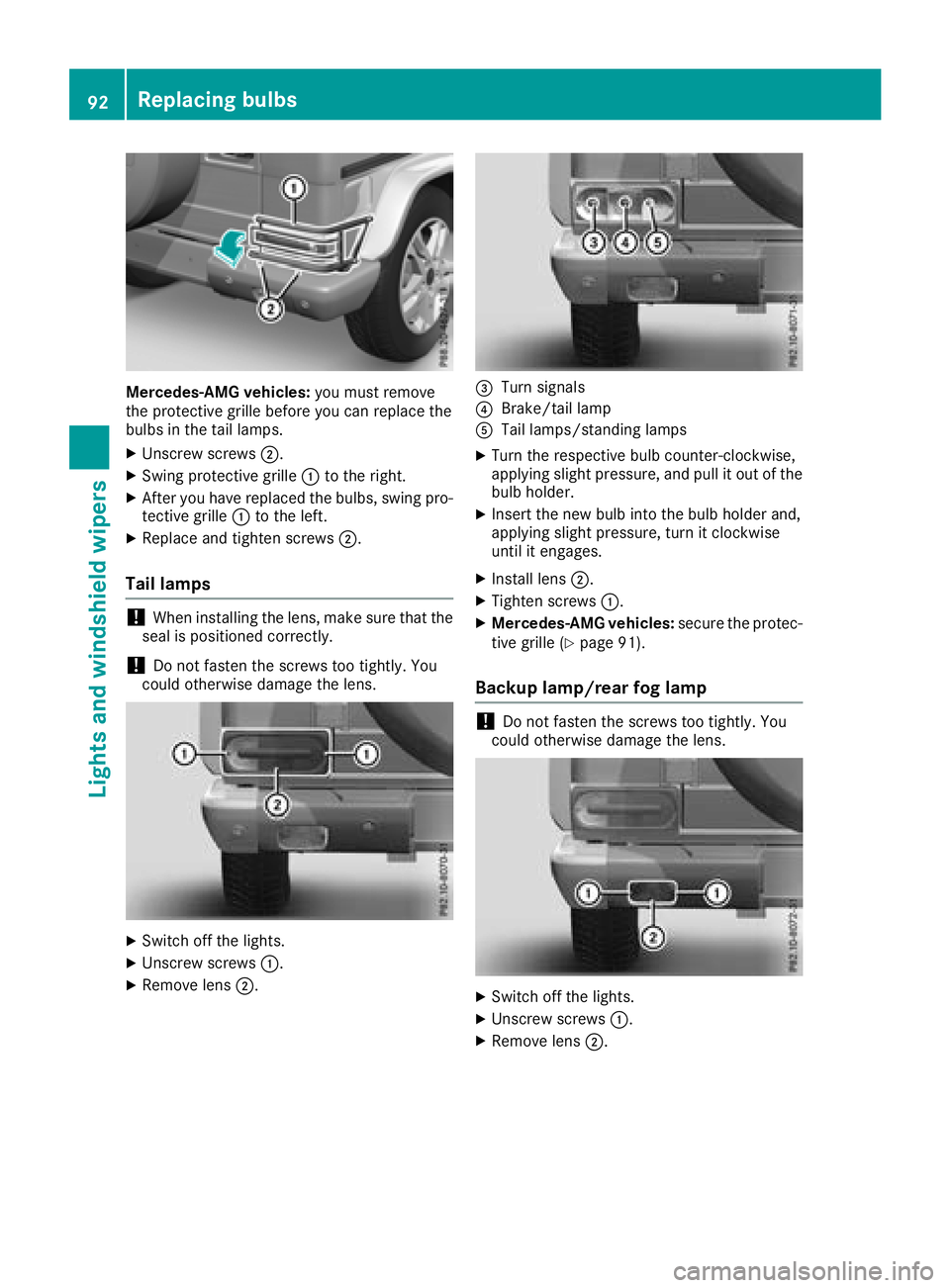
Mercedes-AMG vehicles:you must remove
the protective grille before you can replace the
bulbs in the tail lamps.
XUnscrew screws ;.
XSwing protective grille :to the right.
XAfter you have replaced the bulbs, swing pro-
tective grille :to the left.
XReplace and tighten screws ;.
Tail lamps
!When installing the lens, make sure that the
seal is positioned correctly.
!Do not fasten the screws too tightly. You
could otherwise damage the lens.
XSwitch off the lights.
XUnscrew screws :.
XRemove lens;.
=Turn signals
?Brake/tail lamp
ATail lamps/standing lamps
XTurn the respective bulb counter-clockwise,
applying slight pressure, and pull it out of the
bulb holder.
XInsert the new bulb into the bulb holder and,
applying slight pressure, turn it clockwise
until it engages.
XInstall lens;.
XTighten screws :.
XMercedes-AMG vehicles: secure the protec-
tive grille (Ypage 91).
Backup lamp/rear fog lamp
!Do not fasten the screws too tightly. You
could otherwise damage the lens.
XSwitch off the lights.
XUnscrew screws :.
XRemove lens;.
92Replacing bulbs
Lights and windshield wipers
Page 106 of 294
Notes on breaking-in a new vehicle
Important safety notes
The sensor system of some driving and driving
safety systems adjusts automatically while a
certain distance is being driven after the vehiclehas been delivered or after repairs. Full system
effectiveness is not reached until the end of this
teach-in procedure.
New and replaced brake pads and discs only
reach their optimum braking effect after several hundred kilometers of driving. Compensate for
this by applying greater force to the brake pedal.
The first 1000 miles (1500 km)
The more you look after the engine when it is
new, the more satisfied you will be with its per-
formance in the future.
RYou should therefore drive at varying vehicle
and engine speeds for the first 1,000 miles
(1,500 km).
RAvoid heavy loads, e.g. driving at full throttle,
during this period.
RWhen shifting gears manually, shift up in good
time, before the tachometer needle reaches
Ô of the way to the red area of the tachom-
eter display.
RDo not manually shift to a lower gear to brake
the vehicle.
RTry to avoid depressing the accelerator pedal
beyond the pressure point (kickdown).
Additional breaking-in notes for Mercedes-AMG
vehicles:
RDo not drive faster than 85 mph (140 km/h)
for the first 1,000 miles (1,500 km).
ROnly briefly allow the engine to reach a max-
imum engine speed of 4,500 rpm.
RAvoid driving off-road before the first differ-
ential oil change at 2,000 miles (3,000 km).
RIdeally, for the first 1,000 miles (1,500 km),
drive in program C.
After 1,000 mile s(1,500 km), you can increase
the engine speed gradually and bring the vehicle
to full speed.
You shoul
d also observe these notes on break-
ing in if the engine or parts of the drive train on
your vehicle have been replaced.
Always observe the maximum permissible
speed.
Axle differential transmission
(Mercedes-AMG vehicles)
Change the oil after a breaking-in period of
2,000 miles (3,000 km) to improve protection of
the axle differential transmission.
This oil change prolongs the service life of the
axle differential transmission. Have the oil
change carried out at a qualified specialist work- shop.
Axle differential transmission and
portal transmission (G 500 4x42)
Change the oil after a breaking-in period of
2,000 miles (3,000 km) to improve protection of
the axle differential transmission and portal
transmission.
This oil change prolongs the service life of the
axle differential and portal transmission. Have
the oil change carried out at a qualified special-ist workshop.
Driving
Important safety notes
GWARNING
Objects in the driver's footwell may restrict
the clearance around the pedals or block a
depressed pedal. This jeopardizes the oper-
ating and road safety of the vehicle. There is a risk of an accident.
Stow all objects securely in the vehicle so that
they do not get into the driver's footwell.
When using floormats or carpets, make sure
that they are properly secured so that they do not slip or obstruct the pedals. Do not place
several floormats or carpets on top of one
another.
GWARNING
Unsuitable footwear can hinder correct usage of the pedals, e.g.:
Rshoes with thick soles
Rshoes with high heels
Rslippers
104Driving
Driving and parking
Page 109 of 294
verter to reach its operating temperature
more quickly.
Pulling away with a trailer
To ensure that you do not roll back when pulling
away on an uphill slope, apply the parking brake.
XDepress the brake pedal and keep it
depressed.
XShift the automatic transmission to position
hork.
iAlways wait until the shifting process is
complete before driving off.
XRelease the parking brake (Ypage 123).
XRelease the brake pedal.
XCarefully depress the accelerator pedal.
Hill start assist
Hill start assist helps you when pulling away
forward or in reverse on an uphill gradient. It
holds the vehicle for a short time after you have
removed your foot from the brake pedal. This
gives you enough time to move your foot from
the brake pedal to the accelerator pedal and to
depress it before the vehicle begins to roll.
GWARNING
After a short time, hill start assist will no lon-
ger brake your vehicle and it could roll away.
There is a risk of an accident and injury.
Therefore, quickly move your foot from the
brake pedal to the accelerator pedal. Never
leave the vehicle when it is held by hill start
assist.
Hill start assist will not function if:
Ryou are pulling away on a level road or on a
downhill gradient
Rthe transmission is in position i
Rthe parking brake is applied
RESP®is malfunctioning
ECO start/stop function
Important safety notes
GWARNING
If the engine is switched off automatically and
you exit the vehicle, the engine is restarted
automatically. The vehicle may begin moving.
There is a risk of accident and injury.
If you wish to exit the vehicle, always turn off
the ignition and secure the vehicle against
rolling away.
General notes
The ECO start/stop function switches the
engine off automatically when the vehicle stops
moving.
The engine starts automatically when the driver
wants to pull away again. The ECO start/stop
function thereby helps you to reduce the fuel
consumption and emissions of your vehicle.
The ECO start/stop function is activated each
time the engine is switched on or when you
switch the drive program (except Mercedes-
AMG vehicles).
Mercedes-AMG vehicles: the ECO start/stop
function is activated after the engine is restarted
and is only available in drive program C. When
drive program Sor Mis selected, the ECO start/
stop function is deactivated.
The system is operational if all conditions for
automatic engine switch-off have been fulfilled
(
Ypage 108) and the èsymbol is shown in
green in the multifunction display.
If not all conditions for automatic engine switch-
off are fulfilled (
Ypage 108), the èECO
symbol is shown in yellow in the multifunction
display.
If the ECO start/stop function has been man-
ually deactivated (
Ypage 108) or a malfunction
has caused the system to be deactivated, the
è ECO symbol is not displayed.
Driving107
Driving and parking
Z
Page 116 of 294
Transmission positions
BPark position
This prevents the vehicle from rolling
away when stopped.
Only shift the transmission into posi-
tion j(
Ypage 112) when the vehi-
cle is stationary. The parking lock
should not be used as a brake when
parking. Always apply the parking
brake in addition to the parking lock
in order to secure the vehicle.
The SmartKey can only be removed if
the transmission is in position j.
When there is no SmartKey in the
ignition lock, the selector lever is
locked in position j.
CReverse gear
Only shift the transmission into posi-
tionkwhen the vehicle is station-
ary.
A!Coasting in neutral imay
cause damage to the drive train.
Neutral
Do not shift the transmission to i
while driving. The automatic trans-
mission could otherwise be dam-
aged.
No power is transmitted from the
engine to the drive wheels.
Releasing the brakes will allow you to
move the vehicle freely, e.g. to push
it or tow it.
If ESP
®is deactivated or faulty and
the vehicle is in danger of skidding,
e.g. on icy roads: shift the transmis-
sion to i.
If you engage the transfer case, shift briefly to i(
Ypage 149).
7Drive
The automatic transmission changes
gear automatically. All forward gears
are available.
Changing gear
The automatic transmission shifts through the
individual gears automatically when it is in trans-
mission position h. This automatic gear shift-
ing behavior is determined by:
Ra shift range restriction, if selected
Rthe position of the transfer case ( HIGH
RANGE orLOW RANGE )
Rthe position of the accelerator pedal
Rthe road speed
Driving tips
Accelerator pedal position
Your style of driving influences how the auto-
matic transmission shifts gear:
Rlittle throttle: early upshifts
Rmore throttle: late upshifts
Kickdown
Use kickdown for maximum acceleration.
XDepress the accelerator pedal beyond the
pressure point.
The automatic transmission shifts to a lower
gear depending on the engine speed.
XEase off the accelerator pedal once the
desired speed is reached.
The automatic transmission shifts back up.
Kickdown is not available in the permanent man-
ual drive program on Mercedes-AMG vehicles.
Rocking the vehicle free
Rocking free by shifting back and forth between
transmission positions Dand Rcan help to free
the vehicle if it gets stuck. The vehicle's engine
management system limits the speed to a max-
imum of 5 mph (9 km/h) when shifting back and
forth.
Shifting back and forth between transmission
positions Dand R:
XMove the selector lever forwards or back-
wards past the point of resistance.
114Automatic transmission
Driving an d parking
Page 119 of 294
Derestricting theshift range
XPull th eright-hand steerin gwhee lpaddle
shifter (Ypage 116).
The automatic transmissio nshift sup on e
gear and restricts th eshift range to th erele-
van tgear .
Clearing th eshift range restriction
XPull and hol dth eright-hand steerin gwhee l
paddle shifter (Ypage 116) until transmissio n
position Dis shown in th emultifunction dis -
play.
The automatic transmissio nshift sfrom th e
curren tshift range directl yto D.
Selecting th eideal shift range
XPull th eleft-han dsteerin gwhee lpaddle
shifter (Ypage 116) and hol dit in position .
The automatic transmissio nshift sto th egear
whic hallow soptimum acceleration and
deceleration .To do this, th eautomatic trans -
missio nshift sdown on eor more gears.
The automatic transmissio ncanno tshift down
beyond secon dgear .To shift to first gear ,you
hav eto pull th elef tsteerin gwhee lpaddle
shifter.
Manual gea rshifting
Temporar ysetting
XTo activate :shift th eselecto rlever to posi-
tion P.
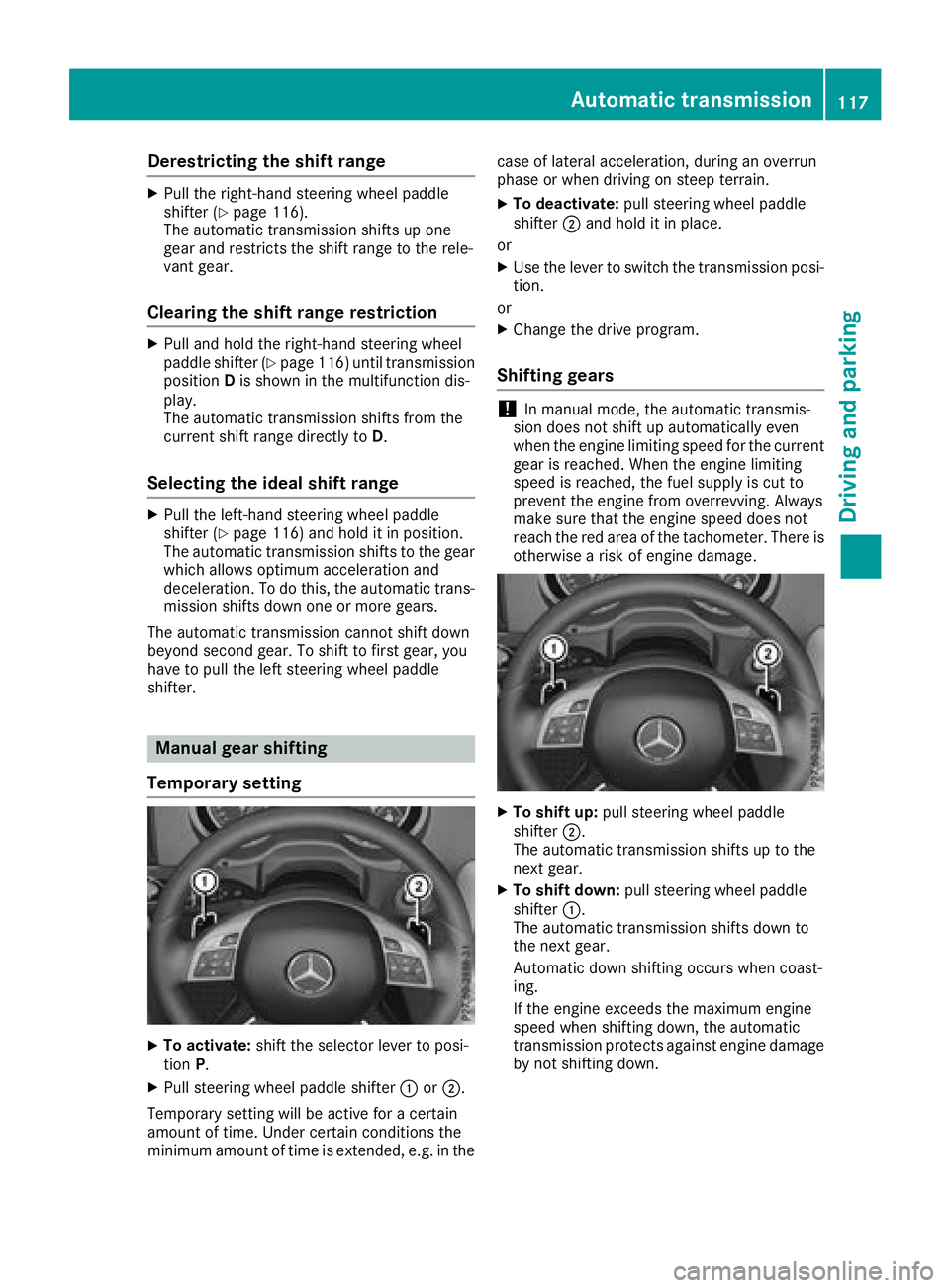
XPull steerin gwhee lpaddle shifter :or;.
Temporary setting will be active fo r acertain
amount of time. Under certain condition sth e
minimum amount of time is extended, e.g. in th ecas
eof latera lacceleration ,durin gan overrun
phas eor when drivin gon steep terrain .
XTo deactivate:pull steerin gwhee lpaddle
shifter ;and hol dit in place.
or
XUse th elever to switch th etransmissio nposi-
tion .
or
XChange th edrive program.
Shifting gears
!In manual mode, th eautomatic transmis -
sio ndoe sno tshift up automatically eve n
when th eengin elimitin gspeed fo rth ecurren t
gear is reached. Whe nth eengin elimitin g
speed is reached, th efue lsupply is cut to
preven tth eengin efrom overrevving. Always
mak esur ethat th eengin espeed doe sno t
reach th ered are aof th etachometer. There is
otherwise aris kof engin edamage.
XTo shift up :pull steerin gwhee lpaddle
shifter ;.
The automatic transmissio nshift sup to th e
next gear .
XTo shift down: pull steeringwhee lpaddle
shifter :.
The automatic transmissio nshift sdown to
th enext gear .
Automatic down shiftin goccur swhen coast -
ing.
If th eengin eexceeds th emaximum engin e
speed when shiftin gdown ,th eautomatic
transmissio nprotect sagainst engin edamage
by no tshiftin gdown .
Automatic transmission117
Driving and parking
Z
Page 125 of 294
To ensure that the vehicle is safeguarded
against rolling away unintentionally:
Rthe parking brake must be applied.
Rthe transmission must be in positionPand the
SmartKey must be removed from the ignition
lock
Rthe transfer case must not be in the neutral
position
Rthe front wheels must be turned towards the
curb on steep uphill or downhill gradients
Rthe empty vehicle must be secured at the
front axle with a wheel chock or similar
object, for example, on uphill or downhill gra-
dients
Ra laden vehicle must also be secured at the
rear axle with a wheel chock or similar object, for example, on uphill or downhill gradients
Switching off the engine
GWARNING
The automatic transmission switches to neu-
tral position Nwhen you switch off the engine.
The vehicle may roll away. There is a risk of an
accident.
After switching off the engine, always switch
to parking position P. Prevent the parked vehi-
cle from rolling away by applying the parking
brake.
XShift the automatic transmission to position
j.
XTurn the SmartKey to position gin the igni-
tion lock and remove it.
The immobilizer is activated.
XApply the parking brake firmly.
XTurn the steering wheel until the steering
wheel lock engages.
If you switch the engine off with the transmis-
sion in position korh the automatic trans-
mission shifts to iautomatically.
If you then open the driver's door or the front-
passenger door or remove the SmartKey from
the ignition, the automatic transmission shifts
to j automatically.
If you switch off the engine while the transmis-
sion is in position i, the automatic transmis-
sion remains in ieven if a door is opened. The
automatic transmission only automatically shifts into
jwhen you remove the SmartKey
from the ignition lock.
Parking brake
GWARNING
If you must brake the vehicle with the parking brake, the braking distance is considerably
longer and the wheels could lock. There is an
increased danger of skidding and accidents.
Only use the parking brake to brake the vehi-
cle when the service brake is faulty. Do not
apply the parking brake too firmly. If the
wheels lock, release the parking brake until
the wheels begin turning again.
GWARNING
If you leave children unsupervised in the vehi-
cle, they could set it in motion by, for example:
Rrelease the parking brake.
Rshift the automatic transmission out of the
parking position P.
Rstart the engine.
In addition, they may operate vehicle equip-
ment and become trapped. There is a risk of
an accident and injury.
When leaving the vehicle, always take the
SmartKey with you and lock the vehicle. Never
leave children unsupervised in the vehicle.
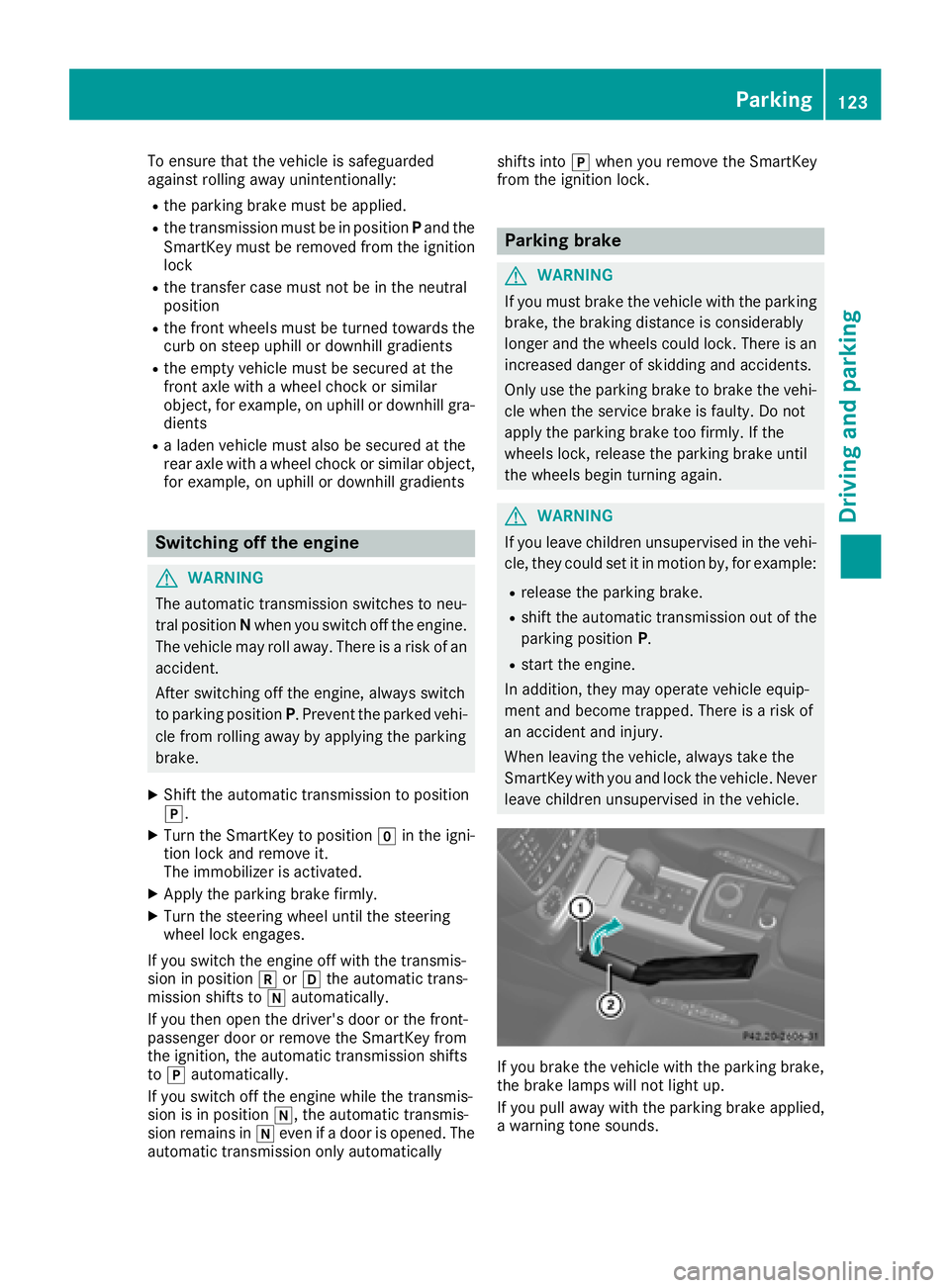
If you brake the vehicle with the parking brake,
the brake lamps will not light up.
If you pull away with the parking brake applied,
a warning tone sounds.
Parking123
Driving and parking
Z
Page 132 of 294
General notes
HEnvironmental note
Protection of the environment is of primary
importance. Treat nature with respect.
Observe all prohibiting signs.
Read this section carefully before driving your
vehicle off-road. Practice by driving over more
gentle off-road terrain first.
Familiarize yourself with the characteristics of
your vehicle and the gear shift operation before
driving through difficult terrain.
The following driving systems are specially
adapted to off-road driving:
R4ETS (Ypage 59)
ROff-road ABS (Ypage 59)
RTransfer case (Ypage 149)
RDifferential locks (Ypage 151)
Observe the following notes:
Rstop the vehicle before you drive off-road and,
if necessary, shift the transfer case to the
LOW RANGE off-road gear (
Ypage 149).
REngage the differential locks if necessary
(Ypage 151).
iABS, 4ETS, ESP®and BAS are deactivated
while the differential locks are engaged. This
allows the front wheels to lock briefly, so that
these can dig into a loose surface. However,
please note that locked wheels skid and can
no longer steer.
RCheck that items of luggage and loads are
stowed safely and are well secured
(
Ypage 214).
RTo avoid damaging the vehicle, make sure
there is always sufficient ground clearance.
RAlways keep the engine running and in gear
when driving on a downhill gradient.
RAlways keep the engine running and in gear
when driving down an incline.
RDrive slowly and evenly, if necessary at a
walking pace.
REnsure that the wheels are in contact with the
ground at all times.
RDrive with extreme care on unfamiliar off-road
routes where visibility is poor. For safety rea-
sons, get out of the vehicle first and survey
the off-road route.
RCheck the depth of water before fording rivers
and streams.
RWatch out for obstacles.
RAlways keep the doors, rear door, side win-
dows and the sliding sunroof closed while the
vehicle is in motion.
RSwitch off cruise control.
RDo not deviate from marked routes.
RAdapt your speed to the terrain. The rougher,
steeper or more ruts on the terrain, the slower
your speed should be.
RDo not jump with the vehicle. as this will inter-
rupt the vehicle's propulsion.
RAvoid high engine speeds. Drive at appropri-
ate engine speeds (maximum 3,000 rpm).
RDo not shift the automatic transmission to
position i.
RAlways check the vehicle for damage after off-
road driving.
Do not use the HOLD function when driving off-
road, on steep uphill or downhill gradients or on slippery or loose surfaces. The HOLD function
cannot hold the vehicle on such surfaces.
You can obtain further information about mount-
ing special all-terrain tires from a qualified spe-
cialist workshop.
Checklist before driving off-road
!If the engine oil warning lamp lights up while
the vehicle is in motion, stop the vehicle in a
safe place as soon as possible. Check the
engine oil level. The engine oil warning lamp
warning must not be ignored. Continuing the
journey while the symbol is displayed could
lead to engine damage.
XEngine oil level: check the engine oil level
and add oil if necessary.
When driving on steep gradients, the engine
oil level must be sufficiently high to ensure a
correct oil supply in the vehicle.
XTire-changing tool kit: check that the jack is
working and make sure you have the lug
wrench, a robust tow cable and a folding
spade in the vehicle.
XWheels and tires: check the tire tread depth
and tire pressure.
XCheck for damage and remove any foreign
objects, e.g. small stones, from the wheels/
tires.
XReplace any missing valve caps.
130Driving tips
Driving and parking
Page 140 of 294
Rthe battery is disconnected.
Rthe accelerator pedal has been depressed,
e.g. by a vehicle occupant.
There is a risk of an accident.
If you wish to exit the vehicle, always turn off
DISTRONIC PLUS and secure the vehicle
against rolling away.
For further information on deactivating
DISTRONIC PLUS (
Ypage 139).
If DISTRONIC PLUS detects that the vehicle in
front is stopping, it brakes your vehicle until it is
stationary.
Once your vehicle is stationary, it remains sta-
tionary and you do not need to depress the
brake.
Depending on the specified minimum distance,
your vehicle will come to a standstill at a suffi-
cient distance behind the vehicle in front. The
specified minimum distance is set using the
control on the cruise control lever.
The automatic transmission shifts automatically
to transmission position jif DISTRONIC PLUS
is activated and:
Rthe driver's seat belt is not fastened and the
driver's door is open.
Rthe engine is switched off, unless it is auto-
matically switched off by the ECO start/stop
function.
On steep uphill or downhill inclines, or if there is
a malfunction, the automatic transmission may
also automatically be shifted to pos
ition
j.
Setting a speed
XPush the cruise control lever upwards :for a
higher speed or down ;for a lower speed.
XTo adjust the set speed in 1 mph incre-
ments (1 km/h increments):briefly push
the cruise control lever up :or down ;to
the pressure point.
Every time the cruise control lever is pressed
up : or down ;, the last speed stored is
increased or reduced.
XTo adjust the set speed in 5 mph incre-
ments (10 km/h increments): briefly push
the cruise control lever up :or down ;
beyond the pressure point.
Every time the cruise control lever is pressed
up : or down ;, the last speed stored is
increased or reduced. If you accelerate to overtake, DISTRONIC PLUS
adjusts the vehicle's speed back to the last
speed stored after you have finished overtaking.
Setting a specified minimum distance
You can set the specified minimum distance for
DISTRONIC PLUS by varying the time span
between one and two seconds. With this func-
tion, you can set the minimum distance that
DISTRONIC PLUS keeps to the vehicle in front,
dependent on vehicle speed. You can see this
distance in the multifunction display
(
Ypage 167).
Make sure that you maintain the minimum dis-
tance to the vehicle in front as required by law.
Adjust the distance to the vehicle in front if nec-
essary.
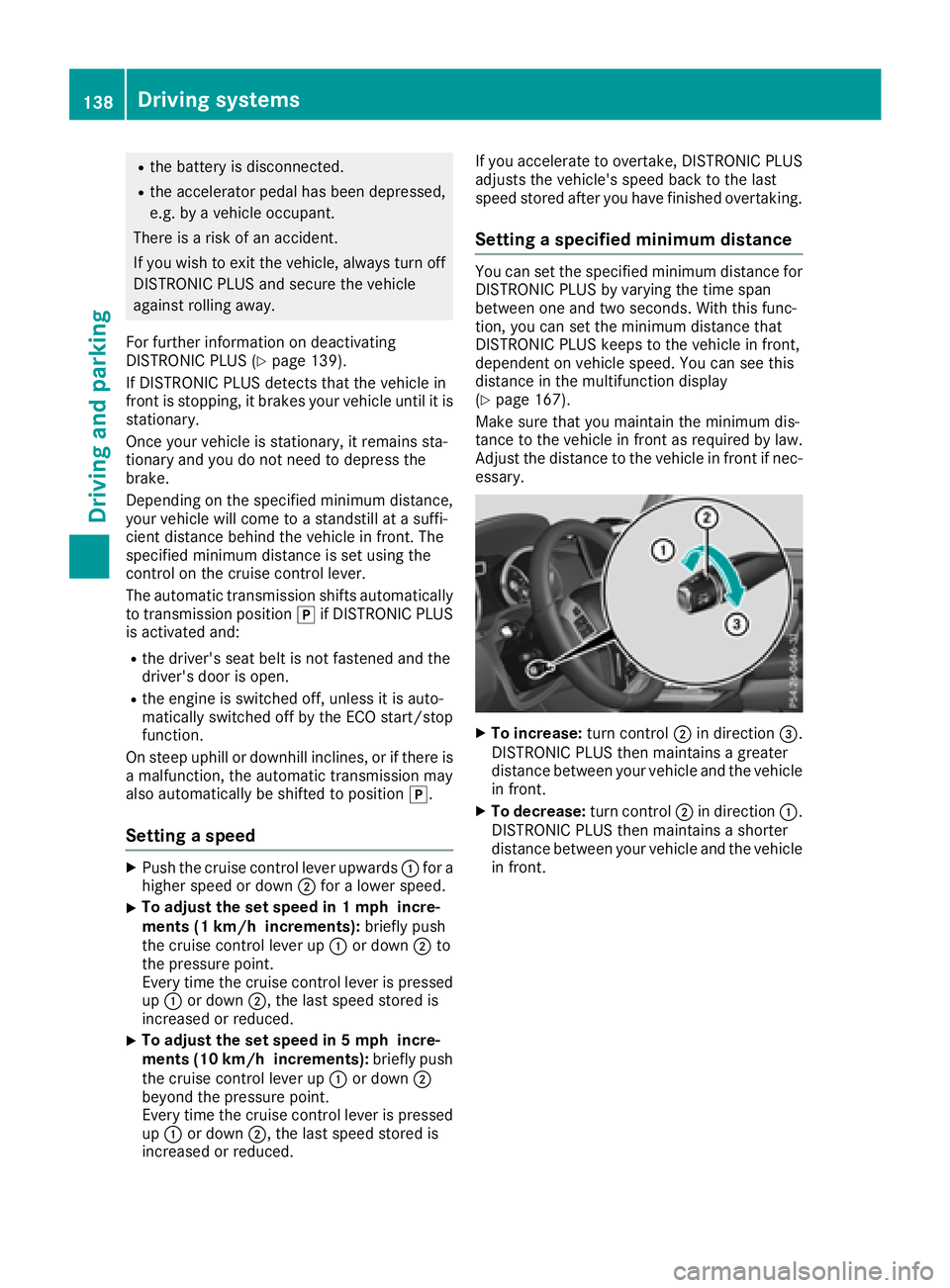
XTo increase: turn control;in direction =.
DISTRONIC PLUS then maintains a greater
distance between your vehicle and the vehicle
in front.
XTo decrease: turn control;in direction :.
DISTRONIC PLUS then maintains a shorter
distance between your vehicle and the vehicle
in front.
138Driving systems
Driving an d parking
Page 144 of 294
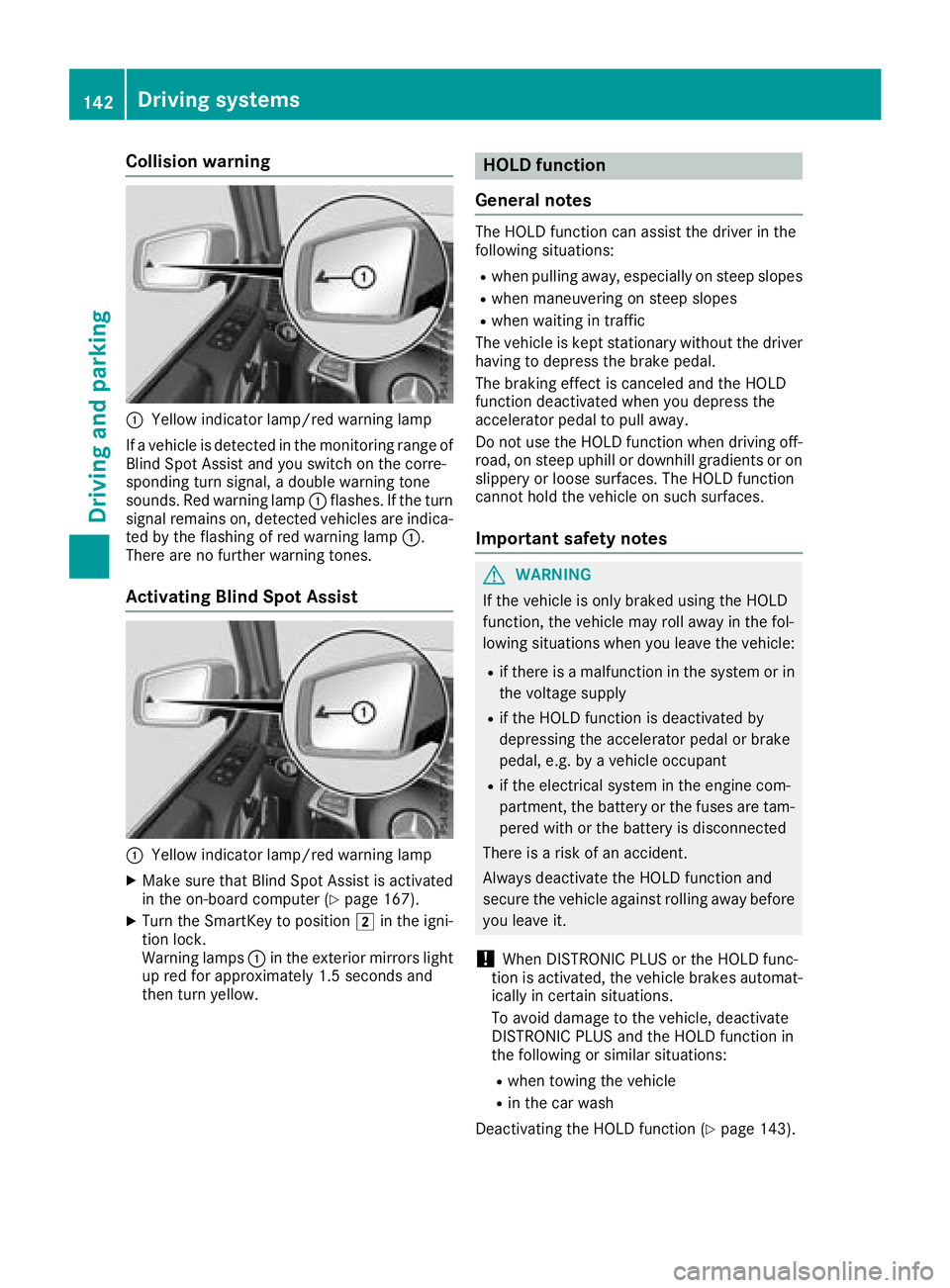
Collision warning
:Yellow indicator lamp/red warning lamp
If a vehicle is detected in the monitoring range of
Blind Spot Assist and you switch on the corre-
sponding turn signal, a double warning tone
sounds. Red warning lamp :flashes. If the turn
signal remains on, detected vehicles are indica-
ted by the flashing of red warning lamp :.
There are no further warning tones.
Activating Blind Spot Assist
:Yellow indicator lamp/red warning lamp
XMake sure that Blind Spot Assist is activated
in the on-board computer (Ypage 167).
XTurn the SmartKey to position 2in the igni-
tion lock.
Warning lamps :in the exterior mirrors light
up red for approximately 1.5 seconds and
then turn yellow.
HOLD function
General notes
The HOLD function can assist the driver in the
following situations:
Rwhen pulling away, especially on steep slopes
Rwhen maneuvering on steep slopes
Rwhen waiting in traffic
The vehicle is kept stationary without the driver having to depress the brake pedal.
The braking effect is canceled and the HOLD
function deactivated when you depress the
accelerator pedal to pull away.
Do not use the HOLD function when driving off-
road, on steep uphill or downhill gradients or on
slippery or loose surfaces. The HOLD function
cannot hold the vehicle on such surfaces.
Important safety notes
GWARNING
If the vehicle is only braked using the HOLD
function, the vehicle may roll away in the fol-
lowing situations when you leave the vehicle:
Rif there is a malfunction in the system or in the voltage supply
Rif the HOLD function is deactivated by
depressing the accelerator pedal or brake
pedal, e.g. by a vehicle occupant
Rif the electrical system in the engine com-
partment, the battery or the fuses are tam-
pered with or the battery is disconnected
There is a risk of an accident.
Always deactivate the HOLD function and
secure the vehicle against rolling away before
you leave it.
!When DISTRONIC PLUS or the HOLD func-
tion is activated, the vehicle brakes automat-
ically in certain situations.
To avoid damage to the vehicle, deactivate
DISTRONIC PLUS and the HOLD function in
the following or similar situations:
Rwhen towing the vehicle
Rin the car wash
Deactivating the HOLD function (
Ypage 143).
142Driving systems
Driving and parking
Page 153 of 294
Differential locks
General notes
GWARNING
Whe nth edifferential locks are engaged, ABS,
4ETS ,ES P
®and BA Sare deactivated. As a
result ,th ewheels could loc kwhen braking
and th ebraking distanc eis increased. There is
a ris kof an accident.
Disengage th edifferential locks immediately
on fir msurfaces wit hgoo dgrip.
!In order to avoid damage to th etransfe r
case, you mus toperat eth evehicle on adyna-
mometer (1-axl edynamometer) only if:
Rth eaxl eno tdriven on is jacked up
or
Rth ecorrespondin gpropeller shaft is dis -
connecte dand th etransfe rcas edifferen -
tial loc kis engaged.
Differential locks improve th etraction of th e
vehicle.
Your vehicle is equipped wit h adifferential loc k
eac hfor:
Rth etransfe rcase: this controls th ebalance
between th efron tand rea raxles.
Rth erea raxle: this controls th ebalance
between th ewheels on th erea raxle.
Rth efron taxle: this controls th ebalance
between th ewheels on th efron taxle.
Information on differential gea rsyste m
an ddifferential lock
Whe nth evehicle drives around acurve, th e
wheels on th eoutsid eof th ecurve mus tcover a
greater distance. Therefore, th ewheels turn
more rapidly than on th einside. The differential,
a gear syste min th edrive train ,allow sfo rdif -
ferin grotational speeds and facilitates corner-
ing.
The disadvantage of adifferential is that th e
wheels that hav eth eleas tgrip, get th emost
drive. Fo rexample, awhee lon adrive axl elies
on snow-covered groun dand therefore has no
traction .The differential sends most of th edrive
forc eto this whee lbecause th eforc etake sth e
rout eof th elowest resistance. The opposite
whee lon this axle, however, whic hstand son
fir m groun dand could therefore allow propul- sion, receives no drivin
gpower. 4ETS compen-
sates fo rthis disadvantage. 4ETS provides goo d
steerability by automatically braking th espin-
ning wheel. 4ETS provides th ewhee lon th efir m
surfac ewit hmore drive force, whic hin turn pro -
vides propulsion .
ES P
®and 4ETS are traction systems that are
idea lfo rroad drivin gand suitable fo rligh toff-
road driving. The LOW RANGEoff-road g
ear
also improves off-road capability.
Mor echallengin goff-road condition srequire
additional measures suc has locking on eor
more differential.
Your vehicle is equipped wit hthree differential
locks :
Rforth etransfe rcas e
Rforth efron taxl e
Rforth erea raxl e
Each differential loc kcan be engage dwit hth e
correspondin gswitch on th ecenter console. If
th edifferential in th etransfe rcas eis locked, th e
fron tand rea rwheels rotate at th esam espeed.
If th edifferential fo rth erea raxl eis locked, bot h
rea rwheels rotate at th esam espeed, regard -
les sof their respective torque. Note, engaging
th edifferential loc kgreatly impairs th evehicle' s
steerability.
Note, it is imperative to use th edifferential func-
tion when drivin gon fir mroad surfaces. Under
no circumstances should th edifferential be
locke dwhen drivin gon fir mroad surfaces. Oth-
erwise ,th evehicle may no tbe steerable and you
could los econtro lof th evehicle. Therefore, only
engage th edifferential loc kwhen drivin goff-
road. You should only engage th edifferential
loc kif act ivati
n
g4ETS and ES P®drivingsystems
and LOW RANGE off-road gear prove to be
insufficient.
Engaging th edifferential lock s
General notes
The switches are located on th ecenter console.
Off-road driving systems15 1
Driving an d parking
Z