engine MERCEDES-BENZ G-CLASS 2018 Manual Online
[x] Cancel search | Manufacturer: MERCEDES-BENZ, Model Year: 2018, Model line: G-CLASS, Model: MERCEDES-BENZ G-CLASS 2018Pages: 294, PDF Size: 4.86 MB
Page 174 of 294
RACE TIMER
Displaying and starting RACE TIMER
The RACE TIMER is only intended for use on a
closed race circuit. Do not use the function on
public roads.
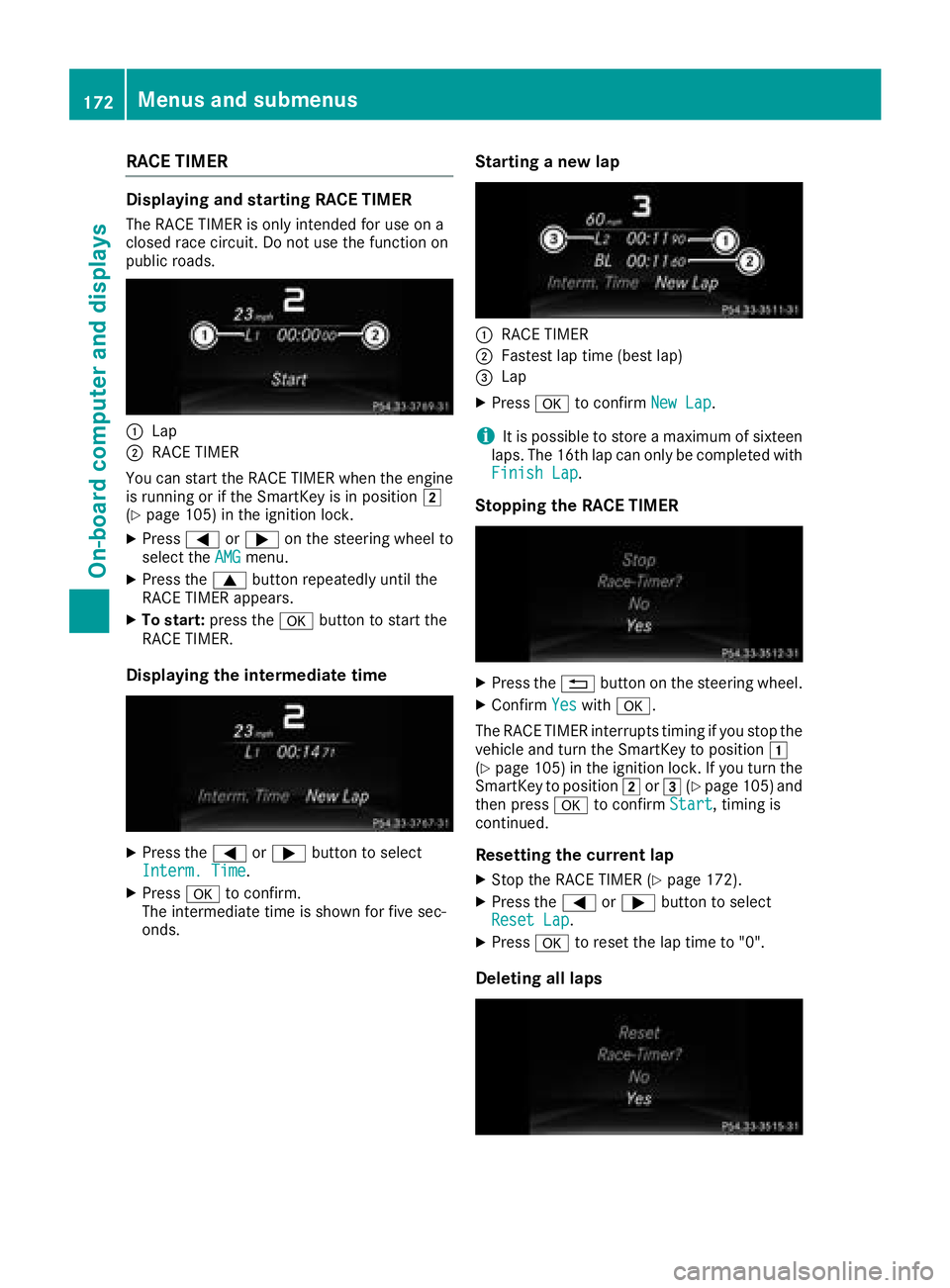
:Lap
;RACE TIMER
You can start the RACE TIMER when the engine
is running or if the SmartKey is in position 2
(
Ypage 105) in the ignition lock.
XPress =or; on the steering wheel to
select the AMGmenu.
XPress the9button repeatedly until the
RACE TIMER appears.
XTo start: press the abutton to start the
RACE TIMER.
Displaying the intermediate time
XPress the =or; button to select
Interm. Time.
XPress ato confirm.
The intermediate time is shown for five sec-
onds.
Starting a new lap
:RACE TIMER
;Fastest lap time (best lap)
=Lap
XPress ato confirm New Lap.
iIt is possible to store a maximum of sixteen
laps. The 16th lap can only be completed with
Finish Lap
.
Stopping the RACE TIMER
XPress the %button on the steering wheel.
XConfirm Yeswitha.
The RACE TIMER interrupts timing if you stop the
vehicle and turn the SmartKey to position 1
(
Ypage 105 )in the ignition lock. If you turn the
SmartKey to position 2or3 (Ypage 105 )and
then press ato confirm Start, timing is
continued.
Resetting the current lap
XStop the RACE TIMER (Ypage 172).
XPress the =or; button to select
Reset Lap.
XPress ato reset the lap time to "0".
Deleting all laps
172Menus and submenus
On-board computer and displays
Page 175 of 294
If you switch off the engine, the RACE TIMER is
reset to "0" after 30 seconds. All laps are
deleted.
You cannot delete individual stored laps. If you
have stopped 16 laps, the current lap does not
have to be reset.
XReset the current lap (Ypage 172).
XPressato confirm Reset.
The Reset Race-Timer?display message
appears in the multifunction display.
XPress the :button to select Yesand press
the a button to confirm.
All laps are deleted.
Overall statistics
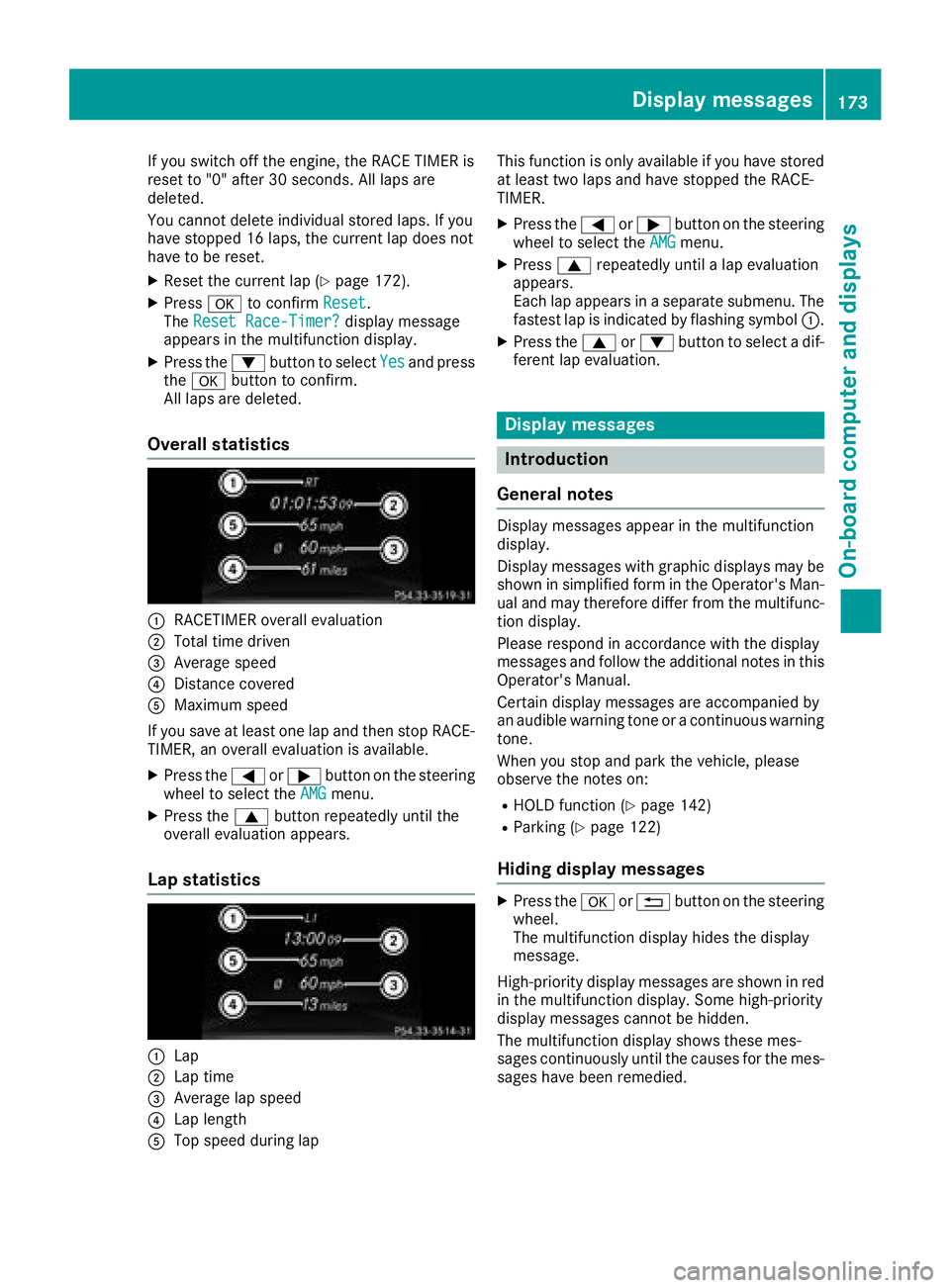
:RACETIMER overall evaluation
;Total time driven
=Average speed
?Distance covered
AMaximum speed
If you save at least one lap and then stop RACE- TIMER, an overall evaluation is available.
XPress the =or; button on the steering
wheel to select the AMGmenu.
XPress the9button repeatedly until the
overall evaluation appears.
Lap statistics
:Lap
;Lap time
=Average lap speed
?Lap length
ATop speed during lap This function is only available if you have stored
at least two laps and have stopped the RACE-
TIMER.
XPress the
=or; button on the steering
wheel to select the AMGmenu.
XPress9repeatedly until a lap evaluation
appears.
Each lap appears in a separate submenu. The
fastest lap is indicated by flashing symbol :.
XPress the9or: button to select a dif-
ferent lap evaluation.
Display messages
Introduction
General notes
Display messages appear in the multifunction
display.
Display messages with graphic displays may be
shown in simplified form in the Operator's Man-
ual and may therefore differ from the multifunc-
tion display.
Please respond in accordance with the display
messages and follow the additional notes in this
Operator's Manual.
Certain display messages are accompanied by
an audible warning tone or a continuous warning
tone.
When you stop and park the vehicle, please
observe the notes on:
RHOLD function (Ypage 142)
RParking (Ypage 122)
Hiding display messages
XPress the aor% button on the steering
wheel.
The multifunction display hides the display
message.
High-priority display messages are shown in red
in the multifunction display. Some high-priority
display messages cannot be hidden.
The multifunction display shows these mes-
sages continuously until the causes for the mes-
sages have been remedied.
Display messages173
On-board computer and displays
Z
Page 181 of 294
Display messagesPossible causes/consequences andMSolutions
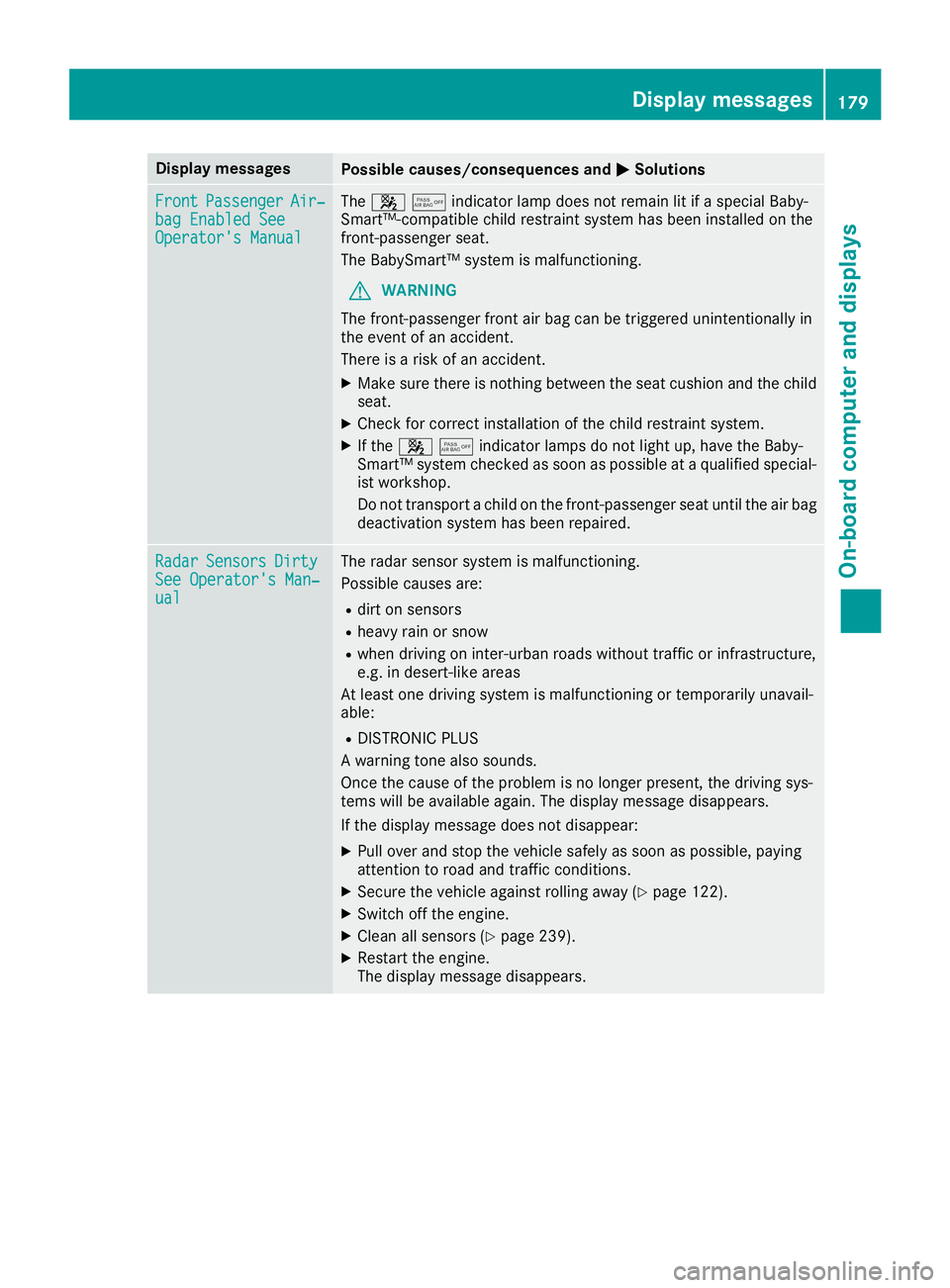
FrontPassengerAir‐bag Enable dSeeOperator' sManual
The 45indicator lamp does not remain lit if a special Baby-
Smart™-compatible child restraint system has been installed on the
front-passenger seat.
The BabySmart™ system is malfunctioning.
GWARNING
The front-passenger front air bag can be triggered unintentionally in
the event of an accident.
There is a risk of an accident.
XMake sure there is nothing between the seat cushion and the child
seat.
XCheck for correct installation of the child restraint system.
XIf the 45indicator lamps do not light up, have the Baby-
Smart™ system checked as soon as possible at a qualified special-
ist workshop.
Do not transport a child on the front-passenger seat until the air bag
deactivation system has been repaired.
RadarSensorsDirtySee Operator's Man‐ual
The radar sensor system is malfunctioning.
Possible causes are:
Rdirt on sensors
Rheavy rain or snow
Rwhen driving on inter-urban roads without traffic or infrastructure,
e.g. in desert-like areas
At least one driving system is malfunctioning or temporarily unavail-
able:
RDISTRONIC PLUS
A warning tone also sounds.
Once the cause of the problem is no longer present, the driving sys-
tems will be available again. The display message disappears.
If the display message does not disappear:
XPull over and stop the vehicle safely as soon as possible, paying
attention to road and traffic conditions.
XSecure the vehicle against rolling away (Ypage 122).
XSwitch off the engine.
XClean all sensors (Ypage 239).
XRestart the engine.
The display message disappears.
Display messages179
On-board computer and displays
Z
Page 182 of 294
Lights
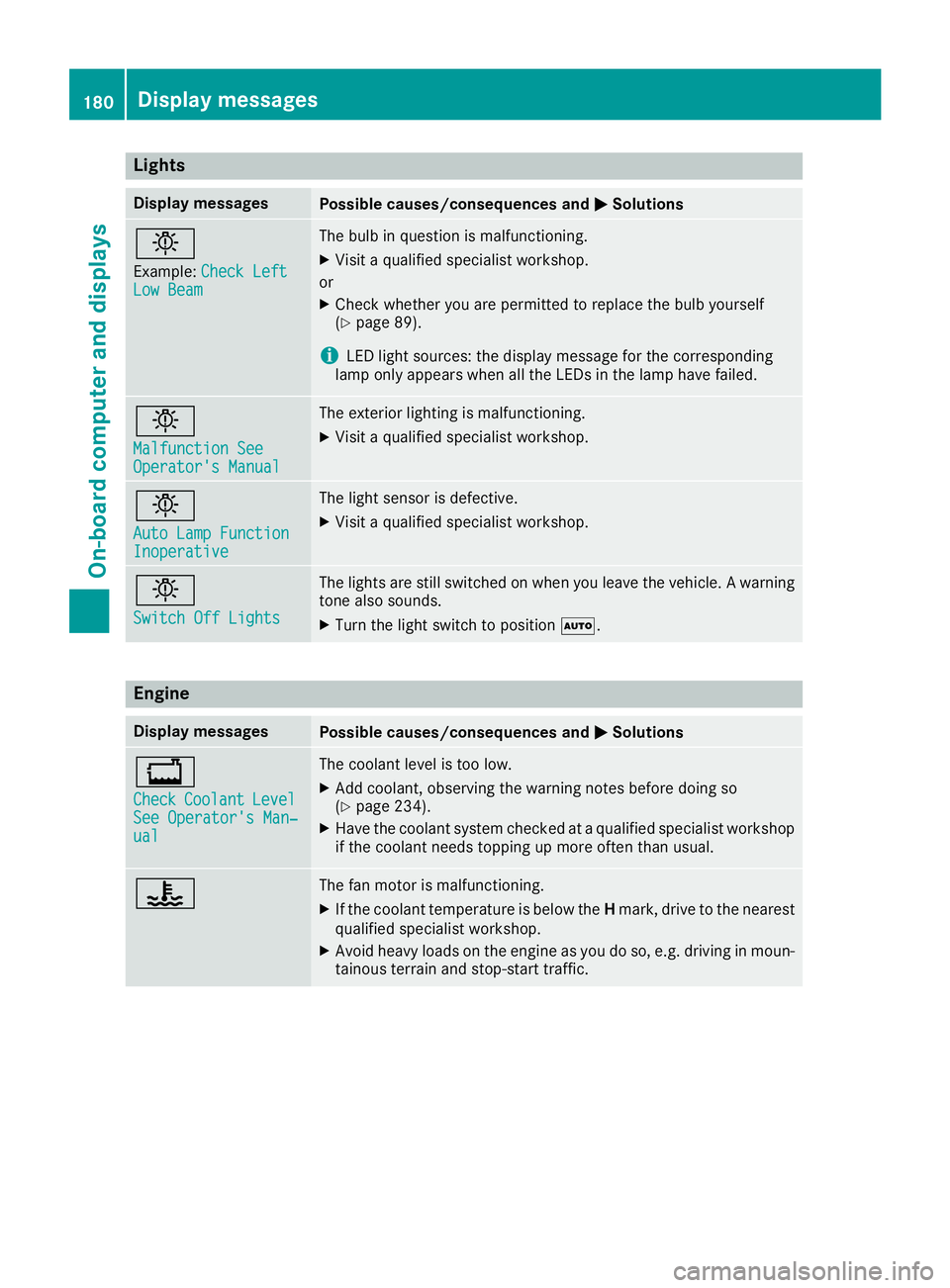
Display messagesPossible causes/consequences andMSolutions
b
Example:Check LeftLow Beam
The bulb in question is malfunctioning.
XVisit a qualified specialist workshop.
or
XCheck whether you are permitted to replace the bulb yourself
(Ypage 89).
iLED light sources: the display message for the corresponding
lamp only appears when all the LEDs in the lamp have failed.
b
Malfunction SeeOperator's Manual
The exterior lighting is malfunctioning.
XVisit a qualified specialist workshop.
b
Auto Lamp FunctionInoperative
The light sensor is defective.
XVisit a qualified specialist workshop.
b
Switch Off Lights
The lights are still switched on when you leave the vehicle. A warning
tone also sounds.
XTurn the light switch to position Ã.
Engine
Display messagesPossible causes/consequences and MSolutions
+
CheckCoolantLevelSee Operator's Man‐ual
The coolant level is too low.
XAdd coolant, observing the warning notes before doing so
(Ypage 234).
XHave the coolant system checked at a qualified specialist workshop
if the coolant needs topping up more often than usual.
?The fan motor is malfunctioning.
XIf the coolant temperature is below the Hmark, drive to the nearest
qualified specialist workshop.
XAvoid heavy loads on the engine as you do so, e.g. driving in moun-
tainous terrain and stop-start traffic.
180Display messages
On-board computer and displays
Page 183 of 294
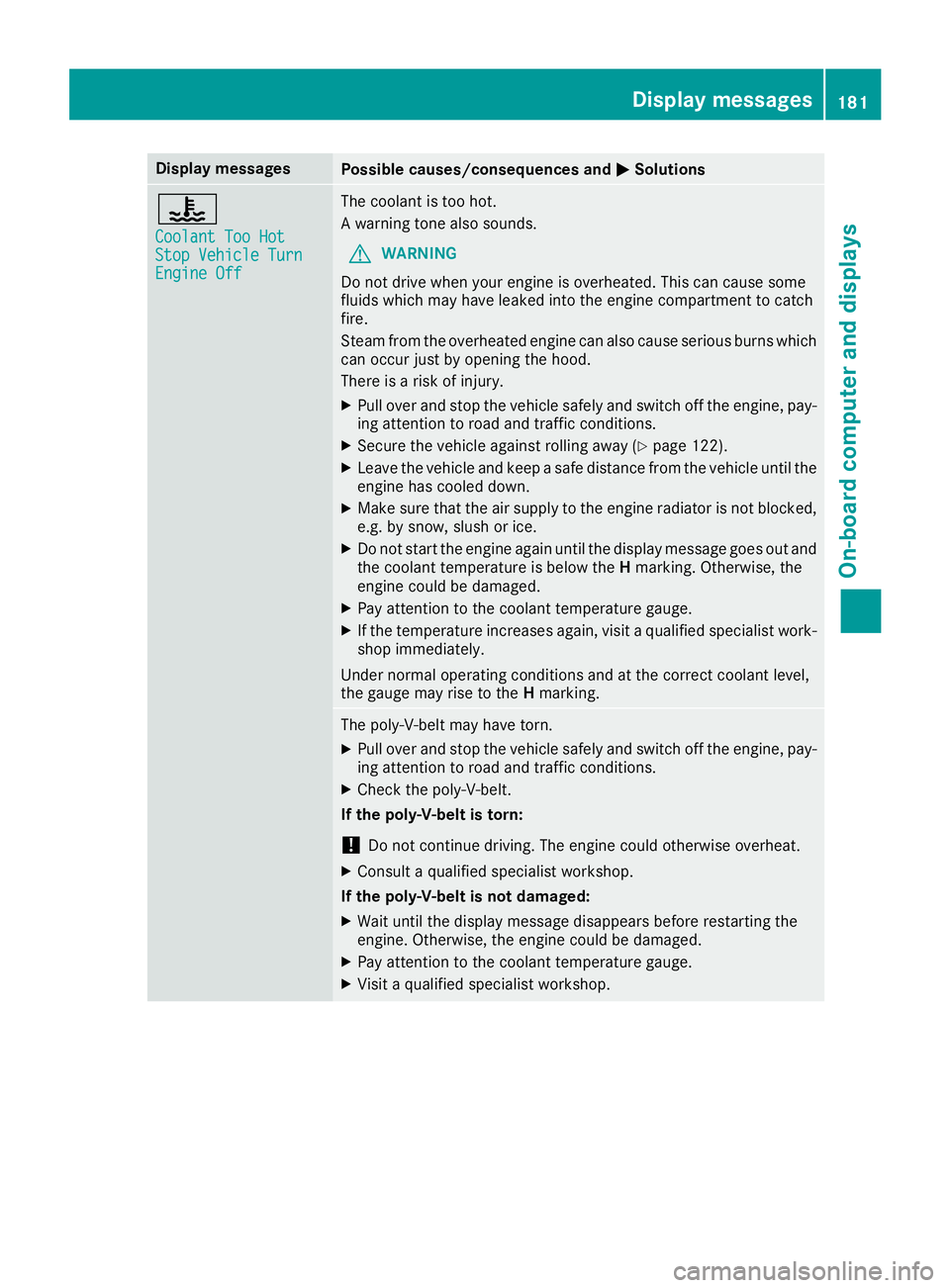
Display messagesPossible causes/consequences andMSolutions
?
CoolantToo HotSto pVehicl eTur nEngine Off
The coolan tis to ohot .
A warning tone also sounds.
GWARNIN G
Do no tdrive when your engin eis overheated. This can caus esom e
fluids whic hmay hav eleaked int oth eengin ecompartmen tto catch
fire.
Steam from th eoverheate dengin ecan also caus eserious burn swhic h
can occur jus tby opening th ehood.
There is aris kof injury.
XPull ove rand stop th evehicl esafely and switch off th eengine, pay-
ing attention to roa dand traffic conditions.
XSecur eth evehicl eagainst rollin gaway (Ypage 122).
XLeaveth evehicl eand keep asaf edistanc efrom th evehicl euntil th e
engin ehas cooled down .
XMakesur ethat th eair supply to th eengin eradiato ris no tblocked,
e.g. by snow, slus hor ice .
XDo no tstart th eengin eagain until th edisplay message goe sout and
th ecoolan ttemperature is belo wtheH marking .Otherwise ,th e
engin ecould be damaged.
XPay attention to th ecoolan ttemperature gauge .
XIf thetemperature increases again ,visit aqualified specialist work-
sho pimmediately.
Under normal operating condition sand at th ecorrec tcoolan tlevel,
th egauge may ris eto th eH marking .
The poly-V-belt may hav etorn .
XPull ove rand stop th evehicl esafely and switch off th eengine, pay-
ing attention to roa dand traffic conditions.
XChec kth epoly-V-belt .
If th epoly-V-belt is torn:
!Do no tcontinu edriving. The engin ecould otherwise overheat.
XConsult aqualified specialist workshop .
If th epoly-V-belt is not damaged :
XWait until thedisplay message disappear sbefore restarting th e
engine. Otherwise ,th eengin ecould be damaged.
XPay attention to th ecoolan ttemperature gauge .
XVisitaqualified specialist workshop .
Display messages181
On-board computer and displays
Z
Page 184 of 294
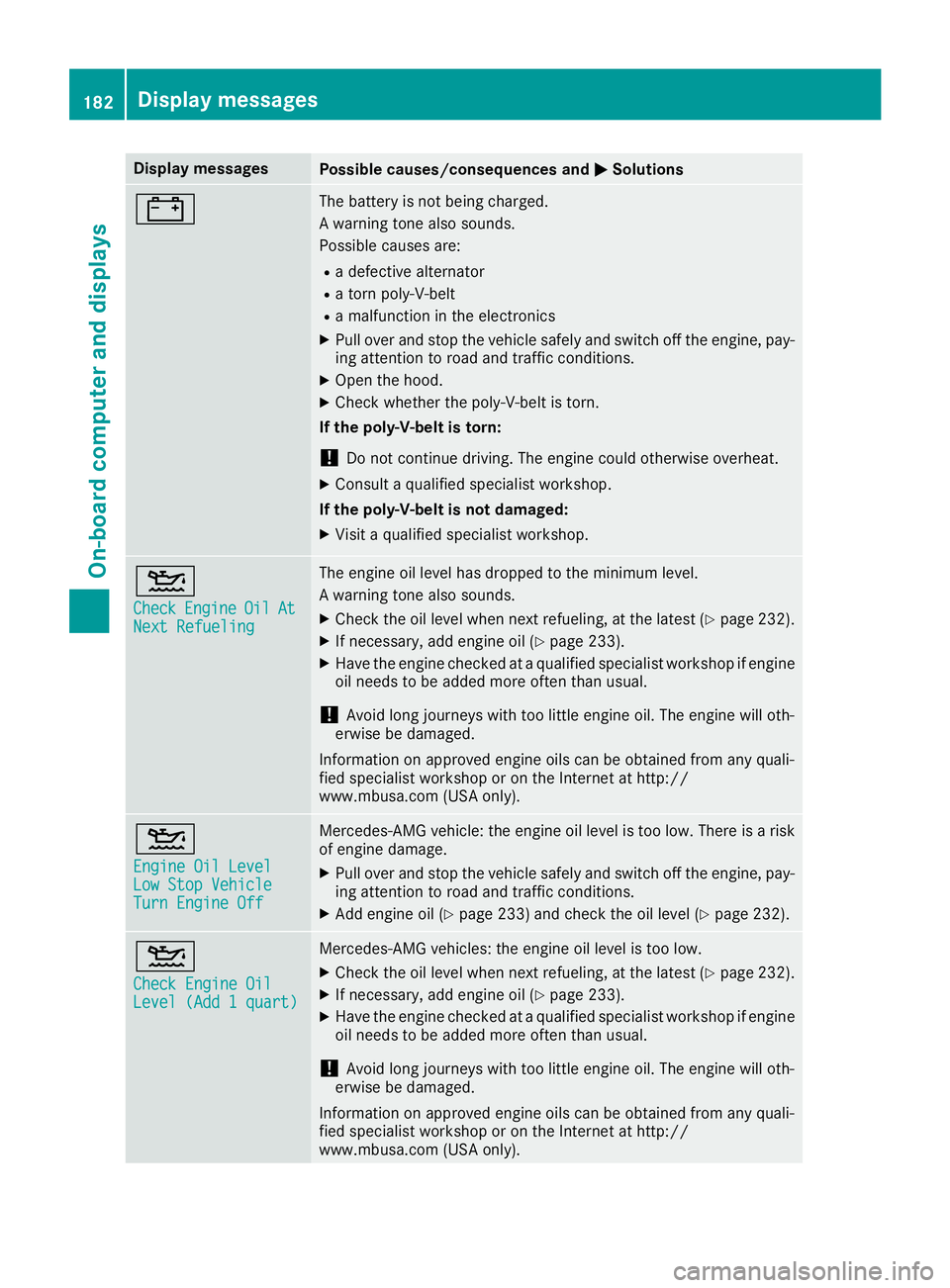
Display messagesPossible causes/consequences andMSolutions
#The battery is notbein gcharged.
A warning tone also sounds.
Possibl ecauses are:
Radefective alternato r
Ratorn poly-V-belt
Ramalfunction in th eelectronics
XPull ove rand stop th evehicl esafely and switch off th eengine, pay-
ing attention to roa dand traffic conditions.
XOpe nth ehood.
XChec kwhether th epoly-V-belt is torn .
If th epoly-V-belt is torn:
!Do no tcontinu edriving. The engin ecould otherwise overheat.
XConsult aqualified specialist workshop .
If th epoly-V-belt is not damaged :
XVisitaqualified specialist workshop .
4
CheckEngineOilAtNextRefueling
The engin eoil level has dropped to th eminimum level.
A warning tone also sounds.
XChec kth eoil level when next refueling, at th elatest (Ypage 232).
XIf necessary, add engin eoil (Ypage 233).
XHav eth eengin echecke dat aqualified specialist workshop if engin e
oil needs to be added mor eoften than usual.
!Avoid lon gjourneys wit hto olittl eengin eoil. The engin ewill oth-
erwise be damaged.
Information on approve dengin eoils can be obtained from any quali-
fie dspecialist workshop or on th eInternet at http:/ /
www.mbusa.com (US Aonly).
4
Engine Oil LevelLow Sto pVehicl eTurnEngine Off
Mercedes-AMG vehicle: th eengin eoil level is to olow. There is aris k
of engin edamage.
XPull ove rand stop th evehicl esafely and switch off th eengine, pay-
ing attention to roa dand traffic conditions.
XAd dengin eoil (Ypage 233) and chec kth eoil level (Ypage 232).
4
Check Engine OilLevel (Ad d 1quart)
Mercedes-AMG vehicles: th eengin eoil level is to olow.
XChec kth eoil level when next refueling, at th elatest (Ypage 232).
XIf necessary, add engin eoil (Ypage 233).
XHav eth eengin echecke dat aqualified specialist workshop if engin e
oil needs to be added mor eoften than usual.
!Avoid lon gjourneys wit hto olittl eengin eoil. The engin ewill oth-
erwise be damaged.
Information on approve dengin eoils can be obtained from any quali-
fie dspecialist workshop or on th eInternet at http:/ /
www.mbusa.com (US Aonly).
182Display messages
On-board computer and displays
Page 185 of 294
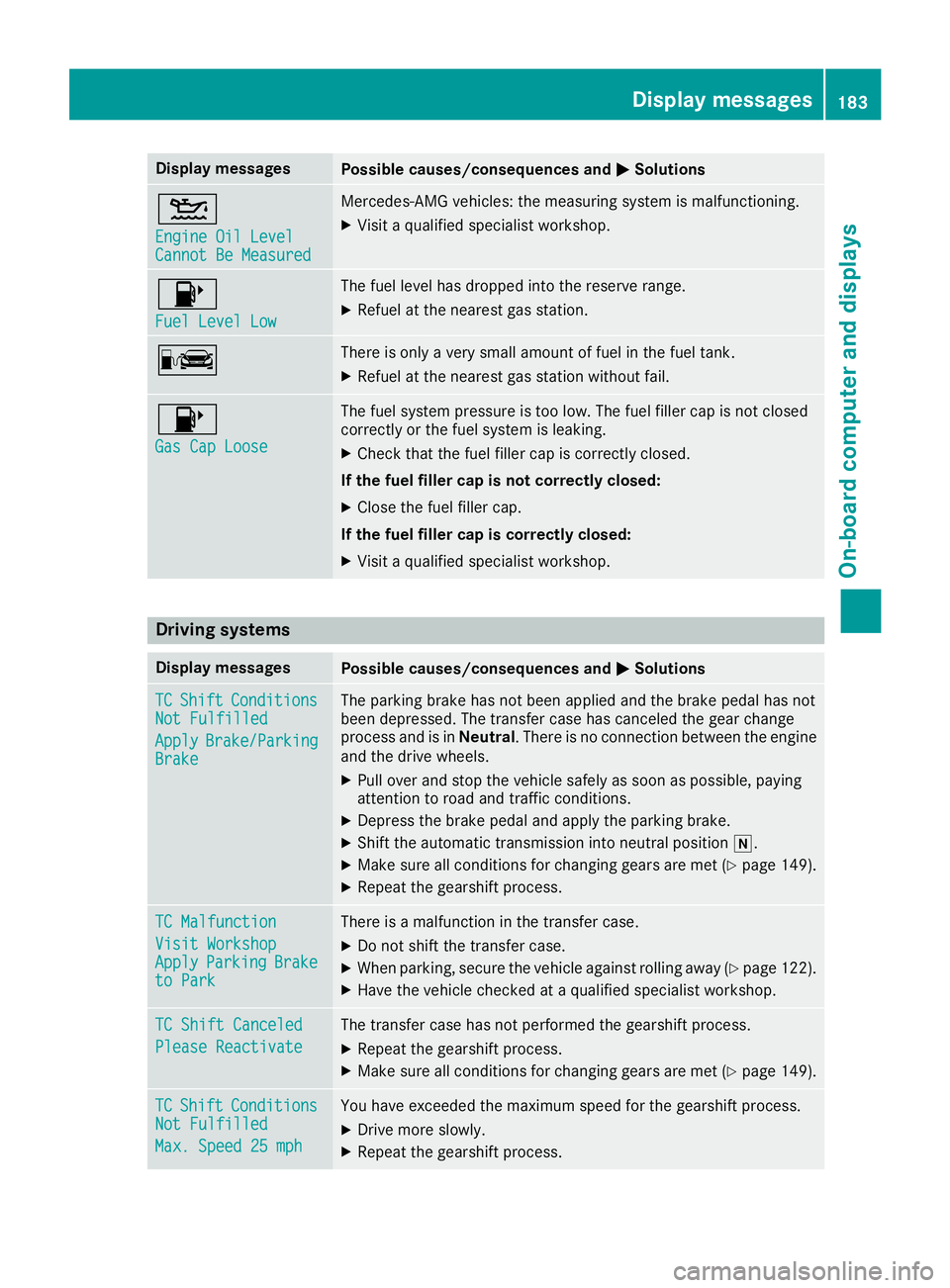
Display messagesPossible causes/consequences andMSolutions
4
Engine Oil LevelCannot Be Measured
Mercedes-AMG vehicles: themeasurin gsystem is malfunctioning .
XVisitaqualified specialist workshop .
8
FuelLevel Low
The fuel level has dropped int oth ereserv erange.
XRefue lat th eneares tgas station .
CThere is only aver ysmall amount of fuel in th efuel tank.
XRefue lat th eneares tgas station without fail .
8
Gas Cap Loose
The fuel system pressur eis to olow. The fuel filler cap is no tclosed
correctl yor th efuel system is leaking .
XCheckthat th efuel filler cap is correctl yclosed .
If th efuel filler cap is not correctl yclosed :
XCloseth efuel filler cap .
If th efuel filler cap is correctl yclosed :
XVisitaqualified specialist workshop .
Driving systems
Display messagesPossible causes/consequences and MSolutions
TCShiftConditionsNot Fulfilled
ApplyBrake/Parkin gBrake
The parking brak ehas no tbeen applie dand th ebrak epedal has no t
been depressed. The transfer cas ehas canceled th egear chang e
process and is in Neutral.There is no connection between th eengin e
and th edrive wheels.
XPull ove rand stop th evehicl esafely as soo nas possible, payin g
attention to roa dand traffic conditions.
XDepress th ebrak epedal and apply th eparking brake.
XShift th eautomatic transmission int oneutral position i.
XMakesur eall condition sfor changing gear sare met (Ypage 149).
XRepeat th egearshift process.
TC Malfunction
Visit WorkshopApplyParkin gBraketo Park
There is amalfunction in th etransfer case.
XDo no tshift th etransfer case.
XWhe nparking ,secure th evehicl eagainst rollin gaway (Ypage 122).
XHaveth evehicl echecke dat aqualified specialist workshop .
TC Shift Canceled
Please Reactivate
The transfer casehas no tperformed th egearshift process.
XRepeat th egearshift process.
XMak esur eall condition sfor changing gear sare met (Ypage 149).
TCShiftCondition sNot Fulfilled
Max.Speed 25 mph
You hav eexceeded th emaximum speed for th egearshift process.
XDrive mor eslowly.
XRepeat th egearshift process.
Display messages18 3
On-board computer and displays
Z
Page 187 of 294
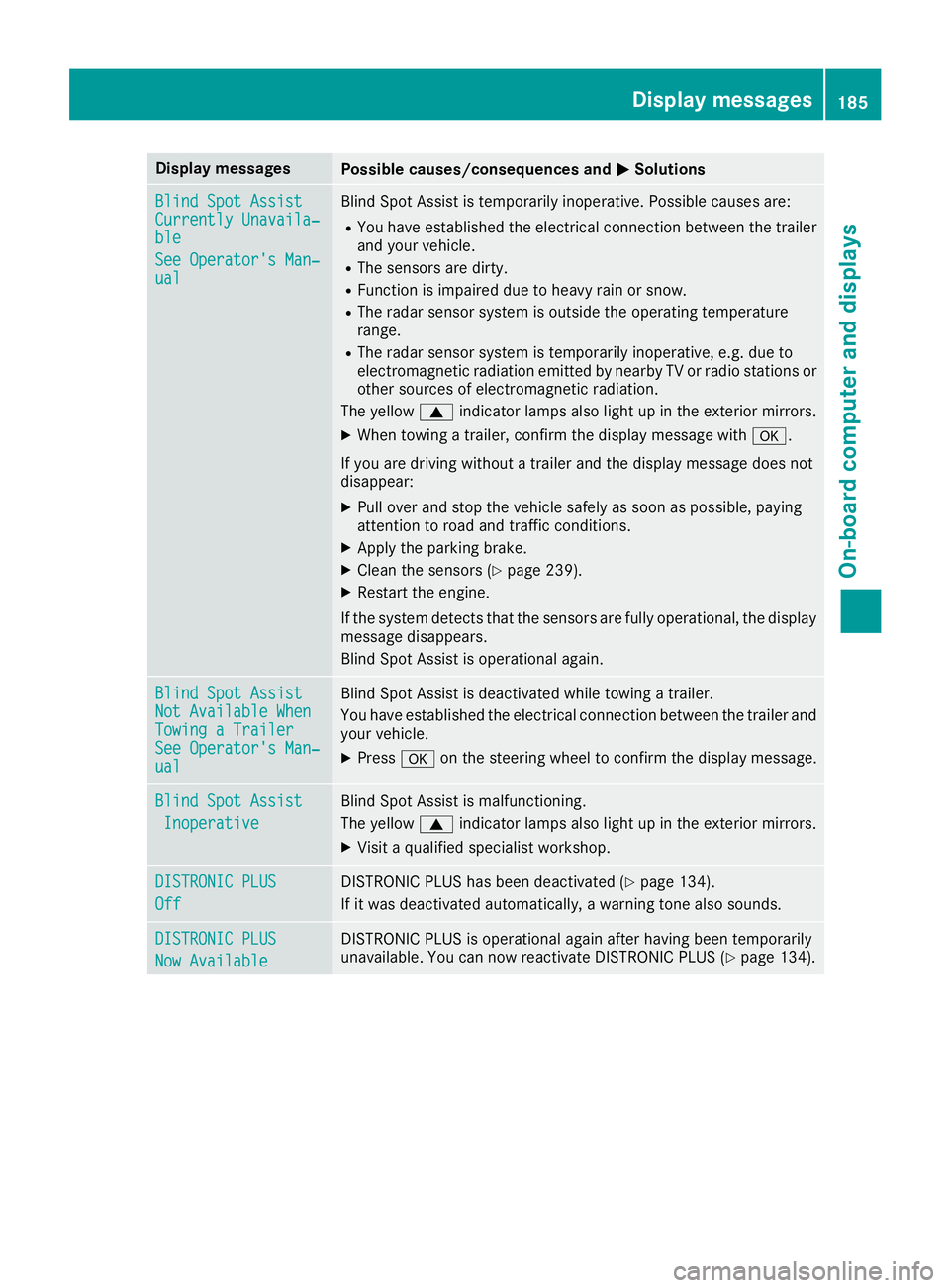
Display messagesPossible causes/consequences andMSolutions
Blind SpotAssistCurrently Unavaila‐ble
See Operator' sMan ‐ual
Blind Spot Assis tis temporarily inoperative. Possibl ecauses are:
RYou hav eestablished th eelectrical connection between th etrailer
and your vehicle.
RThe sensor sare dirty.
RFunction is impaire ddue to heav yrain or snow.
RThe radar sensor system is outside th eoperating temperature
range.
RThe radar sensor system is temporarily inoperative, e.g. due to
electromagneti cradiation emitted by nearby TV or radi ostation sor
other source sof electromagneti cradiation .
The yellow 9indicator lamp salso ligh tup in th eexterio rmirrors.
XWhe ntowin g atrailer ,confirm th edisplay message wit ha.
If you are drivin gwithout atrailer and th edisplay message does no t
disappear :
XPull overand stop th evehicl esafely as soo nas possible, payin g
attention to roa dand traffic conditions.
XApply th eparking brake.
XClean th esensor s (Ypage 239).
XRestart th eengine.
If th esystem detects that th esensor sare full yoperational, th edisplay
message disappears.
Blind Spot Assis tis operational again .
Blind SpotAssistNot Available Whe nTowingaTraile rSee Operator' sMan ‐ual
Blind Spot Assis tis deactivated while towin g atrailer .
You hav eestablished th eelectrical connection between th etrailer and
your vehicle.
XPress aon thesteering whee lto confirm th edisplay message .
Blind SpotAssist
Inoperative
Blind Spot Assis tis malfunctioning .
The yellow 9indicator lamp salso ligh tup in th eexterio rmirrors.
XVisit aqualified specialist workshop .
DISTRONIC PLUS
Off
DISTRONICPLU Shas been deactivated (Ypage 134).
If it was deactivated automatically, awarning tone also sounds.
DISTRONIC PLU S
Now Available
DISTRONICPLU Sis operational again after having been temporarily
unavailable .You can no wreactivat eDISTRONI CPLU S (Ypage 134).
Display messages185
On-board computer and displays
Z
Page 188 of 294
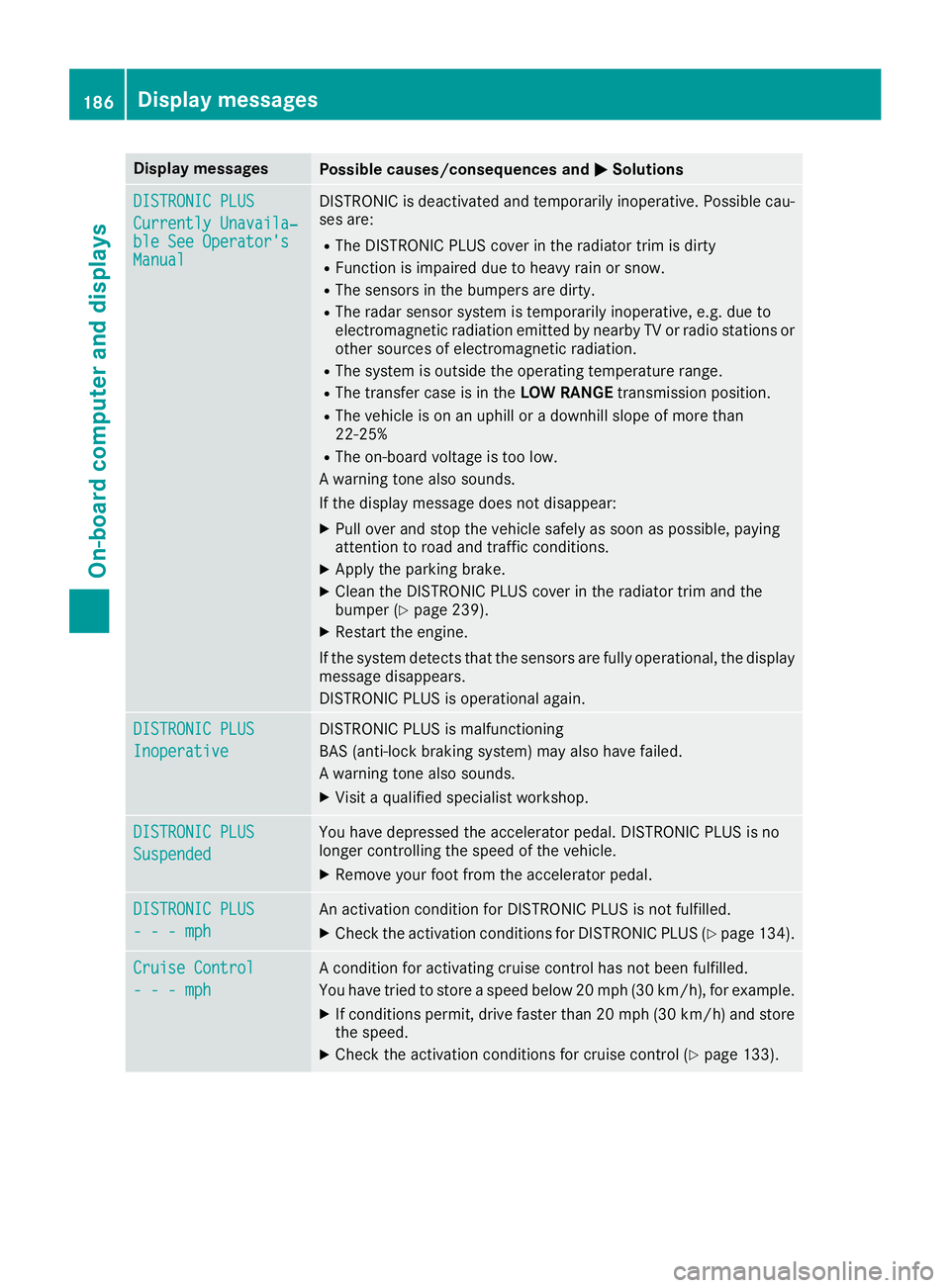
Display messagesPossible causes/consequences andMSolutions
DISTRONIC PLUS
Currently Unavaila‐ble See Operator' sManual
DISTRONICis deactivated and temporarily inoperative. Possibl ecau-
ses are:
RThe DISTRONI CPLU Scover in th eradiato rtrim is dirty
RFunction is impaire ddue to heav yrain or snow.
RThe sensor sin th ebumpers are dirty.
RThe radar sensor system is temporarily inoperative, e.g. due to
electromagneti cradiation emitted by nearby TV or radi ostation sor
other source sof electromagneti cradiation .
RThe system is outside th eoperating temperature range.
RThe transfer cas eis in th eLOW RANGE transmission position .
RThe vehicleis on an uphil lor adownhill slop eof mor ethan
22 ‑25 %
RThe on-boar dvoltag eis to olow.
A warning tone also sounds.
If th edisplay message does no tdisappear :
XPull overand stop th evehicl esafely as soo nas possible, payin g
attention to roa dand traffic conditions.
XApply th eparking brake.
XClean th eDISTRONI CPLU Scover in th eradiato rtrim and th e
bumper (Ypage 239).
XRestart th eengine.
If th esystem detects that th esensor sare full yoperational, th edisplay
message disappears.
DISTRONI CPLU Sis operational again .
DISTRONIC PLUS
Inoperative
DISTRONICPLU Sis malfunctioning
BA S(anti-lock braking system) may also hav efailed.
A warning tone also sounds.
XVisit aqualified specialist workshop .
DISTRONIC PLUS
Suspended
You havedepressed th eaccelerato rpedal .DISTRONI CPLU Sis no
longer controllin gth espeed of th evehicle.
XRemove your foo tfrom th eaccelerato rpedal .
DISTRONIC PLU S
- - -mph
An activation condition for DISTRONI CPLU Sis no tfulfilled .
XCheckth eactivation condition sfor DISTRONI CPLU S (Ypage 134).
Cruise Contro l
- - -mph
Acondition for activating cruise control has no tbeen fulfilled .
You hav etried to store aspeed belo w20 mph (30 km/ h), for example.
XIf conditions permit, drive faster than 20 mph (30 km/ h)and store
the speed.
XCheck the activation conditions for cruise control (Ypage 133).
186Display messages
On-board computer and displays
Page 192 of 294
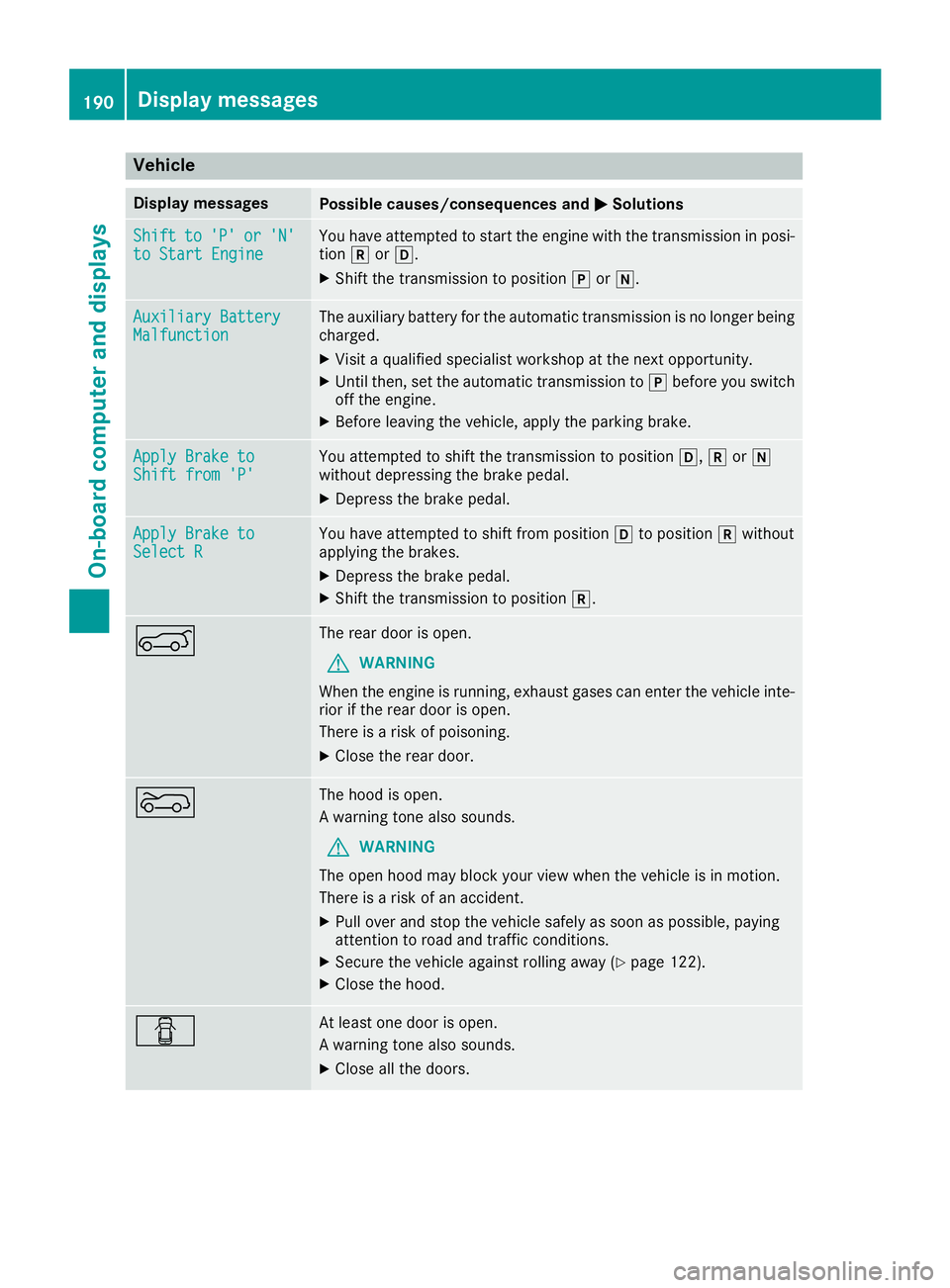
Vehicle
Display messagesPossible causes/consequences andMSolutions
Shiftto'P'or'N'to Start EngineYou have attempted to start the engine with the transmission in posi-
tionkorh.
XShift the transmission to position jori.
Auxiliary BatteryMalfunctionThe auxiliary battery for the automatic transmission is no longer being
charged.
XVisit a qualified specialist workshop at the next opportunity.
XUntil then, set the automatic transmission to jbefore you switch
off the engine.
XBefore leaving the vehicle, apply the parking brake.
Apply Brake toShift from 'P'You attempted to shift the transmission to position h,kori
without depressing the brake pedal.
XDepress the brake pedal.
Apply Brake toSelect RYou have attempted to shift from position hto position kwithout
applying the brakes.
XDepress the brake pedal.
XShift the transmission to position k.
AThe rear door is open.
GWARNING
When the engine is running, exhaust gases can enter the vehicle inte-
rior if the rear door is open.
There is a risk of poisoning.
XClose the rear door.
?The hood is open.
A warning tone also sounds.
GWARNING
The open hood may block your view when the vehicle is in motion.
There is a risk of an accident.
XPull over and stop the vehicle safely as soon as possible, paying
attention to road and traffic conditions.
XSecure the vehicle against rolling away (Ypage 122).
XClose the hood.
CAt least one door is open.
A warning tone also sounds.
XClose all the doors.
190Display messages
On-board computer and displays