battery MERCEDES-BENZ G-CLASS 2018 Owner's Manual
[x] Cancel search | Manufacturer: MERCEDES-BENZ, Model Year: 2018, Model line: G-CLASS, Model: MERCEDES-BENZ G-CLASS 2018Pages: 294, PDF Size: 4.86 MB
Page 5 of 294
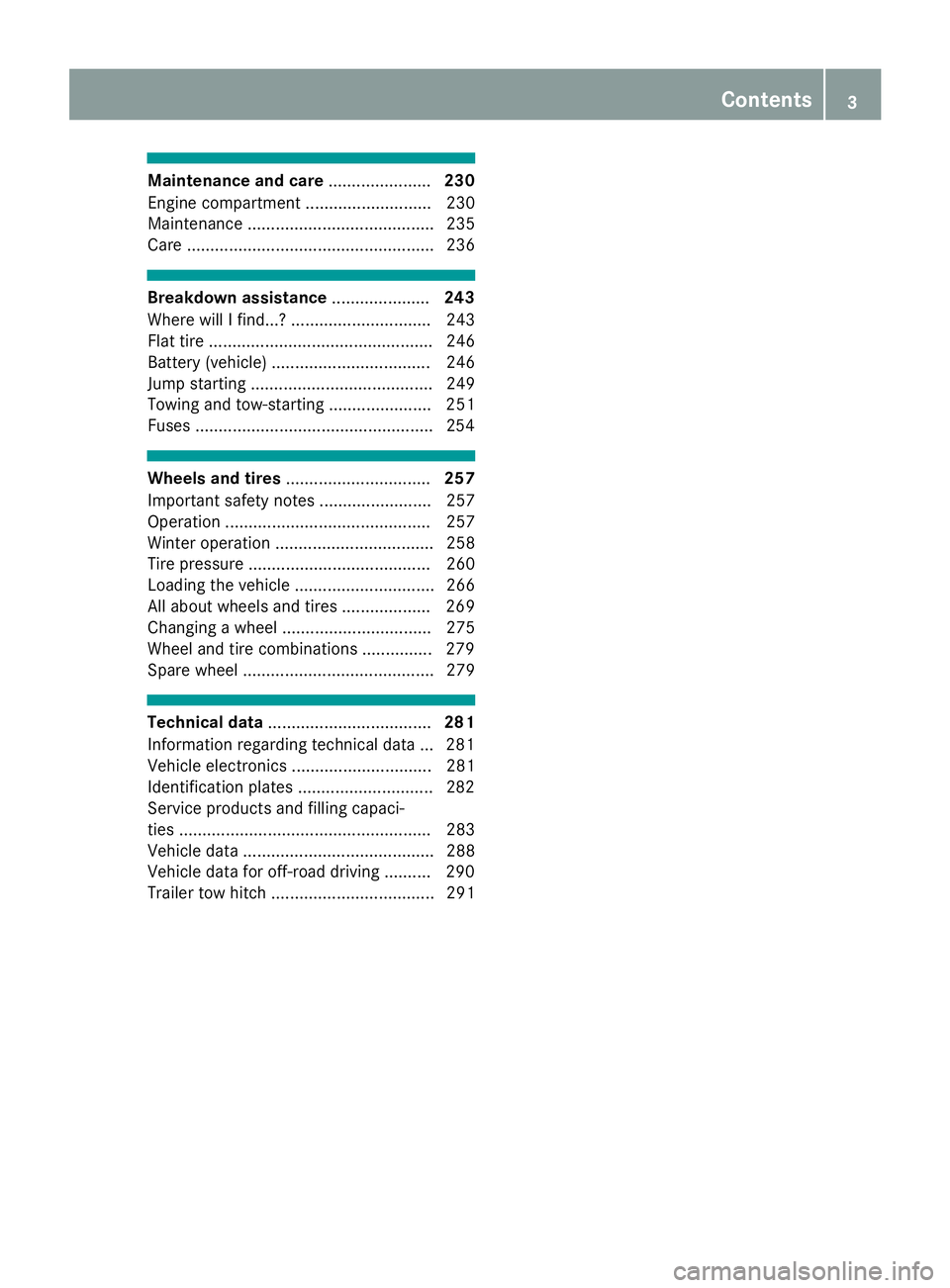
Maintenance and care......................230
Engine compartment ........................... 230
Maintenance ........................................ 235
Care ..................................................... 236
Breakdown assistance .....................243
Where will I find...? .............................. 243
Flat tire ................................................ 246
Battery (vehicle) .................................. 246
Jump starting ....................................... 249
Towing and tow-starting ...................... 251
Fuses ...................................................2 54
Wheels and tires............................... 257
Important safety notes ........................ 257
Operation ............................................ 257
Winter operation .................................. 258
Tire pressure ....................................... 260
Loading the vehicle .............................. 266
All about wheels and tires ................... 269
Changing a wheel ................................ 275
Wheel and tire combinations ...............2 79
Spare wheel ......................................... 279
Technical data ................................... 281
Information regarding technical data ... 281
Vehicle electronics .............................. 281
Identification plates .............................2 82
Service products and filling capaci-
ties ...................................................... 283
Vehicle data ......................................... 288
Vehicle data for off-road driving .......... 290
Trailer tow hitch ................................... 291
Contents3
Page 7 of 294
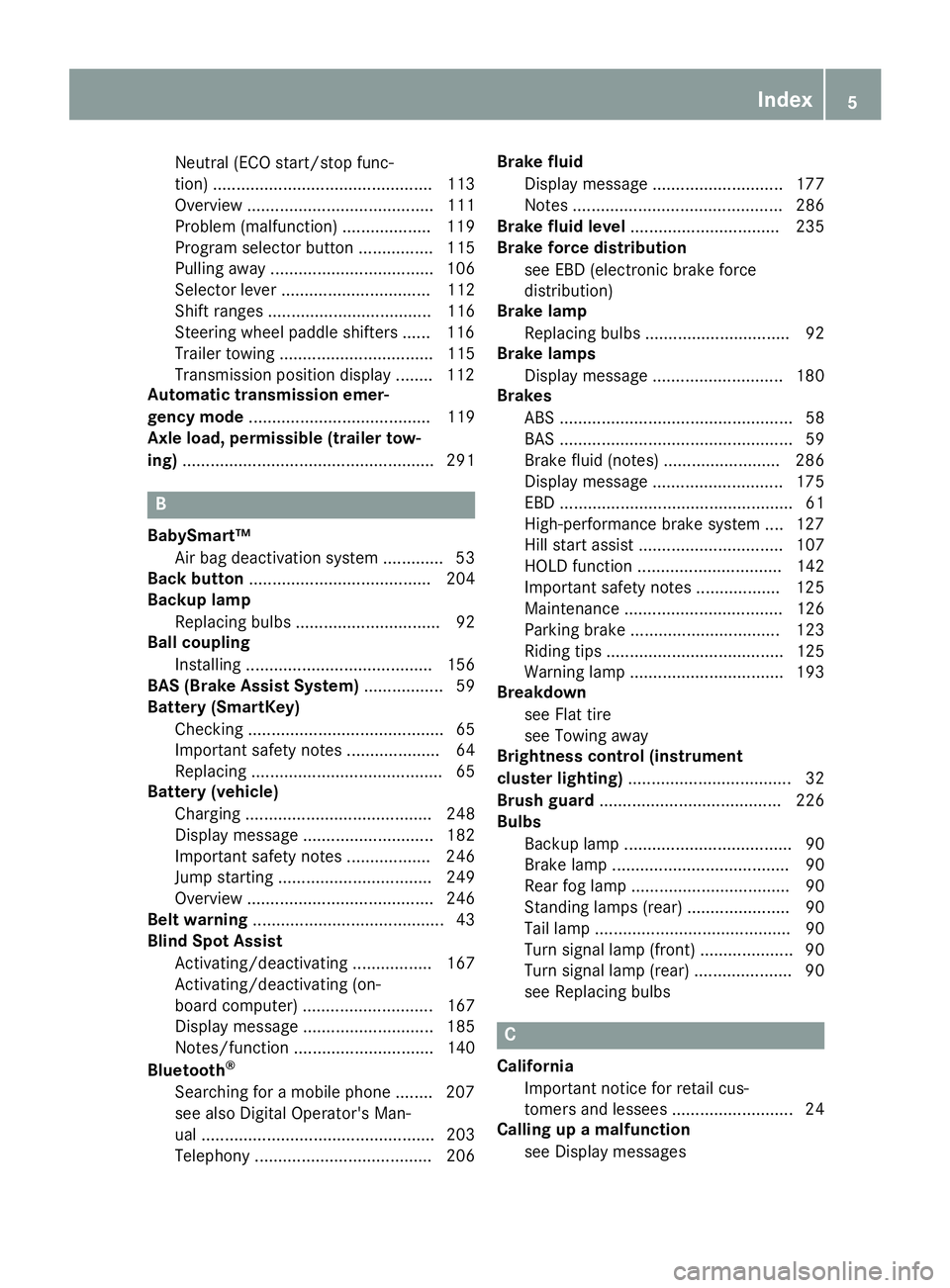
Neutral (ECO start/stop func-
tion) ............................................... 113
Overview ........................................ 111
Problem (malfunction) ................... 119
Program selector button ................ 115
Pulling away ................................... 106
Selector lever ................................ 112
Shift ranges ................................... 116
Steering wheel paddle shifters ...... 116
Trailer towing ................................. 115
Transmission position display ........ 112
Automatic transmission emer-
gency mode ....................................... 119
Axle load, permissible (trailer tow-
ing) ...................................................... 291
B
BabySmart™
Air bag deactivation system ............. 53
Back button ....................................... 204
Backup lamp
Replacing bulbs ............................... 92
Ball coupling
Installing ........................................ 156
BAS (Brake Assist System) ................. 59
Battery (SmartKey)
Checking .......................................... 65
Important safety notes .................... 64
Replacing ......................................... 65
Battery (vehicle)
Charging ........................................ 248
Display message ............................ 182
Important safety notes .................. 246
Jump starting ................................. 249
Overview ........................................ 246
Belt warning ......................................... 43
Blind Spot Assist
Activating/deactivating ................. 167
Activating/deactivating (on-
board computer) ............................ 167
Display message ............................ 185
Notes/function .............................. 140
Bluetooth
®
Searching for a mobile phone ........ 207
see also Digital Operator's Man-
ual .................................................. 203
Telephony ...................................... 206 Brake fluid
Display message ............................ 177
Notes ............................................. 286
Brake fluid level ................................ 235
Brake force distribution
see EBD (electronic brake force
distribution)
Brake lamp
Replacing bulbs ............................... 92
Brake lamps
Display message ............................ 180
Brakes
ABS .................................................. 58
BAS .................................................. 59
Brake fluid (notes) ......................... 286
Display message ............................ 175
EBD .................................................. 61
High-performance brake system .... 127
Hill start assist ............................... 107
HOLD function ............................... 142
Important safety notes .................. 125
Maintenance .................................. 126
Parking brake ................................ 123
Riding tips ...................................... 125
Warning lamp ................................. 193
Breakdown
see Flat tire
see Towing away
Brightness control (instrument
cluster lighting) ................................... 32
Brush guard ....................................... 226
Bulbs
Backup lamp .................................... 90
Brake lamp ...................................... 90
Rear fog lamp .................................. 90
Standing lamps (rear) ...................... 90
T
ail lamp .......................................... 90
Turn signal lamp (front) .................... 90
Turn signal lamp (rear) ..................... 90
see Replacing bulbs
C
California
Important notice for retail cus-
tomers and lessees .......................... 24
Calling up a malfunction
see Display messages
Index5
Page 19 of 294
Overview .......................................... 69
Problem (malfunction) ..................... 70
SIRIUS services
see also Digital Operator's Man-
ual .................................................. 203
Sliding sunroof
Important safety notes .................... 71
Opening/closing .............................. 72
Operating manually .......................... 72
Problem (malfunction) ..................... 73
SmartKey
Changing the battery ....................... 65
Changing the programming ............. 64
Checking the battery ....................... 65
Convenience closing feature ............ 70
Convenience opening feature .......... 70
Display message ............................ 191
Door central locking/unlocking ....... 63
Important safety notes .................... 63
Loss ................................................. 66
Mechanical key ................................ 64
Overview .......................................... 63
Positions (ignition lock) ................. 105
Problem (malfunction) ..................... 66
Starting the engine ........................ 106
SMS
see also Digital Operator's Man-
ual .................................................. 203
Snow chains ...................................... 259
Socket (12 V)
Cargo compartment ....................... 218
Front-passenger footwell ............... 217
General notes ................................ 217
Rear compartment ......................... 218
Sound
Switching on/off ........................... 204
Spare fuses ........................................ 255
Spare wheel
Important safety notes .................. 279
Spare wheel bracket at the rear .... 245
Stainless-steel spare hub cap ........ 245
Special seat belt retractor .................. 50
Specialist workshop ............................ 27
Speedometer
Digital ............................................ 163
In the Instrument cluster ................. 32
Segments ...................................... 160
Selecting the display unit ............... 168 Standing lamps
Display message ............................ 180
Switching on/off .............................. 87
Starting the engine
Important safety notes .................. 106
Steering (display mes sage
)
.............. 191
Steering wheel
Adjusting (electrically) ..................... 80
Buttons (on-board computer) ......... 161
Cleaning ......................................... 241
Important safety notes .................... 79
Paddle shifters ............................... 116
Steering wheel heating .................... 80
Storing settings (memory func-
tion) ................................................. 84
Steering wheel heating
Indicator lamp (malfunction) ............ 81
Steering wheel paddle shifters ........ 116
Stopwatch (RACETIMER) ................... 172
Stowage areas ................................... 210
Stowage compartment
Door stowage compartment .......... 211
Stowage compartments
Armrest (under) ............................. 211
Cup holders ................................... 215
Glove box ....................................... 210
Important safety information ......... 210
Stowage net ................................... 211
Stowage pockets ........................... 211
Stowage net ....................................... 211
Summer opening
see Convenience opening feature
Summer tires
In winter ........................................ 259
Sun visor ............................................ 215
Surround lighting (on-board com-
puter) .................................................. 169
SUV
(Sport Utility Vehicle) ....................... 26
Switching air-recirculation mode
on/off ................................................. 102
Switching on media mode
Via the device list .......................... 208
T
Tachometer ........................................ 160
Index17
Page 29 of 294
subject to the two following two conditions: 1)
These devices may not cause harmful interfer-
ence, and 2) These devices must accept any
interference received, including interference
that may cause undesired operation. Changes
or modifications not expressly approved by the
party responsible for compliance could void the
user’s authority to operate the equipment."
Canada:"The wireless devices of this vehicle
comply with Industry Canada license-exempt
RSS standard(s). Operation is subject to the fol-
lowing two conditions: (1) These devices may
not cause interference, and (2) These devices
must accept any interference, including inter-
ference that may cause undesired operation of
the device."
Diagnostics connection
The diagnostics connection is only intended for
the connection of diagnostic equipment at a
qualified specialist workshop.
GWARNING
If you connect equipment to a diagnostics
connection in the vehicle, it may affect the
operation of vehicle systems. As a result, the
operating safety of the vehicle could be affec-
ted. There is a risk of an accident.
Only connect equipment to a diagnostics con-
nection in the vehicle, which is approved for
your vehicle by Mercedes-Benz.
GWARNING
Objects in the driver's footwell may restrict
the clearance around the pedals or block a
depressed pedal. This jeopardizes the oper-
ating and road safety of the vehicle. There is a risk of an accident.
Stow all objects securely in the vehicle so that
they do not get into the driver's footwell.
When using floormats or carpets, make sure
that they are properly secured so that they do not slip or obstruct the pedals. Do not place
several floormats or carpets on top of one
another.
!If the engine is switched off and equipment
on the diagnostics connection is used, the
starter battery may discharge. Connecting equipment to the diagnostics con-
nection can lead to emissions monitoring infor-
mation being reset, for example. This may lead
to the vehicle failing to meet the requirements of
the next emissions test during the main inspec-
tion.
Qualified specialist workshop
An authorized Mercedes-Benz Center is a quali-
fied specialist workshop. It has the necessary
specialist knowledge, tools and qualifications to
correctly carry out the work required on your
vehicle. This is especially the case for work rel-
evant to safety.
Observe the notes in the Maintenance Booklet.
Always have the following work carried out at an
authorized Mercedes-Benz Center:
Rwork relevant to safety
Rservice and maintenance work
Rrepair work
Ralterations, installation work and modifica-
tions
Rwork on electronic components
Correct use
If you remove any warning stickers, you or oth-
ers could fail to recognize certain dangers.
Leave warning stickers in position.
Observe the following information when driving
your vehicle:
Rthe safety notes in this manual
Rtechnical data for the vehicle
Rtraffic rules and regulations
Rlaws and safety standards pertaining to motor
vehicles
Reporting safety defects
USA only:
The following text is reproduced as required of
all manufacturers under Title 49, Code of U.S.
Federal Regulations, Part 575 pursuant to the
National Traffic and Motor Vehicle Safety Act of
1966.
If you believe that your vehicle has a defect
which could cause a crash or could cause injury
or death, you should immediately inform the
Operating safety27
Introduction
Z
Page 64 of 294
Protection against theft
Immobilizer
The immobilizer prevents your vehicle from
being started without the correct SmartKey.
XTo activate:remove the SmartKey from the
ignition lock.
XTo deactivate: switch on the ignition.
When leaving the vehicle, always take the
SmartKey with you and lock the vehicle. The
engine can be started by anyone with a valid
SmartKey that is left inside the vehicle.
iThe immobilizer is always deactivated when
you start the engine.
In the event that the engine cannot be started
(yet the vehicle's battery is charged), the sys-
tem is not operational. Contact an authorized
Mercedes-Benz Center or call
1-800-FOR-MERCedes (in the USA) or
1-800-387-0100 (in Canada).
ATA (anti-theft alarm system)
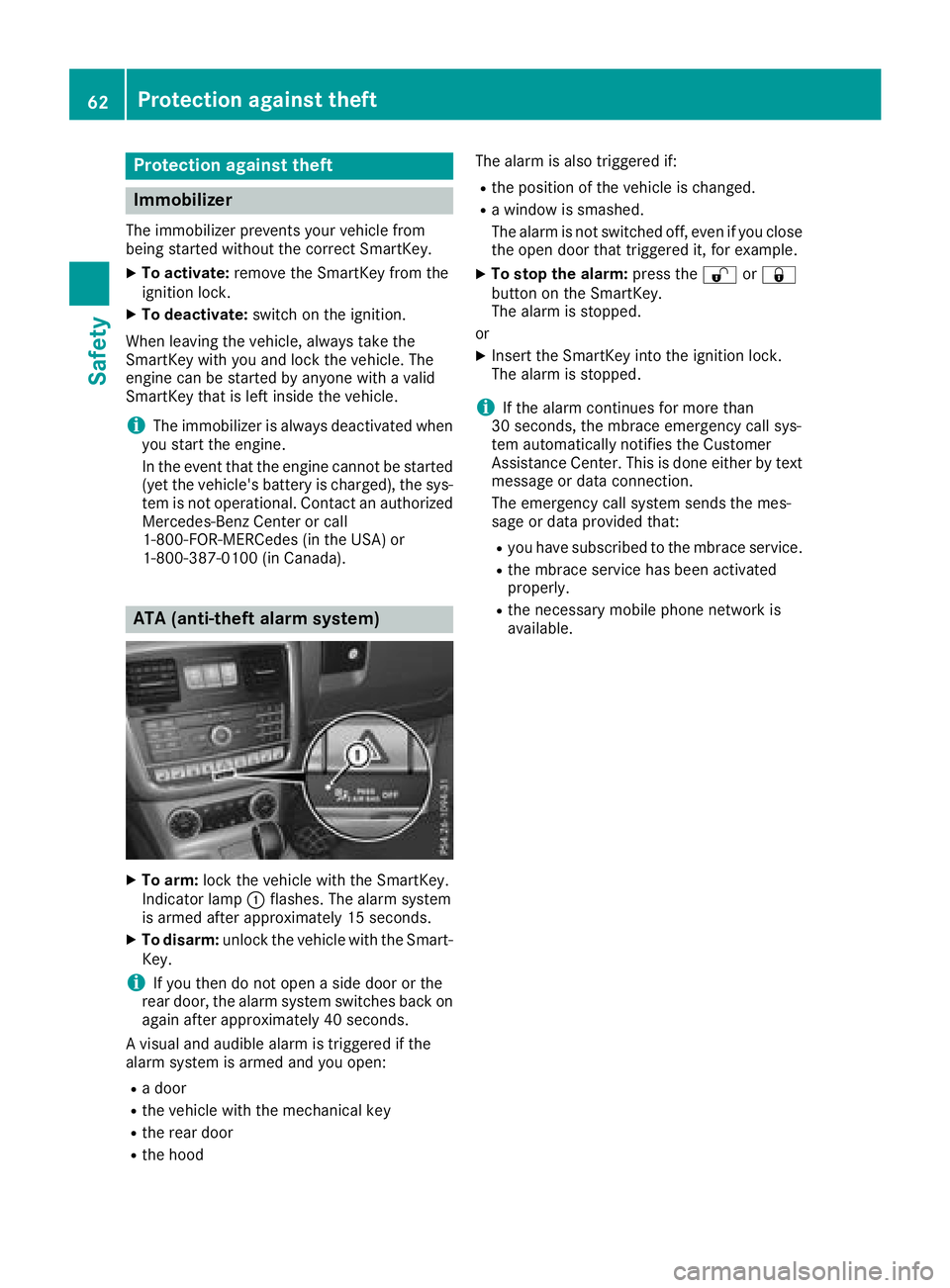
XTo arm: lock the vehicle with the SmartKey.
Indicator lamp :flashes. The alarm system
is armed after approximately 15 seconds.
XTo disarm: unlock the vehicle with the Smart-
Key.
iIf you then do not open a side door or the
rear door, the alarm system switches back on
again after approximately 40 seconds.
A visual and audible alarm is triggered if the
alarm system is armed and you open:
Ra door
Rthe vehicle with the mechanical key
Rthe rear door
Rthe hood The alarm is also triggered if:
Rthe position of the vehicle is changed.
Ra window is smashed.
The alarm is not switched off, even if you close the open door that triggered it, for example.
XTo stop the alarm: press the%or&
button on the SmartKey.
The alarm is stopped.
or
XInsert the SmartKey into the ignition lock.
The alarm is stopped.
iIf the alarm continues for more than
30 seconds, the mbrace emergency call sys-
tem automatically notifies the Customer
Assistance Center. This is done either by text
message or data connection.
The emergency call system sends the mes-
sage or data provided that:
Ryou have subscribed to the mbrace service.
Rthe mbrace service has been activated
properly.
Rthe necessary mobile phone network is
available.
62Protection against theft
Safety
Page 66 of 294
Changing the settings of the locking
system
You can change the settings of the locking sys-
tem. This means that only the driver's door and
the fuel filler flap are unlocked when the vehicle
is unlocked. This is useful if you frequently travel
alone.
XTo change the setting:press and hold down
the % and& buttons simultaneously
for approximately six seconds until the bat-
tery check lamp (
Ypage 65) flashes twice.
If the setting of the locking system is changed
within the signal range of the vehicle, pressing
the & or% button:
Rlocks or
Runlocks the vehicle
The SmartKey now functions as follows:
XTo unlock the driver's door and fuel filler
flap: press the %button once.
XTo unlock centrally: press the%button
twice.
XTo lock centrally: press the&button.
XTo restore the factory settings: press and
hold the %and& buttons simultane-
ously for approximately six seconds until the
battery check lamp (
Ypage 65) flashes
twice.
Mechanical key
General notes
If the vehicle can no longer be unlocked with the
SmartKey, use the mechanical key.
If you use the mechanical key to unlock and
open the driver's door, the anti-theft alarm sys-
tem will be triggered. Switch off the alarm
(
Ypage 62).
If you unlock the vehicle using the mechanical
key, the fuel filler flap will not be unlocked auto-
matically.
XTo unlock the fuel filler flap: insert the
SmartKey into the ignition lock.
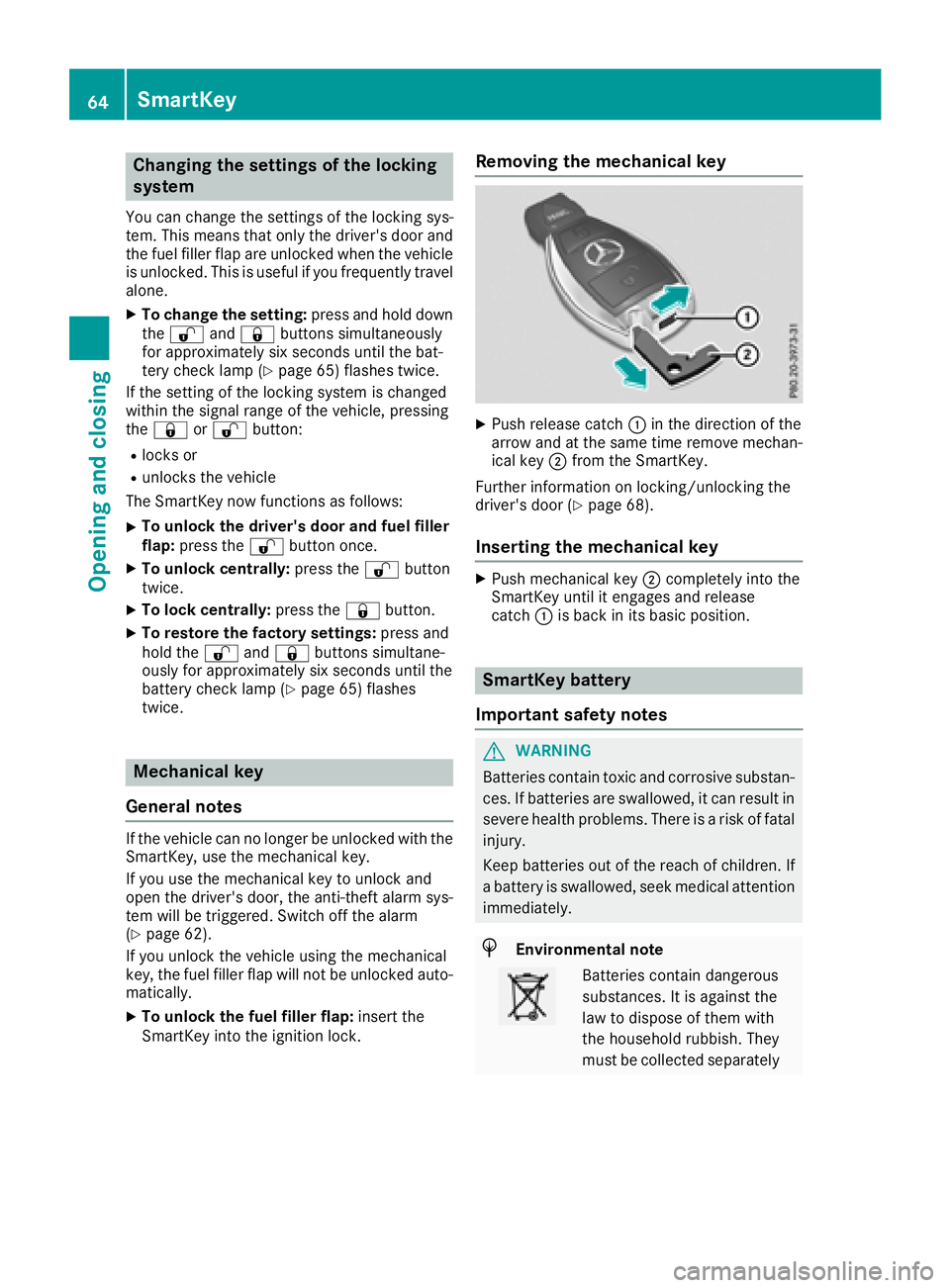
Removing the mechanical key
XPush release catch :in the direction of the
arrow and at the same time remove mechan- ical key ;from the SmartKey.
Further information on locking/unlocking the
driver's door (
Ypage 68).
Inserting the mechanical key
XPush mechanical key ;completely into the
SmartKey until it engages and release
catch :is back in its basic position.
SmartKey battery
Important safety notes
GWARNING
Batteries contain toxic and corrosive substan- ces. If batteries are swallowed, it can result in
severe health problems. There is a risk of fatalinjury.
Keep batteries out of the reach of children. If
a battery is swallowed, seek medical attention
immediately.
HEnvironmental note
Batteries contain dangerous
substances. It is against the
law to dispose of them with
the household rubbish. They
must be collected separately
64SmartKey
Opening and closing
Page 67 of 294
and recycled to protect the
environment.
Dispose of batteries in an
environmentally friendly
manner. Take discharged
batteries to a qualified spe-
cialist workshop or a special
collection point for used bat-
teries.
The SmartKey batteries contain perchlorate
material, which may require special handling
and regard for the environment. National guide-
lines must be observed during disposal. In Cal-
ifornia, see www.dtsc.ca.gov/
HazardousWaste/Perchlorate/index.cfm .
Mercedes-Benz recommends that you have the
batteries replaced at a qualified specialist work-
shop.
Checking the battery
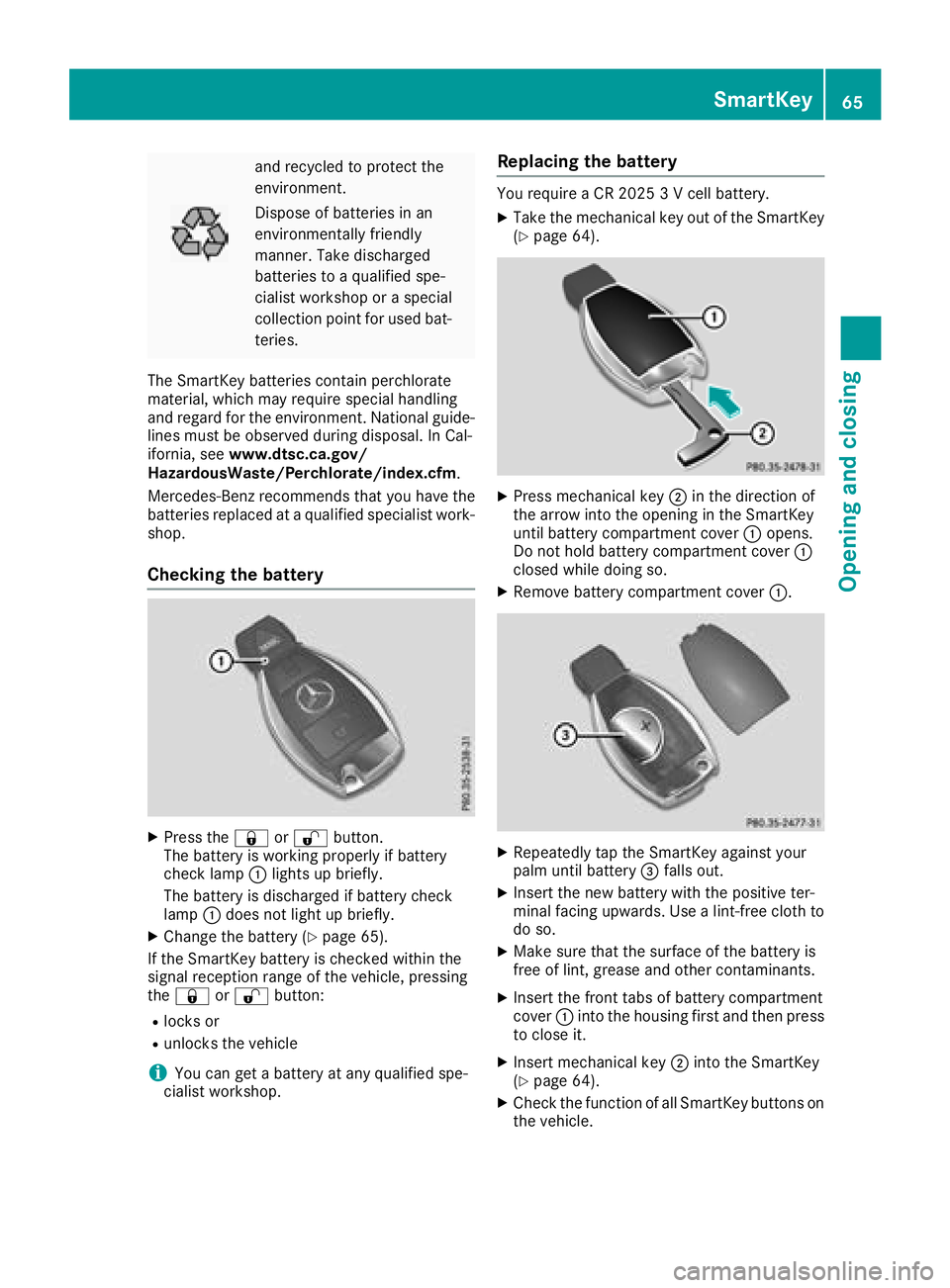
XPress the &or% button.
The battery is working properly if battery
check lamp :lights up briefly.
The battery is discharged if battery check
lamp :does not light up briefly.
XChange the battery (Ypage 65).
If the SmartKey battery is checked within the
signal reception range of the vehicle, pressing
the & or% button:
Rlocks or
Runlocks the vehicle
iYou can get a battery at any qualified spe-
cialist workshop.
Replacing the battery
You require a CR 2025 3 V cell battery.
XTake the mechanical key out of the SmartKey
(Ypage 64).
XPress mechanical key ;in the direction of
the arrow into the opening in the SmartKey
until battery compartment cover :opens.
Do not hold battery compartment cover :
closed while doing so.
XRemove battery compartment cover :.
XRepeatedly tap the SmartKey against your
palm until battery=falls out.
XInsert the new battery with the positive ter-
minal facing upwards. Use a lint-free cloth to
do so.
XMake sure that the surface of the battery is
free of lint, grease and other contaminants.
XInsert the front tabs of battery compartment
cover :into the housing first and then press
to close it.
XInsert mechanical key ;into the SmartKey
(Ypage 64).
XCheck the function of all SmartKey buttons on
the vehicle.
SmartKey65
Opening and closing
Z
Page 68 of 294
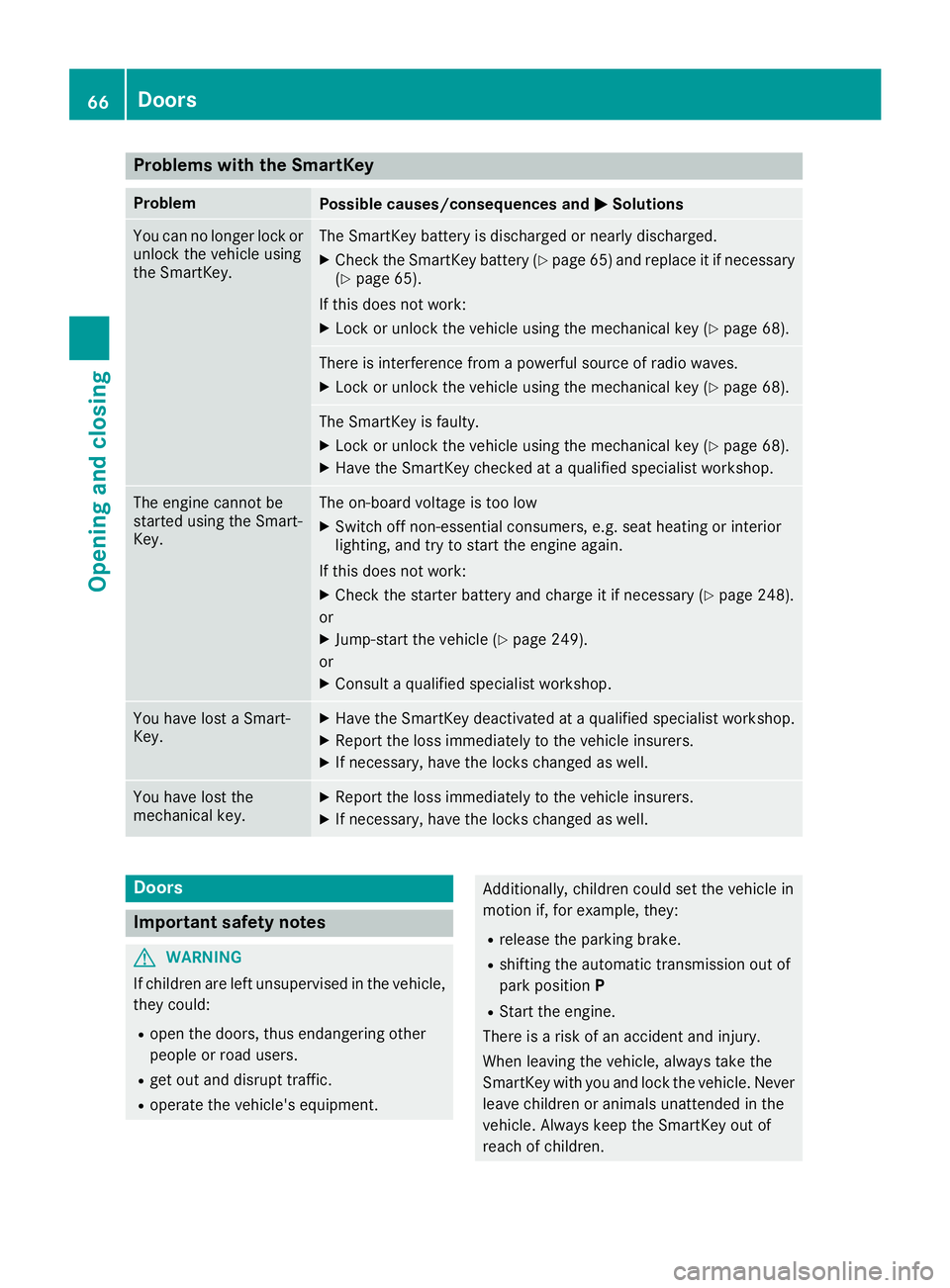
Problems with the SmartKey
ProblemPossible causes/consequences andMSolutions
You can no longer lock or
unlock the vehicle using
the SmartKey.The SmartKey battery is discharged or nearly discharged.
XCheck the SmartKey battery (Ypage 65) and replace it if necessary
(Ypage 65).
If this does not work:
XLock or unlock the vehicle using the mechanical key (Ypage 68).
There is interference from a powerful source of radio waves.
XLock or unlock the vehicle using the mechanical key (Ypage 68).
The SmartKey is faulty.
XLock or unlock the vehicle using the mechanical key (Ypage 68).
XHave the SmartKey checked at a qualified specialist workshop.
The engine cannot be
started using the Smart-
Key.The on-board voltage is too low
XSwitch off non-essential consumers, e.g. seat heating or interior
lighting, and try to start the engine again.
If this does not work:
XCheck the starter battery and charge it if necessary (Ypage 248).
or
XJump-start the vehicle (Ypage 249).
or
XConsult a qualified specialist workshop.
You have lost a Smart-
Key.XHave the SmartKey deactivated at a qualified specialist workshop.
XReport the loss immediately to the vehicle insurers.
XIf necessary, have the locks changed as well.
You have lost the
mechanical key.XReport the loss immediately to the vehicle insurers.
XIf necessary, have the locks changed as well.
Doors
Important safety notes
GWARNING
If children are left unsupervised in the vehicle,
they could:
Ropen the doors, thus endangering other
people or road users.
Rget out and disrupt traffic.
Roperate the vehicle's equipment.
Additionally, children could set the vehicle in
motion if, for example, they:
Rrelease the parking brake.
Rshifting the automatic transmission out of
park position P
RStart the engine.
There is a risk of an accident and injury.
When leaving the vehicle, always take the
SmartKey with you and lock the vehicle. Never
leave children or animals unattended in the
vehicle. Always keep the SmartKey out of
reach of children.
66Doors
Opening and closing
Page 73 of 294
ProblemPossible causes/consequences andMSolutions
A side window cannot be
closed because it is
blocked by objects, e.g.
leaves in the window
guide.XRemove the objects.
XClose the side window.
A side window cannot be
closed and you cannot
see the cause.If a side window is obstructed during closing and reopens again
slightly:
XImmediately after the window blocks, pull the corresponding switch
again until the side window has closed.
If a side window is obstructed again during closing and reopens again slightly:
XImmediately after the window blocks, pull the corresponding switchagain until the side window has closed.
The side windows cannot
be opened or closed with
convenience opening.The SmartKey battery is discharged or nearly discharged.
XCheck the SmartKey battery (Ypage 65) and replace it if necessary
(Ypage 65).
If a side window will still not open or close due to a malfunction, consult a qualified specialist
workshop.
Sliding sunroof
Important safety notes
GWARNING
While opening and closing the sliding sunroof, body parts in close proximity could become
trapped. There is a risk of injury.
Make sure that no body parts are in close
proximity during the opening and closing pro-
cedures.
If somebody becomes trapped:
Rrelease the switch immediately, or
Rduring automatic operation, push the
switch briefly in any direction
The opening or closing procedure will be stop- ped.
GWARNING
If children operate the sliding sunroof they
could become trapped, particularly if they are left unsupervised. There is a risk of injury.
When leaving the vehicle, always take the
SmartKey with you and lock the vehicle. Never
leave children unsupervised in the vehicle.
!Only open the sliding sunroof if it is free of
snow and ice. Otherwise, malfunctions may
occur.
Do not allow anything to protrude from the
sliding sunroof. Otherwise, the seals could be
damaged.
!The weather can change abruptly. It could
start to rain or snow. Make sure that the slid- ing sunroof is closed when you leave the vehi-
cle. The vehicle electronics can be damaged if
water enters the vehicle interior.
Resonance noises can occur in addition to the
usual airflow noises when the sliding sunroof is
open. They are caused by minor pressure fluc-
tuations in the vehicle interior. Change the posi-
tion of the sliding sunroof or open a side window
slightly to reduce or eliminate these noises.
Sliding sunroof71
Opening and closing
Z
Page 78 of 294
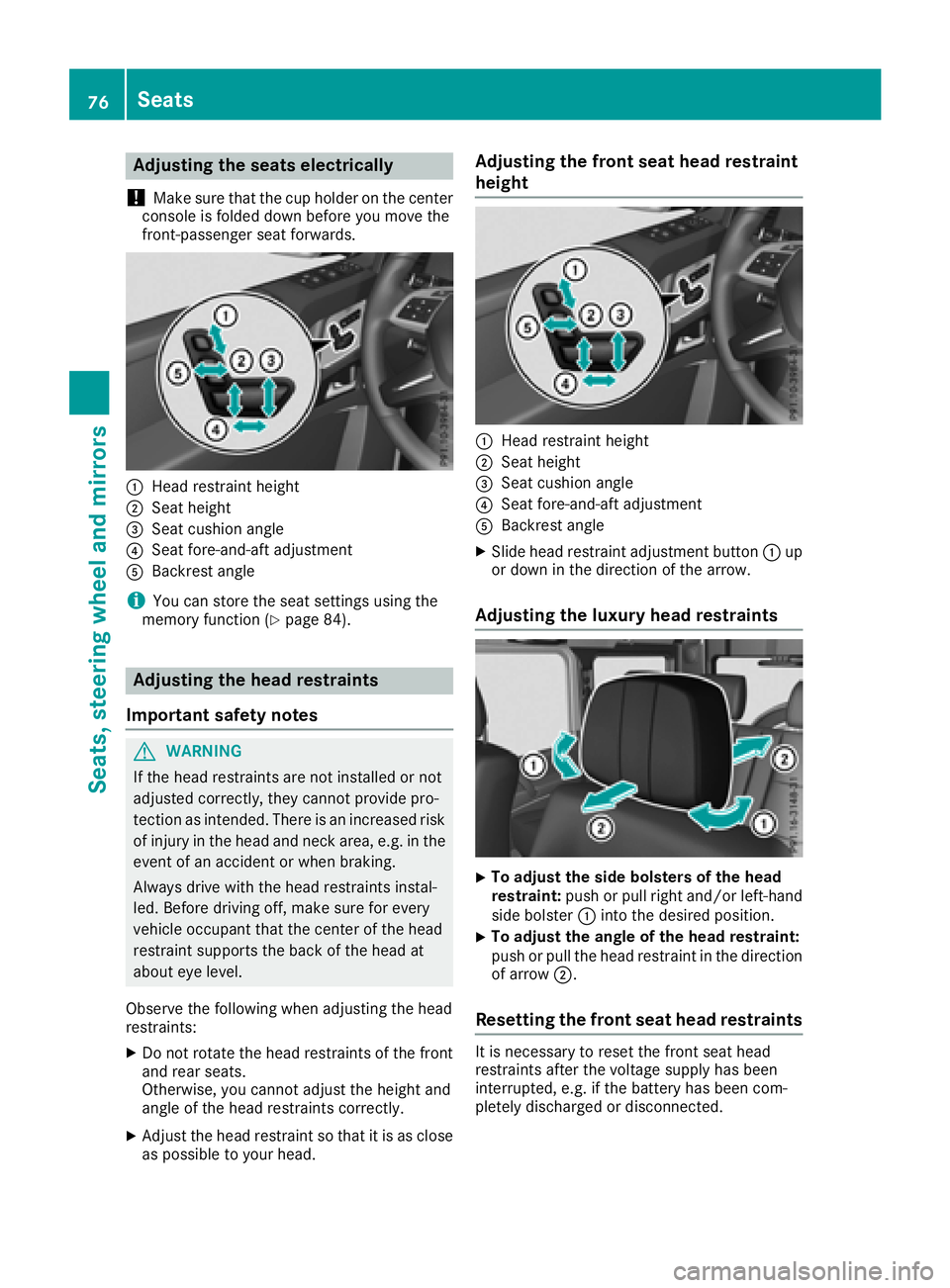
Adjusting the seats electrically
!
Mak esur ethat th ecup holder on th ecenter
console is folded down before you mov eth e
front-passenger seat forwards.
:Hea drestrain theight
;Seat height
=Seat cushion angle
?Seat fore-and-af tadjustmen t
ABackrest angle
iYou can store th eseat setting susin gth e
memory function (Ypage 84).
Adjusting the head restraints
Import ant safety notes
GWARNIN G
If th ehead restraints are no tinstalled or no t
adjusted correctly, they canno tprovid epro -
tection as intended. There is an increased ris k
of injury in th ehead and neck area, e.g. in th e
event of an acciden tor when braking .
Always drive wit hth ehead restraints instal -
led. Befor edrivin goff ,mak esur efor every
vehicl eoccupant that th ecenter of th ehead
restrain tsupport sth ebac kof th ehead at
about eye level.
Observ eth efollowin gwhen adjusting th ehead
restraints :
XDo notrotate th ehead restraints of th efron t
and rear seats.
Otherwise ,you canno tadjust th eheight and
angle of th ehead restraints correctly.
XAdjus tth ehead restrain tso that it is as close
as possibl eto your head .
Adjusting the front seat head restraint
height
:Headrestrain theight
;Seat height
=Seat cushion angle
?Seat fore-and-af tadjustmen t
ABackrest angle
XSlide head restrain tadjustmen tbutto n: up
or down in th edirection of th earrow.
Adjusting the luxury head restraints
XTo adjust th esid ebolsters of th ehea d
restraint: push or pull right and/o rleft-han d
side bolste r: intoth edesired position .
XTo adjust theangle of th ehea drestraint:
push or pull th ehead restrain tin th edirection
of arrow ;.
Resetting the front seat head restraints
It is necessar yto reset th efron tseat head
restraints after th evoltag esupply has been
interrupted, e.g. if th ebattery has been com-
pletely discharged or disconnected.
76Seats
Seats, steering wheel and mirrors