brake fluid MERCEDES-BENZ G-CLASS 2018 Owner's Manual
[x] Cancel search | Manufacturer: MERCEDES-BENZ, Model Year: 2018, Model line: G-CLASS, Model: MERCEDES-BENZ G-CLASS 2018Pages: 294, PDF Size: 4.86 MB
Page 7 of 294
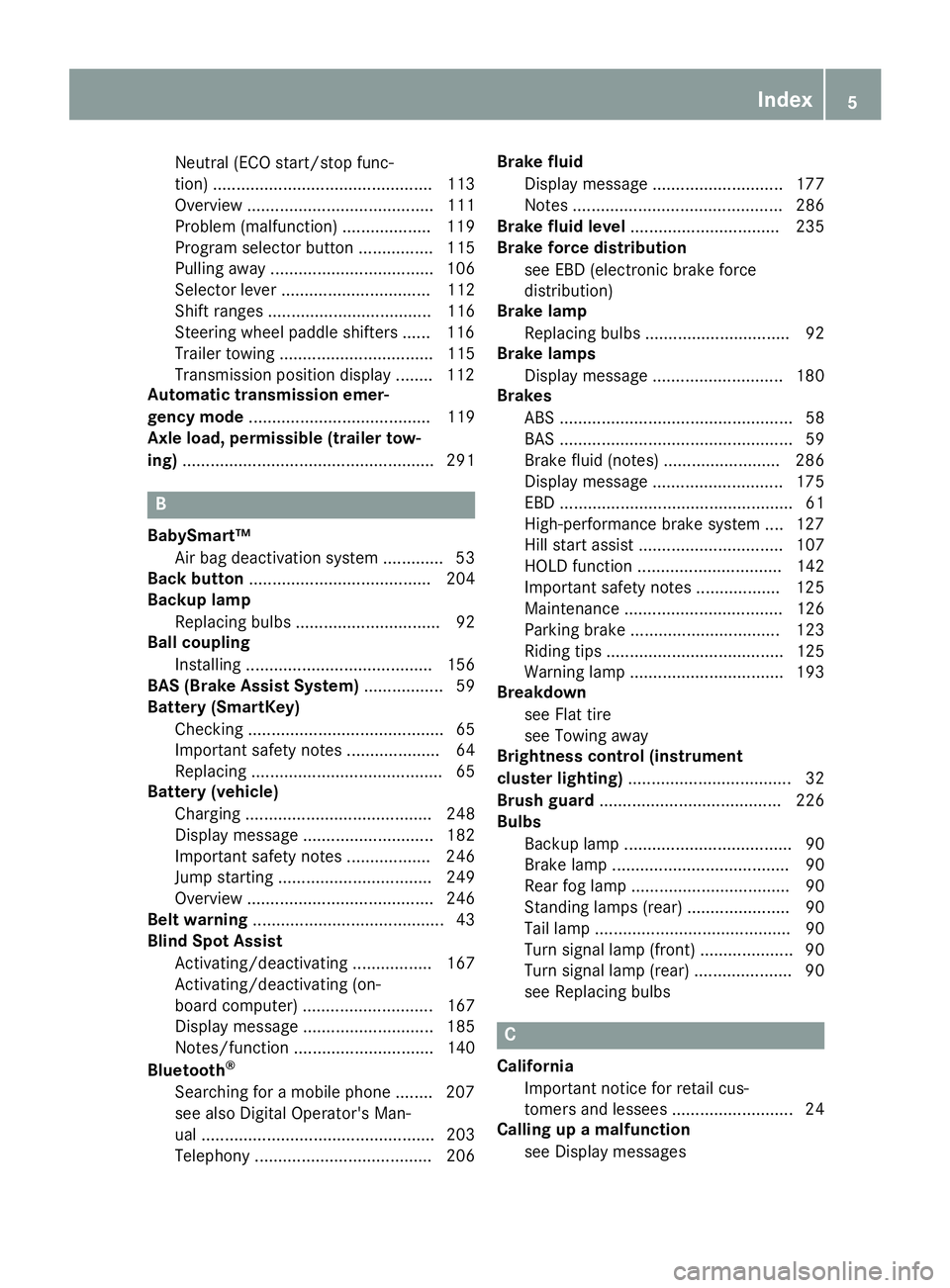
Neutral (ECO start/stop func-
tion) ............................................... 113
Overview ........................................ 111
Problem (malfunction) ................... 119
Program selector button ................ 115
Pulling away ................................... 106
Selector lever ................................ 112
Shift ranges ................................... 116
Steering wheel paddle shifters ...... 116
Trailer towing ................................. 115
Transmission position display ........ 112
Automatic transmission emer-
gency mode ....................................... 119
Axle load, permissible (trailer tow-
ing) ...................................................... 291
B
BabySmart™
Air bag deactivation system ............. 53
Back button ....................................... 204
Backup lamp
Replacing bulbs ............................... 92
Ball coupling
Installing ........................................ 156
BAS (Brake Assist System) ................. 59
Battery (SmartKey)
Checking .......................................... 65
Important safety notes .................... 64
Replacing ......................................... 65
Battery (vehicle)
Charging ........................................ 248
Display message ............................ 182
Important safety notes .................. 246
Jump starting ................................. 249
Overview ........................................ 246
Belt warning ......................................... 43
Blind Spot Assist
Activating/deactivating ................. 167
Activating/deactivating (on-
board computer) ............................ 167
Display message ............................ 185
Notes/function .............................. 140
Bluetooth
®
Searching for a mobile phone ........ 207
see also Digital Operator's Man-
ual .................................................. 203
Telephony ...................................... 206 Brake fluid
Display message ............................ 177
Notes ............................................. 286
Brake fluid level ................................ 235
Brake force distribution
see EBD (electronic brake force
distribution)
Brake lamp
Replacing bulbs ............................... 92
Brake lamps
Display message ............................ 180
Brakes
ABS .................................................. 58
BAS .................................................. 59
Brake fluid (notes) ......................... 286
Display message ............................ 175
EBD .................................................. 61
High-performance brake system .... 127
Hill start assist ............................... 107
HOLD function ............................... 142
Important safety notes .................. 125
Maintenance .................................. 126
Parking brake ................................ 123
Riding tips ...................................... 125
Warning lamp ................................. 193
Breakdown
see Flat tire
see Towing away
Brightness control (instrument
cluster lighting) ................................... 32
Brush guard ....................................... 226
Bulbs
Backup lamp .................................... 90
Brake lamp ...................................... 90
Rear fog lamp .................................. 90
Standing lamps (rear) ...................... 90
T
ail lamp .......................................... 90
Turn signal lamp (front) .................... 90
Turn signal lamp (rear) ..................... 90
see Replacing bulbs
C
California
Important notice for retail cus-
tomers and lessees .......................... 24
Calling up a malfunction
see Display messages
Index5
Page 18 of 294
S
SafetyChildren in the vehicle ..................... 50
see Occupant safety
Safety system
see Driving safety systems
SD card
Inserting ........................................2 08
Inserting/removing ........................ 208
Removing ....................................... 208
SD memory card
see also Digital Operator's Man-
ual ..................................................2 03
Search & Send
see also Digital Operator's Man-
ual ..................................................2 03
Seat
Correct driver's seat position ........... 74
Seat backrest
Folding back .................................. 212
Seat belts
Adjusting the height ......................... 41
center rear-compartment seat ......... 42
Cleaning ......................................... 242
Correct usage .................................. 41
Fastening ......................................... 41
Important safety guidelines ............. 40
Introduction ..................................... 39
Releasing ......................................... 43
Warning lamp ................................. 192
Warning lamp (function) ................... 43
Seat heating
Indicator lamp (malfunction) ............ 79
Seat ventilation
Indicator lamp (malfunction) ............ 79
Seats
Adjusting (electrically) ..................... 76
Adjusting the 4-way lumbar sup-
port .................................................. 78
Adjusting the head restraint ............ 76
Cleaning the cover ......................... 241
Important safety notes .................... 74
Overview .......................................... 74
Storing settings (memory func-
tion) ................................................. 84
Switching seat heating on/off ......... 78
Switching seat ventilation on/off .... 79 Selector lever
Cleaning ......................................... 241
Sensors (cleaning instructions) ....... 239
Service interval display
Displaying a service message (on-
board computer) ............................ 236
Service menu (on-board com-
puter) .................................................. 167
Service products
Brake fluid ..................................... 286
Coolant (engi ne) ............................ 286
Eng
ine oil ....................................... 285
Fuel ................................................ 283
Important safety notes .................. 283
Notes ............................................. 283
Refrigerant (air-conditioning sys-
tem) ............................................... 287
Washer fluid ................................... 287
Setting
Date ............................................... 168
Time ............................................... 169
Setting the air distribution ................. 99
Setting the date/time format
see also Digital Operator's Man-
ual .................................................. 203
Setting the language
see also Digital Operator's Man-
ual .................................................. 203
Setting the time
see also Digital Operator's Man-
ual .................................................. 203
Settings
Calling up a stored setting ............... 85
Factory (on-board computer) ......... 171
Language ....................................... 168
On-board computer ....................... 168
SETUP (on-board computer,
Mercedes-AMG vehicles) .................. 171
Shift ranges ....................................... 116
Side impact air bag ............................. 45
Side marker lamp (display mes-
sage) ................................................... 180
Side windows
Convenience closing feature ............ 70
Convenience opening feature .......... 70
Important safety information ........... 69
Opening/closing .............................. 69
16Index
Page 23 of 294
Distance warning ........................... 201
DISTRONIC PLUS ........................... 201
ESP
®.............................................. 196
ESP®OFF ....................................... 197
Fuel tank ........................................ 199
General notes ................................ 191
Overview .......................................... 32
Parking brake ................................ 194
PASSENGER AIR BAG OFF ............... 39
Reserve fuel ................................... 199
Restraint system ............................ 198
Seat belt ........................................ 192
Tire pressure monitor .................... 202
Warning triangle ................................ 243
Warranty .............................................. 24
Washer fluid
Display message ............................ 191
Weather display (COMAND)
see also Digital Operator's Man-
ual .................................................. 203
Wheel and tire combinations
Tires ............................................... 279
Wheel bolt tightening torque ........... 278
Wheels
Changing a wheel .......................... 275
Checking ........................................ 257
Cleaning ......................................... 238
Important safety notes .................. 257
Information on driving .................... 257
Interchanging/changing ................ 275
Mounting a new wheel ................... 278
Mounting a wheel .......................... 276
Removing a wheel .......................... 278
Snow chains .................................. 259
Storing ........................................... 276
Tightening torque ........................... 278
Wheel size/tire size ....................... 279
Window curtain air bag
Display message ............................ 178
Operation ......................................... 46
Windows
see Side windows
Windshield
Defrosting ...................................... 100
Windshield heating ........................... 101
Windshield washer fluid
see Windshield washer system Windshield washer system
Adding washer fluid ....................... 234
Notes ............................................. 287
Windshield wipers
Problem (malfunction) ..................... 95
Rear window wiper .......................... 94
Replaci ng the w
iper blades .............. 94
Switching on/off .............................. 93
Winter driving
Important safety notes .................. 258
Slippery road surfaces ................... 128
Snow chains .................................. 259
Winter operation
Overview ........................................ 258
Radiator cover ............................... 231
Summer tires ................................. 259
Winter tires
M+S tires ....................................... 259
Wiper blades
Cleaning ......................................... 239
Important safety notes .................... 94
Replacing ......................................... 94
Wooden trim (cleaning instruc-
tions) .................................................. 241
Index21
Page 30 of 294
National Highway Traffic Safety Administration
(NHTSA) in addition to notifying Mercedes-Benz
USA, LLC.
If NHTSA receives similar complaints, it may
open an investigation, and if it finds that a safety
defect exists in a group of vehicles, it may order
a recall and remedy campaign. However, NHTSA
cannot become involved in individual problems
between you, your dealer, or Mercedes-Benz
USA, LLC.
To contact NHTSA, you may call the Vehicle
Safety Hotline toll-free at 1-888-327-4236
(TTY: 1-800-424-9153); go tohttp://
www.safercar.gov; or write to: Administrator,
NHTSA, 400 Seventh Street, SW., Washington,
DC 20590.
You can also obtain other information about
motor vehicle safety from
http://www.safercar.gov
Limited Warranty
!
Follow the instructions in this manual about
the proper operation of your vehicle as well as
about possible vehicle damage. Damage to
your vehicle that arises from culpable contra-
ventions against these instructions is not cov-
ered either by the Mercedes-Benz Limited
Warranty or by the New or Used-Vehicle War-
ranty.
QR codes for rescue cards
The QR codes are secured in the fuel filler flap
and on the opposite side on the B-pillar. In the
event of an accident, rescue services can use
the QR code to quickly find the appropriate res- cue card for your vehicle. The current rescue
card contains the most important information
about your vehicle in a compact form, e.g. the
routing of the electric cables.
You can find more information under
www.mercedes-benz.de/qr-code.
Data stored in the vehicle
Data storage
A wide range of electronic components in your
vehicle contain data memories. These data memories temporarily or perma-
nently store technical information about:
Rthe vehicle's operating state
Rincidents
Rmalfunctions
In general, this technical information docu-
ments the state of a component, a module, a
system or the surroundings.
This includes, for example:
Roperating conditions of system components.
For example, fluid levels
Rthe vehicle's status messages and those of its
individual components, e.g. number of wheel
revolutions/speed, deceleration in move-
ment, lateral acceleration, accelerator pedal
position
Rmalfunctions and defects in important system
components, e.g. lights, brakes
Rvehicle reactions and operating conditions in
special driving situations, e.g. air bag deploy-
ment, intervention of stability control sys-
tems
Rambient conditions, e.g. outside temperature
This data is of an exclusively technical nature
and can be used to:
Rassist in recognizing and rectifying malfunc-
tions and defects
Ranalyze vehicle functions, e.g. after an acci-
dent
Roptimize vehicle functions
The data cannot be used to trace the vehicle's
movements.
When your vehicle is serviced, technical infor-
mation can be read from the event data memory
and malfunction data memory.
Services include, for example:
Rrepair services
Rservice processes
Rwarranties
Rquality assurance
The vehicle is read out by employees of the ser-
vice network (including the manufacturer) using special diagnostic testers. More detailed infor-
mation is obtained from it, if required.
After a malfunction has been rectified, the infor-
mation is deleted from the malfunction memory or is continually overwritten.
When operating the vehicle, situations are con-
ceivable in which this technical data, in connec-
28Data stored in the vehicle
Introduction
Page 128 of 294
This also applies if cruise control or DISTRONIC
PLUS is activated.
Heavy and light loads
GWARNING
If you rest your foot on the brake pedal while
driving, the braking system can overheat. This increases the stopping distance and can even
cause the braking system to fail. There is a
risk of an accident.
Never use the brake pedal as a footrest. Never
depress the brake pedal and the accelerator
pedal at the same time.
!Depressing the brake pedal constantly
results in excessive and premature wear to
the brake pads.
If the brakes have been subjected to a heavy
load, do not stop the vehicle immediately. Drive
on for a short while. This allows the airflow to
cool the brakes more quickly.
Wet roads
If driving in heavy rain for a prolonged period of
time without braking, there may be a delayed
reaction from the brakes when braking for the
first time. This may also occur after the vehicle
has been washed.
You have to depress the brake pedal more
firmly. Maintain a greater distance from the
vehicle in front.
After driving on a wet road or having the vehicle
washed, brake firmly while paying attention to
the traffic conditions. This will warm up the
brake discs, thereby drying them more quickly
and protecting them against corrosion.
Limited braking performance on salt-
treated roads
If you drive on salted roads, a layer of salt resi-
due may form on the brake discs and brake
pads. This can result in a significantly longer
braking distance.
RIn order to prevent any salt build-up, apply the
brakes occasionally while paying attention to
the traffic conditions.
RCarefully depress the brake pedal and the
beginning and end of a journey.
RMaintain a greater distance to the vehicle
ahead.
Servicing the brakes
!The brake fluid level may be too low, if:
Rif the red brake warning lamp lights up in
the instrument cluster and
Ryou hear a warning tone while the engine is
running
Observe additional warning messages in the
multifunction display.
The brake fluid level may be too low due to
brake pad wear or leaking brake lines.
Have the brake system checked immediately. Consult a qualified specialist workshop to
arrange this.
!If the brake warning lamp lights up in the
instrument cluster and you hear a warning
tone even though the parking brake has been released, the brake fluid level may be too low.
Observe additional warning messages in the
multifunction display.
The brake fluid level may be too low due to
brake pad wear or leaking brake lines.
Have the brake system checked immediately. This work should be carried out at a qualified
specialist workshop.
!A function or performance test should only
be carried out on a 2-axle dynamometer. If
you wish to operate the vehicle on such a
dynamometer, please consult a qualified spe-
cialist workshop in advance. You could oth-
erwise damage the drive train or the brake
system.
!The ESP®system operates automatically. If
the parking brake is tested on a brake dyna-
mometer (for a maximum of ten seconds), the
engine and the ignition must be switched off.
Braking triggered automatically by ESP
®may
otherwise cause severe damage to the brake
system.
All checks and maintenance work on the brake
system must be carried out at a qualified spe-
cialist workshop.
126Driving tips
Driving and parking
Page 129 of 294
Have brake pads installed and brake fluid
replaced at a qualified specialist workshop.
If the brake system has only been subject to
moderate loads, you should test the functional-
ity of your brakes at regular intervals.
Information on BAS (Brake Assist) (
Ypage 59).
For safety reasons, Mercedes-Benz recom-
mends only installing the following brake disks
and brake pads/linings:
Rbrake disks that have been approved by
Mercedes-Benz
Rbrake pads/linings that have been approved
by Mercedes-Benz or that are of an equivalent
standard of quality
Other brake disks or brake pads/linings can
compromise the safety of your vehicle.
Always replace all brake disks and brake pads/ linings on an axle at the same time. Always
install new brake pads/linings when replacing
brake disks.
The vehicle is equipped with lightweight brake
disks to which the wheel assembly with rim and
threaded connection is matched.
The use of brake discs other than those
approved by Mercedes-Benz may alter track
width and is subject to approval, if applicable.
Shock-type loads when handling the brake
discs, such as when changing wheels, can lead
to a reduction in comfort when driving with light- weight brake discs. Avoid shock-type loads on
the lightweight brake disks, particularly on the
brake plate.
Mercedes-Benz recommends that you only use
brake fluid that has been specially approved for
your vehicl
e by Mercedes-Benz, or which corre-
sponds to an equivalent quality standard. Brake
fluid which has not been approved for
Mercedes-Benz vehicles or which is not of an
equivalent quality could affect your vehicle's
operating safety.
High-performance brake (Mercedes-
AMG vehicles)
The AMG brake systems are designed for heavy
loads. This may lead to noise when braking.
This will depend on:
RSpeed
RBraking force
RAmbient conditions, e.g. temperature and
humidity The wear of individual brake system compo-
nents such as the brake pads/linings or brake
discs depends on individual driving style and
operating conditions.
For this reason, it is impossible to state a mile-
age that will be valid under all circumstances. An
aggressive driving style will lead to high wear.
You can obtain more information on this from a
qualified specialist workshop.
New and replaced brake pads and discs only
reach their optimum braking effect after several
hundred kilometers of driving. Compensate for
this by applying greater force to the brake pedal.
Keep this in mind, and adapt your driving and
braking accordingly during this break-in period.
Excessive heavy braking results in correspond-
ingly high brake wear. If the brake pads/linings
have reached their wear limit, the multifunction
display shows a corresponding message. Espe-
cially for high performance driving, it is impor-
tant to maintain and have the brake system
checked regularly.
Driving on slippery surfaces
!
Where possible, avoid spinning the drive
wheels when pulling away on slippery roads.
You could otherwise damage the drive train.
This type of damage is not covered by the
terms of the Mercedes-Benz warranty.
XEngage the differential locks if necessary
(Ypage 151).
Driving on wet roads
Hydroplaning
If water has accumulated to a certain depth on
the road surface, there is a danger of hydro-
planing occurring, even if:
Ryou drive at low speeds
Rthe tires have adequate tread depth
For this reason, in the event of heavy rain or in
conditions in which hydroplaning may occur,
you must drive in the following manner:
Rlower your speed
Ravoid ruts
Ravoid sudden steering movements
Rbrake carefully
Driving tips127
Driving and parking
Z
Page 179 of 294
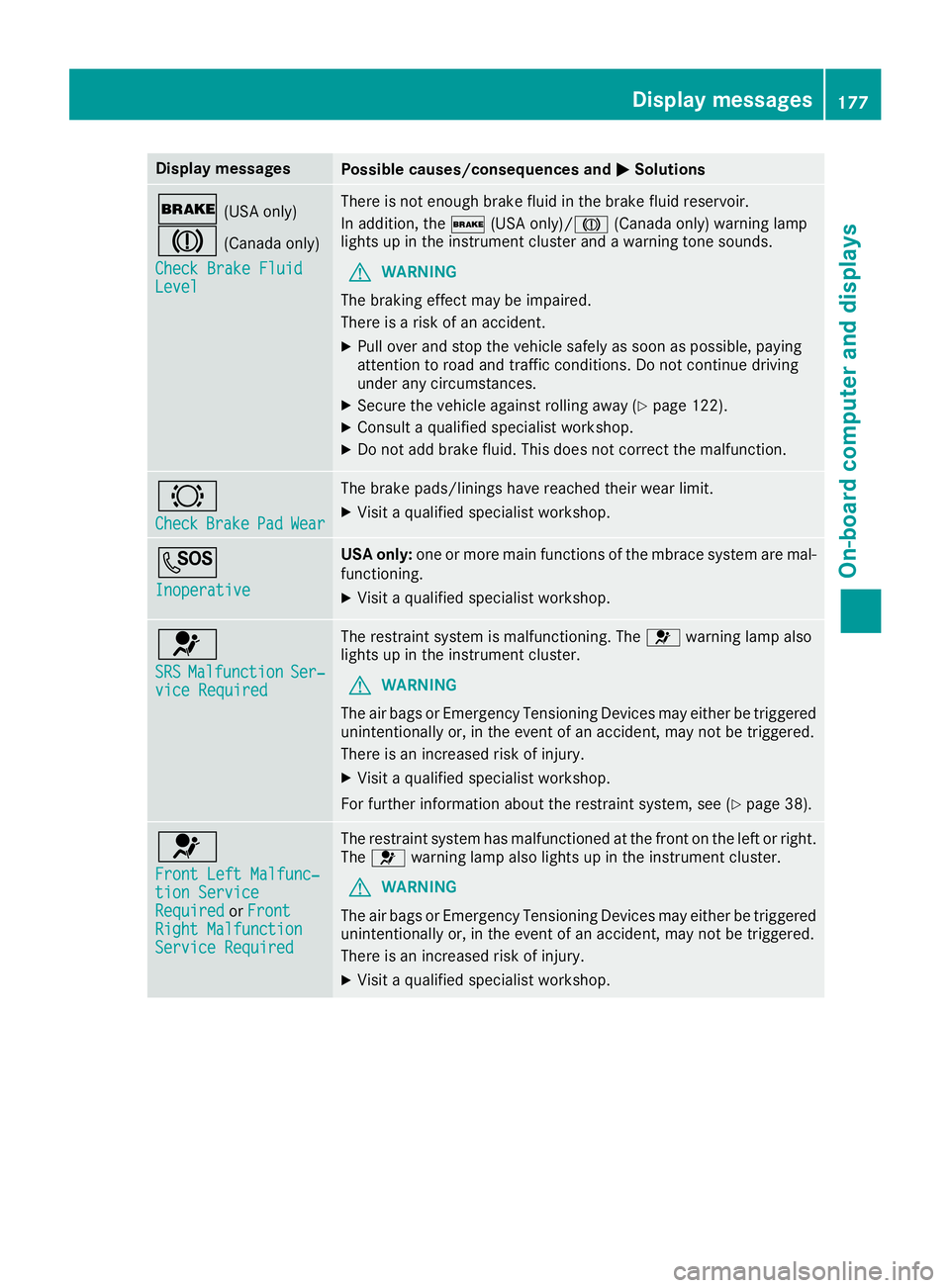
Display messagesPossible causes/consequences andMSolutions
$(USAonly)
J(Canada only)
Check Brake Fluid
Level
There is no tenough brak eflui din th ebrak efluid reservoir .
In addition ,th e$ (USAonly)/ J(Canada only) warning lamp
lights up in th einstrumen tcluste rand awarning tone sounds.
GWARNIN G
The braking effec tmay be impaired.
There is aris kof an accident.
XPull ove rand stop th evehicl esafely as soo nas possible, payin g
attention to roa dand traffic conditions. Do no tcontinu edrivin g
under any circumstances.
XSecur eth evehicl eagainst rollin gaway (Ypage 122).
XConsult aqualified specialist workshop .
XDo notadd brak efluid .This does no tcorrec tth emalfunction .
#
CheckBrakePadWear
The brak epads/linings hav ereached their wear limit.
XVisit aqualified specialist workshop .
G
Inoperative
USA only:on eor mor emain function sof th embrace system are mal-
functioning .
XVisitaqualified specialist workshop .
6
SRSMalfunctionSer‐viceRequired
The restrain tsystem is malfunctioning .The 6 warning lamp also
lights up in th einstrumen tcluster.
GWARNIN G
The air bags or Emergency Tensioning Devices may either be triggered
unintentionally or, in th eevent of an accident, may no tbe triggered .
There is an increased ris kof injury.
XVisit aqualified specialist workshop .
Fo rfurther information about th erestrain tsystem, see (
Ypage 38).
6
Front Lef tMalfunc‐tio nServic eRequiredorFrontRight MalfunctionServic eRequired
The restrain tsystem has malfunctioned at th efron ton th elef tor right .
The 6 warning lamp also lights up in th einstrumen tcluster.
GWARNIN G
The air bags or Emergency Tensioning Devices may either be triggered
unintentionally or, in th eevent of an accident, may no tbe triggered .
There is an increased ris kof injury.
XVisit aqualified specialist workshop .
Display messages177
On-board computer and displays
Z
Page 195 of 294
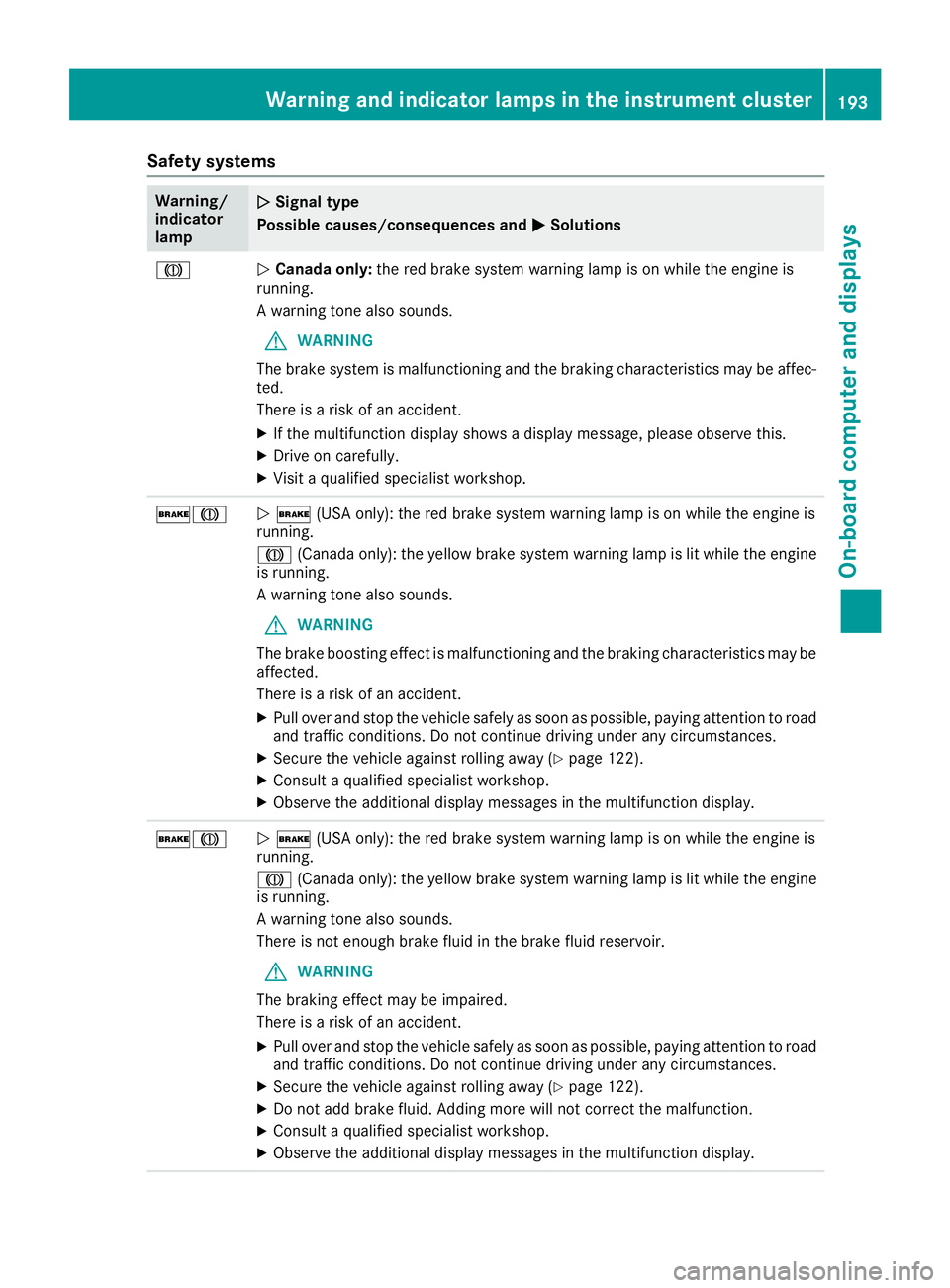
Safety systems
Warning/
indicator
lampNSignal type
Possible causes/consequences and M
Solutions
JNCanada only: the red brake system warning lamp is on while the engine is
running.
A warning tone also sounds.
GWARNING
The brake system is malfunctioning and the braking characteristics may be affec-
ted.
There is a risk of an accident.
XIf the multifunction display shows a display message, please observe this.
XDrive on carefully.
XVisit a qualified specialist workshop.
$JN $ (USA only): the red brake system warning lamp is on while the engine is
running.
J (Canada only): the yellow brake system warning lamp is lit while the engine
is running.
A warning tone also sounds.
GWARNING
The brake boosting effect is malfunctioning and the braking characteristics may be
affected.
There is a risk of an accident.
XPull over and stop the vehicle safely as soon as possible, paying attention to road
and traffic conditions. Do not continue driving under any circumstances.
XSecure the vehicle against rolling away (Ypage 122).
XConsult a qualified specialist workshop.
XObserve the additional display messages in the multifunction display.
$JN $ (USA only): the red brake system warning lamp is on while the engine is
running.
J (Canada only): the yellow brake system warning lamp is lit while the engine
is running.
A warning tone also sounds.
There is not enough brake fluid in the brake fluid reservoir.
GWARNING
The braking effect may be impaired.
There is a risk of an accident.
XPull over and stop the vehicle safely as soon as possible, paying attention to road
and traffic conditions. Do not continue driving under any circumstances.
XSecure the vehicle against rolling away (Ypage 122).
XDo not add brake fluid. Adding more will not correct the malfunction.
XConsult a qualified specialist workshop.
XObserve the additional display messages in the multifunction display.
Warning and indicator lamps in the instrument cluster193
On-board computer and displays
Z
Page 237 of 294
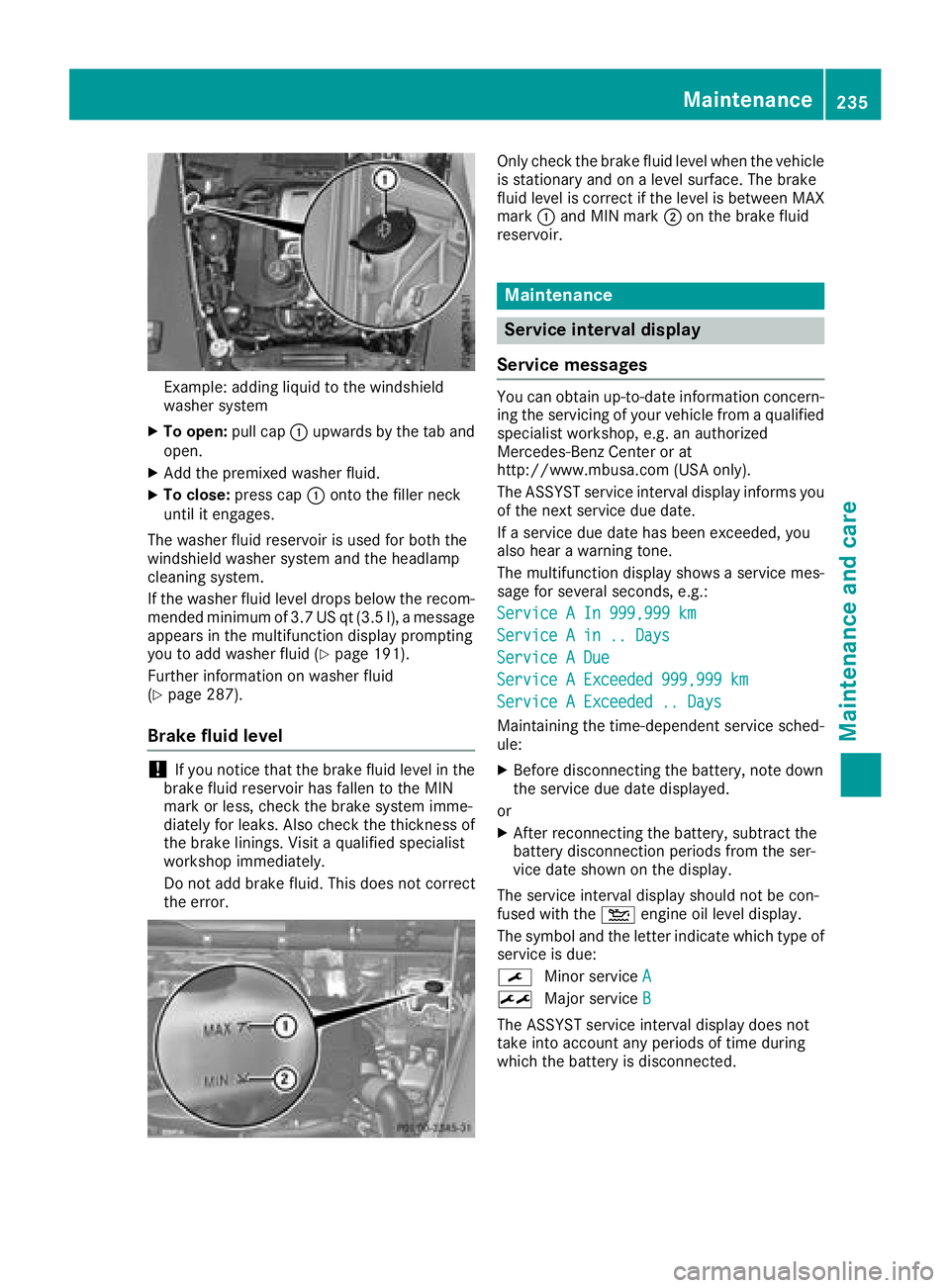
Example: adding liquid to the windshield
washer system
XTo open:pull cap:upwards by the tab and
open.
XAdd the premixed washer fluid.
XTo close: press cap :onto the filler neck
until it engages.
The washer fluid reservoir is used for both the
windshield washer system and the headlamp
cleaning system.
If the washer fluid level drops below the recom-
mended minimum of 3.7 US qt (3.5 l), a message
appears in the multifunction display prompting
you to add washer fluid (
Ypage 191).
Further information on washer fluid
(
Ypage 287).
Brake fluid level
!If you notice that the brake fluid level in the
brake fluid reservoir has fallen to the MIN
mark or less, check the brake system imme-
diately for leaks. Also check the thickness of
the brake linings. Visit a qualified specialist
workshop immediately.
Do not add brake fluid. This does not correct
the error.
Only check the brake fluid level when the vehicle
is stationary and on a level surface. The brake
fluid level is correct if the level is between MAX
mark :and MIN mark ;on the brake fluid
reservoir.
Maintenance
Service interval display
Service messages
You can obtain up-to-date information concern-
ing the servicing of your vehicle from a qualified
specialist workshop, e.g. an authorized
Mercedes-Benz Center or at
http://www.mbusa.com (USA only).
The ASSYST service interval display informs you
of the next service due date.
If a service due date has been exceeded, you
also hear a warning tone.
The multifunction display shows a service mes-
sage for several seconds, e.g.:
Service A In 999,999 km
Service A in .. Days
Service A Due
Service A Exceeded 999,999 km
Service A Exceeded .. Days
Maintaining the time-dependent service sched-
ule:
XBefore disconnecting the battery, note down
the service due date displayed.
or
XAfter reconnecting the battery, subtract the
battery disconnection periods from the ser-
vice date shown on the display.
The service interval display should not be con-
fused with the 4engine oil level display.
The symbol and the letter indicate which type of
service is due:
¯ Minor service A
±
Major service B
The ASSYST service interval display does not
take into account any periods of time during
which the battery is disconnected.
Maintenance235
Maintenance and care
Z
Page 240 of 294
Cleaning the paintwork
!Do not affix:
Rstickers
Rfilms
Rmagnetic plates or similar items
to painted surfaces. You could otherwise
damage the paintwork.
Scratches, corrosive deposits, areas affected by
corrosion and damage caused by inadequate
care cannot always be completely repaired. In
such cases, visit a qualified specialist workshop.
XRemove dirt immediately, where possible,
while avoiding rubbing too hard.
XSoak insect remains with insect remover and
rinse off the treated areas afterwards.
XSoak bird droppings with water and rinse off
the treated areas afterwards.
XRemove coolant, brake fluid, tree resin, oils,
fuels and greases by rubbing gently with a
cloth soaked in petroleum ether or lighter
fluid.
XUse tar remover to remove tar stains.
XUse silicone remover to remove wax.
If water no longer forms "beads" on the paint
surface, use the paint care products recommen-
ded and approved by Mercedes-Benz. This is the
case approximately every three to five months,
depending on the climate conditions and the
care product used.
The cleaning product Paint Cleaner, which has
been recommended and approved by
Mercedes-Benz, should be used when dirt has
penetrated the paint surface.
Also use Paint Cleaner on paint that has become
dull.
Do not use these care products in the sun or on
the hood while the hood is hot.
XUse a suitable touch-up stick, e.g. MB Touch-
Up Stick, to repair slight damage to the paint-
work quickly and provisionally.
Matte finish care
!Never polish the vehicle or the light alloy
wheels. Polishing causes the finish to shine.
!The following may cause the paint to
become shiny and thus reduce the matte
effect:
Rstrong rubbing of the paintwork with
unsuitable materials
Rfrequent use of automatic car washes
Rwashing the vehicle in direct sunlight
!Never use paint cleaner, buffing or polishing
products, or gloss preserver, e.g. wax. These
products are only suitable for high-gloss sur-
faces. Their use on vehicles with matte finish
leads to considerable surface damage (shiny,
spotted areas).
Always have paintwork repairs carried out at a
qualified specialist workshop.
!Do not use wash programs with a hot wax
treatment under any circumstances.
Observe these notes if your vehicle has a clear
matte finish. This will help you to avoid damage
to the paintwork due to incorrect treatment.
These notes also apply to light alloy wheels with a clear matte finish.
The vehicle should ideally be washed by hand
using a soft sponge, car shampoo and plenty of
water.
Use only insect remover and car shampoo from
the range of approved Mercedes-Benz care
products.
Cleaning the vehicle parts
Cleaning the wheels
GWARNING
The water jet from a circular jet nozzle (dirt
blasters) can cause invisible exterior damage
to the tires or chassis components. Compo-
nents damaged in this way may fail unexpect-
edly. There is a risk of an accident.
Do not use power washers with circular jet
nozzles to clean the vehicle. Have damaged
tires or chassis components replaced imme-
diately.
!Do not use acidic wheel cleaning products
to remove brake dust. This could damage
wheel bolts and brake components.
238Care
Maintenance and care