low beam MERCEDES-BENZ G-CLASS 2018 Owner's Manual
[x] Cancel search | Manufacturer: MERCEDES-BENZ, Model Year: 2018, Model line: G-CLASS, Model: MERCEDES-BENZ G-CLASS 2018Pages: 294, PDF Size: 4.86 MB
Page 14 of 294
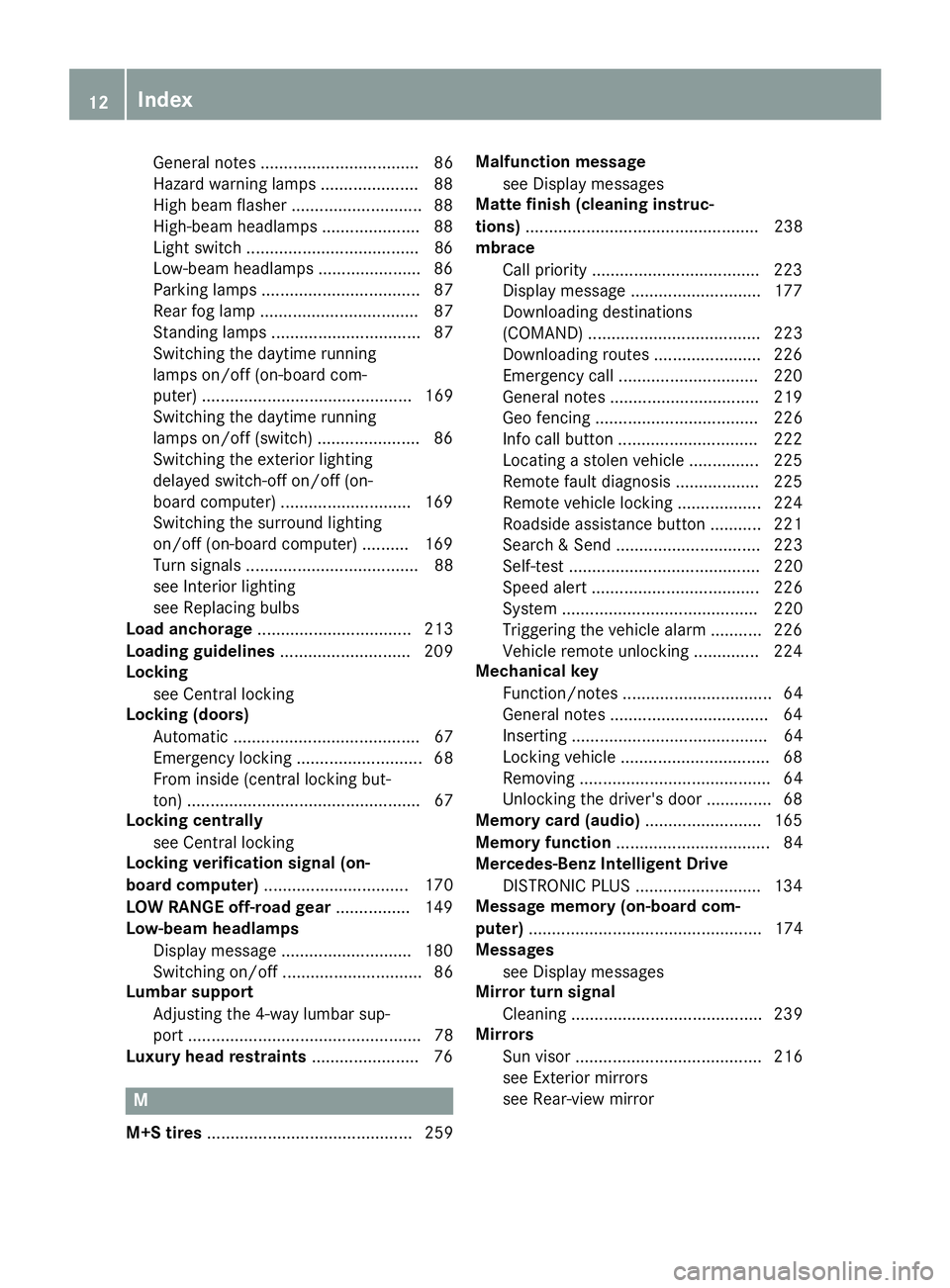
General notes .................................. 86
Hazard warning lamps .....................88
High beam flasher ............................ 88
High-beam headlamps ..................... 88
Light switch .....................................8 6
Low-beam headlamps ...................... 86
Parking lamps .................................. 87
Rear fog lamp .................................. 87
Standing lamps ................................ 87
Switching the daytime running
lamps on/off (on-board com-
puter) ............................................. 169
Switching the daytime running
lamps on/off (switch) ...................... 86
Switching the exterior lighting
delayed switch-off on/off (on-
board computer) ............................ 169
Switching the surround lighting
on/off (on-board computer) .......... 169
Turn signals ..................................... 88
see Interior lighting
see Replacing bulbs
Load anchorage ................................. 213
Loading guidelines ............................ 209
Locking
see Central locking
Locking (doors)
Automatic ........................................ 67
Emergency locking ........................... 68
From inside (central locking but-
ton) .................................................. 67
Locking centrally
see Central locking
Locking verification signal (on-
board computer) ............................... 170
LOW RANGE off-road gear ................ 149
Low-beam headlamps
Display message ............................ 180
Switching on/off .............................. 86
Lumbar support
Adjusting the 4-way lumbar sup-
port .................................................. 78
Luxury head restraints ....................... 76
M
M+S tires............................................ 259 Malfunction message
see Display messages
Matte finish (cleaning instruc-
tions) .................................................. 238
mbrace
Call priority .................................... 223
Display message ............................ 177
Downloading destinations
(COMAND) ..................................... 223
Downloading routes ....................... 226
Emergency call .............................. 220
General notes ................................ 219
Geo fencing ................................... 226
Info call button .............................. 222
Locating a stolen vehicle ............... 225
Remote fault diagnosis .................. 225
Remote vehicle locking .................. 224
Roadside assistance button ........... 221
Search & Send ............................... 223
Self-test ......................................... 220
Speed alert .................................... 226
System .......................................... 220
Triggering the vehicle alarm ........... 226
Vehicle remote unlocking .............. 224
Mechanical key
Function/notes ................................ 64
General notes .................................. 64
Inserting .......................................... 64
Locking vehicle ................................ 68
Removing ......................................... 64
Unlocking the driver's door .............. 68
Memory card (audio) ......................... 165
Memory function ................................. 84
Mercedes-Benz Intelligent Drive
DISTRONIC PLUS ........................... 134
Message memory (on-board com-
puter) .................................................. 174
Messages
see Display messages
Mirror turn signal
Cleaning ......................................... 239
Mirrors
Sun visor ........................................ 216
see Exterior mirrors
see Rear-view mirror
12Index
Page 34 of 294
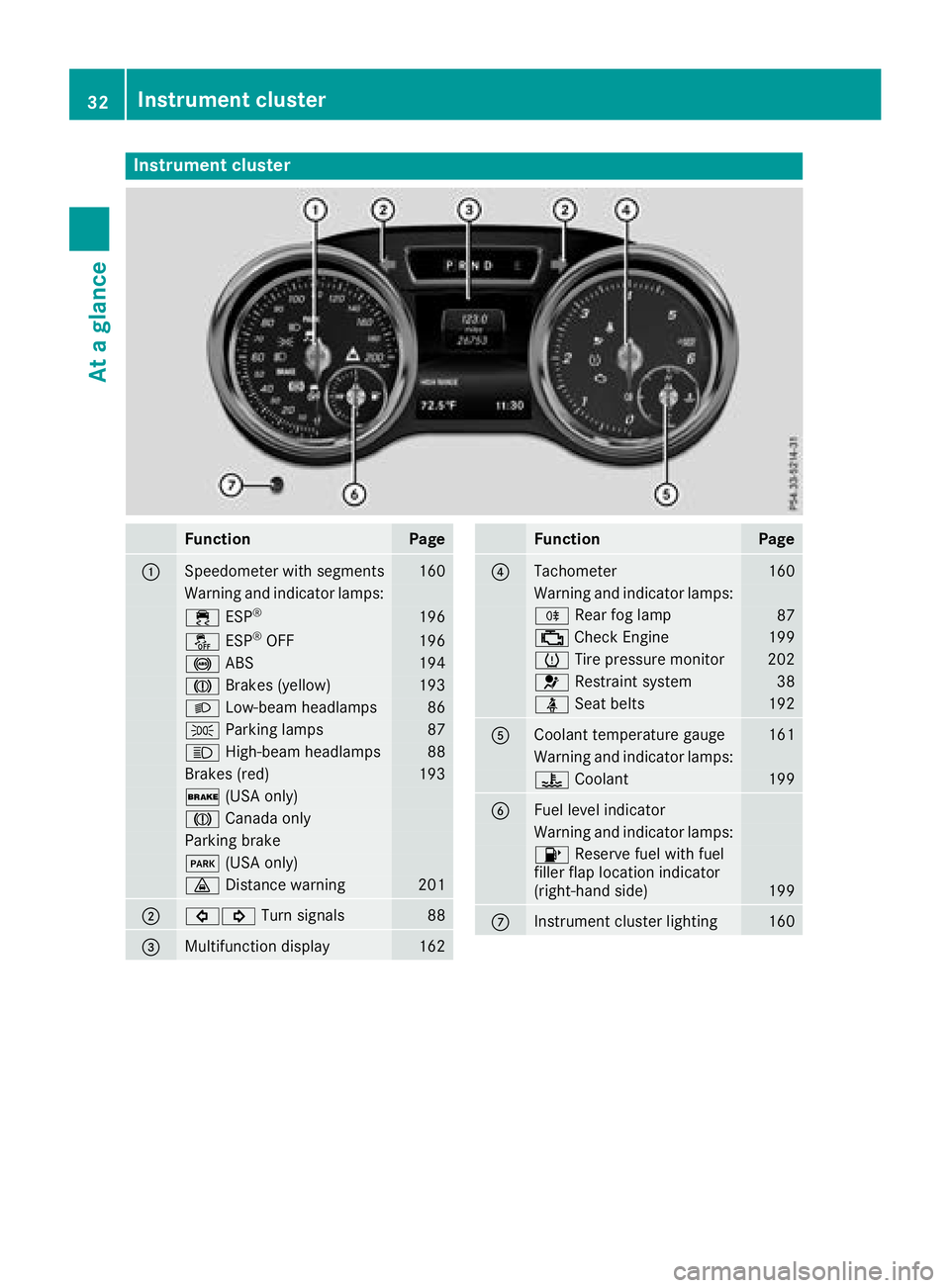
Instrument cluster
FunctionPage
:Speedometer wit hsegments16 0
Warning and indicator lamps:
÷ ESP®19 6
å ESP®OF F196
! ABS194
J Brakes(yellow)19 3
L Low-beam headlamps86
TParking lamp s87
KHigh-beam headlamps88
Brakes(red)19 3
$ (USAonly)
J Canad aonly
Parking brak e
F(USAonly)
· Distanc ewarning20 1
;#! Turn signals88
=Multifunction display162
FunctionPag e
?Tachometer160
Warning and indicator lamps:
R Rear fog lamp87
;CheckEngin e199
h Tirepressur emonitor20 2
6 Restrain tsystem38
ü Seat belt s192
ACoolan ttemperature gauge16 1
Warning and indicator lamps:
? Coolan t199
BFue llevel indicator
Warning and indicator lamps:
8 Reserve fuel wit hfuel
filler flap location indicator
(right-hand side )
199
CInstrumen tcluste rlighting16 0
32Instrument cluster
At a glance
Page 88 of 294
Exterior lighting
General notes
USA only: if you wish to drive during the daytime
without lights, switch off theDaytime Run‐
ning Lightsfunction via the on-board com-
puter (Ypage 169).
Light switch
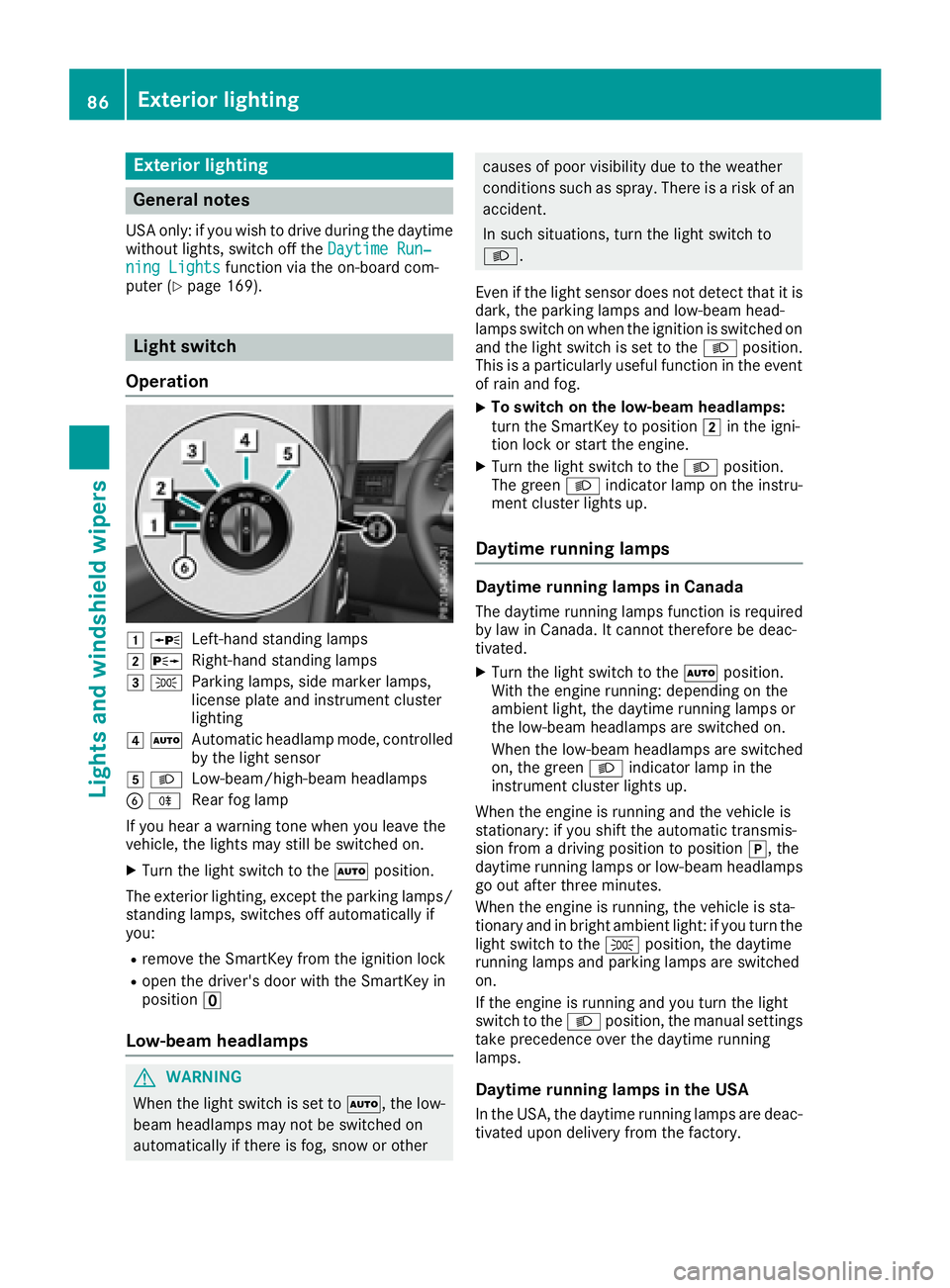
Operation
1 WLeft-hand standing lamps
2XRight-hand standing lamps
3TParking lamps, side marker lamps,
license plate and instrument cluster
lighting
4ÃAutomatic headlamp mode, controlled
by the light sensor
5LLow-beam/high-beam headlamps
BRRear fog lamp
If you hear a warning tone when you leave the
vehicle, the lights may still be switched on.
XTurn the light switch to the Ãposition.
The exterior lighting, except the parking lamps/
standing lamps, switches off automatically if
you:
Rremove the SmartKey from the ignition lock
Ropen the driver's door with the SmartKey in
position u
Low-beam headlamps
GWARNING
When the light switch is set to Ã, the low-
beam headlamps may not be switched on
automatically if there is fog, snow or other
causes of poor visibility due to the weather
conditions such as spray. There is a risk of an
accident.
In such situations, turn the light switch to
L.
Even if the light sensor does not detect that it is
dark, the parking lamps and low-beam head-
lamps switch on when the ignition is switched on
and the light switch is set to the Lposition.
This is a particularly useful function in the event
of rain and fog.
XTo switch on the low-beam headlamps:
turn the SmartKey to position 2in the igni-
tion lock or start the engine.
XTurn the light switch to the Lposition.
The green Lindicator lamp on the instru-
ment cluster lights up.
Daytime running lamps
Daytime running lamps in Canada
The daytime running lamps function is required
by law in Canada. It cannot therefore be deac-
tivated.
XTurn the light switch to the Ãposition.
With the engine running: depending on the
ambient light, the daytime running lamps or
the low-beam headlamps are switched on.
When the low-beam headlamps are switched
on, the green Lindicator lamp in the
instrument cluster lights up.
When the engine is running and the vehicle is
stationary: if you shift the automatic transmis-
sion from a driving position to position j, the
daytime running lamps or low-beam headlamps
go out after three minutes.
When the engine is running, the vehicle is sta-
tionary and in bright ambient light: if you turn the
light switch to the Tposition, the daytime
running lamps and parking lamps are switched
on.
If the engine is running and you turn the light
switch to the Lposition, the manual settings
take precedence over the daytime running
lamps.
Daytime running lamps in the USA
In the USA, the daytime running lamps are deac-
tivated upon delivery from the factory.
86Exterior lighting
Lights and windshield wipers
Page 89 of 294
XTo switch on the daytime running lamps:
switch on theDaytime Running Lights
function via the on-board computer
(Ypage 169).
XTurn the light switch to the Ãposition.
With the engine running: depending on the
ambient light, the daytime running lamps or
the low-beam headlamps are switched on.
When the low-beam headlamps are switched
on, the green Lindicator lamp in the
instrument cluster lights up.
If the engine is running and you turn the light
switch to the TorL position, the manual
settings take precedence over the daytime run-
ning lamps.
Automatic headlamp mode
GWARNING
When the light switch is set to Ã, the low-
beam headlamps may not be switched on
automatically if there is fog, snow or other
causes of poor visibility due to the weather
conditions such as spray. There is a risk of an
accident.
In such situations, turn the light switch to
L.
The automatic headlamp feature is only an aid.
The driver is responsible for the vehicle's light-
ing at all times.
à is the favored light switch setting.
The light setting is automatically selected
according to the brightness of the ambient light,
but not in the event of poor visibility due to
weather conditions such as fog, snow or spray.
XTo switch on the automatic headlamps:
turn the light switch to the Ãposition.
With the SmartKey in position 1in the igni-
tion lock, the parking lamps are switched on
or off automatically depending on the bright-
ness of the ambient light.
If you have switched on the Daytime Run‐
ning Lightsfunction via the on-board com-
puter, the daytime running lamps or the park-
ing lamps and low-beam headlamps will
switch on or off automatically while the
engine is running.
When the low-beam headlamps are switched
on, the green Lindicator lamp in the
instrument cluster lights up.
Rear fog lamp
The rear fog lamp improves visibility of your
vehicle for the traffic behind in the event of thick
fog. You must observe the legal requirements
for the country in which you are currently driving
when operating the rear fog lamp.
XTo switch on the rear fog lamp: turn the
SmartKey in the ignition lock to position 2or
start the engine.
XTurn the light switch to the LorÃ
position.
XPress the Rbutton.
The yellow Rindicator lamp on the instru-
ment cluster lights up.
Parking lamps
!
If the battery charge is very low, the parking
lamps or standing lamps are automatically
switched off to enable the next engine start.
Always park your vehicle safely and in a well lit
area, in accordance with the relevant legal
stipulations. Avoid using the Tparking
lamps over a period of several hours. If pos-
sible, switch on the right-hand Xor left-
hand W standing lamps.
XTo switch on: turn the light switch to the
T position.
The green Tindicator lamp on the instru-
ment cluster lights up.
Standing lamps
Switching on the standing lamps ensures the
corresponding side of the vehicle is illuminated.
XTo switch on the standing lamp: turn the
SmartKey to position uin the ignition lock or
remove the SmartKey.
XTurn the light switch to the W(left-hand
side of the vehicle) or X(right-hand side of
the vehicle) position.
Headlamp cleaning system
The headlamps are cleaned automatically if the
"Wipe with washer fluid" function is operated
ten times while the lights are on and the engine
is running (
Ypage 93). When you switch off
Exterior lighting87
Lights and windshield wiper s
Z
Page 92 of 294
the Xenon bulb and touch the electrical con-
tacts. There is a risk of fatal injury.
Never touch the parts or the electrical con-
tacts of the Xenon bulb. Always have work onthe Xenon bulbs carried out at a qualified spe-
cialist workshop.
GWARNING
Bulbs, lamps and connectors can get very hot
when operating. If you change a bulb, you
could burn yourself on these components.
There is a risk of injury.
Allow these components to cool down before
changing a bulb.
Do not use a bulb if it has been dropped or if its glass tube has been scratched.
The bulb may explode if:
Ryou touch it
Rit is hot
Ryou drop it
Ryou scratch it
Use bulbs only in closed lamps that have been
designed for this purpose. Only install spare
bulbs of the same type and the specified volt-
age.
Marks on the glass tube reduce the service life
of the bulbs. Do not touch the glass tube with
your bare hands. If necessary, clean the glass
tube when cold with alcohol or spirit and rub it
off with a lint-free cloth.
Protect bulbs from moisture during operation.
Do not allow bulbs to come into contact with
liquids.
Xenon bulbs and LED modules: in addition to
the Xenon bulbs, there are LED modules which
you cannot change yourself.
Have the following bulbs replaced at a qualified
specialist workshop:
RHigh-mounted brake lamp
RAdditional turn signals in the exterior mirrors
RParking lamps/standing lamps (front)
RHigh-beam/low-beam headlamps (Xenon
headlamps)
RDaytime running lamps
RLicense plate lamp
RSide marker lamps
iIndividual segments of the license plate
lamp LEDs may fail without a display message
appearing in the multifunction display. Regu-
larly check the license plate lamp. If neces-
sary, visit a qualified specialist workshop.
You can replace the following bulbs:
RTurn signal lamp (front)
RBrake/tail lamp
RTurn signal lamp (rear)
RTail lamps/standing lamps
RBackup lamp
RRear fog lamp
Replace only the bulbs listed (
Ypage 90).
Have the bulbs that you cannot change yourself
replaced at a qualified specialist workshop.
If you require assistance replacing bulbs, con-
sult a qualified specialist workshop.
If the new bulb still does not light up, consult a
qualified specialist workshop.
Headlamps and lights are an important aspect of
vehicle safety. You must therefore make sure
that these function correctly at all times. Have
the headlamp setting checked regularly.
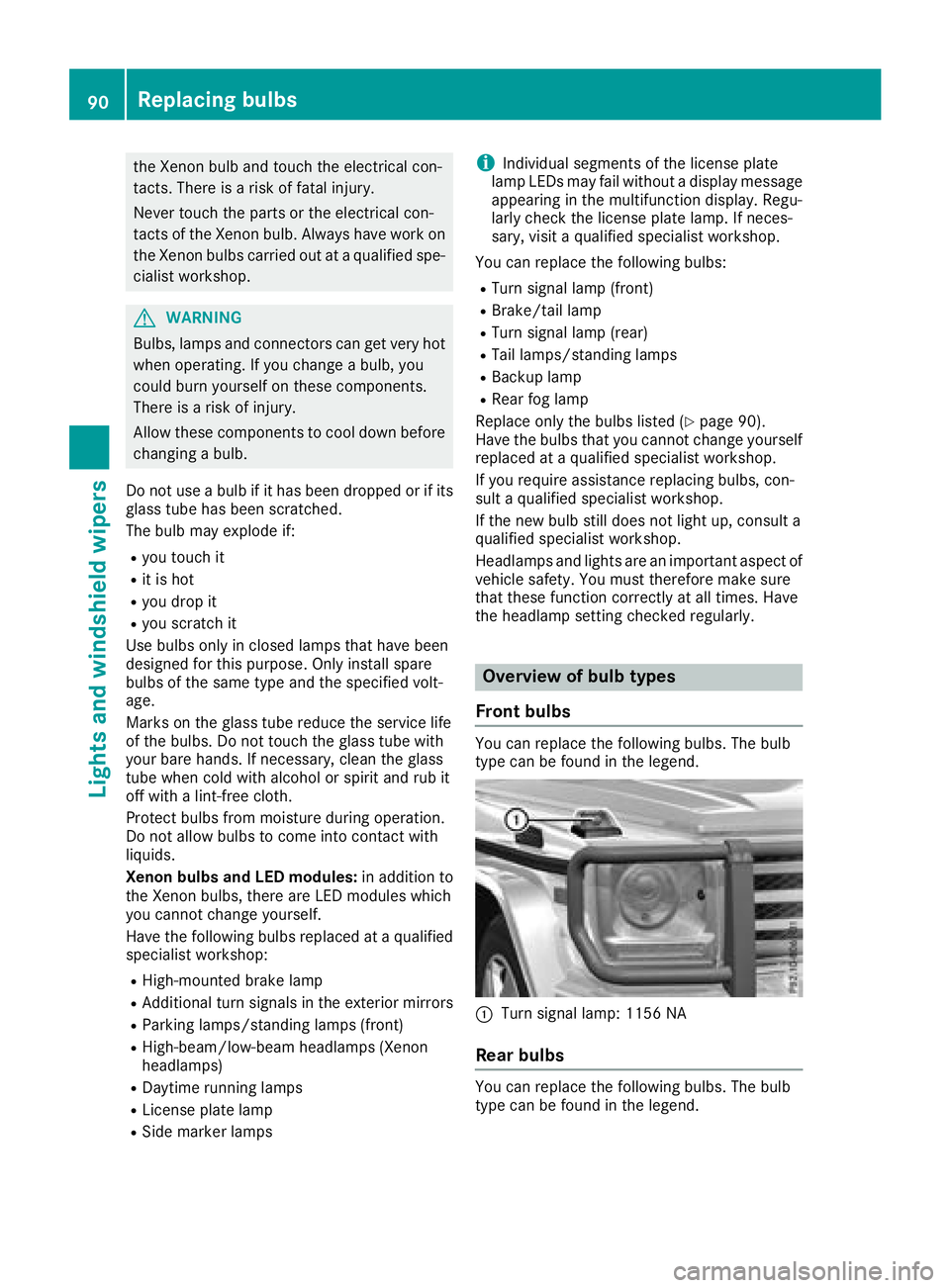
Overview of bulb types
Front bulbs
You can replace the following bulbs. The bulb
type can be found in the legend.
:Turn signal lamp: 1156 NA
Rear bulbs
You can replace the following bulbs. The bulb
type can be found in the legend.
90Replacing bulbs
Lights and windshield wiper s
Page 171 of 294
Setting the time
XPress the=or; button on the steering
wheel to select the Settingsmenu.
XPress:or9 to select the Time/Datesubmenu.
XPressato confirm.
XPress :or9 to select the Time:func-
tion.
You will see the current setting.
XTo set the time: pressaagain.
XPress =or; to switch between hours
and minutes.
XPress :or9 to set the hours or
minutes.
XPress ato store the entry.
The display shows the selected time.
Lights
Setting the daytime running lamps
iThis function is not available in Canada.
XPress the =or; button on the steering
wheel to select the Sett.menu.
XPress the:or9 button to select the
Lightssubmenu.
XPress ato confirm.
XPress the :or9 button to select the
Daytime Running Lightsfunction.
If the DaytimeRunningLightsfunction has
been switched on, the cone of light and the
W symbol are shown in red in the multi-
function display.
XPress the abutton to save the setting.
Further information on daytime running lamps
(
Ypage 86).
Surround lighting and exterior lighting
delayed switch-off
XPress the =or; button on the steering
wheel to select the Sett.menu.
XPress the:or9 button to select the
Lightsubmenu.
XPress ato confirm.
XPress the :or9 button to select the
Surround Lightingfunction.
When the Surround Lightingfunction has
been activated, the cone of light is shown in
red in the multifunction display.
XPress the abutton to save the setting. To deactivate exterior lighting delayed switch-
off temporarily:
XBefore leaving the vehicle, turn the SmartKey
to position
gin the ignition lock
(
Ypage 105).
XTurn the SmartKey to position 2in the igni-
tion lock (Ypage 105).
Exterior lighting delayed switch-off is deacti-
vated.
Exterior lighting delayed switch-off is reactiva-
ted the next time you start the engine.
If you have activated the Surround Lighting
function and the light switch is set to Ã, the
following functions are switched on when it is
dark:
Rsurround lighting: the exterior lighting
remains lit for 40 seconds after unlocking
with the SmartKey. If you start the engine, the
surround lighting is switched off and auto-
matic headlamp mode is activated
(
Ypage 87).
Rexterior lighting delayed switch-off: the
exterior lighting remains lit for 60 seconds
after the engine is switched off. If you close all
the doors and the trunk lid, the exterior light-
ing goes off after five seconds.
iDepending on your vehicle's equipment,
when the surround lighting and exterior light-
ing delayed switch-off are on, the following
light up:
RParking lamps
RLow-beam headlamps
RDaytime running lamps
RSide marker lamps
RSurround lighting in the exterior mirrors
Switching the interior lighting delayed
switch-off on/off
If you activate the Interior Lighting Delayfunction, the interior lighting remains on for
20 seconds after you remove the SmartKey from
the ignition lock.
XPress the=or; button on the steering
wheel to select the Sett.menu.
XPress the:or9 button to select the
Lightssubmenu.
XPress ato confirm.
Menus and submenus169
On-board computer and displays
Z
Page 182 of 294
Lights
Display messagesPossible causes/consequences andMSolutions
b
Example:Check LeftLow Beam
The bulb in question is malfunctioning.
XVisit a qualified specialist workshop.
or
XCheck whether you are permitted to replace the bulb yourself
(Ypage 89).
iLED light sources: the display message for the corresponding
lamp only appears when all the LEDs in the lamp have failed.
b
Malfunction SeeOperator's Manual
The exterior lighting is malfunctioning.
XVisit a qualified specialist workshop.
b
Auto Lamp FunctionInoperative
The light sensor is defective.
XVisit a qualified specialist workshop.
b
Switch Off Lights
The lights are still switched on when you leave the vehicle. A warning
tone also sounds.
XTurn the light switch to position Ã.
Engine
Display messagesPossible causes/consequences and MSolutions
+
CheckCoolantLevelSee Operator's Man‐ual
The coolant level is too low.
XAdd coolant, observing the warning notes before doing so
(Ypage 234).
XHave the coolant system checked at a qualified specialist workshop
if the coolant needs topping up more often than usual.
?The fan motor is malfunctioning.
XIf the coolant temperature is below the Hmark, drive to the nearest
qualified specialist workshop.
XAvoid heavy loads on the engine as you do so, e.g. driving in moun-
tainous terrain and stop-start traffic.
180Display messages
On-board computer and displays
Page 218 of 294
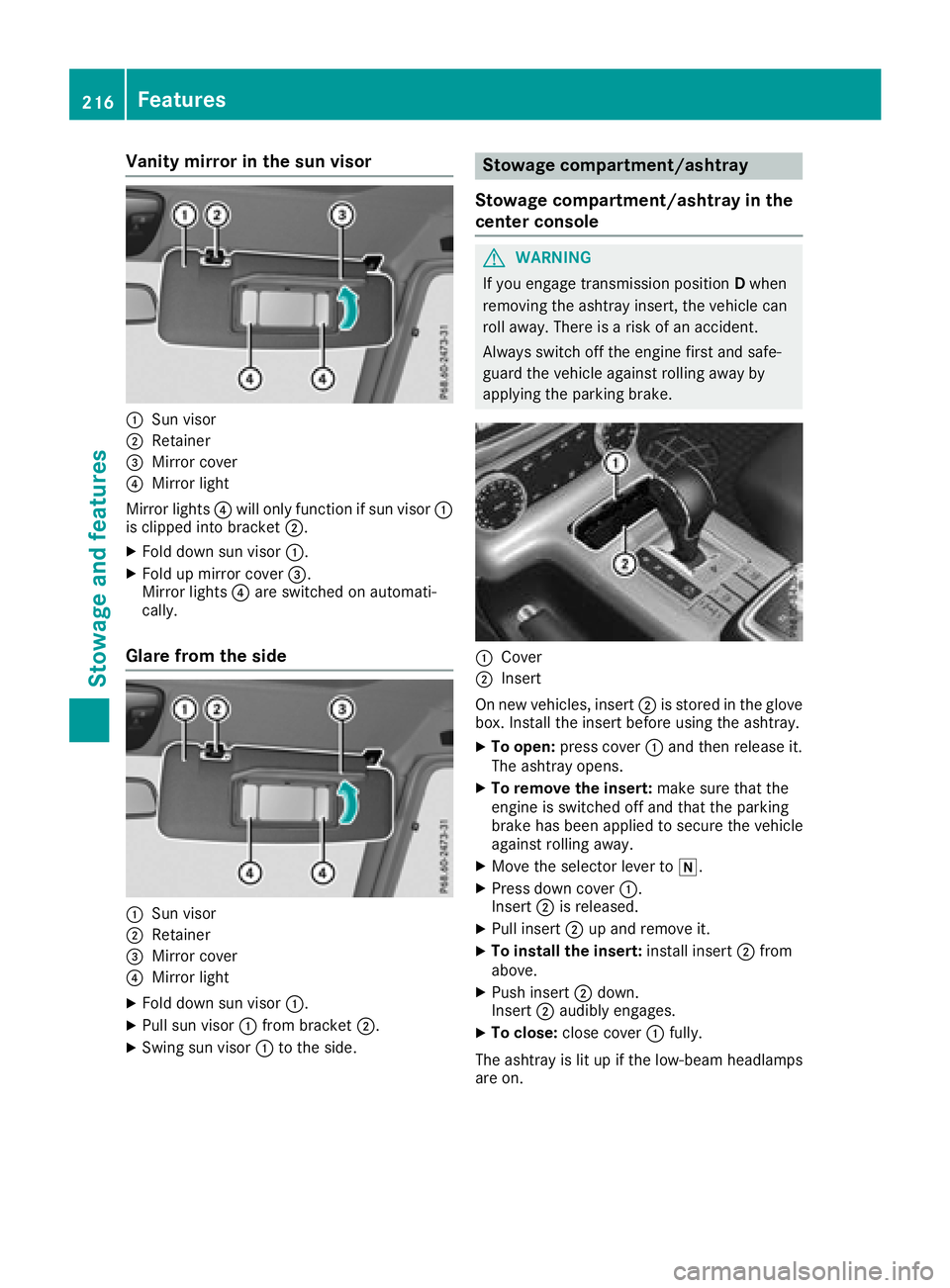
Vanity mirror in the sun visor
:Sun visor
;Retainer
=Mirror cover
?Mirror light
Mirror lights ?will only function if sun visor :
is clipped into bracket ;.
XFold down sun visor:.
XFold up mirror cover =.
Mirror lights ?are switched on automati-
cally.
Glare from the side
:Sun visor
;Retainer
=Mirror cover
?Mirror light
XFold down sun visor :.
XPull sun visor:from bracket ;.
XSwing sun visor :to the side.
Stowage compartment/ashtray
Stowage compartment/ashtray in the
center console
GWARNING
If you engage transmission position Dwhen
removing the ashtray insert, the vehicle can
roll away. There is a risk of an accident.
Always switch off the engine first and safe-
guard the vehicle against rolling away by
applying the parking brake.
:Cover
;Insert
On new vehicles, insert ;is stored in the glove
box. Install the insert before using the ashtray.
XTo open: press cover :and then release it.
The ashtray opens.
XTo remove the insert: make sure that the
engine is switched off and that the parking
brake has been applied to secure the vehicle
against rolling away.
XMove the selector lever to i.
XPress down cover:.
Insert ;is released.
XPull insert ;up and remove it.
XTo install the insert: install insert;from
above.
XPush insert ;down.
Insert ;audibly engages.
XTo close: close cover :fully.
The ashtray is lit up if the low-beam headlamps
are on.
216Features
Stowag ean d features