ECU MERCEDES-BENZ G-CLASS 2020 Owners Manual
[x] Cancel search | Manufacturer: MERCEDES-BENZ, Model Year: 2020, Model line: G-CLASS, Model: MERCEDES-BENZ G-CLASS 2020Pages: 530, PDF Size: 45.97 MB
Page 309 of 530
obt
ained intheMer cedes meportal:htt ps:/ /
me. secur e.mercedes -benz.com
Inf orma tion onMer cedes meconnect acci‐
dent andbreakd ownmana gemen t
The accident and brea kdo wnmanag eme ntcan
incl udeth efo llo wing functions:
R Supplem enttotheMer cedes- Benzemer‐
ge ncy callsy stem (/ page308)
If neces sary,thecon tact per son atthe
Mer cedes-Ben zemer gency callcent erfor‐
wa rdsth ecall toMer cedes meconn ect
br eakdo wnand accident management. For‐
wa rding thecall isho we verno tpossi bleinall
countr ies.
R Breakdo wnassi stanc eby amec hanicon
loc atio nand/ ortheto wing away oftheve hi‐
cle tothenear estaut hor ized Mercedes- Benz
Cent er
Yo uma ybe charge dfo rth ese services.
Mor einf ormation aboutMercedes meconnect
ser vices canbeobt ained intheMer cedes me
por tal:htt ps:/ /me .secure.m ercedes -benz.com Data
transf erre ddur ing Mer cedes mecon‐
ne ct cal lse rvices
The datatransf erreddur ing aMer cedes mecon‐
nec tcall depends onthere ason thecall wasini‐
tiat ed, whic hser vice isselect edinthevo ice
con trol system and whic hMer cedes meconnect
ser vices areactiv ated.
Whic hdat ais transf erredfo rth eser vices canbe
ta ke nfrom thecur rentl yva lid term sof use.
These canbeobt ained intheMer cedes mepor‐
ta l:htt ps:/ /me .secure.m ercedes -benz.com Mer
cedes-B enzemer gency callsystem Inf
orma tion ontheMer cedes- Benzemer‐
ge ncy callsystem
Yo ur vehicle iseq uipped withth eMer cedes- Benz
emer gency callsy stem ("eCall ").This featur ecan
help save lives intheeve ntofan acci dent. eCall
in no wayre places assistance prov ided from
dialing 911.
The Mercedes-B enzemer gency callsy stem is
av ailable forat lea sttenye arsst ar tin gfrom the
manuf acturingdate. Mer
cedes-Benz eCallonly functions inareas
wher emobil ephone coverage isavailable from
th ewir eless service prov ider s.Insuf ficie ntnet‐
wo rkcoverage from thewir eless service prov id‐
er sma yre sult inan emerg encycallnotbeing
tr ansmitt ed.
eCal lis ast andar dfeatur ein your Mer cedes-
Ben zve hicle. Inorder tofunction asintended ,
th esy stem relies onthetransmission ofdat a
de tailed inthe"Mer cedes- Benzemergency call
sy stem datatra nsmiss ion"sectionthat follo ws
( / pag e309) .
To disable eCall,acus tomer mustvisit an
au thor ized Mercedes-B enzService depar tment
to deactiv ateth eve hicle's communication mod‐
ule.
Deactiv ationofthis mod ulepreve nts the
act ivat ion ofanyand allMer cedes mecon‐
nect services. Afterthe deactivatio nof
eC all,aut omati ceme rgency calland manua l
emer gency callwill notbe availab le.
The igniti onmus tbe swi tched onbef orean auto‐
matic emergency callcan bemade.
% eCallis acti vatedat thefa ct or y. Multimedia
system 30
7
Page 312 of 530
Fo
raccide ntclar ificatio npur poses ,th efo llo wing
measur escan betake nup toan hour afte rth e
emer gency callha sbe en initia ted:
R The current vehicle position canbecalled up.
R Avo ice con nection totheve hicle occupants
can beestablished Online
andInterne tfunctions Int
erne tconnection Inf
ormat iononconnecting totheInt erne t &
WARNIN GRisk ofdist ra ction from infor‐
mati onsystems andcomm unication s
eq uipment
If yo uoper ateinf ormat ionand comm unic a‐
tio neq uipme ntintegratedin theve hicle
when driving, youwill bedistract edfrom the
tr af fic situ ation. Thiscou ldalso cau seyouto
lose control of theve hicle. #
Onlyoper ateth is eq uipmen twhen the
tr af fic situ ation per mits. #
Ifyo ucan notbe sur eof this, stop the
ve hicle whilstpa ying attention toroad
and traffic condi tions andoperate the
eq uipment withth eve hicle statio nary. Yo
umus tobse rveth eleg alrequ iremen tsforth e
cou ntryin whi chyouar ecur rentl ydr ivi ng when
op erati ng themultimedia system. &
WARNIN GRisk ofan acci dent from
ope rating mob ile comm unicati onequip ‐
ment while th eve hicle isin mo tion
Mobile communication sde vices distract the
dr iver from thetraf fic situ ation. Thiscou ld
al so cau sethedr iver tolose control of the
ve hicle. #
Asthedr iver ,onl yoper atemobile com‐
municat ionsdevices when theve hicle is
st atio nary. #
Asave hicle occupant, onlyuse mobile
communication sde vices inthear eas
int ended forth is pur pose, e.g.inthe
re ar passe nger com partment . Yo
umus tobse rveth eleg alrequ iremen tsforth e
cou ntryin whi chyouar ecur rentl ydr ivi ng when
op erati ng mob ile comm unicati onequip ment in
th eve hicle.
The Interne tfunct ionscanonlybe used toalimi‐
te ddeg reewhils tdr iving.
Fu nction ofthecomm unicationmodule
On vehicles withabuilt-in communication mod‐
ule, theInt erne tcon nect ionises tablished viaan
int egratedSIM card.
To use Inte rn et acc ess viathecomm unication
module thefo llo wing condition smus tbe met:
R The vehicle iseq uipped withaper manent ly
ins talled com munic ationmodule.
R Mer cedes meconnectis act ive and ready for
oper ation.
R Mer cedes meconn ectisactiv ated forInt er‐
ne taccess.
R Cou ntrydepe ndent :dat avo lume via
Mer cedes meconnectis available.
If th edat avo lume limitisreac hed, theav ailabil‐
ity ofMer cedesme connectser vices islimit ed. 31
0
Multimedia system
Page 314 of 530
Oper
ating Mercedes-Benz Appsusing voice
contr ol
Re quirement s:
R The regis tration forth euse ofMer cedes-
Benz Apps hasbeen completed.
R The gener alterm sand conditions have been
con firm ed.
The o symbol indicatesthat aMer cedes-
Ben zapp canbeused viavoice con trol. #
Selec ta Mer cedes -Benz app.
The app men uis displa yed. #
Touse voice contr ol:select oLan-
guage. #
Sayth equ estion orcomm and.
% Voice con trol isno tav ailable inall coun tries
and languages. We
bbr ow ser Calling
upawe bpag e &
WARNIN GRisk ofdist ra ction from infor‐
mati onsystems andcomm unication s
eq uipment
If yo uoper ateinf ormat ionand comm unic a‐
tio neq uipme ntintegratedin theve hicle
when driving, youwill bedistract ed from the
tr af fic situ ation. Thiscou ldalso cau seyouto
lose control of theve hicle. #
Onlyoper ateth is eq uipmen twhen the
tr af fic situ ation per mits. #
Ifyo ucan notbe sur eof this, stop the
ve hicle whilstpa ying attention toroad
and traffic condi tions andoperate the
eq uipment withth eve hicle statio nary. Yo
umus tobse rveth eleg alrequ iremen tsforth e
cou ntryin whi chyouar ecur rentl ydr ivi ng when
op erati ng themultimedia system. Multimedia
system:
4 Connec t5
z Browser
5 z Enter URL #
Entera we baddr ess.
% The func tion iscount ry-de pende nt. #
Tofinish theentr yand callupthewe b‐
sit e:select 0054.
Sho wing/hiding thewe bbr ows ermenu
If yo ucall upawe bsit eby selecting alink ,fo r
ex am ple, thewe bbr ows ermenu ishidden. #
Tosho w/hide: press the0038 button.
% The webbr ows ersuppor tsvideo playbac k.
% Nowebsit esorvideos aredispla yedwhile
th eve hicle isin mo tion. 31
2
Multimedia system
Page 316 of 530
Cr
eat ing abookm ark #
Sele ctAdd New Bookmark. #
Entera URL andaname. #
Select ¡.
Editin gaboo kmar k #
Highl ightabookmar k. #
Select p. #
Select Edit . #
EnteraUR Land aname . #
Select ¡.
De leting abo okmar k #
Highlight aboo kmar k. #
Select p. #
Select Dele te. #
Select Yes.
Cl os ingthe brow ser
Multimedia system:
4 Connec t5
z Browser #
Select åCloseBrowser . Tu
neIn radio Cal
ling up Inte rn et Radio
Re quirement s:
R The Interne tRa dio service isactiv ated.
R The datavo lume isavailable.
De pen dingon thecount ry,dat avo lume may
need tobe pur chased.
R Afast Int erne tconnection fordat atransmis‐
sion free ofinterfere nce.
The service sar ecou ntry-dependen t.
Fo rmor einf ormation, consultanauthor ized
Mer cedes-B enzCent er.
Multimedia system:
4 Radio 5
Þ Radio Source #
Select TuneIn Radio.
The Interne tRa dio displa yappear s.The last
st atio nse tst ar ts pla ying .
% The connectionqu alit ydepen dson thelocal
mobile phonerecep tion. In
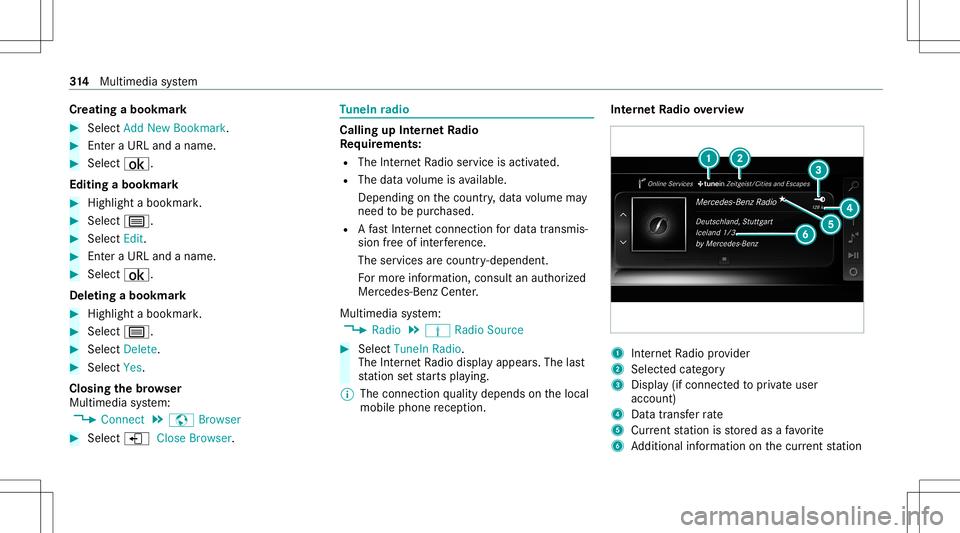
te rn et Radio overview 1
Interne tRa dio prov ider
2 Selec tedcat egor y
3 Displa y(if con nectedto privat euser
accoun t)
4 Datatra nsf errate
5 Current statio nis stor ed asafa vo rite
6 Addition alinf ormation onthecur rent statio n 31
4
Multimedia system
Page 322 of 530
The
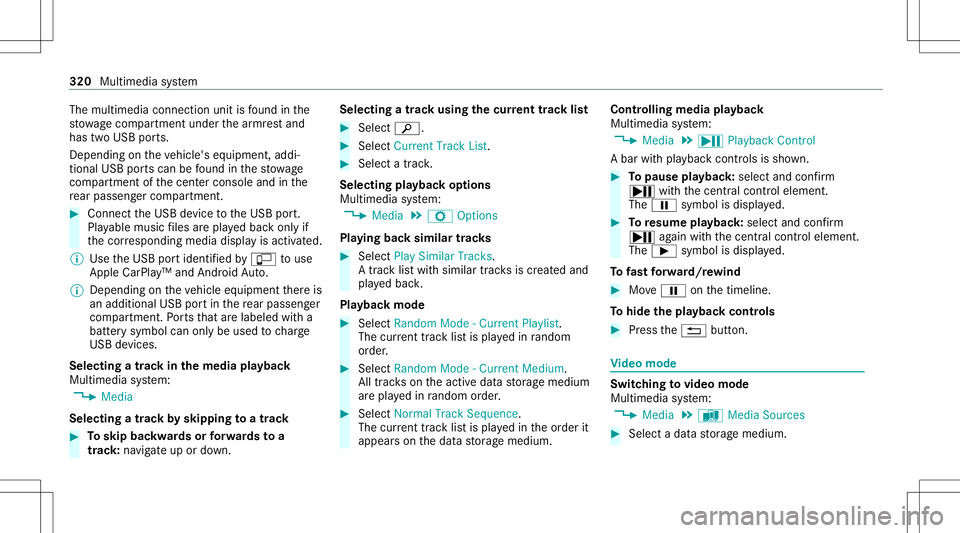
multimedia connection unitisfound inthe
st ow agecom partment unde rth ear mr estand
has twoUSB ports.
Depen dingontheve hicle's equipment, addi‐
tional USBportscan befound inthestow age
com partment ofthecent ercon sole andinthe
re ar passe nger com partment . #
Con nectth eUSB device totheUSB port.
Pla yable music files arepla yedbac konl yif
th ecor responding mediadisplayis activ ated.
% Use theUSB portidentif iedbyç touse
Ap ple CarPla y™and Android Auto.
% Dep endingontheve hicle equipment ther eis
an additional USBportin there ar passe nger
com partment .Po rts th at arelabeled witha
bat tery symbol canonly beused tocharge
USB devices.
Selec tingatrac kin themed iapla yba ck
Multimedia system:
4 Media
Selecting atrac kby skipping toatrac k #
Toskip backwards orforw ards toa
tr ac k: navig ateup ordown. Sel
ecting atrac kusin gth ecur rent trac klis t #
Select 00D3. #
Select Current TrackList. #
Select atra ck.
Selec tingplaybac kop tions
Multimedia system:
4 Media 5
Z Option s
Pla ying backsimilar trac ks #
Select Play Simi larTra cks.
A trac klist wit hsimilar trac ks iscreat edand
pla yedbac k.
Pla ybac kmode #
Select Random Mode-Current Playlist.
The current trac klist ispla yedin rando m
or de r. #
Select Random Mode-Cu rrent Medium.
All trac ks on theactiv edat ast or ag emedium
ar epla yedin rando morde r. #
Select Norm alTra ckSequ ence.
The current trac klist ispla yedin theor der it
appear son thedat ast or ag emedium. Contr
olling media playbac k
Multimedia system:
4 Media 5
Y Playback Control
A bar withpla ybac kcon trols issho wn. #
Topause playbac k:sel ect and conf irm
Y with thecent ralcon trol elemen t.
The 00CF symbol isdispla yed. #
Toresume playbac k:select andconf irm
Y again withth ecent ralcon trol elemen t.
The 00D0 symbol isdispla yed.
To fast forw ard/r ewind #
Move00CF onthetimeline.
To hide theplaybac kco ntr ols #
Press the0038 button. Vi
deo mode Sw
itchin gto video mode
Multimedia system:
4 Media 5
à Media Sources #
Select adat ast or ag emedium. 320
Multimedia system
Page 334 of 530
Multimedia
system:
4 Radio 5
Þ Radio Source
5 SiriusXM Radio5
Z Option s #
Select ServiceInformation.
The service information screen appear s
sho wing thera dio IDand thecur rent sub‐
scr iptio nstatus . #
Establish ate lephon econ nection . #
Followtheser vice staf f's instruct ions.
The activatio npr oce ssma yta ke up toten
minut es.
% Youcan also have thesat ellit eser vice acti‐
va tedonline .To do so, please visithttp://
www .siriusxm. com(USA)orhtt p://
www .siriusxm. ca(Canada).
Switc hingonsat ellit era dio
Mu ltimed iasystem:
4 Radio 5
Þ Radio Source #
Select SiriusXM Radio. 332
Multimedia system
Page 337 of 530
R
Mark AllEnt ries
R Unmark AllEnt ries
R Delete ThisEntry
R Delete AllEnt ries #
Select anoption. #
Activate Artist &Song Alerts 0073.
The alertis setfo rth ecur rent artis tor trac k.
If amatc his found, apr om ptappear sask ing
whe ther youwish tochang eto thest atio n.
Se tting aspor taler t #
Select Add New Alert.
or #
Select Man ageSports Ale rts. #
Select Select New Alerts.
or #
Select EditAle rts. #
Select ate am from aleague. #
Activate Spo rts Ale rts 0073. Inf
orma tion onSm artFa vo rite sand Tune
St art
St atio nsinthest atio npr ese tscan beadded as
Sm artFa vorite s. Smar tFa vorite sst atio nsare
aut omat icallysa ve dto temp orar yst or ag ein the
bac kground .If yo uch ang eto aSm artFa vorite s
st atio n,youcan repla y,pause oractiv elyskip
fo rw ardor bac kto broadcas tswhic hyo uha ve
missed .If Tu ne Startis act ivat ed and youch ang e
to ano ther Smar tFa vorite sst atio n,themusic
tra ck cur rentl ypl ay ing onthest atio nis aut omat ‐
icall yre star tedfrom thebeginnin gof thetra ck.
Ad ding ach anne lto Smar tFa vo rite s
Multimedia system:
4 Radio 5
Þ Radio Source
5 SiriusXM Radio #
Select theactiv efreq uency band. #
Highlight anent ry. #
Select ¥. #
Select Add Highlighte dCh anne lto Smar t
Favo rites. Ac
tiv atin g/deac tivatin gTu neS tart
Multimedia system:
4 Radio 5
Z Option s5
TuneSt art #
Activate0073 ordeacti vate 0053 thefunc tion.
Contr olling playbac k
Multimedia system:
4 Radio 5
Y Playback Control
Yo ucan pause thepla ybac kof thecur rent sta‐
tio nor skip forw ardor bac kwardin thetimelin e.
This leavesliv emode toacc ess theint ernal tem‐
por aryst or ag e. #
Tofast forw ard/r ewind: turnth econ troller
count er-cloc kwise orcloc kwise/swipe leftor
ri ght ontheto uc hpad. #
Tojum pto thepr ev ious/ne xtsong: press
th econ troller leftor right/swipe leftor right
on theto uc hpad. #
Topause playbac k:sel ect 00CF. #
Toretur nto livemod e:navig ateto theend
of thetimeline. Multimedia
system 335
Page 340 of 530
&
WARNIN GRisk ofacci dent orinju rydue
to inc orrect mod ifica tions oftheRe ar
Seat Entertainm entSystem
The Rear Seat Entertainm entSystem con‐
ta ins nopar tsthat can bemain tained byyou.
Modi ficati ons totheRe ar Seat Entertainm ent
Sy stem can impair itsfunc tion and/or the
function ofadd itiona llynetworke dcom po‐
nen tpar ts. #
Alw aysha ve maint enance workand
re pair scar ried out byaqu alif ied spe‐
cialis two rkshop. &
WARNIN GRisk ofinju ryfrom unsecu red
it ems intheve hicle
If object ssuc has <004B0048004400470053004B00520051004800560012004B0048004400470056
0048> tsor
ex tern al audio/ videosour cesareno t
sec ured intheve hicle interior ,th ey can be
fl ung aroun dand hitvehicle occupants. #
Alw aysst ow these items orsimilar
objec tscar efully sothat they canno tbe
fl ung aroun d,forex am ple inaloc kable
ve hicle stow agecom partment . Obse
rveth eno teson loadi ngtheve hicle. &
WARNIN GRisk ofacci dent andinjury
cau sed byspilli ngliquids onadispla y
Spilled liquids could result inafire or an
electr icshoc k. #
Donotpo ur or sprayan yliq uids onto
th edispla y. *
NO
TEDama getothere ar displa yand/ or
th ere ar ben chseat The
rear displa ysoftheRe ar Seat Entertain‐
men tSy stem and/or there ar ben chseat can
be damag edwhen folding there ar ben ch
seat forw ards. #
Mak esur eth at when folding there ar
ben chseat forw ards itdoes notcom e
int ocon tact with there ar displa ysand
th efront seats. *
NO
TEDama getocom pone ntparts when
adjus tingthefront seats The
rear displa ysoftheRe ar Seat Entertain‐
men tSy stem, thefront seats orother com‐
ponent partscan bedamag edwhen adjust‐
ing thefront seats. #
When adjustingthefront seats andthe
ins talled rear displa ysmak esur eth at
th ey do notcome intocon tact with
ot her com ponent parts. Obser
vetheno teson adjus tingthefront seats.
Fu nction restriction s
Ra dio-based electronic device s,e.g .mob ile
pho nes, caninterfere wit hth eRe ar Seat Enter‐
ta inm ent System and adversely affect thequ alit y
of thepla ybac k.Ke ep thenumber ofthese devi‐
ces intheve hicle totheminimum necessary.
No teson temp eratur es: intheev ent that a
re ar displa yove rheats asaf etyshut offis car ried
out. Protect there ar displa ysfrom cons tant
di re ct sunli ght. 338
Multimed iasystem
Page 347 of 530
Se
tting thevo lum eand bright ness Re
ar Seat Entertainm entSystem:
4 Comfort
Se tting thesound #
Sele ctSoun d. #
Sele ctVolume . #
Setth evo lume.
or #
Selec tEqualiz er. #
Setth etreble andbass.
Ad jus tingthe brightne ss #
Select Bright nes s. #
Setth escr een brightn ess.
% Settings forsound andbrightness canbe
car ried out individuall yfo rbo th rear displa ys. Se
tting thesy stem langu agefo rthe rear dis‐
pla y Re
ar Seat Entertainm entSystem:
4 Setting s5
Language #
The desir edsystem languag eis set. Se
tting theRe ar Seat Entertai nment System
connecti ons Re
ar Seat Entertainm entSystem:
4 Setting s
Wi -Fise ttings #
Sele ctWi-Fi .
The follo wing menusareav ailable:
R Acces sPoin tMode
In this men uyo ucan setth esear chnam e
of thede vice aswellas thepassw ordfo r
Wi -Fi secu rity .Fo rsuf ficie ntsecu rity you
should useapassw ordwit h8-1 6ch arac‐
te rs.
R Wi-Fi Connec tion In
this men uyo ucan switchtheWi -Fi
on/o ffas wellas setaut omat icand man‐
ual con nection toavailable networks .
% Wher eth er eis activ eWi -Fi theö symbol
is sho wnattheto pright ofthest atus bar.
Pa iring settings (Blue tooth®
) #
Select Pairing.
The follo wing functionsar eav ailable:
R Activati ng/d eactiv ating Blu etoo th®
R Pairing/ disco nnect ing Blue toothde vices
(e.g. Bluetoothheadphones)
% Ifth eRe ar Seat Entertainm entSystem is
re se tto thefa ct or yse ttings, theWi -Fi and
pa iring settings arealso rese t.
Fu rther information onrese ttin gto thefa c‐
to ry settin gs(/ page346). Shar
ingplaybac kwith are ar displa y Re
quirement sfo rpla yba ckofamobil eend
de vice viathere ar displa y:
R The end device isDLN Acom patible. Multimedia
system 34
5
Page 351 of 530
#
Swi tchon one Rear Seat Entertainm entSys‐
te m scr een.
The homescr eenappears. #
Select adat asour ce. #
Select theMusic ,Videos orPhotos categor y.
All files inthedesir edcategor yar esho wnin
alphabe ticalorder .
% The Rear Seat Entertainm entSystem can be
oper ated withth ebutt ons onthe
scr een(/ page339) orwit hth e
to uc hsc reen.
Media playbac kvia HDM Ide vices canonly
be con trolled using thebutt ons onthe
scr een aswellas on theend device connec‐
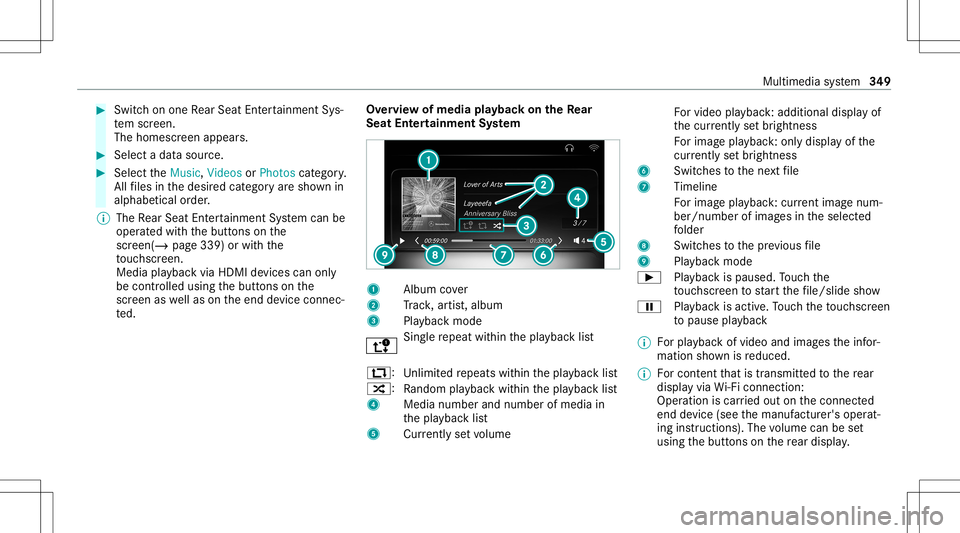
te d. Ov
ervie wof media playbac kon theRe ar
Seat Entertai nment System 1
Albumcover
2 Trac k, artis t,album
3 Playbac kmode Sin
gle re peat within thepla ybac klis t
:: Unlimit edrepeats within thepla ybac klis t
9: Rando mplay bac kwit hin thepla ybac klis t
4 Medianumber andnumber ofmedia in
th epla ybac klis t
5 Currentl yse tvo lume Fo
rvideo playba ck:ad ditiona ldi spl ayof
th ecur rently setbr ightnes s
Fo rimag epla yba ck:only displ ayofthe
cur rentl yse tbr ightnes s
6 Switches tothene xt file
7 Timeli ne
Fo rimag epla yba ck:cur rent ima genum ‐
be r/nu mberof ima gesin theselect ed
fo lder
8 Switches tothepr ev ious file
9 Playbac kmode
00D0 Playbac kis paused. Touc hth e
to uc hsc reen tostar tth efile/slid esho w
00CF Playbac kis act ive. Touc hth eto uc hsc reen
to pause playbac k
% Forpla yba ckofvideo andimag estheinf or‐
mation shownisreduced.
% Forcont entthat istransm itted tothere ar
displa yvia Wi-Fi conne ction:
Ope ratio nis car ried out onthecon nect ed
end device (see themanuf acturer'soper at‐
ing instruction s).The volume canbeset
using thebutt ons onthere ar displa y. Multimedia
system 34
9