warning MERCEDES-BENZ G-CLASS 2020 Owner's Guide
[x] Cancel search | Manufacturer: MERCEDES-BENZ, Model Year: 2020, Model line: G-CLASS, Model: MERCEDES-BENZ G-CLASS 2020Pages: 530, PDF Size: 45.97 MB
Page 187 of 530
The
vehicle orother object scould oth‐
er wise bedamag ed. If
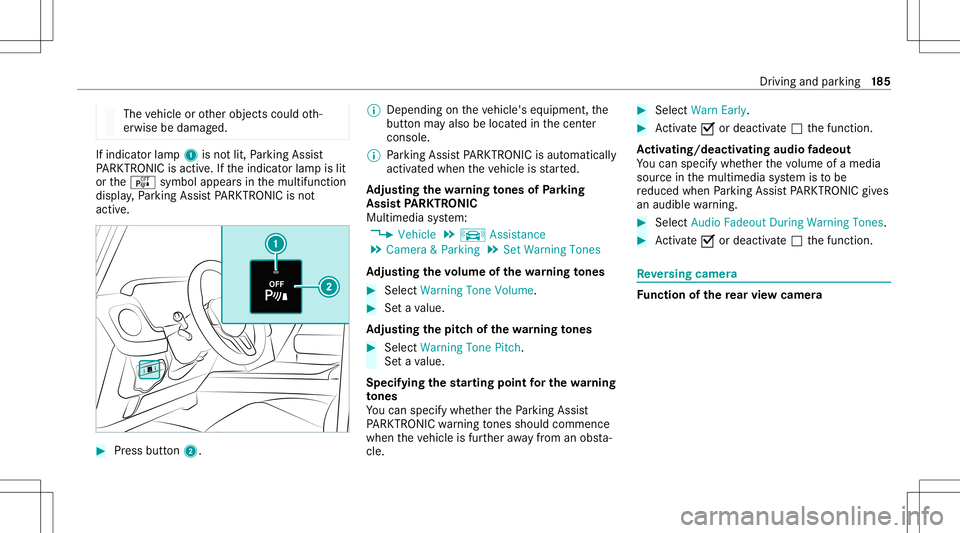
indicat orlam p1 isno tlit, Parking Assist
PA RK TRONI Cis act ive. Ifth eindicat orlam pis lit
or theé symbol appearsin themultifunc tion
displa y,Pa rking AssistPA RK TRONI Cis no t
act ive. #
Press button2. %
Dep endingontheve hicle's equipment, the
butt onmayalso belocat edinthecent er
con sole.
% Parking AssistPA RK TRONI Cis aut omat ically
act ivat ed when theve hicle isstar ted.
Ad jus tingthe warning tones ofParking
Assis tPA RK TRONI C
Mu ltimed iasystem:
4 Vehicle 5
k Assist ance
5 Camera &Parkin g5
Set Warning Tones
Ad jus tingthe volum eof thewa rning tones #
Select Warning ToneVolume. #
Seta va lue.
Ad jus tingthe pitchof the warning tones #
Select Warning TonePitch.
Se ta va lue.
Specif yingthest ar ting pointfo rthe warning
to nes
Yo ucan spec ifywhe ther thePa rking Assist
PA RK TRONI Cwa rning tones should comm ence
wh en theve hicle isfur ther aw ay from anobs ta‐
cle . #
Sele ctWa rnEarl y. #
Activate0073 ordeacti vate 0053 thefunc tion.
Ac tiv atin g/deac tivatin gaudi ofa deo ut
Yo ucan spec ifywhe ther thevo lume ofamedia
sour ceinthemultimedia system isto be
re duced whenParking AssistPA RK TRONI Cgiv es
an audible warning. #
Selec tAudio Fadeout DuringWarn ingTon es. #
Activate0073 ordeacti vate 0053 thefunc tion. Re
versing camer a Fu
nction ofthere ar vie wcamer a Dr
iving andparking 18
5
Page 191 of 530
360°
camer a Fu
nction ofthe360° Camera
The 360°Camera isasy stem that con sistsof
fo ur cam eras. The cam eras coverth eimmediat e
ve hicle surround ings.The system assis tsyou,
e.g .when parkingor atexits withre duced visibil‐
ity .
The views ofthe360° Camer aar ealw aysav aila‐
ble when drivin gfo rw ards up toaspee dof
appr ox.10 mph(1 6 km/h) andwhen backing
up.
% Youcan also usethe360° Camer aas an aid
when driving off-r oad.
The 360° Camer ais onl yan aid. Itis no ta sub‐
st itut efo ryo ur att entio nto thesur round ings.
The responsibili tyforsaf emaneu vering and
pa rking remains withyo u. Mak esur eth at ther e
ar eno per sons, animals orobjec tsetc., inthe
maneu vering area while ma neu vering and park‐
ing.
The system evaluat esimag esfrom thefo llo wing
cameras:
R Rear vie wcam era R
Front camer a
R Twoside camer asintheoutside mirrors
Vi ew sof the360° Camera
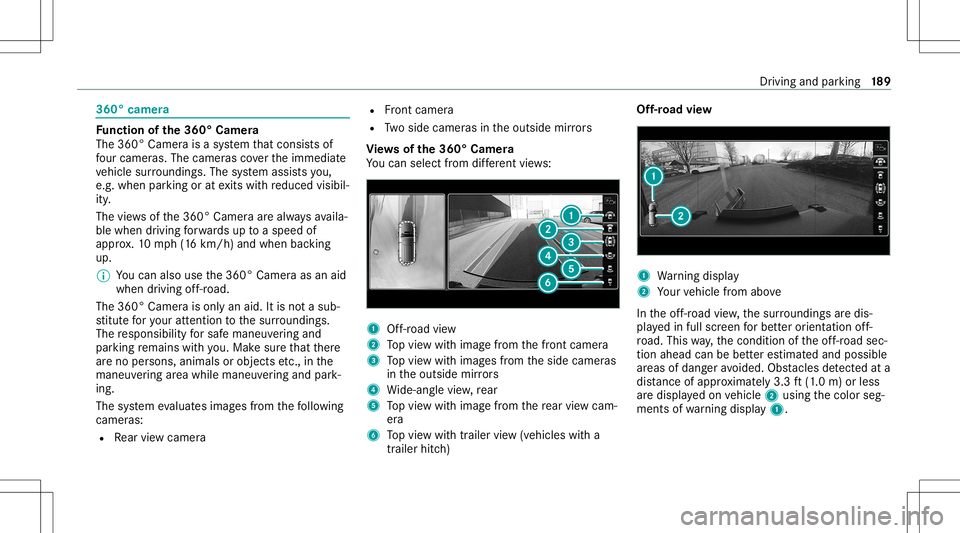
Yo ucan selectfrom differe nt vie ws: 1
Off-road view
2 Topvie wwit himag efrom thefront camer a
3 Topvie wwit himag esfrom theside camer as
in theoutside mirrors
4 Wide-ang levie w, rear
5 Topvie wwit himag efrom there ar vie wcam ‐
er a
6 Topvie wwit htrailer view(vehicles witha
tra iler hitch) Of
f-road view 1
Warning displa y
2 Your vehicle from above
In theof f-r oad view, thesur round ingsar edis‐
pla yedin full screen forbe tter orient ation off-
ro ad. This way,thecon dition oftheof f-r oad sec‐
tion ahead canbebetter estimat edand possible
ar eas ofdang eravo ided. Obstacle sde tected ata
di st anc eof appr oximat ely3. 3ft (1.0 m) orless
ar edispla yedon vehicle 2using thecolor seg‐
ment sof wa rning displa y1. Dr
ivin gand parking18
9
Page 192 of 530
To
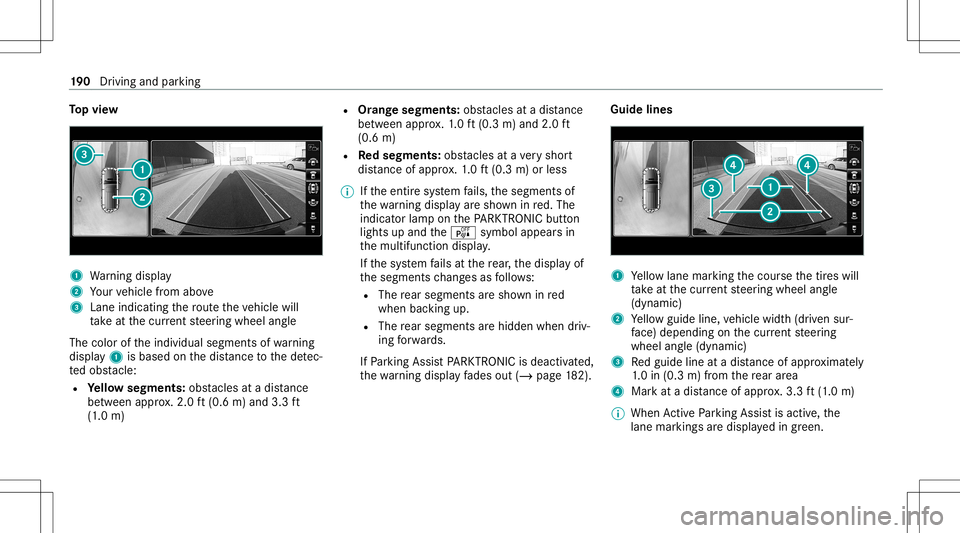
pvie w 1
Warning displa y
2 Your vehicle from above
3 Lane indicating thero uteth eve hicle will
ta ke atthecur rent steer ing wheel angle
The color oftheindividual segmentsof wa rning
displa y1 isbased onthedis tance tothede tec‐
te dobs tacle :
R Yello wsegment s:obs tacle sat adi st anc e
be tween appr ox.2.0 ft(0.6 m)and 3.3ft
(1 .0 m) R
Orang esegment s:obs tacle sat adi st anc e
be tween appr ox.1. 0 ft (0.3 m)and 2.0ft
(0.6 m)
R Redse gme nts: obstacle sat ave ry shor t
dis tance ofapprox .1. 0 ft (0.3 m)orless
% Ifth eent ire sy stem fails, thesegment sof
th ewa rning displa yar esho wninred. The
indicat orlam pon thePA RK TRONI Cbut ton
light sup and theé symbol appearsin
th emultifunc tiondispla y.
If th esy stem fails atthere ar,th edispla yof
th esegment sch ang esasfollo ws :
R The rear segm entsar esho wninred
when backingup.
R The rear segm entsar ehidde nwhen driv‐
ing forw ards.
If Pa rking AssistPA RK TRONI Cis deac tiva ted,
th ewa rning displa yfa des out(/ page18 2). Gu
idelin es 1
Yello wlane markingth ecour sethetir es will
ta ke atthecur rent steer ing wheel angle
(dynamic)
2 Yello wguide line,vehicle width(dr iven sur‐
fa ce) dep endi ngon thecur rent steer ing
wheel angle(dynamic)
3 Redguide lineatadis tance ofapprox imat ely
1. 0 in (0.3 m)from there ar area
4 Markat adis tance ofappr ox.3.3 ft(1.0 m)
% When ActivePa rking Assistis act ive, the
lane markingsaredispla yedin green. 19
0
Driving and parking
Page 202 of 530
AT
TENTI ONASSIST Fu
nction ofATTENTI ONASSIST
AT TENTION ASSISTassis tsyouon long,mon oto‐
nous journeys,e.g. onhighw aysand trunk roads.
If AT TENTION ASSISTde tects indicatorsof fati‐
gu eor incr easing laps es inconce ntration onthe
par tof thedr iver ,it sugg ests taking abr ea k.
AT TENTION ASSISTis onl yan aid. Itcann ot
alw aysde tect fatig ue orlaps es inconce ntration
in tim e.The system isno ta subs titutefo ra we ll-
re sted and attent ive dr iver .On long journeys,
ta ke regular break sin good timethat allo wfor
adeq uatere cup erati on.
Yo ucan choose between twose ttings:
R Standar d:nor mal system sensit ivity.
R Sensitiv e:higher system sensit ivity.The
dr iver iswa rned ear lier and theatt ent ion
le ve lde tected byATTENTION ASSISTis adap‐
te daccor dingly.
If dr ow siness orincr easing lapsesinconcen tra‐
tion arede tected, theATTE NTION ASSIS T:Take
a Break !wa rning appear sin theIns trument Dis‐
pla y.Yo ucan ackn ow ledg eth emessag eand tak
eabr eak wher eneces sary.Ifyo udo notta ke
a br eak and ATTENTION ASSISTcont inues to
de tect incr easing lapse sin concentr ation, you
will bewarned again afte ra minimu mof
15 minut es. Yo
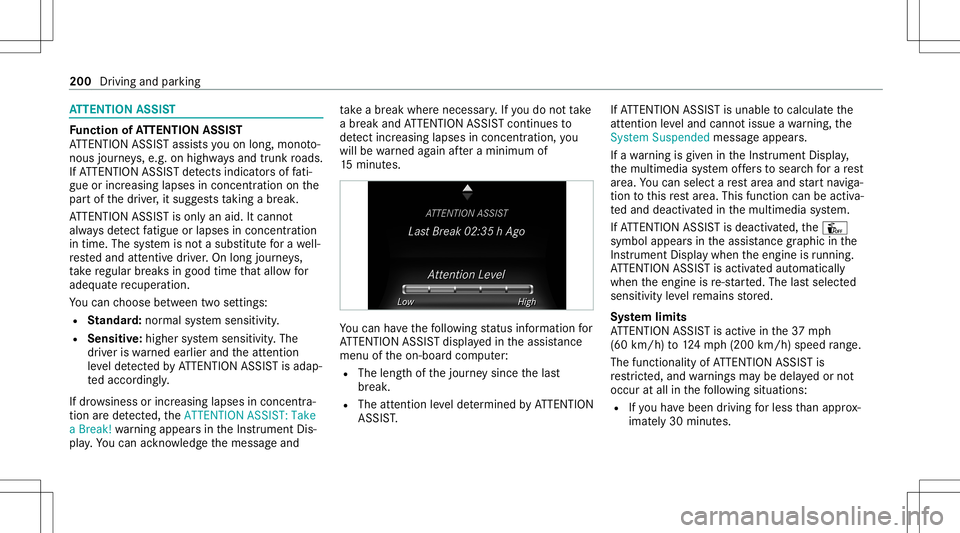
ucan have thefo llo wing status informat ionfor
AT TENTION ASSISTdispla yedin theassis tance
menu oftheon- boar dcom puter:
R The lengt hof thejour neysince thelas t
br eak .
R The attent ion leve lde term ined byATTENTION
ASS IST. If
AT TENTION ASSISTis unable tocal cul ateth e
att ent ion leve land cannotissue awa rning, the
Sys tem Suspend edmes sage appear s.
If awa rning isgiv en intheIns trument Display,
th emultimedia system offers to sear chfora re st
ar ea. Youcan selectare st area and star tna vig a‐
tio nto this rest area. This function can beact iva‐
te dand deactiv ated inthemultimedia system.
If AT TENTION ASSISTis deactiv ated, theÛ
symbol appearsin theassis tance grap hicin the
Ins trument Displaywhen theengine isrunning .
AT TENTION ASSISTis activ ated aut omaticall y
when theengine isre-sta rted. The lastselect ed
sensit ivityleve lre mains stor ed.
Sy stem limit s
AT TENTION ASSISTis activ ein the37 mph
(60 km/ h)to 124mp h(200 km/h) speedrang e.
The func tional ity ofATTENTION ASSISTis
re strict ed, and warnings maybe dela yedor not
occ uratall inthefo llo wing situat ions:
R Ifyo uha ve been driving forless than appr ox‐
imat ely30 min utes. 200
Drivin gand parking
Page 204 of 530
Since
Traf fic Sign Assistalso uses thedat a
st or ed inthena vig ation system, itcan updat e
th edispla yin thefo llo wing situat ionswithout
de tecting traf fic sig ns:
R Whe nth eve hicle chang esroads, e.g.on a
fr ee wa yen try or exitro ad.
R When avillag eor cityboun darywhic his
st or ed inthedigit almap ispassed.
The camer aalso detects traf fic sig ns with a
re striction indicatedbyan addit ionalsign (e.g.in
we tcond itions ).
Tr af fic Sign Assistisonl yan aid. Thedriver is
re sponsible forke eping asaf edis tance from the
ve hicle infront, forve hicle speed andforbr aking
in good time.
Wa rning when thema xim um permis sible
speed isexc eeded
The system can warnyouif yo uunin tentio nally
ex ceed themaximum permissible speed.Todo
th is, youcan spec ifyinthemultimedia system
by howmuc hth emaximum permissible speed
can beexceed edbef oreawa rning isissued. You
can specify whether thewa rning isto be justa
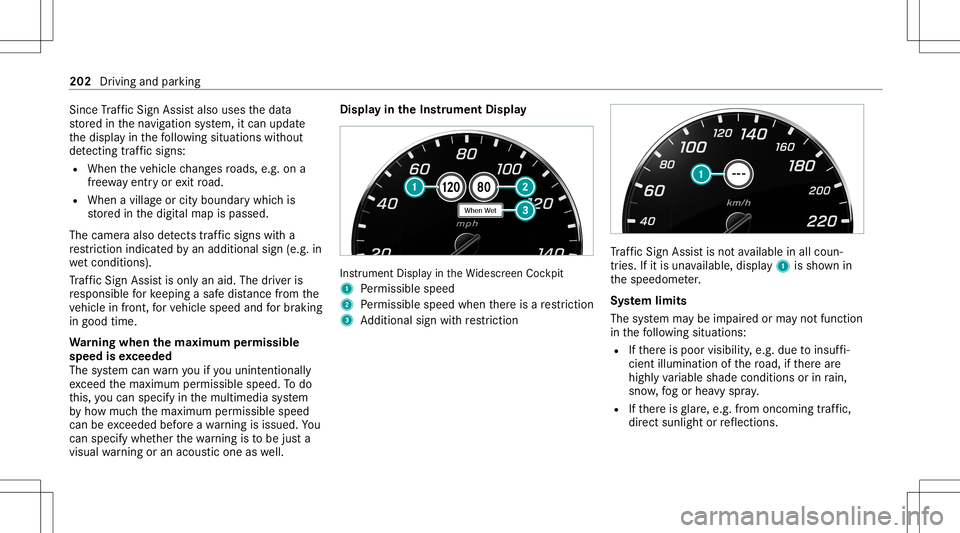
visual warning oran acous ticone aswell. Displa
yin theIns trum ent Displa y In
stru ment Displa yin theWi descr eenCockpit
1 Perm issible speed
2 Perm issible speedwhenther eis are striction
3 Addition alsign withre striction Tr
af fic Sign Assistisno tav ailable inall coun ‐
tr ies. Ifit is una vailable, display1 issho wnin
th espeedome ter.
Sy stem limit s
The system maybe impair edorma yno tfunc tion
in thefo llo wing situat ions:
R Ifth er eis poor visibility ,e.g. due toinsuf fi‐
cie ntillu mina tionofthero ad, ifth er ear e
highl yva riable shade condition sor inrain,
sno w,fogor hea vyspr ay.
R Ifth er eis glar e, e.g .fr om oncom ingtraf fic,
di re ct sunli ght orreflect ions. 202
Driving andparking
Page 205 of 530
R
Ifth ewindshield inthear ea ofthemultifunc ‐
tion camer ais dir ty,or ifth ecamer ais fog‐
ge dup, damag edorcovered.
R Ifth etraf fic sig ns areha rd todetect, e.g. due
to dir tor sno w,orbecause they areco vered
or due toinsuf ficie ntlighti ng.
R Ifth einf ormation inthena vig ation system's
digit almap isincor rect or out-of-da te.
R Ifth esigns areambiguous, e.g.traffic sign s
on con stru ction sites orinad jacent lanes.
R Ifyo utur nshar ply, when passin gtraf fic sig ns
ou tsid eth ecamer a'sfield ofvision.
Se tting Traf fic Sign Assis t
Mult imed iasystem:
4 Vehicle 5
k Assist ance
5 Speed LimitWarning
Displa yingdetected traf fic signs inthe
me diadispla y #
Select DisplayinCOM AND. #
Activate0073 ordeacti vate 0053 thefunc tion. Ad
jus tingthe type ofwa rning #
Selec tVisual &Audible ,Visual orNon e.
Ad jus tingthe warning threshold
This value determ ines thespeed atwhic ha
wa rning isissued whenexceeded. #
Select Warning Threshold. #
Setth edesir edspeed. Blind
SpotAssis twit hex itwa rning Fu
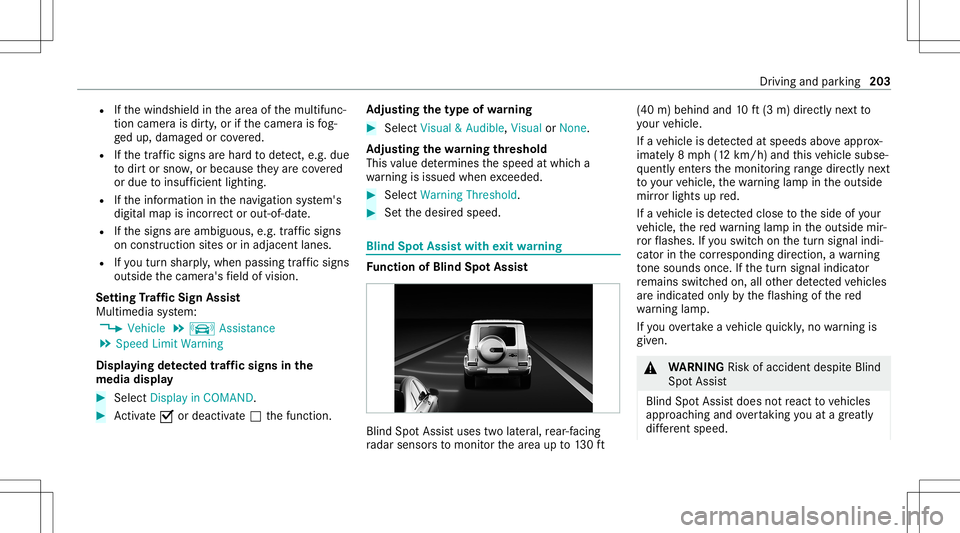
nction ofBlind SpotAssis t Blind
SpotAssis tuses twolat eral, rear-facin g
ra dar sensor sto monit orthear ea up to130ft (40
m)behind and10ft(3 m) direct lyne xt to
yo ur vehicle.
If ave hicle isde tected atspe eds aboveappr ox‐
imat ely8 mp h(12 km/h) andthis vehicle subse‐
qu ent lyent ersth emonit oring rang edire ctly next
to your vehicle, thewa rning lam pin theoutside
mir rorlig hts upred.
If ave hicle isde tected clos eto theside ofyour
ve hicle, there dwa rning lam pin theoutside mir‐
ro rflashes .If yo uswit chon thetur nsignal indi‐
cat orinthecor responding direction, awa rning
to ne sou nds once .If th etur nsignal indicat or
re mains switchedon,allother detected vehicles
ar eindicat edonlyby theflashin gof there d
wa rning lam p.
If yo uove rtak eave hicle quickl y, no warning is
giv en. &
WARNIN GRisk ofacci dent despite Blind
Spo tAssi st
Bli nd Spo tAssi stdoes notre act tovehicles
appr oaching andovertakin gyo uat agr ea tly
di ffer ent speed. Dr
iving andparking 203
Page 260 of 530
Pe
rfor min gasof twareup date
Re quirement s:
R Ther eis an Interne tcon nection
(/ page31 0).
R Foraut omat icupdat es:yo ur vehicle hasa
per manent lyins talled com munic ationmod‐
ule.
Multim ediasystem:
4 System 5
Soft ware Update
Au tomatic update #
Swi tchAuto matic Onl ine Update on 0073.
Up dat esareper form ed.
The current status oftheupdat esisdis‐
pla yed.
Manu alupd ate #
Deact ivat e0053 Auto matic OnlineUpdate. #
Select anupdat efrom thelis tand star tth e
updat e.
Ac tiv atin gthe softwa reupdat e #
Restar tth esy stem. Fu
nction ofimpor tant system updates
Im por tant system updat esma ybe neces saryfo r
th esecur ityofyour mult imed iasystem's data.
Please installth ese updat es,other wise the
secur ityofyour mult imed iasystem cann otbe
ensur ed.
% Ifaut omatic softwareupdat esareactiv ated,
th esy stem updat eswill bedownloaded auto‐
maticall y(/ page258).
As soon asan updat eis available fordo wnloa d,
a cor responding messageappea rson themedia
displa y.
Yo uha ve thefo llo wing selectionoption s:
R Down load
The updat ewill bedownloaded inthebac k‐
gr ound.
R Det ails
Inf ormation aboutthepending system
updat eis displa yed.
R Later
The updat ecan bedownloaded manuallyata
lat er time (/page258) . If
th edo wnload iscom pletedand theupdat eis
re ady forins tallation ,yo uwill beinformed ofthis
af te rth ene xt ignition cycle, forex am ple.
% Park theve hicle safely inasuit able location
bef orest ar tin gth eins tallation .
Re quiremen tsforth eins tallation :
R The ignit ionisswitc hedon.
R The engin eis no tru nning .
R Notesand warnings have been read and
acc epted.
R The parkingbr ak eis applied.
If all requ iremen tsareme t,th eupdat ewill be
ins talled. Themultim ediasystem cann otbe
oper ated while theupdat eis being installed and
ve hicle functionsarere strict ed.
If er ro rs should occurduring theins tallation ,th e
multime diasystem automatic allyatt em ptsto
re stor eth epr ev ious version. Ifre stor ation ofthe
pr ev ious version isno tpossible ,a symbol
appear son themultimedia system displa y.
Please consultaqu alif ied spec ialistwo rkshop to
re solv eth epr oblem. 258
Multimedia system
Page 282 of 530
-
Roadw orks
- Road bloc ks
- Warning mess ages
The symbols fortr af fic inci dents aredis‐
pl ay ed incolor (onthero ute) or gra y(of fth e
ro ute).
R Traf fic flow informatio n:
- Traf fic jam (red line)
- Slow-mo ving traf fic (or ang eline)
- Hea vytraf fic (yel lo w line)
- Free-f lowing traffic (gr een line)
R Disp lay fo rtr af fic del ayson thero utelas ting
at leas ton emin ute
R Warning mess agesymbols :
- Symbo lÔ
- Addition alroad safetyno teswhen
appr oaching atraf fic inci dent, e.g.the
end ofatra ffic jam
If th eve hicle approaches adang erarea
on thero ute, awa rning mess ageis dis‐ pla
yedon themap. Awa rning mess age
ma yalso beissued (/page28 1).
Displa yingtraf fic incid ents
Mult imed iasystem:
4 Navigation 5
Z Option s
5 Map Conten t #
Activate0073 TrafficInci dents .
Ro adw orks ,ro ad bloc ks,local area repor ts
(e.g. fog) and warning mess ages aredis‐
pla yed.
Ac tiv atin gfree flowan dtraf fic dis pla y #
Activate0073 FreeFlo wing Tra fficand Traffic
Del ays.
% The traf fic del ayisdispla yedfo rth ecur rent
ro ute. Traf fic del ayslas ting oneminut eor
long erareta ke nint oconsi deratio n.
Di spl aying details #
Displa ysthetraf fic map (/page 279). #
Movesth emap (/page282). #
When atra ffic repor tsymbol isunder the
cr oss hair,pr ess onthecent ralcon trol ele‐
men t.
The traffic re por tde tails aredispla yed.
or #
Press onthecent ralcon trol elemen t. #
Selec tInf ormat iononTraff icReport s.
The map showsthetraf fic re por tsymbols in
th evicinit y.
Tr af fic re por tinf ormation isdispla yedin the
st atus line:
R Traf fic re por tsymbol
R Reason forth etraf fic re por t,e.g. traffic
con gestion
R Warning mess age(highligh tedin red) #
Toselect atraf fic re por tsymb ol:sel ect
Next orPre vious. #
Press onthecent ralcon trol elemen t.
The traffic re por tde tails aredispla yed. 280
Multimedia system
Page 371 of 530
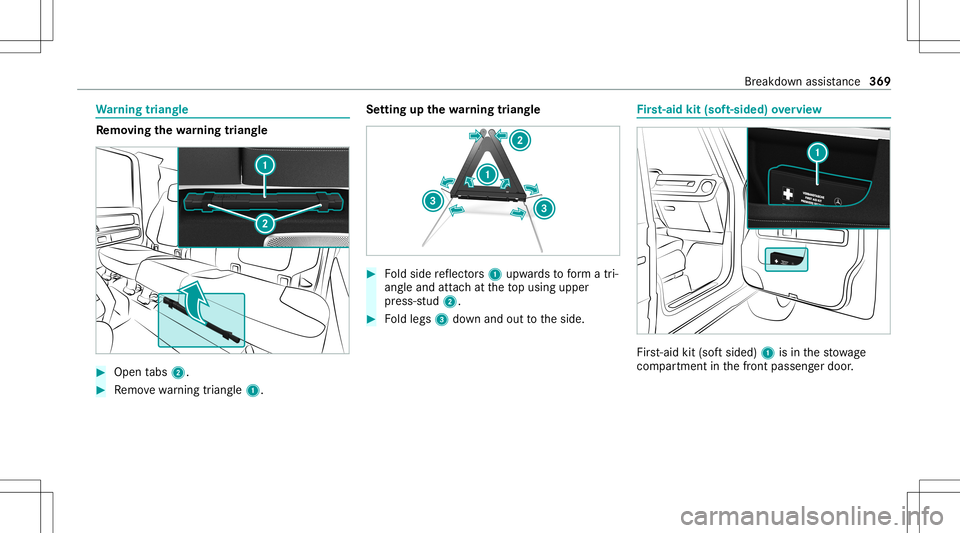
Wa
rning triang le Re
mo ving the warning triang le #
Open tabs 2. #
Remo vewarning triang le1. Se
tting upthewa rning triang le #
Foldside reflect ors1 upw ards toform atri‐
ang leand attachat theto pusing upper
pr ess-s tud2. #
Foldlegs 3down and outtotheside. Fi
rs t-aid kit(sof t-si ded) overview Fir
st-ai dkit (softsided) 1isin thestow age
com partment inthefront passeng erdoor . Br
eakdo wnassis tance 36
9
Page 377 of 530
Dur
ing star tin gassis tance orbatter ych arg‐
ing ,bat tery gascan bereleased. #
Alw aysallo wabatt eryto thaw before
ch argin git or per form ing star tin gassis ‐
ta nce. If
th eindicat or/warning lampsintheins trument
clus terdo notlig ht up atlow temp eratur es,itis
ve ry likelyth at thedisc hargedbatt eryhas fro‐
zen .In this case youma yne ither jump-start the
ve hicle norcharge thebatt ery.
The service life of abatt eryth at has been
th awe dma ybe dramaticall yshor tened .The
st ar tin gch aract eristic sma ybe impair ed,espe ‐
ciall yat low temp eratur es.
It is recomme ndedthat youha ve ath aw ed bat‐
te ry checkedat aqu alif ied spec ialistwo rkshop.
* NO
TEDama gecau sed bynum erou sor
ex tende datt em ptsto star tth eengine Nu
me rous orextende datt em ptsto star tth e
engine maydamag eth ecat alytic converter
due tonon-co mbusted fuel. #
Avoid numer ousand extende datt em pts
to star tth eengine. Obser
vethefo llo wing pointsdur ing star tin g
assis tance and when chargin gth ebatt ery:
R Onlyuse undamag edjum per cables/c harg‐
ing cables withasuf ficie ntcross -secti onand
insu late dte rm inal clam ps.
R Non-insulat edpar tsof thete rm inal clam ps
mus tno tcom eint ocon tactwi th other metal
par tswhile thejum per cable/c harging cable
is con nect edtothebatt ery/jum p-start con‐
nectio npoi nt.
R The jumper cable/c harging cable mustno t
com eint ocon tactwi th anypar tswhic hma y
mo vewhen theengine isrunning .
R Alw aysmak esur eth at nei ther youno rth e
batt eryis elect rostatic allych arge d.
R Keep away from fire and open flames .
R Donotlean overth ebatt ery. Obser
vetheadditional follo wing pointswhen
ch argin gth ebatt ery:
R Onlyuse batterych arge rs tested and
appr oved forMer cedes-Benz.
R Read thebatt erych arge r's oper ating instruc‐
tions beforech argin gth ebatt ery.
Obser vetheadditional follo wing pointsdur ing
st ar tin gassis tance:
R Startin gassis tance mayonly beprov ided
using batteries withanom inalvoltag eof
12 V.
R The vehicles mustno tto uc h.
R Gasoline engine :On lyacc eptst ar tin gassis ‐
ta nce ifth eengine andexhaus tsy stem are
cold. St
arting assistance andchargin gth e12 V
batt ery Re
quirement s
R The vehicle issecur edwithth eelectr icpar k‐
ing brak e.
R The transmiss ionisin position 005D. Br
eakdo wnassis tance 37
5