mirror MERCEDES-BENZ G-CLASS SUV 2008 User Guide
[x] Cancel search | Manufacturer: MERCEDES-BENZ, Model Year: 2008, Model line: G-CLASS SUV, Model: MERCEDES-BENZ G-CLASS SUV 2008Pages: 293, PDF Size: 4.49 MB
Page 73 of 293

Memory functions
70 Memory functions
Storing settings
Using the memory button on the driver's side
you can store up to three different settings
per key. You can store one setting per mem-
ory button on the front-passenger side.
On the driver's side the following settings can
be stored on each memory position:
R seat and head restraint position of the driv-
er's seat
R steering wheel position
R exterior mirror position on the driver’s and
front-passenger side
R parking position for the exterior mirror on
the front-passenger side
On the front-passenger side, the following
settings can be stored on each memory posi-
tion:
R seat and head restraint position of the
front-passenger seat G
Risk of accident
Only use the memory function on the driv-
er's side when the vehicle is stationary.
Otherwise, you could be distracted from
the traffic conditions by the steering wheel and seat moving of their own accord, as a
result cause an accident.
The buttons are located on the door control
panel. 1
Memory button
2 Storage position switches
X Make sure that the key is in position 2or
that the respective door is open.
X Adjust the seat and head restraint
(Y page 60).
X On the driver's side, also adjust the steer-
ing wheel (Y page 66) and the mirrors
(Y page 68). X
Press memory button 1.
X Press storage position switch 2within
three seconds.
The settings are stored in the selected stor-
age position. Calling up a stored setting
G
Risk of accident
Only use the memory function on the driv-
er's side when the vehicle is stationary.
Otherwise, you could be distracted from
the traffic conditions by the steering wheel
and seat moving of their own accord, as a
result cause an accident.
X Press the required storage position button
2 until the seat, head restraints, steering
wheel and mirrors are in the stored posi-
tion.
i The setting procedure is interrupted as
soon as you release the storage position
switch.
! If you want to move the seat from the fully
reclined position to a stored seat position,
first raise the backrest using the seat Controls
463_AKB; 1; 8, en-GB
wobuchh
, Version: 2.10.6 2008-07-17T15:19:41+02:00 - Seite 70Dateiname: 6515_4091_02_buchblock.pdf; preflight
Page 74 of 293
Seat belts
71
switch. Otherwise, the seat could be dam-
aged. Storing a parking position
To make it easier to park, you can store the
front-passenger side exterior mirror position
in such a way that you can see the rear wheel
on that side as soon as you engage reverse
gear.
Using the storage position switches on the
driver's side, you can store three parking
positions per key.
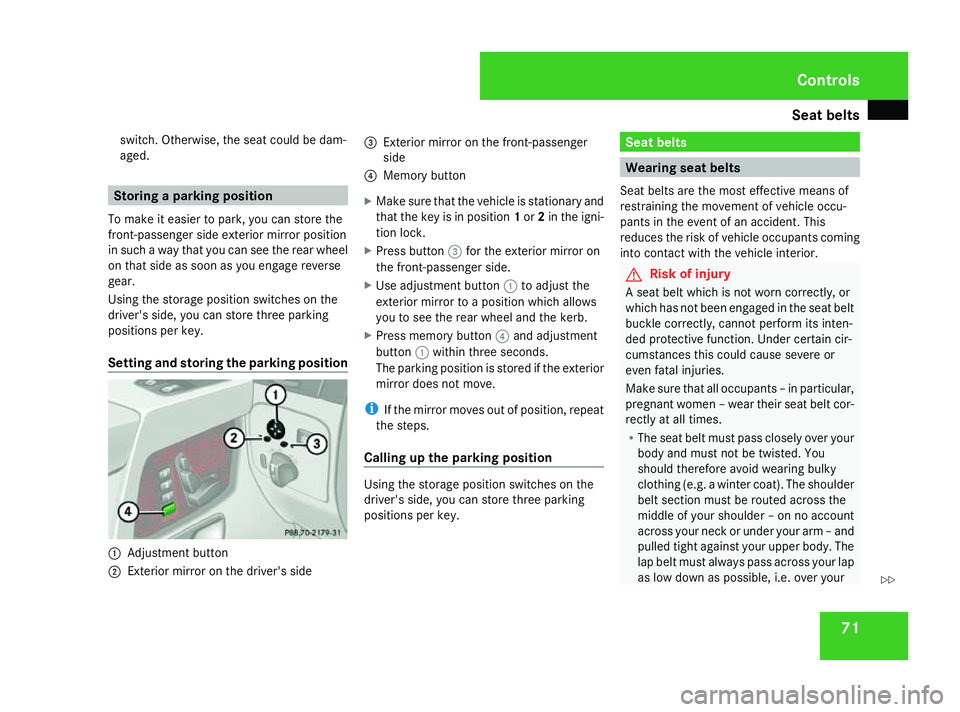
Setting and storing the parking position 1
Adjustment button
2 Exterior mirror on the driver's side 3
Exterior mirror on the front-passenger
side
4 Memory button
X Make sure that the vehicle is stationary and
that the key is in position 1or 2in the igni-
tion lock.
X Press button 3for the exterior mirror on
the front-passenger side.
X Use adjustment button 1to adjust the
exterior mirror to a position which allows
you to see the rear wheel and the kerb.
X Press memory button 4and adjustment
button 1within three seconds.
The parking position is stored if the exterior
mirror does not move.
i If the mirror moves out of position, repeat
the steps.
Calling up the parking position Using the storage position switches on the
driver's side, you can store three parking
positions per key. Seat belts
Wearing seat belts
Seat belts are the most effective means of
restraining the movement of vehicle occu-
pants in the event of an accident. This
reduces the risk of vehicle occupants coming
into contact with the vehicle interior. G
Risk of injury
A seat belt which is not worn correctly, or
which has not been engaged in the seat belt
buckle correctly, cannot perform its inten-
ded protective function. Under certain cir-
cumstances this could cause severe or
even fatal injuries.
Make sure that all occupants – in particular,
pregnant women – wear their seat belt cor-
rectly at all times.
R The seat belt must pass closely over your
body and must not be twisted. You
should therefore avoid wearing bulky
clothing (e.g. a winter coat). The shoulder
belt section must be routed across the
middle of your shoulder – on no account
across your neck or under your arm – and
pulled tight against your upper body. The
lap belt must always pass across your lap
as low down as possible, i.e. over your Controls
463_AKB; 1; 8, en-GB
wobuchh,
Version: 2.10.6 2008-07-17T15:19:41+02:00 - Seite 71 ZDateiname: 6515_4091_02_buchblock.pdf; preflight
Page 123 of 293
Driving sys
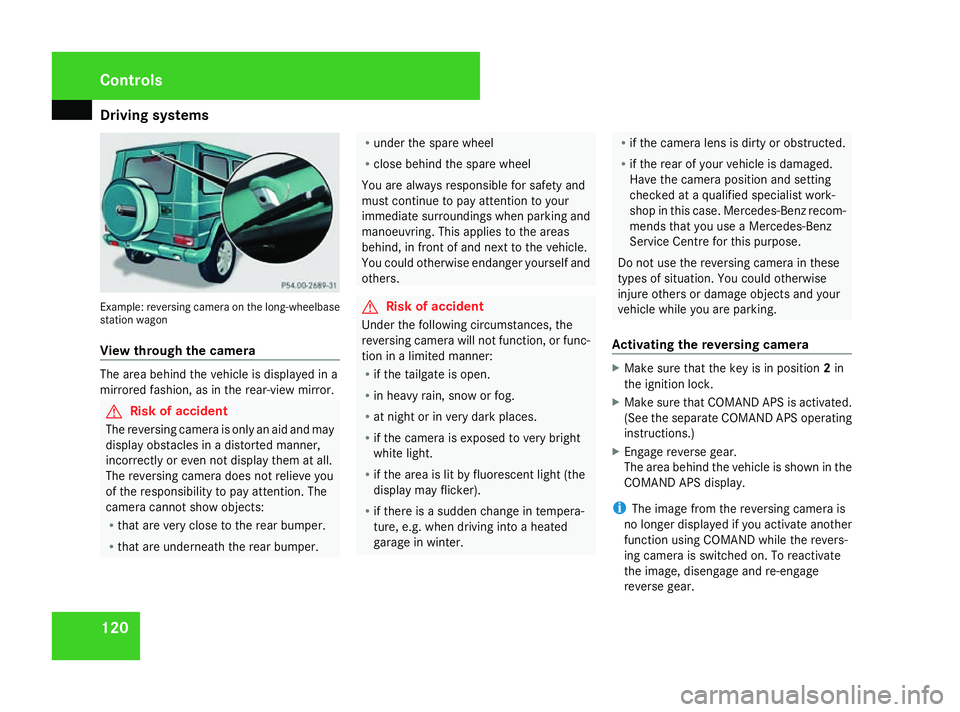
tems 120Example: reversing camera on the long-wheelbase
station wagon
View through the camera The area behind the vehicle is displayed in a
mirrored fashion, as in the rear-view mirror. G
Risk of accident
The reversing camera is only an aid and may
display obstacles in a distorted manner,
incorrectly or even not display them at all.
The reversing camera does not relieve you
of the responsibility to pay attention. The
camera cannot show objects:
R that are very close to the rear bumper.
R that are underneath the rear bumper. R
under the spare wheel
R close behind the spare wheel
You are always responsible for safety and
must continue to pay attention to your
immediate surroundings when parking and
manoeuvring. This applies to the areas
behind, in front of and next to the vehicle.
You could otherwise endanger yourself and
others. G
Risk of accident
Under the following circumstances, the
reversing camera will not function, or func-
tion in a limited manner:
R if the tailgate is open.
R in heavy rain, snow or fog.
R at night or in very dark places.
R if the camera is exposed to very bright
white light.
R if the area is lit by fluorescent light (the
display may flicker).
R if there is a sudden change in tempera-
ture, e.g. when driving into a heated
garage in winter. R
if the camera lens is dirty or obstructed.
R if the rear of your vehicle is damaged.
Have the camera position and setting
checked at a qualified specialist work-
shop in this case. Mercedes-Benz recom-
mends that you use a Mercedes-Benz
Service Centre for this purpose.
Do not use the reversing camera in these
types of situation. You could otherwise
injure others or damage objects and your
vehicle while you are parking.
Activating the reversing camera X
Make sure that the key is in position 2in
the ignition lock.
X Make sure that COMAND APS is activated.
(See the separate COMAND APS operating
instructions.)
X Engage reverse gear.
The area behind the vehicle is shown in the
COMAND APS display.
i The image from the reversing camera is
no longer displayed if you activate another
function using COMAND while the revers-
ing camera is switched on. To reactivate
the image, disengage and re-engage
reverse gear. Controls
463_AKB; 1; 8, en-GB
wobuchh
,V ersion: 2.10.6
2008-07-17T15:19:41+02:00 - Seite 120 Dateiname: 6515_4091_02_buchblock.pdf; preflight
Page 151 of 293
Features
148 Features
Sun visors
G
Risk of accident
Keep the mirrors in the sun visors covered
while driving. Otherwise, you could be daz-
zled, impairing your view of traffic condi-
tions. As a result, you could cause an acci-
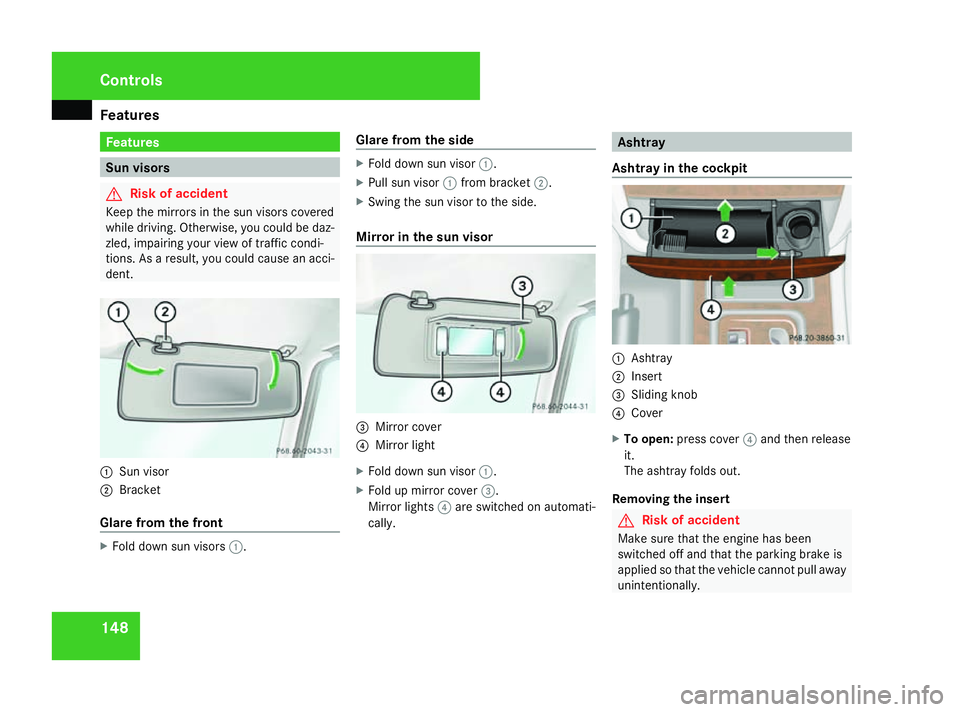
dent. 1
Sun visor
2 Bracket
Glare from the front X
Fold down sun visors 1. Glare from the side X
Fold down sun visor 1.
X Pull sun visor 1from bracket 2.
X Swing the sun visor to the side.
Mirror in the sun visor 3
Mirror cover
4 Mirror light
X Fold down sun visor 1.
X Fold up mirror cover 3.
Mirror lights 4are switched on automati-
cally. Ashtray
Ashtray in the cockpit 1
Ashtray
2 Insert
3 Sliding knob
4 Cover
X To open: press cover 4and then release
it.
The ashtray folds out.
Removing the insert G
Risk of accident
Make sure that the engine has been
switched off and that the parking brake is
applied so that the vehicle cannot pull away
unintentionally. Cont
rols
463_AKB; 1; 8, en-GB
wobuchh,
Version: 2.10.6
2008-07-17T15:19:41+02:00 - Seite 148 Dateiname: 6515_4091_02_buchblock.pdf; preflight
Page 154 of 293
Features
151Two-way radios and fax equipment used
without low-reflection exterior aerials can
interfere with the vehicle's electronics and,
thereby, jeopardise the operating safety of
the vehicle and your safety. Therefore, you
may only use this equipment if it is correctly
connected to a separate reflection-free
exterior aerial.
G
Risk of injury
Excessive electromagnetic radiation may
cause damage to your health and the health
of others. Using an exterior aerial takes into
account current scientific discussions
relating to the possible health risk posed by
electromagnetic fields.
In order to ensure optimum signal quality for
mobile phones and to minimise mutual inter-
ference between the vehicle electronics and
mobile phones, Mercedes-Benz recommends
the use of an approved exterior aerial. An
exterior aerial conducts the electromagnetic
fields generated by a wireless device to the
exterior of the vehicle; the field strength
within the vehicle interior is lower than in a
vehicle that does not have an exterior aerial.
i There are various mobile phone brackets
that may be fitted in your vehicle. In some cases, these are country-specific. You can
obtain these mobile phone brackets from a
qualified specialist workshop, e.g. a
Mercedes-Benz Service Centre.
The functions and services available when
you use the phone depend on your mobile
phone model and service provider.
X Open the telephone compart-
ment* (Y page 147).
X Place the mobile phone bracket into the
pre-installed fitting, see separate mobile
phone cradle/bracket installation instruc-
tions.
X Insert the mobile phone into the mobile
phone bracket, see separate mobile phone
cradle/bracket installation instructions.
If the mobile phone is inserted in the mobile
phone bracket, you can only speak to the per-
son you are calling using the hands-free sys-
tem.
You can operate the telephone using the
s andt buttons on the luxury multi-
function steering wheel. You can control
other mobile phone functions via the on-
board computer (Y page 111).
When you remove the key from the ignition
lock, the mobile phone remains switched on
for approximately ten minutes (run-on time). If you make a call during this time, the mobile
phone will be switched off approximately ten
minutes after you have ended the call. Garage door opener*
The remote control integrated in the rear-view
mirror allows you to operate up to three dif-
ferent door and gate systems.
i The garage door opener is only available
for certain countries. Observe the legal
requirements in all countries concerned.
It may not be possible to operate some
garage door opening systems with the inte-
grated remote control. You can obtain
detailed information from any Mercedes-
Benz Service Centre. Cont
rols
* option al
463_AKB; 1; 8, en-GB
wobuchh,
Version: 2.10.6 2008-07-17T15:19:41+02:00 - Seite 151 ZDateiname: 6515_4091_02_buchblock.pdf; preflight
Page 155 of 293
Features
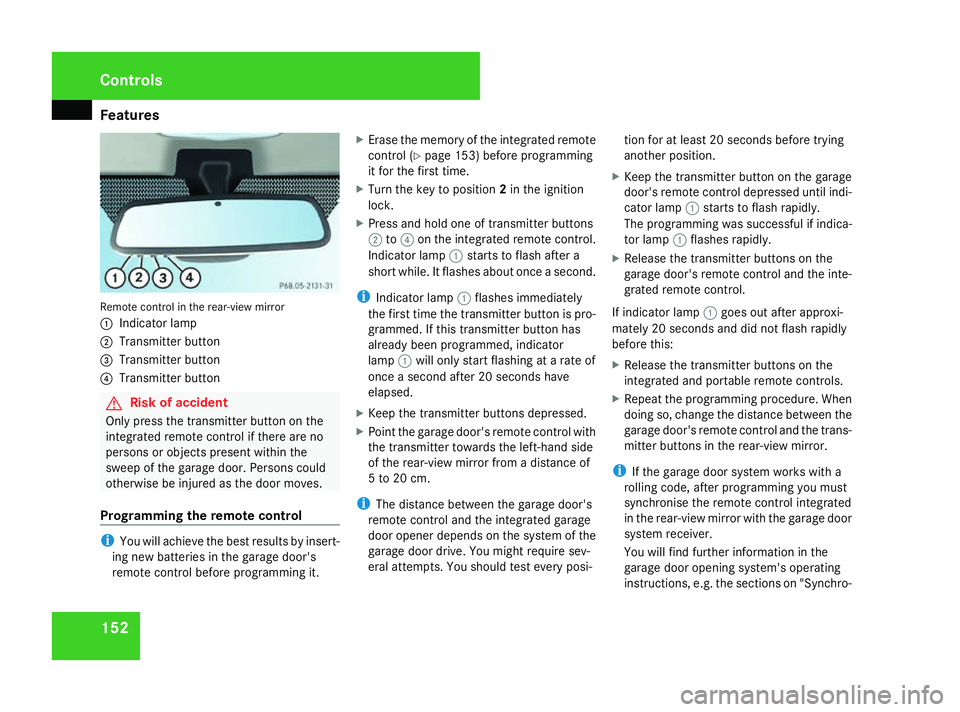
152Remote control in the rear-view mirror
1
Indicator lamp
2 Transmitter button
3 Transmitter button
4 Transmitter button G
Risk of accident
Only press the transmitter button on the
integrated remote control if there are no
persons or objects present within the
sweep of the garage door. Persons could
otherwise be injured as the door moves.
Programming the remote control i
You will achieve the best results by insert-
ing new batteries in the garage door's
remote control before programming it. X
Erase the memory of the integrated remote
control (Y page 153) before programming
it for the first time.
X Turn the key to position 2in the ignition
lock.
X Press and hold one of transmitter buttons
2 to4 on the integrated remote control.
Indicator lamp 1starts to flash after a
short while. It flashes about once a second.
i Indicator lamp 1flashes immediately
the first time the transmitter button is pro-
grammed. If this transmitter button has
already been programmed, indicator
lamp 1will only start flashing at a rate of
once a second after 20 seconds have
elapsed.
X Keep the transmitter buttons depressed.
X Point the garage door's remote control with
the transmitter towards the left-hand side
of the rear-view mirror from a distance of
5 to 20 cm.
i The distance between the garage door's
remote control and the integrated garage
door opener depends on the system of the
garage door drive. You might require sev-
eral attempts. You should test every posi- tion for at least 20 seconds before trying
another position.
X Keep the transmitter button on the garage
door's remote control depressed until indi-
cator lamp 1starts to flash rapidly.
The programming was successful if indica-
tor lamp 1flashes rapidly.
X Release the transmitter buttons on the
garage door's remote control and the inte-
grated remote control.
If indicator lamp 1goes out after approxi-
mately 20 seconds and did not flash rapidly
before this:
X Release the transmitter buttons on the
integrated and portable remote controls.
X Repeat the programming procedure. When
doing so, change the distance between the
garage door's remote control and the trans-
mitter buttons in the rear-view mirror.
i If the garage door system works with a
rolling code, after programming you must
synchronise the remote control integrated
in the rear-view mirror with the garage door
system receiver.
You will find further information in the
garage door opening system's operating
instructions, e.g. the sections on "Synchro- Cont
rols
463_AKB; 1; 8, en-GB
wobuchh,
Version: 2.10.6 2008-07-17T15:19:41+02:00 - Seite 152Dateiname: 6515_4091_02_buchblock.pdf; preflight
Page 156 of 293
Features
153
nising the transmitter" or "Registering a
new transmitter".
Opening or closing the garage door Once programmed, the integrated remote
control will assume the function of the garage
door system's remote control. Please read
the operating instructions for the garage door
system.
X Turn the key to position 2in the ignition
lock.
X Press the transmitter button on the rear-
view mirror that you have programmed to
operate the garage door.
i The transmitter will transmit a signal for
as long as the transmitter button is being
pressed. The transmission will be halted
after a maximum of 20 seconds and indi-
cator lamp 1will flash. Press the trans-
mitter button again if necessary. Clearing the remote control memory X
Turn the key to position 2in the ignition
lock.
X Press and hold transmitter buttons 2and
4 for approximately 20 seconds until indi-
cator lamp 1flashes rapidly.
The memory is cleared.
i You should clear the remote control mem-
ory before selling the vehicle. Floormat on the driver's side
G
Risk of accident
Make sure that there is sufficient clearance
around the pedals when floormats are
used, and that the floormats are properly
secured.
The floormats must be secured at all times
using retainers and studs.
Before you drive off, make sure that the
floormats are secure and rectify if neces-
sary. A floormat which is not properly
secured can slip and thereby interfere with
the movement of the pedals.
Do not place floormats on top of one
another. Cont
rols
463_AKB; 1; 8, en-GB
wobuchh,
Version: 2.10.6 2008-07-17T15:19:41+02:00 - Seite 153 ZDateiname: 6515_4091_02_buchblock.pdf; preflight
Page 186 of 293
Care
183H
Environmental note
Dispose of empty packaging, cleaning
cloths and polishing wads in an environ-
mentally responsible manner.
! Do not affix:
R stickers
R films
R magnetic plates or similar items
to painted surfaces, otherwise you could
damage the paintwork. Vehicle care
! Do not park the vehicle for a long period
of time directly after cleaning, especially if
the wheels have just been cleaned with a
wheel cleaner. Wheel cleaners could cause
rapid corrosion of the brake discs and
brake pads/linings. After cleaning, park
the vehicle when it is at normal operating
temperature.
Automatic car wash You can wash the vehicle in an automatic car
wash from the beginning. !
Do not use a touch-free automatic car
wash that uses chemical agents to wash
the vehicle.
Preferably use automatic car washes without
brushes.
If the vehicle is very dirty, pre-wash it before
cleaning it in an automatic car wash.
! Make sure that the automatic car wash is
suitable for the size of the vehicle. Fold in
the exterior mirrors before the vehicle is
washed. There is otherwise a risk of dam-
age to the exterior mirrors.
! Make sure that the side windows are com-
pletely closed, that the ventilation/heater
blower is fully turned off and that the wind-
screen wiper switch is set to 0. The rain
sensor may otherwise be activated, trig-
gering unintended wiper movements. This
could cause damage to the vehicle.
After using an automatic car wash, wipe any
wax and drying agents off the windscreen and
the wiper blades. This will prevent smears and
reduce wiping noises caused by residue on
the windscreen. High-pressure cleaners G
Risk of accident
Do not use high-pressure cleaners with cir-
cular-jet nozzles (dirt grinders) to clean
your vehicle or ― especially ― the tyres.
Otherwise, you could damage the tyres and
cause an accident.
! Observe the instructions issued by the
equipment manufacturer concerning the
distance to be maintained between the
nozzle of the high-pressure cleaner and the
vehicle (at least 30 cm).
Move the high-pressure cleaner nozzle
around when cleaning your vehicle.
Do not aim directly at any of the following:
R tyres
R door joint
R electrical components
R battery
R connectors
R lights
R seals
Damaged seals or electrical components
can lead to failures or leaks. Operation
463_AKB; 1; 8, en-GB
wobuchh,
Version: 2.10.6 2008-07-17T15:19:41+02:00 - Seite 183 ZDateiname: 6515_4091_02_buchblock.pdf; preflight
Page 208 of 293
Display
messages 205Display messages Possible cause/consequence Possible solution
. Turn signal rear
left Back-up bulb
on
or
Turn signal rear
right Back-up bulb
on The rear left-hand or rear right-hand turn
signal is fa
ulty. Another lamp has taken
over its function. X
Replace the bulb (Y page 235). . Turn signal left
mirror
or
Turn signal right
mirror The turn signal in the left-hand or right-
hand exterior mirror is faulty. This mes-
sage will only appear if all LEDs have
failed. X
Visit a qualified specialist workshop. . Turn signal front
left Back-up bulb
on
or
Turn signal front
right Back-up bulb
on The front left-hand or right-hand turn sig-
nal is faulty. Another lamp has taken over
its function. X
Replace the bulb (Y page 235). . Brake lamp left
or
Brake lamp right The left-hand or right-hand brake lamp is
faulty. X
Replace the bulb (Y page 235). . 3rd brake lamp The third brake lamp is faulty. This mes-
sage will only appear if all LEDs have
failed. X
Visit a qualified specialist workshop. Practical advice
463_AKB; 1; 8, en-GB
wobuchh,
Version: 2.10.6 2008-07-17T15:19:41+02:00 - Seite 205 ZDateiname: 6515_4091_02_buchblock.pdf; preflight
Page 226 of 293
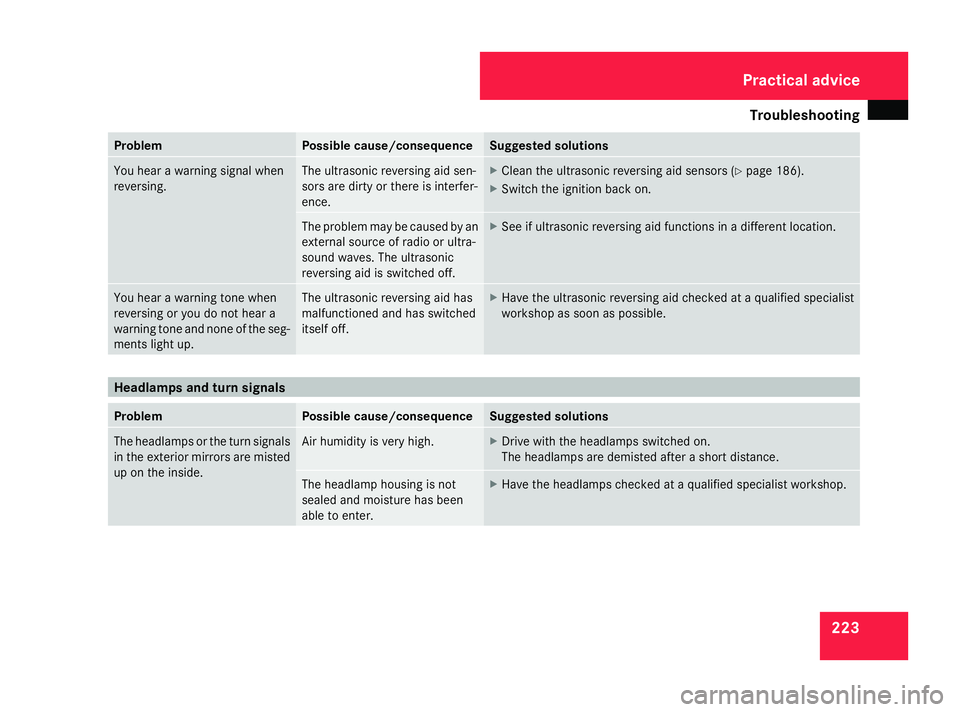
Troubleshooting
223Problem Possible cause/consequence Suggested solutions
You hear a warning signal when
reversing. The ultrasonic reversing aid sen-
sors are dirty or there is interfer-
ence. X
Clean the ultrasonic reversing aid sensors (Y page 186).
X Switch the ignition back on. The problem ma
y be caused by an
external source of radio or ultra-
sound waves. The ultrasonic
reversing aid is switched off. X
See if ultrasonic reversing aid functions in a different location. You hear a warning tone when
reversing or you do not hear a
warning tone and none of the seg-
ments light up. The ultrasonic reversing aid has
malfunctioned and has switched
itself off. X
Have the ultrasonic reversing aid checked at a qualified specialist
workshop as soon as possible. Headlamps and turn signals
Problem Possible cause/consequence Suggested solutions
The headlamps or the turn signals
in the exterior mirrors are misted
up on the inside. Air humidity is very high. X
Drive with the headlamps switched on.
The headlamps are demisted after a short distance. The headlamp housing is not
sealed and moisture has been
able to enter. X
Have the headlamps checked at a qualified specialist workshop. Practical advice
463_AKB; 1; 8, en-GB
wobuchh,
Version: 2.10.6 2008-07-17T15:19:41+02:00 - Seite 223 ZDateiname: 6515_4091_02_buchblock.pdf; preflight