reset MERCEDES-BENZ G-CLASS SUV 2008 User Guide
[x] Cancel search | Manufacturer: MERCEDES-BENZ, Model Year: 2008, Model line: G-CLASS SUV, Model: MERCEDES-BENZ G-CLASS SUV 2008Pages: 293, PDF Size: 4.49 MB
Page 105 of 293
On-board computer
102
X
To select a channel from the channel
list: press and briefly hold the jor
k button.
X To select a station using the station
search (only if no station list is received):
press and briefly hold the jork
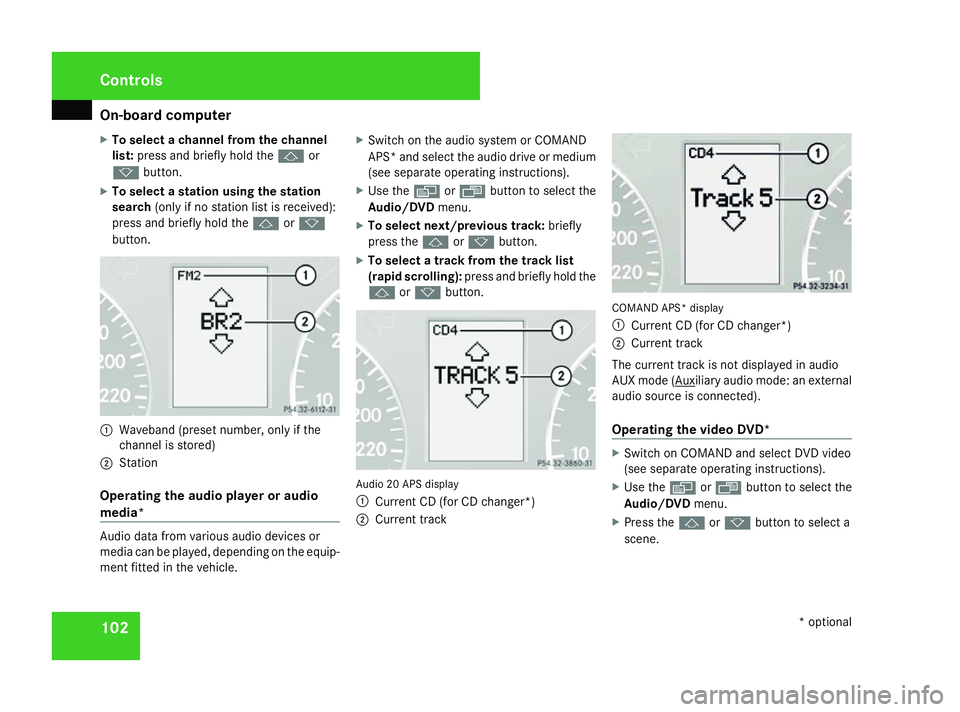
button. 1
Waveband (preset number, only if the
channel is stored)
2 Station
Operating the audio player or audio
media* Audio data from various audio devices or
media can be played, depending on the equip-
ment fitted in the vehicle. X
Switch on the audio system or COMAND
APS* and select the audio drive or medium
(see separate operating instructions).
X Use the èor· button to select the
Audio/DVD menu.
X To select next/previous track: briefly
press the jork button.
X To select a track from the track list
(rapid scrolling): press and briefly hold the
j ork button. Audio 20 APS display
1 Current CD (for CD changer*)
2 Current track COMAND APS* display
1
Current CD (for CD changer*)
2 Current track
The current track is not displayed in audio
AUX mode ( Auxiliary audio mode: an external
audio source is connected).
Operating the video DVD* X
Switch on COMAND and select DVD video
(see separate operating instructions).
X Use the èor· button to select the
Audio/DVD menu.
X Press the jork button to select a
scene. Controls
* optional
463_AKB; 1; 8, en-GB
wobuchh,
Version: 2.10.6
2008-07-17T15:19:41+02:00 - Seite 102 Dateiname: 6515_4091_02_buchblock.pdf; preflight
Page 107 of 293
On-board computer
104
i
All possible display messages are
explained in the "Practical advice" section
(Y page 194).
Switching off the ignition clears the Message
memory except for the highest priority dis-
play messages. The on-board computer will
only delete these display messages after the
cause of the message has been rectified.
i Menu overview: see ( Ypage 99).
Displaying messages Use the buttons on the multi-function steer-
ing wheel.
X Press the èor· button repeatedly
until either the original menu or the Mes-
sage memory menu appears.
If the Message memory menu does not
appear, there are no display messages.
If there are messages, the following mes-
sage may appear in the multi-function dis-
play, for example: 2 messages.
X Press the jork button to call up a
display message. Settings menu
There are two functions in the Settings
menu: the To reset: Press reset button
for 3 seconds function, which you can use
to reset most settings to the factory settings.
You can also use the submenus here to make
individual settings for your vehicle.
i Menu overview: see ( Ypage 99).
Use the buttons on the multi-function steer-
ing wheel.
Resetting to factory settings For safety reasons, not all functions are reset:
the
Headlamp mode function in theLight-
ing submenu is only reset if the vehicle is
stationary.
X Press the èor· button to select the
Settings menu.
X Press and hold the reset button on the left
of the instrument cluster for approximately
three seconds.
A prompt appears in the multi-function dis-
play asking you to press the reset button
again to confirm. X
Press the reset button again.
The functions of most submenus are
restored to factory settings.
or
X If you want to retain the settings, do not
press the reset button a second time.
The Settings menu appears again after
approximately 5 seconds.
X Press the èor· button to select a
different menu.
Submenus in the Settings menu X
Press the èor· button to select the
Settings menu.
X Press the jbutton to select submenus.
A list of submenus is displayed. More sub-
menus are available than can be displayed
at a time. Controls
463_AKB; 1; 8, en-GB
wobuchh
,V ersion: 2.10.6
2008-07-17T15:19:41+02:00 - Seite 104 Dateiname: 6515_4091_02_buchblock.pdf; preflight
Page 113 of 293
On-board computer
110 the driver's door and thereby unintention-
ally activate the easy-entry/exit feature
and become trapped.
X Press the èor· button to select the
Settings menu.
X Press the jbutton to select submenus.
X Press the æorç button to select the
Convenience submenu.
X Press jto select EASY-ENTRY sys-
tem.
X Press æorç to activate or deacti-
vate the EASY-ENTRY system.
X Press the j,èorÿ button to
select a different display. Trip computer menu
You can use the Trip computermenu to call
up or reset statistical data for your vehicle.
i You can select kmormiles as the unit of
measurement for distance (Y page 105).
i Menu overview: see ( Ypage 99).
Use the buttons on the multi-function steer-
ing wheel.
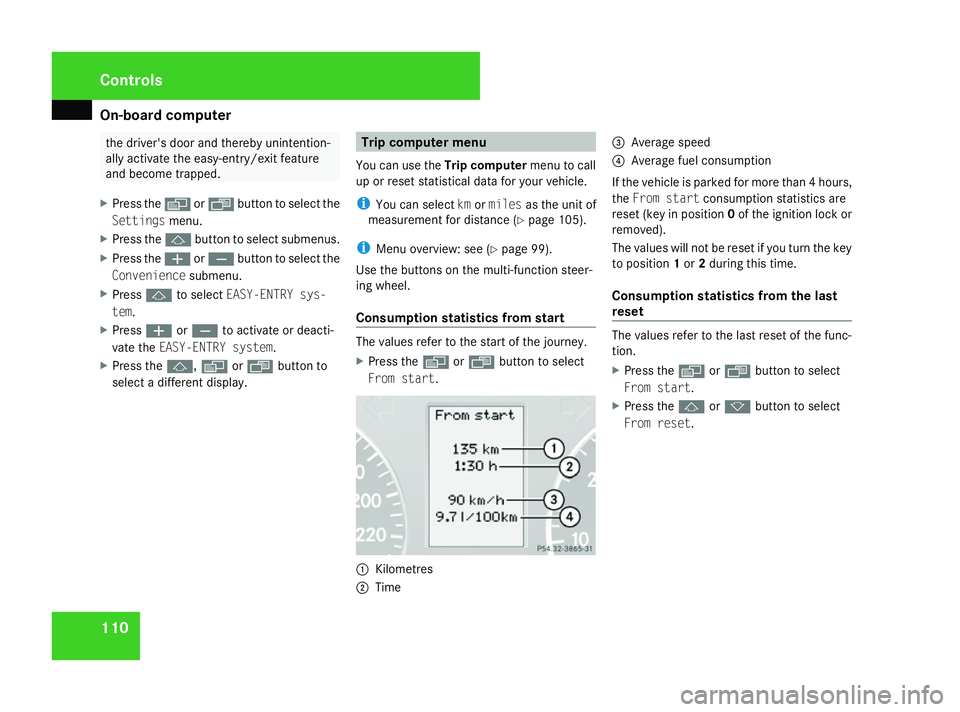
Consumption statistics from start The values refer to the start of the journey.
X
Press the èor· button to select
From start . 1
Kilometres
2 Time 3
Average speed
4 Average fuel consumption
If the vehicle is parked for more than 4 hours,
the From start consumption statistics are
reset (key in position 0of the ignition lock or
removed).
The values will not be reset if you turn the key
to position 1or 2during this time.
Consumption statistics from the last
reset The values refer to the last reset of the func-
tion.
X
Press the èor· button to select
From start .
X Press the jork button to select
From reset . Controls
463_AKB; 1; 8, en-GB
wobuchh
,V ersion: 2.10.6
2008-07-17T15:19:41+02:00 - Seite 110 Dateiname: 6515_4091_02_buchblock.pdf; preflight
Page 114 of 293
On-board computer
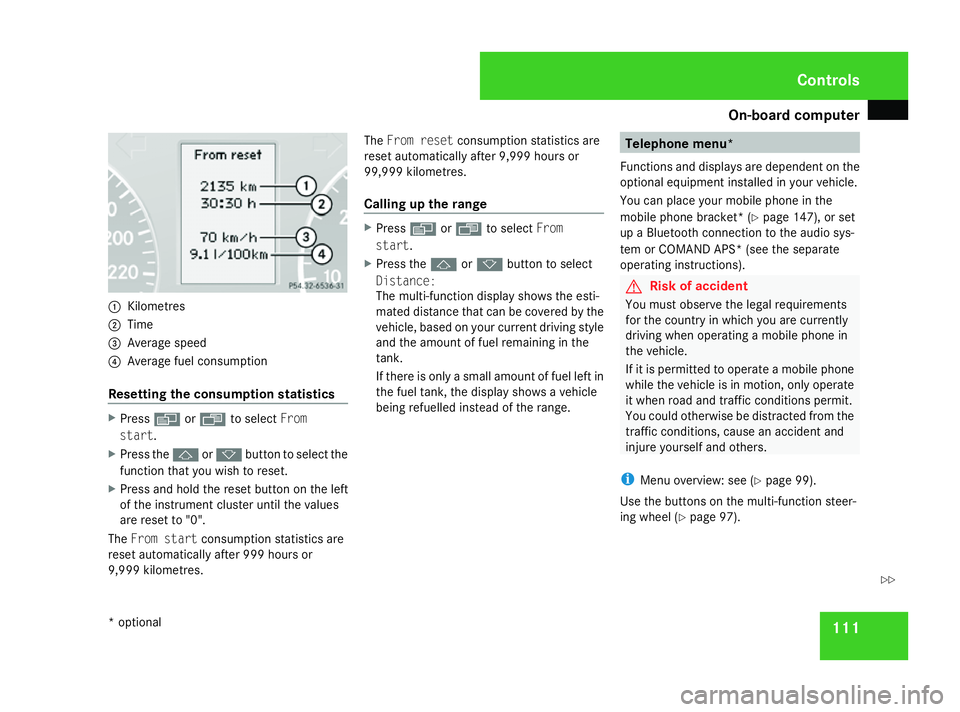
1111
Kilometres
2 Time
3 Average speed
4 Average fuel consumption
Resetting the consumption statistics X
Press èor· to select From
start .
X Press the jork button to select the
function that you wish to reset.
X Press and hold the reset button on the left
of the instrument cluster until the values
are reset to "0".
The From start consumption statistics are
reset automatically after 999 hours or
9,999 kilometres. The
From reset consumption statistics are
reset automatically after 9,999 hours or
99,999 kilometres.
Calling up the range X
Press èor· to select From
start .
X Press the jork button to select
Distance:
The multi-function display shows the esti-
mated distance that can be covered by the
vehicle, based on your current driving style
and the amount of fuel remaining in the
tank.
If there is only a small amount of fuel left in
the fuel tank, the display shows a vehicle
being refuelled instead of the range. Telephone menu*
Functions and displays are dependent on the
optional equipment installed in your vehicle.
You can place your mobile phone in the
mobile phone bracket* (Y page 147), or set
up a Bluetooth connection to the audio sys-
tem or COMAND APS* (see the separate
operating instructions). G
Risk of accident
You must observe the legal requirements
for the country in which you are currently
driving when operating a mobile phone in
the vehicle.
If it is permitted to operate a mobile phone
while the vehicle is in motion, only operate
it when road and traffic conditions permit.
You could otherwise be distracted from the
traffic conditions, cause an accident and
injure yourself and others.
i Menu overview: see ( Ypage 99).
Use the buttons on the multi-function steer-
ing wheel ( Ypage 97). Controls
* optional
463_AKB; 1; 8, en-GB
wobuchh
,V ersion: 2.10.6
2008-07-17T15:19:41+02:00 - Seite 111 ZDateiname: 6515_4091_02_buchblock.pdf; preflight
Page 170 of 293
Tyres and wheels
167
R
changed the tyre pressure
R changed the wheels or tyres
R fitted new wheels or tyres
If you wish to define the new reference values
manually:
X Use the table on the inside of the fuel filler
flap to ensure that the tyre pressure is set
correctly in all four tyres for the current
operating conditions.
Also observe the notes in the section on
tyre pressures (Y page 164).
X Make sure that the key is in position 2in
the ignition lock.
The standard display appears in the multi-
function display (Y page 101).
X Press the jork button to select the
Tyre pressure function on the multi-func-
tion steering wheel or wait until the follow-
ing message appears:
Tyre pressure displayed only after
driving a few mins.
X Press the reset button on the left of the
instrument cluster (Y page 96).
The following message appears in the
multi-function display:
Tyre pressure monitor
reactivate?
Yes No
X Press the æbutton on the multi-func-
tion steering wheel.
The following message appears in the
multi-function display:
Tyre pressure monitor restarted
The tyre pressure monitor has stored the
pressure of the tyres as a new reference
value.
If you wish to cancel the restart:
X Press the çbutton on the multi-func-
tion steering wheel.
The tyre pressure values stored at the last
restart will continue to be monitored. Interchanging the wheels
G
Risk of accident
Interchange the front and rear wheels only
if they have the same dimensions: for exam-
ple size, offset, etc.
After every wheel interchange/change,
have the tightening torque checked at a
qualified specialist workshop that has the
necessary specialist knowledge and tools
to carry out the work required. Mercedes-
Benz recommends that you use a Mercedes-Benz Service Centre for this pur-
pose. In particular, work relevant to safety
or on safety-related systems must be car-
ried out at a qualified specialist workshop.
The wheels could work loose if they are not
tightened to a torque of 130 Nm.
For safety reasons, Mercedes-Benz recom-
mends that you only use wheel bolts of the
correct size which have been approved for
Mercedes-Benz vehicles.
The wear patterns on the front and rear tyres
differ depending on the operating conditions.
Interchange the wheels before a clear wear
pattern has formed on the tyres. Front tyres
typically wear more on the shoulders and the
rear tyres in the centre.
Interchange the wheels every 5,000 km to
10,000 km depending on the degree of tyre
wear, provided that the vehicle has the same
size front and rear tyres. Do not reverse the
direction of tyre rotation.
Clean the contact surfaces of the wheel and
the brake disc thoroughly every time a wheel
is interchanged. Check the tyre pressure and
reactivate the tyre pressure monitor* if nec-
essary. Operation
* optional
463_AKB; 1; 8, en-GB
wobuchh
,V ersion: 2.10.6
2008-07-17T15:19:41+02:00 - Seite 167 ZDateiname: 6515_4091_02_buchblock.pdf; preflight
Page 184 of 293
Service
181Service
ASSYST service interval display
The ASSYST service display informs you when
the next service is due. Whenever a service is
due, this is shown in the multi-function dis-
play:
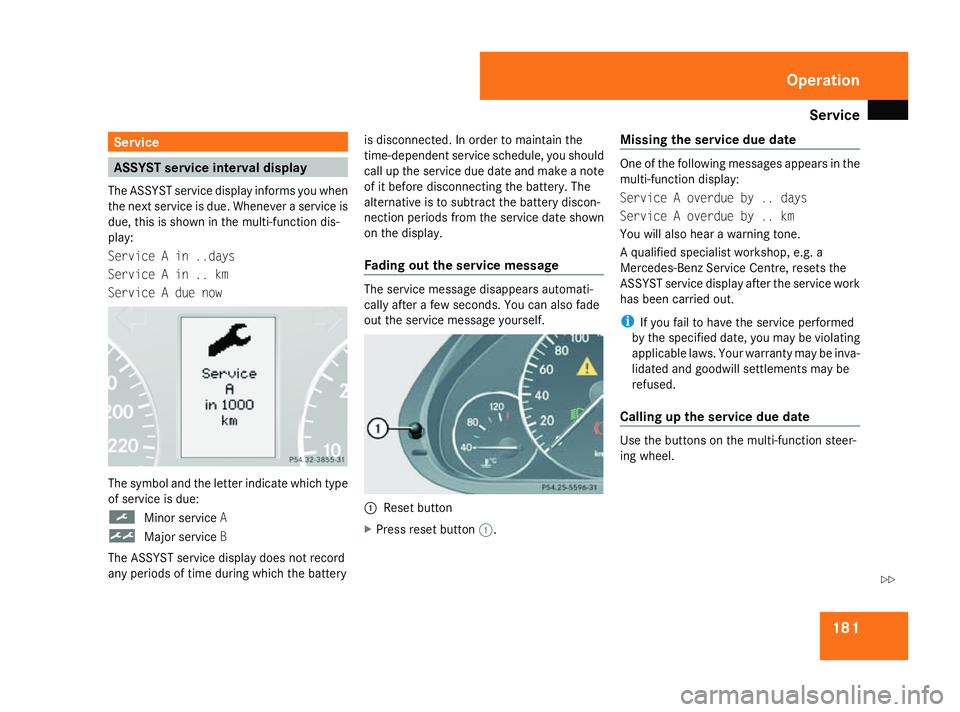
Service A in ..days
Service A in .. km
Service A due now The symbol and the letter indicate which type
of service is due:
9
Minor service A
½ Major service B
The ASSYST service display does not record
any periods of time during which the battery is disconnected. In order to maintain the
time-dependent service schedule, you should
call up the service due date and make a note
of it before disconnecting the battery. The
alternative is to subtract the battery discon-
nection periods from the service date shown
on the display.
Fading out the service message
The service message disappears automati-
cally after a few seconds. You can also fade
out the service message yourself.
1
Reset button
X Press reset button 1. Missing the service due date One of the following messages appears in the
multi-function display:
Service A overdue by .. days
Service A overdue by .. km
You will also hear a warning tone.
A qualified specialist workshop, e.g. a
Mercedes-Benz Service Centre, resets the
ASSYST service display after the service work
has been carried out.
i If you fail to have the service performed
by the specified date, you may be violating
applicable laws. Your warranty may be inva-
lidated and goodwill settlements may be
refused.
Calling up the service due date Use the buttons on the multi-function steer-
ing wheel. Operation
463_AKB; 1; 8, en-GB
wobuchh,
Version: 2.10.6 2008-07-17T15:19:41+02:00 - Seite 181 ZDateiname: 6515_4091_02_buchblock.pdf; preflight
Page 254 of 293
Jump-starting
251
X
Connect positive terminal clamp 1and
secure the cover.
X Connect negative terminal clamp 3.
X Connect breather hose 4. Make sure that
a cell cap is fitted between battery 2and
breather hose 4.
i If the battery power supply has been inter-
rupted (e.g. if it has been reconnected), you
must carry out the following tasks:2
R set the time (Y page 106)
R reset the head restraints on the front
seats (Y page 61)
R reset the side windows ( Ypage 85) Jump-starting
If your vehicle's battery is discharged, the
engine can be jump-started from another
vehicle or from an external battery using jump
leads.
Observe the following points:
R Jump-starting may only be performed when
the engine and catalytic converter are cold.
R Do not start the engine if the battery is fro-
zen. Let the battery thaw first.
R Jump-starting may only be performed with
batteries that have the same nominal volt-
age.
R Only use jump leads which are protected
against polarity reversal and which have a
sufficient cross-section and insulated ter-
minal clamps.
i Jump leads which are protected against
polarity reversal and further information
about jump-starting can be obtained from
any Mercedes-Benz Service Centre.
! Avoid repeated and lengthy starting
attempts. Only use the jump-starting pro-
cedure for the battery in the engine com-
partment. Do not use a rapid-charging device to start
the engine. G
Risk of injury
There is a risk of acid burns when jump-
starting a vehicle due to the gases which
escape from the battery. Do not lean over
the battery while the engine is being jump-
started. G
Risk of explosion
Gases escaping from the battery during
jump-starting may cause minor explosions.
Avoid creating sparks. Keep naked flames
away from the battery, and do not smoke.
Comply with safety precautions and take
protective measures when handling batter-
ies. You will find these under "Battery" in
the index.
X Make sure that the two vehicles do not
touch.
X Apply the parking brake.
X Move the selector lever to P.
X Switch off all electrical consumers. Practical advice
463_AKB; 1; 8, en-GB
wobuchh,
Version: 2.10.6 2008-07-17T15:19:41+02:00 - Seite 251 ZDateiname: 6515_4091_02_buchblock.pdf; preflight