towing MERCEDES-BENZ G-CLASS SUV 2008 Owners Manual
[x] Cancel search | Manufacturer: MERCEDES-BENZ, Model Year: 2008, Model line: G-CLASS SUV, Model: MERCEDES-BENZ G-CLASS SUV 2008Pages: 293, PDF Size: 4.49 MB
Page 6 of 293
31, 2, 3 ...
4ETS (Electronic Traction Support )............ 50 A
ABS (Anti-lock Braking System) ..........48
Display message ............................. 196
Warning lamp.................................. 212
Acceleration
Technical data. ............................... 265
Accident
Notes. ............................................. 218
Active service system
see Service display
Airbag
Activation.......................................... 33
Control unit....................................... 33
Driver's ............................................. 37
Front. ................................................ 37
Front passenger ................................ 37
PASSENGER AIRBAG OFF warning
lamp .............................................. 211
System.............................................. 35
Windowbags. .................................... 37
Air conditioning
Activating/deactivating ..................124
Activating/deactivating air-recir-
culation mode. ................................ 129
Auxiliary heating/ventilation........... 130 Controlling automatically.
...............124
Cooling with air dehumidification ...124
Demisting the windscreen ..............127
Malfunction indicator lamp. ............210
Misted-up windows. ........................127
Rear window heating ......................128
Setting the air distribution. .............126
Setting the airflow .......................... 127
Setting the air vents .......................125
Setting the temperature .................125
Switching the residual heat func-
tion on/off ...................................... 129
Thermatic. ...................................... 122
Air-conditioning
Windscreen heating. .......................128
Air-conditioning system
see Air conditioning
Air filter
Display message ............................. 207
Antifreeze concentration................... 281
Anti-lock braking system see ABS
Anti-theft alarm system
see ATA
Anti-theft systems................................ 51
Ashtray................................................ 148
ASSYST see Service display
ATA (anti-theft alarm system)............. 51
Switching off the alarm. ....................52Audible warning signal......................
217
AUTO lights Display message ............................. 204
Automatic car wash........................... 183
Automatic transmission Changing gear yoursel f..................... 90
Display message ............................. 198
Driving tips ....................................... 91
Emergency running mode ...............222
Instrument cluster display. ...............89
Malfunction..................................... 222
Oil level.. ......................................... 161
One-touch gearshifting. ....................90
Releasing the parking lock man-
ually. ............................................... 233
Selector lever positions. ...................89
Shift ranges. ..................................... 91
Trailer towing. ................................... 91
Auxiliary heating ................................ 130
Malfunction..................................... 228
Remote control ............................... 131
Setting (on-board computer).......... .105
Auxiliary ventilation ...........................130
Axle load, maximum permissible
............................................ .271, 272, 273 B
Backrest Display message ............................. 208
BAS (Brake Assist)............................... 48 Index
463_AKB; 1; 8, en-GB
wobuchh,
Version: 2.10.6 2008-07-17T15:19:41+02:00 - Seite 3Dateiname: 6515_4091_02_buchblock.pdf; preflight
Page 9 of 293
6BAS.
.................................................. 48
EBV. .................................................. 50
Driving safety systems
4ETS. ................................................ 50
ESP ®
................................................ 48
Driving system................................... 113
Cruise control. ................................ 113
Speedtronic. ................................... 115
Driving systems
Reversing camera. ..........................119
Driving tip
Braking ........................................... 170
Trailer towing. ................................. 178
Winter ............................................. 169
Driving tips......................................... 169
Driving abroad ............................... 177
Driving on wet roads ......................171
Fording .................................. 172, 176
DVD audio
Operating (on-board computer). .....102
DVD video
Operating (on-board computer). .....102 E
Easy-entry/exit feature Activating/deactivating (on-
board computer). ............................ 109
Easy-entry feature ..........................63, 67
Easy-exit feature.................................. 67EBV (electronic brake-power distri-
bution)
................................................... 50
Electrical/electronic equipment Retrofitting ..................................... 260
Electronic brake-power distribution
see EBV
Electronic Stability Program
see ESP ®
Electronic Traction Support see 4ETS
e mark................................................. 260
Emergency key element Lost. ............................................... 226
Emergency locking
Vehicle............................................ 230
Emergency release
Fuel filler fla p.................................. 230
Emergency running mode
Automatic transmission ..................222
Emergency unlocking
Rear door. ....................................... 229
Vehicle............................................ 229
Engine
Display message ............................. 200
Running irregularl y.......................... 220
Starting ............................................. 86
Starting problems ........................... 220
Technical data. ............................... 263
Engine diagnostic warning lamp....... 215 Engine electronics.............................. 260
Malfunction..................................... 220
Engine number................................... 262
Engine oil ........................................... 279
Capacities.. ..................................... 160
Checking the oil level (automatic
transmission) .................................. 161
Checking the oil level (dipstick). .....160
Checking the oil level (on-board
computer). ...................................... 159
Consumption ................................. 159
Display message
....................................... 159, 207, 208
Filler neck. ...................................... 160
Topping up. ..................................... 160
ESP ®
(Electronic Stability Program)... 48
Activating/deactivating ....................49
Display messages ...................197, 198
Warning lamp. .......................... 48, 213
Exterior lighting
Delayed switch-off (on-board
computer). ...................................... 107
Exterior mirrors
Adjusting .......................................... 68
Anti-dazzle mode (automatic). ..........68
Malfunction..................................... 225
Parking position. ......................... 69, 71
Storing settings ................................ 70
Exterior view
Overview. .......................................... 18Index
463_AKB; 1; 8, en-GB
wobuchh,
Version: 2.10.6 2008-07-17T15:19:41+02:00 - Seite 6Dateiname: 6515_4091_02_buchblock.pdf; preflight
Page 15 of 293
12
SRS (Supplemental Restraint Sys-
tem).......................................................
33
Display message..................... 199, 202
Warning lamp. .......................... 33, 214
Standard display (on-board com-
puter) ................................................... 101
Station see Radio
Status line (on-board computer)......... 98
Selecting the display....................... 106
Steering wheel
Adjusting .......................................... 66
Buttons (on-board computer)............ 97
Storing settings ................................ 70
Steering wheel heating........................ 67
Stowage compartment...................... 146
Armrest (under) .............................. 147
Glove compartment. .......................147
Stowage compartments
Overview. .......................................... 30
Submenu (on-board computer)......... 104
Convenience ................................... 105
Heating. .......................................... 105
Instrument cluster .......................... 105
Lighting........................................... 105
Time/date. ..................................... 105
Vehicle............................................ 105
Summer opening .................................. 85
Sun visor............................................. 148Supplemental Restraint System
see SRS
Surround lighting
Switching on/off (on-board com-
puter). ............................................. 107
Switching off the alarm
ATA. .................................................. 52 T
Tailgate (Cabriolet) Opening/closing. .............................. 58
Tail lamps
Changing. ....................................... 240
Display message ............................. 207
Tank capacity..................................... 276
Technical data Acceleration. .................................. 265
Engine............................................ .263
Speed. ............................................ 264
Trailer loads .................................... 275
Tyres. .............................................. 267
Vehicle dimensions. ........................269
Vehicle weights............................... 271
Wheels. ........................................... 267
Telephone
see Mobile phone
Telephone compartment................... 147Temperature
Coolant. ............................................ 96
Outside temperature......................... 97
Thermatic
Malfunction indicator lamp. ............210
Third brake lamp
Display message ............................. 205
Tightening torque............................... 246
Time Setting (on-board computer).......... .106
Setting the time (on-board com-
puter). ............................................. 106
Tonneau cover.................................... 136
TopTether.............................................. 45
Tow-away protection........................... 52
Towing................................................. 254
Towing eye Front. .............................................. 253
Rear. ............................................... 254
Trailer
7-pin connector .............................. 180
Display message ............................. 204
Power supply. ................................. 180
Trailer loads
Technical data. ............................... 275
Trailer tow hitch
Notes on care ................................. 186Index
463_AKB; 1; 8, en-GB
wobuchh,
Version: 2.10.6 2008-07-17T15:19:41+02:00 - Seite 12Dateiname: 6515_4091_02_buchblock.pdf; preflight
Page 16 of 293
13
Trailer towing
Driving tips. .................................... 178
Mounting dimensions. ....................274
Ultrasonic reversing aid. .................119
Transfer case
Display message ............................. 202
Shift range ........................................ 92
Transmission
Display message ............................. 198
Transmission output (maximum)
Telephone/two-way radio ...............260
Transport (vehicle)............................. 254
Travelling uphill .................................. 174
Trip computer Menu (on-board computer). ............110
Trip meter........................................... 100
Resetting. ......................................... 96
Turn signal lamps
Display message ............................. 205
Two-way radio
Installation. ..................................... 260
Tyre grip.............................................. 171
Tyre pressure ..................................... 164
Calling up (on-board computer) .....165
Display message ............................. 198
see Tyre pressure
Tyres
Direction of rotatio n....................... 164
General notes. ................................ 162
Technical data. ............................... 267Tyre tread............................................ 164 U
Ultrasonic reversing aid.................... 118
Malfunction..................................... 222
Range of the sensors. .....................118
Trailer towing. ................................. 119
Warning displa y.............................. 119
Unladen weight.......................... 271, 272
Unlocking Emergency unlocking...................... 229
From the inside (central unlocking
button) .............................................. 56 V
Variable Speedtronic .........................115
Vehicle Emergency unlocking .............229, 230
Individual settings (on-board com-
puter). ............................................. 104
Leaving parked up. .........................228
Towing. ........................................... 254
Transporting ................................... 254
Vehicle battery................................... 247
Vehicle dimensions............................ 269
Vehicle electronics............................ 260
Vehicle identification number
(VIN)............................................ 261, 262
Vehicle identification plates............. 261Vehicle tool kit
Cabriolet. ........................................ 191
Long-wheelbase station wagon....... 189
Short-wheelbase station wagon. .....190
Vehicle weights.................................. 271 W
Warning and indicator lamp ABS (yellow).................................... 212
LIM (cruise control)......................... 114
LIM (variable Speedtronic). .............116
Warning and indicator lamps
ESP ®
......................................... 48, 213
Warning signal
Audible. .......................................... 217
Warning triangle
Cabriolet. ........................................ 191
Long-wheelbase station wagon
............................................... 188, 190
Washer fluid
Display message ............................. 209
Wearing seat belts............................... 71
Wheel bolts Tightening torque............................ 246
Wheels
General notes. ................................ 162
Interchanging.................................. 167
Technical data. ............................... 267
Windowbags......................................... 37 Index
463_AKB; 1; 8, en-GB
wobuchh,
Version: 2.10.6 2008-07-17T15:19:41+02:00 - Seite 13Dateiname: 6515_4091_02_buchblock.pdf; preflight
Page 22 of 293
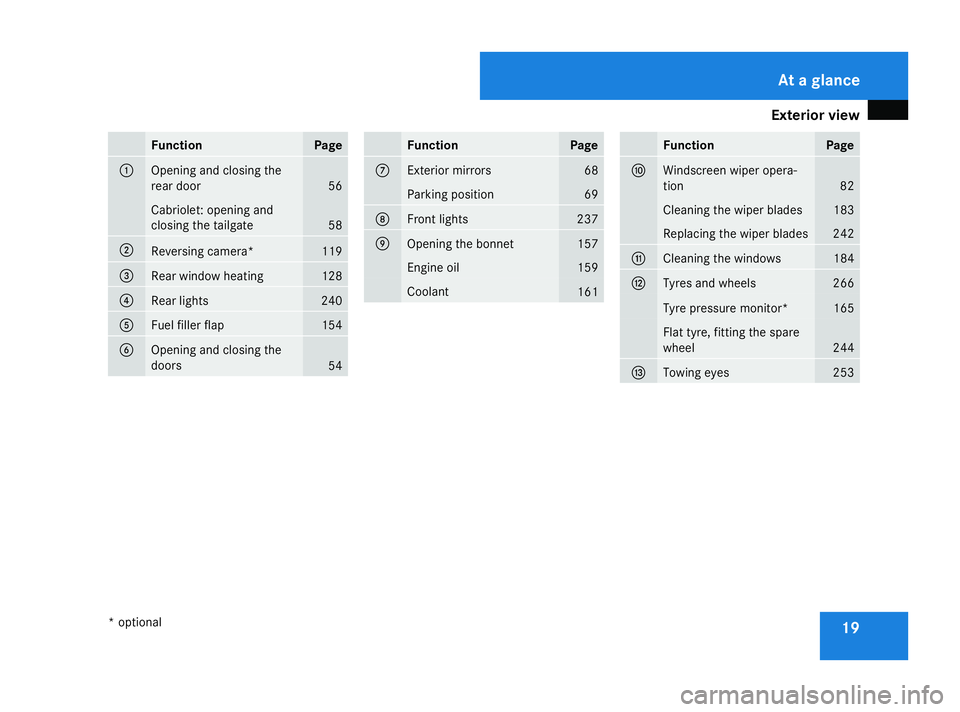
Exterior view
19Function Page
1
Opening and closing the
rear door 56
Cabriolet: opening and
closing the tailgate
58
2
Reversing camera* 119
3
Rear window heating 128
4
Rear lights 240
5
Fuel filler flap 154
6
Opening and closing the
doors 54 Function Page
7
Exterior mirrors 68
Parking position 69
8
Front lights 237
9
Opening the bonnet 157
Engine oil 159
Coolant
161 Function Page
a
Windscreen wiper opera-
tion
82
Cleaning the wiper blades 183
Replacing the wiper blades 242
b
Cleaning the windows 184
c
Tyres and wheels 266
Tyre pressure monitor* 165
Flat tyre, fitting the spare
wheel
244
d
Towing eyes 253At a glance
* optional
463_AKB; 1; 8, en-GB
wobuchh,
Version: 2.10.6 2008-07-17T15:19:41+02:00 - Seite 19Dateiname: 6515_4091_02_buchblock.pdf; preflight
Page 94 of 293
Transmission
91
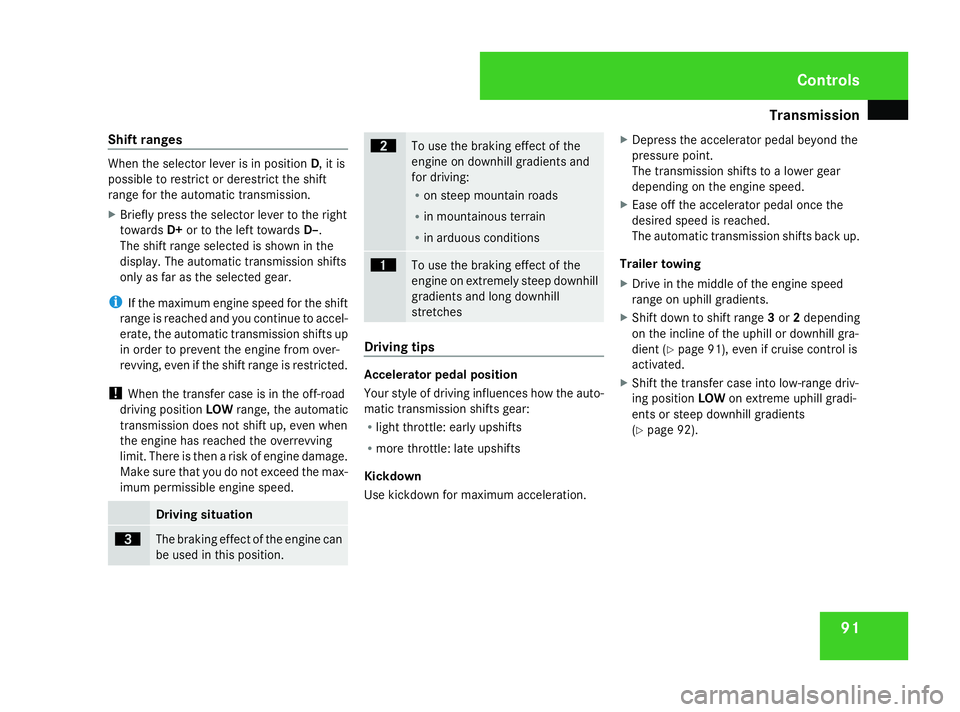
Shift ranges When the selector lever is in position
D, it is
possible to restrict or derestrict the shift
range for the automatic transmission.
X Briefly press the selector lever to the right
towards D+or to the left towards D–.
The shift range selected is shown in the
display. The automatic transmission shifts
only as far as the selected gear.
i If the maximum engine speed for the shift
range is reached and you continue to accel-
erate, the automatic transmission shifts up
in order to prevent the engine from over-
revving, even if the shift range is restricted.
! When the transfer case is in the off-road
driving position LOWrange, the automatic
transmission does not shift up, even when
the engine has reached the overrevving
limit. There is then a risk of engine damage.
Make sure that you do not exceed the max-
imum permissible engine speed. Driving situation
è
The braking effect of the engine can
be used in this position. ç
To use the braking effect of the
engine on downhill gradients and
for driving:
R
on steep mountain roads
R in mountainous terrain
R in arduous conditions æ
To use the braking effect of the
engine on extremely steep downhill
gradients and long downhill
stretches
Driving tips
Accelerator pedal position
Your style of driving influences how the auto-
matic transmission shifts gear:
R light throttle: early upshifts
R more throttle: late upshifts
Kickdown
Use kickdown for maximum acceleration. X
Depress the accelerator pedal beyond the
pressure point.
The transmission shifts to a lower gear
depending on the engine speed.
X Ease off the accelerator pedal once the
desired speed is reached.
The automatic transmission shifts back up.
Trailer towing
X Drive in the middle of the engine speed
range on uphill gradients.
X Shift down to shift range 3or 2depending
on the incline of the uphill or downhill gra-
dient (Y page 91), even if cruise control is
activated.
X Shift the transfer case into low-range driv-
ing position LOWon extreme uphill gradi-
ents or steep downhill gradients
(Y page 92). Controls
463_AKB; 1; 8, en-GB
wobuchh
,V ersion: 2.10.6
2008-07-17T15:19:41+02:00 - Seite 91 ZDateiname: 6515_4091_02_buchblock.pdf; preflight
Page 95 of 293
Transmission
92 Transfer case
The vehicle has permanent all-wheel drive.
The front and rear axles are being constantly
driven.
You will find further information about driving
off-road in the "Operation" section
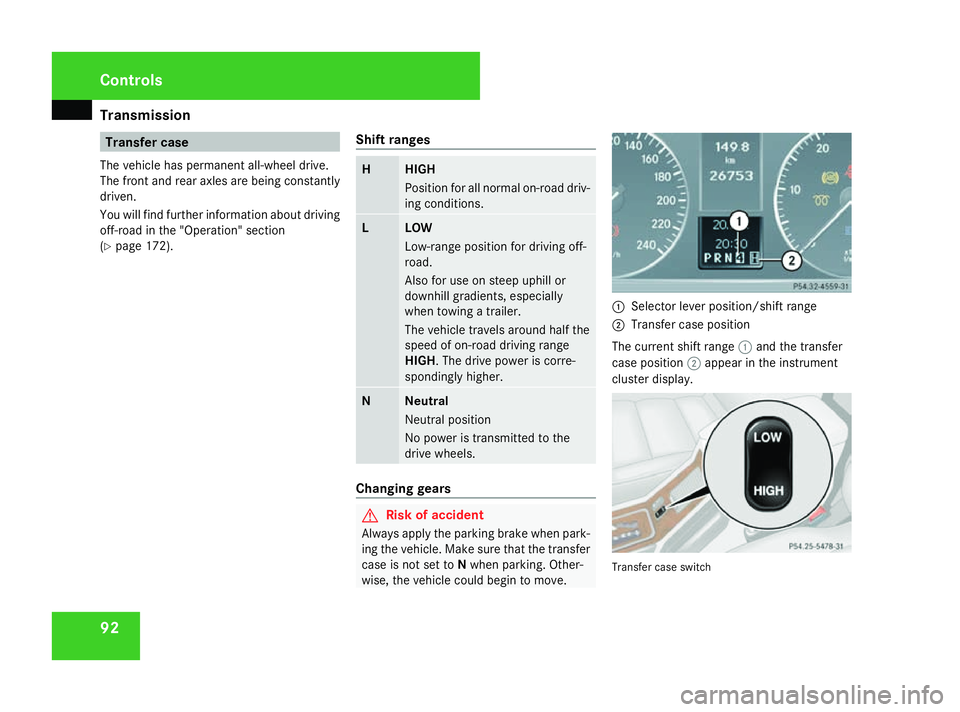
(Y page 172). Shift ranges H HIGH
Position for all normal on-road driv-
ing conditions.
L LOW
Low-range position for driving off-
road.
Also for use on steep uphill or
downhill gradients, especially
when towing a trailer.
The vehicle travels around half the
speed of on-road driving range
HIGH. The drive power is corre-
spondingly higher.
N Neutral
Neutral position
No power is transmitted to the
drive wheels.
Changing gears
G
Risk of accident
Always apply the parking brake when park-
ing the vehicle. Make sure that the transfer
case is not set to Nwhen parking. Other-
wise, the vehicle could begin to move. 1
Selector lever position/shift range
2 Transfer case position
The current shift range 1and the transfer
case position 2appear in the instrument
cluster display. Transfer case switchControls
463_AKB; 1; 8, en-GB
wobuchh
,V ersion: 2.10.6
2008-07-17T15:19:41+02:00 - Seite 92 Dateiname: 6515_4091_02_buchblock.pdf; preflight
Page 116 of 293
Driving sys
tems 113
If the call is connected, the call duration
appears in the multi-function display. If it is
stored in the phone book, the name is also
displayed. Otherwise, the number dialled is
displayed.
or
X If you do not wish to make a call, press the
ì button.
Redialling The on-board computer stores the last phone
numbers which were dialled.
X
Press the èor· button to select the
Telephone menu.
X Press the íbutton to call up the most
recently dialled number in the redial mem-
ory.
X Press the jork button to select the
desired name or number.
X Press the íbutton to start dialling. Driving systems
Overview of driving systems
The vehicle's driving systems are described
on the following pages:
R Cruise control and variable Speedtronic
which you can use to control the speed of
the vehicle
R Ultrasonic reversing aid*, which helps you
park and manoeuvre
R Reversing camera *,which helps you when
parking and manoeuvring
You will find further information about driving
off-road in the "Operation" section
(Y page 172). Cruise control
Cruise control maintains a constant road
speed for you. On long and steep downhill
gradients, especially if the vehicle is laden or
towing a trailer, you must select shift range
1, 2or 3in good time. By doing so you will
make use of the braking effect of the engine,
which relieves the load on the brake system
and prevents the brakes from overheating
and wearing too quickly. G
Risk of accident
Do not change down for additional engine
braking on a slippery road surface. This
could cause the drive wheels to lose their
grip and the vehicle could skid.
Use cruise control only if road and traffic con-
ditions make it appropriate to maintain a
steady speed for a prolonged period. You can
store any road speed above 30 km/h. G
Risk of accident
Cruise control cannot take account of road
and traffic conditions.
Always pay attention to traffic conditions
even when cruise control is activated.
Cruise control is only an aid designed to
assist driving. You are responsible for the Cont
rols
* option al
463_AKB; 1; 8, en-GB
wobuchh,
Version: 2.10.6 2008-07-17T15:19:41+02:00 - Seite 113 ZDateiname: 6515_4091_02_buchblock.pdf; preflight
Page 118 of 293
Driving sys
tems 115
Calling up the last speed stored G
Risk of accident
Only select a stored speed if you know what
that speed is and whether it is suitable for
the current situation. Otherwise, sudden
acceleration or braking could endanger you
or others.
X Briefly pull the cruise control lever towards
you 3.
X Remove your foot from the accelerator
pedal.
Cruise control adjusts the vehicle’s speed
to the last speed stored.
i G 320 CDI: if no speed is stored, cruise
control stores the current speed and main-
tains it.
Setting a speed X
Press the cruise control lever up 1for a
higher speed or down 4for a lower speed.
X Keep the cruise control lever pressed until
the desired speed is reached.
X Release the cruise control lever.
The new speed is stored.
i Cruise control is not deactivated if you
depress the accelerator pedal. For exam- ple, if you accelerate briefly to overtake,
cruise control adjusts the vehicle's speed
to the last speed stored after you have fin-
ished overtaking.
Making adjustments in 1 km/hincre-
ments X
Briefly press the cruise control lever up
1 for a higher speed or down 4for a
lower speed.
The last speed stored is increased or
reduced.
Deactivating cruise control There are several ways to deactivate cruise
control:
X Briefly press the cruise control lever for-
wards 6.
or
X Brake.
or
X Briefly press the cruise control lever in the
direction of arrow 5.
Variable Speedtronic is selected. LIM indi-
cator lamp 2in the cruise control lever
lights up. Cruise control is automatically deactivated if,
for example:
R
you are driving at less than 30 km/h
R ESP ®
is intervening
R you move the selector lever to Nwhile driv-
ing
R G 320 CDI: you engage a differential lock
i The last speed stored is cleared when you
switch off the engine. Speedtronic
Variable Speedtronic helps you to avoid
exceeding a specified speed, e. g. when driv-
ing through varying speed limits in built-up
areas. On long and steep downhill gradients,
especially if the vehicle is laden or towing a
trailer, you must select shift range 1,2or 3
in good time. By doing so, you will make use
of the braking effect of the engine, which
relieves the load on the brake system and
prevents the brakes from overheating and
wearing too quickly. G
Risk of accident
Never depress the brake pedal continu-
ously while the vehicle is in motion, e.g. Controls
463_AKB; 1; 8, en-GB
wobuchh
,V ersion: 2.10.6
2008-07-17T15:19:41+02:00 - Seite 115 ZDateiname: 6515_4091_02_buchblock.pdf; preflight
Page 122 of 293
Driving sys
tems 119
!
When parking, pay particular attention to
objects above or below the sensors, such
as flower pots or trailer towbars. The ultra-
sonic reversing aid does not detect such
objects when they are in the immediate
vicinity of the vehicle. You could damage
the vehicle or the objects.
Ultrasonic sources such as an automatic
car wash, a lorry's compressed-air brakes
or a pneumatic drill could cause the ultra-
sonic reversing aid to malfunction.
Minimum distance Centre Approximately 30 cm
Corners Approximately 30 cm
If there is an obstacle within this range, all
warning displays flash and a warning tone
sounds. If the distance falls below the mini-
mum clearance, it may no longer be shown.
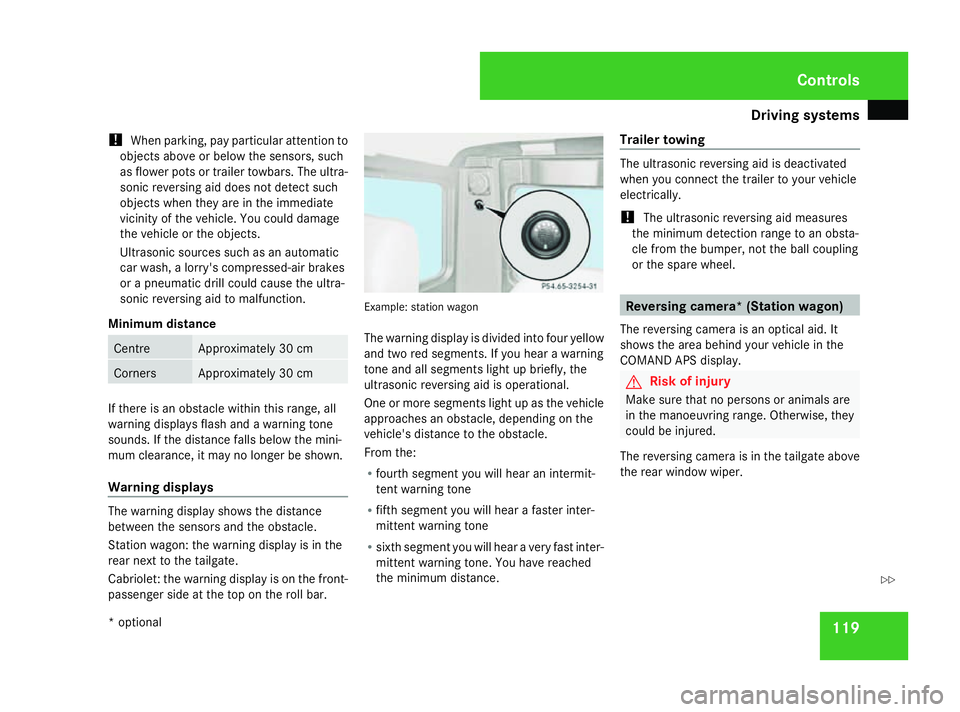
Warning displays
The warning display shows the distance
between the sensors and the obstacle.
Station wagon: the warning display is in the
rear next to the tailgate.
Cabriolet: the warning display is on the front-
passenger side at the top on the roll bar. Example: station wagon
The warning display is divided into four yellow
and two red segments. If you hear a warning
tone and all segments light up briefly, the
ultrasonic reversing aid is operational.
One or more segments light up as the vehicle
approaches an obstacle, depending on the
vehicle's distance to the obstacle.
From the:
R
fourth segment you will hear an intermit-
tent warning tone
R fifth segment you will hear a faster inter-
mittent warning tone
R sixth segment you will hear a very fast inter-
mittent warning tone. You have reached
the minimum distance. Trailer towing The ultrasonic reversing aid is deactivated
when you connect the trailer to your vehicle
electrically.
!
The ultrasonic reversing aid measures
the minimum detection range to an obsta-
cle from the bumper, not the ball coupling
or the spare wheel. Reversing camera* (Station wagon)
The reversing camera is an optical aid. It
shows the area behind your vehicle in the
COMAND APS display. G
Risk of injury
Make sure that no persons or animals are
in the manoeuvring range. Otherwise, they
could be injured.
The reversing camera is in the tailgate above
the rear window wiper. Controls
* optional
463_AKB; 1; 8, en-GB
wobuchh
,V ersion: 2.10.6
2008-07-17T15:19:41+02:00 - Seite 119 ZDateiname: 6515_4091_02_buchblock.pdf; preflight