heating MERCEDES-BENZ G-CLASS SUV 2012 User Guide
[x] Cancel search | Manufacturer: MERCEDES-BENZ, Model Year: 2012, Model line: G-CLASS SUV, Model: MERCEDES-BENZ G-CLASS SUV 2012Pages: 357, PDF Size: 8.86 MB
Page 36 of 357
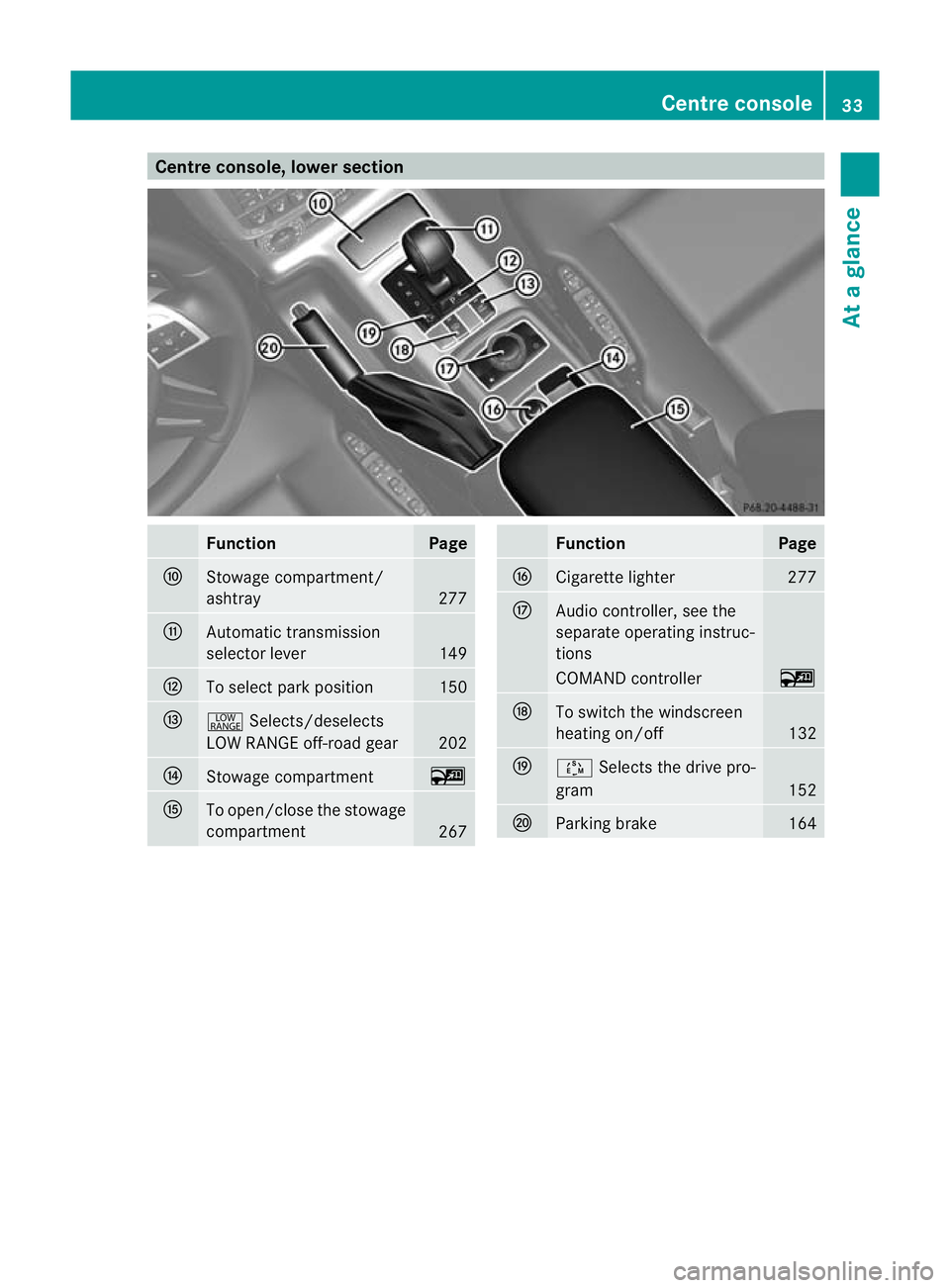
Centre console, lower section
Function Page
F
Stowage compartment/
ashtray
277
G
Automatic transmission
selecto
rlever 149
H
To select park position 150
I
+
Selects/deselects
LOW RANGE off-road gear 202
J
Stowage compartment ~
K
To open/close the stowage
compartment
267 Function Page
L
Cigarette lighter 277
M
Audio controller, see the
separate operating instruc-
tions
COMAND controller ~
N
To switch the windscreen
heating on/off
132
O
Ú
Selects the drive pro-
gram 152
P
Parking brake 164Centre console
33At a glance
Page 75 of 357
Problems with the key
Problem Possible causes/consequences and
M Solutions
You cannot lock or
unlock the vehicle
using the key. The key battery is discharged or nearly discharged.
X
Point the tip of the key at the driver's door handle from a dis-
tance of approximately 50 cm and try to unlock or lock the
vehicle again.
If this does not work:
X Check the key battery (Y page 71) and replace it if necessary
(Y page 71).
X Lock (Y page 74) or unlock (Y page 75) the vehicle using
the emergency key element. The key is faulty.
X
Lock or unlock the vehicle using the emergency key element
(Y page 74).
X Have the key checked at a qualified specialist workshop. You have lost a key. X
Have the key deactivated at a qualified specialist workshop.
X Report the loss immediately to the vehicle insurers.
X If necessary, have the locks replaced as well. You have lost the emer-
gency key element. X
Report the loss immediately to the vehicle insurers.
X If necessary, have the locks replaced as well. Problem Possible causes/consequences and
M Solutions
The engine cannot be
started using the key. The key has been in position
0(Ypage 143) for a considerable
time.
X Remove the key and reinsert it into the ignition lock.
X Start the engine. The on-board voltage is too low.
X
Switch off non-essential consumers, e.g. seat heating or interior
lighting, and try to turn the key again.
If this does not work:
X Check the battery and charge it if necessary (Y page 311).
or
X Jump-start the vehicle (Y page 313).
or
X Consult a qualified specialist workshop. 72
KeyOpening and closing
Page 94 of 357
Seats
Important safety notes
G
WARNING
The seats can still be adjusted when there is
no key in the ignition lock. For this reason,
children should never be left unsupervised in
the vehicle. They could adjust the seats and
become trapped. G
WARNING
Only adjust the driver's seat when the vehicle
is stationary. You will otherwise be distracted
from the road and traffic conditions and you
could lose control of the vehicle as a result of
the seat moving. This could cause an acci-
dent. G
WARNING
If you adjust the seat height carelessly, you or
others could be trapped and thereby injured.
Children in particular could unintentionally
press the buttons to electrically adjust the
seats and become trapped.
Take care that:
R while moving the seats, your hands do not
get under the lever assembly of the seat
adjustment system.
R children in the vehicle do not slide their
hands under the levers. G
WARNING
Make sure that nobody can become trapped
when adjusting the seats.
Observe the notes on airbags.
Secure children as recommended; see the
"Children in the vehicle" section. G
WARNING
Make sure that the back of your head is sup-
ported at eye level by the central area of the
head restraint .Ifyour head is not supported
correctly by the head restraint, you could suf-
fer a severe neck injury in the event of an accident
.Never drive if the head restraints are
not engaged and set correctly. G
WARNING
Occupants should only travel sitting on seats
which have the head restraints fitted. On a
seat which is occupied, move the head
restraint into the upright position .This
reduces the risk of injury to the passenger in
the event of an accident. G
WARNING
As eat belt can only offer its intended degree
of protection when the backrest is almost ver-
tical and the occupant is sitting upright. Avoid
seat positions that do not allow the seat belt
to be routed correctly. Adjust the backrest so
that it is as upright as possible. Never travel
with the backrest reclined too far backwards.
You could otherwise be seriously or even
fatally injured in the event of an accident or
sudden braking.
! To avoid damage to the seats and the seat
heating, observe the following information:
R do not spill any liquids on the seats. If
liquid is spilled on the seats, dry them as
soon as possible.
R if the seat covers are damp or wet, do not
switch on the seat heating. The seat
heating should also not be used to dry
the seats.
R clean the seat covers as recommended;
see the "Interior care" section.
R do not transport heavy loads on the
seats. Do not place sharp objects on the
seat cushions, e.g. knives, nails or tools.
The seats should only be occupied by
passengers, if possible.
R when the seat heating is in operation, do
not cover the seats with insulating mate-
rials, e.g. blankets, coats, bags, seat cov-
ers, child seats or booster seats.
! Make sure that there are no objects in the
footwell or behind the seats when moving Seats
91Seats, steering wheel and mirrors Z
Page 98 of 357
The following adjustments are made:
R
the seat cushion and head restraint move
down.
R the seat moves forwards or backwards,
depending on the starting position.
R backrest :tilts forwards.
R on the driver's side, the steering wheel
moves upwards and towards the dash-
board.
X Fold backrest :forwards in the direction
of the arrow.
Folding the seat back X
Push backrest :back until the seat
engages.
The seat cushion, head restraint, backrest
and steering wheel (driver's side) move
back to their original positions.
For safety reasons, the seat only moves to
its original position if this is in frontoft he
EASY-ENTRY position.
i Store the seat position using the memory
function (Y page 102).
i If your seat position is behind the EASY-
ENTRY position, you can return to this posi-
tion by pressing one of the memory but-
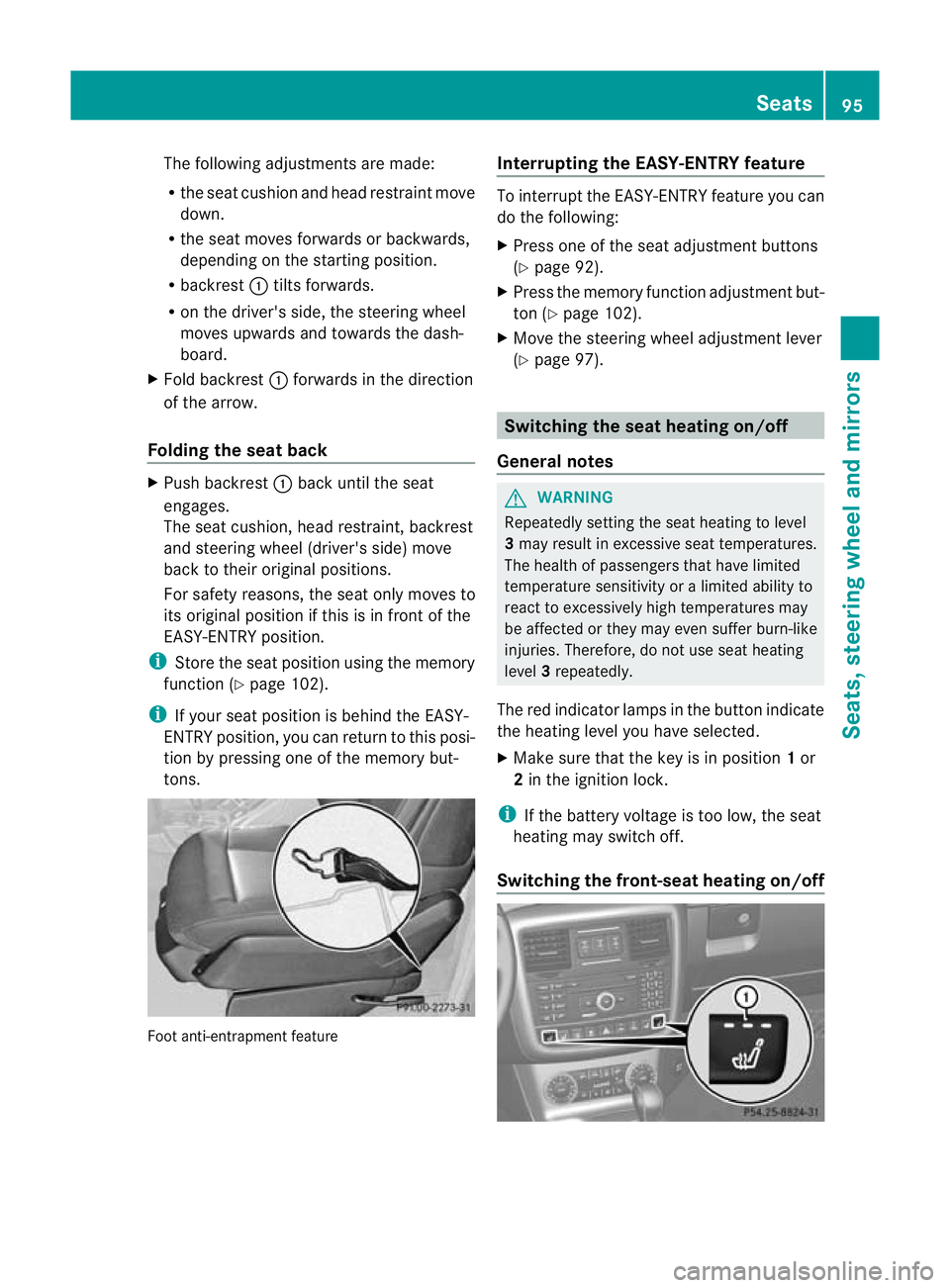
tons. Foot anti-entrapment feature Interrupting the EASY-ENTRY feature To interrupt the EASY-ENTRY feature you can
do the following:
X
Press one of the seat adjustment buttons
(Y page 92).
X Press the memory function adjustment but-
ton (Y page 102).
X Move the steering wheel adjustment lever
(Y page 97). Switching the seat heating on/off
General notes G
WARNING
Repeatedly setting the seat heating to level
3 may result in excessive seat temperatures.
The health of passengers that have limited
temperature sensitivity or a limited ability to
react to excessively high temperatures may
be affected or they may even suffer burn-like
injuries. Therefore, do not use seat heating
level 3repeatedly.
The red indicator lamps in the button indicate
the heating level you have selected.
X Make sure that the key is in position 1or
2 in the ignition lock.
i If the battery voltage is too low, the seat
heating may switch off.
Switching the front-seat heating on/off Seats
95Seats, steering wheel and mirrors Z
Page 99 of 357
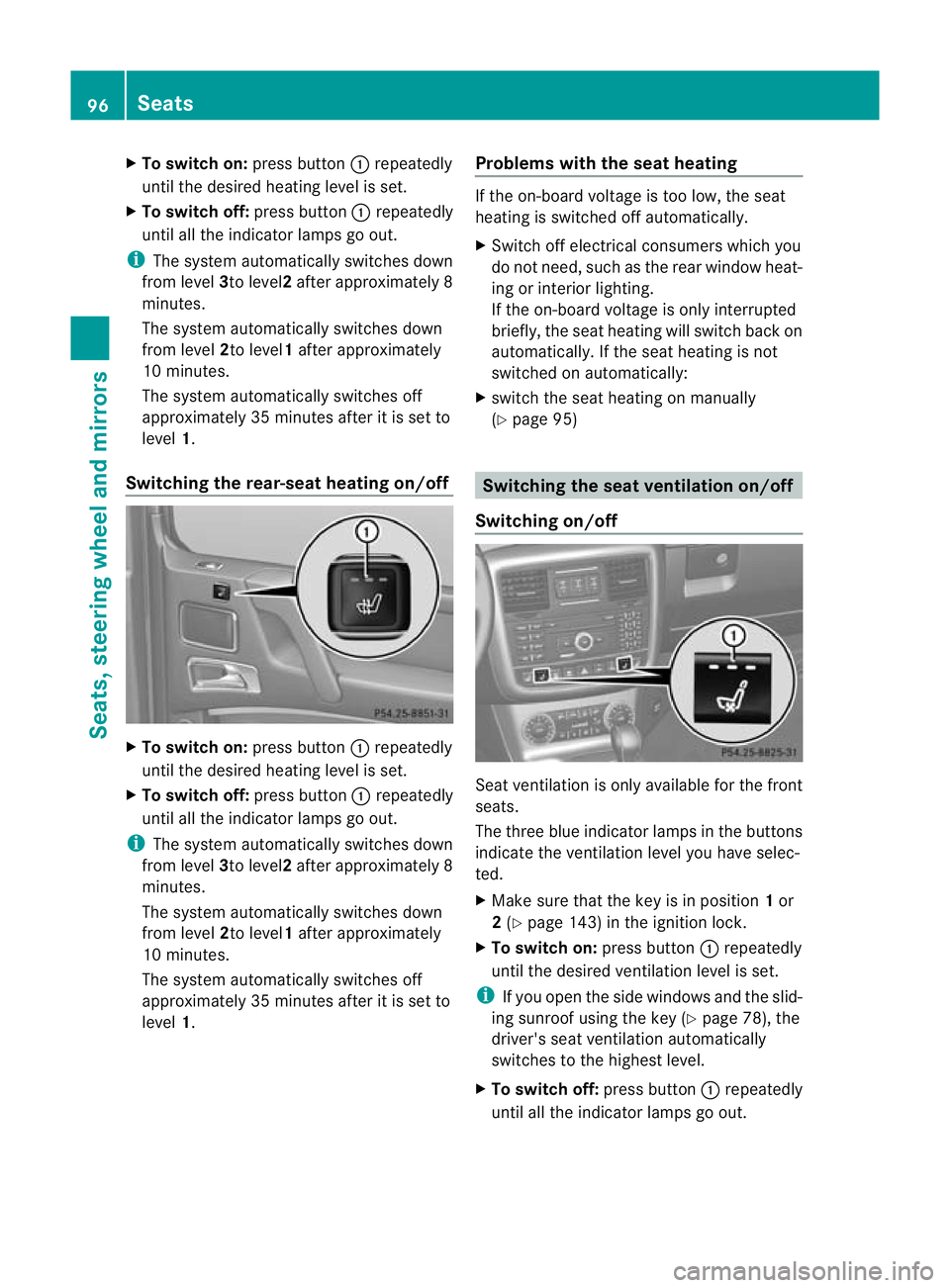
X
To switc hon:press button :repeatedly
until the desired heating level is set.
X To switch off: press button:repeatedly
until all the indicator lamps go out.
i The system automatically switches down
from level 3to level2after approximately 8
minutes.
The system automatically switches down
from level 2to level1 after approximately
10 minutes.
The system automatically switches off
approximately 35 minutes after it is set to
level 1.
Switching the rear-seat heating on/off X
To switch on: press button:repeatedly
until the desired heating level is set.
X To switch off: press button:repeatedly
until all the indicator lamps go out.
i The system automatically switches down
from level 3to level2after approximately 8
minutes.
The system automatically switches down
from level 2to level1 after approximately
10 minutes.
The system automatically switches off
approximately 35 minutes after it is set to
level 1. Problems with the seat heating If the on-board voltage is too low, the seat
heating is switched off automatically.
X
Switch off electrical consumers which you
do not need, such as the rear window heat-
ing or interior lighting.
If the on-board voltage is only interrupted
briefly, the seat heating will switch back on
automatically. If the seat heating is not
switched on automatically:
X switch the seat heating on manually
(Y page 95) Switching the seat ventilation on/off
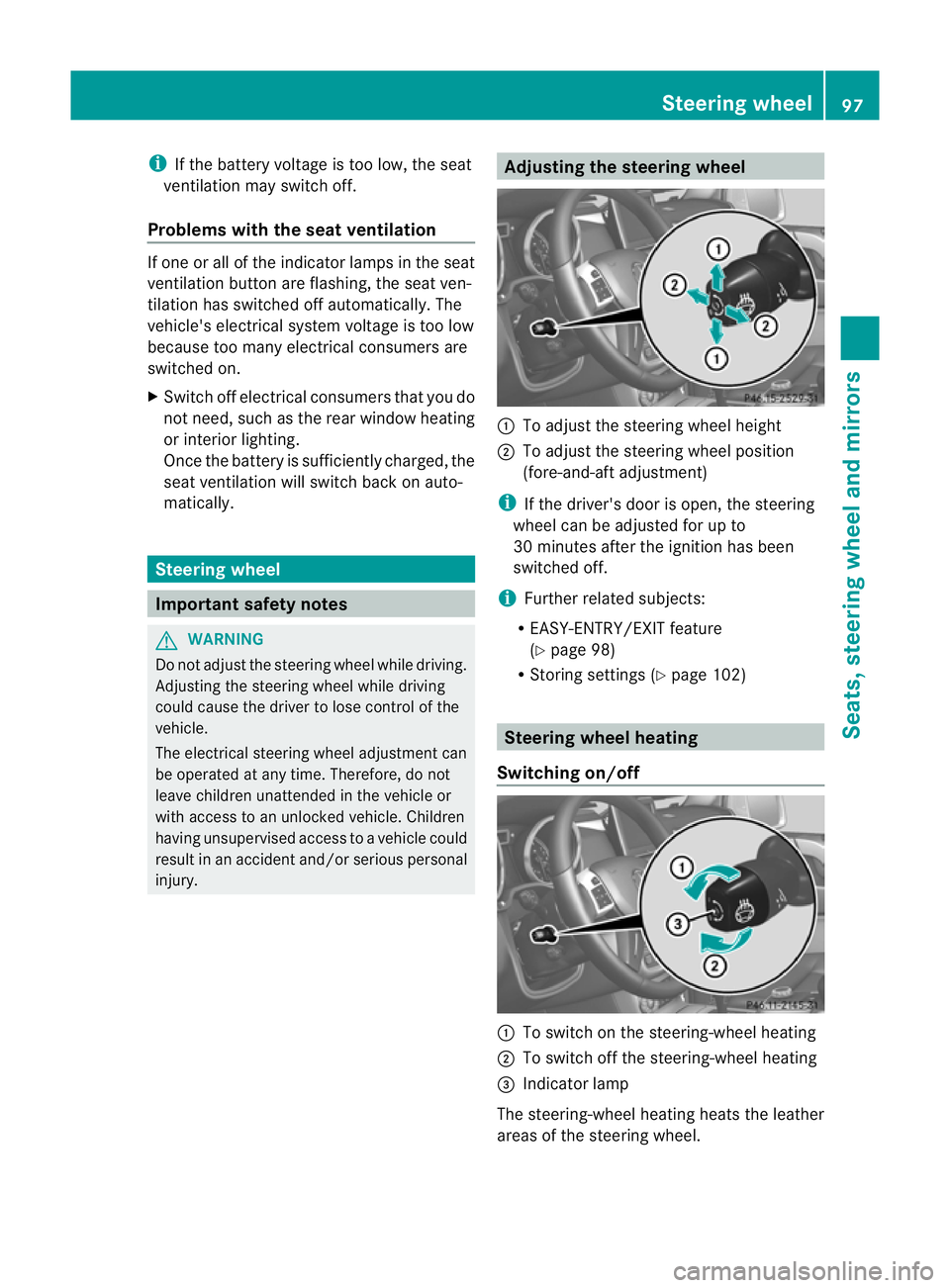
Switching on/off Seat ventilation is only available for the front
seats.
The three blue indicator lamps in the buttons
indicate the ventilation level you have selec-
ted.
X
Make sure that the key is in position 1or
2 (Y page 143) in the ignition lock.
X To switch on: press button:repeatedly
until the desired ventilation level is set.
i If you open the side windows and the slid-
ing sunroof using the key (Y page 78), the
driver's seat ventilation automatically
switches to the highest level.
X To switch off: press button:repeatedly
until all the indicator lamps go out. 96
SeatsSeats, steering wheel and mirrors
Page 100 of 357
i
If the battery voltage is too low, the seat
ventilation may switch off.
Problems with the seat ventilation If one or all of the indicator lamps in the seat
ventilation button are flashing, the seat ven-
tilatio nhas switched off automatically. The
vehicle's electrical system voltage is too low
because too many electrical consumers are
switched on.
X Switch off electrical consumers that you do
no tn eed, such as the rear window heating
or interior lighting.
Once the battery is sufficiently charged, the
seat ventilation will switch back on auto-
matically. Steering wheel
Important safety notes
G
WARNING
Do not adjust the steering wheel while driving.
Adjusting the steering wheel while driving
could cause the driver to lose control of the
vehicle.
The electrical steering wheel adjustment can
be operated at any time. Therefore, do not
leave children unattended in the vehicle or
with access to an unlocked vehicle. Children
having unsupervised access to a vehicle could
result in an acciden tand/o rserious personal
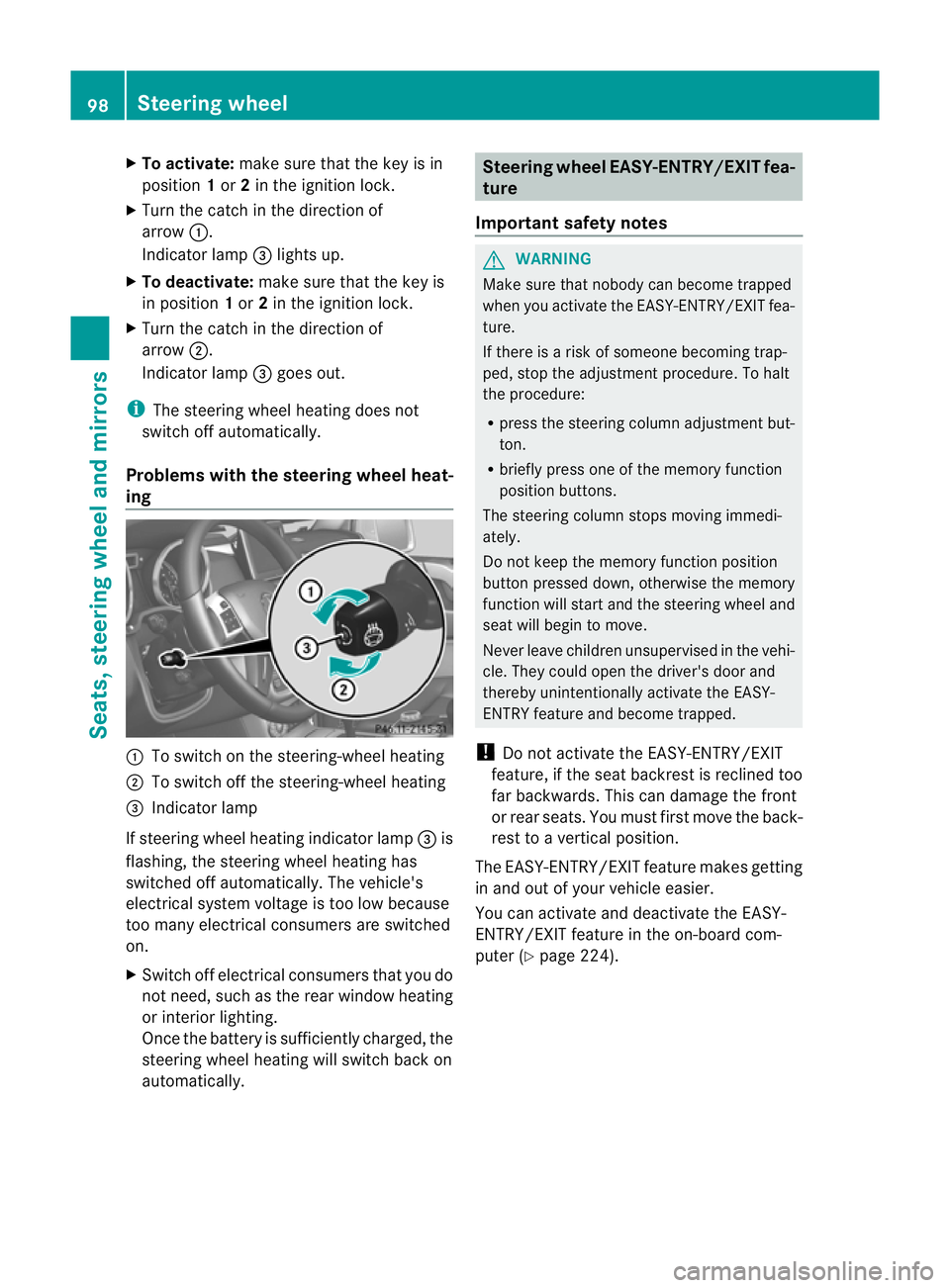
injury. Adjusting the steering wheel
:
To adjust the steering wheel height
; To adjust the steering wheel position
(fore-and-aft adjustment)
i If the driver's door is open, the steering
wheel can be adjusted for up to
30 minutes after the ignition has been
switched off.
i Further related subjects:
R EASY-ENTRY/EXIT feature
(Y page 98)
R Storing settings (Y page 102) Steering wheel heating
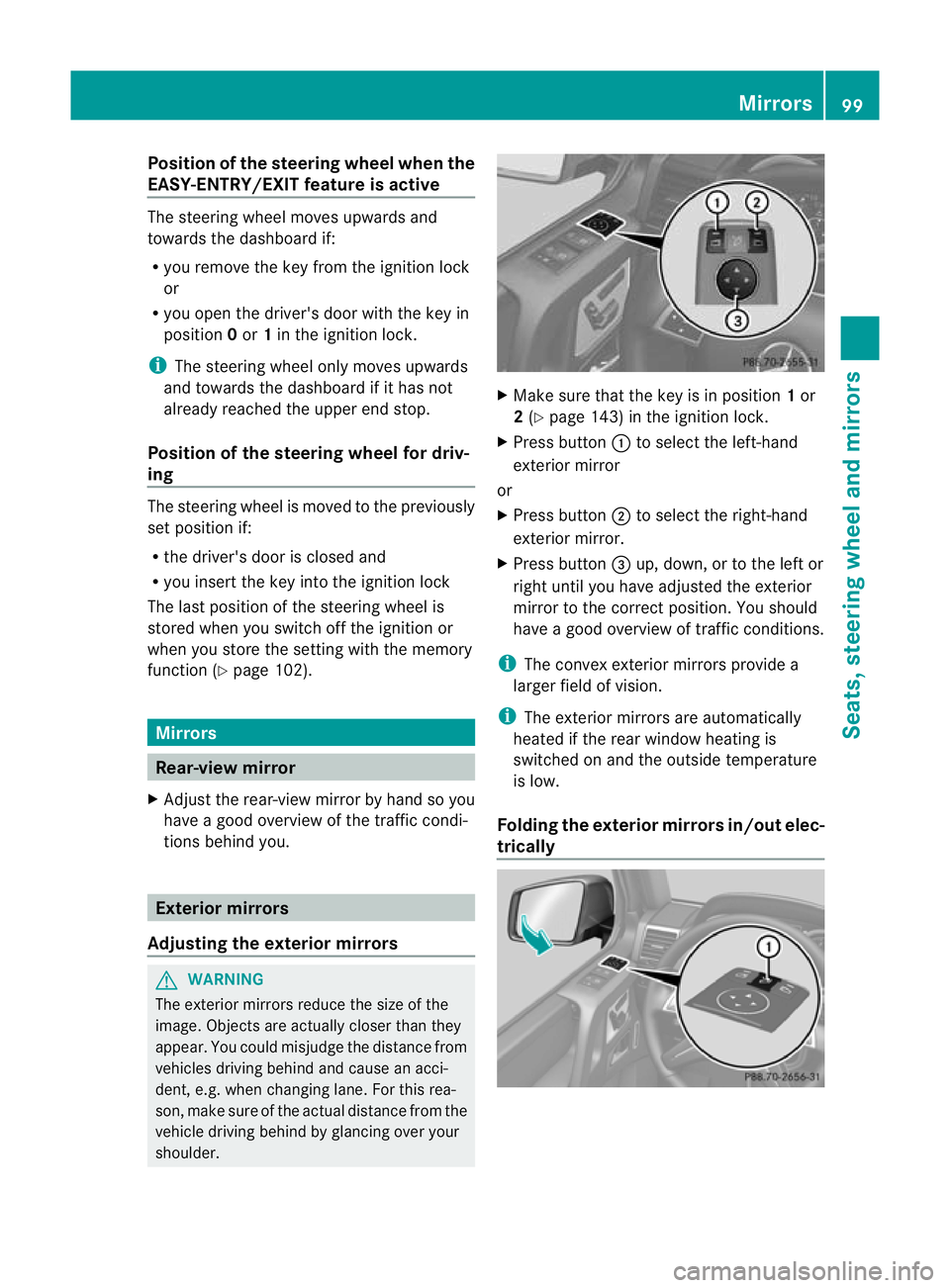
Switching on/off :
To switch on the steering-wheel heating
; To switch off the steering-wheel heating
= Indicator lamp
The steering-wheel heating heats the leather
areas of the steering wheel. Steering wheel
97Seats, steering wheel and mirrors Z
Page 101 of 357
X
To activate: make sure tha tthe key is in
position 1or 2in the ignition lock.
X Turn the catch in the direction of
arrow :.
Indicator lamp =lights up.
X To deactivate: make sure that the key is
in position 1or 2in the ignition lock.
X Turn the catch in the direction of
arrow ;.
Indicator lamp =goes out.
i The steering wheel heating does not
switch off automatically.
Problems with the steering wheel heat-
ing :
To switch on the steering-wheel heating
; To switch off the steering-wheel heating
= Indicator lamp
If steering wheel heating indicator lamp =is
flashing, the steering wheel heating has
switched off automatically .The vehicle's
electrical system voltage is too low because
too many electrical consumers are switched
on.
X Switch off electrical consumers that you do
not need, such as the rear window heating
or interior lighting.
Once the battery is sufficiently charged, the
steering wheel heating will switch back on
automatically. Steering wheel EASY-ENTRY/EXIT fea-
ture
Important safety notes G
WARNING
Make sure that nobody can become trapped
when you activate the EASY-ENTRY/EXIT fea-
ture.
If there is a risk of someone becoming trap-
ped, stop the adjustment procedure. To halt
the procedure:
R press the steering column adjustment but-
ton.
R briefly press one of the memory function
position buttons.
The steering column stops moving immedi-
ately.
Do not keep the memory function position
button pressed down, otherwise the memory
function will start and the steering wheel and
seat will begin to move.
Never leave children unsupervised in the vehi-
cle. They could open the driver's door and
thereby unintentionally activate the EASY-
ENTRY feature and become trapped.
! Do not activate the EASY-ENTRY/EXIT
feature, if the seat backrest is reclined too
far backwards. This can damage the front
or rear seats. You must first move the back-
rest to a vertical position.
The EASY-ENTRY/EXIT feature makes getting
in and out of your vehicle easier.
You can activate and deactivate the EASY-
ENTRY/EXIT feature in the on-board com-
puter (Y page 224). 98
Steering wheelSeats, steering wheel and mirrors
Page 102 of 357
Position of the steering wheel when the
EASY-ENTRY/EXIT featurei s activeThe steering wheel moves upwards and
towards the dashboard if:
R you remove the key from the ignition lock
or
R you open the driver's door with the key in
position 0or 1in the ignition lock.
i The steering wheel only moves upwards
and towards the dashboard if it has not
already reached the upper end stop.
Position of the steering wheel for driv-
ing The steering wheel is moved to the previously
set position if:
R the driver's door is closed and
R you insert the key into the ignition lock
The last position of the steering wheel is
stored when you switch off the ignition or
when you store the setting with the memory
function (Y page 102). Mirrors
Rear-view mirror
X Adjust the rear-view mirror by hand so you
have a good overview of the traffic condi-
tions behind you. Exterior mirrors
Adjusting the exterior mirrors G
WARNING
The exterior mirrors reduce the size of the
image. Objects are actually closer than they
appear. You could misjudge the distance from
vehicles driving behind and cause an acci-
dent, e.g. when changin glane. For this rea-
son, make sure of the actual distance from the
vehicle driving behind by glancing ove ryour
shoulder. X
Make sure that the key is in position 1or
2 (Y page 143) in the ignition lock.
X Press button :to select the left-hand
exterior mirror
or
X Press button ;to select the right-hand
exterior mirror.
X Press button =up, down, or to the left or
right until you have adjusted the exterior
mirror to the correc tposition. You should
have a good overview of traffic conditions.
i The convex exterior mirrors provide a
larger field of vision.
i The exterior mirrors are automatically
heated if the rear window heating is
switched on and the outside temperature
is low.
Folding the exterior mirrors in/out elec-
trically Mirrors
99Seats, steering wheel and mirrors Z
Page 128 of 357
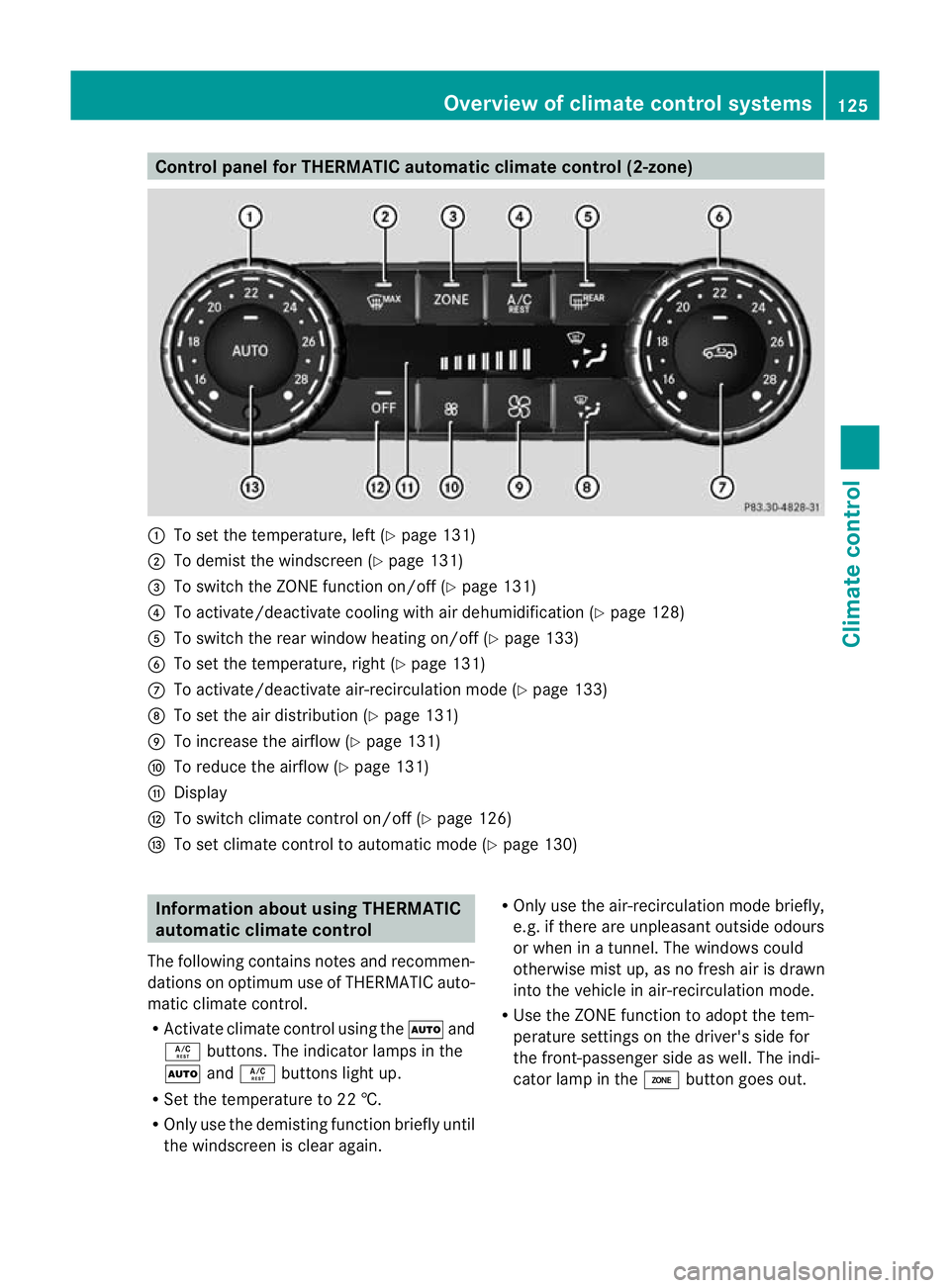
Control panel for THERMATIC automatic climate control (2-zone)
:
To set the temperature, left (Y page 131)
; To demist the windscree n(Ypage 131)
= To switch the ZONE function on/off (Y page 131)
? To activate/deactivate cooling with air dehumidification (Y page 128)
A To switch the rear window heating on/off (Y page 133)
B To set the temperature, right (Y page 131)
C To activate/deactivate air-recirculation mode (Y page 133)
D To set the air distribution (Y page 131)
E To increase the airflow (Y page 131)
F To reduce the airflow (Y page 131)
G Display
H To switch climate control on/off (Y page 126)
I To set climate control to automatic mode (Y page 130)Information about using THERMATIC
automatic climate control
The following contains notes and recommen-
dations on optimum use of THERMATIC auto-
matic climate control.
R Activate climate contro lusing the Ãand
Á buttons. The indicator lamps in the
à andÁ buttons light up.
R Set the temperature to 22 †.
R Only use the demisting function briefly until
the windscreen is clear again. R
Only use the air-recirculation mode briefly,
e.g. if there are unpleasant outside odours
or when in a tunnel. The windows could
otherwise mist up, as no fresh air is drawn
into the vehicle in air-recirculation mode.
R Use the ZONE function to adopt the tem-
perature settings on the driver's side for
the front-passenger side as well.T he indi-
cator lamp in the ábutton goes out. Overview of climate control systems
125Climate control Z
Page 129 of 357
Operating the climate control system
Switching climate control on/off
Points to observe before use i
If climate control is switched off, the air supply and air circulation are also switched off.
Only select this setting briefly. Otherwise, the windows may mist up.
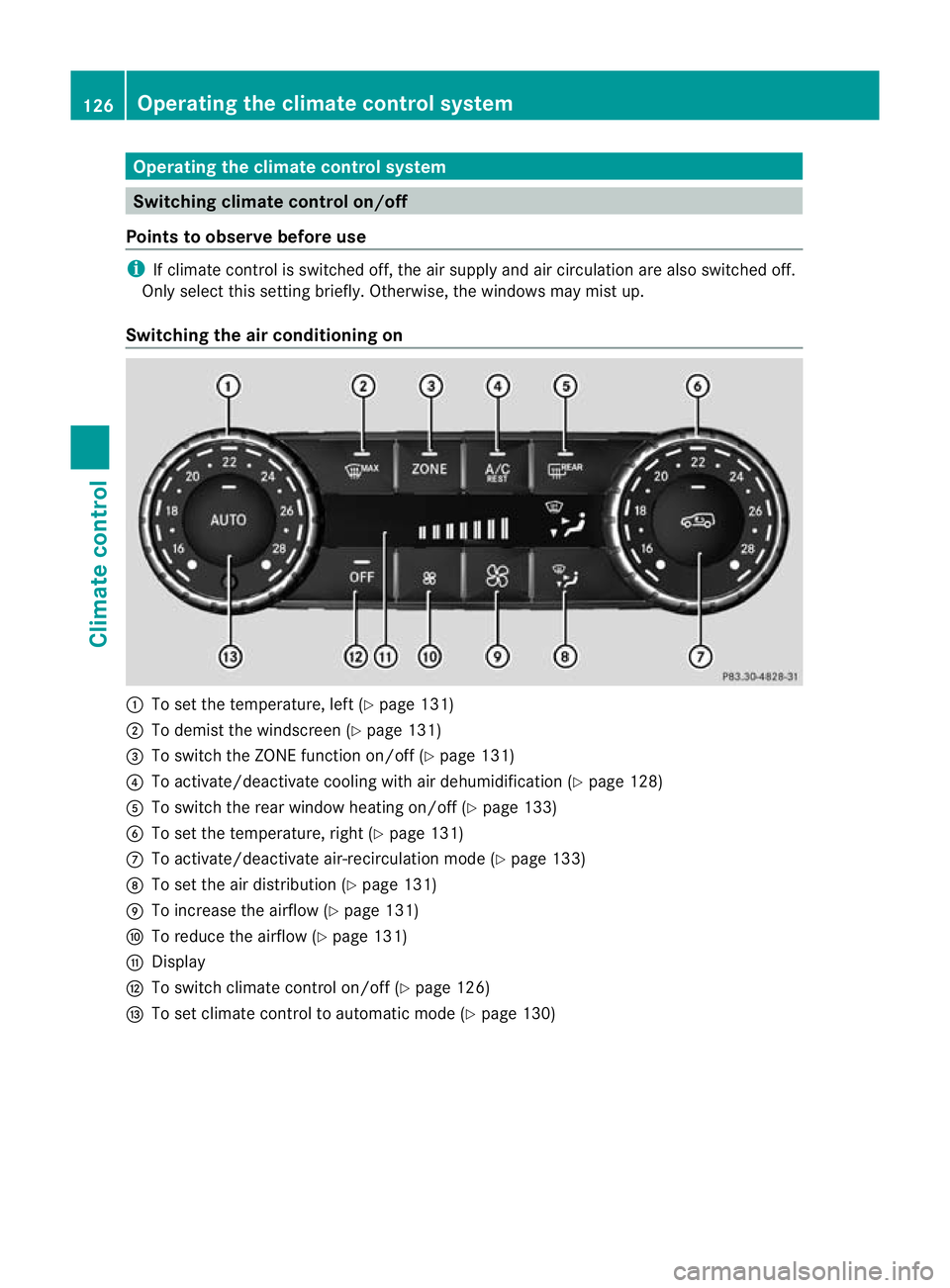
Switching the air conditioning on :
To set the temperature, left (Y page 131)
; To demist the windscreen (Y page 131)
= To switch the ZONE function on/off (Y page 131)
? To activate/deactivate cooling with air dehumidification (Y page 128)
A To switch the rear window heating on/off (Y page 133)
B To set the temperature, right (Y page 131)
C To activate/deactivate air-recirculation mode (Y page 133)
D To set the air distribution (Y page 131)
E To increase the airflow (Y page 131)
F To reduce the airflow (Y page 131)
G Display
H To switch climate control on/off (Y page 126)
I To set climate control to automatic mode (Y page 130)126
Operating the climate control systemClimate control