display MERCEDES-BENZ G-CLASS SUV 2012 Owner's Guide
[x] Cancel search | Manufacturer: MERCEDES-BENZ, Model Year: 2012, Model line: G-CLASS SUV, Model: MERCEDES-BENZ G-CLASS SUV 2012Pages: 357, PDF Size: 8.86 MB
Page 132 of 357
H
To switch climate control on/off (Y page 126)
I To set climate control to automatic mode (Y page 130)
X Press the Ábutton.
The indicator lamp in the Ábutton lights up.
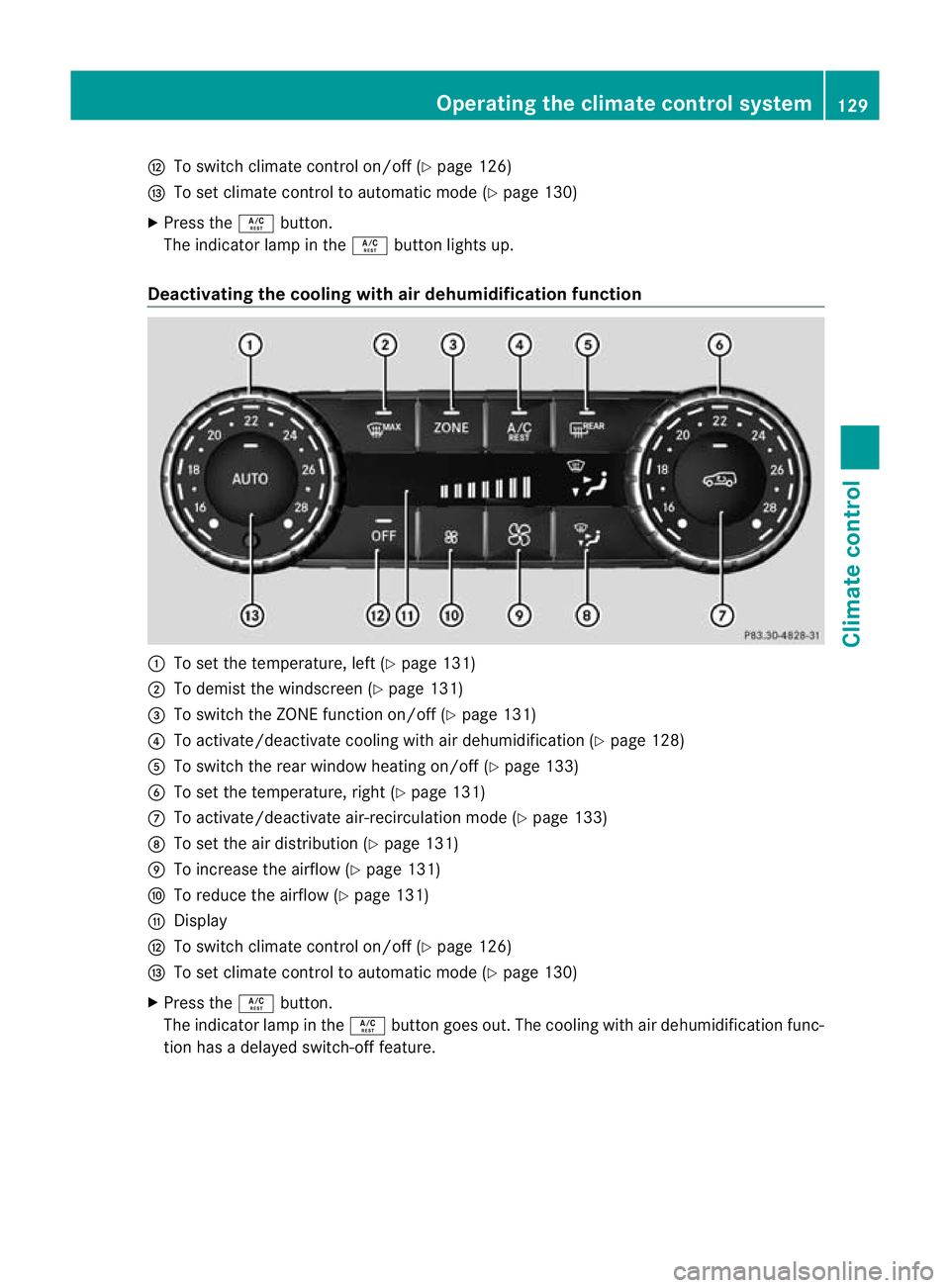
Deactivating the cooling with air dehumidification function :
To set the temperature, left (Y page 131)
; To demist the windscreen (Y page 131)
= To switch the ZONE function on/off (Y page 131)
? To activate/deactivate cooling with air dehumidification (Y page 128)
A To switch the rear window heating on/of f(Ypage 133)
B To set the temperature, right (Y page 131)
C To activate/deactivate air-recirculation mode (Y page 133)
D To set the air distribution (Y page 131)
E To increase the airflow (Y page 131)
F To reduce the airflow (Y page 131)
G Display
H To switch climate control on/off (Y page 126)
I To set climate control to automatic mode (Y page 130)
X Press the Ábutton.
The indicator lamp in the Ábutton goes out. The cooling with air dehumidification func-
tion has a delayed switch-of ffeature. Operating the climate control system
129Climate control Z
Page 133 of 357
Problems with the cooling with air dehumidification function
:
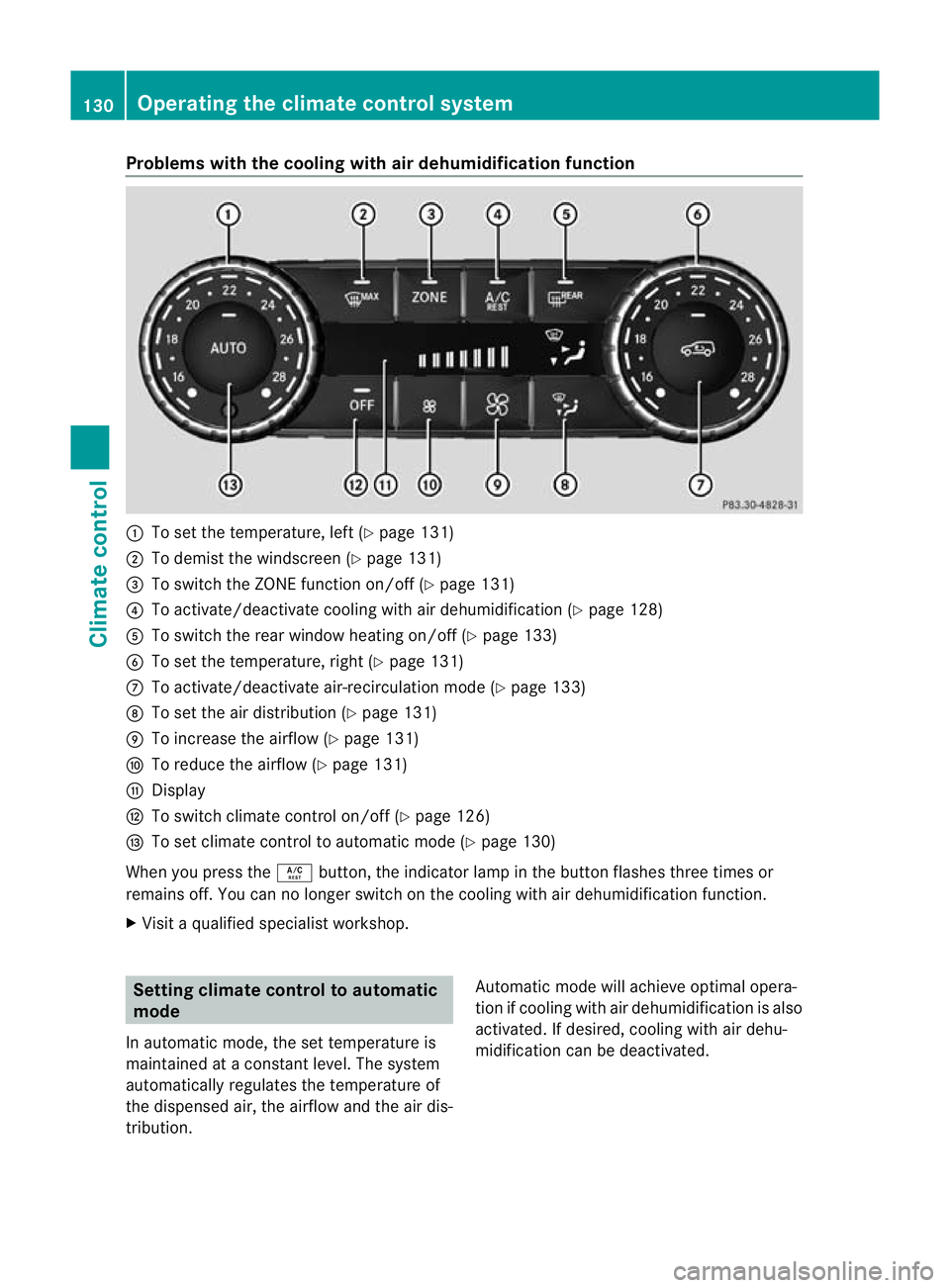
To set the temperature, left (Y page 131)
; To demist the windscreen (Y page 131)
= To switch the ZONE function on/off (Y page 131)
? To activate/deactivate cooling with air dehumidification (Y page 128)
A To switch the rear window heating on/off (Y page 133)
B To set the temperature, right (Y page 131)
C To activate/deactivate air-recirculation mode (Y page 133)
D To set the air distribution (Y page 131)
E To increase the airflow (Y page 131)
F To reduce the airflow (Y page 131)
G Display
H To switch climate control on/off (Y page 126)
I To set climate control to automatic mode (Y page 130)
When you press the Ábutton, the indicator lamp in the button flashes three times or
remains off. You can no longer switch on the cooling with air dehumidification function.
X Visit a qualified specialist workshop. Setting climate control to automatic
mode
In automatic mode, the set temperature is
maintained at a constant level. The system
automatically regulates the temperature of
the dispensed air, the airflow and the air dis-
tribution. Automatic mode will achieve optimal opera-
tion if cooling with air dehumidification is also
activated. If desired, cooling with air dehu-
midification can be deactivated.130
Operating the climate control systemClimate control
Page 134 of 357
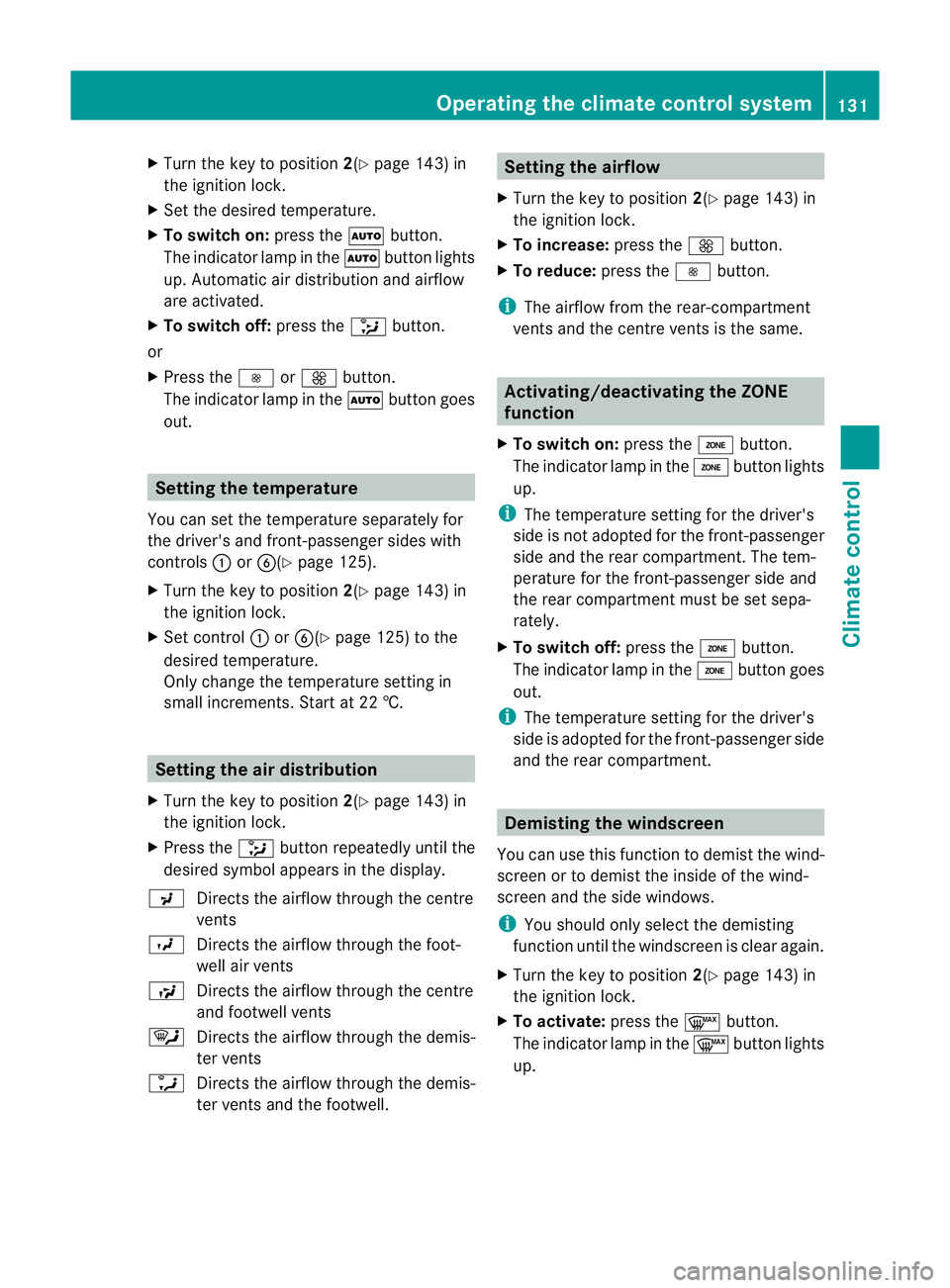
X
Turn the key to position 2(Ypage 143) in
the ignition lock.
X Set the desired temperature.
X To switch on: press theÃbutton.
The indicator lamp in the Ãbutton lights
up. Automatic air distribution and airflow
are activated.
X To switch off: press the_button.
or
X Press the IorK button.
The indicator lamp in the Ãbutton goes
out. Setting the temperature
You can set the temperature separately for
the driver's and front-passenger sides with
controls :orB(Y page 125).
X Turn the key to position 2(Ypage 143) in
the ignition lock.
X Set control :orB(Y page 125) to the
desired temperature.
Only change the temperature setting in
small increments. Start at 22 †. Setting the air distribution
X Turn the key to position 2(Ypage 143) in
the ignition lock.
X Press the _button repeatedly until the
desired symbol appears in the display.
P Directs the airflow through the centre
vents
O Directs the airflow through the foot-
well air vents
S Directs the airflow through the centre
and footwell vents
¯ Directs the airflow through the demis-
ter vents
a Directs the airflow through the demis-
ter vents and the footwell. Setting the airflow
X Turn the key to position 2(Ypage 143) in
the ignition lock.
X To increase: press theKbutton.
X To reduce: press theIbutton.
i The airflow from the rear-compartment
vents and the centre vents is the same. Activating/deactivating the ZONE
function
X To switch on: press theábutton.
The indicator lamp in the ábutton lights
up.
i The temperature setting for the driver's
side is not adopted for the front-passenger
side and the rear compartment. The tem-
perature for the front-passenger side and
the rear compartment must be set sepa-
rately.
X To switch off: press theábutton.
The indicator lamp in the ábutton goes
out.
i The temperature setting for the driver's
side is adopted for the front-passenger side
and the rear compartment. Demisting the windscreen
You can use this function to demist the wind-
screen or to demist the inside of the wind-
screen and the side windows.
i You should only select the demisting
function until the windscreen is clear again.
X Turn the key to position 2(Ypage 143) in
the ignition lock.
X To activate: press the¬button.
The indicator lamp in the ¬button lights
up. Operating the climate control system
131Climate control Z
Page 138 of 357
The on-board computer can be used to spec-
ify up to three departure times, one of which
may be preselected (Y page 223).
Switching the auxiliar yheating/venti-
lation on/off using the centre console
button Auxiliar
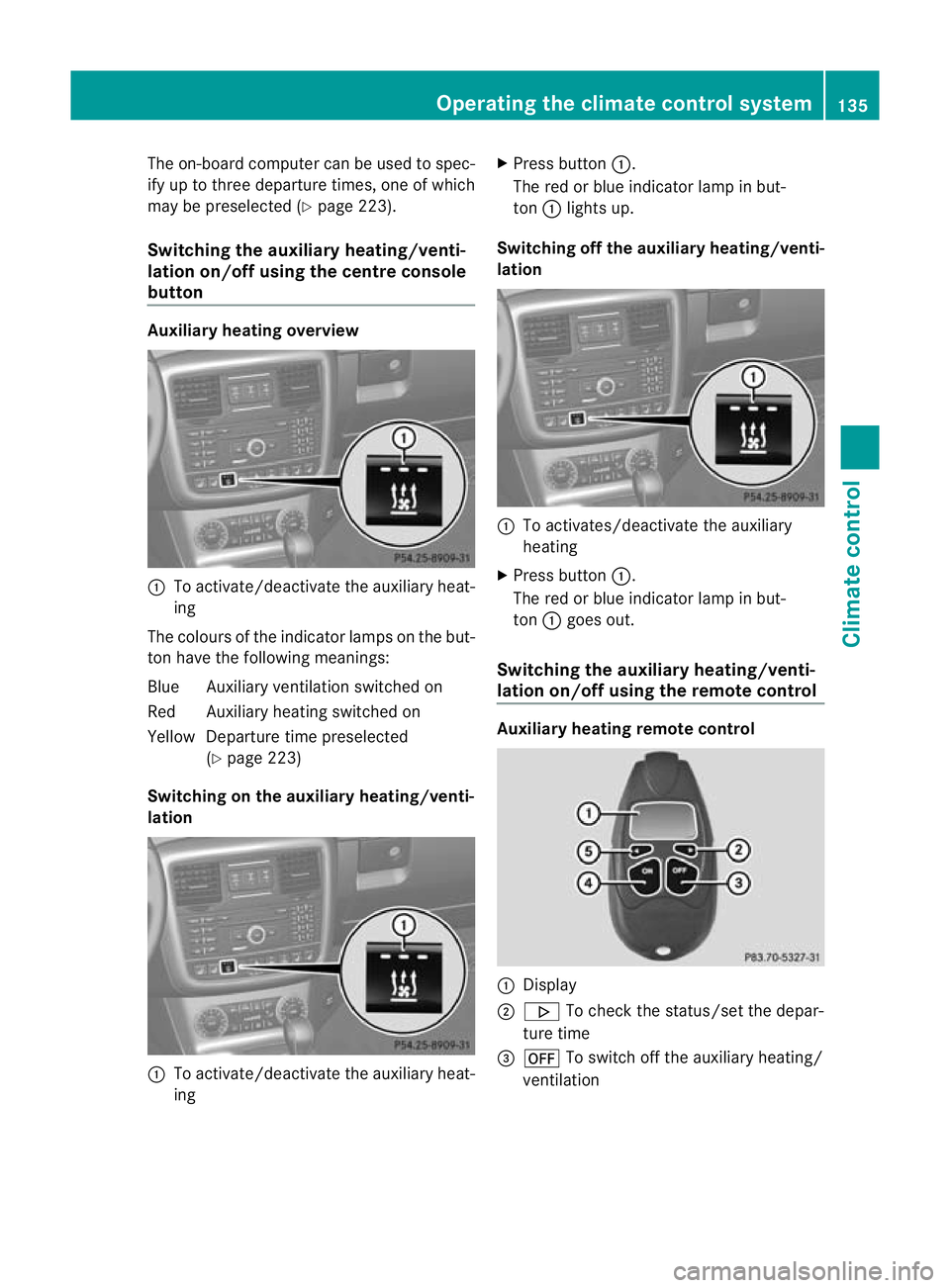
yheating overview :
To activate/deactivate th eauxiliary heat-
ing
The colours of the indicator lamps on the but-
to nh ave the following meanings:
Blue Auxiliary ventilatio nswitched on
Red Auxiliary heating switched on
Yellow Departure time preselected (Ypage 223)
Switching on the auxiliary heating/venti-
lation :
To activate/deactivate th eauxiliary heat-
ing X
Press button :.
The red or blue indicator lamp in but-
ton :lights up.
Switching off the auxiliary heating/venti-
lation :
To activates/deactivate th eauxiliary
heating
X Press button :.
The red or blue indicator lamp in but-
ton :goes out.
Switching the auxiliary heating/venti-
lation on/off using the remote control Auxiliar
yheating remote control :
Display
; . To check the status/set the depar-
ture time
= ^ To switch off the auxiliary heating/
ventilation Operating the climate control system
135Climate control Z
Page 139 of 357
?
u To switch on the auxiliary heating/
ventilation
A , To check the status/set the depar-
ture time
Your vehicle comes with one remote control.
You may use one additional remote control
for your vehicle. For more information, please
contact a qualified specialist workshop.
The remote control has a maximum range of
approximately 300 metres. This range is
reduced by:
R sources of radio interference
R solid objects between the remote control
and the vehicle
R the remote control being in an unfavoura-
ble position in relation to the vehicle
R transmitting from an enclosed space
i The optimum range can be achieved if you
hold the remote control vertically, pointing
upwards when you press one of the but-
tons.
Switching on the auxiliar yheating/venti-
lation
X Press the ubutton.
ON is shown in the remote control display.
Switching off the auxiliary heating/venti-
lation
X Press the ^button.
OFF is shown in the remote control display.
Checkin gthe status of the auxiliary heat-
ing/ventilation
X Press the ,or. button.
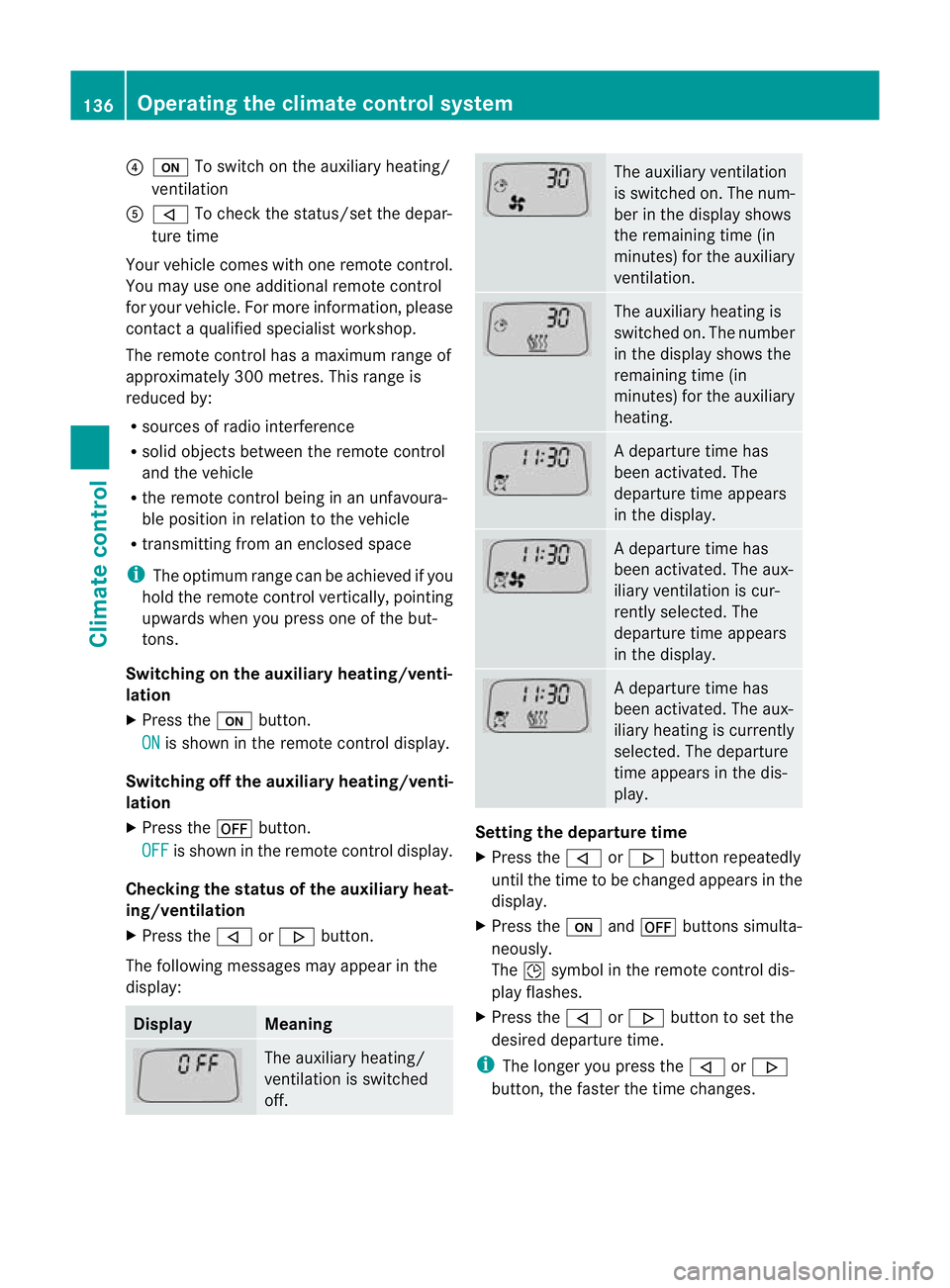
The following messages may appear in the
display: Display Meaning
The auxiliary heating/
ventilation is switched
off. The auxiliary ventilation
is switched on. The num-
ber in the display shows
the remaining time (in
minutes) for the auxiliary
ventilation.
The auxiliary heating is
switched on. The number
in the display shows the
remaining time (in
minutes) for the auxiliary
heating.
Ad
eparture time has
been activated. The
departure time appears
in the display. Ad
eparture time has
been activated. The aux-
iliary ventilation is cur-
rently selected. The
departure time appears
in the display. Ad
eparture time has
been activated. The aux-
iliary heating is currently
selected. The departure
time appears in the dis-
play. Setting the departure time
X
Press the ,or. button repeatedly
until the time to be changed appears in the
display.
X Press the uand^ buttons simulta-
neously.
The Îsymbol in the remote control dis-
play flashes.
X Press the ,or. button to set the
desired departure time.
i The longer you press the ,or.
button, the faster the time changes. 136
Operating the climate control systemClimate control
Page 140 of 357
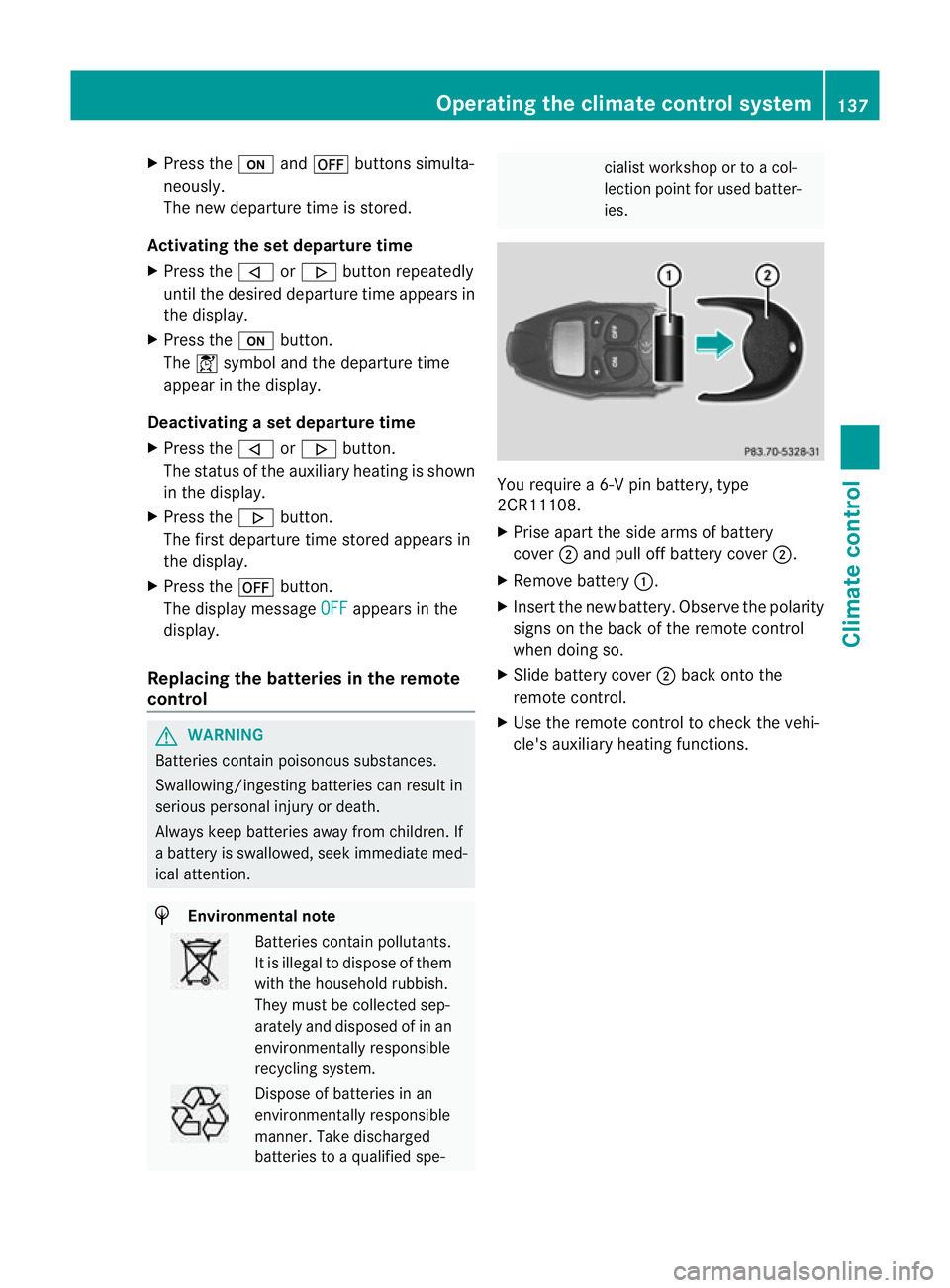
X
Press the uand^ buttons simulta-
neously.
The new departure time is stored.
Activating the set departure time
X Press the ,or. button repeatedly
until the desired departure time appears in
the display.
X Press the ubutton.
The Ísymbol and the departure time
appear in the display.
Deactivating a set departure time
X Press the ,or. button.
The status of the auxiliary heating is shown
in the display.
X Press the .button.
The first departure time stored appears in
the display.
X Press the ^button.
The display message OFF appears in the
display.
Replacing the batteries in the remote
control G
WARNING
Batteries contain poisonous substances.
Swallowing/ingesting batteries can result in
serious personal injury or death.
Always keep batteries away from children. If
a battery is swallowed, seek immediate med-
ical attention. H
Environmental note Batteries contain pollutants.
It is illegal to dispose of them
with the household rubbish.
They must be collected sep-
arately and disposed of in an
environmentally responsible
recycling system.
Dispose of batteries in an
environmentally responsible
manner
.Take discharged
batteries to a qualified spe- cialis
tworkshop or to a col-
lection point for used batter-
ies. You require a 6-V pin battery, type
2CR11108.
X
Prise apart the side arms of battery
cover ;and pull off battery cover ;.
X Remove battery :.
X Insert the new battery. Observe the polarity
signs on the back of the remote control
when doing so.
X Slide battery cover ;back onto the
remote control.
X Use the remote control to check the vehi-
cle's auxiliary heating functions. Operating the climate control system
137Climate control Z
Page 141 of 357
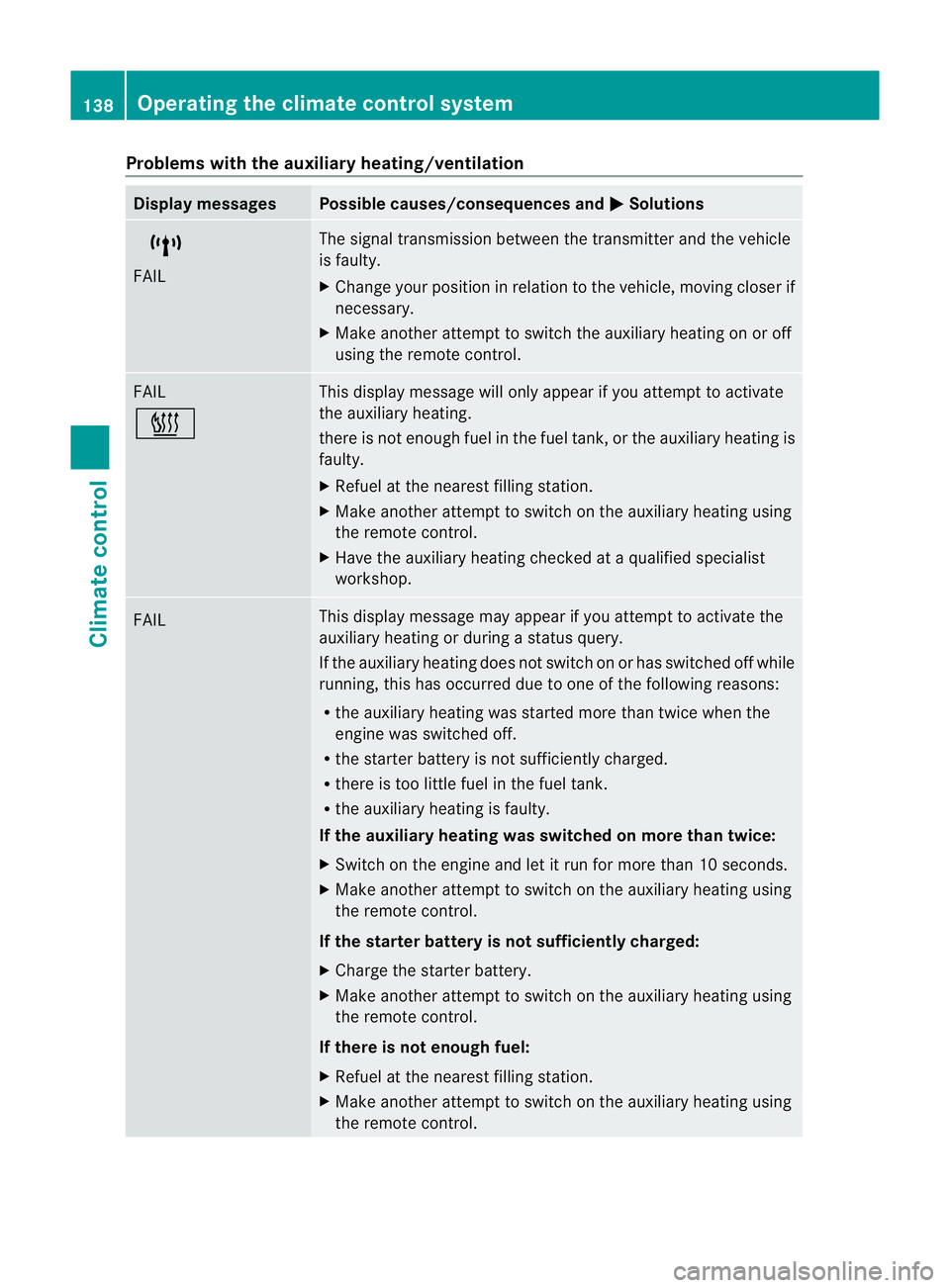
Problems with the auxiliary heating/ventilation
Display messages Possible causes/consequences and
M Solutions
$
FAIL The signal transmission between the transmitter and the vehicle
is faulty.
X
Change your position in relation to the vehicle, moving closer if
necessary.
X Make another attempt to switch the auxiliary heating on or off
using the remote control. FAIL
© This display message will only appear if you attempt to activate
the auxiliary heating.
there is not enough fuel in the fuel tank, or the auxiliary heating is
faulty.
X
Refuel at the nearest filling station.
X Make another attempt to switch on the auxiliary heating using
the remote control.
X Have the auxiliary heating checked at a qualified specialist
workshop. FAIL This display message may appear if you attempt to activate the
auxiliary heating or during a status query.
If the auxiliary heating does not switch on or has switched off while
running, this has occurred due to one of the following reasons:
R
the auxiliary heating was started more than twice when the
engine was switched off.
R the starter battery is not sufficiently charged.
R there is too little fuel in the fuel tank.
R the auxiliary heating is faulty.
If the auxiliary heating was switched on more than twice:
X Switch on the engine and let it run for more than 10 seconds.
X Make another attempt to switch on the auxiliary heating using
the remote control.
If the starter battery is not sufficiently charged:
X Charge the starter battery.
X Make another attempt to switch on the auxiliary heating using
the remote control.
If there is not enough fuel:
X Refuel at the nearest filling station.
X Make another attempt to switch on the auxiliary heating using
the remote control. 138
Operating the climate control systemClimate control
Page 142 of 357
Display messages Possible causes/consequences and
M Solutions
If the auxiliary heating is faulty:
X
Have the auxiliary heating checked at a qualified specialist
workshop. Adjusting the air vents
Important safety notes
G
WARNING
Very hot or very cold air can flow from the air
vents .This could cause burns or frostbite to
bare skin in the immediate vicinity of the
vents. Keep bare skin away from these air
outlets. If necessary, direct the airflow away
to a different area of the vehicle interior. General notes
In order to ensure the direct flow of fresh air
through the air vents into the vehicle interior,
please observe the following notes:
R keep the air inlet grille on the bonnet free
of blockages, such as ice, snow or leaves.
R never cover the vents or ventilation grilles
in the vehicle interior.
i For virtually draught-free ventilation,
adjust the sliders of the air vents to the
centre position.
i If the automatic climate control con-
stantly differs from the set temperature or
if undesired draughts are noticeable, pro-
ceed as follows:
XOpen the side air vents
X Open the centre air vents
X Open the rear air vents
X Set the temperature to 22 †.
The automatic climate control adjusts
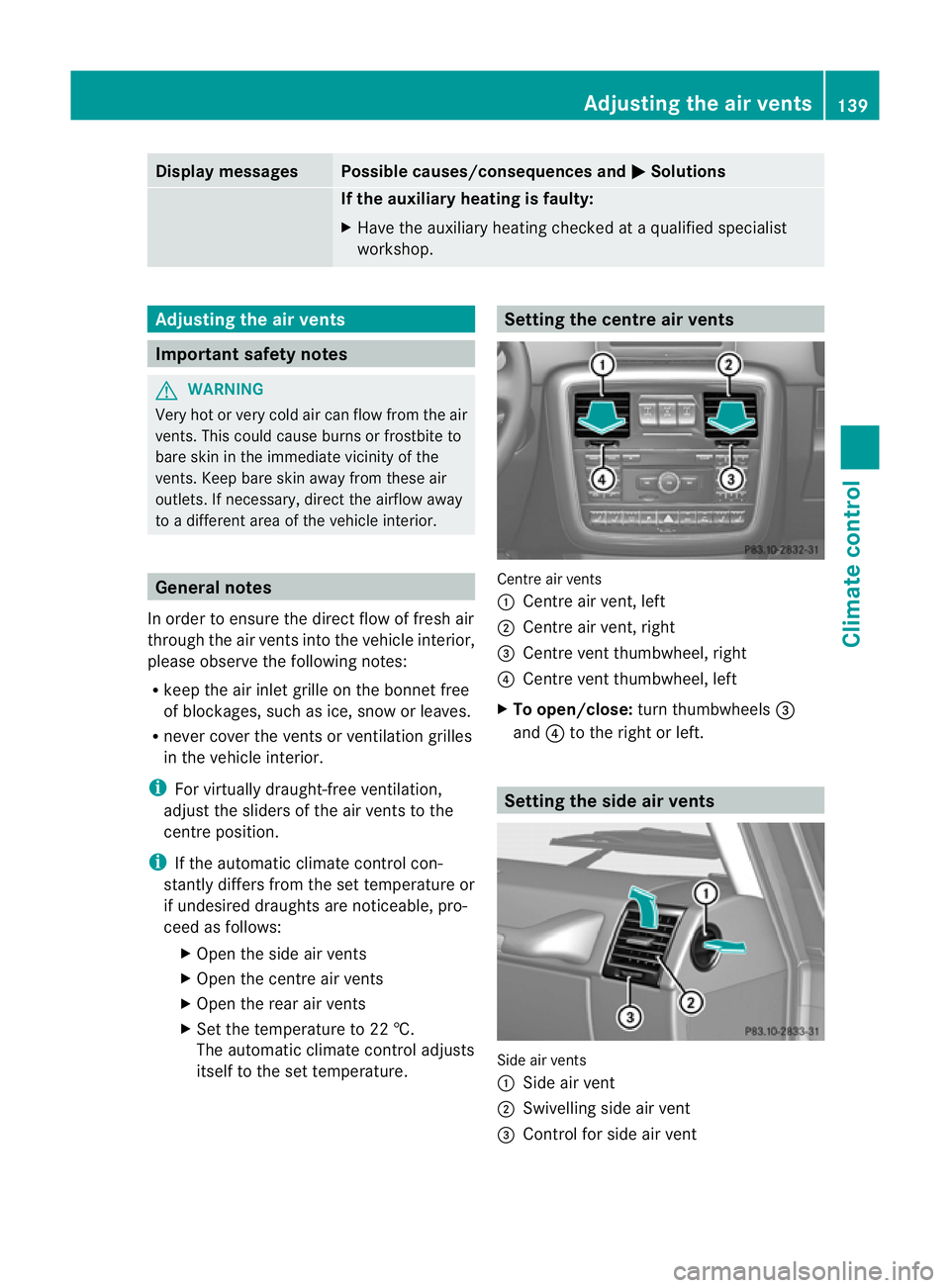
itself to the set temperature. Setting the centre air vents
Centre air vents
:
Centre air vent, left
; Centre air vent, right
= Centre vent thumbwheel, right
? Centre vent thumbwheel, left
X To open/close: turn thumbwheels =
and ?to the right or left. Setting the side air vents
Side air vents
:
Side air vent
; Swivelling side air vent
= Control for side air vent Adjusting the air vents
139Climate control Z
Page 147 of 357
Starting the engine
Important safety notes G
WARNING
Combustion engines emit poisonous exhaust
gases such as carbon monoxide. Inhaling
these exhaust gases leads to poisoning. There
is a risk of fatal injury. Therefore never leave
the engine running in enclosed spaces with-
out sufficient ventilation.
! Do not depress the accelerator pedal
when starting the engine.
Starting procedure X
Shift the automatic transmission to posi-
tion P.
The transmission position display in the
multifunction display shows P.
i You can also start the engine when the
automatic transmission is in position N.
i For further information about the auto-
matic transmission, see (Y page 149).
i If you depress the brake when starting the
engine, pedal travel is unusually long and
there is less pedal resistance.
X Make sure that the parking brake is
applied.
X To start a petrol engine: turn the key to
position 3in the ignition lock
(Y page 143) and release it as soon as the
engine is running.
X To startad iesel engine: turn the key to
position 2in the ignition lock
(Y page 143).
The % preglow indicator lamp in the
instrumen tcluster lights up.
X When the %preglow indicator lamp
goes out, tur nthe key to position
3(Y page 143)and release it as soon as the
engine is running.
i You can start the engine without preglow
if the engine is warm. i
You can also use the touch-start function.
To do this, turn the key to position 3
(Y page 143) and release it immediately.
The engine then starts automatically. Pulling away
Automatic transmission G
WARNING
If the engine speed is above the idling speed
and you engage transmission position Dor
R, the vehicle could pull away suddenly. There
is a risk of an accident.
When engaging transmission position Dor R,
always firmly depress the brake pedal and do
not simultaneously accelerate.
! Only shift the automatic transmission to
reverse gear Ror park position Pwhen the
vehicle is stationary. Otherwise, the auto-
matic transmission could be damaged.
! If a warning tone sounds and the
Release park. brake message appears
in the multifunction display, the parking
brake is still applied. Release the parking
brake.
X Depress the brake pedal and keep it
depressed.
X Shift the automatic transmission to posi-
tion Dor R.
i Before driving off, wait until the gear
change is fully completed.
X Release the parking brake (Y page 164).
X Release the brake pedal.
X Carefully depress the accelerator pedal.
i It is only possible to shift the automatic
transmission from position Pto a different
position if you depress the brake pedal.
Only then is the selector lever lock
released.
i The vehicle locks centrally once you have
pulled away.T he locking knobs in the doors
drop down. 144
DrivingDriving and parking
Page 148 of 357
You can open the doors fro
mthe inside at
any time.
You can also deactivate the automatic lock-
ing feature (Y page 223).
i Upshifts take place at higher engine
speeds after a cold start. This helps the
catalytic converter to reach its operating
temperature more quickly.
Hill starta ssist G
WARNING
After a short time, hill start assist will no lon-
ger brake your vehicle and it could roll away.
There is a risk of an accident and injury.
Therefore, quickly move your foot from the
brake pedal to the accelerator pedal. Never
leave the vehicle when it is held by hill start
assist.
Hill start assist helps you when pulling away
forwards or in reverse on an uphill gradient.
It holds the vehicle for a short time after you
have removed your foot from the brake pedal.
This gives you enough time to move your foot
from the brake pedal to the accelerator pedal
and depress it before the vehicle begins to
roll.
X Take your foot off the brake pedal.
i Once you have taken your foot off the
brake pedal, the vehicle is held for around
one second.
X Pull away.
Hill start assist will not function if:
R you are pulling away on a level road or a
downhill gradient.
R the transmission is in position N.
R the parking brake is applied.
R ESP ®
is malfunctioning. ECO start/stop function (AMG vehi-
cles)
Important safety notes G
WARNING
If the engine is switched off automatically and
you exit the vehicle, the engine is restarted
automatically. The vehicle may begin moving.
There is a risk of accident and injury.
If you wish to exit the vehicle, always turn off
the ignition and secure the vehicle against
rolling away.
General notes The ECO start/stop function is only available
for the G 63 AMG.
The ECO start/stop function switches the
engine off automatically if the vehicle stops
moving.
When pulling away again, the engine starts
automatically. The ECO start/stop function
thereby helps you to reduce the fuel con-
sumption and emissions of your vehicle.
The ECO start/stop function is activated each
time the engine is switched on.
The ECO start/stop function is only available
in drive program
C.
The system is operational when the ¤
symbol is shown in green in the multifunction
display.
The system is operational if all conditions for
automatic engine switch-off have been fulfil-
led (Y page 146) and the ¤symbol is
shown in green in the multifunction display.
In addition, the Stop/Start active mes-
sage is shown in the AMG menu in the multi-
function display.
If not all conditions for automatic engine
switch-off are fulfilled (Y page 146), the
¤ symbol is shown in yellow in the multi-
function display.
In addition, the Stop/Start inactive mes-
sage is shown in the AMG menu in the multi-
function display. Driving
145Driving and parking Z