towing MERCEDES-BENZ G-CLASS SUV 2012 Owner's Guide
[x] Cancel search | Manufacturer: MERCEDES-BENZ, Model Year: 2012, Model line: G-CLASS SUV, Model: MERCEDES-BENZ G-CLASS SUV 2012Pages: 357, PDF Size: 8.86 MB
Page 275 of 357
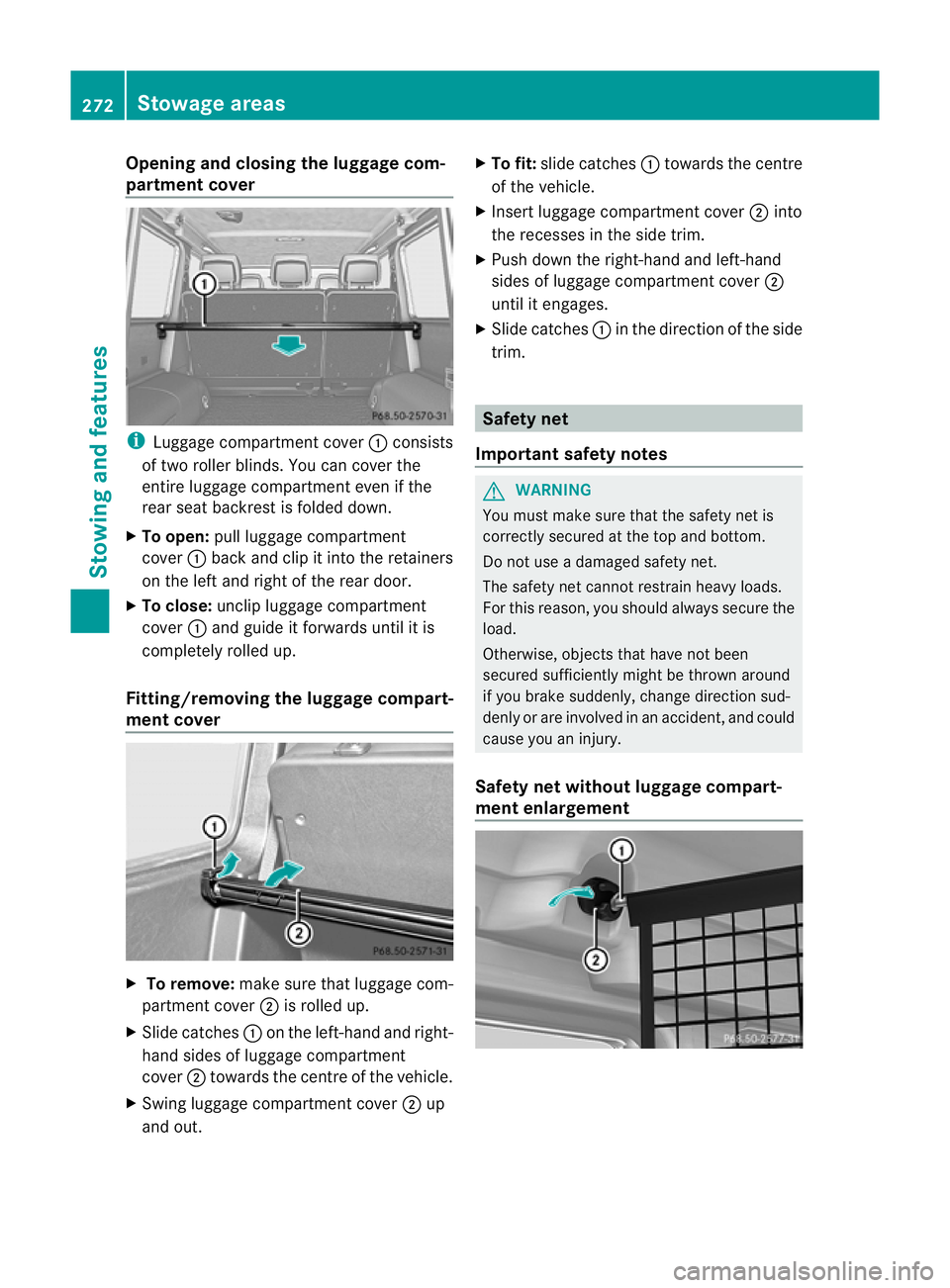
Opening and closing the luggage com-
partment cover
i
Luggage compartment cover :consists
of two roller blinds. You can cover the
entire luggage compartment even if the
rear seat backrest is folded down.
X To open: pull luggage compartment
cover :back and clip it into the retainers
on the left and right of the rear door.
X To close: unclip luggage compartment
cover :and guide it forwards until it is
completely rolled up.
Fitting/removing the luggage compart-
ment cover X
To remove: make sure that luggage com-
partment cover ;is rolled up.
X Slide catches :on the left-hand and right-
hand sides of luggage compartment
cover ;towards the centre of the vehicle.
X Swing luggage compartment cover ;up
and out. X
To fit: slide catches :towards the centre
of the vehicle.
X Insert luggage compartment cover ;into
the recesses in the side trim.
X Push down the right-hand and left-hand
sides of luggage compartment cover ;
until it engages.
X Slide catches :in the direction of the side
trim. Safety net
Important safety notes G
WARNING
You must make sure that the safety net is
correctly secured at the top and bottom.
Do not use a damaged safety net.
The safety net cannot restrain heavy loads.
For this reason, you should always secure the
load.
Otherwise, objects that have not been
secured sufficiently might be thrown around
if you brake suddenly, change direction sud-
denly or are involved in an accident, and could
cause you an injury.
Safety net without luggage compart-
ment enlargement 272
Stowage areasStowing and features
Page 276 of 357
X
Open the rear door.
This allows you to hook in the safety net
more easily.
X Fold the rear bench seat forward, without
folding the seat backrest forward before-
hand (Y page 270).
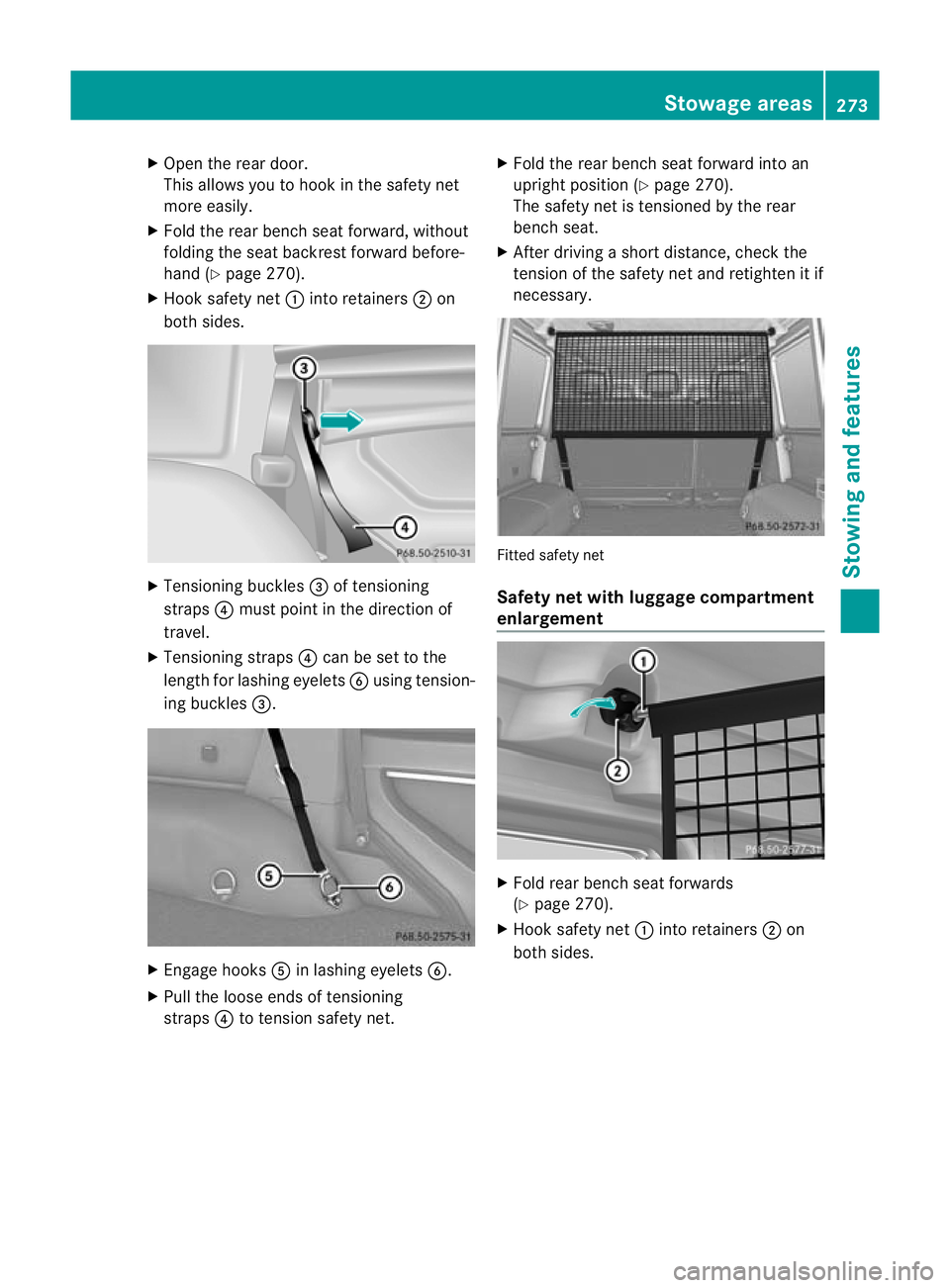
X Hook safety net :into retainers ;on
both sides. X
Tensioning buckles =of tensioning
straps ?must point in the direction of
travel.
X Tensioning straps ?can be set to the
length for lashing eyelets Busing tension-
ing buckles =. X
Engage hooks Ain lashing eyelets B.
X Pull the loose ends of tensioning
straps ?to tension safety net. X
Fold the rear bench seat forward into an
upright position (Y page 270).
The safety net is tensioned by the rear
bench seat.
X After driving a short distance, check the
tension of the safety net and retighten it if
necessary. Fitted safety net
Safety net with luggage compartment
enlargement
X
Fold rear bench seat forwards
(Y page 270).
X Hook safety net :into retainers ;on
both sides. Stowage areas
273Stowing and features Z
Page 277 of 357
=
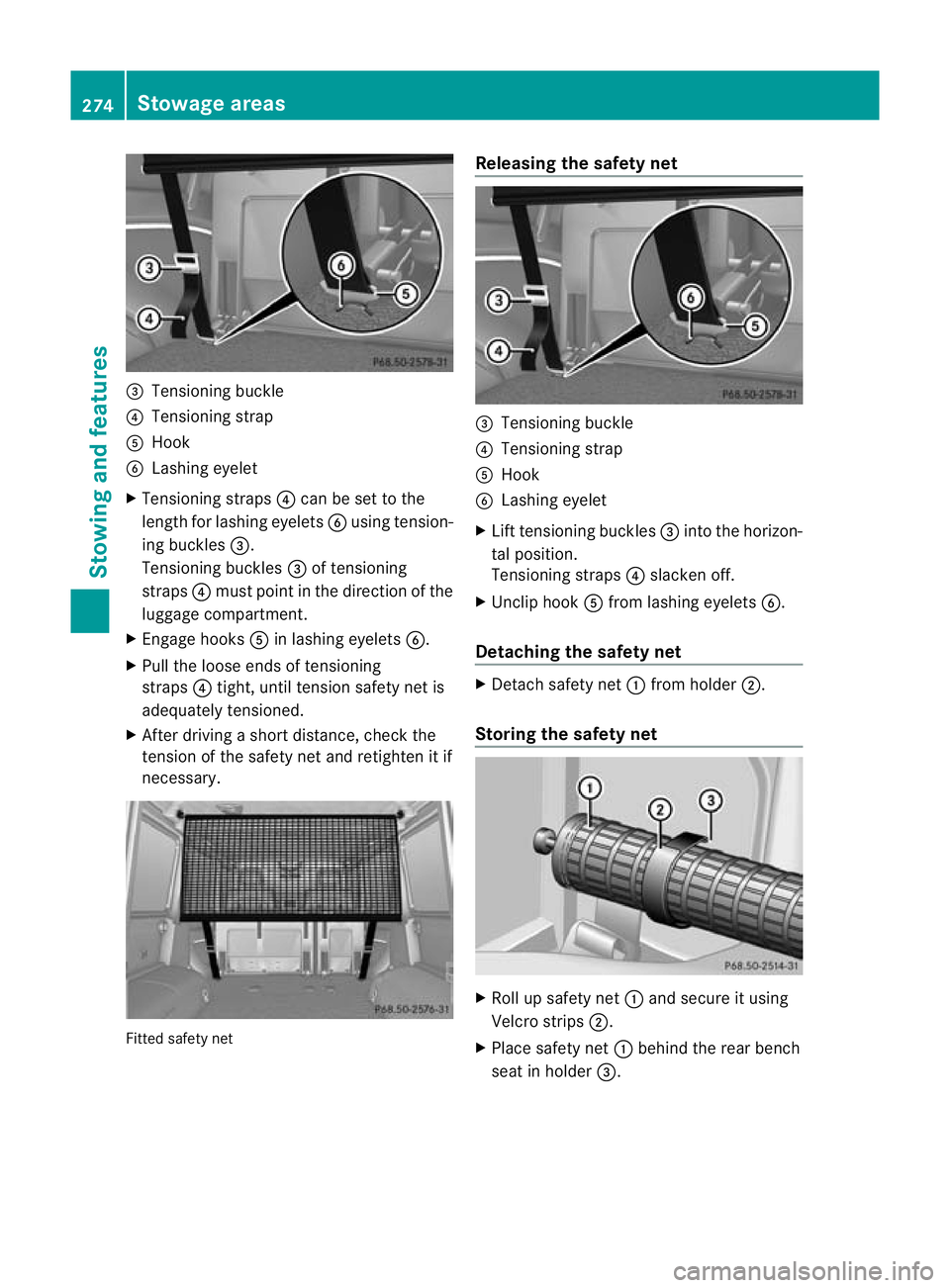
Tensioning buckle
? Tensioning strap
A Hook
B Lashing eyelet
X Tensioning straps ?can be set to the
length for lashing eyelets Busing tension-
ing buckles =.
Tensioning buckles =of tensioning
straps ?must point in the direction of the
luggage compartment.
X Engage hooks Ain lashing eyelets B.
X Pull the loose ends of tensioning
straps ?tight, until tension safety net is
adequately tensioned.
X After driving a short distance, check the
tension of the safety net and retighten it if
necessary. Fitted safety net Releasing the safety net
=
Tensioning buckle
? Tensioning strap
A Hook
B Lashing eyelet
X Lift tensioning buckles =into the horizon-
tal position.
Tensioning straps ?slacken off.
X Unclip hook Afrom lashing eyelets B.
Detaching the safety net X
Detach safety net :from holder ;.
Storing the safety net X
Roll up safety net :and secure it using
Velcro strips ;.
X Place safety net :behind the rear bench
seat in holder =.274
Stowage areasStowing and features
Page 278 of 357
Roof carrier
G
WARNING
An incorrectl ysecured roof carrier, ski rack or
load could become detached from the vehi-
cle. These objects may then be thrown around
and can injure you or others or cause an acci-
dent. Follow the roof carrier/ski rack manu-
facturer's installation instructions and special
instructions for use.
The roof load raises the vehicle's centre of
gravity, thereby affecting vehicle handling.
Always observe the maximum roof load (see
the "Technical data" section). Always adapt
your driving style to the prevailing road, traffic
and weather conditions and drive with partic-
ular care if the roof is laden.
! Mercedes-Benz recommends that you
only use roof carriers that have been tested
and approved for Mercedes-Benz vehicles.
This helps to preven tdamage to the vehi-
cle.
Positio nthe load on the roof carrier in such
a way that the vehicle will not sustain dam-
age even when it is in motion.
Make sure that the sliding sunroof can be
fully raised, depending on the vehicle's
equipment.
X Follow the manufacturer’s installation
instructions when fitting the roof carrier. Features
Cup holders
Important safety notes G
WARNING
If you are transporting objects in the stowage
compartments, the stowage compartments
must remain closed while the vehicle is in
motion. Otherwise, vehicle occupants could
be injured by objects being thrown around if
you: R
brake sharply
R change direction suddenly
R are involved in an accident
Only use the cup holders for containers of a
suitable size and which have lids. The drinks
could otherwise spill.
Cup holders should not be used for hot drinks.
You may otherwise scald yourself.
Cup holders in the glove compartment X
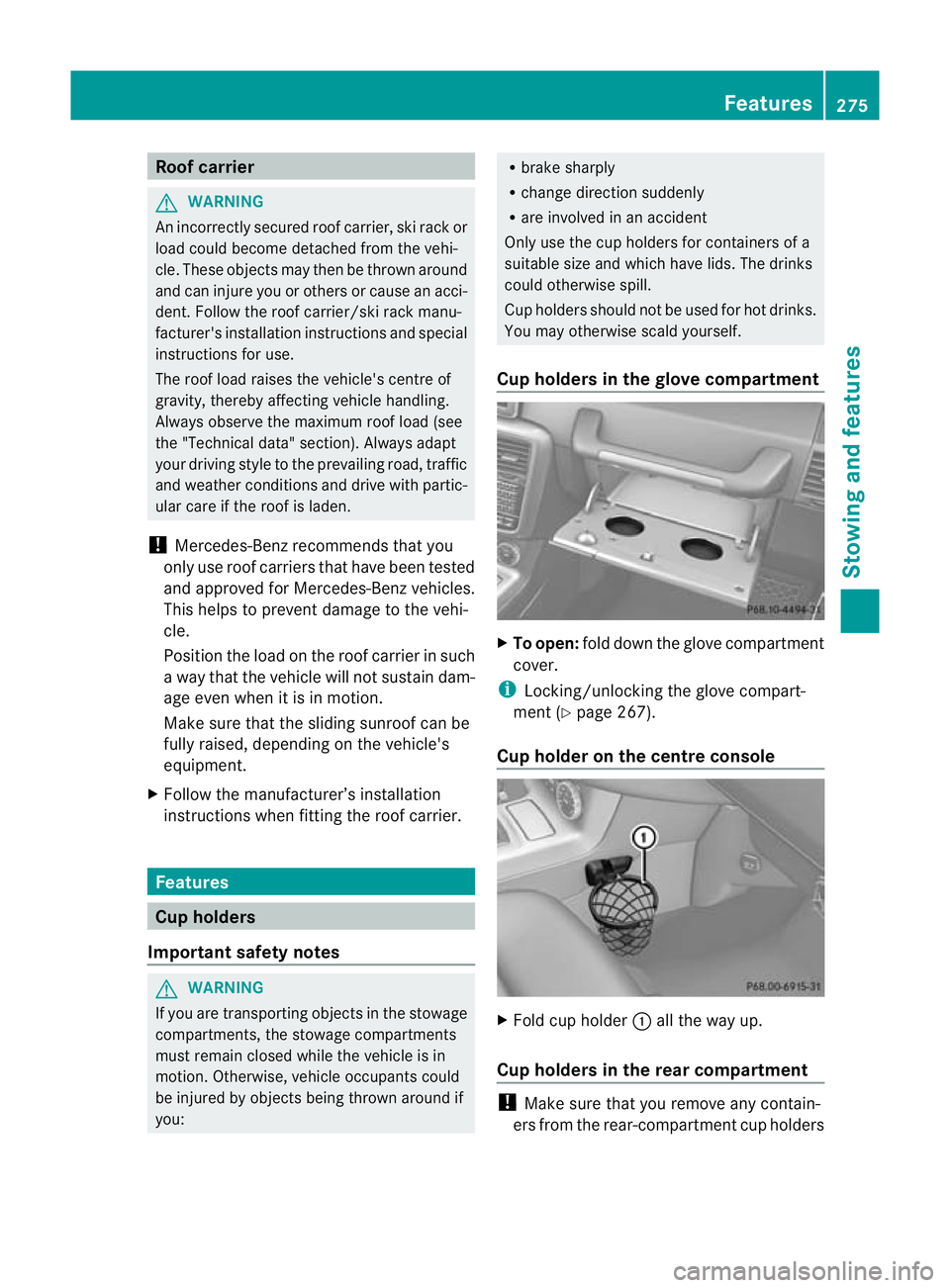
To open: fold down the glove compartment
cover.
i Locking/unlocking the glove compart-
ment (Y page 267).
Cup holder on the centre console X
Fold cup holder :all the way up.
Cup holders in the rear compartment !
Make sure that you remove any contain-
ers from the rear-compartment cup holders Features
275Stowing and features Z
Page 279 of 357
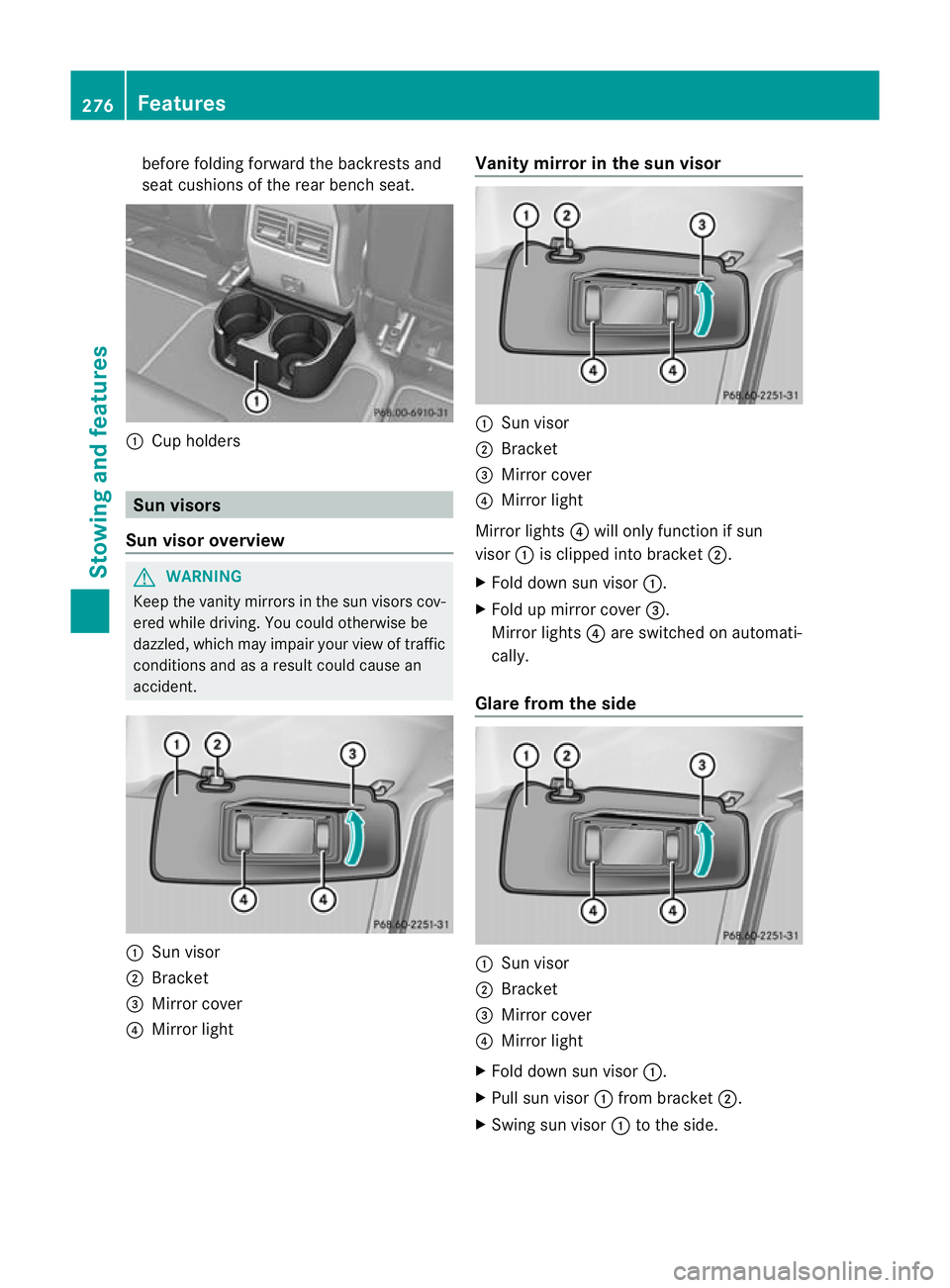
before folding forward the backrests and
seat cushions of the rear bench seat.
:
Cup holders Sun visors
Sun visor overview G
WARNING
Keep the vanity mirror sinthe sun visors cov-
ered while driving. You could otherwise be
dazzled, which may impair your view of traffic
conditions and as a result could cause an
accident. :
Sun visor
; Bracket
= Mirror cover
? Mirror light Vanity mirror in the sun visor
:
Sun visor
; Bracket
= Mirror cover
? Mirror light
Mirror lights ?will only function if sun
visor :is clipped into bracket ;.
X Fold down sun visor :.
X Fold up mirror cover =.
Mirror lights ?are switched on automati-
cally.
Glare from the side :
Sun visor
; Bracket
= Mirror cover
? Mirror light
X Fold down sun visor :.
X Pull sun visor :from bracket ;.
X Swing sun visor :to the side. 276
FeaturesStowing and features
Page 280 of 357
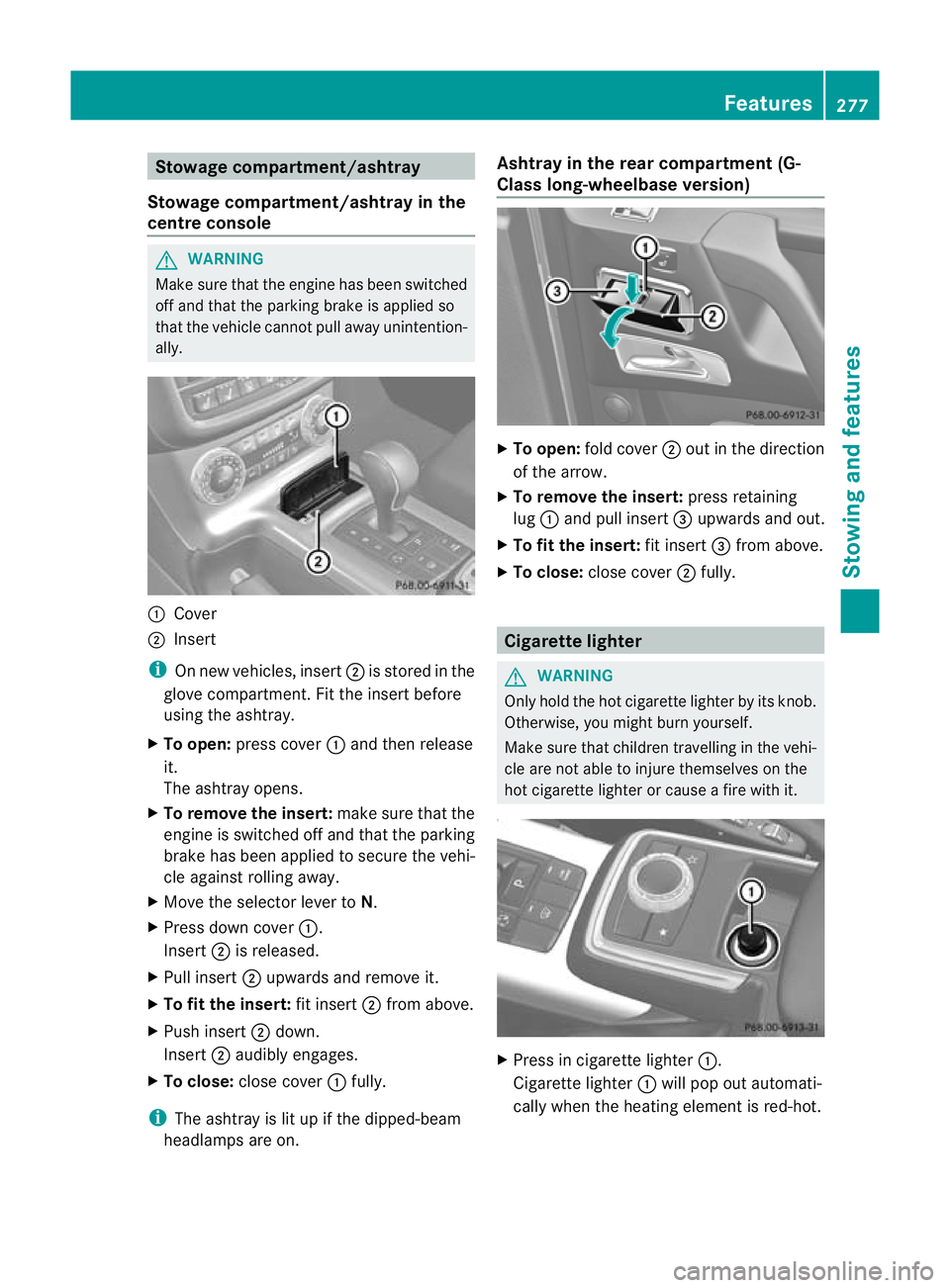
Stowage compartment/ashtray
Stowage compartment/ashtray in the
centre console G
WARNING
Make sure that the engine has been switched
off and that the parking brake is applied so
that the vehicle cannot pull away unintention-
ally. :
Cover
; Insert
i On new vehicles, insert ;is stored in the
glove compartment. Fit the insert before
using the ashtray.
X To open: press cover :and then release
it.
The ashtray opens.
X To remove the insert: make sure that the
engine is switched off and that the parking
brake has been applied to secure the vehi-
cle against rolling away.
X Move the selector lever to N.
X Press down cover :.
Insert ;is released.
X Pull insert ;upwards and remove it.
X To fit the insert: fit insert;from above.
X Push insert ;down.
Insert ;audibly engages.
X To close: close cover :fully.
i The ashtray is lit up if the dipped-beam
headlamps are on. Ashtray in the rear compartment (G-
Class long-wheelbase version)
X
To open: fold cover ;out in the direction
of the arrow.
X To remove the insert: press retaining
lug :and pull insert =upwards and out.
X To fit the insert: fit insert=from above.
X To close: close cover ;fully. Cigarette lighter
G
WARNING
Only hold the hot cigarette lighter by its knob.
Otherwise, you might burn yourself.
Make sure that children travelling in the vehi-
cle are not able to injure themselves on the
hot cigarette lighter or cause a fire with it. X
Press in cigarette lighter :.
Cigarette lighter :will pop out automati-
cally when the heating element is red-hot. Features
277Stowing and features Z
Page 281 of 357
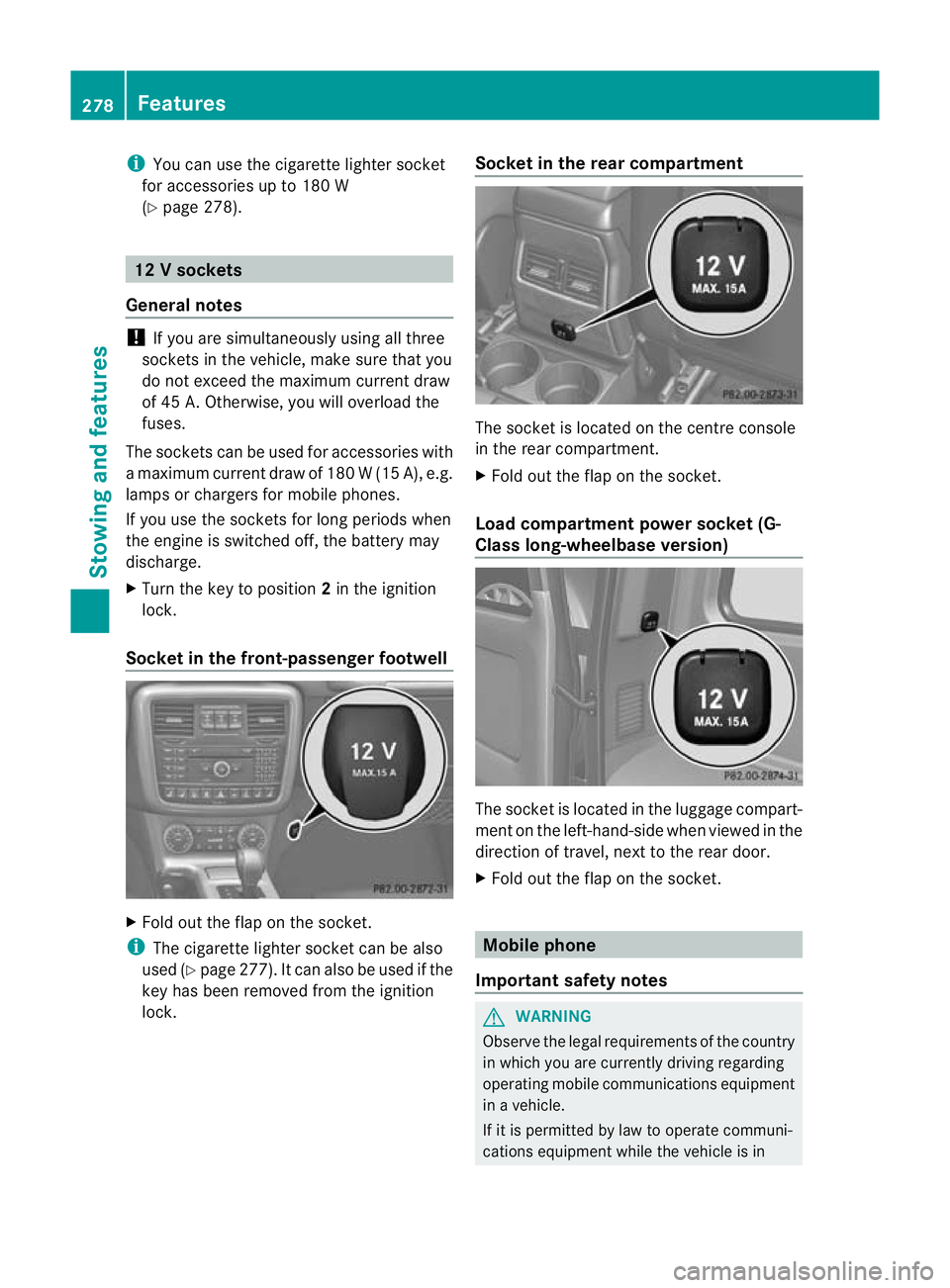
i
You can use the cigarette lighter socket
for accessories up to 180 W
(Y page 278). 12
Vsockets
General notes !
If you are simultaneously using all three
sockets in the vehicle, make sure that you
do not exceed the maximum current draw
of 45 A. Otherwise, you will overload the
fuses.
The sockets can be used for accessories with
am aximum current draw of 180 W(15 A), e.g.
lamps or chargers for mobile phones.
If you use the sockets for long periods when
the engine is switched off, the battery may
discharge.
X Turn the key to position 2in the ignition
lock.
Socket in the front-passenge rfootwell X
Fold out the flap on th esocket.
i The cigarette lighter socket can be also
used (Y page 277). It can also be used if the
key has been removed from the ignition
lock. Socket in the rear compartment The socket is located on the centre console
in the rear compartment.
X
Fold out the flap on the socket.
Load compartment power socket (G-
Class long-wheelbase version) The socket is located in the luggage compart-
ment on the left-hand-side when viewed in the
direction of travel, next to the rear door.
X Fold out the flap on the socket. Mobile phone
Important safety notes G
WARNING
Observe the legal requirements of the country
in which you are currently driving regarding
operating mobile communications equipment
in a vehicle.
If it is permitted by law to operate communi-
cations equipment while the vehicle is in 278
FeaturesStowing and features
Page 282 of 357
motion, you must only do so if the traffic sit-
uation permits. Otherwise, you could be dis-
tracted from the traffic conditions, cause an
accident and injure yourself and others.
Two-way radios and fax equipment used with-
out low-reflection exterior aerials can inter-
fere with the vehicle's electronics and thereby
jeopardise the operating safety of the vehicle
and yours afety. Therefore, you must only use
this equipment if it is correctly connected to
a separate reflection-free exterio raerial. G
WARNING
Excessive levels of electromagnetic radiation
may cause damage to your health and the
health of others. Using an exterior aerial takes
into account current scientific discussions
relating to the possible health risk posed by
electromagnetic fields.
Mercedes-Benz recommends the use of an
approved exterior aerial. This ensures:
R optimal mobile phone reception quality in
the vehicle
R mutual influences between the vehicle
electronics and mobile phones are mini-
mised
An exterior aerial has the following advan-
tages:
R it conducts the electromagnetic fields gen-
erated by a wireless device to the exterior.
R the field strength in the vehicle interior is
lower than in a vehicle that does not have
an exterior aerial.
i There are various mobile phone brackets
that may be fitted in your vehicle; in some
cases, these are country-specific. You can
obtain these mobile phone brackets from a
qualified specialist workshop.
The functions and services available when
you use the phone depend on your mobile
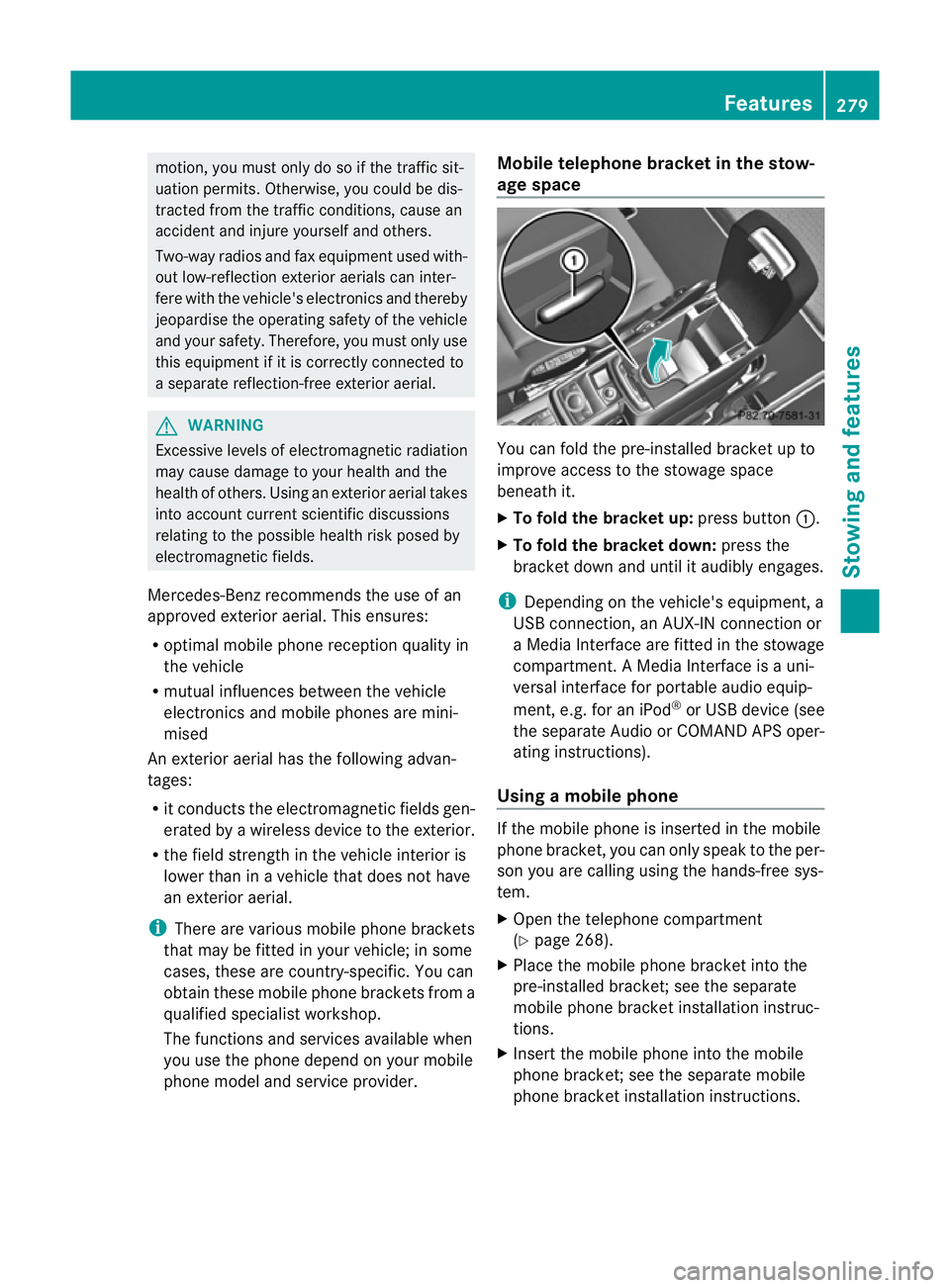
phone model and service provider. Mobile telephone bracket in the stow-
age space
You can fold the pre-installed bracket up to
improve access to the stowage space
beneath it.
X
To fold the bracket up: press button:.
X To fold the bracket down: press the
bracket down and until it audibly engages.
i Depending on the vehicle's equipment, a
USB connection, an AUX-IN connection or
a Media Interface are fitted in the stowage
compartment. A Media Interface is a uni-
versal interface for portable audio equip-
ment, e.g. for an iPod ®
or USB device (see
the separate Audio or COMAND APS oper-
ating instructions).
Using amobile phone If the mobile phone is inserted in the mobile
phone bracket, you can only speak to the per-
son you are calling using the hands-free sys-
tem.
X
Open the telephone compartment
(Y page 268).
X Place the mobile phone bracket into the
pre-installed bracket; see the separate
mobile phone bracket installation instruc-
tions.
X Inser tthe mobile phone into the mobile
phone bracket; see the separate mobile
phone bracket installation instructions. Features
279Stowing and features Z
Page 283 of 357
Operating the mobile phone
You can operate the telephon
eusing the
6 and~ buttons on the multifunction
steering wheel. You can operate other mobile
phone functions via the on-board computer
(Y page 218).
When you remove the key from the ignition
lock, the mobile phone remains switched on
for approximately ten minutes (run-on time).
If you make a call during this time, the mobile
phone will be switched off approximately ten
minutes after you have ended the call. Garage door opener
Important safety notes You can use the HomeLink
®
garage door
opener integrated into the rear-view mirror to
operate up to three different gate/garage
door opener systems.
i The garage door opener is only available
for certain countries. Observe the legal
requirements for each individual country.
The HomeLink ®
garage door opener is
compatible with most European garage and
gate opener drives. More information on
HomeLink ®
and/or compatible products is
available from:
R any Mercedes-Benz Service Centre
R the HomeLink ®
hotline
(0) 08000 466 354 65 (free of charge) or
+49 (0) 6838 907 277 (charges apply)
R on the Internet at:
http://www.homelink.com
Programming the remote control Programming
G
WARNING
Only press the button on the integrated
garage door opener if there are no persons or
objects present within the sweep of the garage door. Persons could otherwise be
injured as the door moves.
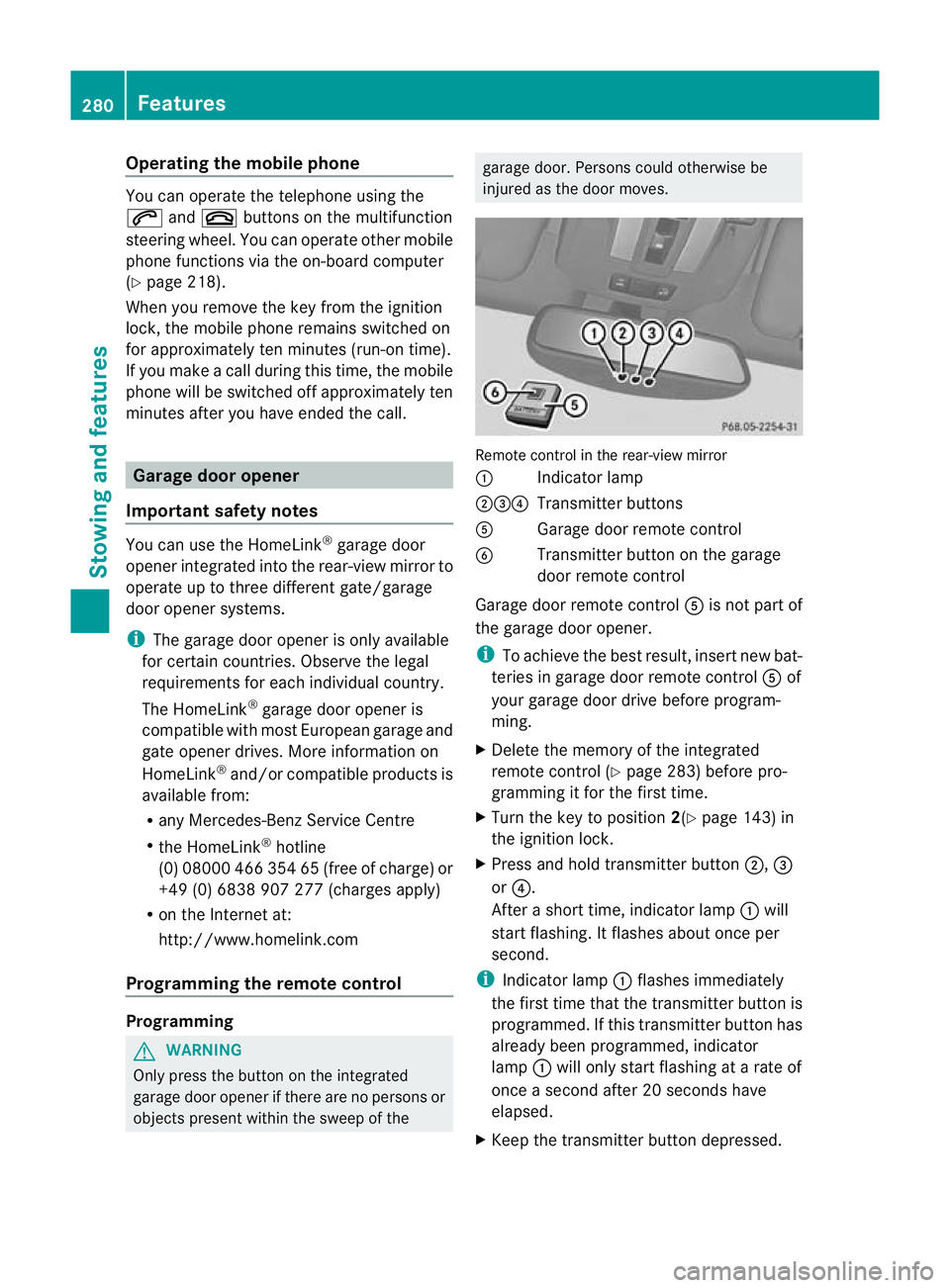
Remote control in the rear-view mirror
:
Indicator lamp
;=? Transmitter buttons
A Garage door remote control
B Transmitter button on the garage
door remote control
Garage door remote control Ais not part of
the garage door opener.
i To achieve the best result, insert new bat-
teries in garage door remote control Aof
your garage door drive before program-
ming.
X Delete the memory of the integrated
remote control (Y page 283) before pro-
gramming it for the first time.
X Turn the key to position 2(Ypage 143) in
the ignition lock.
X Press and hold transmitter button ;,=
or ?.
After a short time, indicator lamp :will
start flashing. It flashes abouto nce per
second.
i Indicato rlamp :flashes immediately
th ef irst tim ethat the transmitter button is
programmed. If this transmitter button has
already been programmed, indicator
lamp :will only start flashing at a rate of
once a second after 20 seconds have
elapsed.
X Keep the transmitter button depressed. 280
FeaturesStowing and features
Page 284 of 357
X
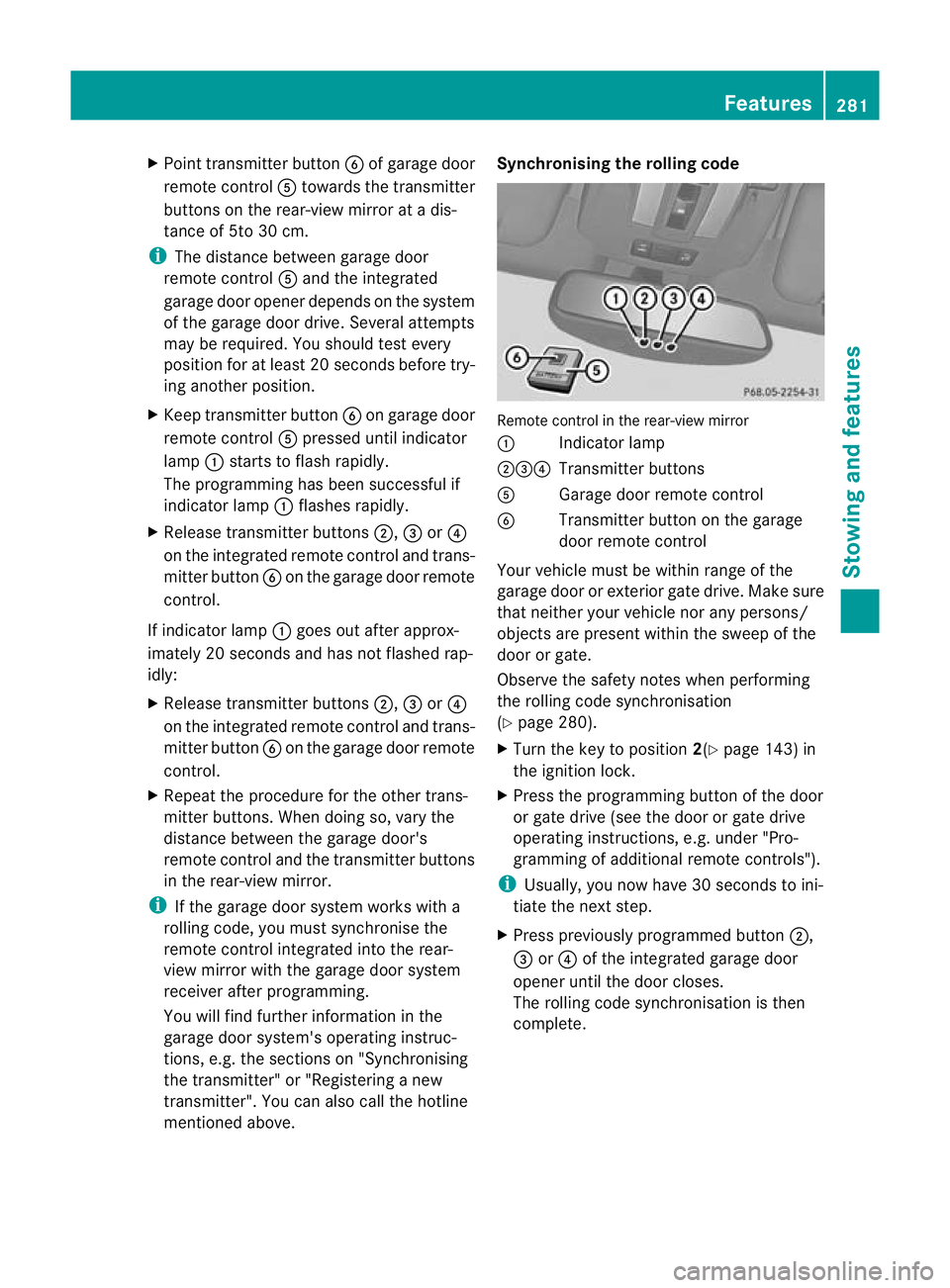
Point transmitter button Bof garage door
remote control Atowards the transmitter
buttons on the rear-view mirror at a dis-
tance of 5to 30 cm.
i The distance between garage door
remote control Aand the integrated
garage door opener depends on the system
of the garage door drive. Several attempts
may be required. You should test every
position for at least 20 seconds before try-
ing another position.
X Keep transmitter button Bon garage door
remote control Apressed until indicator
lamp :starts to flash rapidly.
The programming has been successful if
indicator lamp :flashes rapidly.
X Release transmitter buttons ;,=or?
on the integrated remot econtrol and trans-
mitter button Bon the garage door remote
control.
If indicator lamp :goes out after approx-
imately 20 seconds and has not flashed rap-
idly:
X Release transmitter buttons ;,=or?
on the integrated remote control and trans-
mitter button Bon the garage door remote
control.
X Repeat the procedure for the other trans-
mitter buttons. When doing so, vary the
distance between the garage door's
remote control and the transmitter buttons
in the rear-view mirror.
i If the garage door system works with a
rolling code, you must synchronise the
remote control integrated into the rear-
view mirror with the garage door system
receiver after programming.
You will find further information in the
garage door system's operating instruc-
tions, e.g. the section son"Synchronising
the transmitter" or "Registering a new
transmitter". You can also call the hotline
mentioned above. Synchronising the rolling code
Remote control in the rear-view mirror
:
Indicator lamp
;=? Transmitter buttons
A Garage doo rremote control
B Transmitter button on the garage
door remote control
Your vehicle must be within range of the
garage door or exterior gate drive. Make sure
that neither your vehicle nor any persons/
objects are present within the sweep of the
door or gate.
Observe the safety notes when performing
the rolling code synchronisation
(Y page 280).
X Turn the key to position 2(Ypage 143) in
the ignition lock.
X Press the programming button of the door
or gate drive (see the door or gate drive
operating instructions, e.g. under "Pro-
gramming of additional remote controls").
i Usually, you now have 30 seconds to ini-
tiate the next step.
X Press previously programmed button ;,
= or? of the integrated garage door
opener until the door closes.
The rolling code synchronisation is then
complete. Features
281Stowing and features Z