warning MERCEDES-BENZ G-CLASS SUV 2013 Owners Manual
[x] Cancel search | Manufacturer: MERCEDES-BENZ, Model Year: 2013, Model line: G-CLASS SUV, Model: MERCEDES-BENZ G-CLASS SUV 2013Pages: 364, PDF Size: 9.62 MB
Page 203 of 364
display. If you then release the parking
brake, a warning tone will sound.
Differential locks
General notes G
WARNING
When differential locks are engaged on a firm,
high-grip surface, the vehicle's steerability is
greatly impaired. In particular, engaging the
differential locks when cornering could lead
to you losing control
of the vehicle. There is a
risk of an accident.
Disengage the differential locks immediately
on firm, high-grip surfaces. G
WARNING
ABS, 4ETS, ESP ®
and BAS are deactivated
while the differential locks are engaged. As a
result, the wheels could lock when braking
and the braking distance is increased. There
is a risk of an accident.
Disengage the differential locks immediately
on firm, high-grip surfaces.
! In order to avoid damage to the transfer
case, you must operate the vehicle on a
dynamometer (1-axle dynamometer) only
if:
R the axle not driven on is jacked up
or
R the corresponding propeller shaft is
disconnected and the transfer case
differential lock is activated.
Otherwise, the transfer case can be
damaged.
Differential locks improve the traction of the
vehicle. Your vehicle is equipped with a differential
lock for:
R
the transfer case: this
controls the balance
between the front and rear axles.
R the rear axle: this controls the balance
between the wheels on the rear axle.
R the front axle: this controls the balance
between the wheels on the front axle.
Information on differential and
differential locks When the vehicle drives around a curve, the
wheels on the
outside
of the curve must cover
a greater distance. Therefore, the wheels turn
more rapidly than on the inside. The
differential, a transmission in the drive train,
compensates for these different rotational
speeds, making cornering possible.
The disadvantage of a differential is that more
power is transferred to the wheels that have
the least grip. An example: a wheel of a driven
axle is on a snow-covered surface and
therefore does not have any traction. The
differential causes this wheel to be subjected
to the strongest driving force, as the flow of
force takes the path of least resistance. The
opposite wheel on this axle, however, which
stands on firm ground and could therefore
allow propulsion, receives no driving power.
4ETS compensates for this disadvantage.
4ETS provides good steerability by
automatically braking the spinning wheel.
4ETS provides the wheel on the firm surface
with more drive force, which in turn provides
propulsion.
ESP® and 4ETS are traction systems that are
ideal for road driving and suitable for light off-
road driving. The LOW RANGE off-road gear
also improves off-road capability.
Moreover, the more difficult conditions in off-
road driving require further measures such as
locking one or several differentials. Your
vehicle is equipped with three differential
locks: Off-road driving systems
201
Driving and parking Z
Page 204 of 364
R
a central differential lock for the transfer
case,
R a differential lock for the front axle and
R a differential lock for the rear axle.
Each differential lock can
be engaged with the
respective switch on the center console. If
the transfer case differential is disabled, the
front and rear wheels turn at the same speed.
If the differential for the rear axle is locked,
both rear wheels turn at the same speed,
regardless of their individual torques. Please
note that activating the differential locks
severely restricts the vehicle's steerability.
Please note that the functions of the
differential are absolutely necessary for
driving on paved roads. The differential locks
must never be engaged when driving on
paved roads. Otherwise, the vehicle may not
be steerable and you could lose control of the
vehicle. The differential locks must therefore
only be engaged when driving off-road. You
may only engage the differential locks if the
functions of the 4ETS and ESP ®
driving
systems and the LOW RANGE off-road gear
are insufficient.
i The differential locks are only available in
the LOW RANGE off-road gear.
Activating the differential lock Important safety notes
G
WARNING
When differential locks are engaged on a firm,
high-grip surface, the vehicle's steerability is
greatly impaired. In particular, engaging the
differential locks when cornering could lead
to you losing control
of the vehicle. There is a
risk of an accident.
Disengage the differential locks immediately
on firm, high-grip surfaces. G
WARNING
ABS, 4ETS, ESP ®
and BAS are deactivated
while the differential locks are engaged. As a
result, the wheels could lock when braking and the braking distance is increased. There
is a risk of an accident.
Disengage the differential locks immediately
on firm, high-grip surfaces.
! Only activate the differential locks when:
R you are driving at walking pace.
R the driven wheels are not spinning.
R you are not driving
on a firm road surface.
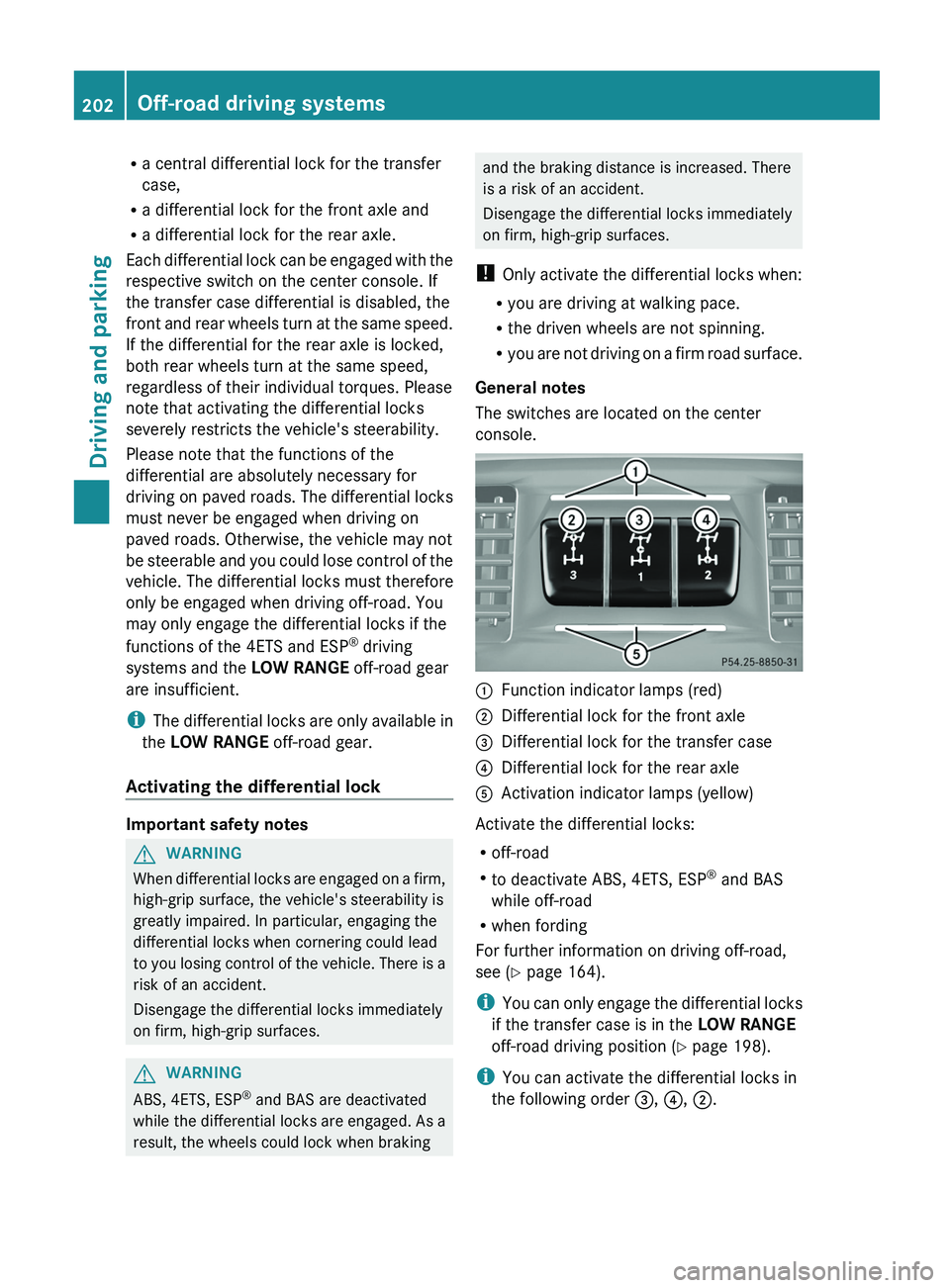
General notes
The switches are located on the center
console. 0043
Function indicator lamps (red)
0044 Differential lock for the front axle
0087 Differential lock for the transfer case
0085 Differential lock for the rear axle
0083 Activation indicator lamps (yellow)
Activate the differential locks:
R off-road
R to deactivate ABS, 4ETS, ESP ®
and BAS
while off-road
R when fording
For further information on driving off-road,
see ( Y page 164).
i You can only engage
the differential locks
if the transfer case is in the LOW RANGE
off-road driving position (Y page 198).
i You can activate the differential locks in
the following order 0087, 0085, 0044.202
Off-road driving systems
Driving and parking
Page 205 of 364
Differential lock for the transfer case
X
To engage: switch the transfer case to the
LOW RANGE off-road driving position ( Y
page 199).
X Press switch 0087.
When the transfer case is in the LOW
RANGE off-road driving position,
the yellow
activation indicator lamp below switch 0087
lights up.
The 00BB warning lamp in the instrument
panel lights up.
When the differential is locked, the red
function indicator lamp above switch 0087
lights up.
In the multifunction display you see the:
ABS not available Differential
Locked
The 00BB002500E5 warning lamps in the
instrument cluster light up.
The differential lock for the transfer case is
engaged.
4ETS, ESP ®
, BAS and ABS are deactivated.
The vehicle's ability to steer is severely
restricted. Drive carefully and accelerate
gently for optimum traction.
i You can now engage the differential lock
for rear axle 0085
and the differential lock for
front axle 0044 as required.
Differential lock for the rear axle X
To engage: press switch 0085.
Yellow activation indicator lamp 0083 lights
up first, followed by red function indicator
lamp 0043 of switch 0085.
The differential lock for the rear axle is
engaged.
Differential lock for the front axle X
To engage: press switch 0044.
First, the yellow activation indicator lamp
lights up, followed by the red function
indicator lamp. The differential lock for the front axle is
engaged.
Deactivating the differential lock You can deactivate the differential locks in
this order: 0044, 0085, 0087.
X
To simultaneously deactivate all
differential locks: press switch 0087.
Yellow activation indicator lamps 0083 and
red function indicator lamps 0043 go out.
After approximately three seconds of
normal driving, ABS, 4ETS, ESP ®
and BAS
are activated.
The ABS not available
Differential
Locked
message disappears from the
multifunction display and the 00BB, 0025
and 00E5 warning lamps in the instrument
cluster go out.
X Shift the transfer case to the HIGH
RANGE on-road position (Y page 199).
i If red function indicator lamps 0043 do not
go out after disengaging the differential
locks, bring the vehicle to a standstill in
accordance with the traffic conditions.
Then continue driving, as the load change
can release the differential locks. Towing a trailer
Notes on towing a trailer
Important safety notes G
WARNING
If you rest your foot on the brake pedal while
driving, the braking system
can overheat. This
increases the stopping distance and can even
cause the braking system to fail. There is a
risk of an accident.
Never use the brake pedal as a footrest. Never
depress the brake pedal and the accelerator
pedal at the same time. Towing a trailer
203
Driving and parking Z
Page 206 of 364
G
WARNING
When the vehicle/trailer combination begins
to lurch, you could lose control of it. The
vehicle/trailer combination could even
rollover. There is a risk of an accident.
On no account should you attempt to
straighten up the vehicle/trailer
combination
by increasing the speed. Reduce vehicle
speed and do not countersteer. Apply the
brake as necessary. G
WARNING
If you install a ball coupling other than the one
delivered with the vehicle,
the trailer tow hitch
and the rear axle may be overloaded. This
applies especially if the ball coupling in
question is longer or angled differently. This
could seriously impair the driving
characteristics and the trailer can come
loose. There is a risk of an accident.
Only install the ball coupling delivered with
the vehicle or a ball coupling that is designed
to meet your trailer towing requirements. Do
not modify the ball coupling or the trailer tow
hitch. G
WARNING
If the ball coupling is not installed correctly or
not secured with the bolt provided and the
corresponding spring cotter, the trailer may
come loose. There is a risk of an accident.
Always install and secure
the ball coupling as
described. Before every journey, ensure that
the ball coupling is secured with the bolt and
the corresponding spring cotter.
Please observe the manufacturer's operating
instructions for the trailer coupling if a
detachable trailer coupling is used.
You will find the applicable permissible
values, which must not be exceeded, in the
vehicle documents. You will find the values
approved by the manufacturer on the vehicle
identification plates and those for the towing
vehicle in the "Technical data" section
(Y page 349). Couple and uncouple the trailer carefully. If
you do not couple the trailer to the towing
vehicle correctly, the trailer could become
detached.
Make sure that the following values are not
exceeded:
R
the permissible trailer drawbar
noseweight
R the permissible trailer load
R the permissible rear axle load of the towing
vehicle
R the maximum permissible gross vehicle
weight of both the towing vehicle and the
trailer
When towing a trailer, your vehicle's handling
characteristics will be different in comparison
with when driving without a trailer.
The vehicle/trailer combination:
R is heavier
R is restricted in its acceleration and
gradient-climbing capability
R has an increased braking distance
R is affected more by strong crosswinds
R demands more sensitive steering
R has a larger turning circle
This could impair the handling
characteristics.
When towing a trailer, always adjust your
speed to the current road and weather
conditions. Do not exceed the maximum
permissible speed for your vehicle/trailer
combination.
General notes R
Do not exceed the legally prescribed
maximum speed for vehicle/trailer
combinations in the relevant country.
This lowers the risk of an accident.
R Only install an approved
trailer coupling on
your vehicle.
Further information on availability and on
installation is available from any authorized
Mercedes-Benz Center. 204
Towing a trailer
Driving and parking
Page 209 of 364
Useful information ............................
208
Important safety notes ....................208
Displays and operation .................... 209
Menus and submenus ...................... 212
Display messages ............................. 224
Warning and indicator lamps
in the
instrument cluster ............................247 207
On-board computer and displays
Page 210 of 364
Useful information
i This Operator's Manual describes all
models and all standard and optional
equipment of your vehicle available at the
time of publication of the Operator's
Manual. Country-specific differences are
possible. Please note that
your vehicle may
not be equipped with all features
described. This also applies to safety-
related systems and functions.
i Read the information on qualified
specialist workshops: ( Y page 23).Important safety notes
G
WARNING
The driver's concentration must always be
directed primarily at road traffic.
For your safety and the safety of others,
selecting features through the multifunction
steering wheel should only be done by the
driver when traffic and
road conditions permit
it to be done safely.
Bear in mind that at a speed of only 30 mph
(approximately 50 km/h), the vehicle covers
a distance of 44 feet (approximately 14 m) per
second. G
WARNING
No messages will be displayed if either the
instrument cluster or the multifunction
display is inoperative.
As a result, you will not be able to see
information about your driving conditions,
such as
R speed
R outside temperature
R warning/indicator lamps
R malfunction/warning messages
R failure of any systems
Driving characteristics may be impaired. If you must continue to drive, do so with added
caution. Contact an authorized Mercedes-
Benz Center as soon as possible.
G
WARNING
Malfunction and warning messages are only
displayed for certain systems and are
intentionally not very detailed. The
malfunction and warning messages are
simply a reminder with respect to the
operation of certain systems. They do not
replace the owner's and/or driver's
responsibility to maintain the vehicle's
operating safety. Have all required
maintenance services and safety checks
performed on the vehicle.
Bring the vehicle to
an authorized Mercedes-Benz Center to
address the malfunction and warning
messages. G
WARNING
All categories of messages contain important
information which should be taken note of
and, where a malfunction is indicated,
addressed as soon as possible at an
authorized Mercedes-Benz Center.
Failure to repair the condition noted may
cause damage not covered
by the Mercedes-
Benz Limited Warranty, or result in property
damage or personal injury.
For an illustration of the instrument cluster,
see ( Y page 209).208
Important safety notes
On-board computer and displays
Page 211 of 364
Displays and operation
Instrument cluster
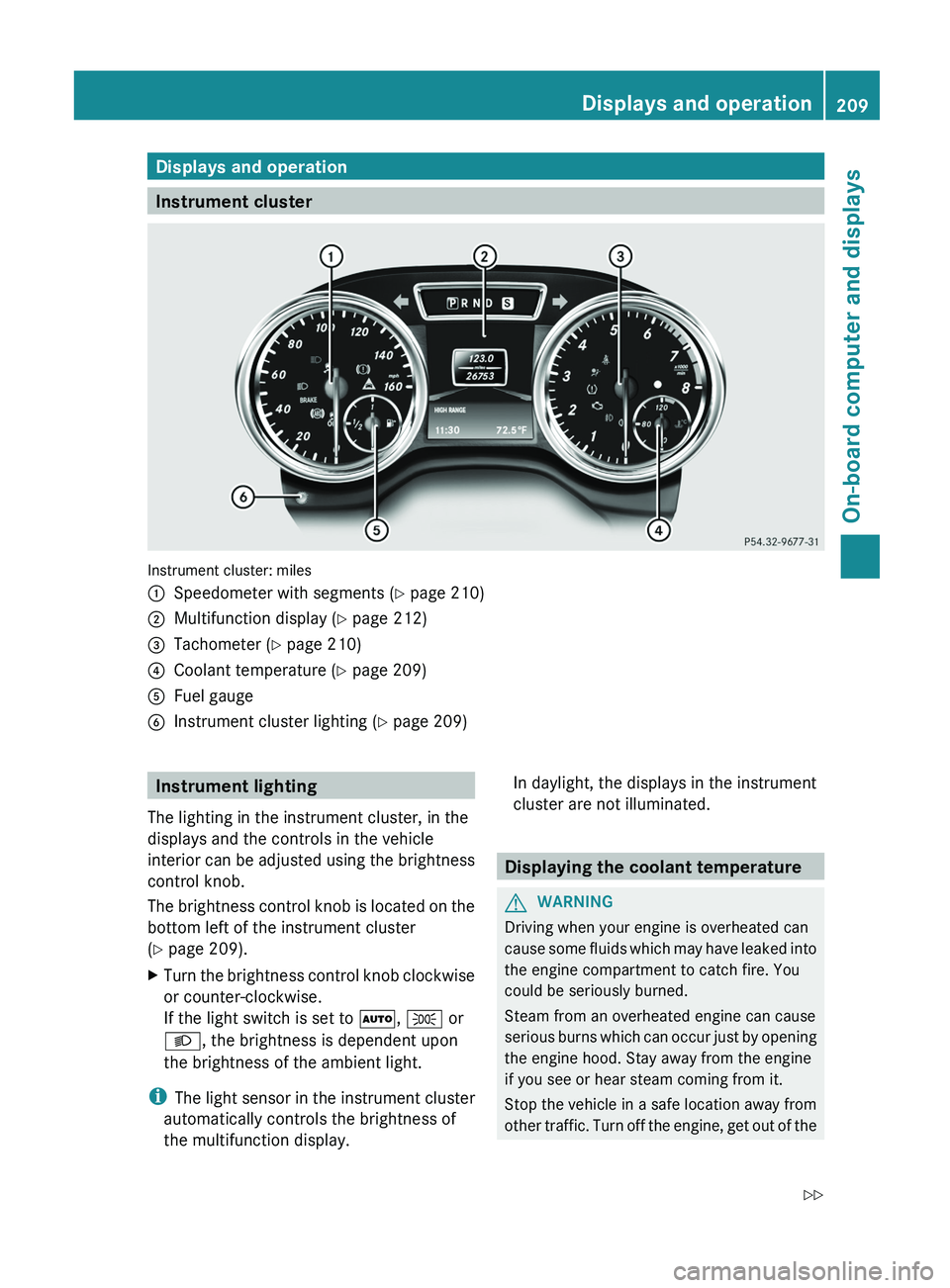
Instrument cluster: miles
0043
Speedometer with segments (Y page 210)
0044 Multifunction display ( Y page 212)
0087 Tachometer (Y page 210)
0085 Coolant temperature ( Y page 209)
0083 Fuel gauge
0084 Instrument cluster lighting (Y page 209) Instrument lighting
The lighting in the instrument cluster, in the
displays and the controls in the vehicle
interior can be adjusted
using the brightness
control knob.
The brightness control knob is located on the
bottom left of the instrument cluster
(Y page 209).
X Turn the brightness control knob clockwise
or counter-clockwise.
If the light switch is set to 0058, 0060 or
0058, the brightness is dependent upon
the brightness of the ambient light.
i The light sensor
in
the instrument cluster
automatically controls the brightness of
the multifunction display. In daylight, the displays in the instrument
cluster are not illuminated.
Displaying the coolant temperature
G
WARNING
Driving when your engine is overheated can
cause some fluids which
may have leaked into
the engine compartment to catch fire. You
could be seriously burned.
Steam from an overheated engine can cause
serious burns which can occur just by opening
the engine hood. Stay away from the engine
if you see or hear steam coming from it.
Stop the vehicle in a safe location away from
other traffic. Turn off the engine, get out of the Displays and operation
209
On-board computer and displays
Z
Page 212 of 364
vehicle and do not stand near the vehicle until
the engine has cooled down.
! A display message is
shown if the coolant
temperature is too high.
If the coolant temperature is over
248 ‡(120 †), do not continue driving. The
engine will otherwise be damaged.
The coolant temperature gauge is in the
instrument cluster on the right-hand side
(Y page 209).
Under normal operating conditions and with
the specified coolant level, the coolant
temperature may rise to 248 ‡ (120 †). Tachometer
! Do not drive in the overrevving range, as
this could damage the engine.
The red band in
the tachometer indicates the
engine's overrevving range.
The fuel supply is interrupted to protect the
engine when the red band is reached. Outside temperature display
G
WARNING
The outside temperature indicator is not
designed to serve as an ice-warning device
and is therefore unsuitable for that purpose.
Indicated temperatures just above the
freezing point do not
guarantee that the road
surface is free of ice. The road may still be icy,
especially in wooded areas or on bridges.
The outside temperature display is in the
multifunction display ( Y page 212).
Changes in the outside temperature are
displayed after a short delay. Speedometer with segments
The segments in the speedometer indicate
which speed range is available.
R Cruise control activated ( Y page 169):
The segments light up from the stored
speed to the maximum speed.
R Variable SPEEDTRONIC activated
(Y page 174):
The segments light up
from the start of the
scale to the selected limit speed.
R DISTRONIC PLUS activated (Y page 179):
One or two segments in the set speed
range light up.
R DISTRONIC PLUS detects a vehicle in front:
The segments between the speed of the
vehicle in front and the stored speed light
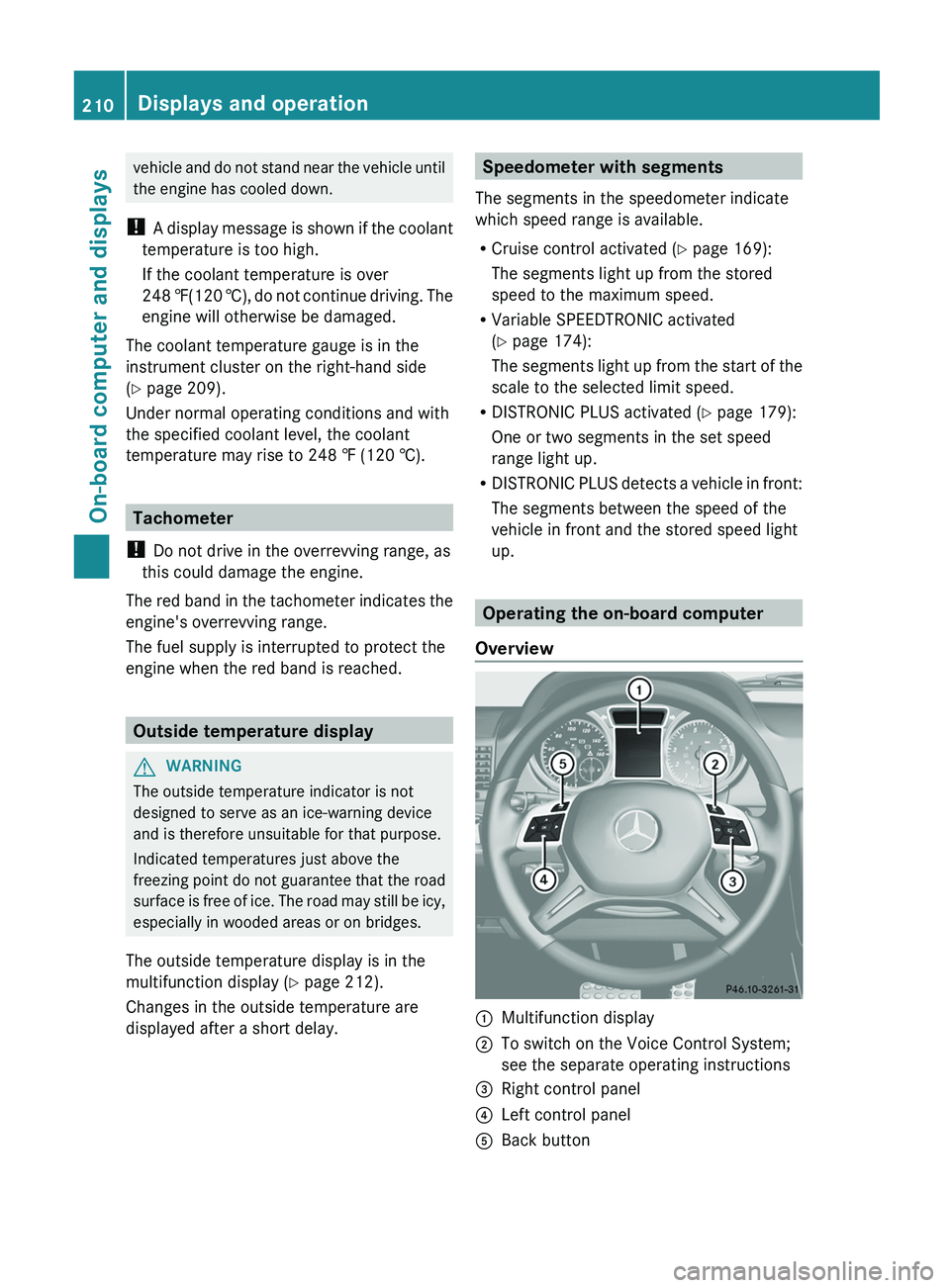
up. Operating the on-board computer
Overview 0043
Multifunction display
0044 To switch on the Voice Control System;
see the separate operating instructions
0087 Right control panel
0085 Left control panel
0083 Back button210
Displays and operation
On-board computer and displays
Page 218 of 364
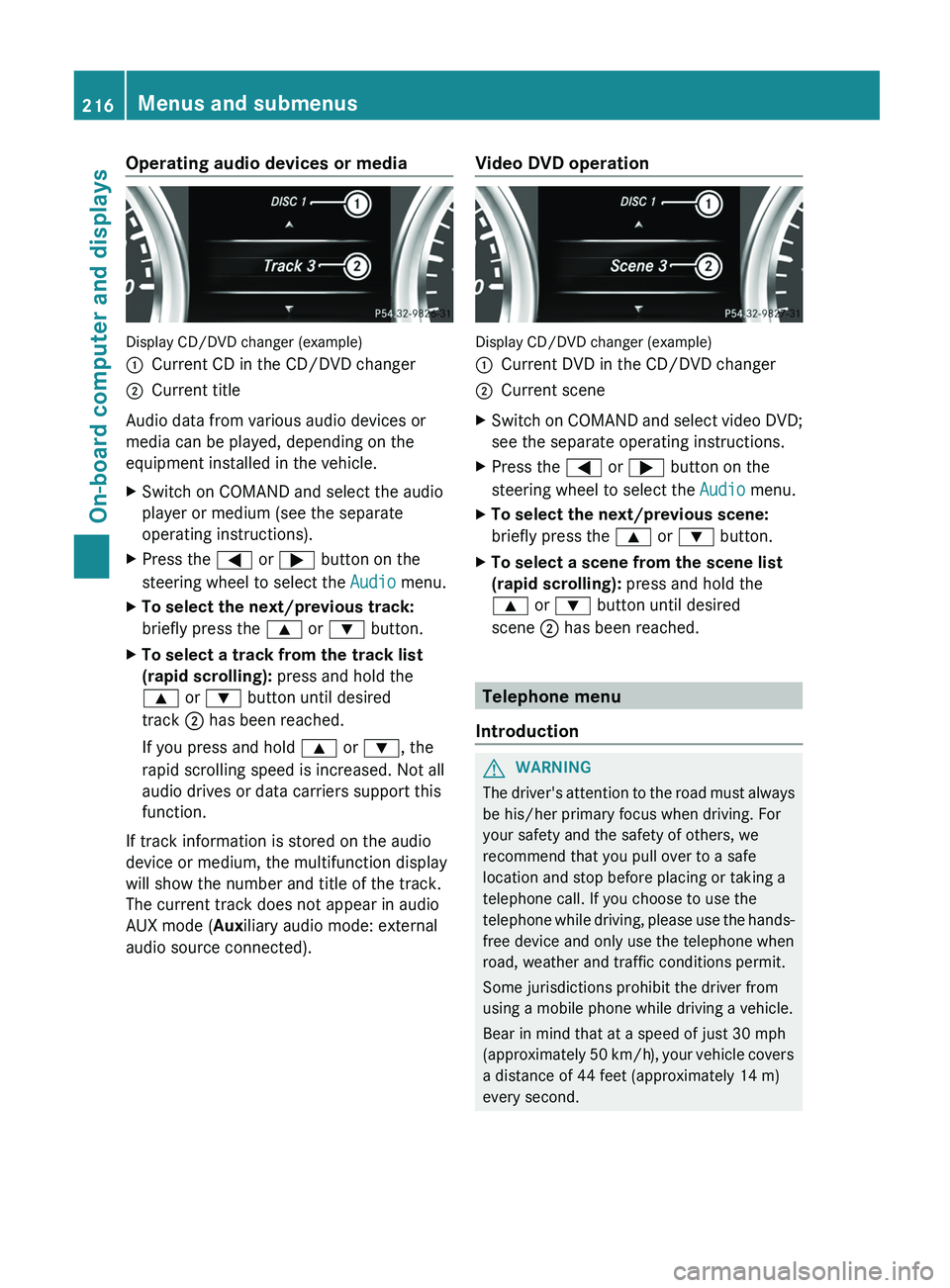
Operating audio devices or media
Display CD/DVD changer (example)
0043
Current CD in the CD/DVD changer
0044 Current title
Audio data from various audio devices or
media can be played, depending on the
equipment installed in the vehicle.
X Switch on COMAND and select the audio
player or medium (see the separate
operating instructions).
X Press the 0059 or 0065 button on the
steering wheel to select the Audio menu.
X To select the next/previous track:
briefly press the 0063 or 0064 button.
X To select a track from the track list
(rapid scrolling): press and hold the
0063 or 0064 button until desired
track 0044 has been reached.
If you press and hold 0063 or 0064, the
rapid scrolling speed is increased. Not all
audio drives or data carriers support this
function.
If track information is stored on the audio
device or medium, the multifunction display
will show the number and title of the track.
The current track does not appear in audio
AUX mode (Auxiliary audio mode: external
audio source connected). Video DVD operation Display CD/DVD changer (example)
0043
Current DVD in the CD/DVD changer
0044 Current scene
X Switch on COMAND and select video DVD;
see the separate operating instructions.
X Press the 0059 or 0065 button on the
steering wheel to select the Audio menu.
X To select the next/previous scene:
briefly press the 0063 or 0064 button.
X To select a scene from the scene list
(rapid scrolling): press and hold the
0063 or 0064 button until desired
scene 0044 has been reached. Telephone menu
Introduction G
WARNING
The driver's attention to the road must always
be his/her primary focus when driving. For
your safety and the safety of others, we
recommend that you pull over to a safe
location and stop before placing or taking a
telephone call. If you choose to use the
telephone while driving, please
use the hands-
free device and only use the telephone when
road, weather and traffic conditions permit.
Some jurisdictions prohibit the driver from
using a mobile phone while driving a vehicle.
Bear in mind that at a speed of just 30 mph
(approximately 50 km/h), your vehicle covers
a distance of 44 feet (approximately 14 m)
every second. 216
Menus and submenus
On-board computer and displays
Page 223 of 364
Activating/deactivating the acoustic
locking verification signal
If you switch
on
the Acoustic Lock function,
an acoustic signal sounds when you lock the
vehicle.
X Press the 0059 or 0065 button on the
steering wheel to select the Sett. menu.
X Press 0064 or 0063 to select the Vehicle
submenu.
X Press 0076 to confirm.
X Press the 0064 or 0063 button
to select the
Acoustic Lock function.
If the Acoustic Lock function is activated,
the 0037 symbol in the multifunction
display lights up red.
X Press the 0076 button to save the setting.
Convenience Activating/deactivating the EASY-
ENTRY/EXIT feature
G
WARNING
You must make sure no one can become
trapped or injured by the moving steering
wheel when the easy-entry/exit feature is
activated.
To stop steering wheel movement, move
steering wheel adjustment lever
or press one
of the memory position buttons.
Do not leave children unattended in the
vehicle, or with access to an unlocked vehicle.
Children could open the driver's door and
unintentionally activate the easy-entry/exit
feature, which could result in an accident
and/or serious personal injury.
X Press the 0059 or 0065 button on the
steering wheel to select the Sett. menu.
X Press the 0064
or 0063
button
to select the
Convenience submenu.
X Press 0076 to confirm. X
Press 0064 or 0063 to select the Easy
Entry/Exit: function.
If the Easy Entry/Exit function is
activated, the vehicle steering wheel is
displayed in red in the multifunction
display.
X Press the 0076 button to save the setting.
Further information on the EASY-ENTRY/EXIT
feature ( Y page 92).
Switching the fold-in mirrors when
locking feature on/off
When you activate the Auto. Mirror
Folding function, the exterior mirrors are
folded in when the vehicle is locked. If you
unlock the vehicle and then open a door, the
exterior mirrors fold out again.
X Press the 0059 or 0065 button on the
steering wheel to select the Sett. menu.
X Press the 0064 or
0063 button
to select the
Convenience submenu.
X Press 0076 to confirm.
X Press 0064 or 0063 to select the Auto.
Mirror Folding function.
If the Auto. Mirror Folding function is
activated, the vehicle's exterior mirror is
displayed in red in the multifunction
display.
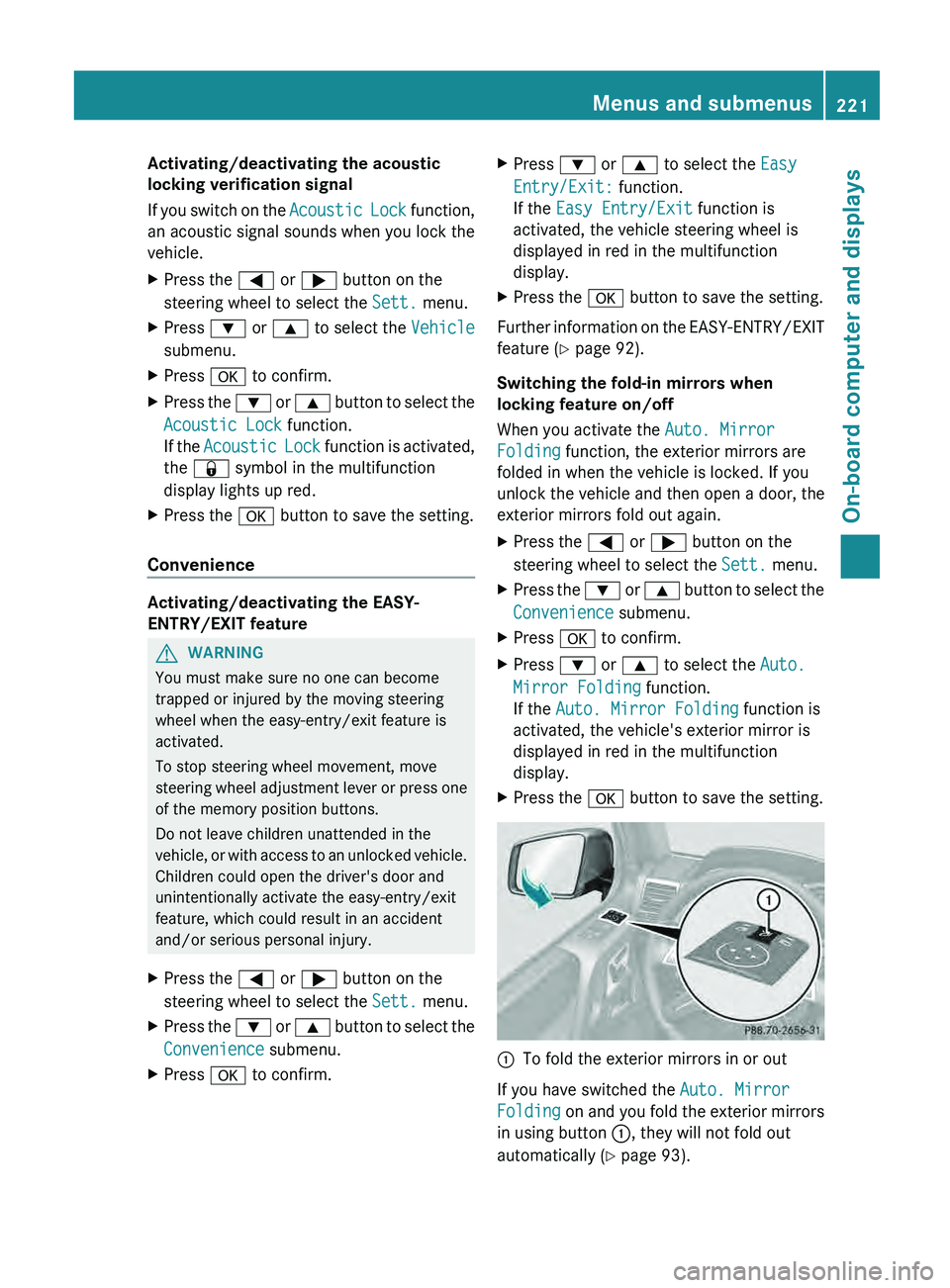
X Press the 0076 button to save the setting. 0043
To fold the exterior mirrors in or out
If you have switched the Auto. Mirror
Folding on and you
fold the exterior mirrors
in using button 0043, they will not fold out
automatically ( Y page 93). Menus and submenus
221
On-board computer and displays Z