warning MERCEDES-BENZ G-CLASS SUV 2013 Owners Manual
[x] Cancel search | Manufacturer: MERCEDES-BENZ, Model Year: 2013, Model line: G-CLASS SUV, Model: MERCEDES-BENZ G-CLASS SUV 2013Pages: 364, PDF Size: 9.62 MB
Page 178 of 364
If it is on, variable SPEEDTRONIC is already
selected.
If it is not, press the cruise control lever in
the direction of arrow 0083.
LIM indicator lamp
0044
in the cruise control
lever lights up. Variable SPEEDTRONIC is
selected.
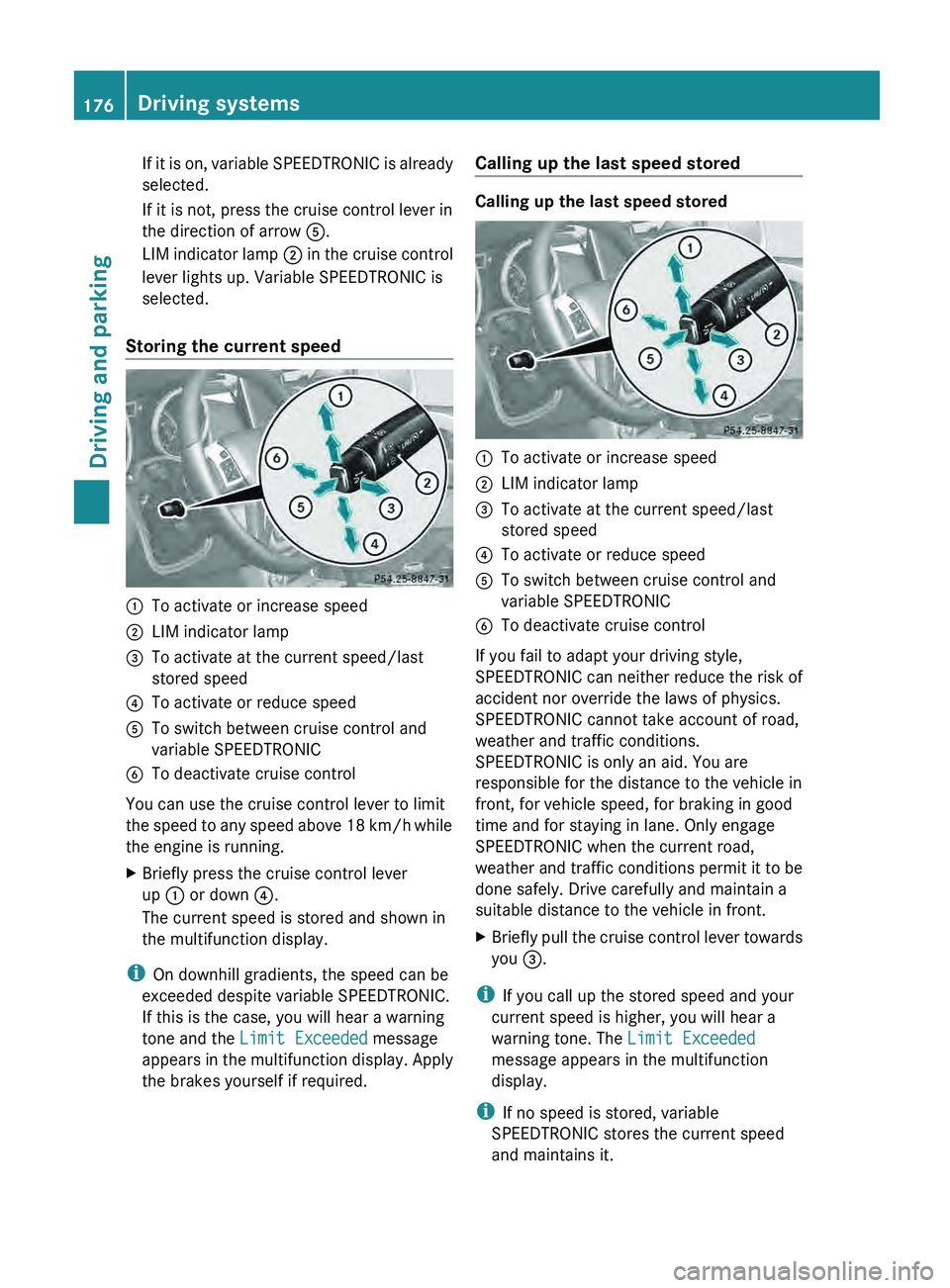
Storing the current speed 0043
To activate or increase speed
0044 LIM indicator lamp
0087 To activate at the current speed/last
stored speed
0085 To activate or reduce speed
0083 To switch between cruise control and
variable SPEEDTRONIC
0084 To deactivate cruise control
You can use the cruise control lever to limit
the speed to
any
speed above 18 km/h while
the engine is running.
X Briefly press the cruise control lever
up 0043 or down 0085.
The current speed is stored and shown in
the multifunction display.
i On downhill gradients, the speed can be
exceeded despite variable SPEEDTRONIC.
If this is the case, you will hear a warning
tone and the Limit Exceeded message
appears in the
multifunction
display. Apply
the brakes yourself if required. Calling up the last speed stored Calling up the last speed stored
0043
To activate or increase speed
0044 LIM indicator lamp
0087 To activate at the current speed/last
stored speed
0085 To activate or reduce speed
0083 To switch between cruise control and
variable SPEEDTRONIC
0084 To deactivate cruise control
If you fail to adapt your driving style,
SPEEDTRONIC can neither
reduce
the risk of
accident nor override the laws of physics.
SPEEDTRONIC cannot take account of road,
weather and traffic conditions.
SPEEDTRONIC is only an aid. You are
responsible for the distance to the vehicle in
front, for vehicle speed, for braking in good
time and for staying in lane. Only engage
SPEEDTRONIC when the current road,
weather and traffic conditions permit it to be
done safely. Drive carefully and maintain a
suitable distance to the vehicle in front.
X Briefly pull the cruise control lever towards
you 0087.
i If you call up the stored speed and your
current speed is higher, you will hear a
warning tone. The Limit Exceeded
message appears in the multifunction
display.
i If no speed is stored, variable
SPEEDTRONIC stores the current speed
and maintains it. 176
Driving systems
Driving and parking
Page 179 of 364
Deactivating variable SPEEDTRONIC
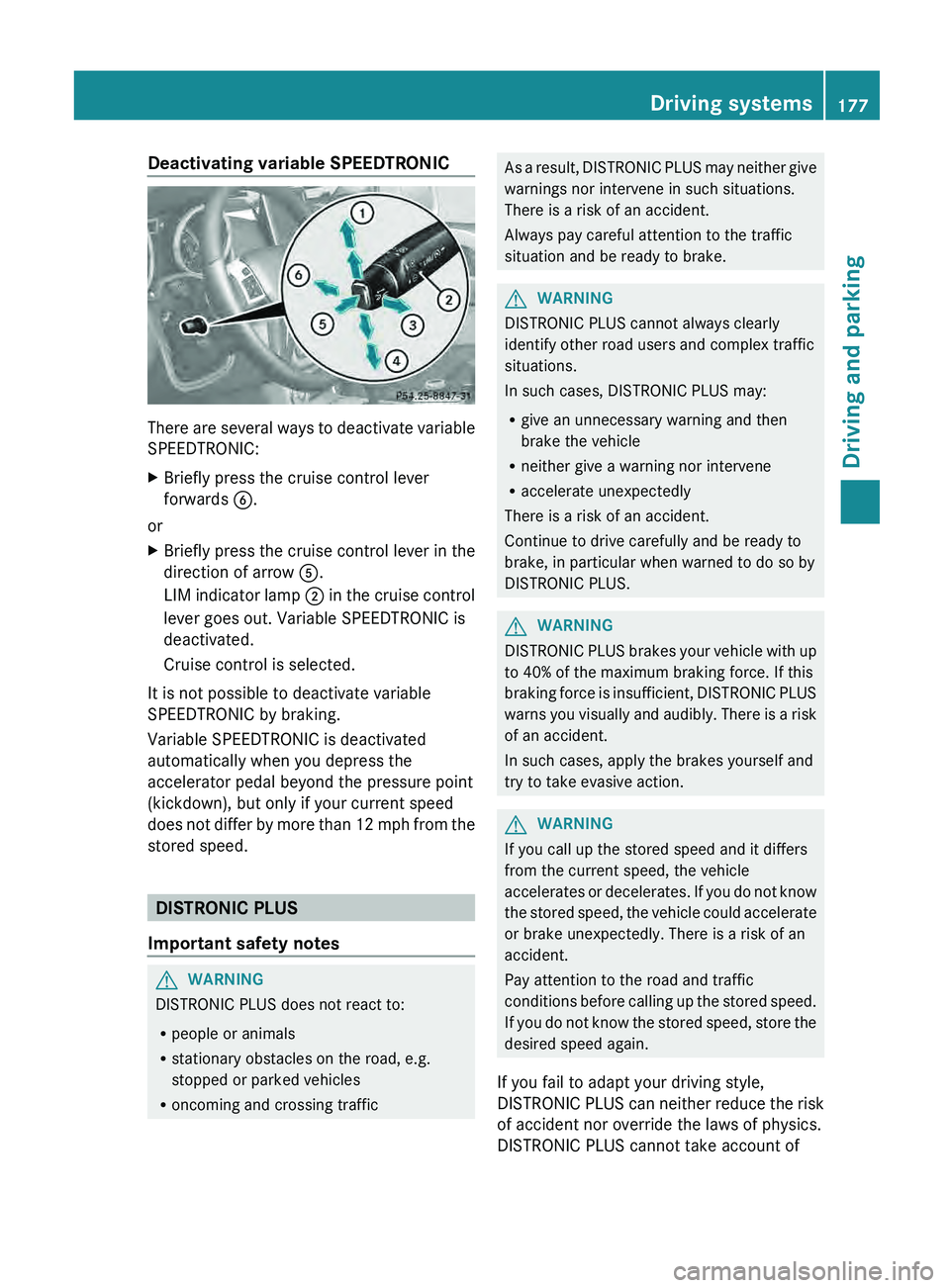
There are several ways to deactivate variable
SPEEDTRONIC:
X
Briefly press the cruise control lever
forwards 0084.
or
X Briefly press the cruise control lever in the
direction of arrow 0083.
LIM indicator lamp
0044
in the cruise control
lever goes out. Variable SPEEDTRONIC is
deactivated.
Cruise control is selected.
It is not possible to deactivate variable
SPEEDTRONIC by braking.
Variable SPEEDTRONIC is deactivated
automatically when you depress the
accelerator pedal beyond the pressure point
(kickdown), but only if your current speed
does not differ
by
more than 12 mph from the
stored speed. DISTRONIC PLUS
Important safety notes G
WARNING
DISTRONIC PLUS does not react to:
R people or animals
R stationary obstacles on the road, e.g.
stopped or parked vehicles
R oncoming and crossing traffic As a result, DISTRONIC PLUS may neither give
warnings nor intervene in such situations.
There is a risk of an accident.
Always pay careful attention to the traffic
situation and be ready to brake.
G
WARNING
DISTRONIC PLUS cannot always clearly
identify other road users and complex traffic
situations.
In such cases, DISTRONIC PLUS may:
R give an unnecessary warning and then
brake the vehicle
R neither give a warning nor intervene
R accelerate unexpectedly
There is a risk of an accident.
Continue to drive carefully and be ready to
brake, in particular when warned to do so by
DISTRONIC PLUS. G
WARNING
DISTRONIC PLUS brakes your vehicle with up
to 40% of the maximum braking force. If this
braking force is insufficient,
DISTRONIC PLUS
warns you visually and audibly. There is a risk
of an accident.
In such cases, apply the brakes yourself and
try to take evasive action. G
WARNING
If you call up the stored speed and it differs
from the current speed, the vehicle
accelerates or decelerates. If
you do not know
the stored speed, the vehicle could accelerate
or brake unexpectedly. There is a risk of an
accident.
Pay attention to the road and traffic
conditions before calling up the stored speed.
If you do not know the stored speed, store the
desired speed again.
If you fail to adapt your driving style,
DISTRONIC PLUS can neither reduce the risk
of accident nor override the laws of physics.
DISTRONIC PLUS cannot take account of Driving systems
177
Driving and parking Z
Page 180 of 364
road, weather and traffic conditions.
DISTRONIC PLUS is only an aid. You are
responsible for the distance to the vehicle in
front, for vehicle speed, for braking in good
time and for staying in lane. Only engage
DISTRONIC PLUS when the current road,
weather and traffic
conditions
permit it to be
done safely, and adapt your driving style
accordingly. Drive carefully and maintain a
suitable distance to the vehicle in front.
If DISTRONIC PLUS detects a risk of collision
but cannot sufficiently decelerate the vehicle
in order to maintain the set distance, you will
be warned visually and acoustically.
DISTRONIC PLUS cannot prevent a collision
without your intervention. An intermittent
warning tone will then sound and the distance
warning lamp will light up in the instrument
cluster. Brake immediately in order to
increase the distance from the vehicle in
front, or take evasive action, provided it is
safe to do so.
DISTRONIC PLUS may not detect narrow
vehicles driving in front, e.g. motorcycles, or
vehicles driving on a different line. Therefore,
always pay attention to traffic conditions
even when DISTRONIC PLUS is activated.
Otherwise, you may fail to recognize dangers
in time, cause an accident and injure yourself
and others.
In particular, the detection of obstacles can
be impaired if there is:
R the sensor is dirty or covered
R snow or heavy rain
R interference by other radar sources
R there is the possibility of strong radar
reflections, for example, in parking
garages.
If DISTRONIC PLUS is activated, the vehicle
brakes automatically in certain situations.
This can happen unexpectedly, especially
when towing or in a car wash. There is a risk
of an accident. In these or similar situations,
deactivate DISTRONIC PLUS.
If you want DISTRONIC PLUS to assist you,
the following activation conditions must be fulfilled (
Y page 179) and the radar sensor
system must be operational.
General notes DISTRONIC PLUS regulates the speed and
automatically helps you maintain the
distance to the vehicle detected in front.
DISTRONIC PLUS brakes automatically so
that the set speed is not exceeded.
On long and steep downhill gradients,
especially if the vehicle is laden or towing a
trailer, you must select shift range
1, 2 or 3
in good time. By doing so, you will make use
of the braking effect of the engine, which
relieves the load on the brake system and
prevents the brakes from overheating and
wearing too quickly.
If DISTRONIC PLUS detects a slower-moving
vehicle in front, your
vehicle is braked in order
to maintain the preset distance to the vehicle
in front.
If there is no vehicle in front, DISTRONIC
PLUS operates in the same way as cruise
control in the speed range between 20 mph
(Canada: 30 km/h) and120 mph (Canada:
200 km/h). If a vehicle is driving in front of
you, it operates in the speed range between
0 mph (0 km/h) and 120 mph (Canada:
200 km/h).
Do not use DISTRONIC PLUS while driving on
roads with steep gradients.
As DISTRONIC PLUS transmits radar waves,
it can resemble the radar detectors of the
responsible authorities. You can refer to the
relevant chapter in the Operator's Manual if
questions are asked about this.
i USA only:
This device has been approved by the FCC
as a “Vehicular Radar System”. The radar
sensor is intended for use in an automotive
radar system only. Removal, tampering, or
altering of the device will void any
warranties, and is not permitted by the
FCC. Do not tamper with, alter, or use in
any non-approved way. 178
Driving systems
Driving and parking
Page 182 of 364
Activating while driving
When driving at speeds below 20 mph
(30 km/h)
you
can activate DISTRONIC PLUS
if the vehicle in front has been detected and
is shown in the multifunction display. If the
vehicle in front is no longer detected and
displayed, DISTRONIC PLUS switches off and
a tone sounds.
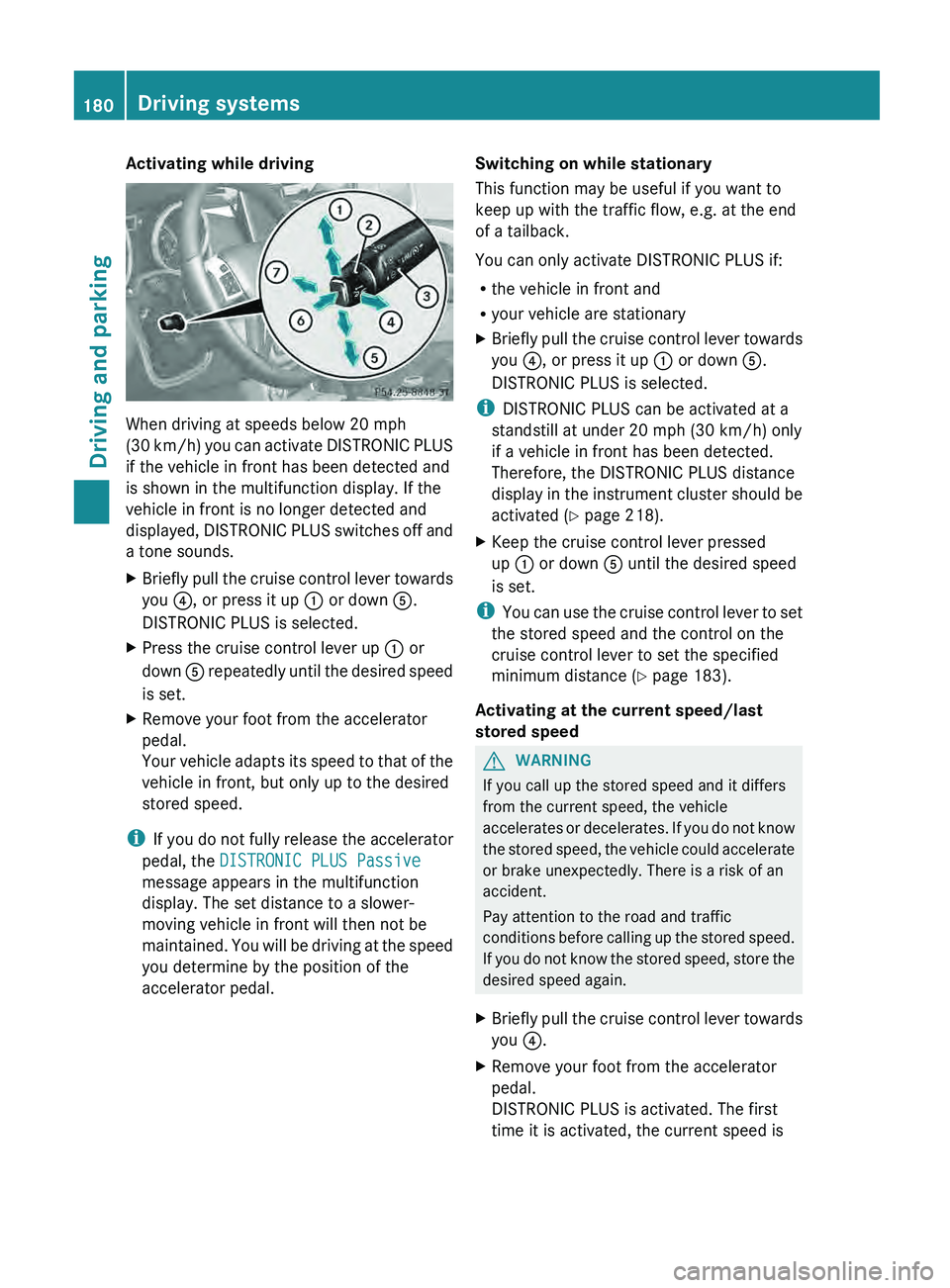
X Briefly pull the cruise control lever towards
you 0085, or press it up 0043 or down 0083.
DISTRONIC PLUS is selected.
X Press the cruise control lever up 0043 or
down 0083 repeatedly until the
desired speed
is set.
X Remove your foot from the accelerator
pedal.
Your vehicle adapts
its
speed to that of the
vehicle in front, but only up to the desired
stored speed.
i If you do not
fully release the accelerator
pedal, the DISTRONIC PLUS Passive
message appears in the multifunction
display. The set distance to a slower-
moving vehicle in front will then not be
maintained. You will be driving at the speed
you determine by the position of the
accelerator pedal. Switching on while stationary
This function may be useful if you want to
keep up with the traffic flow, e.g. at the end
of a tailback.
You can only activate DISTRONIC PLUS if:
R
the vehicle in front and
R your vehicle are stationary
X Briefly pull the cruise control lever towards
you 0085, or press it up 0043 or down 0083.
DISTRONIC PLUS is selected.
i DISTRONIC PLUS can be activated at a
standstill at under 20 mph (30 km/h) only if a vehicle in front has been detected.
Therefore, the DISTRONIC PLUS distance
display in the
instrument cluster should be
activated (Y page 218).
X Keep the cruise control lever pressed
up 0043 or down 0083 until the desired speed
is set.
i You can use the
cruise control lever to set
the stored speed and the control on the
cruise control lever to set the specified
minimum distance (Y page 183).
Activating at the current speed/last
stored speed G
WARNING
If you call up the stored speed and it differs
from the current speed, the vehicle
accelerates or decelerates. If
you do not know
the stored speed, the vehicle could accelerate
or brake unexpectedly. There is a risk of an
accident.
Pay attention to the road and traffic
conditions before calling up the stored speed.
If you do not know the stored speed, store the
desired speed again.
X Briefly pull the cruise control lever towards
you 0085.
X Remove your foot from the accelerator
pedal.
DISTRONIC PLUS is activated. The first
time it is activated, the current speed is180
Driving systems
Driving and parking
Page 183 of 364
stored. Otherwise, it sets the vehicle cruise
speed to the previously stored value.
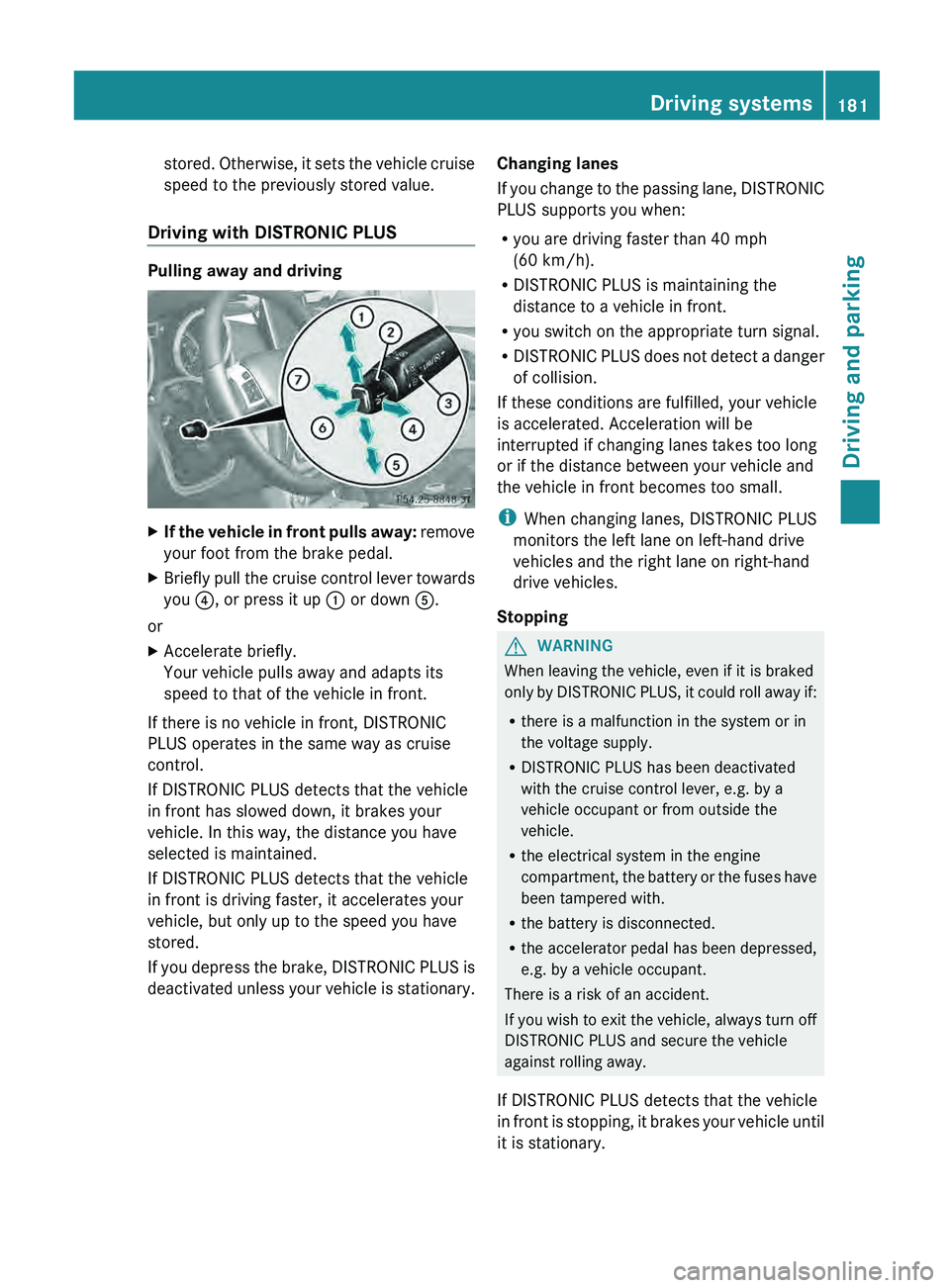
Driving with DISTRONIC PLUS Pulling away and driving
X
If the vehicle in front pulls away: remove
your foot from the brake pedal.
X Briefly pull the
cruise control lever towards
you 0085, or press it up 0043 or down 0083.
or
X Accelerate briefly.
Your vehicle pulls away and adapts its
speed to that of the vehicle in front.
If there is no vehicle in front, DISTRONIC
PLUS operates in the same way as cruise
control.
If DISTRONIC PLUS detects that the vehicle
in front has slowed down, it brakes your
vehicle. In this way, the distance you have
selected is maintained.
If DISTRONIC PLUS detects that the vehicle
in front is driving faster, it accelerates your
vehicle, but only up to the speed you have
stored.
If you depress the
brake, DISTRONIC PLUS is
deactivated unless your vehicle is stationary. Changing lanes
If you change
to
the passing lane, DISTRONIC
PLUS supports you when:
R you are driving faster than 40 mph
(60 km/h).
R DISTRONIC PLUS is maintaining the
distance to a vehicle in front.
R you switch on the appropriate turn signal.
R DISTRONIC PLUS does not detect a danger
of collision.
If these conditions are fulfilled, your vehicle
is accelerated. Acceleration will be
interrupted if changing lanes takes too long
or if the distance between your vehicle and
the vehicle in front becomes too small.
i When changing lanes, DISTRONIC PLUS
monitors the left lane on left-hand drive
vehicles and the right lane on right-hand
drive vehicles.
Stopping G
WARNING
When leaving the vehicle, even if it is braked
only by DISTRONIC PLUS,
it could roll away if:
R there is a malfunction in the system or in
the voltage supply.
R DISTRONIC PLUS has been deactivated
with the cruise control lever, e.g. by a
vehicle occupant or from outside the
vehicle.
R the electrical system in the engine
compartment, the battery or the fuses have
been tampered with.
R the battery is disconnected.
R the accelerator pedal has been depressed,
e.g. by a vehicle occupant.
There is a risk of an accident.
If you wish to exit the vehicle, always turn off
DISTRONIC PLUS and secure the vehicle
against rolling away.
If DISTRONIC PLUS detects that the vehicle
in front is stopping, it brakes your vehicle until
it is stationary. Driving systems
181
Driving and parking Z
Page 186 of 364
X
To increase: turn control 0087 in
direction 0044.
DISTRONIC PLUS then
maintains
a greater
distance between your vehicle and the
vehicle in front.
X To decrease: turn control 0087 in
direction 0043.
DISTRONIC PLUS then
maintains
a shorter
distance between your vehicle and the
vehicle in front.
i Make sure that you maintain the
minimum distance to the
vehicle in front as
required by law. Adjust the distance to the
vehicle in front if necessary.
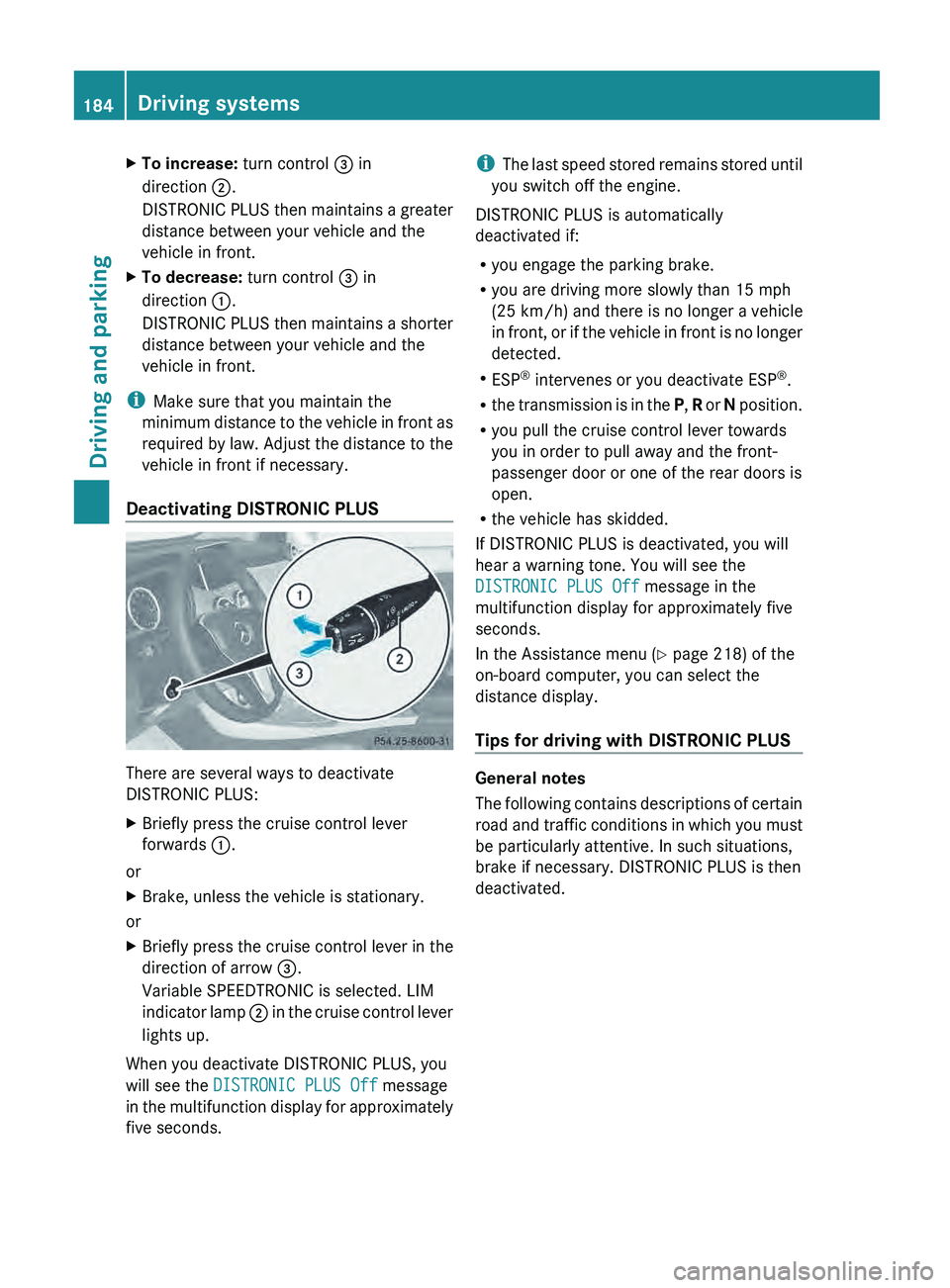
Deactivating DISTRONIC PLUS There are several ways to deactivate
DISTRONIC PLUS:
X
Briefly press the cruise control lever
forwards 0043.
or
X Brake, unless the vehicle is stationary.
or
X Briefly press the cruise control lever in the
direction of arrow 0087.
Variable SPEEDTRONIC is selected. LIM
indicator lamp 0044 in
the cruise control lever
lights up.
When you deactivate DISTRONIC PLUS, you
will see the DISTRONIC PLUS Off message
in the multifunction
display
for approximately
five seconds. i
The last speed stored
remains stored until
you switch off the engine.
DISTRONIC PLUS is automatically
deactivated if:
R you engage the parking brake.
R you are driving more slowly than 15 mph
(25 km/h) and there is no longer a vehicle
in front, or if the vehicle in front is no longer
detected.
R ESP ®
intervenes or you deactivate ESP ®
.
R the transmission is in the P, R or N position.
R you pull the cruise control lever towards
you in order to pull away and the front-
passenger door or one of the rear doors is
open.
R the vehicle has skidded.
If DISTRONIC PLUS is deactivated, you will
hear a warning tone. You will see the
DISTRONIC PLUS Off message in the
multifunction display for approximately five
seconds.
In the Assistance menu (Y page 218) of the
on-board computer, you can select the
distance display.
Tips for driving with DISTRONIC PLUS General notes
The following contains
descriptions
of certain
road and traffic conditions in which you must
be particularly attentive. In such situations,
brake if necessary. DISTRONIC PLUS is then
deactivated. 184
Driving systems
Driving and parking
Page 188 of 364
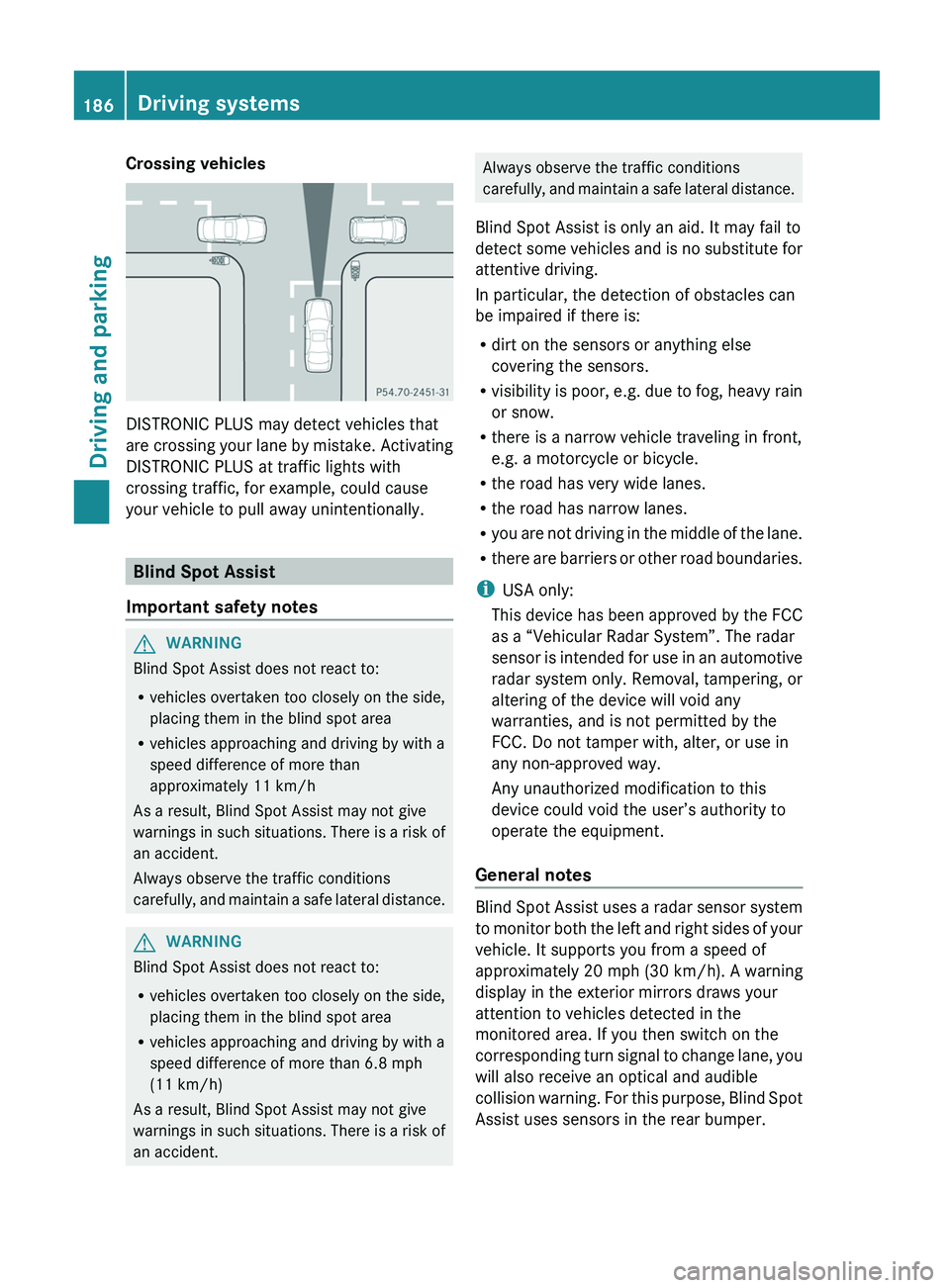
Crossing vehicles
DISTRONIC PLUS may detect vehicles that
are crossing your
lane
by mistake. Activating
DISTRONIC PLUS at traffic lights with
crossing traffic, for example, could cause
your vehicle to pull away unintentionally. Blind Spot Assist
Important safety notes G
WARNING
Blind Spot Assist does not react to:
R vehicles overtaken too closely on the side,
placing them in the blind spot area
R vehicles approaching and driving by with a
speed difference of more than
approximately 11 km/h
As a result, Blind Spot Assist may not give
warnings in such
situations. There is a risk of
an accident.
Always observe the traffic conditions
carefully, and maintain a safe lateral distance. G
WARNING
Blind Spot Assist does not react to:
R vehicles overtaken too closely on the side,
placing them in the blind spot area
R vehicles approaching and driving by with a
speed difference of more than 6.8 mph
(11 km/h)
As a result, Blind Spot Assist may not give
warnings in such
situations. There is a risk of
an accident. Always observe the traffic conditions
carefully, and maintain
a
safe lateral distance.
Blind Spot Assist is only an aid. It may fail to
detect some vehicles and is no substitute for
attentive driving.
In particular, the detection of obstacles can
be impaired if there is:
R dirt on the sensors or anything else
covering the sensors.
R visibility is poor, e.g. due to fog, heavy rain
or snow.
R there is a narrow vehicle traveling in front,
e.g. a motorcycle or bicycle.
R the road has very wide lanes.
R the road has narrow lanes.
R you are not driving in the middle of the lane.
R there are barriers or other road boundaries.
i USA only:
This device has been approved by the FCC
as a “Vehicular Radar System”. The radar
sensor is intended for use in an automotive
radar system only. Removal, tampering, or
altering of the device will void any
warranties, and is not permitted by the
FCC. Do not tamper with, alter, or use in
any non-approved way.
Any unauthorized modification to this
device could void the user’s authority to
operate the equipment.
General notes Blind Spot Assist uses a radar sensor system
to monitor both
the
left and right sides of your
vehicle. It supports you from a speed of
approximately 20 mph (30 km/h). A warning
display in the exterior mirrors draws your
attention to vehicles detected in the
monitored area. If you then switch on the
corresponding turn signal to change lane, you
will also receive an optical and audible
collision warning. For this purpose, Blind Spot
Assist uses sensors in the rear bumper. 186
Driving systems
Driving and parking
Page 189 of 364
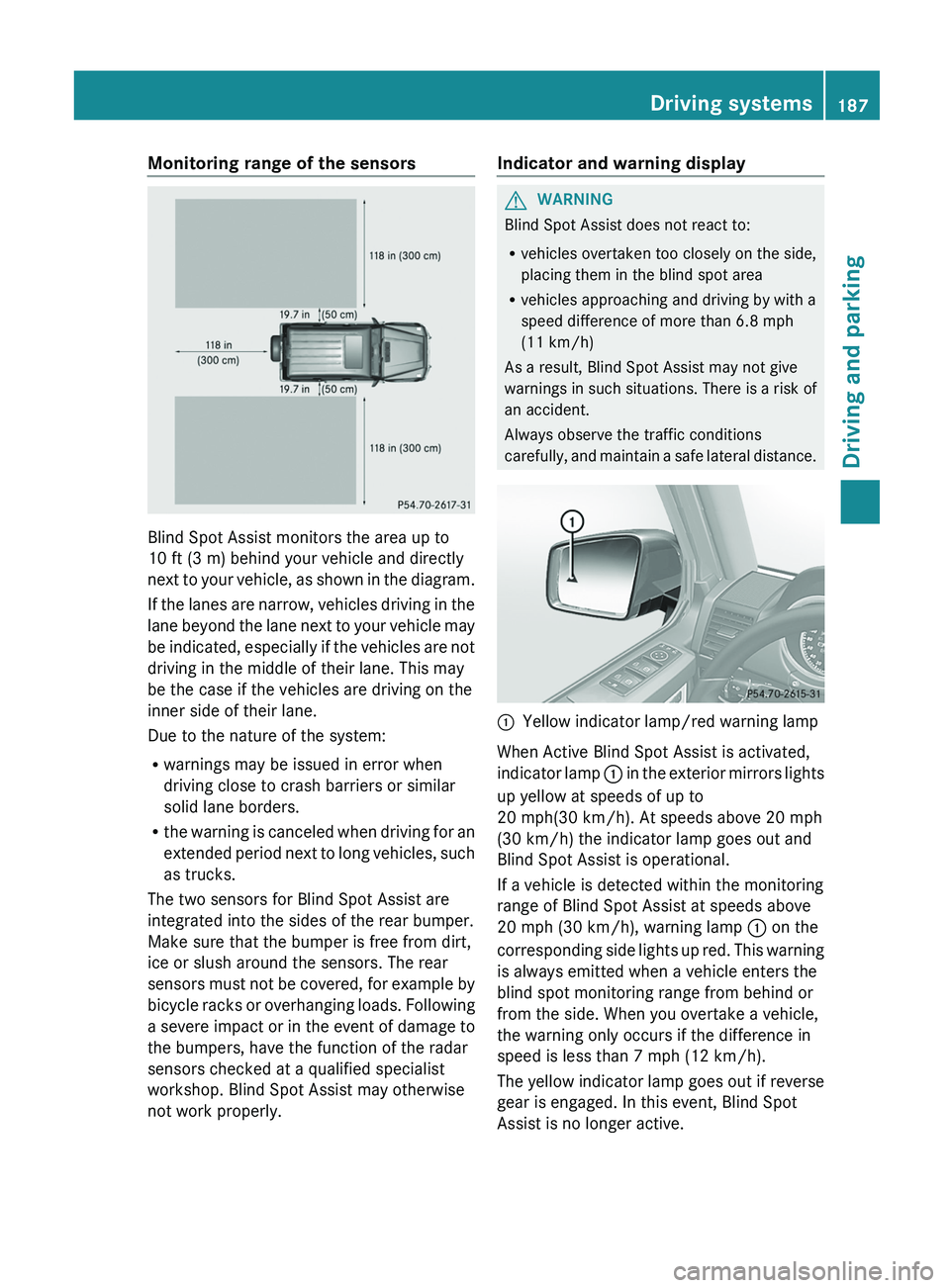
Monitoring range of the sensors
Blind Spot Assist monitors the area up to
10 ft (3 m) behind your vehicle and directly
next to
your
vehicle, as shown in the diagram.
If the lanes are narrow, vehicles driving in the
lane beyond the lane next to your vehicle may
be indicated, especially if the vehicles are not
driving in the middle of their lane. This may
be the case if the vehicles are driving on the
inner side of their lane.
Due to the nature of the system:
R warnings may be issued in error when
driving close to crash barriers or similar
solid lane borders.
R the warning is canceled when driving for an
extended period next to long vehicles, such
as trucks.
The two sensors for Blind Spot Assist are
integrated into the sides of the rear bumper.
Make sure that the bumper is free from dirt,
ice or slush around the sensors. The rear
sensors must not be covered, for example by
bicycle racks or overhanging loads. Following
a severe impact or in the event of damage to
the bumpers, have the function of the radar
sensors checked at a qualified specialist
workshop. Blind Spot Assist may otherwise
not work properly. Indicator and warning display G
WARNING
Blind Spot Assist does not react to:
R vehicles overtaken too closely on the side,
placing them in the blind spot area
R vehicles approaching and driving by with a
speed difference of more than 6.8 mph
(11 km/h)
As a result, Blind Spot Assist may not give
warnings in such
situations. There is a risk of
an accident.
Always observe the traffic conditions
carefully, and maintain a safe lateral distance. 0043
Yellow indicator lamp/red warning lamp
When Active Blind Spot Assist is activated,
indicator lamp
0043
in
the exterior mirrors lights
up yellow at speeds of up to
20 mph(30 km/h). At speeds above 20 mph
(30 km/h) the indicator lamp goes out and
Blind Spot Assist is operational.
If a vehicle is detected within the monitoring
range of Blind Spot Assist at speeds above
20 mph (30 km/h), warning lamp 0043 on the
corresponding side lights up red. This warning
is always emitted when a vehicle enters the
blind spot monitoring range from behind or
from the side. When you overtake a vehicle,
the warning only occurs if the difference in
speed is less than 7 mph (12 km/h).
The yellow indicator lamp goes out if reverse
gear is engaged. In this event, Blind Spot
Assist is no longer active. Driving systems
187
Driving and parking Z
Page 190 of 364
The brightness of the indicator/warning
lamps is adjusted
automatically
according to
the ambient light.
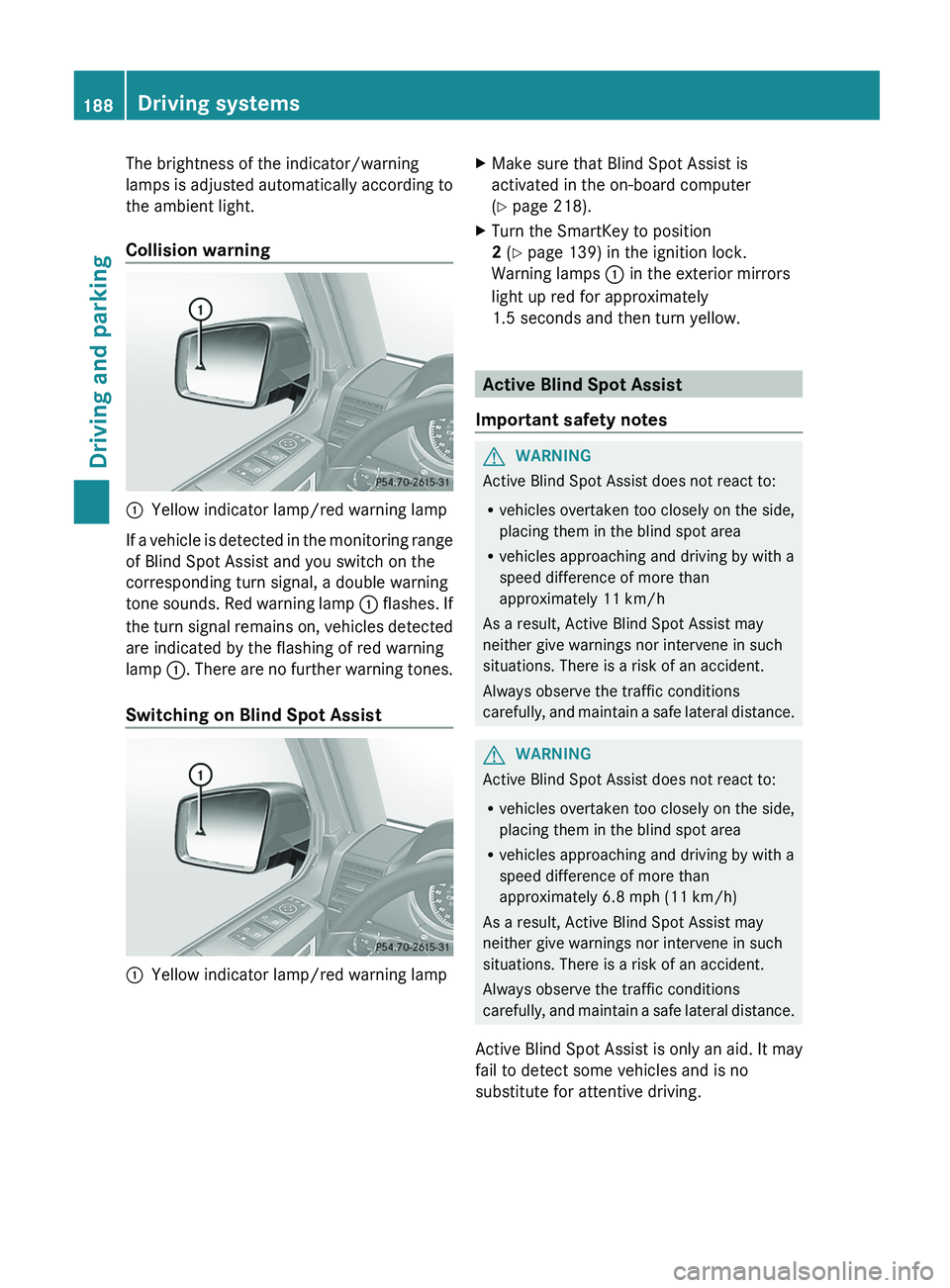
Collision warning 0043
Yellow indicator lamp/red warning lamp
If a vehicle is detected in the monitoring range
of Blind Spot Assist and you switch on the
corresponding turn signal, a double warning
tone sounds.
Red warning
lamp 0043 flashes. If
the turn signal remains on, vehicles detected
are indicated by the flashing of red warning
lamp 0043. There are no further warning tones.
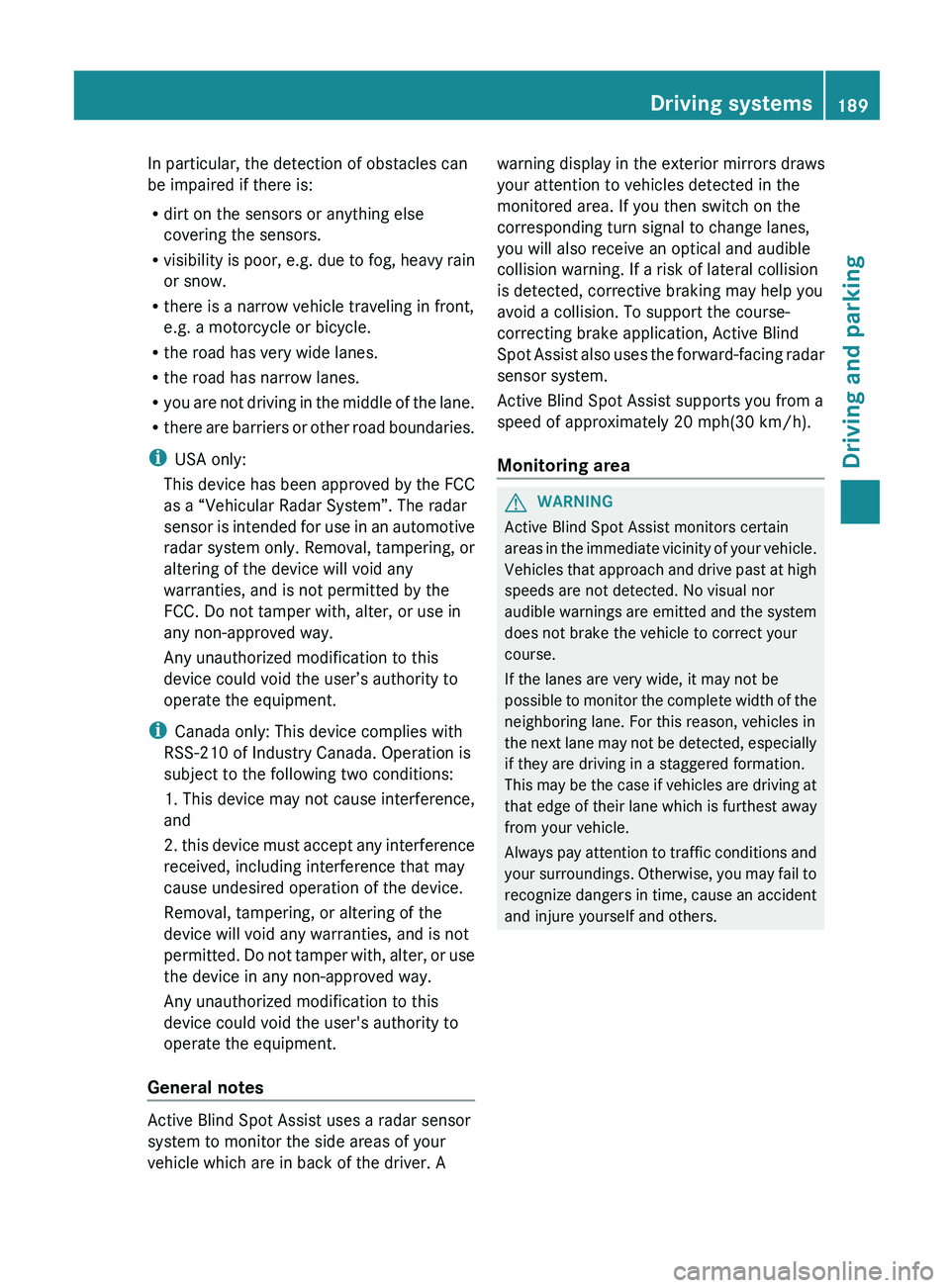
Switching on Blind Spot Assist 0043
Yellow indicator lamp/red warning lamp X
Make sure that Blind Spot Assist is
activated in the on-board computer
(Y page 218).
X Turn the SmartKey to position
2 (Y page 139) in the ignition lock.
Warning lamps 0043 in the exterior mirrors
light up red for approximately
1.5 seconds and then turn yellow. Active Blind Spot Assist
Important safety notes G
WARNING
Active Blind Spot Assist does not react to:
R vehicles overtaken too closely on the side,
placing them in the blind spot area
R vehicles approaching and driving by with a
speed difference of more than
approximately 11 km/h
As a result, Active Blind Spot Assist may
neither give warnings nor intervene in such
situations. There is a risk of an accident.
Always observe the traffic conditions
carefully, and maintain
a safe lateral distance. G
WARNING
Active Blind Spot Assist does not react to:
R vehicles overtaken too closely on the side,
placing them in the blind spot area
R vehicles approaching and driving by with a
speed difference of more than
approximately 6.8 mph (11 km/h)
As a result, Active Blind Spot Assist may
neither give warnings nor intervene in such
situations. There is a risk of an accident.
Always observe the traffic conditions
carefully, and
maintain a safe lateral distance.
Active Blind Spot Assist is only an aid. It may
fail to detect some vehicles and is no
substitute for attentive driving. 188
Driving systems
Driving and parking
Page 191 of 364
In particular, the detection of obstacles can
be impaired if there is:
R
dirt on the sensors or anything else
covering the sensors.
R visibility is poor, e.g.
due to fog, heavy rain
or snow.
R there is a narrow vehicle traveling in front,
e.g. a motorcycle or bicycle.
R the road has very wide lanes.
R the road has narrow lanes.
R you are not driving in the middle of the lane.
R there are barriers or other road boundaries.
i USA only:
This device has been approved by the FCC
as a “Vehicular Radar System”. The radar
sensor is intended for use in an automotive
radar system only. Removal, tampering, or
altering of the device will void any
warranties, and is not permitted by the
FCC. Do not tamper with, alter, or use in
any non-approved way.
Any unauthorized modification to this
device could void the user’s authority to
operate the equipment.
i Canada only: This device complies with
RSS-210 of Industry Canada. Operation is
subject to the following two conditions:
1. This device may not cause interference,
and
2. this device must accept any interference
received, including interference that may
cause undesired operation of the device.
Removal, tampering, or altering of the
device will void any warranties, and is not
permitted. Do not tamper with, alter, or use
the device in any non-approved way.
Any unauthorized modification to this
device could void the user's authority to
operate the equipment.
General notes Active Blind Spot Assist uses a radar sensor
system to monitor the side areas of your
vehicle which are in back of the driver. A warning display in the exterior mirrors draws
your attention to vehicles detected in the
monitored area. If you then switch on the
corresponding turn signal to change lanes,
you will also receive an optical and audible
collision warning. If a risk of lateral collision
is detected, corrective braking may help you
avoid a collision. To support the course-
correcting brake application, Active Blind
Spot Assist also
uses
the forward-facing radar
sensor system.
Active Blind Spot Assist supports you from a
speed of approximately 20 mph(30 km/h).
Monitoring area G
WARNING
Active Blind Spot Assist monitors certain
areas in the immediate
vicinity of your vehicle.
Vehicles that approach and drive past at high
speeds are not detected. No visual nor
audible warnings are emitted and the system
does not brake the vehicle to correct your
course.
If the lanes are very wide, it may not be
possible to monitor the complete width of the
neighboring lane. For this reason, vehicles in
the next lane may not be detected, especially
if they are driving in a staggered formation.
This may be the case if vehicles are driving at
that edge of their lane which is furthest away
from your vehicle.
Always pay attention to traffic conditions and
your surroundings. Otherwise, you may fail to
recognize dangers in time, cause an accident
and injure yourself and others. Driving systems
189
Driving and parking Z