coolant MERCEDES-BENZ G-CLASS SUV 2013 User Guide
[x] Cancel search | Manufacturer: MERCEDES-BENZ, Model Year: 2013, Model line: G-CLASS SUV, Model: MERCEDES-BENZ G-CLASS SUV 2013Pages: 364, PDF Size: 9.62 MB
Page 212 of 364
vehicle and do not stand near the vehicle until
the engine has cooled down.
! A display message is
shown if the coolant
temperature is too high.
If the coolant temperature is over
248 ‡(120 †), do not continue driving. The
engine will otherwise be damaged.
The coolant temperature gauge is in the
instrument cluster on the right-hand side
(Y page 209).
Under normal operating conditions and with
the specified coolant level, the coolant
temperature may rise to 248 ‡ (120 †). Tachometer
! Do not drive in the overrevving range, as
this could damage the engine.
The red band in
the tachometer indicates the
engine's overrevving range.
The fuel supply is interrupted to protect the
engine when the red band is reached. Outside temperature display
G
WARNING
The outside temperature indicator is not
designed to serve as an ice-warning device
and is therefore unsuitable for that purpose.
Indicated temperatures just above the
freezing point do not
guarantee that the road
surface is free of ice. The road may still be icy,
especially in wooded areas or on bridges.
The outside temperature display is in the
multifunction display ( Y page 212).
Changes in the outside temperature are
displayed after a short delay. Speedometer with segments
The segments in the speedometer indicate
which speed range is available.
R Cruise control activated ( Y page 169):
The segments light up from the stored
speed to the maximum speed.
R Variable SPEEDTRONIC activated
(Y page 174):
The segments light up
from the start of the
scale to the selected limit speed.
R DISTRONIC PLUS activated (Y page 179):
One or two segments in the set speed
range light up.
R DISTRONIC PLUS detects a vehicle in front:
The segments between the speed of the
vehicle in front and the stored speed light
up. Operating the on-board computer
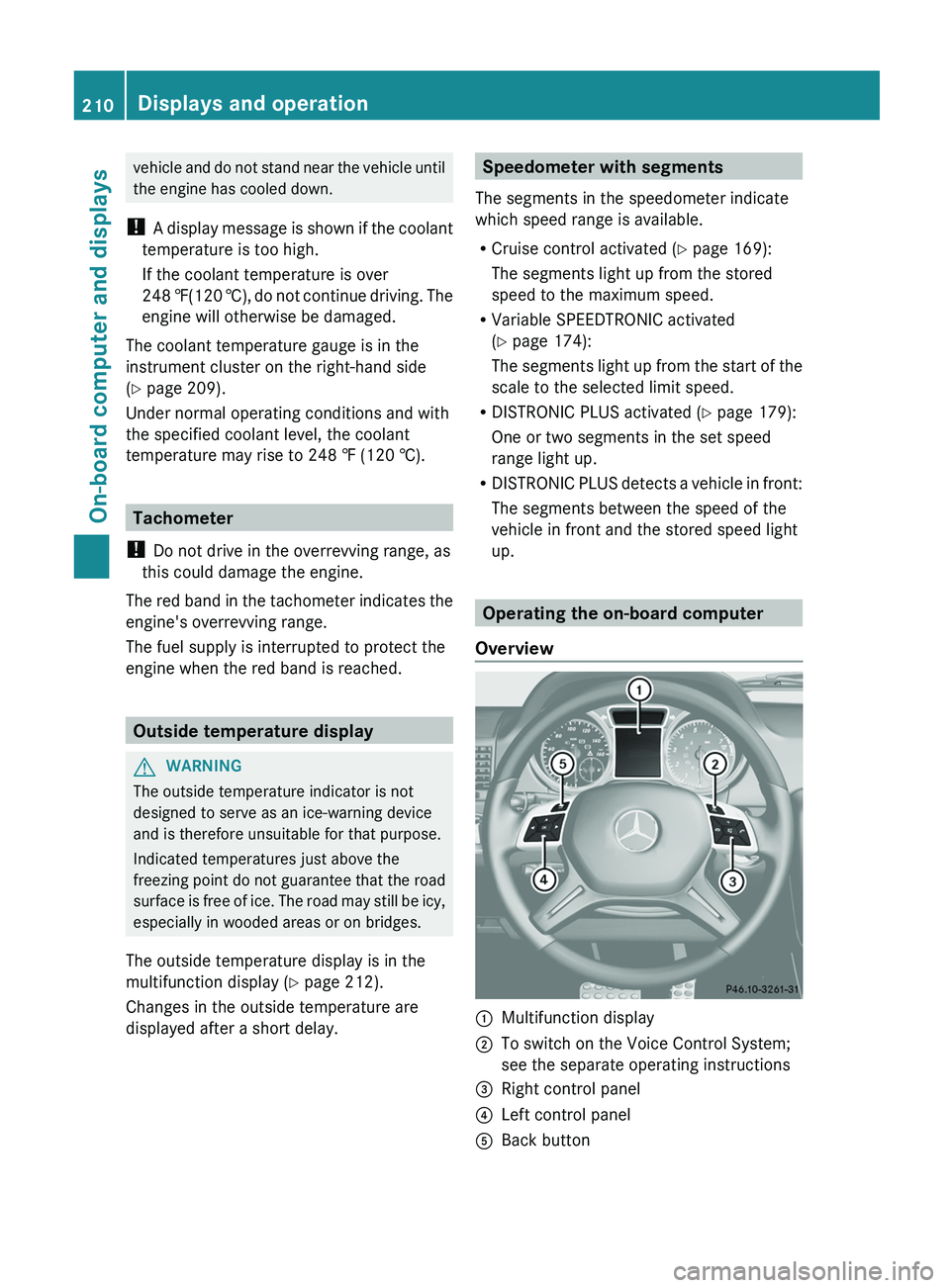
Overview 0043
Multifunction display
0044 To switch on the Voice Control System;
see the separate operating instructions
0087 Right control panel
0085 Left control panel
0083 Back button210
Displays and operation
On-board computer and displays
Page 224 of 364
You can then only fold out the exterior mirrors
using button 0043.
Restoring the factory settings
X Press the 0059 or 0065 button on the
steering wheel to select the Sett. menu.
X Press the 0064
or 0063 button to select the
Factory Setting submenu.
X Press 0076 to confirm.
The Reset All Settings? message
appears.
X Press the 0064 or 0063 button to select
No or Yes.
X Press 0076 to confirm the selection.
If you select Yes, the multifunction display
shows a confirmation message.
For safety reasons, the Daytime Running
Lights function in the Lights submenu is
only reset if the vehicle is stationary. AMG menu in AMG vehicles
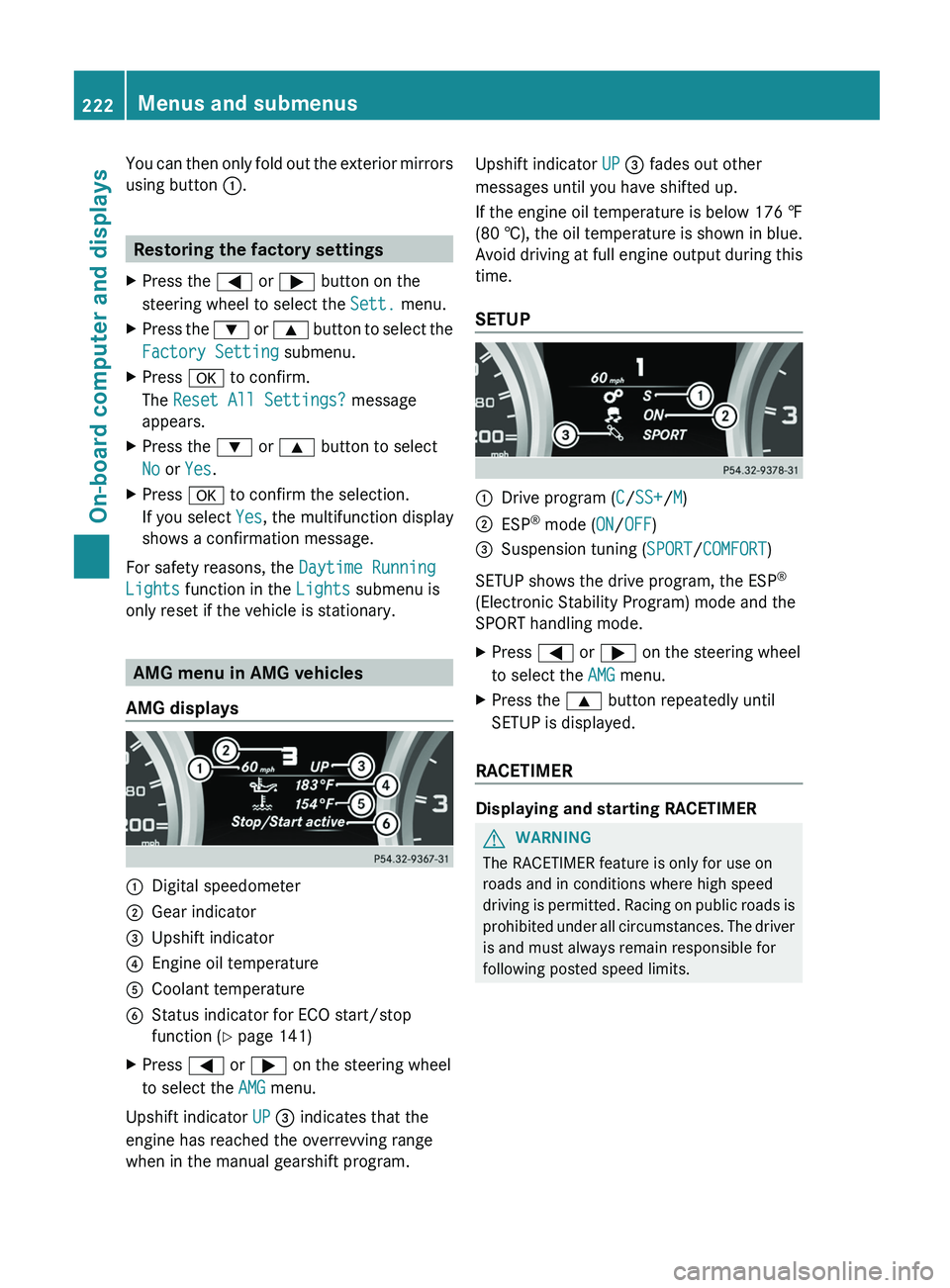
AMG displays 0043
Digital speedometer
0044 Gear indicator
0087 Upshift indicator
0085 Engine oil temperature
0083 Coolant temperature
0084 Status indicator for ECO start/stop
function ( Y page 141)
X Press 0059 or 0065 on the steering wheel
to select the AMG menu.
Upshift indicator UP 0087 indicates that the
engine has reached the overrevving range
when in the manual gearshift program. Upshift indicator UP 0087 fades out other
messages until you have shifted up.
If the engine oil temperature is below
176 ‡
(80 † ),
the oil temperature is shown in blue.
Avoid driving at full engine output during this
time.
SETUP 0043
Drive program (C/SS+/M)
0044 ESP ®
mode ( ON/OFF)
0087 Suspension tuning (SPORT/COMFORT)
SETUP shows the drive program, the ESP ®
(Electronic Stability Program) mode and the
SPORT handling mode.
X Press 0059 or 0065 on the steering wheel
to select the AMG menu.
X Press the 0063 button repeatedly until
SETUP is displayed.
RACETIMER Displaying and starting RACETIMER
G
WARNING
The RACETIMER feature is only for use on
roads and in conditions where high speed
driving is permitted.
Racing
on public roads is
prohibited under all circumstances. The driver
is and must always remain responsible for
following posted speed limits. 222
Menus and submenus
On-board computer and displays
Page 236 of 364
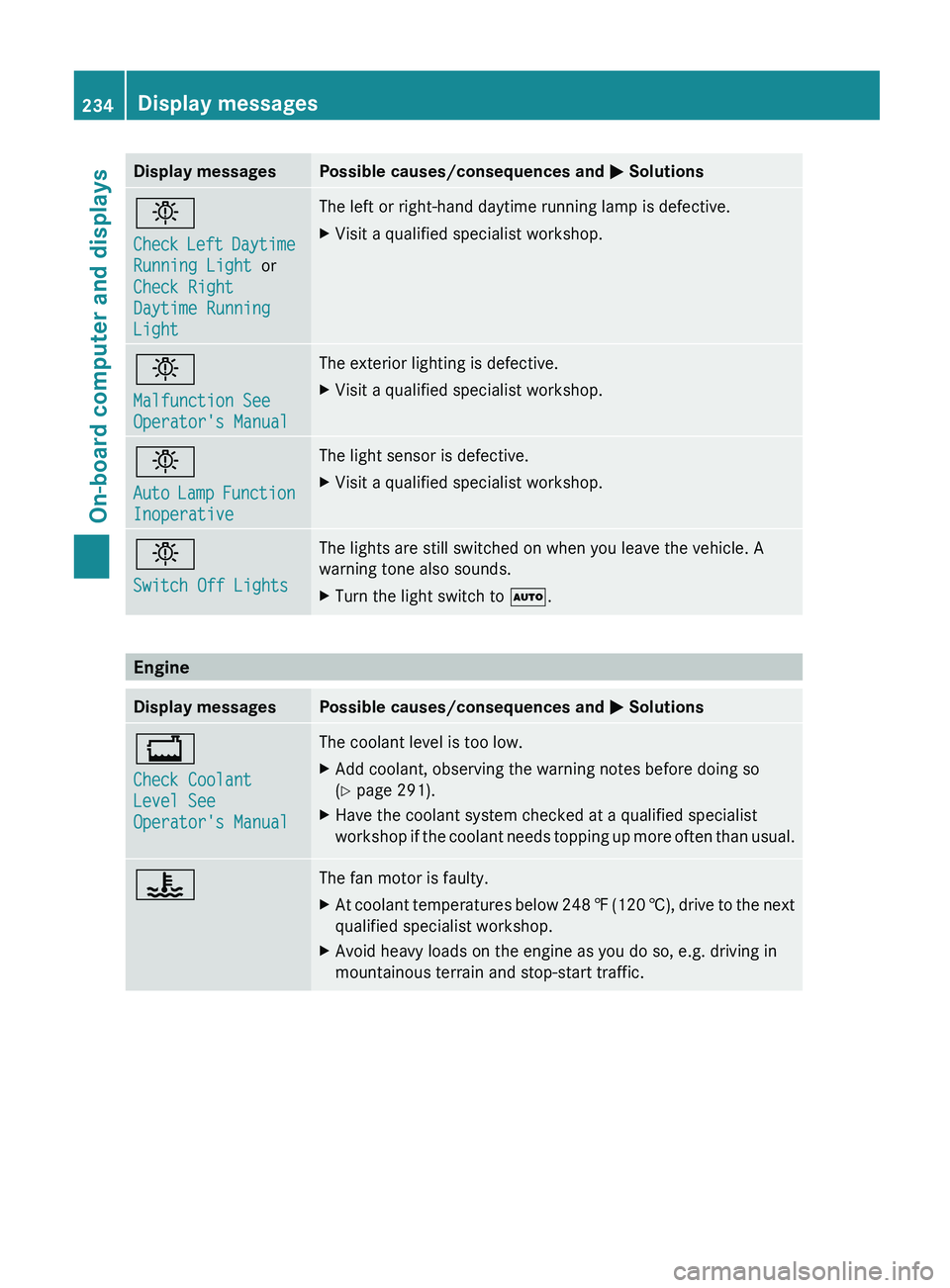
Display messages Possible causes/consequences and
0050 Solutions0049
Check Left Daytime
Running Light or
Check Right
Daytime Running
Light The left or right-hand daytime running lamp is defective.
X
Visit a qualified specialist workshop. 0049
Malfunction See
Operator's Manual The exterior lighting is defective.
X
Visit a qualified specialist workshop. 0049
Auto Lamp Function
Inoperative The light sensor is defective.
X
Visit a qualified specialist workshop. 0049
Switch Off Lights The lights are still switched on when you leave the vehicle. A
warning tone also sounds.
X
Turn the light switch to 0058. Engine
Display messages Possible causes/consequences and
0050 Solutions00BD
Check Coolant
Level See
Operator's Manual The coolant level is too low.
X
Add coolant, observing the warning notes before doing so
(Y page 291).
X Have the coolant system checked at a qualified specialist
workshop if the coolant
needs topping up more often than usual.00AC The fan motor is faulty.
X
At coolant temperatures below 248 ‡ (120 †), drive
to the next
qualified specialist workshop.
X Avoid heavy loads on the engine as you do so, e.g. driving in
mountainous terrain and stop-start traffic.234
Display messages
On-board computer and displays
Page 237 of 364
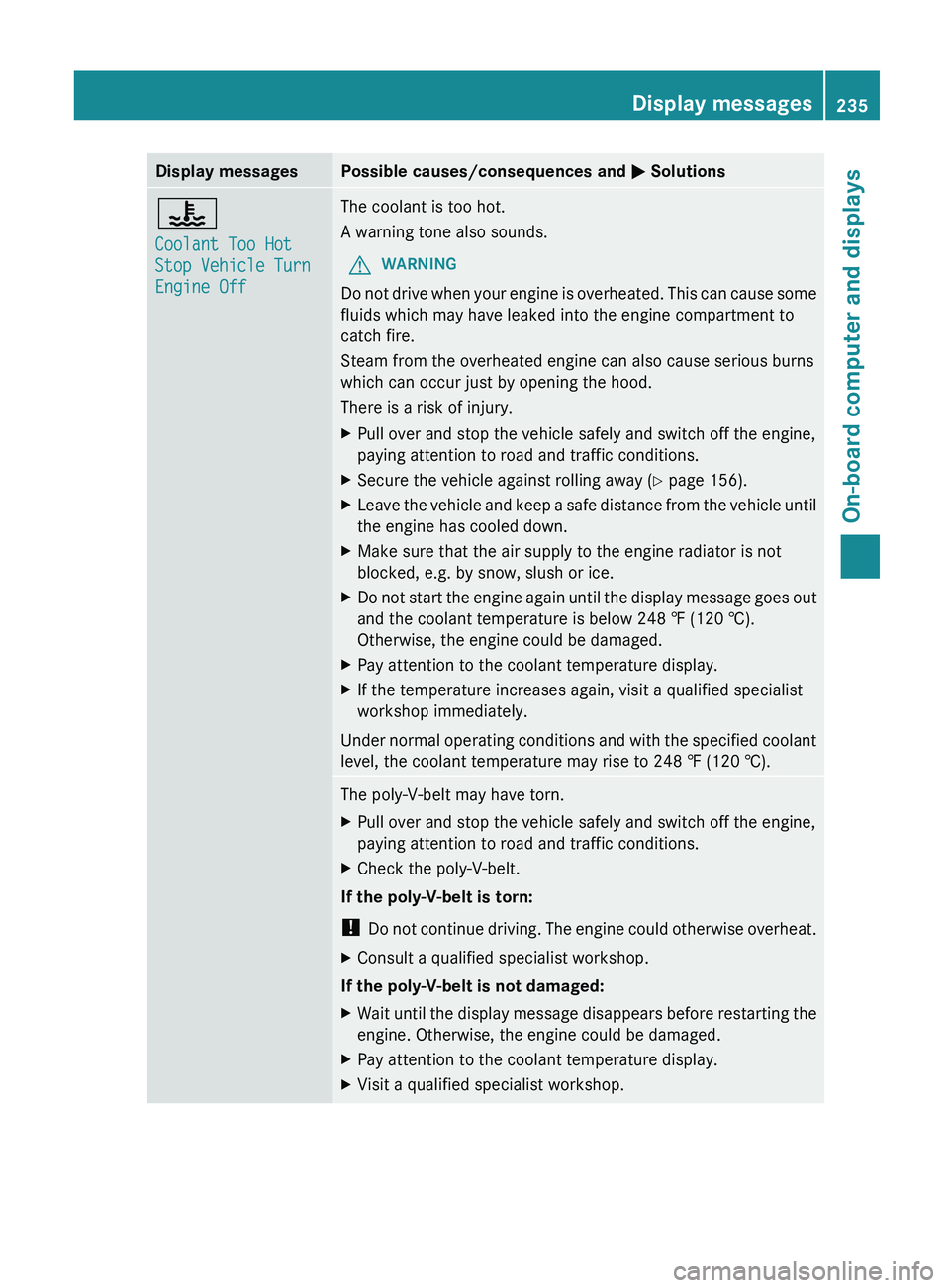
Display messages Possible causes/consequences and
0050 Solutions00AC
Coolant Too Hot
Stop Vehicle Turn
Engine Off The coolant is too hot.
A warning tone also sounds.
G WARNING
Do not drive when your engine is overheated. This can cause some
fluids which may have leaked into the engine compartment to
catch fire.
Steam from the overheated engine can also cause serious burns
which can occur just by opening the hood.
There is a risk of injury.
X Pull over and stop the vehicle safely and switch off the engine,
paying attention to road and traffic conditions.
X Secure the vehicle against rolling away ( Y page 156).
X Leave the vehicle and keep a safe distance from the vehicle until
the engine has cooled down.
X Make sure that the air supply to the engine radiator is not
blocked, e.g. by snow, slush or ice.
X Do not start the engine again until the display message goes out
and the coolant temperature is below 248 ‡ (120 †).
Otherwise, the engine could be damaged.
X Pay attention to the coolant temperature display.
X If the temperature increases again, visit a qualified specialist
workshop immediately.
Under normal
operating conditions and with the specified coolant
level, the coolant temperature may rise to 248 ‡ (120 †). The poly-V-belt may have torn.
X
Pull over and stop the vehicle safely and switch off the engine,
paying attention to road and traffic conditions.
X Check the poly-V-belt.
If the poly-V-belt is torn:
! Do not continue driving.
The engine could otherwise overheat.
X Consult a qualified specialist workshop.
If the poly-V-belt is not damaged:
X Wait until the display message disappears before restarting the
engine. Otherwise, the engine could be damaged.
X Pay attention to the coolant temperature display.
X Visit a qualified specialist workshop. Display messages
235
On-board computer and displays Z
Page 249 of 364
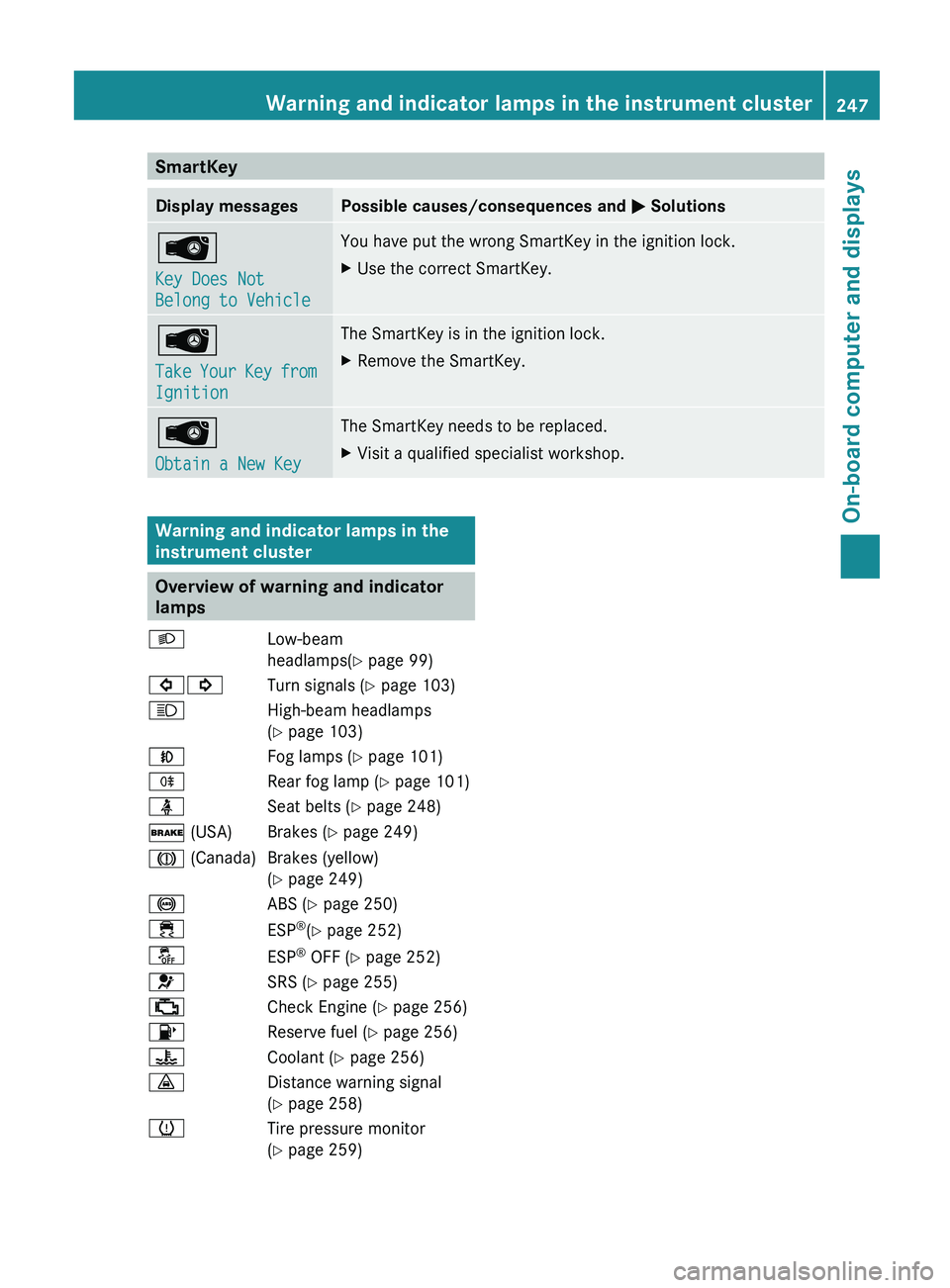
SmartKey
Display messages Possible causes/consequences and
0050 Solutions00AF
Key Does Not
Belong to Vehicle You have put the wrong SmartKey in the ignition lock.
X
Use the correct SmartKey. 00AF
Take Your Key
from
Ignition The SmartKey is in the ignition lock.
X
Remove the SmartKey. 00AF
Obtain a New Key The SmartKey needs to be replaced.
X
Visit a qualified specialist workshop. Warning and indicator lamps in the
instrument cluster
Overview of warning and indicator
lamps
0058 Low-beam
headlamps(Y page 99)
003E003D Turn signals (Y
page 103)
0057 High-beam headlamps
(
Y page 103)
005A Fog lamps (Y page 101)
005E Rear fog lamp (Y page 101)
00E9 Seat belts (Y page 248)
0027 (USA) Brakes (Y page 249)
004D (Canada) Brakes (yellow) (Y page 249)
0025 ABS (Y page 250)
00E5 ESP®
(Y page 252)
00BB ESP®
OFF (Y page 252)
0075 SRS (Y page 255)
00B9 Check Engine (Y page 256)
00B6 Reserve fuel (Y page 256)
00AC Coolant (Y page 256)
00BA Distance warning signal
(Y page 258)
0077 Tire pressure monitor
(Y page 259) Warning and indicator lamps in the instrument cluster
247
On-board computer and displays Z
Page 258 of 364
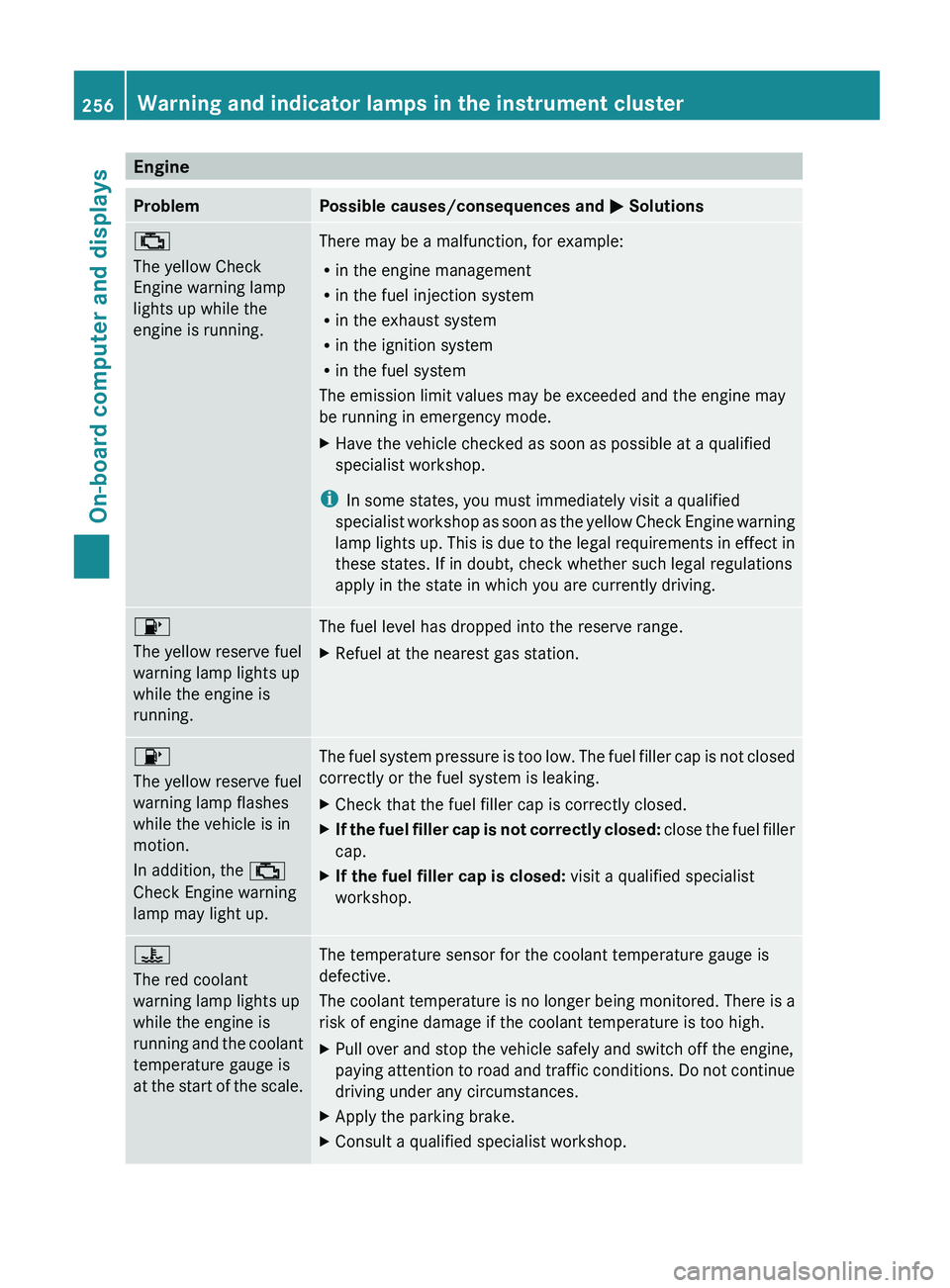
Engine
Problem Possible causes/consequences and
0050 Solutions00B9
The yellow Check
Engine warning lamp
lights up while the
engine is running.
There may be a malfunction, for example:
R
in the engine management
R in the fuel injection system
R in the exhaust system
R in the ignition system
R in the fuel system
The emission limit values may be exceeded and the engine may
be running in emergency mode.
X Have the vehicle checked as soon as possible at a qualified
specialist workshop.
i In some states, you must immediately visit a qualified
specialist workshop as soon
as the yellow Check Engine warning
lamp lights up. This is due to the legal requirements in effect in
these states. If in doubt, check whether such legal regulations
apply in the state in which you are currently driving. 00B6
The yellow reserve fuel
warning lamp lights up
while the engine is
running.
The fuel level has dropped into the reserve range.
X
Refuel at the nearest gas station. 00B6
The yellow reserve fuel
warning lamp flashes
while the vehicle is in
motion.
In addition, the 00B9
Check Engine warning
lamp may light up.
The fuel system pressure is too low. The fuel filler cap is not closed
correctly or the fuel system is leaking.
X
Check that the fuel filler cap is correctly closed.
X If the fuel filler cap is not correctly closed:
close the
fuel
filler
cap.
X If the fuel filler cap is closed: visit a qualified specialist
workshop. 00AC
The red coolant
warning lamp lights up
while the engine is
running
and the
coolant
temperature gauge is
at
the start of the scale. The temperature sensor for the coolant temperature gauge is
defective.
The coolant temperature
is
no longer being monitored. There is a
risk of engine damage if the coolant temperature is too high.
X Pull over and stop the vehicle safely and switch off the engine,
paying attention to road
and traffic conditions. Do not continue
driving under any circumstances.
X Apply the parking brake.
X Consult a qualified specialist workshop.256
Warning and indicator lamps in the instrument cluster
On-board computer and displays
Page 259 of 364
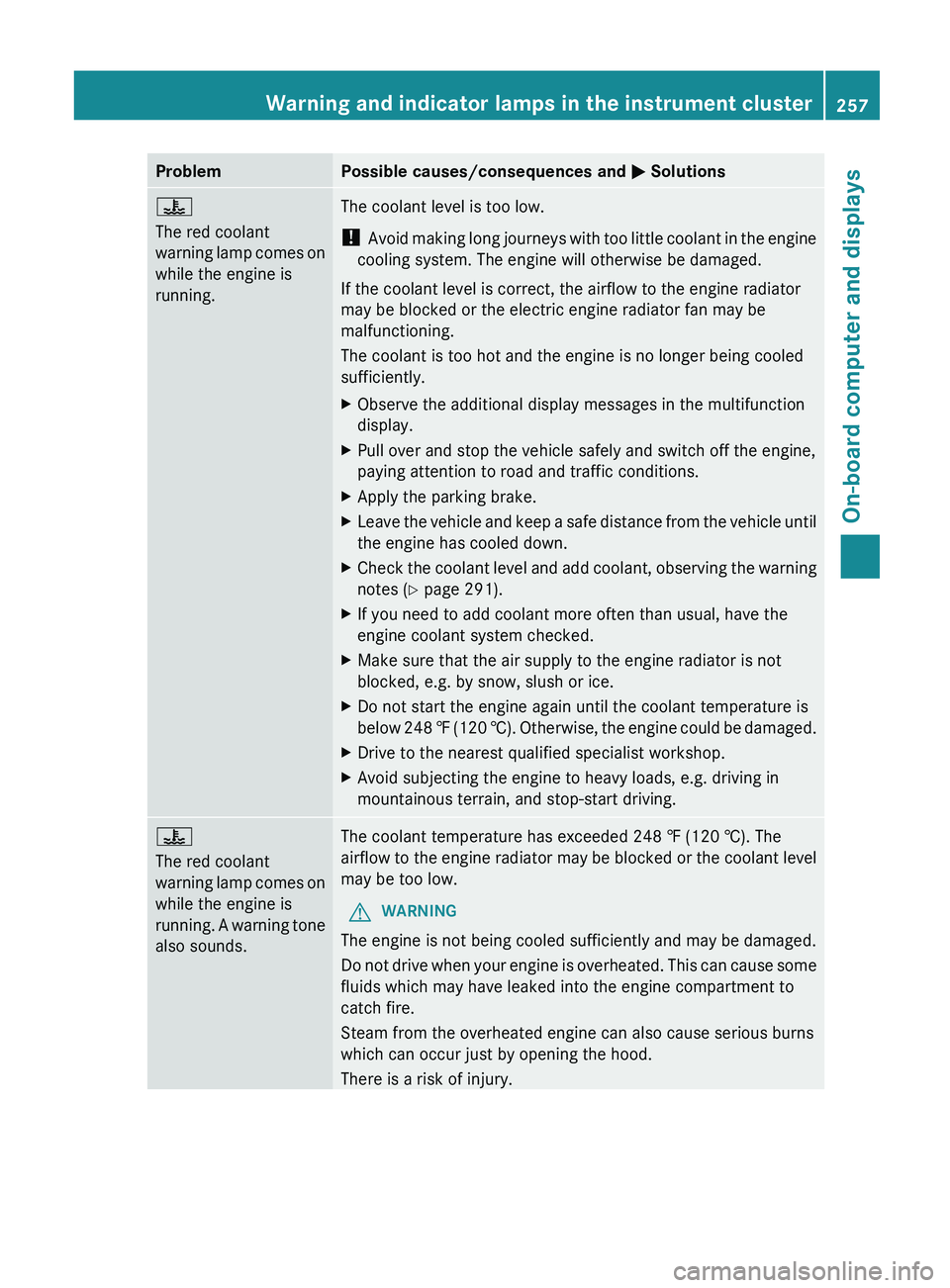
Problem Possible causes/consequences and
0050 Solutions00AC
The red coolant
warning lamp comes
on
while the engine is
running. The coolant level is too low.
!
Avoid making long
journeys
with too little coolant in the engine
cooling system. The engine will otherwise be damaged.
If the coolant level is correct, the airflow to the engine radiator
may be blocked or the electric engine radiator fan may be
malfunctioning.
The coolant is too hot and the engine is no longer being cooled
sufficiently.
X Observe the additional display messages in the multifunction
display.
X Pull over and stop the vehicle safely and switch off the engine,
paying attention to road and traffic conditions.
X Apply the parking brake.
X Leave the vehicle and keep a safe distance from the vehicle until
the engine has cooled down.
X Check the coolant level and add coolant, observing the warning
notes (Y page 291).
X If you need to add coolant more often than usual, have the
engine coolant system checked.
X Make sure that the air supply to the engine radiator is not
blocked, e.g. by snow, slush or ice.
X Do not start the engine again until the coolant temperature is
below 248 ‡ (120
†). Otherwise, the engine could be damaged.
X Drive to the nearest qualified specialist workshop.
X Avoid subjecting the engine to heavy loads, e.g. driving in
mountainous terrain, and stop-start driving. 00AC
The red coolant
warning lamp comes
on
while the engine is
running.
A warning tone
also sounds. The coolant temperature has exceeded 248 ‡ (120 †). The
airflow
to the
engine
radiator may be blocked or the coolant level
may be too low.
G WARNING
The engine is not being cooled sufficiently and may be damaged.
Do not drive when
your engine is overheated. This can cause some
fluids which may have leaked into the engine compartment to
catch fire.
Steam from the overheated engine can also cause serious burns
which can occur just by opening the hood.
There is a risk of injury. Warning and indicator lamps in the instrument cluster
257
On-board computer and displays Z
Page 260 of 364
Problem Possible causes/consequences and
0050 SolutionsX
Observe the additional display messages in the multifunction
display.
X Pull over and stop the vehicle safely and switch off the engine,
paying attention to road and traffic conditions.
X Secure the vehicle against rolling away ( Y page 156).
X Leave the vehicle and keep a safe distance from the vehicle until
the engine has cooled down.
X Check the coolant level and add coolant, observing the warning
notes (Y page 291).
X If you need to add coolant more often than usual, have the
engine coolant system checked.
X Make sure that the air supply to the engine radiator is not
blocked, e.g. by snow, slush or ice.
X At coolant temperatures below 248 ‡ (120 †),
drive to the next
qualified specialist workshop.
X Avoid subjecting the engine to heavy loads, e.g. driving in
mountainous terrain, and stop-start driving. Driving systems
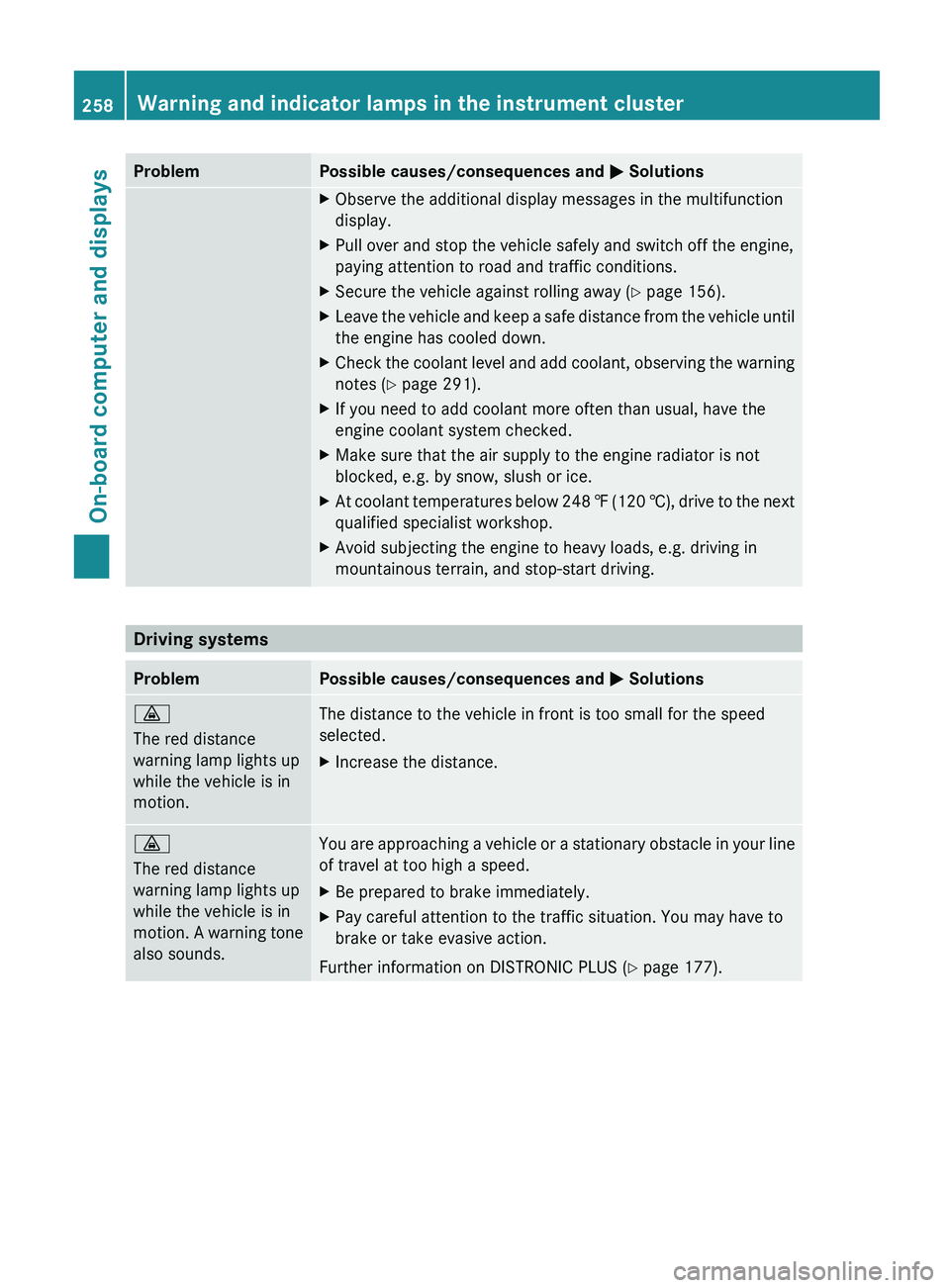
Problem Possible causes/consequences and
0050 Solutions00BA
The red distance
warning lamp lights up
while the vehicle is in
motion.
The distance to the vehicle in front is too small for the speed
selected.
X
Increase the distance. 00BA
The red distance
warning lamp lights up
while the vehicle is in
motion. A warning
tone
also sounds. You are approaching a vehicle or a stationary obstacle in your line
of travel at too high a speed.
X
Be prepared to brake immediately.
X Pay careful attention to the traffic situation. You may have to
brake or take evasive action.
Further information on DISTRONIC PLUS ( Y page 177).258
Warning and indicator lamps in the instrument clusterOn-board computer and displays
Page 290 of 364
Useful information
i This Operator's Manual describes all
models and all standard and optional
equipment of your vehicle available at the
time of publication of the Operator's
Manual. Country-specific differences are
possible. Please note that
your vehicle may
not be equipped with all features
described. This also applies to safety-
related systems and functions.
i Read the information on qualified
specialist workshops: ( Y page 23).Engine compartment
Hood
Important safety notes G
WARNING
Do not pull the release lever while the vehicle
is in motion. Otherwise, the hood could be
forced open by passing air flow.
This could cause the
hood to come loose and
injure you and/or others. G
WARNING
Do not open the hood when the engine is
overheated. You could be seriously injured.
Observe the coolant temperature gauge to
determine whether the engine may be
overheated. If you see flames or smoke
coming from the engine compartment, move
away from the vehicle. Wait until the engine
has cooled. If necessary, call the fire
department. G
WARNING
You could be injured when the hood is open –
even when the engine is turned off.
Parts of the engine can become very hot. To
prevent burns, let
the
engine cool completely
before touching any components on the
vehicle. Comply with all relevant safety
precautions. G
WARNING
To avoid injury, stay clear of moving parts
when the hood is open and the engine is
running.
The radiator fan may continue to run for
approximately 30seconds or may even
restart
after the engine has been switched off. For
this reason, you must not reach into the fan
rotation area. G
WARNING
The engine is equipped with a transistorized
ignition system. Because of the high voltage,
it is dangerous to touch any components
(ignition coils, spark plug sockets, diagnostic
socket) of the ignition system:
R with the engine running
R while starting the engine
R when the ignition is switched on and the
engine is turned manually G
WARNING
The windshield wipers and wiper linkage
could be set in motion.
When the hood is open, you or others could
be injured by the wiper linkage.
Make sure that the windshield wipers are
switched off and that
the SmartKey has been
pulled out of the ignition lock before opening
the hood.
! Make sure that the windshield wipers are
not folded away from the windshield. You
could otherwise damage the windshield
wipers or the hood. 288
Engine compartment
Maintenance and care
Page 293 of 364
Adding engine oil
H
Environmental note
When adding oil, take care not to spill any. If
oil enters the soil or waterways, it is harmful
to the environment.
! Only use engine oils and oil filters that
have been approved for vehicles with a
service system. You can
obtain a list of the
engine oils and oil filters tested and
approved in accordance with the
Mercedes-Benz Specifications for Service
Products at any Mercedes-Benz Service
center.
Damage to the engine or exhaust system is
caused by the following:
R using engine oils and oil filters that have
not been specifically approved for the
service system
R replacing engine oil and oil filters after
the interval for replacement specified by
the service system has been exceeded
R using engine oil additives.
! Do not add too much oil. If the oil level is
above the "max" mark on the dipstick, too
much oil has been added. This can lead to
damage to the engine or the catalytic
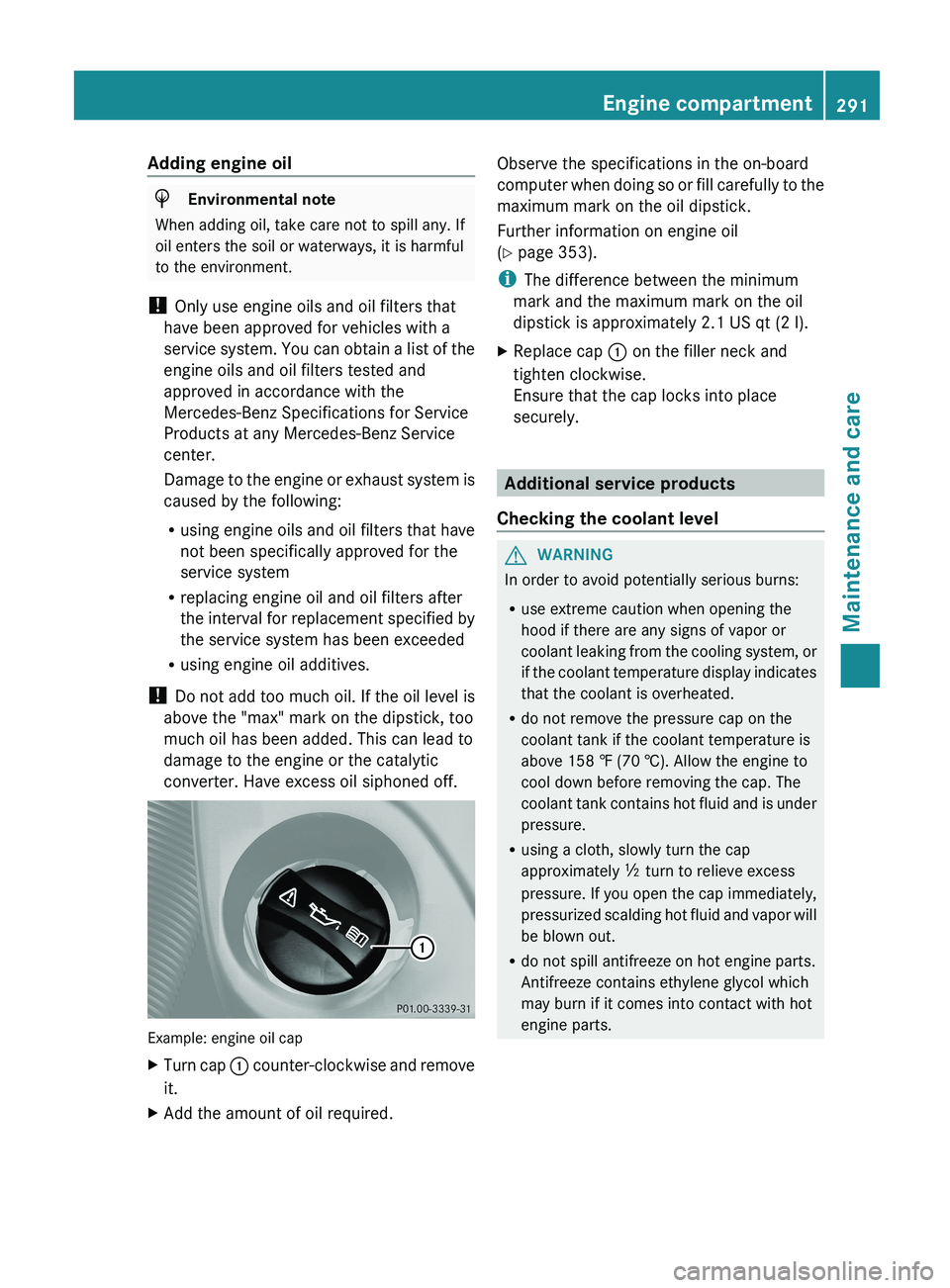
converter. Have excess oil siphoned off. Example: engine oil cap
X
Turn cap 0043 counter-clockwise and remove
it.
X Add the amount of oil required. Observe the specifications in the on-board
computer
when doing
so
or fill carefully to the
maximum mark on the oil dipstick.
Further information on engine oil
(Y page 353).
i The difference between the minimum
mark and the maximum mark on the oil
dipstick is approximately 2.1 US qt (2 l).
X Replace cap 0043 on the filler neck and
tighten clockwise.
Ensure that the cap locks into place
securely. Additional service products
Checking the coolant level G
WARNING
In order to avoid potentially serious burns:
R use extreme caution when opening the
hood if there are any signs of vapor or
coolant leaking from the
cooling system, or
if the coolant temperature display indicates
that the coolant is overheated.
R do not remove the pressure cap on the
coolant tank if the coolant temperature is
above 158 ‡ (70 †). Allow the engine to
cool down before removing the cap. The
coolant tank contains hot fluid and is under
pressure.
R using a cloth, slowly turn the cap
approximately 00C5 turn to relieve excess
pressure. If you open the cap immediately,
pressurized scalding hot fluid and vapor will
be blown out.
R do not spill antifreeze on hot engine parts.
Antifreeze contains ethylene glycol which
may burn if it comes into contact with hot
engine parts. Engine compartment
291
Maintenance and care Z